Security Best Practices
For Regular Users
Geoffrey Vaughan
@mrvaughan
Security Engineer
Whoami
• Geoffrey Vaughan @MrVaughan
• Security Engineer @SecurityInnovation
• Appsec pentesting/advisory at all areas of SDLC
• Former High School/Prison/University Teacher
• Occasionally I’m let out of my basement
• Travelled from Toronto to be here with you today
Why This Talk?
• I care about you and your data
• I’m tired of regular users suffering for mistakes made by large
organizations (data breaches) or being caught by the simplest
of phishing scam
• Often small adjustments in user behavior has a large impact on
security / privacy
Tldr; If you only read one slide
Giving it all away at the beginning:
1) Use a password manager
2) Keep your devices up to date
3) Use 2-Factor Authentication on all your accounts
4) Free Wi-Fi Comes at a cost – Don’t connect to untrusted networks
5) Lock and encrypt your devices (phones + computers)
For more info I wrote a Guide:
https://web.securityinnovation.com/essential-guide-to-online-security
Beyond the Basics: How Paranoid
Should I be?
• Protecting your data and privacy online can take a lot of effort
• Complete anonymity is really hard
• It will always be a trade off between usability and
security/privacy
How Paranoid should I be?
It greatly depends on your personal threat model
Threat Model?
Simplified Definition:
Identify and quantify your weaknesses so you can come up with
appropriate defenses.
Threat Modelling on Easy Mode
• What assets are you trying to protect?
• What threats are the assets under?
• What is the likelihood of a threat being realized?
• What measures can help mitigate or decrease the risk
associated with the threat?
Assets to Protect
• Personal Information - Name, Age, DOB, Spouse, Children, Parents
• Personal Pictures, videos, documents
• Financial Information - Banking, loan, credit
• Your Location - Home address, places you frequent, or where you are right
now
• Social Media accounts and data
• Physical Devices
• Business Assets on your devices
• Personal Communications/Conversations - Emails, Text Messages, Chat
etc, phone calls
• Data about Data – When you called someone, who you text messaged
Threats?
• Which of the assets are most important for you to protect?
• How might an attacker target each of those assets?
Personal Information
Threats
• Information obtained through
public searchable resources
(Google, phone/address look
up)
• Attacker reads information
leaked by peers (tagged
pictures, connections)
• Social Media post leaks info
Defenses
• Hack yourself – See what’s out
there
• Harden your social media
security/privacy settings
• Use fake names / complete alter
ego online
• Draw a very clear line between
your public and private life.
• Ask friends not to tag you
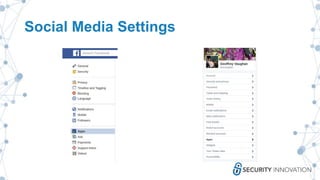
Social Media Settings
Personal Pictures, Videos, Documents
Threats
• Malware compromises
mobile/desktop device
• Cloud backup account is
compromised
• ‘Auto post’ feature publishes
content automatically
• Data shared with a friend gets
shared with others
Defenses
• Keep your devices up to date
• Use strong passwords on all
online accounts
• Use multi-factor
authentication wherever
possible
• Be aware of all
security/privacy settings for
the applications you are using
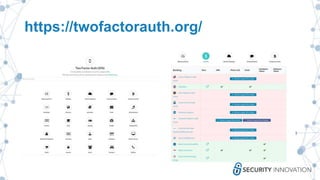
https://twofactorauth.org/
Financial Information
Threats
• Attacker compromises online banking
account (Guesses PVQ, Weak password,
Compromised email allows password
reset)
• Attacker acquires enough information to
perform credit/loan applications on your
behalf
• Website you used improperly stores your
information and your credit
card/information gets compromised
• You use a malicious POS device and your
credit card gets skimmed
• Paypal (or other) account is compromised
Defenses
• Lie on all PVQ questions
• Strong passwords (password
managers)
• Use multi-factor authentication
• Never give out SIN/SS/Personal
Code unless you are sure that
the request is legitimate
• Big retailers are probably safer
than mom/pop shops as they
likely spend much more on
security*
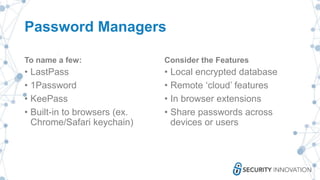
Password Managers
To name a few:
• LastPass
• 1Password
• KeePass
• Built-in to browsers (ex.
Chrome/Safari keychain)
Consider the Features
• Local encrypted database
• Remote ‘cloud’ features
• In browser extensions
• Share passwords across
devices or users
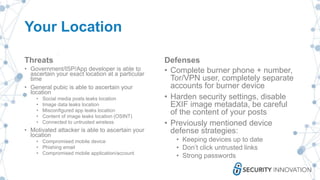
Your Location
Threats
• Government/ISP/App developer is able to
ascertain your exact location at a particular
time
• General pubic is able to ascertain your
location
• Social media posts leaks location
• Image data leaks location
• Misconfigured app leaks location
• Content of image leaks location (OSINT)
• Connected to untrusted wireless
• Motivated attacker is able to ascertain your
location
• Compromised mobile device
• Phishing email
• Compromised mobile application/account
Defenses
• Complete burner phone + number,
Tor/VPN user, completely separate
accounts for burner device
• Harden security settings, disable
EXIF image metadata, be careful
of the content of your posts
• Previously mentioned device
defense strategies:
• Keeping devices up to date
• Don’t click untrusted links
• Strong passwords
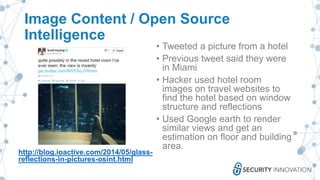
Image Content / Open Source
Intelligence
http://blog.ioactive.com/2014/05/glass-
reflections-in-pictures-osint.html
• Tweeted a picture from a hotel
• Previous tweet said they were
in Miami
• Hacker used hotel room
images on travel websites to
find the hotel based on window
structure and reflections
• Used Google earth to render
similar views and get an
estimation on floor and building
area.
Tinder API
http://blog.includesecurity.com/2014/02/ho
w-i-was-able-to-track-location-of-any.html
• In 2014 Tinder API allowed
trilateration of a users exact
location
• Used in conjunction with GPS
spoofing
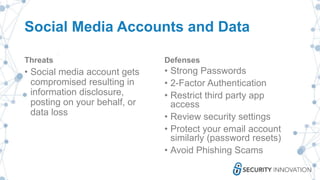
Social Media Accounts and Data
Threats
• Social media account gets
compromised resulting in
information disclosure,
posting on your behalf, or
data loss
Defenses
• Strong Passwords
• 2-Factor Authentication
• Restrict third party app
access
• Review security settings
• Protect your email account
similarly (password resets)
• Avoid Phishing Scams
Physical Devices
Threats
• Lost or stolen device results
in all data being
lost/compromised
• Your device is inspected at a
border crossing
• Your device is compromised
while being unattended
Defenses
• Strong device password
• Full disk encryption (usually enabled
by default on mobile devices when
you apply a password)
• Restrict what data you keep on your
device (if concerned)
• Consider implications of online vs.
local backups
• Use and test a “lost my device” app
• Enable remote wipe capabilities
(never a guarantee)
Business Assets
• All other threats/defenses apply except now the implications are
more severe
• Greater care needs to be taking with corporate assets
• Consider implications on personal assets if a BYOD policy
allows remote management/monitoring/removal of your data
• Recommend separating business and pleasure or revise your
threat model to consider additional threats
Personal
Communications/Conversations
Threats
• Attacker/ISP/App
Provider/Nation State intercepts
communication data in transit
and reads conversation
• Receiver forwards conversation
to third party
• App Provider is compromised
leaking all conversation logs
• Government requests app
provider to turn over data
Defenses
• Gold Star: Signal Messenger
(now with disappearing
messages)
• Decent: Wickr
• Getting Better: Facebook
Messenger, WhatsApp
• Avoid: SMS
• A couple companies that have
proven they have your back:
OpenWhisper (Signal), Apple,
Facebook
Data About Data
Threats
• You consider information
about who you are talking to
and when sensitive
information
• Attacker/ISP/App
Provider/Nation
State/Untrusted Wireless is
able to collecting metadata
about your
communication/activity
Defenses
• Anonymity is hard. At this level
even the best get caught
• Burner phones / accounts
• Full Tor/VPN would make it
difficult for organizations to
collect data
• Time delayed messages might
mask some traffic
• Create additional noise in
communications, talk to more
people more often
Resources
I wrote a paper:
https://web.securityinnovation.com/essential-guide-to-online-
security
Another talk today:
I’m also presenting one other talk today on a completely
unrelated subject:
Catching IMSI Catchers: Hunting the hunter, can you tell if your
phone’s being captured by a rogue cell phone tower/ IMSI
catcher/ Stingray?
Thank you
Geoffrey Vaughan
@mrvaughan
@SecurityInnovation

Security best practices for regular users

  • 1.
    Security Best Practices ForRegular Users Geoffrey Vaughan @mrvaughan Security Engineer
  • 2.
    Whoami • Geoffrey Vaughan@MrVaughan • Security Engineer @SecurityInnovation • Appsec pentesting/advisory at all areas of SDLC • Former High School/Prison/University Teacher • Occasionally I’m let out of my basement • Travelled from Toronto to be here with you today
  • 3.
    Why This Talk? •I care about you and your data • I’m tired of regular users suffering for mistakes made by large organizations (data breaches) or being caught by the simplest of phishing scam • Often small adjustments in user behavior has a large impact on security / privacy
  • 4.
    Tldr; If youonly read one slide Giving it all away at the beginning: 1) Use a password manager 2) Keep your devices up to date 3) Use 2-Factor Authentication on all your accounts 4) Free Wi-Fi Comes at a cost – Don’t connect to untrusted networks 5) Lock and encrypt your devices (phones + computers) For more info I wrote a Guide: https://web.securityinnovation.com/essential-guide-to-online-security
  • 5.
    Beyond the Basics:How Paranoid Should I be? • Protecting your data and privacy online can take a lot of effort • Complete anonymity is really hard • It will always be a trade off between usability and security/privacy How Paranoid should I be? It greatly depends on your personal threat model
  • 6.
    Threat Model? Simplified Definition: Identifyand quantify your weaknesses so you can come up with appropriate defenses.
  • 7.
    Threat Modelling onEasy Mode • What assets are you trying to protect? • What threats are the assets under? • What is the likelihood of a threat being realized? • What measures can help mitigate or decrease the risk associated with the threat?
  • 8.
    Assets to Protect •Personal Information - Name, Age, DOB, Spouse, Children, Parents • Personal Pictures, videos, documents • Financial Information - Banking, loan, credit • Your Location - Home address, places you frequent, or where you are right now • Social Media accounts and data • Physical Devices • Business Assets on your devices • Personal Communications/Conversations - Emails, Text Messages, Chat etc, phone calls • Data about Data – When you called someone, who you text messaged
  • 9.
    Threats? • Which ofthe assets are most important for you to protect? • How might an attacker target each of those assets?
  • 10.
    Personal Information Threats • Informationobtained through public searchable resources (Google, phone/address look up) • Attacker reads information leaked by peers (tagged pictures, connections) • Social Media post leaks info Defenses • Hack yourself – See what’s out there • Harden your social media security/privacy settings • Use fake names / complete alter ego online • Draw a very clear line between your public and private life. • Ask friends not to tag you
  • 11.
  • 12.
    Personal Pictures, Videos,Documents Threats • Malware compromises mobile/desktop device • Cloud backup account is compromised • ‘Auto post’ feature publishes content automatically • Data shared with a friend gets shared with others Defenses • Keep your devices up to date • Use strong passwords on all online accounts • Use multi-factor authentication wherever possible • Be aware of all security/privacy settings for the applications you are using
  • 13.
  • 14.
    Financial Information Threats • Attackercompromises online banking account (Guesses PVQ, Weak password, Compromised email allows password reset) • Attacker acquires enough information to perform credit/loan applications on your behalf • Website you used improperly stores your information and your credit card/information gets compromised • You use a malicious POS device and your credit card gets skimmed • Paypal (or other) account is compromised Defenses • Lie on all PVQ questions • Strong passwords (password managers) • Use multi-factor authentication • Never give out SIN/SS/Personal Code unless you are sure that the request is legitimate • Big retailers are probably safer than mom/pop shops as they likely spend much more on security*
  • 15.
    Password Managers To namea few: • LastPass • 1Password • KeePass • Built-in to browsers (ex. Chrome/Safari keychain) Consider the Features • Local encrypted database • Remote ‘cloud’ features • In browser extensions • Share passwords across devices or users
  • 16.
    Your Location Threats • Government/ISP/Appdeveloper is able to ascertain your exact location at a particular time • General pubic is able to ascertain your location • Social media posts leaks location • Image data leaks location • Misconfigured app leaks location • Content of image leaks location (OSINT) • Connected to untrusted wireless • Motivated attacker is able to ascertain your location • Compromised mobile device • Phishing email • Compromised mobile application/account Defenses • Complete burner phone + number, Tor/VPN user, completely separate accounts for burner device • Harden security settings, disable EXIF image metadata, be careful of the content of your posts • Previously mentioned device defense strategies: • Keeping devices up to date • Don’t click untrusted links • Strong passwords
  • 17.
    Image Content /Open Source Intelligence http://blog.ioactive.com/2014/05/glass- reflections-in-pictures-osint.html • Tweeted a picture from a hotel • Previous tweet said they were in Miami • Hacker used hotel room images on travel websites to find the hotel based on window structure and reflections • Used Google earth to render similar views and get an estimation on floor and building area.
  • 18.
    Tinder API http://blog.includesecurity.com/2014/02/ho w-i-was-able-to-track-location-of-any.html • In2014 Tinder API allowed trilateration of a users exact location • Used in conjunction with GPS spoofing
  • 19.
    Social Media Accountsand Data Threats • Social media account gets compromised resulting in information disclosure, posting on your behalf, or data loss Defenses • Strong Passwords • 2-Factor Authentication • Restrict third party app access • Review security settings • Protect your email account similarly (password resets) • Avoid Phishing Scams
  • 20.
    Physical Devices Threats • Lostor stolen device results in all data being lost/compromised • Your device is inspected at a border crossing • Your device is compromised while being unattended Defenses • Strong device password • Full disk encryption (usually enabled by default on mobile devices when you apply a password) • Restrict what data you keep on your device (if concerned) • Consider implications of online vs. local backups • Use and test a “lost my device” app • Enable remote wipe capabilities (never a guarantee)
  • 21.
    Business Assets • Allother threats/defenses apply except now the implications are more severe • Greater care needs to be taking with corporate assets • Consider implications on personal assets if a BYOD policy allows remote management/monitoring/removal of your data • Recommend separating business and pleasure or revise your threat model to consider additional threats
  • 22.
    Personal Communications/Conversations Threats • Attacker/ISP/App Provider/Nation Stateintercepts communication data in transit and reads conversation • Receiver forwards conversation to third party • App Provider is compromised leaking all conversation logs • Government requests app provider to turn over data Defenses • Gold Star: Signal Messenger (now with disappearing messages) • Decent: Wickr • Getting Better: Facebook Messenger, WhatsApp • Avoid: SMS • A couple companies that have proven they have your back: OpenWhisper (Signal), Apple, Facebook
  • 23.
    Data About Data Threats •You consider information about who you are talking to and when sensitive information • Attacker/ISP/App Provider/Nation State/Untrusted Wireless is able to collecting metadata about your communication/activity Defenses • Anonymity is hard. At this level even the best get caught • Burner phones / accounts • Full Tor/VPN would make it difficult for organizations to collect data • Time delayed messages might mask some traffic • Create additional noise in communications, talk to more people more often
  • 24.
    Resources I wrote apaper: https://web.securityinnovation.com/essential-guide-to-online- security
  • 25.
    Another talk today: I’malso presenting one other talk today on a completely unrelated subject: Catching IMSI Catchers: Hunting the hunter, can you tell if your phone’s being captured by a rogue cell phone tower/ IMSI catcher/ Stingray?
  • 26.

Editor's Notes

  • #3 This is my third presentation today, anyone make all 3?
  • #4 First time giving this talk, Why talk about the really wild and ‘sophisticated’ hacks when most people are barely doing the basics correctly
  • #5 5) Don’t wait for a crypto locker to do it for you This is by no means a complete list, there are definitely way more threats to consider than we can talk about today
  • #7 Twitter Troll Definition: Ryan Gooler ‏@jippen Oct 20 @mrvaughan a plan for how to lose the company, used to help keep it running Threat models can be long painful processes by companies to plan for every possible outcome… They don’t have to be complex
  • #8 Pause on next slide
  • #9 Participate for a few (put in slide prompt)
  • #10 It’s a question you have to ask yourself
  • #11 Police officers, teachers, other public officials
  • #12 Read through all settings, Recognize that they change from time to time
  • #14 Catalogs every site that supports/ doesn’t support 2FA Allows you to tweet your bank to ask them to implement 2FA DON”T TWEET AT YOUR BANK!
  • #15 Personas kods in Latvia *Payment processes, everybody gets hacked
  • #17 Broken up into 3 main threats If you think you need Tor… do your homework OSINT hotel room talk Tinder story
  • #23 Message Disappearing is not a guarantee If the company feels strongly enough on the political spectrum they can design a zero knowledge system whereby they cannot be compelled to give up any information, but if they are in the middle they may have decent security, but then you have to trust them to battle the government on your behalf,
  • #24 If an attacker can be highly motivated to exploit you a government can also be highly motivated to find you One thing we can learn from Mr. Robot