Securing Red Hat workloads on Azure
Leveraging the strength of cloud-native security
Securing Red Hat workloads on Azure February 2025
A Principled Technologies report: In-depth research. Real-world value.
Contents
Exploring the security strengths of Red Hat
on Azure 3
Security principles in Azure 4
Shared responsibility model 4
Defense in Depth 4
Zero Trust 5
Secure Future Initiative 5
Infrastructure security  6
Azure Boost 6
Azure Monitor 7
Retina 8
Azure Bastion 9
Azure Firewall and Azure Network Security Groups 10
Change management and policy enforcement  10
• Azure Policy (compliance and governance) 10
• Azure Arc (single-pane management) 10
Data security 11
Storage encryption 11
• Data at rest 11
• Data in transit 13
• Azure Backup and disaster recovery  14
• Confidential computing 14
Application security 17
Web Application Firewall (WAF) 17
Identity management with Microsoft Entra ID 17
• Managed identities in Entra ID 17
• Conditional Access  18
• Private Access 19
• Internet Access 19
• ID Governance 19
• ID Protection 20
• Verified ID 20
• External ID 21
• Permissions Management 21
• Microsoft Entra ID Protection/PIM 21
Confidential containers 22
Vulnerability management  22
• Microsoft Defender for Cloud 22
• Microsoft Defender for Endpoint on Linux 23
• Microsoft Defender for Storage 24
• Microsoft Sentinel (SIEM) 24
• Red Hat Insights 26
Code security  27
GitHub Advanced Security for Azure DevOps 27
Additional Red Hat platform security features 29
Red Hat ecosystem components 30
• Red Hat Enterprise Linux 30
• Red Hat Ansible Automation Platform  31
• Container image security with Red Hat OpenShift  32
Azure and Red Hat integration points
and compatibility  33
Security feature interoperability 33
• Hardware and virtualization security compatibility  33
• Identity Management 33
• Threat detection and monitoring  34
• Change management or single-pane management  34
• Compliance and policy tools 34
How customers win from the Microsoft and Red Hat
partnership 35
• Support integration of Red Hat on Microsoft Azure 35
• Benefits of Azure Marketplace for Red Hat images 35
• Partner architecture guidance 35
Conclusion 36
Securing Red Hat workloads on Azure February 2025 | 2
Exploring the security strengths of Red Hat on Azure
From mom-and-pop shops to the world’s largest
multinational corporations, many organizations rely
on the cloud for some or all elements of their daily
operations. Microsoft Azure cloud services is a leader,
with 95 percent of Fortune 500 businesses using the
platform.1
As one of the world’s largest cloud service
providers (CSPs), Microsoft Azure provides a range of
services and integrations that can help organizations
sustain and grow operations and workloads.
The Azure portfolio includes solutions that integrate
Microsoft technologies with technologies from other
partners to meet varying customer goals. Red Hat
is a key Microsoft partner, providing essential open-
source solutions with an estimated 17.28 percent share
of IT services.2
Microsoft and Red Hat have a long
history of collaboration to help customers achieve
their objectives. The Red Hat on Azure portfolio
includes Red Hat®
Enterprise Linux®
(RHEL), Red Hat
OpenShift®
, JBoss, and Red Hat Ansible®
Automation
Platform. According to a 2024 IDC paper, customers
choose RHEL to simplify and centralize their Linux
workloads, have 24/7 customer support, and meet
security goals.3
Alongside their business goals, security is on
customers’ minds when selecting cloud technologies.
IT teams must feel confident that the CSP they’ve
chosen—plus any partners or services they’re using—
will keep their cloud-stored data confidential and out
of the hands of bad actors. Every organization has
some confidential data to protect: human resources
files, financial information, or confidential customer
data. But for some organizations, such as healthcare
providers or financial services groups, data security
is of the utmost importance, as a data breach could
break compliance with legal regulations. With the
global average cost of a data breach reaching
US$4.88M in 2024, security is a top-of-mind concern.4
To explore how Azure and Red Hat address security
in Red Hat on Azure deployments, we used publicly
available materials and interviews with Microsoft and
Red Hat subject matter experts. Our goal was to
research the security features that each platform offers
and how they intersect to provide enhanced protection
for Red Hat on Azure customers. We found several
areas where the two platforms work together to offer a
great deal of value, and we provide an overview of key
security features and benefits available to customers
in the Azure and Red Hat ecosystems. We hope this
report will help you understand the many ways Azure
and Red Hat unite to secure your data, users, and
cloud systems.
Securing Red Hat workloads on Azure February 2025 | 3
Security principles in Azure
Shared responsibility model
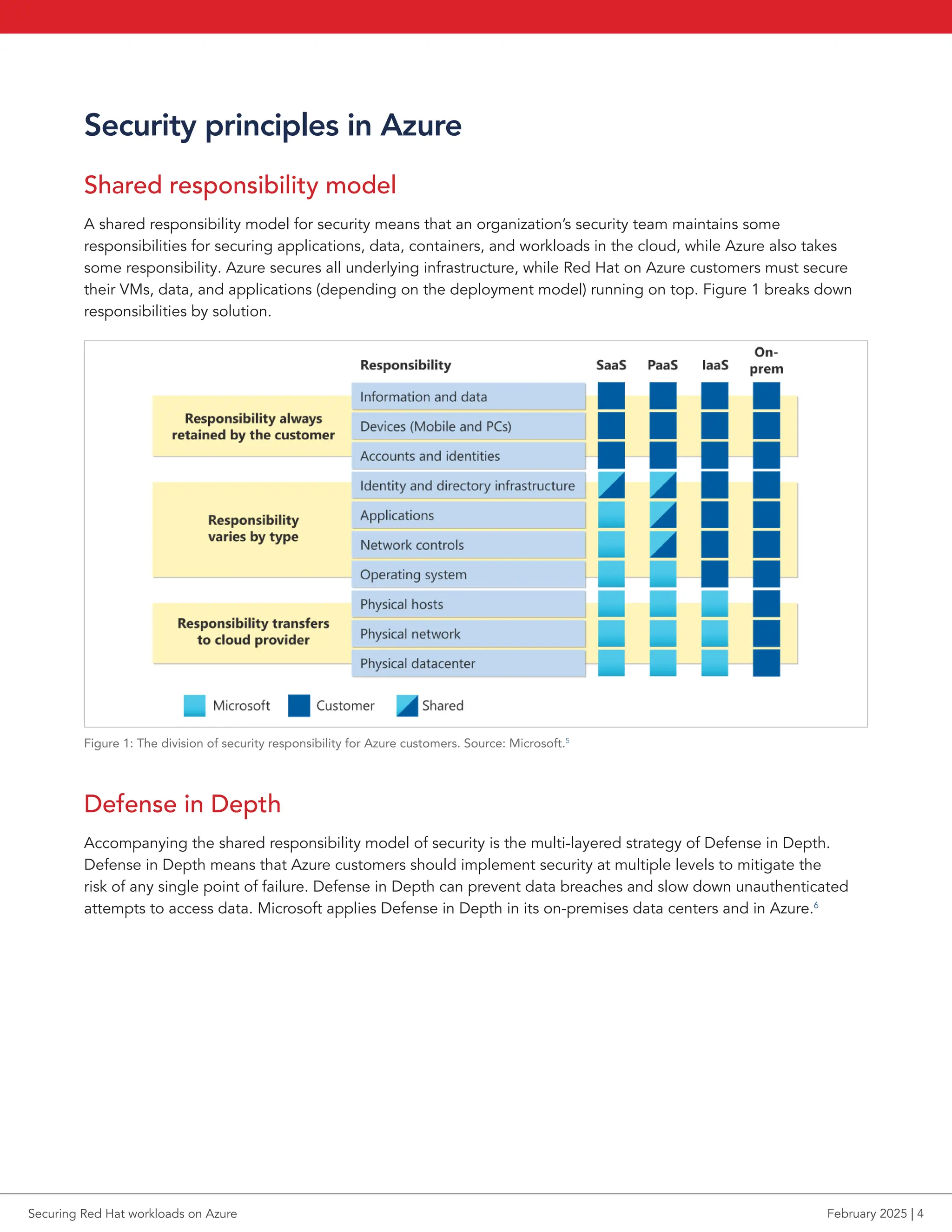
A shared responsibility model for security means that an organization’s security team maintains some
responsibilities for securing applications, data, containers, and workloads in the cloud, while Azure also takes
some responsibility. Azure secures all underlying infrastructure, while Red Hat on Azure customers must secure
their VMs, data, and applications (depending on the deployment model) running on top. Figure 1 breaks down
responsibilities by solution.
Figure 1: The division of security responsibility for Azure customers. Source: Microsoft.5
Defense in Depth
Accompanying the shared responsibility model of security is the multi-layered strategy of Defense in Depth.
Defense in Depth means that Azure customers should implement security at multiple levels to mitigate the
risk of any single point of failure. Defense in Depth can prevent data breaches and slow down unauthenticated
attempts to access data. Microsoft applies Defense in Depth in its on-premises data centers and in Azure.6
Securing Red Hat workloads on Azure February 2025 | 4
Zero Trust
The Zero Trust security model always assumes breach and thus requires systems and users to verify every request
as though it originated from an uncontrolled network. A simpler version of the principle is “never trust, always
verify,” which emphasizes the need for continuous validation of users and systems, regardless of location.
Microsoft considers these three principles the basis for Zero Trust security:7
• Verify explicitly: Always authenticate and authorize based on all available data points
• Use least privilege access: Limit user access with Just-In-Time and Just-Enough-Access (JIT/JEA), risk-
based adaptive policies, and data protection
• Assume breach: Minimize blast radius and segment access; verify end-to-end encryption; and use analytics
to get visibility, drive threat detection, and improve defenses
Secure Future Initiative
The Microsoft Secure Future Initiative (SFI) is a multi-year commitment that advances the way Microsoft designs,
builds, tests, and operates technology to ensure that solutions meet the highest possible standards for security.
According to Microsoft, the company “launched SFI to prepare for the increasing scale and high stakes of
cyberattacks.”8
SFI brings together every part of Microsoft to advance cybersecurity protection across the
company and its products.9
The initiative focuses on the security of Azure infrastructure and services and works
with the community around increasing the industry’s security posture. The core of Azure’s platform offers many
security features that Microsoft continually enhances for customer and some Microsoft environments to make
sure they’re secure.10
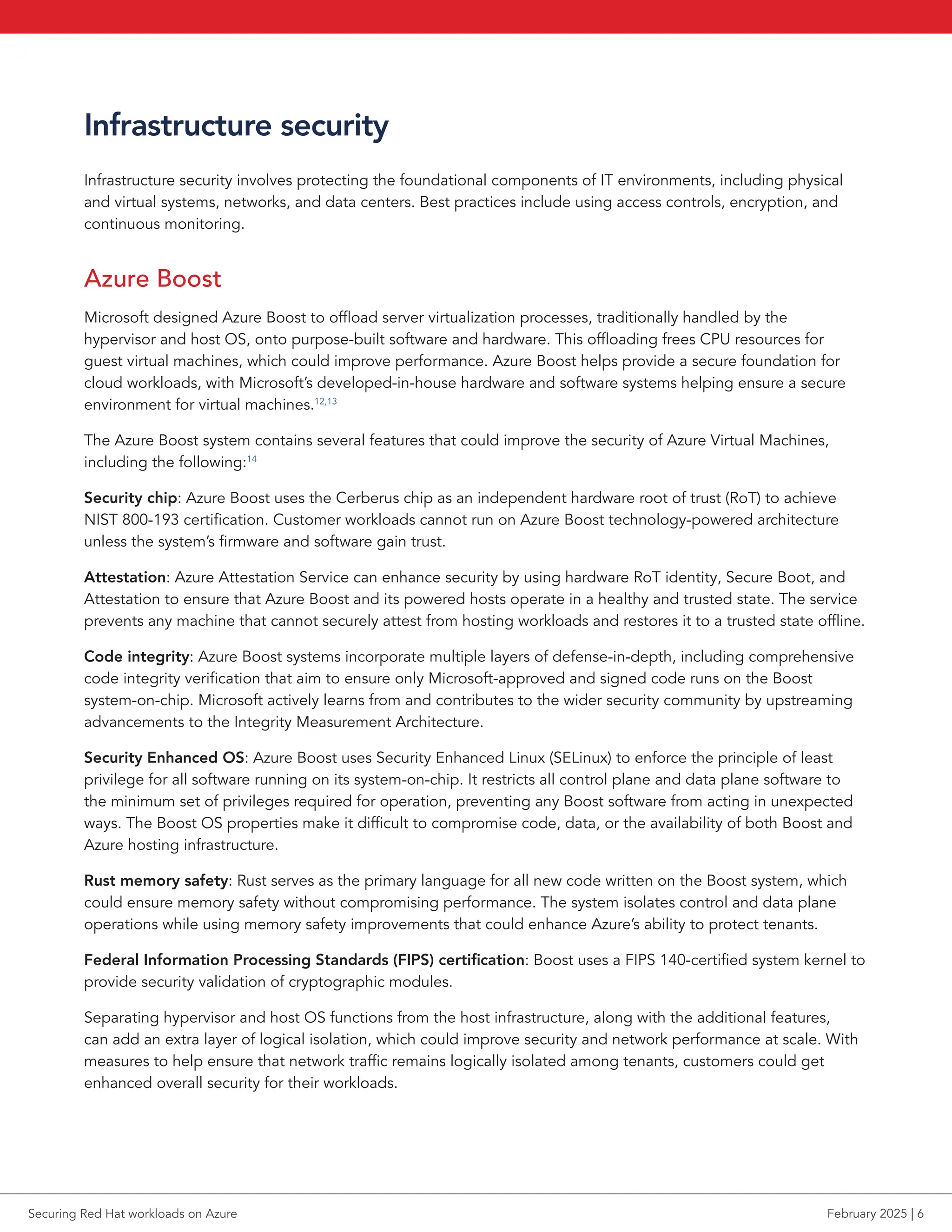
Figure 2 outlines the security culture and governance ideals of SFI.
Figure 2: SFI overview. Source: Microsoft.11
Securing Red Hat workloads on Azure February 2025 | 5
Infrastructure security
Infrastructure security involves protecting the foundational components of IT environments, including physical
and virtual systems, networks, and data centers. Best practices include using access controls, encryption, and
continuous monitoring.
Azure Boost
Microsoft designed Azure Boost to offload server virtualization processes, traditionally handled by the
hypervisor and host OS, onto purpose-built software and hardware. This offloading frees CPU resources for
guest virtual machines, which could improve performance. Azure Boost helps provide a secure foundation for
cloud workloads, with Microsoft’s developed-in-house hardware and software systems helping ensure a secure
environment for virtual machines.12,13
The Azure Boost system contains several features that could improve the security of Azure Virtual Machines,
including the following:14
Security chip: Azure Boost uses the Cerberus chip as an independent hardware root of trust (RoT) to achieve
NIST 800-193 certification. Customer workloads cannot run on Azure Boost technology-powered architecture
unless the system’s firmware and software gain trust.
Attestation: Azure Attestation Service can enhance security by using hardware RoT identity, Secure Boot, and
Attestation to ensure that Azure Boost and its powered hosts operate in a healthy and trusted state. The service
prevents any machine that cannot securely attest from hosting workloads and restores it to a trusted state offline.
Code integrity: Azure Boost systems incorporate multiple layers of defense-in-depth, including comprehensive
code integrity verification that aim to ensure only Microsoft-approved and signed code runs on the Boost
system-on-chip. Microsoft actively learns from and contributes to the wider security community by upstreaming
advancements to the Integrity Measurement Architecture.
Security Enhanced OS: Azure Boost uses Security Enhanced Linux (SELinux) to enforce the principle of least
privilege for all software running on its system-on-chip. It restricts all control plane and data plane software to
the minimum set of privileges required for operation, preventing any Boost software from acting in unexpected
ways. The Boost OS properties make it difficult to compromise code, data, or the availability of both Boost and
Azure hosting infrastructure.
Rust memory safety: Rust serves as the primary language for all new code written on the Boost system, which
could ensure memory safety without compromising performance. The system isolates control and data plane
operations while using memory safety improvements that could enhance Azure’s ability to protect tenants.
Federal Information Processing Standards (FIPS) certification: Boost uses a FIPS 140-certified system kernel to
provide security validation of cryptographic modules.
Separating hypervisor and host OS functions from the host infrastructure, along with the additional features,
can add an extra layer of logical isolation, which could improve security and network performance at scale. With
measures to help ensure that network traffic remains logically isolated among tenants, customers could get
enhanced overall security for their workloads.
Securing Red Hat workloads on Azure February 2025 | 6
Azure Monitor
Azure Monitor collects, analyzes, and responds to monitoring data from Azure and on-premises environments.
On a basic level, Azure Monitor helps users understand how applications are performing and enables manual
and programmatic responsiveness to system events.15
Azure Monitor Logs is half of the data platform that supports Azure Monitor. Azure Monitor Logs is a cloud-based
SaaS IT management solution built for collecting and analyzing telemetry data generated by Azure and non-
Azure resources and applications. The primary resources for Azure Monitor Logs are Log Analytics workspaces,
data stores that hold tables of collected data. Users can optimize log data reporting by customizing their Log
Analytics workspace and log tables, with options for permissions for data access and more.16
Azure Monitor Logs
can integrate with Defender for Cloud and other monitoring solutions.
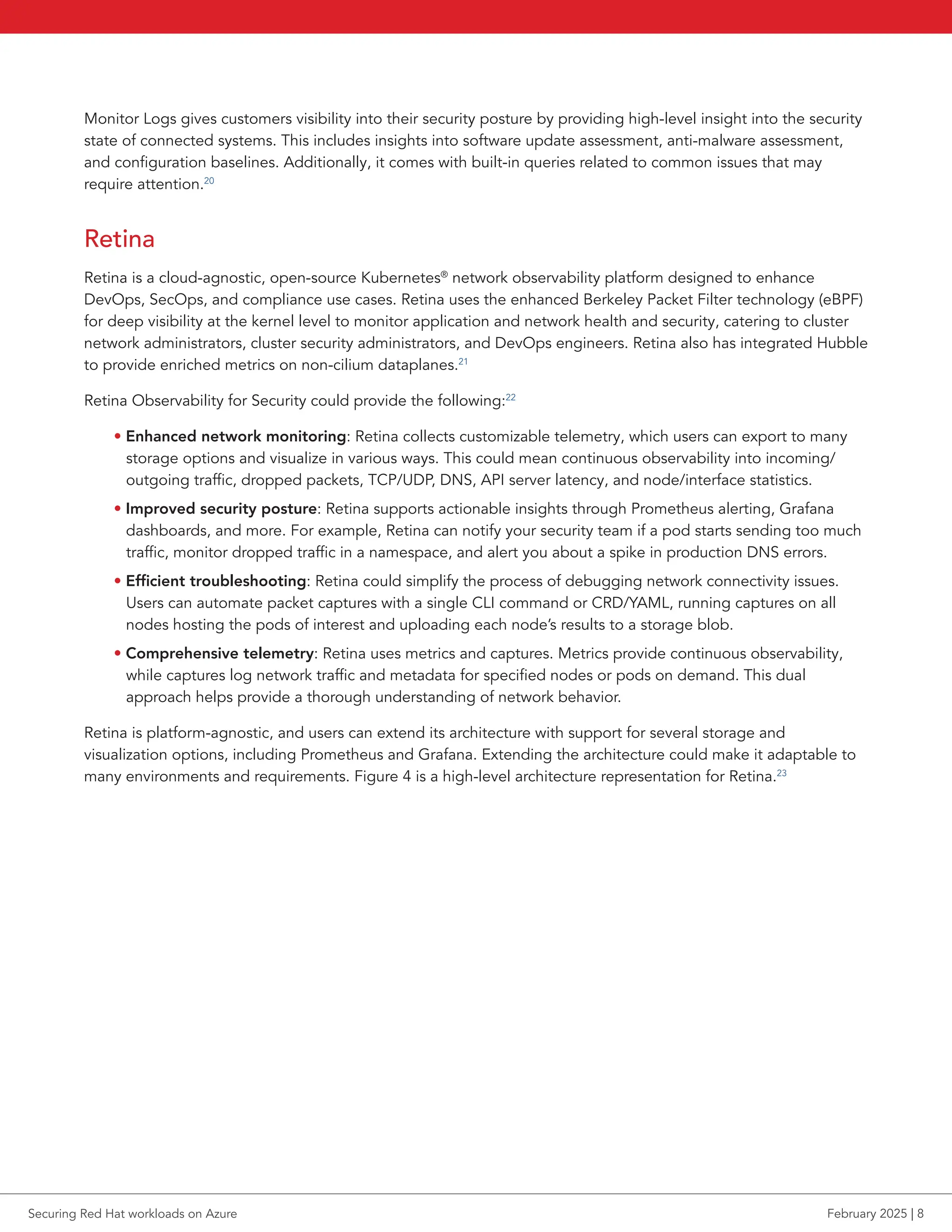
Azure Monitor Logs collects data in an Azure-hosted repository. As Figure 3 shows, data can come from a variety
of connected sources, such as applications and resources running on Azure, other CSPs, or on-premises systems.
Each data source creates separate record types with their own set of properties; however, Monitor Logs can still
sort and analyze data due to a robust ingestion pipeline capable of filtering, transforming, and routing data to
destination tables in Log Analytics workspaces.
Figure 3: An overview of the processes involved in Azure Monitor Logs. Source: Azure.17
Azure Monitor Logs can also receive log data from both Syslog and rsyslog. Used in Linux environments, Syslog
is a standard event logging protocol that collects and manages local system events. It either stores these events
locally or forwards them to a centralized log collector. In many Linux distributions, the rsyslog daemon extends
this functionality by handling the consumption, storage, and routing of log messages generated by the Syslog
API, making it a key tool for managing and forwarding log data to platforms like Azure Monitor.18
Additionally, Red Hat OpenShift Logging 5.9 introduces native support for forwarding logs to Azure Monitor
and Azure Log Analytics. This integration enables users to route log data from OpenShift environments to Azure,
providing a centralized solution for monitoring and analysis.19
Securing Red Hat workloads on Azure February 2025 | 7
Monitor Logs gives customers visibility into their security posture by providing high-level insight into the security
state of connected systems. This includes insights into software update assessment, anti-malware assessment,
and configuration baselines. Additionally, it comes with built-in queries related to common issues that may
require attention.20
Retina
Retina is a cloud-agnostic, open-source Kubernetes®
network observability platform designed to enhance
DevOps, SecOps, and compliance use cases. Retina uses the enhanced Berkeley Packet Filter technology (eBPF)
for deep visibility at the kernel level to monitor application and network health and security, catering to cluster
network administrators, cluster security administrators, and DevOps engineers. Retina also has integrated Hubble
to provide enriched metrics on non-cilium dataplanes.21
Retina Observability for Security could provide the following:22
• Enhanced network monitoring: Retina collects customizable telemetry, which users can export to many
storage options and visualize in various ways. This could mean continuous observability into incoming/
outgoing traffic, dropped packets, TCP/UDP, DNS, API server latency, and node/interface statistics.
• Improved security posture: Retina supports actionable insights through Prometheus alerting, Grafana
dashboards, and more. For example, Retina can notify your security team if a pod starts sending too much
traffic, monitor dropped traffic in a namespace, and alert you about a spike in production DNS errors.
• Efficient troubleshooting: Retina could simplify the process of debugging network connectivity issues.
Users can automate packet captures with a single CLI command or CRD/YAML, running captures on all
nodes hosting the pods of interest and uploading each node’s results to a storage blob.
• Comprehensive telemetry: Retina uses metrics and captures. Metrics provide continuous observability,
while captures log network traffic and metadata for specified nodes or pods on demand. This dual
approach helps provide a thorough understanding of network behavior.
Retina is platform-agnostic, and users can extend its architecture with support for several storage and
visualization options, including Prometheus and Grafana. Extending the architecture could make it adaptable to
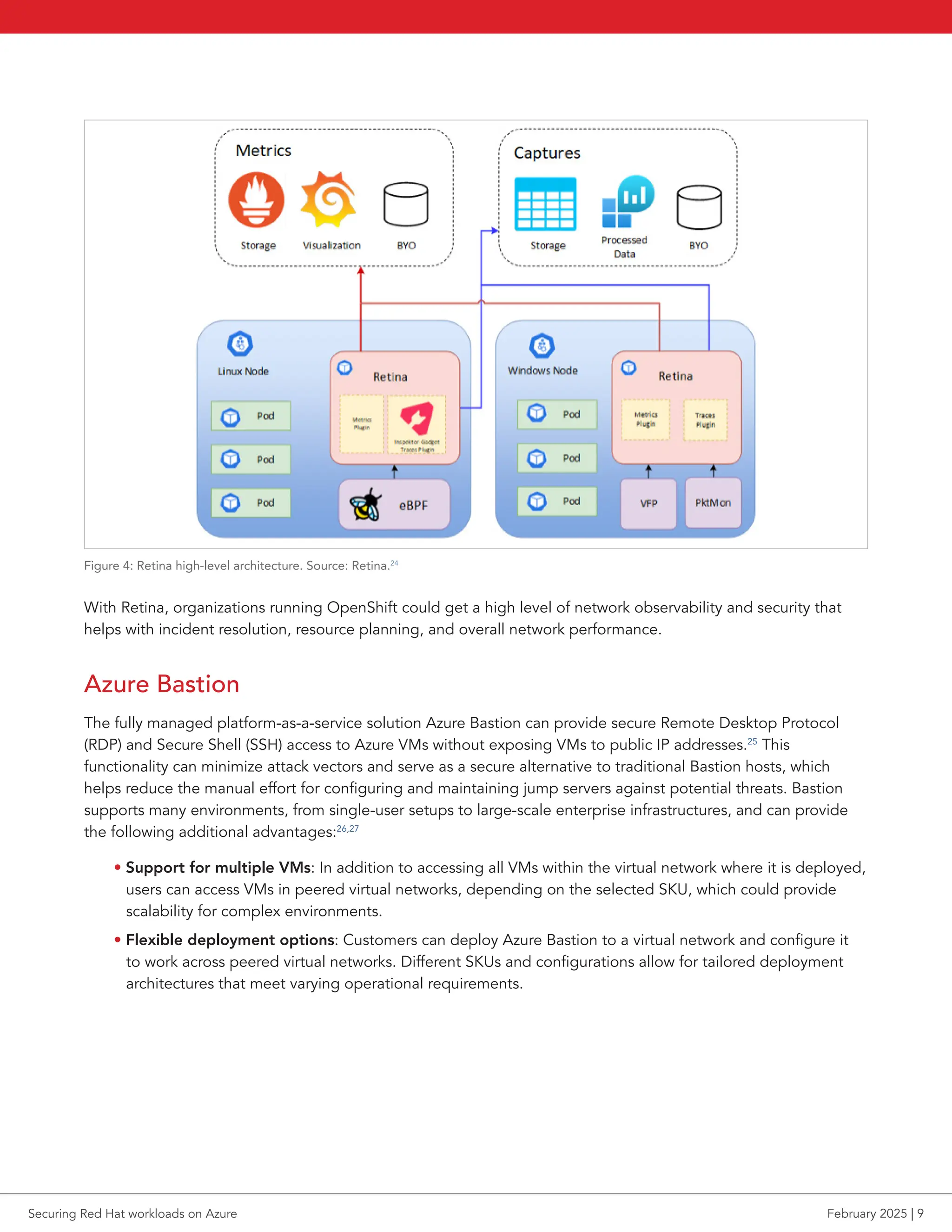
many environments and requirements. Figure 4 is a high-level architecture representation for Retina.23
Securing Red Hat workloads on Azure February 2025 | 8
Figure 4: Retina high-level architecture. Source: Retina.24
With Retina, organizations running OpenShift could get a high level of network observability and security that
helps with incident resolution, resource planning, and overall network performance.
Azure Bastion
The fully managed platform-as-a-service solution Azure Bastion can provide secure Remote Desktop Protocol
(RDP) and Secure Shell (SSH) access to Azure VMs without exposing VMs to public IP addresses.25
This
functionality can minimize attack vectors and serve as a secure alternative to traditional Bastion hosts, which
helps reduce the manual effort for configuring and maintaining jump servers against potential threats. Bastion
supports many environments, from single-user setups to large-scale enterprise infrastructures, and can provide
the following additional advantages:26,27
• Support for multiple VMs: In addition to accessing all VMs within the virtual network where it is deployed,
users can access VMs in peered virtual networks, depending on the selected SKU, which could provide
scalability for complex environments.
• Flexible deployment options: Customers can deploy Azure Bastion to a virtual network and configure it
to work across peered virtual networks. Different SKUs and configurations allow for tailored deployment
architectures that meet varying operational requirements.
Securing Red Hat workloads on Azure February 2025 | 9
Azure Firewall and Azure Network Security Groups
Azure Firewall and Azure Network Security Groups (NSGs) provide complementary tools for securing Azure
virtual networks by filtering and managing network traffic while offering threat protection.
The fully managed, cloud-native network security service Azure Firewall provides stateful traffic monitoring and
advanced threat protection across Azure environments, including Red Hat workloads on Azure. The service
offers threat intelligence filtering, which blocks traffic from known malicious IPs and domains and sends alerts via
real-time updates. Premium Firewall customers also get the Signature-Based Intrusion Detection and Prevention
System, which provides pattern-based attack detection with over 67,000 signatures across 50+ exploit
categories, including malware, phishing, and Trojans.28
NSGs filter network traffic at the subnet or VM network interface level within Azure virtual networks. They achieve
this through a set of security rules that allow or deny inbound and outbound traffic based on source, source port,
destination, destination port, and protocol. Customers can deploy NSGs to refine traffic for individual virtual
networks, subnets, or VMs, offering targeted access management for Azure resources.
Change management and policy enforcement
Azure Policy (compliance and governance)
Azure Policy is built to enforce organizational standards while ensuring compliance across large environments.
Through the compliance dashboard, it provides an aggregated view to evaluate the overall state of the
environment, with the capability to drill down into resource and policy details. It also facilitates bringing
resources into compliance by offering bulk remediation for existing resources and automatic remediation
for new ones.29
Azure Policy ensures that resource states remain aligned with business rules, regardless of who made the change
or has permissions to alter the resource. By using the DenyAction effect, Azure Policy can also prevent specific
actions on resources. Certain Azure Policy components, including policy definitions, initiative definitions, and
assignments, are accessible to all users. This structure promotes transparency across users and services, clearly
displaying the policy rules that govern the environment.30
Common use cases include governance for resource consistency, regulatory compliance, security, cost
management, and operational oversight. Built-in policy definitions are available to address these needs, allowing
quick implementation of governance rules, such as restricting resource deployment to specific regions, enforcing
consistent use of taxonomic tags, and ensuring diagnostic logs go to a Log Analytics workspace.31
Azure Arc (single-pane management)
Azure Arc extends policy-based governance beyond Azure itself, enabling coverage across other cloud providers
as well as on-premises data centers.32
Azure Arc provides a centralized platform for managing VMs, Kubernetes
clusters, and databases as if they are part of Azure, enabling consistent management, governance, and security
across environments. Additionally, Azure Policy supports Kubernetes clusters,33
ensuring compliance through
built-in and custom policies, while GitOps enables configuration deployment across multiple clusters.
Azure Arc also facilitates the management of non-Azure resources, enabling VM lifecycle management,
governance at scale for Kubernetes, and the ability to run Azure data services in any Kubernetes environment. It
offers a unified management experience, whether through the Azure portal, CLI, PowerShell, or REST API.
Securing Red Hat workloads on Azure February 2025 | 10
Data security
Data security focuses on protecting sensitive information from unauthorized access, corruption, or loss
throughout its lifecycle, including data in storage, transit, and processing environments.
Storage encryption
Azure uses many approaches to encrypt data at rest and data in transit. Data at rest encryption approaches
include server-side and Azure disk encryption. Data in transit encryption approaches include transport layer
security (TLS) encryption and more.
Data at rest
Client-side encryption
First, customers should consider if they require client-side encryption. For most scenarios, Microsoft recommends
using server-side encryption features for ease of use in protecting your data. Client-side encryption refers to data
encryption performed outside of Azure. For client-side encryption, customers manage keys, which helps prevent
CSPs from decrypting data. Although this approach relies on organizations to initiate and manage the process,
Azure supports client-side encryption for its customers.
For data hosted on Azure blobs, Azure customers can perform client-side encryption in a few different ways.
Customers can use the Azure Storage Client Library for .NET, Java, or Python to encrypt data prior to uploading
it to Azure storage, or they can bring their own encryption logic. Customers can then decrypt the data upon
retrieval with the same library, which can integrate with Azure Key Vault to simplify key management. Customers
can use client-side encryption with Azure Key Vault, which uses a one-time symmetric content encryption key
(CEK) that the Azure Storage client SDK generates. Azure encrypts the key itself using a key encryption key
(KEK), and customers can manage the keys either locally or with Key Vault.34
Azure server-side encryption (SSE)
Azure supports SSE with options for key management. There are service-managed keys, where Azure hosts the
keys but users retain some control, making it a potentially convenient option with low overhead. Customer-
managed keys give users more control and enables them to generate new keys and bring their own keys. Lastly,
Azure provides a “service-managed keys in customer-controlled hardware”35
option, which allows users to host
keys in their own private repository outside of Microsoft control. This is the most complex option of the three,
and many Azure services do not support it.36
Azure Storage SSE
Azure Storage uses SSE to “automatically encrypt your data when it is persisted to the cloud.”37
Customers can
encrypt data at rest in Azure Blob Storage and Azure file shares in server-side or client-side configurations. SSE
uses 256-bit Advanced Encryption Standard (AES) encryption to encrypt data automatically before storing it and
then decrypts it upon retrieval.38
Securing Red Hat workloads on Azure February 2025 | 11
Azure-managed disk encryption options
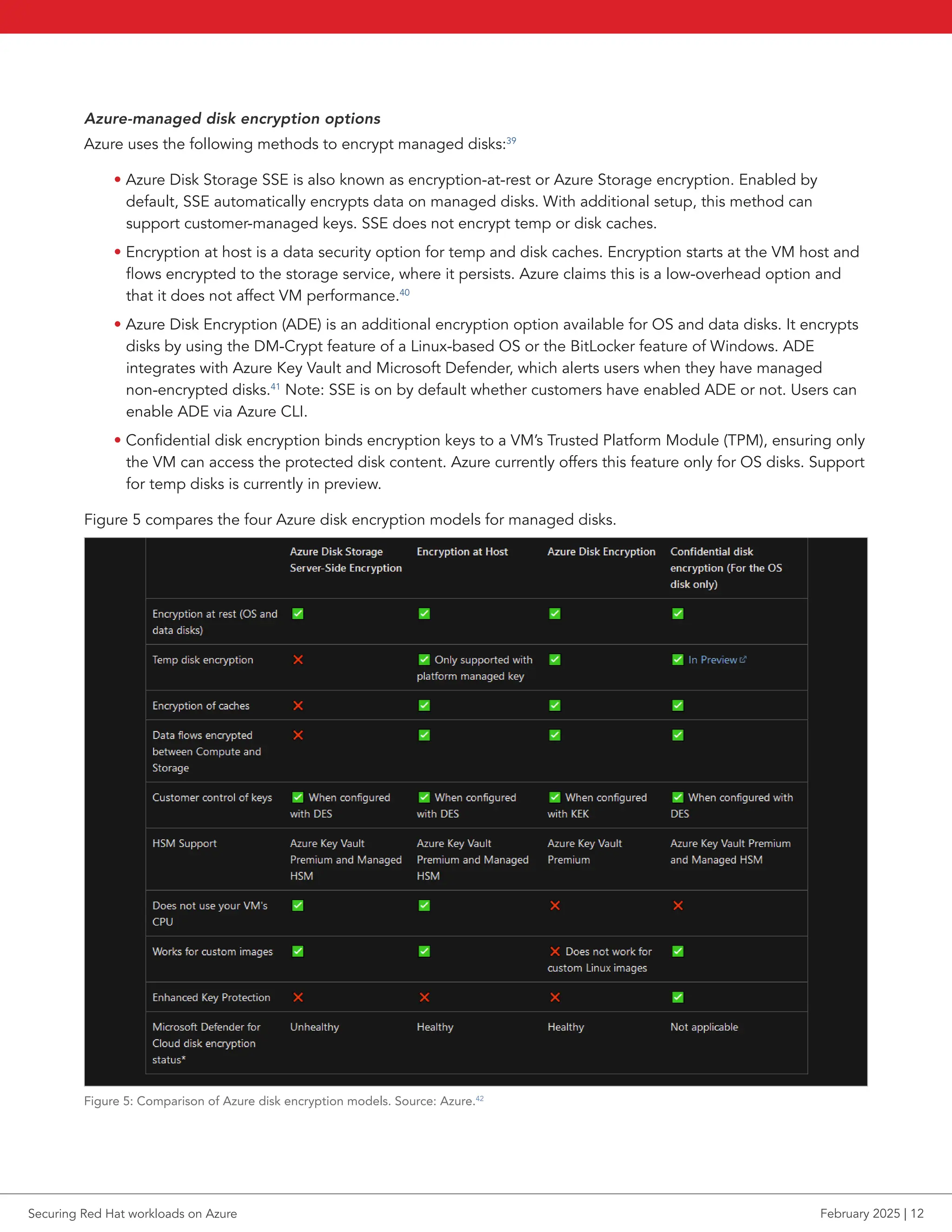
Azure uses the following methods to encrypt managed disks:39
• Azure Disk Storage SSE is also known as encryption-at-rest or Azure Storage encryption. Enabled by
default, SSE automatically encrypts data on managed disks. With additional setup, this method can
support customer-managed keys. SSE does not encrypt temp or disk caches.
• Encryption at host is a data security option for temp and disk caches. Encryption starts at the VM host and
flows encrypted to the storage service, where it persists. Azure claims this is a low-overhead option and
that it does not affect VM performance.40
• Azure Disk Encryption (ADE) is an additional encryption option available for OS and data disks. It encrypts
disks by using the DM-Crypt feature of a Linux-based OS or the BitLocker feature of Windows. ADE
integrates with Azure Key Vault and Microsoft Defender, which alerts users when they have managed
non-encrypted disks.41
Note: SSE is on by default whether customers have enabled ADE or not. Users can
enable ADE via Azure CLI.
• Confidential disk encryption binds encryption keys to a VM’s Trusted Platform Module (TPM), ensuring only
the VM can access the protected disk content. Azure currently offers this feature only for OS disks. Support
for temp disks is currently in preview.
Figure 5 compares the four Azure disk encryption models for managed disks.
Figure 5: Comparison of Azure disk encryption models. Source: Azure.42
Securing Red Hat workloads on Azure February 2025 | 12
At-rest encryption in Data Lake
Azure enables data encryption by default for data at rest in Azure Data Lake, an enterprise-wide repository for
data. Azure Data Lake Store manages keys by default, but customers have the option to manage their own keys.44
Data in transit
Data-link layer encryption in Azure
Azure applies a data-link layer encryption method point-to-point across underlying hardware for any Azure
customer data moving between Azure data centers. Azure encrypts data packets prior to transit to protect
against man-in-the-middle attacks. Azure enables this encryption by default for all Azure traffic traveling
within a region or between regions and provides line rate encryption with no measurable latency increase,
according to Azure.44
TLS encryption in Azure
Azure customers have the option to use TLS protocol to protect data in transit between the customer and Azure.
Azure data centers automatically negotiate a TLS connection with client systems.45
Azure Storage transactions
Azure completes informational transactions made with Azure Storage through the Azure Portal over HTTPS.
Additionally, users can interact with Azure Storage using the Storage REST API over HTTPS.46
RDP sessions
Users with Windows or Linux VMs hosted on Azure can use the Microsoft protocol RDP to connect and sign-in to
their systems securely. Azure protects data in transit in RDP sessions with TLS.47
Secure access to Linux VMs with SSH
In addition to RDP, customers can use SSH, an encrypted connection protocol that allows secure sign-ins over
unsecured connections, to connect to Linux VMs running on Azure. This is Azure’s default connection protocol
for Linux VMs, and it allows for password-less connection. SSH relies instead on a public/private key pair for
authentication, i.e., asymmetric encryption.48
Azure VPN encryption
Users can connect to systems in their Azure environment via VPN to create a secure tunnel that protects the
privacy of data being sent across the network. Customers can use the service Azure VPN Gateway to “send
encrypted traffic between an Azure virtual network and on-premises locations over the public Internet.”49
There
are two main VPN scenarios that customers can use with Azure VPN Gateway:50
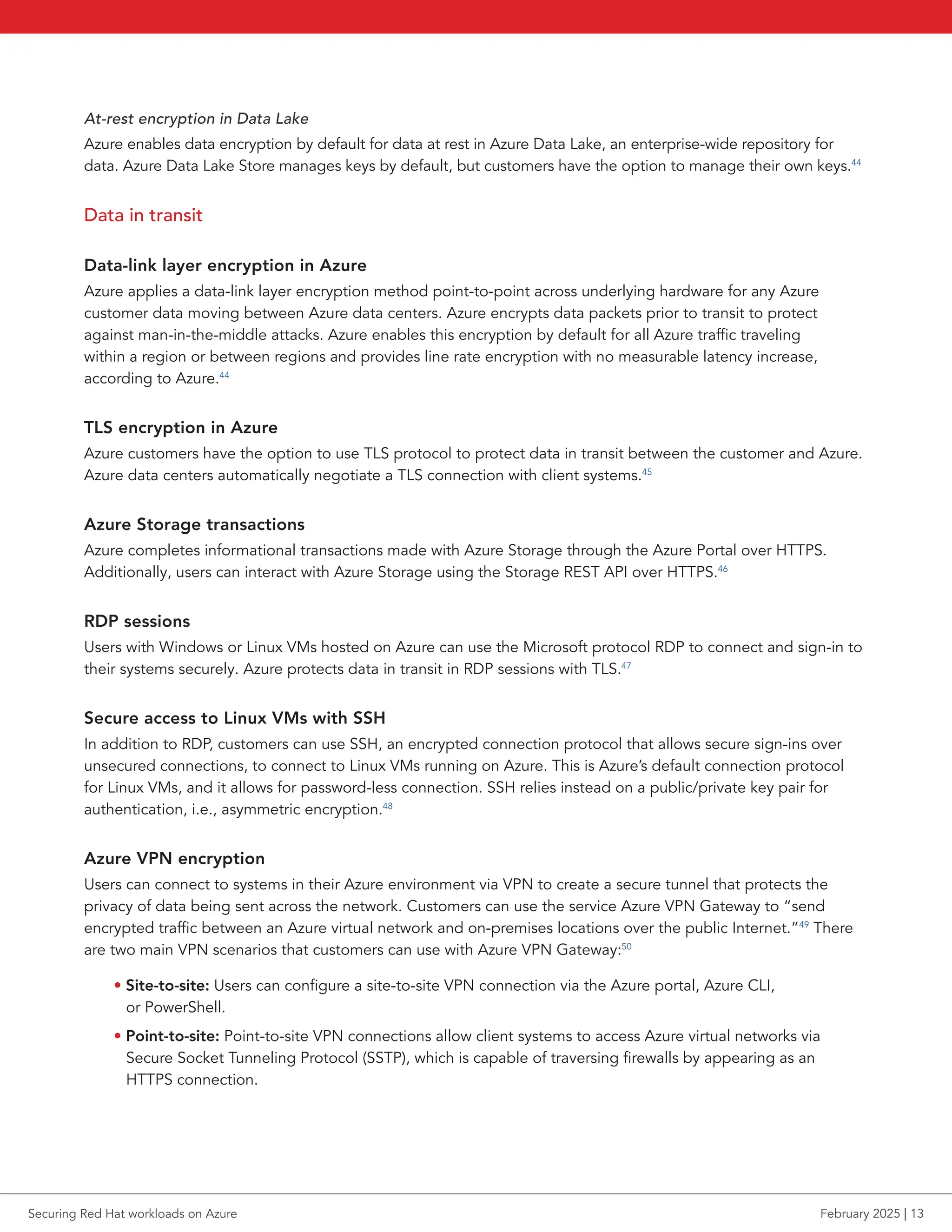
• Site-to-site: Users can configure a site-to-site VPN connection via the Azure portal, Azure CLI,
or PowerShell.
• Point-to-site: Point-to-site VPN connections allow client systems to access Azure virtual networks via
Secure Socket Tunneling Protocol (SSTP), which is capable of traversing firewalls by appearing as an
HTTPS connection.
Securing Red Hat workloads on Azure February 2025 | 13
Azure Backup and disaster recovery
Disaster recovery helps ensure business continuity by restoring data and IT access after disruptions from
natural disasters, technology failures, cyberattacks, or user errors.51
To help organizations using Red Hat on
Azure solutions with their disaster recovery plan, Azure offers Azure Backup and Azure Site Recovery. Azure
Backup backs up and restores data on Azure while Azure Site Recovery facilitates seamless disaster recovery for
applications, enabling organizations to maintain business continuity during outages. Backed by highly available
Azure storage, these services form a cohesive strategy for backup and recovery.
The services simplify policy definition and management through a centralized Azure interface, providing
seamless control over backup and recovery processes. They support diverse workloads and platforms, including
SQL and SAP databases, Azure File Shares, Azure VMs, on-premises Windows servers, and Linux VMs. For
disaster recovery specifically, customers can use Azure Site Recovery to manage replication, failover, and failback
directly from the Azure portal. This streamlined approach can enable quick and reliable recovery of critical
applications and data for Red Hat on Azure solutions during outages or disruptions.52
Confidential computing
Confidential computing is an industry term standardized by the Confidential Computing Consortium (CCC),
part of the Linux Foundation.53
It refers to the prevention of unauthorized access to data in use, and in memory,
rather than at rest or in transit, both of which Azure already encrypts. Confidential computing protects data
in use for governmental, medical, financial, and other entities handling sensitive information.54
The basis for
confidential computing lies in hardware-based and attested trusted execution environments (TEEs). A CPU-
based TEE consists of the CPU itself and sections of trusted memory-containing code. In the case of confidential
virtual machines (CVMs), the guest operating system and all code preinstalled on that guest operating system is
considered trusted and part of a single TEE.
To meet the definition of a TEE from the CCC, the environment must be attested.55
For Azure CVMs, attestation
occurs automatically at VM boot time. If a user attempts to boot a confidential VM where the underlying
hardware or software within the VM is not as expected, Azure aborts the boot process. Furthermore, a relying
third party, such as an application that wants to process highly sensitive data on the confidential VM, can request
an attestation report from the VM. The third-party application can then present the report to an attestation
verifier, such as the Microsoft Azure Attestation (MAA) service, to verify its validity before the VM releases
encryption keys or other secrets to the application.
Azure provides confidential computing in the forms of confidential VMs, containers, and other services.56
VMs
Azure supports many hardened technologies, including confidential VMs using AMD Secure Encrypted
Virtualization-Secure Nested Paging (SEV-SNP), Intel®
Domain Extensions (TDX), and VMs with Application
Enclaves using Intel Software Guard Extensions (SGX). However, only Azure VMs using AMD SEV-SNP support
RHEL—specifically, version 9.4.57
AMD SEV uses keys managed by the AMD Secure Processor to isolate guests and the hypervisor from each
other. SNP adds memory integrity protection to help combat hypervisor-based attacks, such as data replay and
memory remapping. It also provides several optional security enhancements to strengthen resistance to interrupt
behavior and side-channel attacks.58
Securing Red Hat workloads on Azure February 2025 | 14
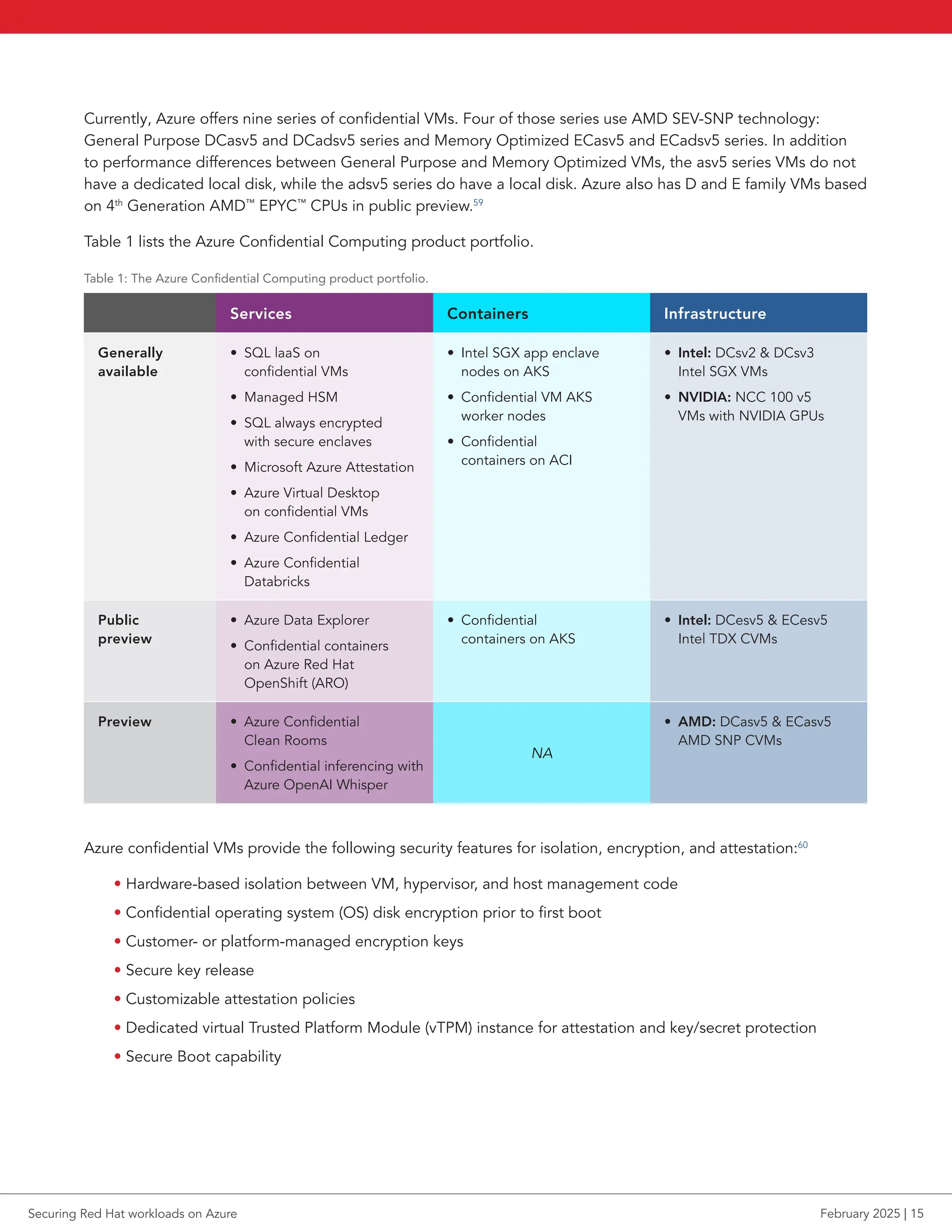
Currently, Azure offers nine series of confidential VMs. Four of those series use AMD SEV-SNP technology:
General Purpose DCasv5 and DCadsv5 series and Memory Optimized ECasv5 and ECadsv5 series. In addition
to performance differences between General Purpose and Memory Optimized VMs, the asv5 series VMs do not
have a dedicated local disk, while the adsv5 series do have a local disk. Azure also has D and E family VMs based
on 4th
Generation AMD™
EPYC™
CPUs in public preview.59
Table 1 lists the Azure Confidential Computing product portfolio.
Table 1: The Azure Confidential Computing product portfolio.
Services Containers Infrastructure
Generally
available
• SQL laaS on
confidential VMs
• Managed HSM
• SQL always encrypted
with secure enclaves
• Microsoft Azure Attestation
• Azure Virtual Desktop
on confidential VMs
• Azure Confidential Ledger
• Azure Confidential
Databricks
• Intel SGX app enclave
nodes on AKS
• Confidential VM AKS
worker nodes
• Confidential
containers on ACI
• Intel: DCsv2  DCsv3
Intel SGX VMs
• NVIDIA: NCC 100 v5
VMs with NVIDIA GPUs
Public
preview
• Azure Data Explorer
• Confidential containers
on Azure Red Hat
OpenShift (ARO)
• Confidential
containers on AKS
• Intel: DCesv5  ECesv5
Intel TDX CVMs
Preview • Azure Confidential
Clean Rooms
• Confidential inferencing with
Azure OpenAI Whisper
NA
• AMD: DCasv5  ECasv5
AMD SNP CVMs
Azure confidential VMs provide the following security features for isolation, encryption, and attestation:60
• Hardware-based isolation between VM, hypervisor, and host management code
• Confidential operating system (OS) disk encryption prior to first boot
• Customer- or platform-managed encryption keys
• Secure key release
• Customizable attestation policies
• Dedicated virtual Trusted Platform Module (vTPM) instance for attestation and key/secret protection
• Secure Boot capability
Securing Red Hat workloads on Azure February 2025 | 15
Trusted Launch
Infrastructure technologies that provide layers of defense against VM security threats comprise the Azure
feature Trusted Launch. Customers can independently enable technologies such as Secure Boot, vTPM, and
virtualization-based security (VBS). Trusted Launch integrates with cloud security solution Microsoft Defender for
Cloud, which can provide security recommendations and alerts.61
Confidential services
In addition to confidential VMs and containers, Azure provides services that support or build upon confidential
computing technologies:
• Azure Key Vault Managed Hardware Security Modules (HSM) is a cloud service that allows users to
manage cryptographic keys for their cloud applications.62
• Azure Databricks is an analytics platform for building, deploying, maintaining, and sharing data
and analytics.63
• Microsoft Azure Attestation is a unified solution for remotely verifying the trustworthiness of hardware
platforms and associated binaries.64
• Trusted Hardware Identity Management oversees cache management of certificates for all TEEs in an
Azure environment.65
• Azure Confidential Ledger (ACL) is a register for recordkeeping, auditing sensitive data, and multi-party
data transparency. ACL runs exclusively on hardware-backed secure enclaves.66
• Azure Confidential Clean Rooms is a PaaS offering that enables users to collaborate on sensitive multi-
party data while helping to ensure data privacy. Collaborators can create tamper-resistant contracts that
define constraints enforced by the clean room. Governance verifies the validity of these constraints before
data is released into clean rooms and helps generate tamper-resistant audit trails.67
• Azure IoT Edge supports confidential applications running in enclaves and provides security for data in
use at the edge. The service encrypts applications in transit and at rest and decrypts them to run only
inside a TEE.68
• Azure Virtual Desktop is a desktop and app virtualization service that can use AMD SEV-SNP confidential
VMs to help protect the virtual desktops in a TEE.69
Securing Red Hat workloads on Azure February 2025 | 16
Application security
Application security focuses on safeguarding software from vulnerabilities and threats throughout their
development, deployment, and operational lifecycle. Application security uses tools, practices, and processes to
prevent unauthorized access, data breaches, and malicious exploitation.
Web Application Firewall (WAF)
The Azure WAF plays a crucial role in safeguarding web applications from common exploits and vulnerabilities,
including SQL injection and cross-site scripting. By providing security without modifying backend code, WAF
enables organizations to protect their applications seamlessly. Red Hat on Azure customers can deploy Azure
WAF through various deployment options, including Azure Application Gateway, Azure Front Door, and the
Azure Content Delivery Network (CDN), with the latter currently in public preview. This flexibility enables
customers to implement WAF across multiple applications simultaneously, supporting up to 40 sites hosted
behind a single Application Gateway.70,71
The protection features of Azure WAF can defend against many web vulnerabilities. It could effectively mitigate
threats such as SQL injection, cross-site scripting, command injection, and HTTP anomalies. WAF uses IP
Reputation and Bot Mitigation rulesets to defend against crawlers, scanners, and bot attacks. Additionally, WAF
works in conjunction with Microsoft Defender for Cloud, providing a centralized view of security across Azure,
hybrid, and multicloud environments.72
Identity management with Microsoft Entra ID
Microsoft Entra is a family of multi-cloud identity and access solutions. For this paper, we focus on Microsoft
Entra ID (Azure’s primary identity management solution).
Microsoft Entra ID is a cloud-based identity and access management (IAM) service allowing users to access both
external and internal resources, such as Azure and Microsoft 365 (external) or apps developed within a user’s
own organization (internal).73
Administrators can use Entra ID to provide granular access to apps and resources,
delegate specific permissions to users, and enable single sign-on (SSO) for applications. Entra ID serves as the
replacement for Microsoft Active Directory.
Managed identities in Entra ID
Managed identities are a feature of Entra ID that allow developers to connect applications to Azure services and
resources without the need to manage credentials, secrets, keys, and certificates. Managed identities can also
connect to other applications that support Entra authentication. These identities are automatically managed
in Entra ID and are either system-assigned (an option available on some Azure resources to enable a unique
managed identity directly on the resource) or user-assigned, which is a unique resource that users can create and
use on multiple Azure resources at the same time.
When an application or resource using managed identities requests permission to access other resources, the
request goes to Entra ID. The application or resource then receives a temporary set of credentials with the least
permissions necessary based on role assignments for the identity. This method helps keep environments secure
by limiting the lifespan of a set of credentials and limiting the abilities available to a set of credentials.74
Securing Red Hat workloads on Azure February 2025 | 17
In partnership with Red Hat, Microsoft announced in Q4 2024 that managed identities are coming to ARO.
Microsoft has not announced a release date as of publishing, but they indicated that an announcement on
availability and a preview would come in early 2025. The current roadmap shows that the ARO identities would
break down into the following operators used in ARO:75
• OpenShift Image Registry Operator
• OpenShift Network Operator
• OpenShift Disk Storage Operator
• OpenShift File Storage Operator
• OpenShift Cluster Ingress Operator
• OpenShift Cloud Controller Manager
• OpenShift Machine API Operator
• Azure Red Hat OpenShift Service Operator
• Azure Red Hat OpenShift Federated Credential
Entra ID will automatically silo these identities so that if a credential should be compromised, the corresponding
user cannot access abilities on different operators in an OpenShift cluster. The identities will also support
customer workload connections to other Azure services from within OpenShift pods.76
Conditional Access
Microsoft Entra Conditional Access is Microsoft’s Zero Trust policy engine, which brings signals together to
make decisions and enforce organizational policies. At its core, Conditional Access provides a condition-based
barrier to protect resources that users access. To gain access, users must satisfy a given condition, such as
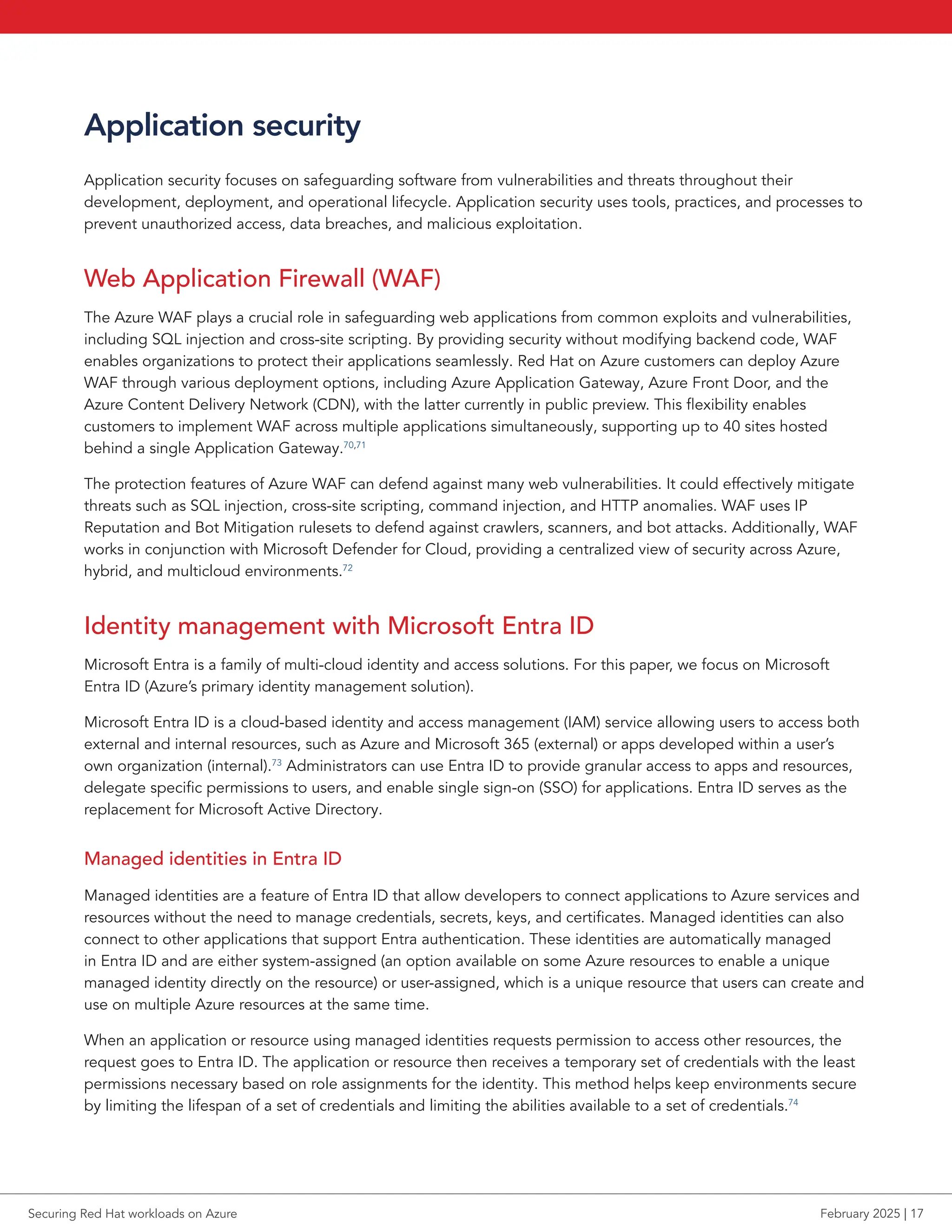
using a compliant device or completing multifactor authentication.77
Figure 6 provides an overview of how
Conditional Access works.
Figure 6: An abstract representation of how Conditional Access functions. Source: Microsoft.78
Securing Red Hat workloads on Azure February 2025 | 18
Private Access
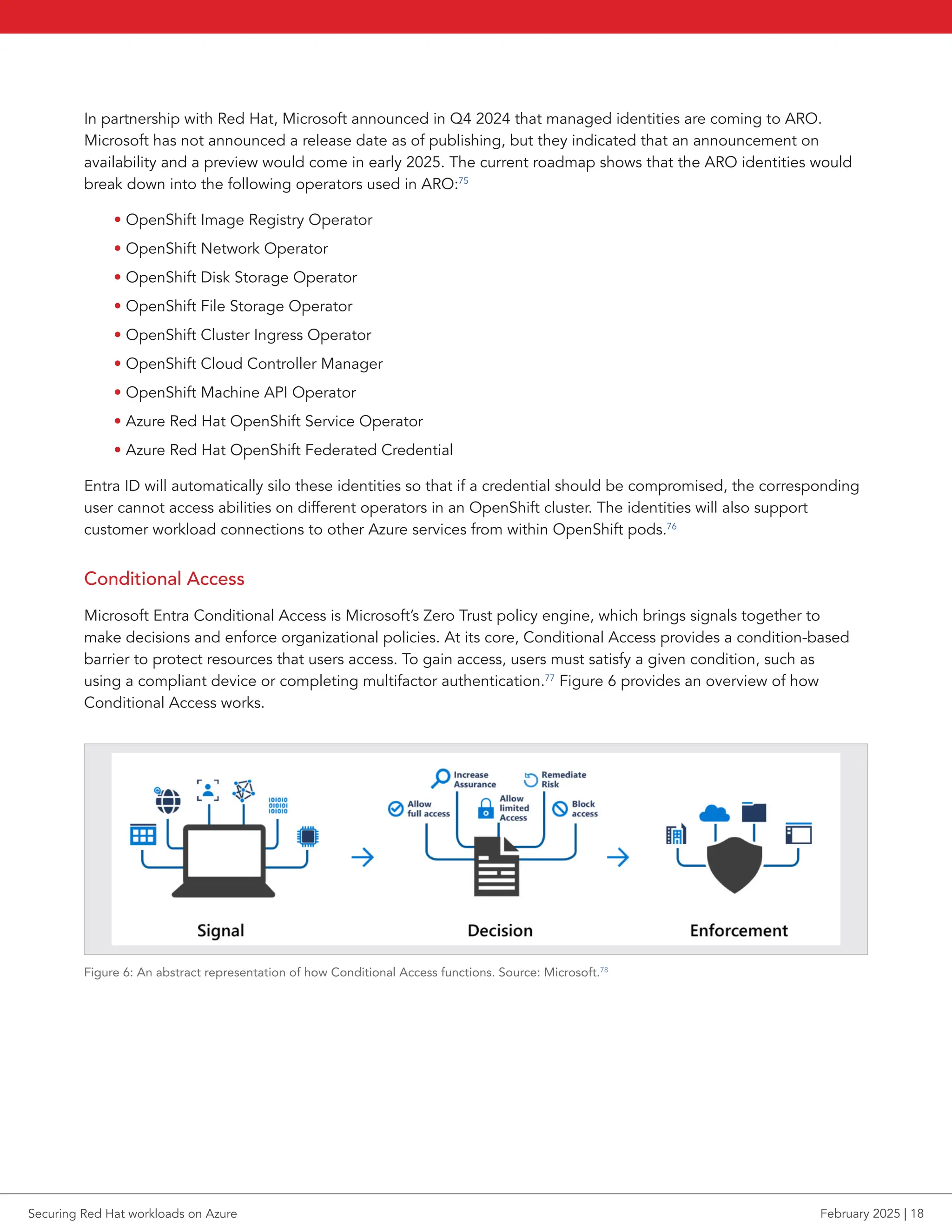
Microsoft Entra Private Access allows administrators to manage organizational access to private apps and
resources by specifying private fully qualified domain names (FQDN) and IP addresses. This can supplant the
need for remote workers to use a VPN to access private resources; instead, they can use Microsoft’s Global
Secure Access client software.79
Figure 9 shows the general model of access that guides Entra functionality.
Figure 7: An overview of access with Microsoft Entra. Source: Microsoft.80
Internet Access
Microsoft Entra Internet Access offers protection for users, devices, and data by providing a Secure Web
Gateway (SWG) solution for SaaS applications and other internet traffic. It primarily does so by leveraging web
content filtering, a key feature for Entra Internet Access. This feature provides granular access control for web
categories and FQDNs, blocking known malicious or unsafe websites and domains.81
ID Governance
The Microsoft Entra ID Governance provides automation capabilities for the identity lifecycle of individual
workers in their organization. Admins can create automated workflows that activate based on an employee’s
status giving or removing certain permissions as their status changes, from new hires to fully engaged employee
to former employee.82
Securing Red Hat workloads on Azure February 2025 | 19
ID Protection
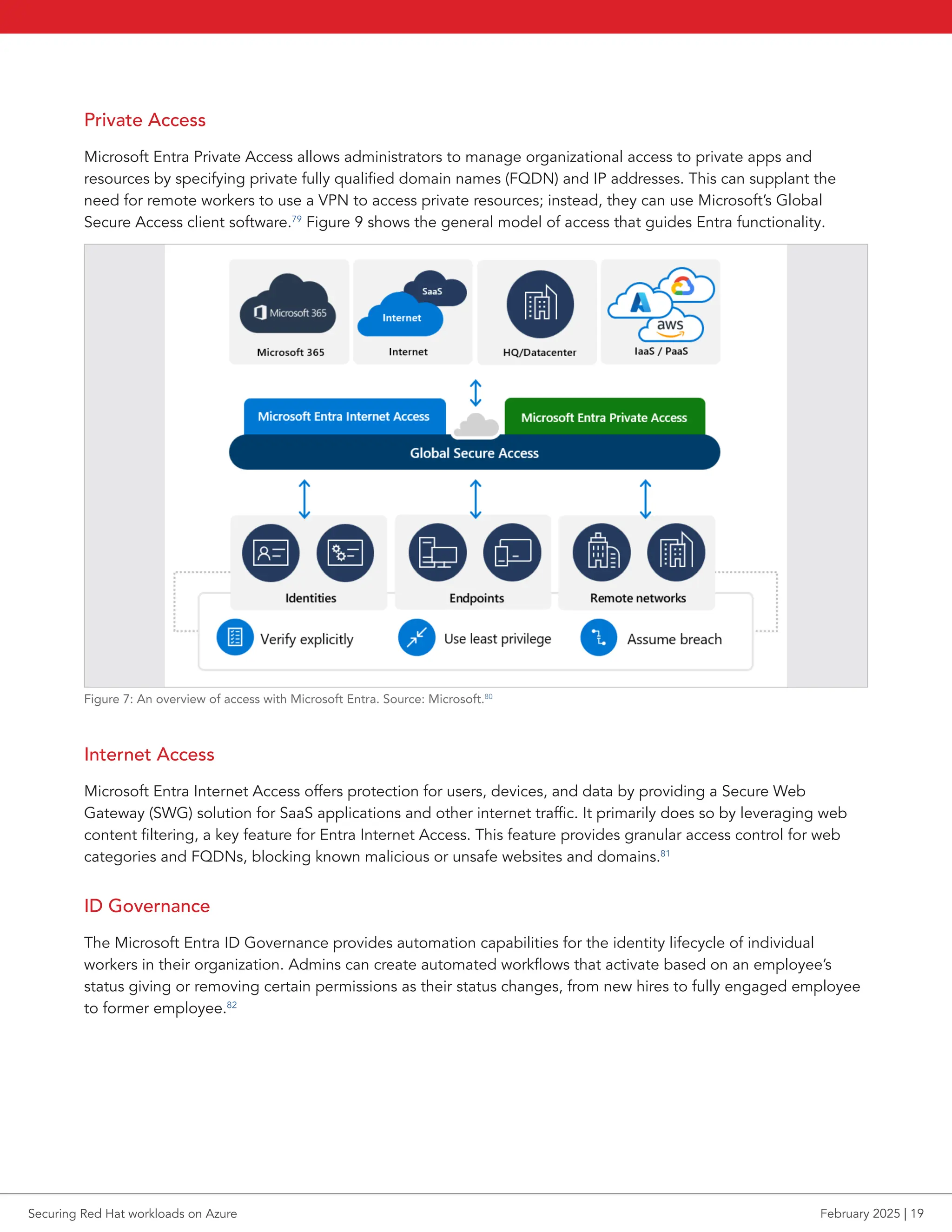
Entra ID Protection detects and protects against identity-based risks. During each sign-in, ID Protection
generates a sign-in session risk level by running all known real-time sign-in detections. The sign-in session risk
level indicates how likely it is that the sign-in is compromised. ID Protection then feeds the risk level into policies
that protect the user and the organization.83
Figure 8 provides an overview of how ID Protection works.
Figure 8: An overview of ID Protection. Source: Microsoft.84
Verified ID
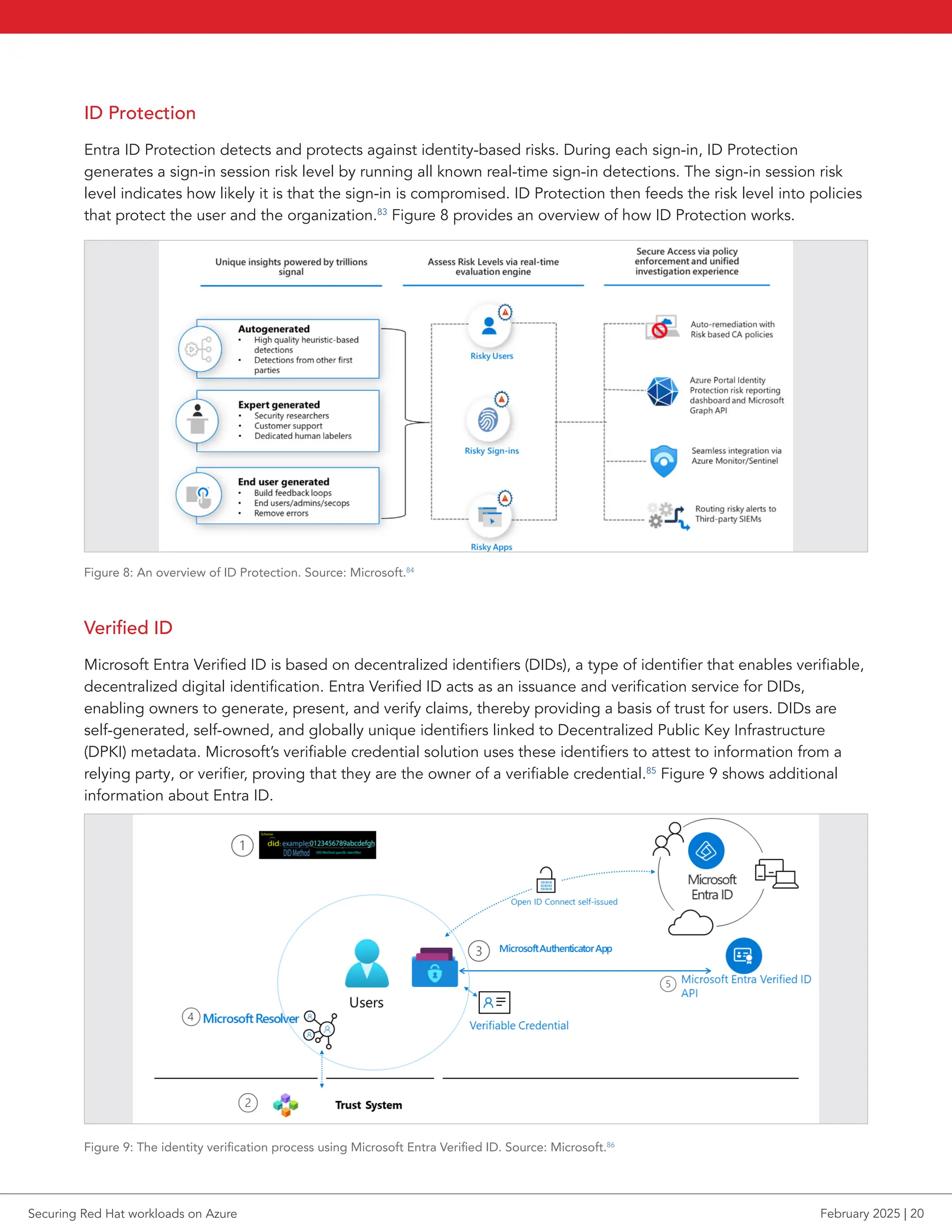
Microsoft Entra Verified ID is based on decentralized identifiers (DIDs), a type of identifier that enables verifiable,
decentralized digital identification. Entra Verified ID acts as an issuance and verification service for DIDs,
enabling owners to generate, present, and verify claims, thereby providing a basis of trust for users. DIDs are
self-generated, self-owned, and globally unique identifiers linked to Decentralized Public Key Infrastructure
(DPKI) metadata. Microsoft’s verifiable credential solution uses these identifiers to attest to information from a
relying party, or verifier, proving that they are the owner of a verifiable credential.85
Figure 9 shows additional
information about Entra ID.
Figure 9: The identity verification process using Microsoft Entra Verified ID. Source: Microsoft.86
Securing Red Hat workloads on Azure February 2025 | 20
External ID
Microsoft Entra External ID is a service designed to extend access for apps to individuals outside a user’s
organization. Admins can add authentication and customer identity and access management (CIAM) for
external users.87
Permissions Management
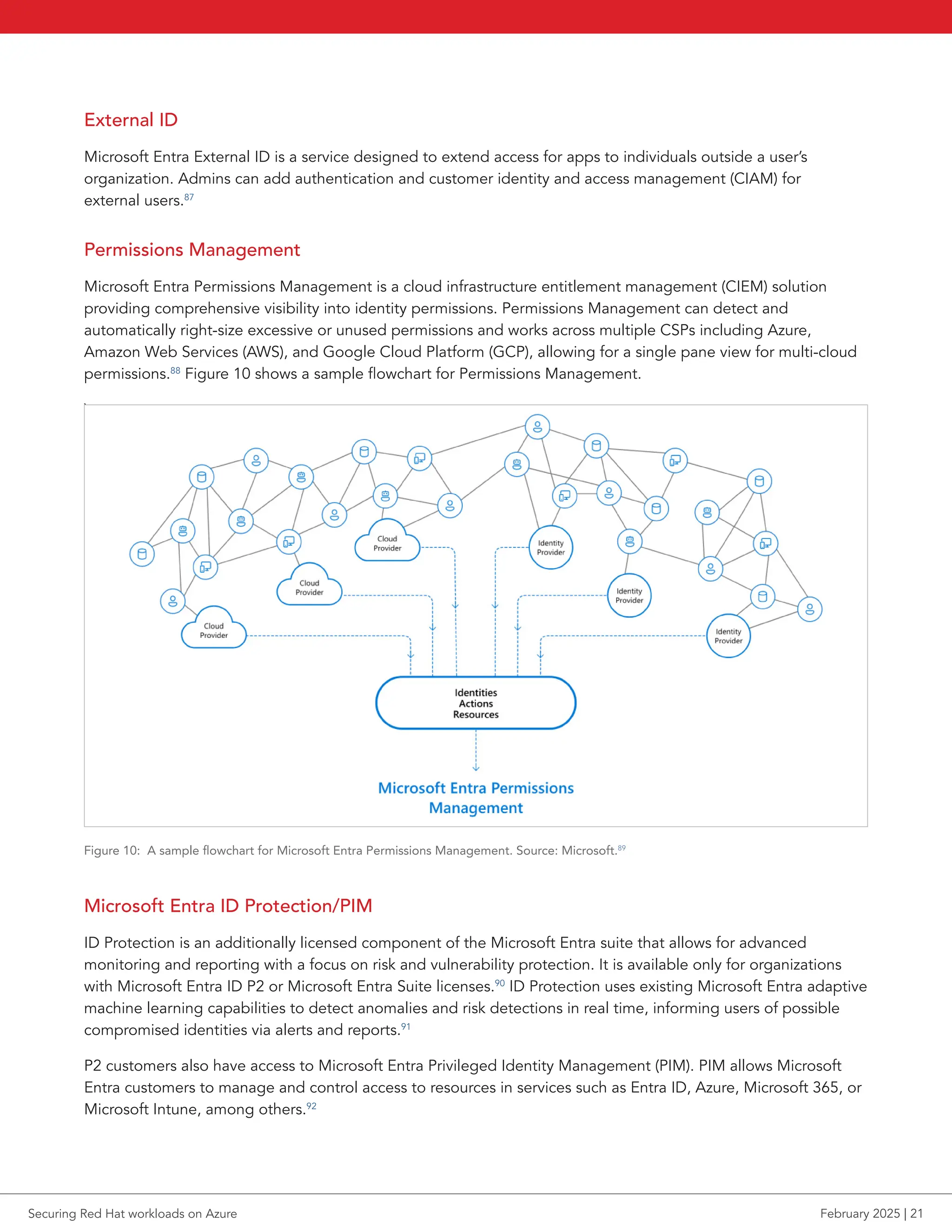
Microsoft Entra Permissions Management is a cloud infrastructure entitlement management (CIEM) solution
providing comprehensive visibility into identity permissions. Permissions Management can detect and
automatically right-size excessive or unused permissions and works across multiple CSPs including Azure,
Amazon Web Services (AWS), and Google Cloud Platform (GCP), allowing for a single pane view for multi-cloud
permissions.88
Figure 10 shows a sample flowchart for Permissions Management.
`
Figure 10: A sample flowchart for Microsoft Entra Permissions Management. Source: Microsoft.89
Microsoft Entra ID Protection/PIM
ID Protection is an additionally licensed component of the Microsoft Entra suite that allows for advanced
monitoring and reporting with a focus on risk and vulnerability protection. It is available only for organizations
with Microsoft Entra ID P2 or Microsoft Entra Suite licenses.90
ID Protection uses existing Microsoft Entra adaptive
machine learning capabilities to detect anomalies and risk detections in real time, informing users of possible
compromised identities via alerts and reports.91
P2 customers also have access to Microsoft Entra Privileged Identity Management (PIM). PIM allows Microsoft
Entra customers to manage and control access to resources in services such as Entra ID, Azure, Microsoft 365, or
Microsoft Intune, among others.92
Securing Red Hat workloads on Azure February 2025 | 21
Confidential containers
Like confidential VMs, confidential containers provide enhanced data security, privacy, and integrity for
workloads in them. They run in hardware-backed TEEs in either VM-based or container-group-based
configurations.93
To provide additional confidential functionality, confidential containers on Azure Container
Instances (ACI) integrate with two open-source sidecar containers, which are typically loaded in the same
container group as the main application container.
The first open-source sidecar is a secure key release sidecar, which spins up a web server with REST API
functionality to support attestation. The sidecar integrates with Azure Key Vault to allow key release
following validation.
About Azure Key Vault
Azure Key Vault is “a cloud service for securely storing and accessing secrets. A secret is anything that you want to
tightly control access to, such as API keys, passwords, certificates, or cryptographic keys.”94
Microsoft recommends
Key Vault for managing keys and controlling access to them. Customers can assign access permission to specific
services or users with Microsoft Entra accounts. Microsoft cannot see or access users’ keys.
The second open-source sidecar is an encrypted file system sidecar. It performs a series of transparent
attestations and key retrievals/releases to use the key to mount an encrypted remote filesystem that the user has
previously uploaded to Azure Blob Storage, object storage for Azure.95
This process preserves the integrity and
confidentiality of the file system.96
Vulnerability management
Microsoft Defender for Cloud
Microsoft Defender for Cloud is a cloud-native application protection platform (CNAPP) that helps offer security
and compliance from code-to-runtime in hybrid and multicloud environments. The solution performs continuous
security assessments of connected resources and provides security recommendations for any detected
vulnerabilities. These recommendations are based on the Microsoft cloud security benchmark, an Azure-specific
set of standards for security and compliance best practices. It builds on recommendations from the Center for
Internet Security (CIS) and the National Institute of Standards and Technology (NIST), with a focus on cloud
security protocols.97
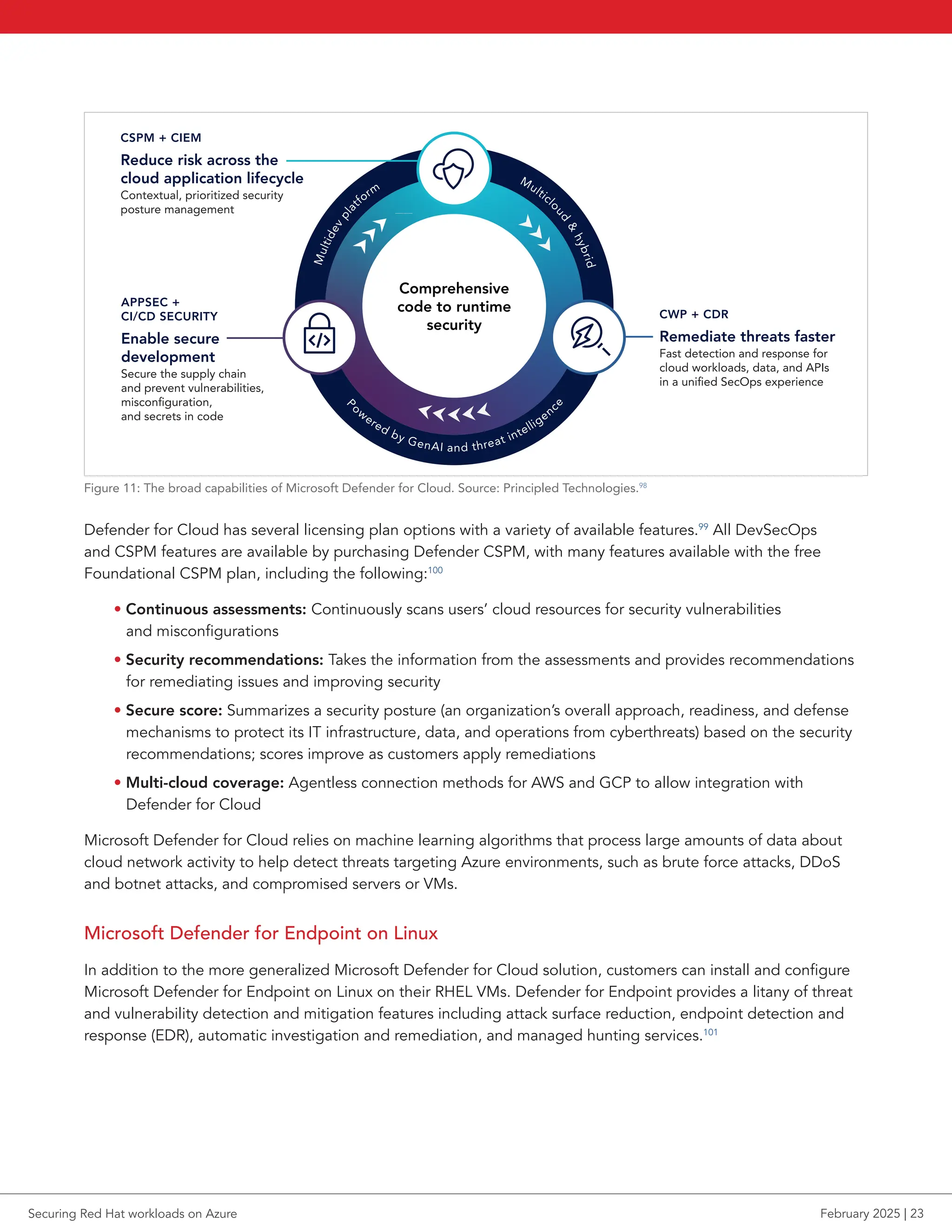
Figure 11 shows the broad-ranging capabilities of Defender for Cloud, including developer, security, and
operations (DevSecOps) for code-level security management during software development, cloud security
posture management (CSPM), which provides users with recommended actions to prevent attacks or
breaches, and a cloud workload protection (CWP) platform that gives security alerts and workload-specific
recommendations to protect from threats.
Securing Red Hat workloads on Azure February 2025 | 22
CSPM + CIEM
Reduce risk across the
cloud application lifecycle
Contextual, prioritized security
posture management
Comprehensive
code to runtime
security
APPSEC +
CI/CD SECURITY
Enable secure
development
Secure the supply chain
and prevent vulnerabilities,
misconfiguration,
and secrets in code
CWP + CDR
Remediate threats faster
Fast detection and response for
cloud workloads, data, and APIs
in a unified SecOps experience
Multicl
o
u
d

h
y
b
r
i
d
P
ow
ered by GenAI and threat intelligenc
e
M
u
l
t
i
d
e
v
p
l
a
tform







Figure 11: The broad capabilities of Microsoft Defender for Cloud. Source: Principled Technologies.98
Defender for Cloud has several licensing plan options with a variety of available features.99
All DevSecOps
and CSPM features are available by purchasing Defender CSPM, with many features available with the free
Foundational CSPM plan, including the following:100
• Continuous assessments: Continuously scans users’ cloud resources for security vulnerabilities
and misconfigurations
• Security recommendations: Takes the information from the assessments and provides recommendations
for remediating issues and improving security
• Secure score: Summarizes a security posture (an organization’s overall approach, readiness, and defense
mechanisms to protect its IT infrastructure, data, and operations from cyberthreats) based on the security
recommendations; scores improve as customers apply remediations
• Multi-cloud coverage: Agentless connection methods for AWS and GCP to allow integration with
Defender for Cloud
Microsoft Defender for Cloud relies on machine learning algorithms that process large amounts of data about
cloud network activity to help detect threats targeting Azure environments, such as brute force attacks, DDoS
and botnet attacks, and compromised servers or VMs.
Microsoft Defender for Endpoint on Linux
In addition to the more generalized Microsoft Defender for Cloud solution, customers can install and configure
Microsoft Defender for Endpoint on Linux on their RHEL VMs. Defender for Endpoint provides a litany of threat
and vulnerability detection and mitigation features including attack surface reduction, endpoint detection and
response (EDR), automatic investigation and remediation, and managed hunting services.101
Securing Red Hat workloads on Azure February 2025 | 23
By integrating Defender for Endpoint with Defender for Cloud, users with RHEL VMs hosted on Azure can gain
access to several additional security features, such as vulnerability assessment, post-breach detection, and
threat intelligence, all in a single pane view for management with the Defender for Cloud portal.102
Defender for
Endpoint uses sensors to collect behavioral signals from connected systems, processing them with advanced
analytics and big data models, and generates actionable alerts when it identifies attacker tools, techniques,
or procedures. After integrating Defender for Endpoint with Defender for Cloud, customers can also take
advantage of automated onboarding, which automatically enables sensors on all compatible systems that are
connected to Defender for Cloud.103
RHEL 6.7 or higher, 7.2 or higher, and all distributions of RHEL 8 and 9
support Defender for Endpoint on Linux.
Enabling the integration between Defender for Endpoint and Defender for Cloud gives users findings from
Microsoft Defender Vulnerability Management without installing additional agents. Vulnerability Management
continuously monitors environments for vulnerabilities, removing the need for manual scans, and can discover,
surface, and prioritize vulnerabilities and system misconfigurations.104
Microsoft Defender for Storage
Microsoft Defender for Storage is an Azure-native security solution designed to detect threats to storage accounts.
It addresses three primary risks: malicious file uploads, sensitive data accessibility, and data corruption.105
The system works by analyzing telemetry from the data and control planes from services such as Azure Blob
Storage, Azure Files, and Azure Data Lake Storage. Defender for Storage employs advanced threat detection
tools—using data from Microsoft Threat Intelligence, Defender Antivirus, and Sensitive Data Discovery—to
identify and mitigate potential risks. One of the core functions is its Malware Scanning feature, which monitors
all file types, including archives, as users upload them. This scanning helps ensure that bad actors do not use
storage accounts as vectors for malicious files.
Defender for Storage integrates intelligence models and machine learning to track abnormal or suspicious
activities. The solution then generates alerts covering common cloud storage risks, such as data exfiltration,
corruption, and malicious file uploads.106
A key feature of Defender for Storage is that once customers activate the solution, it will continuously monitor
telemetry from storage services without diagnostic logs, providing consistent oversight.107
Microsoft Sentinel (SIEM)
Sentinel is Microsoft’s cloud-native security information and event management (SIEM) solution for security
orchestration, automation, and response (SOAR).108
It can detect, investigate, respond to, and proactively
hunt cyberthreats. Sentinel incorporates Azure services, such as Log Analytics and Logic Apps, and uses AI
functionality to enhance and enrich detection and investigation.109
Sentinel has several out-of-the-box SIEM technologies for Azure customers looking to get running quickly. This
includes both on-premises and multi-cloud connectors for other CSPs, allowing organizations to ingest data
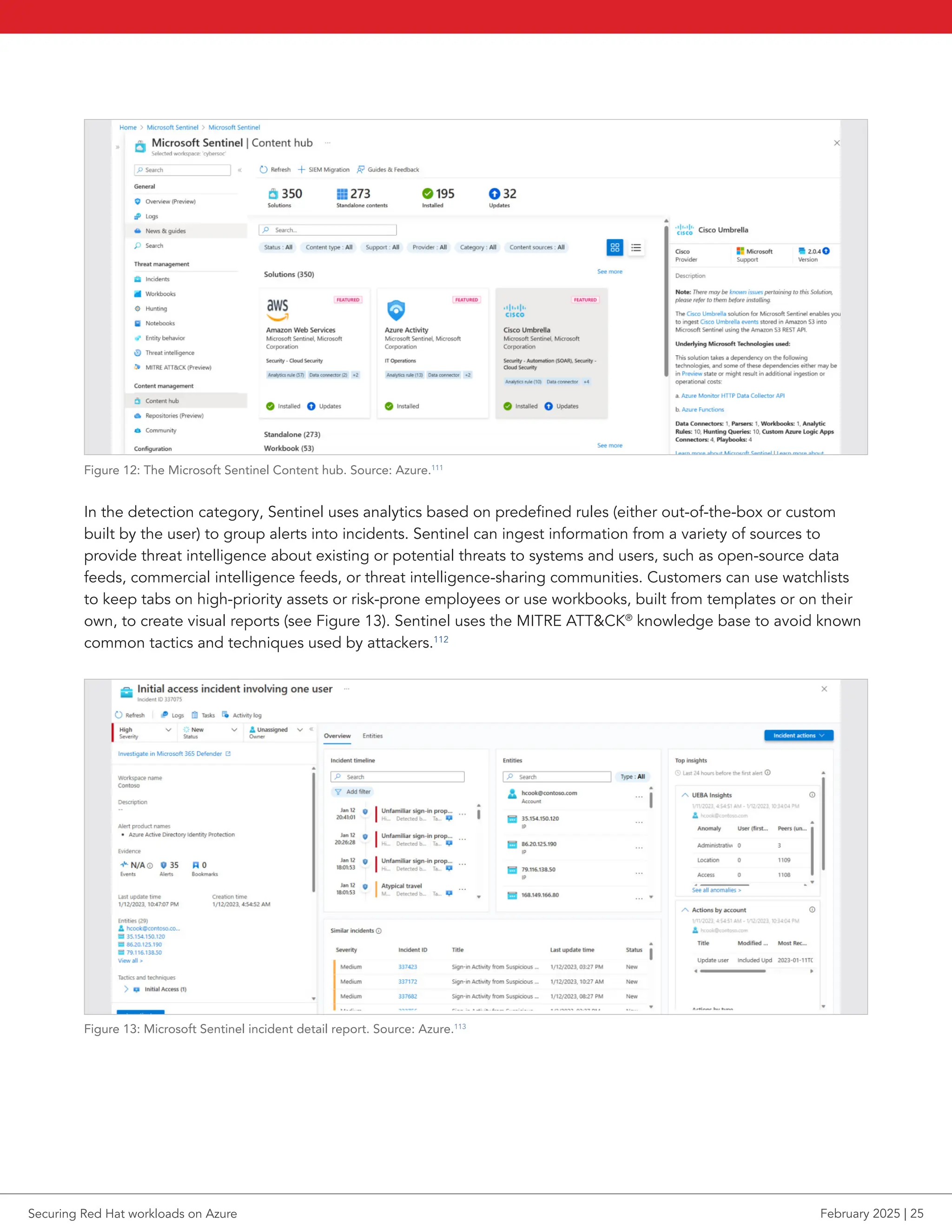
logs from many sources into a centralized solution (see Figure 12).110
Other out-of-the-box Sentinel technologies
enable customers to use REST API, Syslog, or common event format to connect their data sources. In addition to
the out-of-the-box options, Sentinel enables Azure customers to create their own data source connectors, such
as in the case where a dedicated connector for a particular data source doesn’t exist.
Securing Red Hat workloads on Azure February 2025 | 24
Figure 12: The Microsoft Sentinel Content hub. Source: Azure.111
In the detection category, Sentinel uses analytics based on predefined rules (either out-of-the-box or custom
built by the user) to group alerts into incidents. Sentinel can ingest information from a variety of sources to
provide threat intelligence about existing or potential threats to systems and users, such as open-source data
feeds, commercial intelligence feeds, or threat intelligence-sharing communities. Customers can use watchlists
to keep tabs on high-priority assets or risk-prone employees or use workbooks, built from templates or on their
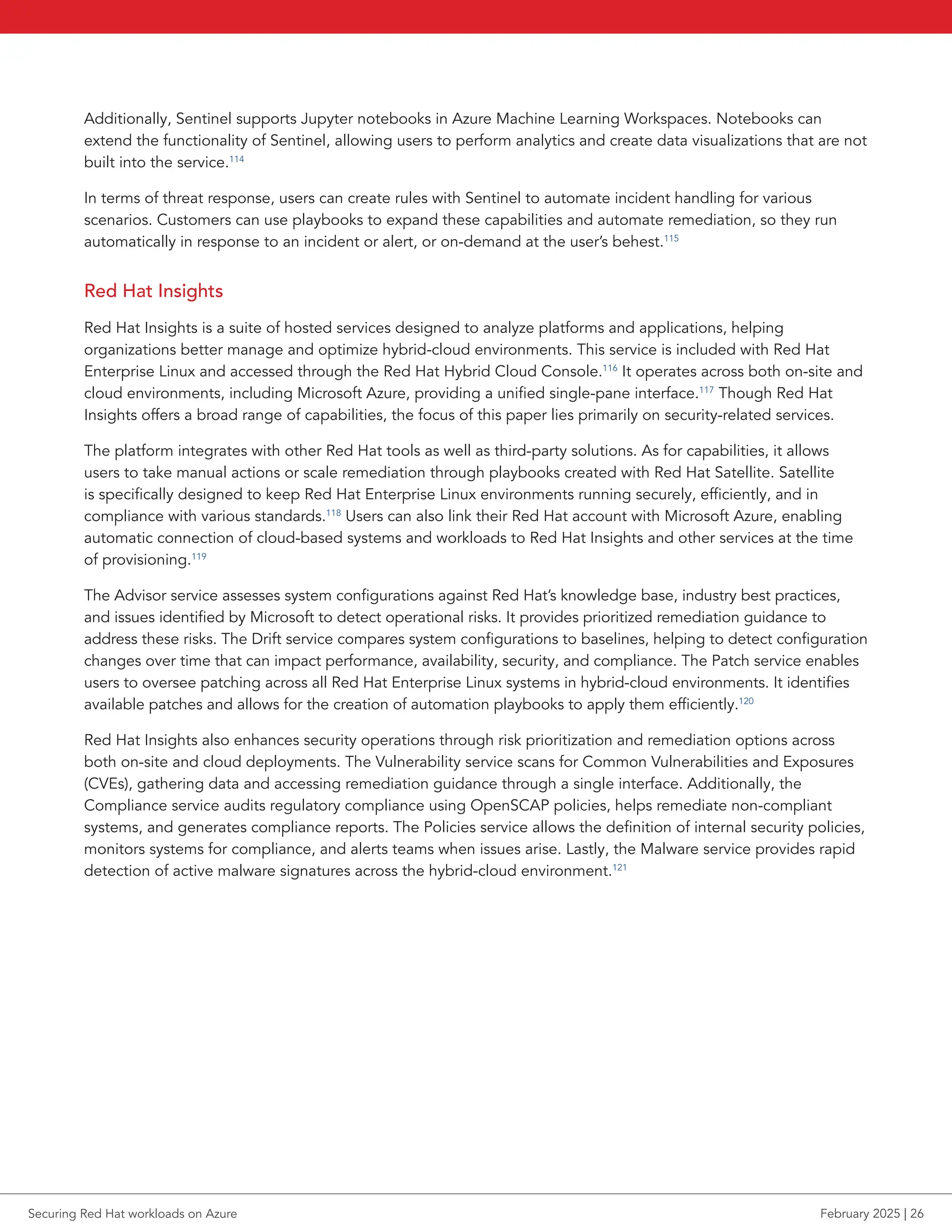
own, to create visual reports (see Figure 13). Sentinel uses the MITRE ATTCK®
knowledge base to avoid known
common tactics and techniques used by attackers.112
Figure 13: Microsoft Sentinel incident detail report. Source: Azure.113
Securing Red Hat workloads on Azure February 2025 | 25
Additionally, Sentinel supports Jupyter notebooks in Azure Machine Learning Workspaces. Notebooks can
extend the functionality of Sentinel, allowing users to perform analytics and create data visualizations that are not
built into the service.114
In terms of threat response, users can create rules with Sentinel to automate incident handling for various
scenarios. Customers can use playbooks to expand these capabilities and automate remediation, so they run
automatically in response to an incident or alert, or on-demand at the user’s behest.115
Red Hat Insights
Red Hat Insights is a suite of hosted services designed to analyze platforms and applications, helping
organizations better manage and optimize hybrid-cloud environments. This service is included with Red Hat
Enterprise Linux and accessed through the Red Hat Hybrid Cloud Console.116
It operates across both on-site and
cloud environments, including Microsoft Azure, providing a unified single-pane interface.117
Though Red Hat
Insights offers a broad range of capabilities, the focus of this paper lies primarily on security-related services.
The platform integrates with other Red Hat tools as well as third-party solutions. As for capabilities, it allows
users to take manual actions or scale remediation through playbooks created with Red Hat Satellite. Satellite
is specifically designed to keep Red Hat Enterprise Linux environments running securely, efficiently, and in
compliance with various standards.118
Users can also link their Red Hat account with Microsoft Azure, enabling
automatic connection of cloud-based systems and workloads to Red Hat Insights and other services at the time
of provisioning.119
The Advisor service assesses system configurations against Red Hat’s knowledge base, industry best practices,
and issues identified by Microsoft to detect operational risks. It provides prioritized remediation guidance to
address these risks. The Drift service compares system configurations to baselines, helping to detect configuration
changes over time that can impact performance, availability, security, and compliance. The Patch service enables
users to oversee patching across all Red Hat Enterprise Linux systems in hybrid-cloud environments. It identifies
available patches and allows for the creation of automation playbooks to apply them efficiently.120
Red Hat Insights also enhances security operations through risk prioritization and remediation options across
both on-site and cloud deployments. The Vulnerability service scans for Common Vulnerabilities and Exposures
(CVEs), gathering data and accessing remediation guidance through a single interface. Additionally, the
Compliance service audits regulatory compliance using OpenSCAP policies, helps remediate non-compliant
systems, and generates compliance reports. The Policies service allows the definition of internal security policies,
monitors systems for compliance, and alerts teams when issues arise. Lastly, the Malware service provides rapid
detection of active malware signatures across the hybrid-cloud environment.121
Securing Red Hat workloads on Azure February 2025 | 26
CUSTOMER STORY
COFCO International turned to Microsoft Defender for Microsoft Office 365 to
provide comprehensive protection
Global agri-business COFCO International needed robust security that would not diminish system
performance. The company chose Microsoft due to its long association with Microsoft and Azure.
“Microsoft Sentinel, with its ability to interoperate with multiple solutions and act as a hub to manage
control and automation, has been particularly valuable for us,” says Pedro Relvas, SAP Basis Linux
Principal Engineer at COFCO. “
We deployed Microsoft Defender for Endpoint across different types of
SAP workloads running on top of Red Hat Enterprise Linux and also Windows, achieving not just better
security but also significant improvements in system management and oversight. The automation in
our security solution has also been a huge success.” He adds that these SAP workloads run on top of
a high-availability scenario, using a Pacemaker cluster. The deployment also extended to other critical
areas such as Oracle and SQL databases, covering 90 percent of COFCO’s Linux server environments.
The approach used by Microsoft Defender for Endpoint on Linux ensured zero workload disruption
and a friction-free deployment across the fleet. COFCO is also using Microsoft Defender for IoT at
its industrial sites to help safeguard products moving through locations with critical operational
technology infrastructure from threats, such as destructive ransomware and targeted attacks.122
Code security
Code security aims to ensure the integrity, confidentiality, and availability of code throughout its lifecycle by
protecting code and applications from vulnerabilities, threats, and malicious attacks.
GitHub Advanced Security for Azure DevOps
GitHub has become a common platform for many developers to create repositories for storing and sharing
code. For DevOps teams using GitHub, GitHub Actions for Azure automates tasks in the software development
lifecycle, including continuous integration and continuous delivery (CI/CD) pipelines in the build, test, and
deploy cycles. In terms of key code security functionality, customers can authenticate securely to Azure services
from GitHub Actions workflows using Azure Login action with a client secret.123
GitHub Actions also enables
customers to manage Azure Policies, the Azure service that helps ensure compliance and security.124
Securing Red Hat workloads on Azure February 2025 | 27
Microsoft aims to make the cloud-native application protection platform GitHub Advanced Security for Azure
DevOps native to the developer workflow. With the service, DevSecOps teams can promote security without
sacrificing productivity.125,126
When customers enable Advanced Security, they can use the following functions to
help protect code:127,128,129,130
• Secret scanning push protection: Actively monitors code pushes to prevent sensitive information
exposure while also preventing source code from exposing new credentials
• Repository secret scanning: Analyzes repositories for accidentally committed secrets, generates
a single alert per unique credential across branches and commit history, and provides detailed
remediation guidance
• Alert system for secrets: Notifies users of detected secrets in repositories from many service providers
• Credential pair detection: Scans for paired credentials, such as API keys and secrets, to ensure both parts
are present, reducing false positives and highlighting critical leaks to secure engineering systems
• Dependency scanning: Detects both direct and transitive open-source dependencies, flags associated
vulnerabilities, and generates detailed alerts with severity, affected components, and Common
Vulnerabilities and Exposures (CVE) information in the build log
• Code scanning: Uses the CodeQL static analysis engine to identify code-level vulnerabilities, such
as SQL injection or authentication bypass, and automates security checks with detailed alerts for
proactive remediation
CUSTOMER STORY
Azure DevOps and GitHub enable Novo Nordisk to expedite research
Scientists and engineers at Novo Nordisk frequently work with external partners. Novo Nordisk IT
must provide each partner with an environment and correlating access while following applicable
compliance regulations. The company built a research collaboration platform (RCP) to automate the
process using existing Azure DevOps and GitHub workflows. According to Microsoft:131
RCP leverages GitHub Advanced Security on Azure DevOps to support the workflow of
delivering the automatic compliance documentation tool. This combination enabled the team
to build and deliver an agile, quality product in a short time. Novo Nordisk quality assurance
took part early in the process to ensure regulatory requirements were understood and met,
incorporating the right controls from the beginning.
“The platform is external facing—it’s built outside Novo Nordisk,” [project technical lead
Roshan Thomas Mathew, Cloud Engineer and Lead for High Performance Computing (HPC)]
says. “That gives us flexibility to deploy an instance of the entire suite for a project, and our
partners as much freedom as they need while we segregate the resources.” Nielsen adds, “RCP
exists as multiple platforms around the world where the data needs to reside locally. There is
also the security and governance advantage of using RCP, a self-contained, isolated setup. It
would not expose any other platform at Novo Nordisk in the highly unlikely event of a breach.”
Securing Red Hat workloads on Azure February 2025 | 28
CUSTOMER STORY
Infosys chooses Azure Red Hat OpenShift for identity security
Infosys, a global leader in next-generation digital services and consulting, needed a central identity
platform and chose to deploy such a solution on Azure Red Hat OpenShift. According to Microsoft:132
Microsoft and Infosys worked together to build an extensible solution that Infosys customized
to its requirements by building Service Principal Interfaces (SPIs) and Application Programming
Interfaces (APIs). The team at Infosys built multiple authentication and authorization workflows.
This enabled users to login [sic] using various social credentials. They also enabled password-
less multi-factor authentication via mobile devices and SMS. External users now have the
flexibility to choose from various authentication flows that the solution provides thereby
providing better usability and a seamless Single Sign On experience.
In Infosys’ words, given their positive experiences with Microsoft solutions in the past,
they believed that opting for Azure Red Hat OpenShift would provide faster time to
market and substantially decrease operational overheads compared to self-managed
orchestration platforms.
Since Microsoft offered an integrated solution meeting most of their requirements, they
decided to go ahead with it. The platform has offered great flexibility in customization, and they
have developed SPIs and APIs on top of it for easy integration with various applications.
The identity platform was implemented in 15 days.
Additional Red Hat platform security features
Open source doesn’t mean your data is insecure. Since 2001 when it established the Red Hat Product Security
team, Red Hat has maintained a serious focus on security. The Product Security team works with the CVE board
to standardize how the industry refers to vulnerabilities, developed a custom hardware signing module in the
early 2000s, and quickly develops responses and processes to address new bugs and attack approaches.133,134
According to a 2021 interview with Vincent Danen, Red Hat Vice President of Product Security, “The challenge
isn’t just to make our software better and more trustworthy, but to enable the customers who use our software as
a platform to host or run their own, to also create trustworthy code for their customers…. This really is the next
frontier—enabling and empowering upstream and downstream open source communities and users to use open
source securely.”135
The following pages explore how Red Hat approaches security in its product ecosystem, providing an overview
of key Red Hat security technologies. Note that our focus is on the Red Hat ecosystem rather than Linux security
more broadly. For more information, see the listed citations.
Securing Red Hat workloads on Azure February 2025 | 29
Red Hat ecosystem components
Red Hat Enterprise Linux
RHEL is an open-source Linux operating system distribution designed for enterprise commercial use. According
to Red Hat, RHEL is the “world’s leading enterprise Linux platform” and is “certified on hundreds of clouds and
with thousands of hardware and software vendors.”136
Released initially in 2000, RHEL has gone through nine
major releases with the latest major version (9.0) released in May of 2022 and minor revision (9.4) released in
April of 2024.137,138
Each major release follows a predictable 10-year lifecycle “to reduce the level of change
within each major release” allowing users to adopt new features and upgrade at their own pace.139,140
RHEL
provides many features beyond just the Linux operating system: optimization for many hardware architectures
such as x86, ARM, IBM Power, IBM Z, and IBM LinuxONE; migration tools for users moving to RHEL from other
OSes; management tools such as Red Hat Insights for issue remediation and vulnerability detection; and tested
performance best practice profiles with TuneD.141
RHEL offers several built-in security features. Here, we explore
the primary highlights of RHEL’s security feature offerings.
CUSTOMER STORY
Fujitsu Limited developed a proprietary global platform with the help of RHEL and
Microsoft Azure
Multi-national information and communications technology giant Fujitsu Limited adopted Azure to
consolidate its next-generation IT platform, DXP Cloud.
According to Microsoft:142
Tsuyoshi Tatebayashi, Senior Director, Platform Transformation Unit, Digital Systems Platform
Division, Fujitsu Limited, explains the importance of integrating infrastructure for RHEL that was
previously distributed in global on-premises environments into the DXP Cloud.
“In the past, security levels differed in every region making it necessary to rely on local
administrators to implement security measures. Migrating RHEL to Azure helped us achieve
a common global platform with standardized operation and secure platform services. This
unifies security levels globally with the goal of strengthening our governance. The concept
of operational uniformity applies not only to RHEL, but also to the larger concept for
the DXP Cloud.”
Tatebayashi expands on the reasons for choosing Azure as the migration platform.
“Our considerations were not only from the perspective of a common global platform, but
also included requirements of high availability, high reliability, and disaster recovery. We
also focused on the fact that using Azure can solve operational issues such as patch updates,
compatibility with existing mission-critical systems, and ease of cloud migration through
lift and shift.”
Securing Red Hat workloads on Azure February 2025 | 30
Red Hat Identity Management
Red Hat Identity Management (IdM) “provides a centralized and unified way to manage identity stores,
authentication, policies, and authorization policies in a Linux-based domain.”143
According to Red Hat, “IdM is
one of the few centralized identity, policy, and authorization software solutions that support:
• Advanced features of Linux operating system environments
• Unifying large groups of Linux machines
• Native integration with [Entra ID]”144
Security-Enhanced Linux (SELinux)
SELinux is a security feature for Linux systems that controls what or who can access applications, processes, and
files. When system administrators enable SELinux on a system, access requests to objects by applications must
first go through a cached permissions policy check that ensures that access is allowed. To support users working
with SELinux, RHEL provides an SELinux system Ansible role that helps users automate and manage SELinux with
consistency across their environments.145
Linux kernel live patching
To reduce downtime when patching systems, RHEL gives admins the ability to apply kernel patches without
rebooting them. Live patching takes the patch code, creates a replacement function, and uses function trace to
redirect processes from the old function to the new function. This lets admins protect their systems from kernel
security threats while reducing the need for maintenance windows due to reboots.146
Zero trust architecture
With the release of RHEL 9.4, Red Hat added new security authentication features to support zero trust
architecture best practices. Per Red Hat: “As a component of the zero-trust architecture (ZTA) security model,
passkey authentication in RHEL allows for password less and multifactor authentication (MFA) with FIDO2 (Fast
IDentity Online 2) compliant passkeys for centrally managed users.”147
Red Hat Ansible Automation Platform
Red Hat Ansible Automation Platform enables IT security teams to automate key security processes using
playbooks, local directory services, consolidated logs, and external applications. The platform streamlines
the identification of and response to security incidents through automation of security tools and processes.
It integrates with on-site and cloud environments, allowing for the management of diverse systems from a
single interface.
Ansible Automation Platform includes developer tools that simplify automation creation and uses Red Hat
Ansible Lightspeed to generate trusted playbooks efficiently. These features allow for scaling security automation
across environments while maintaining standardization and accuracy.148
The platform includes Ansible security automation collections, which provide roles and modules specifically
for security teams. This allows for automating the processes required to detect, triage, and respond to security
events. Ansible Automation Platform enables integrations between various enterprise security solutions that are
not inherently designed to work together, providing a comprehensive approach to security automation beyond
simple baseline enforcement (e.g., PCI, STIG, or CIS).149
Securing Red Hat workloads on Azure February 2025 | 31
The platform enforces consistent security policies and configurations across critical systems, including firewalls,
intrusion detection and prevention systems (IDPS), security information and event management (SIEM) platforms,
and privileged access management (PAM) tools.150
Additionally, Ansible automates the collection of security
logs across these systems, centralizing data to facilitate more efficient threat detection and analysis. Predefined
policies can trigger automated responses to mitigate threats by updating configurations such as blacklists or
adjusting workloads.151,152
Container image security with Red Hat OpenShift
Red Hat OpenShift is a hybrid-cloud platform for the development and management of applications. Red Hat
OpenShift is built on RHEL and Kubernetes and supports both containers and VMs with OpenShift Container
Platform and OpenShift Virtualization. Red Hat designed OpenShift specifically for developers and DevOps,
boasting that OpenShift “ships with everything you need to manage the development lifecycle, including
standardized workflows, support for multiple environments, continuous integration, release management, and
more.”153
Red Hat also provides self-managed and fully managed cloud service editions for multi-cloud and
private cloud use cases.154
Red Hat OpenShift Container Platform has several other components to support the
application development process, including Red Hat OpenShift Service Mesh, GitOps, and Pipelines. To further
support a secure development process, Red Hat OpenShift offers the following critical security features.
RBAC
To better accommodate multi-tenancy and to protect individual projects across the cluster, OpenShift uses role-
based access control (RBAC), which allows administrators to define what actions users can take and what access
to objects a user has. There are two levels of RBAC controls: cluster RBAC for roles that impact all projects and
local RBAC for specific project-level control. OpenShift offers default roles that an administrator can assign to
users, or admins can define new roles and permissions to meet their needs. RBAC helps secure the OpenShift
environment by ensuring users have access to only objects and functions they specifically need.155
Compliance Operator
To ensure compliance across the OpenShift cluster, Compliance Operator monitors the compliance of each
cluster node as well as the Kubernetes API resources. Once Compliance Operator detects compliance issues,
administrators can also use it to remediate the issues.156
Red Hat container registry
Red Hat OpenShift comes with a built-in, private container registry that provides a repository of container
images for sharing across the platform for faster application development. With the OpenShift container registry,
administrators can protect their images by cryptographically signing applications and scanning for vulnerabilities.157
Red Hat OpenShift Service Mesh
Using OpenShift Service, administrators can secure network traffic across applications and services.
OpenShift Service Mesh uses Mutual Transport Layer Security (mTLS), a security protocol that allows cross-
traffic authentication. By default, OpenShift sets this to permissive mode to allow for an easier transition to
Service Mesh, but administrators can set the mTLS to strict for encrypted communications across services and
applications without changing application code.158
Securing Red Hat workloads on Azure February 2025 | 32
Integrations with other tools for security
Red Hat OpenShift integrates with several other tools for increased security in the development process. For
code validation, OpenShift integrates with Jenkins as well as other CI/CD pipeline tools. For API access security,
administrators can integrate Red Hat 3scale API Management. Red Hat also offers the Red Hat Ecosystem
Catalog that provides a validated, secure library of application content for developers as they build applications
and services. These are just some of the integrations OpenShift makes possible.159
Azure and Red Hat integration points and compatibility
Security feature interoperability
Hardware and virtualization security compatibility
As we note above, Azure Confidential Computing covers many security concerns. Partnering with Azure, Red Hat
ensures that Red Hat Enterprise Linux 9.4 meets the compatibility standards for one of the approved operating
systems for Azure Confidential Computing (AMD SEV-SNP only). Red Hat and Microsoft have also partnered to
release a specific image for RHEL tailored for confidential computing, which they call Red Hat Enterprise Linux
(RHEL) Confidential VM (CVM).160
“RHEL CVM provides data protection at runtime guaranteed by enabling
hardware technologies underpinning Azure Confidential VMs, as well as data protection at rest by supporting
software based Confidential OS disk encryption for the whole VM disk. Admins may prefer RHEL CVM over a
standard RHEL image when they require strong confidentiality guarantees for the data stored and processed
within the VM.”161
This RHEL compatibility with Azure confidential VM helps ensure that customers are leveraging confidential VM
benefits such as hardware-based isolation, OS disk encryption, attestation policies for compliance, and more.
Identity Management
Above, we reviewed the features of Microsoft Entra and briefly defined Red Hat Identity Management. Making
the choice to integrate these two critical identity management solutions allows admins to reap benefits that
provide and centralize administrative functionality and user maintenance. One could choose to use Microsoft
Entra for RHEL users to authenticate with SSO or go so far as to integrate Microsoft Entra with existing Red Hat
IdM. For details and design recommendations when using Red Hat IdM and Red Hat SSO in the context of Azure
landing zones for RHEL, see Microsoft documentation.162
Securing Red Hat workloads on Azure February 2025 | 33
Threat detection and monitoring
Red Hat customers with VMs hosted on Azure can take advantage of integrations between Azure and Red Hat
Insights for monitoring. Users can link their Azure and Red Hat accounts to connect their Red Hat on Azure VMs
to the Insights interface automatically.
On the Azure side, Red Hat users can use Microsoft Defender for Cloud as a centralized solution for system
auditing, security management, and threat protection. Azure Monitor can also provide metrics and alerts for
RHEL VMs. Lastly, according to Red Hat, “Microsoft Azure monitors Red Hat virtual-machine related networks
and cloud services for known attack patterns and post-breach activity.”163
Change management or single-pane management
For single-pane security management, Red Hat customers with VMs on Azure can use Red Hat Insights to
monitor, manage, and remediate their systems. Or, Azure customers using RHEL VMs can rely on Microsoft
Defender for Cloud and Azure Arc to provide a centralized view of their systems and all related alerts, policies,
and insights.164
Compliance and policy tools
Red Hat provides content specifically designed to help meet governance and compliance needs. When setting
compliance goals—whether they’re baseline requirements or mandatory policies—the first step is to look
over the existing compliance content and automation tools available. To keep things up-to-date and ensure
reliability, Red Hat works closely with Microsoft, other security partners, and compliance standards bodies.164
This
collaboration helps build more comprehensive codebases, making the compliance evaluation process smoother.
A useful resource included with every RHEL subscription is the SCAP Workbench.166
This tool provides access
to pre-existing compliance content, which you can then modify to meet your specific needs. With each major
release of RHEL, Red Hat also provides the SCAP Security Guide (SSG), containing XCCDF baselines for a variety
of well-known compliance standards.167
In terms of security monitoring, the Red Hat Product Security Incident Response Team keeps a constant stream
of updates on known CVEs,168
helping Red Hat products remain secure. The team works with customers,
partners, and the global open-source community to address identified vulnerabilities.
When it comes to automation, Red Hat Satellite and RHEL Image Builder integrate SCAP features, allowing
you to customize security policies, schedule scans, and automate the process of maintaining compliance
across systems.
Finally, Red Hat and Microsoft combine security features within both RHEL and Microsoft Azure. Security extends
across physical data centers, infrastructure, and operations, while built-in security features within the operating
system—such as live kernel patching,169
regular updates, and smaller package sets in pre-built cloud images—
help reduce the attack surface and meet modern security standards.170
Securing Red Hat workloads on Azure February 2025 | 34
How customers win from the Microsoft and Red Hat partnership
Having two of the world’s largest technology companies partner together provides great value not just from a
technical feature set, but also from a cooperative perspective which includes co-engineering initiatives, support
ecosystem integration, and partner guidance on architecture and design.
Support integration of Red Hat on Microsoft Azure
According to a Microsoft interview we conducted for this research with a member of the Microsoft Global
Black Belt Solutions team, “When you call into Microsoft [for support of Red Hat], you are getting a Red Hat-
certified engineer.” He noted the support processes of the two ecosystems are integrated on the back end of
the Azure support system, giving Microsoft engineers the ability to trigger tickets directly into Red Hat support
and escalations team if necessary. This “one-stop-shop” approach provides great value to customers who need
simplicity during the support process.
Benefits of Azure Marketplace for Red Hat images
In the same interview we cited above, the Microsoft SME stated, “Our engineering teams and Red Hat’s
engineering teams work closely in building out standard images within the Azure Marketplace.” This
collaboration in creating standardized images helps customers who need to follow certain compliance
regulations such as HIPAA or NIST standards.
Partner architecture guidance
Another example of the benefits the Microsoft and Red Hat partnership provide is Red Hat’s participation in
documenting several Landing Zone Accelerators. Azure Landing Zones offer a conceptual architecture for how
to organize resources in Azure across scopes and groups, which teams can then customize to their needs.171
Microsoft and Red Hat have partnered to create an Azure Landing Zone for both RHEL and Red Hat OpenShift,
offering organizations a ready-made starting point for their RHEL deployments on Azure and what they call an
“accelerator,” an “infrastructure-as-code implementation” that can help customers deploy the landing zone.172
In
the Red Hat ecosystem, Red Hat and Azure have published Landing Zone Accelerator documentation for:173,174
• Red Hat Enterprise Linux on Azure
• Azure Red Hat OpenShift (ARO)
The Azure Landing Zone for Red Hat OpenShift can speed the unlocking of several security features, including:175
• Microsoft Entra ID with Azure Red Hat OpenShift as an identity provider, meaning that users can log onto
the Azure Red Hat OpenShift console with Azure AD credentials
• Egress lockdown, where “all the platform required endpoints are connected via the Azure backbone
network” and filtering of outbound traffic occurs at the firewall
• Azure Key Vault, for storing sensitive data with encryption
Securing Red Hat workloads on Azure February 2025 | 35
Conclusion
As organizations of all sizes continue to adopt the cloud, security remains a serious concern, particularly for
industries with stringent compliance requirements. Microsoft Azure, with its extensive service portfolio and
integration capabilities, and Red Hat, with its enterprise-grade open-source solutions, combine to offer a robust
cloud environment for those prioritizing security. This report has highlighted key security features from both
vendors, demonstrating how their collaboration can help organizations protect their data and meet evolving
security needs. We encourage organizations deploying Red Hat workloads on Azure to further delve into the
publicly available material we have referenced and determine how best to configure their solutions to meet their
particular security needs.
1. “What is Azure?” accessed October 7, 2024,
https://azure.microsoft.com/en-us/resources/cloud-computing-
dictionary/what-is-azure#.
2. 6Sense, “Red Hat,” accessed October 17, 2024,
https://6sense.com/tech/it-service/red-hat-market-share.
3. Greg Macatee and Megan Szurley, “The Business Value of
Standardizing on Red Hat Enterprise Linux,” accessed October
7, 2024, https://www.redhat.com/rhdc/managed-files/li-idc-
business-value-of-standardizing-analyst-material-1442174-
202410-en.pdf.
4. IBM, “Cost of a Data Breach Report 2024,” accessed October 9,
2024, https://www.ibm.com/reports/data-breach.
5. Azure, “Shared responsibility in the cloud,” accessed November
21, 2024, https://learn.microsoft.com/en-us/azure/security/
fundamentals/shared-responsibility.
6. Geeksforgeeks.org, “Defense in Depth Strategy in Microsoft
Azure,” accessed November 21, 2024, https://www.
geeksforgeeks.org/defense-in-depth-strategy-in-microsoft-azure/.
7. Azure, “Zero Trust security,” accessed November 22, 2024, https://
learn.microsoft.com/en-us/azure/security/fundamentals/zero-trust.
8. Microsoft, “Secure Future Initiative – Security above all else,”
accessed December 3, 2024, https://www.microsoft.com/en-us/
trust-center/security/secure-future-initiative.
9. Microsoft, “Secure Future Initiative – Security above all else,”
accessed December 3, 2024, https://www.microsoft.com/en-us/
trust-center/security/secure-future-initiative.
10. Microsoft, “What’s new in Linux: How we’re collaborating to
help shape its future,” accessed January 15, 2025, https://
ignite.microsoft.com/en-US/sessions/BRK228.
11. Microsoft, “What’s new in Linux: How we’re collaborating to
help shape its future,” accessed January 15, 2025, https://
ignite.microsoft.com/en-US/sessions/BRK228.
12. Microsoft, “Azure Boost,” accessed January 15, 2025, https://
azure.microsoft.com/en-us/products/virtual-machines/boost.
13. Azure, “Microsoft Azure Boost,” accessed January 15, 2025,
https://learn.microsoft.com/en-us/azure/azure-boost/overview.
14. Azure, “Microsoft Azure Boost,” accessed January 15, 2025,
https://learn.microsoft.com/en-us/azure/azure-boost/overview.
15. Azure, “Azure Monitor overview,” accessed November 20, 2024,
https://learn.microsoft.com/en-us/azure/azure-monitor/overview.
16. Azure, “Azure Monitor Logs overview,” accessed October 8,
2024, https://learn.microsoft.com/en-us/azure/azure-monitor/
logs/data-platform-logs.
17. Azure, “Azure Monitor Logs overview, accessed October 8,
2024, https://learn.microsoft.com/en-us/azure/azure-monitor/
logs/data-platform-logs.”
18. Azure, “Collect Syslog events with Azure Monitor Agent,”
accessed October 8, 2024, https://learn.microsoft.com/en-us/
azure/azure-monitor/agents/data-collection-syslog.
19. Red Hat, “Using Cluster Logging Forwarder in ARO with Azure
Monitor (=4.13),” accessed October 9, 2024,
https://cloud.redhat.com/experts/aro/clf-to-azure/.
20. Azure, “Azure threat protection,” accessed October 17, 2024,
https://learn.microsoft.com/en-us/azure/security/fundamentals/
threat-detection.
21. Retina, “Introduction to Retina,” accessed January 16, 2025,
https://retina.sh/docs/Introduction/intro.
22. Retina, “Introduction to Retina,” accessed January 16, 2025,
https://retina.sh/docs/Introduction/intro.
23. Retina, “Retina - Kubernetes network observability platform,”
accessed January 16, 2025, https://retina.sh/.
24. Retina, “Introduction to Retina,” accessed January 16, 2025,
https://retina.sh/docs/Introduction/intro.
25. Azure, “What is Azure Bastion?” accessed November 14, 2024,
https://learn.microsoft.com/en-us/azure/bastion/bastion-overview.
26. Azure, “Azure Bastion documentation,” accessed November 14,
2024, https://learn.microsoft.com/en-us/azure/bastion/.
Securing Red Hat workloads on Azure February 2025 | 36
27. Azure, “Azure Bastion,” accessed November 14, 2024,
https://azure.microsoft.com/en-us/products/azure-bastion.
28. Azure, “What is Azure Firewall?” November 14, 2024, https://
learn.microsoft.com/en-us/azure/firewall/overview.
29. Azure, “What is Azure Policy?” accessed October 11, 2024, https://
learn.microsoft.com/en-us/azure/governance/policy/overview.
30. Red Hat, “Simplify cloud security with Red Hat Enterprise Linux
and Azure,” accessed October 11, 2024, https://www.redhat.
com/en/resources/simplify-cloud-security-with-azure-overview.
31. Azure, “Azure Policy – Frequently Asked Questions,” accessed
October 11, 2024, https://azure.microsoft.com/en-us/products/
azure-policy/#faq
32. Azure, “Azure Arc overview,” accessed October 17, 2024,
https://learn.microsoft.com/en-us/azure/azure-arc/overview.
33. Azure, “What is Azure Arc-enabled Kubernetes?” accessed
October 11, 2024, https://learn.microsoft.com/en-us/azure/
azure-arc/kubernetes/overview.
34. Azure, “Client-side encryption for blobs,” accessed October 17,
2024, https://learn.microsoft.com/en-us/azure/storage/blobs/
client-side-encryption?tabs=dotnet.
35. Azure, “Azure encryption overview,” accessed October 17,
2024, https://learn.microsoft.com/en-us/azure/security/
fundamentals/encryption-overview.
36. Azure, “Azure Arc overview,” accessed October 17, 2024,
https://learn.microsoft.com/en-us/azure/azure-arc/overview.
37. Azure, “Azure Storage encryption for data at rest,” accessed
October 17, 2024, https://learn.microsoft.com/en-us/azure/
storage/common/storage-service-encryption.
38. Azure, “Azure encryption overview,” accessed October 17,
2024, https://learn.microsoft.com/en-us/azure/security/
fundamentals/encryption-overview.
39. Azure, “Overview of managed disk encryption options,”
accessed October 7, 2024, https://learn.microsoft.com/en-us/
azure/virtual-machines/disk-encryption-overview.
40. Azure, “Server-side encryption of Azure Disk Storage,” accessed
October 7, 2024, https://learn.microsoft.com/en-us/azure/
virtual-machines/disk-encryption#encryption-at-host---end-to-
end-encryption-for-your-vm-data.
41. Azure, “Azure Disk Encryption for Linux VMs,” accessed
October 7, 2024, https://learn.microsoft.com/en-us/azure/
virtual-machines/linux/disk-encryption-overview.
42. Azure, “Overview of managed disk encryption options,”
accessed October 7, 2024, https://learn.microsoft.com/en-us/
azure/virtual-machines/disk-encryption-overview.
43. Azure, “Azure encryption overview,” accessed October 17,
2024, https://learn.microsoft.com/en-us/azure/security/
fundamentals/encryption-overview.
44. Azure, “Azure encryption overview,” accessed October 17,
2024, https://learn.microsoft.com/en-us/azure/security/
fundamentals/encryption-overview.
45. Azure, “Encryption in Azure,” accessed October 17, 2024, https://
learn.microsoft.com/en-us/purview/office-365-azure-encryption.
46. Azure, “Grant limited access to Azure Storage resources using
shared access signatures (SAS),” accessed October 17, 2024,
https://learn.microsoft.com/en-us/azure/storage/common/
storage-sas-overview.
47. Azure, “Understanding Azure Virtual Desktop network
connectivity,” accessed October 17, 2024, https://learn.
microsoft.com/en-us/azure/virtual-desktop/network-connectivity.
48. Azure, “How to use SSH keys with Windows on Azure,”
accessed October 17, 2024, https://learn.microsoft.com/en-us/
azure/virtual-machines/linux/ssh-from-windows.
49. Azure, “What is Azure VPN Gateway?” accessed October 17,
2024, https://learn.microsoft.com/en-us/azure/vpn-gateway/
vpn-gateway-about-vpngateways.
50. Azure, “VPN Gateway topology and design,” accessed October 17,
2024, https://learn.microsoft.com/en-us/azure/vpn-gateway/design.
51. Microsoft, “What is disaster recovery?” accessed November
14, 2024, https://azure.microsoft.com/en-us/resources/cloud-
computing-dictionary/what-is-disaster-recovery.
52. Azure, “Minimize disruption with cost-effective backup and
disaster recovery solutions on Azure,” accessed November
14, 2024, https://azure.microsoft.com/en-us/blog/minimize-
disruption-with-costeffective-backup-and-disaster-recovery-
solutions-on-azure/.
53. Azure, “What is confidential computing?” accessed October
8, 2024, https://learn.microsoft.com/en-us/azure/confidential-
computing/overview.
54. Azure, “Azure confidential computing,” accessed October 9,
2024, https://azure.microsoft.com/en-us/solutions/confidential-
compute#tabxa28a4f30895e4ef2815a79f66fd93fc2.
55. Confidential Computing Consortium, “About the Confidential
Computing Consortium,” accessed November 12, 2024,
https://confidentialcomputing.io/about/.
56. Azure, “Azure offerings,” accessed October 8, 2024,
https://learn.microsoft.com/en-us/azure/confidential-
computing/overview-azure-products.
57. Azure, “About Azure confidential VMs,” accessed October 9,
2024, https://learn.microsoft.com/en-us/azure/confidential-
computing/confidential-vm-overview.
58. AMD, “AMD Secure Encrypted Virtualization (SEV),” accessed
October 7, 2024, https://www.amd.com/en/developer/sev.html.
59. Microsoft, “Azure Updates,” accessed November 21, 2024,
https://azure.microsoft.com/en-us/updates?id=public-preview-
new-generation-amd-vms-dav6eav6fav6.
60. Azure, “About Azure confidential VMs,” accessed October 7,
2024, https://learn.microsoft.com/en-us/azure/confidential-
computing/confidential-vm-overview.
61. Azure, “Trusted Launch for Azure virtual machines,” accessed
October 7, 2024, https://learn.microsoft.com/en-us/azure/
virtual-machines/trusted-launch.
62. Azure, “What is Azure Key Vault Managed HSM?” accessed
October 7, 2024, https://learn.microsoft.com/en-us/azure/key-
vault/managed-hsm/overview.
63. Kelly Albano and Samrat Ray, “Announcing the General
Availability of Azure Databricks support for Azure confidential
computing (ACC),” accessed October 7, 2024, https://www.
databricks.com/blog/announcing-general-availability-azure-
databricks-support-azure-confidential-computing-acc.
64. Azure, “Microsoft Azure Attestation,” accessed October 6, 2024,
https://learn.microsoft.com/en-us/azure/attestation/overview.
65. Azure, “Trusted Hardware Identity Management,” accessed
October 7, 2024, https://learn.microsoft.com/en-us/azure/
security/fundamentals/trusted-hardware-identity-management.
66. Azure, “Microsoft Azure confidential ledger,” accessed October
7, 2024, https://learn.microsoft.com/en-us/azure/confidential-
ledger/overview.
Securing Red Hat workloads on Azure February 2025 | 37
67. Microsoft, “Azure Confidential Computing Blog,” accessed
February 10, 2025, https://techcommunity.microsoft.com/blog/
azureconfidentialcomputingblog/preview-of-azure-confidential-
clean-rooms-for-secure-multiparty-data-collaborati/4286926.
68. Azure, “Confidential computing at the edge,” accessed
October 7, 2024, https://learn.microsoft.com/en-us/azure/iot-
edge/deploy-confidential-applications?view=iotedge-1.5.
69. Steve Downs, “Confidential Virtual Machine support for Azure
Virtual Desktop now in Public Preview,” accessed October 7,
2024, https://techcommunity.microsoft.com/t5/azure-virtual-
desktop-blog/confidential-virtual-machine-support-for-azure-
virtual-desktop/ba-p/3686350.
70. Microsoft, “Azure Web Application Firewall,” accessed
November 15, 2024, https://azure.microsoft.com/en-us/
products/web-application-firewall.
71. Azure, “What is Azure Web Application Firewall on Azure
Application Gateway?,” accessed November 15, 2024,
https://learn.microsoft.com/en-us/azure/web-application-firewall/
ag/ag-overview.
72. Azure, “What is Azure Web Application Firewall?” accessed
November 15, 2024, https://learn.microsoft.com/en-us/azure/
web-application-firewall/overview.
73. Microsoft, “What is Microsoft Entra ID?” accessed October 11,
2024, https://learn.microsoft.com/en-us/entra/fundamentals/whatis.
74. Microsoft, “What are managed identities for Azure resources?”
accessed January 15, 2025, https://learn.microsoft.com/en-us/
entra/identity/managed-identities-azure-resources/overview.
75. Red Hat, “Managed Identity and Workload Identity support in
Azure Red Hat OpenShift,” accessed January 15, 2025, https://
www.redhat.com/en/blog/managed-identity-and-workload-
identity-support-azure-red-hat-openshift.
76. Red Hat, “Managed Identity and Workload Identity support in
Azure Red Hat OpenShift,” accessed January 15, 2025,
https://www.redhat.com/en/blog/managed-identity-and-
workload-identity-support-azure-red-hat-openshift.
77. Microsoft, “What is Conditional Access?” accessed October
14, 2024, https://learn.microsoft.com/en-us/entra/identity/
conditional-access/overview.
78. Microsoft, “What is Conditional Access?” accessed October
14, 2024, https://learn.microsoft.com/en-us/entra/identity/
conditional-access/overview.
79. Microsoft, “What is Global Secure Access?” accessed October
11, 2024, https://learn.microsoft.com/en-us/entra/global-
secure-access/overview-what-is-global-secure-access.
80. Microsoft, “What is Global Secure Access?” accessed October
11, 2024, https://learn.microsoft.com/en-us/entra/global-
secure-access/overview-what-is-global-secure-access.
81. Microsoft, “Learn about Microsoft Entra Internet Access for all
apps,” accessed October 11, 2024, https://learn.microsoft.com/
en-us/entra/global-secure-access/concept-internet-access.
82. Microsoft, “What is Microsoft Entra ID Governance?” accessed
October 14, 2024, https://learn.microsoft.com/en-us/entra/id-
governance/identity-governance-overview.
83. Microsoft, “What is Microsoft Entra ID Protection?” accessed
October 14, 2024, https://learn.microsoft.com/en-us/entra/id-
protection/overview-identity-protection.
84. Microsoft, “What is Microsoft Entra ID Protection?” accessed
October 14, 2024, https://learn.microsoft.com/en-us/entra/id-
protection/overview-identity-protection.
85. Microsoft, “Introduction to Microsoft Entra Verified ID,”
accessed October 14, 2024, https://learn.microsoft.com/en-us/
entra/verified-id/decentralized-identifier-overview.
86. Microsoft, “Introduction to Microsoft Entra Verified ID,” October
14, 2024, https://learn.microsoft.com/en-us/entra/verified-id/
decentralized-identifier-overview.
87. Microsoft, “Introduction to Microsoft Entra Verified ID,” October
14, 2024, https://learn.microsoft.com/en-us/entra/verified-id/
decentralized-identifier-overview.
88. Microsoft, “What’s Microsoft Entra Permissions Management,”
accessed October 14, 2024, https://learn.microsoft.com/en-us/
entra/permissions-management/overview.
89. Microsoft, “What’s Microsoft Entra Permissions Management,”
accessed October 14, 2024, https://learn.microsoft.com/en-us/
entra/permissions-management/overview.
90. Microsoft, “What is Microsoft Entra ID Protection?” accessed
October 14, 2024, https://learn.microsoft.com/en-us/entra/id-
protection/overview-identity-protection.
91. Microsoft, “What is Microsoft Entra ID Protection?” accessed
October 14, 2024, https://learn.microsoft.com/en-us/entra/id-
protection/overview-identity-protection.
92. Microsoft, “What is Microsoft Entra Privileged Identity
Management?” accessed October 10, 2024, https://learn.
microsoft.com/en-us/entra/id-governance/privileged-identity-
management/pim-configure.
93. Azure, “Confidential containers on Azure,” accessed November
14, 2024, https://learn.microsoft.com/en-us/azure/confidential-
computing/confidential-containers.
94. Azure, “Azure Key Vault basic concepts,” accessed October
17, 2024, https://learn.microsoft.com/en-us/azure/key-vault/
general/basic-concepts.
95. Azure, “Introduction to Azure Blob Storage,” accessed October
17, 2024, https://learn.microsoft.com/en-us/azure/storage/
blobs/storage-blobs-introduction.
96. Azure, “Confidential containers on Azure Container Instances,”
accessed October 7, 2024, https://learn.microsoft.com/en-us/azure/
container-instances/container-instances-confidential-overview.
97. Azure, “What is Microsoft Defender for Cloud?” accessed
October 8, 2024, https://learn.microsoft.com/en-us/azure/
defender-for-cloud/defender-for-cloud-introduction.
98. Azure, “What is Microsoft Defender for Cloud?” accessed
October 8, 2024, https://learn.microsoft.com/en-us/azure/
defender-for-cloud/defender-for-cloud-introduction.
99. Azure, “Microsoft Defender for Cloud pricing,” accessed
October 7, 2024, https://azure.microsoft.com/en-us/pricing/
details/defender-for-cloud/.
100. Azure, “What is Microsoft Defender for Cloud?” accessed
October 8, 2024, https://learn.microsoft.com/en-us/azure/
defender-for-cloud/defender-for-cloud-introduction.
101. Azure, “Microsoft Defender for Endpoint on Linux,” accessed
October 17, 2024, https://learn.microsoft.com/en-us/defender-
endpoint/microsoft-defender-endpoint-linux.
102. Azure, “Understand endpoint detection and response,”
accessed October 7, 2024, https://learn.microsoft.com/en-us/
azure/defender-for-cloud/integration-defender-for-endpoint.
103. Azure, “Microsoft Defender for Endpoint on Linux,” accessed
October 7, 2024, https://learn.microsoft.com/en-us/defender-
endpoint/microsoft-defender-endpoint-linux.
Securing Red Hat workloads on Azure February 2025 | 38
104. Azure, “Use asset inventory to manage your resources’ security
posture,” accessed October 7, 2024, https://learn.microsoft.
com/en-us/azure/defender-for-cloud/asset-inventory#access-a-
software-inventory.
105. Azure, “Deploy Microsoft Defender for Storage,” accessed
October 7, 2024, https://learn.microsoft.com/en-us/azure/
defender-for-cloud/tutorial-enable-storage-plan.
106. Microsoft, “Microsoft Defender Threat Intelligence,” accessed
October 9, 2024, https://www.microsoft.com/en-us/security/
business/siem-and-xdr/microsoft-defender-threat-intelligence.
107. Azure, “What is Microsoft Defender for Storage?” accessed
October 9, 2024, https://learn.microsoft.com/en-us/azure/
defender-for-cloud/defender-for-storage-introduction.
108. Azure, “What is Microsoft Sentinel?” accessed October 8,
2024, https://learn.microsoft.com/en-us/azure/sentinel/
overview?tabs=azure-portal.
109. Azure, “About Microsoft Sentinel content and solutions,”
accessed October 8, 2024, https://learn.microsoft.com/en-us/
azure/sentinel/sentinel-solutions.
110. Azure, “About Microsoft Sentinel content and solutions,”
accessed October 8, 2024, https://learn.microsoft.com/en-us/
azure/sentinel/sentinel-solutions.
111. Azure, “What is Microsoft Sentinel?” accessed October 8,
2024, https://learn.microsoft.com/en-us/azure/sentinel/
overview?tabs=azure-portal.
112. Azure, “Understand threat intelligence in Microsoft Sentinel,”
accessed October 9, 2024, https://learn.microsoft.com/en-us/
azure/sentinel/understand-threat-intelligence.
113. Azure, “Navigate and investigate incidents in Microsoft
Sentinel,” accessed October 9, 2024, https://learn.microsoft.
com/en-us/azure/sentinel/investigate-incidents.
114. Azure, “Jupyter notebooks with Microsoft Sentinel hunting
capabilities,” accessed October 17, 2024, https://learn.
microsoft.com/en-us/azure/sentinel/notebooks.
115. Azure, “Automate threat response with playbooks in Microsoft
Sentinel,” accessed October 17, 2024,
https://learn.microsoft.com/en-us/azure/sentinel/automation/
automate-responses-with-playbooks.
116. Red Hat, “Unlock what’s next in AI,” accessed October 7, 2024,
https://cloud.redhat.com/.
117. Red Hat, “Effectively manage Microsoft Azure environments with
Red Hat Insights,” accessed October 7, 2024, https://www.redhat.
com/en/resources/manage-azure-environments-with-insights-brief.
118. Red Hat, “Red Hat Satellite,” accessed October 7, 2024,
https://www.redhat.com/en/technologies/management/satellite.
119. Red Hat, “Red Hat Insights,” accessed October 7, 2024,
https://www.redhat.com/en/technologies/management/insights.
120. Red Hat, “Effectively manage Microsoft Azure environments
with Red Hat Insights – Section 4,” accessed October 7,
2024, https://www.redhat.com/en/resources/manage-azure-
environments-with-insights-brief#section-4.
121. Red Hat, “Red Hat, “Effectively manage Microsoft Azure
environments with Red Hat Insights – Section 5,” accessed
October 7, 2024, https://www.redhat.com/en/resources/
manage-azure-environments-with-insights-brief#section-5.
122. Microsoft, “COFCO International lifts global food supply
chain safety with Microsoft Defender solutions,” accessed
November 13, 2024, https://customers.microsoft.com/en-us/
story/1816041296426769804-cofcointernational-microsoft-
defender-for-endpoint-discrete-manufacturing-en-switzerland.
123. Azure, “Use the Azure Login action with a client secret,”
accessed November 19, 2024, https://learn.microsoft.com/en-
us/azure/developer/github/connect-from-azure-secret.
124. Azure, “Manage Azure Policies with GitHub,” accessed
November 19, 2024, https://learn.microsoft.com/en-us/azure/
developer/github/manage-azure-policy.
125. Microsoft, “GitHub Advanced Security for Azure DevOps,” ,
accessed November 14, 2024 https://azure.microsoft.com/en-
us/products/devops/github-advanced-security.
126. Microsoft, “GitHub Advanced Security,” accessed November
14, 2024, https://azure.microsoft.com/en-us/products/github/
Advanced-Security#Features.
127. Azure DevOps, “Configure GitHub Advanced Security for Azure
DevOps,” accessed November 14, 2024, https://learn.microsoft.
com/en-us/azure/devops/repos/security/configure-github-
advanced-security-features?view=azure-devopstabs=yaml.
128. Azure DevOps, “Secret scanning,” accessed November 14, 2024,
https://learn.microsoft.com/en-us/azure/devops/repos/security/
github-advanced-security-secret-scanning?view=azure-devops.
129. Azure DevOps, “Dependency scanning,” November 14, 2024,
https://learn.microsoft.com/en-us/azure/devops/repos/security/
github-advanced-security-dependency-scanning?view=azure-
devops.
130. Azure DevOps, “Code scanning,” accessed November 14, 2024,
https://learn.microsoft.com/en-us/azure/devops/repos/security/
github-advanced-security-code-scanning?view=azure-devops.
131. Microsoft, “Novo Nordisk accelerates life-changing research
using Azure DevOps and GitHub,” accessed February
7, 2025, https://www.microsoft.com/en/customers/
story/1703023298904319840-novo-nordisk-azure-devops-github-
pharmaceuticals-denmark.
132. Microsoft, “Infosys deploys central identity and access
management platform based on Microsoft Azure Red Hat
OpenShift,” accessed November 13, 2024, https://customers.
microsoft.com/en-us/story/1815912603652251518-infosys-
azure-red-hat-openshift-professional-services-en-india.
133. Red Hat, “20 Years of Red Hat Product Security: From inception
to customer experience (Part 1),” accessed October 7, 2024,
https://www.redhat.com/en/blog/20-years-red-hat-product-
security-inception-customer-experience.
134. Red Hat, “20 years of Red Hat Product Security: The rise of
branded exploits (Part 2),” accessed October 7, 2024,
https://www.redhat.com/en/blog/20-years-red-hat-product-
security-rise-branded-exploits.
135. Red Hat, “20 years of Red Hat Product Security: The rise of
branded exploits (Part 2),” accessed October 7, 2024,
https://www.redhat.com/en/blog/20-years-red-hat-product-
security-rise-branded-exploits.
136. Red Hat, “Red Hat Enterprise Linux,” accessed October 7,
2024, https://www.redhat.com/en/technologies/linux-platforms/
enterprise-linux.
137. Red Hat, “Red Hat Enterprise Edition Product Line Optimizes
Solutions for Top E-business Applications,” accessed October
7, 2024, https://www.redhat.com/en/about/press-releases/red-
hat-enterprise-edition-product-line-optimizes-solutions-top-e-
business-applications.
138. Red Hat, “Red Hat Enterprise Linux Release Dates,” accessed
October 7, 2024, https://access.redhat.com/articles/3078.
Securing Red Hat workloads on Azure February 2025 | 39
139. Red Hat, “Red Hat Enterprise Linux Life Cycle,” accessed
October 7, 2024, https://access.redhat.com/support/
policy/updates/errata?extIdCarryOver=truesc_
cid=7013a000003ScmnAAC.
140. Red Hat, “Red Hat Enterprise Linux,” accessed October 7,
2024, https://www.redhat.com/en/technologies/linux-platforms/
enterprise-linux.
141. Red Hat, “Red Hat Enterprise Linux,” accessed October 7,
2024, https://www.redhat.com/en/technologies/linux-platforms/
enterprise-linux.
142. Microsoft, “Achieving One Fujitsu with Red Hat Enterprise Linux
on Azure for Enhanced Security and Operational Efficiency,”
accessed November 14, 2024, https://www.microsoft.com/en/
customers/story/1783281198523812796-fujitsu-limited-linux-on-
azure-professional-servies-en-japan.
143. Red Hat, “Chapter 1. Introduction to Red Hat Identity
Management,” accessed October 7, 2024, https://docs.
redhat.com/en/documentation/red_hat_enterprise_linux/7/
html/linux_domain_identity_authentication_and_policy_guide/
introduction#ipadefined.
144. Red Hat, “Chapter 1. Introduction to Red Hat
Identity Management,” accessed October 7, 2024, https://
docs.redhat.com/en/documentation/red_hat_enterprise_linux/7/
html/linux_domain_identity_authentication_and_policy_guide/
introduction#ipadefined.
145. Red Hat, “What is What is SELinux (Security-Enhanced Linux)?”
accessed October 7, 2024, https://www.redhat.com/en/topics/
linux/what-is-selinux.
146. Red Hat, “What is Linux kernel live patching?” accessed
October 7, 2024, https://www.redhat.com/en/topics/linux/what-
is-linux-kernel-live-patching.
147. Red Hat, “Explore new capabilities in Red Hat Enterprise Linux
9.4 and 8.10 beta releases,” accessed October 7, 2024, https://
www.redhat.com/en/blog/explore-new-capabilities-red-hat-
enterprise-linux-94-and-810-beta-releases.
148. Ansible, “Ansible Collaborative,” accessed October 14, 2024,
https://www.ansible.com/.
149. Red Hat, “Security automation with Red Hat Ansible Automation
Platform,” accessed October 11, 2024, https://www.redhat.com/
en/technologies/management/ansible/security-automation.
150. Red Hat Developer, “5 examples of security automation with
Ansible,” accessed October 11, 2024, https://developers.
redhat.com/articles/2022/09/07/5-examples-security-
automation-ansible.
151. Red Hat, “Gain security with Red Hat Ansible Automation
Platform,” accessed October 14, 2024, https://www.redhat.
com/en/technologies/management/ansible/gain-security-with-
red-hat-ansible-automation-platform.
152. Red Hat, “Security automation with Red Hat Ansible Automation
Platform,” accessed October 11, 2024, https://www.redhat.com/
en/technologies/management/ansible/security-automation.
153. Red Hat, “Red Hat Developer – Red Hat OpenShift,” accessed
October 7, 2024, https://developers.redhat.com/products/
openshift/overview.
154. Red Hat, “Red Hat OpenShift,” accessed October 7, 2024, https://
www.redhat.com/en/technologies/cloud-computing/openshift.
155. Red Hat, “Using RBAC to define and apply permissions – RBAC
overview,” accessed October 7, 2024, https://docs.openshift.
com/container-platform/4.8/authentication/using-rbac.html.
156. Red Hat, “Understanding the Compliance Operator,” accessed
October 7, 2024, https://docs.openshift.com/container-
platform/4.6/security/compliance_operator/compliance-
operator-understanding.html?extIdCarryOver=truesc_
cid=701f2000001OH7iAAG.
157. Red Hat, “What is a container registry?” accessed October 7,
2024, https://www.redhat.com/en/topics/cloud-native-apps/
what-is-a-container-registry#a-red-hat-container-registry.
158. Red Hat, “Red Hat OpenShift – Security,” accessed October
7, 2024, https://docs.openshift.com/container-platform/4.9/
service_mesh/v2x/ossm-security.html.
159. Red Hat, “How Red Hat OpenShift enables container security,”
accessed October 7, 2024, https://www.redhat.com/en/
technologies/cloud-computing/openshift/security.
160. Azure, “Red Hat Enterprise Linux (RHEL) Confidential VM,”
accessed October 11, 2024, https://azuremarketplace.microsoft.
com/en/marketplace/apps/redhat.rhel-cvm?tab=Overview.
161. Azure, “Red Hat Enterprise Linux (RHEL) Confidential VM,”
accessed October 11, 2024, https://azuremarketplace.microsoft.
com/en/marketplace/apps/redhat.rhel-cvm?tab=Overview.
162. Azure, “Identity and access management considerations for
Red Hat Enterprise Linux on Azure,” accessed October 8,
2024, https://learn.microsoft.com/en-us/azure/cloud-adoption-
framework/scenarios/app-platform/azure-red-hat-enterprise-
linux/identity-access-management.
163. Red Hat, “Simplify cloud security with Red Hat Enterprise Linux
and Azure,” accessed October 7, 2024, https://www.redhat.
com/en/resources/simplify-cloud-security-with-azure-overview.
164. Red Hat, “Redefining RHEL: Introduction to Red Hat Insights -
2020 Update,” accessed October 14, 2024, https://www.redhat.
com/en/blog/redefining-rhel-introduction-red-hat-insights.
165. Azure, “Governance and compliance considerations for Red Hat
Enterprise Linux on Azure,” accessed October 14, 2024, https://
learn.microsoft.com/en-us/azure/cloud-adoption-framework/
scenarios/app-platform/azure-red-hat-enterprise-linux/
governance-compliance#overview.
166. Azure, “Governance and compliance considerations for
Red Hat Enterprise Linux on Azure,” accessed October
14, 2024, https://learn.microsoft.com/en-us/azure/cloud-
adoption-framework/scenarios/app-platform/azure-red-
hat-enterprise-linux/governance-compliance#overview.
167. Red Hat, “Chapter 1. Introduction to Red Hat Identity
Management,” accessed October 7, 2024, https://docs.
redhat.com/en/documentation/red_hat_enterprise_
linux/7/html/linux_domain_identity_authentication_
and_policy_guide/introduction#ipadefined.
168. The MITRE Corporation, CVE®
home page, accessed
October 14, 2024, https://www.cve.org/.
169. Red Hat, “What is Linux kernel live patching?” accessed
October 14, 2024, https://www.redhat.com/en/
topics/linux/what-is-linux-kernel-live-patching.
170. Azure, “Security considerations for Red Hat Enterprise Linux
on Azure,” accessed October 14, 2024, https://learn.microsoft.
com/en-us/azure/cloud-adoption-framework/scenarios/app-
platform/azure-red-hat-enterprise-linux/security#harden-images.
171. Azure, “What is an Azure landing zone?” accessed
October 7, 2024, https://learn.microsoft.com/en-us/
azure/cloud-adoption-framework/ready/landing-zone/.
Securing Red Hat workloads on Azure February 2025 | 40
Principled Technologies is a registered trademark of Principled Technologies, Inc.
All other product names are the trademarks of their respective owners.
DISCLAIMER OF WARRANTIES; LIMITATION OF LIABILITY:
Principled Technologies, Inc. has made reasonable efforts to ensure the accuracy and validity of its testing, however, Principled Technologies, Inc. specifically disclaims
any warranty, expressed or implied, relating to the test results and analysis, their accuracy, completeness or quality, including any implied warranty of fitness for any
particular purpose. All persons or entities relying on the results of any testing do so at their own risk, and agree that Principled Technologies, Inc., its employees and its
subcontractors shall have no liability whatsoever from any claim of loss or damage on account of any alleged error or defect in any testing procedure or result.
In no event shall Principled Technologies, Inc. be liable for indirect, special, incidental, or consequential damages in connection with its testing, even if advised of
the possibility of such damages. In no event shall Principled Technologies, Inc.’s liability, including for direct damages, exceed the amounts paid in connection with
Principled Technologies, Inc.’s testing. Customer’s sole and exclusive remedies are as set forth herein.
This project was commissioned by Microsoft.
Principled
Technologies®
Facts matter.®
Principled
Technologies®
Facts matter.®
172. Azure, “What is an Azure landing zone? – Azure landing
zone accelerators,” accessed October 7, 2024, https://learn.
microsoft.com/en-us/azure/cloud-adoption-framework/
ready/landing-zone/#azure-landing-zone-accelerators.
173. Azure, “Azure Red Hat Enterprise Linux landing zone
accelerator,” accessed February 7, 2025, https://
learn.microsoft.com/en-us/azure/cloud-adoption-
framework/scenarios/app-platform/azure-red-hat-
enterprise-linux/landing-zone-accelerator.
174. Azure, “Azure Red Hat OpenShift (ARO) landing zone
accelerator,” accessed February 7, 2025, https://learn.microsoft.
com/en-us/azure/cloud-adoption-framework/scenarios/app-
platform/azure-red-hat-openshift/landing-zone-accelerator.
175. Red Hat, “Microsoft Azure Red Hat OpenShift
explained,” accessed October 9, 2024, https://cloud.
redhat.com/learning/learn:microsoft-azure-red-hat-
openshift-explained/resource/resources:microsoft-
azure-red-hat-openshift-landing-zone-accelerator.
Securing Red Hat workloads on Azure February 2025 | 41

Securing Red Hat workloads on Azure

  • 1.
    Securing Red Hatworkloads on Azure Leveraging the strength of cloud-native security Securing Red Hat workloads on Azure February 2025 A Principled Technologies report: In-depth research. Real-world value.
  • 2.
    Contents Exploring the securitystrengths of Red Hat on Azure 3 Security principles in Azure 4 Shared responsibility model 4 Defense in Depth 4 Zero Trust 5 Secure Future Initiative 5 Infrastructure security 6 Azure Boost 6 Azure Monitor 7 Retina 8 Azure Bastion 9 Azure Firewall and Azure Network Security Groups 10 Change management and policy enforcement 10 • Azure Policy (compliance and governance) 10 • Azure Arc (single-pane management) 10 Data security 11 Storage encryption 11 • Data at rest 11 • Data in transit 13 • Azure Backup and disaster recovery 14 • Confidential computing 14 Application security 17 Web Application Firewall (WAF) 17 Identity management with Microsoft Entra ID 17 • Managed identities in Entra ID 17 • Conditional Access 18 • Private Access 19 • Internet Access 19 • ID Governance 19 • ID Protection 20 • Verified ID 20 • External ID 21 • Permissions Management 21 • Microsoft Entra ID Protection/PIM 21 Confidential containers 22 Vulnerability management 22 • Microsoft Defender for Cloud 22 • Microsoft Defender for Endpoint on Linux 23 • Microsoft Defender for Storage 24 • Microsoft Sentinel (SIEM) 24 • Red Hat Insights 26 Code security 27 GitHub Advanced Security for Azure DevOps 27 Additional Red Hat platform security features 29 Red Hat ecosystem components 30 • Red Hat Enterprise Linux 30 • Red Hat Ansible Automation Platform 31 • Container image security with Red Hat OpenShift 32 Azure and Red Hat integration points and compatibility 33 Security feature interoperability 33 • Hardware and virtualization security compatibility 33 • Identity Management 33 • Threat detection and monitoring 34 • Change management or single-pane management 34 • Compliance and policy tools 34 How customers win from the Microsoft and Red Hat partnership 35 • Support integration of Red Hat on Microsoft Azure 35 • Benefits of Azure Marketplace for Red Hat images 35 • Partner architecture guidance 35 Conclusion 36 Securing Red Hat workloads on Azure February 2025 | 2
  • 3.
    Exploring the securitystrengths of Red Hat on Azure From mom-and-pop shops to the world’s largest multinational corporations, many organizations rely on the cloud for some or all elements of their daily operations. Microsoft Azure cloud services is a leader, with 95 percent of Fortune 500 businesses using the platform.1 As one of the world’s largest cloud service providers (CSPs), Microsoft Azure provides a range of services and integrations that can help organizations sustain and grow operations and workloads. The Azure portfolio includes solutions that integrate Microsoft technologies with technologies from other partners to meet varying customer goals. Red Hat is a key Microsoft partner, providing essential open- source solutions with an estimated 17.28 percent share of IT services.2 Microsoft and Red Hat have a long history of collaboration to help customers achieve their objectives. The Red Hat on Azure portfolio includes Red Hat® Enterprise Linux® (RHEL), Red Hat OpenShift® , JBoss, and Red Hat Ansible® Automation Platform. According to a 2024 IDC paper, customers choose RHEL to simplify and centralize their Linux workloads, have 24/7 customer support, and meet security goals.3 Alongside their business goals, security is on customers’ minds when selecting cloud technologies. IT teams must feel confident that the CSP they’ve chosen—plus any partners or services they’re using— will keep their cloud-stored data confidential and out of the hands of bad actors. Every organization has some confidential data to protect: human resources files, financial information, or confidential customer data. But for some organizations, such as healthcare providers or financial services groups, data security is of the utmost importance, as a data breach could break compliance with legal regulations. With the global average cost of a data breach reaching US$4.88M in 2024, security is a top-of-mind concern.4 To explore how Azure and Red Hat address security in Red Hat on Azure deployments, we used publicly available materials and interviews with Microsoft and Red Hat subject matter experts. Our goal was to research the security features that each platform offers and how they intersect to provide enhanced protection for Red Hat on Azure customers. We found several areas where the two platforms work together to offer a great deal of value, and we provide an overview of key security features and benefits available to customers in the Azure and Red Hat ecosystems. We hope this report will help you understand the many ways Azure and Red Hat unite to secure your data, users, and cloud systems. Securing Red Hat workloads on Azure February 2025 | 3
  • 4.
    Security principles inAzure Shared responsibility model A shared responsibility model for security means that an organization’s security team maintains some responsibilities for securing applications, data, containers, and workloads in the cloud, while Azure also takes some responsibility. Azure secures all underlying infrastructure, while Red Hat on Azure customers must secure their VMs, data, and applications (depending on the deployment model) running on top. Figure 1 breaks down responsibilities by solution. Figure 1: The division of security responsibility for Azure customers. Source: Microsoft.5 Defense in Depth Accompanying the shared responsibility model of security is the multi-layered strategy of Defense in Depth. Defense in Depth means that Azure customers should implement security at multiple levels to mitigate the risk of any single point of failure. Defense in Depth can prevent data breaches and slow down unauthenticated attempts to access data. Microsoft applies Defense in Depth in its on-premises data centers and in Azure.6 Securing Red Hat workloads on Azure February 2025 | 4
  • 5.
    Zero Trust The ZeroTrust security model always assumes breach and thus requires systems and users to verify every request as though it originated from an uncontrolled network. A simpler version of the principle is “never trust, always verify,” which emphasizes the need for continuous validation of users and systems, regardless of location. Microsoft considers these three principles the basis for Zero Trust security:7 • Verify explicitly: Always authenticate and authorize based on all available data points • Use least privilege access: Limit user access with Just-In-Time and Just-Enough-Access (JIT/JEA), risk- based adaptive policies, and data protection • Assume breach: Minimize blast radius and segment access; verify end-to-end encryption; and use analytics to get visibility, drive threat detection, and improve defenses Secure Future Initiative The Microsoft Secure Future Initiative (SFI) is a multi-year commitment that advances the way Microsoft designs, builds, tests, and operates technology to ensure that solutions meet the highest possible standards for security. According to Microsoft, the company “launched SFI to prepare for the increasing scale and high stakes of cyberattacks.”8 SFI brings together every part of Microsoft to advance cybersecurity protection across the company and its products.9 The initiative focuses on the security of Azure infrastructure and services and works with the community around increasing the industry’s security posture. The core of Azure’s platform offers many security features that Microsoft continually enhances for customer and some Microsoft environments to make sure they’re secure.10 Figure 2 outlines the security culture and governance ideals of SFI. Figure 2: SFI overview. Source: Microsoft.11 Securing Red Hat workloads on Azure February 2025 | 5
  • 6.
    Infrastructure security Infrastructure securityinvolves protecting the foundational components of IT environments, including physical and virtual systems, networks, and data centers. Best practices include using access controls, encryption, and continuous monitoring. Azure Boost Microsoft designed Azure Boost to offload server virtualization processes, traditionally handled by the hypervisor and host OS, onto purpose-built software and hardware. This offloading frees CPU resources for guest virtual machines, which could improve performance. Azure Boost helps provide a secure foundation for cloud workloads, with Microsoft’s developed-in-house hardware and software systems helping ensure a secure environment for virtual machines.12,13 The Azure Boost system contains several features that could improve the security of Azure Virtual Machines, including the following:14 Security chip: Azure Boost uses the Cerberus chip as an independent hardware root of trust (RoT) to achieve NIST 800-193 certification. Customer workloads cannot run on Azure Boost technology-powered architecture unless the system’s firmware and software gain trust. Attestation: Azure Attestation Service can enhance security by using hardware RoT identity, Secure Boot, and Attestation to ensure that Azure Boost and its powered hosts operate in a healthy and trusted state. The service prevents any machine that cannot securely attest from hosting workloads and restores it to a trusted state offline. Code integrity: Azure Boost systems incorporate multiple layers of defense-in-depth, including comprehensive code integrity verification that aim to ensure only Microsoft-approved and signed code runs on the Boost system-on-chip. Microsoft actively learns from and contributes to the wider security community by upstreaming advancements to the Integrity Measurement Architecture. Security Enhanced OS: Azure Boost uses Security Enhanced Linux (SELinux) to enforce the principle of least privilege for all software running on its system-on-chip. It restricts all control plane and data plane software to the minimum set of privileges required for operation, preventing any Boost software from acting in unexpected ways. The Boost OS properties make it difficult to compromise code, data, or the availability of both Boost and Azure hosting infrastructure. Rust memory safety: Rust serves as the primary language for all new code written on the Boost system, which could ensure memory safety without compromising performance. The system isolates control and data plane operations while using memory safety improvements that could enhance Azure’s ability to protect tenants. Federal Information Processing Standards (FIPS) certification: Boost uses a FIPS 140-certified system kernel to provide security validation of cryptographic modules. Separating hypervisor and host OS functions from the host infrastructure, along with the additional features, can add an extra layer of logical isolation, which could improve security and network performance at scale. With measures to help ensure that network traffic remains logically isolated among tenants, customers could get enhanced overall security for their workloads. Securing Red Hat workloads on Azure February 2025 | 6
  • 7.
    Azure Monitor Azure Monitorcollects, analyzes, and responds to monitoring data from Azure and on-premises environments. On a basic level, Azure Monitor helps users understand how applications are performing and enables manual and programmatic responsiveness to system events.15 Azure Monitor Logs is half of the data platform that supports Azure Monitor. Azure Monitor Logs is a cloud-based SaaS IT management solution built for collecting and analyzing telemetry data generated by Azure and non- Azure resources and applications. The primary resources for Azure Monitor Logs are Log Analytics workspaces, data stores that hold tables of collected data. Users can optimize log data reporting by customizing their Log Analytics workspace and log tables, with options for permissions for data access and more.16 Azure Monitor Logs can integrate with Defender for Cloud and other monitoring solutions. Azure Monitor Logs collects data in an Azure-hosted repository. As Figure 3 shows, data can come from a variety of connected sources, such as applications and resources running on Azure, other CSPs, or on-premises systems. Each data source creates separate record types with their own set of properties; however, Monitor Logs can still sort and analyze data due to a robust ingestion pipeline capable of filtering, transforming, and routing data to destination tables in Log Analytics workspaces. Figure 3: An overview of the processes involved in Azure Monitor Logs. Source: Azure.17 Azure Monitor Logs can also receive log data from both Syslog and rsyslog. Used in Linux environments, Syslog is a standard event logging protocol that collects and manages local system events. It either stores these events locally or forwards them to a centralized log collector. In many Linux distributions, the rsyslog daemon extends this functionality by handling the consumption, storage, and routing of log messages generated by the Syslog API, making it a key tool for managing and forwarding log data to platforms like Azure Monitor.18 Additionally, Red Hat OpenShift Logging 5.9 introduces native support for forwarding logs to Azure Monitor and Azure Log Analytics. This integration enables users to route log data from OpenShift environments to Azure, providing a centralized solution for monitoring and analysis.19 Securing Red Hat workloads on Azure February 2025 | 7
  • 8.
    Monitor Logs givescustomers visibility into their security posture by providing high-level insight into the security state of connected systems. This includes insights into software update assessment, anti-malware assessment, and configuration baselines. Additionally, it comes with built-in queries related to common issues that may require attention.20 Retina Retina is a cloud-agnostic, open-source Kubernetes® network observability platform designed to enhance DevOps, SecOps, and compliance use cases. Retina uses the enhanced Berkeley Packet Filter technology (eBPF) for deep visibility at the kernel level to monitor application and network health and security, catering to cluster network administrators, cluster security administrators, and DevOps engineers. Retina also has integrated Hubble to provide enriched metrics on non-cilium dataplanes.21 Retina Observability for Security could provide the following:22 • Enhanced network monitoring: Retina collects customizable telemetry, which users can export to many storage options and visualize in various ways. This could mean continuous observability into incoming/ outgoing traffic, dropped packets, TCP/UDP, DNS, API server latency, and node/interface statistics. • Improved security posture: Retina supports actionable insights through Prometheus alerting, Grafana dashboards, and more. For example, Retina can notify your security team if a pod starts sending too much traffic, monitor dropped traffic in a namespace, and alert you about a spike in production DNS errors. • Efficient troubleshooting: Retina could simplify the process of debugging network connectivity issues. Users can automate packet captures with a single CLI command or CRD/YAML, running captures on all nodes hosting the pods of interest and uploading each node’s results to a storage blob. • Comprehensive telemetry: Retina uses metrics and captures. Metrics provide continuous observability, while captures log network traffic and metadata for specified nodes or pods on demand. This dual approach helps provide a thorough understanding of network behavior. Retina is platform-agnostic, and users can extend its architecture with support for several storage and visualization options, including Prometheus and Grafana. Extending the architecture could make it adaptable to many environments and requirements. Figure 4 is a high-level architecture representation for Retina.23 Securing Red Hat workloads on Azure February 2025 | 8
  • 9.
    Figure 4: Retinahigh-level architecture. Source: Retina.24 With Retina, organizations running OpenShift could get a high level of network observability and security that helps with incident resolution, resource planning, and overall network performance. Azure Bastion The fully managed platform-as-a-service solution Azure Bastion can provide secure Remote Desktop Protocol (RDP) and Secure Shell (SSH) access to Azure VMs without exposing VMs to public IP addresses.25 This functionality can minimize attack vectors and serve as a secure alternative to traditional Bastion hosts, which helps reduce the manual effort for configuring and maintaining jump servers against potential threats. Bastion supports many environments, from single-user setups to large-scale enterprise infrastructures, and can provide the following additional advantages:26,27 • Support for multiple VMs: In addition to accessing all VMs within the virtual network where it is deployed, users can access VMs in peered virtual networks, depending on the selected SKU, which could provide scalability for complex environments. • Flexible deployment options: Customers can deploy Azure Bastion to a virtual network and configure it to work across peered virtual networks. Different SKUs and configurations allow for tailored deployment architectures that meet varying operational requirements. Securing Red Hat workloads on Azure February 2025 | 9
  • 10.
    Azure Firewall andAzure Network Security Groups Azure Firewall and Azure Network Security Groups (NSGs) provide complementary tools for securing Azure virtual networks by filtering and managing network traffic while offering threat protection. The fully managed, cloud-native network security service Azure Firewall provides stateful traffic monitoring and advanced threat protection across Azure environments, including Red Hat workloads on Azure. The service offers threat intelligence filtering, which blocks traffic from known malicious IPs and domains and sends alerts via real-time updates. Premium Firewall customers also get the Signature-Based Intrusion Detection and Prevention System, which provides pattern-based attack detection with over 67,000 signatures across 50+ exploit categories, including malware, phishing, and Trojans.28 NSGs filter network traffic at the subnet or VM network interface level within Azure virtual networks. They achieve this through a set of security rules that allow or deny inbound and outbound traffic based on source, source port, destination, destination port, and protocol. Customers can deploy NSGs to refine traffic for individual virtual networks, subnets, or VMs, offering targeted access management for Azure resources. Change management and policy enforcement Azure Policy (compliance and governance) Azure Policy is built to enforce organizational standards while ensuring compliance across large environments. Through the compliance dashboard, it provides an aggregated view to evaluate the overall state of the environment, with the capability to drill down into resource and policy details. It also facilitates bringing resources into compliance by offering bulk remediation for existing resources and automatic remediation for new ones.29 Azure Policy ensures that resource states remain aligned with business rules, regardless of who made the change or has permissions to alter the resource. By using the DenyAction effect, Azure Policy can also prevent specific actions on resources. Certain Azure Policy components, including policy definitions, initiative definitions, and assignments, are accessible to all users. This structure promotes transparency across users and services, clearly displaying the policy rules that govern the environment.30 Common use cases include governance for resource consistency, regulatory compliance, security, cost management, and operational oversight. Built-in policy definitions are available to address these needs, allowing quick implementation of governance rules, such as restricting resource deployment to specific regions, enforcing consistent use of taxonomic tags, and ensuring diagnostic logs go to a Log Analytics workspace.31 Azure Arc (single-pane management) Azure Arc extends policy-based governance beyond Azure itself, enabling coverage across other cloud providers as well as on-premises data centers.32 Azure Arc provides a centralized platform for managing VMs, Kubernetes clusters, and databases as if they are part of Azure, enabling consistent management, governance, and security across environments. Additionally, Azure Policy supports Kubernetes clusters,33 ensuring compliance through built-in and custom policies, while GitOps enables configuration deployment across multiple clusters. Azure Arc also facilitates the management of non-Azure resources, enabling VM lifecycle management, governance at scale for Kubernetes, and the ability to run Azure data services in any Kubernetes environment. It offers a unified management experience, whether through the Azure portal, CLI, PowerShell, or REST API. Securing Red Hat workloads on Azure February 2025 | 10
  • 11.
    Data security Data securityfocuses on protecting sensitive information from unauthorized access, corruption, or loss throughout its lifecycle, including data in storage, transit, and processing environments. Storage encryption Azure uses many approaches to encrypt data at rest and data in transit. Data at rest encryption approaches include server-side and Azure disk encryption. Data in transit encryption approaches include transport layer security (TLS) encryption and more. Data at rest Client-side encryption First, customers should consider if they require client-side encryption. For most scenarios, Microsoft recommends using server-side encryption features for ease of use in protecting your data. Client-side encryption refers to data encryption performed outside of Azure. For client-side encryption, customers manage keys, which helps prevent CSPs from decrypting data. Although this approach relies on organizations to initiate and manage the process, Azure supports client-side encryption for its customers. For data hosted on Azure blobs, Azure customers can perform client-side encryption in a few different ways. Customers can use the Azure Storage Client Library for .NET, Java, or Python to encrypt data prior to uploading it to Azure storage, or they can bring their own encryption logic. Customers can then decrypt the data upon retrieval with the same library, which can integrate with Azure Key Vault to simplify key management. Customers can use client-side encryption with Azure Key Vault, which uses a one-time symmetric content encryption key (CEK) that the Azure Storage client SDK generates. Azure encrypts the key itself using a key encryption key (KEK), and customers can manage the keys either locally or with Key Vault.34 Azure server-side encryption (SSE) Azure supports SSE with options for key management. There are service-managed keys, where Azure hosts the keys but users retain some control, making it a potentially convenient option with low overhead. Customer- managed keys give users more control and enables them to generate new keys and bring their own keys. Lastly, Azure provides a “service-managed keys in customer-controlled hardware”35 option, which allows users to host keys in their own private repository outside of Microsoft control. This is the most complex option of the three, and many Azure services do not support it.36 Azure Storage SSE Azure Storage uses SSE to “automatically encrypt your data when it is persisted to the cloud.”37 Customers can encrypt data at rest in Azure Blob Storage and Azure file shares in server-side or client-side configurations. SSE uses 256-bit Advanced Encryption Standard (AES) encryption to encrypt data automatically before storing it and then decrypts it upon retrieval.38 Securing Red Hat workloads on Azure February 2025 | 11
  • 12.
    Azure-managed disk encryptionoptions Azure uses the following methods to encrypt managed disks:39 • Azure Disk Storage SSE is also known as encryption-at-rest or Azure Storage encryption. Enabled by default, SSE automatically encrypts data on managed disks. With additional setup, this method can support customer-managed keys. SSE does not encrypt temp or disk caches. • Encryption at host is a data security option for temp and disk caches. Encryption starts at the VM host and flows encrypted to the storage service, where it persists. Azure claims this is a low-overhead option and that it does not affect VM performance.40 • Azure Disk Encryption (ADE) is an additional encryption option available for OS and data disks. It encrypts disks by using the DM-Crypt feature of a Linux-based OS or the BitLocker feature of Windows. ADE integrates with Azure Key Vault and Microsoft Defender, which alerts users when they have managed non-encrypted disks.41 Note: SSE is on by default whether customers have enabled ADE or not. Users can enable ADE via Azure CLI. • Confidential disk encryption binds encryption keys to a VM’s Trusted Platform Module (TPM), ensuring only the VM can access the protected disk content. Azure currently offers this feature only for OS disks. Support for temp disks is currently in preview. Figure 5 compares the four Azure disk encryption models for managed disks. Figure 5: Comparison of Azure disk encryption models. Source: Azure.42 Securing Red Hat workloads on Azure February 2025 | 12
  • 13.
    At-rest encryption inData Lake Azure enables data encryption by default for data at rest in Azure Data Lake, an enterprise-wide repository for data. Azure Data Lake Store manages keys by default, but customers have the option to manage their own keys.44 Data in transit Data-link layer encryption in Azure Azure applies a data-link layer encryption method point-to-point across underlying hardware for any Azure customer data moving between Azure data centers. Azure encrypts data packets prior to transit to protect against man-in-the-middle attacks. Azure enables this encryption by default for all Azure traffic traveling within a region or between regions and provides line rate encryption with no measurable latency increase, according to Azure.44 TLS encryption in Azure Azure customers have the option to use TLS protocol to protect data in transit between the customer and Azure. Azure data centers automatically negotiate a TLS connection with client systems.45 Azure Storage transactions Azure completes informational transactions made with Azure Storage through the Azure Portal over HTTPS. Additionally, users can interact with Azure Storage using the Storage REST API over HTTPS.46 RDP sessions Users with Windows or Linux VMs hosted on Azure can use the Microsoft protocol RDP to connect and sign-in to their systems securely. Azure protects data in transit in RDP sessions with TLS.47 Secure access to Linux VMs with SSH In addition to RDP, customers can use SSH, an encrypted connection protocol that allows secure sign-ins over unsecured connections, to connect to Linux VMs running on Azure. This is Azure’s default connection protocol for Linux VMs, and it allows for password-less connection. SSH relies instead on a public/private key pair for authentication, i.e., asymmetric encryption.48 Azure VPN encryption Users can connect to systems in their Azure environment via VPN to create a secure tunnel that protects the privacy of data being sent across the network. Customers can use the service Azure VPN Gateway to “send encrypted traffic between an Azure virtual network and on-premises locations over the public Internet.”49 There are two main VPN scenarios that customers can use with Azure VPN Gateway:50 • Site-to-site: Users can configure a site-to-site VPN connection via the Azure portal, Azure CLI, or PowerShell. • Point-to-site: Point-to-site VPN connections allow client systems to access Azure virtual networks via Secure Socket Tunneling Protocol (SSTP), which is capable of traversing firewalls by appearing as an HTTPS connection. Securing Red Hat workloads on Azure February 2025 | 13
  • 14.
    Azure Backup anddisaster recovery Disaster recovery helps ensure business continuity by restoring data and IT access after disruptions from natural disasters, technology failures, cyberattacks, or user errors.51 To help organizations using Red Hat on Azure solutions with their disaster recovery plan, Azure offers Azure Backup and Azure Site Recovery. Azure Backup backs up and restores data on Azure while Azure Site Recovery facilitates seamless disaster recovery for applications, enabling organizations to maintain business continuity during outages. Backed by highly available Azure storage, these services form a cohesive strategy for backup and recovery. The services simplify policy definition and management through a centralized Azure interface, providing seamless control over backup and recovery processes. They support diverse workloads and platforms, including SQL and SAP databases, Azure File Shares, Azure VMs, on-premises Windows servers, and Linux VMs. For disaster recovery specifically, customers can use Azure Site Recovery to manage replication, failover, and failback directly from the Azure portal. This streamlined approach can enable quick and reliable recovery of critical applications and data for Red Hat on Azure solutions during outages or disruptions.52 Confidential computing Confidential computing is an industry term standardized by the Confidential Computing Consortium (CCC), part of the Linux Foundation.53 It refers to the prevention of unauthorized access to data in use, and in memory, rather than at rest or in transit, both of which Azure already encrypts. Confidential computing protects data in use for governmental, medical, financial, and other entities handling sensitive information.54 The basis for confidential computing lies in hardware-based and attested trusted execution environments (TEEs). A CPU- based TEE consists of the CPU itself and sections of trusted memory-containing code. In the case of confidential virtual machines (CVMs), the guest operating system and all code preinstalled on that guest operating system is considered trusted and part of a single TEE. To meet the definition of a TEE from the CCC, the environment must be attested.55 For Azure CVMs, attestation occurs automatically at VM boot time. If a user attempts to boot a confidential VM where the underlying hardware or software within the VM is not as expected, Azure aborts the boot process. Furthermore, a relying third party, such as an application that wants to process highly sensitive data on the confidential VM, can request an attestation report from the VM. The third-party application can then present the report to an attestation verifier, such as the Microsoft Azure Attestation (MAA) service, to verify its validity before the VM releases encryption keys or other secrets to the application. Azure provides confidential computing in the forms of confidential VMs, containers, and other services.56 VMs Azure supports many hardened technologies, including confidential VMs using AMD Secure Encrypted Virtualization-Secure Nested Paging (SEV-SNP), Intel® Domain Extensions (TDX), and VMs with Application Enclaves using Intel Software Guard Extensions (SGX). However, only Azure VMs using AMD SEV-SNP support RHEL—specifically, version 9.4.57 AMD SEV uses keys managed by the AMD Secure Processor to isolate guests and the hypervisor from each other. SNP adds memory integrity protection to help combat hypervisor-based attacks, such as data replay and memory remapping. It also provides several optional security enhancements to strengthen resistance to interrupt behavior and side-channel attacks.58 Securing Red Hat workloads on Azure February 2025 | 14
  • 15.
    Currently, Azure offersnine series of confidential VMs. Four of those series use AMD SEV-SNP technology: General Purpose DCasv5 and DCadsv5 series and Memory Optimized ECasv5 and ECadsv5 series. In addition to performance differences between General Purpose and Memory Optimized VMs, the asv5 series VMs do not have a dedicated local disk, while the adsv5 series do have a local disk. Azure also has D and E family VMs based on 4th Generation AMD™ EPYC™ CPUs in public preview.59 Table 1 lists the Azure Confidential Computing product portfolio. Table 1: The Azure Confidential Computing product portfolio. Services Containers Infrastructure Generally available • SQL laaS on confidential VMs • Managed HSM • SQL always encrypted with secure enclaves • Microsoft Azure Attestation • Azure Virtual Desktop on confidential VMs • Azure Confidential Ledger • Azure Confidential Databricks • Intel SGX app enclave nodes on AKS • Confidential VM AKS worker nodes • Confidential containers on ACI • Intel: DCsv2 DCsv3 Intel SGX VMs • NVIDIA: NCC 100 v5 VMs with NVIDIA GPUs Public preview • Azure Data Explorer • Confidential containers on Azure Red Hat OpenShift (ARO) • Confidential containers on AKS • Intel: DCesv5 ECesv5 Intel TDX CVMs Preview • Azure Confidential Clean Rooms • Confidential inferencing with Azure OpenAI Whisper NA • AMD: DCasv5 ECasv5 AMD SNP CVMs Azure confidential VMs provide the following security features for isolation, encryption, and attestation:60 • Hardware-based isolation between VM, hypervisor, and host management code • Confidential operating system (OS) disk encryption prior to first boot • Customer- or platform-managed encryption keys • Secure key release • Customizable attestation policies • Dedicated virtual Trusted Platform Module (vTPM) instance for attestation and key/secret protection • Secure Boot capability Securing Red Hat workloads on Azure February 2025 | 15
  • 16.
    Trusted Launch Infrastructure technologiesthat provide layers of defense against VM security threats comprise the Azure feature Trusted Launch. Customers can independently enable technologies such as Secure Boot, vTPM, and virtualization-based security (VBS). Trusted Launch integrates with cloud security solution Microsoft Defender for Cloud, which can provide security recommendations and alerts.61 Confidential services In addition to confidential VMs and containers, Azure provides services that support or build upon confidential computing technologies: • Azure Key Vault Managed Hardware Security Modules (HSM) is a cloud service that allows users to manage cryptographic keys for their cloud applications.62 • Azure Databricks is an analytics platform for building, deploying, maintaining, and sharing data and analytics.63 • Microsoft Azure Attestation is a unified solution for remotely verifying the trustworthiness of hardware platforms and associated binaries.64 • Trusted Hardware Identity Management oversees cache management of certificates for all TEEs in an Azure environment.65 • Azure Confidential Ledger (ACL) is a register for recordkeeping, auditing sensitive data, and multi-party data transparency. ACL runs exclusively on hardware-backed secure enclaves.66 • Azure Confidential Clean Rooms is a PaaS offering that enables users to collaborate on sensitive multi- party data while helping to ensure data privacy. Collaborators can create tamper-resistant contracts that define constraints enforced by the clean room. Governance verifies the validity of these constraints before data is released into clean rooms and helps generate tamper-resistant audit trails.67 • Azure IoT Edge supports confidential applications running in enclaves and provides security for data in use at the edge. The service encrypts applications in transit and at rest and decrypts them to run only inside a TEE.68 • Azure Virtual Desktop is a desktop and app virtualization service that can use AMD SEV-SNP confidential VMs to help protect the virtual desktops in a TEE.69 Securing Red Hat workloads on Azure February 2025 | 16
  • 17.
    Application security Application securityfocuses on safeguarding software from vulnerabilities and threats throughout their development, deployment, and operational lifecycle. Application security uses tools, practices, and processes to prevent unauthorized access, data breaches, and malicious exploitation. Web Application Firewall (WAF) The Azure WAF plays a crucial role in safeguarding web applications from common exploits and vulnerabilities, including SQL injection and cross-site scripting. By providing security without modifying backend code, WAF enables organizations to protect their applications seamlessly. Red Hat on Azure customers can deploy Azure WAF through various deployment options, including Azure Application Gateway, Azure Front Door, and the Azure Content Delivery Network (CDN), with the latter currently in public preview. This flexibility enables customers to implement WAF across multiple applications simultaneously, supporting up to 40 sites hosted behind a single Application Gateway.70,71 The protection features of Azure WAF can defend against many web vulnerabilities. It could effectively mitigate threats such as SQL injection, cross-site scripting, command injection, and HTTP anomalies. WAF uses IP Reputation and Bot Mitigation rulesets to defend against crawlers, scanners, and bot attacks. Additionally, WAF works in conjunction with Microsoft Defender for Cloud, providing a centralized view of security across Azure, hybrid, and multicloud environments.72 Identity management with Microsoft Entra ID Microsoft Entra is a family of multi-cloud identity and access solutions. For this paper, we focus on Microsoft Entra ID (Azure’s primary identity management solution). Microsoft Entra ID is a cloud-based identity and access management (IAM) service allowing users to access both external and internal resources, such as Azure and Microsoft 365 (external) or apps developed within a user’s own organization (internal).73 Administrators can use Entra ID to provide granular access to apps and resources, delegate specific permissions to users, and enable single sign-on (SSO) for applications. Entra ID serves as the replacement for Microsoft Active Directory. Managed identities in Entra ID Managed identities are a feature of Entra ID that allow developers to connect applications to Azure services and resources without the need to manage credentials, secrets, keys, and certificates. Managed identities can also connect to other applications that support Entra authentication. These identities are automatically managed in Entra ID and are either system-assigned (an option available on some Azure resources to enable a unique managed identity directly on the resource) or user-assigned, which is a unique resource that users can create and use on multiple Azure resources at the same time. When an application or resource using managed identities requests permission to access other resources, the request goes to Entra ID. The application or resource then receives a temporary set of credentials with the least permissions necessary based on role assignments for the identity. This method helps keep environments secure by limiting the lifespan of a set of credentials and limiting the abilities available to a set of credentials.74 Securing Red Hat workloads on Azure February 2025 | 17
  • 18.
    In partnership withRed Hat, Microsoft announced in Q4 2024 that managed identities are coming to ARO. Microsoft has not announced a release date as of publishing, but they indicated that an announcement on availability and a preview would come in early 2025. The current roadmap shows that the ARO identities would break down into the following operators used in ARO:75 • OpenShift Image Registry Operator • OpenShift Network Operator • OpenShift Disk Storage Operator • OpenShift File Storage Operator • OpenShift Cluster Ingress Operator • OpenShift Cloud Controller Manager • OpenShift Machine API Operator • Azure Red Hat OpenShift Service Operator • Azure Red Hat OpenShift Federated Credential Entra ID will automatically silo these identities so that if a credential should be compromised, the corresponding user cannot access abilities on different operators in an OpenShift cluster. The identities will also support customer workload connections to other Azure services from within OpenShift pods.76 Conditional Access Microsoft Entra Conditional Access is Microsoft’s Zero Trust policy engine, which brings signals together to make decisions and enforce organizational policies. At its core, Conditional Access provides a condition-based barrier to protect resources that users access. To gain access, users must satisfy a given condition, such as using a compliant device or completing multifactor authentication.77 Figure 6 provides an overview of how Conditional Access works. Figure 6: An abstract representation of how Conditional Access functions. Source: Microsoft.78 Securing Red Hat workloads on Azure February 2025 | 18
  • 19.
    Private Access Microsoft EntraPrivate Access allows administrators to manage organizational access to private apps and resources by specifying private fully qualified domain names (FQDN) and IP addresses. This can supplant the need for remote workers to use a VPN to access private resources; instead, they can use Microsoft’s Global Secure Access client software.79 Figure 9 shows the general model of access that guides Entra functionality. Figure 7: An overview of access with Microsoft Entra. Source: Microsoft.80 Internet Access Microsoft Entra Internet Access offers protection for users, devices, and data by providing a Secure Web Gateway (SWG) solution for SaaS applications and other internet traffic. It primarily does so by leveraging web content filtering, a key feature for Entra Internet Access. This feature provides granular access control for web categories and FQDNs, blocking known malicious or unsafe websites and domains.81 ID Governance The Microsoft Entra ID Governance provides automation capabilities for the identity lifecycle of individual workers in their organization. Admins can create automated workflows that activate based on an employee’s status giving or removing certain permissions as their status changes, from new hires to fully engaged employee to former employee.82 Securing Red Hat workloads on Azure February 2025 | 19
  • 20.
    ID Protection Entra IDProtection detects and protects against identity-based risks. During each sign-in, ID Protection generates a sign-in session risk level by running all known real-time sign-in detections. The sign-in session risk level indicates how likely it is that the sign-in is compromised. ID Protection then feeds the risk level into policies that protect the user and the organization.83 Figure 8 provides an overview of how ID Protection works. Figure 8: An overview of ID Protection. Source: Microsoft.84 Verified ID Microsoft Entra Verified ID is based on decentralized identifiers (DIDs), a type of identifier that enables verifiable, decentralized digital identification. Entra Verified ID acts as an issuance and verification service for DIDs, enabling owners to generate, present, and verify claims, thereby providing a basis of trust for users. DIDs are self-generated, self-owned, and globally unique identifiers linked to Decentralized Public Key Infrastructure (DPKI) metadata. Microsoft’s verifiable credential solution uses these identifiers to attest to information from a relying party, or verifier, proving that they are the owner of a verifiable credential.85 Figure 9 shows additional information about Entra ID. Figure 9: The identity verification process using Microsoft Entra Verified ID. Source: Microsoft.86 Securing Red Hat workloads on Azure February 2025 | 20
  • 21.
    External ID Microsoft EntraExternal ID is a service designed to extend access for apps to individuals outside a user’s organization. Admins can add authentication and customer identity and access management (CIAM) for external users.87 Permissions Management Microsoft Entra Permissions Management is a cloud infrastructure entitlement management (CIEM) solution providing comprehensive visibility into identity permissions. Permissions Management can detect and automatically right-size excessive or unused permissions and works across multiple CSPs including Azure, Amazon Web Services (AWS), and Google Cloud Platform (GCP), allowing for a single pane view for multi-cloud permissions.88 Figure 10 shows a sample flowchart for Permissions Management. ` Figure 10: A sample flowchart for Microsoft Entra Permissions Management. Source: Microsoft.89 Microsoft Entra ID Protection/PIM ID Protection is an additionally licensed component of the Microsoft Entra suite that allows for advanced monitoring and reporting with a focus on risk and vulnerability protection. It is available only for organizations with Microsoft Entra ID P2 or Microsoft Entra Suite licenses.90 ID Protection uses existing Microsoft Entra adaptive machine learning capabilities to detect anomalies and risk detections in real time, informing users of possible compromised identities via alerts and reports.91 P2 customers also have access to Microsoft Entra Privileged Identity Management (PIM). PIM allows Microsoft Entra customers to manage and control access to resources in services such as Entra ID, Azure, Microsoft 365, or Microsoft Intune, among others.92 Securing Red Hat workloads on Azure February 2025 | 21
  • 22.
    Confidential containers Like confidentialVMs, confidential containers provide enhanced data security, privacy, and integrity for workloads in them. They run in hardware-backed TEEs in either VM-based or container-group-based configurations.93 To provide additional confidential functionality, confidential containers on Azure Container Instances (ACI) integrate with two open-source sidecar containers, which are typically loaded in the same container group as the main application container. The first open-source sidecar is a secure key release sidecar, which spins up a web server with REST API functionality to support attestation. The sidecar integrates with Azure Key Vault to allow key release following validation. About Azure Key Vault Azure Key Vault is “a cloud service for securely storing and accessing secrets. A secret is anything that you want to tightly control access to, such as API keys, passwords, certificates, or cryptographic keys.”94 Microsoft recommends Key Vault for managing keys and controlling access to them. Customers can assign access permission to specific services or users with Microsoft Entra accounts. Microsoft cannot see or access users’ keys. The second open-source sidecar is an encrypted file system sidecar. It performs a series of transparent attestations and key retrievals/releases to use the key to mount an encrypted remote filesystem that the user has previously uploaded to Azure Blob Storage, object storage for Azure.95 This process preserves the integrity and confidentiality of the file system.96 Vulnerability management Microsoft Defender for Cloud Microsoft Defender for Cloud is a cloud-native application protection platform (CNAPP) that helps offer security and compliance from code-to-runtime in hybrid and multicloud environments. The solution performs continuous security assessments of connected resources and provides security recommendations for any detected vulnerabilities. These recommendations are based on the Microsoft cloud security benchmark, an Azure-specific set of standards for security and compliance best practices. It builds on recommendations from the Center for Internet Security (CIS) and the National Institute of Standards and Technology (NIST), with a focus on cloud security protocols.97 Figure 11 shows the broad-ranging capabilities of Defender for Cloud, including developer, security, and operations (DevSecOps) for code-level security management during software development, cloud security posture management (CSPM), which provides users with recommended actions to prevent attacks or breaches, and a cloud workload protection (CWP) platform that gives security alerts and workload-specific recommendations to protect from threats. Securing Red Hat workloads on Azure February 2025 | 22
  • 23.
    CSPM + CIEM Reducerisk across the cloud application lifecycle Contextual, prioritized security posture management Comprehensive code to runtime security APPSEC + CI/CD SECURITY Enable secure development Secure the supply chain and prevent vulnerabilities, misconfiguration, and secrets in code CWP + CDR Remediate threats faster Fast detection and response for cloud workloads, data, and APIs in a unified SecOps experience Multicl o u d h y b r i d P ow ered by GenAI and threat intelligenc e M u l t i d e v p l a tform        Figure 11: The broad capabilities of Microsoft Defender for Cloud. Source: Principled Technologies.98 Defender for Cloud has several licensing plan options with a variety of available features.99 All DevSecOps and CSPM features are available by purchasing Defender CSPM, with many features available with the free Foundational CSPM plan, including the following:100 • Continuous assessments: Continuously scans users’ cloud resources for security vulnerabilities and misconfigurations • Security recommendations: Takes the information from the assessments and provides recommendations for remediating issues and improving security • Secure score: Summarizes a security posture (an organization’s overall approach, readiness, and defense mechanisms to protect its IT infrastructure, data, and operations from cyberthreats) based on the security recommendations; scores improve as customers apply remediations • Multi-cloud coverage: Agentless connection methods for AWS and GCP to allow integration with Defender for Cloud Microsoft Defender for Cloud relies on machine learning algorithms that process large amounts of data about cloud network activity to help detect threats targeting Azure environments, such as brute force attacks, DDoS and botnet attacks, and compromised servers or VMs. Microsoft Defender for Endpoint on Linux In addition to the more generalized Microsoft Defender for Cloud solution, customers can install and configure Microsoft Defender for Endpoint on Linux on their RHEL VMs. Defender for Endpoint provides a litany of threat and vulnerability detection and mitigation features including attack surface reduction, endpoint detection and response (EDR), automatic investigation and remediation, and managed hunting services.101 Securing Red Hat workloads on Azure February 2025 | 23
  • 24.
    By integrating Defenderfor Endpoint with Defender for Cloud, users with RHEL VMs hosted on Azure can gain access to several additional security features, such as vulnerability assessment, post-breach detection, and threat intelligence, all in a single pane view for management with the Defender for Cloud portal.102 Defender for Endpoint uses sensors to collect behavioral signals from connected systems, processing them with advanced analytics and big data models, and generates actionable alerts when it identifies attacker tools, techniques, or procedures. After integrating Defender for Endpoint with Defender for Cloud, customers can also take advantage of automated onboarding, which automatically enables sensors on all compatible systems that are connected to Defender for Cloud.103 RHEL 6.7 or higher, 7.2 or higher, and all distributions of RHEL 8 and 9 support Defender for Endpoint on Linux. Enabling the integration between Defender for Endpoint and Defender for Cloud gives users findings from Microsoft Defender Vulnerability Management without installing additional agents. Vulnerability Management continuously monitors environments for vulnerabilities, removing the need for manual scans, and can discover, surface, and prioritize vulnerabilities and system misconfigurations.104 Microsoft Defender for Storage Microsoft Defender for Storage is an Azure-native security solution designed to detect threats to storage accounts. It addresses three primary risks: malicious file uploads, sensitive data accessibility, and data corruption.105 The system works by analyzing telemetry from the data and control planes from services such as Azure Blob Storage, Azure Files, and Azure Data Lake Storage. Defender for Storage employs advanced threat detection tools—using data from Microsoft Threat Intelligence, Defender Antivirus, and Sensitive Data Discovery—to identify and mitigate potential risks. One of the core functions is its Malware Scanning feature, which monitors all file types, including archives, as users upload them. This scanning helps ensure that bad actors do not use storage accounts as vectors for malicious files. Defender for Storage integrates intelligence models and machine learning to track abnormal or suspicious activities. The solution then generates alerts covering common cloud storage risks, such as data exfiltration, corruption, and malicious file uploads.106 A key feature of Defender for Storage is that once customers activate the solution, it will continuously monitor telemetry from storage services without diagnostic logs, providing consistent oversight.107 Microsoft Sentinel (SIEM) Sentinel is Microsoft’s cloud-native security information and event management (SIEM) solution for security orchestration, automation, and response (SOAR).108 It can detect, investigate, respond to, and proactively hunt cyberthreats. Sentinel incorporates Azure services, such as Log Analytics and Logic Apps, and uses AI functionality to enhance and enrich detection and investigation.109 Sentinel has several out-of-the-box SIEM technologies for Azure customers looking to get running quickly. This includes both on-premises and multi-cloud connectors for other CSPs, allowing organizations to ingest data logs from many sources into a centralized solution (see Figure 12).110 Other out-of-the-box Sentinel technologies enable customers to use REST API, Syslog, or common event format to connect their data sources. In addition to the out-of-the-box options, Sentinel enables Azure customers to create their own data source connectors, such as in the case where a dedicated connector for a particular data source doesn’t exist. Securing Red Hat workloads on Azure February 2025 | 24
  • 25.
    Figure 12: TheMicrosoft Sentinel Content hub. Source: Azure.111 In the detection category, Sentinel uses analytics based on predefined rules (either out-of-the-box or custom built by the user) to group alerts into incidents. Sentinel can ingest information from a variety of sources to provide threat intelligence about existing or potential threats to systems and users, such as open-source data feeds, commercial intelligence feeds, or threat intelligence-sharing communities. Customers can use watchlists to keep tabs on high-priority assets or risk-prone employees or use workbooks, built from templates or on their own, to create visual reports (see Figure 13). Sentinel uses the MITRE ATTCK® knowledge base to avoid known common tactics and techniques used by attackers.112 Figure 13: Microsoft Sentinel incident detail report. Source: Azure.113 Securing Red Hat workloads on Azure February 2025 | 25
  • 26.
    Additionally, Sentinel supportsJupyter notebooks in Azure Machine Learning Workspaces. Notebooks can extend the functionality of Sentinel, allowing users to perform analytics and create data visualizations that are not built into the service.114 In terms of threat response, users can create rules with Sentinel to automate incident handling for various scenarios. Customers can use playbooks to expand these capabilities and automate remediation, so they run automatically in response to an incident or alert, or on-demand at the user’s behest.115 Red Hat Insights Red Hat Insights is a suite of hosted services designed to analyze platforms and applications, helping organizations better manage and optimize hybrid-cloud environments. This service is included with Red Hat Enterprise Linux and accessed through the Red Hat Hybrid Cloud Console.116 It operates across both on-site and cloud environments, including Microsoft Azure, providing a unified single-pane interface.117 Though Red Hat Insights offers a broad range of capabilities, the focus of this paper lies primarily on security-related services. The platform integrates with other Red Hat tools as well as third-party solutions. As for capabilities, it allows users to take manual actions or scale remediation through playbooks created with Red Hat Satellite. Satellite is specifically designed to keep Red Hat Enterprise Linux environments running securely, efficiently, and in compliance with various standards.118 Users can also link their Red Hat account with Microsoft Azure, enabling automatic connection of cloud-based systems and workloads to Red Hat Insights and other services at the time of provisioning.119 The Advisor service assesses system configurations against Red Hat’s knowledge base, industry best practices, and issues identified by Microsoft to detect operational risks. It provides prioritized remediation guidance to address these risks. The Drift service compares system configurations to baselines, helping to detect configuration changes over time that can impact performance, availability, security, and compliance. The Patch service enables users to oversee patching across all Red Hat Enterprise Linux systems in hybrid-cloud environments. It identifies available patches and allows for the creation of automation playbooks to apply them efficiently.120 Red Hat Insights also enhances security operations through risk prioritization and remediation options across both on-site and cloud deployments. The Vulnerability service scans for Common Vulnerabilities and Exposures (CVEs), gathering data and accessing remediation guidance through a single interface. Additionally, the Compliance service audits regulatory compliance using OpenSCAP policies, helps remediate non-compliant systems, and generates compliance reports. The Policies service allows the definition of internal security policies, monitors systems for compliance, and alerts teams when issues arise. Lastly, the Malware service provides rapid detection of active malware signatures across the hybrid-cloud environment.121 Securing Red Hat workloads on Azure February 2025 | 26
  • 27.
    CUSTOMER STORY COFCO Internationalturned to Microsoft Defender for Microsoft Office 365 to provide comprehensive protection Global agri-business COFCO International needed robust security that would not diminish system performance. The company chose Microsoft due to its long association with Microsoft and Azure. “Microsoft Sentinel, with its ability to interoperate with multiple solutions and act as a hub to manage control and automation, has been particularly valuable for us,” says Pedro Relvas, SAP Basis Linux Principal Engineer at COFCO. “ We deployed Microsoft Defender for Endpoint across different types of SAP workloads running on top of Red Hat Enterprise Linux and also Windows, achieving not just better security but also significant improvements in system management and oversight. The automation in our security solution has also been a huge success.” He adds that these SAP workloads run on top of a high-availability scenario, using a Pacemaker cluster. The deployment also extended to other critical areas such as Oracle and SQL databases, covering 90 percent of COFCO’s Linux server environments. The approach used by Microsoft Defender for Endpoint on Linux ensured zero workload disruption and a friction-free deployment across the fleet. COFCO is also using Microsoft Defender for IoT at its industrial sites to help safeguard products moving through locations with critical operational technology infrastructure from threats, such as destructive ransomware and targeted attacks.122 Code security Code security aims to ensure the integrity, confidentiality, and availability of code throughout its lifecycle by protecting code and applications from vulnerabilities, threats, and malicious attacks. GitHub Advanced Security for Azure DevOps GitHub has become a common platform for many developers to create repositories for storing and sharing code. For DevOps teams using GitHub, GitHub Actions for Azure automates tasks in the software development lifecycle, including continuous integration and continuous delivery (CI/CD) pipelines in the build, test, and deploy cycles. In terms of key code security functionality, customers can authenticate securely to Azure services from GitHub Actions workflows using Azure Login action with a client secret.123 GitHub Actions also enables customers to manage Azure Policies, the Azure service that helps ensure compliance and security.124 Securing Red Hat workloads on Azure February 2025 | 27
  • 28.
    Microsoft aims tomake the cloud-native application protection platform GitHub Advanced Security for Azure DevOps native to the developer workflow. With the service, DevSecOps teams can promote security without sacrificing productivity.125,126 When customers enable Advanced Security, they can use the following functions to help protect code:127,128,129,130 • Secret scanning push protection: Actively monitors code pushes to prevent sensitive information exposure while also preventing source code from exposing new credentials • Repository secret scanning: Analyzes repositories for accidentally committed secrets, generates a single alert per unique credential across branches and commit history, and provides detailed remediation guidance • Alert system for secrets: Notifies users of detected secrets in repositories from many service providers • Credential pair detection: Scans for paired credentials, such as API keys and secrets, to ensure both parts are present, reducing false positives and highlighting critical leaks to secure engineering systems • Dependency scanning: Detects both direct and transitive open-source dependencies, flags associated vulnerabilities, and generates detailed alerts with severity, affected components, and Common Vulnerabilities and Exposures (CVE) information in the build log • Code scanning: Uses the CodeQL static analysis engine to identify code-level vulnerabilities, such as SQL injection or authentication bypass, and automates security checks with detailed alerts for proactive remediation CUSTOMER STORY Azure DevOps and GitHub enable Novo Nordisk to expedite research Scientists and engineers at Novo Nordisk frequently work with external partners. Novo Nordisk IT must provide each partner with an environment and correlating access while following applicable compliance regulations. The company built a research collaboration platform (RCP) to automate the process using existing Azure DevOps and GitHub workflows. According to Microsoft:131 RCP leverages GitHub Advanced Security on Azure DevOps to support the workflow of delivering the automatic compliance documentation tool. This combination enabled the team to build and deliver an agile, quality product in a short time. Novo Nordisk quality assurance took part early in the process to ensure regulatory requirements were understood and met, incorporating the right controls from the beginning. “The platform is external facing—it’s built outside Novo Nordisk,” [project technical lead Roshan Thomas Mathew, Cloud Engineer and Lead for High Performance Computing (HPC)] says. “That gives us flexibility to deploy an instance of the entire suite for a project, and our partners as much freedom as they need while we segregate the resources.” Nielsen adds, “RCP exists as multiple platforms around the world where the data needs to reside locally. There is also the security and governance advantage of using RCP, a self-contained, isolated setup. It would not expose any other platform at Novo Nordisk in the highly unlikely event of a breach.” Securing Red Hat workloads on Azure February 2025 | 28
  • 29.
    CUSTOMER STORY Infosys choosesAzure Red Hat OpenShift for identity security Infosys, a global leader in next-generation digital services and consulting, needed a central identity platform and chose to deploy such a solution on Azure Red Hat OpenShift. According to Microsoft:132 Microsoft and Infosys worked together to build an extensible solution that Infosys customized to its requirements by building Service Principal Interfaces (SPIs) and Application Programming Interfaces (APIs). The team at Infosys built multiple authentication and authorization workflows. This enabled users to login [sic] using various social credentials. They also enabled password- less multi-factor authentication via mobile devices and SMS. External users now have the flexibility to choose from various authentication flows that the solution provides thereby providing better usability and a seamless Single Sign On experience. In Infosys’ words, given their positive experiences with Microsoft solutions in the past, they believed that opting for Azure Red Hat OpenShift would provide faster time to market and substantially decrease operational overheads compared to self-managed orchestration platforms. Since Microsoft offered an integrated solution meeting most of their requirements, they decided to go ahead with it. The platform has offered great flexibility in customization, and they have developed SPIs and APIs on top of it for easy integration with various applications. The identity platform was implemented in 15 days. Additional Red Hat platform security features Open source doesn’t mean your data is insecure. Since 2001 when it established the Red Hat Product Security team, Red Hat has maintained a serious focus on security. The Product Security team works with the CVE board to standardize how the industry refers to vulnerabilities, developed a custom hardware signing module in the early 2000s, and quickly develops responses and processes to address new bugs and attack approaches.133,134 According to a 2021 interview with Vincent Danen, Red Hat Vice President of Product Security, “The challenge isn’t just to make our software better and more trustworthy, but to enable the customers who use our software as a platform to host or run their own, to also create trustworthy code for their customers…. This really is the next frontier—enabling and empowering upstream and downstream open source communities and users to use open source securely.”135 The following pages explore how Red Hat approaches security in its product ecosystem, providing an overview of key Red Hat security technologies. Note that our focus is on the Red Hat ecosystem rather than Linux security more broadly. For more information, see the listed citations. Securing Red Hat workloads on Azure February 2025 | 29
  • 30.
    Red Hat ecosystemcomponents Red Hat Enterprise Linux RHEL is an open-source Linux operating system distribution designed for enterprise commercial use. According to Red Hat, RHEL is the “world’s leading enterprise Linux platform” and is “certified on hundreds of clouds and with thousands of hardware and software vendors.”136 Released initially in 2000, RHEL has gone through nine major releases with the latest major version (9.0) released in May of 2022 and minor revision (9.4) released in April of 2024.137,138 Each major release follows a predictable 10-year lifecycle “to reduce the level of change within each major release” allowing users to adopt new features and upgrade at their own pace.139,140 RHEL provides many features beyond just the Linux operating system: optimization for many hardware architectures such as x86, ARM, IBM Power, IBM Z, and IBM LinuxONE; migration tools for users moving to RHEL from other OSes; management tools such as Red Hat Insights for issue remediation and vulnerability detection; and tested performance best practice profiles with TuneD.141 RHEL offers several built-in security features. Here, we explore the primary highlights of RHEL’s security feature offerings. CUSTOMER STORY Fujitsu Limited developed a proprietary global platform with the help of RHEL and Microsoft Azure Multi-national information and communications technology giant Fujitsu Limited adopted Azure to consolidate its next-generation IT platform, DXP Cloud. According to Microsoft:142 Tsuyoshi Tatebayashi, Senior Director, Platform Transformation Unit, Digital Systems Platform Division, Fujitsu Limited, explains the importance of integrating infrastructure for RHEL that was previously distributed in global on-premises environments into the DXP Cloud. “In the past, security levels differed in every region making it necessary to rely on local administrators to implement security measures. Migrating RHEL to Azure helped us achieve a common global platform with standardized operation and secure platform services. This unifies security levels globally with the goal of strengthening our governance. The concept of operational uniformity applies not only to RHEL, but also to the larger concept for the DXP Cloud.” Tatebayashi expands on the reasons for choosing Azure as the migration platform. “Our considerations were not only from the perspective of a common global platform, but also included requirements of high availability, high reliability, and disaster recovery. We also focused on the fact that using Azure can solve operational issues such as patch updates, compatibility with existing mission-critical systems, and ease of cloud migration through lift and shift.” Securing Red Hat workloads on Azure February 2025 | 30
  • 31.
    Red Hat IdentityManagement Red Hat Identity Management (IdM) “provides a centralized and unified way to manage identity stores, authentication, policies, and authorization policies in a Linux-based domain.”143 According to Red Hat, “IdM is one of the few centralized identity, policy, and authorization software solutions that support: • Advanced features of Linux operating system environments • Unifying large groups of Linux machines • Native integration with [Entra ID]”144 Security-Enhanced Linux (SELinux) SELinux is a security feature for Linux systems that controls what or who can access applications, processes, and files. When system administrators enable SELinux on a system, access requests to objects by applications must first go through a cached permissions policy check that ensures that access is allowed. To support users working with SELinux, RHEL provides an SELinux system Ansible role that helps users automate and manage SELinux with consistency across their environments.145 Linux kernel live patching To reduce downtime when patching systems, RHEL gives admins the ability to apply kernel patches without rebooting them. Live patching takes the patch code, creates a replacement function, and uses function trace to redirect processes from the old function to the new function. This lets admins protect their systems from kernel security threats while reducing the need for maintenance windows due to reboots.146 Zero trust architecture With the release of RHEL 9.4, Red Hat added new security authentication features to support zero trust architecture best practices. Per Red Hat: “As a component of the zero-trust architecture (ZTA) security model, passkey authentication in RHEL allows for password less and multifactor authentication (MFA) with FIDO2 (Fast IDentity Online 2) compliant passkeys for centrally managed users.”147 Red Hat Ansible Automation Platform Red Hat Ansible Automation Platform enables IT security teams to automate key security processes using playbooks, local directory services, consolidated logs, and external applications. The platform streamlines the identification of and response to security incidents through automation of security tools and processes. It integrates with on-site and cloud environments, allowing for the management of diverse systems from a single interface. Ansible Automation Platform includes developer tools that simplify automation creation and uses Red Hat Ansible Lightspeed to generate trusted playbooks efficiently. These features allow for scaling security automation across environments while maintaining standardization and accuracy.148 The platform includes Ansible security automation collections, which provide roles and modules specifically for security teams. This allows for automating the processes required to detect, triage, and respond to security events. Ansible Automation Platform enables integrations between various enterprise security solutions that are not inherently designed to work together, providing a comprehensive approach to security automation beyond simple baseline enforcement (e.g., PCI, STIG, or CIS).149 Securing Red Hat workloads on Azure February 2025 | 31
  • 32.
    The platform enforcesconsistent security policies and configurations across critical systems, including firewalls, intrusion detection and prevention systems (IDPS), security information and event management (SIEM) platforms, and privileged access management (PAM) tools.150 Additionally, Ansible automates the collection of security logs across these systems, centralizing data to facilitate more efficient threat detection and analysis. Predefined policies can trigger automated responses to mitigate threats by updating configurations such as blacklists or adjusting workloads.151,152 Container image security with Red Hat OpenShift Red Hat OpenShift is a hybrid-cloud platform for the development and management of applications. Red Hat OpenShift is built on RHEL and Kubernetes and supports both containers and VMs with OpenShift Container Platform and OpenShift Virtualization. Red Hat designed OpenShift specifically for developers and DevOps, boasting that OpenShift “ships with everything you need to manage the development lifecycle, including standardized workflows, support for multiple environments, continuous integration, release management, and more.”153 Red Hat also provides self-managed and fully managed cloud service editions for multi-cloud and private cloud use cases.154 Red Hat OpenShift Container Platform has several other components to support the application development process, including Red Hat OpenShift Service Mesh, GitOps, and Pipelines. To further support a secure development process, Red Hat OpenShift offers the following critical security features. RBAC To better accommodate multi-tenancy and to protect individual projects across the cluster, OpenShift uses role- based access control (RBAC), which allows administrators to define what actions users can take and what access to objects a user has. There are two levels of RBAC controls: cluster RBAC for roles that impact all projects and local RBAC for specific project-level control. OpenShift offers default roles that an administrator can assign to users, or admins can define new roles and permissions to meet their needs. RBAC helps secure the OpenShift environment by ensuring users have access to only objects and functions they specifically need.155 Compliance Operator To ensure compliance across the OpenShift cluster, Compliance Operator monitors the compliance of each cluster node as well as the Kubernetes API resources. Once Compliance Operator detects compliance issues, administrators can also use it to remediate the issues.156 Red Hat container registry Red Hat OpenShift comes with a built-in, private container registry that provides a repository of container images for sharing across the platform for faster application development. With the OpenShift container registry, administrators can protect their images by cryptographically signing applications and scanning for vulnerabilities.157 Red Hat OpenShift Service Mesh Using OpenShift Service, administrators can secure network traffic across applications and services. OpenShift Service Mesh uses Mutual Transport Layer Security (mTLS), a security protocol that allows cross- traffic authentication. By default, OpenShift sets this to permissive mode to allow for an easier transition to Service Mesh, but administrators can set the mTLS to strict for encrypted communications across services and applications without changing application code.158 Securing Red Hat workloads on Azure February 2025 | 32
  • 33.
    Integrations with othertools for security Red Hat OpenShift integrates with several other tools for increased security in the development process. For code validation, OpenShift integrates with Jenkins as well as other CI/CD pipeline tools. For API access security, administrators can integrate Red Hat 3scale API Management. Red Hat also offers the Red Hat Ecosystem Catalog that provides a validated, secure library of application content for developers as they build applications and services. These are just some of the integrations OpenShift makes possible.159 Azure and Red Hat integration points and compatibility Security feature interoperability Hardware and virtualization security compatibility As we note above, Azure Confidential Computing covers many security concerns. Partnering with Azure, Red Hat ensures that Red Hat Enterprise Linux 9.4 meets the compatibility standards for one of the approved operating systems for Azure Confidential Computing (AMD SEV-SNP only). Red Hat and Microsoft have also partnered to release a specific image for RHEL tailored for confidential computing, which they call Red Hat Enterprise Linux (RHEL) Confidential VM (CVM).160 “RHEL CVM provides data protection at runtime guaranteed by enabling hardware technologies underpinning Azure Confidential VMs, as well as data protection at rest by supporting software based Confidential OS disk encryption for the whole VM disk. Admins may prefer RHEL CVM over a standard RHEL image when they require strong confidentiality guarantees for the data stored and processed within the VM.”161 This RHEL compatibility with Azure confidential VM helps ensure that customers are leveraging confidential VM benefits such as hardware-based isolation, OS disk encryption, attestation policies for compliance, and more. Identity Management Above, we reviewed the features of Microsoft Entra and briefly defined Red Hat Identity Management. Making the choice to integrate these two critical identity management solutions allows admins to reap benefits that provide and centralize administrative functionality and user maintenance. One could choose to use Microsoft Entra for RHEL users to authenticate with SSO or go so far as to integrate Microsoft Entra with existing Red Hat IdM. For details and design recommendations when using Red Hat IdM and Red Hat SSO in the context of Azure landing zones for RHEL, see Microsoft documentation.162 Securing Red Hat workloads on Azure February 2025 | 33
  • 34.
    Threat detection andmonitoring Red Hat customers with VMs hosted on Azure can take advantage of integrations between Azure and Red Hat Insights for monitoring. Users can link their Azure and Red Hat accounts to connect their Red Hat on Azure VMs to the Insights interface automatically. On the Azure side, Red Hat users can use Microsoft Defender for Cloud as a centralized solution for system auditing, security management, and threat protection. Azure Monitor can also provide metrics and alerts for RHEL VMs. Lastly, according to Red Hat, “Microsoft Azure monitors Red Hat virtual-machine related networks and cloud services for known attack patterns and post-breach activity.”163 Change management or single-pane management For single-pane security management, Red Hat customers with VMs on Azure can use Red Hat Insights to monitor, manage, and remediate their systems. Or, Azure customers using RHEL VMs can rely on Microsoft Defender for Cloud and Azure Arc to provide a centralized view of their systems and all related alerts, policies, and insights.164 Compliance and policy tools Red Hat provides content specifically designed to help meet governance and compliance needs. When setting compliance goals—whether they’re baseline requirements or mandatory policies—the first step is to look over the existing compliance content and automation tools available. To keep things up-to-date and ensure reliability, Red Hat works closely with Microsoft, other security partners, and compliance standards bodies.164 This collaboration helps build more comprehensive codebases, making the compliance evaluation process smoother. A useful resource included with every RHEL subscription is the SCAP Workbench.166 This tool provides access to pre-existing compliance content, which you can then modify to meet your specific needs. With each major release of RHEL, Red Hat also provides the SCAP Security Guide (SSG), containing XCCDF baselines for a variety of well-known compliance standards.167 In terms of security monitoring, the Red Hat Product Security Incident Response Team keeps a constant stream of updates on known CVEs,168 helping Red Hat products remain secure. The team works with customers, partners, and the global open-source community to address identified vulnerabilities. When it comes to automation, Red Hat Satellite and RHEL Image Builder integrate SCAP features, allowing you to customize security policies, schedule scans, and automate the process of maintaining compliance across systems. Finally, Red Hat and Microsoft combine security features within both RHEL and Microsoft Azure. Security extends across physical data centers, infrastructure, and operations, while built-in security features within the operating system—such as live kernel patching,169 regular updates, and smaller package sets in pre-built cloud images— help reduce the attack surface and meet modern security standards.170 Securing Red Hat workloads on Azure February 2025 | 34
  • 35.
    How customers winfrom the Microsoft and Red Hat partnership Having two of the world’s largest technology companies partner together provides great value not just from a technical feature set, but also from a cooperative perspective which includes co-engineering initiatives, support ecosystem integration, and partner guidance on architecture and design. Support integration of Red Hat on Microsoft Azure According to a Microsoft interview we conducted for this research with a member of the Microsoft Global Black Belt Solutions team, “When you call into Microsoft [for support of Red Hat], you are getting a Red Hat- certified engineer.” He noted the support processes of the two ecosystems are integrated on the back end of the Azure support system, giving Microsoft engineers the ability to trigger tickets directly into Red Hat support and escalations team if necessary. This “one-stop-shop” approach provides great value to customers who need simplicity during the support process. Benefits of Azure Marketplace for Red Hat images In the same interview we cited above, the Microsoft SME stated, “Our engineering teams and Red Hat’s engineering teams work closely in building out standard images within the Azure Marketplace.” This collaboration in creating standardized images helps customers who need to follow certain compliance regulations such as HIPAA or NIST standards. Partner architecture guidance Another example of the benefits the Microsoft and Red Hat partnership provide is Red Hat’s participation in documenting several Landing Zone Accelerators. Azure Landing Zones offer a conceptual architecture for how to organize resources in Azure across scopes and groups, which teams can then customize to their needs.171 Microsoft and Red Hat have partnered to create an Azure Landing Zone for both RHEL and Red Hat OpenShift, offering organizations a ready-made starting point for their RHEL deployments on Azure and what they call an “accelerator,” an “infrastructure-as-code implementation” that can help customers deploy the landing zone.172 In the Red Hat ecosystem, Red Hat and Azure have published Landing Zone Accelerator documentation for:173,174 • Red Hat Enterprise Linux on Azure • Azure Red Hat OpenShift (ARO) The Azure Landing Zone for Red Hat OpenShift can speed the unlocking of several security features, including:175 • Microsoft Entra ID with Azure Red Hat OpenShift as an identity provider, meaning that users can log onto the Azure Red Hat OpenShift console with Azure AD credentials • Egress lockdown, where “all the platform required endpoints are connected via the Azure backbone network” and filtering of outbound traffic occurs at the firewall • Azure Key Vault, for storing sensitive data with encryption Securing Red Hat workloads on Azure February 2025 | 35
  • 36.
    Conclusion As organizations ofall sizes continue to adopt the cloud, security remains a serious concern, particularly for industries with stringent compliance requirements. Microsoft Azure, with its extensive service portfolio and integration capabilities, and Red Hat, with its enterprise-grade open-source solutions, combine to offer a robust cloud environment for those prioritizing security. This report has highlighted key security features from both vendors, demonstrating how their collaboration can help organizations protect their data and meet evolving security needs. We encourage organizations deploying Red Hat workloads on Azure to further delve into the publicly available material we have referenced and determine how best to configure their solutions to meet their particular security needs. 1. “What is Azure?” accessed October 7, 2024, https://azure.microsoft.com/en-us/resources/cloud-computing- dictionary/what-is-azure#. 2. 6Sense, “Red Hat,” accessed October 17, 2024, https://6sense.com/tech/it-service/red-hat-market-share. 3. Greg Macatee and Megan Szurley, “The Business Value of Standardizing on Red Hat Enterprise Linux,” accessed October 7, 2024, https://www.redhat.com/rhdc/managed-files/li-idc- business-value-of-standardizing-analyst-material-1442174- 202410-en.pdf. 4. IBM, “Cost of a Data Breach Report 2024,” accessed October 9, 2024, https://www.ibm.com/reports/data-breach. 5. Azure, “Shared responsibility in the cloud,” accessed November 21, 2024, https://learn.microsoft.com/en-us/azure/security/ fundamentals/shared-responsibility. 6. Geeksforgeeks.org, “Defense in Depth Strategy in Microsoft Azure,” accessed November 21, 2024, https://www. geeksforgeeks.org/defense-in-depth-strategy-in-microsoft-azure/. 7. Azure, “Zero Trust security,” accessed November 22, 2024, https:// learn.microsoft.com/en-us/azure/security/fundamentals/zero-trust. 8. Microsoft, “Secure Future Initiative – Security above all else,” accessed December 3, 2024, https://www.microsoft.com/en-us/ trust-center/security/secure-future-initiative. 9. Microsoft, “Secure Future Initiative – Security above all else,” accessed December 3, 2024, https://www.microsoft.com/en-us/ trust-center/security/secure-future-initiative. 10. Microsoft, “What’s new in Linux: How we’re collaborating to help shape its future,” accessed January 15, 2025, https:// ignite.microsoft.com/en-US/sessions/BRK228. 11. Microsoft, “What’s new in Linux: How we’re collaborating to help shape its future,” accessed January 15, 2025, https:// ignite.microsoft.com/en-US/sessions/BRK228. 12. Microsoft, “Azure Boost,” accessed January 15, 2025, https:// azure.microsoft.com/en-us/products/virtual-machines/boost. 13. Azure, “Microsoft Azure Boost,” accessed January 15, 2025, https://learn.microsoft.com/en-us/azure/azure-boost/overview. 14. Azure, “Microsoft Azure Boost,” accessed January 15, 2025, https://learn.microsoft.com/en-us/azure/azure-boost/overview. 15. Azure, “Azure Monitor overview,” accessed November 20, 2024, https://learn.microsoft.com/en-us/azure/azure-monitor/overview. 16. Azure, “Azure Monitor Logs overview,” accessed October 8, 2024, https://learn.microsoft.com/en-us/azure/azure-monitor/ logs/data-platform-logs. 17. Azure, “Azure Monitor Logs overview, accessed October 8, 2024, https://learn.microsoft.com/en-us/azure/azure-monitor/ logs/data-platform-logs.” 18. Azure, “Collect Syslog events with Azure Monitor Agent,” accessed October 8, 2024, https://learn.microsoft.com/en-us/ azure/azure-monitor/agents/data-collection-syslog. 19. Red Hat, “Using Cluster Logging Forwarder in ARO with Azure Monitor (=4.13),” accessed October 9, 2024, https://cloud.redhat.com/experts/aro/clf-to-azure/. 20. Azure, “Azure threat protection,” accessed October 17, 2024, https://learn.microsoft.com/en-us/azure/security/fundamentals/ threat-detection. 21. Retina, “Introduction to Retina,” accessed January 16, 2025, https://retina.sh/docs/Introduction/intro. 22. Retina, “Introduction to Retina,” accessed January 16, 2025, https://retina.sh/docs/Introduction/intro. 23. Retina, “Retina - Kubernetes network observability platform,” accessed January 16, 2025, https://retina.sh/. 24. Retina, “Introduction to Retina,” accessed January 16, 2025, https://retina.sh/docs/Introduction/intro. 25. Azure, “What is Azure Bastion?” accessed November 14, 2024, https://learn.microsoft.com/en-us/azure/bastion/bastion-overview. 26. Azure, “Azure Bastion documentation,” accessed November 14, 2024, https://learn.microsoft.com/en-us/azure/bastion/. Securing Red Hat workloads on Azure February 2025 | 36
  • 37.
    27. Azure, “AzureBastion,” accessed November 14, 2024, https://azure.microsoft.com/en-us/products/azure-bastion. 28. Azure, “What is Azure Firewall?” November 14, 2024, https:// learn.microsoft.com/en-us/azure/firewall/overview. 29. Azure, “What is Azure Policy?” accessed October 11, 2024, https:// learn.microsoft.com/en-us/azure/governance/policy/overview. 30. Red Hat, “Simplify cloud security with Red Hat Enterprise Linux and Azure,” accessed October 11, 2024, https://www.redhat. com/en/resources/simplify-cloud-security-with-azure-overview. 31. Azure, “Azure Policy – Frequently Asked Questions,” accessed October 11, 2024, https://azure.microsoft.com/en-us/products/ azure-policy/#faq 32. Azure, “Azure Arc overview,” accessed October 17, 2024, https://learn.microsoft.com/en-us/azure/azure-arc/overview. 33. Azure, “What is Azure Arc-enabled Kubernetes?” accessed October 11, 2024, https://learn.microsoft.com/en-us/azure/ azure-arc/kubernetes/overview. 34. Azure, “Client-side encryption for blobs,” accessed October 17, 2024, https://learn.microsoft.com/en-us/azure/storage/blobs/ client-side-encryption?tabs=dotnet. 35. Azure, “Azure encryption overview,” accessed October 17, 2024, https://learn.microsoft.com/en-us/azure/security/ fundamentals/encryption-overview. 36. Azure, “Azure Arc overview,” accessed October 17, 2024, https://learn.microsoft.com/en-us/azure/azure-arc/overview. 37. Azure, “Azure Storage encryption for data at rest,” accessed October 17, 2024, https://learn.microsoft.com/en-us/azure/ storage/common/storage-service-encryption. 38. Azure, “Azure encryption overview,” accessed October 17, 2024, https://learn.microsoft.com/en-us/azure/security/ fundamentals/encryption-overview. 39. Azure, “Overview of managed disk encryption options,” accessed October 7, 2024, https://learn.microsoft.com/en-us/ azure/virtual-machines/disk-encryption-overview. 40. Azure, “Server-side encryption of Azure Disk Storage,” accessed October 7, 2024, https://learn.microsoft.com/en-us/azure/ virtual-machines/disk-encryption#encryption-at-host---end-to- end-encryption-for-your-vm-data. 41. Azure, “Azure Disk Encryption for Linux VMs,” accessed October 7, 2024, https://learn.microsoft.com/en-us/azure/ virtual-machines/linux/disk-encryption-overview. 42. Azure, “Overview of managed disk encryption options,” accessed October 7, 2024, https://learn.microsoft.com/en-us/ azure/virtual-machines/disk-encryption-overview. 43. Azure, “Azure encryption overview,” accessed October 17, 2024, https://learn.microsoft.com/en-us/azure/security/ fundamentals/encryption-overview. 44. Azure, “Azure encryption overview,” accessed October 17, 2024, https://learn.microsoft.com/en-us/azure/security/ fundamentals/encryption-overview. 45. Azure, “Encryption in Azure,” accessed October 17, 2024, https:// learn.microsoft.com/en-us/purview/office-365-azure-encryption. 46. Azure, “Grant limited access to Azure Storage resources using shared access signatures (SAS),” accessed October 17, 2024, https://learn.microsoft.com/en-us/azure/storage/common/ storage-sas-overview. 47. Azure, “Understanding Azure Virtual Desktop network connectivity,” accessed October 17, 2024, https://learn. microsoft.com/en-us/azure/virtual-desktop/network-connectivity. 48. Azure, “How to use SSH keys with Windows on Azure,” accessed October 17, 2024, https://learn.microsoft.com/en-us/ azure/virtual-machines/linux/ssh-from-windows. 49. Azure, “What is Azure VPN Gateway?” accessed October 17, 2024, https://learn.microsoft.com/en-us/azure/vpn-gateway/ vpn-gateway-about-vpngateways. 50. Azure, “VPN Gateway topology and design,” accessed October 17, 2024, https://learn.microsoft.com/en-us/azure/vpn-gateway/design. 51. Microsoft, “What is disaster recovery?” accessed November 14, 2024, https://azure.microsoft.com/en-us/resources/cloud- computing-dictionary/what-is-disaster-recovery. 52. Azure, “Minimize disruption with cost-effective backup and disaster recovery solutions on Azure,” accessed November 14, 2024, https://azure.microsoft.com/en-us/blog/minimize- disruption-with-costeffective-backup-and-disaster-recovery- solutions-on-azure/. 53. Azure, “What is confidential computing?” accessed October 8, 2024, https://learn.microsoft.com/en-us/azure/confidential- computing/overview. 54. Azure, “Azure confidential computing,” accessed October 9, 2024, https://azure.microsoft.com/en-us/solutions/confidential- compute#tabxa28a4f30895e4ef2815a79f66fd93fc2. 55. Confidential Computing Consortium, “About the Confidential Computing Consortium,” accessed November 12, 2024, https://confidentialcomputing.io/about/. 56. Azure, “Azure offerings,” accessed October 8, 2024, https://learn.microsoft.com/en-us/azure/confidential- computing/overview-azure-products. 57. Azure, “About Azure confidential VMs,” accessed October 9, 2024, https://learn.microsoft.com/en-us/azure/confidential- computing/confidential-vm-overview. 58. AMD, “AMD Secure Encrypted Virtualization (SEV),” accessed October 7, 2024, https://www.amd.com/en/developer/sev.html. 59. Microsoft, “Azure Updates,” accessed November 21, 2024, https://azure.microsoft.com/en-us/updates?id=public-preview- new-generation-amd-vms-dav6eav6fav6. 60. Azure, “About Azure confidential VMs,” accessed October 7, 2024, https://learn.microsoft.com/en-us/azure/confidential- computing/confidential-vm-overview. 61. Azure, “Trusted Launch for Azure virtual machines,” accessed October 7, 2024, https://learn.microsoft.com/en-us/azure/ virtual-machines/trusted-launch. 62. Azure, “What is Azure Key Vault Managed HSM?” accessed October 7, 2024, https://learn.microsoft.com/en-us/azure/key- vault/managed-hsm/overview. 63. Kelly Albano and Samrat Ray, “Announcing the General Availability of Azure Databricks support for Azure confidential computing (ACC),” accessed October 7, 2024, https://www. databricks.com/blog/announcing-general-availability-azure- databricks-support-azure-confidential-computing-acc. 64. Azure, “Microsoft Azure Attestation,” accessed October 6, 2024, https://learn.microsoft.com/en-us/azure/attestation/overview. 65. Azure, “Trusted Hardware Identity Management,” accessed October 7, 2024, https://learn.microsoft.com/en-us/azure/ security/fundamentals/trusted-hardware-identity-management. 66. Azure, “Microsoft Azure confidential ledger,” accessed October 7, 2024, https://learn.microsoft.com/en-us/azure/confidential- ledger/overview. Securing Red Hat workloads on Azure February 2025 | 37
  • 38.
    67. Microsoft, “AzureConfidential Computing Blog,” accessed February 10, 2025, https://techcommunity.microsoft.com/blog/ azureconfidentialcomputingblog/preview-of-azure-confidential- clean-rooms-for-secure-multiparty-data-collaborati/4286926. 68. Azure, “Confidential computing at the edge,” accessed October 7, 2024, https://learn.microsoft.com/en-us/azure/iot- edge/deploy-confidential-applications?view=iotedge-1.5. 69. Steve Downs, “Confidential Virtual Machine support for Azure Virtual Desktop now in Public Preview,” accessed October 7, 2024, https://techcommunity.microsoft.com/t5/azure-virtual- desktop-blog/confidential-virtual-machine-support-for-azure- virtual-desktop/ba-p/3686350. 70. Microsoft, “Azure Web Application Firewall,” accessed November 15, 2024, https://azure.microsoft.com/en-us/ products/web-application-firewall. 71. Azure, “What is Azure Web Application Firewall on Azure Application Gateway?,” accessed November 15, 2024, https://learn.microsoft.com/en-us/azure/web-application-firewall/ ag/ag-overview. 72. Azure, “What is Azure Web Application Firewall?” accessed November 15, 2024, https://learn.microsoft.com/en-us/azure/ web-application-firewall/overview. 73. Microsoft, “What is Microsoft Entra ID?” accessed October 11, 2024, https://learn.microsoft.com/en-us/entra/fundamentals/whatis. 74. Microsoft, “What are managed identities for Azure resources?” accessed January 15, 2025, https://learn.microsoft.com/en-us/ entra/identity/managed-identities-azure-resources/overview. 75. Red Hat, “Managed Identity and Workload Identity support in Azure Red Hat OpenShift,” accessed January 15, 2025, https:// www.redhat.com/en/blog/managed-identity-and-workload- identity-support-azure-red-hat-openshift. 76. Red Hat, “Managed Identity and Workload Identity support in Azure Red Hat OpenShift,” accessed January 15, 2025, https://www.redhat.com/en/blog/managed-identity-and- workload-identity-support-azure-red-hat-openshift. 77. Microsoft, “What is Conditional Access?” accessed October 14, 2024, https://learn.microsoft.com/en-us/entra/identity/ conditional-access/overview. 78. Microsoft, “What is Conditional Access?” accessed October 14, 2024, https://learn.microsoft.com/en-us/entra/identity/ conditional-access/overview. 79. Microsoft, “What is Global Secure Access?” accessed October 11, 2024, https://learn.microsoft.com/en-us/entra/global- secure-access/overview-what-is-global-secure-access. 80. Microsoft, “What is Global Secure Access?” accessed October 11, 2024, https://learn.microsoft.com/en-us/entra/global- secure-access/overview-what-is-global-secure-access. 81. Microsoft, “Learn about Microsoft Entra Internet Access for all apps,” accessed October 11, 2024, https://learn.microsoft.com/ en-us/entra/global-secure-access/concept-internet-access. 82. Microsoft, “What is Microsoft Entra ID Governance?” accessed October 14, 2024, https://learn.microsoft.com/en-us/entra/id- governance/identity-governance-overview. 83. Microsoft, “What is Microsoft Entra ID Protection?” accessed October 14, 2024, https://learn.microsoft.com/en-us/entra/id- protection/overview-identity-protection. 84. Microsoft, “What is Microsoft Entra ID Protection?” accessed October 14, 2024, https://learn.microsoft.com/en-us/entra/id- protection/overview-identity-protection. 85. Microsoft, “Introduction to Microsoft Entra Verified ID,” accessed October 14, 2024, https://learn.microsoft.com/en-us/ entra/verified-id/decentralized-identifier-overview. 86. Microsoft, “Introduction to Microsoft Entra Verified ID,” October 14, 2024, https://learn.microsoft.com/en-us/entra/verified-id/ decentralized-identifier-overview. 87. Microsoft, “Introduction to Microsoft Entra Verified ID,” October 14, 2024, https://learn.microsoft.com/en-us/entra/verified-id/ decentralized-identifier-overview. 88. Microsoft, “What’s Microsoft Entra Permissions Management,” accessed October 14, 2024, https://learn.microsoft.com/en-us/ entra/permissions-management/overview. 89. Microsoft, “What’s Microsoft Entra Permissions Management,” accessed October 14, 2024, https://learn.microsoft.com/en-us/ entra/permissions-management/overview. 90. Microsoft, “What is Microsoft Entra ID Protection?” accessed October 14, 2024, https://learn.microsoft.com/en-us/entra/id- protection/overview-identity-protection. 91. Microsoft, “What is Microsoft Entra ID Protection?” accessed October 14, 2024, https://learn.microsoft.com/en-us/entra/id- protection/overview-identity-protection. 92. Microsoft, “What is Microsoft Entra Privileged Identity Management?” accessed October 10, 2024, https://learn. microsoft.com/en-us/entra/id-governance/privileged-identity- management/pim-configure. 93. Azure, “Confidential containers on Azure,” accessed November 14, 2024, https://learn.microsoft.com/en-us/azure/confidential- computing/confidential-containers. 94. Azure, “Azure Key Vault basic concepts,” accessed October 17, 2024, https://learn.microsoft.com/en-us/azure/key-vault/ general/basic-concepts. 95. Azure, “Introduction to Azure Blob Storage,” accessed October 17, 2024, https://learn.microsoft.com/en-us/azure/storage/ blobs/storage-blobs-introduction. 96. Azure, “Confidential containers on Azure Container Instances,” accessed October 7, 2024, https://learn.microsoft.com/en-us/azure/ container-instances/container-instances-confidential-overview. 97. Azure, “What is Microsoft Defender for Cloud?” accessed October 8, 2024, https://learn.microsoft.com/en-us/azure/ defender-for-cloud/defender-for-cloud-introduction. 98. Azure, “What is Microsoft Defender for Cloud?” accessed October 8, 2024, https://learn.microsoft.com/en-us/azure/ defender-for-cloud/defender-for-cloud-introduction. 99. Azure, “Microsoft Defender for Cloud pricing,” accessed October 7, 2024, https://azure.microsoft.com/en-us/pricing/ details/defender-for-cloud/. 100. Azure, “What is Microsoft Defender for Cloud?” accessed October 8, 2024, https://learn.microsoft.com/en-us/azure/ defender-for-cloud/defender-for-cloud-introduction. 101. Azure, “Microsoft Defender for Endpoint on Linux,” accessed October 17, 2024, https://learn.microsoft.com/en-us/defender- endpoint/microsoft-defender-endpoint-linux. 102. Azure, “Understand endpoint detection and response,” accessed October 7, 2024, https://learn.microsoft.com/en-us/ azure/defender-for-cloud/integration-defender-for-endpoint. 103. Azure, “Microsoft Defender for Endpoint on Linux,” accessed October 7, 2024, https://learn.microsoft.com/en-us/defender- endpoint/microsoft-defender-endpoint-linux. Securing Red Hat workloads on Azure February 2025 | 38
  • 39.
    104. Azure, “Useasset inventory to manage your resources’ security posture,” accessed October 7, 2024, https://learn.microsoft. com/en-us/azure/defender-for-cloud/asset-inventory#access-a- software-inventory. 105. Azure, “Deploy Microsoft Defender for Storage,” accessed October 7, 2024, https://learn.microsoft.com/en-us/azure/ defender-for-cloud/tutorial-enable-storage-plan. 106. Microsoft, “Microsoft Defender Threat Intelligence,” accessed October 9, 2024, https://www.microsoft.com/en-us/security/ business/siem-and-xdr/microsoft-defender-threat-intelligence. 107. Azure, “What is Microsoft Defender for Storage?” accessed October 9, 2024, https://learn.microsoft.com/en-us/azure/ defender-for-cloud/defender-for-storage-introduction. 108. Azure, “What is Microsoft Sentinel?” accessed October 8, 2024, https://learn.microsoft.com/en-us/azure/sentinel/ overview?tabs=azure-portal. 109. Azure, “About Microsoft Sentinel content and solutions,” accessed October 8, 2024, https://learn.microsoft.com/en-us/ azure/sentinel/sentinel-solutions. 110. Azure, “About Microsoft Sentinel content and solutions,” accessed October 8, 2024, https://learn.microsoft.com/en-us/ azure/sentinel/sentinel-solutions. 111. Azure, “What is Microsoft Sentinel?” accessed October 8, 2024, https://learn.microsoft.com/en-us/azure/sentinel/ overview?tabs=azure-portal. 112. Azure, “Understand threat intelligence in Microsoft Sentinel,” accessed October 9, 2024, https://learn.microsoft.com/en-us/ azure/sentinel/understand-threat-intelligence. 113. Azure, “Navigate and investigate incidents in Microsoft Sentinel,” accessed October 9, 2024, https://learn.microsoft. com/en-us/azure/sentinel/investigate-incidents. 114. Azure, “Jupyter notebooks with Microsoft Sentinel hunting capabilities,” accessed October 17, 2024, https://learn. microsoft.com/en-us/azure/sentinel/notebooks. 115. Azure, “Automate threat response with playbooks in Microsoft Sentinel,” accessed October 17, 2024, https://learn.microsoft.com/en-us/azure/sentinel/automation/ automate-responses-with-playbooks. 116. Red Hat, “Unlock what’s next in AI,” accessed October 7, 2024, https://cloud.redhat.com/. 117. Red Hat, “Effectively manage Microsoft Azure environments with Red Hat Insights,” accessed October 7, 2024, https://www.redhat. com/en/resources/manage-azure-environments-with-insights-brief. 118. Red Hat, “Red Hat Satellite,” accessed October 7, 2024, https://www.redhat.com/en/technologies/management/satellite. 119. Red Hat, “Red Hat Insights,” accessed October 7, 2024, https://www.redhat.com/en/technologies/management/insights. 120. Red Hat, “Effectively manage Microsoft Azure environments with Red Hat Insights – Section 4,” accessed October 7, 2024, https://www.redhat.com/en/resources/manage-azure- environments-with-insights-brief#section-4. 121. Red Hat, “Red Hat, “Effectively manage Microsoft Azure environments with Red Hat Insights – Section 5,” accessed October 7, 2024, https://www.redhat.com/en/resources/ manage-azure-environments-with-insights-brief#section-5. 122. Microsoft, “COFCO International lifts global food supply chain safety with Microsoft Defender solutions,” accessed November 13, 2024, https://customers.microsoft.com/en-us/ story/1816041296426769804-cofcointernational-microsoft- defender-for-endpoint-discrete-manufacturing-en-switzerland. 123. Azure, “Use the Azure Login action with a client secret,” accessed November 19, 2024, https://learn.microsoft.com/en- us/azure/developer/github/connect-from-azure-secret. 124. Azure, “Manage Azure Policies with GitHub,” accessed November 19, 2024, https://learn.microsoft.com/en-us/azure/ developer/github/manage-azure-policy. 125. Microsoft, “GitHub Advanced Security for Azure DevOps,” , accessed November 14, 2024 https://azure.microsoft.com/en- us/products/devops/github-advanced-security. 126. Microsoft, “GitHub Advanced Security,” accessed November 14, 2024, https://azure.microsoft.com/en-us/products/github/ Advanced-Security#Features. 127. Azure DevOps, “Configure GitHub Advanced Security for Azure DevOps,” accessed November 14, 2024, https://learn.microsoft. com/en-us/azure/devops/repos/security/configure-github- advanced-security-features?view=azure-devopstabs=yaml. 128. Azure DevOps, “Secret scanning,” accessed November 14, 2024, https://learn.microsoft.com/en-us/azure/devops/repos/security/ github-advanced-security-secret-scanning?view=azure-devops. 129. Azure DevOps, “Dependency scanning,” November 14, 2024, https://learn.microsoft.com/en-us/azure/devops/repos/security/ github-advanced-security-dependency-scanning?view=azure- devops. 130. Azure DevOps, “Code scanning,” accessed November 14, 2024, https://learn.microsoft.com/en-us/azure/devops/repos/security/ github-advanced-security-code-scanning?view=azure-devops. 131. Microsoft, “Novo Nordisk accelerates life-changing research using Azure DevOps and GitHub,” accessed February 7, 2025, https://www.microsoft.com/en/customers/ story/1703023298904319840-novo-nordisk-azure-devops-github- pharmaceuticals-denmark. 132. Microsoft, “Infosys deploys central identity and access management platform based on Microsoft Azure Red Hat OpenShift,” accessed November 13, 2024, https://customers. microsoft.com/en-us/story/1815912603652251518-infosys- azure-red-hat-openshift-professional-services-en-india. 133. Red Hat, “20 Years of Red Hat Product Security: From inception to customer experience (Part 1),” accessed October 7, 2024, https://www.redhat.com/en/blog/20-years-red-hat-product- security-inception-customer-experience. 134. Red Hat, “20 years of Red Hat Product Security: The rise of branded exploits (Part 2),” accessed October 7, 2024, https://www.redhat.com/en/blog/20-years-red-hat-product- security-rise-branded-exploits. 135. Red Hat, “20 years of Red Hat Product Security: The rise of branded exploits (Part 2),” accessed October 7, 2024, https://www.redhat.com/en/blog/20-years-red-hat-product- security-rise-branded-exploits. 136. Red Hat, “Red Hat Enterprise Linux,” accessed October 7, 2024, https://www.redhat.com/en/technologies/linux-platforms/ enterprise-linux. 137. Red Hat, “Red Hat Enterprise Edition Product Line Optimizes Solutions for Top E-business Applications,” accessed October 7, 2024, https://www.redhat.com/en/about/press-releases/red- hat-enterprise-edition-product-line-optimizes-solutions-top-e- business-applications. 138. Red Hat, “Red Hat Enterprise Linux Release Dates,” accessed October 7, 2024, https://access.redhat.com/articles/3078. Securing Red Hat workloads on Azure February 2025 | 39
  • 40.
    139. Red Hat,“Red Hat Enterprise Linux Life Cycle,” accessed October 7, 2024, https://access.redhat.com/support/ policy/updates/errata?extIdCarryOver=truesc_ cid=7013a000003ScmnAAC. 140. Red Hat, “Red Hat Enterprise Linux,” accessed October 7, 2024, https://www.redhat.com/en/technologies/linux-platforms/ enterprise-linux. 141. Red Hat, “Red Hat Enterprise Linux,” accessed October 7, 2024, https://www.redhat.com/en/technologies/linux-platforms/ enterprise-linux. 142. Microsoft, “Achieving One Fujitsu with Red Hat Enterprise Linux on Azure for Enhanced Security and Operational Efficiency,” accessed November 14, 2024, https://www.microsoft.com/en/ customers/story/1783281198523812796-fujitsu-limited-linux-on- azure-professional-servies-en-japan. 143. Red Hat, “Chapter 1. Introduction to Red Hat Identity Management,” accessed October 7, 2024, https://docs. redhat.com/en/documentation/red_hat_enterprise_linux/7/ html/linux_domain_identity_authentication_and_policy_guide/ introduction#ipadefined. 144. Red Hat, “Chapter 1. Introduction to Red Hat Identity Management,” accessed October 7, 2024, https:// docs.redhat.com/en/documentation/red_hat_enterprise_linux/7/ html/linux_domain_identity_authentication_and_policy_guide/ introduction#ipadefined. 145. Red Hat, “What is What is SELinux (Security-Enhanced Linux)?” accessed October 7, 2024, https://www.redhat.com/en/topics/ linux/what-is-selinux. 146. Red Hat, “What is Linux kernel live patching?” accessed October 7, 2024, https://www.redhat.com/en/topics/linux/what- is-linux-kernel-live-patching. 147. Red Hat, “Explore new capabilities in Red Hat Enterprise Linux 9.4 and 8.10 beta releases,” accessed October 7, 2024, https:// www.redhat.com/en/blog/explore-new-capabilities-red-hat- enterprise-linux-94-and-810-beta-releases. 148. Ansible, “Ansible Collaborative,” accessed October 14, 2024, https://www.ansible.com/. 149. Red Hat, “Security automation with Red Hat Ansible Automation Platform,” accessed October 11, 2024, https://www.redhat.com/ en/technologies/management/ansible/security-automation. 150. Red Hat Developer, “5 examples of security automation with Ansible,” accessed October 11, 2024, https://developers. redhat.com/articles/2022/09/07/5-examples-security- automation-ansible. 151. Red Hat, “Gain security with Red Hat Ansible Automation Platform,” accessed October 14, 2024, https://www.redhat. com/en/technologies/management/ansible/gain-security-with- red-hat-ansible-automation-platform. 152. Red Hat, “Security automation with Red Hat Ansible Automation Platform,” accessed October 11, 2024, https://www.redhat.com/ en/technologies/management/ansible/security-automation. 153. Red Hat, “Red Hat Developer – Red Hat OpenShift,” accessed October 7, 2024, https://developers.redhat.com/products/ openshift/overview. 154. Red Hat, “Red Hat OpenShift,” accessed October 7, 2024, https:// www.redhat.com/en/technologies/cloud-computing/openshift. 155. Red Hat, “Using RBAC to define and apply permissions – RBAC overview,” accessed October 7, 2024, https://docs.openshift. com/container-platform/4.8/authentication/using-rbac.html. 156. Red Hat, “Understanding the Compliance Operator,” accessed October 7, 2024, https://docs.openshift.com/container- platform/4.6/security/compliance_operator/compliance- operator-understanding.html?extIdCarryOver=truesc_ cid=701f2000001OH7iAAG. 157. Red Hat, “What is a container registry?” accessed October 7, 2024, https://www.redhat.com/en/topics/cloud-native-apps/ what-is-a-container-registry#a-red-hat-container-registry. 158. Red Hat, “Red Hat OpenShift – Security,” accessed October 7, 2024, https://docs.openshift.com/container-platform/4.9/ service_mesh/v2x/ossm-security.html. 159. Red Hat, “How Red Hat OpenShift enables container security,” accessed October 7, 2024, https://www.redhat.com/en/ technologies/cloud-computing/openshift/security. 160. Azure, “Red Hat Enterprise Linux (RHEL) Confidential VM,” accessed October 11, 2024, https://azuremarketplace.microsoft. com/en/marketplace/apps/redhat.rhel-cvm?tab=Overview. 161. Azure, “Red Hat Enterprise Linux (RHEL) Confidential VM,” accessed October 11, 2024, https://azuremarketplace.microsoft. com/en/marketplace/apps/redhat.rhel-cvm?tab=Overview. 162. Azure, “Identity and access management considerations for Red Hat Enterprise Linux on Azure,” accessed October 8, 2024, https://learn.microsoft.com/en-us/azure/cloud-adoption- framework/scenarios/app-platform/azure-red-hat-enterprise- linux/identity-access-management. 163. Red Hat, “Simplify cloud security with Red Hat Enterprise Linux and Azure,” accessed October 7, 2024, https://www.redhat. com/en/resources/simplify-cloud-security-with-azure-overview. 164. Red Hat, “Redefining RHEL: Introduction to Red Hat Insights - 2020 Update,” accessed October 14, 2024, https://www.redhat. com/en/blog/redefining-rhel-introduction-red-hat-insights. 165. Azure, “Governance and compliance considerations for Red Hat Enterprise Linux on Azure,” accessed October 14, 2024, https:// learn.microsoft.com/en-us/azure/cloud-adoption-framework/ scenarios/app-platform/azure-red-hat-enterprise-linux/ governance-compliance#overview. 166. Azure, “Governance and compliance considerations for Red Hat Enterprise Linux on Azure,” accessed October 14, 2024, https://learn.microsoft.com/en-us/azure/cloud- adoption-framework/scenarios/app-platform/azure-red- hat-enterprise-linux/governance-compliance#overview. 167. Red Hat, “Chapter 1. Introduction to Red Hat Identity Management,” accessed October 7, 2024, https://docs. redhat.com/en/documentation/red_hat_enterprise_ linux/7/html/linux_domain_identity_authentication_ and_policy_guide/introduction#ipadefined. 168. The MITRE Corporation, CVE® home page, accessed October 14, 2024, https://www.cve.org/. 169. Red Hat, “What is Linux kernel live patching?” accessed October 14, 2024, https://www.redhat.com/en/ topics/linux/what-is-linux-kernel-live-patching. 170. Azure, “Security considerations for Red Hat Enterprise Linux on Azure,” accessed October 14, 2024, https://learn.microsoft. com/en-us/azure/cloud-adoption-framework/scenarios/app- platform/azure-red-hat-enterprise-linux/security#harden-images. 171. Azure, “What is an Azure landing zone?” accessed October 7, 2024, https://learn.microsoft.com/en-us/ azure/cloud-adoption-framework/ready/landing-zone/. Securing Red Hat workloads on Azure February 2025 | 40
  • 41.
    Principled Technologies isa registered trademark of Principled Technologies, Inc. All other product names are the trademarks of their respective owners. DISCLAIMER OF WARRANTIES; LIMITATION OF LIABILITY: Principled Technologies, Inc. has made reasonable efforts to ensure the accuracy and validity of its testing, however, Principled Technologies, Inc. specifically disclaims any warranty, expressed or implied, relating to the test results and analysis, their accuracy, completeness or quality, including any implied warranty of fitness for any particular purpose. All persons or entities relying on the results of any testing do so at their own risk, and agree that Principled Technologies, Inc., its employees and its subcontractors shall have no liability whatsoever from any claim of loss or damage on account of any alleged error or defect in any testing procedure or result. In no event shall Principled Technologies, Inc. be liable for indirect, special, incidental, or consequential damages in connection with its testing, even if advised of the possibility of such damages. In no event shall Principled Technologies, Inc.’s liability, including for direct damages, exceed the amounts paid in connection with Principled Technologies, Inc.’s testing. Customer’s sole and exclusive remedies are as set forth herein. This project was commissioned by Microsoft. Principled Technologies® Facts matter.® Principled Technologies® Facts matter.® 172. Azure, “What is an Azure landing zone? – Azure landing zone accelerators,” accessed October 7, 2024, https://learn. microsoft.com/en-us/azure/cloud-adoption-framework/ ready/landing-zone/#azure-landing-zone-accelerators. 173. Azure, “Azure Red Hat Enterprise Linux landing zone accelerator,” accessed February 7, 2025, https:// learn.microsoft.com/en-us/azure/cloud-adoption- framework/scenarios/app-platform/azure-red-hat- enterprise-linux/landing-zone-accelerator. 174. Azure, “Azure Red Hat OpenShift (ARO) landing zone accelerator,” accessed February 7, 2025, https://learn.microsoft. com/en-us/azure/cloud-adoption-framework/scenarios/app- platform/azure-red-hat-openshift/landing-zone-accelerator. 175. Red Hat, “Microsoft Azure Red Hat OpenShift explained,” accessed October 9, 2024, https://cloud. redhat.com/learning/learn:microsoft-azure-red-hat- openshift-explained/resource/resources:microsoft- azure-red-hat-openshift-landing-zone-accelerator. Securing Red Hat workloads on Azure February 2025 | 41