2: OS Structures 1
Jerry Breecher
OPERATING SYSTEMS
STRUCTURES
2: OS Structures 2
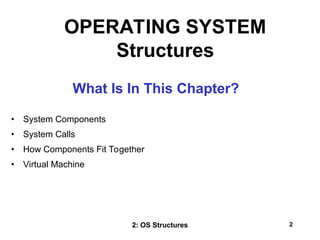
What Is In This Chapter?
• System Components
• System Calls
• How Components Fit Together
• Virtual Machine
OPERATING SYSTEM
Structures
2: OS Structures 3
OPERATING SYSTEM
STRUCTURES
These are the pieces of the system we’ll be looking at:
Process Management
Main Memory Management
File Management
I/O System Management
Secondary Management
Networking
Protection System
Command-Interpreter System
SYSTEM
COMPONENTS
2: OS Structures 4
OPERATING SYSTEM
STRUCTURES
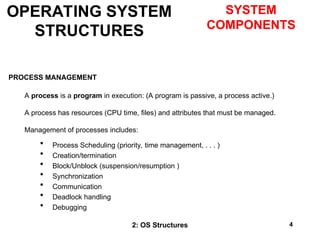
PROCESS MANAGEMENT
A process is a program in execution: (A program is passive, a process active.)
A process has resources (CPU time, files) and attributes that must be managed.
Management of processes includes:
 Process Scheduling (priority, time management, . . . )
 Creation/termination
 Block/Unblock (suspension/resumption )
 Synchronization
 Communication
 Deadlock handling
 Debugging
SYSTEM
COMPONENTS
2: OS Structures 5
MAIN MEMORY MANAGEMENT
 Allocation/de-allocation for processes, files, I/O.
 Maintenance of several processes at a time
 Keep track of who's using what memory
 Movement of process memory to/from secondary storage.
FILE MANAGEMENT
A file is a collection of related information defined by its creator. Commonly, files
represent programs (both source and object forms) and data.
The operating system is responsible for the following activities in connections with file
management:
• File creation and deletion.
• Directory creation and deletion.
• Support of primitives for manipulating files and directories.
• Mapping files onto secondary storage.
• File backup on stable (nonvolatile) storage media.
OPERATING SYSTEM
STRUCTURES
System
Components
2: OS Structures 6
I/O MANAGEMENT
 Buffer caching system
 Generic device driver code
 Drivers for each device - translate read/write requests into disk position
commands.
SECONDARY STORAGE MANAGEMENT
 Disks, tapes, optical, ...
 Free space management ( paging/swapping )
 Storage allocation ( what data goes where on disk )
 Disk scheduling
OPERATING SYSTEM
STRUCTURES
System
Components
2: OS Structures 7
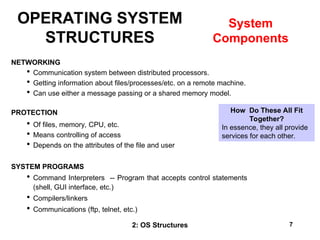
NETWORKING
 Communication system between distributed processors.
 Getting information about files/processes/etc. on a remote machine.
 Can use either a message passing or a shared memory model.
PROTECTION
 Of files, memory, CPU, etc.
 Means controlling of access
 Depends on the attributes of the file and user
SYSTEM PROGRAMS
 Command Interpreters -- Program that accepts control statements
(shell, GUI interface, etc.)
 Compilers/linkers
 Communications (ftp, telnet, etc.)
OPERATING SYSTEM
STRUCTURES
System
Components
How Do These All Fit
Together?
In essence, they all provide
services for each other.
2: OS Structures 8
Modifying the Operating System program for a particular machine. The goal is to include
all the necessary pieces, but not too many extra ones.
 Typically a System can support many possible devices, but any one installation has
only a few of these possibilities.
 Plug and play allows for detection of devices and automatic inclusion of the code
(drivers) necessary to drive these devices.
 A sysgen is usually a link of many OS routines/modules in order to produce an
executable containing the code to run the drivers.
OPERATING SYSTEM
STRUCTURES
System
Tailoring
2: OS Structures 9
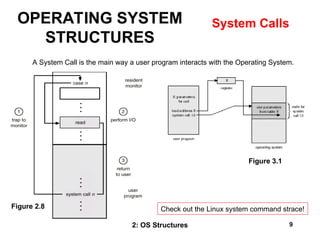
A System Call is the main way a user program interacts with the Operating System.
Figure 3.1
Figure 2.8
OPERATING SYSTEM
STRUCTURES
System Calls
Check out the Linux system command strace!
2: OS Structures 10
HOW A SYSTEM CALL WORKS
Obtain access to system space
Do parameter validation
System resource collection ( locks on
structures )
Ask device/system for requested item
Suspend waiting for device
Interrupt makes this thread ready to run
Wrap-up
Return to user
There are 11 (or more) steps in making the system call
read (fd, buffer, nbytes)
OPERATING SYSTEM
STRUCTURES
System Calls
Linux API
2: OS Structures 11
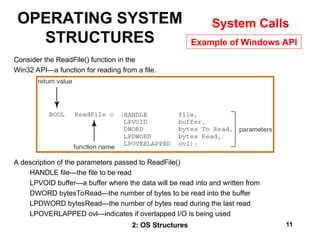
Consider the ReadFile() function in the
Win32 API—a function for reading from a file.
A description of the parameters passed to ReadFile()
HANDLE file—the file to be read
LPVOID buffer—a buffer where the data will be read into and written from
DWORD bytesToRead—the number of bytes to be read into the buffer
LPDWORD bytesRead—the number of bytes read during the last read
LPOVERLAPPED ovl—indicates if overlapped I/O is being used
OPERATING SYSTEM
STRUCTURES
System Calls
Example of Windows API
2: OS Structures 12
OPERATING SYSTEM
STRUCTURES
System Calls
Msg Passing Shared Memory
Two ways of passing
data between programs.
2: OS Structures 13
OPERATING SYSTEM
STRUCTURES
System Calls
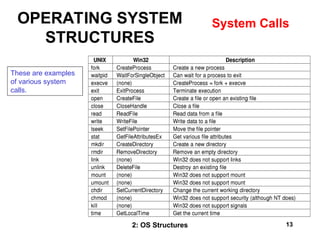
These are examples
of various system
calls.
2: OS Structures 14
A SIMPLE STRUCTURE:
Example of MS-DOS.
Application Programming
Resident System Programming
MS-DOS Drivers
ROM - BIOS Device Drivers
Note how all
layers can touch
the hardware.
Bad News!!
OPERATING SYSTEM
STRUCTURES
How An Operating
System Is Put
Together
2: OS Structures 15
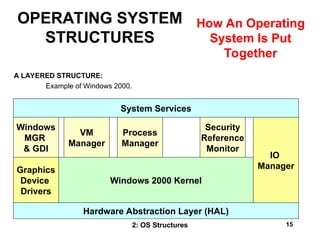
A LAYERED STRUCTURE:
Example of Windows 2000.
System Services
Windows
MGR
& GDI
Windows 2000 Kernel
Hardware Abstraction Layer (HAL)
IO
Manager
Graphics
Device
Drivers
VM
Manager
Security
Reference
Monitor
Process
Manager
OPERATING SYSTEM
STRUCTURES
How An Operating
System Is Put
Together
2: OS Structures 16
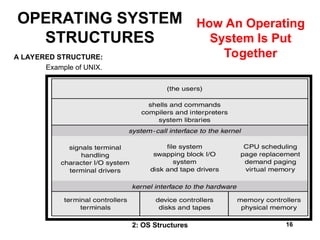
A LAYERED STRUCTURE:
Example of UNIX.
OPERATING SYSTEM
STRUCTURES
How An Operating
System Is Put
Together
2: OS Structures 17
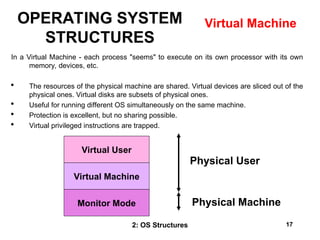
In a Virtual Machine - each process "seems" to execute on its own processor with its own
memory, devices, etc.
 The resources of the physical machine are shared. Virtual devices are sliced out of the
physical ones. Virtual disks are subsets of physical ones.
 Useful for running different OS simultaneously on the same machine.
 Protection is excellent, but no sharing possible.
 Virtual privileged instructions are trapped.
Virtual User
Virtual Machine
Monitor Mode
Physical User
Physical Machine
OPERATING SYSTEM
STRUCTURES
Virtual Machine
2: OS Structures 18
OPERATING SYSTEM
STRUCTURES
Virtual Machine
2: OS Structures 19
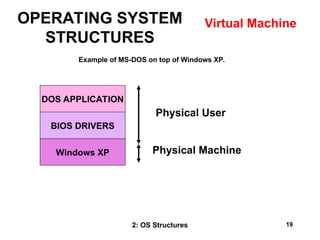
Example of MS-DOS on top of Windows XP.
DOS APPLICATION
BIOS DRIVERS
Windows XP
Physical User
Physical Machine
OPERATING SYSTEM
STRUCTURES
Virtual Machine
2: OS Structures 20
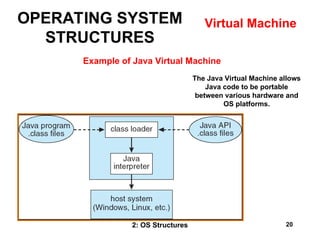
Example of Java Virtual Machine
The Java Virtual Machine allows
Java code to be portable
between various hardware and
OS platforms.
OPERATING SYSTEM
STRUCTURES
Virtual Machine
2: OS Structures 21
OPERATING SYSTEM STRUCTURES
WRAPUP
We’ve completed our second overview of an Operating System – this at
the level of a high flying plane.
We’ve looked at the basic building blocks of an operating system –
processes, memory management, file systems, and seen how they all
connect together.
Now we’ll get into the nitty-gritty, spending considerable time on each
of these pieces.

Section02-Structures.pptdvnfiughidfusffg

  • 1.
    2: OS Structures1 Jerry Breecher OPERATING SYSTEMS STRUCTURES
  • 2.
    2: OS Structures2 What Is In This Chapter? • System Components • System Calls • How Components Fit Together • Virtual Machine OPERATING SYSTEM Structures
  • 3.
    2: OS Structures3 OPERATING SYSTEM STRUCTURES These are the pieces of the system we’ll be looking at: Process Management Main Memory Management File Management I/O System Management Secondary Management Networking Protection System Command-Interpreter System SYSTEM COMPONENTS
  • 4.
    2: OS Structures4 OPERATING SYSTEM STRUCTURES PROCESS MANAGEMENT A process is a program in execution: (A program is passive, a process active.) A process has resources (CPU time, files) and attributes that must be managed. Management of processes includes:  Process Scheduling (priority, time management, . . . )  Creation/termination  Block/Unblock (suspension/resumption )  Synchronization  Communication  Deadlock handling  Debugging SYSTEM COMPONENTS
  • 5.
    2: OS Structures5 MAIN MEMORY MANAGEMENT  Allocation/de-allocation for processes, files, I/O.  Maintenance of several processes at a time  Keep track of who's using what memory  Movement of process memory to/from secondary storage. FILE MANAGEMENT A file is a collection of related information defined by its creator. Commonly, files represent programs (both source and object forms) and data. The operating system is responsible for the following activities in connections with file management: • File creation and deletion. • Directory creation and deletion. • Support of primitives for manipulating files and directories. • Mapping files onto secondary storage. • File backup on stable (nonvolatile) storage media. OPERATING SYSTEM STRUCTURES System Components
  • 6.
    2: OS Structures6 I/O MANAGEMENT  Buffer caching system  Generic device driver code  Drivers for each device - translate read/write requests into disk position commands. SECONDARY STORAGE MANAGEMENT  Disks, tapes, optical, ...  Free space management ( paging/swapping )  Storage allocation ( what data goes where on disk )  Disk scheduling OPERATING SYSTEM STRUCTURES System Components
  • 7.
    2: OS Structures7 NETWORKING  Communication system between distributed processors.  Getting information about files/processes/etc. on a remote machine.  Can use either a message passing or a shared memory model. PROTECTION  Of files, memory, CPU, etc.  Means controlling of access  Depends on the attributes of the file and user SYSTEM PROGRAMS  Command Interpreters -- Program that accepts control statements (shell, GUI interface, etc.)  Compilers/linkers  Communications (ftp, telnet, etc.) OPERATING SYSTEM STRUCTURES System Components How Do These All Fit Together? In essence, they all provide services for each other.
  • 8.
    2: OS Structures8 Modifying the Operating System program for a particular machine. The goal is to include all the necessary pieces, but not too many extra ones.  Typically a System can support many possible devices, but any one installation has only a few of these possibilities.  Plug and play allows for detection of devices and automatic inclusion of the code (drivers) necessary to drive these devices.  A sysgen is usually a link of many OS routines/modules in order to produce an executable containing the code to run the drivers. OPERATING SYSTEM STRUCTURES System Tailoring
  • 9.
    2: OS Structures9 A System Call is the main way a user program interacts with the Operating System. Figure 3.1 Figure 2.8 OPERATING SYSTEM STRUCTURES System Calls Check out the Linux system command strace!
  • 10.
    2: OS Structures10 HOW A SYSTEM CALL WORKS Obtain access to system space Do parameter validation System resource collection ( locks on structures ) Ask device/system for requested item Suspend waiting for device Interrupt makes this thread ready to run Wrap-up Return to user There are 11 (or more) steps in making the system call read (fd, buffer, nbytes) OPERATING SYSTEM STRUCTURES System Calls Linux API
  • 11.
    2: OS Structures11 Consider the ReadFile() function in the Win32 API—a function for reading from a file. A description of the parameters passed to ReadFile() HANDLE file—the file to be read LPVOID buffer—a buffer where the data will be read into and written from DWORD bytesToRead—the number of bytes to be read into the buffer LPDWORD bytesRead—the number of bytes read during the last read LPOVERLAPPED ovl—indicates if overlapped I/O is being used OPERATING SYSTEM STRUCTURES System Calls Example of Windows API
  • 12.
    2: OS Structures12 OPERATING SYSTEM STRUCTURES System Calls Msg Passing Shared Memory Two ways of passing data between programs.
  • 13.
    2: OS Structures13 OPERATING SYSTEM STRUCTURES System Calls These are examples of various system calls.
  • 14.
    2: OS Structures14 A SIMPLE STRUCTURE: Example of MS-DOS. Application Programming Resident System Programming MS-DOS Drivers ROM - BIOS Device Drivers Note how all layers can touch the hardware. Bad News!! OPERATING SYSTEM STRUCTURES How An Operating System Is Put Together
  • 15.
    2: OS Structures15 A LAYERED STRUCTURE: Example of Windows 2000. System Services Windows MGR & GDI Windows 2000 Kernel Hardware Abstraction Layer (HAL) IO Manager Graphics Device Drivers VM Manager Security Reference Monitor Process Manager OPERATING SYSTEM STRUCTURES How An Operating System Is Put Together
  • 16.
    2: OS Structures16 A LAYERED STRUCTURE: Example of UNIX. OPERATING SYSTEM STRUCTURES How An Operating System Is Put Together
  • 17.
    2: OS Structures17 In a Virtual Machine - each process "seems" to execute on its own processor with its own memory, devices, etc.  The resources of the physical machine are shared. Virtual devices are sliced out of the physical ones. Virtual disks are subsets of physical ones.  Useful for running different OS simultaneously on the same machine.  Protection is excellent, but no sharing possible.  Virtual privileged instructions are trapped. Virtual User Virtual Machine Monitor Mode Physical User Physical Machine OPERATING SYSTEM STRUCTURES Virtual Machine
  • 18.
    2: OS Structures18 OPERATING SYSTEM STRUCTURES Virtual Machine
  • 19.
    2: OS Structures19 Example of MS-DOS on top of Windows XP. DOS APPLICATION BIOS DRIVERS Windows XP Physical User Physical Machine OPERATING SYSTEM STRUCTURES Virtual Machine
  • 20.
    2: OS Structures20 Example of Java Virtual Machine The Java Virtual Machine allows Java code to be portable between various hardware and OS platforms. OPERATING SYSTEM STRUCTURES Virtual Machine
  • 21.
    2: OS Structures21 OPERATING SYSTEM STRUCTURES WRAPUP We’ve completed our second overview of an Operating System – this at the level of a high flying plane. We’ve looked at the basic building blocks of an operating system – processes, memory management, file systems, and seen how they all connect together. Now we’ll get into the nitty-gritty, spending considerable time on each of these pieces.