Copyright © 2012 Pearson Education, Inc.Copyright © 2012 Pearson Education, Inc.
Introduction to Search
Algorithms
• Search: Searching is the process of
determining whether or not a given value
exists in a collection of data.
• Two algorithms we will examine:
– Linear search
– Binary search
Copyright © 2012 Pearson Education, Inc.Copyright © 2012 Pearson Education, Inc.
Linear Search
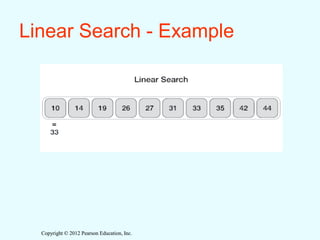
• Also called the sequential search
– Sequentially scan the array, comparing each array
item with the searched value.
– If a match is found; return the index of the matched
element; otherwise return not found.
• Note: linear search can be applied to both sorted and
unsorted arrays.
Copyright © 2012 Pearson Education, Inc.Copyright © 2012 Pearson Education, Inc.
Linear Search - Example
Copyright © 2012 Pearson Education, Inc.Copyright © 2012 Pearson Education, Inc.
Linear Search Algorithm
• Linear Search ( Array A, Value x)
Step 1: Set i to 1
Step 2: if i >= n then go to step 7
Step 3: if A[i] = x then go to step 6
Step 4: Set i to i + 1
Step 5: Go to Step 2
Step 6: Print Element x Found at index i and go to step 8
Step 7: Print element not found
Step 8: Exit
Copyright © 2012 Pearson Education, Inc.Copyright © 2012 Pearson Education, Inc.
Linear Search - Tradeoffs
• Benefits:
– Easy algorithm to understand
– Array can be in any order
• Disadvantages:
– Inefficient (slow): for array of N elements,
Copyright © 2012 Pearson Education, Inc.Copyright © 2012 Pearson Education, Inc.
Binary Search
Binary search is a fast searching algorithm. This
search algorithm works on the principle of divide
and conquer. For this algorithm to work properly,
the data collection should be in the sorted form.
Copyright © 2012 Pearson Education, Inc.Copyright © 2012 Pearson Education, Inc.
Search Procedure of binary search
Binary search looks for a particular item by comparing
the middle most item of the collection. If a match
occurs, then the index of item is returned. If the middle
item is greater than the item, then the item is searched in
the sub-array to the left of the middle item. Otherwise,
the item is searched for in the sub-array to the right of
the middle item. This process continues on the sub-
array.
Copyright © 2012 Pearson Education, Inc.Copyright © 2012 Pearson Education, Inc.
How Binary Search Works?
• For a binary search to work, it is mandatory for the target array to be
sorted.
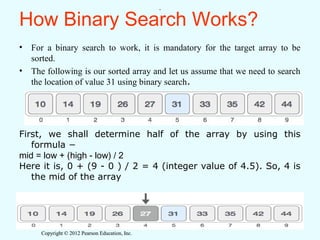
• The following is our sorted array and let us assume that we need to search
the location of value 31 using binary search.
First, we shall determine half of the array by using this
formula −
mid = low + (high - low) / 2
Here it is, 0 + (9 - 0 ) / 2 = 4 (integer value of 4.5). So, 4 is
the mid of the array
.
Copyright © 2012 Pearson Education, Inc.Copyright © 2012 Pearson Education, Inc.
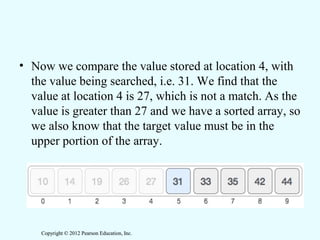
• Now we compare the value stored at location 4, with
the value being searched, i.e. 31. We find that the
value at location 4 is 27, which is not a match. As the
value is greater than 27 and we have a sorted array, so
we also know that the target value must be in the
upper portion of the array.
Copyright © 2012 Pearson Education, Inc.Copyright © 2012 Pearson Education, Inc.
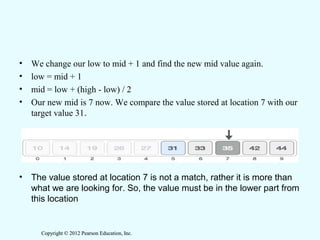
• We change our low to mid + 1 and find the new mid value again.
• low = mid + 1
• mid = low + (high - low) / 2
• Our new mid is 7 now. We compare the value stored at location 7 with our
target value 31.
• The value stored at location 7 is not a match, rather it is more than
what we are looking for. So, the value must be in the lower part from
this location
Copyright © 2012 Pearson Education, Inc.Copyright © 2012 Pearson Education, Inc.
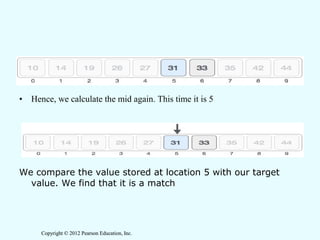
• Hence, we calculate the mid again. This time it is 5
We compare the value stored at location 5 with our target
value. We find that it is a match
Copyright © 2012 Pearson Education, Inc.Copyright © 2012 Pearson Education, Inc.
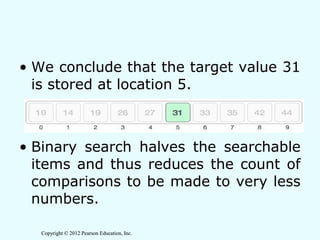
• We conclude that the target value 31
is stored at location 5.
• Binary search halves the searchable
items and thus reduces the count of
comparisons to be made to very less
numbers.
Copyright © 2012 Pearson Education, Inc.Copyright © 2012 Pearson Education, Inc.
Binary Search algorithm
BINARY SEARCH(A(array), N(size of
array), X(Item searched),UB,LB)
This algorithm is used to search an
element in sorted array ‘A’. ITEM is the
element which is to be searched in array .
BEG,END and MID variables are used to
store array index numbers. N is the total
number of filled memory locations.
Step no1: [Initialization]
BEG=LB & END=UB
Step no2: [Search Element]
Repeat No 3, 4, 5 while (BEG<=END)
Step no3: [Calculate MID]
MID=(END+BEG)/2
Step no4: [check element]
IF(ITEM== A[MID]) then
Break
Step no5: [Set BEG and END Pointers]
IF(ITEM< A[MID])
END=MID-1
ELSE
BEG=MID+1
Step no6: IF(ITEM== A[MID])
print “Item Found”
ELSE
Print “Not found”
Step no7 : Exit
Copyright © 2012 Pearson Education, Inc.Copyright © 2012 Pearson Education, Inc.
In the above algorithm we first find the MID of the given list. i.e first and last
index of the list is added and divided by two. After calculation MID, compare the
element at MID with the searched item, if found at the middle of the list then
end the search otherwise compare the item with item at the MID of the list . If
the item is less than the MID item then search the element in the left half of
the list otherwise search the element in the right half of the list . Again
caluculate the MID, but first set the BEG and END indexes as
IF(ITEM< A[MID])
END=MID-1
ELSE
BEG=MID+1
Again compare the item with the element at the MID of the half list. Repeat this
mechanism until the BEG index is greater than the END index, which means
that the whole list is searched and the given item is not found in a list.
Copyright © 2012 Pearson Education, Inc.Copyright © 2012 Pearson Education, Inc.
Binary Search - Tradeoffs
• Benefits:
– Much more efficient than linear search.
• Disadvantages:
– Requires that array elements be sorted
Copyright © 2012 Pearson Education, Inc.Copyright © 2012 Pearson Education, Inc.

Searching

  • 1.
    Copyright © 2012Pearson Education, Inc.Copyright © 2012 Pearson Education, Inc. Introduction to Search Algorithms • Search: Searching is the process of determining whether or not a given value exists in a collection of data. • Two algorithms we will examine: – Linear search – Binary search
  • 2.
    Copyright © 2012Pearson Education, Inc.Copyright © 2012 Pearson Education, Inc. Linear Search • Also called the sequential search – Sequentially scan the array, comparing each array item with the searched value. – If a match is found; return the index of the matched element; otherwise return not found. • Note: linear search can be applied to both sorted and unsorted arrays.
  • 3.
    Copyright © 2012Pearson Education, Inc.Copyright © 2012 Pearson Education, Inc. Linear Search - Example
  • 4.
    Copyright © 2012Pearson Education, Inc.Copyright © 2012 Pearson Education, Inc. Linear Search Algorithm • Linear Search ( Array A, Value x) Step 1: Set i to 1 Step 2: if i >= n then go to step 7 Step 3: if A[i] = x then go to step 6 Step 4: Set i to i + 1 Step 5: Go to Step 2 Step 6: Print Element x Found at index i and go to step 8 Step 7: Print element not found Step 8: Exit
  • 5.
    Copyright © 2012Pearson Education, Inc.Copyright © 2012 Pearson Education, Inc. Linear Search - Tradeoffs • Benefits: – Easy algorithm to understand – Array can be in any order • Disadvantages: – Inefficient (slow): for array of N elements,
  • 6.
    Copyright © 2012Pearson Education, Inc.Copyright © 2012 Pearson Education, Inc. Binary Search Binary search is a fast searching algorithm. This search algorithm works on the principle of divide and conquer. For this algorithm to work properly, the data collection should be in the sorted form.
  • 7.
    Copyright © 2012Pearson Education, Inc.Copyright © 2012 Pearson Education, Inc. Search Procedure of binary search Binary search looks for a particular item by comparing the middle most item of the collection. If a match occurs, then the index of item is returned. If the middle item is greater than the item, then the item is searched in the sub-array to the left of the middle item. Otherwise, the item is searched for in the sub-array to the right of the middle item. This process continues on the sub- array.
  • 8.
    Copyright © 2012Pearson Education, Inc.Copyright © 2012 Pearson Education, Inc. How Binary Search Works? • For a binary search to work, it is mandatory for the target array to be sorted. • The following is our sorted array and let us assume that we need to search the location of value 31 using binary search. First, we shall determine half of the array by using this formula − mid = low + (high - low) / 2 Here it is, 0 + (9 - 0 ) / 2 = 4 (integer value of 4.5). So, 4 is the mid of the array .
  • 9.
    Copyright © 2012Pearson Education, Inc.Copyright © 2012 Pearson Education, Inc. • Now we compare the value stored at location 4, with the value being searched, i.e. 31. We find that the value at location 4 is 27, which is not a match. As the value is greater than 27 and we have a sorted array, so we also know that the target value must be in the upper portion of the array.
  • 10.
    Copyright © 2012Pearson Education, Inc.Copyright © 2012 Pearson Education, Inc. • We change our low to mid + 1 and find the new mid value again. • low = mid + 1 • mid = low + (high - low) / 2 • Our new mid is 7 now. We compare the value stored at location 7 with our target value 31. • The value stored at location 7 is not a match, rather it is more than what we are looking for. So, the value must be in the lower part from this location
  • 11.
    Copyright © 2012Pearson Education, Inc.Copyright © 2012 Pearson Education, Inc. • Hence, we calculate the mid again. This time it is 5 We compare the value stored at location 5 with our target value. We find that it is a match
  • 12.
    Copyright © 2012Pearson Education, Inc.Copyright © 2012 Pearson Education, Inc. • We conclude that the target value 31 is stored at location 5. • Binary search halves the searchable items and thus reduces the count of comparisons to be made to very less numbers.
  • 13.
    Copyright © 2012Pearson Education, Inc.Copyright © 2012 Pearson Education, Inc. Binary Search algorithm BINARY SEARCH(A(array), N(size of array), X(Item searched),UB,LB) This algorithm is used to search an element in sorted array ‘A’. ITEM is the element which is to be searched in array . BEG,END and MID variables are used to store array index numbers. N is the total number of filled memory locations. Step no1: [Initialization] BEG=LB & END=UB Step no2: [Search Element] Repeat No 3, 4, 5 while (BEG<=END) Step no3: [Calculate MID] MID=(END+BEG)/2 Step no4: [check element] IF(ITEM== A[MID]) then Break Step no5: [Set BEG and END Pointers] IF(ITEM< A[MID]) END=MID-1 ELSE BEG=MID+1 Step no6: IF(ITEM== A[MID]) print “Item Found” ELSE Print “Not found” Step no7 : Exit
  • 14.
    Copyright © 2012Pearson Education, Inc.Copyright © 2012 Pearson Education, Inc. In the above algorithm we first find the MID of the given list. i.e first and last index of the list is added and divided by two. After calculation MID, compare the element at MID with the searched item, if found at the middle of the list then end the search otherwise compare the item with item at the MID of the list . If the item is less than the MID item then search the element in the left half of the list otherwise search the element in the right half of the list . Again caluculate the MID, but first set the BEG and END indexes as IF(ITEM< A[MID]) END=MID-1 ELSE BEG=MID+1 Again compare the item with the element at the MID of the half list. Repeat this mechanism until the BEG index is greater than the END index, which means that the whole list is searched and the given item is not found in a list.
  • 15.
    Copyright © 2012Pearson Education, Inc.Copyright © 2012 Pearson Education, Inc. Binary Search - Tradeoffs • Benefits: – Much more efficient than linear search. • Disadvantages: – Requires that array elements be sorted
  • 16.
    Copyright © 2012Pearson Education, Inc.Copyright © 2012 Pearson Education, Inc.