Government Polytechnic Lucknow
INFORMATION
TECHNOLOGY 2ND YEAR
Presented by : Krishnanand Mishra, Sumit Shukla , Ankur Kumar , Utkarsh Tiwari
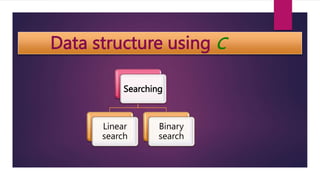
Data structure using C
Searching
Linear
search
Binary
search
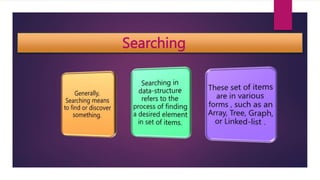
Searching
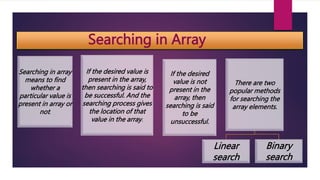
Searching in Array
Searching in array
means to find
whether a
particular value is
present in array or
not.
If the desired value is
present in the array,
then searching is said to
be successful. And the
searching process gives
the location of that
value in the array.
If the desired
value is not
present in the
array, then
searching is said
to be
unsuccessful.
There are two
popular methods
for searching the
array elements.
Linear
search
Binary
search
Linear Search
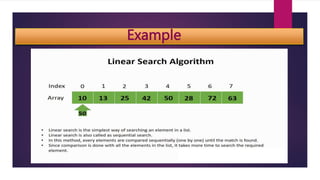
It is a very basic and simple search algorithm.
In linear search we search an element in given array by traversing the array from the
starting till the desired element is found.
Linear search is mostly used to search an unordered list of elements.
like : A[ ] = { 10,8,4,7,6,2,5,1,9};
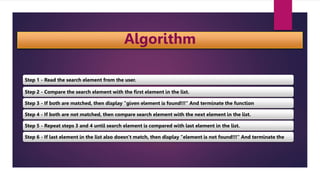
Algorithm
Step 1 - Read the search element from the user.
Step 2 - Compare the search element with the first element in the list.
Step 3 - If both are matched, then display "given element is found!!!" And terminate the function
Step 4 - If both are not matched, then compare search element with the next element in the list.
Step 5 - Repeat steps 3 and 4 until search element is compared with last element in the list.
Step 6 - If last element in the list also doesn't match, then display "element is not found!!!" And terminate the
Example
Code
Int linear_search ( a[ ], LB, UB, item ) // LB= Lower bound, UB= upper bound,
{
int k;
for (k = LB ; k <= UB; K++)
{
if ( a [k] == item )
{
return k ;
}
}
return LB -1;
}
Binary search
Binary search is the search technique that works efficiently on sorted lists.
To search an element into some list using the binary search technique, we must ensure that
the list is sorted.
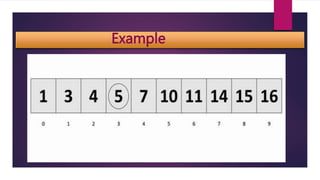
Binary search follows the divide and conquer approach in which the list is divided into two
halves, and the item is compared with the middle element of the list.
If the match is found then, the location of the middle element is returned. Otherwise, we
search into either of the halves depending upon the result produced through the match.
Algorithm
Step 1 - Start searching data from middle of the list.
Step 2 – If it is a match, return the index of the item, and exit.
Step 3 – If it is not a match, probe position.
Step 4 – Divide the list and find the new middle.
Step 5 – If data is greater than middle, search in higher sub-list.
Step 6 – If data is smaller than middle, search in lower sub-list.
Step 7 – Repeat until match
Example
.
Code
Int binary_ search ( A[ ], LB, UB, item ) // LB= Lower bound, UB= Upper bound,
{ int low=LB, high=UB;
int mid=(low + high) / 2;
while( (A[mid]!= item) && ( low<=high ) )
{ if( item<A[mid] )
high = mid -1 ;
else
low = mid +1 ;
mid = (low + high ) / 2;
}
if( A[ mid ]= item )
return min ;
else
return LB -1 ;
}
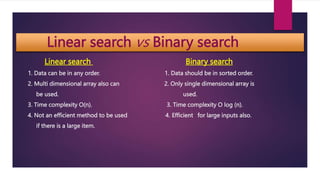
Linear search vs Binary search
Linear search Binary search
1. Data can be in any order. 1. Data should be in sorted order.
2. Multi dimensional array also can 2. Only single dimensional array is
be used. used.
3. Time complexity O(n). 3. Time complexity O log (n).
4. Not an efficient method to be used 4. Efficient for large inputs also.
if there is a large item.
Visualization
,
Thank you

Presentation on Searching and Sorting in C language.pptx

  • 1.
    Government Polytechnic Lucknow INFORMATION TECHNOLOGY2ND YEAR Presented by : Krishnanand Mishra, Sumit Shukla , Ankur Kumar , Utkarsh Tiwari
  • 2.
    Data structure usingC Searching Linear search Binary search
  • 3.
  • 4.
    Searching in Array Searchingin array means to find whether a particular value is present in array or not. If the desired value is present in the array, then searching is said to be successful. And the searching process gives the location of that value in the array. If the desired value is not present in the array, then searching is said to be unsuccessful. There are two popular methods for searching the array elements. Linear search Binary search
  • 5.
    Linear Search It isa very basic and simple search algorithm. In linear search we search an element in given array by traversing the array from the starting till the desired element is found. Linear search is mostly used to search an unordered list of elements. like : A[ ] = { 10,8,4,7,6,2,5,1,9};
  • 6.
    Algorithm Step 1 -Read the search element from the user. Step 2 - Compare the search element with the first element in the list. Step 3 - If both are matched, then display "given element is found!!!" And terminate the function Step 4 - If both are not matched, then compare search element with the next element in the list. Step 5 - Repeat steps 3 and 4 until search element is compared with last element in the list. Step 6 - If last element in the list also doesn't match, then display "element is not found!!!" And terminate the
  • 7.
  • 8.
    Code Int linear_search (a[ ], LB, UB, item ) // LB= Lower bound, UB= upper bound, { int k; for (k = LB ; k <= UB; K++) { if ( a [k] == item ) { return k ; } } return LB -1; }
  • 9.
    Binary search Binary searchis the search technique that works efficiently on sorted lists. To search an element into some list using the binary search technique, we must ensure that the list is sorted. Binary search follows the divide and conquer approach in which the list is divided into two halves, and the item is compared with the middle element of the list. If the match is found then, the location of the middle element is returned. Otherwise, we search into either of the halves depending upon the result produced through the match.
  • 10.
    Algorithm Step 1 -Start searching data from middle of the list. Step 2 – If it is a match, return the index of the item, and exit. Step 3 – If it is not a match, probe position. Step 4 – Divide the list and find the new middle. Step 5 – If data is greater than middle, search in higher sub-list. Step 6 – If data is smaller than middle, search in lower sub-list. Step 7 – Repeat until match
  • 11.
  • 12.
    Code Int binary_ search( A[ ], LB, UB, item ) // LB= Lower bound, UB= Upper bound, { int low=LB, high=UB; int mid=(low + high) / 2; while( (A[mid]!= item) && ( low<=high ) ) { if( item<A[mid] ) high = mid -1 ; else low = mid +1 ; mid = (low + high ) / 2; } if( A[ mid ]= item ) return min ; else return LB -1 ; }
  • 13.
    Linear search vsBinary search Linear search Binary search 1. Data can be in any order. 1. Data should be in sorted order. 2. Multi dimensional array also can 2. Only single dimensional array is be used. used. 3. Time complexity O(n). 3. Time complexity O log (n). 4. Not an efficient method to be used 4. Efficient for large inputs also. if there is a large item.
  • 14.
  • 15.