<?php 
presents 
echo "Google App Engine For 
PHP"; 
?>
A quick slide about SDPHP 
Social and Communications: 
● MeetUp: http://www.meetup.com/SanDiegoPHP/ 
● Facebook: https://www.facebook.com/groups/SanDiegoPUG/ 
● Github: https://github.com/sdphp 
● Twitter: @sdphp 
● IRC: freenode.net #sdphp 
Website: http://www.sdphp.org/ 
● Mentoring Program - http://www.sdphp.org/sdphp-mentoring-program/ 
● PHP Resources - http://www.sdphp.org/php-resources/ 
● Job Listing - http://www.sdphp.org/job-listings/ 
Two Monthly Group Meetings (held on different days) 
● Downtown San Diego 
● North County - Carlsbad 
Speakers welcome 
and get a cool 
SDPHP pint glass.
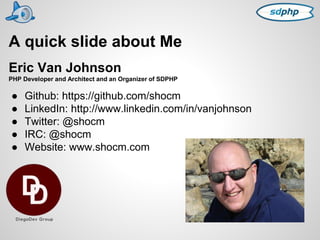
A quick slide about Me 
Eric Van Johnson 
PHP Developer and Architect and an Organizer of SDPHP 
● Github: https://github.com/shocm 
● LinkedIn: http://www.linkedin.com/in/vanjohnson 
● Twitter: @shocm 
● IRC: @shocm 
● Website: www.shocm.com
What is Google App Engine 
Google App Engine (GAE) is Google Platform As A Service 
(PaaS). 
PaaS solutions are designed to supply a full solution stacks 
"as a service". 
Pros include no server administration, no patching, very 
low-maintenance, and auto scaling. 
Cons are that these solutions can be pretty restrictive 
environments to work in. 
Other PHP PaaS Solution include Engine Yard, Red Hat 
OpenShift, Zend PHPCloud, and Appfog
History of GAE 
April 7, 2008 - Google announces Google App 
Engine, their new PaaS solution with support 
for the Python Programming language. 
April 8, 2008 - Feature request #13 was 
opened up asking for PHP support 
2009 - Google adds Support for Java to GAE. 
This, by extension, opened the door to running 
other JVM languages such as Groovy, JRuby, 
Scala, Clojure and Jython.
More History of GAE 
May 2011 (Google I/O 2011) Experimental 
Support for the Google Language Go is 
announced on GAE. 
May 2013 (Google I/O 2013) Experimental 
Support for PHP is announced on GAE. Over 
3300 people had starred the original Issue #13.
GAE and PHP 
GAE (currently version 1.8.0) runs a harden 
version of the Open Source PHP 5.4 interpreter 
Extensions loaded in GAE 
Core, GAE Runtime Module, OAuth, PDO, Reflection, SPL, SimpleXML, apc, 
bcmath, calendar, ctype, date, dom, ereg, filter, gd, 
google_cloud_sql_mysqlnd_plugin, hash, iconv, json, libxml, mbstring, mcrypt, 
memcache, memcached, mysql, mysqli, mysqlnd, openssl, pcre, pdo_mysql, 
session, shmop, soap, standard, tokenizer, urlfetch_stream_wrapper_plugin, 
xml, xmlreader, xmlwriter, zlib
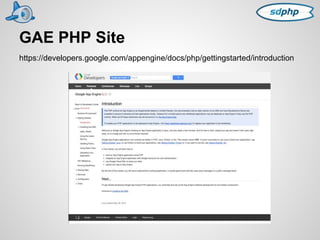
GAE PHP Site 
https://developers.google.com/appengine/docs/php/gettingstarted/introduction
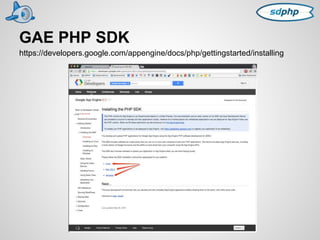
GAE PHP SDK 
https://developers.google.com/appengine/docs/php/gettingstarted/installing
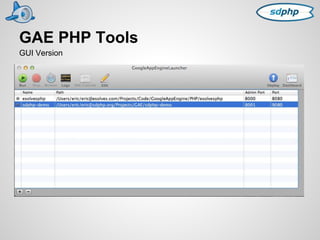
GAE PHP Tools 
GUI Version
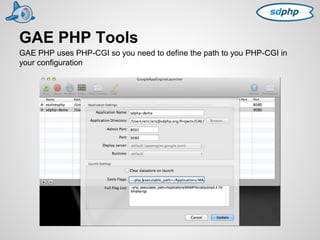
GAE PHP Tools 
GAE PHP uses PHP-CGI so you need to define the path to you PHP-CGI in 
your configuration
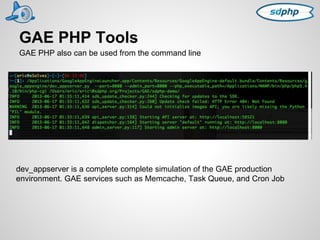
GAE PHP Tools 
GAE PHP also can be used from the command line 
dev_appserver is a complete complete simulation of the GAE production 
environment. GAE services such as Memcache, Task Queue, and Cron Job
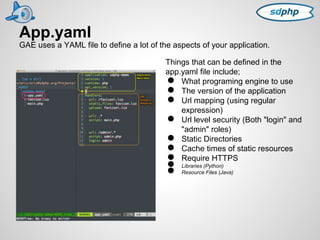
App.yaml 
GAE uses a YAML file to define a lot of the aspects of your application. 
Things that can be defined in the 
app.yaml file include; 
● What programing engine to use 
● The version of the application 
● Url mapping (using regular 
expression) 
● Url level security (Both "login" and 
"admin" roles) 
● Static Directories 
● Cache times of static resources 
● Require HTTPS ● Libraries (Python) ● Resource Files (Java)
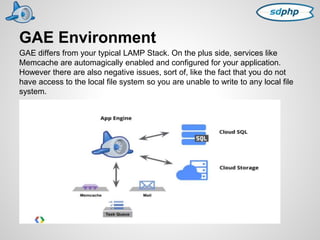
GAE Environment 
GAE differs from your typical LAMP Stack. On the plus side, services like 
Memcache are automagically enabled and configured for your application. 
However there are also negative issues, sort of, like the fact that you do not 
have access to the local file system so you are unable to write to any local file 
system.
Google Cloud SQL 
● A fully managed, MySQL 5.5 compatible 
database service. 
● Highly durable, highly available 
● Automatically backed up. 
● One Click restores 
Google Cloud SQL propagates writes out to multiple datacenters. 
Pricing 
Interesting pricing models. You can pay for Cloud SQL on a per hour usage. You can also pay for the 
service in the increments of time you are actually doing reads and writes to the database. This comes in 
handy for QA and Staging environments where you may only use the database for very small amounts of 
time. The Database can sit there, not being used, and you would not pay for it. 
Pricing ranges from $0.10 for a million I/O to $1.46 a day up to $46.84 a day. 
https://cloud.google.com/pricing/cloud-sql
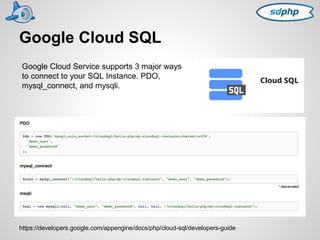
Google Cloud SQL 
Google Cloud Service supports 3 major ways 
to connect to your SQL Instance. PDO, 
mysql_connect, and mysqli. 
https://developers.google.com/appengine/docs/php/cloud-sql/developers-guide 
* deprecated
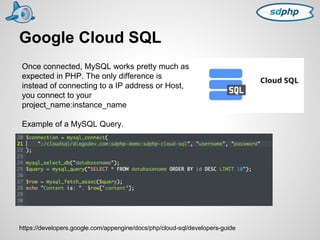
Google Cloud SQL 
Once connected, MySQL works pretty much as 
expected in PHP. The only difference is 
instead of connecting to a IP address or Host, 
you connect to your 
project_name:instance_name 
Example of a MySQL Query. 
https://developers.google.com/appengine/docs/php/cloud-sql/developers-guide
Google Cloud Storage 
● Fast, reliable, and durable 
● Fine grained access control (you can 
control exactly who can read and write to 
each file) 
● Can be used to publish public web content 
● Access your files from GAE, RESTful 
APIs, or Web Based GUI 
The simplest way to write data to Google Cloud Storage from your app is to use 
file_put_contents as follows: 
$options = [ "gs" => [ "Content-Type" => "text/plain" ]]; 
$ctx = stream_context_create($options); 
file_put_contents("gs://my_bucket/hello.txt", "Hello", 0, $ctx); 
Alternatively, you could use fopen/fwrite to write data in a streaming fashion instead 
$fp = fopen("gs://my_bucket/some_file.txt", "w"); 
fwrite($fp, "Hello"); 
fclose($fp); 
https://developers.google.com/appengine/docs/php/googlestorage/overview
Memcache 
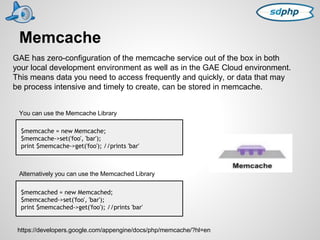
GAE has zero-configuration of the memcache service out of the box in both 
your local development environment as well as in the GAE Cloud environment. 
This means data you need to access frequently and quickly, or data that may 
be process intensive and timely to create, can be stored in memcache. 
You can use the Memcache Library 
$memcache = new Memcache; 
$memcache->set('foo', 'bar'); 
print $memcache->get('foo'); //prints 'bar' 
Alternatively you can use the Memcached Library 
$memcached = new Memcached; 
$memcached->set('foo', 'bar'); 
print $memcached->get('foo'); //prints 'bar' 
https://developers.google.com/appengine/docs/php/memcache/?hl=en
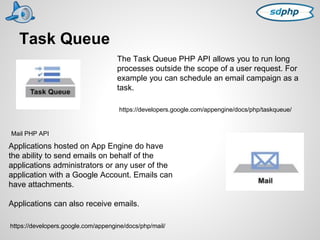
Task Queue 
The Task Queue PHP API allows you to run long 
processes outside the scope of a user request. For 
example you can schedule an email campaign as a 
task. 
https://developers.google.com/appengine/docs/php/taskqueue/ 
Mail PHP API 
Applications hosted on App Engine do have 
the ability to send emails on behalf of the 
applications administrators or any user of the 
application with a Google Account. Emails can 
have attachments. 
Applications can also receive emails. 
https://developers.google.com/appengine/docs/php/mail/
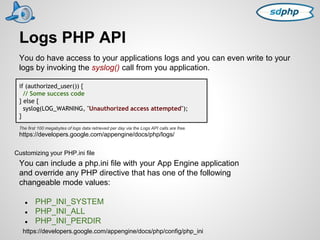
Logs PHP API 
You do have access to your applications logs and you can even write to your 
logs by invoking the syslog() call from you application. 
if (authorized_user()) { 
// Some success code 
} else { 
syslog(LOG_WARNING, "Unauthorized access attempted"); 
} 
The first 100 megabytes of logs data retrieved per day via the Logs API calls are free. 
https://developers.google.com/appengine/docs/php/logs/ 
Customizing your PHP.ini file 
You can include a php.ini file with your App Engine application 
and override any PHP directive that has one of the following 
changeable mode values: 
● PHP_INI_SYSTEM 
● PHP_INI_ALL 
● PHP_INI_PERDIR 
https://developers.google.com/appengine/docs/php/config/php_ini
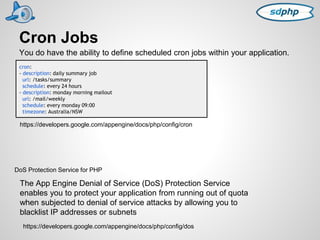
Cron Jobs 
You do have the ability to define scheduled cron jobs within your application. 
cron: 
- description: daily summary job 
url: /tasks/summary 
schedule: every 24 hours 
- description: monday morning mailout 
url: /mail/weekly 
schedule: every monday 09:00 
timezone: Australia/NSW 
https://developers.google.com/appengine/docs/php/config/cron 
DoS Protection Service for PHP 
The App Engine Denial of Service (DoS) Protection Service 
enables you to protect your application from running out of quota 
when subjected to denial of service attacks by allowing you to 
blacklist IP addresses or subnets 
https://developers.google.com/appengine/docs/php/config/dos
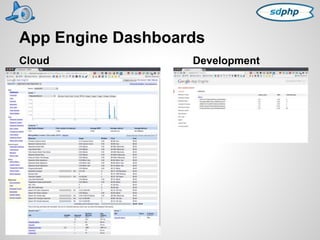
App Engine Dashboards 
Cloud Development
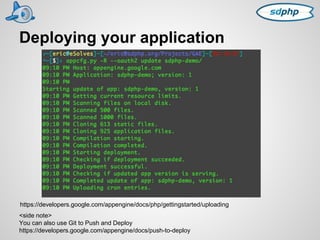
Deploying your application 
https://developers.google.com/appengine/docs/php/gettingstarted/uploading 
<side note> 
You can also use Git to Push and Deploy 
https://developers.google.com/appengine/docs/push-to-deploy
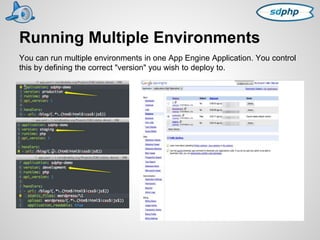
Running Multiple Environments 
You can run multiple environments in one App Engine Application. You control 
this by defining the correct "version" you wish to deploy to.
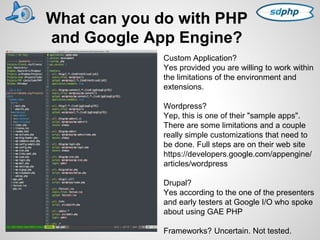
What can you do with PHP 
and Google App Engine? 
Custom Application? 
Yes provided you are willing to work within 
the limitations of the environment and 
extensions. 
Wordpress? 
Yep, this is one of their "sample apps". 
There are some limitations and a couple 
really simple customizations that need to 
be done. Full steps are on their web site 
https://developers.google.com/appengine/ 
articles/wordpress 
Drupal? 
Yes according to the one of the presenters 
and early testers at Google I/O who spoke 
about using GAE PHP 
Frameworks? Uncertain. Not tested.
DEMO TIME 
IF WE HAVE 
TIME ...
Drawbacks ... 
● Very limited "Free Tier" to use. 
● Lack of support for many established and popular PHP 
solutions such as CMS and eCommerce Solutions. 
BU$INE$$ IDEA!!!! 
Customize established and popular PHP solutions such as 
CMS and eCommerce solutions to run on Google App Engine
THANK YOU! 
Eric Van Johnson 
● Twitter: @shocm 
● IRC: @shocm 
● Website: www.shocm.com

Google App Engine for PHP

  • 1.
    <?php presents echo"Google App Engine For PHP"; ?>
  • 2.
    A quick slideabout SDPHP Social and Communications: ● MeetUp: http://www.meetup.com/SanDiegoPHP/ ● Facebook: https://www.facebook.com/groups/SanDiegoPUG/ ● Github: https://github.com/sdphp ● Twitter: @sdphp ● IRC: freenode.net #sdphp Website: http://www.sdphp.org/ ● Mentoring Program - http://www.sdphp.org/sdphp-mentoring-program/ ● PHP Resources - http://www.sdphp.org/php-resources/ ● Job Listing - http://www.sdphp.org/job-listings/ Two Monthly Group Meetings (held on different days) ● Downtown San Diego ● North County - Carlsbad Speakers welcome and get a cool SDPHP pint glass.
  • 3.
    A quick slideabout Me Eric Van Johnson PHP Developer and Architect and an Organizer of SDPHP ● Github: https://github.com/shocm ● LinkedIn: http://www.linkedin.com/in/vanjohnson ● Twitter: @shocm ● IRC: @shocm ● Website: www.shocm.com
  • 4.
    What is GoogleApp Engine Google App Engine (GAE) is Google Platform As A Service (PaaS). PaaS solutions are designed to supply a full solution stacks "as a service". Pros include no server administration, no patching, very low-maintenance, and auto scaling. Cons are that these solutions can be pretty restrictive environments to work in. Other PHP PaaS Solution include Engine Yard, Red Hat OpenShift, Zend PHPCloud, and Appfog
  • 5.
    History of GAE April 7, 2008 - Google announces Google App Engine, their new PaaS solution with support for the Python Programming language. April 8, 2008 - Feature request #13 was opened up asking for PHP support 2009 - Google adds Support for Java to GAE. This, by extension, opened the door to running other JVM languages such as Groovy, JRuby, Scala, Clojure and Jython.
  • 6.
    More History ofGAE May 2011 (Google I/O 2011) Experimental Support for the Google Language Go is announced on GAE. May 2013 (Google I/O 2013) Experimental Support for PHP is announced on GAE. Over 3300 people had starred the original Issue #13.
  • 7.
    GAE and PHP GAE (currently version 1.8.0) runs a harden version of the Open Source PHP 5.4 interpreter Extensions loaded in GAE Core, GAE Runtime Module, OAuth, PDO, Reflection, SPL, SimpleXML, apc, bcmath, calendar, ctype, date, dom, ereg, filter, gd, google_cloud_sql_mysqlnd_plugin, hash, iconv, json, libxml, mbstring, mcrypt, memcache, memcached, mysql, mysqli, mysqlnd, openssl, pcre, pdo_mysql, session, shmop, soap, standard, tokenizer, urlfetch_stream_wrapper_plugin, xml, xmlreader, xmlwriter, zlib
  • 8.
    GAE PHP Site https://developers.google.com/appengine/docs/php/gettingstarted/introduction
  • 9.
    GAE PHP SDK https://developers.google.com/appengine/docs/php/gettingstarted/installing
  • 10.
    GAE PHP Tools GUI Version
  • 11.
    GAE PHP Tools GAE PHP uses PHP-CGI so you need to define the path to you PHP-CGI in your configuration
  • 12.
    GAE PHP Tools GAE PHP also can be used from the command line dev_appserver is a complete complete simulation of the GAE production environment. GAE services such as Memcache, Task Queue, and Cron Job
  • 13.
    App.yaml GAE usesa YAML file to define a lot of the aspects of your application. Things that can be defined in the app.yaml file include; ● What programing engine to use ● The version of the application ● Url mapping (using regular expression) ● Url level security (Both "login" and "admin" roles) ● Static Directories ● Cache times of static resources ● Require HTTPS ● Libraries (Python) ● Resource Files (Java)
  • 14.
    GAE Environment GAEdiffers from your typical LAMP Stack. On the plus side, services like Memcache are automagically enabled and configured for your application. However there are also negative issues, sort of, like the fact that you do not have access to the local file system so you are unable to write to any local file system.
  • 15.
    Google Cloud SQL ● A fully managed, MySQL 5.5 compatible database service. ● Highly durable, highly available ● Automatically backed up. ● One Click restores Google Cloud SQL propagates writes out to multiple datacenters. Pricing Interesting pricing models. You can pay for Cloud SQL on a per hour usage. You can also pay for the service in the increments of time you are actually doing reads and writes to the database. This comes in handy for QA and Staging environments where you may only use the database for very small amounts of time. The Database can sit there, not being used, and you would not pay for it. Pricing ranges from $0.10 for a million I/O to $1.46 a day up to $46.84 a day. https://cloud.google.com/pricing/cloud-sql
  • 16.
    Google Cloud SQL Google Cloud Service supports 3 major ways to connect to your SQL Instance. PDO, mysql_connect, and mysqli. https://developers.google.com/appengine/docs/php/cloud-sql/developers-guide * deprecated
  • 17.
    Google Cloud SQL Once connected, MySQL works pretty much as expected in PHP. The only difference is instead of connecting to a IP address or Host, you connect to your project_name:instance_name Example of a MySQL Query. https://developers.google.com/appengine/docs/php/cloud-sql/developers-guide
  • 18.
    Google Cloud Storage ● Fast, reliable, and durable ● Fine grained access control (you can control exactly who can read and write to each file) ● Can be used to publish public web content ● Access your files from GAE, RESTful APIs, or Web Based GUI The simplest way to write data to Google Cloud Storage from your app is to use file_put_contents as follows: $options = [ "gs" => [ "Content-Type" => "text/plain" ]]; $ctx = stream_context_create($options); file_put_contents("gs://my_bucket/hello.txt", "Hello", 0, $ctx); Alternatively, you could use fopen/fwrite to write data in a streaming fashion instead $fp = fopen("gs://my_bucket/some_file.txt", "w"); fwrite($fp, "Hello"); fclose($fp); https://developers.google.com/appengine/docs/php/googlestorage/overview
  • 19.
    Memcache GAE haszero-configuration of the memcache service out of the box in both your local development environment as well as in the GAE Cloud environment. This means data you need to access frequently and quickly, or data that may be process intensive and timely to create, can be stored in memcache. You can use the Memcache Library $memcache = new Memcache; $memcache->set('foo', 'bar'); print $memcache->get('foo'); //prints 'bar' Alternatively you can use the Memcached Library $memcached = new Memcached; $memcached->set('foo', 'bar'); print $memcached->get('foo'); //prints 'bar' https://developers.google.com/appengine/docs/php/memcache/?hl=en
  • 20.
    Task Queue TheTask Queue PHP API allows you to run long processes outside the scope of a user request. For example you can schedule an email campaign as a task. https://developers.google.com/appengine/docs/php/taskqueue/ Mail PHP API Applications hosted on App Engine do have the ability to send emails on behalf of the applications administrators or any user of the application with a Google Account. Emails can have attachments. Applications can also receive emails. https://developers.google.com/appengine/docs/php/mail/
  • 21.
    Logs PHP API You do have access to your applications logs and you can even write to your logs by invoking the syslog() call from you application. if (authorized_user()) { // Some success code } else { syslog(LOG_WARNING, "Unauthorized access attempted"); } The first 100 megabytes of logs data retrieved per day via the Logs API calls are free. https://developers.google.com/appengine/docs/php/logs/ Customizing your PHP.ini file You can include a php.ini file with your App Engine application and override any PHP directive that has one of the following changeable mode values: ● PHP_INI_SYSTEM ● PHP_INI_ALL ● PHP_INI_PERDIR https://developers.google.com/appengine/docs/php/config/php_ini
  • 22.
    Cron Jobs Youdo have the ability to define scheduled cron jobs within your application. cron: - description: daily summary job url: /tasks/summary schedule: every 24 hours - description: monday morning mailout url: /mail/weekly schedule: every monday 09:00 timezone: Australia/NSW https://developers.google.com/appengine/docs/php/config/cron DoS Protection Service for PHP The App Engine Denial of Service (DoS) Protection Service enables you to protect your application from running out of quota when subjected to denial of service attacks by allowing you to blacklist IP addresses or subnets https://developers.google.com/appengine/docs/php/config/dos
  • 23.
    App Engine Dashboards Cloud Development
  • 24.
    Deploying your application https://developers.google.com/appengine/docs/php/gettingstarted/uploading <side note> You can also use Git to Push and Deploy https://developers.google.com/appengine/docs/push-to-deploy
  • 25.
    Running Multiple Environments You can run multiple environments in one App Engine Application. You control this by defining the correct "version" you wish to deploy to.
  • 26.
    What can youdo with PHP and Google App Engine? Custom Application? Yes provided you are willing to work within the limitations of the environment and extensions. Wordpress? Yep, this is one of their "sample apps". There are some limitations and a couple really simple customizations that need to be done. Full steps are on their web site https://developers.google.com/appengine/ articles/wordpress Drupal? Yes according to the one of the presenters and early testers at Google I/O who spoke about using GAE PHP Frameworks? Uncertain. Not tested.
  • 27.
    DEMO TIME IFWE HAVE TIME ...
  • 28.
    Drawbacks ... ●Very limited "Free Tier" to use. ● Lack of support for many established and popular PHP solutions such as CMS and eCommerce Solutions. BU$INE$$ IDEA!!!! Customize established and popular PHP solutions such as CMS and eCommerce solutions to run on Google App Engine
  • 29.
    THANK YOU! EricVan Johnson ● Twitter: @shocm ● IRC: @shocm ● Website: www.shocm.com