First course : Introduction
Resource of photo : https://zh.wikipedia.org/wiki/Scratch
 It is easy to understand the concept of
programming and train the capability of logic.
 It is also easy to combine with some
hardware, like a smoke sensor.
 Scratch will let you have more imagination
and creativity.
Why I learn Scratch
 How about make a luggage?
Auto luggage
 How about make a robot?
football game of robot (2)
 How about make a fighting game?
Fighting game
What things you can do
if you learn programming?
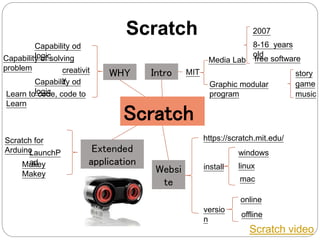
Scratch
Scratch video
Scratch
WHY
Extended
application
Capability of solving
problem creativit
yCapability od
logicLearn to code, code to
Learn
Capability od
logic
Scratch for
ArduinoLaunchP
adMakey
Makey
Intro
Graphic modular
program
story
game
music
MIT
Media Lab
2007
8-16 years
old
free software
Websi
te
https://scratch.mit.edu/
install
windows
linux
mac
versio
n
online
offline
Scratch Website
 https://scratch.mit.edu/
 You can apply for an account for free, then you
can share your project for others and see the
projects of other man.
 You also can create a studio to save your
projects.
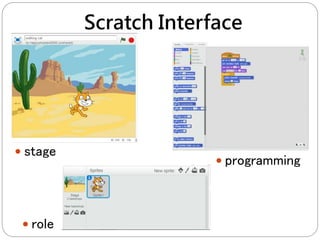
Scratch Interface
 programming
 stage
 role
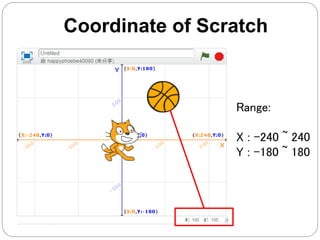
Coordinate of Scratch
Range:
X : -240 ~ 240
Y : -180 ~ 180
Challenge time
• Walking cat
https://scratch.mit.edu/projects/17383910
5/
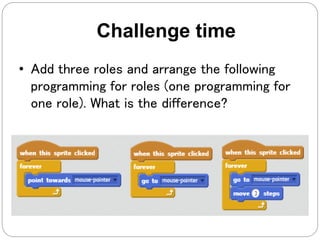
• Add three roles and arrange the following
programming for roles (one programming for
one role). What is the difference?
Challenge time
Concept of Programming
 Instruction:Each brick represents an
instruction
 Sequence: The instructions will be executed
in order
 Examples of reality: recipes, DIY furniture
assembly instructions
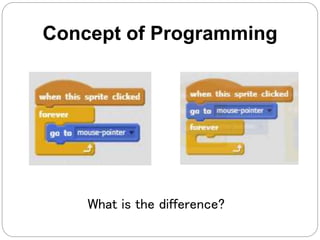
What is the difference?
Concept of Programming
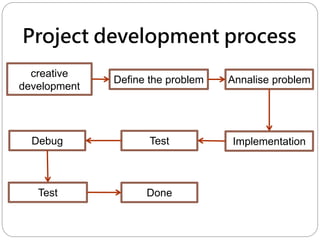
Project development process
creative
development
Define the problem Annalise problem
ImplementationTestDebug
Test Done
Review
 Concept of Programming:Instruction,
Sequence
 Project development process
Reference
 https://scratch.mit.edu/
 https://web.media.mit.edu/~mres/papers/L2
CC2L-handout.pdf

Scratch Introduction

Editor's Notes

  • #2 老師提前20分到教室準備 ● 上課前,板書下列 4 點在黑板上 happyphoebe40090 a1b2c3d4ABCD 學生座位及名單 a. scratch註冊時需要的電子郵件:(老師提供) happyphoebe40090@yahoo.com.tw e5f6i7j8EFIJ b. 班級工作室網址:(老師自建新工作室 工作室名字範例:台北金華教室星期六10:00)(工作室網址設好後回傳給公司) https://scratch.mit.edu/studios/4264279/ c. 公用帳號:(老師提供,提供試聽生使用) happyphoebe40090@yahoo.com.tw happy40090 a1b2c3d4ABCD d. 取名 – 儲存 – 分享 檔案取名 學生英文名稱加日期 ● 電腦先開機,然後闔上,等學生進教室 ● 教師自我介紹、教室規則說明 -自我介紹(要有哏,好笑一點) -鼓勵孩子表達想法,不要怕犯錯 獎勵方法 -學生在自己的講義上加v -老師會告知學生加v數(1-3個) -何時?(舉手發言/發問/良好表現/課堂挑戦完成) -5個v蓋一個章,集章可以換獎品(獎品兑換表在學生講義內,自行參考) -完成回家挑戰可以直接蓋2個章 教室規則 -桌面乾淨(只有文具/講義),其它放抽屜 -不要吃東西 -想上厠所隨時舉手 -聽到321的3時----手放大腿、眼看老師(馬上練習幾遍,然後加v鼓勵) -聽到『GO』時----才可以動電腦,開始操作