School Presentation Marian Merritt, Norton Internet Safety Advocate
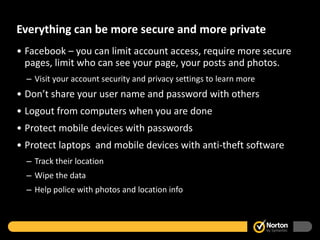
Everything can be more secure and more private Facebook – you can limit account access, require more secure pages, limit who can see your page, your posts and photos.  Visit your account security and privacy settings to learn more Don’t share your user name and password with others Logout from computers when you are done Protect mobile devices with passwords Protect laptops  and mobile devices with anti-theft software Track their location Wipe the data Help police with photos and location info
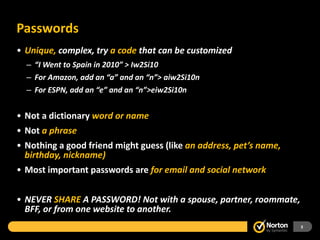
Passwords Unique,  complex, try  a code  that can be customized “ I Went to Spain in 2010” > Iw2Si10 For Amazon, add an “a” and an “n”> aiw2Si10n For ESPN, add an “e” and an “n”>eiw2Si10n Not a dictionary  word or name Not  a phrase Nothing a good friend might guess (like  an address, pet’s name, birthday, nickname) Most important passwords are  for email and social network NEVER  SHARE  A   PASSWORD! Not with a spouse, partner, roommate, BFF, or from one website to another.
Online Reputation and Privacy
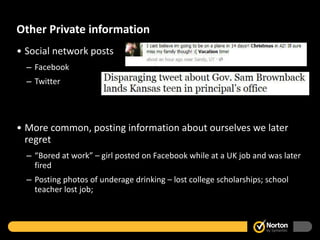
Other Private information Social network posts Facebook Twitter More common, posting information about ourselves we later regret “ Bored at work” – girl posted on Facebook while at a UK job and was later fired Posting photos of underage drinking – lost college scholarships; school teacher lost job;
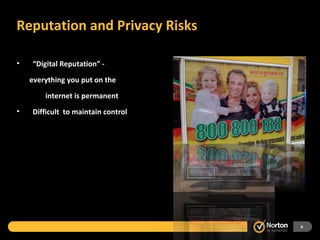
Reputation and Privacy Risks “ Digital Reputation” - everything you put on the    internet is permanent Difficult  to maintain control
Recognizing and Stopping Spam
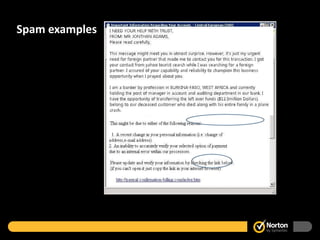
What is Spam? Unwanted emails Up to 80% of the world’s email is spam Some is dangerous: links to websites with malware attachments that have viruses in them Phishing emails – offers that are dangerous or fake
Spam examples
Avoiding Spam and Staying Safe Never click unknown links or reply to these emails Check sender’s email or web address. Look at the part that is “.com” or “.gov”. Whatever is just to the left is the website. i.e. onlinefamily.norton.com = a norton website Norton.onlinefamily.com is not. Never respond to “urgent” or “emergency” emails Never give out your private information like passwords, account number, social security numbers, etc. Just because it looks legit, or has the right logos doesn’t mean it is Don’t click links, go to the website and login as normal to see if your account needs attention
Avoiding Viruses and Malware
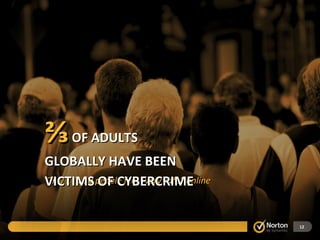
Only  1 in 10  people feel “very safe” online ⅔   OF ADULTS GLOBALLY HAVE BEEN VICTIMS OF CYBERCRIME
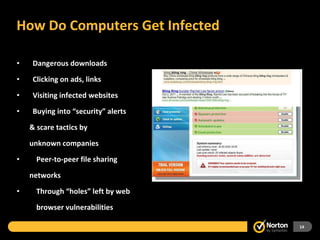
How Do Computers Get Infected Dangerous downloads Clicking on ads, links Visiting infected websites Buying into “security” alerts & scare tactics by  unknown companies Peer-to-peer file sharing networks Through “holes” left by web   browser vulnerabilities
Spotting Virus or Malware Infection Your computer might run more slowly or have trouble starting Some programs might not start, especially your security software You might see flickering hard drive light when you aren’t using computer When you look at your computer’s list of programs you might spot odd listings OFTEN YOU CAN’T EVEN TELL!!! Best bet: run security software at all times, regularly scan the computer and let your parents know if something weird happens when you are online.
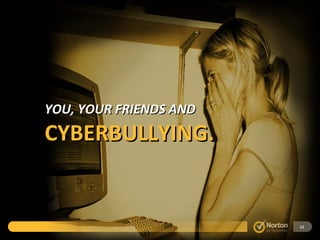
YOU, YOUR FRIENDS AND CYBERBULLYING.
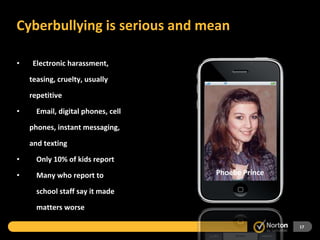
Cyberbullying is serious and mean  Electronic harassment,  teasing, cruelty, usually repetitive Email, digital phones, cell phones, instant messaging, and texting Only 10% of kids report Many who report to    school staff say it made    matters worse Tyler Clementi Megan Meier Phoebe Prince
Tips for Dealing with Cyberbullying Most kids don’t cyberbully! Work together as a community If you see cyberbullying, don’t be a silent bystander. Do something! Talk to your classmates if they are being teased online, be a friend! Involve your parents, teachers and other adults. If there’s too much “drama”, turn it off. Get off the computer, mobile phone and find something else to do.  Talk about it  before it happens Don’t reply, Keep copies Set rules  and consequences Don’t let bystander off the hook
Review and Wrapping up Passwords – why they matter, how to create good ones Privacy and reputation – what can happen when you aren’t careful Spam – recognizing it, avoiding it Viruses – keep the computer clean  Cyberbullying – make your school “drama free”

School presentation

  • 1.
    School Presentation MarianMerritt, Norton Internet Safety Advocate
  • 2.
    Everything can bemore secure and more private Facebook – you can limit account access, require more secure pages, limit who can see your page, your posts and photos. Visit your account security and privacy settings to learn more Don’t share your user name and password with others Logout from computers when you are done Protect mobile devices with passwords Protect laptops and mobile devices with anti-theft software Track their location Wipe the data Help police with photos and location info
  • 3.
    Passwords Unique, complex, try a code that can be customized “ I Went to Spain in 2010” > Iw2Si10 For Amazon, add an “a” and an “n”> aiw2Si10n For ESPN, add an “e” and an “n”>eiw2Si10n Not a dictionary word or name Not a phrase Nothing a good friend might guess (like an address, pet’s name, birthday, nickname) Most important passwords are for email and social network NEVER SHARE A PASSWORD! Not with a spouse, partner, roommate, BFF, or from one website to another.
  • 4.
  • 5.
    Other Private informationSocial network posts Facebook Twitter More common, posting information about ourselves we later regret “ Bored at work” – girl posted on Facebook while at a UK job and was later fired Posting photos of underage drinking – lost college scholarships; school teacher lost job;
  • 6.
    Reputation and PrivacyRisks “ Digital Reputation” - everything you put on the internet is permanent Difficult to maintain control
  • 7.
  • 8.
    What is Spam?Unwanted emails Up to 80% of the world’s email is spam Some is dangerous: links to websites with malware attachments that have viruses in them Phishing emails – offers that are dangerous or fake
  • 9.
  • 10.
    Avoiding Spam andStaying Safe Never click unknown links or reply to these emails Check sender’s email or web address. Look at the part that is “.com” or “.gov”. Whatever is just to the left is the website. i.e. onlinefamily.norton.com = a norton website Norton.onlinefamily.com is not. Never respond to “urgent” or “emergency” emails Never give out your private information like passwords, account number, social security numbers, etc. Just because it looks legit, or has the right logos doesn’t mean it is Don’t click links, go to the website and login as normal to see if your account needs attention
  • 11.
  • 12.
    Only 1in 10 people feel “very safe” online ⅔ OF ADULTS GLOBALLY HAVE BEEN VICTIMS OF CYBERCRIME
  • 14.
    How Do ComputersGet Infected Dangerous downloads Clicking on ads, links Visiting infected websites Buying into “security” alerts & scare tactics by unknown companies Peer-to-peer file sharing networks Through “holes” left by web browser vulnerabilities
  • 15.
    Spotting Virus orMalware Infection Your computer might run more slowly or have trouble starting Some programs might not start, especially your security software You might see flickering hard drive light when you aren’t using computer When you look at your computer’s list of programs you might spot odd listings OFTEN YOU CAN’T EVEN TELL!!! Best bet: run security software at all times, regularly scan the computer and let your parents know if something weird happens when you are online.
  • 16.
    YOU, YOUR FRIENDSAND CYBERBULLYING.
  • 17.
    Cyberbullying is seriousand mean Electronic harassment, teasing, cruelty, usually repetitive Email, digital phones, cell phones, instant messaging, and texting Only 10% of kids report Many who report to school staff say it made matters worse Tyler Clementi Megan Meier Phoebe Prince
  • 18.
    Tips for Dealingwith Cyberbullying Most kids don’t cyberbully! Work together as a community If you see cyberbullying, don’t be a silent bystander. Do something! Talk to your classmates if they are being teased online, be a friend! Involve your parents, teachers and other adults. If there’s too much “drama”, turn it off. Get off the computer, mobile phone and find something else to do. Talk about it before it happens Don’t reply, Keep copies Set rules and consequences Don’t let bystander off the hook
  • 19.
    Review and Wrappingup Passwords – why they matter, how to create good ones Privacy and reputation – what can happen when you aren’t careful Spam – recognizing it, avoiding it Viruses – keep the computer clean Cyberbullying – make your school “drama free”

Editor's Notes

  • #4 From Gawker hack; 13 most common passwords used (of millions of accounts): 123456 Password 12345678 Lifehack Qwerty abc123 111111 Monkey Consumer 12345 0 Letmein Trustno1 Most common Iphone passwords: 0000, 1234, 2580 (straight shot down keypad) Most important two passwords are your email and social network? Because with email I can hit “forgotmy password” at almost any account and get the code to reset yours. With your social network I can spread a scam to all your friends and make money or spread malware. Or just embarrass you by using your account and posting silly or embarassing stuff. Sharing – lots of girls will test their friendships by saying you’re not “BFF” until you share a FB password. Or boyfriend/girlfriends will post for each other or share an account, then whenthey break up it’s a disaster.
  • #5 So what about the dumb stuff we do to hurt ourselves online? Those are things that can damage our online reputation and privacy.
  • #7 What we all need to know is that everything we post or send online is permanent. Even if you remove it, someone else might have kept it. Even an instant message can be stored in a history or cut and paste into a document. Here’s Alison Chang from the midwest. She went to a BBQ at her church, her photo was taken and posted to Flickr. There, because it wasn’t protected by the right copyright, it was reused in an Australian bus bench ad without her permission. She definitely didn’t get paid to be their model. And all they had to do is display in that white box in the lower left part of the ad was a credit to the Flickr photographer. This second image is of the Smith family (their real name). This was their Christmas card photo. The photographer was proud and put on her website tagged as “one happy family”. She didn’t put a copyright on it, or protect it behind a password or even put a watermark over the image to prevent someone using it. So then it was used by a Czech grocery store whose owner did a websearch for an image of a “happy family”. Without their permission and they definitely weren’t paid.
  • #13 Norton did it’s own global study and found that 2/3 of adults have already been a victim. So it’s a huge problem and almost never reported. That’s why we have a disconnect (1 in 5 or 2 of 3). Cybercrime is a huge problem, driven by an underground economy of people buying and selling our private information for financial gain. Cybercrime includes: More recent data Viruses/malware 51% Online scams 10% Phishing 9% Social network hacking 7% Online credit card fraud 7% Sexual predation 7%
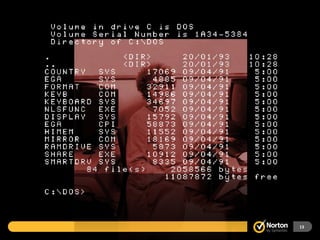
  • #14 Who is this kid? He represents the old school virus writer. Well, it used to be someone who looked a lot like this: a computer geek squirreled away in a basement somewhere spreading viruses as a prank to prove how smart he was. And his work looked like this….a virus that was more of a nuisance – maybe just a silly graphic of running across your screen. Some of you may recall the Ambulance Virus, which was popular in the late ’80’s. The good old days of computer viruses, no one lost money and it was just a big annoyance.
  • #15 This is where kids get into trouble. We think they are safe because we installed security software but we let our kids use the Admin account (where they can install and uninstall things on the family computer) or they don’t know not to ignore security software warnings. Also if you give a kid an iPod but not a way to get music legally, you’ve created a pirate. That brings us to peer to peer software. Some of it is legal but most isn’t and downloading free music is usually stealing. Kids who don’t know what they are doing are inviting the criminals directly into your computer. There’s nothing the software can do to stop them since by definition when you install peer to peer, you are opening a port on your computer where traffic is allowed. Crooks know this and regularly scan the networks of connected music sharing computers, looking for financial records. The Today show recently did a story on a family whose tax refund was stolen by a crook who found their tax return’s digital image (from their online filing), registered a change of address for them at the IRS and received (and cashed) the family’s refund check.
  • #17 Cyberbullying is such a common issue, it’s one parents need to prepare for, the way we prepare to teach our kids to drive. Even if your child is never a target or a bully, they’ll probably see it and be effected by that exposure alone. Make sure they know you get it and can be a help.
  • #18 The images on the right are possibly familiar to you. They are children who committed suicide due to ongoing cyberbullying and other forms of cruelty. Phoebe Prince of Massachusetts, Tyler Clementi of New Jersey, Megan Meier of Missouri. Cyberbullying is a huge problem. We need to be mostly concerned, not with the one off mean message of a kid being “a kid” but with repetition or ongoing cruelty. It can take so many different forms, it might be anonymous but your child will likely know who is involved if asked. Few kids tell their parents or a trusted adult. So while schools now have policies about cyberbullying and 43 of 50 states have laws about it, and school counselors now have an ethical obligation to address cyberbullying in their charter, many who reported it in the past to school staff say it made matters worse. Schools are not perfect when it comes to delaing with it, even though it impacts the students ability to learn, it can create a hostile environment and it can contribute to a child developing depression. We have to educate our children about being the same in person as you are online, also about the permanency of digital communication. Teach kids not to respond to cyberbullying , to keep a copy (cut and paste into word processing), tell school (especially if they know their bully and their school has a cyberbullying policy) if threats or violence is implied, immediately report it to local law enforcement. , etc. Most kids are trying to the right thing online and off but we do need more schools to teach the importance of character and appropriate behavior.
  • #19 Parents must be aware of cyberbullying and teach their kids to recognize and report it. Talk to your child about how you could work together if it happened. If it does, make sure you don’t respond to the bully. Keep a copy of any on screen message, no matter how embarassing. And if you are a bystander (meaning you were sent a link to a mean website, copied on an email, etc) make sure you reach out to the victim/target to express friendship, sympathy, offer a diversion together (like ‘let’s get together after school and work on math’) If the bullying is serious enough, get police involved. If it’s impacting the school environment, (child is afraid to go to school, feels like everyone is laughing at them, etc) then report to the school, the teacher or principal, counselor or resource officer. But parents need to drive process, leave a paper trail, review the school policy, ask for an action plan in writing. Stay on top of things and demand a respones. (from Allison Trachthill) theAmerican School Counselor Association has updated its ethical standards. Now, confronting cyberbullying is an ethical obligation for school counselors. Section A.10.e of the Ethical Standards for School Counselors states that school counselors should, "Consider the extent to which cyberbullying is interfering with students’ educational process and base guidance curriculum and intervention programming for this pervasive and potentially dangerous problem on research-based and best practices."