Introducing Collections
        in Scala


    Rishi Khandelwal
    Software Consultant
    Knoldus Software LLP
    Email : rishi@knoldus.com
Features


    Easy to use

    Concise

    Safe

    Fast

    Universal
Continued...

    e.g. val (minors, adults) = people partition (_.age < 18)

       It partitions a collection of people into minors and adults
       depending on their age.

      Much more concise than the one to three loops required for traditional
      collection processing.

      Writing this code is much easier, once we learn the basic
      collection vocabulary.

      Safer than writing explicit loops.

      The partition operation is quite fast.
Mutable and Immutable collections

Mutable :

    can change, add, or remove elements of a collection

    import scala.collection.mutable

Immutable :

    never change

    updation return a new collection and leave the old collection
    unchanged.

    By default collections are immutable
Continued...


    To use mutable collections, just import
    scala.collection.mutable.

    To use both mutable and immutable versions of collections is
    to import just the package collection.mutable.

e.g. scala> import scala.collection.mutable
     import scala.collection.mutable

     scala> val immutSet=Set(1,2,3)
     immutSet: scala.collection.immutable.Set[Int] = Set(1, 2, 3)

     scala> val mutSet=mutable.Set(1,2,3)
     mutSet: scala.collection.mutable.Set[Int] = Set(2, 1, 3)
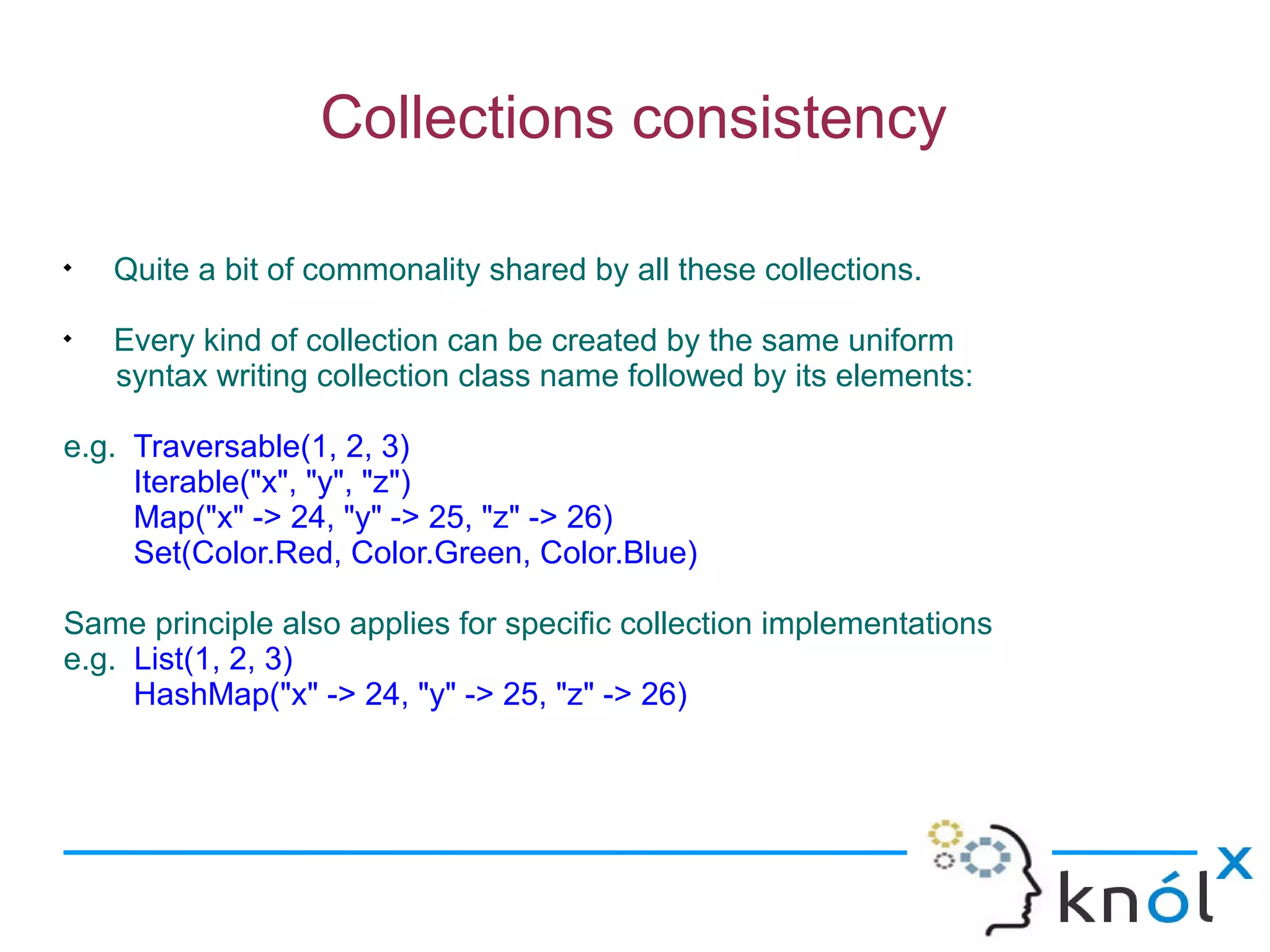
Collections consistency


    Quite a bit of commonality shared by all these collections.

    Every kind of collection can be created by the same uniform
    syntax writing collection class name followed by its elements:

e.g. Traversable(1, 2, 3)
     Iterable("x", "y", "z")
     Map("x" -> 24, "y" -> 25, "z" -> 26)
     Set(Color.Red, Color.Green, Color.Blue)

Same principle also applies for specific collection implementations
e.g. List(1, 2, 3)
     HashMap("x" -> 24, "y" -> 25, "z" -> 26)
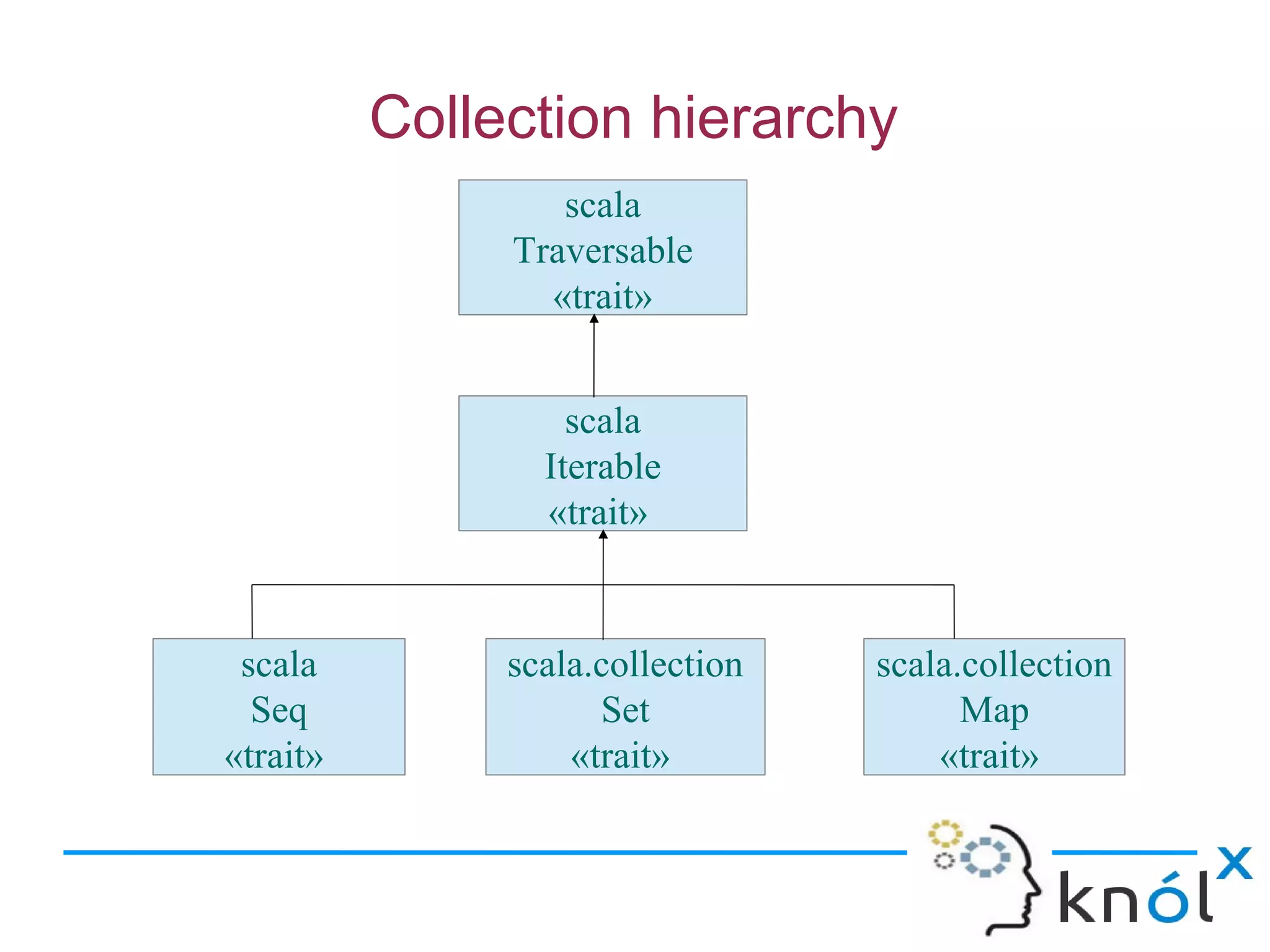
Collection hierarchy
                  scala
               Traversable
                 «trait»


                   scala
                 Iterable
                 «trait»


 scala         scala.collection   scala.collection
  Seq                Set                Map
«trait»            «trait»            «trait»
Trait Traversable


    At the top of the collection hierarchy.

    Only abstract operation is foreach:
    def foreach[U](f: Elem =>U)

    foreach method is meant to traverse all elements of the collection.
    apply the given operation f, to each element.
    Elem => U= the type of the operation.
    Elem = the type of the collection’s elements.
    U = an arbitrary result type.

    It also defines many concrete methods
Trait Iterable

    Next trait from the top.

    All methods are defined in terms of an abstract method, iterator, which
    yields the collection’s elements one by one.

    Implementation of foreach :
    def foreach[U](f: Elem => U): Unit = {
         val it = iterator
         while (it.hasNext) f(it.next())
    }

    Two more methods exist in Iterable that return iterators:
    grouped and sliding.

    These iterators do not return single elements but whole subsequences of
    elements of the original collection.
scala> val xs = List(1, 2, 3, 4, 5)
xs: List[Int] = List(1, 2, 3, 4, 5)

grouped :
scala> val git = xs grouped 3
git: Iterator[List[Int]] = non-empty iterator
scala> git.next()
res2: List[Int] = List(1, 2, 3)
scala> git.next()
res3: List[Int] = List(4, 5)

sliding:
scala> val sit = xs sliding 3
sit: Iterator[List[Int]] = non-empty iterator
scala> sit.next()
res4: List[Int] = List(1, 2, 3)
scala> sit.next()
res5: List[Int] = List(2, 3, 4)
scala> sit.next()
res6: List[Int] = List(3, 4, 5)
Why have both Traversable and Iterable?
    sealed abstract class Tree
    case class Branch(left: Tree, right: Tree) extends Tree
    case class Node(elem: Int) extends Tree

       Using Traversable
    sealed abstract class Tree extends Traversable[Int] {
    def foreach[U](f: Int => U) = this match {
      case Node(elem) => f(elem)
      case Branch(l, r) => l foreach f; r foreach f
    }
}

      Traversing a balanced tree takes time proportional to the number of
    elements in the tree.

       A balanced tree with N leaves will have N - 1 interior nodes of
    class branch. So the total number of steps to traverse the tree is N + N - 1.
Continued...

      Using Iterable :

      sealed abstract class Tree extends Iterable[Int] {
          def iterator: Iterator[Int] = this match {
       case Node(elem) => Iterator.single(elem)
       case Branch(l, r) => l.iterator ++ r.iterator
       }
         }

       There’s an efficiency problem that has to do with the implementation of the
    iterator concatenation method, ++

      The computation needs to follow one indirection to get at the right iterator
      (either l.iterator,or r.iterator).

      Overall, that makes log(N) indirections to get at a leaf of a balanced tree
      with N leaves.
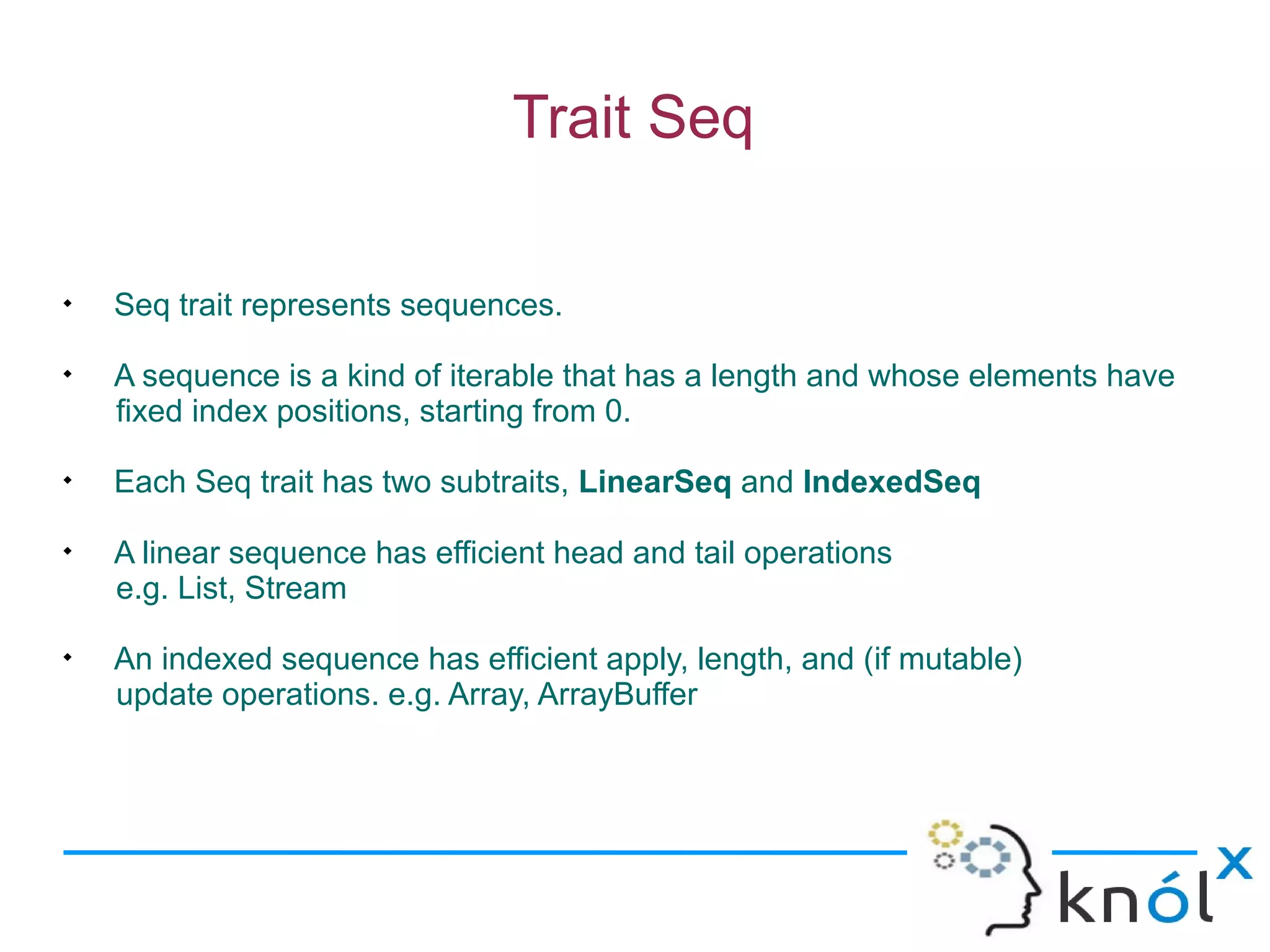
Trait Seq


    Seq trait represents sequences.

    A sequence is a kind of iterable that has a length and whose elements have
    fixed index positions, starting from 0.

    Each Seq trait has two subtraits, LinearSeq and IndexedSeq

    A linear sequence has efficient head and tail operations
    e.g. List, Stream

    An indexed sequence has efficient apply, length, and (if mutable)
    update operations. e.g. Array, ArrayBuffer
Sequences

    Classes that inherit from trait Seq

Lists :

    Always Immutable

     Support fast addition and removal of items to the beginning of
    the list

scala> val colors = List("red", "blue", "green")
colors: List[java.lang.String] = List(red, blue, green)

scala> colors.head
res0: java.lang.String = red

scala> colors.tail
res1: List[java.lang.String] = List(blue, green)
Continued...
Array :

    Efficiently access an element at an arbitrary position.

    Scala arrays are represented in the same way as Java arrays

    Create an array whose size is known but don’t yet know the
    element values:
    e.g. scala> val fiveInts = new Array[Int](5)
         fiveInts: Array[Int] = Array(0, 0, 0, 0, 0)

    Initialize an array when we do know the element values:
    e.g. scala> val fiveToOne = Array(5, 4, 3, 2, 1)
          fiveToOne: Array[Int] = Array(5, 4, 3, 2, 1)

    Accessing and updating an array element:
    e.g. scala> fiveInts(0) = fiveToOne(4)
         scala> fiveInts
         res1: Array[Int] = Array(1, 0, 0, 0, 0)
Continued...

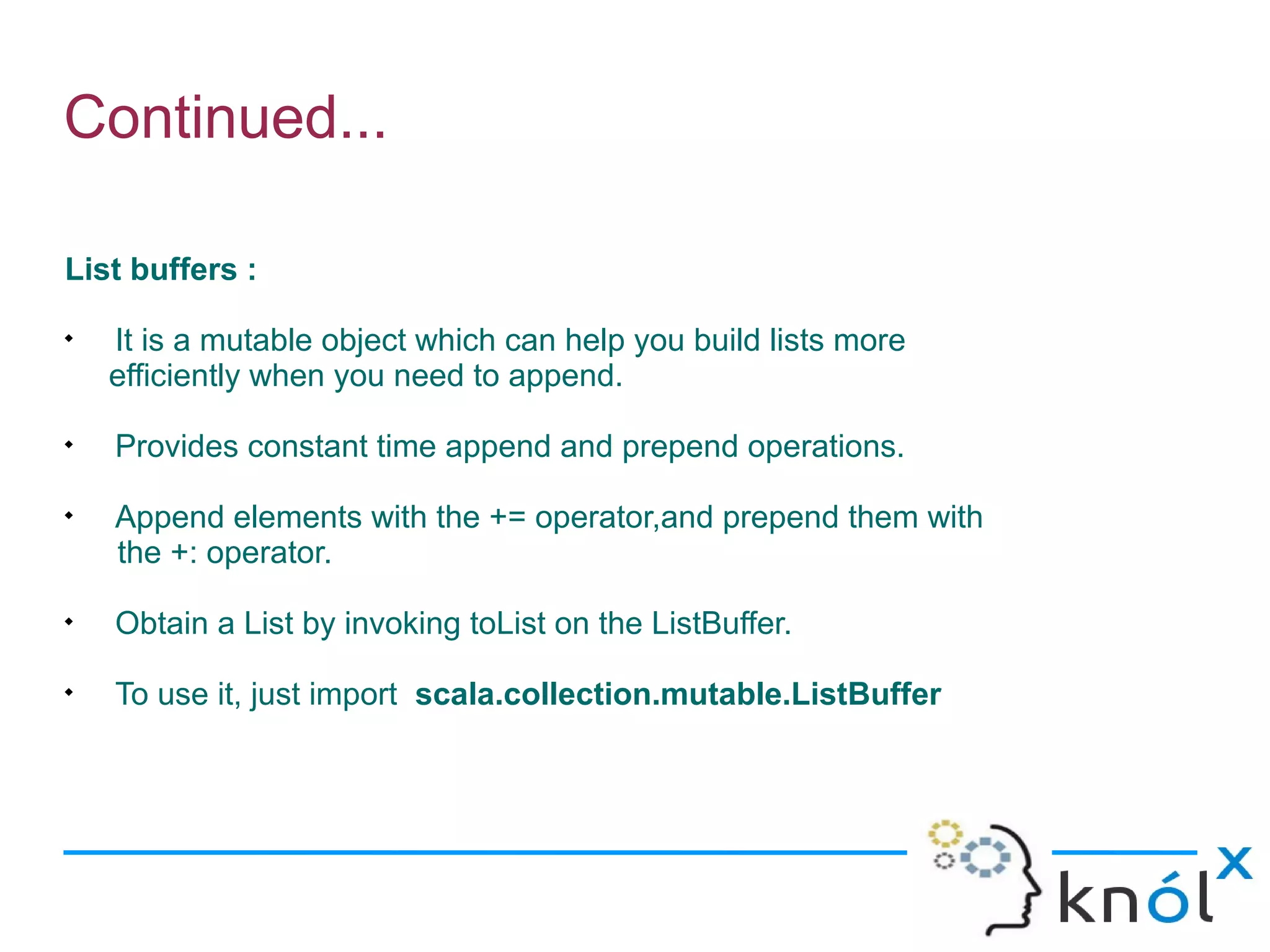
List buffers :

    It is a mutable object which can help you build lists more
    efficiently when you need to append.

    Provides constant time append and prepend operations.

    Append elements with the += operator,and prepend them with
    the +: operator.

    Obtain a List by invoking toList on the ListBuffer.

    To use it, just import scala.collection.mutable.ListBuffer
Continued...
scala> import scala.collection.mutable.ListBuffer
import scala.collection.mutable.ListBuffer

scala> val buf = new ListBuffer[Int]
buf: scala.collection.mutable.ListBuffer[Int] = ListBuffer()

scala> buf += 1
scala> buf += 2
scala> buf
res11: scala.collection.mutable.ListBuffer[Int]= ListBuffer(1, 2)

scala> 3 +: buf
res12: scala.collection.mutable.Buffer[Int]= ListBuffer(3, 1, 2)

scala> buf.toList
res13: List[Int] = List(3, 1, 2)
Continued...

Array buffers :

       It is like an array, except that you can additionally add and remove
    elements from the beginning and end of the sequence.

       To use it just import scala.collection.mutable.ArrayBuffer
       e.g. scala> import scala.collection.mutable.ArrayBuffer
            import scala.collection.mutable.ArrayBuffer

       To create an ArrayBuffer, only specify a type parameter, no need not
       specify a length.
       e.g. scala> val buf = new ArrayBuffer[Int]()
            buf: scala.collection.mutable.ArrayBuffer[Int] =
            ArrayBuffer()
Continued...


   Append to an ArrayBuffer using the += method:
e.g. scala> buf += 12
     scala> buf += 15
     scala> buf
     res16: scala.collection.mutable.ArrayBuffer[Int] =
     ArrayBuffer(12, 15).

       All the normal array methods are available
    e.g. scala> buf.length
         res17: Int = 2
         scala> buf(0)
         res18: Int = 12
Continued...
 Queue :
 
     first-in-first-out sequence.
 
     Both mutable and immutable variants of Queue.
 
     Create an empty immutable queue:
     e.g. scala> import scala.collection.immutable.Queue
          import scala.collection.immutable.Queue
          scala> val empty = Queue[Int]()
          empty: scala.collection.immutable.Queue[Int] = Queue()
 
     Note :
     scala> val empty=new Queue[Int]
     <console>:8: error: constructor Queue in class Queue cannot be
     accessed in object $iw Access to protected constructor Queue not permitted
     because enclosing class object $iw in object $iw is not a subclass ofclass
     Queue in package immutable where target is defined
                   val empty=new Queue[Int]
                               ^
Continued...


    Append an element to an immutable queue with enqueue:
    e.g. scala> val has1 = empty.enqueue(1)
         has1: scala.collection.immutable.Queue[Int] = Queue(1)

    To append multiple elements to a queue, call enqueue with a collection as
    its argument:
    e.g. scala> val has123 = has1.enqueue(List(2, 3))
          has123: scala.collection.immutable.Queue[Int] =
          Queue(1,2,3)

    To remove an element from the head of the queue,use dequeue:
    scala> val (element, has23) = has123.dequeue
    element: Int = 1
    has23: scala.collection.immutable.Queue[Int] = Queue(2,3)
Continued...

    Use mutable Queue

scala> import scala.collection.mutable.Queue
import scala.collection.mutable.Queue

scala> val queue = new Queue[String]
queue: scala.collection.mutable.Queue[String] = Queue()

scala> queue += "a"
scala> queue ++= List("b", "c")
scala> queue
res21: scala.collection.mutable.Queue[String] = Queue(a, b, c)

scala> queue.dequeue
res22: String = a

scala> queue
res23: scala.collection.mutable.Queue[String] = Queue(b, c)
Continued...
Stack :

    last-in-first-out sequence.

    Both mutable and immutable variants..

    push an element onto a stack with push,

    pop an element with pop,

    peek at the top of the stack without removing it with top

scala> import scala.collection.mutable.Stack
import scala.collection.mutable.Stack

scala> val stack = new Stack[Int]
stack: scala.collection.mutable.Stack[Int] = Stack()
Continued...
scala> stack.push(1)
scala> stack
res1: scala.collection.mutable.Stack[Int] = Stack(1)

scala> stack.push(2)
scala> stack
res3: scala.collection.mutable.Stack[Int] = Stack(1, 2)

scala> stack.top
res8: Int = 2

scala> stack
res9: scala.collection.mutable.Stack[Int] = Stack(1, 2)

scala> stack.pop
res10: Int = 2

scala> stack
res11: scala.collection.mutable.Stack[Int] = Stack(1)
Continued...

Strings (via StringOps) :

    It implements many sequence methods..

    Predef has an implicit conversion from String to StringOps,we can treat any
    string as a Seq[Char].

scala> def hasUpperCase(s: String) = s.exists(_.isUpperCase)
hasUpperCase: (String)Boolean

scala> hasUpperCase("Robert Frost")
res14: Boolean = true

scala> hasUpperCase("e e cummings")
res15: Boolean = false
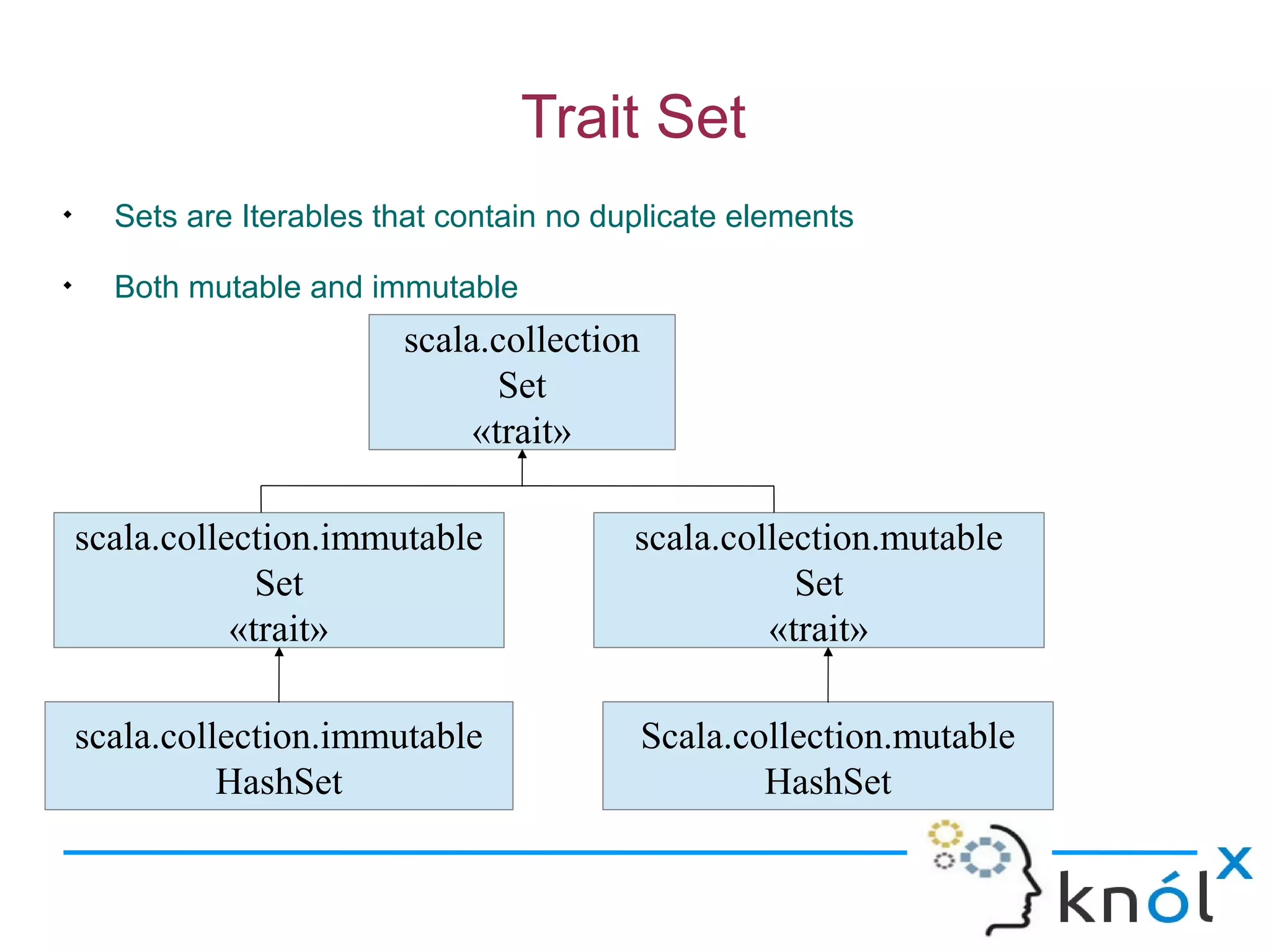
Trait Set

      Sets are Iterables that contain no duplicate elements

      Both mutable and immutable
                          scala.collection
                                 Set
                               «trait»

    scala.collection.immutable             scala.collection.mutable
                 Set                                  Set
               «trait»                              «trait»

    scala.collection.immutable               Scala.collection.mutable
              HashSet                                HashSet
Continued...
scala> val text = "See Spot run. Run, Spot. Run!"
text: java.lang.String = See Spot run. Run, Spot. Run!

scala> val wordsArray = text.split("[ !,.]+")
wordsArray: Array[java.lang.String] =
Array(See, Spot, run, Run, Spot, Run)

scala> import scala.collection.mutable
import scala.collection.mutable

scala>val words = mutable.Set.empty[String]
words: scala.collection.mutable.Set[String] = Set()

scala> for (word <- wordsArray)
words += word.toLowerCase

scala> words
res25: scala.collection.mutable.Set[String] = Set(spot, run, see)
Continued...

    Two Set subtraits are SortedSet and BitSet

SortedSet :

    No matter what order elements were added to the set, the elements are
    traversed in sorted order.

    Default representation of a SortedSet is an ordered binary tree

    Define ordering :
    scala> val myOrdering = Ordering.fromLessThan[String](_ > _)
    myOrdering: scala.math.Ordering[String] = ...

    Create an empty tree set with that ordering, use:
    scala> import scala.collection.immutable.TreeSet
    import scala.collection.immutable.TreeSet

    scala> val mySet=TreeSet.empty(myOrdering)
    mySet: scala.collection.immutable.TreeSet[String] = TreeSet()
Continued...

    Default ordering Set :
    scala> val set = TreeSet.empty[String]
    set: scala.collection.immutable.TreeSet[String] = TreeSet()

      Creating new sets from a tree set by concatenation
    scala> val numbers = set + ("one", "two", "three", "four")
    numbers: scala.collection.immutable.TreeSet[String] =TreeSet(four, one,
    three, two)

    scala> val myNumbers=mySet + ("one","two","three","four")
    myNumbers: scala.collection.immutable.TreeSet[String] = TreeSet(two,
    three, one, four)

    Sorted sets also support ranges of elements.
    scala> numbers range ("one", "two")
    res13: scala.collection.immutable.TreeSet[String]= TreeSet(one, three)

    scala> numbers from "three"
    res14: scala.collection.immutable.TreeSet[String] = TreeSet(three, two)
Continued...
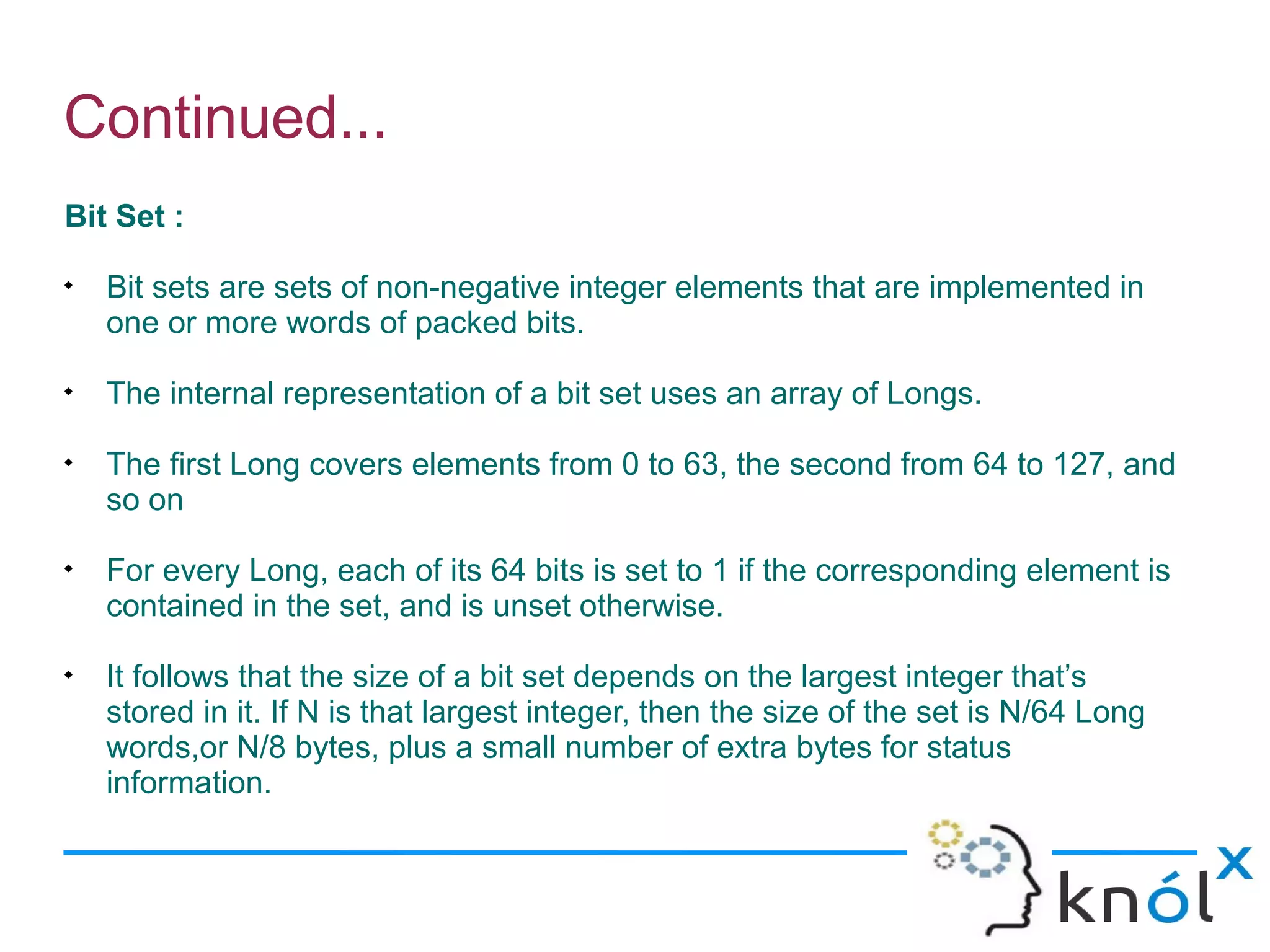
Bit Set :

    Bit sets are sets of non-negative integer elements that are implemented in
    one or more words of packed bits.

    The internal representation of a bit set uses an array of Longs.

    The first Long covers elements from 0 to 63, the second from 64 to 127, and
    so on

    For every Long, each of its 64 bits is set to 1 if the corresponding element is
    contained in the set, and is unset otherwise.

    It follows that the size of a bit set depends on the largest integer that’s
    stored in it. If N is that largest integer, then the size of the set is N/64 Long
    words,or N/8 bytes, plus a small number of extra bytes for status
    information.
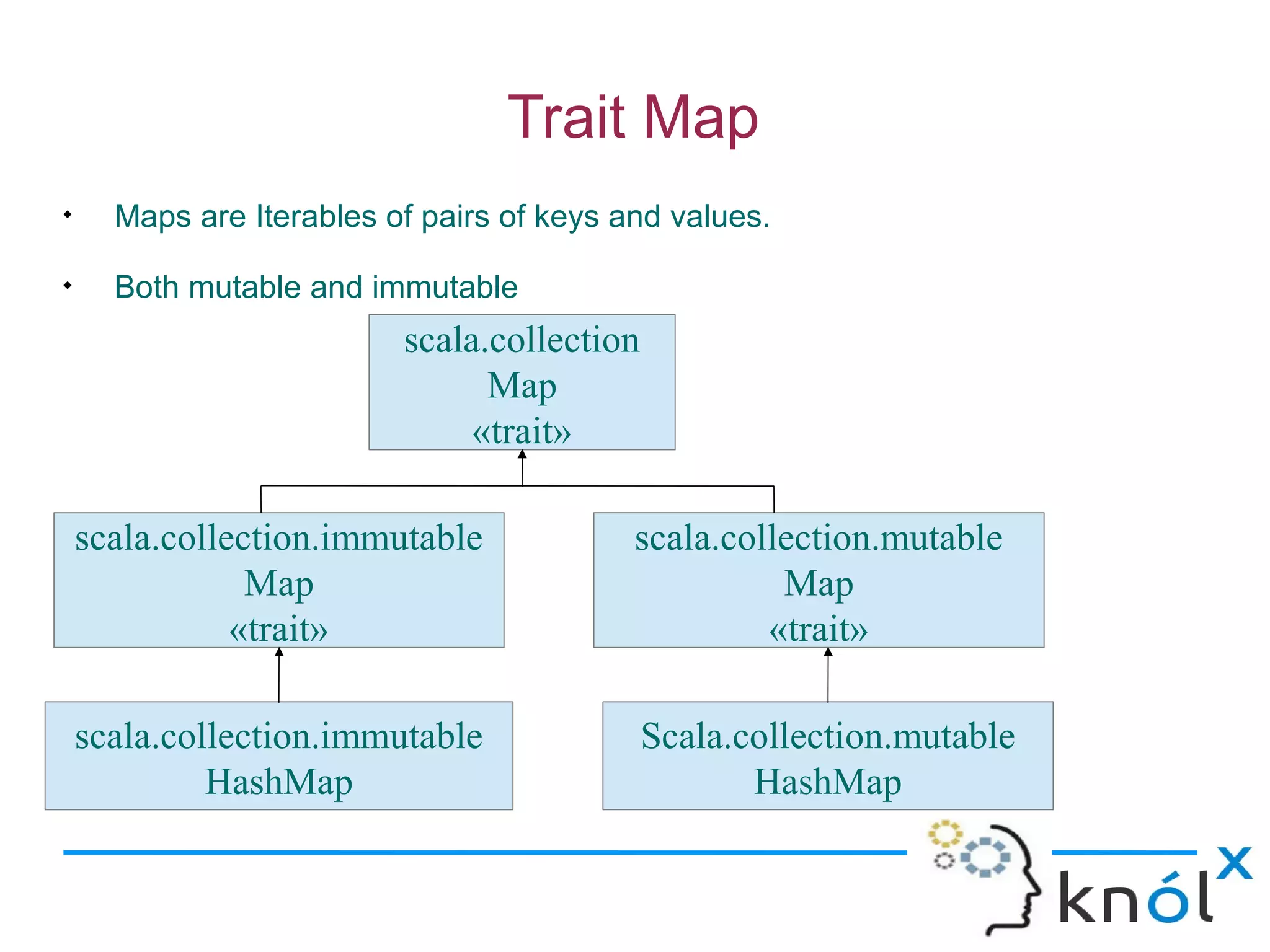
Trait Map

      Maps are Iterables of pairs of keys and values.

      Both mutable and immutable
                          scala.collection
                                Map
                               «trait»

    scala.collection.immutable             scala.collection.mutable
                Map                                  Map
               «trait»                              «trait»

    scala.collection.immutable               Scala.collection.mutable
             HashMap                                HashMap
Continued...
scala> import scala.collection.mutable
import scala.collection.mutable

scala> val map = mutable.Map.empty[String, Int]
map: scala.collection.mutable.Map[String,Int] = Map()

scala> map("hello") = 1

scala> map("there") = 2

scala> map
res2: scala.collection.mutable.Map[String,Int] = Map(there -> 2, hello -> 1)

scala> map("hello")
res3: Int = 1
Continued...
Sorted Map

    Trait SortedMap are implemented by class TreeMap

    Order is determined by Ordered trait on key element type

scala> import scala.collection.immutable.TreeMap
import scala.collection.immutable.TreeMap

scala> var tm = TreeMap(3 -> 'x', 1 -> 'x', 4 -> 'x')
tm: scala.collection.immutable.SortedMap[Int,Char] =
Map(1 -> x, 3 -> x, 4 -> x)

scala> tm += (2 -> 'x')

scala> tm
res38: scala.collection.immutable.SortedMap[Int,Char] =
Map(1 -> x, 2 -> x, 3 -> x, 4 -> x)
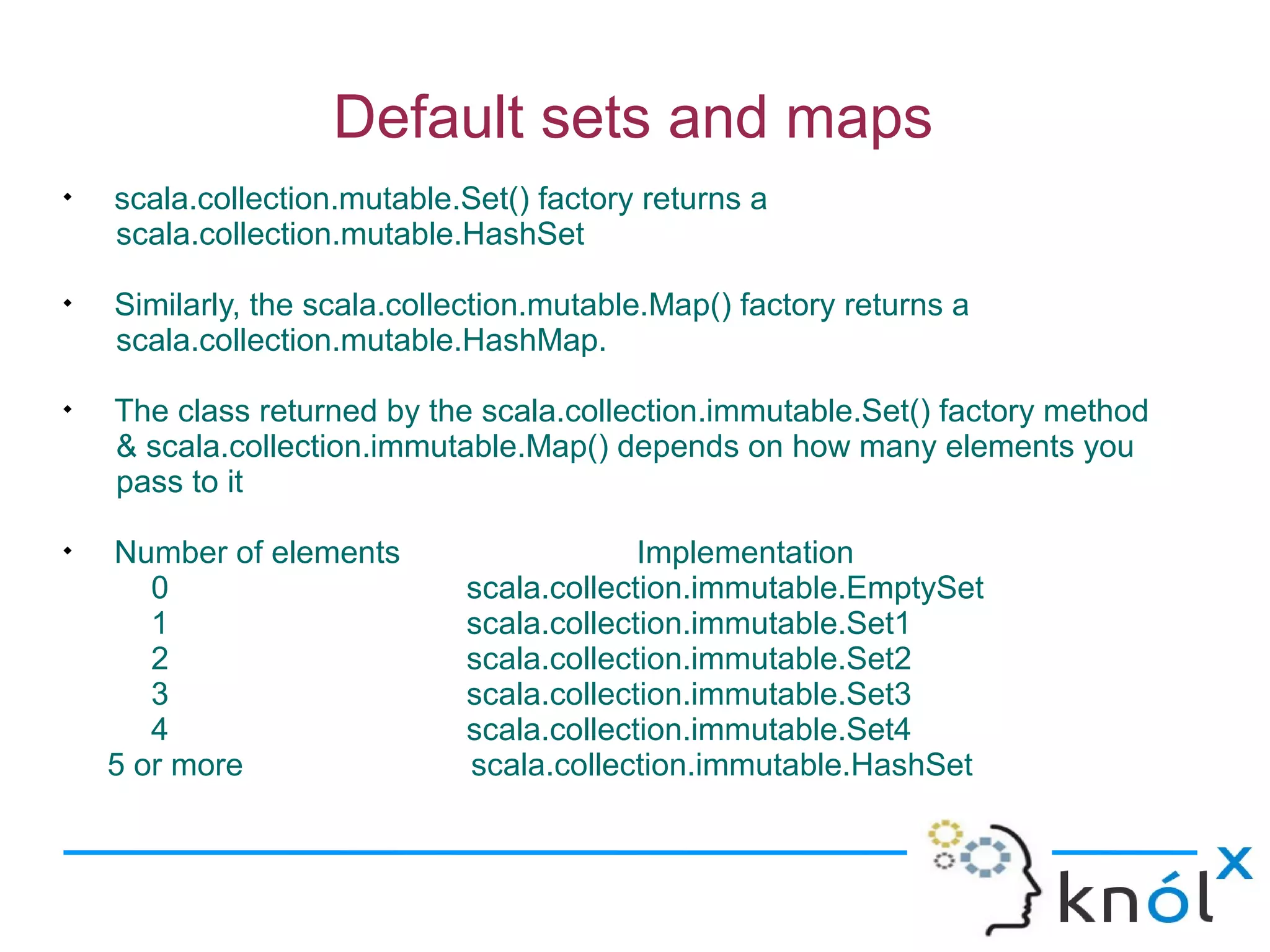
Default sets and maps

    scala.collection.mutable.Set() factory returns a
    scala.collection.mutable.HashSet

    Similarly, the scala.collection.mutable.Map() factory returns a
    scala.collection.mutable.HashMap.

    The class returned by the scala.collection.immutable.Set() factory method
    & scala.collection.immutable.Map() depends on how many elements you
    pass to it

    Number of elements                    Implementation
       0                     scala.collection.immutable.EmptySet
       1                     scala.collection.immutable.Set1
       2                     scala.collection.immutable.Set2
       3                     scala.collection.immutable.Set3
       4                     scala.collection.immutable.Set4
    5 or more                scala.collection.immutable.HashSet
Continued...

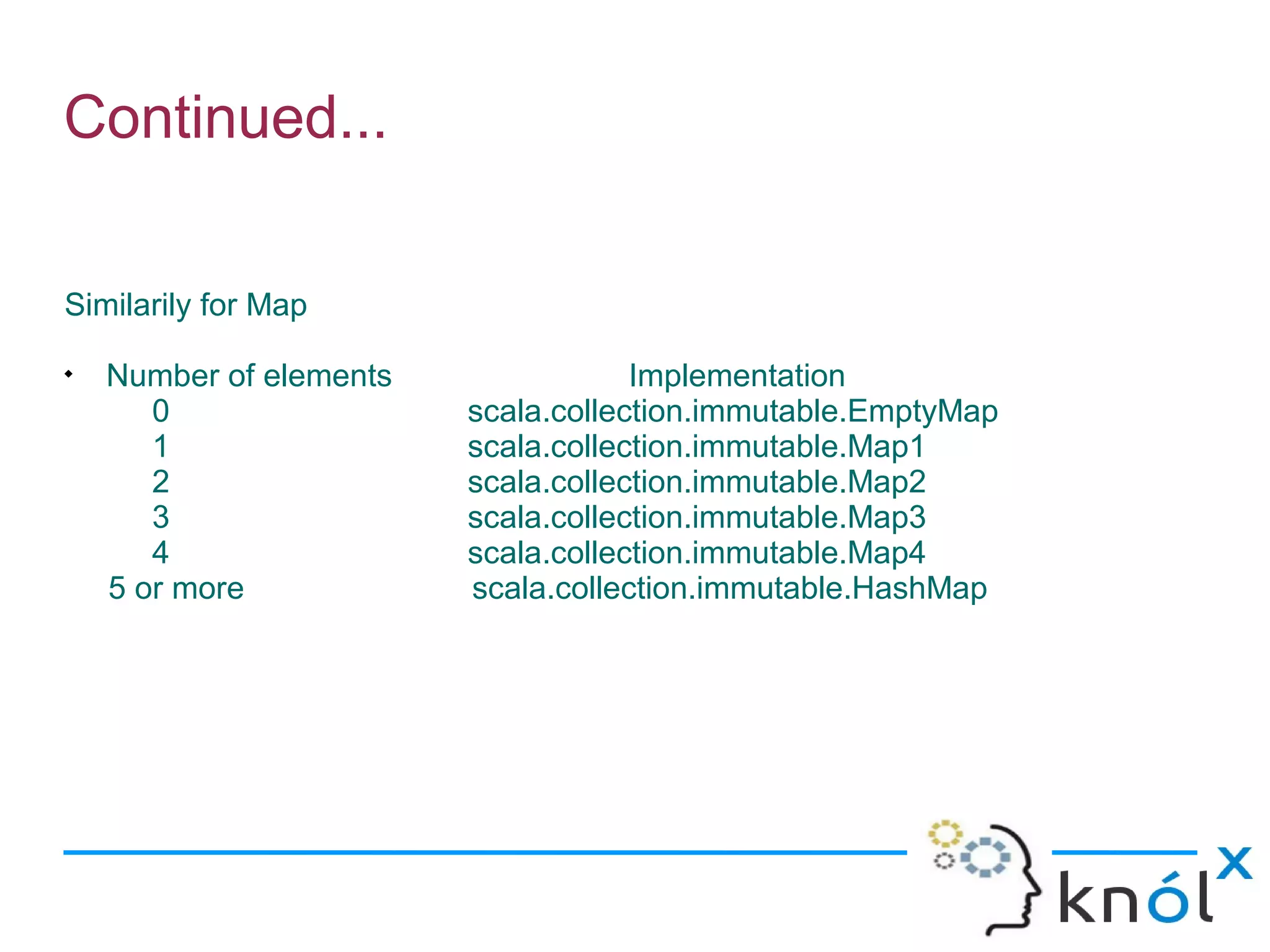
Similarily for Map

    Number of elements               Implementation
       0                 scala.collection.immutable.EmptyMap
       1                 scala.collection.immutable.Map1
       2                 scala.collection.immutable.Map2
       3                 scala.collection.immutable.Map3
       4                 scala.collection.immutable.Map4
    5 or more            scala.collection.immutable.HashMap
Synchronized sets and maps

      For a thread-safe map,mix the SynchronizedMap trait into particular map
      implementation

 import scala.collection.mutable.{Map,SynchronizedMap, HashMap}
 object MapMaker {
    def makeMap: Map[String, String] = {
         new HashMap[String, String] with SynchronizedMap[String, String] {
         override def default(key: String) =“Why do you want to know?"
         }
    }
}

      Similarily for sets
    import scala.collection.mutable
    val synchroSet =new mutable.HashSet[Int] with mutable.SynchronizedSet[Int]
Continued...
scala> val capital = MapMaker.makeMap
capital: scala.collection.mutable.Map[String,String] = Map()

scala> capital ++ List("US" -> "Washington",
"Paris" -> "France", "Japan" -> "Tokyo")
res0: scala.collection.mutable.Map[String,String] =
Map(Paris -> France, US -> Washington, Japan -> Tokyo)

scala> capital("Japan")
res1: String = Tokyo

scala> capital("New Zealand")
res2: String = Why do you want to know?

scala> capital += ("New Zealand" -> "Wellington")

scala> capital("New Zealand")
res3: String = Wellington
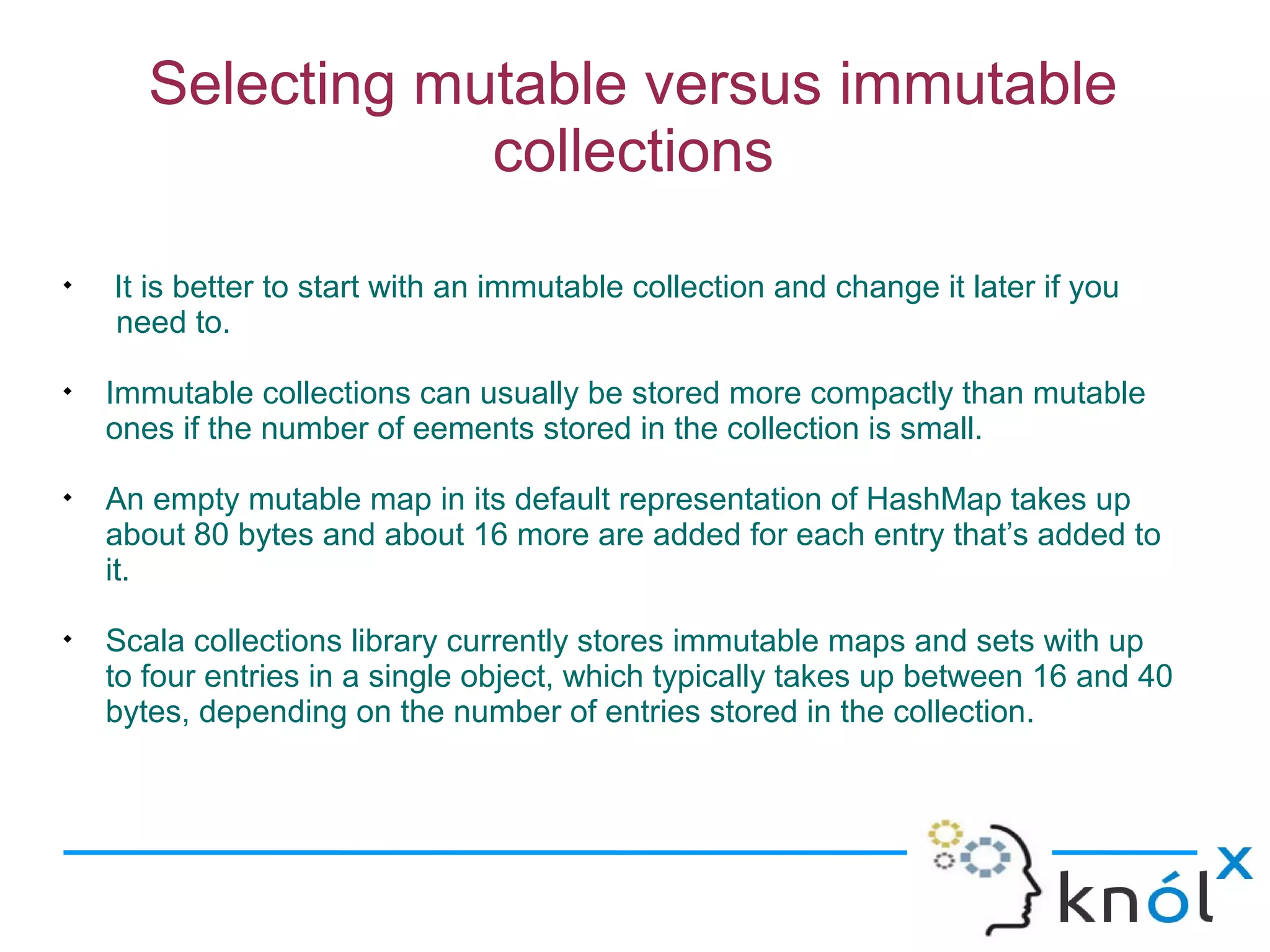
Selecting mutable versus immutable
                   collections

    It is better to start with an immutable collection and change it later if you
    need to.

    Immutable collections can usually be stored more compactly than mutable
    ones if the number of eements stored in the collection is small.

    An empty mutable map in its default representation of HashMap takes up
    about 80 bytes and about 16 more are added for each entry that’s added to
    it.

    Scala collections library currently stores immutable maps and sets with up
    to four entries in a single object, which typically takes up between 16 and 40
    bytes, depending on the number of entries stored in the collection.
Initializing collections

    Most common way to create and initialize a collection is to pass the initial
    elements to a factory method on the companion object of collection.

scala> List(1, 2, 3)
res0: List[Int] = List(1, 2, 3)

scala> Set('a', 'b', 'c')
res1: scala.collection.immutable.Set[Char] = Set(a, b, c)

scala> import scala.collection.mutable
import scala.collection.mutable

scala> mutable.Map("hi" -> 2, "there" -> 5)
res2: scala.collection.mutable.Map[java.lang.String,Int] =
Map(hi -> 2, there -> 5)

scala> Array(1.0, 2.0, 3.0)
res3: Array[Double] = Array(1.0, 2.0, 3.0)
Continued...
Initialize a collection with another collection.
 scala> val colors = List("blue", "yellow", "red", "green")
 colors: List[java.lang.String] = List(blue, yellow, red, green)

    scala> import scala.collection.immutable.TreeSet
    import scala.collection.immutable.TreeSet

    Cannot pass the colors list to the factory method for TreeSet
    scala> val treeSet = TreeSet(colors)
   <console>:9: error: No implicit Ordering defined for List[java.lang.String].
     val treeSet = TreeSet(colors)
                   ^

    Create an empty TreeSet[String] and add to it the elements of the list with
the TreeSet’s ++ operator:
  scala> val treeSet = TreeSet[String]() ++ colors
  treeSet: scala.collection.immutable.TreeSet[String] = TreeSet(blue, green,
  red, yellow)
Continued...

      Converting to array or list
    scala> treeSet.toList
    res54: List[String] = List(blue, green, red, yellow)

    scala> treeSet.toArray
    res55: Array[String] = Array(blue, green, red, yellow)

       Converting between mutable and immutable sets and maps
    scala> import scala.collection.mutable
    import scala.collection.mutable
    scala> treeSet
    res5: scala.collection.immutable.SortedSet[String] =Set(blue, green, red,
      yellow)
    scala> val mutaSet = mutable.Set.empty ++ treeSet
    mutaSet: scala.collection.mutable.Set[String] =Set(yellow, blue, red, green)

    scala> val immutaSet = Set.empty ++ mutaSet
    immutaSet: scala.collection.immutable.Set[String] =Set(yellow, blue, red,
      green)
Tuples

    A tuple can hold objects with different types. e.g. (1, "hello", Console)

   Tuples do not inherit from Iterable.
e.g.
def longestWord(words: Array[String]) = {
     var word = words(0)
     var idx = 0
     for (i <- 1 until words.length)
          if (words(i).length > word.length) {
               word = words(i)
               idx = i
          }
     (word, idx)
}

scala> val longest =longestWord("The quick brown fox".split(" "))
longest: (String, Int) = (quick,1)
Continued...
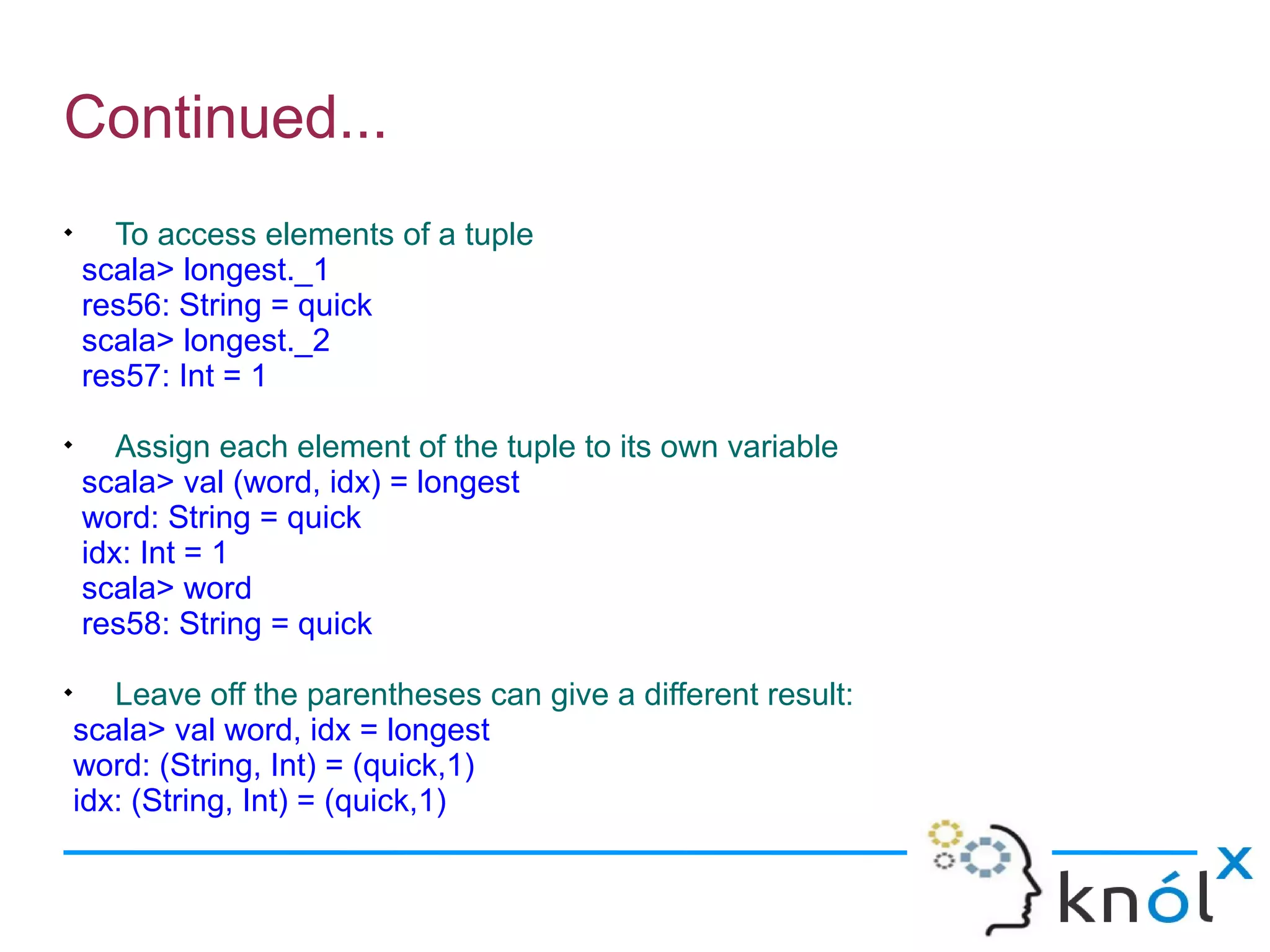

      To access elements of a tuple
    scala> longest._1
    res56: String = quick
    scala> longest._2
    res57: Int = 1

       Assign each element of the tuple to its own variable
    scala> val (word, idx) = longest
    word: String = quick
    idx: Int = 1
    scala> word
    res58: String = quick

       Leave off the parentheses can give a different result:
    scala> val word, idx = longest
    word: (String, Int) = (quick,1)
    idx: (String, Int) = (quick,1)
Scala collection

Scala collection

  • 1.
    Introducing Collections in Scala Rishi Khandelwal Software Consultant Knoldus Software LLP Email : rishi@knoldus.com
  • 2.
    Features  Easy to use  Concise  Safe  Fast  Universal
  • 3.
    Continued... e.g. val (minors, adults) = people partition (_.age < 18)  It partitions a collection of people into minors and adults depending on their age.  Much more concise than the one to three loops required for traditional collection processing.  Writing this code is much easier, once we learn the basic collection vocabulary.  Safer than writing explicit loops.  The partition operation is quite fast.
  • 4.
    Mutable and Immutablecollections Mutable :  can change, add, or remove elements of a collection  import scala.collection.mutable Immutable :  never change  updation return a new collection and leave the old collection unchanged.  By default collections are immutable
  • 5.
    Continued...  To use mutable collections, just import scala.collection.mutable.  To use both mutable and immutable versions of collections is to import just the package collection.mutable. e.g. scala> import scala.collection.mutable import scala.collection.mutable scala> val immutSet=Set(1,2,3) immutSet: scala.collection.immutable.Set[Int] = Set(1, 2, 3) scala> val mutSet=mutable.Set(1,2,3) mutSet: scala.collection.mutable.Set[Int] = Set(2, 1, 3)
  • 6.
    Collections consistency  Quite a bit of commonality shared by all these collections.  Every kind of collection can be created by the same uniform syntax writing collection class name followed by its elements: e.g. Traversable(1, 2, 3) Iterable("x", "y", "z") Map("x" -> 24, "y" -> 25, "z" -> 26) Set(Color.Red, Color.Green, Color.Blue) Same principle also applies for specific collection implementations e.g. List(1, 2, 3) HashMap("x" -> 24, "y" -> 25, "z" -> 26)
  • 7.
    Collection hierarchy scala Traversable «trait» scala Iterable «trait» scala scala.collection scala.collection Seq Set Map «trait» «trait» «trait»
  • 8.
    Trait Traversable  At the top of the collection hierarchy.  Only abstract operation is foreach: def foreach[U](f: Elem =>U) foreach method is meant to traverse all elements of the collection. apply the given operation f, to each element. Elem => U= the type of the operation. Elem = the type of the collection’s elements. U = an arbitrary result type.  It also defines many concrete methods
  • 9.
    Trait Iterable  Next trait from the top.  All methods are defined in terms of an abstract method, iterator, which yields the collection’s elements one by one.  Implementation of foreach : def foreach[U](f: Elem => U): Unit = { val it = iterator while (it.hasNext) f(it.next()) }  Two more methods exist in Iterable that return iterators: grouped and sliding.  These iterators do not return single elements but whole subsequences of elements of the original collection.
  • 10.
    scala> val xs= List(1, 2, 3, 4, 5) xs: List[Int] = List(1, 2, 3, 4, 5) grouped : scala> val git = xs grouped 3 git: Iterator[List[Int]] = non-empty iterator scala> git.next() res2: List[Int] = List(1, 2, 3) scala> git.next() res3: List[Int] = List(4, 5) sliding: scala> val sit = xs sliding 3 sit: Iterator[List[Int]] = non-empty iterator scala> sit.next() res4: List[Int] = List(1, 2, 3) scala> sit.next() res5: List[Int] = List(2, 3, 4) scala> sit.next() res6: List[Int] = List(3, 4, 5)
  • 11.
    Why have bothTraversable and Iterable? sealed abstract class Tree case class Branch(left: Tree, right: Tree) extends Tree case class Node(elem: Int) extends Tree  Using Traversable sealed abstract class Tree extends Traversable[Int] { def foreach[U](f: Int => U) = this match { case Node(elem) => f(elem) case Branch(l, r) => l foreach f; r foreach f } }  Traversing a balanced tree takes time proportional to the number of elements in the tree.  A balanced tree with N leaves will have N - 1 interior nodes of class branch. So the total number of steps to traverse the tree is N + N - 1.
  • 12.
    Continued...  Using Iterable : sealed abstract class Tree extends Iterable[Int] { def iterator: Iterator[Int] = this match { case Node(elem) => Iterator.single(elem) case Branch(l, r) => l.iterator ++ r.iterator } }  There’s an efficiency problem that has to do with the implementation of the iterator concatenation method, ++  The computation needs to follow one indirection to get at the right iterator (either l.iterator,or r.iterator).  Overall, that makes log(N) indirections to get at a leaf of a balanced tree with N leaves.
  • 13.
    Trait Seq  Seq trait represents sequences.  A sequence is a kind of iterable that has a length and whose elements have fixed index positions, starting from 0.  Each Seq trait has two subtraits, LinearSeq and IndexedSeq  A linear sequence has efficient head and tail operations e.g. List, Stream  An indexed sequence has efficient apply, length, and (if mutable) update operations. e.g. Array, ArrayBuffer
  • 14.
    Sequences  Classes that inherit from trait Seq Lists :  Always Immutable  Support fast addition and removal of items to the beginning of the list scala> val colors = List("red", "blue", "green") colors: List[java.lang.String] = List(red, blue, green) scala> colors.head res0: java.lang.String = red scala> colors.tail res1: List[java.lang.String] = List(blue, green)
  • 15.
    Continued... Array :  Efficiently access an element at an arbitrary position.  Scala arrays are represented in the same way as Java arrays  Create an array whose size is known but don’t yet know the element values: e.g. scala> val fiveInts = new Array[Int](5) fiveInts: Array[Int] = Array(0, 0, 0, 0, 0)  Initialize an array when we do know the element values: e.g. scala> val fiveToOne = Array(5, 4, 3, 2, 1) fiveToOne: Array[Int] = Array(5, 4, 3, 2, 1)  Accessing and updating an array element: e.g. scala> fiveInts(0) = fiveToOne(4) scala> fiveInts res1: Array[Int] = Array(1, 0, 0, 0, 0)
  • 16.
    Continued... List buffers :  It is a mutable object which can help you build lists more efficiently when you need to append.  Provides constant time append and prepend operations.  Append elements with the += operator,and prepend them with the +: operator.  Obtain a List by invoking toList on the ListBuffer.  To use it, just import scala.collection.mutable.ListBuffer
  • 17.
    Continued... scala> import scala.collection.mutable.ListBuffer importscala.collection.mutable.ListBuffer scala> val buf = new ListBuffer[Int] buf: scala.collection.mutable.ListBuffer[Int] = ListBuffer() scala> buf += 1 scala> buf += 2 scala> buf res11: scala.collection.mutable.ListBuffer[Int]= ListBuffer(1, 2) scala> 3 +: buf res12: scala.collection.mutable.Buffer[Int]= ListBuffer(3, 1, 2) scala> buf.toList res13: List[Int] = List(3, 1, 2)
  • 18.
    Continued... Array buffers :  It is like an array, except that you can additionally add and remove elements from the beginning and end of the sequence.  To use it just import scala.collection.mutable.ArrayBuffer e.g. scala> import scala.collection.mutable.ArrayBuffer import scala.collection.mutable.ArrayBuffer  To create an ArrayBuffer, only specify a type parameter, no need not specify a length. e.g. scala> val buf = new ArrayBuffer[Int]() buf: scala.collection.mutable.ArrayBuffer[Int] = ArrayBuffer()
  • 19.
    Continued...  Append to an ArrayBuffer using the += method: e.g. scala> buf += 12 scala> buf += 15 scala> buf res16: scala.collection.mutable.ArrayBuffer[Int] = ArrayBuffer(12, 15).  All the normal array methods are available e.g. scala> buf.length res17: Int = 2 scala> buf(0) res18: Int = 12
  • 20.
    Continued... Queue :  first-in-first-out sequence.  Both mutable and immutable variants of Queue.  Create an empty immutable queue: e.g. scala> import scala.collection.immutable.Queue import scala.collection.immutable.Queue scala> val empty = Queue[Int]() empty: scala.collection.immutable.Queue[Int] = Queue()  Note : scala> val empty=new Queue[Int] <console>:8: error: constructor Queue in class Queue cannot be accessed in object $iw Access to protected constructor Queue not permitted because enclosing class object $iw in object $iw is not a subclass ofclass Queue in package immutable where target is defined val empty=new Queue[Int] ^
  • 21.
    Continued...  Append an element to an immutable queue with enqueue: e.g. scala> val has1 = empty.enqueue(1) has1: scala.collection.immutable.Queue[Int] = Queue(1)  To append multiple elements to a queue, call enqueue with a collection as its argument: e.g. scala> val has123 = has1.enqueue(List(2, 3)) has123: scala.collection.immutable.Queue[Int] = Queue(1,2,3)  To remove an element from the head of the queue,use dequeue: scala> val (element, has23) = has123.dequeue element: Int = 1 has23: scala.collection.immutable.Queue[Int] = Queue(2,3)
  • 22.
    Continued...  Use mutable Queue scala> import scala.collection.mutable.Queue import scala.collection.mutable.Queue scala> val queue = new Queue[String] queue: scala.collection.mutable.Queue[String] = Queue() scala> queue += "a" scala> queue ++= List("b", "c") scala> queue res21: scala.collection.mutable.Queue[String] = Queue(a, b, c) scala> queue.dequeue res22: String = a scala> queue res23: scala.collection.mutable.Queue[String] = Queue(b, c)
  • 23.
    Continued... Stack :  last-in-first-out sequence.  Both mutable and immutable variants..  push an element onto a stack with push,  pop an element with pop,  peek at the top of the stack without removing it with top scala> import scala.collection.mutable.Stack import scala.collection.mutable.Stack scala> val stack = new Stack[Int] stack: scala.collection.mutable.Stack[Int] = Stack()
  • 24.
    Continued... scala> stack.push(1) scala> stack res1:scala.collection.mutable.Stack[Int] = Stack(1) scala> stack.push(2) scala> stack res3: scala.collection.mutable.Stack[Int] = Stack(1, 2) scala> stack.top res8: Int = 2 scala> stack res9: scala.collection.mutable.Stack[Int] = Stack(1, 2) scala> stack.pop res10: Int = 2 scala> stack res11: scala.collection.mutable.Stack[Int] = Stack(1)
  • 25.
    Continued... Strings (via StringOps):  It implements many sequence methods..  Predef has an implicit conversion from String to StringOps,we can treat any string as a Seq[Char]. scala> def hasUpperCase(s: String) = s.exists(_.isUpperCase) hasUpperCase: (String)Boolean scala> hasUpperCase("Robert Frost") res14: Boolean = true scala> hasUpperCase("e e cummings") res15: Boolean = false
  • 26.
    Trait Set  Sets are Iterables that contain no duplicate elements  Both mutable and immutable scala.collection Set «trait» scala.collection.immutable scala.collection.mutable Set Set «trait» «trait» scala.collection.immutable Scala.collection.mutable HashSet HashSet
  • 27.
    Continued... scala> val text= "See Spot run. Run, Spot. Run!" text: java.lang.String = See Spot run. Run, Spot. Run! scala> val wordsArray = text.split("[ !,.]+") wordsArray: Array[java.lang.String] = Array(See, Spot, run, Run, Spot, Run) scala> import scala.collection.mutable import scala.collection.mutable scala>val words = mutable.Set.empty[String] words: scala.collection.mutable.Set[String] = Set() scala> for (word <- wordsArray) words += word.toLowerCase scala> words res25: scala.collection.mutable.Set[String] = Set(spot, run, see)
  • 28.
    Continued...  Two Set subtraits are SortedSet and BitSet SortedSet :  No matter what order elements were added to the set, the elements are traversed in sorted order.  Default representation of a SortedSet is an ordered binary tree  Define ordering : scala> val myOrdering = Ordering.fromLessThan[String](_ > _) myOrdering: scala.math.Ordering[String] = ...  Create an empty tree set with that ordering, use: scala> import scala.collection.immutable.TreeSet import scala.collection.immutable.TreeSet scala> val mySet=TreeSet.empty(myOrdering) mySet: scala.collection.immutable.TreeSet[String] = TreeSet()
  • 29.
    Continued...  Default ordering Set : scala> val set = TreeSet.empty[String] set: scala.collection.immutable.TreeSet[String] = TreeSet()  Creating new sets from a tree set by concatenation scala> val numbers = set + ("one", "two", "three", "four") numbers: scala.collection.immutable.TreeSet[String] =TreeSet(four, one, three, two) scala> val myNumbers=mySet + ("one","two","three","four") myNumbers: scala.collection.immutable.TreeSet[String] = TreeSet(two, three, one, four)  Sorted sets also support ranges of elements. scala> numbers range ("one", "two") res13: scala.collection.immutable.TreeSet[String]= TreeSet(one, three) scala> numbers from "three" res14: scala.collection.immutable.TreeSet[String] = TreeSet(three, two)
  • 30.
    Continued... Bit Set :  Bit sets are sets of non-negative integer elements that are implemented in one or more words of packed bits.  The internal representation of a bit set uses an array of Longs.  The first Long covers elements from 0 to 63, the second from 64 to 127, and so on  For every Long, each of its 64 bits is set to 1 if the corresponding element is contained in the set, and is unset otherwise.  It follows that the size of a bit set depends on the largest integer that’s stored in it. If N is that largest integer, then the size of the set is N/64 Long words,or N/8 bytes, plus a small number of extra bytes for status information.
  • 31.
    Trait Map  Maps are Iterables of pairs of keys and values.  Both mutable and immutable scala.collection Map «trait» scala.collection.immutable scala.collection.mutable Map Map «trait» «trait» scala.collection.immutable Scala.collection.mutable HashMap HashMap
  • 32.
    Continued... scala> import scala.collection.mutable importscala.collection.mutable scala> val map = mutable.Map.empty[String, Int] map: scala.collection.mutable.Map[String,Int] = Map() scala> map("hello") = 1 scala> map("there") = 2 scala> map res2: scala.collection.mutable.Map[String,Int] = Map(there -> 2, hello -> 1) scala> map("hello") res3: Int = 1
  • 33.
    Continued... Sorted Map  Trait SortedMap are implemented by class TreeMap  Order is determined by Ordered trait on key element type scala> import scala.collection.immutable.TreeMap import scala.collection.immutable.TreeMap scala> var tm = TreeMap(3 -> 'x', 1 -> 'x', 4 -> 'x') tm: scala.collection.immutable.SortedMap[Int,Char] = Map(1 -> x, 3 -> x, 4 -> x) scala> tm += (2 -> 'x') scala> tm res38: scala.collection.immutable.SortedMap[Int,Char] = Map(1 -> x, 2 -> x, 3 -> x, 4 -> x)
  • 34.
    Default sets andmaps  scala.collection.mutable.Set() factory returns a scala.collection.mutable.HashSet  Similarly, the scala.collection.mutable.Map() factory returns a scala.collection.mutable.HashMap.  The class returned by the scala.collection.immutable.Set() factory method & scala.collection.immutable.Map() depends on how many elements you pass to it  Number of elements Implementation 0 scala.collection.immutable.EmptySet 1 scala.collection.immutable.Set1 2 scala.collection.immutable.Set2 3 scala.collection.immutable.Set3 4 scala.collection.immutable.Set4 5 or more scala.collection.immutable.HashSet
  • 35.
    Continued... Similarily for Map  Number of elements Implementation 0 scala.collection.immutable.EmptyMap 1 scala.collection.immutable.Map1 2 scala.collection.immutable.Map2 3 scala.collection.immutable.Map3 4 scala.collection.immutable.Map4 5 or more scala.collection.immutable.HashMap
  • 36.
    Synchronized sets andmaps  For a thread-safe map,mix the SynchronizedMap trait into particular map implementation import scala.collection.mutable.{Map,SynchronizedMap, HashMap} object MapMaker { def makeMap: Map[String, String] = { new HashMap[String, String] with SynchronizedMap[String, String] { override def default(key: String) =“Why do you want to know?" } } }  Similarily for sets import scala.collection.mutable val synchroSet =new mutable.HashSet[Int] with mutable.SynchronizedSet[Int]
  • 37.
    Continued... scala> val capital= MapMaker.makeMap capital: scala.collection.mutable.Map[String,String] = Map() scala> capital ++ List("US" -> "Washington", "Paris" -> "France", "Japan" -> "Tokyo") res0: scala.collection.mutable.Map[String,String] = Map(Paris -> France, US -> Washington, Japan -> Tokyo) scala> capital("Japan") res1: String = Tokyo scala> capital("New Zealand") res2: String = Why do you want to know? scala> capital += ("New Zealand" -> "Wellington") scala> capital("New Zealand") res3: String = Wellington
  • 38.
    Selecting mutable versusimmutable collections  It is better to start with an immutable collection and change it later if you need to.  Immutable collections can usually be stored more compactly than mutable ones if the number of eements stored in the collection is small.  An empty mutable map in its default representation of HashMap takes up about 80 bytes and about 16 more are added for each entry that’s added to it.  Scala collections library currently stores immutable maps and sets with up to four entries in a single object, which typically takes up between 16 and 40 bytes, depending on the number of entries stored in the collection.
  • 39.
    Initializing collections  Most common way to create and initialize a collection is to pass the initial elements to a factory method on the companion object of collection. scala> List(1, 2, 3) res0: List[Int] = List(1, 2, 3) scala> Set('a', 'b', 'c') res1: scala.collection.immutable.Set[Char] = Set(a, b, c) scala> import scala.collection.mutable import scala.collection.mutable scala> mutable.Map("hi" -> 2, "there" -> 5) res2: scala.collection.mutable.Map[java.lang.String,Int] = Map(hi -> 2, there -> 5) scala> Array(1.0, 2.0, 3.0) res3: Array[Double] = Array(1.0, 2.0, 3.0)
  • 40.
    Continued... Initialize a collectionwith another collection. scala> val colors = List("blue", "yellow", "red", "green") colors: List[java.lang.String] = List(blue, yellow, red, green) scala> import scala.collection.immutable.TreeSet import scala.collection.immutable.TreeSet  Cannot pass the colors list to the factory method for TreeSet scala> val treeSet = TreeSet(colors) <console>:9: error: No implicit Ordering defined for List[java.lang.String]. val treeSet = TreeSet(colors) ^  Create an empty TreeSet[String] and add to it the elements of the list with the TreeSet’s ++ operator: scala> val treeSet = TreeSet[String]() ++ colors treeSet: scala.collection.immutable.TreeSet[String] = TreeSet(blue, green, red, yellow)
  • 41.
    Continued...  Converting to array or list scala> treeSet.toList res54: List[String] = List(blue, green, red, yellow) scala> treeSet.toArray res55: Array[String] = Array(blue, green, red, yellow)  Converting between mutable and immutable sets and maps scala> import scala.collection.mutable import scala.collection.mutable scala> treeSet res5: scala.collection.immutable.SortedSet[String] =Set(blue, green, red, yellow) scala> val mutaSet = mutable.Set.empty ++ treeSet mutaSet: scala.collection.mutable.Set[String] =Set(yellow, blue, red, green) scala> val immutaSet = Set.empty ++ mutaSet immutaSet: scala.collection.immutable.Set[String] =Set(yellow, blue, red, green)
  • 42.
    Tuples  A tuple can hold objects with different types. e.g. (1, "hello", Console)  Tuples do not inherit from Iterable. e.g. def longestWord(words: Array[String]) = { var word = words(0) var idx = 0 for (i <- 1 until words.length) if (words(i).length > word.length) { word = words(i) idx = i } (word, idx) } scala> val longest =longestWord("The quick brown fox".split(" ")) longest: (String, Int) = (quick,1)
  • 43.
    Continued...  To access elements of a tuple scala> longest._1 res56: String = quick scala> longest._2 res57: Int = 1  Assign each element of the tuple to its own variable scala> val (word, idx) = longest word: String = quick idx: Int = 1 scala> word res58: String = quick  Leave off the parentheses can give a different result: scala> val word, idx = longest word: (String, Int) = (quick,1) idx: (String, Int) = (quick,1)