Entreprise Products Management
Fiori Application
Achieved by :
Donia Hammami,
Abir Jaza,
Wissal Hamrouni
Academic year: 2017 - 2018
1
What is SAP Fiori?
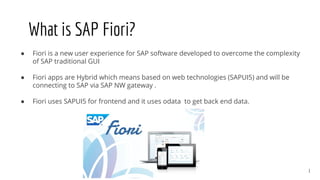
● Fiori is a new user experience for SAP software developed to overcome the complexity
of SAP traditional GUI
● Fiori apps are Hybrid which means based on web technologies (SAPUI5) and will be
connecting to SAP via SAP NW gateway .
● Fiori uses SAPUI5 for frontend and it uses odata to get back end data.
What is SAPUI5?
SAPUI5 is a UI technology that provides everything you need to build
enterprise-ready web apps.
3
● Responsive across browsers and devices - smartphones, tablets, desktops
● Built-in extensibility concepts at code and application level (Enterprise-ready web toolkit)
● Feature-rich UI controls for handling complex UI patterns and predefined layouts for
typical use cases
● Benefit from a consistent design language and predefined UX patterns across all frontend
features.
● Built in support for architectural concepts like MVC and routing
SAPUI5 concepts
4
Projectusecases
● An overview of the enterprise,
● List of product categories,
● List products by category,
● Product information and its corresponding supplier/Orders,
● Access to supplier and orders details.
5
Realization of the project
1) Adding a new “Northwind” destination
2) Creation of the project from the template “Master Master Fiori”
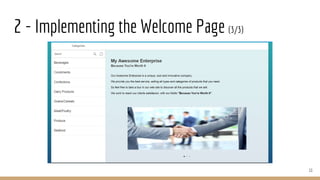
3) Implementing the Welcome Page: the overview of the enterprise
4) Implementing the Product Details Page :
4-1) Visualising the Product details
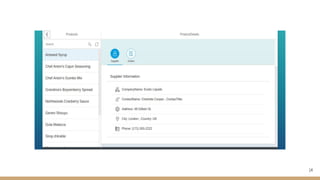
4-2) Visualising the Product Supplier details
4-3) Visualising the Product Orders details
6
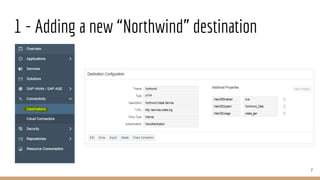
1 - Adding a new “Northwind” destination
7
8
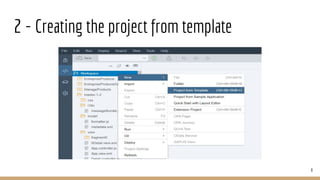
2 - Creating the project from template
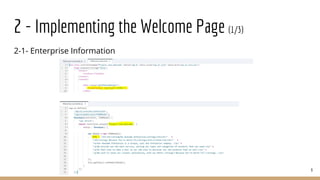
2-1- Enterprise Information
9
2 - Implementing the Welcome Page (1/3)
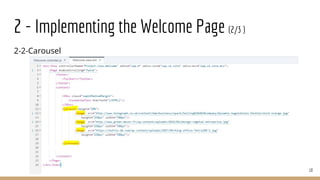
2-2-Carousel
10
2 - Implementing the Welcome Page (2/3 )
11
2 - Implementing the Welcome Page (3/3)
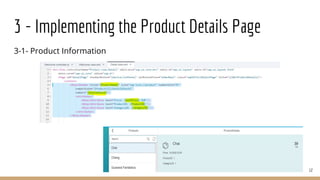
3-1- Product Information
12
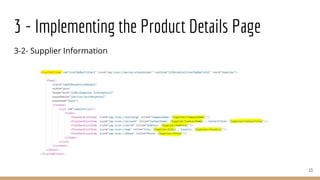
3 - Implementing the Product Details Page
3-2- Supplier Information
13
3 - Implementing the Product Details Page
14
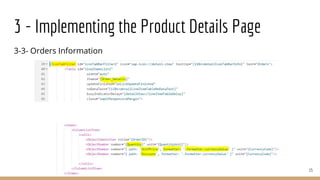
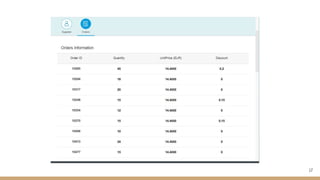
3-3- Orders Information
15
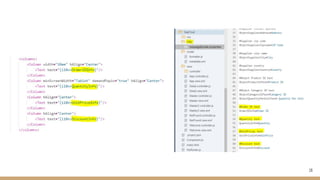
3 - Implementing the Product Details Page
16
17
This project allowed us to :
● Apply what we learned in class in a challenging project,
● Acquire new skills in SAPUI5
● Improve our communication and group work skills.
18
Conclusion
Thank you for your
attention
19

Sap project

  • 1.
    Entreprise Products Management FioriApplication Achieved by : Donia Hammami, Abir Jaza, Wissal Hamrouni Academic year: 2017 - 2018
  • 2.
    1 What is SAPFiori? ● Fiori is a new user experience for SAP software developed to overcome the complexity of SAP traditional GUI ● Fiori apps are Hybrid which means based on web technologies (SAPUI5) and will be connecting to SAP via SAP NW gateway . ● Fiori uses SAPUI5 for frontend and it uses odata to get back end data.
  • 3.
    What is SAPUI5? SAPUI5is a UI technology that provides everything you need to build enterprise-ready web apps. 3
  • 4.
    ● Responsive acrossbrowsers and devices - smartphones, tablets, desktops ● Built-in extensibility concepts at code and application level (Enterprise-ready web toolkit) ● Feature-rich UI controls for handling complex UI patterns and predefined layouts for typical use cases ● Benefit from a consistent design language and predefined UX patterns across all frontend features. ● Built in support for architectural concepts like MVC and routing SAPUI5 concepts 4
  • 5.
    Projectusecases ● An overviewof the enterprise, ● List of product categories, ● List products by category, ● Product information and its corresponding supplier/Orders, ● Access to supplier and orders details. 5
  • 6.
    Realization of theproject 1) Adding a new “Northwind” destination 2) Creation of the project from the template “Master Master Fiori” 3) Implementing the Welcome Page: the overview of the enterprise 4) Implementing the Product Details Page : 4-1) Visualising the Product details 4-2) Visualising the Product Supplier details 4-3) Visualising the Product Orders details 6
  • 7.
    1 - Addinga new “Northwind” destination 7
  • 8.
    8 2 - Creatingthe project from template
  • 9.
    2-1- Enterprise Information 9 2- Implementing the Welcome Page (1/3)
  • 10.
    2-2-Carousel 10 2 - Implementingthe Welcome Page (2/3 )
  • 11.
    11 2 - Implementingthe Welcome Page (3/3)
  • 12.
    3-1- Product Information 12 3- Implementing the Product Details Page
  • 13.
    3-2- Supplier Information 13 3- Implementing the Product Details Page
  • 14.
  • 15.
    3-3- Orders Information 15 3- Implementing the Product Details Page
  • 16.
  • 17.
  • 18.
    This project allowedus to : ● Apply what we learned in class in a challenging project, ● Acquire new skills in SAPUI5 ● Improve our communication and group work skills. 18 Conclusion
  • 19.
    Thank you foryour attention 19