SAP on SUSE Linux
Enterprise
SAP NetWeaver on SUSE Linux Enterprise Server with High Availability - Enqueue
Replication Server and sap_suse_cluster_connector Integration


11 SP2                                                           www.suse.com
October 17, 2012       Best Practice
SAP NetWeaver on SUSE Linux Enterprise Server with
High Availability - Enqueue Replication Server and
sap_suse_cluster_connector Integration
List of Authors: Fabian Herschel (fabian.herschel@suse.com), Lars Pinne (lars.pinne@suse.com)

Copyright © 2010–2012 Novell, Inc. and contributors. All rights reserved.

Permission is granted to copy, distribute and/or modify this document under the terms of the GNU
Free Documentation License, Version 1.2 or any later version published by the Free Software Foun-
dation; with the Invariant Section being this copyright notice and license. A copy of the license is in-
cluded in the section entitled “GNU Free Documentation License”.

For Novell trademarks, see the Novell Trademark and Service Mark list http://www.novell
.com/company/legal/trademarks/tmlist.html. Linux* is a registered trademark of
Linus Torvalds. All other third party trademarks are the property of their respective owners. A trademark
symbol (®, ™ etc.) denotes a Novell trademark; an asterisk (*) denotes a third party trademark.

All information found in this book has been compiled with utmost attention to detail. However, this
does not guarantee complete accuracy. Neither Novell, Inc., SUSE LINUX Products GmbH, the authors,
nor the translators shall be held liable for possible errors or the consequences thereof.
Contents
1 Executive Summary                                                                  1

2 Overview                                                                           3
   2.1   What is this guide about? . . . . . . . . . . . . . . . . . . . . . .        3
   2.2   What is not covered? . . . . . . . . . . . . . . . . . . . . . . . .         5


Part I Introduction and Concept                                                      7

3 Introduction                                                                       9
   3.1   SAP on Linux . . . . . . . . . . . . . . . . . . . . . . . . . . .           9
   3.2   SUSE Linux Enterprise Server for SAP Applications . . . . . . . . . . .     10
   3.3   SUSE Linux Enterprise High Availability Extension . . . . . . . . . . . .   13
   3.4   Sybase ASE as RDBMS for SAP . . . . . . . . . . . . . . . . . . .           18
   3.5   Sizing, Deployment, and Migration Considerations . . . . . . . . . . .      20


4 One Concept — Two Use Cases                                                        21

Part II Installation of Enqueue Replication with Sybase                              27

5 Installation Overview                                                              29

6 Planning                                                                           31

7 Prerequisites                                                                      33
   7.1   Hardware Requirements . . . . . . . . . . . . . . . . . . . . . .           33
   7.2   Software Requirements, Connection Data, and all the Rest . . . . . . .      34
8 Get the needed SAP Installation Media                                                                                     37
   8.1    Download Procedure . . . . . . . . . . . . . . . . . . . . . . .                                                  38
   8.2    Extract downloaded Archives . . . . . . . . . . . . . . . . . . . .                                               39


9 Installation of SUSE Linux Enterprise Server for SAP Applications                                                         41
   9.1    Installing SLES for SAP . . . . . . . . .      . . .      . . .      . . .             . . .             . .      41
   9.2    Additional Configuration . . . . . . . .       . . .      . . .      . . .             . . .             . .      42
   9.3    File System Layout . . . . . . . . . .       . . .      . . .      . . .             . . .             . .        43
   9.4    Update Channels and Software Selection .       . . .      . . .      . . .             . . .             . .      44
   9.5    Runlevel and Services . . . . . . . . .       . . .      . . .      . . .             . . .             . .       45
   9.6    Miscellaneous . . . . . . . . . . . .       . . .      . . .      . . .             . . .             . .         46
   9.7    Check the Installation . . . . . . . . .      . . .      . . .      . . .             . . .             . .       47


1 0 Prepare Storage                                                                                                         49

1 1 Install SAP NetWeaver 7.30                                                                                              51
   11.1   Check operating system prerequisites . . . . . . . .              .     .     .     .     .     .     .     .     51
   11.2   Installing the ASCS Instance on Node cl2n01 . . . . .              .     .     .     .     .     .     .     .    52
   11.3   Installing Sysbase Database . . . . . . . . . . . . .               .     .     .     .     .     .     .     .   53
   11.4   Installing Enqueue-Replication Instance on Node cl2n01             .     .     .     .     .     .     .     .    55
   11.5   Installing Central Instance on Node cl2n01 . . . . . .             .     .     .     .     .     .     .     .    56
   11.6   Installing Additional Dialog Instances on Node cl2n01 .            .     .     .     .     .     .     .     .    58
   11.7   Update SAP Kernel and SAPHOSTAGENT Package . . .                   .     .     .     .     .     .     .     .    59
   11.8   SAP Profile Changes to Match the Master-Slave Scenario             .     .     .     .     .     .     .     .    59
   11.9   Integrating the sap_suse_cluster_connector . . . . .              .     .     .     .     .     .     .     .     60


1 2 Additional Work on the Second Node                                                                                      63
   12.1   Duplicate SAP Related Files to the Second Node . . . . . . . . . . . .                                            63


1 3 Configuration of SUSE Linux Enterprise High Availability Extension and
    SAP NetWeaver integration                                            65
   13.1   Basic Cluster Configuration . . . . . . . . . . .          . .     . .         . .         . .         . .        65
   13.2   Adapting the Configuration Manually . . . . . .           . .     . .         . .         . .         . .         67
   13.3   Start the Cluster for the first Time . . . . . . . .        . .     . .         . .         . .         . .       69
   13.4   Configure Bootstrap and STONITH Using crm Shell .           . .     . .         . .         . .         . .       70
   13.5   Configure Resources Using crm Shell . . . . . . .           . .     . .         . .         . .         . .       71
   13.6   Configure Constraints Using crm Shell . . . . . .          . .     . .         . .         . .         . .        73
1 4 Administration and Troubleshooting                                                   75

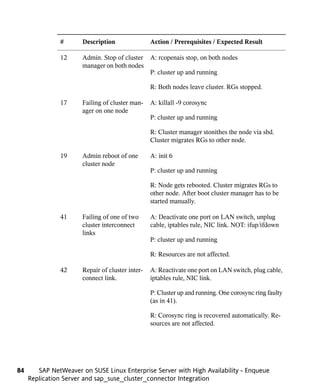
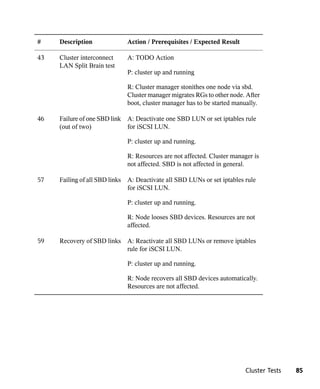
1 5 Cluster Tests                                                                        79
   15.1   Mandatory Test Cases for SAP Enqueue Replication Server Integration . . .      79
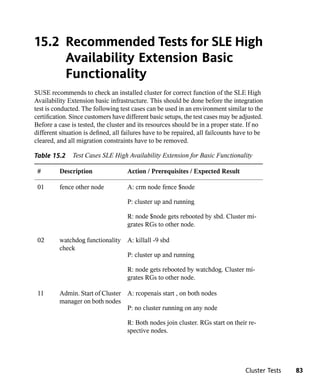
   15.2   Recommended Tests for SLE High Availability Extension Basic Functionality .    83


Part III Appendix                                                                        87

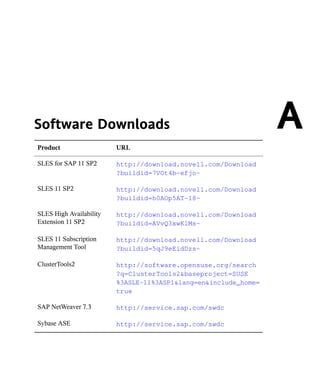
A Software Downloads                                                                     89

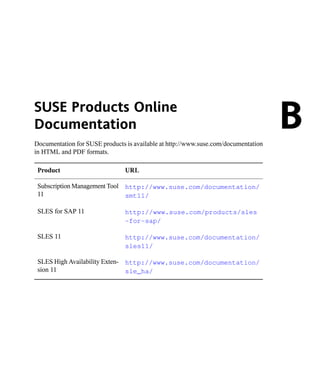
B SUSE Products Online Documentation                                                     91

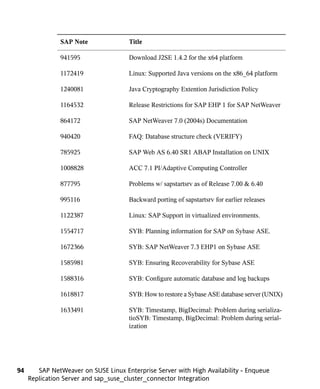
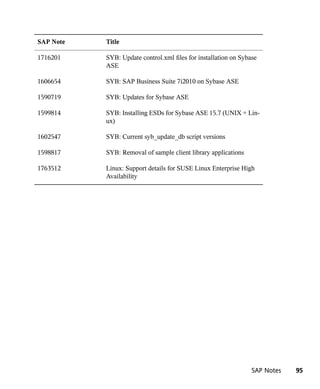
C SAP Notes                                                                              93

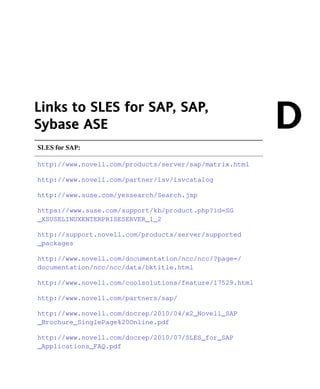
D Links to SLES for SAP, SAP, Sybase ASE                                                 97

E Licenses                                                                              101
   E.1    GNU Free Documentation License . . . . . . . . . . . . . . . . .              101
   E.2    GNU General Public License . . . . . . . . . . . . . . . . . . . .            104


Terminology                                                                             109
Executive Summary
SAP Business Suite is a sophisticated application platform for large enterprises and
                                                                                                1
mid-size companies. Many critical business environments require the highest possible
SAP application availability. SUSE Linux Enterprise Server for SAP Applications is
the optimal platform to run SAP applications with high availability. Together with a
redundant layout of the technical infrastructure, single points of failure can be eliminated.

SAP NetWeaver is a common stack of middleware functionality used to support the
SAP business applications. The SAP Enqueue Replication Server constitutes application
level redundancy for one of the most crucial components of the SAP NetWeaver stack,
the enqueue service. The optimal effect of the enqueue replication mechanism can be
achieved when combining the application level redundancy with a high availability
cluster solution. The described concept has proven its maturity during several years of
productive operations for customers of different sizes and branches.

The described cluster scenario with the SUSE Linux Enterprise High Availability Ex-
tension including the sap_suse_cluster_connector has passed all SAP certification tests
(http://scn.sap.com/docs/DOC-31701). Our solution integration with SAP
NetWeaver has been certified:


This guide will show you how to:

• Plan a SUSE Linux Enterprise high availability platform for SAP NetWeaver, includ-
  ing SAP Enqueue Replication Server.


                                                                               Executive Summary   1
• Set up a Linux high availability platform and perform a basic SAP NetWeaver instal-
                lation including SAP Enqueue Replication Server on SUSE Linux Enterprise.

              • Integrate the high availability cluster with the SAP control framework via
                sap_suse_cluster_connector, as certified by SAP.


2      SAP NetWeaver on SUSE Linux Enterprise Server with High Availability - Enqueue Replica-
    tion Server and sap_suse_cluster_connector Integration
Overview                                                                                        2
2.1 What is this guide about?
SUSE Linux Enterprise Server for SAP Applications is the optimal platform to run
SAP applications with high availability. Together with a redundant layout of the tech-
nical infrastructure, single points of failure can be eliminated. The SAP Enqueue
Replication Server constitutes application level redundancy for one of the most crucial
components of the SAP NetWeaver stack, the enqueue service. "The replicated enqueue
server solves the problem of the enqueue service, which is a single point-of-failure. It
constitutes a fully transparent solution to this problem and enables the SAP system to
continue functioning in the event that an enqueue server fails..." (SAP Help article SAP
High Availability - Standalone Enqueue Replication Service [http://help.sap
.de/saphelp_nw73/helpdata/de/45/
25ebd455c56d7be10000000a114a6b/frameset.htm]) The optimal effect
of the enqueue replication mechanism can be achieved when combining the application
level redundancy (replicated enqueues) with a high availability cluster solution.

The integration of the HA cluster through the SAP control framework using the
sap_suse_cluster_connector is of special interest. "One of the classical problems running
SAP instances in a highly available environment is that if a SAP administrator changes
the status (start/stop) of a SAP instance without using the interfaces provided by the
cluster software then the cluster framework will detect that as an error status and will
bring the SAP instance into the old status by either starting or stopping the SAP instance.
This can result into very dangerous situations, if the cluster changes the status of a SAP
instance during some SAP maintenance tasks. The solution is that the central component
SAPSTARTSRV, which controls SAP instances since SAP Kernel versions 6.4, will


                                                                                         Overview   3
be enabled to communicate the state change (start/stop) to the cluster software." (SAP
              SDN article "How to Connect SAPSTARSRV and Cluster Frameworks using the
              Components saphascriptco.so and SAP_Vendor_Cluster_Connector" http://scn
              .sap.com/docs/DOC-28875).

              The high availability cluster for the replicated enqueue server described in this document
              could be installed on physical hardware as well as in virtual machines. All major virtu-
              alization platforms are supported. Information about virtualization platform support for
              SAP Enqueue Replication Server can be found in SAP Note 1122387 - Linux: SAP
              Support in virtualized environments. Information about virtualization platform support
              for SAP NetWeaver and SLE could be found on http://scn.sap.com/docs/
              DOC-27321 and other web pages listed in the appendix.

               IMPORTANT: SAP Application Server High Availability Interface
               Certification

               The SLE HAE integration with SAP NetWeaver has been certified by SAP
               http://scn.sap.com/docs/DOC-31701.

              This guide will show you how to:

              • Plan a SUSE Linux Enterprise high availability platform for SAP NetWeaver, includ-
                ing SAP Enqueue Replication Server.

              • Set up a Linux high availability platform and perform a basic SAP NetWeaver instal-
                lation including SAP Enqueue Replication Server on SUSE Linux Enterprise.

              • Integrate the high availability cluster with the SAP control framework via
                sap_suse_cluster_connector.

              This guide will also help you to install the following software components:

              • SUSE Linux Enterprise Server for SAP Applications 11 SP2,

              • SAP NetWeaver 7.30 (other versions are supported, too).

              This guide is aimed at IT professionals with skills in:

              • SAP basic operating,

              • Data center system concepts and configuration,


4      SAP NetWeaver on SUSE Linux Enterprise Server with High Availability - Enqueue Replica-
    tion Server and sap_suse_cluster_connector Integration
• Linux knowledge at LPI1 or CLE level.

To follow this guide you need access to the following resources:

• SUSE Linux Enterprise Server for SAP Applications 11 SP2 installation media.

• To update the systems you must have either Internet access, SUSE Manager, or a
  local Subscription Management Tool (SMT).

• SAP NetWeaver 7.30 Installation Media.

• Appropriate hardware (two servers, network, storage, see below).

• Connectivity to the database and NFS server.

This guide is organized into two main parts:

• Part I - Introduction and Concept

  In a perfect world everyone who plans, installs, or runs SAP NetWeaver including
  SAP Enqueue Replication Server with high availability on SUSE Linux Enterprise
  Server for SAP Applications has read this chapter.

• Part II - Planning, Installing, and Testing the Cluster

  Could be used to perform the mentioned tasks or to learn more details about SAP
  Enqueue Replication Server Server with high availability on SLES for SAP.


2.2 What is not covered?
While this guide uses well known components, additional features of SUSE Linux En-
terprise Server for SAP Applications 11 SP2 allow for enhanced concepts, like the use
of local area network-based Distributed Replicated Block Devices (DRBD) instead of
storage area networks. These concepts are described in additional documents.

SLES for SAP contains SUSE Linux Enterprise Server and SUSE Linux Enterprise
Server High Availability Extension. Basically, it is possible to set up the described high
availability solution using these two separate products instead of SLES for SAP. Such
a setup will lack other features of SLES for SAP, like page cache limit or Expanded
Service Pack Overlap Support. Nevertheless, SUSE Linux Enterprise Server and SUSE


                                                                                        Overview   5
Linux Enterprise Server High Availability Extension would allow to run SAP Enqueue
              Replication Server with high availability on other hardware platforms like System z.
              Such platforms may need different configuration parameters that are not explained in
              this document.

              To decide if SAP Enqueue Replication Server fits for a given situation falls into the
              domain of SAP application architecture. This is out of scope for this document. Also
              general configuration and administration of the SAP Enqueue Replication Server is not
              covered by this document. Finally, system sizing and performance related questions
              are not discussed in this document. More Best Practices for SAP on SUSE Linux Enter-
              prise are published at https://www.suse.com/products/sles-for-sap/
              resource-library/sap-best-practices.html.

              Selection, planning, and installing of the needed database is not described here. We
              refer to the database planning and installation where it helps to accomplish our proce-
              dures. More information on planning and installing a Linux high availability platform
              for databases is available at the web pages listed in the appendix.

              Setting up a multipath connection to the SAN storage is not described here in detail.
              We refer to the multipath configuration where necessary for our tasks. More information
              about Linux multipath configuration can be found in the product manuals and at the
              web pages mentioned in the appendix. Information on connecting SUSE Linux Enterprise
              Server to a given SAN storage can be found in the storage manufacturer's documentation.


6      SAP NetWeaver on SUSE Linux Enterprise Server with High Availability - Enqueue Replica-
    tion Server and sap_suse_cluster_connector Integration
Part I. Introduction and Concept
Introduction                                                                                 3
3.1 SAP on Linux
SUSE has multiple dedicated resources working at SAP headquarters and the SAP
LinuxLab to ensure maximum interoperability between our products with SAP software
and technologies.

SAP has built SAP LinuxLab to assist with the release of SAP software on Linux.
LinuxLab supports other SAP departments in development of the Linux platform, pro-
cesses Linux-specific support problems and acts as an information hub to all the SAP
partners in the Linux ecosystem.

Where possible, SAP endorsed open standards and technologies. This allowed SAP to
support a very wide range of operating systems and hardware platforms. Open-source-
based Linux provides the maximum in “openness,” so it was only natural for SAP to
start supporting it in 1999. SAP tries to be “operating system agnostic” and act neutral
on the customer's chosen operating systems. Unlike other software vendors, SAP has
clearly stated its policies toward open source and Linux. For instance, the usage of bi-
nary only (closed source) device drivers (kernel modules) is not supported. This helps
the Linux and open source communities, since hardware vendors are encouraged to either
publish the specifications and APIs of their hardware so the Linux community can write
drivers, or make driver source code that can be included in the Linux kernel available
(see SAP note 784391).


                                                                                  Introduction   9
3.2 SUSE Linux Enterprise Server for
                  SAP Applications
              SUSE Linux Enterprise Server for SAP Applications is the only operating system opti-
              mized for all mission-critical SAP software solutions, including appliances, and is rec-
              ommended by SAP as a preferred Linux platform.

              Since the very start of SAP involvement with Linux, SUSE has been the number one
              Linux platform for SAP. SUSE Linux Enterprise Server (SLES) has become the reference
              platform for SAP's software development. SAP now actively suggests SUSE Linux
              Enterprise Server when customers want to run SAP workloads on Linux. Recently,
              SUSE Linux Enterprise Server became part of SAP products by being chosen as the
              operating system for SAP's all-in-one business solutions.

              SLES for SAP is based on the newest SUSE Linux Enterprise technology, a highly re-
              liable, scalable, secure and optimized server operating system that is built to power
              both physical and virtual mission-critical workloads. SUSE Linux Enterprise Server
              for SAP Applications is optimized for all mission-critical SAP software solutions. SUSE
              Linux Enterprise Server is validated and certified by SAP and is, therefore, uniquely
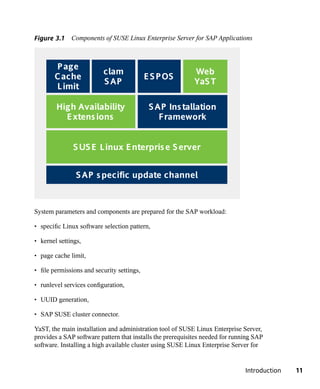
              positioned to support SAP software solutions including appliances. The graphic shows
              the components SUSE Linux Enterprise Server for SAP Applications consists of:


10      SAP NetWeaver on SUSE Linux Enterprise Server with High Availability - Enqueue
     Replication Server and sap_suse_cluster_connector Integration
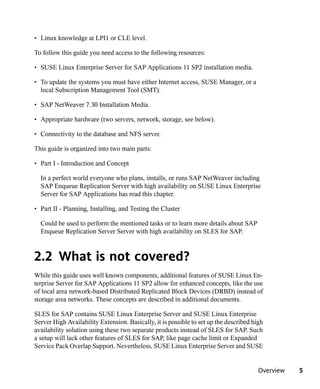
Figure 3.1 Components of SUSE Linux Enterprise Server for SAP Applications


       P age
                          clam                              Web
       Cache                                E S P OS
                          S AP                              YaS T
       L imit

        High Availability                    S AP Ins tallation
          E xtens ions                          Framework


               S US E L inux E nterpris e S erver


                S AP s pecific update channel


System parameters and components are prepared for the SAP workload:

• specific Linux software selection pattern,

• kernel settings,

• page cache limit,

• file permissions and security settings,

• runlevel services configuration,

• UUID generation,

• SAP SUSE cluster connector.

YaST, the main installation and administration tool of SUSE Linux Enterprise Server,
provides a SAP software pattern that installs the prerequisites needed for running SAP
software. Installing a high available cluster using SUSE Linux Enterprise Server for


                                                                               Introduction   11
SAP Applications is more convenient because all needed packages including the cluster
              packages and SAP-related packages like the java JDK are already included in one single
              product.

              SLES for SAP includes SUSE Linux Enterprise Server Priority Support for SAP Appli-
              cations. This support offering provides customers with a single support point of entry,
              from the operating system through the application (http://www.novell.com/
              docrep/2007/05/4611143_f_en.pdf). SLES for SAP also includes Extended
              Service Pack Overlap Support. Find more details about SLES for SAP at http://
              www.novell.com/products/sles-for-sap.html.

              In this document, SUSE Linux Enterprise Server for SAP Applications 11 SP2 with
              updates from Novell Customer Center is used.

              The following current SUSE Linux Enterprise Server systems including all service
              packs (SP) are certified as 64-bit version for SAP:

              • SUSE Linux Enterprise Server for SAP Applications 11 for AMD64 and Intel EM64T,

              • SUSE Linux Enterprise Server 11 for AMD64 and Intel EM64T,

              • SUSE Linux Enterprise Server 11 for IBM Power,

              • SUSE Linux Enterprise Server 11 for IBM System z,

              • SUSE Linux Enterprise Server 11 for Intel ia64.

              SAP and SUSE are working together to ensure that SUSE Linux Enterprise Server
              service packs always match the certification of the respective product. In fact, SAP
              recommends always using the latest available service pack.

              SUSE will provide at least seven years of general support for platform and operating
              system products, including its revisions, starting on the date of a product's general
              availability. When general support ends, SUSE will offer extended support for a mini-
              mum of two years. This gives SAP customers a long installation run-time, ensuring a
              low TCO.


12      SAP NetWeaver on SUSE Linux Enterprise Server with High Availability - Enqueue
     Replication Server and sap_suse_cluster_connector Integration
3.3 SUSE Linux Enterprise High
    Availability Extension
Your data is the most valuable asset that you have—it is what your business depends
on. Robust, scalable and manageable storage is a top priority for your IT department.
High availability storage, applications, and services are critical for your business to be
competitive. The SLE High Availability Extension comes with SLES for SAP and sat-
isfies these needs. It includes high availability service and application clustering, file
systems/clustered file systems, network file systems (NAS), volume managers, net-
worked storage systems and drivers (SAN), and the management of all these components
working together.

Unlike proprietary solutions, SLE High Availability Extension keeps costs low by inte-
grating open source, enterprise-class components. The key components of the extension
are:

• Pacemaker, a high availability cluster manager that supports multinode failover.

• Resource Agents to monitor availability of resources.

• Oracle Cluster File System 2 (OCFS2), a parallel cluster file system that offers scal-
  ability.

• Cluster Logical Volume Manager (cLVM2), a logical volume manager for the Linux
  kernel, which provides a method of allocating space on mass storage devices that is
  more flexible than conventional partitioning schemes.

• Distributed Replicated Block Devices (DRBD8) provides fast data resynchronization
  capabilities over LAN, replicated storage area network (SAN) semantics, allowing
  cluster-aware file systems to be used without additional SANs.

• High Availability Web Console (HAWK) and various command line tools.

Availability is a result of the interaction of cluster software with application services
at the front and the operating system and hardware resources at the backend. Following
this basic idea, cluster software like Pacemaker uses a lot of modules, such as services,
resource agents, a messaging layer, network and file system availability, and a stable
Linux kernel designed and configured for productive server systems in data centers.


                                                                                   Introduction   13
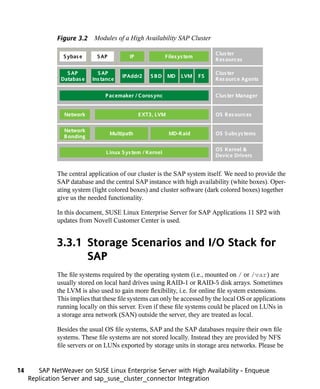
Figure 3.2 Modules of a High Availability SAP Cluster

                                                                                Clus ter
                S ybas e      S AP          IP              Files ys tem
                                                                                Res ources

                  S AP        S AP                                              Clus ter
                                         IPAddr2     SBD      MD   LVM     FS
                Databas e   Ins tance                                           Res ource Agents


                                 P acemaker / Coros ync                         Clus ter Manager


                 Network                         E XT3, LVM                     OS Res ources

                 Network
                                     Multipath                MD-Raid           OS S ubs ys tems
                 B onding

                                                                                OS Kernel &
                                 L inux S ys tem / Kernel
                                                                                Device Drivers


              The central application of our cluster is the SAP system itself. We need to provide the
              SAP database and the central SAP instance with high availability (white boxes). Oper-
              ating system (light colored boxes) and cluster software (dark colored boxes) together
              give us the needed functionality.

              In this document, SUSE Linux Enterprise Server for SAP Applications 11 SP2 with
              updates from Novell Customer Center is used.


              3.3.1 Storage Scenarios and I/O Stack for
                    SAP
              The file systems required by the operating system (i.e., mounted on / or /var) are
              usually stored on local hard drives using RAID-1 or RAID-5 disk arrays. Sometimes
              the LVM is also used to gain more flexibility, i.e. for online file system extensions.
              This implies that these file systems can only be accessed by the local OS or applications
              running locally on this server. Even if these file systems could be placed on LUNs in
              a storage area network (SAN) outside the server, they are treated as local.

              Besides the usual OS file systems, SAP and the SAP databases require their own file
              systems. These file systems are not stored locally. Instead they are provided by NFS
              file servers or on LUNs exported by storage units in storage area networks. Please be


14      SAP NetWeaver on SUSE Linux Enterprise Server with High Availability - Enqueue
     Replication Server and sap_suse_cluster_connector Integration
aware that the storage which the database resides on is subject to specifications and
recommendations of the database vendor.

Some file systems have to be shared across all cluster nodes such that every cluster
node can access the file system at the same time. The recommended way of providing
this service is the usage of a network file system (NFS). The NFS service also has to
be highly available. In this document we use a dedicated NFS. This server could be either
a third-party product or a SUSE Linux Enterprise High Availability Extension cluster
that runs NFS resources. Under specific circumstances, it might be possible to integrate
the NFS server into the SAP cluster. Both the separate NFS cluster as well as the inte-
grated NFS server are described in separate documents.

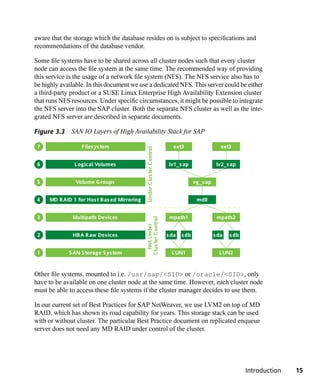
Figure 3.3 SAN IO Layers of High Availability Stack for SAP

 7                Files ys tem                                          ext3                     ext3
                                             Under Clus ter Control

 6             L ogical Volumes                                        lv1_s ap                lv2_s ap


 5              Volume Groups                                                       vg_s ap


 4   MD RAID 1 for Hos t B as ed Mirroring                                           md0


 3            Multipath Devices                                        mpath1                  mpath2
                                             Clus ter Control
                                               Not Under


 2            HB A Raw Devices                                        s da   s db             s da   s db


 1           S AN S torage S ys tem                                     L UN1                   L UN2


Other file systems, mounted to i.e. /usr/sap/<SID> or /oracle/<SID>, only
have to be available on one cluster node at the same time. However, each cluster node
must be able to access these file systems if the cluster manager decides to use them.

In our current set of Best Practices for SAP NetWeaver, we use LVM2 on top of MD
RAID, which has shown its road capability for years. This storage stack can be used
with or without cluster. The particular Best Practice document on replicated enqueue
server does not need any MD RAID under control of the cluster.


                                                                                                            Introduction   15
The UNIX file system is the highest layer of a whole I/O stack consisting of multiple
              I/O layers. Each layer provides a certain kind of functionality. For all I/O critical tasks,
              we have configured an I/O stack that supports the following functions:

              • Low latency: high I/O throughput and fast response times.

              • Host-based mirroring for storing data simultaneously on two separate storage units
                in a SAN.

              • Logical Volume Manager for a flexible management of file systems.

              • Multipath I/O for an additional level of redundancy for file systems, stored on LUNs
                in the SAN.

              • Online resizing (extending) of file systems, snapshots of file systems using LVM
                snapshots, moving or copying file system.

              While this guide focuses on well-known components, additional features of SUSE
              Linux Enterprise High Availability Extension allow for enhanced concepts, like the
              use of local area network-based Distributed Replicated Block Devices (DRBD) instead
              of storage area networks. Those concepts are described in additional documents.


              3.3.2 SAP Resource Agents
              The SAP Instance resource agent is responsible for starting, stopping, and monitoring
              the services in a SAP instance. The following services are monitoring in the resource
              agent: disp+work, msg_server, enserver, enrepserver, jcontrol, and jstart.

              The SAP Instance Resource Agent can be used to manage the following SAP instances:

              • SAP WebAS ABAP Release 6.20 – 7.30,

              • SAP WebAS Java Release 6.40 - 7.30 (for 6.40 please also read SAP Note 995116),

              • SAP WebAS ABAP + Java Add-In Release 6.20 - 7.30 (Java is not monitored by
                the cluster).

              The resource agent is part of the SLE High Availability Extension and SLES for SAP.
              Another resource agent, the SAP Database resource agent, is also included. The purpose
              of the latter RA is to control the database instance of an SAP system. This resource


16      SAP NetWeaver on SUSE Linux Enterprise Server with High Availability - Enqueue
     Replication Server and sap_suse_cluster_connector Integration
agent expects a standard SAP installation and therefore needs fewer parameters to
configure. The monitor operation of the resource agent can test the availability of the
database by using SAP tools (R3trans or jdbcconnect). This ensures that the database
is really accessible for the SAP system.


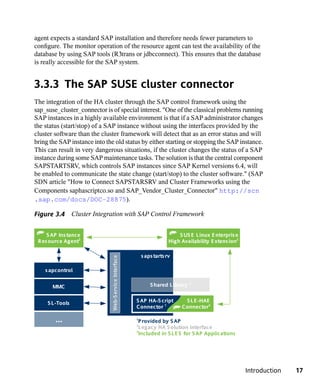
3.3.3 The SAP SUSE cluster connector
The integration of the HA cluster through the SAP control framework using the
sap_suse_cluster_connector is of special interest. "One of the classical problems running
SAP instances in a highly available environment is that if a SAP administrator changes
the status (start/stop) of a SAP instance without using the interfaces provided by the
cluster software than the cluster framework will detect that as an error status and will
bring the SAP instance into the old status by either starting or stopping the SAP instance.
This can result in very dangerous situations, if the cluster changes the status of a SAP
instance during some SAP maintenance tasks. The solution is that the central component
SAPSTARTSRV, which controls SAP instances since SAP Kernel versions 6.4, will
be enabled to communicate the state change (start/stop) to the cluster software." (SAP
SDN article "How to Connect SAPSTARSRV and Cluster Frameworks using the
Components saphascriptco.so and SAP_Vendor_Cluster_Connector" http://scn
.sap.com/docs/DOC-28875).

Figure 3.4 Cluster Integration with SAP Control Framework


    S AP Ins tance                                                           S US E L inux E nterpris e
 Res ource Agent3                                                        High Availability E xtens ion3

                                                            s aps tarts rv
                               Web-S ervice Interface


    s apcontrol

                                                                                   2
       MMC                                                      S hared L ibrary


     S L -Tools                                         S AP HA-S cript        S L E -HAE
                                                        Connector 1           Connector3

        ...                                             1
                                                          P rovided by S AP
                                                        2
                                                          L egacy HA S olution Interface
                                                        3
                                                          Included in S L E S for S AP Applications


                                                                                                          Introduction   17
3.3.4 Virtualization
              The SLE High Availability Extension used in this document is supported on all major
              virtualization platforms, particularly current releases of VMware ESX. Detailed infor-
              mation about virtualization platform support for SLE High Availability Extension could
              be found on web pages listed in the appendix.


              3.4 Sybase ASE as RDBMS for SAP
              Four major RDBMS (Relational Database Management System) are supported with
              SAP on SLES, either with or without the SLES High Availability Extension. In addition,
              for SAP deployments with each of these databases, SAP priority support is available
              from SUSE:

              • Oracle 10gR2 and 11gR2,

              • IBM DB2 UDB for Linux, UNIX, and Windows 9.x,

              • SAP-DB / MaxDB 7.x,

              • Sybase ASE 15.7.x.

              Supported hardware platforms for all RDBMS on SLES for SAP 11 is x86-64 (also
              known as “x86 64-bit”, “AMD64”, “EM64T”). Nevertheless, some databases are also
              supported on other hardware platforms such as System z. Details can be found on the
              certification pages listed as links in the appendix.

              Sybase ASE was chosen as RDBMS for this document. It was mainly chosen to shorten
              the planning and installation procedure. Since the document is targeting a basic instal-
              lation of SAP in a high availability cluster, the use cases are covered with Sybase ASE.
              This installation example does not imply any decision about how one of the database
              management systems fits for a given workload.

              Sybase ASE (ASE) is a high-performance relational database management system for
              mission-critical, data-intensive environments. ASE key features include data encryption
              to protect from internal and external breaches; partitioning technology for better perfor-
              mance and easier maintenance; and, virtualization and clustering capabilities for contin-
              uous availability and efficient use of resources. In-memory database technology provides
              significant improvements in response time and throughput for high data volume and


18      SAP NetWeaver on SUSE Linux Enterprise Server with High Availability - Enqueue
     Replication Server and sap_suse_cluster_connector Integration
high concurrent user organizations. And the addition of data compression allows enter-
prises to reduce storage costs and increase performance on large and growing data sets.

Sybase ASE product options are:

• ASE In-Memory Databases Option: fully integrated within ASE, the In-Memory
  Databases Option equips applications with instant responsiveness and very high
  throughput. The in-memory databases have zero-disk footprint and reside completely
  in memory.

• ASE Partitions Option: allows users to manage large tables and indexes by dividing
  them into smaller, more manageable pieces.

• ASE Encrypted Column Option: Allows data to be natively and selectively encrypted
  and stored with ASE.

• ASE Security and Directory Services Package: ensures data privacy through row-
  based access controls, the encryption of in-transit data, and support for LDAP, Active
  Directory and Pluggable Authentication Modules (PAM) services.

• ASE Active Messaging Option: provides a way to capture transactions in an Adaptive
  Server database and deliver them as events to external applications using either: JMS
  message bus, EAServer and Sonic Software; or Message Queue Interface (MQI) by
  WebSphere MQ.

• ASE High Availability Option: provides near continuous database access for critical
  business applications in the event of unexpected system failures.

Sybase's Linux commitment began in 1999 with the delivery of an enterprise-class
DBMS on Linux and was the first to deliver a free enterprise-class commercial database
that includes both pilot development and deployment. More information is available
at: http://www.sybase.com/linux/ase. As integrated database for the SAP
NetWeaver technology platform, the respective certification applies for SLES on x86-
64. For SAP systems, the appropriate product certification matrix should be applied
(https://websmp201.sap-ag.de/pam). For support with SLE, see also SAP
note 1554717 - SYB: Planning information for SAP on Sybase ASE.

Sybase ASE installation media can be obtained from the SAP portal along with SAP
NetWeaver. The installation is seamlessly integrated into the SAP installer. SAP offers
several services around Sybase ASE for SAP applications. More information can be
found on the web pages listed in the appendix.


                                                                                 Introduction   19
3.5 Sizing, Deployment, and Migration
                  Considerations
              Running SAP workloads in SUSE Linux Enterprise Server can reduce the TCO consid-
              erably. Through the homogenization of the data center (and thus the consolidation of
              resources), cost savings can be achieved even for highly specialized SAP installations.
              SUSE Linux Enterprise Server is very well prepared for automated installation and
              deployment, making it easy to deploy many servers. SUSE provides tools for managing
              updates and releases to ease day-to-day administration.

              SUSE Linux Enterprise Server is very capable of providing the base for small or large
              systems. Customers run smaller central instances or larger distributed systems all with
              the same system base. It is quite possible to run multiple SAP instances in parallel on
              one system even when using high availability clusters. An increasing number of instal-
              lations is done in virtualized environments. SUSE Linux Enterprise Server fits very
              well into such scenarios. SLES, SLE High Availability Extension, and SLES for SAP
              are supported on all major virtualization platforms. For information about virtualization
              platform support for SAP NetWeaver, please refer to SAP Note 1122387.

              SAP requests that system sizing is done by the hardware vendor. SUSE has good rela-
              tionships with many hardware vendors to make sure SUSE Linux Enterprise Server
              runs smoothly on a broad range of enterprise servers fit to run SAP workloads. SUSE
              and its partners are providing customers with solutions to their specific needs when it
              comes to Linux deployment. SUSE consulting has been developing best practices for
              high availability SAP installations and provides this information to customers and
              partners. Basic hardware requirements for a Proof of Concept on setting up SAP Enqueue
              Replication Server with SLES for SAP are given in a later chapter.

              Hundreds of successful SAP to Linux migrations have been made. The results regarding
              cost savings, performance and reliability have exceeded expectations in many instances.
              Since most data centers have adopted a Linux strategy, the know-how for deploying
              and administrating Linux systems is often in place and available. SAP-specific config-
              urations and administration experience is available through SUSE consultation and
              partners. This makes the operating system side of the migration less risky and a ROI
              can be seen within the first six months of migration. SAP provides check lists and
              guidelines for the OS and database migration (see SAP Note 82478 - SAP system
              OS/DB migration).


20      SAP NetWeaver on SUSE Linux Enterprise Server with High Availability - Enqueue
     Replication Server and sap_suse_cluster_connector Integration
One Concept — Two Use
Cases
SAP NetWeaver installation can be adapted to several architectures for the entire system.
                                                                                            4
You can plan and implement an “enqueue replication” SAP system with two dialog
instances (i.e. DVEBMGS01 and D02) and the database on a different machine or
cluster. After the SAP installation we add high availability components and bring the
SAP system into a high availability scenario. There might also be reasons to install a
SAP system with additional application servers. In all previously mentioned cases, SAP
is treated in a two-tier manner, that means all SAP instances could run on the same
system.

 IMPORTANT

 Throughout this document, all instance names (like ASCS00) or instance num-
 bers (like 02) are examples only. Of course you can use the instance names
 and numbers of your SAP installation. The only rule is that your instances names
 and numbers match the SAP conventions, recommendations, and restrictions.

Installing an "enqueue replication” SAP system, we typically have the following types
of instances in our cluster:

• ASCS00 (SCS20) - central service instance with message server and enqueue server,

• ERS10 - enqueue replication server,

• DVEBMGS01 - primary application server (ABAP or Dual-Stack only),

• D02, (D03, ...) - Dialog instance (ABAP or Dual-Stack only),


                                                             One Concept — Two Use Cases    21
• J21, (J22, ...) - Java application server instance (Java only).

              This document focuses on the ABAP application instances only.

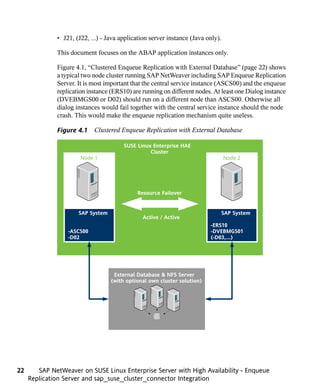
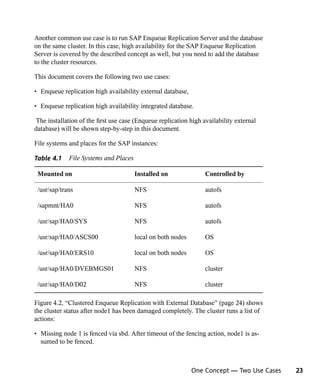
              Figure 4.1, “Clustered Enqueue Replication with External Database” (page 22) shows
              a typical two node cluster running SAP NetWeaver including SAP Enqueue Replication
              Server. It is most important that the central service instance (ASCS00) and the enqueue
              replication instance (ERS10) are running on different nodes. At least one Dialog instance
              (DVEBMGS00 or D02) should run on a different node than ASCS00. Otherwise all
              dialog instances would fail together with the central service instance should the node
              crash. This would make the enqueue replication mechanism quite useless.

              Figure 4.1 Clustered Enqueue Replication with External Database

                                        SUSE Linux Enterprise HAE
                                                  Cluster
                       Node 1                                                     Node 2


                                             Resource Failover


                      SAP System                                                  SAP System
                                               Active / Active
                                                                          -ERS10
                  -ASCS00                                                 -DVEBMGS01
                  -D02                                                    (-D03,...)


                                    External Database & NFS Server
                                   (with optional own cluster solution)


22      SAP NetWeaver on SUSE Linux Enterprise Server with High Availability - Enqueue
     Replication Server and sap_suse_cluster_connector Integration
Another common use case is to run SAP Enqueue Replication Server and the database
on the same cluster. In this case, high availability for the SAP Enqueue Replication
Server is covered by the described concept as well, but you need to add the database
to the cluster resources.

This document covers the following two use cases:

• Enqueue replication high availability external database,

• Enqueue replication high availability integrated database.

 The installation of the first use case (Enqueue replication high availability external
database) will be shown step-by-step in this document.

File systems and places for the SAP instances:

Table 4.1    File Systems and Places

 Mounted on                            Installed on                Controlled by

 /usr/sap/trans                        NFS                         autofs

 /sapmnt/HA0                           NFS                         autofs

 /usr/sap/HA0/SYS                      NFS                         autofs

 /usr/sap/HA0/ASCS00                   local on both nodes         OS

 /usr/sap/HA0/ERS10                    local on both nodes         OS

 /usr/sap/HA0/DVEBMGS01                NFS                         cluster

 /usr/sap/HA0/D02                      NFS                         cluster

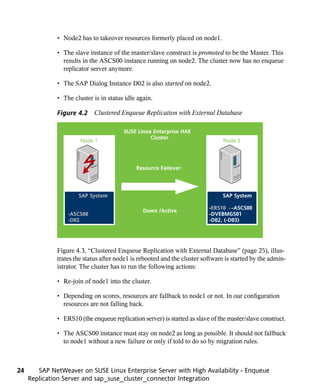
Figure 4.2, “Clustered Enqueue Replication with External Database” (page 24) shows
the cluster status after node1 has been damaged completely. The cluster runs a list of
actions:

• Missing node 1 is fenced via sbd. After timeout of the fencing action, node1 is as-
  sumed to be fenced.


                                                             One Concept — Two Use Cases   23
• Node2 has to takeover resources formerly placed on node1.

              • The slave instance of the master/slave construct is promoted to be the Master. This
                results in the ASCS00 instance running on node2. The cluster now has no enqueue
                replicator server anymore.

              • The SAP Dialog Instance D02 is also started on node2.

              • The cluster is in status idle again.

              Figure 4.2 Clustered Enqueue Replication with External Database

                                        SUSE Linux Enterprise HAE
                                                  Cluster
                       Node 1                                                   Node 2


                                             Resource Failover


                      SAP System                                               SAP System

                                                                          -ERS10 →ASCS00
                                                Down /Active
                  -ASCS00                                                 -DVEBMGS01
                  -D02                                                    -D02, (-D03)


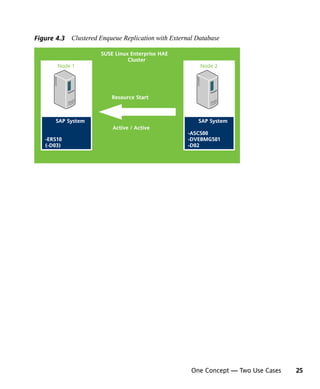
              Figure 4.3, “Clustered Enqueue Replication with External Database” (page 25), illus-
              trates the status after node1 is rebooted and the cluster software is started by the admin-
              istrator. The cluster has to run the following actions:

              • Re-join of node1 into the cluster.

              • Depending on scores, resources are fallback to node1 or not. In our configuration
                resources are not falling back.

              • ERS10 (the enqueue replication server) is started as slave of the master/slave construct.

              • The ASCS00 instance must stay on node2 as long as possible. It should not fallback
                to node1 without a new failure or only if told to do so by migration rules.


24      SAP NetWeaver on SUSE Linux Enterprise Server with High Availability - Enqueue
     Replication Server and sap_suse_cluster_connector Integration
Figure 4.3 Clustered Enqueue Replication with External Database

                      SUSE Linux Enterprise HAE
                                Cluster
       Node 1                                           Node 2


                          Resource Start


       SAP System                                      SAP System
                          Active / Active
                                                    -ASCS00
   -ERS10                                           -DVEBMGS01
   (-D03)                                           -D02


                                                     One Concept — Two Use Cases   25
Part II. Installation of Enqueue
   Replication with Sybase
Installation Overview
This part describes the installation of a SAP NetWeaver “Enqueue Replication High
                                                                                            5
Availability”, based on Sybase ASE SUSE Linux Enterprise Server 11 SP2, for a proof
of concept. The procedure is divided into the following steps:

• Planning: Chapter 6, Planning (page 31).

• Check prerequisites: Chapter 7, Prerequisites (page 33).

• Get the needed SAP NetWeaver installation media: Chapter 8, Get the needed SAP
  Installation Media (page 37).

• Install SUSE Linux Enterprise Server for SAP Applications 11 SP2: Chapter 9, In-
  stallation of SUSE Linux Enterprise Server for SAP Applications (page 41).

• Prepare SAN storage for SBD: Chapter 10, Prepare Storage (page 49).

• Install SAP NetWeaver 7.30 based on Sybase ASE: Chapter 11, Install SAP
  NetWeaver 7.30 (page 51).

• Preparation for SAP NetWeaver on second node Chapter 12, Additional Work on the
  Second Node (page 63).

• Configure SLE High Availability Extension and SAP NetWeaver integration:
  Chapter 13, Configuration of SUSE Linux Enterprise High Availability Extension
  and SAP NetWeaver integration (page 65).

• Check final result: Chapter 14, Administration and Troubleshooting (page 75).


                                                                    Installation Overview   29
• Recommended cluster tests: Chapter 15, Cluster Tests (page 79).


30      SAP NetWeaver on SUSE Linux Enterprise Server with High Availability - Enqueue
     Replication Server and sap_suse_cluster_connector Integration
Planning
Proper planning is essential for a well performing SAP system. For planning and support
                                                                                               6
for your SAP Installation, visit http://service.sap.com [http://service.sap
.com/] to download installation guides, review installation media lists, and to browse
through the SAP Notes. This section focuses on aspects of planning a SAP installation.

The first major step is to size your SAP system and then derive the hardware sizing to
be used for implementation. Use the SAP benchmarks (http://www.sap.com/
solutions/benchmark/index.epx) to estimate sizing for a proof of concept.
If you plan to migrate an existing SAP system, you should first obtain or estimate the
system characteristics of the “old” SAP system. The key values of these characteristics
include:

• SAPS of the old SAP system,

• memory (RAM) size and usage of the old hardware,

• disk size, performance and usage of the old SAP system,

• network performance and utilization of the old hardware,

• language support (including Unicode).

If you have valid key values, you can adapt these to the characteristics of your “new”
SAP system. If you plan a new installation instead of a migration, you might need to
adapt experiences with other SAP installations or use some of the published benchmarks
as mentioned above.


                                                                                    Planning   31
• Estimate the SAPS in the new SAP system. This includes planning additional capac-
                ities, if needed. The calculation should also include estimated growth calculations,
                such as a boost of SAPS per year. Typical SAP growth is between 10% and 20% per
                year.

              • Choose RAM size as well as disk size and performance for the Linux system. Also
                include a boost of the usage. Depending on the usage, the disk space may grow 30%
                per year. The disk size must also include the export and r3trans areas if they are not
                provided by other servers.

              • Check if Unicode support is necessary for the new system.


32      SAP NetWeaver on SUSE Linux Enterprise Server with High Availability - Enqueue
     Replication Server and sap_suse_cluster_connector Integration
Prerequisites
This chapter describes what hardware and software is needed for a proof of concept. It
                                                                                               7
also outlines how to gather all information that is necessary to succeed.


7.1 Hardware Requirements
The final hardware sizing for production systems is always the responsibility of the
hardware vendor. At the time this document was written, a base installation of SAP
NetWeaver on top of SLES for SAP 11 SP2 for a proof of concept could be done on
the following hardware equipment:

• 2* CPU x86-64 2GHz (AMD64 or EM64T),

• 8GB RAM,

• 40GB disk space for OS and SAP application,

• some hundred GB up to some TB additional disk space is needed for RDBMS and
  test data,

• 3* Gbit/s ethernet,

• 2 small (we only need some MB) LUNs in SAN for SBD. This LUNs must not be
  mirrored (neither by the host nor by the storage system).

Although the cluster offers High Availability across two servers, each single server
should already have the maximum possible availability by using redundant devices:


                                                                               Prerequisites   33
• self correcting ECC RAM,

              • two or three redundant power supplies (connected to two circuits),

              • several redundant cooling fans,

              • two or more internal disks with RAID(1/5/6/10) controller,

              • redundant LAN network controllers,

              • redundant LAN network links (connected to two switches),

              • redundant SAN host bus controllers,

              • redundant SAN FC links (connected to two switches).

              Make sure to use certified hardware. Information about certified hardware can be found
              in the SUSE YES database (http://www.suse.com/yessearch/Search
              .jsp), in the SAP Notes, and on the hardware manufacturer's pages. Use certification
              notes from the SUSE YES database and the hardware manufacturer to select appropriate
              hardware components.


              7.2 Software Requirements,
                  Connection Data, and all the Rest
              Before you can start with the installation, make sure you meet the prerequisites.

              • SAP documentation: Use the latest version of the Master Guide. Check SAP Service
                Marketplace immediately before starting the installation. The Master Guide is regu-
                larly updated at: http://service.sap.com/instguidesnw70.

              • Sizing data. After planning the installation, you should have this data.

              • Configuration data:

                   • IP addresses, DNS names, Gateway,

                   • SAP SIDs,


34      SAP NetWeaver on SUSE Linux Enterprise Server with High Availability - Enqueue
     Replication Server and sap_suse_cluster_connector Integration
• Linux User names (like <sid>adm), UIDs.

• Connection data:

     • SAN LUNs (names, lun numbers) and multipath configuration parameters. There
       are some special parameter settings for multipath and SAN-HBA kernel modules,
       depending on the hardware setup (SAN storage model and SAN setup). Check
       if SAN storages require partition alignment for performance reasons. Refer to
       the installation and configuration guides from SUSE and hardware vendors.

     • Access to the system management boards.

     • In addition to the network that connects the SAP servers to the clients, we rec-
       ommend two additional dedicated network links between the two servers for
       cluster intercommunication. At least one additional dedicated network link is
       mandatory.

• Infrastructure such as DNS server, NTP server and a ping-able highly available net-
  work node. This network node could be the gateway between the SAP system and
  the clients who need to access the service. If the gateway is no longer available, the
  service is not available. The cluster can determine which cluster node has (ping)
  connection to the ping node and can migrate a service if needed.

• SAP Installation media (for details see the table in the next section). The SAP instal-
  lation media can either be ordered as a physical CD/DVD or downloaded from
  http://service.sap.com/swdc. The next section describes the procedure for downloading
  the SAP media.

• SAP S-User (partner user) to download the media and installation guides and to
  browse through the SAP notes system. To download media, the S-User must have
  permission to download the installation media. Ask your company's SAP partner
  manager to create an S-User and to grant the proper rights.

• To download the SAP installation media, you will need the SAP download manager.

• To run the download manager you need a matching Java version. In former PoCs,
  SUN Java 1.6.0 (package java-1_6_0-sun-1.6.0.u1-26) worked very well.
  Have a look at the installation notes presented during the procedure to download the
  SAP download manager.


                                                                                 Prerequisites   35
• An up-to-date patch level of the SUSE Linux Enterprise Server 11 SP2 installation.
                You will need:

                   • a Novell Customer Center account,

                   • "SUSE Linux Enterprise Server for SAP Applications 11 SP2" installation media
                     for x86-64 hardware platform,

                   • or "SUSE Linux Enterprise Server 11 SP2" and "SUSE Linux Enterprise High
                     Availability Extension 11 SP2" installation media for x86-64 hardware platform,

                   • possibly some additional hardware-specific driver updates,

                   • a software management software such as the subscription management tool
                     (optional).

              • To test the SAP system you either need to have a previously installed SAP client
                (guilogon, guistart) or you need to install this software on at least one of your
                workstations.


36      SAP NetWeaver on SUSE Linux Enterprise Server with High Availability - Enqueue
     Replication Server and sap_suse_cluster_connector Integration
Get the needed SAP
Installation Media
This section describes in a general way how to download the SAP installation media.
                                                                                         8
As an example, we download the media for SAP NetWeaver 7.30 with database engine
Sybase ASE 15.7.0.008 RDBMS for SUSE Linux Enterprise Server 11 SP2 x86-64.

Table 8.1   SAP NetWeaver Installation Sources

 Type       Number         Title                        Size [KB]    Date

 EXE        51042228_1     SAP NW 7.3 Installation      976563       27.09.2011
                           Export 1 of 2

 RAR        51042228_2     SAP NW 7.3 Installation      950101       27.09.2011
                           Export 2 of 2

 EXE        51042228_1     Kernel 7.20 NW 7.3 En-       976563       20.01.2012
                           ablmt. Sybase 1 of 5

 RAR        51042228_2     Kernel 7.20 NW 7.3 En-       976563       20.01.2012
                           ablmt. Sybase 1 of 5

 RAR        51042228_3     Kernel 7.20 NW 7.3 En-       976563       20.01.2012
                           ablmt. Sybase 1 of 5

 RAR        51042228_4     Kernel 7.20 NW 7.3 En-       976563       20.01.2012
                           ablmt. Sybase 4 of 5


                                                 Get the needed SAP Installation Media   37
Type       Number          Title                        Size [KB]    Date

               RAR        51042228_5      Kernel 7.20 NW 7.3 En-       405126       20.01.2012
                                          ablmt. Sybase 5 of 5

               ZIP        51042226_3      BS7i2010 Installation Mas- 291638         24.01.2012
                                          ter Linux on x86-64 64bit -
                                          Sybase

               ZIP        51042237_1      Sybase ASE 15.7.0.008   822246            18.01.2012
                                          RDBMS - Linux on x86-64
                                          64bit

              We recommend using a workstation with SUSE Linux Enterprise Server 11 or SUSE
              Linux Enterprise Desktop 11 SP2 or newer to download the media. This section only
              describes the download using a SUSE Linux Enterprise system.


              8.1 Download Procedure
              1. Access the SAP download site http://service.sap.com/swdc.

              2. You are asked to login with your S-User and password (unless you have setup single
                 sign on).

              3. From the menu on the left, select Download → Installation and Updates → A - Z
                 Index.

              4. In the middle of the window, select "N" for SAP NetWeaver, then select SAP
                 NetWeaver.

              5. Now you have to select your NetWeaver version. In our example, we select SAP
                 NetWeaver 7.3. → Installation and Upgrade → Linux → Sybase ASE . The version
                 for your use case may differ. This example will follow the names and paths of SAP
                 NetWeaver 7.3.

              6. From the media list, select the media listed above and click “Add to download bas-
                 ket”.


38      SAP NetWeaver on SUSE Linux Enterprise Server with High Availability - Enqueue
     Replication Server and sap_suse_cluster_connector Integration
The total size of installation sources is about 8GB for the chosen SAP NetWeaver
  7.3 with SybaseASE. To unpack the archives, roughly twice the disk space is needed.
  Other products might need more space.

7. After some time, a pop-up with two buttons appears. Press "Download Basket".

8. Your selected media is shown in your download basket. If you haven't installed the
   SAP download manager yet, you will have to download and install it now.

     • Click “get download manager” in this case. The SAP Download Manager Instal-
       lation Guide is shown.

     • Check the section prerequisites and the SAP Download Manager installation
       guide.

     • You need a Java version that fits SAP needs. Download the Linux version.

     • You get a self-extracting archive that starts after the download. Follow the in-
       stallation steps. The Download Manager is installed in the local home directory
       “SAP_Download_Manager”.

9. Download your Download Basket

     • Start the installed SAP Download Manager using the command
       ~/SAP_Download/Manager/Download_Manager.

     • If you start the SAP Download Manager for the first time, you will need to
       provide some credentials such as the SAP Marketplace address (http://
       service.sap.com), your S-User, your S-User-Password, and the Data Store
       (directory to place the downloaded files).

     • Press the "download all objects" button (the button with two right arrows).

     • Now it's time to be very patient.


8.2 Extract downloaded Archives
1. After the download you will have to unpack the downloaded files using unzip (for
   ZIP type) and unrar (for EXE and RAR type). Unrar is able to skip the self extracting
   code in the EXE files and will include all files of a media set such as 1/2, 2/2.


                                                    Get the needed SAP Installation Media   39
2. Copy (rsync) the extracted files to your system to be installed or create NFS exports
                 on the installation source and NFS mounts on the target systems. In our setup we
                 use:

                   • /sapcd/InstMa for the Installation Master,

                   • /sapcd/Kernel for the NW 7.3 kernel,

                   • /sapcd/Sybase for the Sybase ASE engine,

                   • /sapcd/InstExp SAP NW 7.3 installation export.


40      SAP NetWeaver on SUSE Linux Enterprise Server with High Availability - Enqueue
     Replication Server and sap_suse_cluster_connector Integration
Installation of SUSE Linux
Enterprise Server for SAP
Applications                                                                                  9
9.1 Installing SLES for SAP
• Boot SLES4SAP Installation (DVD, PXE).

• Welcome: leave language unchanged EN_US.utf8; keyboard can be adjusted; accept
  License Terms.

• Installation Mode: Select "New Installation"

• Clock and Time Zone: adjust to your time zone. In this case, we have configured
  Europe/Germany; set Hardware Clock to UTC.

• Server Base Scenario: select "Physical Machine".

• Installation Setting:

     • Software: deselect AppArmor; chose GNOME (faster).

     • Software: select SAP Application Server Base, C/C++ Tools, and High Avail-
       ability.

     • Expert-> Default Runlevel 3.

     • Partitioning: (vda: 8GB swap; 42GB root) (vdb, vdc, vdd: unpartitioned 10MB
       reserved-for-sbd).


                          Installation of SUSE Linux Enterprise Server for SAP Applications   41
• Installation runs (phase 1).

              • Reboot.

              • Password for the System Administrator: suse1234 (which would be a silly password
                for a production system, of course). Your password must match the SAP password
                requirements.

              • Hostname and Domain Name: <nodename>, lab.ha-workshop.org; deselect "Change
                Hostname via DHCP"; do not select "Assign Hostname to Loopback IP".

              • Network Configuration:

                   • Disable IPv6,

                   • Disable Firewall,

                   • Optional: Other IP Addresses.

              • Test Internet Connection: select "No, Skip This Test".

              • Network Services Configuration: no changes; use all defaults.

              • User Authentication Method: Local.

              • New Local User: (test, test, suse1234).

              • Release Notes: Read and continue :).

              • Hardware Configuration: no changes; use all defaults.

              • Installation Completes: no changes; use all defaults.


              9.2 Additional Configuration
              • NTP must be set up - in our setup pointing to the KVM host as NTP server.

              • All nodes and service addresses must be resolved in /etc/hosts.


42      SAP NetWeaver on SUSE Linux Enterprise Server with High Availability - Enqueue
     Replication Server and sap_suse_cluster_connector Integration
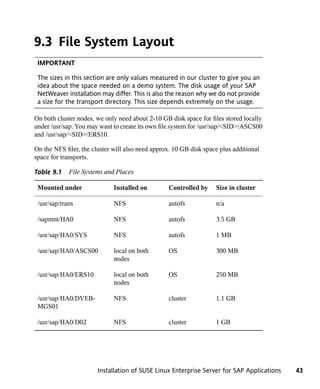
9.3 File System Layout
 IMPORTANT

 The sizes in this section are only values measured in our cluster to give you an
 idea about the space needed on a demo system. The disk usage of your SAP
 NetWeaver installation may differ. This is also the reason why we do not provide
 a size for the transport directory. This size depends extremely on the usage.

On both cluster nodes, we only need about 2-10 GB disk space for files stored locally
under /usr/sap. You may want to create its own file system for /usr/sap/<SID>/ASCS00
and /usr/sap/<SID>/ERS10.

On the NFS filer, the cluster will also need approx. 10 GB disk space plus additional
space for transports.

Table 9.1    File Systems and Places

 Mounted under                Installed on        Controlled by     Size in cluster

 /usr/sap/trans               NFS                 autofs            n/a

 /sapmnt/HA0                  NFS                 autofs            3.5 GB

 /usr/sap/HA0/SYS             NFS                 autofs            1 MB

 /usr/sap/HA0/ASCS00          local on both       OS                300 MB
                              nodes

 /usr/sap/HA0/ERS10           local on both       OS                250 MB
                              nodes

 /usr/sap/HA0/DVEB-           NFS                 cluster           1.1 GB
 MGS01

 /usr/sap/HA0/D02             NFS                 cluster           1 GB


                       Installation of SUSE Linux Enterprise Server for SAP Applications   43
9.4 Update Channels and Software
                  Selection
              The system should be connected to Update Channels. The installed software packages
              should be updated. Either use the GUI of SUSE's systems administration tool YaST or
              the command line tool zypper. In the following, we describe how to do this with zypper.

              suse_register

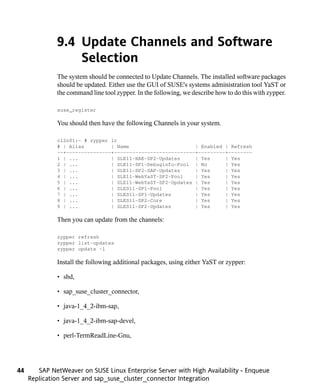
              You should then have the following Channels in your system.

              cl2n01:~ # zypper lr
              # | Alias         | Name                      | Enabled | Refresh
              --+---------------+---------------------------+---------+--------
              1 | ...           | SLE11-HAE-SP2-Updates     | Yes     | Yes
              2 | ...           | SLE11-SP1-Debuginfo-Pool | No       | Yes
              3 | ...           | SLE11-SP2-SAP-Updates     | Yes     | Yes
              4 | ...           | SLE11-WebYaST-SP2-Pool    | Yes     | Yes
              5 | ...           | SLE11-WebYaST-SP2-Updates | Yes     | Yes
              6 | ...           | SLES11-SP1-Pool           | Yes     | Yes
              7 | ...           | SLES11-SP1-Updates        | Yes     | Yes
              8 | ...           | SLES11-SP2-Core           | Yes     | Yes
              9 | ...           | SLES11-SP2-Updates        | Yes     | Yes

              Then you can update from the channels:

              zypper refresh
              zypper list-updates
              zypper update -l

              Install the following additional packages, using either YaST or zypper:

              • sbd,

              • sap_suse_cluster_connector,

              • java-1_4_2-ibm-sap,

              • java-1_4_2-ibm-sap-devel,

              • perl-TermReadLine-Gnu,


44      SAP NetWeaver on SUSE Linux Enterprise Server with High Availability - Enqueue
     Replication Server and sap_suse_cluster_connector Integration
• ClusterTools2.


9.5 Runlevel and Services
Enable automatic start of recommended services:

chkconfig   ntp on
chkconfig   boot.clock on
chkconfig   boot.sysstat on
chkconfig   boot.multipath on
chkconfig   multipathd on
chkconfig   autofs on


Disable automatic start of unwanted services:

chkconfig boot.md off
chkconfig boot.dmraid off
chkconfig boot.openais off


Optional services like HAWK can be activated:

chkconfig lighttpd on


Setup of autofs. File /etc/auto.master

/etc/auto.master
#
# Sample auto.master file
# This is an automounter map and it has the following format
# key [ -mount-options-separated-by-comma ] location
# For details of the format look at autofs(5).
#
#/misc /etc/auto.misc
#
# NOTE: mounts done from a hosts map will be mounted with the
#       "nosuid" and "nodev" options unless the "suid" and "dev"
#       options are explicitly given.
#
#/net   -hosts
#
# Include central master map if it can be found using
# nsswitch sources.


                        Installation of SUSE Linux Enterprise Server for SAP Applications   45
#
              # Note that if there are entries for /net or /misc (as
              # above) in the included master map any keys that are the
              # same will not be seen as the first read key seen takes
              # precedence.
              #
              +auto.master
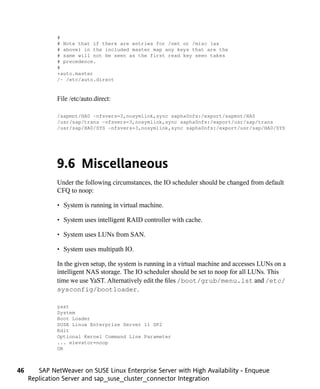
              /- /etc/auto.direct


              File /etc/auto.direct:

              /sapmnt/HA0 -nfsvers=3,nosymlink,sync sapha0nfs:/export/sapmnt/HA0
              /usr/sap/trans -nfsvers=3,nosymlink,sync sapha0nfs:/export/usr/sap/trans
              /usr/sap/HA0/SYS -nfsvers=3,nosymlink,sync sapha0nfs:/export/usr/sap/HA0/SYS


              9.6 Miscellaneous
              Under the following circumstances, the IO scheduler should be changed from default
              CFQ to noop:

              • System is running in virtual machine.

              • System uses intelligent RAID controller with cache.

              • System uses LUNs from SAN.

              • System uses multipath IO.

              In the given setup, the system is running in a virtual machine and accesses LUNs on a
              intelligent NAS storage. The IO scheduler should be set to noop for all LUNs. This
              time we use YaST. Alternatively edit the files /boot/grub/menu.lst and /etc/
              sysconfig/bootloader.

              yast
              System
              Boot Loader
              SUSE Linux Enterprise Server 11 SP2
              Edit
              Optional Kernel Command Line Parameter
              ... elevator=noop
              OK


46      SAP NetWeaver on SUSE Linux Enterprise Server with High Availability - Enqueue
     Replication Server and sap_suse_cluster_connector Integration
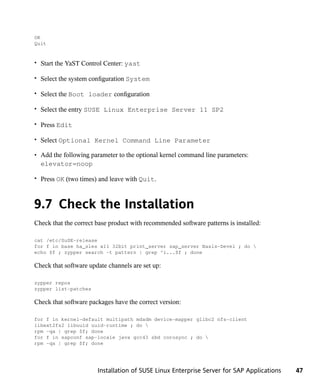
OK
Quit


• Start the YaST Control Center: yast

• Select the system configuration System

• Select the Boot loader configuration

• Select the entry SUSE Linux Enterprise Server 11 SP2

• Press Edit

• Select Optional Kernel Command Line Parameter

• Add the following parameter to the optional kernel command line parameters:
  elevator=noop

• Press OK (two times) and leave with Quit.


9.7 Check the Installation
Check that the correct base product with recommended software patterns is installed:

cat /etc/SuSE-release
for f in base ha_sles x11 32bit print_server sap_server Basis-Devel ; do 
echo $f ; zypper search -t pattern | grep ^i...$f ; done

Check that software update channels are set up:

zypper repos
zypper list-patches

Check that software packages have the correct version:

for f in kernel-default multipath mdadm device-mapper glibc2 nfs-client
libext2fs2 libuuid uuid-runtime ; do 
rpm -qa | grep $f; done
for f in sapconf sap-locale java gcc43 sbd corosync ; do 
rpm -qa | grep $f; done


                       Installation of SUSE Linux Enterprise Server for SAP Applications   47
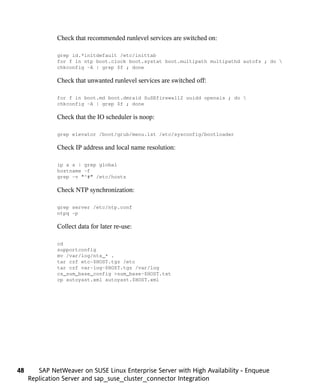
Check that recommended runlevel services are switched on:

              grep id.*initdefault /etc/inittab
              for f in ntp boot.clock boot.systat boot.multipath multipathd autofs ; do 
              chkconfig -A | grep $f ; done

              Check that unwanted runlevel services are switched off:

              for f in boot.md boot.dmraid SuSEfirewall2 uuidd openais ; do 
              chkconfig -A | grep $f ; done

              Check that the IO scheduler is noop:

              grep elevator /boot/grub/menu.lst /etc/sysconfig/bootloader

              Check IP address and local name resolution:

              ip a s | grep global
              hostname -f
              grep -v "^#" /etc/hosts

              Check NTP synchronization:

              grep server /etc/ntp.conf
              ntpq -p

              Collect data for later re-use:

              cd
              supportconfig
              mv /var/log/nts_* .
              tar czf etc-$HOST.tgz /etc
              tar czf var-log-$HOST.tgz /var/log
              cs_sum_base_config >sum_base-$HOST.txt
              cp autoyast.xml autoyast.$HOST.xml


48      SAP NetWeaver on SUSE Linux Enterprise Server with High Availability - Enqueue
     Replication Server and sap_suse_cluster_connector Integration
Prepare Storage
You need one or up to three tiny LUNs with capacity of 10 MB each. These are used
                                                                                    10
as SBD devices later. The LUNs should not be partitioned.


                                                                        Prepare Storage   49
Install SAP NetWeaver 7.30
 IMPORTANT
                                                                                       11
 The described SAP NetWeaver intstallation procedure described in this docu-
 ment is only an example and does not replace the SAP installation guides
 available at the SAP Marketplace. The procedure is only described here to
 demonstrate how the reference system was setup.


11.1 Check operating system
     prerequisites
Check, if:

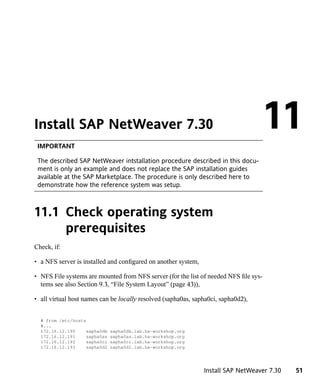
• a NFS server is installed and configured on another system,

• NFS File systems are mounted from NFS server (for the list of needed NFS file sys-
  tems see also Section 9.3, “File System Layout” (page 43)),

• all virtual host names can be locally resolved (sapha0as, sapha0ci, sapha0d2),


  # from /etc/hosts
  #...
  172.16.12.190     sapha0db   sapha0db.lab.ha-workshop.org
  172.16.12.191     sapha0as   sapha0as.lab.ha-workshop.org
  172.16.12.192     sapha0ci   sapha0ci.lab.ha-workshop.org
  172.16.12.193     sapha0d2   sapha0d2.lab.ha-workshop.org


                                                                Install SAP NetWeaver 7.30   51
#...


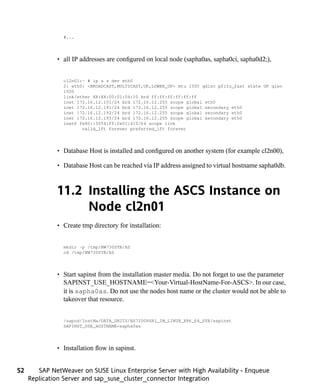
              • all IP addresses are configured on local node (sapha0as, sapha0ci, sapha0d2;),


                cl2n01:~ # ip a s dev eth0
                2: eth0: <BROADCAST,MULTICAST,UP,LOWER_UP> mtu 1500 qdisc pfifo_fast state UP qlen
                1000
                link/ether XX:XX:00:01:04:10 brd ff:ff:ff:ff:ff:ff
                inet 172.16.12.101/24 brd 172.16.12.255 scope global eth0
                inet 172.16.12.191/24 brd 172.16.12.255 scope global secondary eth0
                inet 172.16.12.192/24 brd 172.16.12.255 scope global secondary eth0
                inet 172.16.12.193/24 brd 172.16.12.255 scope global secondary eth0
                inet6 fe80::5054:ff:fe01:410/64 scope link
                       valid_lft forever preferred_lft forever


              • Database Host is installed and configured on another system (for example cl2n00),

              • Database Host can be reached via IP address assigned to virtual hostname sapha0db.


              11.2 Installing the ASCS Instance on
                   Node cl2n01
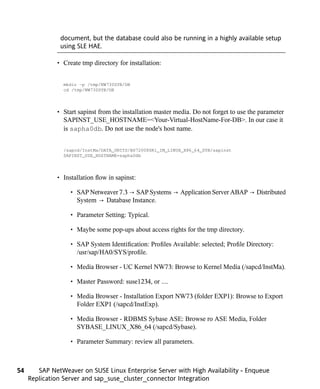
              • Create tmp directory for installation:


                mkdir -p /tmp/NW730SYB/AS
                cd /tmp/NW730SYB/AS


              • Start sapinst from the installation master media. Do not forget to use the parameter
                SAPINST_USE_HOSTNAME=<Your-Virtual-HostName-For-ASCS>. In our case,
                it is sapha0as. Do not use the nodes host name or the cluster would not be able to
                takeover that resource.


                /sapcd/InstMa/DATA_UNITS/BS72008SR1_IM_LINUX_X86_64_SYB/sapinst
                SAPINST_USE_HOSTNAME=sapha0as


              • Installation flow in sapinst.


52      SAP NetWeaver on SUSE Linux Enterprise Server with High Availability - Enqueue
     Replication Server and sap_suse_cluster_connector Integration
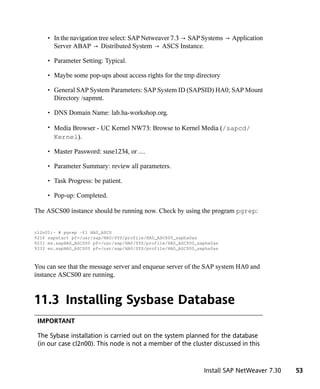
• In the navigation tree select: SAP Netweaver 7.3 → SAP Systems → Application
       Server ABAP → Distributed System → ASCS Instance.

     • Parameter Setting: Typical.

     • Maybe some pop-ups about access rights for the tmp directory

     • General SAP System Parameters: SAP System ID (SAPSID) HA0; SAP Mount
       Directory /sapmnt.

     • DNS Domain Name: lab.ha-workshop.org.

     • Media Browser - UC Kernel NW73: Browse to Kernel Media (/sapcd/
       Kernel).

     • Master Password: suse1234, or ....

     • Parameter Summary: review all parameters.

     • Task Progress: be patient.

     • Pop-up: Completed.

The ASCS00 instance should be running now. Check by using the program pgrep:


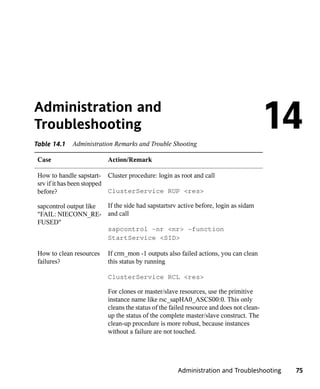
cl2n01:~ # pgrep -fl HA0_ASCS
9216 sapstart pf=/usr/sap/HA0/SYS/profile/HA0_ASCS00_sapha0as
9231 ms.sapHA0_ASCS00 pf=/usr/sap/HA0/SYS/profile/HA0_ASCS00_sapha0as
9232 en.sapHA0_ASCS00 pf=/usr/sap/HA0/SYS/profile/HA0_ASCS00_sapha0as


You can see that the message server and enqueue server of the SAP system HA0 and
instance ASCS00 are running.


11.3 Installing Sysbase Database
 IMPORTANT

 The Sybase installation is carried out on the system planned for the database
 (in our case cl2n00). This node is not a member of the cluster discussed in this


                                                               Install SAP NetWeaver 7.30   53
document, but the database could also be running in a highly available setup
               using SLE HAE.

              • Create tmp directory for installation:


                mkdir -p /tmp/NW730SYB/DB
                cd /tmp/NW730SYB/DB


              • Start sapinst from the installation master media. Do not forget to use the parameter
                SAPINST_USE_HOSTNAME=<Your-Virtual-HostName-For-DB>. In our case it
                is sapha0db. Do not use the node's host name.


                /sapcd/InstMa/DATA_UNITS/BS72008SR1_IM_LINUX_X86_64_SYB/sapinst
                SAPINST_USE_HOSTNAME=sapha0db


              • Installation flow in sapinst:

                   • SAP Netweaver 7.3 → SAP Systems → Application Server ABAP → Distributed
                     System → Database Instance.

                   • Parameter Setting: Typical.

                   • Maybe some pop-ups about access rights for the tmp directory.

                   • SAP System Identification: Profiles Available: selected; Profile Directory:
                     /usr/sap/HA0/SYS/profile.

                   • Media Browser - UC Kernel NW73: Browse to Kernel Media (/sapcd/InstMa).

                   • Master Password: suse1234, or ....

                   • Media Browser - Installation Export NW73 (folder EXP1): Browse to Export
                     Folder EXP1 (/sapcd/InstExp).

                   • Media Browser - RDBMS Sybase ASE: Browse ro ASE Media, Folder
                     SYBASE_LINUX_X86_64 (/sapcd/Sybase).

                   • Parameter Summary: review all parameters.


54      SAP NetWeaver on SUSE Linux Enterprise Server with High Availability - Enqueue
     Replication Server and sap_suse_cluster_connector Integration
• Task Progress: be very patient.

     • Pop-up: Completed.


11.4 Installing Enqueue-Replication
     Instance on Node cl2n01
• Create tmp directory for installation:


  mkdir -p /tmp/NW730SYB/ER
  cd /tmp/NW730SYB/ER


• Start sapinst from the installation master media. Do not forget to use the parameter
  SAPINST_USE_HOSTNAME=<Your-Virtual-HostName-For-ER>. In our case it
  is sapHA0er. Do not use the node's host name or the cluster will not be able to
  takeover this resource.


  /sapcd/InstMa/DATA_UNITS/BS72008SR1_IM_LINUX_X86_64_SYB/sapinst
  SAPINST_USE_HOSTNAME=sapha0er


• Installation flow in sapinst.

     • SAP Netweaver 7.3 → Additional SAP System Instances → Enqueue Replication
       Instance

     • Maybe some pop-ups about access rights for the tmp directory.

     • General SAP System Parameters: Profile Directory /usr/sap/HA0/SYS/profile.

     • Existing SAP System Instances: HA0/ASCS00 selected.

     • Media Browser - UC Kernel NW73: Browse to Kernel Media (/sapcd/Kernel).

     • ERS Instance: number of the ERS Instance: 10.

     • Activate Changes / Attention: "Get the (A)SCS Instance Restarted" is selected.


                                                                Install SAP NetWeaver 7.30   55
• Parameter Summary: review all parameters.

                   • Task Progress: be patient.

                   • Pop-up: Completed.

              The ERS10 instance should be running now. Use the program pgrep to check:


              cl2n01:~ # pgrep -fl HA0_ERS
              8486 /usr/sap/HA0/ERS10/exe/sapstartsrv pf=/usr/sap/HA0/SYS/profile/HA0_ERS10_sapha0er
               -D -u HA0adm
              30480 sapstart pf=/usr/sap/HA0/SYS/profile/HA0_ERS10_sapha0er
              30498 er.sapHA0_ERS10 pf=/usr/sap/HA0/ERS10/profile/HA0_ERS10_sapha0er NR=00


              You can see that the enqueue replication process for SAP system HA0 and instance
              ERS10 is running.


              11.5 Installing Central Instance on
                   Node cl2n01
              • Create tmp directory for installation:


                mkdir -p /tmp/NW730SYB/CI
                cd /tmp/NW730SYB/CI


              • Start sapinst from the installation master media. Do not forget to use the parameter
                SAPINST_USE_HOSTNAME=<Your-Virtual-HostName-For-CI>. In our case it is
                sapHA0ci. Do not use the node's host name or the cluster will not be able to takeover
                this resource.


                /sapcd/InstMa/DATA_UNITS/BS72008SR1_IM_LINUX_X86_64_SYB/sapinst
                SAPINST_USE_HOSTNAME=sapha0ci


              • Installation Flow in sapinst


56      SAP NetWeaver on SUSE Linux Enterprise Server with High Availability - Enqueue
     Replication Server and sap_suse_cluster_connector Integration
• SAP Netweaver 7.3 → SAP Systems → Application Server ABAP → Distributed
       System → Primary Application Server Instance.

     • Parameter Setting: Typical.

     • Maybe some pop-ups about access rights for the tmp directory.

     • General SAP System Parameters: Profile Directory /usr/sap/HA0/SYS/profile.

     • Media Browser - UC Kernel NW73: Browse to Kernel Media.

     • Master Password: suse1234 (just as a silly example password).

     • Media Browser - RDBMS Sybase ASE: Browse ro ASE Media, Folder
       SYBASE_LINUX_X86_64.

     • SAP System/Diagnostics Agent ID (DASID): DAA.

     • Pop-up: daaadm needs to be added to the trusted user list of hostctrl: Press "Yes".

     • SLD Destination for Diagnostic Agent: Select "No SLD destination".

     • Parameter Summary: review all parameters.

     • Task Progress: be patient.

     • Pop-up: Completed.

The DVEBMGS01 instance should be running now. Use the program pgrep to check:


cl2n01:~ # pgrep -fl HA0_DVE
9770 sapstart pf=/usr/sap/HA0/SYS/profile/HA0_DVEBMGS01_sapha0ci
10217 dw.sapHA0_DVEBMGS01 pf=/usr/sap/HA0/SYS/profile/HA0_DVEBMGS01_sapha0ci
10218 ig.sapHA0_DVEBMGS01 -mode=profile
pf=/usr/sap/HA0/SYS/profile/HA0_DVEBMGS01_sapha0ci
10228 /usr/sap/HA0/DVEBMGS01/exe/igsmux_mt -mode=profile -restartcount=0 -wdpid=10218
pf=/usr/sap/HA0/SYS/profile/HA0_DVEBMGS01_sapha0ci
10229 /usr/sap/HA0/DVEBMGS01/exe/igspw_mt -mode=profile -no=0 -restartcount=0
-wdpid=10218 pf=/usr/sap/HA0/SYS/profile/HA0_DVEBMGS01_sapha0ci
10230 /usr/sap/HA0/DVEBMGS01/exe/igspw_mt -mode=profile -no=1 -restartcount=0
-wdpid=10218 pf=/usr/sap/HA0/SYS/profile/HA0_DVEBMGS01_sapha0ci
10285 gwrd -dp pf=/usr/sap/HA0/SYS/profile/HA0_DVEBMGS01_sapha0ci
10286 icman -attach pf=/usr/sap/HA0/SYS/profile/HA0_DVEBMGS01_sapha0ci
10287 dw.sapHA0_DVEBMGS01 pf=/usr/sap/HA0/SYS/profile/HA0_DVEBMGS01_sapha0ci
...
10303 dw.sapHA0_DVEBMGS01 pf=/usr/sap/HA0/SYS/profile/HA0_DVEBMGS01_sapha0ci
13189 /usr/sap/HA0/DVEBMGS01/exe/sapstartsrv


                                                                  Install SAP NetWeaver 7.30   57
pf=/usr/sap/HA0/SYS/profile/HA0_DVEBMGS01_sapha0ci -D -u ha0adm


              You can see that the dispatcher and work processes as well as the gateway, icman and
              igs-processes for SAP system HA0 and instance DVEBMGS01 are running.


              11.6 Installing Additional Dialog
                   Instances on Node cl2n01
              • Create tmp directory for installation:


                mkdir -p /tmp/NW730SYB/D02
                cd /tmp/NW730SYB/D02


              • Start sapinst from the installation master media. Do not forget to use the parameter
                SAPINST_USE_HOSTNAME=<Your-Virtual-HostName-For-D2>. In our case it
                is sapHA0d2. Do not use the node's host name or the cluster will not be able to
                takeover this resource.


                /sapcd/InsttMa/DATA_UNITS/BS72008SR1_IM_LINUX_X86_64_SYB/sapinst
                SAPINST_USE_HOSTNAME=sapha0d2


              • Installation flow in sapinst.

                   • SAP Netweaver 7.3 → Additional SAP System Instances → Additional Appli-
                     cation Server Instance.

                   • Parameter Setting: Typical.

                   • Maybe some pop-ups about access rights for the tmp directory.

                   • General SAP System Parameters: Profile Directory /usr/sap/HA0/SYS/profile.

                   • Media Browser - UC Kernel NW73: Browse to Kernel Media.

                   • Master Password: suse1234, or ...


58      SAP NetWeaver on SUSE Linux Enterprise Server with High Availability - Enqueue
     Replication Server and sap_suse_cluster_connector Integration
• Media Browser - RDBMS Sybase ASE: Browse ro ASE Media, Folder
       SYBASE_LINUX_X86_64.

     • SAP System/Diagnostics Agent ID (DASID): DAA.

     • Pop-up: daaadm needs to be added to the trusted user list of hostctrol: Press
       "Yes".

     • SLD Destination for Diagnostic Agent: Select "No SLD destination".

     • Parameter Summary: review all parameters.

     • Task Progress: be patient.

     • Pop-up: Completed.


11.7 Update SAP Kernel and
     SAPHOSTAGENT Package
After the SAP NetWeaver installation, you should at least update SAP kernel and
SAPHOSTAGENT. Refer to the SAP instructions available at the SAP Marketplace
for download and update procedure.


11.8 SAP Profile Changes to Match
     the Master-Slave Scenario
In the master-slave scenario, the enqueue server must not be restarted locally. This is
why we need to change the start directive for the enqueue server in the ASCS instance
profile (/sapmnt/HA0/profile/HA0_:


#-----------------------------------------------------------------------
# Start SAP message server
#-----------------------------------------------------------------------
_MS = ms.sap$(SAPSYSTEMNAME)_$(INSTANCE_NAME)
Execute_02 = local rm -f $(_MS)
Execute_03 = local ln -s -f $(DIR_EXECUTABLE)/msg_server$(FT_EXE) $(_MS)
Restart_Program_00 = local $(_MS) pf=$(_PF)


                                                                Install SAP NetWeaver 7.30   59
#-----------------------------------------------------------------------
              # Start SAP enqueue server
              #-----------------------------------------------------------------------
              _EN = en.sap$(SAPSYSTEMNAME)_$(INSTANCE_NAME)
              Execute_04 = local rm -f $(_EN)
              Execute_05 = local ln -s -f $(DIR_EXECUTABLE)/enserver$(FT_EXE) $(_EN)
              Start_Program_01 = local $(_EN) pf=$(_PF)
              Max_Program_Restart = 03


              The changes made here are:

              • Use of Start_Program_nn for the enqueue server instead of
                Restart_Program_nn to avoid the local restart of the enqueue server after the
                process has failed.

              • The line Max_Program_Restart = 03 defines that sapstart only restarts
                processes three times. This is useful for takeover of the ASCS instance if the message
                server is failing multiple times.


              11.9 Integrating the
                   sap_suse_cluster_connector
              To integrate the sap_suse_cluster_connector, you have to allow the <sid>adm
              user to communicate with the cluster. Additionally, the SAP command sapstartsrv
              must be instructed to load and use the saphascriptco library.

              1. Add all <sid>adm users to group haclient. Example for ha0adm:


                 groupmod -A ha0adm haclient


              2. The specific values of the profile parameters differ, depending on the version of the
                 SAP kernel:

                   • SAP Instance Profile Changes for SAP Kernel >= 300


                     service/halib = $(DIR_CT_RUN)/saphascriptco.so
                     service/halib_cluster_connector = /usr/bin/sap_suse_cluster_connector


60      SAP NetWeaver on SUSE Linux Enterprise Server with High Availability - Enqueue
     Replication Server and sap_suse_cluster_connector Integration
• SAP Instance Profile Changes for SAP Kernel < 300, SAPHOSTAGENT >=
      111


      service/halib = /usr/sap/hostctrl/exe/saphascriptco.so
      service/halib_cluster_connector = /usr/bin/sap_suse_cluster_connector


You need at least sap_suse_cluster_connector version 1.0.0.


                                                              Install SAP NetWeaver 7.30   61
Additional Work on the
Second Node                                                                              12
12.1 Duplicate SAP Related Files to
     the Second Node
Create users and groups on the other node as they were created by the SAP installation
on the first node. Use the same user ID and group ID. Be careful to use the same user-
IDs and group-IDs in /etc/passwd and /etc/group.

Check login user profiles of <sid>adm and sqd<sid> on <node1>; they should
be similar. Depending on the Installation Master CD used for the SAP installation, the
login profiles for the SAP Administrator user (<sid>adm) and the database adminis-
trator user might be different. In older and non-high availability installations, the user
login profiles look similar to .sapenv_hostname.csh. Optionally repair profiles. Ensure
that the same user login profiles for the <sid>adm and sqd<sid> user are on all
nodes. You can do so by copying the /home/<sid>adm to <node2>.

Copy the /etc/services file or its values, which were adjusted by the sapinst
(see SAP related entries at the end of the file), to all nodes.

There are other directories within the SAP file system, which have to be configured.
These directories belong to specific SAP services, so their configuration depends on
the particular SAP landscape. To set up systems quickly in no greater context or SAP
landscape, it is sufficient to just copy them to the other node.

Create all needed mount points on the second node (/sapmnt, /sapdb, /usr/sap).


                                                      Additional Work on the Second Node     63
In case of choosing MaxDB as database, files and directories have to be synchronized,
              too. Copy the file /etc/opt/sdb and the directory structure /usr/spool/sql
              to the other node.

              Make the directories (with their content) /sapdb/programs/lib and /sapdb/
              programs/runtime available even if the file system /sapdb is not mounted. To
              do so, mount /sapdb, copy the directories to a temporary directory, unmount /sapdb
              and copy them locally to /sapdb/programs/lib and /sapdb/programs/
              runtime. Do so on every node.

              An empty work directory (/usr/sap/<SID>/<Instance><Number>/work)
              of an SAP instance leads to a monitoring error of the SAPInstance resource agent. Every
              instance has to be started manually once so the correct entries will be written to the
              work directory. After that you can do a manual shutdown of the instances and then the
              cluster is ready to control them.

              sapinst will create a script /etc/rc.d/sapinit and a configuration file /usr/
              sap/sapservices. Both are not used by the SAPInstance Resource Agent. Make
              sure /etc/rc.d/sapinit is consistent on both nodes but not activated in a runlevel for
              startup of the operating system.


64      SAP NetWeaver on SUSE Linux Enterprise Server with High Availability - Enqueue
     Replication Server and sap_suse_cluster_connector Integration
Configuration of SUSE Linux
Enterprise High Availability
Extension and SAP NetWeaver
integration                                                                          13
13.1 Basic Cluster Configuration
The first step is to setup the base cluster framework. For convenience, use YaST2 or
the sleha-init script. Depending on your needs, you should later add a second ring and
also change to UCAST communication.

Create an initial setup, using sleha-init:


cl2n01:~ # sleha-init
ntp on
 Enabling sshd service
 Generating ssh key
 Configuring csync2
 csync2 is already configured - overwrite? [y/N] y
 Generating csync2 shared key (this may take a while)...done
 Enabling csync2 service
 Enabling xinetd service
 csync2 checking files

Configure Corosync:
 This will configure the cluster messaging layer. You will need
 to specify a network address over which to communicate (default
 is eth0's network, but you can use the network address of any
 active interface), a multicast address and multicast port.

 /etc/corosync/corosync.conf already exists - overwrite? [y/N] y
 Network address to bind to (e.g.: 192.168.1.0) [172.16.12.0]


Configuration of SUSE Linux Enterprise High Availability Extension and SAP NetWeaver integra-
                                                                                    tion      65
Multicast address (e.g.: 239.x.x.x) [239.107.222.58] 238.50.0.1
               Multicast port [5404]

              Configure SBD:
               If you have shared storage, for example a SAN or iSCSI target,
               you can use it avoid split-brain scenarios by configuring SBD.
               This requires a 1 MB partition, accessible to all nodes in the
               cluster. The device path must be persistent and consistent
               across all nodes in the cluster, so /dev/disk/by-id/* devices
               are a good choice. Note that all data on the partition you
               specify here will be destroyed.

               Do you wish to use SBD? [y/N] y
               Path to storage device (e.g. /dev/disk/by-id/...) [] /dev/vdb
               All data on /dev/vdb will be destroyed
               Are you sure you wish to use this device [y/N] y
               Initializing SBD......done
               Enabling hawk service
                 HA Web Konsole is now running, to see cluster status go to:
                   https://172.16.12.101:7630/
                 Log in with username 'hacluster', password 'linux'
              WARNING: You should change the hacluster password to something more secure!
               Enabling openais service
               Waiting for cluster........done
               Loading initial configuration
               Done (log saved to /var/log/sleha-bootstrap.log)

               Change the hacluster password


              So far we have configured the basic cluster framework including:

              • ssh keys,

              • csync2 to transfer configuration files,

              • SBD (at least one device),

              • corosync (at least one ring),

              • HAWK web interface.

              As requested by sleha-init, we change the passwords of the user hacluster.


66      SAP NetWeaver on SUSE Linux Enterprise Server with High Availability - Enqueue
     Replication Server and sap_suse_cluster_connector Integration
13.2 Adapting the Configuration
     Manually
13.2.1 Change the corosync configuration
       to UCAST and two rings
# /etc/corosync/corosync.conf
compatibility: whitetank
aisexec {
        user:             root
        group:            root
}
service {
        ver:              0
        name:             pacemaker
        use_mgmtd:        yes
        use_logd:         yes
}
totem {
        version:          2
        # kaballa, alchemy, rocket science, never touch this numbers.
        token:            5000
        fail_recv_const: 5000
        token_retransmits_before_loss_const: 28
        join:             60
        consensus:        6000
        vsftype:          none
        max_messages:     20
        clear_node_high_bit: yes
        secauth:          on
        threads:          2
        rrp_mode:         active
        transport:        udpu
        interface {
                 ringnumber:       0
                 bindnetaddr:      172.16.12.0
                 mcastport:        5404
                 member {
                          memberaddr: 172.16.12.101
                 }
                               member {
                          memberaddr: 172.16.12.102
                 }
        }
        interface {


Configuration of SUSE Linux Enterprise High Availability Extension and SAP NetWeaver integra-
                                                                                    tion      67
ringnumber:      1
                               bindnetaddr:     172.16.22.0
                               mcastport:       5406
                               member {
                                        memberaddr: 172.16.22.10
                               }
                               member {
                                        memberaddr: 172.16.22.20
                               }
                      }
              }
              logging {
                      fileline:       off
                      to_stderr:      no
                      to_logfile:     no
                      logfile:        /var/log/corosync.log
                      to_syslog:      yes
                      syslog_facility: daemon
                      debug:          off
                      timestamp:      off
              }
              amf {
                      mode: disabled
              }


              13.2.2 Setup the use of more than one sbd
              To set up the use of more than one sbd, we add the other device to the variable
              SBD_DEVICE in /etc/sysconfig/sbd. The device paths are separated by semi-
              colon (;).

              # /etc/sysconfig/sbd
              SBD_DEVICE="/dev/vdb;/dev/vdc"
              SBD_OPTS="-W"


              If you use the newest updates of the pacemaker packages from the SUSE maintenance
              streams, you can also use the -P option (Check Pacemaker quorum and node health),
              which enables the cluster nodes not to self-fence if SBDs are lost, but pacemaker
              communication is still available. The timeout parameter -t defines the reprobe of the
              SBD device. The timeout is defined in seconds.

              # /etc/sysconfig/sbd
              SBD_DEVICE="/dev/vdb;/dev/vdc"
              SBD_OPTS="-W -P -t 300"


68      SAP NetWeaver on SUSE Linux Enterprise Server with High Availability - Enqueue
     Replication Server and sap_suse_cluster_connector Integration
You might also check manpages sbd(7) and sbd(8) for complete documentation of the
available options.


13.3 Start the Cluster for the first
     Time
Now it's time to start the cluster for the first time on both nodes:


rcopenais start


Check the cluster status with crm_mon. We use the option "-r" to also see resources,
which are configured but stopped:


crm_mon -r


The command will show the "empty" cluster and will print something like in the follow-
ing screen output. The most interesting information for now is that there are two nodes
in status "online" and the message "partition with quorum".


============
Last updated: Fri Sep 7 18:34:49 2012
Last change: Thu Sep 6 14:48:24 2012 by ha0adm via cibadmin on cl2n01
Stack: openais
Current DC: cl2n01 - partition with quorum
Version: 1.1.6-b988976485d15cb702c9307df55512d323831a5e
2 Nodes configured, 2 expected votes
10 Resources configured.
============

Online: [ cl2n02 cl2n01 ]

stonith-sbd       (stonith:external/sbd): Started cl2n01


Some more checks like cs_make_sbd_devices --dump.
# cs_make_sbd_devices --dump
==Dumping header on disk /dev/vdb
Header version     : 2
Number of slots    : 255
Sector size        : 512


Configuration of SUSE Linux Enterprise High Availability Extension and SAP NetWeaver integra-
                                                                                    tion      69
Timeout (watchdog) : 30
              Timeout (allocate) : 2
              Timeout (loop)     : 2
              Timeout (msgwait) : 130
              ==Header on disk /dev/vdb is dumped
              0       cl2n02 clear
              1       cl2n01 clear
              ==Dumping header on disk /dev/vdc
              Header version     : 2
              Number of slots    : 255
              Sector size        : 512
              Timeout (watchdog) : 30
              Timeout (allocate) : 2
              Timeout (loop)     : 2
              Timeout (msgwait) : 130
              ==Header on disk /dev/vdc is dumped
              0       cl2n01 clear
              1       cl2n02 clear


              13.4 Configure Bootstrap and
                   STONITH Using crm Shell
              There are multiple ways to configure resources in a pacemaker cluster. In the following
              we describe the method using the crm shell. For all of the following sections to configure
              parts of the cluster proceed the following steps:

              • Start the crm shell and enter the configure action: crm configure

              • Copy and paste and all prepared crm configuration sequences into the crm shell

              • Quit the crm shell (quit). You might be asked, if you want to commit your changes.

              An other method is to save the crm configuration sequences into a text file adding
              configure at the beginning of each object (like configure property ....
              The created text file could then be loaded to the cluster using crm -f crm-command-
              file

              We define some cluster wide properties. The most important definitions are to activate
              STONITH, to define the no-quorum-policy, and to adjust the STONITH timeout values.
              The values here are examples only, which work in our demo cluster. These values must
              be tuned to your hardware and SAN environment.


70      SAP NetWeaver on SUSE Linux Enterprise Server with High Availability - Enqueue
     Replication Server and sap_suse_cluster_connector Integration
property $id="cib-bootstrap-options" 
         stonith-enabled="true" 
         no-quorum-policy="ignore" 
         stonith-action="reboot" 
         stonith-timeout="150s"


For resources, we define the default stickyness of 1000. Depending on other scoring
values, this should tell the cluster not to move resources without having either a loss
of a node or an explicit migration request.


rsc_defaults $id="rsc-options" 
         resource-stickiness="1000" 
         migration-threshold="5"


Now we define the operation defaults. We define 10 minutes (600 seconds) as default
timeout and we set the cluster to show pending actions. This is needed by the
sap_suse_cluster_connector for proper cluster communication.


op_defaults $id="op-options" 
         timeout="600" 
         record-pending="true"


13.5 Configure Resources Using crm
     Shell
First we define the group of resources needed, before the ASCS and ERS instances can
be started:


primitive rsc_ip_HA0_sapha0as ocf:heartbeat:IPaddr2 
         params ip="172.16.12.191" 
         op monitor interval="10s" timeout="20s" on_fail="restart"
group grp_sap_as_HA0 rsc_ip_HA0_sapha0as 
         meta target-role="Started" is-managed="true" 
         resource-stickiness="1000"


The next step is to define the master/slave resource to have an enqueue/enqueue-repli-
cation construct.


Configuration of SUSE Linux Enterprise High Availability Extension and SAP NetWeaver integra-
                                                                                    tion      71
primitive rsc_sap_HA0_ASCS00 ocf:heartbeat:SAPInstance 
                       operations $id="rsc_sap_HA0_ASCS00-operations" 
                       op monitor interval="11" role="Slave" timeout="60" 
                       op monitor interval="13" role="Master" timeout="60" 
                       params 
                       InstanceName="HA0_ASCS00_sapha0as" 
                       START_PROFILE="/usr/sap/HA0/SYS/profile/HA0_ASCS00_sapha0as" 
                       ERS_InstanceName="HA0_ERS10_sapha0er"
                       ERS_START_PROFILE="/usr/sap/HA0/SYS/profile/HA0_ERS10_sapha0er"

              ms msl_sap_enqrepl_HA0 rsc_sap_HA0_ASCS00 
                       meta clone-max="2" target-role="Started" master-max="1" 
                       is-managed="true"


              To add the primary application server, we need to define all depending resources in a
              group:


              primitive rsc_ip_HA0_sapha0ci ocf:heartbeat:IPaddr2 
                       params ip="172.16.12.192" 
                       op monitor interval="10s" timeout="20s" on_fail="restart"

              primitive rsc_fs_HA0_dvebmgs01 ocf:heartbeat:Filesystem 
                       operations $id="rsc_fs_HA0_dvebmgs01-operations" 
                       op monitor interval="20" timeout="40" 
                       params device="sapha0nfs:/export/usr/sap/HA0/DVEBMGS01" fstype="nfs" 
                       directory="/usr/sap/HA0/DVEBMGS01"

              primitive rsc_sap_HA0_DVEBMGS01 ocf:heartbeat:SAPInstance 
                       operations $id="rsc_sap_HA0_DVEBMGS01-operations" 
                       op monitor interval="120" timeout="60" 
                       params InstanceName="HA0_DVEBMGS01_sapha0ci" 
                       START_PROFILE="/usr/sap/HA0/SYS/profile/HA0_DVEBMGS01_sapha0ci"

              group grp_sap_ci_HA0 rsc_ip_HA0_sapha0ci rsc_fs_HA0_dvebmgs01 
                       rsc_sap_HA0_DVEBMGS01


              For each additional SAP application server, we need to define an additional group of
              resources:


              primitive rsc_ip_HA0_sapha0d2 ocf:heartbeat:IPaddr2 
                       params ip="172.16.12.193" 
                       op monitor interval="10s" timeout="20s" on_fail="restart"

              primitive rsc_fs_HA0_d02 ocf:heartbeat:Filesystem 
                       operations $id="rsc_fs_HA0_d02-operations" 
                       op monitor interval="20" timeout="40" 
                       params device="sapha0nfs:/export/usr/sap/HA0/D02" 
                       directory="/usr/sap/HA0/D02" fstype="nfs"


72      SAP NetWeaver on SUSE Linux Enterprise Server with High Availability - Enqueue
     Replication Server and sap_suse_cluster_connector Integration
primitive rsc_sap_HA0_D02 ocf:heartbeat:SAPInstance 
         operations $id="rsc_sap_HA0_D02-operations" 
         op start interval="0" timeout="240" 
         op monitor interval="120" timeout="60" 
         params InstanceName="HA0_D02_sapha0d2"
         START_PROFILE="/usr/sap/HA0/SYS/profile/HA0_D02_sapha0d2" 
         meta target-role="Started"

group grp_sap_d2_HA0 rsc_ip_HA0_sapha0d2 rsc_fs_HA0_d02 rsc_sap_HA0_D02


Check if you have the stonith-sbd resource defined like this:


primitive stonith-sbd stonith:external/sbd


Now we have defined all needed resources.


13.6 Configure Constraints Using crm
     Shell
Now we define the rules to place the resources for an initial cluster start. We have to
score all SAP resource groups:


location loc_grp_sap_as_HA0_cl2n01 grp_sap_as_HA0 10: cl2n01
location loc_grp_sap_di_HA0_cl2n01 grp_sap_as_HA0 10: cl2n01
location loc_grp_sap_ci_HA0_cl2n02 grp_sap_ci_HA0 10: cl2n02


To "bind" the IP address for the ASCS instance to the Master:


colocation col_grp_sap_as_HAO_msl_sap_enqrepl_HA0_MASTER inf: 
         grp_sap_as_HA0 msl_sap_enqrepl_HA0:Master


And finally we define the start/stop order of resources:


order ord_grp_sap_as_HA0_msl_sap_enq_repl : grp_sap_as_HA0:start 
         msl_sap_enqrepl_HA0:promote symmetrical=true
order ord_msl_sap_enqrepl_HA0_promote_rsc_sap_HA0_D02_start : 
         msl_sap_enqrepl_HA0:promote rsc_sap_HA0_D02
order ord_msl_sap_enqrepl_HA0_promote_rsc_sap_HA0_DVEBMGS01_start : 


Configuration of SUSE Linux Enterprise High Availability Extension and SAP NetWeaver integra-
                                                                                    tion      73
msl_sap_enqrepl_HA0:promote rsc_sap_HA0_DVEBMGS01


74      SAP NetWeaver on SUSE Linux Enterprise Server with High Availability - Enqueue
     Replication Server and sap_suse_cluster_connector Integration
Administration and
Troubleshooting
Table 14.1    Administration Remarks and Trouble Shooting
                                                                                          14
 Case                      Action/Remark

 How to handle sapstart- Cluster procedure: login as root and call
 srv if it has been stopped
 before?                    ClusterService RUP <res>

 sapcontrol output like If the side had sapstartsrv active before, login as sidam
 "FAIL: NIECONN_RE- and call
 FUSED"
                        sapcontrol -nr <nr> -function
                        StartService <SID>

 How to clean resources    If crm_mon -1 outputs also failed actions, you can clean
 failures?                 this status by running

                           ClusterService RCL <res>

                           For clones or master/slave resources, use the primitive
                           instance name like rsc_sapHA0_ASCS00:0. This only
                           cleans the status of the failed resource and does not clean-
                           up the status of the complete master/slave construct. The
                           clean-up procedure is more robust, because instances
                           without a failure are not touched.


                                                      Administration and Troubleshooting   75
Case                        Action/Remark

               Procedure to set com-      If you completely need to deactivate the cluster software,
               plete cluster into mainte- perform the following procedure:
               nance mode for SAP.
                                          • For all resource groups and master/slave resources:

                                             ClusterService RSU <grp-or-ms>

                                           • Wait until cluster status is S_IDLE.

                                           • Stop cluster software on second node:

                                             rcopenais stop

                                           • Stop cluster software on first node:

                                             rcopenais stop


               Get cluster back to pro-    Get cluster back to production after the cluster has been
               duction after the cluster   set to maintenance mode.
               has been set to mainte-
               nance mode.                 • Start cluster software on first node:

                                             rcopenais start

                                           • After some seconds, start cluster software on second
                                             node:

                                             rcopenais start

                                           • For all resource groups and master/slave resources:

                                             ClusterService RSM <grp-or-ms>

                                           • Wait until cluster status is S_IDLE.


76      SAP NetWeaver on SUSE Linux Enterprise Server with High Availability - Enqueue
     Replication Server and sap_suse_cluster_connector Integration
Case                      Action/Remark

How to block resources To block a SAP resource, add the cluster resource name
to be controlled manual- to the config variable BLOCK_RESOURCES in file /etc/
ly?                      sysconfig/sap_suse_cluster_connector

Cluster resource naming Cluster resource name must not be prefixes of other cluster
requirements            resource names.

                          If you are using a name scheme like rsc_sap<SID>_<IN-
                          STANCENAME>, you are on the safe side, because in-
                          stance names including the instance number can also not
                          be prefixes of other instance names.

Restrictions about migra- While the master-slave resource must always be able to
tion rules or location    switch to another cluster node in case of a fail of the SAP
rules.                    instance, it is strongly recommended not to use migration
                          rules for a longer time period and not to use location con-
                          straints with high scoring. Location constraints with low
                          scoring such as "10" are valid. Migration constraints must
                          be removed after the cluster is back in status S_IDLE.


                                                     Administration and Troubleshooting   77
Cluster Tests                                                                                15
15.1 Mandatory Test Cases for SAP
     Enqueue Replication Server
     Integration
SUSE recommends to check an installed cluster for correct integration of SAP Enqueue
Replication Server. The following test cases can be used to make sure that the most
important mandatory parameters are set correctly. Before a case is tested, the cluster
and its resources should be in a proper state. If no different situation is defined, all
failures have to be repaired, all failcounts have to be cleared, and all migration constraints
have to be removed.

Table 15.1     Test Cases for SAP Enqueue Replication Server Integration

 #      Description             Action / Prerequisites / Result

 01     Kill Message Server A: Identify the Message Servers PID: pgrep -fl
        (Category Recover- ms.sapHA0 then terminate the process: kill -9
        able, no failover). <pid-ms>

                                P: Cluster in origin state (both nodes up and active, all
                                instances up, Cluster in Status S_IDLE) and no migra-
                                tion rules left.


                                                                                      Cluster Tests   79
#     Description             Action / Prerequisites / Result

                                             R: Message server is restarted by sapstart. Killing mul-
                                             tiple times will force a failover of the ASCS instance.

               02    Kill Enqueue Server     A: Identify the Message Servers PID: pgrep -fl
                     (Category Irrecover-    en.sapHA0 then terminate the process: kill -9
                     able, failover re-      <pid-en>
                     quired): shutdown
                     Server, on which        P: Cluster in origin state.
                     Enqueue Service is
                     running.                R: Cluster will move instance ASCS to the other node.

               03    Kill Enqueue Repli- A: Identify the Message Servers PID: pgrep -fl
                     cation Server (Cate- er.sapHA0 then terminate the process: kill -9
                     gory Recoverable,    <pid-er>.
                     no failover).
                                          P: Cluster in origin state.

                                             R: enqueue replication server is restarted by sapstart.

               04    Kill Enqueue sap-       A: Identify the Message Servers PID: pgrep -fl
                     startsrv service        "ASCS00.*sapstartsrv" then terminate the pro-
                     (Category Recover-      cess: kill -9 <pid-ssrv>.
                     able, no failover) to
                     test the integration    P: Cluster in origin state.
                     of sapstartsrv into
                     3rd party failover      R: Next monitor will restart sapstartsrv. Note: A SIGINT
                     solution and as         (2) Signal to the sapstartsrv service seems to be identi-
                     provider of status      fied as a "Shutdown" by the Sapstartsrv.
                     information.

               05    Startup test: show      A: ClusterService RUP <resource>
                     proper loading of
                     Shared Library.         P: Cluster in origin state, but one instance stopped.

                                             R: Library is properly loaded and sap_suse_cluster_con-
                                             nector is called with command "init"; instance is started.


80      SAP NetWeaver on SUSE Linux Enterprise Server with High Availability - Enqueue
     Replication Server and sap_suse_cluster_connector Integration
#    Description            Action / Prerequisites / Result

06   Runtime Test           A: sapcontrol -<nr> -function
     Shared Library         "Start|Stop"

                            P: Cluster is in origin state.

                            R: Instance addressed by the sapcontrol-call is start-
                            ed/stopped.

07   Apply kernel patch     A: SAP method to install a kernel update.
     in DIR_CT_RUN
     and restart system     P: Cluster is in origin state.
     (no failover re-
     quired.)               R: Instances started after the SAP kernel update are
                            running the new kernel code (sapcpe copies from
                            /sapmnt/<SID>/...)

08   Simulate cluster       A: n/a
     failure with HA
     vendor software.       P: n/a

                            R: n/a

09   Call HA vendor         A: Clusterervice RMI <group-for-as>;
     function to move       wait until cluster has moved the instance and is S_IDLE
     clustered              again; use ClusterService RUM
     SCS/ASCS instance      <group-for-as> to delete the client-preferred loca-
     to a different node.   tion rule.

                            P: Cluster is in origin state.

                            R: Cluster will move instance ASCS to the other node.

10   Test SCS/ASCS        A: KVM-HOST: virsh destroy <node>
     hardware or OS fail-
     ure.                 P: Cluster is in origin state.

                            R: Remaining node does run the resources which where
                            running on the failing node.


                                                                               Cluster Tests   81
#     Description            Action / Prerequisites / Result

               11    Temporarily disable A: For ALL groups and master-slaves:
                     HA vendor failover ClusterService RSU <resource>; then on
                     software.           both nodes: rcopenais stop (delay between the
                                         two nodes ~1 minute).

                                            P: Cluster is in origin state.

                                            R: Cluster Framework stopped, all SAP instances started
                                            before are still running.

               12    New directory          A: n/a
                     structure of Kernel
                     7.20 is used.          P: n/a

                                            R: n/a

               13    Message Server        A: change mode of the message server binary or other
                     could not be restart- action so message server binary file is not longer avail-
                     ed locally.           able for restart by sapstart.

                                            P: Cluster in origin state.

                                            R: Cluster needs to take over the ASCS00 instance, be-
                                            cause it could not be recovered locally.

               14    Enqueue Replica-       A: Change mode of the enqueue replication server binary
                     tion Server could      or other action so enqueue replication server binary file
                     not be restarted lo-   is no longer available for restart by sapstart.
                     cally.
                                            P: Cluster in origin state.

                                            R: Cluster needs to take over the ERS10 instance, be-
                                            cause it could not be recovered locally.


82      SAP NetWeaver on SUSE Linux Enterprise Server with High Availability - Enqueue
     Replication Server and sap_suse_cluster_connector Integration
15.2 Recommended Tests for SLE High
     Availability Extension Basic
     Functionality
SUSE recommends to check an installed cluster for correct function of the SLE High
Availability Extension basic infrastructure. This should be done before the integration
test is conducted. The following test cases can be used in an environment similar to the
certification. Since customers have different basic setups, the test cases may be adjusted.
Before a case is tested, the cluster and its resources should be in a proper state. If no
different situation is defined, all failures have to be repaired, all failcounts have to be
cleared, and all migration constraints have to be removed.

Table 15.2     Test Cases SLE High Availability Extension for Basic Functionality

 #        Description                Action / Prerequisites / Expected Result

 01       fence other node           A: crm node fence $node

                                     P: cluster up and running

                                     R: node $node gets rebooted by sbd. Cluster mi-
                                     grates RGs to other node.

 02       watchdog functionality A: killall -9 sbd
          check
                                 P: cluster up and running

                                     R: node gets rebooted by watchdog. Cluster mi-
                                     grates RGs to other node.

 11       Admin. Start of Cluster A: rcopenais start , on both nodes
          manager on both nodes
                                  P: no cluster running on any node

                                     R: Both nodes join cluster. RGs start on their re-
                                     spective nodes.


                                                                                    Cluster Tests   83
#       Description                Action / Prerequisites / Expected Result

               12      Admin. Stop of cluster A: rcopenais stop, on both nodes
                       manager on both nodes
                                              P: cluster up and running

                                                  R: Both nodes leave cluster. RGs stopped.

               17      Failing of cluster man-    A: killall -9 corosync
                       ager on one node
                                                  P: cluster up and running

                                                  R: Cluster manager stonithes the node via sbd.
                                                  Cluster migrates RGs to other node.

               19      Admin reboot of one        A: init 6
                       cluster node
                                                  P: cluster up and running

                                                  R: Node gets rebooted. Cluster migrates RGs to
                                                  other node. After boot cluster manager has to be
                                                  started manually.

               41      Failing of one of two      A: Deactivate one port on LAN switch, unplug
                       cluster interconnect       cable, iptables rule, NIC link. NOT: ifup/ifdown
                       links
                                                  P: cluster up and running

                                                  R: Resources are not affected.

               42      Repair of cluster inter-   A: Reactivate one port on LAN switch, plug cable,
                       connect link.              iptables rule, NIC link.

                                                  P: Cluster up and running. One corosync ring faulty
                                                  (as in 41).

                                                  R: Corosync ring is recovered automatically. Re-
                                                  sources are not affected.


84      SAP NetWeaver on SUSE Linux Enterprise Server with High Availability - Enqueue
     Replication Server and sap_suse_cluster_connector Integration
#    Description             Action / Prerequisites / Expected Result

43   Cluster interconnect    A: TODO Action
     LAN Split Brain test
                             P: cluster up and running

                             R: Cluster manager stonithes one node via sbd.
                             Cluster manager migrates RGs to other node. After
                             boot, cluster manager has to be started manually.

46   Failure of one SBD link A: Deactivate one SBD LUN or set iptables rule
     (out of two)            for iSCSI LUN.

                             P: cluster up and running.

                             R: Resources are not affected. Cluster manager is
                             not affected. SBD is not affected in general.

57   Failing of all SBD links A: Deactivate all SBD LUNs or set iptables rule
                              for iSCSI LUN.

                             P: cluster up and running.

                             R: Node looses SBD devices. Resources are not
                             affected.

59   Recovery of SBD links A: Reactivate all SBD LUNs or remove iptables
                           rule for iSCSI LUN.

                             P: cluster up and running.

                             R: Node recovers all SBD devices automatically.
                             Resources are not affected.


                                                                         Cluster Tests   85
Part III. Appendix
Software Downloads                                               A
Product                  URL

SLES for SAP 11 SP2      http://download.novell.com/Download
                         ?buildid=7VOt4b-efjo~

SLES 11 SP2              http://download.novell.com/Download
                         ?buildid=h0AOp5AT-18~

SLES High Availability   http://download.novell.com/Download
Extension 11 SP2         ?buildid=AVvQ3xwKlMs~

SLES 11 Subscription     http://download.novell.com/Download
Management Tool          ?buildid=5qJ9eEidDzs~

ClusterTools2            http://software.opensuse.org/search
                         ?q=ClusterTools2&baseproject=SUSE
                         %3ASLE-11%3ASP1&lang=en&include_home=
                         true

SAP NetWeaver 7.3        http://service.sap.com/swdc

Sybase ASE               http://service.sap.com/swdc
SUSE Products Online
Documentation
Documentation for SUSE products is available at http://www.suse.com/documentation
                                                                                    B
in HTML and PDF formats.

 Product                        URL

 Subscription Management Tool http://www.suse.com/documentation/
 11                           smt11/

 SLES for SAP 11                http://www.suse.com/products/sles
                                -for-sap/

 SLES 11                        http://www.suse.com/documentation/
                                sles11/

 SLES High Availability Exten- http://www.suse.com/documentation/
 sion 11                       sle_ha/
SAP Notes
The general installation of SAP on Linux is described in the SAP Note 171356 - SAP
                                                                                        C
software on Linux: Essential information. This SAP note also points to some SAP notes
with more detailed information about hardware platforms and Linux enterprise distri-
butions. A good entry point for installing SAP on SUSE Linux Enterprise Server 11 is
SAP Note 1310037. SAP Notes are available at the SAP Service Marketplace
(http://service.sap.com [http://service.sap.com/]). You need an account to
access this information.

 SAP Note                 Title

 1310037                  SUSE LINUX Enterprise Server 11 Installation notes

 1763512                  Support details for SUSE Linux Enterprise High Availabil-
                          ity

 171356                   Install SAP software on Linux: Essential information

 516716                   Linux: Locale problems after updating glibc

 1014480                  SAP Management Console (SAP MC)

 784391                   SAP support terms and 3rd-party kernel drivers

 875322                   J2EE engine installation on heterogenous architectures

 1275776                  Linux: Preparing SLES for SAP environments
SAP Note               Title

               941595                 Download J2SE 1.4.2 for the x64 platform

               1172419                Linux: Supported Java versions on the x86_64 platform

               1240081                Java Cryptography Extention Jurisdiction Policy

               1164532                Release Restrictions for SAP EHP 1 for SAP NetWeaver

               864172                 SAP NetWeaver 7.0 (2004s) Documentation

               940420                 FAQ: Database structure check (VERIFY)

               785925                 SAP Web AS 6.40 SR1 ABAP Installation on UNIX

               1008828                ACC 7.1 PI/Adaptive Computing Controller

               877795                 Problems w/ sapstartsrv as of Release 7.00 & 6.40

               995116                 Backward porting of sapstartsrv for earlier releases

               1122387                Linux: SAP Support in virtualized environments.

               1554717                SYB: Planning information for SAP on Sybase ASE.

               1672366                SYB: SAP NetWeaver 7.3 EHP1 on Sybase ASE

               1585981                SYB: Ensuring Recoverability for Sybase ASE

               1588316                SYB: Configure automatic database and log backups

               1618817                SYB: How to restore a Sybase ASE database server (UNIX)

               1633491                SYB: Timestamp, BigDecimal: Problem during serializa-
                                      tioSYB: Timestamp, BigDecimal: Problem during serial-
                                      ization


94      SAP NetWeaver on SUSE Linux Enterprise Server with High Availability - Enqueue
     Replication Server and sap_suse_cluster_connector Integration
SAP Note   Title

1716201    SYB: Update control.xml files for installation on Sybase
           ASE

1606654    SYB: SAP Business Suite 7i2010 on Sybase ASE

1590719    SYB: Updates for Sybase ASE

1599814    SYB: Installing ESDs for Sybase ASE 15.7 (UNIX + Lin-
           ux)

1602547    SYB: Current syb_update_db script versions

1598817    SYB: Removal of sample client library applications

1763512    Linux: Support details for SUSE Linux Enterprise High
           Availability


                                                                 SAP Notes   95
Links to SLES for SAP, SAP,
Sybase ASE                                               D
SLES for SAP:

http://www.novell.com/products/server/sap/matrix.html

http://www.novell.com/partner/isv/isvcatalog

http://www.suse.com/yessearch/Search.jsp

https://www.suse.com/support/kb/product.php?id=SG
_XSUSELINUXENTERPRISESERVER_1_2

http://support.novell.com/products/server/supported
_packages

http://www.novell.com/documentation/ncc/ncc/?page=/
documentation/ncc/ncc/data/bktitle.html

http://www.novell.com/coolsolutions/feature/17529.html

http://www.novell.com/partners/sap/

http://www.novell.com/docrep/2010/04/x2_Novell_SAP
_Brochure_SinglePage%20Online.pdf

http://www.novell.com/docrep/2010/07/SLES_for_SAP
_Applications_FAQ.pdf
SLES for SAP:

               http://www.novell.com/global/datacentertour/sv/pdf/Novell
               _SAP.pdf

               http://www.novell.com/docrep/2009/09/RT_WP_Linux_Trends
               _in_SAP_DC_200908231_Final_English_en.doc

               http://www.novell.com/docrep/2007/05/4611143_f_en.pdf

               http://developer.novell.com/wiki/index.php/SAP_on_hasi_v2
               _Resource-SAPDatabase

               http://www.novell.com/rc/index/index.jsp

               http://www.novell.com/rc/docrepository/portal_skins/
               NovellSearch_public/SearchResults?keywords=migration&page=
               main&docstatus1=P&docstatus1=U&tab=1&x=0&y=0

               http://www.novell.com/rc/docrepository/portal_skins/
               NovellSearch_public/SearchResults?keywords=sap&page=main
               &docstatus1=P&docstatus1=U&tab=1&x=0&y=0

               http://www.novell.com/rc/docrepository/portal_skins/
               NovellSearch_public/SearchResults?id=NovellSearch_public
               &path=http%3A%2F%2Fwww.novell.com%2Frc%2Fdocrepository
               %2Fportal_skins%2FNovellSearch_public&page=advsearch
               &solution1=&solution2=&solution3=&keywords=high+availab
               &title=&description=&PublishDate1=&PublishDate2=
               &geography1=&x=0&y=0

               http://www.novell.com/docrep/2009/05/SUSE-Linux-Enterprise
               -11_Technical-Presentation_en_en.odp

               http://www.novell.com/docrep/2009/03/corebuild_playbook
               _v1.3_03262009_en.pdf


98      SAP NetWeaver on SUSE Linux Enterprise Server with High Availability - Enqueue
     Replication Server and sap_suse_cluster_connector Integration
SLES for SAP:

http://www.novell.com/docrep/2009/11/Enterprise_Linux
_Servers_Solution_Presentation_f_110409_en.pdf

http://www.linux-ha.org/

http://www.openais.org/

http://www.clusterlabs.org/

https://raid.wiki.kernel.org/index.php


SAP:

https://www.sdn.sap.com/irj/sdn/nw-products

https://www.sdn.sap.com/irj/sdn/nw-70ehp1

http://www.sap.com/platform/netweaver/index.epx

http://help.sap.com/content/documentation/netweaver/docu
_nw_70_design.htm#nw70ehp1

http://www.sap.com/linux

https://www.sdn.sap.com/irj/sdn/linux

https://www.sdn.sap.com/irj/scn/weblogs?blog=/pub/wlg/
13603

http://service.sap.com/

https://websmp201.sap-ag.de/pam

http://sdn.sap.com/

http://service.sap.com/osdbmigration


                                  Links to SLES for SAP, SAP, Sybase ASE   99
SAP:

                http://www.sap.com/solutions/benchmark/index.epx

                http://www.sapinsideronline.com/archive.cfm?session

                http://help.sap.com/saphelp_sm32/helpdata/de/c4/
                3a6bff505211d189550000e829fbbd/content.htm

                http://scn.sap.com/docs/DOC-27321

                http://scn.sap.com/docs/DOC-31701


                Sybase:

                http://www.sybase.com/products/databasemanagement/
                adaptiveserverenterprise

                http://www.sybase.com/linux/ase

                http://www.sybase.com/detail_list?id=36791

                http://sybooks.sybase.com/sybooks/sybooks.xhtml

                http://infocenter.sybase.com/help/index.jsp

                http://www.sap.com/solutions/technology/database/adaptive
                -server-enterprise/index.epx

                http://scn.sap.com/community/sybase-ase

                http://en.wikipedia.org/wiki/Adaptive_Server_Enterprise

                http://www.isug.com/Sybase_FAQ/ASE/index.html


100        SAP NetWeaver on SUSE Linux Enterprise Server with High Availability - Enqueue
      Replication Server and sap_suse_cluster_connector Integration
Licenses                                                                                                                                                       E
GNU Free Documentation License
Version 1.2, November 2002

Copyright (C) 2000,2001,2002 Free Software Foundation, Inc. 59 Temple Place, Suite 330, Boston, MA 02111-1307 USA

Everyone is permitted to copy and distribute verbatim copies of this license document, but changing it is not allowed.

PREAMBLE
The purpose of this License is to make a manual, textbook, or other functional and useful document “free” in the sense of freedom: to assure everyone
the effective freedom to copy and redistribute it, with or without modifying it, either commercially or noncommercially. Secondarily, this License preserves
for the author and publisher a way to get credit for their work, while not being considered responsible for modifications made by others.

This License is a kind of “copyleft”, which means that derivative works of the document must themselves be free in the same sense. It complements
the GNU General Public License, which is a copyleft license designed for free software.

We have designed this License in order to use it for manuals for free software, because free software needs free documentation: a free program should
come with manuals providing the same freedoms that the software does. But this License is not limited to software manuals; it can be used for any
textual work, regardless of subject matter or whether it is published as a printed book. We recommend this License principally for works whose purpose
is instruction or reference.

APPLICABILITY AND DEFINITIONS
This License applies to any manual or other work, in any medium, that contains a notice placed by the copyright holder saying it can be distributed under
the terms of this License. Such a notice grants a world-wide, royalty-free license, unlimited in duration, to use that work under the conditions stated
herein. The “Document”, below, refers to any such manual or work. Any member of the public is a licensee, and is addressed as “you”. You accept the
license if you copy, modify or distribute the work in a way requiring permission under copyright law.

A “Modified Version” of the Document means any work containing the Document or a portion of it, either copied verbatim, or with modifications
and/or translated into another language.

A “Secondary Section” is a named appendix or a front-matter section of the Document that deals exclusively with the relationship of the publishers or
authors of the Document to the Document’s overall subject (or to related matters) and contains nothing that could fall directly within that overall subject.
(Thus, if the Document is in part a textbook of mathematics, a Secondary Section may not explain any mathematics.) The relationship could be a matter
of historical connection with the subject or with related matters, or of legal, commercial, philosophical, ethical or political position regarding them.

The “Invariant Sections” are certain Secondary Sections whose titles are designated, as being those of Invariant Sections, in the notice that says that the
Document is released under this License. If a section does not fit the above definition of Secondary then it is not allowed to be designated as Invariant.
The Document may contain zero Invariant Sections. If the Document does not identify any Invariant Sections then there are none.

The “Cover Texts” are certain short passages of text that are listed, as Front-Cover Texts or Back-Cover Texts, in the notice that says that the Document
is released under this License. A Front-Cover Text may be at most 5 words, and a Back-Cover Text may be at most 25 words.

A “Transparent” copy of the Document means a machine-readable copy, represented in a format whose specification is available to the general public,
that is suitable for revising the document straightforwardly with generic text editors or (for images composed of pixels) generic paint programs or (for
drawings) some widely available drawing editor, and that is suitable for input to text formatters or for automatic translation to a variety of formats
               suitable for input to text formatters. A copy made in an otherwise Transparent file format whose markup, or absence of markup, has been arranged to
               thwart or discourage subsequent modification by readers is not Transparent. An image format is not Transparent if used for any substantial amount of
               text. A copy that is not “Transparent” is called “Opaque”.

               Examples of suitable formats for Transparent copies include plain ASCII without markup, Texinfo input format, LaTeX input format, SGML or XML
               using a publicly available DTD, and standard-conforming simple HTML, PostScript or PDF designed for human modification. Examples of transparent
               image formats include PNG, XCF and JPG. Opaque formats include proprietary formats that can be read and edited only by proprietary word processors,
               SGML or XML for which the DTD and/or processing tools are not generally available, and the machine-generated HTML, PostScript or PDF produced
               by some word processors for output purposes only.

               The “Title Page” means, for a printed book, the title page itself, plus such following pages as are needed to hold, legibly, the material this License requires
               to appear in the title page. For works in formats which do not have any title page as such, “Title Page” means the text near the most prominent appearance
               of the work’s title, preceding the beginning of the body of the text.

               A section “Entitled XYZ” means a named subunit of the Document whose title either is precisely XYZ or contains XYZ in parentheses following text
               that translates XYZ in another language. (Here XYZ stands for a specific section name mentioned below, such as “Acknowledgements”, “Dedications”,
               “Endorsements”, or “History”.) To “Preserve the Title” of such a section when you modify the Document means that it remains a section “Entitled
               XYZ” according to this definition.

               The Document may include Warranty Disclaimers next to the notice which states that this License applies to the Document. These Warranty Disclaimers
               are considered to be included by reference in this License, but only as regards disclaiming warranties: any other implication that these Warranty Disclaimers
               may have is void and has no effect on the meaning of this License.

               VERBATIM COPYING
               You may copy and distribute the Document in any medium, either commercially or noncommercially, provided that this License, the copyright notices,
               and the license notice saying this License applies to the Document are reproduced in all copies, and that you add no other conditions whatsoever to
               those of this License. You may not use technical measures to obstruct or control the reading or further copying of the copies you make or distribute.
               However, you may accept compensation in exchange for copies. If you distribute a large enough number of copies you must also follow the conditions
               in section 3.

               You may also lend copies, under the same conditions stated above, and you may publicly display copies.

               COPYING IN QUANTITY
               If you publish printed copies (or copies in media that commonly have printed covers) of the Document, numbering more than 100, and the Document’s
               license notice requires Cover Texts, you must enclose the copies in covers that carry, clearly and legibly, all these Cover Texts: Front-Cover Texts on
               the front cover, and Back-Cover Texts on the back cover. Both covers must also clearly and legibly identify you as the publisher of these copies. The
               front cover must present the full title with all words of the title equally prominent and visible. You may add other material on the covers in addition.
               Copying with changes limited to the covers, as long as they preserve the title of the Document and satisfy these conditions, can be treated as verbatim
               copying in other respects.

               If the required texts for either cover are too voluminous to fit legibly, you should put the first ones listed (as many as fit reasonably) on the actual cover,
               and continue the rest onto adjacent pages.

               If you publish or distribute Opaque copies of the Document numbering more than 100, you must either include a machine-readable Transparent copy
               along with each Opaque copy, or state in or with each Opaque copy a computer-network location from which the general network-using public has access
               to download using public-standard network protocols a complete Transparent copy of the Document, free of added material. If you use the latter option,
               you must take reasonably prudent steps, when you begin distribution of Opaque copies in quantity, to ensure that this Transparent copy will remain thus
               accessible at the stated location until at least one year after the last time you distribute an Opaque copy (directly or through your agents or retailers) of
               that edition to the public.

               It is requested, but not required, that you contact the authors of the Document well before redistributing any large number of copies, to give them a
               chance to provide you with an updated version of the Document.

               MODIFICATIONS
               You may copy and distribute a Modified Version of the Document under the conditions of sections 2 and 3 above, provided that you release the Modified
               Version under precisely this License, with the Modified Version filling the role of the Document, thus licensing distribution and modification of the
               Modified Version to whoever possesses a copy of it. In addition, you must do these things in the Modified Version:

               A. Use in the Title Page (and on the covers, if any) a title distinct from that of the Document, and from those of previous versions (which should, if
               there were any, be listed in the History section of the Document). You may use the same title as a previous version if the original publisher of that version
               gives permission.

               B. List on the Title Page, as authors, one or more persons or entities responsible for authorship of the modifications in the Modified Version, together
               with at least five of the principal authors of the Document (all of its principal authors, if it has fewer than five), unless they release you from this require-
               ment.

               C. State on the Title page the name of the publisher of the Modified Version, as the publisher.


102        SAP NetWeaver on SUSE Linux Enterprise Server with High Availability - Enqueue
      Replication Server and sap_suse_cluster_connector Integration
D. Preserve all the copyright notices of the Document.

E. Add an appropriate copyright notice for your modifications adjacent to the other copyright notices.

F. Include, immediately after the copyright notices, a license notice giving the public permission to use the Modified Version under the terms of this
License, in the form shown in the Addendum below.

G. Preserve in that license notice the full lists of Invariant Sections and required Cover Texts given in the Document’s license notice.

H. Include an unaltered copy of this License.

I. Preserve the section Entitled “History”, Preserve its Title, and add to it an item stating at least the title, year, new authors, and publisher of the
Modified Version as given on the Title Page. If there is no section Entitled “History” in the Document, create one stating the title, year, authors, and
publisher of the Document as given on its Title Page, then add an item describing the Modified Version as stated in the previous sentence.

J. Preserve the network location, if any, given in the Document for public access to a Transparent copy of the Document, and likewise the network
locations given in the Document for previous versions it was based on. These may be placed in the “History” section. You may omit a network location
for a work that was published at least four years before the Document itself, or if the original publisher of the version it refers to gives permission.

K. For any section Entitled “Acknowledgements” or “Dedications”, Preserve the Title of the section, and preserve in the section all the substance and
tone of each of the contributor acknowledgements and/or dedications given therein.

L. Preserve all the Invariant Sections of the Document, unaltered in their text and in their titles. Section numbers or the equivalent are not considered
part of the section titles.

M. Delete any section Entitled “Endorsements”. Such a section may not be included in the Modified Version.

N. Do not retitle any existing section to be Entitled “Endorsements” or to conflict in title with any Invariant Section.

O. Preserve any Warranty Disclaimers.

If the Modified Version includes new front-matter sections or appendices that qualify as Secondary Sections and contain no material copied from the
Document, you may at your option designate some or all of these sections as invariant. To do this, add their titles to the list of Invariant Sections in the
Modified Version’s license notice. These titles must be distinct from any other section titles.

You may add a section Entitled “Endorsements”, provided it contains nothing but endorsements of your Modified Version by various parties--for example,
statements of peer review or that the text has been approved by an organization as the authoritative definition of a standard.

You may add a passage of up to five words as a Front-Cover Text, and a passage of up to 25 words as a Back-Cover Text, to the end of the list of
Cover Texts in the Modified Version. Only one passage of Front-Cover Text and one of Back-Cover Text may be added by (or through arrangements
made by) any one entity. If the Document already includes a cover text for the same cover, previously added by you or by arrangement made by the
same entity you are acting on behalf of, you may not add another; but you may replace the old one, on explicit permission from the previous publisher
that added the old one.

The author(s) and publisher(s) of the Document do not by this License give permission to use their names for publicity for or to assert or imply endorsement
of any Modified Version.

COMBINING DOCUMENTS
You may combine the Document with other documents released under this License, under the terms defined in section 4 above for modified versions,
provided that you include in the combination all of the Invariant Sections of all of the original documents, unmodified, and list them all as Invariant
Sections of your combined work in its license notice, and that you preserve all their Warranty Disclaimers.

The combined work need only contain one copy of this License, and multiple identical Invariant Sections may be replaced with a single copy. If there
are multiple Invariant Sections with the same name but different contents, make the title of each such section unique by adding at the end of it, in
parentheses, the name of the original author or publisher of that section if known, or else a unique number. Make the same adjustment to the section titles
in the list of Invariant Sections in the license notice of the combined work.

In the combination, you must combine any sections Entitled “History” in the various original documents, forming one section Entitled “History”; likewise
combine any sections Entitled “Acknowledgements”, and any sections Entitled “Dedications”. You must delete all sections Entitled “Endorsements”.

COLLECTIONS OF DOCUMENTS
You may make a collection consisting of the Document and other documents released under this License, and replace the individual copies of this License
in the various documents with a single copy that is included in the collection, provided that you follow the rules of this License for verbatim copying
of each of the documents in all other respects.

You may extract a single document from such a collection, and distribute it individually under this License, provided you insert a copy of this License
into the extracted document, and follow this License in all other respects regarding verbatim copying of that document.


                                                                                                                                                      Licenses   103
AGGREGATION WITH INDEPENDENT WORKS
               A compilation of the Document or its derivatives with other separate and independent documents or works, in or on a volume of a storage or distribution
               medium, is called an “aggregate” if the copyright resulting from the compilation is not used to limit the legal rights of the compilation’s users beyond
               what the individual works permit. When the Document is included in an aggregate, this License does not apply to the other works in the aggregate which
               are not themselves derivative works of the Document.

               If the Cover Text requirement of section 3 is applicable to these copies of the Document, then if the Document is less than one half of the entire aggregate,
               the Document’s Cover Texts may be placed on covers that bracket the Document within the aggregate, or the electronic equivalent of covers if the
               Document is in electronic form. Otherwise they must appear on printed covers that bracket the whole aggregate.

               TRANSLATION
               Translation is considered a kind of modification, so you may distribute translations of the Document under the terms of section 4. Replacing Invariant
               Sections with translations requires special permission from their copyright holders, but you may include translations of some or all Invariant Sections
               in addition to the original versions of these Invariant Sections. You may include a translation of this License, and all the license notices in the Document,
               and any Warranty Disclaimers, provided that you also include the original English version of this License and the original versions of those notices and
               disclaimers. In case of a disagreement between the translation and the original version of this License or a notice or disclaimer, the original version will
               prevail.

               If a section in the Document is Entitled “Acknowledgements”, “Dedications”, or “History”, the requirement (section 4) to Preserve its Title (section 1)
               will typically require changing the actual title.

               TERMINATION
               You may not copy, modify, sublicense, or distribute the Document except as expressly provided for under this License. Any other attempt to copy,
               modify, sublicense or distribute the Document is void, and will automatically terminate your rights under this License. However, parties who have received
               copies, or rights, from you under this License will not have their licenses terminated so long as such parties remain in full compliance.

               FUTURE REVISIONS OF THIS LICENSE
               The Free Software Foundation may publish new, revised versions of the GNU Free Documentation License from time to time. Such new versions will
               be similar in spirit to the present version, but may differ in detail to address new problems or concerns. See http://www.gnu.org/copyleft/.

               Each version of the License is given a distinguishing version number. If the Document specifies that a particular numbered version of this License “or
               any later version” applies to it, you have the option of following the terms and conditions either of that specified version or of any later version that has
               been published (not as a draft) by the Free Software Foundation. If the Document does not specify a version number of this License, you may choose
               any version ever published (not as a draft) by the Free Software Foundation.

               ADDENDUM: How to use this License for your documents
               To use this License in a document you have written, include a copy of the License in the document and put the following copyright and license notices
               just after the title page:


                   Copyright (c) YEAR YOUR NAME.
                   Permission is granted to copy, distribute and/or modify this document
                   under the terms of the GNU Free Documentation License, Version 1.2
                   or any later version published by the Free Software Foundation;
                   with no Invariant Sections, no Front-Cover Texts, and no Back-Cover Texts.
                   A copy of the license is included in the section entitled “GNU
                   Free Documentation License”.


               If you have Invariant Sections, Front-Cover Texts and Back-Cover Texts, replace the “with...Texts.” line with this:


                   with the Invariant Sections being LIST THEIR TITLES, with the
                   Front-Cover Texts being LIST, and with the Back-Cover Texts being LIST.


               If you have Invariant Sections without Cover Texts, or some other combination of the three, merge those two alternatives to suit the situation.

               If your document contains nontrivial examples of program code, we recommend releasing these examples in parallel under your choice of free software
               license, such as the GNU General Public License, to permit their use in free software.


               GNU General Public License
               Version 2, June 1991

               Copyright (C) 1989, 1991 Free Software Foundation, Inc. 59 Temple Place - Suite 330, Boston, MA 02111-1307, USA


104        SAP NetWeaver on SUSE Linux Enterprise Server with High Availability - Enqueue
      Replication Server and sap_suse_cluster_connector Integration
Everyone is permitted to copy and distribute verbatim copies of this license document, but changing it is not allowed.

Preamble
The licenses for most software are designed to take away your freedom to share and change it. By contrast, the GNU General Public License is intended
to guarantee your freedom to share and change free software--to make sure the software is free for all its users. This General Public License applies to
most of the Free Software Foundation’s software and to any other program whose authors commit to using it. (Some other Free Software Foundation
software is covered by the GNU Library General Public License instead.) You can apply it to your programs, too.

When we speak of free software, we are referring to freedom, not price. Our General Public Licenses are designed to make sure that you have the freedom
to distribute copies of free software (and charge for this service if you wish), that you receive source code or can get it if you want it, that you can change
the software or use pieces of it in new free programs; and that you know you can do these things.

To protect your rights, we need to make restrictions that forbid anyone to deny you these rights or to ask you to surrender the rights. These restrictions
translate to certain responsibilities for you if you distribute copies of the software, or if you modify it.

For example, if you distribute copies of such a program, whether gratis or for a fee, you must give the recipients all the rights that you have. You must
make sure that they, too, receive or can get the source code. And you must show them these terms so they know their rights.

We protect your rights with two steps: (1) copyright the software, and (2) offer you this license which gives you legal permission to copy, distribute
and/or modify the software.

Also, for each author’s protection and ours, we want to make certain that everyone understands that there is no warranty for this free software. If the
software is modified by someone else and passed on, we want its recipients to know that what they have is not the original, so that any problems introduced
by others will not reflect on the original authors’ reputations.

Finally, any free program is threatened constantly by software patents. We wish to avoid the danger that redistributors of a free program will individu-
ally obtain patent licenses, in effect making the program proprietary. To prevent this, we have made it clear that any patent must be licensed for everyone’s
free use or not licensed at all.

The precise terms and conditions for copying, distribution and modification follow.

GNU GENERAL PUBLIC LICENSE TERMS AND CONDITIONS FOR COPYING, DISTRIBUTION AND MODIFICATION
0. This License applies to any program or other work which contains a notice placed by the copyright holder saying it may be distributed under the
terms of this General Public License. The “Program”, below, refers to any such program or work, and a “work based on the Program” means either the
Program or any derivative work under copyright law: that is to say, a work containing the Program or a portion of it, either verbatim or with modifications
and/or translated into another language. (Hereinafter, translation is included without limitation in the term “modification”.) Each licensee is addressed
as “you”.

Activities other than copying, distribution and modification are not covered by this License; they are outside its scope. The act of running the Program
is not restricted, and the output from the Program is covered only if its contents constitute a work based on the Program (independent of having been
made by running the Program). Whether that is true depends on what the Program does.

1. You may copy and distribute verbatim copies of the Program’s source code as you receive it, in any medium, provided that you conspicuously and
appropriately publish on each copy an appropriate copyright notice and disclaimer of warranty; keep intact all the notices that refer to this License and
to the absence of any warranty; and give any other recipients of the Program a copy of this License along with the Program.

You may charge a fee for the physical act of transferring a copy, and you may at your option offer warranty protection in exchange for a fee.

2. You may modify your copy or copies of the Program or any portion of it, thus forming a work based on the Program, and copy and distribute such
modifications or work under the terms of Section 1 above, provided that you also meet all of these conditions:

a) You must cause the modified files to carry prominent notices stating that you changed the files and the date of any change.

b) You must cause any work that you distribute or publish, that in whole or in part contains or is derived from the Program or any part thereof, to be
licensed as a whole at no charge to all third parties under the terms of this License.

c) If the modified program normally reads commands interactively when run, you must cause it, when started running for such interactive use in the
most ordinary way, to print or display an announcement including an appropriate copyright notice and a notice that there is no warranty (or else, saying
that you provide a warranty) and that users may redistribute the program under these conditions, and telling the user how to view a copy of this License.
(Exception: if the Program itself is interactive but does not normally print such an announcement, your work based on the Program is not required to
print an announcement.)

These requirements apply to the modified work as a whole. If identifiable sections of that work are not derived from the Program, and can be reasonably
considered independent and separate works in themselves, then this License, and its terms, do not apply to those sections when you distribute them as
separate works. But when you distribute the same sections as part of a whole which is a work based on the Program, the distribution of the whole must
be on the terms of this License, whose permissions for other licensees extend to the entire whole, and thus to each and every part regardless of who
wrote it.

Thus, it is not the intent of this section to claim rights or contest your rights to work written entirely by you; rather, the intent is to exercise the right to
control the distribution of derivative or collective works based on the Program.


                                                                                                                                                          Licenses   105
In addition, mere aggregation of another work not based on the Program with the Program (or with a work based on the Program) on a volume of a
               storage or distribution medium does not bring the other work under the scope of this License.

               3. You may copy and distribute the Program (or a work based on it, under Section 2) in object code or executable form under the terms of Sections 1
               and 2 above provided that you also do one of the following:

               a) Accompany it with the complete corresponding machine-readable source code, which must be distributed under the terms of Sections 1 and 2 above
               on a medium customarily used for software interchange; or,

               b) Accompany it with a written offer, valid for at least three years, to give any third party, for a charge no more than your cost of physically performing
               source distribution, a complete machine-readable copy of the corresponding source code, to be distributed under the terms of Sections 1 and 2 above
               on a medium customarily used for software interchange; or,

               c) Accompany it with the information you received as to the offer to distribute corresponding source code. (This alternative is allowed only for non-
               commercial distribution and only if you received the program in object code or executable form with such an offer, in accord with Subsection b above.)

               The source code for a work means the preferred form of the work for making modifications to it. For an executable work, complete source code means
               all the source code for all modules it contains, plus any associated interface definition files, plus the scripts used to control compilation and installation
               of the executable. However, as a special exception, the source code distributed need not include anything that is normally distributed (in either source
               or binary form) with the major components (compiler, kernel, and so on) of the operating system on which the executable runs, unless that component
               itself accompanies the executable.

               If distribution of executable or object code is made by offering access to copy from a designated place, then offering equivalent access to copy the
               source code from the same place counts as distribution of the source code, even though third parties are not compelled to copy the source along with
               the object code.

               4. You may not copy, modify, sublicense, or distribute the Program except as expressly provided under this License. Any attempt otherwise to copy,
               modify, sublicense or distribute the Program is void, and will automatically terminate your rights under this License. However, parties who have received
               copies, or rights, from you under this License will not have their licenses terminated so long as such parties remain in full compliance.

               5. You are not required to accept this License, since you have not signed it. However, nothing else grants you permission to modify or distribute the
               Program or its derivative works. These actions are prohibited by law if you do not accept this License. Therefore, by modifying or distributing the
               Program (or any work based on the Program), you indicate your acceptance of this License to do so, and all its terms and conditions for copying, dis-
               tributing or modifying the Program or works based on it.

               6. Each time you redistribute the Program (or any work based on the Program), the recipient automatically receives a license from the original licensor
               to copy, distribute or modify the Program subject to these terms and conditions. You may not impose any further restrictions on the recipients’ exercise
               of the rights granted herein. You are not responsible for enforcing compliance by third parties to this License.

               7. If, as a consequence of a court judgment or allegation of patent infringement or for any other reason (not limited to patent issues), conditions are
               imposed on you (whether by court order, agreement or otherwise) that contradict the conditions of this License, they do not excuse you from the conditions
               of this License. If you cannot distribute so as to satisfy simultaneously your obligations under this License and any other pertinent obligations, then as
               a consequence you may not distribute the Program at all. For example, if a patent license would not permit royalty-free redistribution of the Program
               by all those who receive copies directly or indirectly through you, then the only way you could satisfy both it and this License would be to refrain en-
               tirely from distribution of the Program.

               If any portion of this section is held invalid or unenforceable under any particular circumstance, the balance of the section is intended to apply and the
               section as a whole is intended to apply in other circumstances.

               It is not the purpose of this section to induce you to infringe any patents or other property right claims or to contest validity of any such claims; this
               section has the sole purpose of protecting the integrity of the free software distribution system, which is implemented by public license practices. Many
               people have made generous contributions to the wide range of software distributed through that system in reliance on consistent application of that
               system; it is up to the author/donor to decide if he or she is willing to distribute software through any other system and a licensee cannot impose that
               choice.

               This section is intended to make thoroughly clear what is believed to be a consequence of the rest of this License.

               8. If the distribution and/or use of the Program is restricted in certain countries either by patents or by copyrighted interfaces, the original copyright
               holder who places the Program under this License may add an explicit geographical distribution limitation excluding those countries, so that distribution
               is permitted only in or among countries not thus excluded. In such case, this License incorporates the limitation as if written in the body of this License.

               9. The Free Software Foundation may publish revised and/or new versions of the General Public License from time to time. Such new versions will
               be similar in spirit to the present version, but may differ in detail to address new problems or concerns.

               Each version is given a distinguishing version number. If the Program specifies a version number of this License which applies to it and “any later
               version”, you have the option of following the terms and conditions either of that version or of any later version published by the Free Software Foun-
               dation. If the Program does not specify a version number of this License, you may choose any version ever published by the Free Software Foundation.

               10. If you wish to incorporate parts of the Program into other free programs whose distribution conditions are different, write to the author to ask for
               permission. For software which is copyrighted by the Free Software Foundation, write to the Free Software Foundation; we sometimes make exceptions
               for this. Our decision will be guided by the two goals of preserving the free status of all derivatives of our free software and of promoting the sharing
               and reuse of software generally.


106        SAP NetWeaver on SUSE Linux Enterprise Server with High Availability - Enqueue
      Replication Server and sap_suse_cluster_connector Integration
NO WARRANTY
11. BECAUSE THE PROGRAM IS LICENSED FREE OF CHARGE, THERE IS NO WARRANTY FOR THE PROGRAM, TO THE EXTENT
PERMITTED BY APPLICABLE LAW. EXCEPT WHEN OTHERWISE STATED IN WRITING THE COPYRIGHT HOLDERS AND/OR OTHER
PARTIES PROVIDE THE PROGRAM “AS IS” WITHOUT WARRANTY OF ANY KIND, EITHER EXPRESSED OR IMPLIED, INCLUDING,
BUT NOT LIMITED TO, THE IMPLIED WARRANTIES OF MERCHANTABILITY AND FITNESS FOR A PARTICULAR PURPOSE. THE
ENTIRE RISK AS TO THE QUALITY AND PERFORMANCE OF THE PROGRAM IS WITH YOU. SHOULD THE PROGRAM PROVE DEFECTIVE,
YOU ASSUME THE COST OF ALL NECESSARY SERVICING, REPAIR OR CORRECTION.

12. IN NO EVENT UNLESS REQUIRED BY APPLICABLE LAW OR AGREED TO IN WRITING WILL ANY COPYRIGHT HOLDER, OR
ANY OTHER PARTY WHO MAY MODIFY AND/OR REDISTRIBUTE THE PROGRAM AS PERMITTED ABOVE, BE LIABLE TO YOU FOR
DAMAGES, INCLUDING ANY GENERAL, SPECIAL, INCIDENTAL OR CONSEQUENTIAL DAMAGES ARISING OUT OF THE USE OR
INABILITY TO USE THE PROGRAM (INCLUDING BUT NOT LIMITED TO LOSS OF DATA OR DATA BEING RENDERED INACCURATE
OR LOSSES SUSTAINED BY YOU OR THIRD PARTIES OR A FAILURE OF THE PROGRAM TO OPERATE WITH ANY OTHER PROGRAMS),
EVEN IF SUCH HOLDER OR OTHER PARTY HAS BEEN ADVISED OF THE POSSIBILITY OF SUCH DAMAGES.

END OF TERMS AND CONDITIONS

How to Apply These Terms to Your New Programs
If you develop a new program, and you want it to be of the greatest possible use to the public, the best way to achieve this is to make it free software
which everyone can redistribute and change under these terms.

To do so, attach the following notices to the program. It is safest to attach them to the start of each source file to most effectively convey the exclusion
of warranty; and each file should have at least the “copyright” line and a pointer to where the full notice is found.


    one line to give the program’s name and an idea of what it does.
    Copyright (C) yyyy name of author


    This program is          free software; you can redistribute it and/or
    modify it under          the terms of the GNU General Public License
    as published by          the Free Software Foundation; either version 2
    of the License,          or (at your option) any later version.


    This program is distributed in the hope that it will be useful,
    but WITHOUT ANY WARRANTY; without even the implied warranty of
    MERCHANTABILITY or FITNESS FOR A PARTICULAR PURPOSE. See the
    GNU General Public License for more details.


    You should have received a copy of the GNU General Public License
    along with this program; if not, write to the Free Software
    Foundation, Inc., 59 Temple Place - Suite 330, Boston, MA 02111-1307, USA.


Also add information on how to contact you by electronic and paper mail.

If the program is interactive, make it output a short notice like this when it starts in an interactive mode:


    Gnomovision version 69, Copyright (C) year name of author
    Gnomovision comes with ABSOLUTELY NO WARRANTY; for details
    type `show w’. This is free software, and you are welcome
    to redistribute it under certain conditions; type `show c’
    for details.


The hypothetical commands `show w’ and `show c’ should show the appropriate parts of the General Public License. Of course, the commands you use
may be called something other than `show w’ and `show c’; they could even be mouse-clicks or menu items--whatever suits your program.

You should also get your employer (if you work as a programmer) or your school, if any, to sign a “copyright disclaimer” for the program, if necessary.
Here is a sample; alter the names:


    Yoyodyne, Inc., hereby disclaims all copyright


                                                                                                                                                      Licenses   107
interest in the program `Gnomovision’
                   (which makes passes at compilers) written
                   by James Hacker.


                   signature of Ty Coon, 1 April 1989
                   Ty Coon, President of Vice


               This General Public License does not permit incorporating your program into proprietary programs. If your program is a subroutine library, you may
               consider it more useful to permit linking proprietary applications with the library. If this is what you want to do, use the GNU Lesser General Public
               License [http://www.fsf.org/licenses/lgpl.html] instead of this License.


108        SAP NetWeaver on SUSE Linux Enterprise Server with High Availability - Enqueue
      Replication Server and sap_suse_cluster_connector Integration
Terminology
active/active, active/passive
    A concept of how services are running on nodes. An active-passive scenario means
    that one or more services are running on the active node and the passive node waits
    for the active node to fail. Active-active means that each node is active and passive
    at the same time.

cluster
    A high-performance cluster is a group of computers (real or virtual) sharing the
    application load in order to achieve faster results. A high-availability cluster is de-
    signed primarily to secure the highest possible availability of services.

cluster information base (CIB)
    A representation of the whole cluster configuration and status (node membership,
    resources, constraints, etc.) written in XML and residing in memory. A master CIB
    is kept and maintained on the designated coordinator (DC) (page 110) and replicated
    to the other nodes.

cluster partition
    Whenever communication fails between one or more nodes and the rest of the
    cluster, a cluster partition occurs. The nodes of a cluster are split in partitions but
    are still alive. They can only communicate with nodes in the same partition and
    are unaware of the separated nodes. If the loss of the nodes on the other partition
    cannot be confirmed, a split brain scenario develops (see also split brain (page 113)).

cluster resource manager (CRM)
    The main management entity responsible for coordinating all non-local interactions.
    Each node of the cluster has its own CRM, but the one running on the DC is the
    one elected to relay decisions to the other non-local CRMs and process their input.
    A CRM interacts with a number of components: local resource managers, both on
    its own node and on the other nodes, non-local CRMs, administrative commands,
    the fencing functionality, and the membership layer.

consensus cluster membership (CCM)
   The CCM determines which nodes make up the cluster and shares this information
   across the cluster. Any new addition and any loss of nodes or quorum is delivered
   by the CCM. A CCM module runs on each node of the cluster.
designated coordinator (DC)
                   The “master” node. This node is where the master copy of the CIB is kept. All
                   other nodes get their configuration and resource allocation information from the
                   current DC. The DC is elected from all nodes in the cluster after a membership
                   change.

               distributed lock manager (DLM)
                    DLM coordinates disk access for clustered file systems and administers file locking
                    to increase performance and availability.

               distributed replicated block device (DRBD)
                    DRBD is a block device designed for building high availability clusters. The whole
                    block device is mirrored via a dedicated network and is seen as a network RAID-
                    1.

               failover
                    Occurs when a resource or node fails on one machine and the affected resources
                    are started on another node.

               fencing
                   Describes the concept of preventing access to a shared resource by isolated or
                   failing cluster members. Should a cluster node fail, it will be shut down or reset to
                   prevent it from causing trouble. This way, resources are locked out of a node whose
                   status is uncertain.

               Heartbeat resource agent
                  Heartbeat resource agents were widely used with Heartbeat version 1. Their use is
                  deprecated, but still supported in version 2. A Heartbeat resource agent can perform
                  start, stop, and status operations and resides under /etc/ha.d/
                  resource.d or /etc/init.d. For more information about Heartbeat resource
                  agents, refer to http://www.linux-ha.org/HeartbeatResourceAgent
                  (see also OCF resource agent (page 112)).

               high availability
                   High availability is a system design approach and associated service implementation
                   that ensures a prearranged level of operational performance will be met during a
                   contractual measurement period.


110        SAP NetWeaver on SUSE Linux Enterprise Server with High Availability - Enqueue
      Replication Server and sap_suse_cluster_connector Integration
Availability is a key aspect of service quality. Availability is usually calculated
    based on a model involving the Availability Ratio and techniques such as Fault
    Tree Analysis.

    See also: http://en.wikipedia.org/wiki/High_availability/
    http://www.itlibrary.org/index.php?page=Availability
    _Management

SBD
   Stonith Block Device

    In an environment where all nodes have access to shared storage, a small partition
    is used for disk-based fencing.

SFEX
   Shared Disk File Exclusiveness.

    SFEX provides storage protection over SAN.

local resource manager (LRM)
    The local resource manager (LRM) is responsible for performing operations on
    resources. It uses the resource agent scripts to carry out these operations. The LRM
    is “dumb” in that it does not know of any policy. It needs the DC to tell it what to
    do.

LSB resource agent
    LSB resource agents are standard LSB init scripts. LSB init scripts are not limited
    to use in a high availability context. Any LSB-compliant Linux system uses LSB
    init scripts to control services. Any LSB resource agent supports the options start,
    stop, restart, status and force-reload and may optionally provide
    try-restart and reload as well. LSB resource agents are located in /etc/
    init.d. Find more information about LSB resource agents and the actual speci-
    fication at http://www.linux-ha.org/LSBResourceAgent and
    http://www.linux-foundation.org/spec/refspecs/LSB_3.0
    .0/LSB-Core-generic/LSB-Core-generic/iniscrptact.html
    (see also OCF resource agent (page 112) and Heartbeat resource agent (page 110)).

node
   Any computer (real or virtual) that is a member of a cluster and invisible to the
   user.


                                                                                 Terminology   111
policy engine (PE)
                   The policy engine computes the actions that need to be taken to implement policy
                   changes in the CIB. This information is then passed on to the transaction engine,
                   which in turn implements the policy changes in the cluster setup. The PE always
                   runs on the DC.

               OCF resource agent
                  OCF resource agents are similar to LSB resource agents (init scripts). Any OCF
                  resource agent must support start, stop, and status (sometimes called
                  monitor) options. Additionally, they support a metadata option that returns
                  the description of the resource agent type in XML. Additional options may be
                  supported, but are not mandatory. OCF resource agents reside in /usr/lib/
                  ocf/resource.d/<provider>. Find more information about OCF resource
                  agents and a draft of the specification at http://www.linux-ha.org/
                  OCFResourceAgent and http://www.opencf.org/cgi-bin/viewcvs
                  .cgi/specs/ra/resource-agent-api.txt?rev=HEAD (see also
                  Heartbeat resource agent (page 110)).

               quorum
                  In a cluster, a cluster partition is defined to have quorum (is “quorate”) if it has the
                  majority of nodes (or votes). Quorum distinguishes exactly one partition. It is part
                  of the algorithm to prevent several disconnected partitions or nodes from proceeding
                  and causing data and service corruption (split brain). Quorum is a prerequisite for
                  fencing, which then ensures that quorum is indeed unique.

               resource
                   Any type of service or application that is known to Heartbeat. Examples include
                   an IP address, a file system, or a database.

               resource agent (RA)
                   A resource agent (RA) is a script acting as a proxy to manage a resource. There
                   are three different kinds of resource agents: OCF (Open Cluster Framework) re-
                   source agents, LSB resource agents (Standard LSB init scripts), and Heartbeat re-
                   source agents (Heartbeat v1 resources).

               Single Point of Failure (SPOF)
                   A single point of failure (SPOF) is any component of a cluster that, should it fail,
                   triggers the failure of the entire cluster.


112        SAP NetWeaver on SUSE Linux Enterprise Server with High Availability - Enqueue
      Replication Server and sap_suse_cluster_connector Integration
split brain
     A scenario in which the cluster nodes are divided into two or more groups that do
     not know of each other (either through a software or hardware failure). STONITH
     prevents a split brain situation from badly affecting the entire cluster. Also known
     as a “partitioned cluster” scenario.

    The term split brain is also used in DRBD but means that the two nodes contain
    different data.

STONITH
   The acronym for “Shoot the other node in the head”, which refers to the fencing
   mechanism that shuts down a misbehaving node to prevent it from causing trouble
   in a cluster.

transition engine (TE)
    The transition engine (TE) receives policy directives from the PE and carries them
    out. The TE always runs on the DC. From there, it instructs the local resource
    managers on the others nodes which actions to take.


                                                                                 Terminology   113
Sap on suse linux

Sap on suse linux

  • 1.
    SAP on SUSELinux Enterprise SAP NetWeaver on SUSE Linux Enterprise Server with High Availability - Enqueue Replication Server and sap_suse_cluster_connector Integration 11 SP2 www.suse.com October 17, 2012 Best Practice
  • 2.
    SAP NetWeaver onSUSE Linux Enterprise Server with High Availability - Enqueue Replication Server and sap_suse_cluster_connector Integration List of Authors: Fabian Herschel (fabian.herschel@suse.com), Lars Pinne (lars.pinne@suse.com) Copyright © 2010–2012 Novell, Inc. and contributors. All rights reserved. Permission is granted to copy, distribute and/or modify this document under the terms of the GNU Free Documentation License, Version 1.2 or any later version published by the Free Software Foun- dation; with the Invariant Section being this copyright notice and license. A copy of the license is in- cluded in the section entitled “GNU Free Documentation License”. For Novell trademarks, see the Novell Trademark and Service Mark list http://www.novell .com/company/legal/trademarks/tmlist.html. Linux* is a registered trademark of Linus Torvalds. All other third party trademarks are the property of their respective owners. A trademark symbol (®, ™ etc.) denotes a Novell trademark; an asterisk (*) denotes a third party trademark. All information found in this book has been compiled with utmost attention to detail. However, this does not guarantee complete accuracy. Neither Novell, Inc., SUSE LINUX Products GmbH, the authors, nor the translators shall be held liable for possible errors or the consequences thereof.
  • 3.
    Contents 1 Executive Summary 1 2 Overview 3 2.1 What is this guide about? . . . . . . . . . . . . . . . . . . . . . . 3 2.2 What is not covered? . . . . . . . . . . . . . . . . . . . . . . . . 5 Part I Introduction and Concept 7 3 Introduction 9 3.1 SAP on Linux . . . . . . . . . . . . . . . . . . . . . . . . . . . 9 3.2 SUSE Linux Enterprise Server for SAP Applications . . . . . . . . . . . 10 3.3 SUSE Linux Enterprise High Availability Extension . . . . . . . . . . . . 13 3.4 Sybase ASE as RDBMS for SAP . . . . . . . . . . . . . . . . . . . 18 3.5 Sizing, Deployment, and Migration Considerations . . . . . . . . . . . 20 4 One Concept — Two Use Cases 21 Part II Installation of Enqueue Replication with Sybase 27 5 Installation Overview 29 6 Planning 31 7 Prerequisites 33 7.1 Hardware Requirements . . . . . . . . . . . . . . . . . . . . . . 33 7.2 Software Requirements, Connection Data, and all the Rest . . . . . . . 34
  • 4.
    8 Get theneeded SAP Installation Media 37 8.1 Download Procedure . . . . . . . . . . . . . . . . . . . . . . . 38 8.2 Extract downloaded Archives . . . . . . . . . . . . . . . . . . . . 39 9 Installation of SUSE Linux Enterprise Server for SAP Applications 41 9.1 Installing SLES for SAP . . . . . . . . . . . . . . . . . . . . . . . 41 9.2 Additional Configuration . . . . . . . . . . . . . . . . . . . . . . 42 9.3 File System Layout . . . . . . . . . . . . . . . . . . . . . . . . 43 9.4 Update Channels and Software Selection . . . . . . . . . . . . . . . 44 9.5 Runlevel and Services . . . . . . . . . . . . . . . . . . . . . . . 45 9.6 Miscellaneous . . . . . . . . . . . . . . . . . . . . . . . . . . 46 9.7 Check the Installation . . . . . . . . . . . . . . . . . . . . . . . 47 1 0 Prepare Storage 49 1 1 Install SAP NetWeaver 7.30 51 11.1 Check operating system prerequisites . . . . . . . . . . . . . . . . 51 11.2 Installing the ASCS Instance on Node cl2n01 . . . . . . . . . . . . . 52 11.3 Installing Sysbase Database . . . . . . . . . . . . . . . . . . . . . 53 11.4 Installing Enqueue-Replication Instance on Node cl2n01 . . . . . . . . 55 11.5 Installing Central Instance on Node cl2n01 . . . . . . . . . . . . . . 56 11.6 Installing Additional Dialog Instances on Node cl2n01 . . . . . . . . . 58 11.7 Update SAP Kernel and SAPHOSTAGENT Package . . . . . . . . . . . 59 11.8 SAP Profile Changes to Match the Master-Slave Scenario . . . . . . . . 59 11.9 Integrating the sap_suse_cluster_connector . . . . . . . . . . . . . 60 1 2 Additional Work on the Second Node 63 12.1 Duplicate SAP Related Files to the Second Node . . . . . . . . . . . . 63 1 3 Configuration of SUSE Linux Enterprise High Availability Extension and SAP NetWeaver integration 65 13.1 Basic Cluster Configuration . . . . . . . . . . . . . . . . . . . . . 65 13.2 Adapting the Configuration Manually . . . . . . . . . . . . . . . . 67 13.3 Start the Cluster for the first Time . . . . . . . . . . . . . . . . . . 69 13.4 Configure Bootstrap and STONITH Using crm Shell . . . . . . . . . . . 70 13.5 Configure Resources Using crm Shell . . . . . . . . . . . . . . . . . 71 13.6 Configure Constraints Using crm Shell . . . . . . . . . . . . . . . . 73
  • 5.
    1 4 Administrationand Troubleshooting 75 1 5 Cluster Tests 79 15.1 Mandatory Test Cases for SAP Enqueue Replication Server Integration . . . 79 15.2 Recommended Tests for SLE High Availability Extension Basic Functionality . 83 Part III Appendix 87 A Software Downloads 89 B SUSE Products Online Documentation 91 C SAP Notes 93 D Links to SLES for SAP, SAP, Sybase ASE 97 E Licenses 101 E.1 GNU Free Documentation License . . . . . . . . . . . . . . . . . 101 E.2 GNU General Public License . . . . . . . . . . . . . . . . . . . . 104 Terminology 109
  • 7.
    Executive Summary SAP BusinessSuite is a sophisticated application platform for large enterprises and 1 mid-size companies. Many critical business environments require the highest possible SAP application availability. SUSE Linux Enterprise Server for SAP Applications is the optimal platform to run SAP applications with high availability. Together with a redundant layout of the technical infrastructure, single points of failure can be eliminated. SAP NetWeaver is a common stack of middleware functionality used to support the SAP business applications. The SAP Enqueue Replication Server constitutes application level redundancy for one of the most crucial components of the SAP NetWeaver stack, the enqueue service. The optimal effect of the enqueue replication mechanism can be achieved when combining the application level redundancy with a high availability cluster solution. The described concept has proven its maturity during several years of productive operations for customers of different sizes and branches. The described cluster scenario with the SUSE Linux Enterprise High Availability Ex- tension including the sap_suse_cluster_connector has passed all SAP certification tests (http://scn.sap.com/docs/DOC-31701). Our solution integration with SAP NetWeaver has been certified: This guide will show you how to: • Plan a SUSE Linux Enterprise high availability platform for SAP NetWeaver, includ- ing SAP Enqueue Replication Server. Executive Summary 1
  • 8.
    • Set upa Linux high availability platform and perform a basic SAP NetWeaver instal- lation including SAP Enqueue Replication Server on SUSE Linux Enterprise. • Integrate the high availability cluster with the SAP control framework via sap_suse_cluster_connector, as certified by SAP. 2 SAP NetWeaver on SUSE Linux Enterprise Server with High Availability - Enqueue Replica- tion Server and sap_suse_cluster_connector Integration
  • 9.
    Overview 2 2.1 What is this guide about? SUSE Linux Enterprise Server for SAP Applications is the optimal platform to run SAP applications with high availability. Together with a redundant layout of the tech- nical infrastructure, single points of failure can be eliminated. The SAP Enqueue Replication Server constitutes application level redundancy for one of the most crucial components of the SAP NetWeaver stack, the enqueue service. "The replicated enqueue server solves the problem of the enqueue service, which is a single point-of-failure. It constitutes a fully transparent solution to this problem and enables the SAP system to continue functioning in the event that an enqueue server fails..." (SAP Help article SAP High Availability - Standalone Enqueue Replication Service [http://help.sap .de/saphelp_nw73/helpdata/de/45/ 25ebd455c56d7be10000000a114a6b/frameset.htm]) The optimal effect of the enqueue replication mechanism can be achieved when combining the application level redundancy (replicated enqueues) with a high availability cluster solution. The integration of the HA cluster through the SAP control framework using the sap_suse_cluster_connector is of special interest. "One of the classical problems running SAP instances in a highly available environment is that if a SAP administrator changes the status (start/stop) of a SAP instance without using the interfaces provided by the cluster software then the cluster framework will detect that as an error status and will bring the SAP instance into the old status by either starting or stopping the SAP instance. This can result into very dangerous situations, if the cluster changes the status of a SAP instance during some SAP maintenance tasks. The solution is that the central component SAPSTARTSRV, which controls SAP instances since SAP Kernel versions 6.4, will Overview 3
  • 10.
    be enabled tocommunicate the state change (start/stop) to the cluster software." (SAP SDN article "How to Connect SAPSTARSRV and Cluster Frameworks using the Components saphascriptco.so and SAP_Vendor_Cluster_Connector" http://scn .sap.com/docs/DOC-28875). The high availability cluster for the replicated enqueue server described in this document could be installed on physical hardware as well as in virtual machines. All major virtu- alization platforms are supported. Information about virtualization platform support for SAP Enqueue Replication Server can be found in SAP Note 1122387 - Linux: SAP Support in virtualized environments. Information about virtualization platform support for SAP NetWeaver and SLE could be found on http://scn.sap.com/docs/ DOC-27321 and other web pages listed in the appendix. IMPORTANT: SAP Application Server High Availability Interface Certification The SLE HAE integration with SAP NetWeaver has been certified by SAP http://scn.sap.com/docs/DOC-31701. This guide will show you how to: • Plan a SUSE Linux Enterprise high availability platform for SAP NetWeaver, includ- ing SAP Enqueue Replication Server. • Set up a Linux high availability platform and perform a basic SAP NetWeaver instal- lation including SAP Enqueue Replication Server on SUSE Linux Enterprise. • Integrate the high availability cluster with the SAP control framework via sap_suse_cluster_connector. This guide will also help you to install the following software components: • SUSE Linux Enterprise Server for SAP Applications 11 SP2, • SAP NetWeaver 7.30 (other versions are supported, too). This guide is aimed at IT professionals with skills in: • SAP basic operating, • Data center system concepts and configuration, 4 SAP NetWeaver on SUSE Linux Enterprise Server with High Availability - Enqueue Replica- tion Server and sap_suse_cluster_connector Integration
  • 11.
    • Linux knowledgeat LPI1 or CLE level. To follow this guide you need access to the following resources: • SUSE Linux Enterprise Server for SAP Applications 11 SP2 installation media. • To update the systems you must have either Internet access, SUSE Manager, or a local Subscription Management Tool (SMT). • SAP NetWeaver 7.30 Installation Media. • Appropriate hardware (two servers, network, storage, see below). • Connectivity to the database and NFS server. This guide is organized into two main parts: • Part I - Introduction and Concept In a perfect world everyone who plans, installs, or runs SAP NetWeaver including SAP Enqueue Replication Server with high availability on SUSE Linux Enterprise Server for SAP Applications has read this chapter. • Part II - Planning, Installing, and Testing the Cluster Could be used to perform the mentioned tasks or to learn more details about SAP Enqueue Replication Server Server with high availability on SLES for SAP. 2.2 What is not covered? While this guide uses well known components, additional features of SUSE Linux En- terprise Server for SAP Applications 11 SP2 allow for enhanced concepts, like the use of local area network-based Distributed Replicated Block Devices (DRBD) instead of storage area networks. These concepts are described in additional documents. SLES for SAP contains SUSE Linux Enterprise Server and SUSE Linux Enterprise Server High Availability Extension. Basically, it is possible to set up the described high availability solution using these two separate products instead of SLES for SAP. Such a setup will lack other features of SLES for SAP, like page cache limit or Expanded Service Pack Overlap Support. Nevertheless, SUSE Linux Enterprise Server and SUSE Overview 5
  • 12.
    Linux Enterprise ServerHigh Availability Extension would allow to run SAP Enqueue Replication Server with high availability on other hardware platforms like System z. Such platforms may need different configuration parameters that are not explained in this document. To decide if SAP Enqueue Replication Server fits for a given situation falls into the domain of SAP application architecture. This is out of scope for this document. Also general configuration and administration of the SAP Enqueue Replication Server is not covered by this document. Finally, system sizing and performance related questions are not discussed in this document. More Best Practices for SAP on SUSE Linux Enter- prise are published at https://www.suse.com/products/sles-for-sap/ resource-library/sap-best-practices.html. Selection, planning, and installing of the needed database is not described here. We refer to the database planning and installation where it helps to accomplish our proce- dures. More information on planning and installing a Linux high availability platform for databases is available at the web pages listed in the appendix. Setting up a multipath connection to the SAN storage is not described here in detail. We refer to the multipath configuration where necessary for our tasks. More information about Linux multipath configuration can be found in the product manuals and at the web pages mentioned in the appendix. Information on connecting SUSE Linux Enterprise Server to a given SAN storage can be found in the storage manufacturer's documentation. 6 SAP NetWeaver on SUSE Linux Enterprise Server with High Availability - Enqueue Replica- tion Server and sap_suse_cluster_connector Integration
  • 13.
  • 15.
    Introduction 3 3.1 SAP on Linux SUSE has multiple dedicated resources working at SAP headquarters and the SAP LinuxLab to ensure maximum interoperability between our products with SAP software and technologies. SAP has built SAP LinuxLab to assist with the release of SAP software on Linux. LinuxLab supports other SAP departments in development of the Linux platform, pro- cesses Linux-specific support problems and acts as an information hub to all the SAP partners in the Linux ecosystem. Where possible, SAP endorsed open standards and technologies. This allowed SAP to support a very wide range of operating systems and hardware platforms. Open-source- based Linux provides the maximum in “openness,” so it was only natural for SAP to start supporting it in 1999. SAP tries to be “operating system agnostic” and act neutral on the customer's chosen operating systems. Unlike other software vendors, SAP has clearly stated its policies toward open source and Linux. For instance, the usage of bi- nary only (closed source) device drivers (kernel modules) is not supported. This helps the Linux and open source communities, since hardware vendors are encouraged to either publish the specifications and APIs of their hardware so the Linux community can write drivers, or make driver source code that can be included in the Linux kernel available (see SAP note 784391). Introduction 9
  • 16.
    3.2 SUSE LinuxEnterprise Server for SAP Applications SUSE Linux Enterprise Server for SAP Applications is the only operating system opti- mized for all mission-critical SAP software solutions, including appliances, and is rec- ommended by SAP as a preferred Linux platform. Since the very start of SAP involvement with Linux, SUSE has been the number one Linux platform for SAP. SUSE Linux Enterprise Server (SLES) has become the reference platform for SAP's software development. SAP now actively suggests SUSE Linux Enterprise Server when customers want to run SAP workloads on Linux. Recently, SUSE Linux Enterprise Server became part of SAP products by being chosen as the operating system for SAP's all-in-one business solutions. SLES for SAP is based on the newest SUSE Linux Enterprise technology, a highly re- liable, scalable, secure and optimized server operating system that is built to power both physical and virtual mission-critical workloads. SUSE Linux Enterprise Server for SAP Applications is optimized for all mission-critical SAP software solutions. SUSE Linux Enterprise Server is validated and certified by SAP and is, therefore, uniquely positioned to support SAP software solutions including appliances. The graphic shows the components SUSE Linux Enterprise Server for SAP Applications consists of: 10 SAP NetWeaver on SUSE Linux Enterprise Server with High Availability - Enqueue Replication Server and sap_suse_cluster_connector Integration
  • 17.
    Figure 3.1 Componentsof SUSE Linux Enterprise Server for SAP Applications P age clam Web Cache E S P OS S AP YaS T L imit High Availability S AP Ins tallation E xtens ions Framework S US E L inux E nterpris e S erver S AP s pecific update channel System parameters and components are prepared for the SAP workload: • specific Linux software selection pattern, • kernel settings, • page cache limit, • file permissions and security settings, • runlevel services configuration, • UUID generation, • SAP SUSE cluster connector. YaST, the main installation and administration tool of SUSE Linux Enterprise Server, provides a SAP software pattern that installs the prerequisites needed for running SAP software. Installing a high available cluster using SUSE Linux Enterprise Server for Introduction 11
  • 18.
    SAP Applications ismore convenient because all needed packages including the cluster packages and SAP-related packages like the java JDK are already included in one single product. SLES for SAP includes SUSE Linux Enterprise Server Priority Support for SAP Appli- cations. This support offering provides customers with a single support point of entry, from the operating system through the application (http://www.novell.com/ docrep/2007/05/4611143_f_en.pdf). SLES for SAP also includes Extended Service Pack Overlap Support. Find more details about SLES for SAP at http:// www.novell.com/products/sles-for-sap.html. In this document, SUSE Linux Enterprise Server for SAP Applications 11 SP2 with updates from Novell Customer Center is used. The following current SUSE Linux Enterprise Server systems including all service packs (SP) are certified as 64-bit version for SAP: • SUSE Linux Enterprise Server for SAP Applications 11 for AMD64 and Intel EM64T, • SUSE Linux Enterprise Server 11 for AMD64 and Intel EM64T, • SUSE Linux Enterprise Server 11 for IBM Power, • SUSE Linux Enterprise Server 11 for IBM System z, • SUSE Linux Enterprise Server 11 for Intel ia64. SAP and SUSE are working together to ensure that SUSE Linux Enterprise Server service packs always match the certification of the respective product. In fact, SAP recommends always using the latest available service pack. SUSE will provide at least seven years of general support for platform and operating system products, including its revisions, starting on the date of a product's general availability. When general support ends, SUSE will offer extended support for a mini- mum of two years. This gives SAP customers a long installation run-time, ensuring a low TCO. 12 SAP NetWeaver on SUSE Linux Enterprise Server with High Availability - Enqueue Replication Server and sap_suse_cluster_connector Integration
  • 19.
    3.3 SUSE LinuxEnterprise High Availability Extension Your data is the most valuable asset that you have—it is what your business depends on. Robust, scalable and manageable storage is a top priority for your IT department. High availability storage, applications, and services are critical for your business to be competitive. The SLE High Availability Extension comes with SLES for SAP and sat- isfies these needs. It includes high availability service and application clustering, file systems/clustered file systems, network file systems (NAS), volume managers, net- worked storage systems and drivers (SAN), and the management of all these components working together. Unlike proprietary solutions, SLE High Availability Extension keeps costs low by inte- grating open source, enterprise-class components. The key components of the extension are: • Pacemaker, a high availability cluster manager that supports multinode failover. • Resource Agents to monitor availability of resources. • Oracle Cluster File System 2 (OCFS2), a parallel cluster file system that offers scal- ability. • Cluster Logical Volume Manager (cLVM2), a logical volume manager for the Linux kernel, which provides a method of allocating space on mass storage devices that is more flexible than conventional partitioning schemes. • Distributed Replicated Block Devices (DRBD8) provides fast data resynchronization capabilities over LAN, replicated storage area network (SAN) semantics, allowing cluster-aware file systems to be used without additional SANs. • High Availability Web Console (HAWK) and various command line tools. Availability is a result of the interaction of cluster software with application services at the front and the operating system and hardware resources at the backend. Following this basic idea, cluster software like Pacemaker uses a lot of modules, such as services, resource agents, a messaging layer, network and file system availability, and a stable Linux kernel designed and configured for productive server systems in data centers. Introduction 13
  • 20.
    Figure 3.2 Modulesof a High Availability SAP Cluster Clus ter S ybas e S AP IP Files ys tem Res ources S AP S AP Clus ter IPAddr2 SBD MD LVM FS Databas e Ins tance Res ource Agents P acemaker / Coros ync Clus ter Manager Network E XT3, LVM OS Res ources Network Multipath MD-Raid OS S ubs ys tems B onding OS Kernel & L inux S ys tem / Kernel Device Drivers The central application of our cluster is the SAP system itself. We need to provide the SAP database and the central SAP instance with high availability (white boxes). Oper- ating system (light colored boxes) and cluster software (dark colored boxes) together give us the needed functionality. In this document, SUSE Linux Enterprise Server for SAP Applications 11 SP2 with updates from Novell Customer Center is used. 3.3.1 Storage Scenarios and I/O Stack for SAP The file systems required by the operating system (i.e., mounted on / or /var) are usually stored on local hard drives using RAID-1 or RAID-5 disk arrays. Sometimes the LVM is also used to gain more flexibility, i.e. for online file system extensions. This implies that these file systems can only be accessed by the local OS or applications running locally on this server. Even if these file systems could be placed on LUNs in a storage area network (SAN) outside the server, they are treated as local. Besides the usual OS file systems, SAP and the SAP databases require their own file systems. These file systems are not stored locally. Instead they are provided by NFS file servers or on LUNs exported by storage units in storage area networks. Please be 14 SAP NetWeaver on SUSE Linux Enterprise Server with High Availability - Enqueue Replication Server and sap_suse_cluster_connector Integration
  • 21.
    aware that thestorage which the database resides on is subject to specifications and recommendations of the database vendor. Some file systems have to be shared across all cluster nodes such that every cluster node can access the file system at the same time. The recommended way of providing this service is the usage of a network file system (NFS). The NFS service also has to be highly available. In this document we use a dedicated NFS. This server could be either a third-party product or a SUSE Linux Enterprise High Availability Extension cluster that runs NFS resources. Under specific circumstances, it might be possible to integrate the NFS server into the SAP cluster. Both the separate NFS cluster as well as the inte- grated NFS server are described in separate documents. Figure 3.3 SAN IO Layers of High Availability Stack for SAP 7 Files ys tem ext3 ext3 Under Clus ter Control 6 L ogical Volumes lv1_s ap lv2_s ap 5 Volume Groups vg_s ap 4 MD RAID 1 for Hos t B as ed Mirroring md0 3 Multipath Devices mpath1 mpath2 Clus ter Control Not Under 2 HB A Raw Devices s da s db s da s db 1 S AN S torage S ys tem L UN1 L UN2 Other file systems, mounted to i.e. /usr/sap/<SID> or /oracle/<SID>, only have to be available on one cluster node at the same time. However, each cluster node must be able to access these file systems if the cluster manager decides to use them. In our current set of Best Practices for SAP NetWeaver, we use LVM2 on top of MD RAID, which has shown its road capability for years. This storage stack can be used with or without cluster. The particular Best Practice document on replicated enqueue server does not need any MD RAID under control of the cluster. Introduction 15
  • 22.
    The UNIX filesystem is the highest layer of a whole I/O stack consisting of multiple I/O layers. Each layer provides a certain kind of functionality. For all I/O critical tasks, we have configured an I/O stack that supports the following functions: • Low latency: high I/O throughput and fast response times. • Host-based mirroring for storing data simultaneously on two separate storage units in a SAN. • Logical Volume Manager for a flexible management of file systems. • Multipath I/O for an additional level of redundancy for file systems, stored on LUNs in the SAN. • Online resizing (extending) of file systems, snapshots of file systems using LVM snapshots, moving or copying file system. While this guide focuses on well-known components, additional features of SUSE Linux Enterprise High Availability Extension allow for enhanced concepts, like the use of local area network-based Distributed Replicated Block Devices (DRBD) instead of storage area networks. Those concepts are described in additional documents. 3.3.2 SAP Resource Agents The SAP Instance resource agent is responsible for starting, stopping, and monitoring the services in a SAP instance. The following services are monitoring in the resource agent: disp+work, msg_server, enserver, enrepserver, jcontrol, and jstart. The SAP Instance Resource Agent can be used to manage the following SAP instances: • SAP WebAS ABAP Release 6.20 – 7.30, • SAP WebAS Java Release 6.40 - 7.30 (for 6.40 please also read SAP Note 995116), • SAP WebAS ABAP + Java Add-In Release 6.20 - 7.30 (Java is not monitored by the cluster). The resource agent is part of the SLE High Availability Extension and SLES for SAP. Another resource agent, the SAP Database resource agent, is also included. The purpose of the latter RA is to control the database instance of an SAP system. This resource 16 SAP NetWeaver on SUSE Linux Enterprise Server with High Availability - Enqueue Replication Server and sap_suse_cluster_connector Integration
  • 23.
    agent expects astandard SAP installation and therefore needs fewer parameters to configure. The monitor operation of the resource agent can test the availability of the database by using SAP tools (R3trans or jdbcconnect). This ensures that the database is really accessible for the SAP system. 3.3.3 The SAP SUSE cluster connector The integration of the HA cluster through the SAP control framework using the sap_suse_cluster_connector is of special interest. "One of the classical problems running SAP instances in a highly available environment is that if a SAP administrator changes the status (start/stop) of a SAP instance without using the interfaces provided by the cluster software than the cluster framework will detect that as an error status and will bring the SAP instance into the old status by either starting or stopping the SAP instance. This can result in very dangerous situations, if the cluster changes the status of a SAP instance during some SAP maintenance tasks. The solution is that the central component SAPSTARTSRV, which controls SAP instances since SAP Kernel versions 6.4, will be enabled to communicate the state change (start/stop) to the cluster software." (SAP SDN article "How to Connect SAPSTARSRV and Cluster Frameworks using the Components saphascriptco.so and SAP_Vendor_Cluster_Connector" http://scn .sap.com/docs/DOC-28875). Figure 3.4 Cluster Integration with SAP Control Framework S AP Ins tance S US E L inux E nterpris e Res ource Agent3 High Availability E xtens ion3 s aps tarts rv Web-S ervice Interface s apcontrol 2 MMC S hared L ibrary S L -Tools S AP HA-S cript S L E -HAE Connector 1 Connector3 ... 1 P rovided by S AP 2 L egacy HA S olution Interface 3 Included in S L E S for S AP Applications Introduction 17
  • 24.
    3.3.4 Virtualization The SLE High Availability Extension used in this document is supported on all major virtualization platforms, particularly current releases of VMware ESX. Detailed infor- mation about virtualization platform support for SLE High Availability Extension could be found on web pages listed in the appendix. 3.4 Sybase ASE as RDBMS for SAP Four major RDBMS (Relational Database Management System) are supported with SAP on SLES, either with or without the SLES High Availability Extension. In addition, for SAP deployments with each of these databases, SAP priority support is available from SUSE: • Oracle 10gR2 and 11gR2, • IBM DB2 UDB for Linux, UNIX, and Windows 9.x, • SAP-DB / MaxDB 7.x, • Sybase ASE 15.7.x. Supported hardware platforms for all RDBMS on SLES for SAP 11 is x86-64 (also known as “x86 64-bit”, “AMD64”, “EM64T”). Nevertheless, some databases are also supported on other hardware platforms such as System z. Details can be found on the certification pages listed as links in the appendix. Sybase ASE was chosen as RDBMS for this document. It was mainly chosen to shorten the planning and installation procedure. Since the document is targeting a basic instal- lation of SAP in a high availability cluster, the use cases are covered with Sybase ASE. This installation example does not imply any decision about how one of the database management systems fits for a given workload. Sybase ASE (ASE) is a high-performance relational database management system for mission-critical, data-intensive environments. ASE key features include data encryption to protect from internal and external breaches; partitioning technology for better perfor- mance and easier maintenance; and, virtualization and clustering capabilities for contin- uous availability and efficient use of resources. In-memory database technology provides significant improvements in response time and throughput for high data volume and 18 SAP NetWeaver on SUSE Linux Enterprise Server with High Availability - Enqueue Replication Server and sap_suse_cluster_connector Integration
  • 25.
    high concurrent userorganizations. And the addition of data compression allows enter- prises to reduce storage costs and increase performance on large and growing data sets. Sybase ASE product options are: • ASE In-Memory Databases Option: fully integrated within ASE, the In-Memory Databases Option equips applications with instant responsiveness and very high throughput. The in-memory databases have zero-disk footprint and reside completely in memory. • ASE Partitions Option: allows users to manage large tables and indexes by dividing them into smaller, more manageable pieces. • ASE Encrypted Column Option: Allows data to be natively and selectively encrypted and stored with ASE. • ASE Security and Directory Services Package: ensures data privacy through row- based access controls, the encryption of in-transit data, and support for LDAP, Active Directory and Pluggable Authentication Modules (PAM) services. • ASE Active Messaging Option: provides a way to capture transactions in an Adaptive Server database and deliver them as events to external applications using either: JMS message bus, EAServer and Sonic Software; or Message Queue Interface (MQI) by WebSphere MQ. • ASE High Availability Option: provides near continuous database access for critical business applications in the event of unexpected system failures. Sybase's Linux commitment began in 1999 with the delivery of an enterprise-class DBMS on Linux and was the first to deliver a free enterprise-class commercial database that includes both pilot development and deployment. More information is available at: http://www.sybase.com/linux/ase. As integrated database for the SAP NetWeaver technology platform, the respective certification applies for SLES on x86- 64. For SAP systems, the appropriate product certification matrix should be applied (https://websmp201.sap-ag.de/pam). For support with SLE, see also SAP note 1554717 - SYB: Planning information for SAP on Sybase ASE. Sybase ASE installation media can be obtained from the SAP portal along with SAP NetWeaver. The installation is seamlessly integrated into the SAP installer. SAP offers several services around Sybase ASE for SAP applications. More information can be found on the web pages listed in the appendix. Introduction 19
  • 26.
    3.5 Sizing, Deployment,and Migration Considerations Running SAP workloads in SUSE Linux Enterprise Server can reduce the TCO consid- erably. Through the homogenization of the data center (and thus the consolidation of resources), cost savings can be achieved even for highly specialized SAP installations. SUSE Linux Enterprise Server is very well prepared for automated installation and deployment, making it easy to deploy many servers. SUSE provides tools for managing updates and releases to ease day-to-day administration. SUSE Linux Enterprise Server is very capable of providing the base for small or large systems. Customers run smaller central instances or larger distributed systems all with the same system base. It is quite possible to run multiple SAP instances in parallel on one system even when using high availability clusters. An increasing number of instal- lations is done in virtualized environments. SUSE Linux Enterprise Server fits very well into such scenarios. SLES, SLE High Availability Extension, and SLES for SAP are supported on all major virtualization platforms. For information about virtualization platform support for SAP NetWeaver, please refer to SAP Note 1122387. SAP requests that system sizing is done by the hardware vendor. SUSE has good rela- tionships with many hardware vendors to make sure SUSE Linux Enterprise Server runs smoothly on a broad range of enterprise servers fit to run SAP workloads. SUSE and its partners are providing customers with solutions to their specific needs when it comes to Linux deployment. SUSE consulting has been developing best practices for high availability SAP installations and provides this information to customers and partners. Basic hardware requirements for a Proof of Concept on setting up SAP Enqueue Replication Server with SLES for SAP are given in a later chapter. Hundreds of successful SAP to Linux migrations have been made. The results regarding cost savings, performance and reliability have exceeded expectations in many instances. Since most data centers have adopted a Linux strategy, the know-how for deploying and administrating Linux systems is often in place and available. SAP-specific config- urations and administration experience is available through SUSE consultation and partners. This makes the operating system side of the migration less risky and a ROI can be seen within the first six months of migration. SAP provides check lists and guidelines for the OS and database migration (see SAP Note 82478 - SAP system OS/DB migration). 20 SAP NetWeaver on SUSE Linux Enterprise Server with High Availability - Enqueue Replication Server and sap_suse_cluster_connector Integration
  • 27.
    One Concept —Two Use Cases SAP NetWeaver installation can be adapted to several architectures for the entire system. 4 You can plan and implement an “enqueue replication” SAP system with two dialog instances (i.e. DVEBMGS01 and D02) and the database on a different machine or cluster. After the SAP installation we add high availability components and bring the SAP system into a high availability scenario. There might also be reasons to install a SAP system with additional application servers. In all previously mentioned cases, SAP is treated in a two-tier manner, that means all SAP instances could run on the same system. IMPORTANT Throughout this document, all instance names (like ASCS00) or instance num- bers (like 02) are examples only. Of course you can use the instance names and numbers of your SAP installation. The only rule is that your instances names and numbers match the SAP conventions, recommendations, and restrictions. Installing an "enqueue replication” SAP system, we typically have the following types of instances in our cluster: • ASCS00 (SCS20) - central service instance with message server and enqueue server, • ERS10 - enqueue replication server, • DVEBMGS01 - primary application server (ABAP or Dual-Stack only), • D02, (D03, ...) - Dialog instance (ABAP or Dual-Stack only), One Concept — Two Use Cases 21
  • 28.
    • J21, (J22,...) - Java application server instance (Java only). This document focuses on the ABAP application instances only. Figure 4.1, “Clustered Enqueue Replication with External Database” (page 22) shows a typical two node cluster running SAP NetWeaver including SAP Enqueue Replication Server. It is most important that the central service instance (ASCS00) and the enqueue replication instance (ERS10) are running on different nodes. At least one Dialog instance (DVEBMGS00 or D02) should run on a different node than ASCS00. Otherwise all dialog instances would fail together with the central service instance should the node crash. This would make the enqueue replication mechanism quite useless. Figure 4.1 Clustered Enqueue Replication with External Database SUSE Linux Enterprise HAE Cluster Node 1 Node 2 Resource Failover SAP System SAP System Active / Active -ERS10 -ASCS00 -DVEBMGS01 -D02 (-D03,...) External Database & NFS Server (with optional own cluster solution) 22 SAP NetWeaver on SUSE Linux Enterprise Server with High Availability - Enqueue Replication Server and sap_suse_cluster_connector Integration
  • 29.
    Another common usecase is to run SAP Enqueue Replication Server and the database on the same cluster. In this case, high availability for the SAP Enqueue Replication Server is covered by the described concept as well, but you need to add the database to the cluster resources. This document covers the following two use cases: • Enqueue replication high availability external database, • Enqueue replication high availability integrated database. The installation of the first use case (Enqueue replication high availability external database) will be shown step-by-step in this document. File systems and places for the SAP instances: Table 4.1 File Systems and Places Mounted on Installed on Controlled by /usr/sap/trans NFS autofs /sapmnt/HA0 NFS autofs /usr/sap/HA0/SYS NFS autofs /usr/sap/HA0/ASCS00 local on both nodes OS /usr/sap/HA0/ERS10 local on both nodes OS /usr/sap/HA0/DVEBMGS01 NFS cluster /usr/sap/HA0/D02 NFS cluster Figure 4.2, “Clustered Enqueue Replication with External Database” (page 24) shows the cluster status after node1 has been damaged completely. The cluster runs a list of actions: • Missing node 1 is fenced via sbd. After timeout of the fencing action, node1 is as- sumed to be fenced. One Concept — Two Use Cases 23
  • 30.
    • Node2 hasto takeover resources formerly placed on node1. • The slave instance of the master/slave construct is promoted to be the Master. This results in the ASCS00 instance running on node2. The cluster now has no enqueue replicator server anymore. • The SAP Dialog Instance D02 is also started on node2. • The cluster is in status idle again. Figure 4.2 Clustered Enqueue Replication with External Database SUSE Linux Enterprise HAE Cluster Node 1 Node 2 Resource Failover SAP System SAP System -ERS10 →ASCS00 Down /Active -ASCS00 -DVEBMGS01 -D02 -D02, (-D03) Figure 4.3, “Clustered Enqueue Replication with External Database” (page 25), illus- trates the status after node1 is rebooted and the cluster software is started by the admin- istrator. The cluster has to run the following actions: • Re-join of node1 into the cluster. • Depending on scores, resources are fallback to node1 or not. In our configuration resources are not falling back. • ERS10 (the enqueue replication server) is started as slave of the master/slave construct. • The ASCS00 instance must stay on node2 as long as possible. It should not fallback to node1 without a new failure or only if told to do so by migration rules. 24 SAP NetWeaver on SUSE Linux Enterprise Server with High Availability - Enqueue Replication Server and sap_suse_cluster_connector Integration
  • 31.
    Figure 4.3 ClusteredEnqueue Replication with External Database SUSE Linux Enterprise HAE Cluster Node 1 Node 2 Resource Start SAP System SAP System Active / Active -ASCS00 -ERS10 -DVEBMGS01 (-D03) -D02 One Concept — Two Use Cases 25
  • 33.
    Part II. Installationof Enqueue Replication with Sybase
  • 35.
    Installation Overview This partdescribes the installation of a SAP NetWeaver “Enqueue Replication High 5 Availability”, based on Sybase ASE SUSE Linux Enterprise Server 11 SP2, for a proof of concept. The procedure is divided into the following steps: • Planning: Chapter 6, Planning (page 31). • Check prerequisites: Chapter 7, Prerequisites (page 33). • Get the needed SAP NetWeaver installation media: Chapter 8, Get the needed SAP Installation Media (page 37). • Install SUSE Linux Enterprise Server for SAP Applications 11 SP2: Chapter 9, In- stallation of SUSE Linux Enterprise Server for SAP Applications (page 41). • Prepare SAN storage for SBD: Chapter 10, Prepare Storage (page 49). • Install SAP NetWeaver 7.30 based on Sybase ASE: Chapter 11, Install SAP NetWeaver 7.30 (page 51). • Preparation for SAP NetWeaver on second node Chapter 12, Additional Work on the Second Node (page 63). • Configure SLE High Availability Extension and SAP NetWeaver integration: Chapter 13, Configuration of SUSE Linux Enterprise High Availability Extension and SAP NetWeaver integration (page 65). • Check final result: Chapter 14, Administration and Troubleshooting (page 75). Installation Overview 29
  • 36.
    • Recommended clustertests: Chapter 15, Cluster Tests (page 79). 30 SAP NetWeaver on SUSE Linux Enterprise Server with High Availability - Enqueue Replication Server and sap_suse_cluster_connector Integration
  • 37.
    Planning Proper planning isessential for a well performing SAP system. For planning and support 6 for your SAP Installation, visit http://service.sap.com [http://service.sap .com/] to download installation guides, review installation media lists, and to browse through the SAP Notes. This section focuses on aspects of planning a SAP installation. The first major step is to size your SAP system and then derive the hardware sizing to be used for implementation. Use the SAP benchmarks (http://www.sap.com/ solutions/benchmark/index.epx) to estimate sizing for a proof of concept. If you plan to migrate an existing SAP system, you should first obtain or estimate the system characteristics of the “old” SAP system. The key values of these characteristics include: • SAPS of the old SAP system, • memory (RAM) size and usage of the old hardware, • disk size, performance and usage of the old SAP system, • network performance and utilization of the old hardware, • language support (including Unicode). If you have valid key values, you can adapt these to the characteristics of your “new” SAP system. If you plan a new installation instead of a migration, you might need to adapt experiences with other SAP installations or use some of the published benchmarks as mentioned above. Planning 31
  • 38.
    • Estimate theSAPS in the new SAP system. This includes planning additional capac- ities, if needed. The calculation should also include estimated growth calculations, such as a boost of SAPS per year. Typical SAP growth is between 10% and 20% per year. • Choose RAM size as well as disk size and performance for the Linux system. Also include a boost of the usage. Depending on the usage, the disk space may grow 30% per year. The disk size must also include the export and r3trans areas if they are not provided by other servers. • Check if Unicode support is necessary for the new system. 32 SAP NetWeaver on SUSE Linux Enterprise Server with High Availability - Enqueue Replication Server and sap_suse_cluster_connector Integration
  • 39.
    Prerequisites This chapter describeswhat hardware and software is needed for a proof of concept. It 7 also outlines how to gather all information that is necessary to succeed. 7.1 Hardware Requirements The final hardware sizing for production systems is always the responsibility of the hardware vendor. At the time this document was written, a base installation of SAP NetWeaver on top of SLES for SAP 11 SP2 for a proof of concept could be done on the following hardware equipment: • 2* CPU x86-64 2GHz (AMD64 or EM64T), • 8GB RAM, • 40GB disk space for OS and SAP application, • some hundred GB up to some TB additional disk space is needed for RDBMS and test data, • 3* Gbit/s ethernet, • 2 small (we only need some MB) LUNs in SAN for SBD. This LUNs must not be mirrored (neither by the host nor by the storage system). Although the cluster offers High Availability across two servers, each single server should already have the maximum possible availability by using redundant devices: Prerequisites 33
  • 40.
    • self correctingECC RAM, • two or three redundant power supplies (connected to two circuits), • several redundant cooling fans, • two or more internal disks with RAID(1/5/6/10) controller, • redundant LAN network controllers, • redundant LAN network links (connected to two switches), • redundant SAN host bus controllers, • redundant SAN FC links (connected to two switches). Make sure to use certified hardware. Information about certified hardware can be found in the SUSE YES database (http://www.suse.com/yessearch/Search .jsp), in the SAP Notes, and on the hardware manufacturer's pages. Use certification notes from the SUSE YES database and the hardware manufacturer to select appropriate hardware components. 7.2 Software Requirements, Connection Data, and all the Rest Before you can start with the installation, make sure you meet the prerequisites. • SAP documentation: Use the latest version of the Master Guide. Check SAP Service Marketplace immediately before starting the installation. The Master Guide is regu- larly updated at: http://service.sap.com/instguidesnw70. • Sizing data. After planning the installation, you should have this data. • Configuration data: • IP addresses, DNS names, Gateway, • SAP SIDs, 34 SAP NetWeaver on SUSE Linux Enterprise Server with High Availability - Enqueue Replication Server and sap_suse_cluster_connector Integration
  • 41.
    • Linux Usernames (like <sid>adm), UIDs. • Connection data: • SAN LUNs (names, lun numbers) and multipath configuration parameters. There are some special parameter settings for multipath and SAN-HBA kernel modules, depending on the hardware setup (SAN storage model and SAN setup). Check if SAN storages require partition alignment for performance reasons. Refer to the installation and configuration guides from SUSE and hardware vendors. • Access to the system management boards. • In addition to the network that connects the SAP servers to the clients, we rec- ommend two additional dedicated network links between the two servers for cluster intercommunication. At least one additional dedicated network link is mandatory. • Infrastructure such as DNS server, NTP server and a ping-able highly available net- work node. This network node could be the gateway between the SAP system and the clients who need to access the service. If the gateway is no longer available, the service is not available. The cluster can determine which cluster node has (ping) connection to the ping node and can migrate a service if needed. • SAP Installation media (for details see the table in the next section). The SAP instal- lation media can either be ordered as a physical CD/DVD or downloaded from http://service.sap.com/swdc. The next section describes the procedure for downloading the SAP media. • SAP S-User (partner user) to download the media and installation guides and to browse through the SAP notes system. To download media, the S-User must have permission to download the installation media. Ask your company's SAP partner manager to create an S-User and to grant the proper rights. • To download the SAP installation media, you will need the SAP download manager. • To run the download manager you need a matching Java version. In former PoCs, SUN Java 1.6.0 (package java-1_6_0-sun-1.6.0.u1-26) worked very well. Have a look at the installation notes presented during the procedure to download the SAP download manager. Prerequisites 35
  • 42.
    • An up-to-datepatch level of the SUSE Linux Enterprise Server 11 SP2 installation. You will need: • a Novell Customer Center account, • "SUSE Linux Enterprise Server for SAP Applications 11 SP2" installation media for x86-64 hardware platform, • or "SUSE Linux Enterprise Server 11 SP2" and "SUSE Linux Enterprise High Availability Extension 11 SP2" installation media for x86-64 hardware platform, • possibly some additional hardware-specific driver updates, • a software management software such as the subscription management tool (optional). • To test the SAP system you either need to have a previously installed SAP client (guilogon, guistart) or you need to install this software on at least one of your workstations. 36 SAP NetWeaver on SUSE Linux Enterprise Server with High Availability - Enqueue Replication Server and sap_suse_cluster_connector Integration
  • 43.
    Get the neededSAP Installation Media This section describes in a general way how to download the SAP installation media. 8 As an example, we download the media for SAP NetWeaver 7.30 with database engine Sybase ASE 15.7.0.008 RDBMS for SUSE Linux Enterprise Server 11 SP2 x86-64. Table 8.1 SAP NetWeaver Installation Sources Type Number Title Size [KB] Date EXE 51042228_1 SAP NW 7.3 Installation 976563 27.09.2011 Export 1 of 2 RAR 51042228_2 SAP NW 7.3 Installation 950101 27.09.2011 Export 2 of 2 EXE 51042228_1 Kernel 7.20 NW 7.3 En- 976563 20.01.2012 ablmt. Sybase 1 of 5 RAR 51042228_2 Kernel 7.20 NW 7.3 En- 976563 20.01.2012 ablmt. Sybase 1 of 5 RAR 51042228_3 Kernel 7.20 NW 7.3 En- 976563 20.01.2012 ablmt. Sybase 1 of 5 RAR 51042228_4 Kernel 7.20 NW 7.3 En- 976563 20.01.2012 ablmt. Sybase 4 of 5 Get the needed SAP Installation Media 37
  • 44.
    Type Number Title Size [KB] Date RAR 51042228_5 Kernel 7.20 NW 7.3 En- 405126 20.01.2012 ablmt. Sybase 5 of 5 ZIP 51042226_3 BS7i2010 Installation Mas- 291638 24.01.2012 ter Linux on x86-64 64bit - Sybase ZIP 51042237_1 Sybase ASE 15.7.0.008 822246 18.01.2012 RDBMS - Linux on x86-64 64bit We recommend using a workstation with SUSE Linux Enterprise Server 11 or SUSE Linux Enterprise Desktop 11 SP2 or newer to download the media. This section only describes the download using a SUSE Linux Enterprise system. 8.1 Download Procedure 1. Access the SAP download site http://service.sap.com/swdc. 2. You are asked to login with your S-User and password (unless you have setup single sign on). 3. From the menu on the left, select Download → Installation and Updates → A - Z Index. 4. In the middle of the window, select "N" for SAP NetWeaver, then select SAP NetWeaver. 5. Now you have to select your NetWeaver version. In our example, we select SAP NetWeaver 7.3. → Installation and Upgrade → Linux → Sybase ASE . The version for your use case may differ. This example will follow the names and paths of SAP NetWeaver 7.3. 6. From the media list, select the media listed above and click “Add to download bas- ket”. 38 SAP NetWeaver on SUSE Linux Enterprise Server with High Availability - Enqueue Replication Server and sap_suse_cluster_connector Integration
  • 45.
    The total sizeof installation sources is about 8GB for the chosen SAP NetWeaver 7.3 with SybaseASE. To unpack the archives, roughly twice the disk space is needed. Other products might need more space. 7. After some time, a pop-up with two buttons appears. Press "Download Basket". 8. Your selected media is shown in your download basket. If you haven't installed the SAP download manager yet, you will have to download and install it now. • Click “get download manager” in this case. The SAP Download Manager Instal- lation Guide is shown. • Check the section prerequisites and the SAP Download Manager installation guide. • You need a Java version that fits SAP needs. Download the Linux version. • You get a self-extracting archive that starts after the download. Follow the in- stallation steps. The Download Manager is installed in the local home directory “SAP_Download_Manager”. 9. Download your Download Basket • Start the installed SAP Download Manager using the command ~/SAP_Download/Manager/Download_Manager. • If you start the SAP Download Manager for the first time, you will need to provide some credentials such as the SAP Marketplace address (http:// service.sap.com), your S-User, your S-User-Password, and the Data Store (directory to place the downloaded files). • Press the "download all objects" button (the button with two right arrows). • Now it's time to be very patient. 8.2 Extract downloaded Archives 1. After the download you will have to unpack the downloaded files using unzip (for ZIP type) and unrar (for EXE and RAR type). Unrar is able to skip the self extracting code in the EXE files and will include all files of a media set such as 1/2, 2/2. Get the needed SAP Installation Media 39
  • 46.
    2. Copy (rsync)the extracted files to your system to be installed or create NFS exports on the installation source and NFS mounts on the target systems. In our setup we use: • /sapcd/InstMa for the Installation Master, • /sapcd/Kernel for the NW 7.3 kernel, • /sapcd/Sybase for the Sybase ASE engine, • /sapcd/InstExp SAP NW 7.3 installation export. 40 SAP NetWeaver on SUSE Linux Enterprise Server with High Availability - Enqueue Replication Server and sap_suse_cluster_connector Integration
  • 47.
    Installation of SUSELinux Enterprise Server for SAP Applications 9 9.1 Installing SLES for SAP • Boot SLES4SAP Installation (DVD, PXE). • Welcome: leave language unchanged EN_US.utf8; keyboard can be adjusted; accept License Terms. • Installation Mode: Select "New Installation" • Clock and Time Zone: adjust to your time zone. In this case, we have configured Europe/Germany; set Hardware Clock to UTC. • Server Base Scenario: select "Physical Machine". • Installation Setting: • Software: deselect AppArmor; chose GNOME (faster). • Software: select SAP Application Server Base, C/C++ Tools, and High Avail- ability. • Expert-> Default Runlevel 3. • Partitioning: (vda: 8GB swap; 42GB root) (vdb, vdc, vdd: unpartitioned 10MB reserved-for-sbd). Installation of SUSE Linux Enterprise Server for SAP Applications 41
  • 48.
    • Installation runs(phase 1). • Reboot. • Password for the System Administrator: suse1234 (which would be a silly password for a production system, of course). Your password must match the SAP password requirements. • Hostname and Domain Name: <nodename>, lab.ha-workshop.org; deselect "Change Hostname via DHCP"; do not select "Assign Hostname to Loopback IP". • Network Configuration: • Disable IPv6, • Disable Firewall, • Optional: Other IP Addresses. • Test Internet Connection: select "No, Skip This Test". • Network Services Configuration: no changes; use all defaults. • User Authentication Method: Local. • New Local User: (test, test, suse1234). • Release Notes: Read and continue :). • Hardware Configuration: no changes; use all defaults. • Installation Completes: no changes; use all defaults. 9.2 Additional Configuration • NTP must be set up - in our setup pointing to the KVM host as NTP server. • All nodes and service addresses must be resolved in /etc/hosts. 42 SAP NetWeaver on SUSE Linux Enterprise Server with High Availability - Enqueue Replication Server and sap_suse_cluster_connector Integration
  • 49.
    9.3 File SystemLayout IMPORTANT The sizes in this section are only values measured in our cluster to give you an idea about the space needed on a demo system. The disk usage of your SAP NetWeaver installation may differ. This is also the reason why we do not provide a size for the transport directory. This size depends extremely on the usage. On both cluster nodes, we only need about 2-10 GB disk space for files stored locally under /usr/sap. You may want to create its own file system for /usr/sap/<SID>/ASCS00 and /usr/sap/<SID>/ERS10. On the NFS filer, the cluster will also need approx. 10 GB disk space plus additional space for transports. Table 9.1 File Systems and Places Mounted under Installed on Controlled by Size in cluster /usr/sap/trans NFS autofs n/a /sapmnt/HA0 NFS autofs 3.5 GB /usr/sap/HA0/SYS NFS autofs 1 MB /usr/sap/HA0/ASCS00 local on both OS 300 MB nodes /usr/sap/HA0/ERS10 local on both OS 250 MB nodes /usr/sap/HA0/DVEB- NFS cluster 1.1 GB MGS01 /usr/sap/HA0/D02 NFS cluster 1 GB Installation of SUSE Linux Enterprise Server for SAP Applications 43
  • 50.
    9.4 Update Channelsand Software Selection The system should be connected to Update Channels. The installed software packages should be updated. Either use the GUI of SUSE's systems administration tool YaST or the command line tool zypper. In the following, we describe how to do this with zypper. suse_register You should then have the following Channels in your system. cl2n01:~ # zypper lr # | Alias | Name | Enabled | Refresh --+---------------+---------------------------+---------+-------- 1 | ... | SLE11-HAE-SP2-Updates | Yes | Yes 2 | ... | SLE11-SP1-Debuginfo-Pool | No | Yes 3 | ... | SLE11-SP2-SAP-Updates | Yes | Yes 4 | ... | SLE11-WebYaST-SP2-Pool | Yes | Yes 5 | ... | SLE11-WebYaST-SP2-Updates | Yes | Yes 6 | ... | SLES11-SP1-Pool | Yes | Yes 7 | ... | SLES11-SP1-Updates | Yes | Yes 8 | ... | SLES11-SP2-Core | Yes | Yes 9 | ... | SLES11-SP2-Updates | Yes | Yes Then you can update from the channels: zypper refresh zypper list-updates zypper update -l Install the following additional packages, using either YaST or zypper: • sbd, • sap_suse_cluster_connector, • java-1_4_2-ibm-sap, • java-1_4_2-ibm-sap-devel, • perl-TermReadLine-Gnu, 44 SAP NetWeaver on SUSE Linux Enterprise Server with High Availability - Enqueue Replication Server and sap_suse_cluster_connector Integration
  • 51.
    • ClusterTools2. 9.5 Runleveland Services Enable automatic start of recommended services: chkconfig ntp on chkconfig boot.clock on chkconfig boot.sysstat on chkconfig boot.multipath on chkconfig multipathd on chkconfig autofs on Disable automatic start of unwanted services: chkconfig boot.md off chkconfig boot.dmraid off chkconfig boot.openais off Optional services like HAWK can be activated: chkconfig lighttpd on Setup of autofs. File /etc/auto.master /etc/auto.master # # Sample auto.master file # This is an automounter map and it has the following format # key [ -mount-options-separated-by-comma ] location # For details of the format look at autofs(5). # #/misc /etc/auto.misc # # NOTE: mounts done from a hosts map will be mounted with the # "nosuid" and "nodev" options unless the "suid" and "dev" # options are explicitly given. # #/net -hosts # # Include central master map if it can be found using # nsswitch sources. Installation of SUSE Linux Enterprise Server for SAP Applications 45
  • 52.
    # # Note that if there are entries for /net or /misc (as # above) in the included master map any keys that are the # same will not be seen as the first read key seen takes # precedence. # +auto.master /- /etc/auto.direct File /etc/auto.direct: /sapmnt/HA0 -nfsvers=3,nosymlink,sync sapha0nfs:/export/sapmnt/HA0 /usr/sap/trans -nfsvers=3,nosymlink,sync sapha0nfs:/export/usr/sap/trans /usr/sap/HA0/SYS -nfsvers=3,nosymlink,sync sapha0nfs:/export/usr/sap/HA0/SYS 9.6 Miscellaneous Under the following circumstances, the IO scheduler should be changed from default CFQ to noop: • System is running in virtual machine. • System uses intelligent RAID controller with cache. • System uses LUNs from SAN. • System uses multipath IO. In the given setup, the system is running in a virtual machine and accesses LUNs on a intelligent NAS storage. The IO scheduler should be set to noop for all LUNs. This time we use YaST. Alternatively edit the files /boot/grub/menu.lst and /etc/ sysconfig/bootloader. yast System Boot Loader SUSE Linux Enterprise Server 11 SP2 Edit Optional Kernel Command Line Parameter ... elevator=noop OK 46 SAP NetWeaver on SUSE Linux Enterprise Server with High Availability - Enqueue Replication Server and sap_suse_cluster_connector Integration
  • 53.
    OK Quit • Start theYaST Control Center: yast • Select the system configuration System • Select the Boot loader configuration • Select the entry SUSE Linux Enterprise Server 11 SP2 • Press Edit • Select Optional Kernel Command Line Parameter • Add the following parameter to the optional kernel command line parameters: elevator=noop • Press OK (two times) and leave with Quit. 9.7 Check the Installation Check that the correct base product with recommended software patterns is installed: cat /etc/SuSE-release for f in base ha_sles x11 32bit print_server sap_server Basis-Devel ; do echo $f ; zypper search -t pattern | grep ^i...$f ; done Check that software update channels are set up: zypper repos zypper list-patches Check that software packages have the correct version: for f in kernel-default multipath mdadm device-mapper glibc2 nfs-client libext2fs2 libuuid uuid-runtime ; do rpm -qa | grep $f; done for f in sapconf sap-locale java gcc43 sbd corosync ; do rpm -qa | grep $f; done Installation of SUSE Linux Enterprise Server for SAP Applications 47
  • 54.
    Check that recommendedrunlevel services are switched on: grep id.*initdefault /etc/inittab for f in ntp boot.clock boot.systat boot.multipath multipathd autofs ; do chkconfig -A | grep $f ; done Check that unwanted runlevel services are switched off: for f in boot.md boot.dmraid SuSEfirewall2 uuidd openais ; do chkconfig -A | grep $f ; done Check that the IO scheduler is noop: grep elevator /boot/grub/menu.lst /etc/sysconfig/bootloader Check IP address and local name resolution: ip a s | grep global hostname -f grep -v "^#" /etc/hosts Check NTP synchronization: grep server /etc/ntp.conf ntpq -p Collect data for later re-use: cd supportconfig mv /var/log/nts_* . tar czf etc-$HOST.tgz /etc tar czf var-log-$HOST.tgz /var/log cs_sum_base_config >sum_base-$HOST.txt cp autoyast.xml autoyast.$HOST.xml 48 SAP NetWeaver on SUSE Linux Enterprise Server with High Availability - Enqueue Replication Server and sap_suse_cluster_connector Integration
  • 55.
    Prepare Storage You needone or up to three tiny LUNs with capacity of 10 MB each. These are used 10 as SBD devices later. The LUNs should not be partitioned. Prepare Storage 49
  • 57.
    Install SAP NetWeaver7.30 IMPORTANT 11 The described SAP NetWeaver intstallation procedure described in this docu- ment is only an example and does not replace the SAP installation guides available at the SAP Marketplace. The procedure is only described here to demonstrate how the reference system was setup. 11.1 Check operating system prerequisites Check, if: • a NFS server is installed and configured on another system, • NFS File systems are mounted from NFS server (for the list of needed NFS file sys- tems see also Section 9.3, “File System Layout” (page 43)), • all virtual host names can be locally resolved (sapha0as, sapha0ci, sapha0d2), # from /etc/hosts #... 172.16.12.190 sapha0db sapha0db.lab.ha-workshop.org 172.16.12.191 sapha0as sapha0as.lab.ha-workshop.org 172.16.12.192 sapha0ci sapha0ci.lab.ha-workshop.org 172.16.12.193 sapha0d2 sapha0d2.lab.ha-workshop.org Install SAP NetWeaver 7.30 51
  • 58.
    #... • all IP addresses are configured on local node (sapha0as, sapha0ci, sapha0d2;), cl2n01:~ # ip a s dev eth0 2: eth0: <BROADCAST,MULTICAST,UP,LOWER_UP> mtu 1500 qdisc pfifo_fast state UP qlen 1000 link/ether XX:XX:00:01:04:10 brd ff:ff:ff:ff:ff:ff inet 172.16.12.101/24 brd 172.16.12.255 scope global eth0 inet 172.16.12.191/24 brd 172.16.12.255 scope global secondary eth0 inet 172.16.12.192/24 brd 172.16.12.255 scope global secondary eth0 inet 172.16.12.193/24 brd 172.16.12.255 scope global secondary eth0 inet6 fe80::5054:ff:fe01:410/64 scope link valid_lft forever preferred_lft forever • Database Host is installed and configured on another system (for example cl2n00), • Database Host can be reached via IP address assigned to virtual hostname sapha0db. 11.2 Installing the ASCS Instance on Node cl2n01 • Create tmp directory for installation: mkdir -p /tmp/NW730SYB/AS cd /tmp/NW730SYB/AS • Start sapinst from the installation master media. Do not forget to use the parameter SAPINST_USE_HOSTNAME=<Your-Virtual-HostName-For-ASCS>. In our case, it is sapha0as. Do not use the nodes host name or the cluster would not be able to takeover that resource. /sapcd/InstMa/DATA_UNITS/BS72008SR1_IM_LINUX_X86_64_SYB/sapinst SAPINST_USE_HOSTNAME=sapha0as • Installation flow in sapinst. 52 SAP NetWeaver on SUSE Linux Enterprise Server with High Availability - Enqueue Replication Server and sap_suse_cluster_connector Integration
  • 59.
    • In thenavigation tree select: SAP Netweaver 7.3 → SAP Systems → Application Server ABAP → Distributed System → ASCS Instance. • Parameter Setting: Typical. • Maybe some pop-ups about access rights for the tmp directory • General SAP System Parameters: SAP System ID (SAPSID) HA0; SAP Mount Directory /sapmnt. • DNS Domain Name: lab.ha-workshop.org. • Media Browser - UC Kernel NW73: Browse to Kernel Media (/sapcd/ Kernel). • Master Password: suse1234, or .... • Parameter Summary: review all parameters. • Task Progress: be patient. • Pop-up: Completed. The ASCS00 instance should be running now. Check by using the program pgrep: cl2n01:~ # pgrep -fl HA0_ASCS 9216 sapstart pf=/usr/sap/HA0/SYS/profile/HA0_ASCS00_sapha0as 9231 ms.sapHA0_ASCS00 pf=/usr/sap/HA0/SYS/profile/HA0_ASCS00_sapha0as 9232 en.sapHA0_ASCS00 pf=/usr/sap/HA0/SYS/profile/HA0_ASCS00_sapha0as You can see that the message server and enqueue server of the SAP system HA0 and instance ASCS00 are running. 11.3 Installing Sysbase Database IMPORTANT The Sybase installation is carried out on the system planned for the database (in our case cl2n00). This node is not a member of the cluster discussed in this Install SAP NetWeaver 7.30 53
  • 60.
    document, but thedatabase could also be running in a highly available setup using SLE HAE. • Create tmp directory for installation: mkdir -p /tmp/NW730SYB/DB cd /tmp/NW730SYB/DB • Start sapinst from the installation master media. Do not forget to use the parameter SAPINST_USE_HOSTNAME=<Your-Virtual-HostName-For-DB>. In our case it is sapha0db. Do not use the node's host name. /sapcd/InstMa/DATA_UNITS/BS72008SR1_IM_LINUX_X86_64_SYB/sapinst SAPINST_USE_HOSTNAME=sapha0db • Installation flow in sapinst: • SAP Netweaver 7.3 → SAP Systems → Application Server ABAP → Distributed System → Database Instance. • Parameter Setting: Typical. • Maybe some pop-ups about access rights for the tmp directory. • SAP System Identification: Profiles Available: selected; Profile Directory: /usr/sap/HA0/SYS/profile. • Media Browser - UC Kernel NW73: Browse to Kernel Media (/sapcd/InstMa). • Master Password: suse1234, or .... • Media Browser - Installation Export NW73 (folder EXP1): Browse to Export Folder EXP1 (/sapcd/InstExp). • Media Browser - RDBMS Sybase ASE: Browse ro ASE Media, Folder SYBASE_LINUX_X86_64 (/sapcd/Sybase). • Parameter Summary: review all parameters. 54 SAP NetWeaver on SUSE Linux Enterprise Server with High Availability - Enqueue Replication Server and sap_suse_cluster_connector Integration
  • 61.
    • Task Progress:be very patient. • Pop-up: Completed. 11.4 Installing Enqueue-Replication Instance on Node cl2n01 • Create tmp directory for installation: mkdir -p /tmp/NW730SYB/ER cd /tmp/NW730SYB/ER • Start sapinst from the installation master media. Do not forget to use the parameter SAPINST_USE_HOSTNAME=<Your-Virtual-HostName-For-ER>. In our case it is sapHA0er. Do not use the node's host name or the cluster will not be able to takeover this resource. /sapcd/InstMa/DATA_UNITS/BS72008SR1_IM_LINUX_X86_64_SYB/sapinst SAPINST_USE_HOSTNAME=sapha0er • Installation flow in sapinst. • SAP Netweaver 7.3 → Additional SAP System Instances → Enqueue Replication Instance • Maybe some pop-ups about access rights for the tmp directory. • General SAP System Parameters: Profile Directory /usr/sap/HA0/SYS/profile. • Existing SAP System Instances: HA0/ASCS00 selected. • Media Browser - UC Kernel NW73: Browse to Kernel Media (/sapcd/Kernel). • ERS Instance: number of the ERS Instance: 10. • Activate Changes / Attention: "Get the (A)SCS Instance Restarted" is selected. Install SAP NetWeaver 7.30 55
  • 62.
    • Parameter Summary:review all parameters. • Task Progress: be patient. • Pop-up: Completed. The ERS10 instance should be running now. Use the program pgrep to check: cl2n01:~ # pgrep -fl HA0_ERS 8486 /usr/sap/HA0/ERS10/exe/sapstartsrv pf=/usr/sap/HA0/SYS/profile/HA0_ERS10_sapha0er -D -u HA0adm 30480 sapstart pf=/usr/sap/HA0/SYS/profile/HA0_ERS10_sapha0er 30498 er.sapHA0_ERS10 pf=/usr/sap/HA0/ERS10/profile/HA0_ERS10_sapha0er NR=00 You can see that the enqueue replication process for SAP system HA0 and instance ERS10 is running. 11.5 Installing Central Instance on Node cl2n01 • Create tmp directory for installation: mkdir -p /tmp/NW730SYB/CI cd /tmp/NW730SYB/CI • Start sapinst from the installation master media. Do not forget to use the parameter SAPINST_USE_HOSTNAME=<Your-Virtual-HostName-For-CI>. In our case it is sapHA0ci. Do not use the node's host name or the cluster will not be able to takeover this resource. /sapcd/InstMa/DATA_UNITS/BS72008SR1_IM_LINUX_X86_64_SYB/sapinst SAPINST_USE_HOSTNAME=sapha0ci • Installation Flow in sapinst 56 SAP NetWeaver on SUSE Linux Enterprise Server with High Availability - Enqueue Replication Server and sap_suse_cluster_connector Integration
  • 63.
    • SAP Netweaver7.3 → SAP Systems → Application Server ABAP → Distributed System → Primary Application Server Instance. • Parameter Setting: Typical. • Maybe some pop-ups about access rights for the tmp directory. • General SAP System Parameters: Profile Directory /usr/sap/HA0/SYS/profile. • Media Browser - UC Kernel NW73: Browse to Kernel Media. • Master Password: suse1234 (just as a silly example password). • Media Browser - RDBMS Sybase ASE: Browse ro ASE Media, Folder SYBASE_LINUX_X86_64. • SAP System/Diagnostics Agent ID (DASID): DAA. • Pop-up: daaadm needs to be added to the trusted user list of hostctrl: Press "Yes". • SLD Destination for Diagnostic Agent: Select "No SLD destination". • Parameter Summary: review all parameters. • Task Progress: be patient. • Pop-up: Completed. The DVEBMGS01 instance should be running now. Use the program pgrep to check: cl2n01:~ # pgrep -fl HA0_DVE 9770 sapstart pf=/usr/sap/HA0/SYS/profile/HA0_DVEBMGS01_sapha0ci 10217 dw.sapHA0_DVEBMGS01 pf=/usr/sap/HA0/SYS/profile/HA0_DVEBMGS01_sapha0ci 10218 ig.sapHA0_DVEBMGS01 -mode=profile pf=/usr/sap/HA0/SYS/profile/HA0_DVEBMGS01_sapha0ci 10228 /usr/sap/HA0/DVEBMGS01/exe/igsmux_mt -mode=profile -restartcount=0 -wdpid=10218 pf=/usr/sap/HA0/SYS/profile/HA0_DVEBMGS01_sapha0ci 10229 /usr/sap/HA0/DVEBMGS01/exe/igspw_mt -mode=profile -no=0 -restartcount=0 -wdpid=10218 pf=/usr/sap/HA0/SYS/profile/HA0_DVEBMGS01_sapha0ci 10230 /usr/sap/HA0/DVEBMGS01/exe/igspw_mt -mode=profile -no=1 -restartcount=0 -wdpid=10218 pf=/usr/sap/HA0/SYS/profile/HA0_DVEBMGS01_sapha0ci 10285 gwrd -dp pf=/usr/sap/HA0/SYS/profile/HA0_DVEBMGS01_sapha0ci 10286 icman -attach pf=/usr/sap/HA0/SYS/profile/HA0_DVEBMGS01_sapha0ci 10287 dw.sapHA0_DVEBMGS01 pf=/usr/sap/HA0/SYS/profile/HA0_DVEBMGS01_sapha0ci ... 10303 dw.sapHA0_DVEBMGS01 pf=/usr/sap/HA0/SYS/profile/HA0_DVEBMGS01_sapha0ci 13189 /usr/sap/HA0/DVEBMGS01/exe/sapstartsrv Install SAP NetWeaver 7.30 57
  • 64.
    pf=/usr/sap/HA0/SYS/profile/HA0_DVEBMGS01_sapha0ci -D -uha0adm You can see that the dispatcher and work processes as well as the gateway, icman and igs-processes for SAP system HA0 and instance DVEBMGS01 are running. 11.6 Installing Additional Dialog Instances on Node cl2n01 • Create tmp directory for installation: mkdir -p /tmp/NW730SYB/D02 cd /tmp/NW730SYB/D02 • Start sapinst from the installation master media. Do not forget to use the parameter SAPINST_USE_HOSTNAME=<Your-Virtual-HostName-For-D2>. In our case it is sapHA0d2. Do not use the node's host name or the cluster will not be able to takeover this resource. /sapcd/InsttMa/DATA_UNITS/BS72008SR1_IM_LINUX_X86_64_SYB/sapinst SAPINST_USE_HOSTNAME=sapha0d2 • Installation flow in sapinst. • SAP Netweaver 7.3 → Additional SAP System Instances → Additional Appli- cation Server Instance. • Parameter Setting: Typical. • Maybe some pop-ups about access rights for the tmp directory. • General SAP System Parameters: Profile Directory /usr/sap/HA0/SYS/profile. • Media Browser - UC Kernel NW73: Browse to Kernel Media. • Master Password: suse1234, or ... 58 SAP NetWeaver on SUSE Linux Enterprise Server with High Availability - Enqueue Replication Server and sap_suse_cluster_connector Integration
  • 65.
    • Media Browser- RDBMS Sybase ASE: Browse ro ASE Media, Folder SYBASE_LINUX_X86_64. • SAP System/Diagnostics Agent ID (DASID): DAA. • Pop-up: daaadm needs to be added to the trusted user list of hostctrol: Press "Yes". • SLD Destination for Diagnostic Agent: Select "No SLD destination". • Parameter Summary: review all parameters. • Task Progress: be patient. • Pop-up: Completed. 11.7 Update SAP Kernel and SAPHOSTAGENT Package After the SAP NetWeaver installation, you should at least update SAP kernel and SAPHOSTAGENT. Refer to the SAP instructions available at the SAP Marketplace for download and update procedure. 11.8 SAP Profile Changes to Match the Master-Slave Scenario In the master-slave scenario, the enqueue server must not be restarted locally. This is why we need to change the start directive for the enqueue server in the ASCS instance profile (/sapmnt/HA0/profile/HA0_: #----------------------------------------------------------------------- # Start SAP message server #----------------------------------------------------------------------- _MS = ms.sap$(SAPSYSTEMNAME)_$(INSTANCE_NAME) Execute_02 = local rm -f $(_MS) Execute_03 = local ln -s -f $(DIR_EXECUTABLE)/msg_server$(FT_EXE) $(_MS) Restart_Program_00 = local $(_MS) pf=$(_PF) Install SAP NetWeaver 7.30 59
  • 66.
    #----------------------------------------------------------------------- # Start SAP enqueue server #----------------------------------------------------------------------- _EN = en.sap$(SAPSYSTEMNAME)_$(INSTANCE_NAME) Execute_04 = local rm -f $(_EN) Execute_05 = local ln -s -f $(DIR_EXECUTABLE)/enserver$(FT_EXE) $(_EN) Start_Program_01 = local $(_EN) pf=$(_PF) Max_Program_Restart = 03 The changes made here are: • Use of Start_Program_nn for the enqueue server instead of Restart_Program_nn to avoid the local restart of the enqueue server after the process has failed. • The line Max_Program_Restart = 03 defines that sapstart only restarts processes three times. This is useful for takeover of the ASCS instance if the message server is failing multiple times. 11.9 Integrating the sap_suse_cluster_connector To integrate the sap_suse_cluster_connector, you have to allow the <sid>adm user to communicate with the cluster. Additionally, the SAP command sapstartsrv must be instructed to load and use the saphascriptco library. 1. Add all <sid>adm users to group haclient. Example for ha0adm: groupmod -A ha0adm haclient 2. The specific values of the profile parameters differ, depending on the version of the SAP kernel: • SAP Instance Profile Changes for SAP Kernel >= 300 service/halib = $(DIR_CT_RUN)/saphascriptco.so service/halib_cluster_connector = /usr/bin/sap_suse_cluster_connector 60 SAP NetWeaver on SUSE Linux Enterprise Server with High Availability - Enqueue Replication Server and sap_suse_cluster_connector Integration
  • 67.
    • SAP InstanceProfile Changes for SAP Kernel < 300, SAPHOSTAGENT >= 111 service/halib = /usr/sap/hostctrl/exe/saphascriptco.so service/halib_cluster_connector = /usr/bin/sap_suse_cluster_connector You need at least sap_suse_cluster_connector version 1.0.0. Install SAP NetWeaver 7.30 61
  • 69.
    Additional Work onthe Second Node 12 12.1 Duplicate SAP Related Files to the Second Node Create users and groups on the other node as they were created by the SAP installation on the first node. Use the same user ID and group ID. Be careful to use the same user- IDs and group-IDs in /etc/passwd and /etc/group. Check login user profiles of <sid>adm and sqd<sid> on <node1>; they should be similar. Depending on the Installation Master CD used for the SAP installation, the login profiles for the SAP Administrator user (<sid>adm) and the database adminis- trator user might be different. In older and non-high availability installations, the user login profiles look similar to .sapenv_hostname.csh. Optionally repair profiles. Ensure that the same user login profiles for the <sid>adm and sqd<sid> user are on all nodes. You can do so by copying the /home/<sid>adm to <node2>. Copy the /etc/services file or its values, which were adjusted by the sapinst (see SAP related entries at the end of the file), to all nodes. There are other directories within the SAP file system, which have to be configured. These directories belong to specific SAP services, so their configuration depends on the particular SAP landscape. To set up systems quickly in no greater context or SAP landscape, it is sufficient to just copy them to the other node. Create all needed mount points on the second node (/sapmnt, /sapdb, /usr/sap). Additional Work on the Second Node 63
  • 70.
    In case ofchoosing MaxDB as database, files and directories have to be synchronized, too. Copy the file /etc/opt/sdb and the directory structure /usr/spool/sql to the other node. Make the directories (with their content) /sapdb/programs/lib and /sapdb/ programs/runtime available even if the file system /sapdb is not mounted. To do so, mount /sapdb, copy the directories to a temporary directory, unmount /sapdb and copy them locally to /sapdb/programs/lib and /sapdb/programs/ runtime. Do so on every node. An empty work directory (/usr/sap/<SID>/<Instance><Number>/work) of an SAP instance leads to a monitoring error of the SAPInstance resource agent. Every instance has to be started manually once so the correct entries will be written to the work directory. After that you can do a manual shutdown of the instances and then the cluster is ready to control them. sapinst will create a script /etc/rc.d/sapinit and a configuration file /usr/ sap/sapservices. Both are not used by the SAPInstance Resource Agent. Make sure /etc/rc.d/sapinit is consistent on both nodes but not activated in a runlevel for startup of the operating system. 64 SAP NetWeaver on SUSE Linux Enterprise Server with High Availability - Enqueue Replication Server and sap_suse_cluster_connector Integration
  • 71.
    Configuration of SUSELinux Enterprise High Availability Extension and SAP NetWeaver integration 13 13.1 Basic Cluster Configuration The first step is to setup the base cluster framework. For convenience, use YaST2 or the sleha-init script. Depending on your needs, you should later add a second ring and also change to UCAST communication. Create an initial setup, using sleha-init: cl2n01:~ # sleha-init ntp on Enabling sshd service Generating ssh key Configuring csync2 csync2 is already configured - overwrite? [y/N] y Generating csync2 shared key (this may take a while)...done Enabling csync2 service Enabling xinetd service csync2 checking files Configure Corosync: This will configure the cluster messaging layer. You will need to specify a network address over which to communicate (default is eth0's network, but you can use the network address of any active interface), a multicast address and multicast port. /etc/corosync/corosync.conf already exists - overwrite? [y/N] y Network address to bind to (e.g.: 192.168.1.0) [172.16.12.0] Configuration of SUSE Linux Enterprise High Availability Extension and SAP NetWeaver integra- tion 65
  • 72.
    Multicast address (e.g.:239.x.x.x) [239.107.222.58] 238.50.0.1 Multicast port [5404] Configure SBD: If you have shared storage, for example a SAN or iSCSI target, you can use it avoid split-brain scenarios by configuring SBD. This requires a 1 MB partition, accessible to all nodes in the cluster. The device path must be persistent and consistent across all nodes in the cluster, so /dev/disk/by-id/* devices are a good choice. Note that all data on the partition you specify here will be destroyed. Do you wish to use SBD? [y/N] y Path to storage device (e.g. /dev/disk/by-id/...) [] /dev/vdb All data on /dev/vdb will be destroyed Are you sure you wish to use this device [y/N] y Initializing SBD......done Enabling hawk service HA Web Konsole is now running, to see cluster status go to: https://172.16.12.101:7630/ Log in with username 'hacluster', password 'linux' WARNING: You should change the hacluster password to something more secure! Enabling openais service Waiting for cluster........done Loading initial configuration Done (log saved to /var/log/sleha-bootstrap.log) Change the hacluster password So far we have configured the basic cluster framework including: • ssh keys, • csync2 to transfer configuration files, • SBD (at least one device), • corosync (at least one ring), • HAWK web interface. As requested by sleha-init, we change the passwords of the user hacluster. 66 SAP NetWeaver on SUSE Linux Enterprise Server with High Availability - Enqueue Replication Server and sap_suse_cluster_connector Integration
  • 73.
    13.2 Adapting theConfiguration Manually 13.2.1 Change the corosync configuration to UCAST and two rings # /etc/corosync/corosync.conf compatibility: whitetank aisexec { user: root group: root } service { ver: 0 name: pacemaker use_mgmtd: yes use_logd: yes } totem { version: 2 # kaballa, alchemy, rocket science, never touch this numbers. token: 5000 fail_recv_const: 5000 token_retransmits_before_loss_const: 28 join: 60 consensus: 6000 vsftype: none max_messages: 20 clear_node_high_bit: yes secauth: on threads: 2 rrp_mode: active transport: udpu interface { ringnumber: 0 bindnetaddr: 172.16.12.0 mcastport: 5404 member { memberaddr: 172.16.12.101 } member { memberaddr: 172.16.12.102 } } interface { Configuration of SUSE Linux Enterprise High Availability Extension and SAP NetWeaver integra- tion 67
  • 74.
    ringnumber: 1 bindnetaddr: 172.16.22.0 mcastport: 5406 member { memberaddr: 172.16.22.10 } member { memberaddr: 172.16.22.20 } } } logging { fileline: off to_stderr: no to_logfile: no logfile: /var/log/corosync.log to_syslog: yes syslog_facility: daemon debug: off timestamp: off } amf { mode: disabled } 13.2.2 Setup the use of more than one sbd To set up the use of more than one sbd, we add the other device to the variable SBD_DEVICE in /etc/sysconfig/sbd. The device paths are separated by semi- colon (;). # /etc/sysconfig/sbd SBD_DEVICE="/dev/vdb;/dev/vdc" SBD_OPTS="-W" If you use the newest updates of the pacemaker packages from the SUSE maintenance streams, you can also use the -P option (Check Pacemaker quorum and node health), which enables the cluster nodes not to self-fence if SBDs are lost, but pacemaker communication is still available. The timeout parameter -t defines the reprobe of the SBD device. The timeout is defined in seconds. # /etc/sysconfig/sbd SBD_DEVICE="/dev/vdb;/dev/vdc" SBD_OPTS="-W -P -t 300" 68 SAP NetWeaver on SUSE Linux Enterprise Server with High Availability - Enqueue Replication Server and sap_suse_cluster_connector Integration
  • 75.
    You might alsocheck manpages sbd(7) and sbd(8) for complete documentation of the available options. 13.3 Start the Cluster for the first Time Now it's time to start the cluster for the first time on both nodes: rcopenais start Check the cluster status with crm_mon. We use the option "-r" to also see resources, which are configured but stopped: crm_mon -r The command will show the "empty" cluster and will print something like in the follow- ing screen output. The most interesting information for now is that there are two nodes in status "online" and the message "partition with quorum". ============ Last updated: Fri Sep 7 18:34:49 2012 Last change: Thu Sep 6 14:48:24 2012 by ha0adm via cibadmin on cl2n01 Stack: openais Current DC: cl2n01 - partition with quorum Version: 1.1.6-b988976485d15cb702c9307df55512d323831a5e 2 Nodes configured, 2 expected votes 10 Resources configured. ============ Online: [ cl2n02 cl2n01 ] stonith-sbd (stonith:external/sbd): Started cl2n01 Some more checks like cs_make_sbd_devices --dump. # cs_make_sbd_devices --dump ==Dumping header on disk /dev/vdb Header version : 2 Number of slots : 255 Sector size : 512 Configuration of SUSE Linux Enterprise High Availability Extension and SAP NetWeaver integra- tion 69
  • 76.
    Timeout (watchdog) :30 Timeout (allocate) : 2 Timeout (loop) : 2 Timeout (msgwait) : 130 ==Header on disk /dev/vdb is dumped 0 cl2n02 clear 1 cl2n01 clear ==Dumping header on disk /dev/vdc Header version : 2 Number of slots : 255 Sector size : 512 Timeout (watchdog) : 30 Timeout (allocate) : 2 Timeout (loop) : 2 Timeout (msgwait) : 130 ==Header on disk /dev/vdc is dumped 0 cl2n01 clear 1 cl2n02 clear 13.4 Configure Bootstrap and STONITH Using crm Shell There are multiple ways to configure resources in a pacemaker cluster. In the following we describe the method using the crm shell. For all of the following sections to configure parts of the cluster proceed the following steps: • Start the crm shell and enter the configure action: crm configure • Copy and paste and all prepared crm configuration sequences into the crm shell • Quit the crm shell (quit). You might be asked, if you want to commit your changes. An other method is to save the crm configuration sequences into a text file adding configure at the beginning of each object (like configure property .... The created text file could then be loaded to the cluster using crm -f crm-command- file We define some cluster wide properties. The most important definitions are to activate STONITH, to define the no-quorum-policy, and to adjust the STONITH timeout values. The values here are examples only, which work in our demo cluster. These values must be tuned to your hardware and SAN environment. 70 SAP NetWeaver on SUSE Linux Enterprise Server with High Availability - Enqueue Replication Server and sap_suse_cluster_connector Integration
  • 77.
    property $id="cib-bootstrap-options" stonith-enabled="true" no-quorum-policy="ignore" stonith-action="reboot" stonith-timeout="150s" For resources, we define the default stickyness of 1000. Depending on other scoring values, this should tell the cluster not to move resources without having either a loss of a node or an explicit migration request. rsc_defaults $id="rsc-options" resource-stickiness="1000" migration-threshold="5" Now we define the operation defaults. We define 10 minutes (600 seconds) as default timeout and we set the cluster to show pending actions. This is needed by the sap_suse_cluster_connector for proper cluster communication. op_defaults $id="op-options" timeout="600" record-pending="true" 13.5 Configure Resources Using crm Shell First we define the group of resources needed, before the ASCS and ERS instances can be started: primitive rsc_ip_HA0_sapha0as ocf:heartbeat:IPaddr2 params ip="172.16.12.191" op monitor interval="10s" timeout="20s" on_fail="restart" group grp_sap_as_HA0 rsc_ip_HA0_sapha0as meta target-role="Started" is-managed="true" resource-stickiness="1000" The next step is to define the master/slave resource to have an enqueue/enqueue-repli- cation construct. Configuration of SUSE Linux Enterprise High Availability Extension and SAP NetWeaver integra- tion 71
  • 78.
    primitive rsc_sap_HA0_ASCS00 ocf:heartbeat:SAPInstance operations $id="rsc_sap_HA0_ASCS00-operations" op monitor interval="11" role="Slave" timeout="60" op monitor interval="13" role="Master" timeout="60" params InstanceName="HA0_ASCS00_sapha0as" START_PROFILE="/usr/sap/HA0/SYS/profile/HA0_ASCS00_sapha0as" ERS_InstanceName="HA0_ERS10_sapha0er" ERS_START_PROFILE="/usr/sap/HA0/SYS/profile/HA0_ERS10_sapha0er" ms msl_sap_enqrepl_HA0 rsc_sap_HA0_ASCS00 meta clone-max="2" target-role="Started" master-max="1" is-managed="true" To add the primary application server, we need to define all depending resources in a group: primitive rsc_ip_HA0_sapha0ci ocf:heartbeat:IPaddr2 params ip="172.16.12.192" op monitor interval="10s" timeout="20s" on_fail="restart" primitive rsc_fs_HA0_dvebmgs01 ocf:heartbeat:Filesystem operations $id="rsc_fs_HA0_dvebmgs01-operations" op monitor interval="20" timeout="40" params device="sapha0nfs:/export/usr/sap/HA0/DVEBMGS01" fstype="nfs" directory="/usr/sap/HA0/DVEBMGS01" primitive rsc_sap_HA0_DVEBMGS01 ocf:heartbeat:SAPInstance operations $id="rsc_sap_HA0_DVEBMGS01-operations" op monitor interval="120" timeout="60" params InstanceName="HA0_DVEBMGS01_sapha0ci" START_PROFILE="/usr/sap/HA0/SYS/profile/HA0_DVEBMGS01_sapha0ci" group grp_sap_ci_HA0 rsc_ip_HA0_sapha0ci rsc_fs_HA0_dvebmgs01 rsc_sap_HA0_DVEBMGS01 For each additional SAP application server, we need to define an additional group of resources: primitive rsc_ip_HA0_sapha0d2 ocf:heartbeat:IPaddr2 params ip="172.16.12.193" op monitor interval="10s" timeout="20s" on_fail="restart" primitive rsc_fs_HA0_d02 ocf:heartbeat:Filesystem operations $id="rsc_fs_HA0_d02-operations" op monitor interval="20" timeout="40" params device="sapha0nfs:/export/usr/sap/HA0/D02" directory="/usr/sap/HA0/D02" fstype="nfs" 72 SAP NetWeaver on SUSE Linux Enterprise Server with High Availability - Enqueue Replication Server and sap_suse_cluster_connector Integration
  • 79.
    primitive rsc_sap_HA0_D02 ocf:heartbeat:SAPInstance operations $id="rsc_sap_HA0_D02-operations" op start interval="0" timeout="240" op monitor interval="120" timeout="60" params InstanceName="HA0_D02_sapha0d2" START_PROFILE="/usr/sap/HA0/SYS/profile/HA0_D02_sapha0d2" meta target-role="Started" group grp_sap_d2_HA0 rsc_ip_HA0_sapha0d2 rsc_fs_HA0_d02 rsc_sap_HA0_D02 Check if you have the stonith-sbd resource defined like this: primitive stonith-sbd stonith:external/sbd Now we have defined all needed resources. 13.6 Configure Constraints Using crm Shell Now we define the rules to place the resources for an initial cluster start. We have to score all SAP resource groups: location loc_grp_sap_as_HA0_cl2n01 grp_sap_as_HA0 10: cl2n01 location loc_grp_sap_di_HA0_cl2n01 grp_sap_as_HA0 10: cl2n01 location loc_grp_sap_ci_HA0_cl2n02 grp_sap_ci_HA0 10: cl2n02 To "bind" the IP address for the ASCS instance to the Master: colocation col_grp_sap_as_HAO_msl_sap_enqrepl_HA0_MASTER inf: grp_sap_as_HA0 msl_sap_enqrepl_HA0:Master And finally we define the start/stop order of resources: order ord_grp_sap_as_HA0_msl_sap_enq_repl : grp_sap_as_HA0:start msl_sap_enqrepl_HA0:promote symmetrical=true order ord_msl_sap_enqrepl_HA0_promote_rsc_sap_HA0_D02_start : msl_sap_enqrepl_HA0:promote rsc_sap_HA0_D02 order ord_msl_sap_enqrepl_HA0_promote_rsc_sap_HA0_DVEBMGS01_start : Configuration of SUSE Linux Enterprise High Availability Extension and SAP NetWeaver integra- tion 73
  • 80.
    msl_sap_enqrepl_HA0:promote rsc_sap_HA0_DVEBMGS01 74 SAP NetWeaver on SUSE Linux Enterprise Server with High Availability - Enqueue Replication Server and sap_suse_cluster_connector Integration
  • 81.
    Administration and Troubleshooting Table 14.1 Administration Remarks and Trouble Shooting 14 Case Action/Remark How to handle sapstart- Cluster procedure: login as root and call srv if it has been stopped before? ClusterService RUP <res> sapcontrol output like If the side had sapstartsrv active before, login as sidam "FAIL: NIECONN_RE- and call FUSED" sapcontrol -nr <nr> -function StartService <SID> How to clean resources If crm_mon -1 outputs also failed actions, you can clean failures? this status by running ClusterService RCL <res> For clones or master/slave resources, use the primitive instance name like rsc_sapHA0_ASCS00:0. This only cleans the status of the failed resource and does not clean- up the status of the complete master/slave construct. The clean-up procedure is more robust, because instances without a failure are not touched. Administration and Troubleshooting 75
  • 82.
    Case Action/Remark Procedure to set com- If you completely need to deactivate the cluster software, plete cluster into mainte- perform the following procedure: nance mode for SAP. • For all resource groups and master/slave resources: ClusterService RSU <grp-or-ms> • Wait until cluster status is S_IDLE. • Stop cluster software on second node: rcopenais stop • Stop cluster software on first node: rcopenais stop Get cluster back to pro- Get cluster back to production after the cluster has been duction after the cluster set to maintenance mode. has been set to mainte- nance mode. • Start cluster software on first node: rcopenais start • After some seconds, start cluster software on second node: rcopenais start • For all resource groups and master/slave resources: ClusterService RSM <grp-or-ms> • Wait until cluster status is S_IDLE. 76 SAP NetWeaver on SUSE Linux Enterprise Server with High Availability - Enqueue Replication Server and sap_suse_cluster_connector Integration
  • 83.
    Case Action/Remark How to block resources To block a SAP resource, add the cluster resource name to be controlled manual- to the config variable BLOCK_RESOURCES in file /etc/ ly? sysconfig/sap_suse_cluster_connector Cluster resource naming Cluster resource name must not be prefixes of other cluster requirements resource names. If you are using a name scheme like rsc_sap<SID>_<IN- STANCENAME>, you are on the safe side, because in- stance names including the instance number can also not be prefixes of other instance names. Restrictions about migra- While the master-slave resource must always be able to tion rules or location switch to another cluster node in case of a fail of the SAP rules. instance, it is strongly recommended not to use migration rules for a longer time period and not to use location con- straints with high scoring. Location constraints with low scoring such as "10" are valid. Migration constraints must be removed after the cluster is back in status S_IDLE. Administration and Troubleshooting 77
  • 85.
    Cluster Tests 15 15.1 Mandatory Test Cases for SAP Enqueue Replication Server Integration SUSE recommends to check an installed cluster for correct integration of SAP Enqueue Replication Server. The following test cases can be used to make sure that the most important mandatory parameters are set correctly. Before a case is tested, the cluster and its resources should be in a proper state. If no different situation is defined, all failures have to be repaired, all failcounts have to be cleared, and all migration constraints have to be removed. Table 15.1 Test Cases for SAP Enqueue Replication Server Integration # Description Action / Prerequisites / Result 01 Kill Message Server A: Identify the Message Servers PID: pgrep -fl (Category Recover- ms.sapHA0 then terminate the process: kill -9 able, no failover). <pid-ms> P: Cluster in origin state (both nodes up and active, all instances up, Cluster in Status S_IDLE) and no migra- tion rules left. Cluster Tests 79
  • 86.
    # Description Action / Prerequisites / Result R: Message server is restarted by sapstart. Killing mul- tiple times will force a failover of the ASCS instance. 02 Kill Enqueue Server A: Identify the Message Servers PID: pgrep -fl (Category Irrecover- en.sapHA0 then terminate the process: kill -9 able, failover re- <pid-en> quired): shutdown Server, on which P: Cluster in origin state. Enqueue Service is running. R: Cluster will move instance ASCS to the other node. 03 Kill Enqueue Repli- A: Identify the Message Servers PID: pgrep -fl cation Server (Cate- er.sapHA0 then terminate the process: kill -9 gory Recoverable, <pid-er>. no failover). P: Cluster in origin state. R: enqueue replication server is restarted by sapstart. 04 Kill Enqueue sap- A: Identify the Message Servers PID: pgrep -fl startsrv service "ASCS00.*sapstartsrv" then terminate the pro- (Category Recover- cess: kill -9 <pid-ssrv>. able, no failover) to test the integration P: Cluster in origin state. of sapstartsrv into 3rd party failover R: Next monitor will restart sapstartsrv. Note: A SIGINT solution and as (2) Signal to the sapstartsrv service seems to be identi- provider of status fied as a "Shutdown" by the Sapstartsrv. information. 05 Startup test: show A: ClusterService RUP <resource> proper loading of Shared Library. P: Cluster in origin state, but one instance stopped. R: Library is properly loaded and sap_suse_cluster_con- nector is called with command "init"; instance is started. 80 SAP NetWeaver on SUSE Linux Enterprise Server with High Availability - Enqueue Replication Server and sap_suse_cluster_connector Integration
  • 87.
    # Description Action / Prerequisites / Result 06 Runtime Test A: sapcontrol -<nr> -function Shared Library "Start|Stop" P: Cluster is in origin state. R: Instance addressed by the sapcontrol-call is start- ed/stopped. 07 Apply kernel patch A: SAP method to install a kernel update. in DIR_CT_RUN and restart system P: Cluster is in origin state. (no failover re- quired.) R: Instances started after the SAP kernel update are running the new kernel code (sapcpe copies from /sapmnt/<SID>/...) 08 Simulate cluster A: n/a failure with HA vendor software. P: n/a R: n/a 09 Call HA vendor A: Clusterervice RMI <group-for-as>; function to move wait until cluster has moved the instance and is S_IDLE clustered again; use ClusterService RUM SCS/ASCS instance <group-for-as> to delete the client-preferred loca- to a different node. tion rule. P: Cluster is in origin state. R: Cluster will move instance ASCS to the other node. 10 Test SCS/ASCS A: KVM-HOST: virsh destroy <node> hardware or OS fail- ure. P: Cluster is in origin state. R: Remaining node does run the resources which where running on the failing node. Cluster Tests 81
  • 88.
    # Description Action / Prerequisites / Result 11 Temporarily disable A: For ALL groups and master-slaves: HA vendor failover ClusterService RSU <resource>; then on software. both nodes: rcopenais stop (delay between the two nodes ~1 minute). P: Cluster is in origin state. R: Cluster Framework stopped, all SAP instances started before are still running. 12 New directory A: n/a structure of Kernel 7.20 is used. P: n/a R: n/a 13 Message Server A: change mode of the message server binary or other could not be restart- action so message server binary file is not longer avail- ed locally. able for restart by sapstart. P: Cluster in origin state. R: Cluster needs to take over the ASCS00 instance, be- cause it could not be recovered locally. 14 Enqueue Replica- A: Change mode of the enqueue replication server binary tion Server could or other action so enqueue replication server binary file not be restarted lo- is no longer available for restart by sapstart. cally. P: Cluster in origin state. R: Cluster needs to take over the ERS10 instance, be- cause it could not be recovered locally. 82 SAP NetWeaver on SUSE Linux Enterprise Server with High Availability - Enqueue Replication Server and sap_suse_cluster_connector Integration
  • 89.
    15.2 Recommended Testsfor SLE High Availability Extension Basic Functionality SUSE recommends to check an installed cluster for correct function of the SLE High Availability Extension basic infrastructure. This should be done before the integration test is conducted. The following test cases can be used in an environment similar to the certification. Since customers have different basic setups, the test cases may be adjusted. Before a case is tested, the cluster and its resources should be in a proper state. If no different situation is defined, all failures have to be repaired, all failcounts have to be cleared, and all migration constraints have to be removed. Table 15.2 Test Cases SLE High Availability Extension for Basic Functionality # Description Action / Prerequisites / Expected Result 01 fence other node A: crm node fence $node P: cluster up and running R: node $node gets rebooted by sbd. Cluster mi- grates RGs to other node. 02 watchdog functionality A: killall -9 sbd check P: cluster up and running R: node gets rebooted by watchdog. Cluster mi- grates RGs to other node. 11 Admin. Start of Cluster A: rcopenais start , on both nodes manager on both nodes P: no cluster running on any node R: Both nodes join cluster. RGs start on their re- spective nodes. Cluster Tests 83
  • 90.
    # Description Action / Prerequisites / Expected Result 12 Admin. Stop of cluster A: rcopenais stop, on both nodes manager on both nodes P: cluster up and running R: Both nodes leave cluster. RGs stopped. 17 Failing of cluster man- A: killall -9 corosync ager on one node P: cluster up and running R: Cluster manager stonithes the node via sbd. Cluster migrates RGs to other node. 19 Admin reboot of one A: init 6 cluster node P: cluster up and running R: Node gets rebooted. Cluster migrates RGs to other node. After boot cluster manager has to be started manually. 41 Failing of one of two A: Deactivate one port on LAN switch, unplug cluster interconnect cable, iptables rule, NIC link. NOT: ifup/ifdown links P: cluster up and running R: Resources are not affected. 42 Repair of cluster inter- A: Reactivate one port on LAN switch, plug cable, connect link. iptables rule, NIC link. P: Cluster up and running. One corosync ring faulty (as in 41). R: Corosync ring is recovered automatically. Re- sources are not affected. 84 SAP NetWeaver on SUSE Linux Enterprise Server with High Availability - Enqueue Replication Server and sap_suse_cluster_connector Integration
  • 91.
    # Description Action / Prerequisites / Expected Result 43 Cluster interconnect A: TODO Action LAN Split Brain test P: cluster up and running R: Cluster manager stonithes one node via sbd. Cluster manager migrates RGs to other node. After boot, cluster manager has to be started manually. 46 Failure of one SBD link A: Deactivate one SBD LUN or set iptables rule (out of two) for iSCSI LUN. P: cluster up and running. R: Resources are not affected. Cluster manager is not affected. SBD is not affected in general. 57 Failing of all SBD links A: Deactivate all SBD LUNs or set iptables rule for iSCSI LUN. P: cluster up and running. R: Node looses SBD devices. Resources are not affected. 59 Recovery of SBD links A: Reactivate all SBD LUNs or remove iptables rule for iSCSI LUN. P: cluster up and running. R: Node recovers all SBD devices automatically. Resources are not affected. Cluster Tests 85
  • 93.
  • 95.
    Software Downloads A Product URL SLES for SAP 11 SP2 http://download.novell.com/Download ?buildid=7VOt4b-efjo~ SLES 11 SP2 http://download.novell.com/Download ?buildid=h0AOp5AT-18~ SLES High Availability http://download.novell.com/Download Extension 11 SP2 ?buildid=AVvQ3xwKlMs~ SLES 11 Subscription http://download.novell.com/Download Management Tool ?buildid=5qJ9eEidDzs~ ClusterTools2 http://software.opensuse.org/search ?q=ClusterTools2&baseproject=SUSE %3ASLE-11%3ASP1&lang=en&include_home= true SAP NetWeaver 7.3 http://service.sap.com/swdc Sybase ASE http://service.sap.com/swdc
  • 97.
    SUSE Products Online Documentation Documentationfor SUSE products is available at http://www.suse.com/documentation B in HTML and PDF formats. Product URL Subscription Management Tool http://www.suse.com/documentation/ 11 smt11/ SLES for SAP 11 http://www.suse.com/products/sles -for-sap/ SLES 11 http://www.suse.com/documentation/ sles11/ SLES High Availability Exten- http://www.suse.com/documentation/ sion 11 sle_ha/
  • 99.
    SAP Notes The generalinstallation of SAP on Linux is described in the SAP Note 171356 - SAP C software on Linux: Essential information. This SAP note also points to some SAP notes with more detailed information about hardware platforms and Linux enterprise distri- butions. A good entry point for installing SAP on SUSE Linux Enterprise Server 11 is SAP Note 1310037. SAP Notes are available at the SAP Service Marketplace (http://service.sap.com [http://service.sap.com/]). You need an account to access this information. SAP Note Title 1310037 SUSE LINUX Enterprise Server 11 Installation notes 1763512 Support details for SUSE Linux Enterprise High Availabil- ity 171356 Install SAP software on Linux: Essential information 516716 Linux: Locale problems after updating glibc 1014480 SAP Management Console (SAP MC) 784391 SAP support terms and 3rd-party kernel drivers 875322 J2EE engine installation on heterogenous architectures 1275776 Linux: Preparing SLES for SAP environments
  • 100.
    SAP Note Title 941595 Download J2SE 1.4.2 for the x64 platform 1172419 Linux: Supported Java versions on the x86_64 platform 1240081 Java Cryptography Extention Jurisdiction Policy 1164532 Release Restrictions for SAP EHP 1 for SAP NetWeaver 864172 SAP NetWeaver 7.0 (2004s) Documentation 940420 FAQ: Database structure check (VERIFY) 785925 SAP Web AS 6.40 SR1 ABAP Installation on UNIX 1008828 ACC 7.1 PI/Adaptive Computing Controller 877795 Problems w/ sapstartsrv as of Release 7.00 & 6.40 995116 Backward porting of sapstartsrv for earlier releases 1122387 Linux: SAP Support in virtualized environments. 1554717 SYB: Planning information for SAP on Sybase ASE. 1672366 SYB: SAP NetWeaver 7.3 EHP1 on Sybase ASE 1585981 SYB: Ensuring Recoverability for Sybase ASE 1588316 SYB: Configure automatic database and log backups 1618817 SYB: How to restore a Sybase ASE database server (UNIX) 1633491 SYB: Timestamp, BigDecimal: Problem during serializa- tioSYB: Timestamp, BigDecimal: Problem during serial- ization 94 SAP NetWeaver on SUSE Linux Enterprise Server with High Availability - Enqueue Replication Server and sap_suse_cluster_connector Integration
  • 101.
    SAP Note Title 1716201 SYB: Update control.xml files for installation on Sybase ASE 1606654 SYB: SAP Business Suite 7i2010 on Sybase ASE 1590719 SYB: Updates for Sybase ASE 1599814 SYB: Installing ESDs for Sybase ASE 15.7 (UNIX + Lin- ux) 1602547 SYB: Current syb_update_db script versions 1598817 SYB: Removal of sample client library applications 1763512 Linux: Support details for SUSE Linux Enterprise High Availability SAP Notes 95
  • 103.
    Links to SLESfor SAP, SAP, Sybase ASE D SLES for SAP: http://www.novell.com/products/server/sap/matrix.html http://www.novell.com/partner/isv/isvcatalog http://www.suse.com/yessearch/Search.jsp https://www.suse.com/support/kb/product.php?id=SG _XSUSELINUXENTERPRISESERVER_1_2 http://support.novell.com/products/server/supported _packages http://www.novell.com/documentation/ncc/ncc/?page=/ documentation/ncc/ncc/data/bktitle.html http://www.novell.com/coolsolutions/feature/17529.html http://www.novell.com/partners/sap/ http://www.novell.com/docrep/2010/04/x2_Novell_SAP _Brochure_SinglePage%20Online.pdf http://www.novell.com/docrep/2010/07/SLES_for_SAP _Applications_FAQ.pdf
  • 104.
    SLES for SAP: http://www.novell.com/global/datacentertour/sv/pdf/Novell _SAP.pdf http://www.novell.com/docrep/2009/09/RT_WP_Linux_Trends _in_SAP_DC_200908231_Final_English_en.doc http://www.novell.com/docrep/2007/05/4611143_f_en.pdf http://developer.novell.com/wiki/index.php/SAP_on_hasi_v2 _Resource-SAPDatabase http://www.novell.com/rc/index/index.jsp http://www.novell.com/rc/docrepository/portal_skins/ NovellSearch_public/SearchResults?keywords=migration&page= main&docstatus1=P&docstatus1=U&tab=1&x=0&y=0 http://www.novell.com/rc/docrepository/portal_skins/ NovellSearch_public/SearchResults?keywords=sap&page=main &docstatus1=P&docstatus1=U&tab=1&x=0&y=0 http://www.novell.com/rc/docrepository/portal_skins/ NovellSearch_public/SearchResults?id=NovellSearch_public &path=http%3A%2F%2Fwww.novell.com%2Frc%2Fdocrepository %2Fportal_skins%2FNovellSearch_public&page=advsearch &solution1=&solution2=&solution3=&keywords=high+availab &title=&description=&PublishDate1=&PublishDate2= &geography1=&x=0&y=0 http://www.novell.com/docrep/2009/05/SUSE-Linux-Enterprise -11_Technical-Presentation_en_en.odp http://www.novell.com/docrep/2009/03/corebuild_playbook _v1.3_03262009_en.pdf 98 SAP NetWeaver on SUSE Linux Enterprise Server with High Availability - Enqueue Replication Server and sap_suse_cluster_connector Integration
  • 105.
  • 106.
    SAP: http://www.sap.com/solutions/benchmark/index.epx http://www.sapinsideronline.com/archive.cfm?session http://help.sap.com/saphelp_sm32/helpdata/de/c4/ 3a6bff505211d189550000e829fbbd/content.htm http://scn.sap.com/docs/DOC-27321 http://scn.sap.com/docs/DOC-31701 Sybase: http://www.sybase.com/products/databasemanagement/ adaptiveserverenterprise http://www.sybase.com/linux/ase http://www.sybase.com/detail_list?id=36791 http://sybooks.sybase.com/sybooks/sybooks.xhtml http://infocenter.sybase.com/help/index.jsp http://www.sap.com/solutions/technology/database/adaptive -server-enterprise/index.epx http://scn.sap.com/community/sybase-ase http://en.wikipedia.org/wiki/Adaptive_Server_Enterprise http://www.isug.com/Sybase_FAQ/ASE/index.html 100 SAP NetWeaver on SUSE Linux Enterprise Server with High Availability - Enqueue Replication Server and sap_suse_cluster_connector Integration
  • 107.
    Licenses E GNU Free Documentation License Version 1.2, November 2002 Copyright (C) 2000,2001,2002 Free Software Foundation, Inc. 59 Temple Place, Suite 330, Boston, MA 02111-1307 USA Everyone is permitted to copy and distribute verbatim copies of this license document, but changing it is not allowed. PREAMBLE The purpose of this License is to make a manual, textbook, or other functional and useful document “free” in the sense of freedom: to assure everyone the effective freedom to copy and redistribute it, with or without modifying it, either commercially or noncommercially. Secondarily, this License preserves for the author and publisher a way to get credit for their work, while not being considered responsible for modifications made by others. This License is a kind of “copyleft”, which means that derivative works of the document must themselves be free in the same sense. It complements the GNU General Public License, which is a copyleft license designed for free software. We have designed this License in order to use it for manuals for free software, because free software needs free documentation: a free program should come with manuals providing the same freedoms that the software does. But this License is not limited to software manuals; it can be used for any textual work, regardless of subject matter or whether it is published as a printed book. We recommend this License principally for works whose purpose is instruction or reference. APPLICABILITY AND DEFINITIONS This License applies to any manual or other work, in any medium, that contains a notice placed by the copyright holder saying it can be distributed under the terms of this License. Such a notice grants a world-wide, royalty-free license, unlimited in duration, to use that work under the conditions stated herein. The “Document”, below, refers to any such manual or work. Any member of the public is a licensee, and is addressed as “you”. You accept the license if you copy, modify or distribute the work in a way requiring permission under copyright law. A “Modified Version” of the Document means any work containing the Document or a portion of it, either copied verbatim, or with modifications and/or translated into another language. A “Secondary Section” is a named appendix or a front-matter section of the Document that deals exclusively with the relationship of the publishers or authors of the Document to the Document’s overall subject (or to related matters) and contains nothing that could fall directly within that overall subject. (Thus, if the Document is in part a textbook of mathematics, a Secondary Section may not explain any mathematics.) The relationship could be a matter of historical connection with the subject or with related matters, or of legal, commercial, philosophical, ethical or political position regarding them. The “Invariant Sections” are certain Secondary Sections whose titles are designated, as being those of Invariant Sections, in the notice that says that the Document is released under this License. If a section does not fit the above definition of Secondary then it is not allowed to be designated as Invariant. The Document may contain zero Invariant Sections. If the Document does not identify any Invariant Sections then there are none. The “Cover Texts” are certain short passages of text that are listed, as Front-Cover Texts or Back-Cover Texts, in the notice that says that the Document is released under this License. A Front-Cover Text may be at most 5 words, and a Back-Cover Text may be at most 25 words. A “Transparent” copy of the Document means a machine-readable copy, represented in a format whose specification is available to the general public, that is suitable for revising the document straightforwardly with generic text editors or (for images composed of pixels) generic paint programs or (for
  • 108.
    drawings) some widelyavailable drawing editor, and that is suitable for input to text formatters or for automatic translation to a variety of formats suitable for input to text formatters. A copy made in an otherwise Transparent file format whose markup, or absence of markup, has been arranged to thwart or discourage subsequent modification by readers is not Transparent. An image format is not Transparent if used for any substantial amount of text. A copy that is not “Transparent” is called “Opaque”. Examples of suitable formats for Transparent copies include plain ASCII without markup, Texinfo input format, LaTeX input format, SGML or XML using a publicly available DTD, and standard-conforming simple HTML, PostScript or PDF designed for human modification. Examples of transparent image formats include PNG, XCF and JPG. Opaque formats include proprietary formats that can be read and edited only by proprietary word processors, SGML or XML for which the DTD and/or processing tools are not generally available, and the machine-generated HTML, PostScript or PDF produced by some word processors for output purposes only. The “Title Page” means, for a printed book, the title page itself, plus such following pages as are needed to hold, legibly, the material this License requires to appear in the title page. For works in formats which do not have any title page as such, “Title Page” means the text near the most prominent appearance of the work’s title, preceding the beginning of the body of the text. A section “Entitled XYZ” means a named subunit of the Document whose title either is precisely XYZ or contains XYZ in parentheses following text that translates XYZ in another language. (Here XYZ stands for a specific section name mentioned below, such as “Acknowledgements”, “Dedications”, “Endorsements”, or “History”.) To “Preserve the Title” of such a section when you modify the Document means that it remains a section “Entitled XYZ” according to this definition. The Document may include Warranty Disclaimers next to the notice which states that this License applies to the Document. These Warranty Disclaimers are considered to be included by reference in this License, but only as regards disclaiming warranties: any other implication that these Warranty Disclaimers may have is void and has no effect on the meaning of this License. VERBATIM COPYING You may copy and distribute the Document in any medium, either commercially or noncommercially, provided that this License, the copyright notices, and the license notice saying this License applies to the Document are reproduced in all copies, and that you add no other conditions whatsoever to those of this License. You may not use technical measures to obstruct or control the reading or further copying of the copies you make or distribute. However, you may accept compensation in exchange for copies. If you distribute a large enough number of copies you must also follow the conditions in section 3. You may also lend copies, under the same conditions stated above, and you may publicly display copies. COPYING IN QUANTITY If you publish printed copies (or copies in media that commonly have printed covers) of the Document, numbering more than 100, and the Document’s license notice requires Cover Texts, you must enclose the copies in covers that carry, clearly and legibly, all these Cover Texts: Front-Cover Texts on the front cover, and Back-Cover Texts on the back cover. Both covers must also clearly and legibly identify you as the publisher of these copies. The front cover must present the full title with all words of the title equally prominent and visible. You may add other material on the covers in addition. Copying with changes limited to the covers, as long as they preserve the title of the Document and satisfy these conditions, can be treated as verbatim copying in other respects. If the required texts for either cover are too voluminous to fit legibly, you should put the first ones listed (as many as fit reasonably) on the actual cover, and continue the rest onto adjacent pages. If you publish or distribute Opaque copies of the Document numbering more than 100, you must either include a machine-readable Transparent copy along with each Opaque copy, or state in or with each Opaque copy a computer-network location from which the general network-using public has access to download using public-standard network protocols a complete Transparent copy of the Document, free of added material. If you use the latter option, you must take reasonably prudent steps, when you begin distribution of Opaque copies in quantity, to ensure that this Transparent copy will remain thus accessible at the stated location until at least one year after the last time you distribute an Opaque copy (directly or through your agents or retailers) of that edition to the public. It is requested, but not required, that you contact the authors of the Document well before redistributing any large number of copies, to give them a chance to provide you with an updated version of the Document. MODIFICATIONS You may copy and distribute a Modified Version of the Document under the conditions of sections 2 and 3 above, provided that you release the Modified Version under precisely this License, with the Modified Version filling the role of the Document, thus licensing distribution and modification of the Modified Version to whoever possesses a copy of it. In addition, you must do these things in the Modified Version: A. Use in the Title Page (and on the covers, if any) a title distinct from that of the Document, and from those of previous versions (which should, if there were any, be listed in the History section of the Document). You may use the same title as a previous version if the original publisher of that version gives permission. B. List on the Title Page, as authors, one or more persons or entities responsible for authorship of the modifications in the Modified Version, together with at least five of the principal authors of the Document (all of its principal authors, if it has fewer than five), unless they release you from this require- ment. C. State on the Title page the name of the publisher of the Modified Version, as the publisher. 102 SAP NetWeaver on SUSE Linux Enterprise Server with High Availability - Enqueue Replication Server and sap_suse_cluster_connector Integration
  • 109.
    D. Preserve allthe copyright notices of the Document. E. Add an appropriate copyright notice for your modifications adjacent to the other copyright notices. F. Include, immediately after the copyright notices, a license notice giving the public permission to use the Modified Version under the terms of this License, in the form shown in the Addendum below. G. Preserve in that license notice the full lists of Invariant Sections and required Cover Texts given in the Document’s license notice. H. Include an unaltered copy of this License. I. Preserve the section Entitled “History”, Preserve its Title, and add to it an item stating at least the title, year, new authors, and publisher of the Modified Version as given on the Title Page. If there is no section Entitled “History” in the Document, create one stating the title, year, authors, and publisher of the Document as given on its Title Page, then add an item describing the Modified Version as stated in the previous sentence. J. Preserve the network location, if any, given in the Document for public access to a Transparent copy of the Document, and likewise the network locations given in the Document for previous versions it was based on. These may be placed in the “History” section. You may omit a network location for a work that was published at least four years before the Document itself, or if the original publisher of the version it refers to gives permission. K. For any section Entitled “Acknowledgements” or “Dedications”, Preserve the Title of the section, and preserve in the section all the substance and tone of each of the contributor acknowledgements and/or dedications given therein. L. Preserve all the Invariant Sections of the Document, unaltered in their text and in their titles. Section numbers or the equivalent are not considered part of the section titles. M. Delete any section Entitled “Endorsements”. Such a section may not be included in the Modified Version. N. Do not retitle any existing section to be Entitled “Endorsements” or to conflict in title with any Invariant Section. O. Preserve any Warranty Disclaimers. If the Modified Version includes new front-matter sections or appendices that qualify as Secondary Sections and contain no material copied from the Document, you may at your option designate some or all of these sections as invariant. To do this, add their titles to the list of Invariant Sections in the Modified Version’s license notice. These titles must be distinct from any other section titles. You may add a section Entitled “Endorsements”, provided it contains nothing but endorsements of your Modified Version by various parties--for example, statements of peer review or that the text has been approved by an organization as the authoritative definition of a standard. You may add a passage of up to five words as a Front-Cover Text, and a passage of up to 25 words as a Back-Cover Text, to the end of the list of Cover Texts in the Modified Version. Only one passage of Front-Cover Text and one of Back-Cover Text may be added by (or through arrangements made by) any one entity. If the Document already includes a cover text for the same cover, previously added by you or by arrangement made by the same entity you are acting on behalf of, you may not add another; but you may replace the old one, on explicit permission from the previous publisher that added the old one. The author(s) and publisher(s) of the Document do not by this License give permission to use their names for publicity for or to assert or imply endorsement of any Modified Version. COMBINING DOCUMENTS You may combine the Document with other documents released under this License, under the terms defined in section 4 above for modified versions, provided that you include in the combination all of the Invariant Sections of all of the original documents, unmodified, and list them all as Invariant Sections of your combined work in its license notice, and that you preserve all their Warranty Disclaimers. The combined work need only contain one copy of this License, and multiple identical Invariant Sections may be replaced with a single copy. If there are multiple Invariant Sections with the same name but different contents, make the title of each such section unique by adding at the end of it, in parentheses, the name of the original author or publisher of that section if known, or else a unique number. Make the same adjustment to the section titles in the list of Invariant Sections in the license notice of the combined work. In the combination, you must combine any sections Entitled “History” in the various original documents, forming one section Entitled “History”; likewise combine any sections Entitled “Acknowledgements”, and any sections Entitled “Dedications”. You must delete all sections Entitled “Endorsements”. COLLECTIONS OF DOCUMENTS You may make a collection consisting of the Document and other documents released under this License, and replace the individual copies of this License in the various documents with a single copy that is included in the collection, provided that you follow the rules of this License for verbatim copying of each of the documents in all other respects. You may extract a single document from such a collection, and distribute it individually under this License, provided you insert a copy of this License into the extracted document, and follow this License in all other respects regarding verbatim copying of that document. Licenses 103
  • 110.
    AGGREGATION WITH INDEPENDENTWORKS A compilation of the Document or its derivatives with other separate and independent documents or works, in or on a volume of a storage or distribution medium, is called an “aggregate” if the copyright resulting from the compilation is not used to limit the legal rights of the compilation’s users beyond what the individual works permit. When the Document is included in an aggregate, this License does not apply to the other works in the aggregate which are not themselves derivative works of the Document. If the Cover Text requirement of section 3 is applicable to these copies of the Document, then if the Document is less than one half of the entire aggregate, the Document’s Cover Texts may be placed on covers that bracket the Document within the aggregate, or the electronic equivalent of covers if the Document is in electronic form. Otherwise they must appear on printed covers that bracket the whole aggregate. TRANSLATION Translation is considered a kind of modification, so you may distribute translations of the Document under the terms of section 4. Replacing Invariant Sections with translations requires special permission from their copyright holders, but you may include translations of some or all Invariant Sections in addition to the original versions of these Invariant Sections. You may include a translation of this License, and all the license notices in the Document, and any Warranty Disclaimers, provided that you also include the original English version of this License and the original versions of those notices and disclaimers. In case of a disagreement between the translation and the original version of this License or a notice or disclaimer, the original version will prevail. If a section in the Document is Entitled “Acknowledgements”, “Dedications”, or “History”, the requirement (section 4) to Preserve its Title (section 1) will typically require changing the actual title. TERMINATION You may not copy, modify, sublicense, or distribute the Document except as expressly provided for under this License. Any other attempt to copy, modify, sublicense or distribute the Document is void, and will automatically terminate your rights under this License. However, parties who have received copies, or rights, from you under this License will not have their licenses terminated so long as such parties remain in full compliance. FUTURE REVISIONS OF THIS LICENSE The Free Software Foundation may publish new, revised versions of the GNU Free Documentation License from time to time. Such new versions will be similar in spirit to the present version, but may differ in detail to address new problems or concerns. See http://www.gnu.org/copyleft/. Each version of the License is given a distinguishing version number. If the Document specifies that a particular numbered version of this License “or any later version” applies to it, you have the option of following the terms and conditions either of that specified version or of any later version that has been published (not as a draft) by the Free Software Foundation. If the Document does not specify a version number of this License, you may choose any version ever published (not as a draft) by the Free Software Foundation. ADDENDUM: How to use this License for your documents To use this License in a document you have written, include a copy of the License in the document and put the following copyright and license notices just after the title page: Copyright (c) YEAR YOUR NAME. Permission is granted to copy, distribute and/or modify this document under the terms of the GNU Free Documentation License, Version 1.2 or any later version published by the Free Software Foundation; with no Invariant Sections, no Front-Cover Texts, and no Back-Cover Texts. A copy of the license is included in the section entitled “GNU Free Documentation License”. If you have Invariant Sections, Front-Cover Texts and Back-Cover Texts, replace the “with...Texts.” line with this: with the Invariant Sections being LIST THEIR TITLES, with the Front-Cover Texts being LIST, and with the Back-Cover Texts being LIST. If you have Invariant Sections without Cover Texts, or some other combination of the three, merge those two alternatives to suit the situation. If your document contains nontrivial examples of program code, we recommend releasing these examples in parallel under your choice of free software license, such as the GNU General Public License, to permit their use in free software. GNU General Public License Version 2, June 1991 Copyright (C) 1989, 1991 Free Software Foundation, Inc. 59 Temple Place - Suite 330, Boston, MA 02111-1307, USA 104 SAP NetWeaver on SUSE Linux Enterprise Server with High Availability - Enqueue Replication Server and sap_suse_cluster_connector Integration
  • 111.
    Everyone is permittedto copy and distribute verbatim copies of this license document, but changing it is not allowed. Preamble The licenses for most software are designed to take away your freedom to share and change it. By contrast, the GNU General Public License is intended to guarantee your freedom to share and change free software--to make sure the software is free for all its users. This General Public License applies to most of the Free Software Foundation’s software and to any other program whose authors commit to using it. (Some other Free Software Foundation software is covered by the GNU Library General Public License instead.) You can apply it to your programs, too. When we speak of free software, we are referring to freedom, not price. Our General Public Licenses are designed to make sure that you have the freedom to distribute copies of free software (and charge for this service if you wish), that you receive source code or can get it if you want it, that you can change the software or use pieces of it in new free programs; and that you know you can do these things. To protect your rights, we need to make restrictions that forbid anyone to deny you these rights or to ask you to surrender the rights. These restrictions translate to certain responsibilities for you if you distribute copies of the software, or if you modify it. For example, if you distribute copies of such a program, whether gratis or for a fee, you must give the recipients all the rights that you have. You must make sure that they, too, receive or can get the source code. And you must show them these terms so they know their rights. We protect your rights with two steps: (1) copyright the software, and (2) offer you this license which gives you legal permission to copy, distribute and/or modify the software. Also, for each author’s protection and ours, we want to make certain that everyone understands that there is no warranty for this free software. If the software is modified by someone else and passed on, we want its recipients to know that what they have is not the original, so that any problems introduced by others will not reflect on the original authors’ reputations. Finally, any free program is threatened constantly by software patents. We wish to avoid the danger that redistributors of a free program will individu- ally obtain patent licenses, in effect making the program proprietary. To prevent this, we have made it clear that any patent must be licensed for everyone’s free use or not licensed at all. The precise terms and conditions for copying, distribution and modification follow. GNU GENERAL PUBLIC LICENSE TERMS AND CONDITIONS FOR COPYING, DISTRIBUTION AND MODIFICATION 0. This License applies to any program or other work which contains a notice placed by the copyright holder saying it may be distributed under the terms of this General Public License. The “Program”, below, refers to any such program or work, and a “work based on the Program” means either the Program or any derivative work under copyright law: that is to say, a work containing the Program or a portion of it, either verbatim or with modifications and/or translated into another language. (Hereinafter, translation is included without limitation in the term “modification”.) Each licensee is addressed as “you”. Activities other than copying, distribution and modification are not covered by this License; they are outside its scope. The act of running the Program is not restricted, and the output from the Program is covered only if its contents constitute a work based on the Program (independent of having been made by running the Program). Whether that is true depends on what the Program does. 1. You may copy and distribute verbatim copies of the Program’s source code as you receive it, in any medium, provided that you conspicuously and appropriately publish on each copy an appropriate copyright notice and disclaimer of warranty; keep intact all the notices that refer to this License and to the absence of any warranty; and give any other recipients of the Program a copy of this License along with the Program. You may charge a fee for the physical act of transferring a copy, and you may at your option offer warranty protection in exchange for a fee. 2. You may modify your copy or copies of the Program or any portion of it, thus forming a work based on the Program, and copy and distribute such modifications or work under the terms of Section 1 above, provided that you also meet all of these conditions: a) You must cause the modified files to carry prominent notices stating that you changed the files and the date of any change. b) You must cause any work that you distribute or publish, that in whole or in part contains or is derived from the Program or any part thereof, to be licensed as a whole at no charge to all third parties under the terms of this License. c) If the modified program normally reads commands interactively when run, you must cause it, when started running for such interactive use in the most ordinary way, to print or display an announcement including an appropriate copyright notice and a notice that there is no warranty (or else, saying that you provide a warranty) and that users may redistribute the program under these conditions, and telling the user how to view a copy of this License. (Exception: if the Program itself is interactive but does not normally print such an announcement, your work based on the Program is not required to print an announcement.) These requirements apply to the modified work as a whole. If identifiable sections of that work are not derived from the Program, and can be reasonably considered independent and separate works in themselves, then this License, and its terms, do not apply to those sections when you distribute them as separate works. But when you distribute the same sections as part of a whole which is a work based on the Program, the distribution of the whole must be on the terms of this License, whose permissions for other licensees extend to the entire whole, and thus to each and every part regardless of who wrote it. Thus, it is not the intent of this section to claim rights or contest your rights to work written entirely by you; rather, the intent is to exercise the right to control the distribution of derivative or collective works based on the Program. Licenses 105
  • 112.
    In addition, mereaggregation of another work not based on the Program with the Program (or with a work based on the Program) on a volume of a storage or distribution medium does not bring the other work under the scope of this License. 3. You may copy and distribute the Program (or a work based on it, under Section 2) in object code or executable form under the terms of Sections 1 and 2 above provided that you also do one of the following: a) Accompany it with the complete corresponding machine-readable source code, which must be distributed under the terms of Sections 1 and 2 above on a medium customarily used for software interchange; or, b) Accompany it with a written offer, valid for at least three years, to give any third party, for a charge no more than your cost of physically performing source distribution, a complete machine-readable copy of the corresponding source code, to be distributed under the terms of Sections 1 and 2 above on a medium customarily used for software interchange; or, c) Accompany it with the information you received as to the offer to distribute corresponding source code. (This alternative is allowed only for non- commercial distribution and only if you received the program in object code or executable form with such an offer, in accord with Subsection b above.) The source code for a work means the preferred form of the work for making modifications to it. For an executable work, complete source code means all the source code for all modules it contains, plus any associated interface definition files, plus the scripts used to control compilation and installation of the executable. However, as a special exception, the source code distributed need not include anything that is normally distributed (in either source or binary form) with the major components (compiler, kernel, and so on) of the operating system on which the executable runs, unless that component itself accompanies the executable. If distribution of executable or object code is made by offering access to copy from a designated place, then offering equivalent access to copy the source code from the same place counts as distribution of the source code, even though third parties are not compelled to copy the source along with the object code. 4. You may not copy, modify, sublicense, or distribute the Program except as expressly provided under this License. Any attempt otherwise to copy, modify, sublicense or distribute the Program is void, and will automatically terminate your rights under this License. However, parties who have received copies, or rights, from you under this License will not have their licenses terminated so long as such parties remain in full compliance. 5. You are not required to accept this License, since you have not signed it. However, nothing else grants you permission to modify or distribute the Program or its derivative works. These actions are prohibited by law if you do not accept this License. Therefore, by modifying or distributing the Program (or any work based on the Program), you indicate your acceptance of this License to do so, and all its terms and conditions for copying, dis- tributing or modifying the Program or works based on it. 6. Each time you redistribute the Program (or any work based on the Program), the recipient automatically receives a license from the original licensor to copy, distribute or modify the Program subject to these terms and conditions. You may not impose any further restrictions on the recipients’ exercise of the rights granted herein. You are not responsible for enforcing compliance by third parties to this License. 7. If, as a consequence of a court judgment or allegation of patent infringement or for any other reason (not limited to patent issues), conditions are imposed on you (whether by court order, agreement or otherwise) that contradict the conditions of this License, they do not excuse you from the conditions of this License. If you cannot distribute so as to satisfy simultaneously your obligations under this License and any other pertinent obligations, then as a consequence you may not distribute the Program at all. For example, if a patent license would not permit royalty-free redistribution of the Program by all those who receive copies directly or indirectly through you, then the only way you could satisfy both it and this License would be to refrain en- tirely from distribution of the Program. If any portion of this section is held invalid or unenforceable under any particular circumstance, the balance of the section is intended to apply and the section as a whole is intended to apply in other circumstances. It is not the purpose of this section to induce you to infringe any patents or other property right claims or to contest validity of any such claims; this section has the sole purpose of protecting the integrity of the free software distribution system, which is implemented by public license practices. Many people have made generous contributions to the wide range of software distributed through that system in reliance on consistent application of that system; it is up to the author/donor to decide if he or she is willing to distribute software through any other system and a licensee cannot impose that choice. This section is intended to make thoroughly clear what is believed to be a consequence of the rest of this License. 8. If the distribution and/or use of the Program is restricted in certain countries either by patents or by copyrighted interfaces, the original copyright holder who places the Program under this License may add an explicit geographical distribution limitation excluding those countries, so that distribution is permitted only in or among countries not thus excluded. In such case, this License incorporates the limitation as if written in the body of this License. 9. The Free Software Foundation may publish revised and/or new versions of the General Public License from time to time. Such new versions will be similar in spirit to the present version, but may differ in detail to address new problems or concerns. Each version is given a distinguishing version number. If the Program specifies a version number of this License which applies to it and “any later version”, you have the option of following the terms and conditions either of that version or of any later version published by the Free Software Foun- dation. If the Program does not specify a version number of this License, you may choose any version ever published by the Free Software Foundation. 10. If you wish to incorporate parts of the Program into other free programs whose distribution conditions are different, write to the author to ask for permission. For software which is copyrighted by the Free Software Foundation, write to the Free Software Foundation; we sometimes make exceptions for this. Our decision will be guided by the two goals of preserving the free status of all derivatives of our free software and of promoting the sharing and reuse of software generally. 106 SAP NetWeaver on SUSE Linux Enterprise Server with High Availability - Enqueue Replication Server and sap_suse_cluster_connector Integration
  • 113.
    NO WARRANTY 11. BECAUSETHE PROGRAM IS LICENSED FREE OF CHARGE, THERE IS NO WARRANTY FOR THE PROGRAM, TO THE EXTENT PERMITTED BY APPLICABLE LAW. EXCEPT WHEN OTHERWISE STATED IN WRITING THE COPYRIGHT HOLDERS AND/OR OTHER PARTIES PROVIDE THE PROGRAM “AS IS” WITHOUT WARRANTY OF ANY KIND, EITHER EXPRESSED OR IMPLIED, INCLUDING, BUT NOT LIMITED TO, THE IMPLIED WARRANTIES OF MERCHANTABILITY AND FITNESS FOR A PARTICULAR PURPOSE. THE ENTIRE RISK AS TO THE QUALITY AND PERFORMANCE OF THE PROGRAM IS WITH YOU. SHOULD THE PROGRAM PROVE DEFECTIVE, YOU ASSUME THE COST OF ALL NECESSARY SERVICING, REPAIR OR CORRECTION. 12. IN NO EVENT UNLESS REQUIRED BY APPLICABLE LAW OR AGREED TO IN WRITING WILL ANY COPYRIGHT HOLDER, OR ANY OTHER PARTY WHO MAY MODIFY AND/OR REDISTRIBUTE THE PROGRAM AS PERMITTED ABOVE, BE LIABLE TO YOU FOR DAMAGES, INCLUDING ANY GENERAL, SPECIAL, INCIDENTAL OR CONSEQUENTIAL DAMAGES ARISING OUT OF THE USE OR INABILITY TO USE THE PROGRAM (INCLUDING BUT NOT LIMITED TO LOSS OF DATA OR DATA BEING RENDERED INACCURATE OR LOSSES SUSTAINED BY YOU OR THIRD PARTIES OR A FAILURE OF THE PROGRAM TO OPERATE WITH ANY OTHER PROGRAMS), EVEN IF SUCH HOLDER OR OTHER PARTY HAS BEEN ADVISED OF THE POSSIBILITY OF SUCH DAMAGES. END OF TERMS AND CONDITIONS How to Apply These Terms to Your New Programs If you develop a new program, and you want it to be of the greatest possible use to the public, the best way to achieve this is to make it free software which everyone can redistribute and change under these terms. To do so, attach the following notices to the program. It is safest to attach them to the start of each source file to most effectively convey the exclusion of warranty; and each file should have at least the “copyright” line and a pointer to where the full notice is found. one line to give the program’s name and an idea of what it does. Copyright (C) yyyy name of author This program is free software; you can redistribute it and/or modify it under the terms of the GNU General Public License as published by the Free Software Foundation; either version 2 of the License, or (at your option) any later version. This program is distributed in the hope that it will be useful, but WITHOUT ANY WARRANTY; without even the implied warranty of MERCHANTABILITY or FITNESS FOR A PARTICULAR PURPOSE. See the GNU General Public License for more details. You should have received a copy of the GNU General Public License along with this program; if not, write to the Free Software Foundation, Inc., 59 Temple Place - Suite 330, Boston, MA 02111-1307, USA. Also add information on how to contact you by electronic and paper mail. If the program is interactive, make it output a short notice like this when it starts in an interactive mode: Gnomovision version 69, Copyright (C) year name of author Gnomovision comes with ABSOLUTELY NO WARRANTY; for details type `show w’. This is free software, and you are welcome to redistribute it under certain conditions; type `show c’ for details. The hypothetical commands `show w’ and `show c’ should show the appropriate parts of the General Public License. Of course, the commands you use may be called something other than `show w’ and `show c’; they could even be mouse-clicks or menu items--whatever suits your program. You should also get your employer (if you work as a programmer) or your school, if any, to sign a “copyright disclaimer” for the program, if necessary. Here is a sample; alter the names: Yoyodyne, Inc., hereby disclaims all copyright Licenses 107
  • 114.
    interest in theprogram `Gnomovision’ (which makes passes at compilers) written by James Hacker. signature of Ty Coon, 1 April 1989 Ty Coon, President of Vice This General Public License does not permit incorporating your program into proprietary programs. If your program is a subroutine library, you may consider it more useful to permit linking proprietary applications with the library. If this is what you want to do, use the GNU Lesser General Public License [http://www.fsf.org/licenses/lgpl.html] instead of this License. 108 SAP NetWeaver on SUSE Linux Enterprise Server with High Availability - Enqueue Replication Server and sap_suse_cluster_connector Integration
  • 115.
    Terminology active/active, active/passive A concept of how services are running on nodes. An active-passive scenario means that one or more services are running on the active node and the passive node waits for the active node to fail. Active-active means that each node is active and passive at the same time. cluster A high-performance cluster is a group of computers (real or virtual) sharing the application load in order to achieve faster results. A high-availability cluster is de- signed primarily to secure the highest possible availability of services. cluster information base (CIB) A representation of the whole cluster configuration and status (node membership, resources, constraints, etc.) written in XML and residing in memory. A master CIB is kept and maintained on the designated coordinator (DC) (page 110) and replicated to the other nodes. cluster partition Whenever communication fails between one or more nodes and the rest of the cluster, a cluster partition occurs. The nodes of a cluster are split in partitions but are still alive. They can only communicate with nodes in the same partition and are unaware of the separated nodes. If the loss of the nodes on the other partition cannot be confirmed, a split brain scenario develops (see also split brain (page 113)). cluster resource manager (CRM) The main management entity responsible for coordinating all non-local interactions. Each node of the cluster has its own CRM, but the one running on the DC is the one elected to relay decisions to the other non-local CRMs and process their input. A CRM interacts with a number of components: local resource managers, both on its own node and on the other nodes, non-local CRMs, administrative commands, the fencing functionality, and the membership layer. consensus cluster membership (CCM) The CCM determines which nodes make up the cluster and shares this information across the cluster. Any new addition and any loss of nodes or quorum is delivered by the CCM. A CCM module runs on each node of the cluster.
  • 116.
    designated coordinator (DC) The “master” node. This node is where the master copy of the CIB is kept. All other nodes get their configuration and resource allocation information from the current DC. The DC is elected from all nodes in the cluster after a membership change. distributed lock manager (DLM) DLM coordinates disk access for clustered file systems and administers file locking to increase performance and availability. distributed replicated block device (DRBD) DRBD is a block device designed for building high availability clusters. The whole block device is mirrored via a dedicated network and is seen as a network RAID- 1. failover Occurs when a resource or node fails on one machine and the affected resources are started on another node. fencing Describes the concept of preventing access to a shared resource by isolated or failing cluster members. Should a cluster node fail, it will be shut down or reset to prevent it from causing trouble. This way, resources are locked out of a node whose status is uncertain. Heartbeat resource agent Heartbeat resource agents were widely used with Heartbeat version 1. Their use is deprecated, but still supported in version 2. A Heartbeat resource agent can perform start, stop, and status operations and resides under /etc/ha.d/ resource.d or /etc/init.d. For more information about Heartbeat resource agents, refer to http://www.linux-ha.org/HeartbeatResourceAgent (see also OCF resource agent (page 112)). high availability High availability is a system design approach and associated service implementation that ensures a prearranged level of operational performance will be met during a contractual measurement period. 110 SAP NetWeaver on SUSE Linux Enterprise Server with High Availability - Enqueue Replication Server and sap_suse_cluster_connector Integration
  • 117.
    Availability is akey aspect of service quality. Availability is usually calculated based on a model involving the Availability Ratio and techniques such as Fault Tree Analysis. See also: http://en.wikipedia.org/wiki/High_availability/ http://www.itlibrary.org/index.php?page=Availability _Management SBD Stonith Block Device In an environment where all nodes have access to shared storage, a small partition is used for disk-based fencing. SFEX Shared Disk File Exclusiveness. SFEX provides storage protection over SAN. local resource manager (LRM) The local resource manager (LRM) is responsible for performing operations on resources. It uses the resource agent scripts to carry out these operations. The LRM is “dumb” in that it does not know of any policy. It needs the DC to tell it what to do. LSB resource agent LSB resource agents are standard LSB init scripts. LSB init scripts are not limited to use in a high availability context. Any LSB-compliant Linux system uses LSB init scripts to control services. Any LSB resource agent supports the options start, stop, restart, status and force-reload and may optionally provide try-restart and reload as well. LSB resource agents are located in /etc/ init.d. Find more information about LSB resource agents and the actual speci- fication at http://www.linux-ha.org/LSBResourceAgent and http://www.linux-foundation.org/spec/refspecs/LSB_3.0 .0/LSB-Core-generic/LSB-Core-generic/iniscrptact.html (see also OCF resource agent (page 112) and Heartbeat resource agent (page 110)). node Any computer (real or virtual) that is a member of a cluster and invisible to the user. Terminology 111
  • 118.
    policy engine (PE) The policy engine computes the actions that need to be taken to implement policy changes in the CIB. This information is then passed on to the transaction engine, which in turn implements the policy changes in the cluster setup. The PE always runs on the DC. OCF resource agent OCF resource agents are similar to LSB resource agents (init scripts). Any OCF resource agent must support start, stop, and status (sometimes called monitor) options. Additionally, they support a metadata option that returns the description of the resource agent type in XML. Additional options may be supported, but are not mandatory. OCF resource agents reside in /usr/lib/ ocf/resource.d/<provider>. Find more information about OCF resource agents and a draft of the specification at http://www.linux-ha.org/ OCFResourceAgent and http://www.opencf.org/cgi-bin/viewcvs .cgi/specs/ra/resource-agent-api.txt?rev=HEAD (see also Heartbeat resource agent (page 110)). quorum In a cluster, a cluster partition is defined to have quorum (is “quorate”) if it has the majority of nodes (or votes). Quorum distinguishes exactly one partition. It is part of the algorithm to prevent several disconnected partitions or nodes from proceeding and causing data and service corruption (split brain). Quorum is a prerequisite for fencing, which then ensures that quorum is indeed unique. resource Any type of service or application that is known to Heartbeat. Examples include an IP address, a file system, or a database. resource agent (RA) A resource agent (RA) is a script acting as a proxy to manage a resource. There are three different kinds of resource agents: OCF (Open Cluster Framework) re- source agents, LSB resource agents (Standard LSB init scripts), and Heartbeat re- source agents (Heartbeat v1 resources). Single Point of Failure (SPOF) A single point of failure (SPOF) is any component of a cluster that, should it fail, triggers the failure of the entire cluster. 112 SAP NetWeaver on SUSE Linux Enterprise Server with High Availability - Enqueue Replication Server and sap_suse_cluster_connector Integration
  • 119.
    split brain A scenario in which the cluster nodes are divided into two or more groups that do not know of each other (either through a software or hardware failure). STONITH prevents a split brain situation from badly affecting the entire cluster. Also known as a “partitioned cluster” scenario. The term split brain is also used in DRBD but means that the two nodes contain different data. STONITH The acronym for “Shoot the other node in the head”, which refers to the fencing mechanism that shuts down a misbehaving node to prevent it from causing trouble in a cluster. transition engine (TE) The transition engine (TE) receives policy directives from the PE and carries them out. The TE always runs on the DC. From there, it instructs the local resource managers on the others nodes which actions to take. Terminology 113