SAP Enhancement Packages
Selecting and Activating Business Functions
October 2011 (Version 1.01)
© 2011 SAP AG. All rights reserved. 2
Legal Disclaimer
This presentation is not subject to your license
agreement or any other agreement with SAP.
SAP has no obligation to pursue any course of
business outlined in this presentation or to develop
or release any functionality mentioned in this
presentation.
This presentation and SAP's strategy and possible
future developments are subject to change and may
be changed by SAP at any time for any reason
without notice. This document is provided without a
warranty of any kind, either express or implied,
including but not limited to, the implied warranties of
merchantability, fitness for a particular purpose, or
non-infringement.
SAP assumes no responsibility for errors or
omissions in this document, except if such damages
were caused by SAP intentionally or grossly
negligent.
© 2011 SAP AG. All rights reserved. 3
Agenda
1. Getting Started
Implementation Overview
2. Technical Background
Terminology ▪ Switch Framework ▪ Reversibility of Business Functions
3. Discover and Evaluate new Functionality
Information Sources ▪ Business Function Prediction ▪ Test Drive Functionality
4. Activating new Functionality
Preparation Activities ▪ Activation Procedure ▪ Post Activities
5. Landscape Aspects
Transporting Settings ▪ Global Template Landscapes
6. Summary and Further Information
© 2011 SAP AG. All rights reserved. 4
Accelerated Innovation
Enablement
 Evaluate innovations of the
latest SAP enhancement
package in detail
 Setup sandbox system for
evaluation
 Information on how to deploy
to meet business process
requirements
EHP EHP
Switch
Framework
 Activate the relevant business
functions within your
productive landscape
sequentially
 Use test case templates
delivered by SAP
 Use SAP business process
change analyzer (BPCA)
Enhancement Package
Installation
 Use EHP installer for
installation of EHP
 Specific services for
configuration of SAP Solution
Manager, EHP installation,
downtime optimization, code
optimization, etc. available
Business Function
Prediction
 Receive tailored
recommendations for
business functions based on
your current system usage
Solution Browser
 Delta-Functionalities between
releases (generic)
Find what„s new...
Getting started with Enhancement Packages
Quickly meet business requirements for growth and competitive advantage
ActivationInstallationPlanning
... and what you get, ... ... install innovations, ... ... activate and use them!
EHP EHP
© 2011 SAP AG. All rights reserved. 5
Agenda
1. Getting Started
Implementation Overview
2. Technical Background
Terminology ▪ Switch Framework ▪ Reversibility of Business Functions
3. Discover and Evaluate new Functionality
Information Sources ▪ Business Function Prediction ▪ Test Drive Functionality
4. Activating new Functionality
Preparation Activities ▪ Activation Procedure ▪ Post Activities
5. Landscape Aspects
Transporting Settings ▪ Global Template Landscapes
6. Summary and Further Information
© 2011 SAP AG. All rights reserved. 6
Mapping Process – Example (ERP)
Technical Usages - Business Functions - Software Components
Business Function Technical Usage Main Instances &
Software Components
SAP ECC Server
A “Technical Usage”
groups software
components which must
be installed together.
A “Business Function”
is the activatable unit
within the SAP ECC
Server
EA-HR 605
SAP_HR 604
ERECRUIT 600
EA_GLTRADE 600
…….
SAP_APPL 605
EA-APPL 605
SAP NetWeaver 702
Central
Applications
ABAP Product
Instance: Central
Application
HCM Self Services
ABAP Product Instance:
Human Capital Management
JAVA Product Instance:
SAP XSS (Self Services)
BF
BF
Central Applications
Media
ABAP Product
Instance: Media
Financials
ABAP Product Instance:
Leasing/Contract A/R & A/PBusiness Function 3
Lean Manufacturing
Technical Name:
LOG_PP_LMAN
Business Function 1
Real Estate Management
Technical Name:
RE_GEN_CI_1
Business Function 2
General Ledger
Accounting 3
Technical Name:
FIN_GL_CI_3
. . .
BF
© 2011 SAP AG. All rights reserved. 7
Switch Framework
Enables Optional Activation of Business Functions
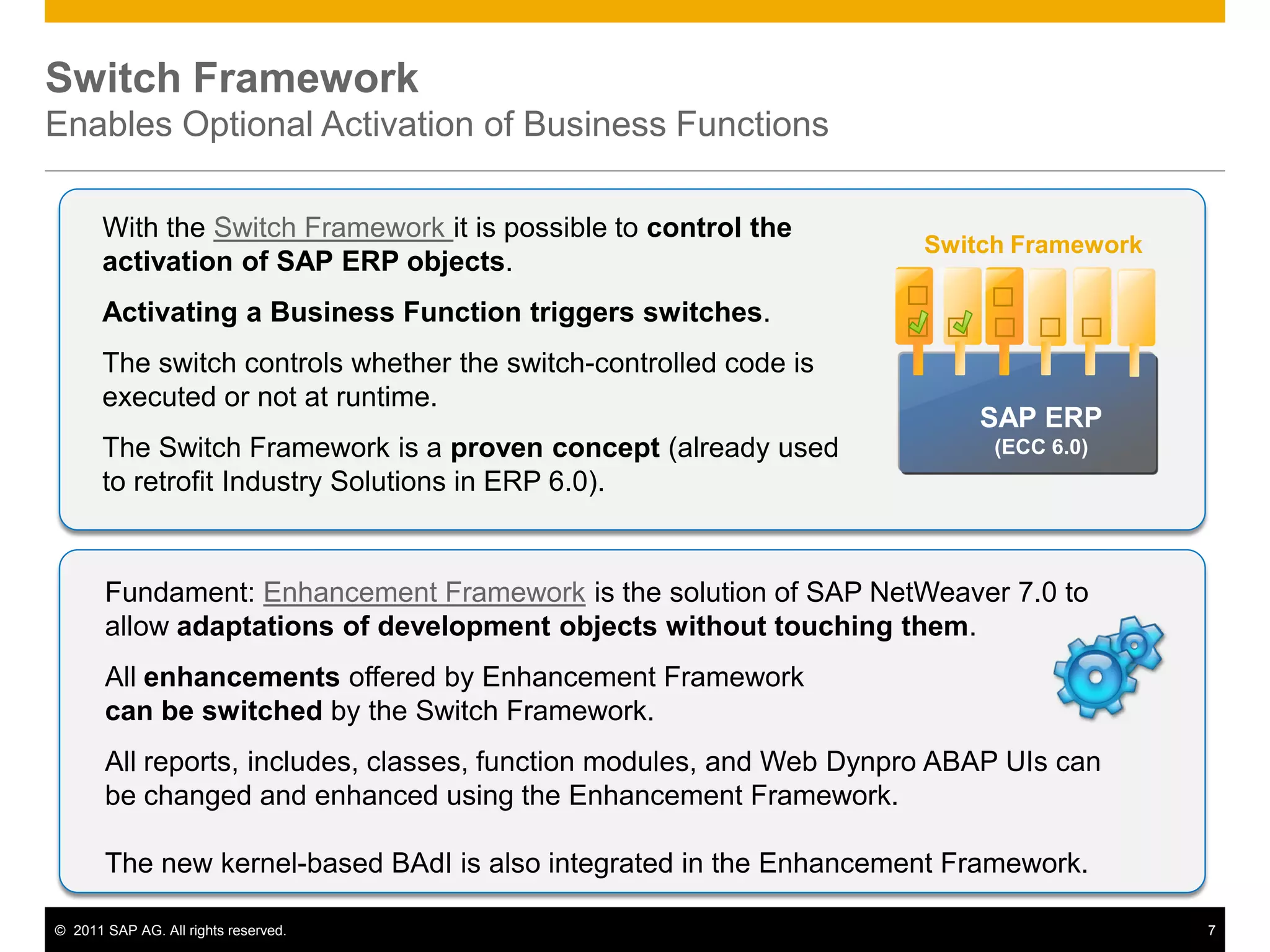
With the Switch Framework it is possible to control the
activation of SAP ERP objects.
Activating a Business Function triggers switches.
The switch controls whether the switch-controlled code is
executed or not at runtime.
The Switch Framework is a proven concept (already used
to retrofit Industry Solutions in ERP 6.0).
Switch Framework
SAP ERP
(ECC 6.0)
Fundament: Enhancement Framework is the solution of SAP NetWeaver 7.0 to
allow adaptations of development objects without touching them.
All enhancements offered by Enhancement Framework
can be switched by the Switch Framework.
All reports, includes, classes, function modules, and Web Dynpro ABAP UIs can
be changed and enhanced using the Enhancement Framework.
The new kernel-based BAdI is also integrated in the Enhancement Framework.
© 2011 SAP AG. All rights reserved. 8
Switch Framework
How Does It work?
Architectural
View:
“techn. Switch”
Repository View:
“Enhancement
Framework”
Switch 1
Business Function Set
Bus Fct F1
Bus Fct F2
Bus Fct F4
Business Function Set
Bus Fct F1
Bus Fct F2
Bus Fct F4
Industry Business
Function Set “Media“
Advertising Mgmt.
Press Distribution
…

Enhancements
IMG-nodes
Enhancements
Switch BC Set
Screen
Element 1
Element 2
Enterprise Business
Function
HCM, Administration
Real Estate
Switch 2 
Switch 3 
Switch 4
Switch 5
Switch n
Business View:
“Business Function”
…
A switch controls the visibility of other repository objects.
© 2011 SAP AG. All rights reserved. 9
ABAP Source Code Plug-ins
Enhancement Points & Enhancement Sections
PROGRAM p1
WRITE ‘Hello World’.
ENHANCEMENT-POINT […]
…
…
ENHANCEMENT-SECTION […]
WRITE ‘Original’.
END-ENHANCEMENT-SECTION.
ENHANCEMENT 1.
WRITE ‘Hello Paris’.
ENDENHANCEMENT.
ENHANCEMENT 2.
WRITE ‘Hello London’.
ENDENHANCEMENT.
ENHANCEMENT 3.
WRITE ‘Enhanced’.
ENDENHANCEMENT.
Enhancement
Point:
Insertion of
additional ABAP
source code
Enhancement
Section:
Replacement of
existing ABAP
source code
Enhancement
Options
Enhancement
Implementation Elements
© 2011 SAP AG. All rights reserved. 10
Switch Framework
Runtime object generation after switch activation
ABAP Source Code Part 1
ENHANCEMENT-POINT
ABAP Source Code Part 2
ABAP Source Code Part 1
ENHANCEMENT-POINT
ABAP Source Code Part 2
ENHANCEMENT E1.
…
…
…
ENDENHANCEMENT.
ENHANCEMENT E1.
…
…
…
ENDENHANCEMENT.
switched off
switched on
compilation
compilation
Enhancement Source Object Runtime Object
activation
Does not contain
enhancement
Contains
enhancement
Activation of switches does not change any sources
Only runtime objects are changed
© 2011 SAP AG. All rights reserved. 11
Switch Framework
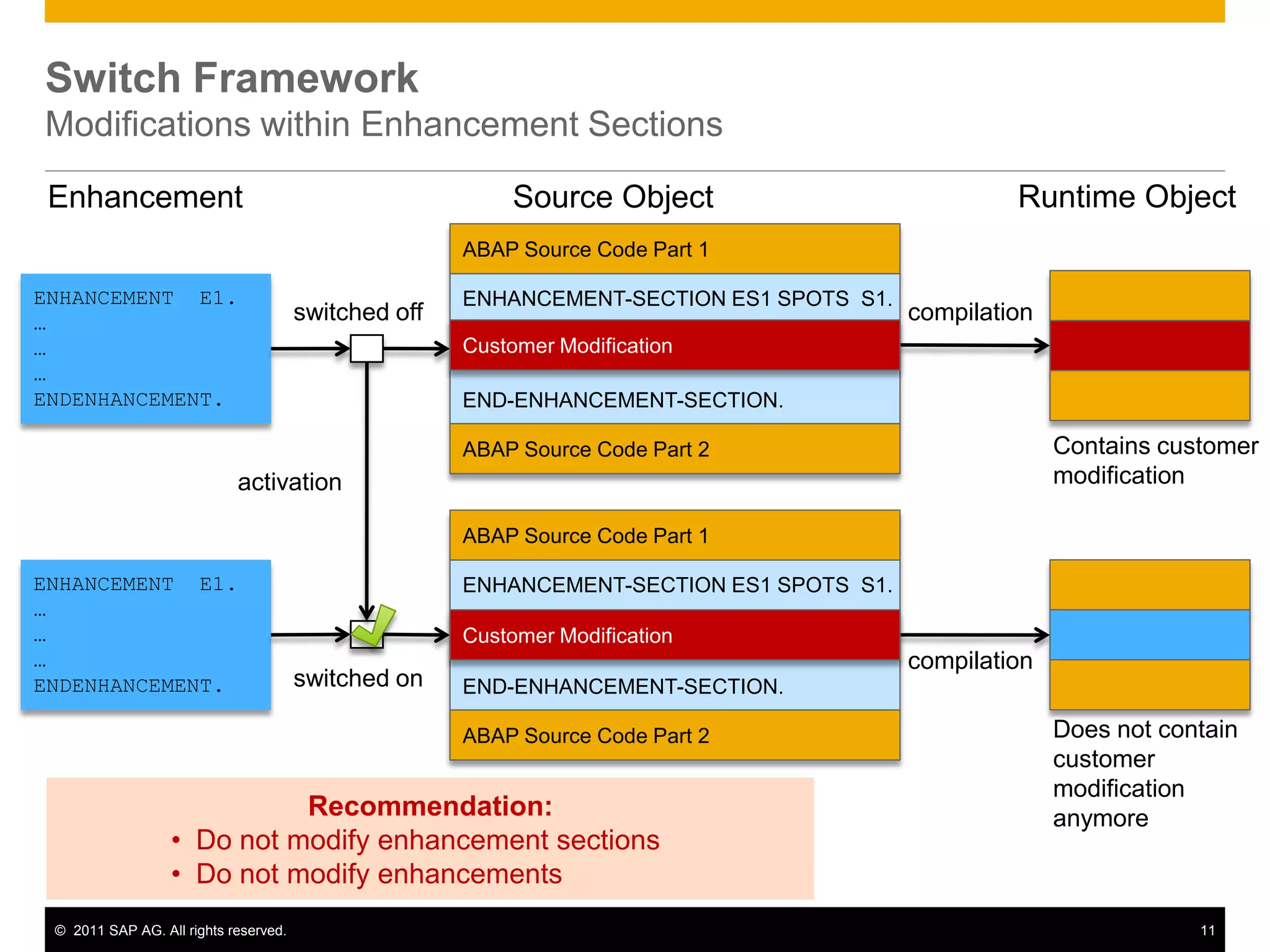
Modifications within Enhancement Sections
ABAP Source Code Part 1
ENHANCEMENT-SECTION ES1 SPOTS S1.
END-ENHANCEMENT-SECTION.
ABAP Source Code Part 2
ABAP Source Code Part 1
ENHANCEMENT-SECTION ES1 SPOTS S1.
END-ENHANCEMENT-SECTION.
ABAP Source Code Part 2
ENHANCEMENT E1.
…
…
…
ENDENHANCEMENT.
ENHANCEMENT E1.
…
…
…
ENDENHANCEMENT.
switched off
switched on
compilation
compilation
Enhancement Source Object Runtime Object
activation
Contains customer
modification
Does not contain
customer
modification
anymore
Customer Modification
Recommendation:
• Do not modify enhancement sections
• Do not modify enhancements
© 2011 SAP AG. All rights reserved. 12
Reversible Business Functions
Available as of Business Suite 7 Innovations 2010
 A reversible Business Function can be tested / evaluated in DEV/QAS systems
 Recommendation: for testing use a separate client (created with client copy)
 Make sure that the activated functionality of the Business Function is not tested
in any other client of the test system.
 Business Functions are active in all clients!
 To completely „undo‟ a Business Function the whole client has to be deleted
37 reversible Business Functions
(in SAP ERP 6.0 EHP5)
Further
information
© 2011 SAP AG. All rights reserved. 13
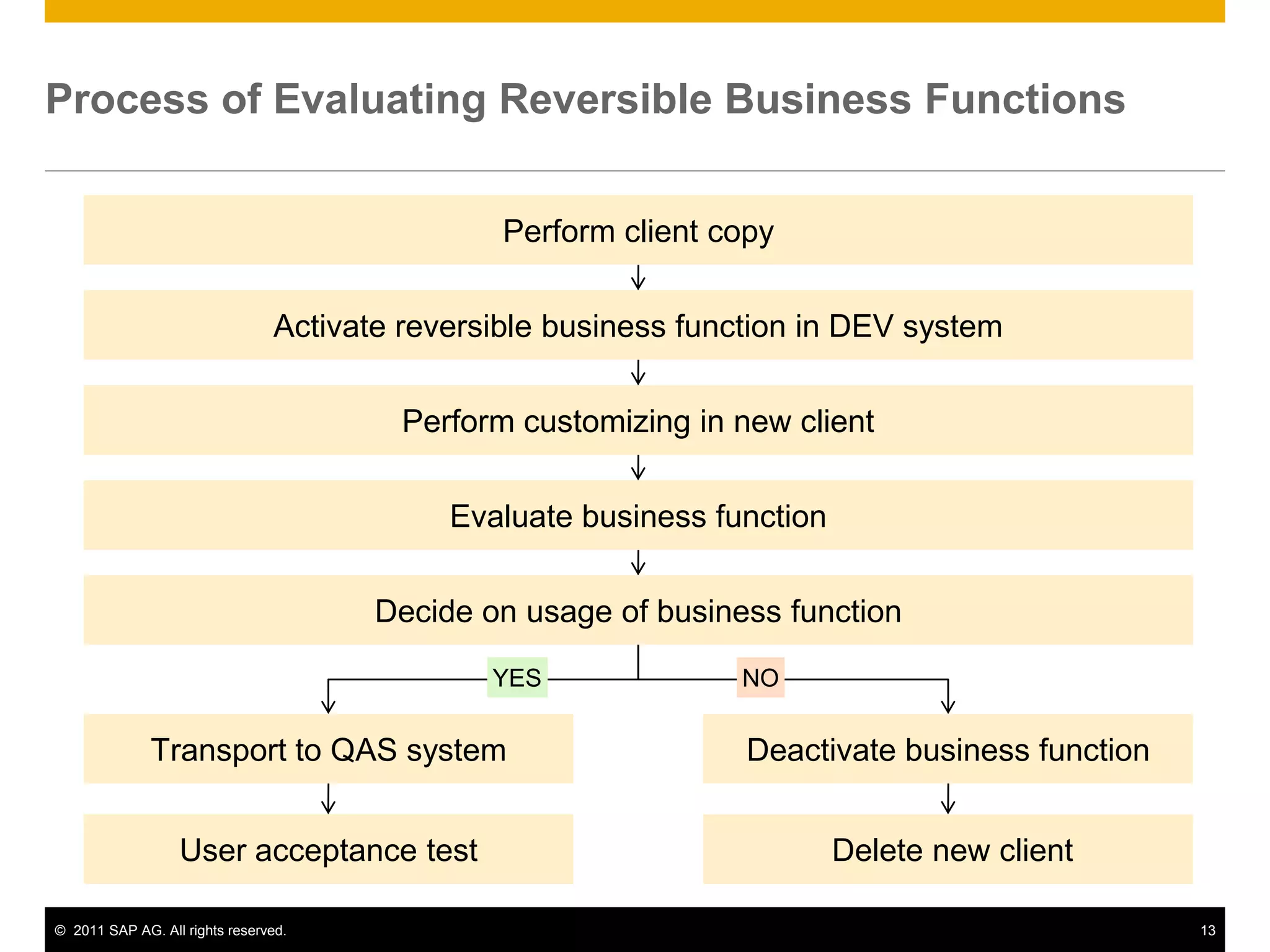
Process of Evaluating Reversible Business Functions
Perform client copy
Activate reversible business function in DEV system
Perform customizing in new client
Evaluate business function
Transport to QAS system
Decide on usage of business function
User acceptance test
Deactivate business function
Delete new client
YES NO
© 2011 SAP AG. All rights reserved. 14
Transaction Purpose
SFW5 Switch on/off business functions
SFW_BROWSER Find out which enhancements are associated
with a business function
SFW1 Create switches (only relevant for custom
enhancements)
SFW2 Create business functions (only relevant for
custom enhancements)
SFW3 Create business functions sets for industry
solutions (only relevant for custom
enhancements)
Switch Framework
Maintenance Transactions
© 2011 SAP AG. All rights reserved. 15
Agenda
1. Getting Started
Implementation Overview
2. Technical Background
Terminology ▪ Switch Framework ▪ Reversibility of Business Functions
3. Discover and Evaluate new Functionality
Information Sources ▪ Business Function Prediction ▪ Test Drive Functionality
4. Activating new Functionality
Preparation Activities ▪ Activation Procedure ▪ Post Activities
5. Landscape Aspects
Transporting Settings ▪ Global Template Landscapes
6. Summary and Further Information
© 2011 SAP AG. All rights reserved. 16
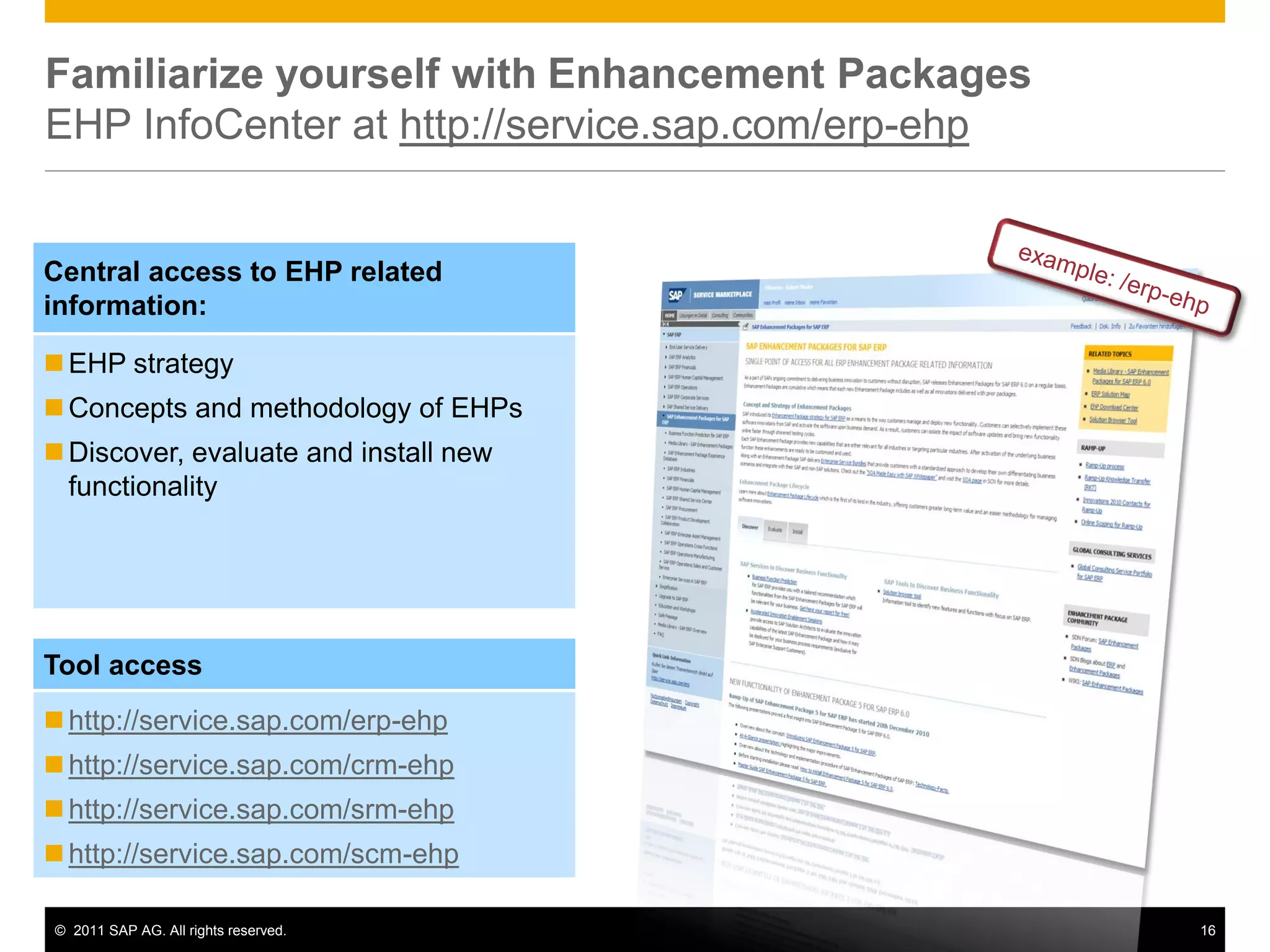
Familiarize yourself with Enhancement Packages
EHP InfoCenter at http://service.sap.com/erp-ehp
EHP strategy
Concepts and methodology of EHPs
Discover, evaluate and install new
functionality
Central access to EHP related
information:
http://service.sap.com/erp-ehp
http://service.sap.com/crm-ehp
http://service.sap.com/srm-ehp
http://service.sap.com/scm-ehp
Tool access
© 2011 SAP AG. All rights reserved. 17
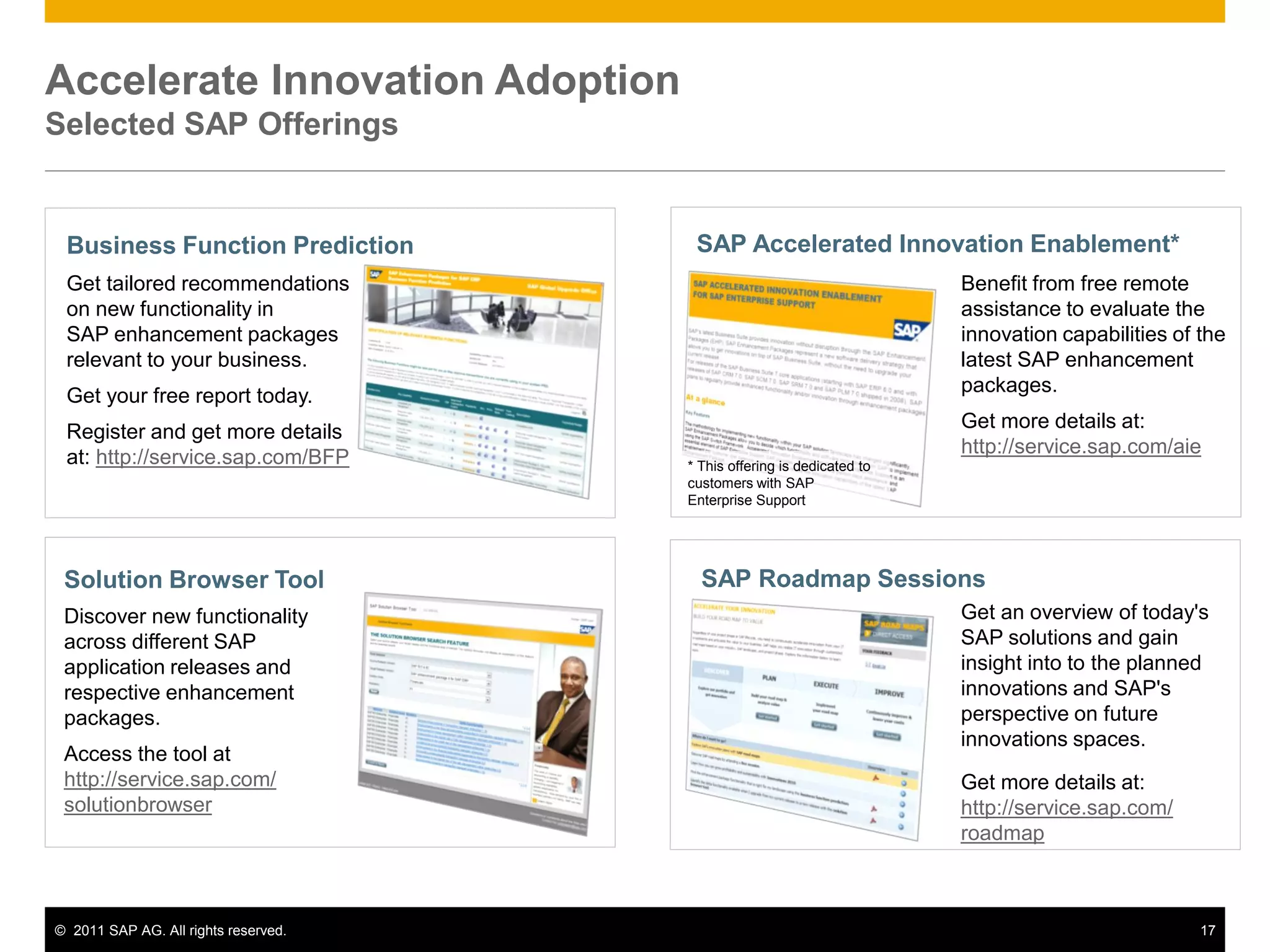
Accelerate Innovation Adoption
Selected SAP Offerings
Business Function Prediction
Get tailored recommendations
on new functionality in
SAP enhancement packages
relevant to your business.
Get your free report today.
Register and get more details
at: http://service.sap.com/BFP
Solution Browser Tool
Discover new functionality
across different SAP
application releases and
respective enhancement
packages.
Access the tool at
http://service.sap.com/
solutionbrowser
SAP Accelerated Innovation Enablement*
Benefit from free remote
assistance to evaluate the
innovation capabilities of the
latest SAP Enhancement
Packages.
Get more details at:
http://service.sap.com/
Benefit from free remote
assistance to evaluate the
innovation capabilities of the
latest SAP enhancement
packages.
Get more details at:
http://service.sap.com/aie
SAP Roadmap Sessions
Access the tool at
http://service.sap.com/
upgrade-erp
Get an overview of today's
SAP solutions and gain
insight into to the planned
innovations and SAP's
perspective on future
innovations spaces.
Get more details at:
http://service.sap.com/
roadmap
* This offering is dedicated to
customers with SAP
Enterprise Support
© 2011 SAP AG. All rights reserved. 18
Unlock the Value of Your SAP ERP System:
Business Function Prediction for SAP® ERP
 Individual and tailored recommendation of
relevant enhancement package functionality
adding value to your existing system usage
 Easy and direct access to all project relevant
information:
 Overview presentation and documentation
(including business benefits)
 Release notes and test case catalogs
 Mapping to technical usage
 Multiple language support
 Including information on enhancement package 5
for SAP ERP
 4.000+ satisfied customers
Get more details and your free report at http://service.sap.com/bfp or email to ehp-tech@sap.com.
© 2011 SAP AG. All rights reserved. 19
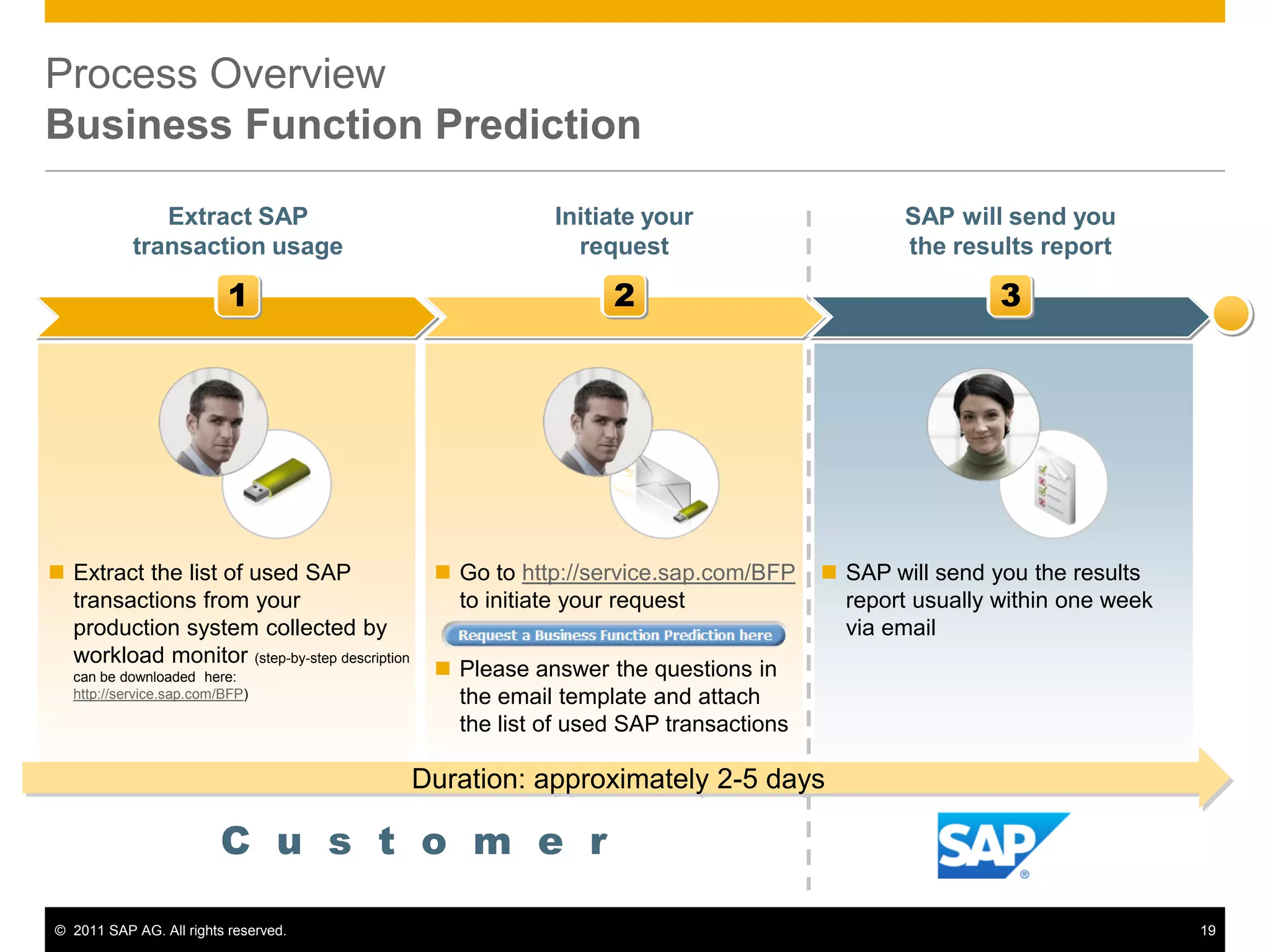
Process Overview
Business Function Prediction
1 2 3
Extract SAP
transaction usage
Initiate your
request
SAP will send you
the results report
 Extract the list of used SAP
transactions from your
production system collected by
workload monitor (step-by-step description
can be downloaded here:
http://service.sap.com/BFP)
 Go to http://service.sap.com/BFP
to initiate your request
 Please answer the questions in
the email template and attach
the list of used SAP transactions
 SAP will send you the results
report usually within one week
via email
C u s t o m e r
Duration: approximately 2-5 days
© 2011 SAP AG. All rights reserved. 20
Solution Browser Tool
 Discover new functionality across different SAP ERP
releases and SAP enhancement packages for ERP
 Assess business benefits and the value of upgrading
by comparing functional enhancements
 Available in English, German and Japanese
Description
Further Information / Tool Access
Benefits
 Via SAP Service Marketplace at:
http://service.sap.com/solutionbrowser
 Direct access at:
http://sapsolutionbrowser.com
 Tailored access to detailed and structured delta
information
 Reduced effort to define a business case or value
proposition for an upgrade
 Fast identification of capabilities that respond to user
requirements
© 2011 SAP AG. All rights reserved. 21
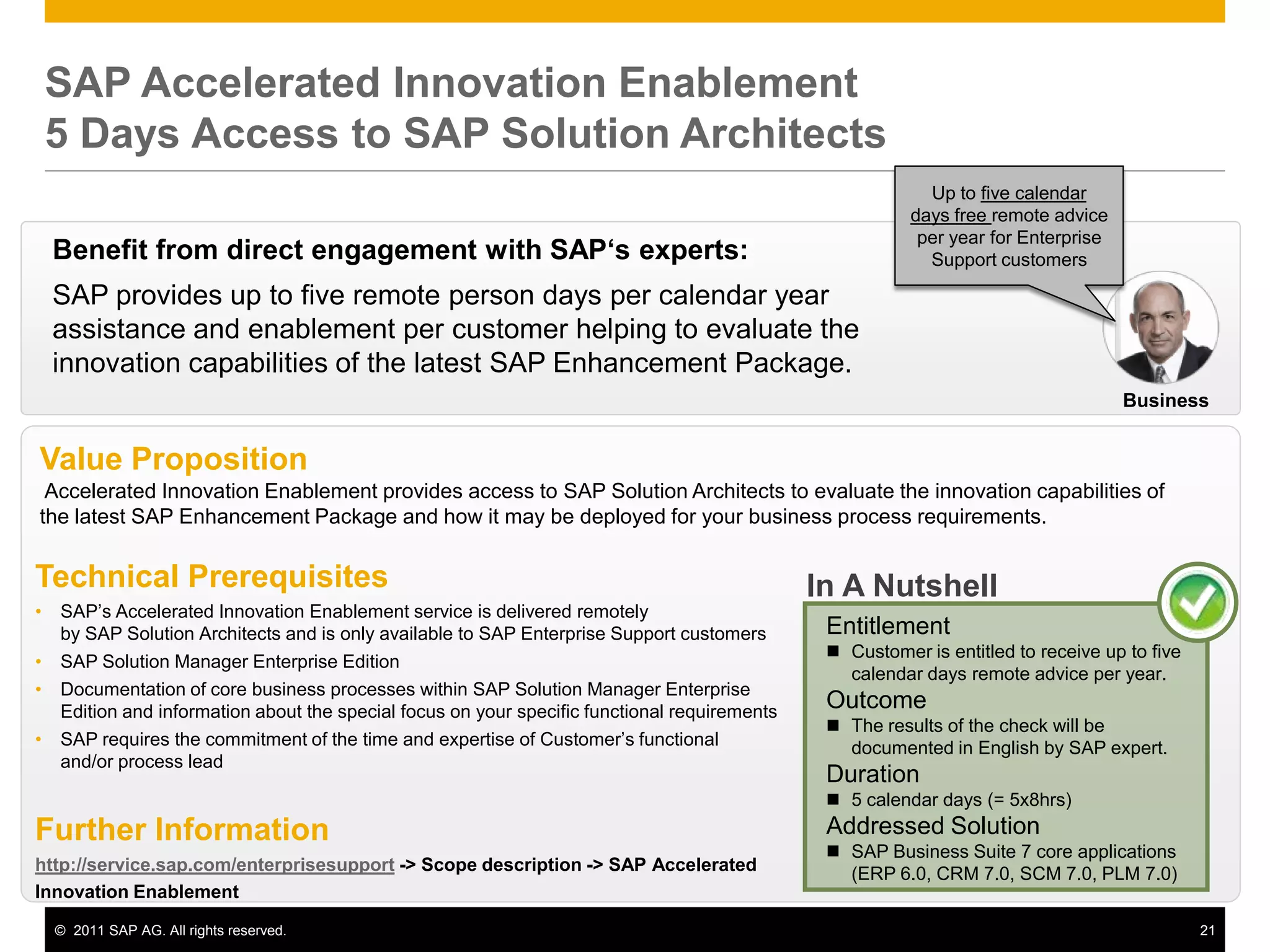
SAP Accelerated Innovation Enablement
5 Days Access to SAP Solution Architects
Benefit from direct engagement with SAP„s experts:
SAP provides up to five remote person days per calendar year
assistance and enablement per customer helping to evaluate the
innovation capabilities of the latest SAP Enhancement Package.
Value Proposition
Accelerated Innovation Enablement provides access to SAP Solution Architects to evaluate the innovation capabilities of
the latest SAP Enhancement Package and how it may be deployed for your business process requirements.
In A Nutshell
Entitlement
 Customer is entitled to receive up to five
calendar days remote advice per year.
Outcome
 The results of the check will be
documented in English by SAP expert.
Duration
 5 calendar days (= 5x8hrs)
Addressed Solution
 SAP Business Suite 7 core applications
(ERP 6.0, CRM 7.0, SCM 7.0, PLM 7.0)
Technical Prerequisites
• SAP‟s Accelerated Innovation Enablement service is delivered remotely
by SAP Solution Architects and is only available to SAP Enterprise Support customers
• SAP Solution Manager Enterprise Edition
• Documentation of core business processes within SAP Solution Manager Enterprise
Edition and information about the special focus on your specific functional requirements
• SAP requires the commitment of the time and expertise of Customer‟s functional
and/or process lead
Further Information
http://service.sap.com/enterprisesupport -> Scope description -> SAP Accelerated
Innovation Enablement
Business
Up to five calendar
days free remote advice
per year for Enterprise
Support customers
© 2011 SAP AG. All rights reserved. 22
Get transparency on possible license implications when
activating business functions
 Majority of business functions covered
by the enterprise foundation package
license
 Using the functionality of certain
business functions productively may
require an additional license package
 either an enterprise extension
 or an industry portfolio package
license
 Access SAP Note 1524246 for details
 The licensing guide and the price list
item catalog apply
© 2011 SAP AG. All rights reserved. 23
Agenda
1. Getting Started
Implementation Overview
2. Technical Background
Terminology ▪ Switch Framework ▪ Reversibility of Business Functions
3. Discover and Evaluate new Functionality
Information Sources ▪ Business Function Prediction ▪ Test Drive Functionality
4. Activating new Functionality
Preparation Activities ▪ Activation Procedure ▪ Post Activities
5. Landscape Aspects
Transporting Settings ▪ Global Template Landscapes
6. Summary and Further Information
© 2011 SAP AG. All rights reserved. 24
Activation Process
Overview
SBX
evaluate
DEV QAS PRD
Transport
Step 2: Activate all or subset of evaluated functionality in your production line
Step 1: Evaluate new functionality in Sandbox system
(for non-reversible business functions)
Customizing
Switches
Transport
Customizing
Switches
© 2011 SAP AG. All rights reserved. 25
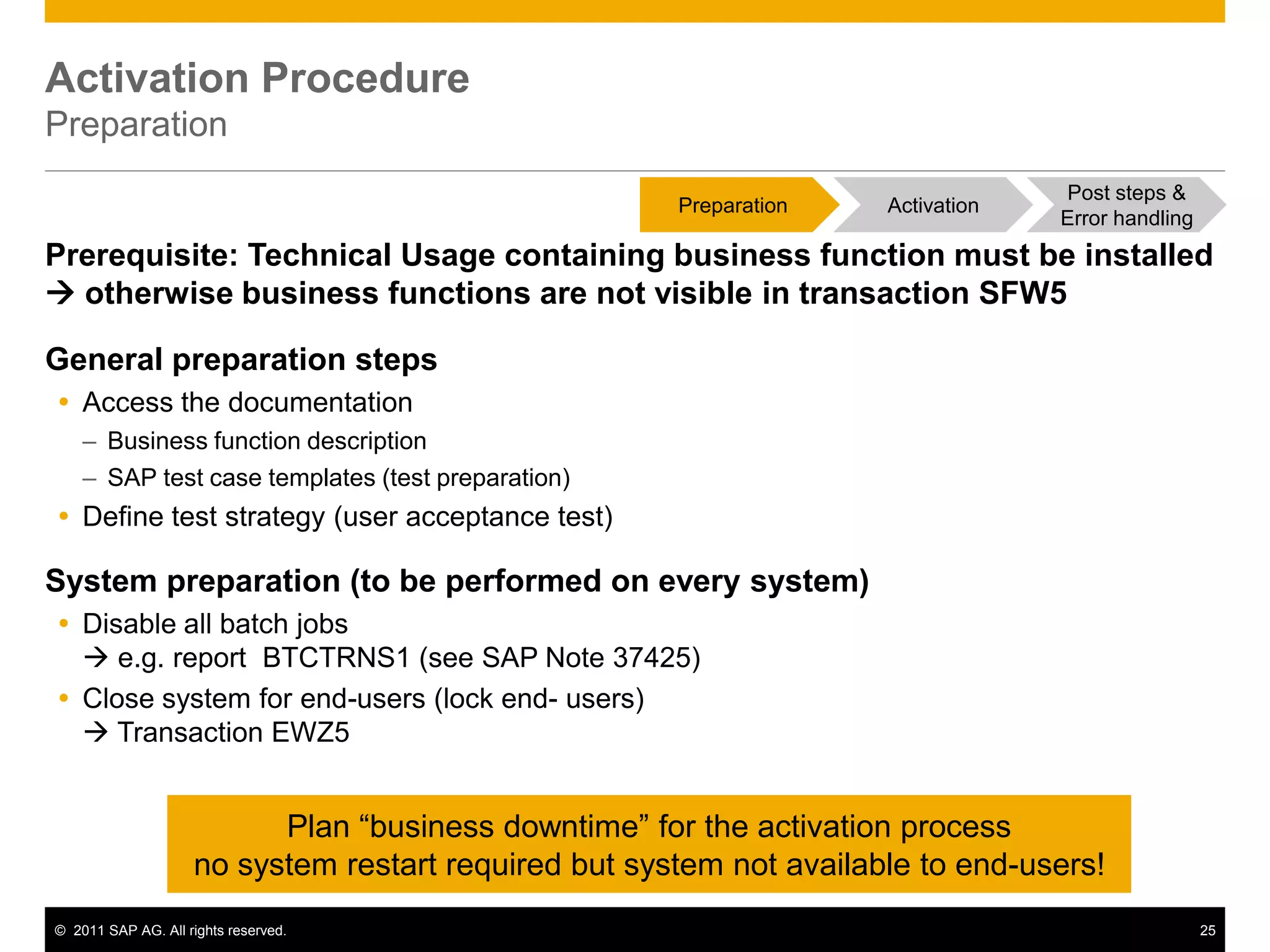
Activation Procedure
Preparation
Prerequisite: Technical Usage containing business function must be installed
 otherwise business functions are not visible in transaction SFW5
General preparation steps
 Access the documentation
– Business function description
– SAP test case templates (test preparation)
 Define test strategy (user acceptance test)
System preparation (to be performed on every system)
 Disable all batch jobs
 e.g. report BTCTRNS1 (see SAP Note 37425)
 Close system for end-users (lock end- users)
 Transaction EWZ5
Plan “business downtime” for the activation process
no system restart required but system not available to end-users!
Post steps &
Error handling
Preparation Activation
© 2011 SAP AG. All rights reserved. 26
Identify affected processes before activation
Business Process Change Analyzer
• Identification of mission-critical business processes
impacted by software changes
• Test scope optimization for SAP SPs and EhPs
based on object coverage and test effort analysis
(available with SAP Solution Manager 7.1)
• Analysis of planned business function activation
• Automatic test plan generation
Description
Further Information / Tool Access
Benefits
• SAP Service Marketplace at:
http://service.sap.com/solutionmanager and http://service.sap.com/testing
• Precise insight of impacted business processes
• Improved handling of change events
• Risk-based test scope recommendation and
automatic test plan generation
Planned software changes:
 Customizing changes
 Custom Code
changes
 Simulation of
planned Business
Function activation
 SAP SP and EHPs
Order to Cash
Sales Order  code change
Delivery
Goods Issue  UI change
Billing
Procure to Pay
Create PO  customizing change
Prerequisites
• (Lean) documentation of business processes
• BPCA triggered trace (TBOM) of mission-critical
business processes
• EHP deployment in DEV or TST system
Post steps &
Error handling
Preparation Activation
© 2011 SAP AG. All rights reserved. 27
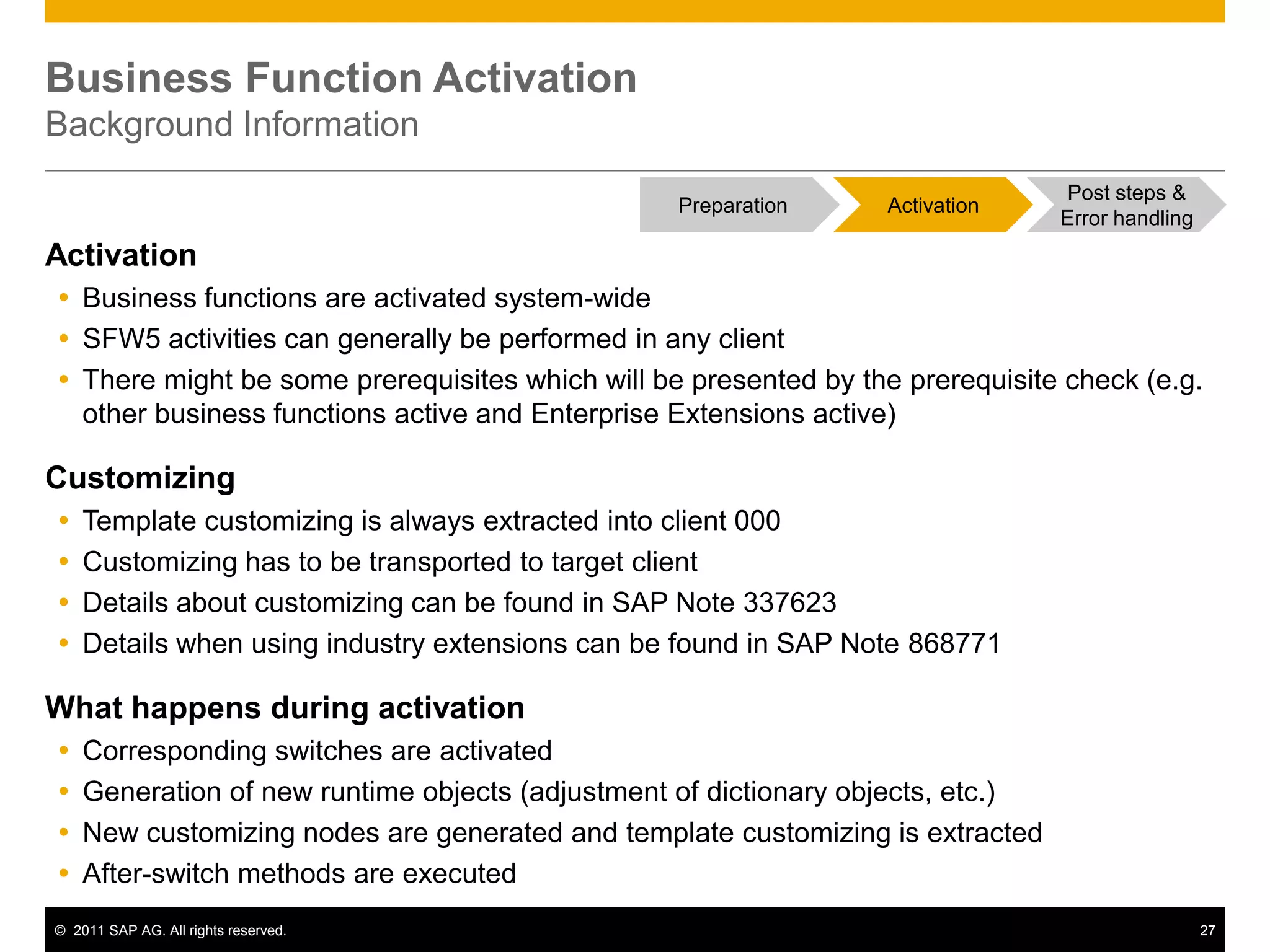
Business Function Activation
Background Information
Activation
 Business functions are activated system-wide
 SFW5 activities can generally be performed in any client
 There might be some prerequisites which will be presented by the prerequisite check (e.g.
other business functions active and Enterprise Extensions active)
Customizing
 Template customizing is always extracted into client 000
 Customizing has to be transported to target client
 Details about customizing can be found in SAP Note 337623
 Details when using industry extensions can be found in SAP Note 868771
What happens during activation
 Corresponding switches are activated
 Generation of new runtime objects (adjustment of dictionary objects, etc.)
 New customizing nodes are generated and template customizing is extracted
 After-switch methods are executed
Post steps &
Error handling
Preparation Activation
© 2011 SAP AG. All rights reserved. 28
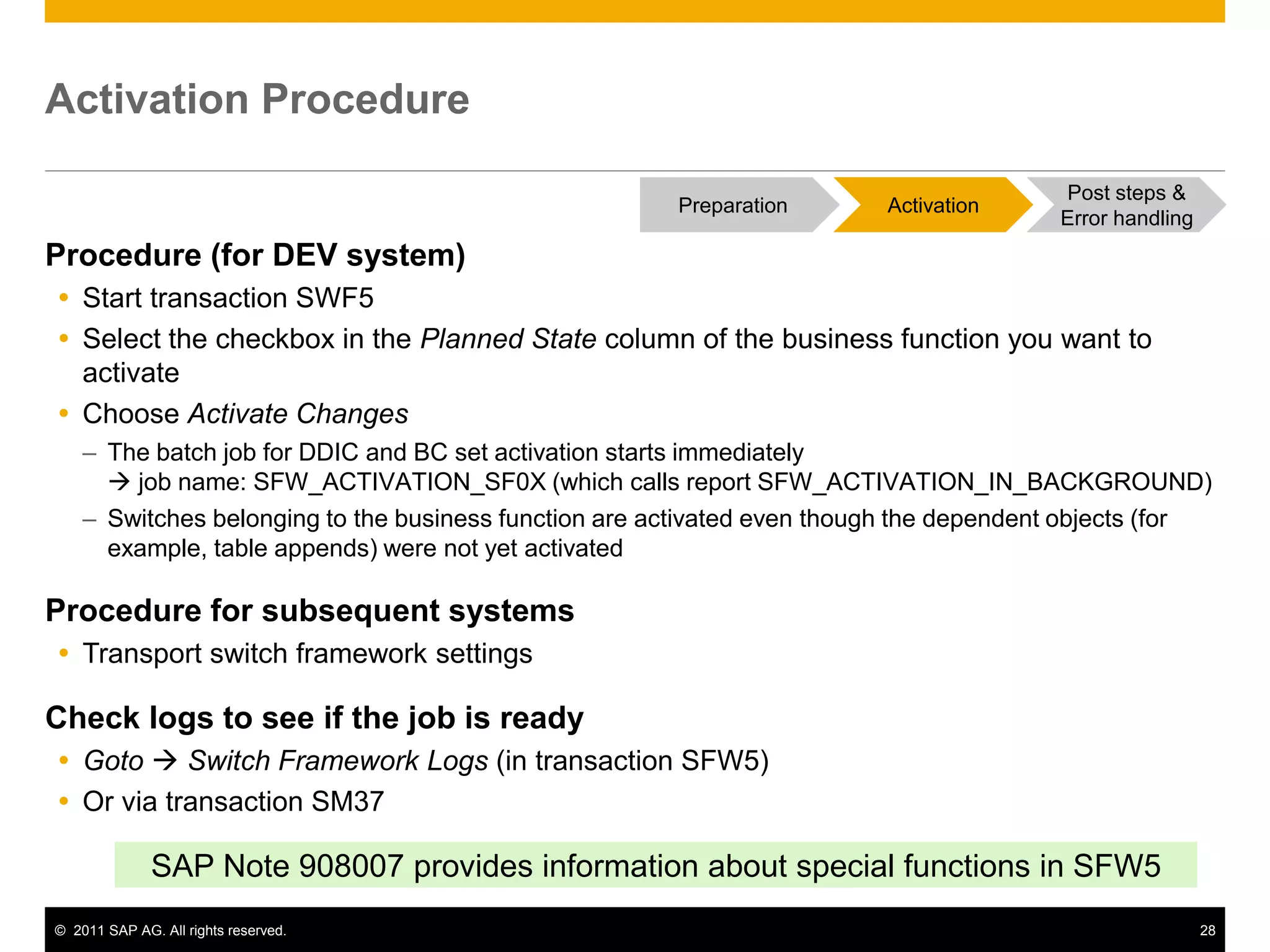
Activation Procedure
Procedure (for DEV system)
 Start transaction SWF5
 Select the checkbox in the Planned State column of the business function you want to
activate
 Choose Activate Changes
– The batch job for DDIC and BC set activation starts immediately
 job name: SFW_ACTIVATION_SF0X (which calls report SFW_ACTIVATION_IN_BACKGROUND)
– Switches belonging to the business function are activated even though the dependent objects (for
example, table appends) were not yet activated
Procedure for subsequent systems
 Transport switch framework settings
Check logs to see if the job is ready
 Goto  Switch Framework Logs (in transaction SFW5)
 Or via transaction SM37
SAP Note 908007 provides information about special functions in SFW5
Post steps &
Error handling
Preparation Activation
© 2011 SAP AG. All rights reserved. 29
Activation Procedure
Runtime
Runtime of the activation procedure
 Runtime varies depending on system performance and business function
 Generally the runtime will be around 30-120 minutes
Recommendation
 Evaluate activation runtimes on DEV/QAS (ideally in a system with comparable size)
 Transaction SFW_BROWSER helps you to get an overview about what specific business
functions contain
Post steps &
Error handling
Preparation Activation
© 2011 SAP AG. All rights reserved. 30
Activation
Error Handling
Error Handling (see also SAP Note 908007)
1. Activation terminates for any reason (dump, system shutdown...)
 You need to choose “Activate Restart”
 at this point, all settings of the Switch Frameworks are
already included in the active version
 Through “Activate Restart” all active settings are copied to an
inactive version
 This inactive version is then activated
2. Activation itself recognizes an error
 System displays a selection dialog box
 Continue: All steps after the dictionary activation are executed.
 Useful only if you could eliminate the errors in the dictionary
 Restart: Job starts again right from the beginning (prior to the dictionary activation)
 Useful if you have corrected the problem by implementing a source code correction
Post steps &
Error handling
Preparation Activation
© 2011 SAP AG. All rights reserved. 31
Activation Procedure
Post Steps
Customizing
 Perform customizing for the chosen business function (typically in DEV system)
 Transport customizing together with switch settings into subsequent systems
 Perform user acceptance tests
General post steps
 Perform user acceptance tests for business function affected area
 SAP delivers test case templates with business functions
 Business Process Change Analyzer in SAP Solution Manager provides you assistance
Post steps in system
 Enable all batch jobs
 e.g. report BTCTRNS2 (see SAP Note 37425)
 Open system for end-users (unlock end-users)
 Transaction EWZ5
Plan “business downtime” for the activation process
no system restart required but system not available to end-users!
Post steps &
Error handling
Preparation Activation
© 2011 SAP AG. All rights reserved. 32
Agenda
1. Getting Started
Implementation Overview
2. Technical Background
Terminology ▪ Switch Framework ▪ Reversibility of Business Functions
3. Discover and Evaluate new Functionality
Information Sources ▪ Business Function Prediction ▪ Test Drive Functionality
4. Activating new Functionality
Preparation Activities ▪ Activation Procedure ▪ Post Activities
5. Landscape Aspects
Transporting Settings ▪ Global Template Landscapes
6. Summary and Further Information
© 2011 SAP AG. All rights reserved. 33
DEV QAS PRD
Transport of Activations & Customizing
General Recommendation
Prerequisites
 Same ERP release with same EHP and SP-Stack installed
 Same technical usages installed
 number and release of all software components installed in one system are the same
Benefits
 Switch settings and respective customizing can be transported across the landscape
 (Adjustments after) SAP corrections can be transported
 Customer enhancements can be transported
Drawbacks
 Projects for activation of new business functions have to be synchronized / aligned
Transport
Customizing
Switches
Transport
Customizing
Switches
© 2011 SAP AG. All rights reserved. 34
Transport of Activations & Customizing
Reasonable Alternative
Landscape Setup
 Same ERP release with same EHP and SP-Stack installed
 Same technical usages installed
 number and release of all software components installed in one system are the same
Benefits
 Projects for setting activating new business functions can run with separate schedules
 (Adjustments after) SAP corrections can be transported
Drawbacks
 Switch settings cannot be transported from DEV system, they need to be switched in QAS
 Special care required for transporting customer enhancements/developments (separation
of developments)
DEV QAS PRD
Activate
manually
Activate
manually
System needs to be
set to „changeable“
Transport
Customizing
Transport
Customizing
Switches
© 2011 SAP AG. All rights reserved. 35
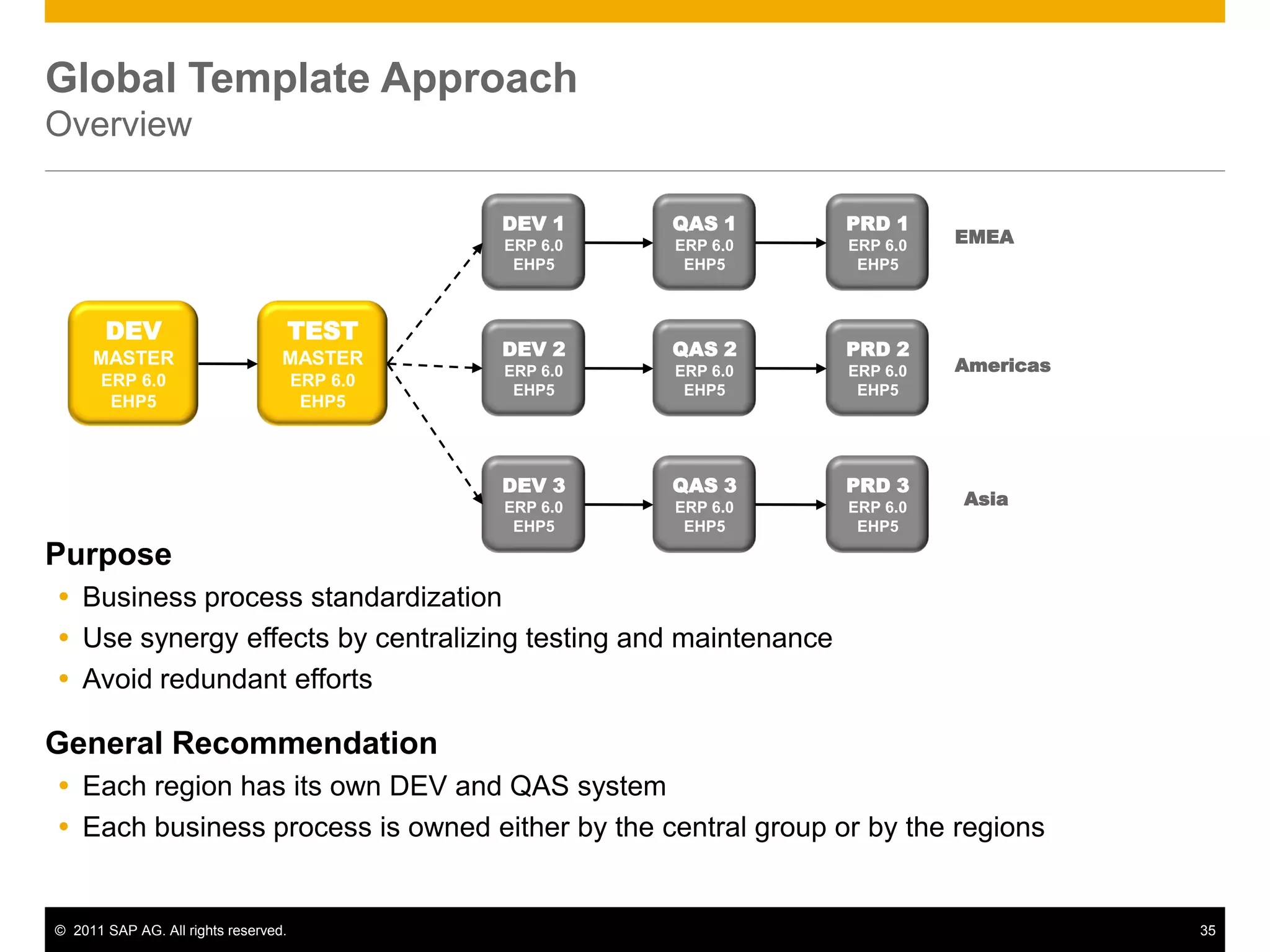
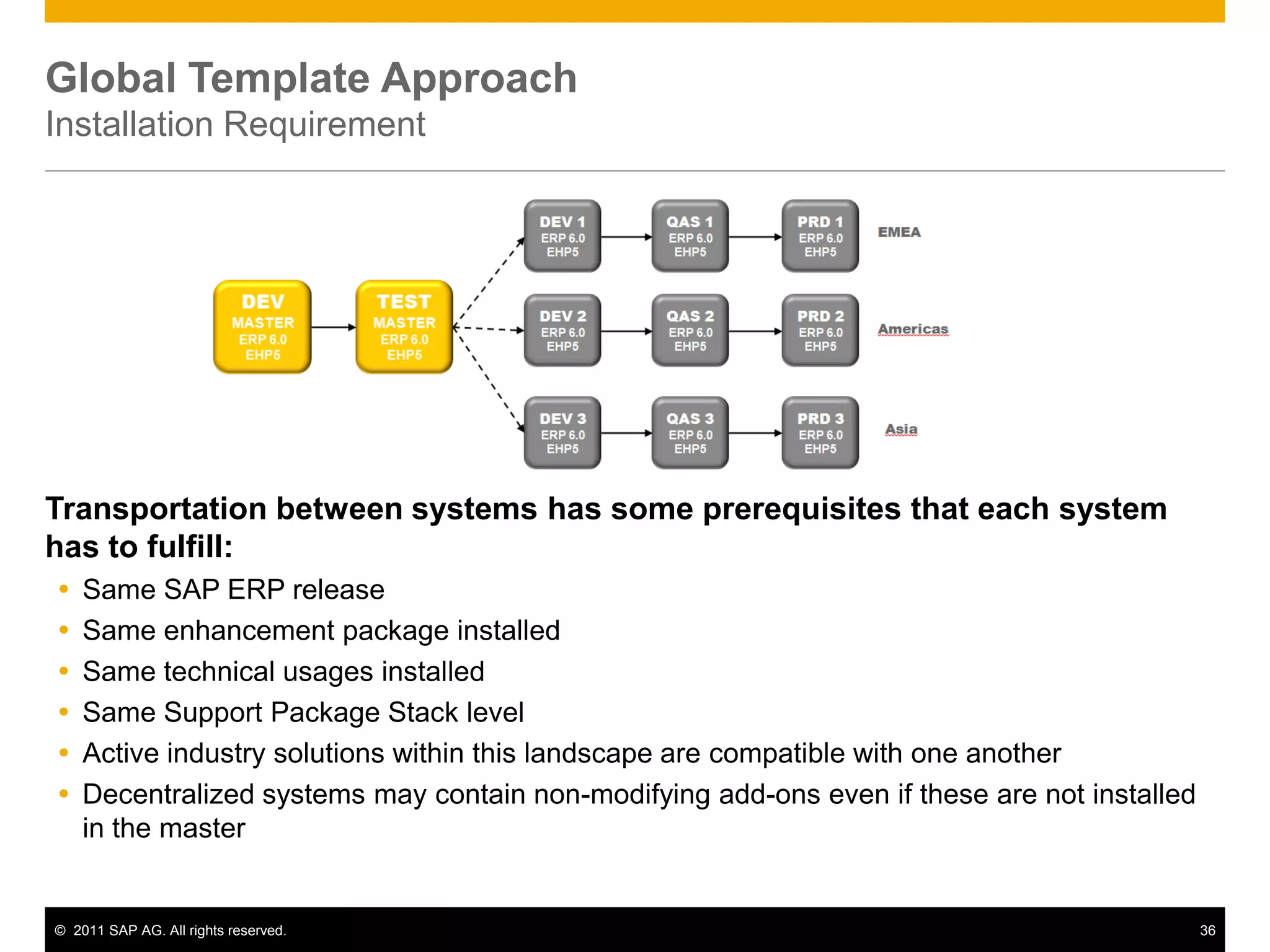
Global Template Approach
Overview
Purpose
 Business process standardization
 Use synergy effects by centralizing testing and maintenance
 Avoid redundant efforts
General Recommendation
 Each region has its own DEV and QAS system
 Each business process is owned either by the central group or by the regions
DEV
MASTER
ERP 6.0
EHP5
TEST
MASTER
ERP 6.0
EHP5
DEV 1
ERP 6.0
EHP5
QAS 1
ERP 6.0
EHP5
PRD 1
ERP 6.0
EHP5
DEV 2
ERP 6.0
EHP5
QAS 2
ERP 6.0
EHP5
PRD 2
ERP 6.0
EHP5
DEV 3
ERP 6.0
EHP5
QAS 3
ERP 6.0
EHP5
PRD 3
ERP 6.0
EHP5
EMEA
Americas
Asia
© 2011 SAP AG. All rights reserved. 36
Global Template Approach
Installation Requirement
Transportation between systems has some prerequisites that each system
has to fulfill:
 Same SAP ERP release
 Same enhancement package installed
 Same technical usages installed
 Same Support Package Stack level
 Active industry solutions within this landscape are compatible with one another
 Decentralized systems may contain non-modifying add-ons even if these are not installed
in the master
© 2011 SAP AG. All rights reserved. 37
General Recommendation
Same business functions activated in
each system – this leads to …
 Same Coding
 Same DDIC objects
 Same BC Sets
Synergy Effects:
 Centralized maintenance
 Centralized testing
Even in case of regionally owned business processes,
many issues can be anticipated in a centralized test
which can be regarded as a „rudimentary pre-test‟.
 Regional testing
Benefits:
 Lowest maintenance effort
 Lowest testing effort due to
maximized use of synergy effects
DEV QAS
MASTER
EHP5 EHP5
EHP5EHP5
AMERICAS
EHP5
EHP5EHP5
EMEA
EHP5
EHP5EHP5
AP/J
EHP5
BF 1 
BF 2 
Add-On
BF 1 
BF 2 
BF 1 
BF 2 
BF 1 
BF 2 
BF 1 
BF 2 
© 2011 SAP AG. All rights reserved. 38
Reasonable Alternative
DEV MASTER contains superset of
activated business functions
 Maintenance can be centralized.
 Everything can be transported from the
DEV Master to the regional systems
 No problems to be expected even if a
switch is not activated in a region
 Optimum maintenance
QAS MASTER contains most used
business function combinations
 Maximize the test scope that can be
covered centrally, to maximize synergy
effects
 Where activations differ in the regional
system, tests have to be executed
decentrally.
 Optimum Testing
DEV QAS
MASTER
EHP5 EHP5
EHP5EHP5
AMERICAS
EHP5
EHP5EHP5
EMEA
EHP5
EHP5EHP5
AP/J
EHP5
BF 1 
BF 2 
Add-On
BF 2  BF 2 
BF 2 
1
1
2
1
2
BF 1 
© 2011 SAP AG. All rights reserved. 39
Possible Exception
Activate in the QAS MASTER as well as
in the DEV Master those business
functions that are used by most
regions
If a regions activates another business
function
 All automatic corrections („/snote‟) (all coding
corrections) can be centralized and be
transported to the regions.
 No problems to be expected even if a switch
is not activated in a region.
 For manual corrections (e.g. DDIC object or
BC Sets):
– Check if a switchable object is affected
– Implement the correction only where this object
has been activated
Dev QAS
MASTER
EHP5 EHP5
EHP5EHP5
AMERICAS
EHP5
EHP5EHP5
EMEA
EHP5
EHP5EHP5
AP/J
EHP5
BF 2 
Add-On
BF 2 
BF 2 
BF 1 
BF 2 
1
1
© 2011 SAP AG. All rights reserved. 40
Agenda
1. Getting Started
Implementation Overview
2. Technical Background
Terminology ▪ Switch Framework ▪ Reversibility of Business Functions
3. Discover and Evaluate new Functionality
Information Sources ▪ Business Function Prediction ▪ Test Drive Functionality
4. Activating new Functionality
Preparation Activities ▪ Activation Procedure ▪ Post Activities
5. Landscape Aspects
Transporting Settings ▪ Global Template Landscapes
6. Summary and Further Information
© 2011 SAP AG. All rights reserved. 41
Hot of the Press:
Implementing SAP Enhancement Packages
 Project manager
 Project members:
Administrators and developers
ISBN 978-1-59229-351-3
Price: 69,90 Euro
 Overview about all capabilities of SAP‟s
enhancement strategy
 Details about the concept, architecture, and
technology as well as implementation, tools
and troubleshooting
 Best practices and step-by-step instructions for
the planning and realization of EHP-projects
“Practical solutions, note boxes, checklists, as well as
tips and tricks from the authors make this book a useful
companion that you can consult time and again..“
Target audience
Content
Link: http://www.sap-press.de/katalog/buecher/titel/gp/titelID-2385?GalileoSession=13970096A4cAf.cCS.c
© 2011 SAP AG. All rights reserved. 42
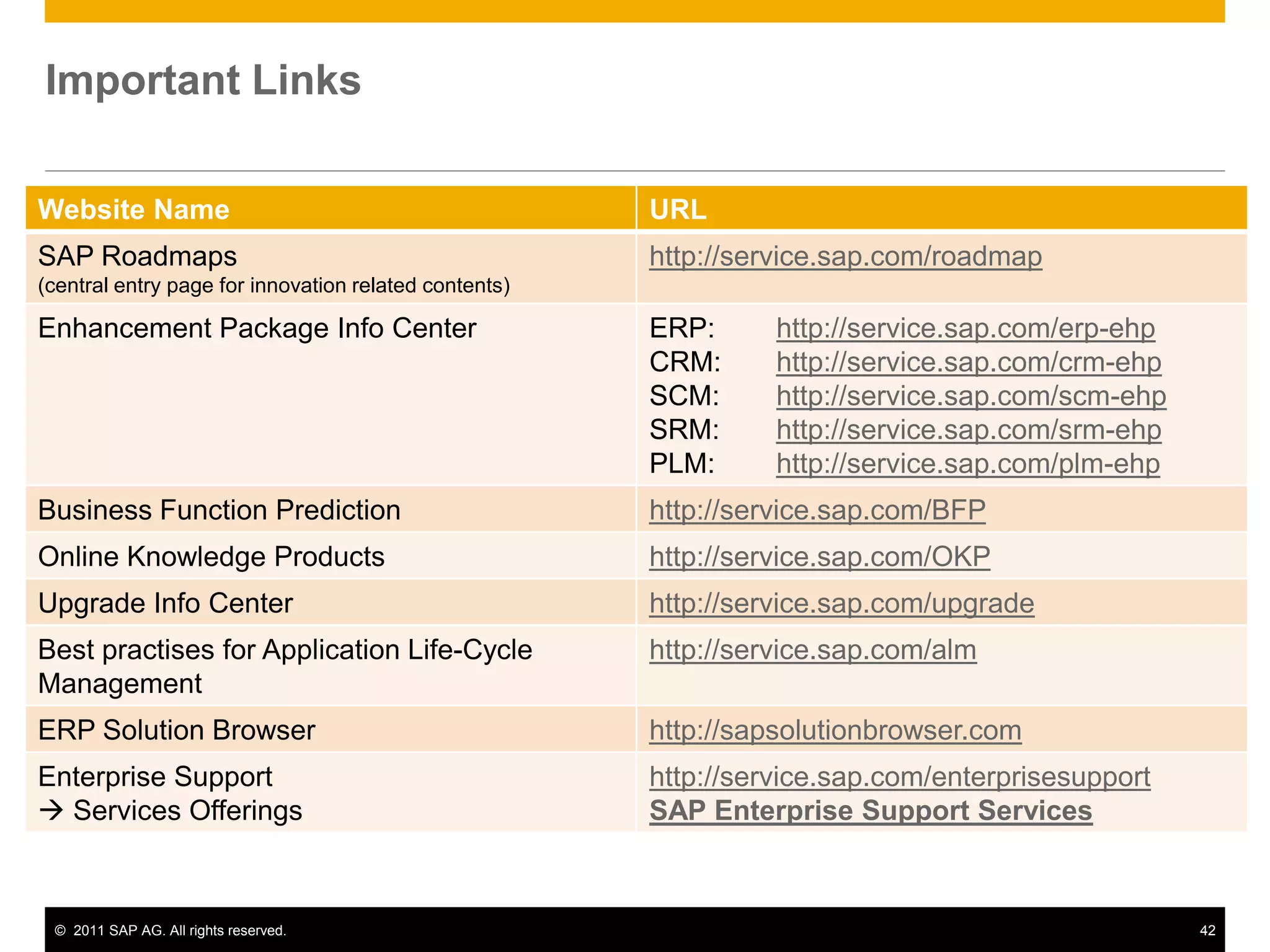
Important Links
Website Name URL
SAP Roadmaps
(central entry page for innovation related contents)
http://service.sap.com/roadmap
Enhancement Package Info Center ERP: http://service.sap.com/erp-ehp
CRM: http://service.sap.com/crm-ehp
SCM: http://service.sap.com/scm-ehp
SRM: http://service.sap.com/srm-ehp
PLM: http://service.sap.com/plm-ehp
Business Function Prediction http://service.sap.com/BFP
Online Knowledge Products http://service.sap.com/OKP
Upgrade Info Center http://service.sap.com/upgrade
Best practises for Application Life-Cycle
Management
http://service.sap.com/alm
ERP Solution Browser http://sapsolutionbrowser.com
Enterprise Support
 Services Offerings
http://service.sap.com/enterprisesupport
SAP Enterprise Support Services
© 2011 SAP AG. All rights reserved. 43
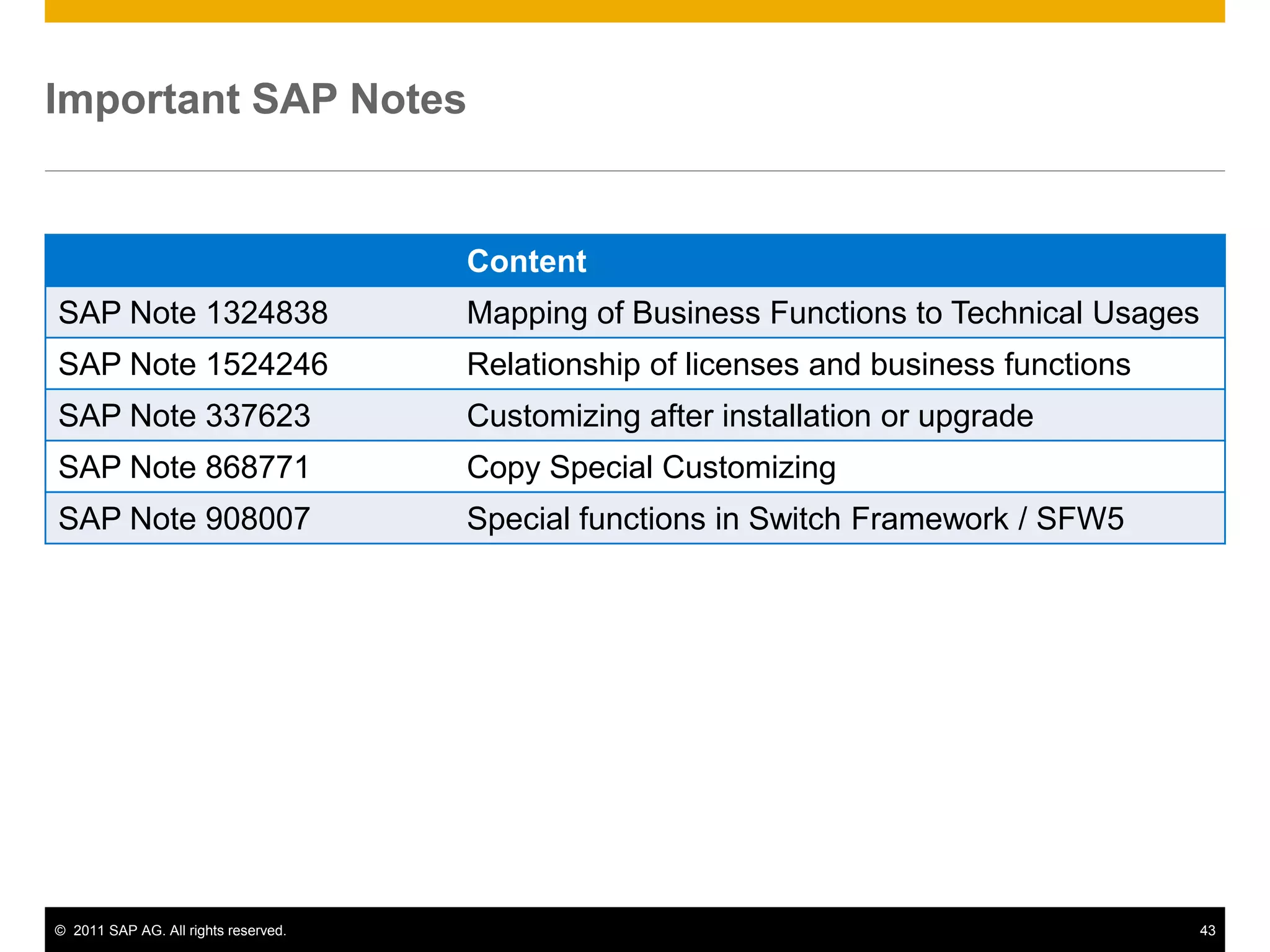
Content
SAP Note 1324838 Mapping of Business Functions to Technical Usages
SAP Note 1524246 Relationship of licenses and business functions
SAP Note 337623 Customizing after installation or upgrade
SAP Note 868771 Copy Special Customizing
SAP Note 908007 Special functions in Switch Framework / SFW5
Important SAP Notes
Thank You!
Contact information:
Oliver Nocon Robert Pinzke
Cross Compliance Global Upgrade Office
Dietmar-Hopp-Allee 16 Dietmar-Hopp-Allee 16
D-69190 Walldorf D-69190 Walldorf
Germany Germany
+49 6227 7-47474 +49 6227 7-47474

Sap enhancement packages

  • 1.
    SAP Enhancement Packages Selectingand Activating Business Functions October 2011 (Version 1.01)
  • 2.
    © 2011 SAPAG. All rights reserved. 2 Legal Disclaimer This presentation is not subject to your license agreement or any other agreement with SAP. SAP has no obligation to pursue any course of business outlined in this presentation or to develop or release any functionality mentioned in this presentation. This presentation and SAP's strategy and possible future developments are subject to change and may be changed by SAP at any time for any reason without notice. This document is provided without a warranty of any kind, either express or implied, including but not limited to, the implied warranties of merchantability, fitness for a particular purpose, or non-infringement. SAP assumes no responsibility for errors or omissions in this document, except if such damages were caused by SAP intentionally or grossly negligent.
  • 3.
    © 2011 SAPAG. All rights reserved. 3 Agenda 1. Getting Started Implementation Overview 2. Technical Background Terminology ▪ Switch Framework ▪ Reversibility of Business Functions 3. Discover and Evaluate new Functionality Information Sources ▪ Business Function Prediction ▪ Test Drive Functionality 4. Activating new Functionality Preparation Activities ▪ Activation Procedure ▪ Post Activities 5. Landscape Aspects Transporting Settings ▪ Global Template Landscapes 6. Summary and Further Information
  • 4.
    © 2011 SAPAG. All rights reserved. 4 Accelerated Innovation Enablement  Evaluate innovations of the latest SAP enhancement package in detail  Setup sandbox system for evaluation  Information on how to deploy to meet business process requirements EHP EHP Switch Framework  Activate the relevant business functions within your productive landscape sequentially  Use test case templates delivered by SAP  Use SAP business process change analyzer (BPCA) Enhancement Package Installation  Use EHP installer for installation of EHP  Specific services for configuration of SAP Solution Manager, EHP installation, downtime optimization, code optimization, etc. available Business Function Prediction  Receive tailored recommendations for business functions based on your current system usage Solution Browser  Delta-Functionalities between releases (generic) Find what„s new... Getting started with Enhancement Packages Quickly meet business requirements for growth and competitive advantage ActivationInstallationPlanning ... and what you get, ... ... install innovations, ... ... activate and use them! EHP EHP
  • 5.
    © 2011 SAPAG. All rights reserved. 5 Agenda 1. Getting Started Implementation Overview 2. Technical Background Terminology ▪ Switch Framework ▪ Reversibility of Business Functions 3. Discover and Evaluate new Functionality Information Sources ▪ Business Function Prediction ▪ Test Drive Functionality 4. Activating new Functionality Preparation Activities ▪ Activation Procedure ▪ Post Activities 5. Landscape Aspects Transporting Settings ▪ Global Template Landscapes 6. Summary and Further Information
  • 6.
    © 2011 SAPAG. All rights reserved. 6 Mapping Process – Example (ERP) Technical Usages - Business Functions - Software Components Business Function Technical Usage Main Instances & Software Components SAP ECC Server A “Technical Usage” groups software components which must be installed together. A “Business Function” is the activatable unit within the SAP ECC Server EA-HR 605 SAP_HR 604 ERECRUIT 600 EA_GLTRADE 600 ……. SAP_APPL 605 EA-APPL 605 SAP NetWeaver 702 Central Applications ABAP Product Instance: Central Application HCM Self Services ABAP Product Instance: Human Capital Management JAVA Product Instance: SAP XSS (Self Services) BF BF Central Applications Media ABAP Product Instance: Media Financials ABAP Product Instance: Leasing/Contract A/R & A/PBusiness Function 3 Lean Manufacturing Technical Name: LOG_PP_LMAN Business Function 1 Real Estate Management Technical Name: RE_GEN_CI_1 Business Function 2 General Ledger Accounting 3 Technical Name: FIN_GL_CI_3 . . . BF
  • 7.
    © 2011 SAPAG. All rights reserved. 7 Switch Framework Enables Optional Activation of Business Functions With the Switch Framework it is possible to control the activation of SAP ERP objects. Activating a Business Function triggers switches. The switch controls whether the switch-controlled code is executed or not at runtime. The Switch Framework is a proven concept (already used to retrofit Industry Solutions in ERP 6.0). Switch Framework SAP ERP (ECC 6.0) Fundament: Enhancement Framework is the solution of SAP NetWeaver 7.0 to allow adaptations of development objects without touching them. All enhancements offered by Enhancement Framework can be switched by the Switch Framework. All reports, includes, classes, function modules, and Web Dynpro ABAP UIs can be changed and enhanced using the Enhancement Framework. The new kernel-based BAdI is also integrated in the Enhancement Framework.
  • 8.
    © 2011 SAPAG. All rights reserved. 8 Switch Framework How Does It work? Architectural View: “techn. Switch” Repository View: “Enhancement Framework” Switch 1 Business Function Set Bus Fct F1 Bus Fct F2 Bus Fct F4 Business Function Set Bus Fct F1 Bus Fct F2 Bus Fct F4 Industry Business Function Set “Media“ Advertising Mgmt. Press Distribution …  Enhancements IMG-nodes Enhancements Switch BC Set Screen Element 1 Element 2 Enterprise Business Function HCM, Administration Real Estate Switch 2  Switch 3  Switch 4 Switch 5 Switch n Business View: “Business Function” … A switch controls the visibility of other repository objects.
  • 9.
    © 2011 SAPAG. All rights reserved. 9 ABAP Source Code Plug-ins Enhancement Points & Enhancement Sections PROGRAM p1 WRITE ‘Hello World’. ENHANCEMENT-POINT […] … … ENHANCEMENT-SECTION […] WRITE ‘Original’. END-ENHANCEMENT-SECTION. ENHANCEMENT 1. WRITE ‘Hello Paris’. ENDENHANCEMENT. ENHANCEMENT 2. WRITE ‘Hello London’. ENDENHANCEMENT. ENHANCEMENT 3. WRITE ‘Enhanced’. ENDENHANCEMENT. Enhancement Point: Insertion of additional ABAP source code Enhancement Section: Replacement of existing ABAP source code Enhancement Options Enhancement Implementation Elements
  • 10.
    © 2011 SAPAG. All rights reserved. 10 Switch Framework Runtime object generation after switch activation ABAP Source Code Part 1 ENHANCEMENT-POINT ABAP Source Code Part 2 ABAP Source Code Part 1 ENHANCEMENT-POINT ABAP Source Code Part 2 ENHANCEMENT E1. … … … ENDENHANCEMENT. ENHANCEMENT E1. … … … ENDENHANCEMENT. switched off switched on compilation compilation Enhancement Source Object Runtime Object activation Does not contain enhancement Contains enhancement Activation of switches does not change any sources Only runtime objects are changed
  • 11.
    © 2011 SAPAG. All rights reserved. 11 Switch Framework Modifications within Enhancement Sections ABAP Source Code Part 1 ENHANCEMENT-SECTION ES1 SPOTS S1. END-ENHANCEMENT-SECTION. ABAP Source Code Part 2 ABAP Source Code Part 1 ENHANCEMENT-SECTION ES1 SPOTS S1. END-ENHANCEMENT-SECTION. ABAP Source Code Part 2 ENHANCEMENT E1. … … … ENDENHANCEMENT. ENHANCEMENT E1. … … … ENDENHANCEMENT. switched off switched on compilation compilation Enhancement Source Object Runtime Object activation Contains customer modification Does not contain customer modification anymore Customer Modification Customer Modification Recommendation: • Do not modify enhancement sections • Do not modify enhancements
  • 12.
    © 2011 SAPAG. All rights reserved. 12 Reversible Business Functions Available as of Business Suite 7 Innovations 2010  A reversible Business Function can be tested / evaluated in DEV/QAS systems  Recommendation: for testing use a separate client (created with client copy)  Make sure that the activated functionality of the Business Function is not tested in any other client of the test system.  Business Functions are active in all clients!  To completely „undo‟ a Business Function the whole client has to be deleted 37 reversible Business Functions (in SAP ERP 6.0 EHP5) Further information
  • 13.
    © 2011 SAPAG. All rights reserved. 13 Process of Evaluating Reversible Business Functions Perform client copy Activate reversible business function in DEV system Perform customizing in new client Evaluate business function Transport to QAS system Decide on usage of business function User acceptance test Deactivate business function Delete new client YES NO
  • 14.
    © 2011 SAPAG. All rights reserved. 14 Transaction Purpose SFW5 Switch on/off business functions SFW_BROWSER Find out which enhancements are associated with a business function SFW1 Create switches (only relevant for custom enhancements) SFW2 Create business functions (only relevant for custom enhancements) SFW3 Create business functions sets for industry solutions (only relevant for custom enhancements) Switch Framework Maintenance Transactions
  • 15.
    © 2011 SAPAG. All rights reserved. 15 Agenda 1. Getting Started Implementation Overview 2. Technical Background Terminology ▪ Switch Framework ▪ Reversibility of Business Functions 3. Discover and Evaluate new Functionality Information Sources ▪ Business Function Prediction ▪ Test Drive Functionality 4. Activating new Functionality Preparation Activities ▪ Activation Procedure ▪ Post Activities 5. Landscape Aspects Transporting Settings ▪ Global Template Landscapes 6. Summary and Further Information
  • 16.
    © 2011 SAPAG. All rights reserved. 16 Familiarize yourself with Enhancement Packages EHP InfoCenter at http://service.sap.com/erp-ehp EHP strategy Concepts and methodology of EHPs Discover, evaluate and install new functionality Central access to EHP related information: http://service.sap.com/erp-ehp http://service.sap.com/crm-ehp http://service.sap.com/srm-ehp http://service.sap.com/scm-ehp Tool access
  • 17.
    © 2011 SAPAG. All rights reserved. 17 Accelerate Innovation Adoption Selected SAP Offerings Business Function Prediction Get tailored recommendations on new functionality in SAP enhancement packages relevant to your business. Get your free report today. Register and get more details at: http://service.sap.com/BFP Solution Browser Tool Discover new functionality across different SAP application releases and respective enhancement packages. Access the tool at http://service.sap.com/ solutionbrowser SAP Accelerated Innovation Enablement* Benefit from free remote assistance to evaluate the innovation capabilities of the latest SAP Enhancement Packages. Get more details at: http://service.sap.com/ Benefit from free remote assistance to evaluate the innovation capabilities of the latest SAP enhancement packages. Get more details at: http://service.sap.com/aie SAP Roadmap Sessions Access the tool at http://service.sap.com/ upgrade-erp Get an overview of today's SAP solutions and gain insight into to the planned innovations and SAP's perspective on future innovations spaces. Get more details at: http://service.sap.com/ roadmap * This offering is dedicated to customers with SAP Enterprise Support
  • 18.
    © 2011 SAPAG. All rights reserved. 18 Unlock the Value of Your SAP ERP System: Business Function Prediction for SAP® ERP  Individual and tailored recommendation of relevant enhancement package functionality adding value to your existing system usage  Easy and direct access to all project relevant information:  Overview presentation and documentation (including business benefits)  Release notes and test case catalogs  Mapping to technical usage  Multiple language support  Including information on enhancement package 5 for SAP ERP  4.000+ satisfied customers Get more details and your free report at http://service.sap.com/bfp or email to ehp-tech@sap.com.
  • 19.
    © 2011 SAPAG. All rights reserved. 19 Process Overview Business Function Prediction 1 2 3 Extract SAP transaction usage Initiate your request SAP will send you the results report  Extract the list of used SAP transactions from your production system collected by workload monitor (step-by-step description can be downloaded here: http://service.sap.com/BFP)  Go to http://service.sap.com/BFP to initiate your request  Please answer the questions in the email template and attach the list of used SAP transactions  SAP will send you the results report usually within one week via email C u s t o m e r Duration: approximately 2-5 days
  • 20.
    © 2011 SAPAG. All rights reserved. 20 Solution Browser Tool  Discover new functionality across different SAP ERP releases and SAP enhancement packages for ERP  Assess business benefits and the value of upgrading by comparing functional enhancements  Available in English, German and Japanese Description Further Information / Tool Access Benefits  Via SAP Service Marketplace at: http://service.sap.com/solutionbrowser  Direct access at: http://sapsolutionbrowser.com  Tailored access to detailed and structured delta information  Reduced effort to define a business case or value proposition for an upgrade  Fast identification of capabilities that respond to user requirements
  • 21.
    © 2011 SAPAG. All rights reserved. 21 SAP Accelerated Innovation Enablement 5 Days Access to SAP Solution Architects Benefit from direct engagement with SAP„s experts: SAP provides up to five remote person days per calendar year assistance and enablement per customer helping to evaluate the innovation capabilities of the latest SAP Enhancement Package. Value Proposition Accelerated Innovation Enablement provides access to SAP Solution Architects to evaluate the innovation capabilities of the latest SAP Enhancement Package and how it may be deployed for your business process requirements. In A Nutshell Entitlement  Customer is entitled to receive up to five calendar days remote advice per year. Outcome  The results of the check will be documented in English by SAP expert. Duration  5 calendar days (= 5x8hrs) Addressed Solution  SAP Business Suite 7 core applications (ERP 6.0, CRM 7.0, SCM 7.0, PLM 7.0) Technical Prerequisites • SAP‟s Accelerated Innovation Enablement service is delivered remotely by SAP Solution Architects and is only available to SAP Enterprise Support customers • SAP Solution Manager Enterprise Edition • Documentation of core business processes within SAP Solution Manager Enterprise Edition and information about the special focus on your specific functional requirements • SAP requires the commitment of the time and expertise of Customer‟s functional and/or process lead Further Information http://service.sap.com/enterprisesupport -> Scope description -> SAP Accelerated Innovation Enablement Business Up to five calendar days free remote advice per year for Enterprise Support customers
  • 22.
    © 2011 SAPAG. All rights reserved. 22 Get transparency on possible license implications when activating business functions  Majority of business functions covered by the enterprise foundation package license  Using the functionality of certain business functions productively may require an additional license package  either an enterprise extension  or an industry portfolio package license  Access SAP Note 1524246 for details  The licensing guide and the price list item catalog apply
  • 23.
    © 2011 SAPAG. All rights reserved. 23 Agenda 1. Getting Started Implementation Overview 2. Technical Background Terminology ▪ Switch Framework ▪ Reversibility of Business Functions 3. Discover and Evaluate new Functionality Information Sources ▪ Business Function Prediction ▪ Test Drive Functionality 4. Activating new Functionality Preparation Activities ▪ Activation Procedure ▪ Post Activities 5. Landscape Aspects Transporting Settings ▪ Global Template Landscapes 6. Summary and Further Information
  • 24.
    © 2011 SAPAG. All rights reserved. 24 Activation Process Overview SBX evaluate DEV QAS PRD Transport Step 2: Activate all or subset of evaluated functionality in your production line Step 1: Evaluate new functionality in Sandbox system (for non-reversible business functions) Customizing Switches Transport Customizing Switches
  • 25.
    © 2011 SAPAG. All rights reserved. 25 Activation Procedure Preparation Prerequisite: Technical Usage containing business function must be installed  otherwise business functions are not visible in transaction SFW5 General preparation steps  Access the documentation – Business function description – SAP test case templates (test preparation)  Define test strategy (user acceptance test) System preparation (to be performed on every system)  Disable all batch jobs  e.g. report BTCTRNS1 (see SAP Note 37425)  Close system for end-users (lock end- users)  Transaction EWZ5 Plan “business downtime” for the activation process no system restart required but system not available to end-users! Post steps & Error handling Preparation Activation
  • 26.
    © 2011 SAPAG. All rights reserved. 26 Identify affected processes before activation Business Process Change Analyzer • Identification of mission-critical business processes impacted by software changes • Test scope optimization for SAP SPs and EhPs based on object coverage and test effort analysis (available with SAP Solution Manager 7.1) • Analysis of planned business function activation • Automatic test plan generation Description Further Information / Tool Access Benefits • SAP Service Marketplace at: http://service.sap.com/solutionmanager and http://service.sap.com/testing • Precise insight of impacted business processes • Improved handling of change events • Risk-based test scope recommendation and automatic test plan generation Planned software changes:  Customizing changes  Custom Code changes  Simulation of planned Business Function activation  SAP SP and EHPs Order to Cash Sales Order  code change Delivery Goods Issue  UI change Billing Procure to Pay Create PO  customizing change Prerequisites • (Lean) documentation of business processes • BPCA triggered trace (TBOM) of mission-critical business processes • EHP deployment in DEV or TST system Post steps & Error handling Preparation Activation
  • 27.
    © 2011 SAPAG. All rights reserved. 27 Business Function Activation Background Information Activation  Business functions are activated system-wide  SFW5 activities can generally be performed in any client  There might be some prerequisites which will be presented by the prerequisite check (e.g. other business functions active and Enterprise Extensions active) Customizing  Template customizing is always extracted into client 000  Customizing has to be transported to target client  Details about customizing can be found in SAP Note 337623  Details when using industry extensions can be found in SAP Note 868771 What happens during activation  Corresponding switches are activated  Generation of new runtime objects (adjustment of dictionary objects, etc.)  New customizing nodes are generated and template customizing is extracted  After-switch methods are executed Post steps & Error handling Preparation Activation
  • 28.
    © 2011 SAPAG. All rights reserved. 28 Activation Procedure Procedure (for DEV system)  Start transaction SWF5  Select the checkbox in the Planned State column of the business function you want to activate  Choose Activate Changes – The batch job for DDIC and BC set activation starts immediately  job name: SFW_ACTIVATION_SF0X (which calls report SFW_ACTIVATION_IN_BACKGROUND) – Switches belonging to the business function are activated even though the dependent objects (for example, table appends) were not yet activated Procedure for subsequent systems  Transport switch framework settings Check logs to see if the job is ready  Goto  Switch Framework Logs (in transaction SFW5)  Or via transaction SM37 SAP Note 908007 provides information about special functions in SFW5 Post steps & Error handling Preparation Activation
  • 29.
    © 2011 SAPAG. All rights reserved. 29 Activation Procedure Runtime Runtime of the activation procedure  Runtime varies depending on system performance and business function  Generally the runtime will be around 30-120 minutes Recommendation  Evaluate activation runtimes on DEV/QAS (ideally in a system with comparable size)  Transaction SFW_BROWSER helps you to get an overview about what specific business functions contain Post steps & Error handling Preparation Activation
  • 30.
    © 2011 SAPAG. All rights reserved. 30 Activation Error Handling Error Handling (see also SAP Note 908007) 1. Activation terminates for any reason (dump, system shutdown...)  You need to choose “Activate Restart”  at this point, all settings of the Switch Frameworks are already included in the active version  Through “Activate Restart” all active settings are copied to an inactive version  This inactive version is then activated 2. Activation itself recognizes an error  System displays a selection dialog box  Continue: All steps after the dictionary activation are executed.  Useful only if you could eliminate the errors in the dictionary  Restart: Job starts again right from the beginning (prior to the dictionary activation)  Useful if you have corrected the problem by implementing a source code correction Post steps & Error handling Preparation Activation
  • 31.
    © 2011 SAPAG. All rights reserved. 31 Activation Procedure Post Steps Customizing  Perform customizing for the chosen business function (typically in DEV system)  Transport customizing together with switch settings into subsequent systems  Perform user acceptance tests General post steps  Perform user acceptance tests for business function affected area  SAP delivers test case templates with business functions  Business Process Change Analyzer in SAP Solution Manager provides you assistance Post steps in system  Enable all batch jobs  e.g. report BTCTRNS2 (see SAP Note 37425)  Open system for end-users (unlock end-users)  Transaction EWZ5 Plan “business downtime” for the activation process no system restart required but system not available to end-users! Post steps & Error handling Preparation Activation
  • 32.
    © 2011 SAPAG. All rights reserved. 32 Agenda 1. Getting Started Implementation Overview 2. Technical Background Terminology ▪ Switch Framework ▪ Reversibility of Business Functions 3. Discover and Evaluate new Functionality Information Sources ▪ Business Function Prediction ▪ Test Drive Functionality 4. Activating new Functionality Preparation Activities ▪ Activation Procedure ▪ Post Activities 5. Landscape Aspects Transporting Settings ▪ Global Template Landscapes 6. Summary and Further Information
  • 33.
    © 2011 SAPAG. All rights reserved. 33 DEV QAS PRD Transport of Activations & Customizing General Recommendation Prerequisites  Same ERP release with same EHP and SP-Stack installed  Same technical usages installed  number and release of all software components installed in one system are the same Benefits  Switch settings and respective customizing can be transported across the landscape  (Adjustments after) SAP corrections can be transported  Customer enhancements can be transported Drawbacks  Projects for activation of new business functions have to be synchronized / aligned Transport Customizing Switches Transport Customizing Switches
  • 34.
    © 2011 SAPAG. All rights reserved. 34 Transport of Activations & Customizing Reasonable Alternative Landscape Setup  Same ERP release with same EHP and SP-Stack installed  Same technical usages installed  number and release of all software components installed in one system are the same Benefits  Projects for setting activating new business functions can run with separate schedules  (Adjustments after) SAP corrections can be transported Drawbacks  Switch settings cannot be transported from DEV system, they need to be switched in QAS  Special care required for transporting customer enhancements/developments (separation of developments) DEV QAS PRD Activate manually Activate manually System needs to be set to „changeable“ Transport Customizing Transport Customizing Switches
  • 35.
    © 2011 SAPAG. All rights reserved. 35 Global Template Approach Overview Purpose  Business process standardization  Use synergy effects by centralizing testing and maintenance  Avoid redundant efforts General Recommendation  Each region has its own DEV and QAS system  Each business process is owned either by the central group or by the regions DEV MASTER ERP 6.0 EHP5 TEST MASTER ERP 6.0 EHP5 DEV 1 ERP 6.0 EHP5 QAS 1 ERP 6.0 EHP5 PRD 1 ERP 6.0 EHP5 DEV 2 ERP 6.0 EHP5 QAS 2 ERP 6.0 EHP5 PRD 2 ERP 6.0 EHP5 DEV 3 ERP 6.0 EHP5 QAS 3 ERP 6.0 EHP5 PRD 3 ERP 6.0 EHP5 EMEA Americas Asia
  • 36.
    © 2011 SAPAG. All rights reserved. 36 Global Template Approach Installation Requirement Transportation between systems has some prerequisites that each system has to fulfill:  Same SAP ERP release  Same enhancement package installed  Same technical usages installed  Same Support Package Stack level  Active industry solutions within this landscape are compatible with one another  Decentralized systems may contain non-modifying add-ons even if these are not installed in the master
  • 37.
    © 2011 SAPAG. All rights reserved. 37 General Recommendation Same business functions activated in each system – this leads to …  Same Coding  Same DDIC objects  Same BC Sets Synergy Effects:  Centralized maintenance  Centralized testing Even in case of regionally owned business processes, many issues can be anticipated in a centralized test which can be regarded as a „rudimentary pre-test‟.  Regional testing Benefits:  Lowest maintenance effort  Lowest testing effort due to maximized use of synergy effects DEV QAS MASTER EHP5 EHP5 EHP5EHP5 AMERICAS EHP5 EHP5EHP5 EMEA EHP5 EHP5EHP5 AP/J EHP5 BF 1  BF 2  Add-On BF 1  BF 2  BF 1  BF 2  BF 1  BF 2  BF 1  BF 2 
  • 38.
    © 2011 SAPAG. All rights reserved. 38 Reasonable Alternative DEV MASTER contains superset of activated business functions  Maintenance can be centralized.  Everything can be transported from the DEV Master to the regional systems  No problems to be expected even if a switch is not activated in a region  Optimum maintenance QAS MASTER contains most used business function combinations  Maximize the test scope that can be covered centrally, to maximize synergy effects  Where activations differ in the regional system, tests have to be executed decentrally.  Optimum Testing DEV QAS MASTER EHP5 EHP5 EHP5EHP5 AMERICAS EHP5 EHP5EHP5 EMEA EHP5 EHP5EHP5 AP/J EHP5 BF 1  BF 2  Add-On BF 2  BF 2  BF 2  1 1 2 1 2 BF 1 
  • 39.
    © 2011 SAPAG. All rights reserved. 39 Possible Exception Activate in the QAS MASTER as well as in the DEV Master those business functions that are used by most regions If a regions activates another business function  All automatic corrections („/snote‟) (all coding corrections) can be centralized and be transported to the regions.  No problems to be expected even if a switch is not activated in a region.  For manual corrections (e.g. DDIC object or BC Sets): – Check if a switchable object is affected – Implement the correction only where this object has been activated Dev QAS MASTER EHP5 EHP5 EHP5EHP5 AMERICAS EHP5 EHP5EHP5 EMEA EHP5 EHP5EHP5 AP/J EHP5 BF 2  Add-On BF 2  BF 2  BF 1  BF 2  1 1
  • 40.
    © 2011 SAPAG. All rights reserved. 40 Agenda 1. Getting Started Implementation Overview 2. Technical Background Terminology ▪ Switch Framework ▪ Reversibility of Business Functions 3. Discover and Evaluate new Functionality Information Sources ▪ Business Function Prediction ▪ Test Drive Functionality 4. Activating new Functionality Preparation Activities ▪ Activation Procedure ▪ Post Activities 5. Landscape Aspects Transporting Settings ▪ Global Template Landscapes 6. Summary and Further Information
  • 41.
    © 2011 SAPAG. All rights reserved. 41 Hot of the Press: Implementing SAP Enhancement Packages  Project manager  Project members: Administrators and developers ISBN 978-1-59229-351-3 Price: 69,90 Euro  Overview about all capabilities of SAP‟s enhancement strategy  Details about the concept, architecture, and technology as well as implementation, tools and troubleshooting  Best practices and step-by-step instructions for the planning and realization of EHP-projects “Practical solutions, note boxes, checklists, as well as tips and tricks from the authors make this book a useful companion that you can consult time and again..“ Target audience Content Link: http://www.sap-press.de/katalog/buecher/titel/gp/titelID-2385?GalileoSession=13970096A4cAf.cCS.c
  • 42.
    © 2011 SAPAG. All rights reserved. 42 Important Links Website Name URL SAP Roadmaps (central entry page for innovation related contents) http://service.sap.com/roadmap Enhancement Package Info Center ERP: http://service.sap.com/erp-ehp CRM: http://service.sap.com/crm-ehp SCM: http://service.sap.com/scm-ehp SRM: http://service.sap.com/srm-ehp PLM: http://service.sap.com/plm-ehp Business Function Prediction http://service.sap.com/BFP Online Knowledge Products http://service.sap.com/OKP Upgrade Info Center http://service.sap.com/upgrade Best practises for Application Life-Cycle Management http://service.sap.com/alm ERP Solution Browser http://sapsolutionbrowser.com Enterprise Support  Services Offerings http://service.sap.com/enterprisesupport SAP Enterprise Support Services
  • 43.
    © 2011 SAPAG. All rights reserved. 43 Content SAP Note 1324838 Mapping of Business Functions to Technical Usages SAP Note 1524246 Relationship of licenses and business functions SAP Note 337623 Customizing after installation or upgrade SAP Note 868771 Copy Special Customizing SAP Note 908007 Special functions in Switch Framework / SFW5 Important SAP Notes
  • 44.
    Thank You! Contact information: OliverNocon Robert Pinzke Cross Compliance Global Upgrade Office Dietmar-Hopp-Allee 16 Dietmar-Hopp-Allee 16 D-69190 Walldorf D-69190 Walldorf Germany Germany +49 6227 7-47474 +49 6227 7-47474