1
SAP Business Technology Platform (BTP):
The Platform for the Intelligent Enterprise.
Basic Platform Concepts
2
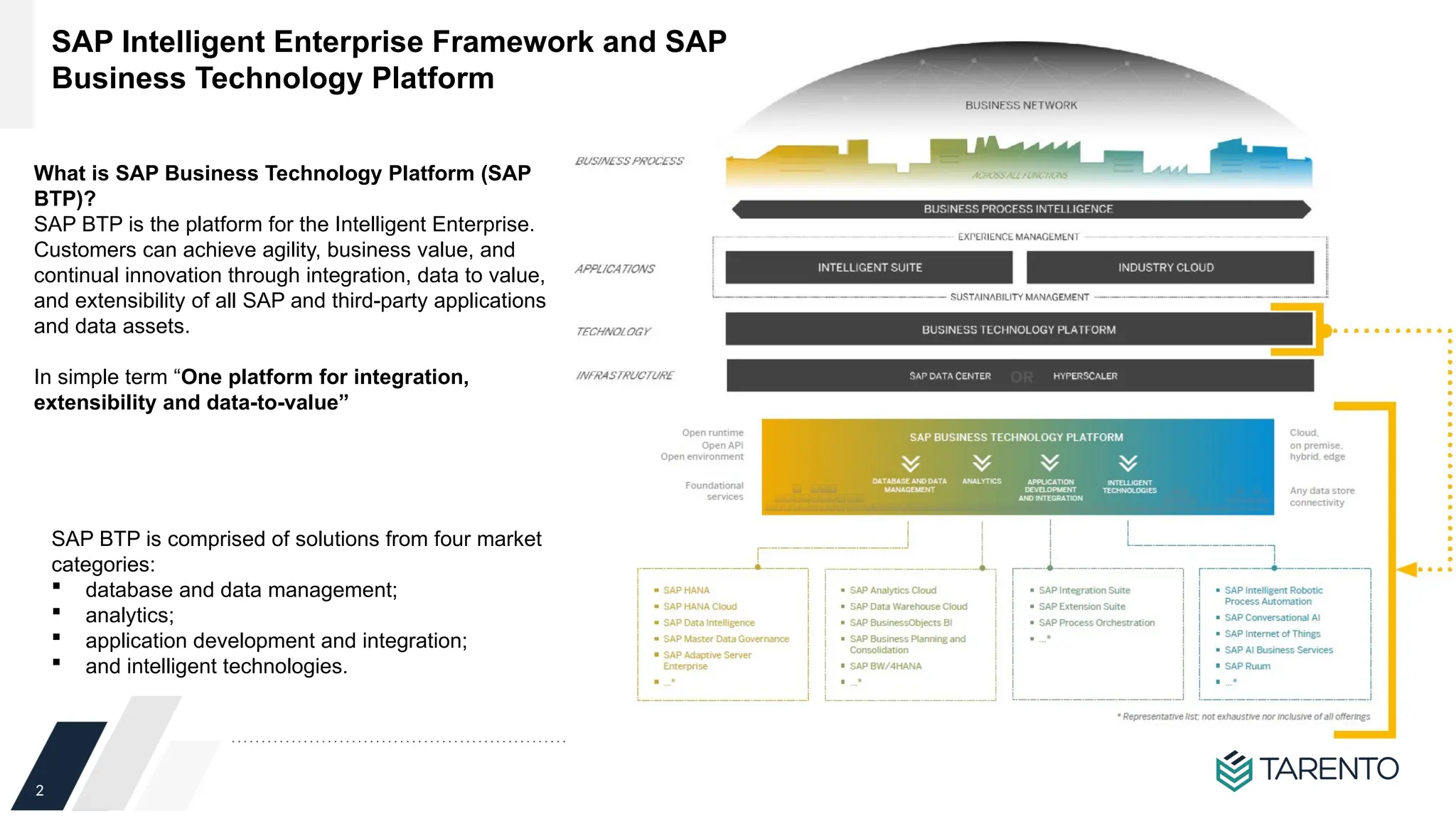
SAP Intelligent Enterprise Framework and SAP
Business Technology Platform
What is SAP Business Technology Platform (SAP
BTP)?
SAP BTP is the platform for the Intelligent Enterprise.
Customers can achieve agility, business value, and
continual innovation through integration, data to value,
and extensibility of all SAP and third-party applications
and data assets.
In simple term “One platform for integration,
extensibility and data-to-value”
SAP BTP is comprised of solutions from four market
categories:
 database and data management;
 analytics;
 application development and integration;
 and intelligent technologies.
3
SAP Cloud Platform rebranding as SAP BTP
 The SAP Cloud Platform brand was officially retired to support SAP’s One Platform strategy.
 SAP BTP is not a 1:1 replacement of SAP Cloud Platform. SAP Cloud Platform makes up only the application development and integration
pillar of SAP BTP
 On the product level, the SAP Cloud Platform services are organized into two suites, renamed to:
SAP Integration Suite : offers capabilities and services that connect applications, processes, people,and devices. As the integration
layer of SAP Business Technology Platform, it simplifies integration and harmonizes processes.
SAP Extension Suite : offers capabilities and services to simplify application development and extensions. As the extension layer for
SAP Business Technology Platform, it helps customers realize immediate value with lower risk
In line with SAP goal to establish SAP Business Technology Platform as The platform for the Intelligent Enterprise, SAP has decided to
sunset the “SAP Cloud Platform” product name to avoid confusion with the SAP Business Technology Platform brand. While the actual
cloud platform capabilities are renamed
4
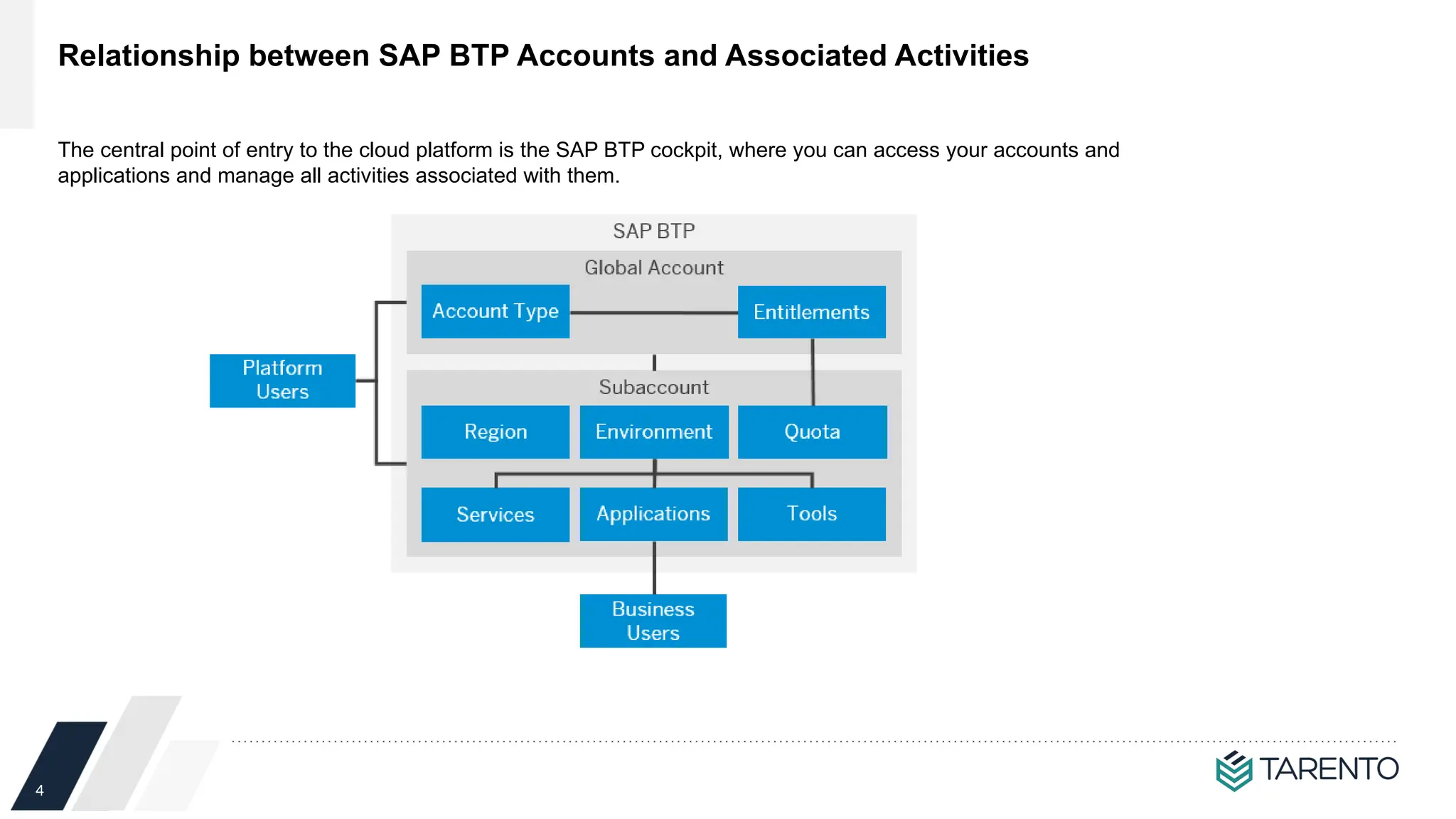
Relationship between SAP BTP Accounts and Associated Activities
The central point of entry to the cloud platform is the SAP BTP cockpit, where you can access your accounts and
applications and manage all activities associated with them.
5
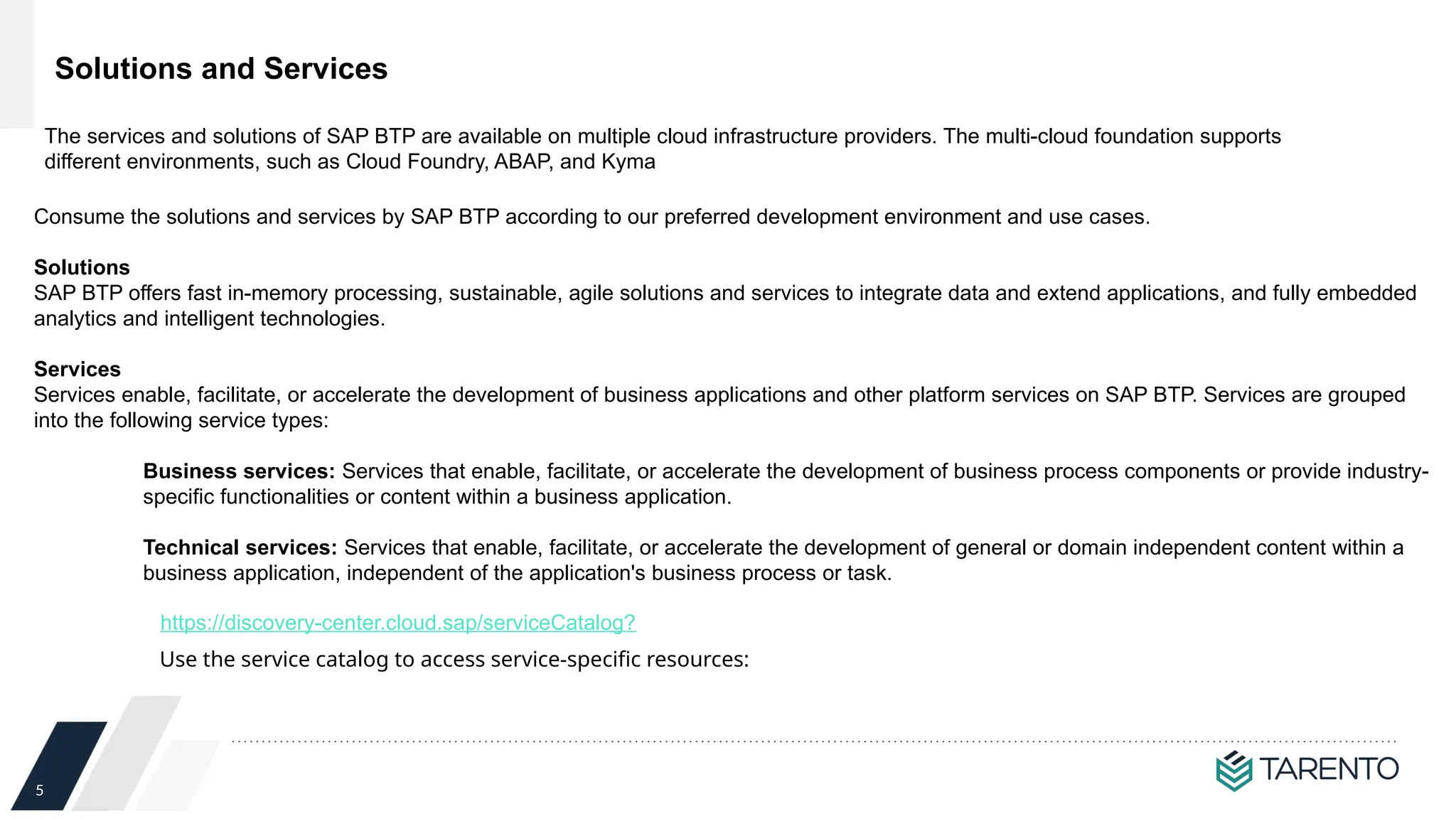
Solutions and Services
Consume the solutions and services by SAP BTP according to our preferred development environment and use cases.
Solutions
SAP BTP offers fast in-memory processing, sustainable, agile solutions and services to integrate data and extend applications, and fully embedded
analytics and intelligent technologies.
Services
Services enable, facilitate, or accelerate the development of business applications and other platform services on SAP BTP. Services are grouped
into the following service types:
Business services: Services that enable, facilitate, or accelerate the development of business process components or provide industry-
specific functionalities or content within a business application.
Technical services: Services that enable, facilitate, or accelerate the development of general or domain independent content within a
business application, independent of the application's business process or task.
https://discovery-center.cloud.sap/serviceCatalog?
Use the service catalog to access service-specific resources:
The services and solutions of SAP BTP are available on multiple cloud infrastructure providers. The multi-cloud foundation supports
different environments, such as Cloud Foundry, ABAP, and Kyma
6
We can deploy applications in different regions. Each region represents a geographical location (for
example, Europe, US East) where applications, data, or services are hosted.
Regions are provided either by SAP or by our Infrastructure-as-a-Service (IaaS) partners Amazon Web
Services (AWS), Microsoft Azure, Google Cloud Platform (GCP), and Alibaba Cloud.
The third-party region providers operate the infrastructure layer of the regions, whereas SAP
operates the platform layer and Cloud Foundry
A region is chosen at the subaccount level. For each subaccount, you select exactly one region (that is
one data center)
Regions
7
Environments constitute the actual platform-as-a-service offering of SAP BTP that allows for the
development and administration of business applications
Environments
SAP BTP provides the following environments:
• Cloud Foundry Environment
The Cloud Foundry environment enables you to develop new business applications and business services, supporting multiple
runtimes, programming languages, libraries, and services. You can leverage a multitude of buildpacks, including community
innovations and self-developed buildpacks.
• ABAP Environment
Within the Cloud Foundry environment, you can create a new space for ABAP development. This is what we refer to as the ABAP
environment. It allows you to create extensions for ABAP-based products, such as SAP S/4HANA Cloud, and develop new cloud
applications. You can transform existing ABAP-based custom code or extensions to the cloud.
• Kyma Environment
The Kyma environment is a fully managed Kubernetes runtime based on the open-source project "Kyma" that allows developers to
extend SAP solutions with serverless functions and combine them with containerized microservices.
• Neo Environment
The Neo environment lets you develop HTML5, Java, and SAP HANA extended application services (SAP HANA XS) applications.
You can also use the UI Development Toolkit for HTML5 (SAPUI5) to develop rich user interfaces for modern web-based business
applications
8
SAP BTP provides different types of global accounts, enterprise and
trial. The type you choose determines pricing, conditions of use,
resources, available services, and hosts.
Enterprise and Trial Accounts
An enterprise account is usually associated with one SAP customer or
partner and contains their purchased entitlements to platform resources
and services. It groups together different subaccounts that an
administrator makes available to users for deploying applications.
A trial account lets you try out the platform for free. Access is open to
everyone. Trial accounts are intended for personal exploration, and not for
production use or team development. They allow restricted use of the
platform resources and services. The trial period varies depending on the
environment.
9
SAP BTP offers two different commercial models
Commercial Models
Consumption-based commercial model: Your organization receives access to all
current and future services that are eligible for this model. You have complete
flexibility to turn services on and off and to switch between services as your
business requires throughout the duration of your contract. This commmerical
model is available in two flavors: Cloud Platform Enterprise Agreement (CPEA) and
Pay-As-You-Go for SAP BTP.
Subscription-based commercial model: Your organization subscribes
only to the services that you plan to use. You can then use these services
at a fixed cost, irrespective of consumption.
Consumption-Based Commercial Model Subscription-Based Commercial Model
CPEA (Cloud Platform Enterprise Agreement) Pay-As-You-Go for SAP BTP - You are entitled to use only the subscribed services.
- To access additional services, at an extra cost, you can
modify your contract via your sales representative or account
executive.
- You pay at a fixed cost, regardless of consumption of
subscribed services.
- You pay in advance when the contract period starts.
- Your organization can renew the subscription at the end of
the contract period.H3
- Your organization makes a prepaid investment in cloud
credits for the contract duration with an annual commitment
to consume SAP BTP services.
- This model is suitable for customers that have well-
established and planned use cases, and who want the
flexibility of turning services on and off, and switching
between services, without the commitment of being tied to
a single service throughout the duration of the contract.
- You receive a monthly balance statement that provides
information about the usage consumption of each service
and the corresponding costs. The total monthly cost is
deducted from your cloud credits balance.
- This model has a minimum investment entry, and volume-
based discounts are available.
- You are billed annually in advance. Any overages are billed
in arrears at list price.
- You can top up your cloud credits at any time to prevent
overages
- You have the same access to all the services that are
available in CPEA, but with a highly flexible zero-commitment
model – you pay nothing upfront and there is no minimum
usage requirement or annual commitment.
- You pay only for the SAP BTP services that you want, when
you use them.
- You are billed monthly in arrears.
- Service charges are non-discountable.
- This low-risk model is suitable for customers with use cases
that are not well defined, and are interested in running a
proof-of-concept in a productive environment. This model
provides the flexibility of turning services on and off, and
switching between services, as needed throughout the
duration of the contract.
- A seamless transition to the CPEA model is available, on the
condition that you have no other CPEA-based global
accounts
10
Account Model
The SAP BTP cockpit is structured according to global accounts and
subaccounts
A global account is the realization of a contract you made with SAP. A global
account is used to manage subaccounts, members, entitlements and quotas. You
receive entitlements and quotas to use platform resources per global account
and then distribute the entitlements and quotas to the subaccount for actual
consumption. There are two types of global accounts: enterprise accounts (paid)
and trial accounts (free).
Subaccounts let you structure a global account according to your organization’s
and project’s requirements with regard to members, authorizations, and
entitlements.
In the Cloud Foundry environment, the subaccount is divided into one or more
spaces, which is where application development, deployment, and maintenance
takes place.
Directories [Feature Set B]
Directories allow you to organize and manage your subaccounts according
to your technical and business needs.
A directory can contain one or more subaccounts. It cannot contain other
directories. Using directories to group subaccounts is optional - you can
still create subaccounts directly under your global account
Example use cases where directories help you manage your subaccounts: Administrative reasons,
Billing ,Geographical separation, Business scenario, Resource limitations and Technical reason
11
Account Model with Subaccount Account Model with Directories and
Subaccount
12
Entitlements and Quotas
When you purchase an enterprise account, you’re entitled to use a specific set of resources, such as the
amount of memory that can be allocated to your applications
On SAP BTP, all external dependencies such as databases, messaging systems, files
systems, and so on, are services. In this context, multitenant applications and
environments are considered services.
Each service has one or more service plans available. A service plan is the
representation of the costs and benefits for a given variant of a particular service. For
instance, a database may be configured with various "T-shirt sizes", each of which is a
different service plan.
An entitlement is your right to provision and consume a resource. In other words,
entitlements are the service plans that you're entitled to use.
A quota represents the numeric quantity that defines the maximum allowed
consumption of a resource. In other words, how much of a service plan you're entitled
to use.
Entitlements and quotas are managed at the global account level, distributed to
subaccounts, and consumed by the subaccounts. When quota is freed at the
subaccount level, it becomes available again at the global account level
13
User and Member Management
On the cloud platform, member management happens at all levels from global account
to space, while user management is done for deployed applications.
User accounts enable users to log on to SAP BTP and access subaccounts and use
services according to the permissions given to them. We distinguish between two types
of users
- Platform users are usually developers, administrators or operators who deploy, administer,
and troubleshoot applications and services on SAP BTP.
- Business users use the applications that are deployed to SAP BTP. For example, the end
users of your deployed application or users of subscribed apps or services, such as SAP
Business Application Studio or SAP Web IDE, are business users.
Member management refers to managing permissions for platform users. A member is
a user who is assigned to an SAP BTP global account or subaccount. Administrators can
add users to global accounts and subaccounts and assign roles to them as needed. You
can use predefined roles, for example the administrator role for managing subaccount
members.
User management refers to managing authentication and authorization for your
business users. This is only done for your deployed applications.
14
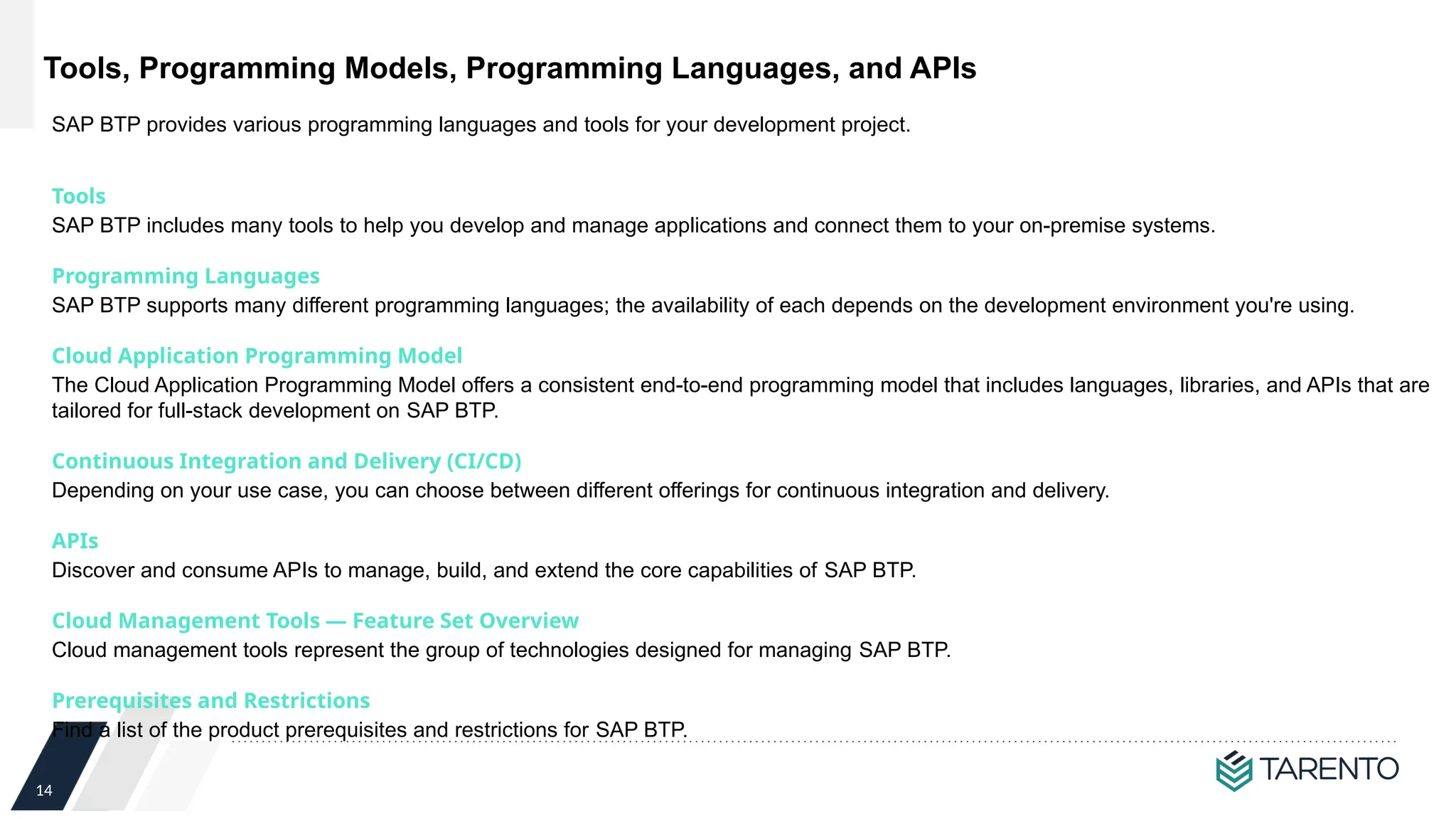
Tools, Programming Models, Programming Languages, and APIs
Tools
SAP BTP includes many tools to help you develop and manage applications and connect them to your on-premise systems.
Programming Languages
SAP BTP supports many different programming languages; the availability of each depends on the development environment you're using.
Cloud Application Programming Model
The Cloud Application Programming Model offers a consistent end-to-end programming model that includes languages, libraries, and APIs that are
tailored for full-stack development on SAP BTP.
Continuous Integration and Delivery (CI/CD)
Depending on your use case, you can choose between different offerings for continuous integration and delivery.
APIs
Discover and consume APIs to manage, build, and extend the core capabilities of SAP BTP.
Cloud Management Tools — Feature Set Overview
Cloud management tools represent the group of technologies designed for managing SAP BTP.
Prerequisites and Restrictions
Find a list of the product prerequisites and restrictions for SAP BTP.
SAP BTP provides various programming languages and tools for your development project.
15
Questions?
Thank You

SAP BTP Basic Platform Concepts for beginners

  • 1.
    1 SAP Business TechnologyPlatform (BTP): The Platform for the Intelligent Enterprise. Basic Platform Concepts
  • 2.
    2 SAP Intelligent EnterpriseFramework and SAP Business Technology Platform What is SAP Business Technology Platform (SAP BTP)? SAP BTP is the platform for the Intelligent Enterprise. Customers can achieve agility, business value, and continual innovation through integration, data to value, and extensibility of all SAP and third-party applications and data assets. In simple term “One platform for integration, extensibility and data-to-value” SAP BTP is comprised of solutions from four market categories:  database and data management;  analytics;  application development and integration;  and intelligent technologies.
  • 3.
    3 SAP Cloud Platformrebranding as SAP BTP  The SAP Cloud Platform brand was officially retired to support SAP’s One Platform strategy.  SAP BTP is not a 1:1 replacement of SAP Cloud Platform. SAP Cloud Platform makes up only the application development and integration pillar of SAP BTP  On the product level, the SAP Cloud Platform services are organized into two suites, renamed to: SAP Integration Suite : offers capabilities and services that connect applications, processes, people,and devices. As the integration layer of SAP Business Technology Platform, it simplifies integration and harmonizes processes. SAP Extension Suite : offers capabilities and services to simplify application development and extensions. As the extension layer for SAP Business Technology Platform, it helps customers realize immediate value with lower risk In line with SAP goal to establish SAP Business Technology Platform as The platform for the Intelligent Enterprise, SAP has decided to sunset the “SAP Cloud Platform” product name to avoid confusion with the SAP Business Technology Platform brand. While the actual cloud platform capabilities are renamed
  • 4.
    4 Relationship between SAPBTP Accounts and Associated Activities The central point of entry to the cloud platform is the SAP BTP cockpit, where you can access your accounts and applications and manage all activities associated with them.
  • 5.
    5 Solutions and Services Consumethe solutions and services by SAP BTP according to our preferred development environment and use cases. Solutions SAP BTP offers fast in-memory processing, sustainable, agile solutions and services to integrate data and extend applications, and fully embedded analytics and intelligent technologies. Services Services enable, facilitate, or accelerate the development of business applications and other platform services on SAP BTP. Services are grouped into the following service types: Business services: Services that enable, facilitate, or accelerate the development of business process components or provide industry- specific functionalities or content within a business application. Technical services: Services that enable, facilitate, or accelerate the development of general or domain independent content within a business application, independent of the application's business process or task. https://discovery-center.cloud.sap/serviceCatalog? Use the service catalog to access service-specific resources: The services and solutions of SAP BTP are available on multiple cloud infrastructure providers. The multi-cloud foundation supports different environments, such as Cloud Foundry, ABAP, and Kyma
  • 6.
    6 We can deployapplications in different regions. Each region represents a geographical location (for example, Europe, US East) where applications, data, or services are hosted. Regions are provided either by SAP or by our Infrastructure-as-a-Service (IaaS) partners Amazon Web Services (AWS), Microsoft Azure, Google Cloud Platform (GCP), and Alibaba Cloud. The third-party region providers operate the infrastructure layer of the regions, whereas SAP operates the platform layer and Cloud Foundry A region is chosen at the subaccount level. For each subaccount, you select exactly one region (that is one data center) Regions
  • 7.
    7 Environments constitute theactual platform-as-a-service offering of SAP BTP that allows for the development and administration of business applications Environments SAP BTP provides the following environments: • Cloud Foundry Environment The Cloud Foundry environment enables you to develop new business applications and business services, supporting multiple runtimes, programming languages, libraries, and services. You can leverage a multitude of buildpacks, including community innovations and self-developed buildpacks. • ABAP Environment Within the Cloud Foundry environment, you can create a new space for ABAP development. This is what we refer to as the ABAP environment. It allows you to create extensions for ABAP-based products, such as SAP S/4HANA Cloud, and develop new cloud applications. You can transform existing ABAP-based custom code or extensions to the cloud. • Kyma Environment The Kyma environment is a fully managed Kubernetes runtime based on the open-source project "Kyma" that allows developers to extend SAP solutions with serverless functions and combine them with containerized microservices. • Neo Environment The Neo environment lets you develop HTML5, Java, and SAP HANA extended application services (SAP HANA XS) applications. You can also use the UI Development Toolkit for HTML5 (SAPUI5) to develop rich user interfaces for modern web-based business applications
  • 8.
    8 SAP BTP providesdifferent types of global accounts, enterprise and trial. The type you choose determines pricing, conditions of use, resources, available services, and hosts. Enterprise and Trial Accounts An enterprise account is usually associated with one SAP customer or partner and contains their purchased entitlements to platform resources and services. It groups together different subaccounts that an administrator makes available to users for deploying applications. A trial account lets you try out the platform for free. Access is open to everyone. Trial accounts are intended for personal exploration, and not for production use or team development. They allow restricted use of the platform resources and services. The trial period varies depending on the environment.
  • 9.
    9 SAP BTP offerstwo different commercial models Commercial Models Consumption-based commercial model: Your organization receives access to all current and future services that are eligible for this model. You have complete flexibility to turn services on and off and to switch between services as your business requires throughout the duration of your contract. This commmerical model is available in two flavors: Cloud Platform Enterprise Agreement (CPEA) and Pay-As-You-Go for SAP BTP. Subscription-based commercial model: Your organization subscribes only to the services that you plan to use. You can then use these services at a fixed cost, irrespective of consumption. Consumption-Based Commercial Model Subscription-Based Commercial Model CPEA (Cloud Platform Enterprise Agreement) Pay-As-You-Go for SAP BTP - You are entitled to use only the subscribed services. - To access additional services, at an extra cost, you can modify your contract via your sales representative or account executive. - You pay at a fixed cost, regardless of consumption of subscribed services. - You pay in advance when the contract period starts. - Your organization can renew the subscription at the end of the contract period.H3 - Your organization makes a prepaid investment in cloud credits for the contract duration with an annual commitment to consume SAP BTP services. - This model is suitable for customers that have well- established and planned use cases, and who want the flexibility of turning services on and off, and switching between services, without the commitment of being tied to a single service throughout the duration of the contract. - You receive a monthly balance statement that provides information about the usage consumption of each service and the corresponding costs. The total monthly cost is deducted from your cloud credits balance. - This model has a minimum investment entry, and volume- based discounts are available. - You are billed annually in advance. Any overages are billed in arrears at list price. - You can top up your cloud credits at any time to prevent overages - You have the same access to all the services that are available in CPEA, but with a highly flexible zero-commitment model – you pay nothing upfront and there is no minimum usage requirement or annual commitment. - You pay only for the SAP BTP services that you want, when you use them. - You are billed monthly in arrears. - Service charges are non-discountable. - This low-risk model is suitable for customers with use cases that are not well defined, and are interested in running a proof-of-concept in a productive environment. This model provides the flexibility of turning services on and off, and switching between services, as needed throughout the duration of the contract. - A seamless transition to the CPEA model is available, on the condition that you have no other CPEA-based global accounts
  • 10.
    10 Account Model The SAPBTP cockpit is structured according to global accounts and subaccounts A global account is the realization of a contract you made with SAP. A global account is used to manage subaccounts, members, entitlements and quotas. You receive entitlements and quotas to use platform resources per global account and then distribute the entitlements and quotas to the subaccount for actual consumption. There are two types of global accounts: enterprise accounts (paid) and trial accounts (free). Subaccounts let you structure a global account according to your organization’s and project’s requirements with regard to members, authorizations, and entitlements. In the Cloud Foundry environment, the subaccount is divided into one or more spaces, which is where application development, deployment, and maintenance takes place. Directories [Feature Set B] Directories allow you to organize and manage your subaccounts according to your technical and business needs. A directory can contain one or more subaccounts. It cannot contain other directories. Using directories to group subaccounts is optional - you can still create subaccounts directly under your global account Example use cases where directories help you manage your subaccounts: Administrative reasons, Billing ,Geographical separation, Business scenario, Resource limitations and Technical reason
  • 11.
    11 Account Model withSubaccount Account Model with Directories and Subaccount
  • 12.
    12 Entitlements and Quotas Whenyou purchase an enterprise account, you’re entitled to use a specific set of resources, such as the amount of memory that can be allocated to your applications On SAP BTP, all external dependencies such as databases, messaging systems, files systems, and so on, are services. In this context, multitenant applications and environments are considered services. Each service has one or more service plans available. A service plan is the representation of the costs and benefits for a given variant of a particular service. For instance, a database may be configured with various "T-shirt sizes", each of which is a different service plan. An entitlement is your right to provision and consume a resource. In other words, entitlements are the service plans that you're entitled to use. A quota represents the numeric quantity that defines the maximum allowed consumption of a resource. In other words, how much of a service plan you're entitled to use. Entitlements and quotas are managed at the global account level, distributed to subaccounts, and consumed by the subaccounts. When quota is freed at the subaccount level, it becomes available again at the global account level
  • 13.
    13 User and MemberManagement On the cloud platform, member management happens at all levels from global account to space, while user management is done for deployed applications. User accounts enable users to log on to SAP BTP and access subaccounts and use services according to the permissions given to them. We distinguish between two types of users - Platform users are usually developers, administrators or operators who deploy, administer, and troubleshoot applications and services on SAP BTP. - Business users use the applications that are deployed to SAP BTP. For example, the end users of your deployed application or users of subscribed apps or services, such as SAP Business Application Studio or SAP Web IDE, are business users. Member management refers to managing permissions for platform users. A member is a user who is assigned to an SAP BTP global account or subaccount. Administrators can add users to global accounts and subaccounts and assign roles to them as needed. You can use predefined roles, for example the administrator role for managing subaccount members. User management refers to managing authentication and authorization for your business users. This is only done for your deployed applications.
  • 14.
    14 Tools, Programming Models,Programming Languages, and APIs Tools SAP BTP includes many tools to help you develop and manage applications and connect them to your on-premise systems. Programming Languages SAP BTP supports many different programming languages; the availability of each depends on the development environment you're using. Cloud Application Programming Model The Cloud Application Programming Model offers a consistent end-to-end programming model that includes languages, libraries, and APIs that are tailored for full-stack development on SAP BTP. Continuous Integration and Delivery (CI/CD) Depending on your use case, you can choose between different offerings for continuous integration and delivery. APIs Discover and consume APIs to manage, build, and extend the core capabilities of SAP BTP. Cloud Management Tools — Feature Set Overview Cloud management tools represent the group of technologies designed for managing SAP BTP. Prerequisites and Restrictions Find a list of the product prerequisites and restrictions for SAP BTP. SAP BTP provides various programming languages and tools for your development project.
  • 15.