SAP APPLICATION LOG
Application Log provides an infrastructure for collecting
messages and exceptions in a log, saving, reading and deleting
logs in the database and displaying them.
ADVANTAGES
Application Log provides multiple advantages:
 System-wide uniform event logging
 Accessible standardized UI based on ABAP List Viewer
(ALV)
 High capabilities for analysis of log data
This article explains how to create your own
application logging program in ABAP.
SAP provides standard functionality to write into as
well as view the application log. This article will
explain in detail how to create your own logging
function module for application logging using standard
SAP log facility. Two transaction code related to
application logging are
Application logging records the progress of the execution of an
application. Whereas the system log records system events,
you can use the application log to record application-specific
events.
Application Log is designed to temporarily store messages.
Logs should be deleted in intervals (e.g. weekly batch job for
deleting logs) to avoid too high database load.
A typical use of the Application Log is within delivery
processing. Negative results of a dangerous goods check are
written to the Application Log. Application messages and
reactions are collected based on a customer defined
examination schema (reactions determine how the document
will be handled further). This approach increases the
transparency of the process for end users. Messages are
collected temporarily and are not saved to the database.
HOW TO APPLY
The goal of the object is to create the Global Class and Method
for Application Log so that it can be reused where necessary in
any RICEF object.
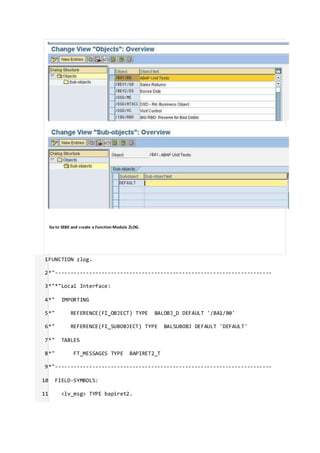
STEP 1: Object and Sub object creation
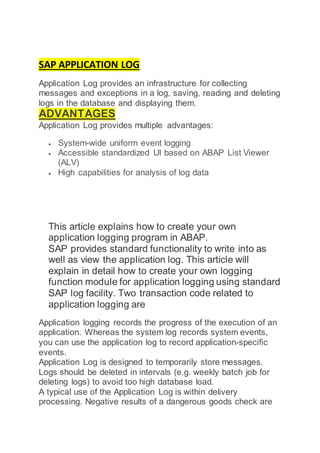
First create object and sub object, Go to transaction SLG0.
Go to change mode and click on New entries button on the
application tool bar.
Then define the sub object for the object.
Select the object and double click on sub object.
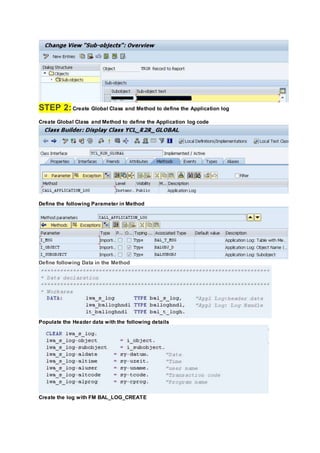
STEP 2:Create Global Class and Method to define the Application log
Create Global Class and Method to define the Application log code
Define the following Parameter in Method
Define following Data in the Method
Populate the Header data with the following details
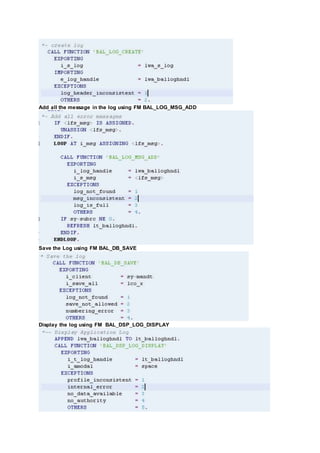
Create the log with FM BAL_LOG_CREATE
Add all the message in the log using FM BAL_LOG_MSG_ADD
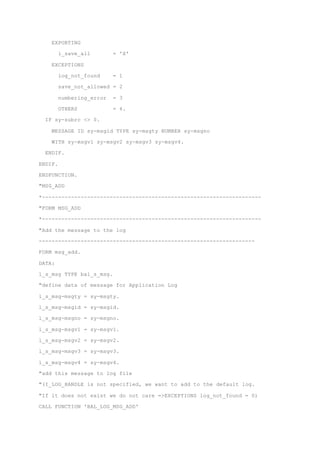
Save the Log using FM BAL_DB_SAVE
Display the log using FM BAL_DSP_LOG_DISPLAY
Define that Class and method in the code wherever necessary
The Method will create log with all the messages and generate log (Transaction SLG1)
Code is attached.
Application Log Methodology in SAP
Skip to end of metadata
 Created by Former Member, lastmodified by Former Member on Oct 22, 2013
Go to startof metadata
Application Log
This article explains how to create your ow n application logging program in ABAP.
SAP provides standard functionality to w rite into as w ell as view the application log. This article w ill explain in detail how
to create your ow n logging function module for application logging using standard SAP log facility. Tw o transaction code
related to application logging are
 SLG0 -> Used to maintain the log object
 SLG1 -> Used to view the log
Desired Functionality in Project
When a program is run in background mode, all the error messages get logged into spool. How ever, in case of project,
the requirement is that a notification needs to be generated in Application Log corresponding to all such spools. Only
one message needs to be logged into Application Log for the entire error messages generated in a particular program.
Configuration step
In this step create a log object.
1. Open transaction SLG0. An information message about cross-client table w ill come.
2. 2. Click the button "New Entries". Enter the name and description of your log object (say ZTESTLOG as object name
and "Test Log" as object description) and save.
Development Step
The follow ing standard function modules provided by SAP has been used to create the Z function module for logging.
 BAL_GLB_MSG_DEFAULTS_SET
 BAL_DB_SAVE
 BAL_LOG_MSG_ADD
Here are the steps:
1. Go to transaction SE11. Create a z-structure Z_LOG_MESSAGE having the follow ing fields
Component Component Type
MSGTY SYMSGTY
MSG_TEXT_1 SYMSGV
MSG_TEXT_2 SYMSGV
MSG_TEXT_3 SYMSGV
MSG_TEXT_4 SYMSGV
2. Crate a message class say ZMESSAGE in transaction SE91 and a message 999 w ith four placeholder ( & ) as the
text.
3. Go to transaction SE37. Create a function group say ZLOG
4. After the function group is created, create a function module in that group. Let is name it ZIU_MESSAGE_LOGGING.
Import parameters:
a. I_LOG_OBJECT type BALOBJ_D -> Application log: Object name (Application code)
b. I_EXTNUMBER type String -> Application Log: External ID
Export parameters: None
Changing parameters: None
Tables parameters:
T_LOG_MESSAGE type Z_LOG_MESSAGE
Exceptions:
LOG_HEADER_INCONSISTENT
LOGGING_ERROR
Paste the code below as the source code
Error rendering macro 'code': Invalid value specified for parameter 'lang'
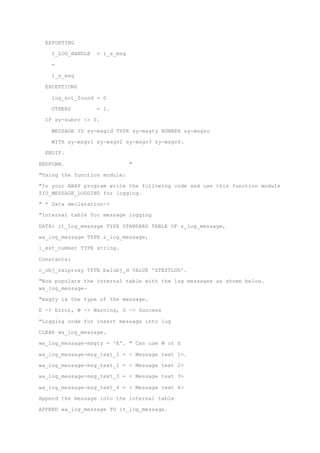
ZIU_MESSAGE_LOGGINGFUNCTION ZIU_MESSAGE_LOGGING.
*"----------------------------------------------------------------------
""Local interface:
*" IMPORTING
*" REFERENCE(I_LOG_OBJECT) TYPE BALOBJ_D
*" REFERENCE(I_EXTNUMBER) TYPE STRING
*" TABLES
*" T_LOG_MESSAGE STRUCTURE Z_LOG_MESSAGE
*" EXCEPTIONS
*" LOG_HEADER_INCONSISTENT
*" LOGGING_ERROR
"---------------------------------------------------------------------
"DESCRIPTION: This function module is used insert messages in the
application log
CONSTANTS: c_message TYPE syst-msgid VALUE 'ZMESSAGE',
c_999 TYPE syst-msgno VALUE '999'.
DATA:
l_log_handle TYPE balloghndl,
l_s_log TYPE bal_s_log,
l_dummy TYPE string,
l_ext_no TYPE bal_s_log-extnumber,
l_s_mdef TYPE bal_s_mdef.
IF t_log_message[] IS NOT INITIAL.
l_s_log-object = i_log_object.
l_ext_no = i_extnumber.
l_s_log-extnumber = l_ext_no.
"Create the log with header data
CALL FUNCTION 'BAL_LOG_CREATE'
EXPORTING
i_s_log = l_s_log
IMPORTING
e_log_handle = l_log_handle
EXCEPTIONS
log_header_inconsistent = 1
OTHERS = 2.
IF sy-subrc <> 0.
CASE sy-subrc.
WHEN 1.
RAISE log_header_inconsistent.
WHEN OTHERS.
RAISE logging_error.
ENDCASE.
ENDIF.
l_s_mdef-log_handle = l_log_handle.
Set the default value
CALL FUNCTION 'BAL_GLB_MSG_DEFAULTS_SET'
EXPORTING
i_s_msg_defaults = l_s_mdef
EXCEPTIONS
OTHERS = 0.
" Loop the message table and write the messages into the log
LOOP AT t_log_message.
"Use the message type ZMESSAGE and msg no 999
"Issue the message in a dummy variable
MESSAGE ID c_message TYPE t_log_message-msgty NUMBER c_999
WITH t_log_message-msg_text_1 t_log_message-msg_text_2
t_log_message-msg_text_3 t_log_message-msg_text_4
INTO l_dummy.
"The parameters set by message statement will be used
"Add the message in the log
PERFORM msg_add.
ENDLOOP.
" save logs in the database
CALL FUNCTION 'BAL_DB_SAVE'
EXPORTING
i_save_all = 'X'
EXCEPTIONS
log_not_found = 1
save_not_allowed = 2
numbering_error = 3
OTHERS = 4.
IF sy-subrc <> 0.
MESSAGE ID sy-msgid TYPE sy-msgty NUMBER sy-msgno
WITH sy-msgv1 sy-msgv2 sy-msgv3 sy-msgv4.
ENDIF.
ENDIF.
ENDFUNCTION.
"MSG_ADD
*--------------------------------------------------------------------
"FORM MSG_ADD
*--------------------------------------------------------------------
"Add the message to the log
-------------------------------------------------------------------
FORM msg_add.
DATA:
l_s_msg TYPE bal_s_msg.
"define data of message for Application Log
l_s_msg-msgty = sy-msgty.
l_s_msg-msgid = sy-msgid.
l_s_msg-msgno = sy-msgno.
l_s_msg-msgv1 = sy-msgv1.
l_s_msg-msgv2 = sy-msgv2.
l_s_msg-msgv3 = sy-msgv3.
l_s_msg-msgv4 = sy-msgv4.
"add this message to log file
"(I_LOG_HANDLE is not specified, we want to add to the default log.
"If it does not exist we do not care =>EXCEPTIONS log_not_found = 0)
CALL FUNCTION 'BAL_LOG_MSG_ADD'
EXPORTING
I_LOG_HANDLE = i_s_msg
=
l_s_msg
EXCEPTIONS
log_not_found = 0
OTHERS = 1.
IF sy-subrc <> 0.
MESSAGE ID sy-msgid TYPE sy-msgty NUMBER sy-msgno
WITH sy-msgv1 sy-msgv2 sy-msgv3 sy-msgv4.
ENDIF.
ENDFORM. "
"Using the function module:
"In your ABAP program write the following code and use this function module
ZIU_MESSAGE_LOGGING for logging.
" * Data declaration->
"Internal table for message logging
DATA: it_log_message TYPE STANDARD TABLE OF z_log_message,
wa_log_message TYPE z_log_message,
l_ext_number TYPE string.
Constants:
c_obj_zxiproxy TYPE balobj_d VALUE 'ZTESTLOG'.
"Now populate the internal table with the log messages as shown below.
wa_log_message-
"msgty is the type of the message.
E -> Error, W -> Warning, S -> Success
"Logging code for insert message into log
CLEAR wa_log_message.
wa_log_message-msgty = 'E'. " Can use W or S
wa_log_message-msg_text_1 = < Message text 1>.
wa_log_message-msg_text_2 = < Message text 2>
wa_log_message-msg_text_3 = < Message text 3>
wa_log_message-msg_text_4 = < Message text 4>
Append the message into the internal table
APPEND wa_log_message TO it_log_message.
"At the end transfer the log message to the system log by calling function
module ZIU_MESSAGE_LOGGING.
"L_EXT_NUMBER will bt any string of your choice.
"Function module ZIU_MESSAGE_LOGGING will do the logging
" i_log_object is the object type (to be configrd using txn SLG0
CALL FUNCTION 'ZIU_MESSAGE_LOGGING'
EXPORTING
i_log_object = c_obj_zxiproxy
i_extnumber = l_ext_number
TABLES
t_log_message = it_log_message
EXCEPTIONS
log_header_inconsistent = 1
logging_error = 2
OTHERS = 3.
IF sy-subrc <> 0.
MESSAGE ID SY-MSGID TYPE SY-MSGTY NUMBER SY-MSGNO
WITH SY-MSGV1 SY-MSGV2 SY-MSGV3 SY-MSGV4.
ENDIF.
ENDIF.
"The logged messages can be viewed in transaction SLG1.
"For filtering the messages use the Object type.
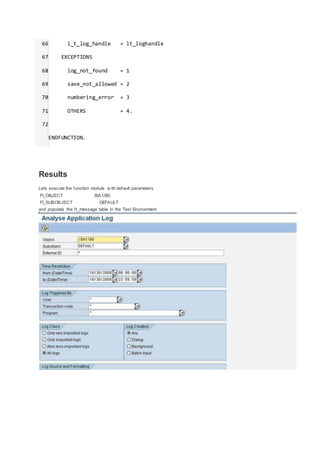
You can select Analyse Application Log by Object, Subobjest, External ID,
Time , User, Transaction Codes, Program …
SAP ABAP
Technicals
This site is to give a briefidea for the abap learners who are looking for some real time programs .It consists of
collection of programs from myside .I hope these programs are very much used for all of the learners.Please
check the links for any information in ABAP.
Please vote for my Blog.And please inputme on this mail addrssess.Email me
Share this link with your friends
http://www.rebtel.com/u/15163104576
For every friend who signs up using this link and makes a payment,we'll give you 8 €!
Thursday, September 23, 2010
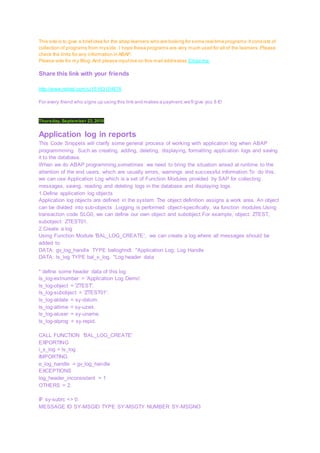
Application log in reports
This Code Snippets will clarify some general process of working with application log when ABAP
programmming. Such as creating, adding, deleting, displaying, formatting application logs and saving
it to the database.
When we do ABAP programming,sometimes we need to bring the situation arised at runtime to the
attention of the end users, which are usually errors, warnings and successful information.To do this,
we can use Application Log which is a set of Function Modules provided by SAP for collecting
messages, saving, reading and deleting logs in the database and displaying logs.
1.Define application log objects
Application log objects are defined in the system. The object definition assigns a work area. An object
can be divided into sub-objects .Logging is performed object-specifically, via function modules.Using
transaction code SLG0, we can define our own object and subobject.For example, object: ZTEST,
subobject: ZTEST01.
2.Create a log
Using Function Module 'BAL_LOG_CREATE', we can create a log where all messages should be
added to.
DATA: gv_log_handle TYPE balloghndl. "Application Log: Log Handle
DATA: ls_log TYPE bal_s_log. "Log header data
* define some header data of this log
ls_log-extnumber = 'Application Log Demo'.
ls_log-object = 'ZTEST'.
ls_log-subobject = 'ZTEST01'.
ls_log-aldate = sy-datum.
ls_log-altime = sy-uzeit.
ls_log-aluser = sy-uname.
ls_log-alprog = sy-repid.
CALL FUNCTION 'BAL_LOG_CREATE'
EXPORTING
i_s_log = ls_log
IMPORTING
e_log_handle = gv_log_handle
EXCEPTIONS
log_header_inconsistent = 1
OTHERS = 2.
IF sy-subrc <> 0.
MESSAGE ID SY-MSGID TYPE SY-MSGTY NUMBER SY-MSGNO
WITH SY-MSGV1 SY-MSGV2 SY-MSGV3 SY-MSGV4.
ENDIF.
The function module 'BAL_LOG_CREATE' returns the log handle (LOG_HANDLE, CHAR22). The
LOG_HANDLE is a globally unique identifier (GUID) which identifies a log uniquely. You can access
this log with this handle, e.g. to change the header data or to put a message in the log.
3. Put a message in the log
Using Function Module 'BAL_LOG_MSG_ADD', we can add a message into the application log.This
message is put in the log identified by the log handle GV_LOG_HANDLE, which is mostly the T100
information (message type, work area, message number, the 4 message variables).
DATA: L_S_MSG TYPE BAL_S_MSG.
* define data of message for Application Log
L_S_MSG-MSGTY = SY-MSGTY.
L_S_MSG-MSGID = SY-MSGID.
L_S_MSG-MSGNO = SY-MSGNO.
L_S_MSG-MSGV1 = SY-MSGV1.
L_S_MSG-MSGV2 = SY-MSGV2.
L_S_MSG-MSGV3 = SY-MSGV3.
L_S_MSG-MSGV4 = SY-MSGV4.
CALL FUNCTION 'BAL_LOG_MSG_ADD'
EXPORTING
i_log_handle = gv_log_handle
i_s_msg = l_s_msg
EXCEPTIONS
log_not_found = 1
msg_inconsistent = 2
log_is_full = 3
OTHERS = 4.
IF sy-subrc <> 0.
MESSAGE ID SY-MSGID TYPE SY-MSGTY NUMBER SY-MSGNO
WITH SY-MSGV1 SY-MSGV2 SY-MSGV3 SY-MSGV4.
ENDIF.
4. Display log
Using Function Module 'BAL_DSP_LOG_DISPLAY', we can display the collected messages. This
function module can be called without parameters. All messages in memory are displayed in a
standard format (this standard format is used e.g. in the transaction SLG1).
CALL FUNCTION 'BAL_DSP_LOG_DISPLAY'
EXCEPTIONS
PROFILE_INCONSISTENT = 1
INTERNAL_ERROR = 2
NO_DATA_AVAILABLE = 3
NO_AUTHORITY = 4
OTHERS = 5.
IF sy-subrc <> 0.
MESSAGE ID SY-MSGID TYPE SY-MSGTY NUMBER SY-MSGNO
WITH SY-MSGV1 SY-MSGV2 SY-MSGV3 SY-MSGV4.
ENDIF.
5. Save logs in the database
Using Function Module 'BAL_DB_SAVE, we can save all memory data in the database. The importing
parameter I_SAVE_ALL should be set as 'X'.
CALL FUNCTION 'BAL_DB_SAVE'
EXPORTING
i_save_all = 'X'
EXCEPTIONS
LOG_NOT_FOUND = 1
SAVE_NOT_ALLOWED = 2
NUMBERING_ERROR = 3
OTHERS = 4.
IF sy-subrc <> 0.
MESSAGE ID SY-MSGID TYPE SY-MSGTY NUMBER SY-MSGNO
WITH SY-MSGV1 SY-MSGV2 SY-MSGV3 SY-MSGV4.
ENDIF.
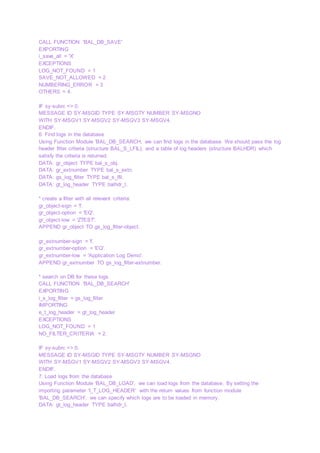
6. Find logs in the database
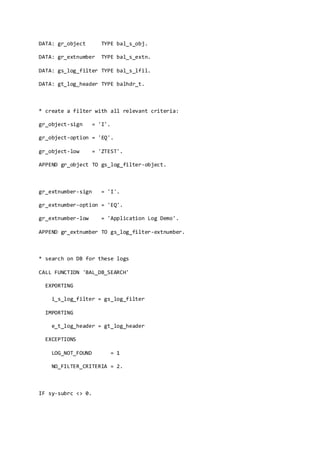
Using Function Module 'BAL_DB_SEARCH, we can find logs in the database. We should pass the log
header filter criteria (structure BAL_S_LFIL), and a table of log headers (structure BALHDR) which
satisfy the criteria is returned.
DATA: gr_object TYPE bal_s_obj.
DATA: gr_extnumber TYPE bal_s_extn.
DATA: gs_log_filter TYPE bal_s_lfil.
DATA: gt_log_header TYPE balhdr_t.
* create a filter with all relevant criteria:
gr_object-sign = 'I'.
gr_object-option = 'EQ'.
gr_object-low = 'ZTEST'.
APPEND gr_object TO gs_log_filter-object.
gr_extnumber-sign = 'I'.
gr_extnumber-option = 'EQ'.
gr_extnumber-low = 'Application Log Demo'.
APPEND gr_extnumber TO gs_log_filter-extnumber.
* search on DB for these logs
CALL FUNCTION 'BAL_DB_SEARCH'
EXPORTING
i_s_log_filter = gs_log_filter
IMPORTING
e_t_log_header = gt_log_header
EXCEPTIONS
LOG_NOT_FOUND = 1
NO_FILTER_CRITERIA = 2.
IF sy-subrc <> 0.
MESSAGE ID SY-MSGID TYPE SY-MSGTY NUMBER SY-MSGNO
WITH SY-MSGV1 SY-MSGV2 SY-MSGV3 SY-MSGV4.
ENDIF.
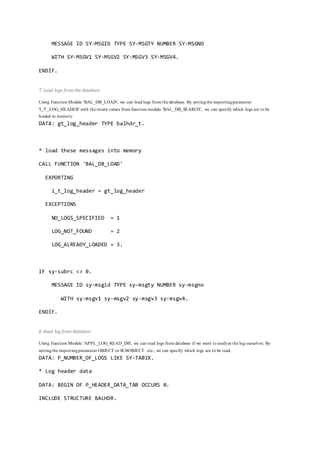
7. Load logs from the database
Using Function Module 'BAL_DB_LOAD', we can load logs from the database. By setting the
importing parameter 'I_T_LOG_HEADER' with the return values from function module
'BAL_DB_SEARCH', we can specify which logs are to be loaded in memory.
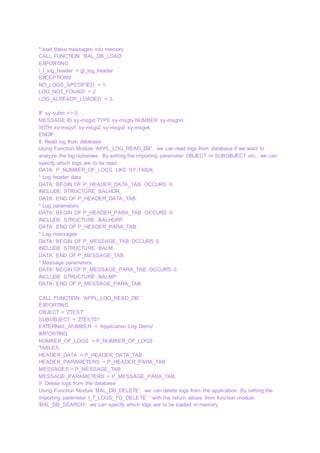
DATA: gt_log_header TYPE balhdr_t.
* load these messages into memory
CALL FUNCTION 'BAL_DB_LOAD'
EXPORTING
i_t_log_header = gt_log_header
EXCEPTIONS
NO_LOGS_SPECIFIED = 1
LOG_NOT_FOUND = 2
LOG_ALREADY_LOADED = 3.
IF sy-subrc <> 0.
MESSAGE ID sy-msgid TYPE sy-msgty NUMBER sy-msgno
WITH sy-msgv1 sy-msgv2 sy-msgv3 sy-msgv4.
ENDIF.
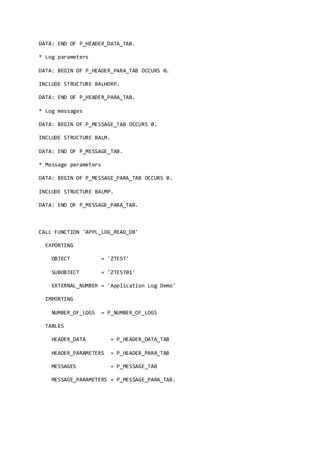
8. Read log from database
Using Function Module 'APPL_LOG_READ_DB', we can read logs from database if we want to
analyze the log ourselves. By setting the importing parameter OBJECT or SUBOBJECT etc., we can
specify which logs are to be read.
DATA: P_NUMBER_OF_LOGS LIKE SY-TABIX.
* Log header data
DATA: BEGIN OF P_HEADER_DATA_TAB OCCURS 0.
INCLUDE STRUCTURE BALHDR.
DATA: END OF P_HEADER_DATA_TAB.
* Log parameters
DATA: BEGIN OF P_HEADER_PARA_TAB OCCURS 0.
INCLUDE STRUCTURE BALHDRP.
DATA: END OF P_HEADER_PARA_TAB.
* Log messages
DATA: BEGIN OF P_MESSAGE_TAB OCCURS 0.
INCLUDE STRUCTURE BALM.
DATA: END OF P_MESSAGE_TAB.
* Message parameters
DATA: BEGIN OF P_MESSAGE_PARA_TAB OCCURS 0.
INCLUDE STRUCTURE BALMP.
DATA: END OF P_MESSAGE_PARA_TAB.
CALL FUNCTION 'APPL_LOG_READ_DB'
EXPORTING
OBJECT = 'ZTEST'
SUBOBJECT = 'ZTEST01'
EXTERNAL_NUMBER = 'Application Log Demo'
IMPORTING
NUMBER_OF_LOGS = P_NUMBER_OF_LOGS
TABLES
HEADER_DATA = P_HEADER_DATA_TAB
HEADER_PARAMETERS = P_HEADER_PARA_TAB
MESSAGES = P_MESSAGE_TAB
MESSAGE_PARAMETERS = P_MESSAGE_PARA_TAB.
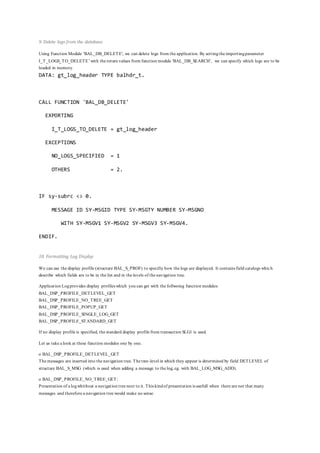
9. Delete logs from the database
Using Function Module 'BAL_DB_DELETE', we can delete logs from the application. By setting the
importing parameter I_T_LOGS_TO_DELETE ' with the return values from function module
'BAL_DB_SEARCH', we can specify which logs are to be loaded in memory.
DATA: gt_log_header TYPE balhdr_t.
CALL FUNCTION 'BAL_DB_DELETE'
EXPORTING
I_T_LOGS_TO_DELETE = gt_log_header
EXCEPTIONS
NO_LOGS_SPECIFIED = 1
OTHERS = 2.
IF sy-subrc <> 0.
MESSAGE ID SY-MSGID TYPE SY-MSGTY NUMBER SY-MSGNO
WITH SY-MSGV1 SY-MSGV2 SY-MSGV3 SY-MSGV4.
ENDIF.
10. Formatting Log Display
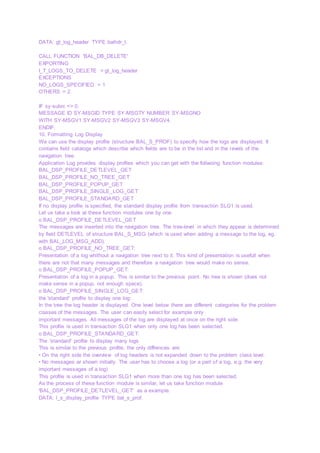
We can use the display profile (structure BAL_S_PROF) to specifiy how the logs are displayed. It
contains field catalogs which describe which fields are to be in the list and in the levels of the
navigation tree.
Application Log provides display profiles which you can get with the follwoing function modules:
BAL_DSP_PROFILE_DETLEVEL_GET
BAL_DSP_PROFILE_NO_TREE_GET
BAL_DSP_PROFILE_POPUP_GET
BAL_DSP_PROFILE_SINGLE_LOG_GET
BAL_DSP_PROFILE_STANDARD_GET
If no display profile is specified, the standard display profile from transaction SLG1 is used.
Let us take a look at these function modules one by one.
o BAL_DSP_PROFILE_DETLEVEL_GET
The messages are inserted into the navigation tree. The tree-level in which they appear is determined
by field DETLEVEL of structure BAL_S_MSG (which is used when adding a message to the log, eg.
with BAL_LOG_MSG_ADD).
o BAL_DSP_PROFILE_NO_TREE_GET:
Presentation of a log whithout a navigation tree next to it. This kind of presentation is usefull when
there are not that many messages and therefore a navigation tree would make no sense.
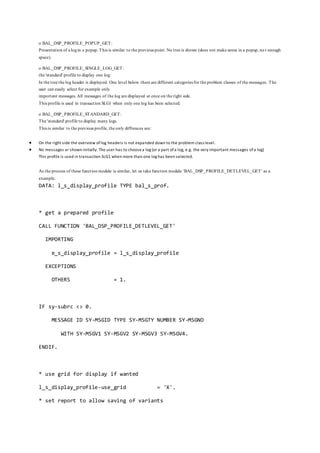
o BAL_DSP_PROFILE_POPUP_GET:
Presentation of a log in a popup. This is similar to the previous point. No tree is shown (does not
make sense in a popup, not enough space).
o BAL_DSP_PROFILE_SINGLE_LOG_GET:
the 'standard' profile to display one log:
In the tree the log header is displayed. One level below there are different categories for the problem
classes of the messages. The user can easily select for example only
important messages. All messages of the log are displayed at once on the right side.
This profile is used in transaction SLG1 when only one log has been selected.
o BAL_DSP_PROFILE_STANDARD_GET:
The 'standard' profile to display many logs.
This is similar to the previous profile, the only diffrences are:
• On the right side the overview of log headers is not expanded down to the problem class level.
• No messages ar shown initially. The user has to choose a log (or a part of a log, e.g. the very
important messages of a log)
This profile is used in transaction SLG1 when more than one log has been selected.
As the process of these function module is similar, let us take function module
'BAL_DSP_PROFILE_DETLEVEL_GET' as a example.
DATA: l_s_display_profile TYPE bal_s_prof.
* get a prepared profile
CALL FUNCTION 'BAL_DSP_PROFILE_DETLEVEL_GET'
IMPORTING
e_s_display_profile = l_s_display_profile
EXCEPTIONS
OTHERS = 1.
IF sy-subrc <> 0.
MESSAGE ID SY-MSGID TYPE SY-MSGTY NUMBER SY-MSGNO
WITH SY-MSGV1 SY-MSGV2 SY-MSGV3 SY-MSGV4.
ENDIF.
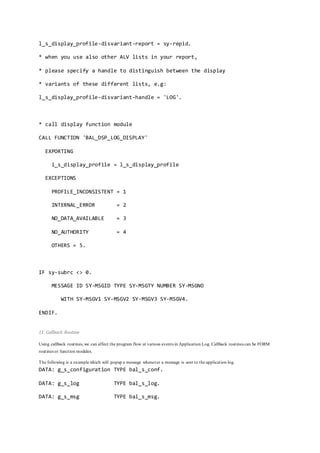
* use grid for display if wanted
l_s_display_profile-use_grid = 'X'.
* set report to allow saving of variants
l_s_display_profile-disvariant-report = sy-repid.
* when you use also other ALV lists in your report,
* please specify a handle to distinguish between the display
* variants of these different lists, e.g:
l_s_display_profile-disvariant-handle = 'LOG'.
* call display function module
CALL FUNCTION 'BAL_DSP_LOG_DISPLAY'
EXPORTING
i_s_display_profile = l_s_display_profile
EXCEPTIONS
PROFILE_INCONSISTENT = 1
INTERNAL_ERROR = 2
NO_DATA_AVAILABLE = 3
NO_AUTHORITY = 4
OTHERS = 5.
IF sy-subrc <> 0.
MESSAGE ID SY-MSGID TYPE SY-MSGTY NUMBER SY-MSGNO
WITH SY-MSGV1 SY-MSGV2 SY-MSGV3 SY-MSGV4.
ENDIF.
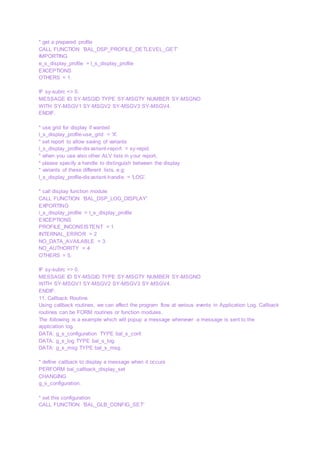
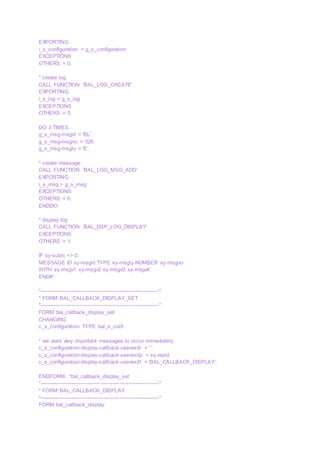
11. Callback Routine
Using callback routines, we can affect the program flow at various events in Application Log. Callback
routines can be FORM routines or function modules.
The following is a example which will popup a message whenever a message is sent to the
application log.
DATA: g_s_configuration TYPE bal_s_conf.
DATA: g_s_log TYPE bal_s_log.
DATA: g_s_msg TYPE bal_s_msg.
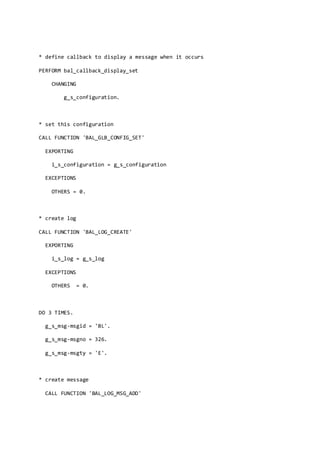
* define callback to display a message when it occurs
PERFORM bal_callback_display_set
CHANGING
g_s_configuration.
* set this configuration
CALL FUNCTION 'BAL_GLB_CONFIG_SET'
EXPORTING
i_s_configuration = g_s_configuration
EXCEPTIONS
OTHERS = 0.
* create log
CALL FUNCTION 'BAL_LOG_CREATE'
EXPORTING
i_s_log = g_s_log
EXCEPTIONS
OTHERS = 0.
DO 3 TIMES.
g_s_msg-msgid = 'BL'.
g_s_msg-msgno = 326.
g_s_msg-msgty = 'E'.
* create message
CALL FUNCTION 'BAL_LOG_MSG_ADD'
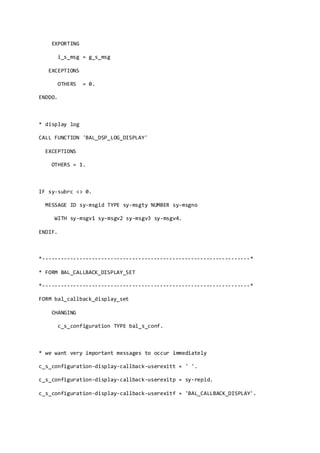
EXPORTING
i_s_msg = g_s_msg
EXCEPTIONS
OTHERS = 0.
ENDDO.
* display log
CALL FUNCTION 'BAL_DSP_LOG_DISPLAY'
EXCEPTIONS
OTHERS = 1.
IF sy-subrc <> 0.
MESSAGE ID sy-msgid TYPE sy-msgty NUMBER sy-msgno
WITH sy-msgv1 sy-msgv2 sy-msgv3 sy-msgv4.
ENDIF.
*-------------------------------------------------------------------*
* FORM BAL_CALLBACK_DISPLAY_SET
*-------------------------------------------------------------------*
FORM bal_callback_display_set
CHANGING
c_s_configuration TYPE bal_s_conf.
* we want very important messages to occur immediately
c_s_configuration-display-callback-userexitt = ' '.
c_s_configuration-display-callback-userexitp = sy-repid.
c_s_configuration-display-callback-userexitf = 'BAL_CALLBACK_DISPLAY'.
ENDFORM. "bal_callback_display_set
*-------------------------------------------------------------------*
* FORM BAL_CALLBACK_DISPLAY
*-------------------------------------------------------------------*
FORM bal_callback_display
USING
i_s_msg TYPE bal_s_msg.
* issue a message
MESSAGE i325(bl) WITH 'BAL_CALLBACK_DISPLAY'.
ENDFORM. "bal_callback_display
Error logging in Application Log
Skip to end of metadata
 Created by Guest, lastmodified by Former Member on Sep 11, 2013
Go to startof metadata
Application events can be centrally logged in the application log. The advantage is system-w ide message logging, w hich
is convenient, easy to analyze.
Several different logs (for various objects) can be w ritten at the same time by an application. The application log can
also be used as a message collector.
Depending upon the message type, messages are displayed in a user friendly interface. Easy to understand at first
glance.
Before w e start w ith the coding some config has to be done. Lets get started.
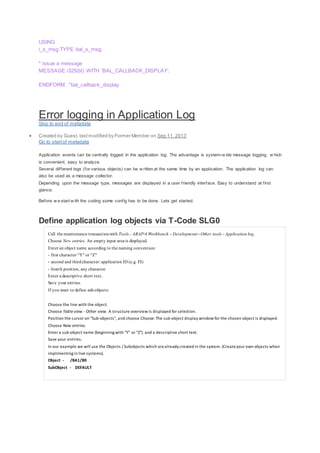
Define application log objects via T-Code SLG0
Call the maintenance transactionwith Tools - ABAP/4 Workbench - Development - Other tools - Application log.
Choose New entries. An empty input area is displayed.
Enter an object name according to the naming convention:
- first character "Y" or "Z"
- second and thirdcharacter: application ID (e.g. FI)
- fourth position, any character
Enter a descriptive short text.
Save your entries.
If you want to define sub-objects:
1. Choose the line with the object.
2. Choose Table view - Other view. A structure overview is displayed for selection.
3. Position the cursor on "Sub-objects", and choose Choose. The sub-object display window for the chosen object is displayed.
4. Choose New entries.
5. Enter a sub-object name (beginning with "Y" or "Z") and a descriptive short text.
6. Save your entries.
In our example we will use the Objects / Subobjects which arealready created in the system. (Createyour own objects when
implimenting in live systems).
Object - /BA1/B0
SubObject - DEFAULT
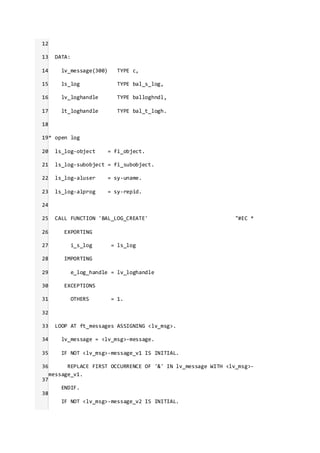
Go to SE80 and create a Function Module ZLOG.
1
2
3
4
5
6
7
8
9
10
11
FUNCTION zlog.
*"----------------------------------------------------------------------
*"*"Local Interface:
*" IMPORTING
*" REFERENCE(FI_OBJECT) TYPE BALOBJ_D DEFAULT '/BA1/B0'
*" REFERENCE(FI_SUBOBJECT) TYPE BALSUBOBJ DEFAULT 'DEFAULT'
*" TABLES
*" FT_MESSAGES TYPE BAPIRET2_T
*"----------------------------------------------------------------------
FIELD-SYMBOLS:
<lv_msg> TYPE bapiret2.
12
13
14
15
16
17
18
19
20
21
22
23
24
25
26
27
28
29
30
31
32
33
34
35
36
37
38
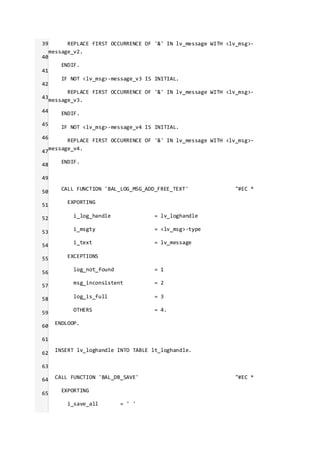
DATA:
lv_message(300) TYPE c,
ls_log TYPE bal_s_log,
lv_loghandle TYPE balloghndl,
lt_loghandle TYPE bal_t_logh.
* open log
ls_log-object = fi_object.
ls_log-subobject = fi_subobject.
ls_log-aluser = sy-uname.
ls_log-alprog = sy-repid.
CALL FUNCTION 'BAL_LOG_CREATE' "#EC *
EXPORTING
i_s_log = ls_log
IMPORTING
e_log_handle = lv_loghandle
EXCEPTIONS
OTHERS = 1.
LOOP AT ft_messages ASSIGNING <lv_msg>.
lv_message = <lv_msg>-message.
IF NOT <lv_msg>-message_v1 IS INITIAL.
REPLACE FIRST OCCURRENCE OF '&' IN lv_message WITH <lv_msg>-
message_v1.
ENDIF.
IF NOT <lv_msg>-message_v2 IS INITIAL.
39
40
41
42
43
44
45
46
47
48
49
50
51
52
53
54
55
56
57
58
59
60
61
62
63
64
65
REPLACE FIRST OCCURRENCE OF '&' IN lv_message WITH <lv_msg>-
message_v2.
ENDIF.
IF NOT <lv_msg>-message_v3 IS INITIAL.
REPLACE FIRST OCCURRENCE OF '&' IN lv_message WITH <lv_msg>-
message_v3.
ENDIF.
IF NOT <lv_msg>-message_v4 IS INITIAL.
REPLACE FIRST OCCURRENCE OF '&' IN lv_message WITH <lv_msg>-
message_v4.
ENDIF.
CALL FUNCTION 'BAL_LOG_MSG_ADD_FREE_TEXT' "#EC *
EXPORTING
i_log_handle = lv_loghandle
i_msgty = <lv_msg>-type
i_text = lv_message
EXCEPTIONS
log_not_found = 1
msg_inconsistent = 2
log_is_full = 3
OTHERS = 4.
ENDLOOP.
INSERT lv_loghandle INTO TABLE lt_loghandle.
CALL FUNCTION 'BAL_DB_SAVE' "#EC *
EXPORTING
i_save_all = ' '
66
67
68
69
70
71
72
i_t_log_handle = lt_loghandle
EXCEPTIONS
log_not_found = 1
save_not_allowed = 2
numbering_error = 3
OTHERS = 4.
ENDFUNCTION.
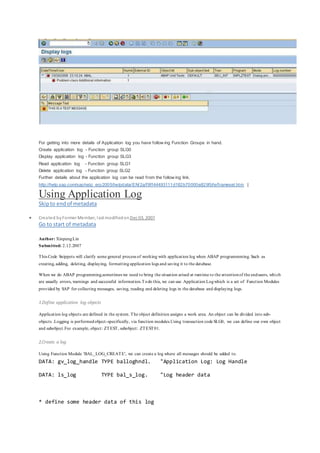
Results
Lets execute the function module w ith default parameters
FI_OBJECT /BA1/B0
FI_SUBOBJECT DEFAULT
and populate the ft_message table in the Test Environment.
For getting into more details of Application log you have follow ing Function Groups in hand.
Create application log - Function group SLG0
Display application log - Function group SLG3
Read application log - Function group SLG1
Delete application log - Function group SLG2
Further details about the application log can be read from the follow ing link.
http://help.sap.com/saphelp_erp2005/helpdata/EN/2a/f9ff44493111d182b70000e829fbfe/frameset.htm |
Using Application Log
Skipto endof metadata
 Created byFormer Member, last modifiedon Dec 03, 2007
Go to start of metadata
Author: XinpengLin
Submitted: 2.12.2007
This Code Snippets will clarify some general process of working with application log when ABAP programmming. Such as
creating, adding, deleting, displaying, formatting application logs and saving it to the database.
When we do ABAP programming,sometimes we need to bring the situation arised at runtime to the attentionof the endusers, which
are usually errors, warnings and successful information.Todo this, we can use Application Logwhich is a set of Function Modules
provided by SAP for collecting messages, saving, reading and deleting logs in the database and displaying logs.
1.Define application log objects
Application log objects are defined in the system. The object definition assigns a work area. An object can be divided into sub-
objects .Logging is performedobject-specifically, via function modules.Using transaction code SLG0, we can define our own object
and subobject.For example, object: ZTEST, subobject: ZTEST01.
2.Create a log
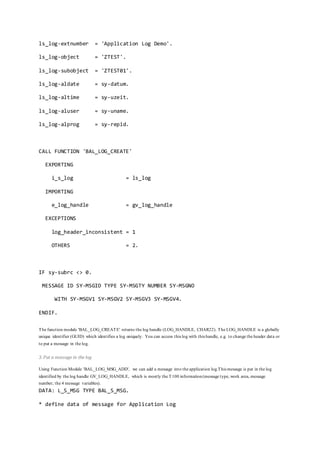
Using Function Module 'BAL_LOG_CREATE', we can create a log where all messages should be added to.
DATA: gv_log_handle TYPE balloghndl. "Application Log: Log Handle
DATA: ls_log TYPE bal_s_log. "Log header data
* define some header data of this log
ls_log-extnumber = 'Application Log Demo'.
ls_log-object = 'ZTEST'.
ls_log-subobject = 'ZTEST01'.
ls_log-aldate = sy-datum.
ls_log-altime = sy-uzeit.
ls_log-aluser = sy-uname.
ls_log-alprog = sy-repid.
CALL FUNCTION 'BAL_LOG_CREATE'
EXPORTING
i_s_log = ls_log
IMPORTING
e_log_handle = gv_log_handle
EXCEPTIONS
log_header_inconsistent = 1
OTHERS = 2.
IF sy-subrc <> 0.
MESSAGE ID SY-MSGID TYPE SY-MSGTY NUMBER SY-MSGNO
WITH SY-MSGV1 SY-MSGV2 SY-MSGV3 SY-MSGV4.
ENDIF.
The function module 'BAL_LOG_CREATE' returns the log handle (LOG_HANDLE, CHAR22). The LOG_HANDLE is a globally
unique identifier (GUID) which identifies a log uniquely. You can access this log with this handle, e.g. to change the header data or
to put a message in the log.
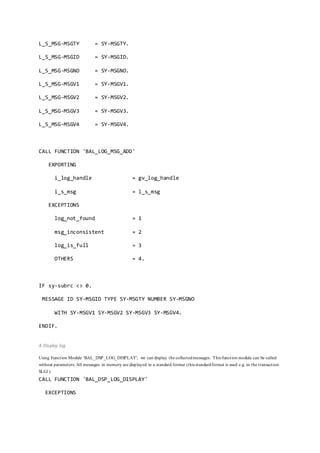
3. Put a message in the log
Using Function Module 'BAL_LOG_MSG_ADD', we can add a message into the application log.This message is put in the log
identified by the log handle GV_LOG_HANDLE, which is mostly the T100 information(message type, work area, message
number, the 4 message variables).
DATA: L_S_MSG TYPE BAL_S_MSG.
* define data of message for Application Log
L_S_MSG-MSGTY = SY-MSGTY.
L_S_MSG-MSGID = SY-MSGID.
L_S_MSG-MSGNO = SY-MSGNO.
L_S_MSG-MSGV1 = SY-MSGV1.
L_S_MSG-MSGV2 = SY-MSGV2.
L_S_MSG-MSGV3 = SY-MSGV3.
L_S_MSG-MSGV4 = SY-MSGV4.
CALL FUNCTION 'BAL_LOG_MSG_ADD'
EXPORTING
i_log_handle = gv_log_handle
i_s_msg = l_s_msg
EXCEPTIONS
log_not_found = 1
msg_inconsistent = 2
log_is_full = 3
OTHERS = 4.
IF sy-subrc <> 0.
MESSAGE ID SY-MSGID TYPE SY-MSGTY NUMBER SY-MSGNO
WITH SY-MSGV1 SY-MSGV2 SY-MSGV3 SY-MSGV4.
ENDIF.
4. Display log
Using Function Module 'BAL_DSP_LOG_DISPLAY', we can display the collectedmessages. This function module can be called
without parameters. All messages in memory are displayed in a standard format (this standardformat is used e.g. in the transaction
SLG1).
CALL FUNCTION 'BAL_DSP_LOG_DISPLAY'
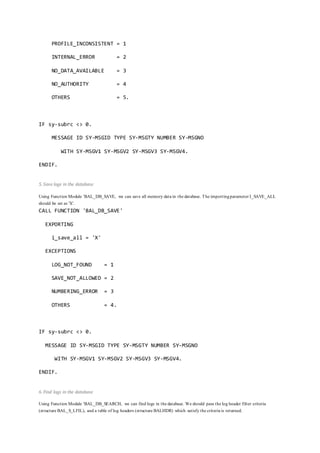
EXCEPTIONS
PROFILE_INCONSISTENT = 1
INTERNAL_ERROR = 2
NO_DATA_AVAILABLE = 3
NO_AUTHORITY = 4
OTHERS = 5.
IF sy-subrc <> 0.
MESSAGE ID SY-MSGID TYPE SY-MSGTY NUMBER SY-MSGNO
WITH SY-MSGV1 SY-MSGV2 SY-MSGV3 SY-MSGV4.
ENDIF.
5. Save logs in the database
Using Function Module 'BAL_DB_SAVE, we can save all memory data in the database. The importingparameter I_SAVE_ALL
should be set as 'X'.
CALL FUNCTION 'BAL_DB_SAVE'
EXPORTING
i_save_all = 'X'
EXCEPTIONS
LOG_NOT_FOUND = 1
SAVE_NOT_ALLOWED = 2
NUMBERING_ERROR = 3
OTHERS = 4.
IF sy-subrc <> 0.
MESSAGE ID SY-MSGID TYPE SY-MSGTY NUMBER SY-MSGNO
WITH SY-MSGV1 SY-MSGV2 SY-MSGV3 SY-MSGV4.
ENDIF.
6. Find logs in the database
Using Function Module 'BAL_DB_SEARCH, we can find logs in the database. We should pass the log header filter criteria
(structure BAL_S_LFIL), and a table of log headers (structure BALHDR) which satisfy the criteria is returned.
DATA: gr_object TYPE bal_s_obj.
DATA: gr_extnumber TYPE bal_s_extn.
DATA: gs_log_filter TYPE bal_s_lfil.
DATA: gt_log_header TYPE balhdr_t.
* create a filter with all relevant criteria:
gr_object-sign = 'I'.
gr_object-option = 'EQ'.
gr_object-low = 'ZTEST'.
APPEND gr_object TO gs_log_filter-object.
gr_extnumber-sign = 'I'.
gr_extnumber-option = 'EQ'.
gr_extnumber-low = 'Application Log Demo'.
APPEND gr_extnumber TO gs_log_filter-extnumber.
* search on DB for these logs
CALL FUNCTION 'BAL_DB_SEARCH'
EXPORTING
i_s_log_filter = gs_log_filter
IMPORTING
e_t_log_header = gt_log_header
EXCEPTIONS
LOG_NOT_FOUND = 1
NO_FILTER_CRITERIA = 2.
IF sy-subrc <> 0.
MESSAGE ID SY-MSGID TYPE SY-MSGTY NUMBER SY-MSGNO
WITH SY-MSGV1 SY-MSGV2 SY-MSGV3 SY-MSGV4.
ENDIF.
7. Load logs from the database
Using Function Module 'BAL_DB_LOAD', we can load logs from the database. By settingthe importingparameter
'I_T_LOG_HEADER' with the return values from function module 'BAL_DB_SEARCH', we can specify which logs are to be
loaded in memory.
DATA: gt_log_header TYPE balhdr_t.
* load these messages into memory
CALL FUNCTION 'BAL_DB_LOAD'
EXPORTING
i_t_log_header = gt_log_header
EXCEPTIONS
NO_LOGS_SPECIFIED = 1
LOG_NOT_FOUND = 2
LOG_ALREADY_LOADED = 3.
IF sy-subrc <> 0.
MESSAGE ID sy-msgid TYPE sy-msgty NUMBER sy-msgno
WITH sy-msgv1 sy-msgv2 sy-msgv3 sy-msgv4.
ENDIF.
8. Read log from database
Using Function Module 'APPL_LOG_READ_DB', we can read logs from database if we want to analyze the log ourselves. By
settingthe importingparameter OBJECT or SUBOBJECT etc., we can specify which logs are to be read.
DATA: P_NUMBER_OF_LOGS LIKE SY-TABIX.
* Log header data
DATA: BEGIN OF P_HEADER_DATA_TAB OCCURS 0.
INCLUDE STRUCTURE BALHDR.
DATA: END OF P_HEADER_DATA_TAB.
* Log parameters
DATA: BEGIN OF P_HEADER_PARA_TAB OCCURS 0.
INCLUDE STRUCTURE BALHDRP.
DATA: END OF P_HEADER_PARA_TAB.
* Log messages
DATA: BEGIN OF P_MESSAGE_TAB OCCURS 0.
INCLUDE STRUCTURE BALM.
DATA: END OF P_MESSAGE_TAB.
* Message parameters
DATA: BEGIN OF P_MESSAGE_PARA_TAB OCCURS 0.
INCLUDE STRUCTURE BALMP.
DATA: END OF P_MESSAGE_PARA_TAB.
CALL FUNCTION 'APPL_LOG_READ_DB'
EXPORTING
OBJECT = 'ZTEST'
SUBOBJECT = 'ZTEST01'
EXTERNAL_NUMBER = 'Application Log Demo'
IMPORTING
NUMBER_OF_LOGS = P_NUMBER_OF_LOGS
TABLES
HEADER_DATA = P_HEADER_DATA_TAB
HEADER_PARAMETERS = P_HEADER_PARA_TAB
MESSAGES = P_MESSAGE_TAB
MESSAGE_PARAMETERS = P_MESSAGE_PARA_TAB.
9. Delete logs from the database
Using Function Module 'BAL_DB_DELETE', we can delete logs from the application. By settingthe importingparameter
I_T_LOGS_TO_DELETE ' with the return values from function module 'BAL_DB_SEARCH', we can specify which logs are to be
loaded in memory.
DATA: gt_log_header TYPE balhdr_t.
CALL FUNCTION 'BAL_DB_DELETE'
EXPORTING
I_T_LOGS_TO_DELETE = gt_log_header
EXCEPTIONS
NO_LOGS_SPECIFIED = 1
OTHERS = 2.
IF sy-subrc <> 0.
MESSAGE ID SY-MSGID TYPE SY-MSGTY NUMBER SY-MSGNO
WITH SY-MSGV1 SY-MSGV2 SY-MSGV3 SY-MSGV4.
ENDIF.
10. Formatting Log Display
We can use the display profile (structure BAL_S_PROF) to specifiy how the logs are displayed. It contains field catalogs which
describe which fields are to be in the list and in the levels of the navigation tree.
Application Logprovides display profiles which you can get with the follwoing function modules:
BAL_DSP_PROFILE_DETLEVEL_GET
BAL_DSP_PROFILE_NO_TREE_GET
BAL_DSP_PROFILE_POPUP_GET
BAL_DSP_PROFILE_SINGLE_LOG_GET
BAL_DSP_PROFILE_STANDARD_GET
If no display profile is specified, the standard display profile from transaction SLG1 is used.
Let us take a look at these function modules one by one.
o BAL_DSP_PROFILE_DETLEVEL_GET
The messages are inserted into the navigation tree. The tree-level in which they appear is determined by field DETLEVEL of
structure BAL_S_MSG (which is used when adding a message to the log, eg. with BAL_LOG_MSG_ADD).
o BAL_DSP_PROFILE_NO_TREE_GET:
Presentation of a logwhithout a navigation tree next to it. This kindof presentation is usefull when there are not that many
messages and therefore a navigation tree would make no sense.
o BAL_DSP_PROFILE_POPUP_GET:
Presentation of a login a popup. This is similar to the previous point. No tree is shown (does not make sense in a popup, no t enough
space).
o BAL_DSP_PROFILE_SINGLE_LOG_GET:
the 'standard' profile to display one log:
In the tree the log header is displayed. One level below there are different categories for the problem classes of the messages. The
user can easily select for example only
important messages. All messages of the log are displayed at once on the right side.
This profile is used in transaction SLG1 when only one log has been selected.
o BAL_DSP_PROFILE_STANDARD_GET:
The 'standard' profile to display many logs.
This is similar to the previous profile, the only diffrences are:
 On the right side the overview oflog headers is not expanded down to the problem class level.
 No messages ar shown initially. The user has to choosea log (or a part ofa log, e.g. the very important messages ofa log)
This profile is used in transaction SLG1 when more than one log has been selected.
As the process of these function module is similar, let us take function module 'BAL_DSP_PROFILE_DETLEVEL_GET' as a
example.
DATA: l_s_display_profile TYPE bal_s_prof.
* get a prepared profile
CALL FUNCTION 'BAL_DSP_PROFILE_DETLEVEL_GET'
IMPORTING
e_s_display_profile = l_s_display_profile
EXCEPTIONS
OTHERS = 1.
IF sy-subrc <> 0.
MESSAGE ID SY-MSGID TYPE SY-MSGTY NUMBER SY-MSGNO
WITH SY-MSGV1 SY-MSGV2 SY-MSGV3 SY-MSGV4.
ENDIF.
* use grid for display if wanted
l_s_display_profile-use_grid = 'X'.
* set report to allow saving of variants
l_s_display_profile-disvariant-report = sy-repid.
* when you use also other ALV lists in your report,
* please specify a handle to distinguish between the display
* variants of these different lists, e.g:
l_s_display_profile-disvariant-handle = 'LOG'.
* call display function module
CALL FUNCTION 'BAL_DSP_LOG_DISPLAY'
EXPORTING
i_s_display_profile = l_s_display_profile
EXCEPTIONS
PROFILE_INCONSISTENT = 1
INTERNAL_ERROR = 2
NO_DATA_AVAILABLE = 3
NO_AUTHORITY = 4
OTHERS = 5.
IF sy-subrc <> 0.
MESSAGE ID SY-MSGID TYPE SY-MSGTY NUMBER SY-MSGNO
WITH SY-MSGV1 SY-MSGV2 SY-MSGV3 SY-MSGV4.
ENDIF.
11. Callback Routine
Using callback routines, we can affect the program flow at various events in Application Log. Callback routines can be FORM
routines or function modules.
The following is a example which will popup a message whenever a message is sent to the application log.
DATA: g_s_configuration TYPE bal_s_conf.
DATA: g_s_log TYPE bal_s_log.
DATA: g_s_msg TYPE bal_s_msg.
* define callback to display a message when it occurs
PERFORM bal_callback_display_set
CHANGING
g_s_configuration.
* set this configuration
CALL FUNCTION 'BAL_GLB_CONFIG_SET'
EXPORTING
i_s_configuration = g_s_configuration
EXCEPTIONS
OTHERS = 0.
* create log
CALL FUNCTION 'BAL_LOG_CREATE'
EXPORTING
i_s_log = g_s_log
EXCEPTIONS
OTHERS = 0.
DO 3 TIMES.
g_s_msg-msgid = 'BL'.
g_s_msg-msgno = 326.
g_s_msg-msgty = 'E'.
* create message
CALL FUNCTION 'BAL_LOG_MSG_ADD'
EXPORTING
i_s_msg = g_s_msg
EXCEPTIONS
OTHERS = 0.
ENDDO.
* display log
CALL FUNCTION 'BAL_DSP_LOG_DISPLAY'
EXCEPTIONS
OTHERS = 1.
IF sy-subrc <> 0.
MESSAGE ID sy-msgid TYPE sy-msgty NUMBER sy-msgno
WITH sy-msgv1 sy-msgv2 sy-msgv3 sy-msgv4.
ENDIF.
*-------------------------------------------------------------------*
* FORM BAL_CALLBACK_DISPLAY_SET
*-------------------------------------------------------------------*
FORM bal_callback_display_set
CHANGING
c_s_configuration TYPE bal_s_conf.
* we want very important messages to occur immediately
c_s_configuration-display-callback-userexitt = ' '.
c_s_configuration-display-callback-userexitp = sy-repid.
c_s_configuration-display-callback-userexitf = 'BAL_CALLBACK_DISPLAY'.
ENDFORM. "bal_callback_display_set
*-------------------------------------------------------------------*
* FORM BAL_CALLBACK_DISPLAY
*-------------------------------------------------------------------*
FORM bal_callback_display
USING
i_s_msg TYPE bal_s_msg.
* issue a message
MESSAGE i325(bl) WITH 'BAL_CALLBACK_DISPLAY'.
ENDFORM. "bal_callback_display
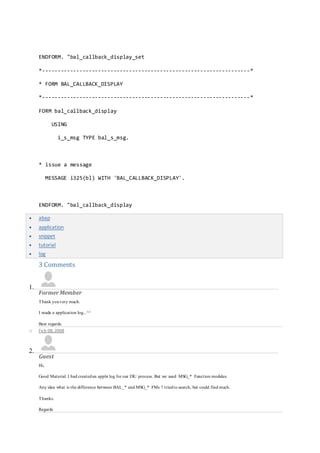
 abap
 application
 snippet
 tutorial
 log
3 Comments
1.
FormerMember
Thank youvery much.
I made a application log...^^
Best regards.
o Feb 08, 2008
2.
Guest
Hi,
Good Material. I had createdan appln log for our ISU process. But we used MSG_* Function modules.
Any idea what is the difference between BAL_* and MSG_* FMs ? triedto search, but could find much.
Thanks.
Regards
Megha
o Aug 09, 2010
3.
FormerMember
Hi.
What if I have a standard FM that updates DB, but does not return error/warning/success messages?
Where is the log stored in such cases? How can we access it?
Using Application Logging
SAP provides a method to use a standard logging facility for all of your custom ABAP
programs. It consists of several transaction codes, tables, and function modules. By using the
SAP functionality, it is possible to have a standard way to store error messages, making the
handling of errors much simpler, and increasing the maintainablity of code.
Transaction Codes: SLG0 is used to configure categories for the error messages, and SLG1
is used to view the messages.
Tables: BALHDR is the main (header table), and BALM contains all of the detailed
messages.
Function Modules: Much like the SAP function modules used to send email, these function
modules would benefit from having a simpler interface wrapped around them. The function
modules can be found in Function Group SLG0. Look for the INIT, HEADER, and
MESSAGE function modules, as well as the WRITE_DB (I think that is the name...). If you
want examples of how these function modules are used, please do a where used on them. I
am unable to post the SAP examples here.
All APPL_LOG function modules are from 3.0. Starting at 4.6, see function groups that start
with SBAL.
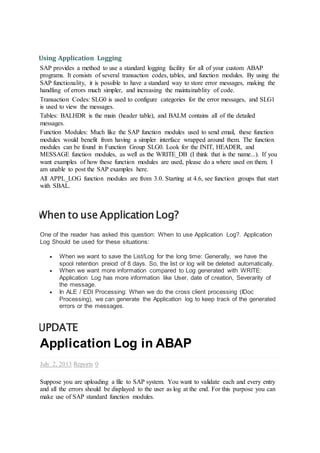
When to use ApplicationLog?
One of the reader has asked this question: When to use Application Log?. Application
Log Should be used for these situations:
 When we want to save the List/Log for the long time: Generally, we have the
spool retention preiod of 8 days. So, the list or log will be deleted automatically.
 When we want more information compared to Log generated with WRITE:
Application Log has more information like User, date of creation, Severarity of
the message.
 In ALE / EDI Processing: When we do the cross client processing (IDoc
Processing), we can generate the Application log to keep track of the generated
errors or the messages.
UPDATE
Application Log in ABAP
July 2, 2013 Reports 0
Suppose you are uploading a file to SAP system. You want to validate each and every entry
and all the errors should be displayed to the user as log at the end. For this purpose you can
make use of SAP standard function modules.
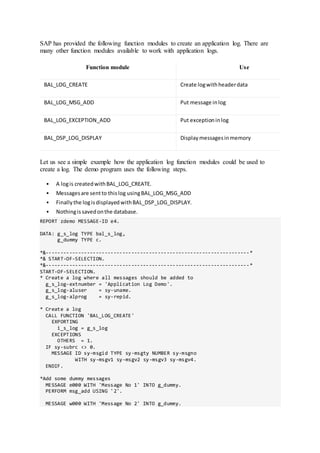
SAP has provided the following function modules to create an application log. There are
many other function modules available to work with application logs.
Function module Use
BAL_LOG_CREATE Create logwithheaderdata
BAL_LOG_MSG_ADD Put message inlog
BAL_LOG_EXCEPTION_ADD Put exceptioninlog
BAL_DSP_LOG_DISPLAY Displaymessagesinmemory
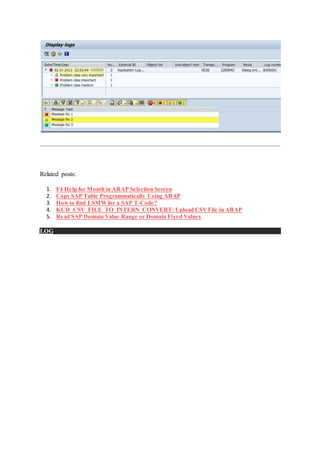
Let us see a simple example how the application log function modules could be used to
create a log. The demo program uses the following steps.
 A logis createdwithBAL_LOG_CREATE.
 Messagesare sentto thislog usingBAL_LOG_MSG_ADD
 Finallythe logisdisplayedwithBAL_DSP_LOG_DISPLAY.
 Nothingissavedonthe database.
REPORT zdemo MESSAGE-ID e4.
DATA: g_s_log TYPE bal_s_log,
g_dummy TYPE c.
*&---------------------------------------------------------------------*
*& START-OF-SELECTION.
*&---------------------------------------------------------------------*
START-OF-SELECTION.
* Create a log where all messages should be added to
g_s_log-extnumber = 'Application Log Demo'.
g_s_log-aluser = sy-uname.
g_s_log-alprog = sy-repid.
* Create a log
CALL FUNCTION 'BAL_LOG_CREATE'
EXPORTING
i_s_log = g_s_log
EXCEPTIONS
OTHERS = 1.
IF sy-subrc <> 0.
MESSAGE ID sy-msgid TYPE sy-msgty NUMBER sy-msgno
WITH sy-msgv1 sy-msgv2 sy-msgv3 sy-msgv4.
ENDIF.
*Add some dummy messages
MESSAGE e000 WITH 'Message No 1' INTO g_dummy.
PERFORM msg_add USING '2'.
MESSAGE w000 WITH 'Message No 2' INTO g_dummy.
PERFORM msg_add USING '1'.
MESSAGE s000 WITH 'Message No 3' INTO g_dummy.
PERFORM msg_add USING '3'.
* Display log file
CALL FUNCTION 'BAL_DSP_LOG_DISPLAY'
EXCEPTIONS
OTHERS = 1.
IF sy-subrc <> 0.
MESSAGE ID sy-msgid TYPE 'S' NUMBER sy-msgno
WITH sy-msgv1 sy-msgv2 sy-msgv3 sy-msgv4.
ENDIF.
*&---------------------------------------------------------------------*
* FORM MSG_ADD
*&---------------------------------------------------------------------*
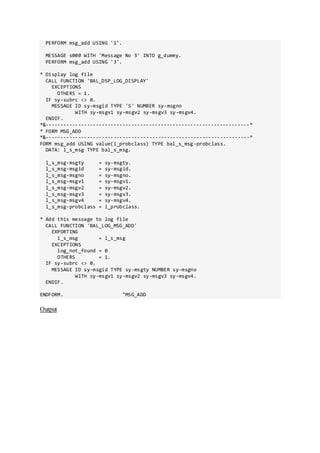
FORM msg_add USING value(i_probclass) TYPE bal_s_msg-probclass.
DATA: l_s_msg TYPE bal_s_msg.
l_s_msg-msgty = sy-msgty.
l_s_msg-msgid = sy-msgid.
l_s_msg-msgno = sy-msgno.
l_s_msg-msgv1 = sy-msgv1.
l_s_msg-msgv2 = sy-msgv2.
l_s_msg-msgv3 = sy-msgv3.
l_s_msg-msgv4 = sy-msgv4.
l_s_msg-probclass = i_probclass.
* Add this message to log file
CALL FUNCTION 'BAL_LOG_MSG_ADD'
EXPORTING
i_s_msg = l_s_msg
EXCEPTIONS
log_not_found = 0
OTHERS = 1.
IF sy-subrc <> 0.
MESSAGE ID sy-msgid TYPE sy-msgty NUMBER sy-msgno
WITH sy-msgv1 sy-msgv2 sy-msgv3 sy-msgv4.
ENDIF.
ENDFORM. "MSG_ADD
Output
Related posts:
1. F4 Help for Month in ABAP Selection Screen
2. Copy SAP Table Programmatically Using ABAP
3. How to find LSMWfor a SAP T-Code?
4. KCD_CSV_FILE_TO_INTERN_CONVERT: Upload CSV File in ABAP
5. Read SAP Domain Value Range or Domain Fixed Values
 LOG

Sap application log

  • 1.
    SAP APPLICATION LOG ApplicationLog provides an infrastructure for collecting messages and exceptions in a log, saving, reading and deleting logs in the database and displaying them. ADVANTAGES Application Log provides multiple advantages:  System-wide uniform event logging  Accessible standardized UI based on ABAP List Viewer (ALV)  High capabilities for analysis of log data This article explains how to create your own application logging program in ABAP. SAP provides standard functionality to write into as well as view the application log. This article will explain in detail how to create your own logging function module for application logging using standard SAP log facility. Two transaction code related to application logging are Application logging records the progress of the execution of an application. Whereas the system log records system events, you can use the application log to record application-specific events. Application Log is designed to temporarily store messages. Logs should be deleted in intervals (e.g. weekly batch job for deleting logs) to avoid too high database load. A typical use of the Application Log is within delivery processing. Negative results of a dangerous goods check are
  • 2.
    written to theApplication Log. Application messages and reactions are collected based on a customer defined examination schema (reactions determine how the document will be handled further). This approach increases the transparency of the process for end users. Messages are collected temporarily and are not saved to the database. HOW TO APPLY The goal of the object is to create the Global Class and Method for Application Log so that it can be reused where necessary in any RICEF object. STEP 1: Object and Sub object creation First create object and sub object, Go to transaction SLG0. Go to change mode and click on New entries button on the application tool bar. Then define the sub object for the object. Select the object and double click on sub object.
  • 3.
    STEP 2:Create GlobalClass and Method to define the Application log Create Global Class and Method to define the Application log code Define the following Parameter in Method Define following Data in the Method Populate the Header data with the following details Create the log with FM BAL_LOG_CREATE
  • 4.
    Add all themessage in the log using FM BAL_LOG_MSG_ADD Save the Log using FM BAL_DB_SAVE Display the log using FM BAL_DSP_LOG_DISPLAY
  • 5.
    Define that Classand method in the code wherever necessary The Method will create log with all the messages and generate log (Transaction SLG1) Code is attached. Application Log Methodology in SAP Skip to end of metadata  Created by Former Member, lastmodified by Former Member on Oct 22, 2013 Go to startof metadata Application Log This article explains how to create your ow n application logging program in ABAP. SAP provides standard functionality to w rite into as w ell as view the application log. This article w ill explain in detail how to create your ow n logging function module for application logging using standard SAP log facility. Tw o transaction code related to application logging are  SLG0 -> Used to maintain the log object  SLG1 -> Used to view the log
  • 6.
    Desired Functionality inProject When a program is run in background mode, all the error messages get logged into spool. How ever, in case of project, the requirement is that a notification needs to be generated in Application Log corresponding to all such spools. Only one message needs to be logged into Application Log for the entire error messages generated in a particular program. Configuration step In this step create a log object. 1. Open transaction SLG0. An information message about cross-client table w ill come. 2. 2. Click the button "New Entries". Enter the name and description of your log object (say ZTESTLOG as object name and "Test Log" as object description) and save. Development Step The follow ing standard function modules provided by SAP has been used to create the Z function module for logging.  BAL_GLB_MSG_DEFAULTS_SET  BAL_DB_SAVE  BAL_LOG_MSG_ADD Here are the steps: 1. Go to transaction SE11. Create a z-structure Z_LOG_MESSAGE having the follow ing fields Component Component Type MSGTY SYMSGTY MSG_TEXT_1 SYMSGV MSG_TEXT_2 SYMSGV MSG_TEXT_3 SYMSGV MSG_TEXT_4 SYMSGV 2. Crate a message class say ZMESSAGE in transaction SE91 and a message 999 w ith four placeholder ( & ) as the text. 3. Go to transaction SE37. Create a function group say ZLOG 4. After the function group is created, create a function module in that group. Let is name it ZIU_MESSAGE_LOGGING. Import parameters: a. I_LOG_OBJECT type BALOBJ_D -> Application log: Object name (Application code) b. I_EXTNUMBER type String -> Application Log: External ID Export parameters: None Changing parameters: None Tables parameters: T_LOG_MESSAGE type Z_LOG_MESSAGE Exceptions:
  • 7.
    LOG_HEADER_INCONSISTENT LOGGING_ERROR Paste the codebelow as the source code Error rendering macro 'code': Invalid value specified for parameter 'lang' ZIU_MESSAGE_LOGGINGFUNCTION ZIU_MESSAGE_LOGGING. *"---------------------------------------------------------------------- ""Local interface: *" IMPORTING *" REFERENCE(I_LOG_OBJECT) TYPE BALOBJ_D *" REFERENCE(I_EXTNUMBER) TYPE STRING *" TABLES *" T_LOG_MESSAGE STRUCTURE Z_LOG_MESSAGE *" EXCEPTIONS *" LOG_HEADER_INCONSISTENT *" LOGGING_ERROR "--------------------------------------------------------------------- "DESCRIPTION: This function module is used insert messages in the application log CONSTANTS: c_message TYPE syst-msgid VALUE 'ZMESSAGE', c_999 TYPE syst-msgno VALUE '999'. DATA: l_log_handle TYPE balloghndl, l_s_log TYPE bal_s_log, l_dummy TYPE string, l_ext_no TYPE bal_s_log-extnumber, l_s_mdef TYPE bal_s_mdef. IF t_log_message[] IS NOT INITIAL. l_s_log-object = i_log_object. l_ext_no = i_extnumber. l_s_log-extnumber = l_ext_no. "Create the log with header data CALL FUNCTION 'BAL_LOG_CREATE' EXPORTING i_s_log = l_s_log IMPORTING
  • 8.
    e_log_handle = l_log_handle EXCEPTIONS log_header_inconsistent= 1 OTHERS = 2. IF sy-subrc <> 0. CASE sy-subrc. WHEN 1. RAISE log_header_inconsistent. WHEN OTHERS. RAISE logging_error. ENDCASE. ENDIF. l_s_mdef-log_handle = l_log_handle. Set the default value CALL FUNCTION 'BAL_GLB_MSG_DEFAULTS_SET' EXPORTING i_s_msg_defaults = l_s_mdef EXCEPTIONS OTHERS = 0. " Loop the message table and write the messages into the log LOOP AT t_log_message. "Use the message type ZMESSAGE and msg no 999 "Issue the message in a dummy variable MESSAGE ID c_message TYPE t_log_message-msgty NUMBER c_999 WITH t_log_message-msg_text_1 t_log_message-msg_text_2 t_log_message-msg_text_3 t_log_message-msg_text_4 INTO l_dummy. "The parameters set by message statement will be used "Add the message in the log PERFORM msg_add. ENDLOOP. " save logs in the database CALL FUNCTION 'BAL_DB_SAVE'
  • 9.
    EXPORTING i_save_all = 'X' EXCEPTIONS log_not_found= 1 save_not_allowed = 2 numbering_error = 3 OTHERS = 4. IF sy-subrc <> 0. MESSAGE ID sy-msgid TYPE sy-msgty NUMBER sy-msgno WITH sy-msgv1 sy-msgv2 sy-msgv3 sy-msgv4. ENDIF. ENDIF. ENDFUNCTION. "MSG_ADD *-------------------------------------------------------------------- "FORM MSG_ADD *-------------------------------------------------------------------- "Add the message to the log ------------------------------------------------------------------- FORM msg_add. DATA: l_s_msg TYPE bal_s_msg. "define data of message for Application Log l_s_msg-msgty = sy-msgty. l_s_msg-msgid = sy-msgid. l_s_msg-msgno = sy-msgno. l_s_msg-msgv1 = sy-msgv1. l_s_msg-msgv2 = sy-msgv2. l_s_msg-msgv3 = sy-msgv3. l_s_msg-msgv4 = sy-msgv4. "add this message to log file "(I_LOG_HANDLE is not specified, we want to add to the default log. "If it does not exist we do not care =>EXCEPTIONS log_not_found = 0) CALL FUNCTION 'BAL_LOG_MSG_ADD'
  • 10.
    EXPORTING I_LOG_HANDLE = i_s_msg = l_s_msg EXCEPTIONS log_not_found= 0 OTHERS = 1. IF sy-subrc <> 0. MESSAGE ID sy-msgid TYPE sy-msgty NUMBER sy-msgno WITH sy-msgv1 sy-msgv2 sy-msgv3 sy-msgv4. ENDIF. ENDFORM. " "Using the function module: "In your ABAP program write the following code and use this function module ZIU_MESSAGE_LOGGING for logging. " * Data declaration-> "Internal table for message logging DATA: it_log_message TYPE STANDARD TABLE OF z_log_message, wa_log_message TYPE z_log_message, l_ext_number TYPE string. Constants: c_obj_zxiproxy TYPE balobj_d VALUE 'ZTESTLOG'. "Now populate the internal table with the log messages as shown below. wa_log_message- "msgty is the type of the message. E -> Error, W -> Warning, S -> Success "Logging code for insert message into log CLEAR wa_log_message. wa_log_message-msgty = 'E'. " Can use W or S wa_log_message-msg_text_1 = < Message text 1>. wa_log_message-msg_text_2 = < Message text 2> wa_log_message-msg_text_3 = < Message text 3> wa_log_message-msg_text_4 = < Message text 4> Append the message into the internal table APPEND wa_log_message TO it_log_message.
  • 11.
    "At the endtransfer the log message to the system log by calling function module ZIU_MESSAGE_LOGGING. "L_EXT_NUMBER will bt any string of your choice. "Function module ZIU_MESSAGE_LOGGING will do the logging " i_log_object is the object type (to be configrd using txn SLG0 CALL FUNCTION 'ZIU_MESSAGE_LOGGING' EXPORTING i_log_object = c_obj_zxiproxy i_extnumber = l_ext_number TABLES t_log_message = it_log_message EXCEPTIONS log_header_inconsistent = 1 logging_error = 2 OTHERS = 3. IF sy-subrc <> 0. MESSAGE ID SY-MSGID TYPE SY-MSGTY NUMBER SY-MSGNO WITH SY-MSGV1 SY-MSGV2 SY-MSGV3 SY-MSGV4. ENDIF. ENDIF. "The logged messages can be viewed in transaction SLG1. "For filtering the messages use the Object type. You can select Analyse Application Log by Object, Subobjest, External ID, Time , User, Transaction Codes, Program … SAP ABAP Technicals
  • 12.
    This site isto give a briefidea for the abap learners who are looking for some real time programs .It consists of collection of programs from myside .I hope these programs are very much used for all of the learners.Please check the links for any information in ABAP. Please vote for my Blog.And please inputme on this mail addrssess.Email me Share this link with your friends http://www.rebtel.com/u/15163104576 For every friend who signs up using this link and makes a payment,we'll give you 8 €! Thursday, September 23, 2010 Application log in reports This Code Snippets will clarify some general process of working with application log when ABAP programmming. Such as creating, adding, deleting, displaying, formatting application logs and saving it to the database. When we do ABAP programming,sometimes we need to bring the situation arised at runtime to the attention of the end users, which are usually errors, warnings and successful information.To do this, we can use Application Log which is a set of Function Modules provided by SAP for collecting messages, saving, reading and deleting logs in the database and displaying logs. 1.Define application log objects Application log objects are defined in the system. The object definition assigns a work area. An object can be divided into sub-objects .Logging is performed object-specifically, via function modules.Using transaction code SLG0, we can define our own object and subobject.For example, object: ZTEST, subobject: ZTEST01. 2.Create a log Using Function Module 'BAL_LOG_CREATE', we can create a log where all messages should be added to. DATA: gv_log_handle TYPE balloghndl. "Application Log: Log Handle DATA: ls_log TYPE bal_s_log. "Log header data * define some header data of this log ls_log-extnumber = 'Application Log Demo'. ls_log-object = 'ZTEST'. ls_log-subobject = 'ZTEST01'. ls_log-aldate = sy-datum. ls_log-altime = sy-uzeit. ls_log-aluser = sy-uname. ls_log-alprog = sy-repid. CALL FUNCTION 'BAL_LOG_CREATE' EXPORTING i_s_log = ls_log IMPORTING e_log_handle = gv_log_handle EXCEPTIONS log_header_inconsistent = 1 OTHERS = 2. IF sy-subrc <> 0. MESSAGE ID SY-MSGID TYPE SY-MSGTY NUMBER SY-MSGNO
  • 13.
    WITH SY-MSGV1 SY-MSGV2SY-MSGV3 SY-MSGV4. ENDIF. The function module 'BAL_LOG_CREATE' returns the log handle (LOG_HANDLE, CHAR22). The LOG_HANDLE is a globally unique identifier (GUID) which identifies a log uniquely. You can access this log with this handle, e.g. to change the header data or to put a message in the log. 3. Put a message in the log Using Function Module 'BAL_LOG_MSG_ADD', we can add a message into the application log.This message is put in the log identified by the log handle GV_LOG_HANDLE, which is mostly the T100 information (message type, work area, message number, the 4 message variables). DATA: L_S_MSG TYPE BAL_S_MSG. * define data of message for Application Log L_S_MSG-MSGTY = SY-MSGTY. L_S_MSG-MSGID = SY-MSGID. L_S_MSG-MSGNO = SY-MSGNO. L_S_MSG-MSGV1 = SY-MSGV1. L_S_MSG-MSGV2 = SY-MSGV2. L_S_MSG-MSGV3 = SY-MSGV3. L_S_MSG-MSGV4 = SY-MSGV4. CALL FUNCTION 'BAL_LOG_MSG_ADD' EXPORTING i_log_handle = gv_log_handle i_s_msg = l_s_msg EXCEPTIONS log_not_found = 1 msg_inconsistent = 2 log_is_full = 3 OTHERS = 4. IF sy-subrc <> 0. MESSAGE ID SY-MSGID TYPE SY-MSGTY NUMBER SY-MSGNO WITH SY-MSGV1 SY-MSGV2 SY-MSGV3 SY-MSGV4. ENDIF. 4. Display log Using Function Module 'BAL_DSP_LOG_DISPLAY', we can display the collected messages. This function module can be called without parameters. All messages in memory are displayed in a standard format (this standard format is used e.g. in the transaction SLG1). CALL FUNCTION 'BAL_DSP_LOG_DISPLAY' EXCEPTIONS PROFILE_INCONSISTENT = 1 INTERNAL_ERROR = 2 NO_DATA_AVAILABLE = 3 NO_AUTHORITY = 4 OTHERS = 5. IF sy-subrc <> 0. MESSAGE ID SY-MSGID TYPE SY-MSGTY NUMBER SY-MSGNO WITH SY-MSGV1 SY-MSGV2 SY-MSGV3 SY-MSGV4. ENDIF. 5. Save logs in the database Using Function Module 'BAL_DB_SAVE, we can save all memory data in the database. The importing parameter I_SAVE_ALL should be set as 'X'.
  • 14.
    CALL FUNCTION 'BAL_DB_SAVE' EXPORTING i_save_all= 'X' EXCEPTIONS LOG_NOT_FOUND = 1 SAVE_NOT_ALLOWED = 2 NUMBERING_ERROR = 3 OTHERS = 4. IF sy-subrc <> 0. MESSAGE ID SY-MSGID TYPE SY-MSGTY NUMBER SY-MSGNO WITH SY-MSGV1 SY-MSGV2 SY-MSGV3 SY-MSGV4. ENDIF. 6. Find logs in the database Using Function Module 'BAL_DB_SEARCH, we can find logs in the database. We should pass the log header filter criteria (structure BAL_S_LFIL), and a table of log headers (structure BALHDR) which satisfy the criteria is returned. DATA: gr_object TYPE bal_s_obj. DATA: gr_extnumber TYPE bal_s_extn. DATA: gs_log_filter TYPE bal_s_lfil. DATA: gt_log_header TYPE balhdr_t. * create a filter with all relevant criteria: gr_object-sign = 'I'. gr_object-option = 'EQ'. gr_object-low = 'ZTEST'. APPEND gr_object TO gs_log_filter-object. gr_extnumber-sign = 'I'. gr_extnumber-option = 'EQ'. gr_extnumber-low = 'Application Log Demo'. APPEND gr_extnumber TO gs_log_filter-extnumber. * search on DB for these logs CALL FUNCTION 'BAL_DB_SEARCH' EXPORTING i_s_log_filter = gs_log_filter IMPORTING e_t_log_header = gt_log_header EXCEPTIONS LOG_NOT_FOUND = 1 NO_FILTER_CRITERIA = 2. IF sy-subrc <> 0. MESSAGE ID SY-MSGID TYPE SY-MSGTY NUMBER SY-MSGNO WITH SY-MSGV1 SY-MSGV2 SY-MSGV3 SY-MSGV4. ENDIF. 7. Load logs from the database Using Function Module 'BAL_DB_LOAD', we can load logs from the database. By setting the importing parameter 'I_T_LOG_HEADER' with the return values from function module 'BAL_DB_SEARCH', we can specify which logs are to be loaded in memory. DATA: gt_log_header TYPE balhdr_t.
  • 15.
    * load thesemessages into memory CALL FUNCTION 'BAL_DB_LOAD' EXPORTING i_t_log_header = gt_log_header EXCEPTIONS NO_LOGS_SPECIFIED = 1 LOG_NOT_FOUND = 2 LOG_ALREADY_LOADED = 3. IF sy-subrc <> 0. MESSAGE ID sy-msgid TYPE sy-msgty NUMBER sy-msgno WITH sy-msgv1 sy-msgv2 sy-msgv3 sy-msgv4. ENDIF. 8. Read log from database Using Function Module 'APPL_LOG_READ_DB', we can read logs from database if we want to analyze the log ourselves. By setting the importing parameter OBJECT or SUBOBJECT etc., we can specify which logs are to be read. DATA: P_NUMBER_OF_LOGS LIKE SY-TABIX. * Log header data DATA: BEGIN OF P_HEADER_DATA_TAB OCCURS 0. INCLUDE STRUCTURE BALHDR. DATA: END OF P_HEADER_DATA_TAB. * Log parameters DATA: BEGIN OF P_HEADER_PARA_TAB OCCURS 0. INCLUDE STRUCTURE BALHDRP. DATA: END OF P_HEADER_PARA_TAB. * Log messages DATA: BEGIN OF P_MESSAGE_TAB OCCURS 0. INCLUDE STRUCTURE BALM. DATA: END OF P_MESSAGE_TAB. * Message parameters DATA: BEGIN OF P_MESSAGE_PARA_TAB OCCURS 0. INCLUDE STRUCTURE BALMP. DATA: END OF P_MESSAGE_PARA_TAB. CALL FUNCTION 'APPL_LOG_READ_DB' EXPORTING OBJECT = 'ZTEST' SUBOBJECT = 'ZTEST01' EXTERNAL_NUMBER = 'Application Log Demo' IMPORTING NUMBER_OF_LOGS = P_NUMBER_OF_LOGS TABLES HEADER_DATA = P_HEADER_DATA_TAB HEADER_PARAMETERS = P_HEADER_PARA_TAB MESSAGES = P_MESSAGE_TAB MESSAGE_PARAMETERS = P_MESSAGE_PARA_TAB. 9. Delete logs from the database Using Function Module 'BAL_DB_DELETE', we can delete logs from the application. By setting the importing parameter I_T_LOGS_TO_DELETE ' with the return values from function module 'BAL_DB_SEARCH', we can specify which logs are to be loaded in memory.
  • 16.
    DATA: gt_log_header TYPEbalhdr_t. CALL FUNCTION 'BAL_DB_DELETE' EXPORTING I_T_LOGS_TO_DELETE = gt_log_header EXCEPTIONS NO_LOGS_SPECIFIED = 1 OTHERS = 2. IF sy-subrc <> 0. MESSAGE ID SY-MSGID TYPE SY-MSGTY NUMBER SY-MSGNO WITH SY-MSGV1 SY-MSGV2 SY-MSGV3 SY-MSGV4. ENDIF. 10. Formatting Log Display We can use the display profile (structure BAL_S_PROF) to specifiy how the logs are displayed. It contains field catalogs which describe which fields are to be in the list and in the levels of the navigation tree. Application Log provides display profiles which you can get with the follwoing function modules: BAL_DSP_PROFILE_DETLEVEL_GET BAL_DSP_PROFILE_NO_TREE_GET BAL_DSP_PROFILE_POPUP_GET BAL_DSP_PROFILE_SINGLE_LOG_GET BAL_DSP_PROFILE_STANDARD_GET If no display profile is specified, the standard display profile from transaction SLG1 is used. Let us take a look at these function modules one by one. o BAL_DSP_PROFILE_DETLEVEL_GET The messages are inserted into the navigation tree. The tree-level in which they appear is determined by field DETLEVEL of structure BAL_S_MSG (which is used when adding a message to the log, eg. with BAL_LOG_MSG_ADD). o BAL_DSP_PROFILE_NO_TREE_GET: Presentation of a log whithout a navigation tree next to it. This kind of presentation is usefull when there are not that many messages and therefore a navigation tree would make no sense. o BAL_DSP_PROFILE_POPUP_GET: Presentation of a log in a popup. This is similar to the previous point. No tree is shown (does not make sense in a popup, not enough space). o BAL_DSP_PROFILE_SINGLE_LOG_GET: the 'standard' profile to display one log: In the tree the log header is displayed. One level below there are different categories for the problem classes of the messages. The user can easily select for example only important messages. All messages of the log are displayed at once on the right side. This profile is used in transaction SLG1 when only one log has been selected. o BAL_DSP_PROFILE_STANDARD_GET: The 'standard' profile to display many logs. This is similar to the previous profile, the only diffrences are: • On the right side the overview of log headers is not expanded down to the problem class level. • No messages ar shown initially. The user has to choose a log (or a part of a log, e.g. the very important messages of a log) This profile is used in transaction SLG1 when more than one log has been selected. As the process of these function module is similar, let us take function module 'BAL_DSP_PROFILE_DETLEVEL_GET' as a example. DATA: l_s_display_profile TYPE bal_s_prof.
  • 17.
    * get aprepared profile CALL FUNCTION 'BAL_DSP_PROFILE_DETLEVEL_GET' IMPORTING e_s_display_profile = l_s_display_profile EXCEPTIONS OTHERS = 1. IF sy-subrc <> 0. MESSAGE ID SY-MSGID TYPE SY-MSGTY NUMBER SY-MSGNO WITH SY-MSGV1 SY-MSGV2 SY-MSGV3 SY-MSGV4. ENDIF. * use grid for display if wanted l_s_display_profile-use_grid = 'X'. * set report to allow saving of variants l_s_display_profile-disvariant-report = sy-repid. * when you use also other ALV lists in your report, * please specify a handle to distinguish between the display * variants of these different lists, e.g: l_s_display_profile-disvariant-handle = 'LOG'. * call display function module CALL FUNCTION 'BAL_DSP_LOG_DISPLAY' EXPORTING i_s_display_profile = l_s_display_profile EXCEPTIONS PROFILE_INCONSISTENT = 1 INTERNAL_ERROR = 2 NO_DATA_AVAILABLE = 3 NO_AUTHORITY = 4 OTHERS = 5. IF sy-subrc <> 0. MESSAGE ID SY-MSGID TYPE SY-MSGTY NUMBER SY-MSGNO WITH SY-MSGV1 SY-MSGV2 SY-MSGV3 SY-MSGV4. ENDIF. 11. Callback Routine Using callback routines, we can affect the program flow at various events in Application Log. Callback routines can be FORM routines or function modules. The following is a example which will popup a message whenever a message is sent to the application log. DATA: g_s_configuration TYPE bal_s_conf. DATA: g_s_log TYPE bal_s_log. DATA: g_s_msg TYPE bal_s_msg. * define callback to display a message when it occurs PERFORM bal_callback_display_set CHANGING g_s_configuration. * set this configuration CALL FUNCTION 'BAL_GLB_CONFIG_SET'
  • 18.
    EXPORTING i_s_configuration = g_s_configuration EXCEPTIONS OTHERS= 0. * create log CALL FUNCTION 'BAL_LOG_CREATE' EXPORTING i_s_log = g_s_log EXCEPTIONS OTHERS = 0. DO 3 TIMES. g_s_msg-msgid = 'BL'. g_s_msg-msgno = 326. g_s_msg-msgty = 'E'. * create message CALL FUNCTION 'BAL_LOG_MSG_ADD' EXPORTING i_s_msg = g_s_msg EXCEPTIONS OTHERS = 0. ENDDO. * display log CALL FUNCTION 'BAL_DSP_LOG_DISPLAY' EXCEPTIONS OTHERS = 1. IF sy-subrc <> 0. MESSAGE ID sy-msgid TYPE sy-msgty NUMBER sy-msgno WITH sy-msgv1 sy-msgv2 sy-msgv3 sy-msgv4. ENDIF. *-------------------------------------------------------------------* * FORM BAL_CALLBACK_DISPLAY_SET *-------------------------------------------------------------------* FORM bal_callback_display_set CHANGING c_s_configuration TYPE bal_s_conf. * we want very important messages to occur immediately c_s_configuration-display-callback-userexitt = ' '. c_s_configuration-display-callback-userexitp = sy-repid. c_s_configuration-display-callback-userexitf = 'BAL_CALLBACK_DISPLAY'. ENDFORM. "bal_callback_display_set *-------------------------------------------------------------------* * FORM BAL_CALLBACK_DISPLAY *-------------------------------------------------------------------* FORM bal_callback_display
  • 19.
    USING i_s_msg TYPE bal_s_msg. *issue a message MESSAGE i325(bl) WITH 'BAL_CALLBACK_DISPLAY'. ENDFORM. "bal_callback_display Error logging in Application Log Skip to end of metadata  Created by Guest, lastmodified by Former Member on Sep 11, 2013 Go to startof metadata Application events can be centrally logged in the application log. The advantage is system-w ide message logging, w hich is convenient, easy to analyze. Several different logs (for various objects) can be w ritten at the same time by an application. The application log can also be used as a message collector. Depending upon the message type, messages are displayed in a user friendly interface. Easy to understand at first glance. Before w e start w ith the coding some config has to be done. Lets get started. Define application log objects via T-Code SLG0 Call the maintenance transactionwith Tools - ABAP/4 Workbench - Development - Other tools - Application log. Choose New entries. An empty input area is displayed. Enter an object name according to the naming convention: - first character "Y" or "Z" - second and thirdcharacter: application ID (e.g. FI) - fourth position, any character Enter a descriptive short text. Save your entries. If you want to define sub-objects: 1. Choose the line with the object. 2. Choose Table view - Other view. A structure overview is displayed for selection. 3. Position the cursor on "Sub-objects", and choose Choose. The sub-object display window for the chosen object is displayed. 4. Choose New entries. 5. Enter a sub-object name (beginning with "Y" or "Z") and a descriptive short text. 6. Save your entries. In our example we will use the Objects / Subobjects which arealready created in the system. (Createyour own objects when implimenting in live systems). Object - /BA1/B0 SubObject - DEFAULT
  • 20.
    Go to SE80and create a Function Module ZLOG. 1 2 3 4 5 6 7 8 9 10 11 FUNCTION zlog. *"---------------------------------------------------------------------- *"*"Local Interface: *" IMPORTING *" REFERENCE(FI_OBJECT) TYPE BALOBJ_D DEFAULT '/BA1/B0' *" REFERENCE(FI_SUBOBJECT) TYPE BALSUBOBJ DEFAULT 'DEFAULT' *" TABLES *" FT_MESSAGES TYPE BAPIRET2_T *"---------------------------------------------------------------------- FIELD-SYMBOLS: <lv_msg> TYPE bapiret2.
  • 21.
    12 13 14 15 16 17 18 19 20 21 22 23 24 25 26 27 28 29 30 31 32 33 34 35 36 37 38 DATA: lv_message(300) TYPE c, ls_logTYPE bal_s_log, lv_loghandle TYPE balloghndl, lt_loghandle TYPE bal_t_logh. * open log ls_log-object = fi_object. ls_log-subobject = fi_subobject. ls_log-aluser = sy-uname. ls_log-alprog = sy-repid. CALL FUNCTION 'BAL_LOG_CREATE' "#EC * EXPORTING i_s_log = ls_log IMPORTING e_log_handle = lv_loghandle EXCEPTIONS OTHERS = 1. LOOP AT ft_messages ASSIGNING <lv_msg>. lv_message = <lv_msg>-message. IF NOT <lv_msg>-message_v1 IS INITIAL. REPLACE FIRST OCCURRENCE OF '&' IN lv_message WITH <lv_msg>- message_v1. ENDIF. IF NOT <lv_msg>-message_v2 IS INITIAL.
  • 22.
    39 40 41 42 43 44 45 46 47 48 49 50 51 52 53 54 55 56 57 58 59 60 61 62 63 64 65 REPLACE FIRST OCCURRENCEOF '&' IN lv_message WITH <lv_msg>- message_v2. ENDIF. IF NOT <lv_msg>-message_v3 IS INITIAL. REPLACE FIRST OCCURRENCE OF '&' IN lv_message WITH <lv_msg>- message_v3. ENDIF. IF NOT <lv_msg>-message_v4 IS INITIAL. REPLACE FIRST OCCURRENCE OF '&' IN lv_message WITH <lv_msg>- message_v4. ENDIF. CALL FUNCTION 'BAL_LOG_MSG_ADD_FREE_TEXT' "#EC * EXPORTING i_log_handle = lv_loghandle i_msgty = <lv_msg>-type i_text = lv_message EXCEPTIONS log_not_found = 1 msg_inconsistent = 2 log_is_full = 3 OTHERS = 4. ENDLOOP. INSERT lv_loghandle INTO TABLE lt_loghandle. CALL FUNCTION 'BAL_DB_SAVE' "#EC * EXPORTING i_save_all = ' '
  • 23.
    66 67 68 69 70 71 72 i_t_log_handle = lt_loghandle EXCEPTIONS log_not_found= 1 save_not_allowed = 2 numbering_error = 3 OTHERS = 4. ENDFUNCTION. Results Lets execute the function module w ith default parameters FI_OBJECT /BA1/B0 FI_SUBOBJECT DEFAULT and populate the ft_message table in the Test Environment.
  • 24.
    For getting intomore details of Application log you have follow ing Function Groups in hand. Create application log - Function group SLG0 Display application log - Function group SLG3 Read application log - Function group SLG1 Delete application log - Function group SLG2 Further details about the application log can be read from the follow ing link. http://help.sap.com/saphelp_erp2005/helpdata/EN/2a/f9ff44493111d182b70000e829fbfe/frameset.htm | Using Application Log Skipto endof metadata  Created byFormer Member, last modifiedon Dec 03, 2007 Go to start of metadata Author: XinpengLin Submitted: 2.12.2007 This Code Snippets will clarify some general process of working with application log when ABAP programmming. Such as creating, adding, deleting, displaying, formatting application logs and saving it to the database. When we do ABAP programming,sometimes we need to bring the situation arised at runtime to the attentionof the endusers, which are usually errors, warnings and successful information.Todo this, we can use Application Logwhich is a set of Function Modules provided by SAP for collecting messages, saving, reading and deleting logs in the database and displaying logs. 1.Define application log objects Application log objects are defined in the system. The object definition assigns a work area. An object can be divided into sub- objects .Logging is performedobject-specifically, via function modules.Using transaction code SLG0, we can define our own object and subobject.For example, object: ZTEST, subobject: ZTEST01. 2.Create a log Using Function Module 'BAL_LOG_CREATE', we can create a log where all messages should be added to. DATA: gv_log_handle TYPE balloghndl. "Application Log: Log Handle DATA: ls_log TYPE bal_s_log. "Log header data * define some header data of this log
  • 25.
    ls_log-extnumber = 'ApplicationLog Demo'. ls_log-object = 'ZTEST'. ls_log-subobject = 'ZTEST01'. ls_log-aldate = sy-datum. ls_log-altime = sy-uzeit. ls_log-aluser = sy-uname. ls_log-alprog = sy-repid. CALL FUNCTION 'BAL_LOG_CREATE' EXPORTING i_s_log = ls_log IMPORTING e_log_handle = gv_log_handle EXCEPTIONS log_header_inconsistent = 1 OTHERS = 2. IF sy-subrc <> 0. MESSAGE ID SY-MSGID TYPE SY-MSGTY NUMBER SY-MSGNO WITH SY-MSGV1 SY-MSGV2 SY-MSGV3 SY-MSGV4. ENDIF. The function module 'BAL_LOG_CREATE' returns the log handle (LOG_HANDLE, CHAR22). The LOG_HANDLE is a globally unique identifier (GUID) which identifies a log uniquely. You can access this log with this handle, e.g. to change the header data or to put a message in the log. 3. Put a message in the log Using Function Module 'BAL_LOG_MSG_ADD', we can add a message into the application log.This message is put in the log identified by the log handle GV_LOG_HANDLE, which is mostly the T100 information(message type, work area, message number, the 4 message variables). DATA: L_S_MSG TYPE BAL_S_MSG. * define data of message for Application Log
  • 26.
    L_S_MSG-MSGTY = SY-MSGTY. L_S_MSG-MSGID= SY-MSGID. L_S_MSG-MSGNO = SY-MSGNO. L_S_MSG-MSGV1 = SY-MSGV1. L_S_MSG-MSGV2 = SY-MSGV2. L_S_MSG-MSGV3 = SY-MSGV3. L_S_MSG-MSGV4 = SY-MSGV4. CALL FUNCTION 'BAL_LOG_MSG_ADD' EXPORTING i_log_handle = gv_log_handle i_s_msg = l_s_msg EXCEPTIONS log_not_found = 1 msg_inconsistent = 2 log_is_full = 3 OTHERS = 4. IF sy-subrc <> 0. MESSAGE ID SY-MSGID TYPE SY-MSGTY NUMBER SY-MSGNO WITH SY-MSGV1 SY-MSGV2 SY-MSGV3 SY-MSGV4. ENDIF. 4. Display log Using Function Module 'BAL_DSP_LOG_DISPLAY', we can display the collectedmessages. This function module can be called without parameters. All messages in memory are displayed in a standard format (this standardformat is used e.g. in the transaction SLG1). CALL FUNCTION 'BAL_DSP_LOG_DISPLAY' EXCEPTIONS
  • 27.
    PROFILE_INCONSISTENT = 1 INTERNAL_ERROR= 2 NO_DATA_AVAILABLE = 3 NO_AUTHORITY = 4 OTHERS = 5. IF sy-subrc <> 0. MESSAGE ID SY-MSGID TYPE SY-MSGTY NUMBER SY-MSGNO WITH SY-MSGV1 SY-MSGV2 SY-MSGV3 SY-MSGV4. ENDIF. 5. Save logs in the database Using Function Module 'BAL_DB_SAVE, we can save all memory data in the database. The importingparameter I_SAVE_ALL should be set as 'X'. CALL FUNCTION 'BAL_DB_SAVE' EXPORTING i_save_all = 'X' EXCEPTIONS LOG_NOT_FOUND = 1 SAVE_NOT_ALLOWED = 2 NUMBERING_ERROR = 3 OTHERS = 4. IF sy-subrc <> 0. MESSAGE ID SY-MSGID TYPE SY-MSGTY NUMBER SY-MSGNO WITH SY-MSGV1 SY-MSGV2 SY-MSGV3 SY-MSGV4. ENDIF. 6. Find logs in the database Using Function Module 'BAL_DB_SEARCH, we can find logs in the database. We should pass the log header filter criteria (structure BAL_S_LFIL), and a table of log headers (structure BALHDR) which satisfy the criteria is returned.
  • 28.
    DATA: gr_object TYPEbal_s_obj. DATA: gr_extnumber TYPE bal_s_extn. DATA: gs_log_filter TYPE bal_s_lfil. DATA: gt_log_header TYPE balhdr_t. * create a filter with all relevant criteria: gr_object-sign = 'I'. gr_object-option = 'EQ'. gr_object-low = 'ZTEST'. APPEND gr_object TO gs_log_filter-object. gr_extnumber-sign = 'I'. gr_extnumber-option = 'EQ'. gr_extnumber-low = 'Application Log Demo'. APPEND gr_extnumber TO gs_log_filter-extnumber. * search on DB for these logs CALL FUNCTION 'BAL_DB_SEARCH' EXPORTING i_s_log_filter = gs_log_filter IMPORTING e_t_log_header = gt_log_header EXCEPTIONS LOG_NOT_FOUND = 1 NO_FILTER_CRITERIA = 2. IF sy-subrc <> 0.
  • 29.
    MESSAGE ID SY-MSGIDTYPE SY-MSGTY NUMBER SY-MSGNO WITH SY-MSGV1 SY-MSGV2 SY-MSGV3 SY-MSGV4. ENDIF. 7. Load logs from the database Using Function Module 'BAL_DB_LOAD', we can load logs from the database. By settingthe importingparameter 'I_T_LOG_HEADER' with the return values from function module 'BAL_DB_SEARCH', we can specify which logs are to be loaded in memory. DATA: gt_log_header TYPE balhdr_t. * load these messages into memory CALL FUNCTION 'BAL_DB_LOAD' EXPORTING i_t_log_header = gt_log_header EXCEPTIONS NO_LOGS_SPECIFIED = 1 LOG_NOT_FOUND = 2 LOG_ALREADY_LOADED = 3. IF sy-subrc <> 0. MESSAGE ID sy-msgid TYPE sy-msgty NUMBER sy-msgno WITH sy-msgv1 sy-msgv2 sy-msgv3 sy-msgv4. ENDIF. 8. Read log from database Using Function Module 'APPL_LOG_READ_DB', we can read logs from database if we want to analyze the log ourselves. By settingthe importingparameter OBJECT or SUBOBJECT etc., we can specify which logs are to be read. DATA: P_NUMBER_OF_LOGS LIKE SY-TABIX. * Log header data DATA: BEGIN OF P_HEADER_DATA_TAB OCCURS 0. INCLUDE STRUCTURE BALHDR.
  • 30.
    DATA: END OFP_HEADER_DATA_TAB. * Log parameters DATA: BEGIN OF P_HEADER_PARA_TAB OCCURS 0. INCLUDE STRUCTURE BALHDRP. DATA: END OF P_HEADER_PARA_TAB. * Log messages DATA: BEGIN OF P_MESSAGE_TAB OCCURS 0. INCLUDE STRUCTURE BALM. DATA: END OF P_MESSAGE_TAB. * Message parameters DATA: BEGIN OF P_MESSAGE_PARA_TAB OCCURS 0. INCLUDE STRUCTURE BALMP. DATA: END OF P_MESSAGE_PARA_TAB. CALL FUNCTION 'APPL_LOG_READ_DB' EXPORTING OBJECT = 'ZTEST' SUBOBJECT = 'ZTEST01' EXTERNAL_NUMBER = 'Application Log Demo' IMPORTING NUMBER_OF_LOGS = P_NUMBER_OF_LOGS TABLES HEADER_DATA = P_HEADER_DATA_TAB HEADER_PARAMETERS = P_HEADER_PARA_TAB MESSAGES = P_MESSAGE_TAB MESSAGE_PARAMETERS = P_MESSAGE_PARA_TAB.
  • 31.
    9. Delete logsfrom the database Using Function Module 'BAL_DB_DELETE', we can delete logs from the application. By settingthe importingparameter I_T_LOGS_TO_DELETE ' with the return values from function module 'BAL_DB_SEARCH', we can specify which logs are to be loaded in memory. DATA: gt_log_header TYPE balhdr_t. CALL FUNCTION 'BAL_DB_DELETE' EXPORTING I_T_LOGS_TO_DELETE = gt_log_header EXCEPTIONS NO_LOGS_SPECIFIED = 1 OTHERS = 2. IF sy-subrc <> 0. MESSAGE ID SY-MSGID TYPE SY-MSGTY NUMBER SY-MSGNO WITH SY-MSGV1 SY-MSGV2 SY-MSGV3 SY-MSGV4. ENDIF. 10. Formatting Log Display We can use the display profile (structure BAL_S_PROF) to specifiy how the logs are displayed. It contains field catalogs which describe which fields are to be in the list and in the levels of the navigation tree. Application Logprovides display profiles which you can get with the follwoing function modules: BAL_DSP_PROFILE_DETLEVEL_GET BAL_DSP_PROFILE_NO_TREE_GET BAL_DSP_PROFILE_POPUP_GET BAL_DSP_PROFILE_SINGLE_LOG_GET BAL_DSP_PROFILE_STANDARD_GET If no display profile is specified, the standard display profile from transaction SLG1 is used. Let us take a look at these function modules one by one. o BAL_DSP_PROFILE_DETLEVEL_GET The messages are inserted into the navigation tree. The tree-level in which they appear is determined by field DETLEVEL of structure BAL_S_MSG (which is used when adding a message to the log, eg. with BAL_LOG_MSG_ADD). o BAL_DSP_PROFILE_NO_TREE_GET: Presentation of a logwhithout a navigation tree next to it. This kindof presentation is usefull when there are not that many messages and therefore a navigation tree would make no sense.
  • 32.
    o BAL_DSP_PROFILE_POPUP_GET: Presentation ofa login a popup. This is similar to the previous point. No tree is shown (does not make sense in a popup, no t enough space). o BAL_DSP_PROFILE_SINGLE_LOG_GET: the 'standard' profile to display one log: In the tree the log header is displayed. One level below there are different categories for the problem classes of the messages. The user can easily select for example only important messages. All messages of the log are displayed at once on the right side. This profile is used in transaction SLG1 when only one log has been selected. o BAL_DSP_PROFILE_STANDARD_GET: The 'standard' profile to display many logs. This is similar to the previous profile, the only diffrences are:  On the right side the overview oflog headers is not expanded down to the problem class level.  No messages ar shown initially. The user has to choosea log (or a part ofa log, e.g. the very important messages ofa log) This profile is used in transaction SLG1 when more than one log has been selected. As the process of these function module is similar, let us take function module 'BAL_DSP_PROFILE_DETLEVEL_GET' as a example. DATA: l_s_display_profile TYPE bal_s_prof. * get a prepared profile CALL FUNCTION 'BAL_DSP_PROFILE_DETLEVEL_GET' IMPORTING e_s_display_profile = l_s_display_profile EXCEPTIONS OTHERS = 1. IF sy-subrc <> 0. MESSAGE ID SY-MSGID TYPE SY-MSGTY NUMBER SY-MSGNO WITH SY-MSGV1 SY-MSGV2 SY-MSGV3 SY-MSGV4. ENDIF. * use grid for display if wanted l_s_display_profile-use_grid = 'X'. * set report to allow saving of variants
  • 33.
    l_s_display_profile-disvariant-report = sy-repid. *when you use also other ALV lists in your report, * please specify a handle to distinguish between the display * variants of these different lists, e.g: l_s_display_profile-disvariant-handle = 'LOG'. * call display function module CALL FUNCTION 'BAL_DSP_LOG_DISPLAY' EXPORTING i_s_display_profile = l_s_display_profile EXCEPTIONS PROFILE_INCONSISTENT = 1 INTERNAL_ERROR = 2 NO_DATA_AVAILABLE = 3 NO_AUTHORITY = 4 OTHERS = 5. IF sy-subrc <> 0. MESSAGE ID SY-MSGID TYPE SY-MSGTY NUMBER SY-MSGNO WITH SY-MSGV1 SY-MSGV2 SY-MSGV3 SY-MSGV4. ENDIF. 11. Callback Routine Using callback routines, we can affect the program flow at various events in Application Log. Callback routines can be FORM routines or function modules. The following is a example which will popup a message whenever a message is sent to the application log. DATA: g_s_configuration TYPE bal_s_conf. DATA: g_s_log TYPE bal_s_log. DATA: g_s_msg TYPE bal_s_msg.
  • 34.
    * define callbackto display a message when it occurs PERFORM bal_callback_display_set CHANGING g_s_configuration. * set this configuration CALL FUNCTION 'BAL_GLB_CONFIG_SET' EXPORTING i_s_configuration = g_s_configuration EXCEPTIONS OTHERS = 0. * create log CALL FUNCTION 'BAL_LOG_CREATE' EXPORTING i_s_log = g_s_log EXCEPTIONS OTHERS = 0. DO 3 TIMES. g_s_msg-msgid = 'BL'. g_s_msg-msgno = 326. g_s_msg-msgty = 'E'. * create message CALL FUNCTION 'BAL_LOG_MSG_ADD'
  • 35.
    EXPORTING i_s_msg = g_s_msg EXCEPTIONS OTHERS= 0. ENDDO. * display log CALL FUNCTION 'BAL_DSP_LOG_DISPLAY' EXCEPTIONS OTHERS = 1. IF sy-subrc <> 0. MESSAGE ID sy-msgid TYPE sy-msgty NUMBER sy-msgno WITH sy-msgv1 sy-msgv2 sy-msgv3 sy-msgv4. ENDIF. *-------------------------------------------------------------------* * FORM BAL_CALLBACK_DISPLAY_SET *-------------------------------------------------------------------* FORM bal_callback_display_set CHANGING c_s_configuration TYPE bal_s_conf. * we want very important messages to occur immediately c_s_configuration-display-callback-userexitt = ' '. c_s_configuration-display-callback-userexitp = sy-repid. c_s_configuration-display-callback-userexitf = 'BAL_CALLBACK_DISPLAY'.
  • 36.
    ENDFORM. "bal_callback_display_set *-------------------------------------------------------------------* * FORMBAL_CALLBACK_DISPLAY *-------------------------------------------------------------------* FORM bal_callback_display USING i_s_msg TYPE bal_s_msg. * issue a message MESSAGE i325(bl) WITH 'BAL_CALLBACK_DISPLAY'. ENDFORM. "bal_callback_display  abap  application  snippet  tutorial  log 3 Comments 1. FormerMember Thank youvery much. I made a application log...^^ Best regards. o Feb 08, 2008 2. Guest Hi, Good Material. I had createdan appln log for our ISU process. But we used MSG_* Function modules. Any idea what is the difference between BAL_* and MSG_* FMs ? triedto search, but could find much. Thanks. Regards
  • 37.
    Megha o Aug 09,2010 3. FormerMember Hi. What if I have a standard FM that updates DB, but does not return error/warning/success messages? Where is the log stored in such cases? How can we access it?
  • 38.
    Using Application Logging SAPprovides a method to use a standard logging facility for all of your custom ABAP programs. It consists of several transaction codes, tables, and function modules. By using the SAP functionality, it is possible to have a standard way to store error messages, making the handling of errors much simpler, and increasing the maintainablity of code. Transaction Codes: SLG0 is used to configure categories for the error messages, and SLG1 is used to view the messages. Tables: BALHDR is the main (header table), and BALM contains all of the detailed messages. Function Modules: Much like the SAP function modules used to send email, these function modules would benefit from having a simpler interface wrapped around them. The function modules can be found in Function Group SLG0. Look for the INIT, HEADER, and MESSAGE function modules, as well as the WRITE_DB (I think that is the name...). If you want examples of how these function modules are used, please do a where used on them. I am unable to post the SAP examples here. All APPL_LOG function modules are from 3.0. Starting at 4.6, see function groups that start with SBAL. When to use ApplicationLog? One of the reader has asked this question: When to use Application Log?. Application Log Should be used for these situations:  When we want to save the List/Log for the long time: Generally, we have the spool retention preiod of 8 days. So, the list or log will be deleted automatically.  When we want more information compared to Log generated with WRITE: Application Log has more information like User, date of creation, Severarity of the message.  In ALE / EDI Processing: When we do the cross client processing (IDoc Processing), we can generate the Application log to keep track of the generated errors or the messages. UPDATE Application Log in ABAP July 2, 2013 Reports 0 Suppose you are uploading a file to SAP system. You want to validate each and every entry and all the errors should be displayed to the user as log at the end. For this purpose you can make use of SAP standard function modules.
  • 39.
    SAP has providedthe following function modules to create an application log. There are many other function modules available to work with application logs. Function module Use BAL_LOG_CREATE Create logwithheaderdata BAL_LOG_MSG_ADD Put message inlog BAL_LOG_EXCEPTION_ADD Put exceptioninlog BAL_DSP_LOG_DISPLAY Displaymessagesinmemory Let us see a simple example how the application log function modules could be used to create a log. The demo program uses the following steps.  A logis createdwithBAL_LOG_CREATE.  Messagesare sentto thislog usingBAL_LOG_MSG_ADD  Finallythe logisdisplayedwithBAL_DSP_LOG_DISPLAY.  Nothingissavedonthe database. REPORT zdemo MESSAGE-ID e4. DATA: g_s_log TYPE bal_s_log, g_dummy TYPE c. *&---------------------------------------------------------------------* *& START-OF-SELECTION. *&---------------------------------------------------------------------* START-OF-SELECTION. * Create a log where all messages should be added to g_s_log-extnumber = 'Application Log Demo'. g_s_log-aluser = sy-uname. g_s_log-alprog = sy-repid. * Create a log CALL FUNCTION 'BAL_LOG_CREATE' EXPORTING i_s_log = g_s_log EXCEPTIONS OTHERS = 1. IF sy-subrc <> 0. MESSAGE ID sy-msgid TYPE sy-msgty NUMBER sy-msgno WITH sy-msgv1 sy-msgv2 sy-msgv3 sy-msgv4. ENDIF. *Add some dummy messages MESSAGE e000 WITH 'Message No 1' INTO g_dummy. PERFORM msg_add USING '2'. MESSAGE w000 WITH 'Message No 2' INTO g_dummy.
  • 40.
    PERFORM msg_add USING'1'. MESSAGE s000 WITH 'Message No 3' INTO g_dummy. PERFORM msg_add USING '3'. * Display log file CALL FUNCTION 'BAL_DSP_LOG_DISPLAY' EXCEPTIONS OTHERS = 1. IF sy-subrc <> 0. MESSAGE ID sy-msgid TYPE 'S' NUMBER sy-msgno WITH sy-msgv1 sy-msgv2 sy-msgv3 sy-msgv4. ENDIF. *&---------------------------------------------------------------------* * FORM MSG_ADD *&---------------------------------------------------------------------* FORM msg_add USING value(i_probclass) TYPE bal_s_msg-probclass. DATA: l_s_msg TYPE bal_s_msg. l_s_msg-msgty = sy-msgty. l_s_msg-msgid = sy-msgid. l_s_msg-msgno = sy-msgno. l_s_msg-msgv1 = sy-msgv1. l_s_msg-msgv2 = sy-msgv2. l_s_msg-msgv3 = sy-msgv3. l_s_msg-msgv4 = sy-msgv4. l_s_msg-probclass = i_probclass. * Add this message to log file CALL FUNCTION 'BAL_LOG_MSG_ADD' EXPORTING i_s_msg = l_s_msg EXCEPTIONS log_not_found = 0 OTHERS = 1. IF sy-subrc <> 0. MESSAGE ID sy-msgid TYPE sy-msgty NUMBER sy-msgno WITH sy-msgv1 sy-msgv2 sy-msgv3 sy-msgv4. ENDIF. ENDFORM. "MSG_ADD Output
  • 41.
    Related posts: 1. F4Help for Month in ABAP Selection Screen 2. Copy SAP Table Programmatically Using ABAP 3. How to find LSMWfor a SAP T-Code? 4. KCD_CSV_FILE_TO_INTERN_CONVERT: Upload CSV File in ABAP 5. Read SAP Domain Value Range or Domain Fixed Values  LOG