Top Search Terms Leads by Source
Campaign ROI
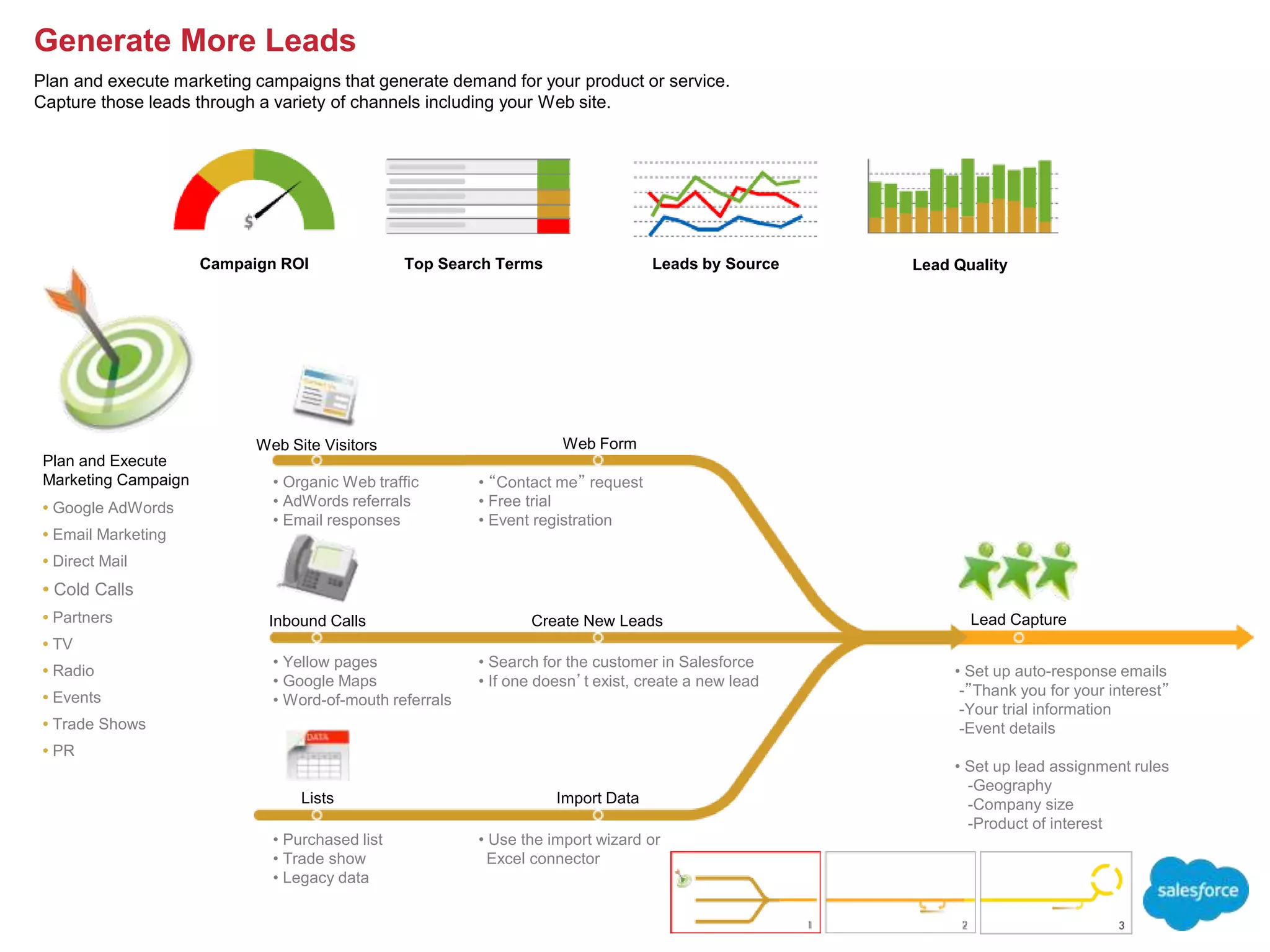
Web Form
Lead Capture
Import Data
Web Site Visitors
Inbound Calls
Lists
Plan and Execute
Marketing Campaign
• Google AdWords
• Email Marketing
• Direct Mail
• Cold Calls
• Partners
• TV
• Radio
• Events
• Trade Shows
• PR
• Set up auto-response emails
-”Thank you for your interest”
-Your trial information
-Event details
• Set up lead assignment rules
-Geography
-Company size
-Product of interest
• Use the import wizard or
Excel connector
• Purchased list
• Trade show
• Legacy data
• “Contact me” request
• Free trial
• Event registration
• Organic Web traffic
• AdWords referrals
• Email responses
• Yellow pages
• Google Maps
• Word-of-mouth referrals
Create New Leads
• Search for the customer in Salesforce
• If one doesn’t exist, create a new lead
Lead Quality
Generate More Leads
Plan and execute marketing campaigns that generate demand for your product or service.
Capture those leads through a variety of channels including your Web site.
Converted Leads by Month
Lead by Status Lead Conversion %
Qualified?
Set up different views to
manage your leads. For
example, today’s leads or
leads sorted by lead type.
Yes
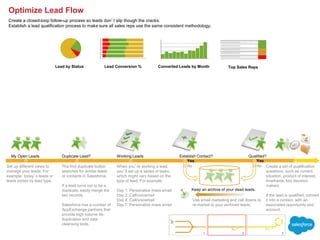
When you’re working a lead,
you’ll set up a series of tasks,
which might vary based on the
type of lead. For example:
Day 1: Personalize mass email
Day 2: Call/voicemail
Day 4: Call/voicemail
Day 7: Personalize mass email
Establish Contact?
My Open Leads Duplicate Lead? Working Leads
The find duplicate button
searches for similar leads
or contacts in Salesforce.
If a lead turns out to be a
duplicate, easily merge the
two records.
Salesforce has a number of
AppExchange partners that
provide high volume de-
duplication and data
cleansing tools.
Yes
No
Use email marketing and call downs to
re-market to your archived leads.
Keep an archive of your dead leads.
No Create a set of qualification
questions, such as current
situation, product of interest,
timeframe, key decision
makers
If the lead is qualified, convert
it into a contact, with an
associated opportunity and
account.
Top Sales Reps
Optimize Lead Flow
Create a closed-loop follow-up process so leads don’t slip though the cracks.
Establish a lead qualification process to make sure all sales reps use the same consistent methodology.
Month-to-Date Trending Closed Business by Month Top Sales Reps
Top 10 Deals
Presentation Proposal Negotiation Won
Yes
No
Open Opportunities
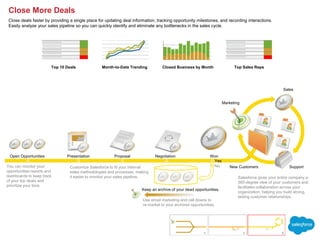
You can monitor your
opportunities reports and
dashboards to keep track
of your top deals and
prioritize your time.
Customize Salesforce to fit your internal
sales methodologies and processes, making
it easier to monitor your sales pipeline.
Use email marketing and call downs to
re-market to your archived opportunities.
Keep an archive of your dead opportunities.
Salesforce gives your entire company a
360-degree view of your customers and
facilitates collaboration across your
organization, helping you build strong,
lasting customer relationships.
Sales
Support
Marketing
New Customers
Close More Deals
Close deals faster by providing a single place for updating deal information, tracking opportunity milestones, and recording interactions.
Easily analyze your sales pipeline so you can quickly identify and eliminate any bottlenecks in the sales cycle.
Cases by Source
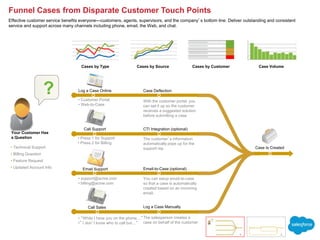
Funnel Cases from Disparate Customer Touch Points
Effective customer service benefits everyone—customers, agents, supervisors, and the company’s bottom line. Deliver outstanding and consistent
service and support across many channels including phone, email, the Web, and chat.
Case Volume
• Technical Support
• Billing Question
• Feature Request
• Updated Account Info
Cases by Customer
Call Support
Log a Case Online
Email Support
Call Sales
Case Deflection
• Customer Portal
• Web-to-Case
• Press 1 for Support
• Press 2 for Billing
• support@acme.com
• billing@acme.com
• “While I have you on the phone…”
•” I don’t know who to call but…”
CTI Integration (optional)
The customer’s information
automatically pops up for the
support rep
Log a Case Manually
The salesperson creates a
case on behalf of the customer
Email-to-Case (optional)
You can setup email-to-case
so that a case is automatically
created based on an incoming
email.
With the customer portal, you
can set it up so the customer
receives a suggested solution
before submitting a case
Case Is Created
Your Customer Has
a Question
?
1 2
Cases by Type
Top Agents Avg. Response Time
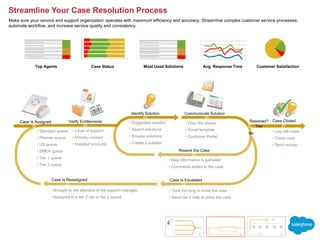
Streamline Your Case Resolution Process
Make sure your service and support organization operates with maximum efficiency and accuracy. Streamline complex customer service processes,
automate workflow, and increase service quality and consistency.
Customer Satisfaction
Case Status
Case Is Assigned Resolved?
Identify Solution Communicate Solution
Verify Entitlements
Yes
Case Closed

• Log call notes
• Close case
• Send survey
• Level of support
• Primary contact
• Installed products
Rework the Case
Case Is Escalated
• Took too long to solve the case
• Need tier 2 help to solve the case
No
Case Is Reassigned
• Brought to the attention of the support manager
• Assigned to a tier 2 rep or tier 2 queue
• New information is gathered
• Comments added to the case
• Suggested solution
• Search solutions
• Browse solutions
• Create a solution
• Over the phone
• Email template
• Customer Portal
Most Used Solutions
• Standard queue
• Premier queue
• US queue
• EMEA queue
• Tier 1 queue
• Tier 2 queue
1 2 3
Popular Ideas
Self-Service Transactions # of Posts, Comments, Votes
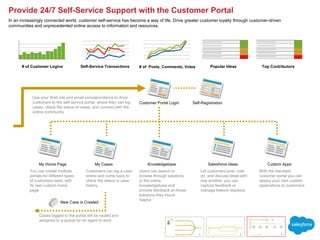
Provide 24/7 Self-Service Support with the Customer Portal
In an increasingly connected world, customer self-service has become a way of life. Drive greater customer loyalty through customer-driven
communities and unprecedented online access to information and resources.
Self-Registration
You can create multiple
portals for different types
of customers each, with
its own custom home
page
Users can search or
browse through solutions
in the online
knowledgebase and
provide feedback on those
solutions they found
helpful
Let customers post, vote
on, and discuss ideas with
one another: you can
capture feedback or
manage feature requests
With the standard
customer portal you can
deploy your own custom
applications to customers
Use your Web site and email correspondence to drive
customers to the self-service portal, where they can log
cases, check the status of cases, and connect with the
online community
# of Customer Logins
Cases logged to the portal will be routed and
assigned to a queue for an agent to work
New Case is Created
Customer Portal Login
My Cases Knowledgebase Salesforce Ideas Custom Apps
My Home Page
Customers can log a case
online and come back to
check the status or case
history
1 2 3
Top Contributors

Sales and Service Process Maps.ppt

  • 1.
    Top Search TermsLeads by Source Campaign ROI Web Form Lead Capture Import Data Web Site Visitors Inbound Calls Lists Plan and Execute Marketing Campaign • Google AdWords • Email Marketing • Direct Mail • Cold Calls • Partners • TV • Radio • Events • Trade Shows • PR • Set up auto-response emails -”Thank you for your interest” -Your trial information -Event details • Set up lead assignment rules -Geography -Company size -Product of interest • Use the import wizard or Excel connector • Purchased list • Trade show • Legacy data • “Contact me” request • Free trial • Event registration • Organic Web traffic • AdWords referrals • Email responses • Yellow pages • Google Maps • Word-of-mouth referrals Create New Leads • Search for the customer in Salesforce • If one doesn’t exist, create a new lead Lead Quality Generate More Leads Plan and execute marketing campaigns that generate demand for your product or service. Capture those leads through a variety of channels including your Web site.
  • 2.
    Converted Leads byMonth Lead by Status Lead Conversion % Qualified? Set up different views to manage your leads. For example, today’s leads or leads sorted by lead type. Yes When you’re working a lead, you’ll set up a series of tasks, which might vary based on the type of lead. For example: Day 1: Personalize mass email Day 2: Call/voicemail Day 4: Call/voicemail Day 7: Personalize mass email Establish Contact? My Open Leads Duplicate Lead? Working Leads The find duplicate button searches for similar leads or contacts in Salesforce. If a lead turns out to be a duplicate, easily merge the two records. Salesforce has a number of AppExchange partners that provide high volume de- duplication and data cleansing tools. Yes No Use email marketing and call downs to re-market to your archived leads. Keep an archive of your dead leads. No Create a set of qualification questions, such as current situation, product of interest, timeframe, key decision makers If the lead is qualified, convert it into a contact, with an associated opportunity and account. Top Sales Reps Optimize Lead Flow Create a closed-loop follow-up process so leads don’t slip though the cracks. Establish a lead qualification process to make sure all sales reps use the same consistent methodology.
  • 3.
    Month-to-Date Trending ClosedBusiness by Month Top Sales Reps Top 10 Deals Presentation Proposal Negotiation Won Yes No Open Opportunities You can monitor your opportunities reports and dashboards to keep track of your top deals and prioritize your time. Customize Salesforce to fit your internal sales methodologies and processes, making it easier to monitor your sales pipeline. Use email marketing and call downs to re-market to your archived opportunities. Keep an archive of your dead opportunities. Salesforce gives your entire company a 360-degree view of your customers and facilitates collaboration across your organization, helping you build strong, lasting customer relationships. Sales Support Marketing New Customers Close More Deals Close deals faster by providing a single place for updating deal information, tracking opportunity milestones, and recording interactions. Easily analyze your sales pipeline so you can quickly identify and eliminate any bottlenecks in the sales cycle.
  • 4.
    Cases by Source FunnelCases from Disparate Customer Touch Points Effective customer service benefits everyone—customers, agents, supervisors, and the company’s bottom line. Deliver outstanding and consistent service and support across many channels including phone, email, the Web, and chat. Case Volume • Technical Support • Billing Question • Feature Request • Updated Account Info Cases by Customer Call Support Log a Case Online Email Support Call Sales Case Deflection • Customer Portal • Web-to-Case • Press 1 for Support • Press 2 for Billing • support@acme.com • billing@acme.com • “While I have you on the phone…” •” I don’t know who to call but…” CTI Integration (optional) The customer’s information automatically pops up for the support rep Log a Case Manually The salesperson creates a case on behalf of the customer Email-to-Case (optional) You can setup email-to-case so that a case is automatically created based on an incoming email. With the customer portal, you can set it up so the customer receives a suggested solution before submitting a case Case Is Created Your Customer Has a Question ? 1 2 Cases by Type
  • 5.
    Top Agents Avg.Response Time Streamline Your Case Resolution Process Make sure your service and support organization operates with maximum efficiency and accuracy. Streamline complex customer service processes, automate workflow, and increase service quality and consistency. Customer Satisfaction Case Status Case Is Assigned Resolved? Identify Solution Communicate Solution Verify Entitlements Yes Case Closed  • Log call notes • Close case • Send survey • Level of support • Primary contact • Installed products Rework the Case Case Is Escalated • Took too long to solve the case • Need tier 2 help to solve the case No Case Is Reassigned • Brought to the attention of the support manager • Assigned to a tier 2 rep or tier 2 queue • New information is gathered • Comments added to the case • Suggested solution • Search solutions • Browse solutions • Create a solution • Over the phone • Email template • Customer Portal Most Used Solutions • Standard queue • Premier queue • US queue • EMEA queue • Tier 1 queue • Tier 2 queue 1 2 3
  • 6.
    Popular Ideas Self-Service Transactions# of Posts, Comments, Votes Provide 24/7 Self-Service Support with the Customer Portal In an increasingly connected world, customer self-service has become a way of life. Drive greater customer loyalty through customer-driven communities and unprecedented online access to information and resources. Self-Registration You can create multiple portals for different types of customers each, with its own custom home page Users can search or browse through solutions in the online knowledgebase and provide feedback on those solutions they found helpful Let customers post, vote on, and discuss ideas with one another: you can capture feedback or manage feature requests With the standard customer portal you can deploy your own custom applications to customers Use your Web site and email correspondence to drive customers to the self-service portal, where they can log cases, check the status of cases, and connect with the online community # of Customer Logins Cases logged to the portal will be routed and assigned to a queue for an agent to work New Case is Created Customer Portal Login My Cases Knowledgebase Salesforce Ideas Custom Apps My Home Page Customers can log a case online and come back to check the status or case history 1 2 3 Top Contributors