Sage ERP Solutions

Sage ERP Document Management
by Altec
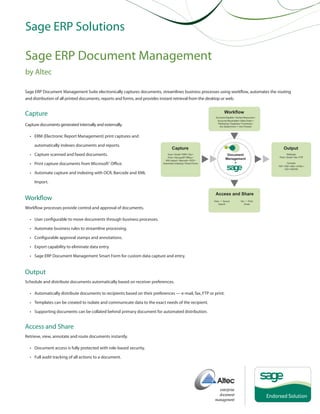
Sage ERP Document Management Suite electronically captures documents, streamlines business processes using workflow, automates the routing
and distribution of all printed documents, reports and forms, and provides instant retrieval from the desktop or web.

Capture
Capture documents generated internally and externally.
•	 ERM (Electronic Report Management) print captures and
automatically indexes documents and reports.
•	 Capture scanned and faxed documents.
•	 Print capture documents from Microsoft® Office.
•	 Automate capture and indexing with OCR, Barcode and XML
Import.

Workflow
Workflow processes provide control and approval of documents.
•	 User configurable to move documents through business processes.
•	 Automate business rules to streamline processing.
•	 Configurable approval stamps and annotations.
•	 Export capability to eliminate data entry.
•	 Sage ERP Document Management Smart Form for custom data capture and entry.

Output
Schedule and distribute documents automatically based on receiver preferences.
•	 Automatically distribute documents to recipients based on their preferences — e-mail, fax, FTP or print.
•	 Templates can be created to isolate and communicate data to the exact needs of the recipient.
•	 Supporting documents can be collated behind primary document for automated distribution.

Access and Share
Retrieve, view, annotate and route documents instantly.
•	 Document access is fully protected with role-based security.
•	 Full audit tracking of all actions to a document.
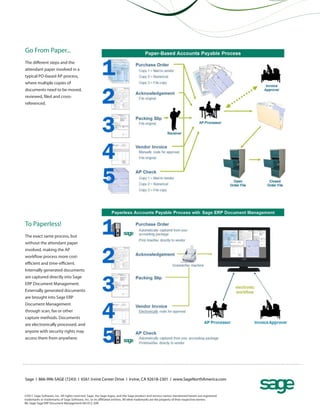
Go From Paper...
The different steps and the
attendant paper involved in a
typical PO-based AP process,
where multiple copies of
documents need to be moved,
reviewed, filed and crossreferenced.

To Paperless!
The exact same process, but
without the attendant paper
involved, making the AP
workflow process more costefficient and time-efficient.
Internally generated documents
are captured directly into Sage
ERP Document Management.
Externally generated documents
are brought into Sage ERP
Document Management
through scan, fax or other
capture methods. Documents
are electronically processed, and
anyone with security rights may
access them from anywhere.

Sage I 866-996-SAGE (7243) I 6561 Irvine Center Drive I Irvine, CA 92618-2301 I www.SageNorthAmerica.com

©2011 Sage Software, Inc. All rights reserved. Sage, the Sage logos, and the Sage product and service names mentioned herein are registered
trademarks or trademarks of Sage Software, Inc. or its affiliated entities. All other trademarks are the property of their respective owners.
ML-Sage-Sage ERP Document Management-061013_600

Sage ERP solutions DOC Management Overview (handout)

  • 1.
    Sage ERP Solutions SageERP Document Management by Altec Sage ERP Document Management Suite electronically captures documents, streamlines business processes using workflow, automates the routing and distribution of all printed documents, reports and forms, and provides instant retrieval from the desktop or web. Capture Capture documents generated internally and externally. • ERM (Electronic Report Management) print captures and automatically indexes documents and reports. • Capture scanned and faxed documents. • Print capture documents from Microsoft® Office. • Automate capture and indexing with OCR, Barcode and XML Import. Workflow Workflow processes provide control and approval of documents. • User configurable to move documents through business processes. • Automate business rules to streamline processing. • Configurable approval stamps and annotations. • Export capability to eliminate data entry. • Sage ERP Document Management Smart Form for custom data capture and entry. Output Schedule and distribute documents automatically based on receiver preferences. • Automatically distribute documents to recipients based on their preferences — e-mail, fax, FTP or print. • Templates can be created to isolate and communicate data to the exact needs of the recipient. • Supporting documents can be collated behind primary document for automated distribution. Access and Share Retrieve, view, annotate and route documents instantly. • Document access is fully protected with role-based security. • Full audit tracking of all actions to a document.
  • 2.
    Go From Paper... Thedifferent steps and the attendant paper involved in a typical PO-based AP process, where multiple copies of documents need to be moved, reviewed, filed and crossreferenced. To Paperless! The exact same process, but without the attendant paper involved, making the AP workflow process more costefficient and time-efficient. Internally generated documents are captured directly into Sage ERP Document Management. Externally generated documents are brought into Sage ERP Document Management through scan, fax or other capture methods. Documents are electronically processed, and anyone with security rights may access them from anywhere. Sage I 866-996-SAGE (7243) I 6561 Irvine Center Drive I Irvine, CA 92618-2301 I www.SageNorthAmerica.com ©2011 Sage Software, Inc. All rights reserved. Sage, the Sage logos, and the Sage product and service names mentioned herein are registered trademarks or trademarks of Sage Software, Inc. or its affiliated entities. All other trademarks are the property of their respective owners. ML-Sage-Sage ERP Document Management-061013_600