Safe-Drive™
Process
Refractometer PR-23-SD
Generation 2.1
Best Practices for PR-23-SD
IM-EN-SDGEN21-BP v. 1.03
Piping Specialties, Inc. | 800-223-1468 | www.psi-team.com
Document/Revision No. IM-EN-SDGEN21-BP 1.03   Effective: April 26, 20182
Contents
Section  1	 About this document............................................................................................................ 3
Section  2	 Before installation................................................................................................................. 3
2.1	 Installation location checklists........................................................................................ 3
2.1.1	 Checklist for steam wash (black liquor).............................................................. 3
2.1.2	 Checklist for high pressure water wash (green liquor)....................................... 4
2.2	 Component checklist (steam wash only)........................................................................ 5
2.3	 Installation equipment..................................................................................................... 6
Section  3	 Safety requirements.............................................................................................................. 7
Section  4	 Installation process............................................................................................................... 8
4.1	 Spool piece assembly..................................................................................................... 8
4.2	 Cutting installation opening for SDI2 valve..................................................................... 8
4.3	 Disassembling SDI2 valve for welding......................................................................... 10
4.4	 Welding SDI2 valve in place..........................................................................................11
4.5	 Reassembling SDI2 valve............................................................................................. 12
4.5.1	 SDI2 wash nozzle upgrade............................................................................... 15
4.6	 Installing wash systems................................................................................................ 15
4.6.1	 Steam prism wash system................................................................................ 15
4.6.2	 High pressure water prism wash system.......................................................... 17
4.6.3	 High pressure water wash with a pump............................................................ 19
4.7	 Before inserting and removing PR-23-SD sensor........................................................ 21
4.8	 Inserting sensor............................................................................................................ 22
4.9	 Box flushing (steam wash systems only)...................................................................... 25
4.10	 Removing sensor.......................................................................................................... 26
4.11	 Removing wash nozzle................................................................................................. 29
4.12	 Inserting wash nozzle................................................................................................... 30
4.13	 Blinding the SD system................................................................................................. 32
4.14	 Installing Indicating transmitter DTR............................................................................ 32
Section  5	 Commissioning SD sensor system................................................................................... 35
5.1	 Prism wash test............................................................................................................. 37
5.2	 Calibration check.......................................................................................................... 37
Section  6	 Operating and monitoring SD sensor system................................................................. 38
6.1	 Preventive maintenance plan (PMP)............................................................................ 38
6.2	 Check valve maintenance............................................................................................. 39
6.3	 Resetting SD sensor system........................................................................................ 40
Section  7	Appendices.......................................................................................................................... 40
Piping Specialties, Inc. | 800-223-1468 | www.psi-team.com
© Copyright K-Patents 2018. All rights reserved. 3
Safe-Drive™
Process Refractometer
PR-23-SD Generation 2.1
Best Practices
1	 About this document
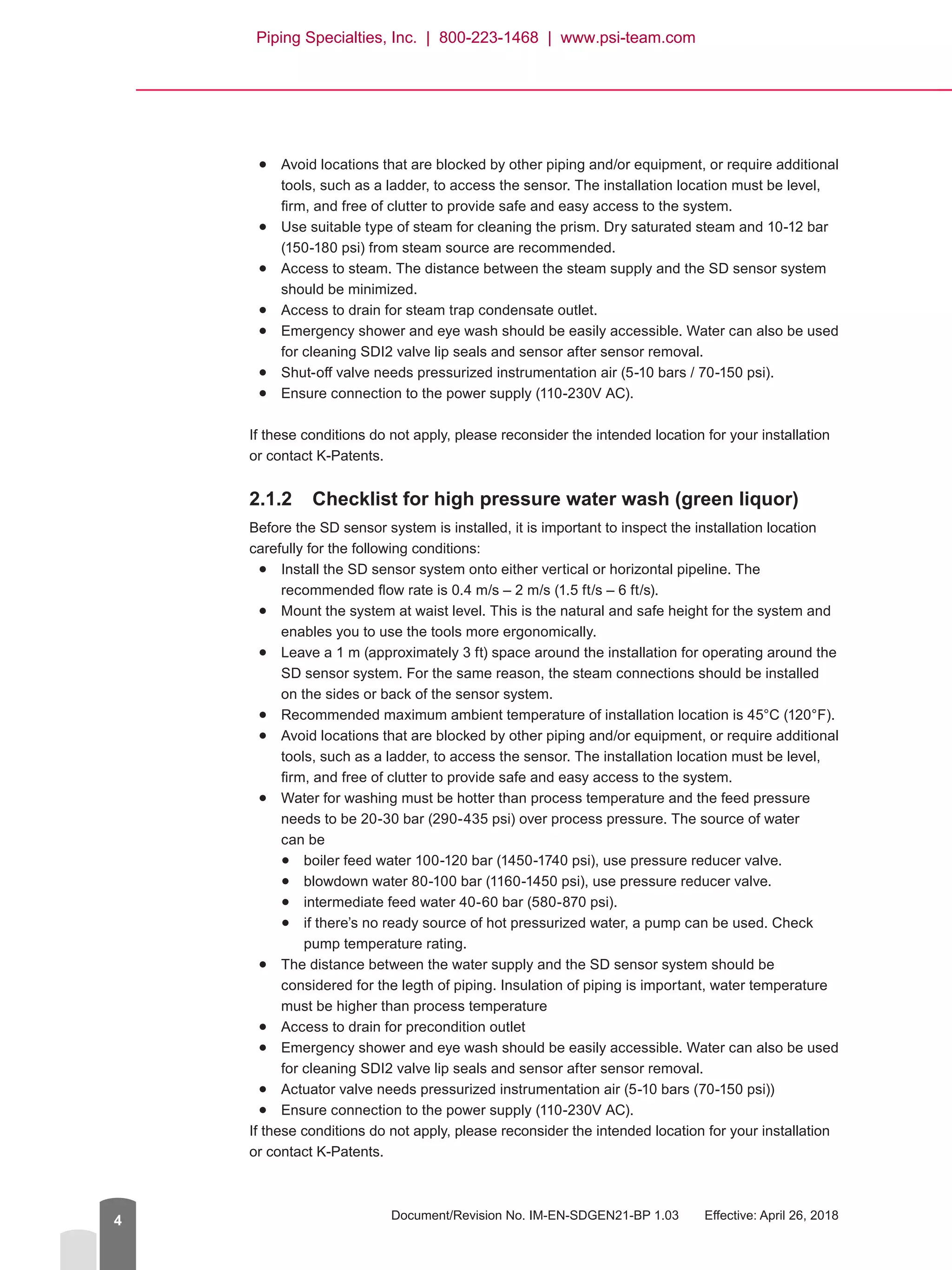
This document is intended for individuals
installing, commissioning, operating, and/
or servicing the Safe-Drive™
Process
Refractometer PR-23-SD, generation 2.1
model. The purpose of this document
is to provide a quick guide for the
abovementioned tasks in the form of
K-Patents recommended best practices.
This document is intended for PR-23-
SD applications that have a steam wash system (typical application for black liquor) and
applications that have high pressure water wash system (typical application for green liquor).
NOTE: These instructions are for quick reference only. For more thorough guidance, please
refer to K-Patents user manual and documentation.
2	 Before installation
2.1	 Installation location checklists
2.1.1	 Checklist for steam wash (black liquor)
Before the SD sensor system is installed, it is important to inspect the installation location
carefully for the following conditions:
●● Install the SD sensor system onto either vertical or horizontal pipeline. The
recommended flow rate is 0.4 m/s – 2 m/s (1.5 ft/s – 6 ft/s).
●● Mount the system at waist level. This is the natural and safe height for the system and
enables you to use the tools more ergonomically.
●● Leave a 1 m (approximately 3 ft) space around the installation for operating around the
SD sensor system. For the same reason, the steam connections should be installed
on the sides or back of the sensor system.
●● Recommended maximum ambient temperature of installation location is 45°C (120°F).
Piping Specialties, Inc. | 800-223-1468 | www.psi-team.com
Document/Revision No. IM-EN-SDGEN21-BP 1.03   Effective: April 26, 20184
●
● Avoid locations that are blocked by other piping and/or equipment, or require additional
tools, such as a ladder, to access the sensor. The installation location must be level,
firm, and free of clutter to provide safe and easy access to the system.●
● Use suitable type of steam for cleaning the prism. Dry saturated steam and 10-12 bar
(150-180 psi) from steam source are recommended.●
● Access to steam. The distance between the steam supply and the SD sensor system
should be minimized.●
● Access to drain for steam trap condensate outlet.●
● Emergency shower and eye wash should be easily accessible. Water can also be used
for cleaning SDI2 valve lip seals and sensor after sensor removal.●
● Shut-off valve needs pressurized instrumentation air (5-10 bars / 70-150 psi).●
● Ensure connection to the power supply (110-230V AC).
If these conditions do not apply, please reconsider the intended location for your installation
or contact K-Patents.
2.1.2	 Checklist for high pressure water wash (green liquor)
Before the SD sensor system is installed, it is important to inspect the installation location
carefully for the following conditions:●
● Install the SD sensor system onto either vertical or horizontal pipeline. The
recommended flow rate is 0.4 m/s – 2 m/s (1.5 ft/s – 6 ft/s).●
● Mount the system at waist level. This is the natural and safe height for the system and
enables you to use the tools more ergonomically.●
● Leave a 1 m (approximately 3 ft) space around the installation for operating around the
SD sensor system. For the same reason, the steam connections should be installed
on the sides or back of the sensor system.●
● Recommended maximum ambient temperature of installation location is 45°C (120°F).●
● Avoid locations that are blocked by other piping and/or equipment, or require additional
tools, such as a ladder, to access the sensor. The installation location must be level,
firm, and free of clutter to provide safe and easy access to the system.●
● Water for washing must be hotter than process temperature and the feed pressure
needs to be 20-30 bar (290-435 psi) over process pressure. The source of water
can be●
● boiler feed water 100-120 bar (1450-1740 psi), use pressure reducer valve.●
● blowdown water 80-100 bar (1160-1450 psi), use pressure reducer valve.●
● intermediate feed water 40-60 bar (580-870 psi).●
● if there’s no ready source of hot pressurized water, a pump can be used. Check
pump temperature rating.●
● The distance between the water supply and the SD sensor system should be
considered for the legth of piping. Insulation of piping is important, water temperature
must be higher than process temperature●
● Access to drain for precondition outlet●
● Emergency shower and eye wash should be easily accessible. Water can also be used
for cleaning SDI2 valve lip seals and sensor after sensor removal.●
● Actuator valve needs pressurized instrumentation air (5-10 bars (70-150 psi))●
● Ensure connection to the power supply (110-230V AC).
If these conditions do not apply, please reconsider the intended location for your installation
or contact K-Patents.
Piping Specialties, Inc. | 800-223-1468 | www.psi-team.com
Safe-Drive™
Process Refractometer PR-23-SD Best Practices, Generation 2.1
© Copyright K-Patents 2018. All rights reserved. 5
Warning! Hard-scale removal in green liquor handing systems: Make sure that the
sensor and wash nozzle materials are suitable for the hard-scale removal chemi-
cals.
2.2	 Component checklist (steam wash only)
Before starting installation, make sure you have all the tools and components listed below.
NOTE: Components 4 and 5 are connected by union nipple or piping not included in
the delivery.
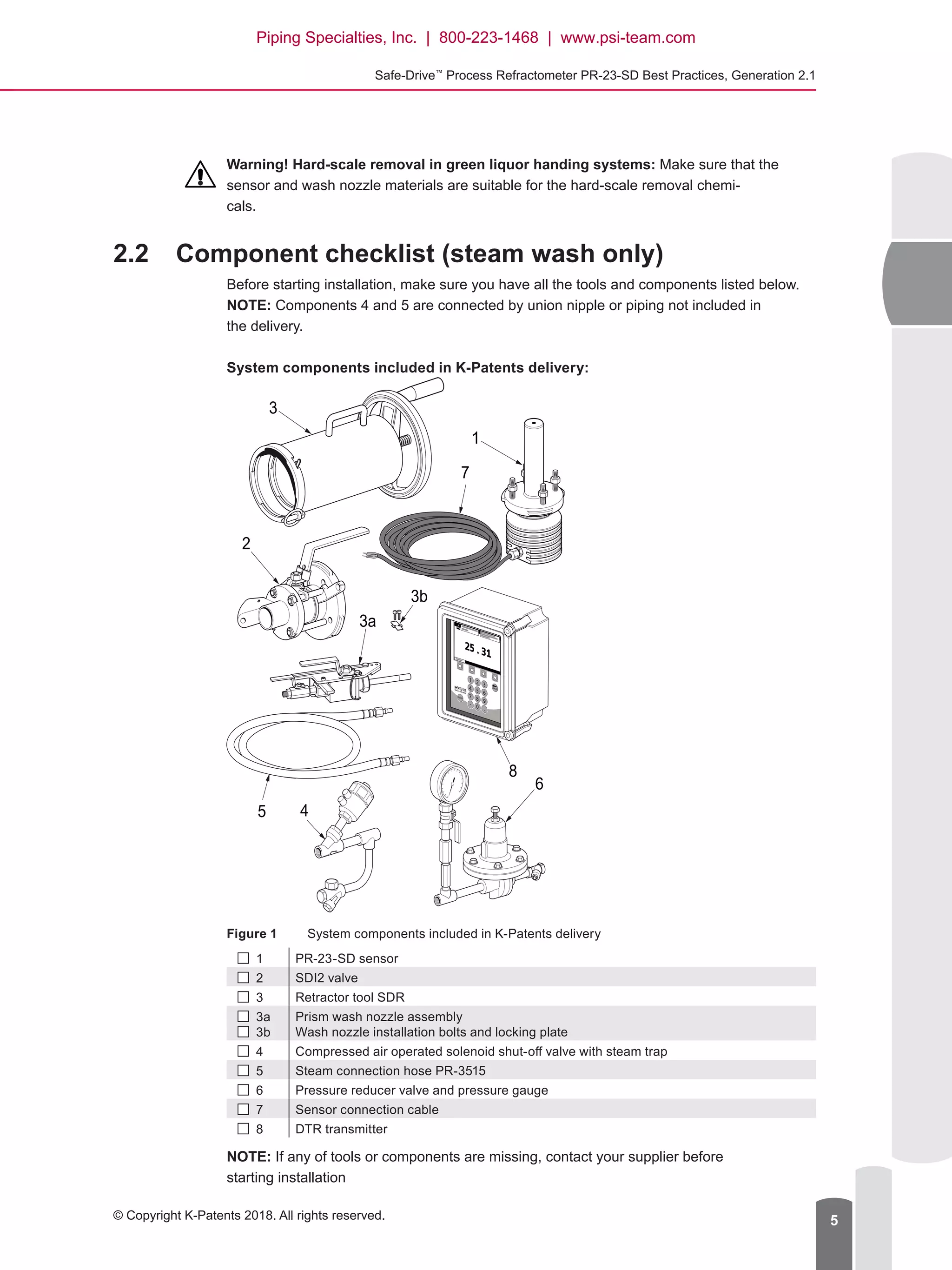
System components included in K-Patents delivery:
1 2 3
4 5 6
7 8 9
- 0 .
BACK
ENTER
1
7
5
3b
8
4
6
3
2
3a
Figure 1	 System components included in K-Patents delivery
 1 PR-23-SD sensor
 2 SDI2 valve
 3 Retractor tool SDR
 3a
  3b
Prism wash nozzle assembly
Wash nozzle installation bolts and locking plate
 4 Compressed air operated solenoid shut-off valve with steam trap
 5 Steam connection hose PR-3515
  6 Pressure reducer valve and pressure gauge
 7 Sensor connection cable
  8 DTR transmitter
NOTE: If any of tools or components are missing, contact your supplier before
starting installation
Piping Specialties, Inc. | 800-223-1468 | www.psi-team.com
Document/Revision No. IM-EN-SDGEN21-BP 1.03   Effective: April 26, 20186
2.3	 Installation equipment
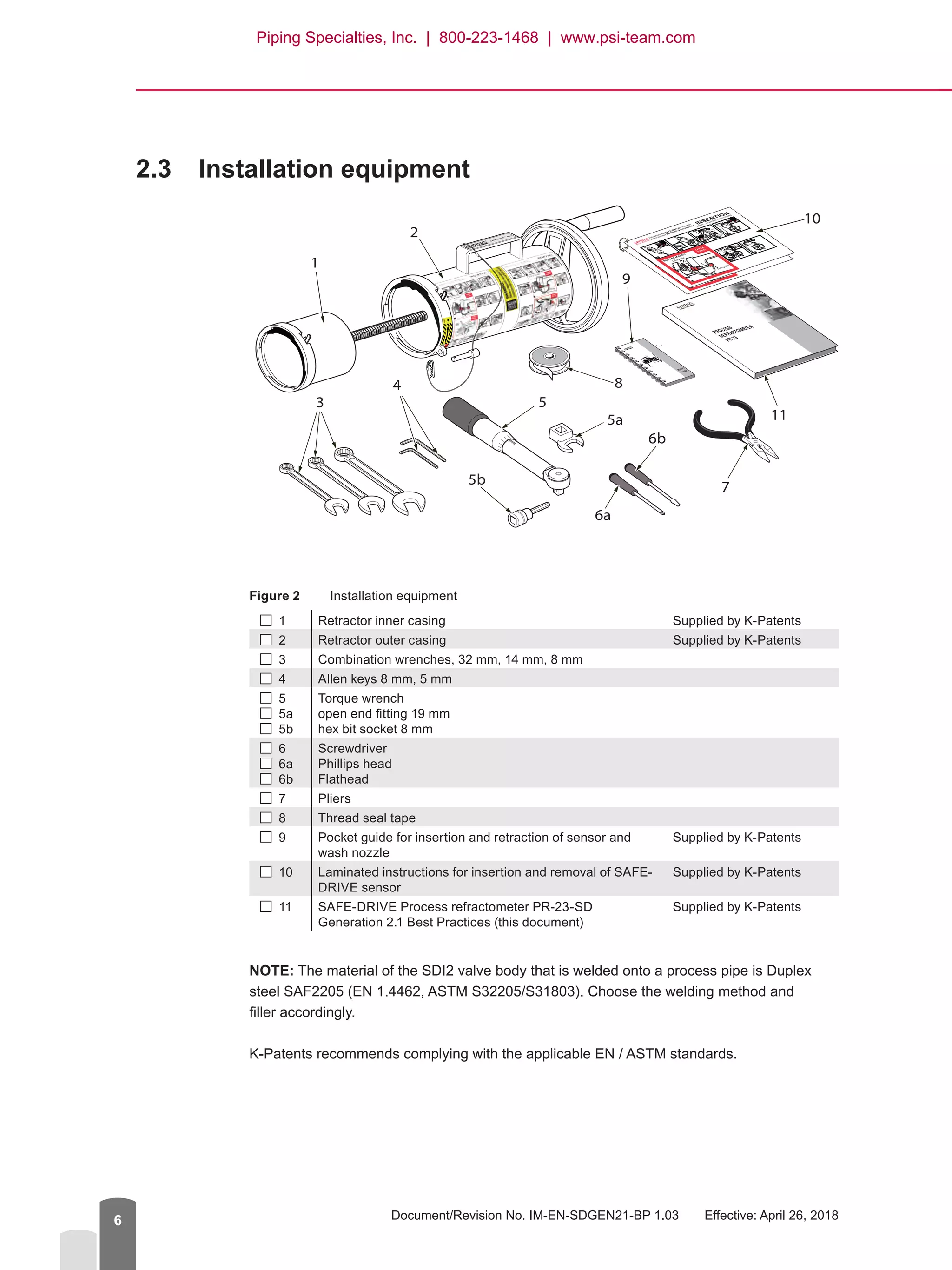
Figure 2	 Installation equipment
 1 Retractor inner casing Supplied by K-Patents
 2 Retractor outer casing Supplied by K-Patents
 3 Combination wrenches, 32 mm, 14 mm, 8 mm
 4 Allen keys 8 mm, 5 mm
 5
 5a
  5b
Torque wrench
open end fitting 19 mm
hex bit socket 8 mm
  6
  6a
  6b
Screwdriver
Phillips head
Flathead
 7 Pliers
  8 Thread seal tape
 9 Pocket guide for insertion and retraction of sensor and
wash nozzle
Supplied by K-Patents
 10 Laminated instructions for insertion and removal of SAFE-
DRIVE sensor
Supplied by K-Patents
 11 SAFE-DRIVE Process refractometer PR-23-SD
Generation 2.1 Best Practices (this document)
Supplied by K-Patents
NOTE: The material of the SDI2 valve body that is welded onto a process pipe is Duplex
steel SAF2205 (EN 1.4462, ASTM S32205/S31803). Choose the welding method and
filler accordingly.
K-Patents recommends complying with the applicable EN / ASTM standards.
PROCESS
REFRACTOMETER
PR-23
POCKET
GUIDE
SAFE-DR
IVE
TM G2.1
®
1
2
3
4
5
6b
6a
7
8
5b
10
115a
9
Piping Specialties, Inc. | 800-223-1468 | www.psi-team.com
Safe-Drive™
Process Refractometer PR-23-SD Best Practices, Generation 2.1
© Copyright K-Patents 2018. All rights reserved. 7
3	 Safety requirements
These safety requirements must be followed at all times when installing, operating, or
servicing PR-23-SD sensor. These are the minimum safety requirements – your company
may require additional PPE (personal protective equipment).
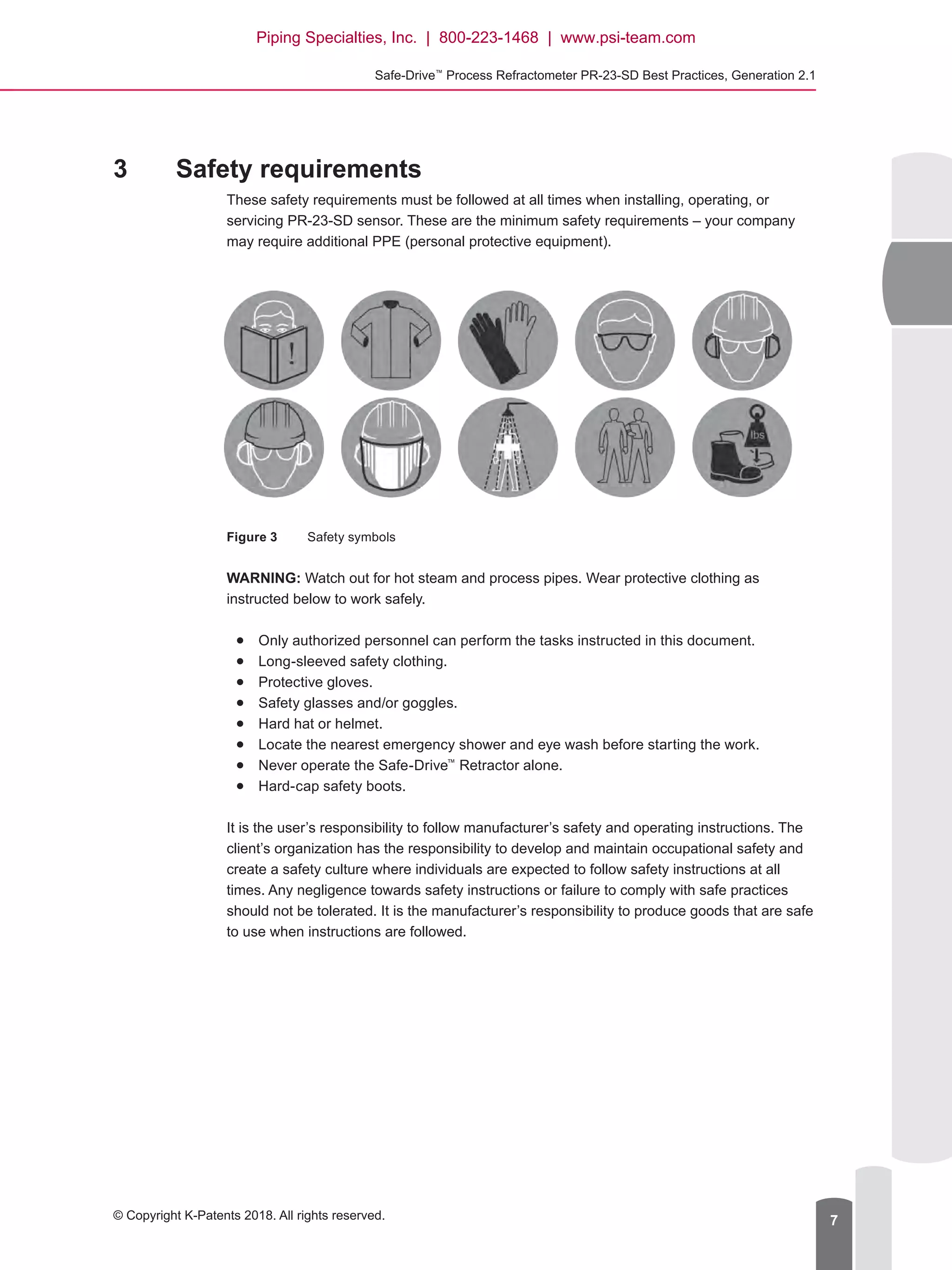
Figure 3	 Safety symbols
WARNING: Watch out for hot steam and process pipes. Wear protective clothing as
instructed below to work safely.●
● Only authorized personnel can perform the tasks instructed in this document.●
● Long-sleeved safety clothing.●
● Protective gloves.●
● Safety glasses and/or goggles.●
● Hard hat or helmet.●
● Locate the nearest emergency shower and eye wash before starting the work.●
● Never operate the Safe-Drive™
Retractor alone.●
● Hard-cap safety boots.
It is the user’s responsibility to follow manufacturer’s safety and operating instructions. The
client’s organization has the responsibility to develop and maintain occupational safety and
create a safety culture where individuals are expected to follow safety instructions at all
times. Any negligence towards safety instructions or failure to comply with safe practices
should not be tolerated. It is the manufacturer’s responsibility to produce goods that are safe
to use when instructions are followed.
Piping Specialties, Inc. | 800-223-1468 | www.psi-team.com
Document/Revision No. IM-EN-SDGEN21-BP 1.03   Effective: April 26, 20188
4	 Installation process
For more thorough instructions, please refer to K-Patents user documentation or visit the
K-Patents website to see the instructional video (www.kpatents.com, PR-23-SD Safe-Drive™
Operation Guide Video).
Installation of the SD sensor system consists of●
● Cutting pipe opening for SDI2 isolation valve.●
● Welding and assembling the SDI2 valve onto the processing piping.●
● Installing the prism wash system.●
● Installing the DTR transmitter.●
● Installing the PR-23-SD sensor.
4.1	 Spool piece assembly
If the SDI2 valve was supplied pre-welded and assembled onto a pipe spool piece for
integration in existing piping on site, please skip ahead to installing prism wash.
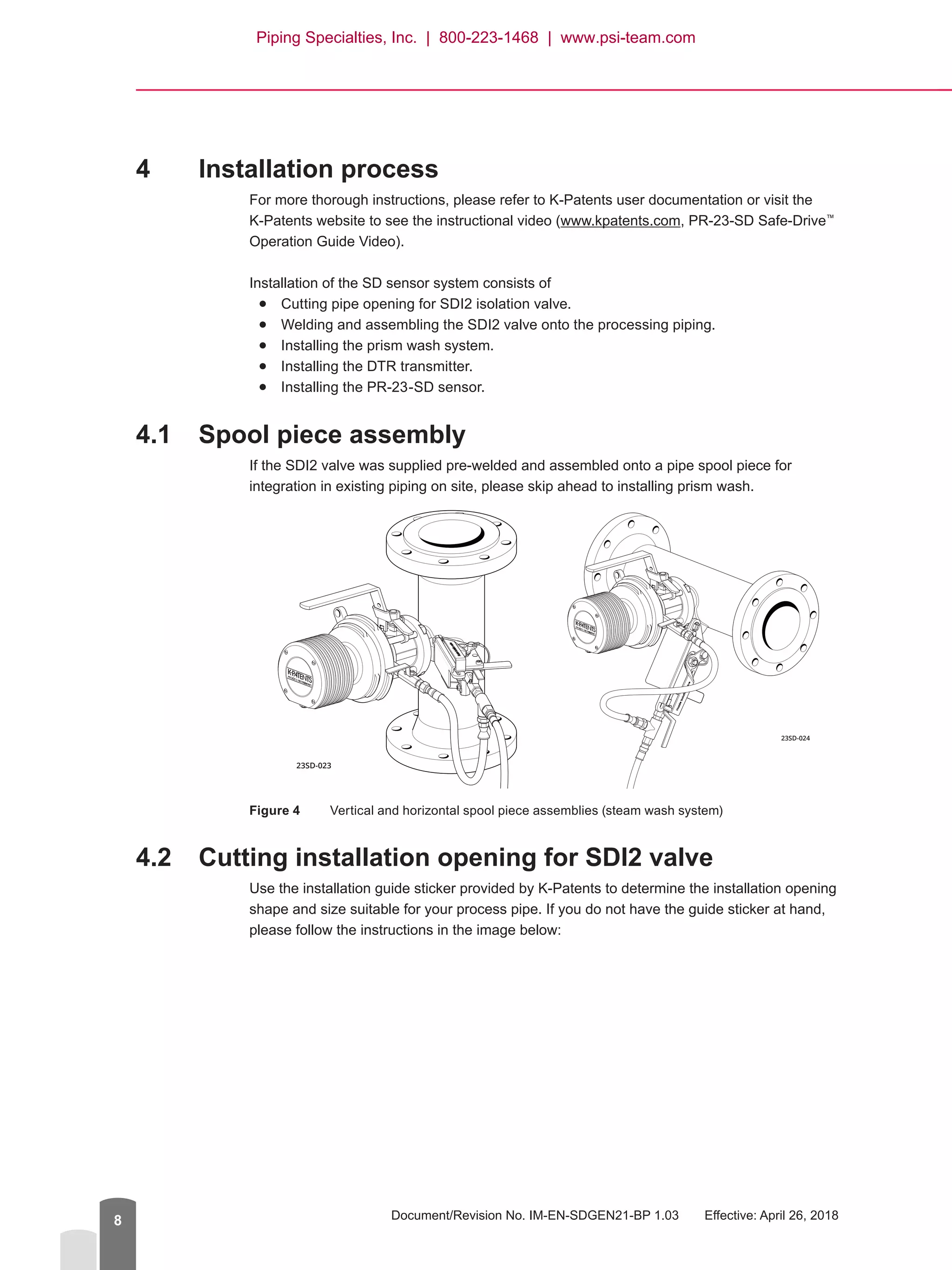
Figure 4	 Vertical and horizontal spool piece assemblies (steam wash system)
4.2	 Cutting installation opening for SDI2 valve
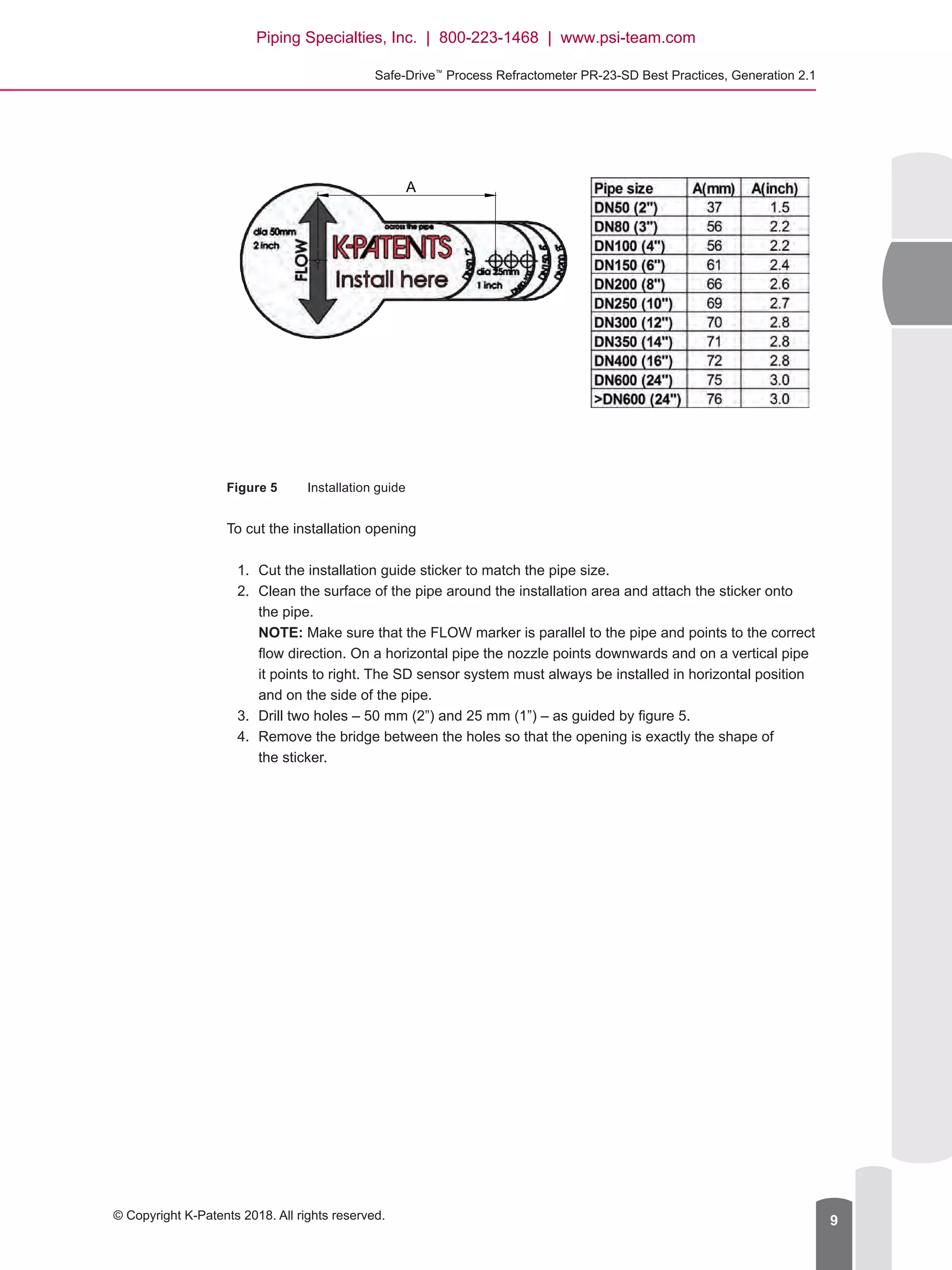
Use the installation guide sticker provided by K-Patents to determine the installation opening
shape and size suitable for your process pipe. If you do not have the guide sticker at hand,
please follow the instructions in the image below:
23SD-023
23SD-024
Piping Specialties, Inc. | 800-223-1468 | www.psi-team.com
Safe-Drive™
Process Refractometer PR-23-SD Best Practices, Generation 2.1
© Copyright K-Patents 2018. All rights reserved. 9
A
Figure 5	 Installation guide
To cut the installation opening
1.	 Cut the installation guide sticker to match the pipe size.
2.	 Clean the surface of the pipe around the installation area and attach the sticker onto
the pipe.
NOTE: Make sure that the FLOW marker is parallel to the pipe and points to the correct
flow direction. On a horizontal pipe the nozzle points downwards and on a vertical pipe
it points to right. The SD sensor system must always be installed in horizontal position
and on the side of the pipe.
3.	 Drill two holes – 50 mm (2”) and 25 mm (1”) – as guided by figure 5.
4.	 Remove the bridge between the holes so that the opening is exactly the shape of
the sticker.
Piping Specialties, Inc. | 800-223-1468 | www.psi-team.com
Document/Revision No. IM-EN-SDGEN21-BP 1.03   Effective: April 26, 201810
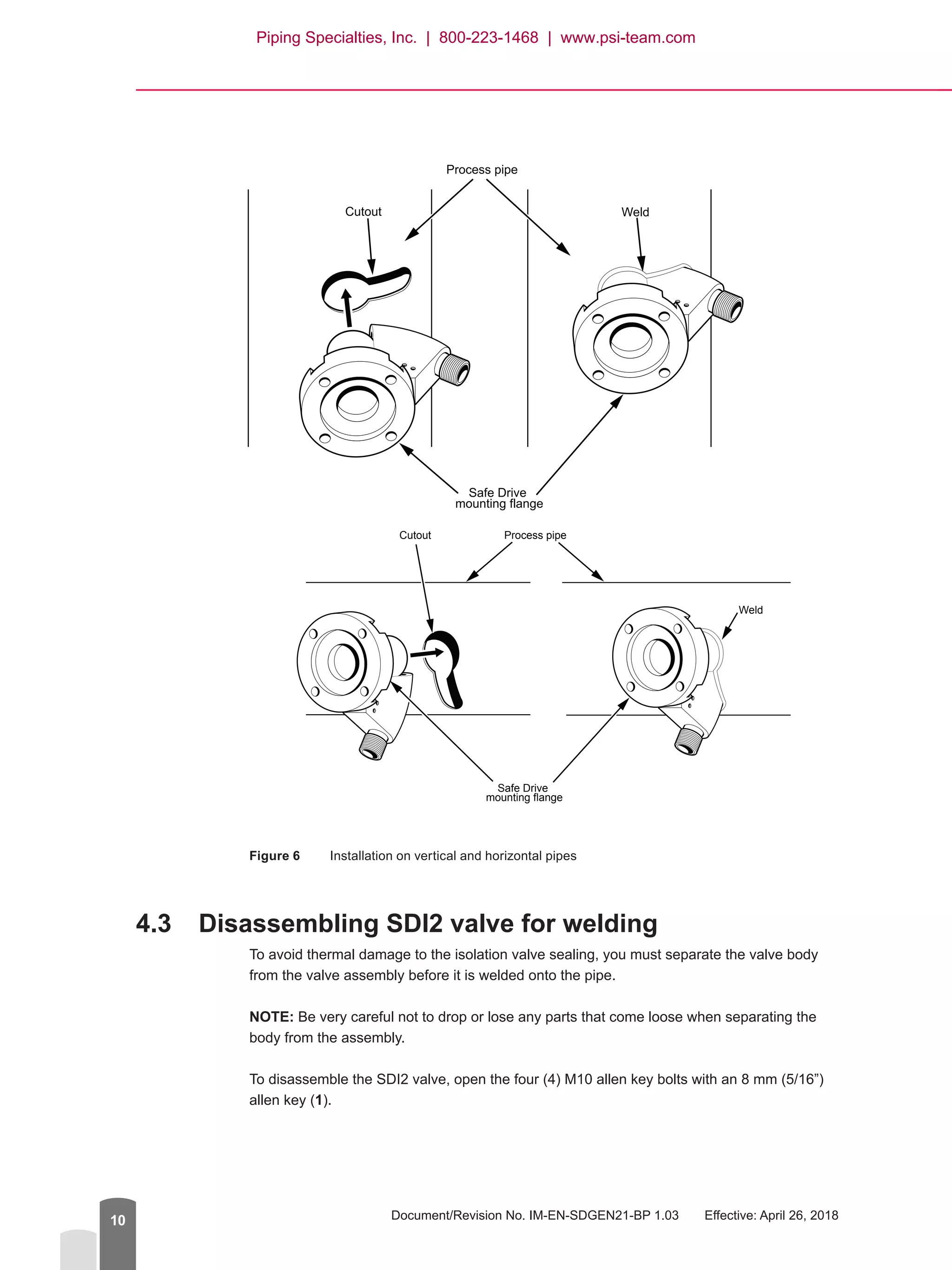
WeldCutout
Safe Drive
mounting flange
Process pipe
Weld
Cutout
Safe Drive
mounting flange
Process pipe
Figure 6	 Installation on vertical and horizontal pipes
4.3	 Disassembling SDI2 valve for welding
To avoid thermal damage to the isolation valve sealing, you must separate the valve body
from the valve assembly before it is welded onto the pipe.
NOTE: Be very careful not to drop or lose any parts that come loose when separating the
body from the assembly.
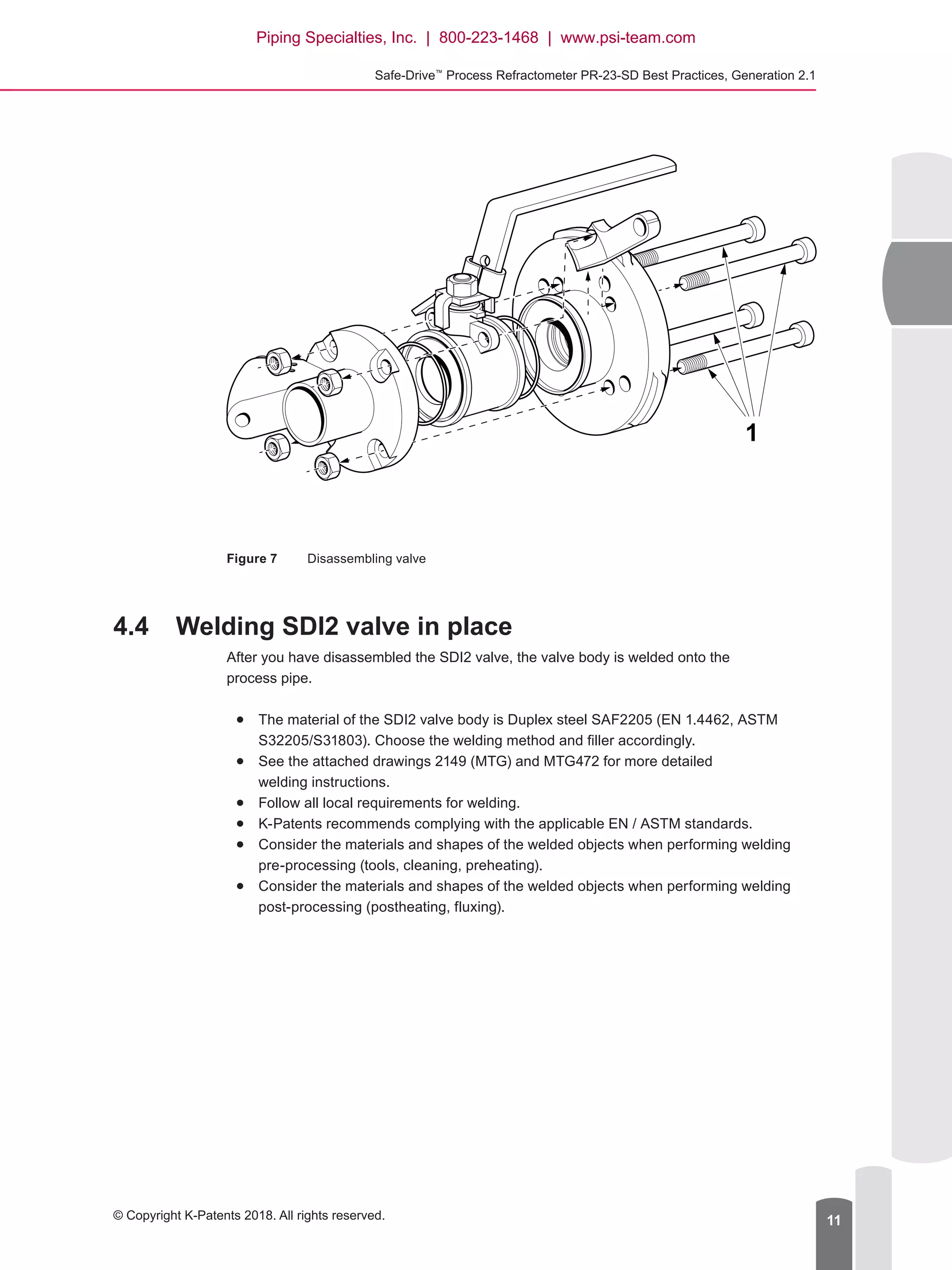
To disassemble the SDI2 valve, open the four (4) M10 allen key bolts with an 8 mm (5/16”)
allen key (1).
Piping Specialties, Inc. | 800-223-1468 | www.psi-team.com
Safe-Drive™
Process Refractometer PR-23-SD Best Practices, Generation 2.1
© Copyright K-Patents 2018. All rights reserved. 11
Figure 7	 Disassembling valve
4.4	 Welding SDI2 valve in place
After you have disassembled the SDI2 valve, the valve body is welded onto the
process pipe.
●● The material of the SDI2 valve body is Duplex steel SAF2205 (EN 1.4462, ASTM
S32205/S31803). Choose the welding method and filler accordingly.
●● See the attached drawings 2149 (MTG) and MTG472 for more detailed
welding instructions.
●● Follow all local requirements for welding.
●● K-Patents recommends complying with the applicable EN / ASTM standards.
●● 	Consider the materials and shapes of the welded objects when performing welding
pre-processing (tools, cleaning, preheating).
●● 	Consider the materials and shapes of the welded objects when performing welding
post-processing (postheating, fluxing).
1
Piping Specialties, Inc. | 800-223-1468 | www.psi-team.com
Document/Revision No. IM-EN-SDGEN21-BP 1.03   Effective: April 26, 201812
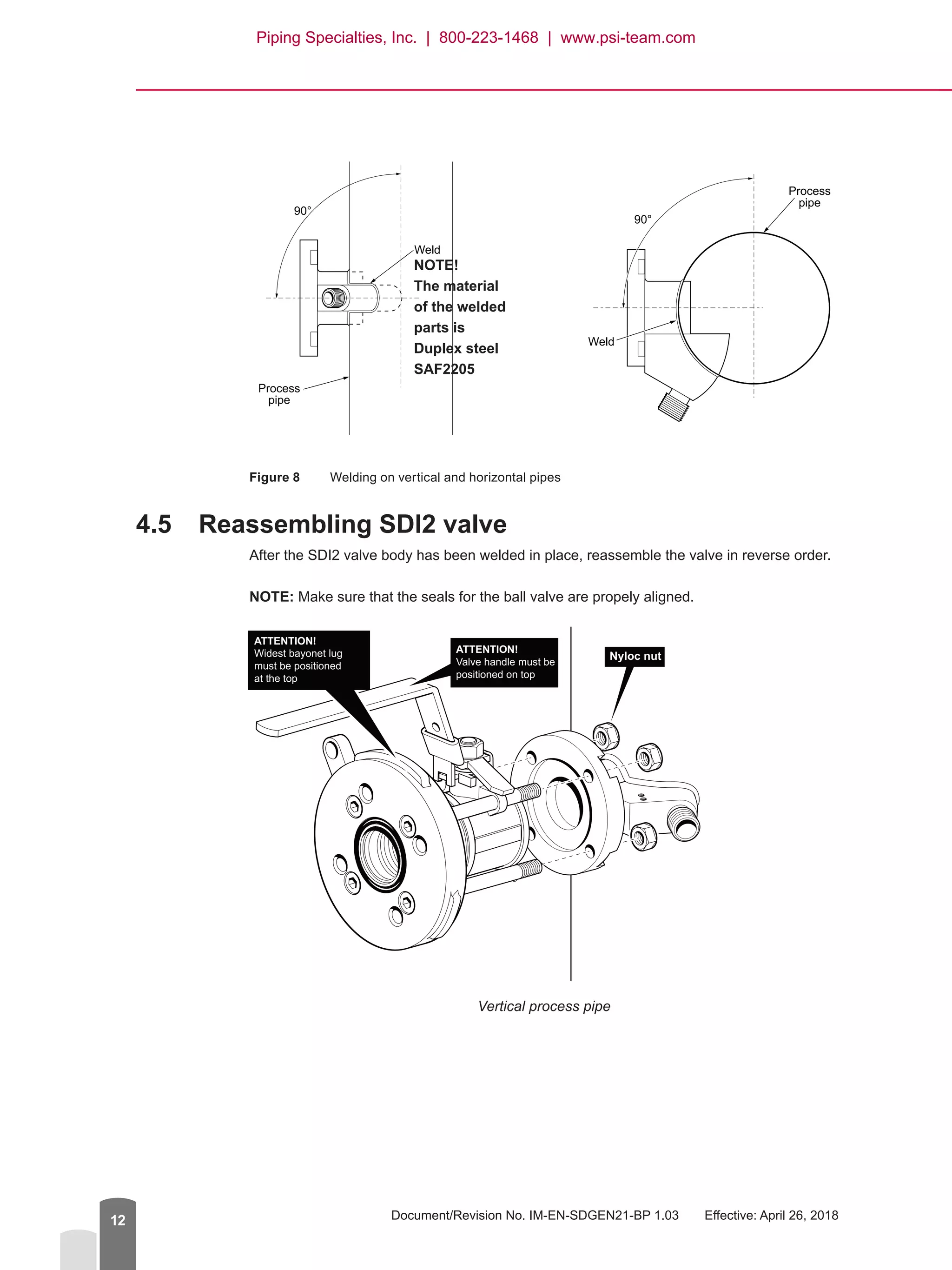
Figure 8	 Welding on vertical and horizontal pipes
4.5	 Reassembling SDI2 valve
After the SDI2 valve body has been welded in place, reassemble the valve in reverse order.
NOTE: Make sure that the seals for the ball valve are propely aligned.
ATTENTION!
Widest bayonet lug
must be positioned
at the top
ATTENTION!
Valve handle must be
positioned on top
Nyloc nut
Vertical process pipe
90°
Weld
Process
pipe
90°
Weld
Process
pipe
NOTE!
The material
of the welded
parts is
Duplex steel
SAF2205
Piping Specialties, Inc. | 800-223-1468 | www.psi-team.com
Safe-Drive™
Process Refractometer PR-23-SD Best Practices, Generation 2.1
© Copyright K-Patents 2018. All rights reserved. 13
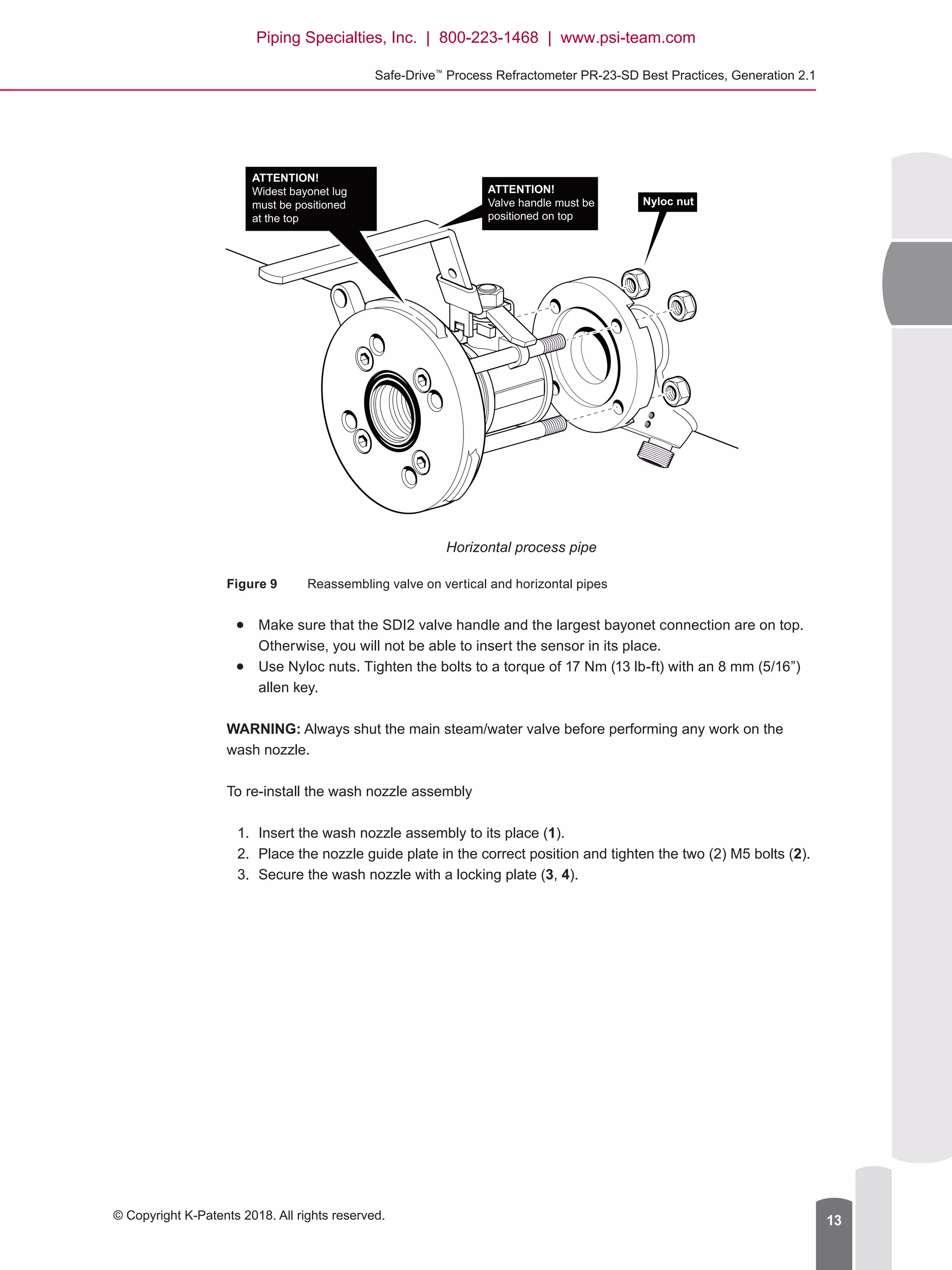
ATTENTION!
Widest bayonet lug
must be positioned
at the top
ATTENTION!
Valve handle must be
positioned on top
Nyloc nut
Horizontal process pipe
Figure 9	 Reassembling valve on vertical and horizontal pipes
●● Make sure that the SDI2 valve handle and the largest bayonet connection are on top.
Otherwise, you will not be able to insert the sensor in its place.
●● Use Nyloc nuts. Tighten the bolts to a torque of 17 Nm (13 lb-ft) with an 8 mm (5/16”)
allen key.
WARNING: Always shut the main steam/water valve before performing any work on the
wash nozzle.
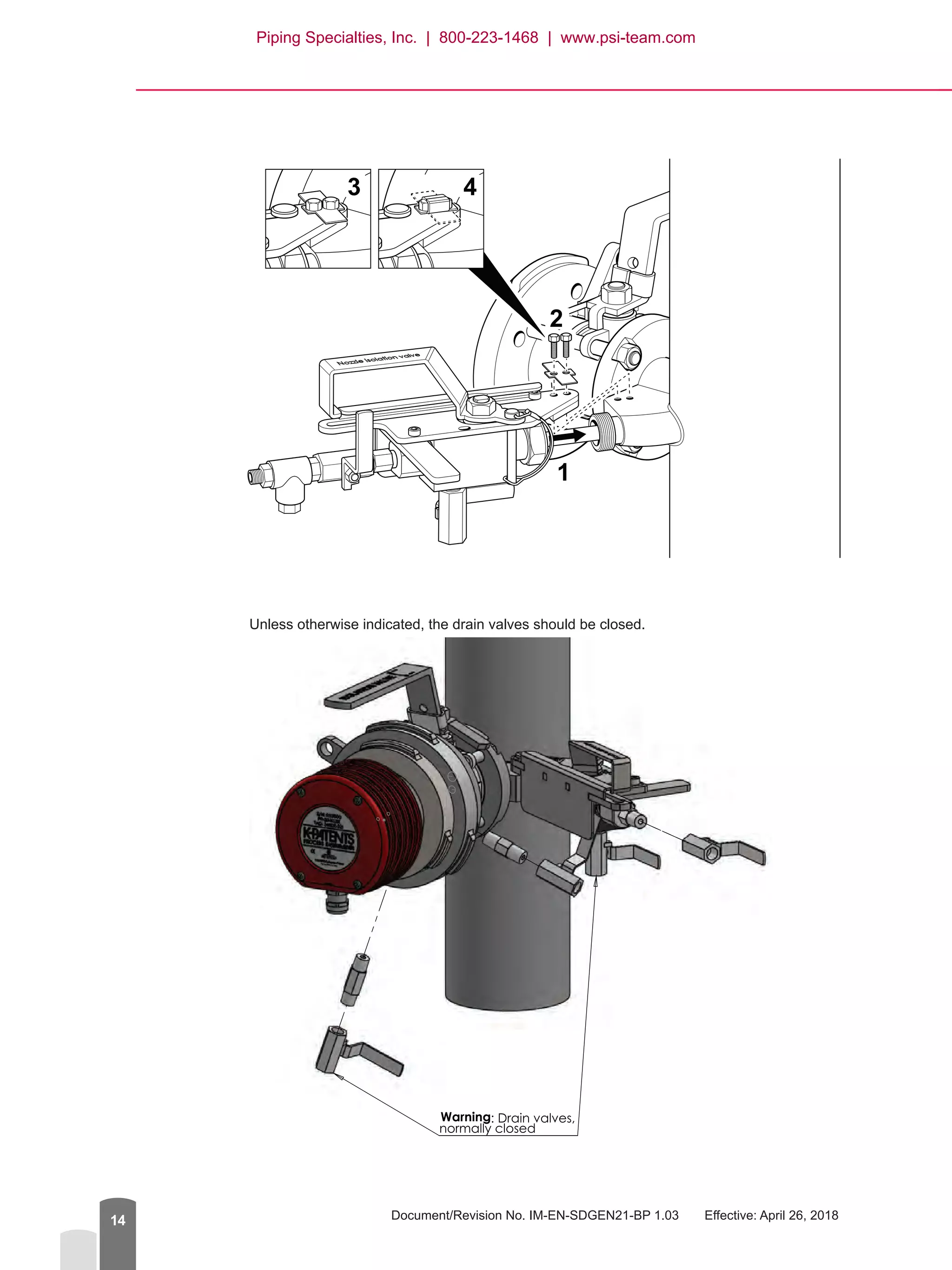
To re-install the wash nozzle assembly
1.	 Insert the wash nozzle assembly to its place (1).
2.	 Place the nozzle guide plate in the correct position and tighten the two (2) M5 bolts (2).
3.	 Secure the wash nozzle with a locking plate (3, 4).
Piping Specialties, Inc. | 800-223-1468 | www.psi-team.com
Document/Revision No. IM-EN-SDGEN21-BP 1.03   Effective: April 26, 201814
1
2
3 4
Unless otherwise indicated, the drain valves should be closed.
Piping Specialties, Inc. | 800-223-1468 | www.psi-team.com
Safe-Drive™
Process Refractometer PR-23-SD Best Practices, Generation 2.1
© Copyright K-Patents 2018. All rights reserved. 15
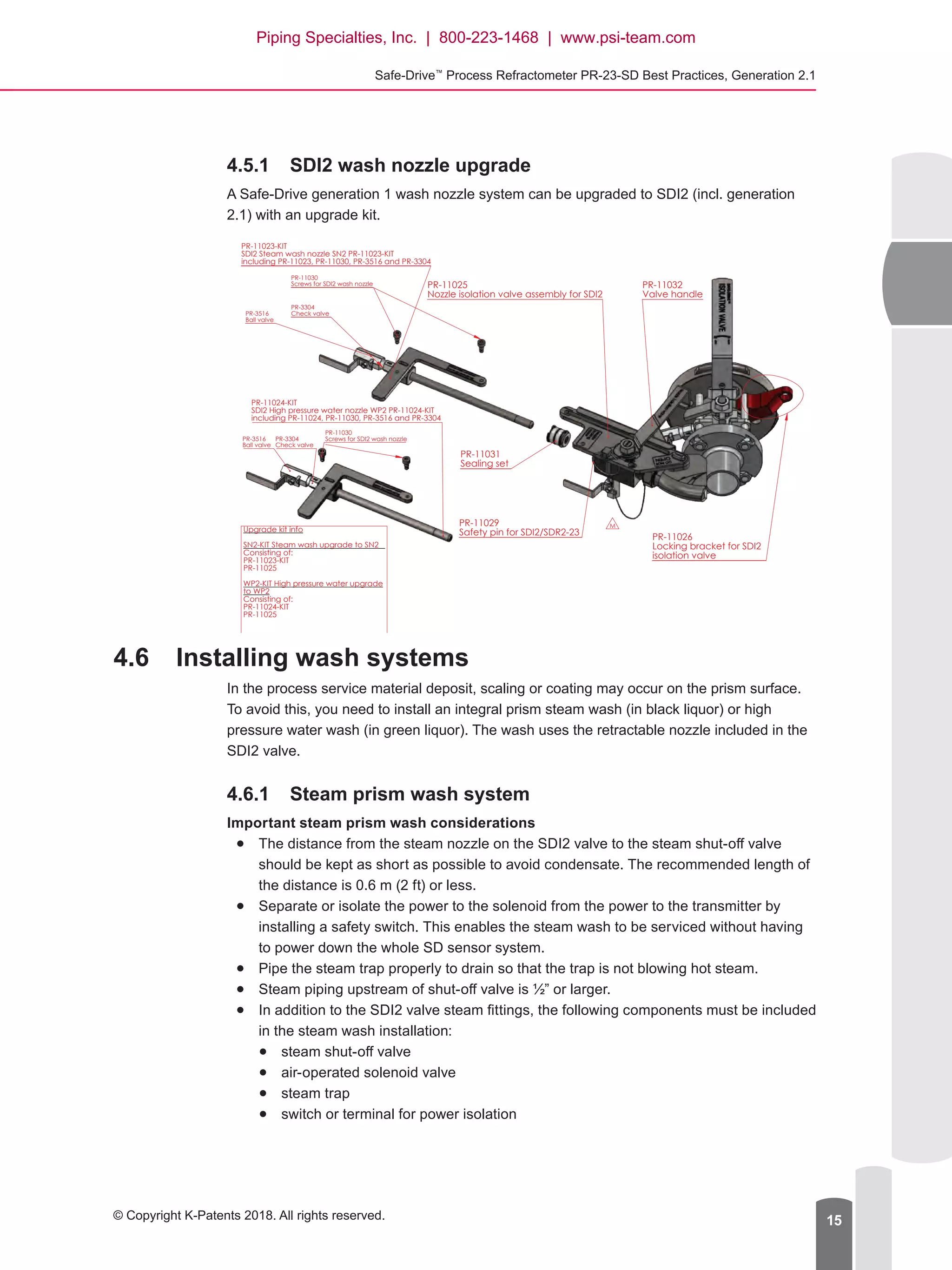
4.5.1	 SDI2 wash nozzle upgrade
A Safe-Drive generation 1 wash nozzle system can be upgraded to SDI2 (incl. generation
2.1) with an upgrade kit.
PR-11025
Nozzle isolation valve assembly for SDI2
PR-11023-KIT
SDI2 Steam wash nozzle SN2 PR-11023-KIT
including PR-11023, PR-11030, PR-3516 and PR-3304
PR-11026
Locking bracket for SDI2
isolation valve
PR-11032
Valve handle
PR-11029
Safety pin for SDI2/SDR2-23
PR-11030
Screws for SDI2 wash nozzle
PR-3304
Check valvePR-3516
Ball valve
M
PR-11031
Sealing set
PR-11024-KIT
SDI2 High pressure water nozzle WP2 PR-11024-KIT
including PR-11024, PR-11030, PR-3516 and PR-3304
PR-11030
Screws for SDI2 wash nozzlePR-3304
Check valve
PR-3516
Ball valve
C Structure updated 03/09/2014 TL
Sparepart kit structures updated TL17/09/2014D
Upgrade kit info
SN2-KIT Steam wash upgrade to SN2
Consisting of:
PR-11023-KIT
PR-11025
WP2-KIT High pressure water upgrade
to WP2
Consisting of:
PR-11024-KIT
PR-11025
IA7/11/2014Assembly updatedF
IA20/02/2015PR-11030 Description addedG
H Upgrade kit info added 05.03.2015 IA
IA26.05.2015WP2-KIT info updatedI
4.6	 Installing wash systems
In the process service material deposit, scaling or coating may occur on the prism surface.
To avoid this, you need to install an integral prism steam wash (in black liquor) or high
pressure water wash (in green liquor). The wash uses the retractable nozzle included in the
SDI2 valve.
4.6.1	 Steam prism wash system
Important steam prism wash considerations
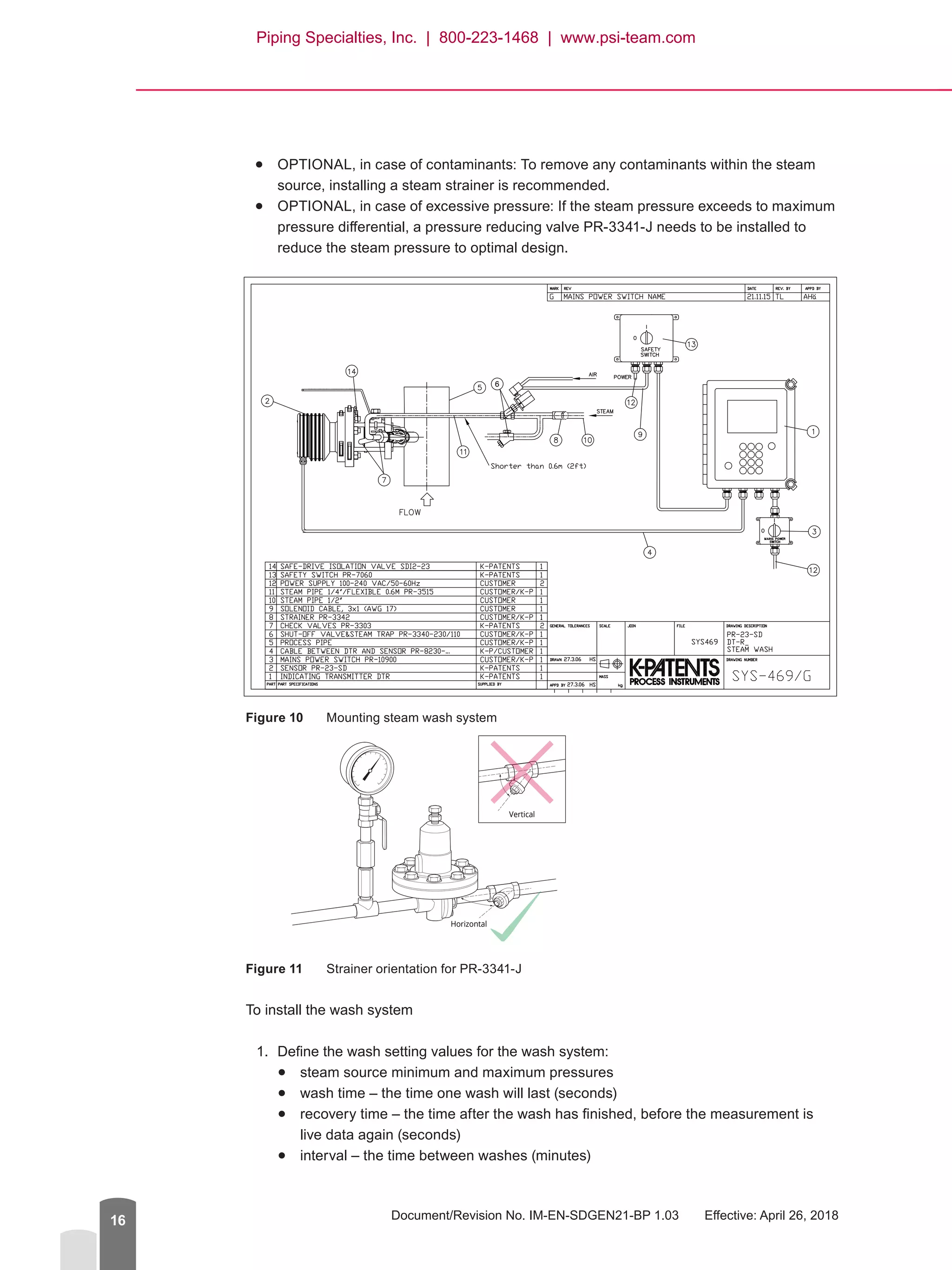
●● The distance from the steam nozzle on the SDI2 valve to the steam shut-off valve
should be kept as short as possible to avoid condensate. The recommended length of
the distance is 0.6 m (2 ft) or less.
●● Separate or isolate the power to the solenoid from the power to the transmitter by
installing a safety switch. This enables the steam wash to be serviced without having
to power down the whole SD sensor system.
●● Pipe the steam trap properly to drain so that the trap is not blowing hot steam.
●● Steam piping upstream of shut-off valve is ½” or larger.
●● In addition to the SDI2 valve steam fittings, the following components must be included
in the steam wash installation:
●● steam shut-off valve
●● air-operated solenoid valve
●● steam trap
●● switch or terminal for power isolation
Piping Specialties, Inc. | 800-223-1468 | www.psi-team.com
Document/Revision No. IM-EN-SDGEN21-BP 1.03   Effective: April 26, 201816
●● OPTIONAL, in case of contaminants: To remove any contaminants within the steam
source, installing a steam strainer is recommended.
●● OPTIONAL, in case of excessive pressure: If the steam pressure exceeds to maximum
pressure differential, a pressure reducing valve PR-3341-J needs to be installed to
reduce the steam pressure to optimal design.
Figure 10	 Mounting steam wash system
Figure 11	 Strainer orientation for PR-3341-J
To install the wash system
1.	 Define the wash setting values for the wash system:
●● steam source minimum and maximum pressures
●● wash time – the time one wash will last (seconds)
●● recovery time – the time after the wash has finished, before the measurement is
live data again (seconds)
●● interval – the time between washes (minutes)
Horizontal
23SD-035Strainer orientation
Vertical
Piping Specialties, Inc. | 800-223-1468 | www.psi-team.com
Safe-Drive™
Process Refractometer PR-23-SD Best Practices, Generation 2.1
© Copyright K-Patents 2018. All rights reserved. 17
Recommended steam prism wash settings
CONC %
value
Minimum above
process pressure
Maximum above
process pressure
Wash time Reco­very Interval
10-30 % 2 bar (30 psi) 4 bar (60 psi) 2-3 s 20 s 120-360 min
30-60 % 3 bar (45 psi) 6 bar (90 psi) 3 s 20 s 20-60 min
60-90 % 4 bar (60 psi) 8 bar (120 psi) 3-5 s 20 s 15-25 min
NOTE: Damage caused to prism by excessive pressure or washing is not covered by the
product warranty.
Choose the correct steam source pressure by comparing it to the process pressure.
The steam source pressure must be higher than process pressure to provide adequate
washing, but excessive pressure may also cause premature damage or etching of the
prism. Also, if the washing phase is programmed to last too long, the prism may wear
out prematurely.
2.	 Install the steam pipes in the SDI2 valve, as instructed below.
NOTE: All the necessary wash fittings are included in the valve.
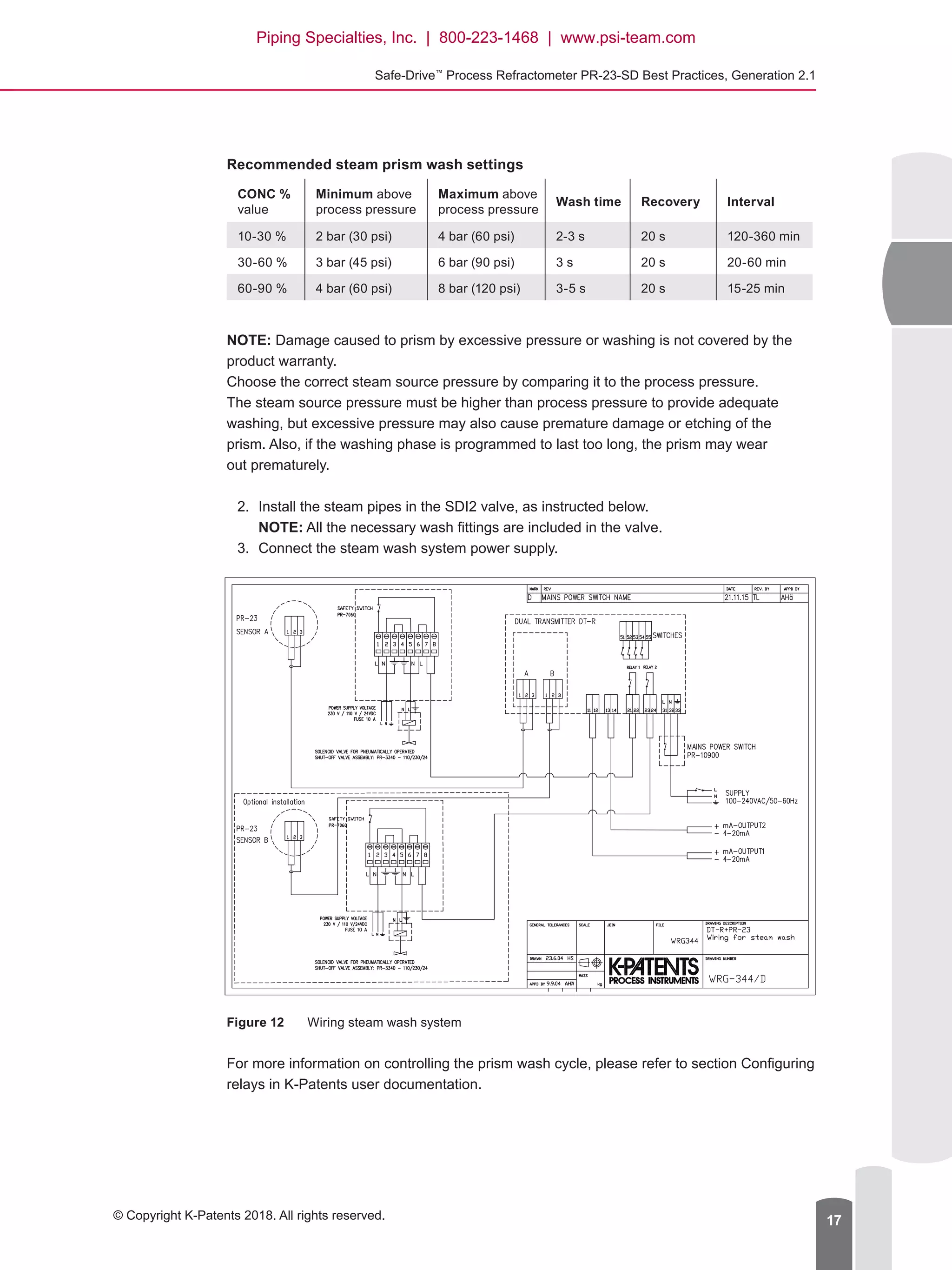
3.	 Connect the steam wash system power supply.
Figure 12	 Wiring steam wash system
For more information on controlling the prism wash cycle, please refer to section Configuring
relays in K-Patents user documentation.
Piping Specialties, Inc. | 800-223-1468 | www.psi-team.com
Document/Revision No. IM-EN-SDGEN21-BP 1.03   Effective: April 26, 201818
4.6.2	 High pressure water prism wash system
Important high pressure water prism wash considerations
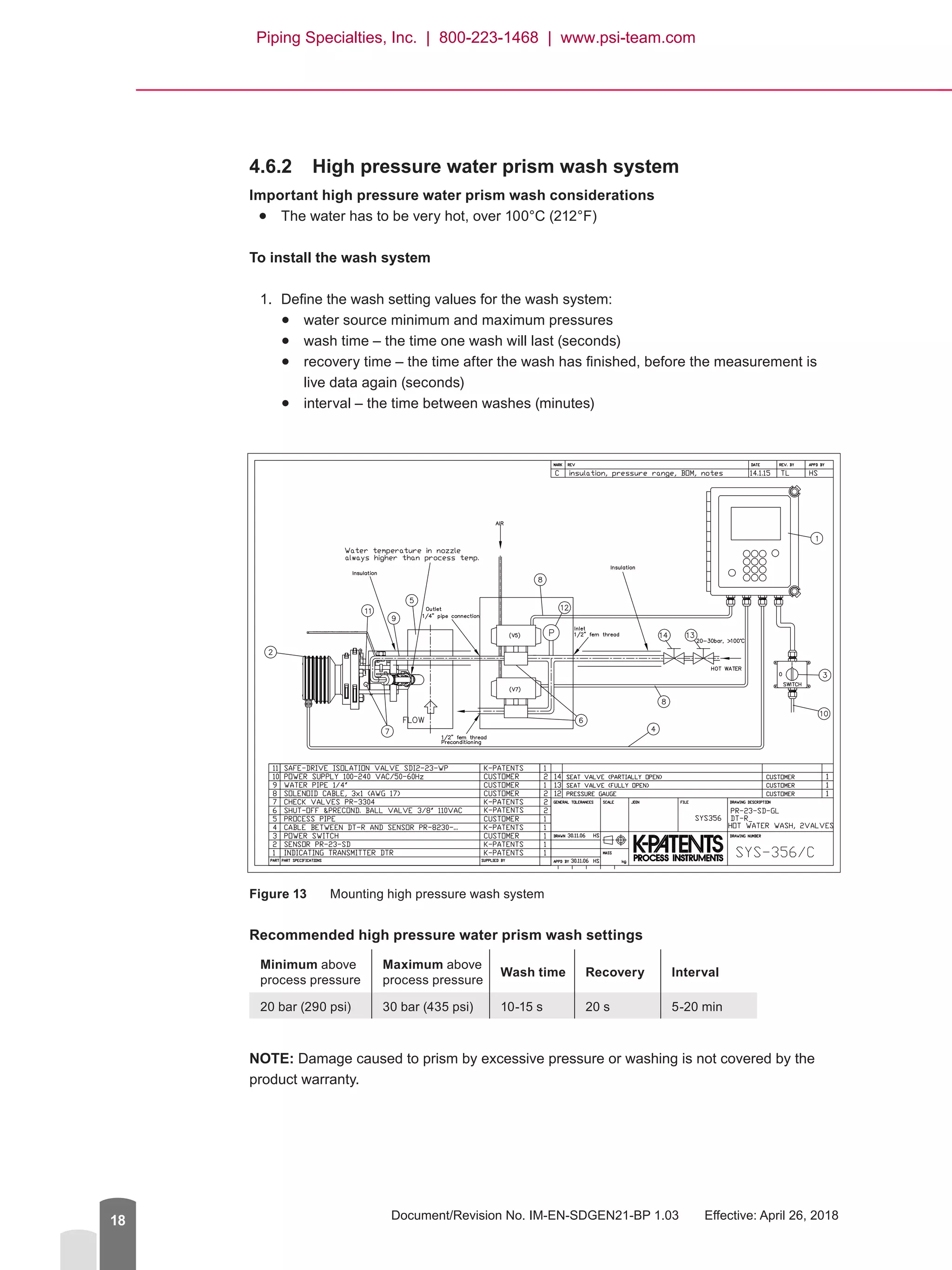
●● The water has to be very hot, over 100°C (212°F)
To install the wash system
1.	 Define the wash setting values for the wash system:
●● water source minimum and maximum pressures
●● wash time – the time one wash will last (seconds)
●● recovery time – the time after the wash has finished, before the measurement is
live data again (seconds)
●● interval – the time between washes (minutes)
Figure 13	 Mounting high pressure wash system
Recommended high pressure water prism wash settings
Minimum above
process pressure
Maximum above
process pressure
Wash time Reco­very Interval
20 bar (290 psi) 30 bar (435 psi) 10-15 s 20 s 5-20 min
NOTE: Damage caused to prism by excessive pressure or washing is not covered by the
product warranty.
Piping Specialties, Inc. | 800-223-1468 | www.psi-team.com
Safe-Drive™
Process Refractometer PR-23-SD Best Practices, Generation 2.1
© Copyright K-Patents 2018. All rights reserved. 19
Choose the correct source pressure by comparing it to the process pressure.
The source pressure must be higher than process pressure to provide adequate washing,
but excessive pressure may also cause premature damage or etching of the prism. Also, if
the washing phase is programmed to last too long, the prism may wear out prematurely.
2.	 Install the pipes in the SDI2 valve, as instructed above.
NOTE: All the necessary wash fittings are included in the valve.
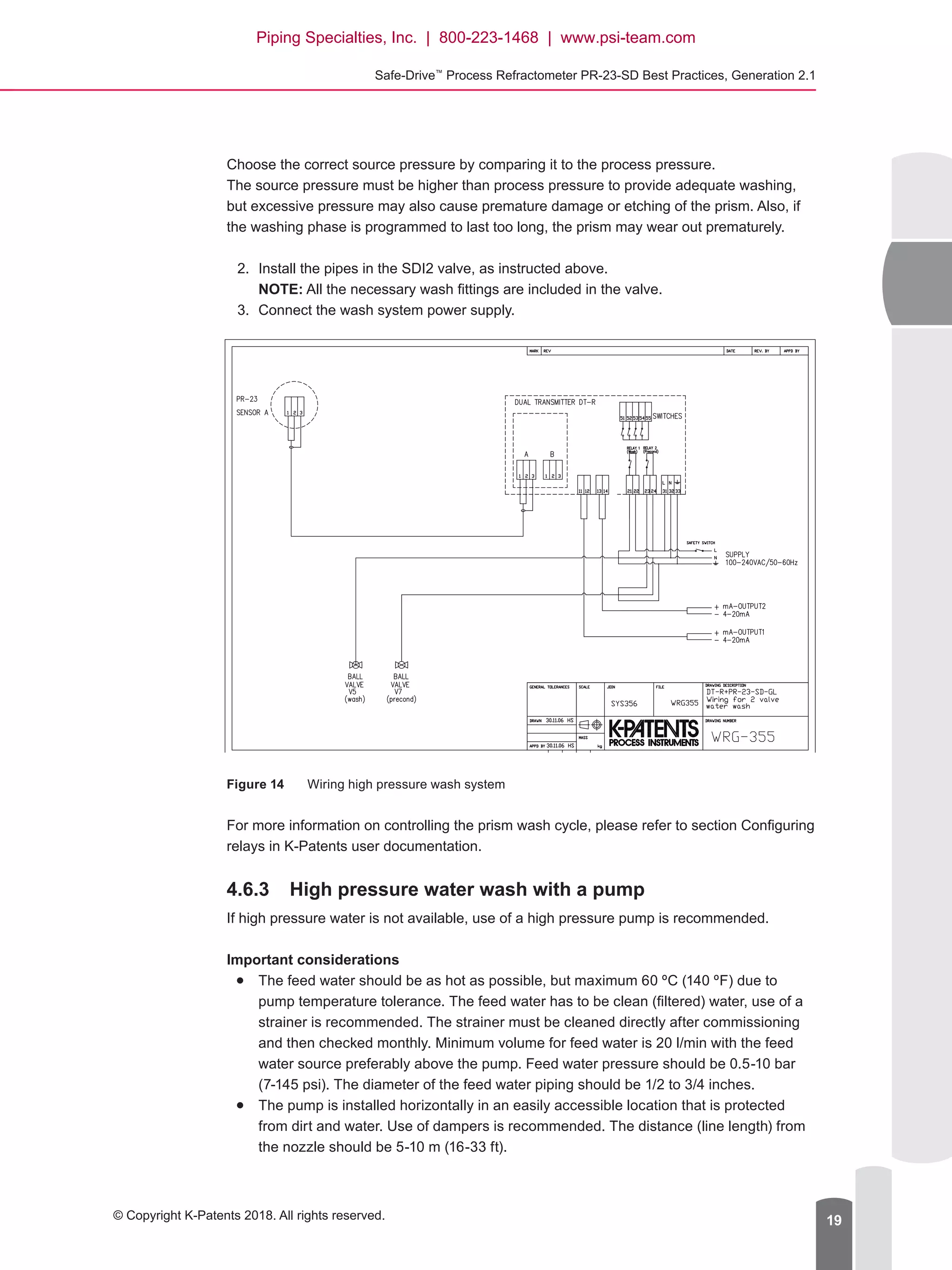
3.	 Connect the wash system power supply.
Figure 14	 Wiring high pressure wash system
For more information on controlling the prism wash cycle, please refer to section Configuring
relays in K-Patents user documentation.
4.6.3	 High pressure water wash with a pump
If high pressure water is not available, use of a high pressure pump is recommended.
Important considerations
●● The feed water should be as hot as possible, but maximum 60 ºC (140 ºF) due to
pump temperature tolerance. The feed water has to be clean (filtered) water, use of a
strainer is recommended. The strainer must be cleaned directly after commissioning
and then checked monthly. Minimum volume for feed water is 20 l/min with the feed
water source preferably above the pump. Feed water pressure should be 0.5-10 bar
(7-145 psi). The diameter of the feed water piping should be 1/2 to 3/4 inches.
●● The pump is installed horizontally in an easily accessible location that is protected
from dirt and water. Use of dampers is recommended. The distance (line length) from
the nozzle should be 5-10 m (16-33 ft).
Piping Specialties, Inc. | 800-223-1468 | www.psi-team.com
Document/Revision No. IM-EN-SDGEN21-BP 1.03   Effective: April 26, 201820
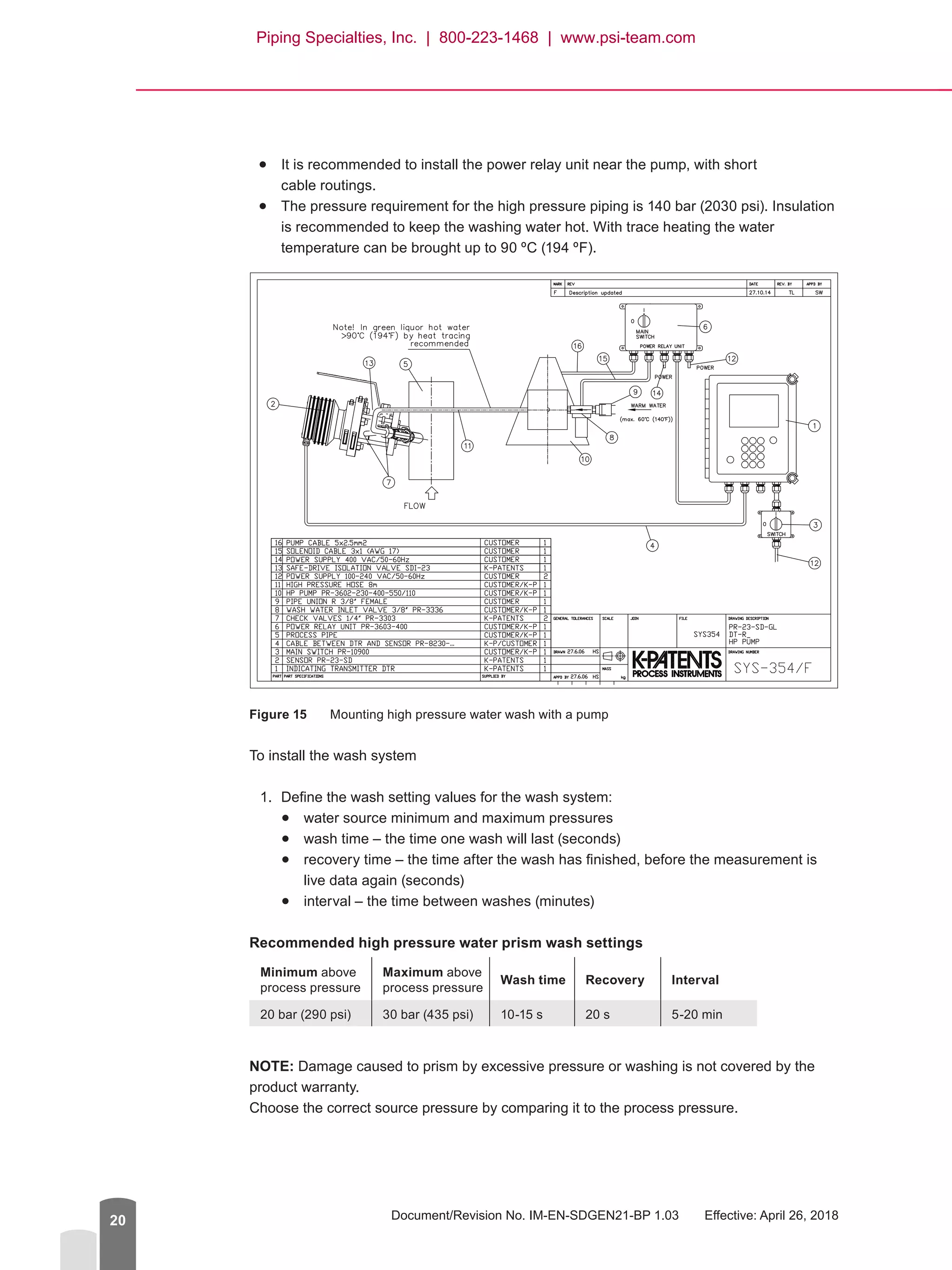
●● It is recommended to install the power relay unit near the pump, with short
cable routings.
●● The pressure requirement for the high pressure piping is 140 bar (2030 psi). Insulation
is recommended to keep the washing water hot. With trace heating the water
temperature can be brought up to 90 ºC (194 ºF).
Figure 15	 Mounting high pressure water wash with a pump
To install the wash system
1.	 Define the wash setting values for the wash system:
●● water source minimum and maximum pressures
●● wash time – the time one wash will last (seconds)
●● recovery time – the time after the wash has finished, before the measurement is
live data again (seconds)
●● interval – the time between washes (minutes)
Recommended high pressure water prism wash settings
Minimum above
process pressure
Maximum above
process pressure
Wash time Reco­very Interval
20 bar (290 psi) 30 bar (435 psi) 10-15 s 20 s 5-20 min
NOTE: Damage caused to prism by excessive pressure or washing is not covered by the
product warranty.
Choose the correct source pressure by comparing it to the process pressure.
Piping Specialties, Inc. | 800-223-1468 | www.psi-team.com
Safe-Drive™
Process Refractometer PR-23-SD Best Practices, Generation 2.1
© Copyright K-Patents 2018. All rights reserved. 21
The source pressure must be higher than process pressure to provide adequate washing,
but excessive pressure may also cause premature damage or etching of the prism. Also, if
the washing phase is programmed to last too long, the prism may wear out prematurely.
2.	 Install the pipes in the SDI2 valve, as instructed above.
NOTE: All the necessary wash fittings are included in the valve.
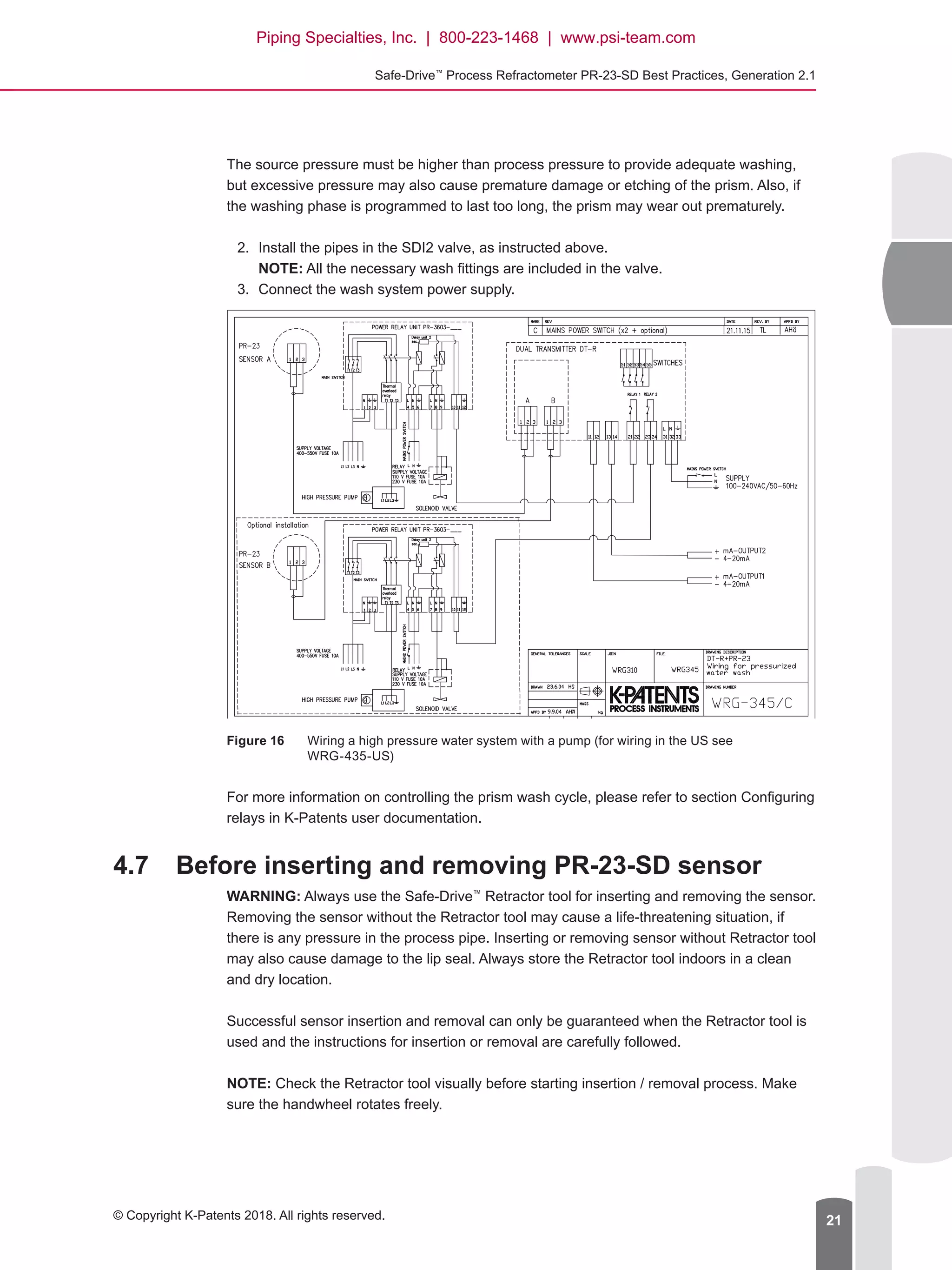
3.	 Connect the wash system power supply.
Figure 16	 Wiring a high pressure water system with a pump (for wiring in the US see
WRG-435-US)
For more information on controlling the prism wash cycle, please refer to section Configuring
relays in K-Patents user documentation.
4.7	 Before inserting and removing PR-23-SD sensor
WARNING: Always use the Safe-Drive™
Retractor tool for inserting and removing the sensor.
Removing the sensor without the Retractor tool may cause a life-threatening situation, if
there is any pressure in the process pipe. Inserting or removing sensor without Retractor tool
may also cause damage to the lip seal. Always store the Retractor tool indoors in a clean
and dry location.
Successful sensor insertion and removal can only be guaranteed when the Retractor tool is
used and the instructions for insertion or removal are carefully followed.
NOTE: Check the Retractor tool visually before starting insertion / removal process. Make
sure the handwheel rotates freely.
Piping Specialties, Inc. | 800-223-1468 | www.psi-team.com
Document/Revision No. IM-EN-SDGEN21-BP 1.03   Effective: April 26, 201822
WARNING: If you detect leaking at any point of sensor insertion or removal process, revert
immediately to the previous step in the process. Do not continue insertion / removal until the
reason for leakage has been cleared and fixed.
Insert and remove the sensor as instructed in the following chapters. For more thorough
instructions, please refer to K-Patents user documentation or visit the K-Patents website to
see the instructional video on inserting and removing the sensor (www.kpatents.com,
PR-23-SD Safe-Drive™
Operation Guide Video).
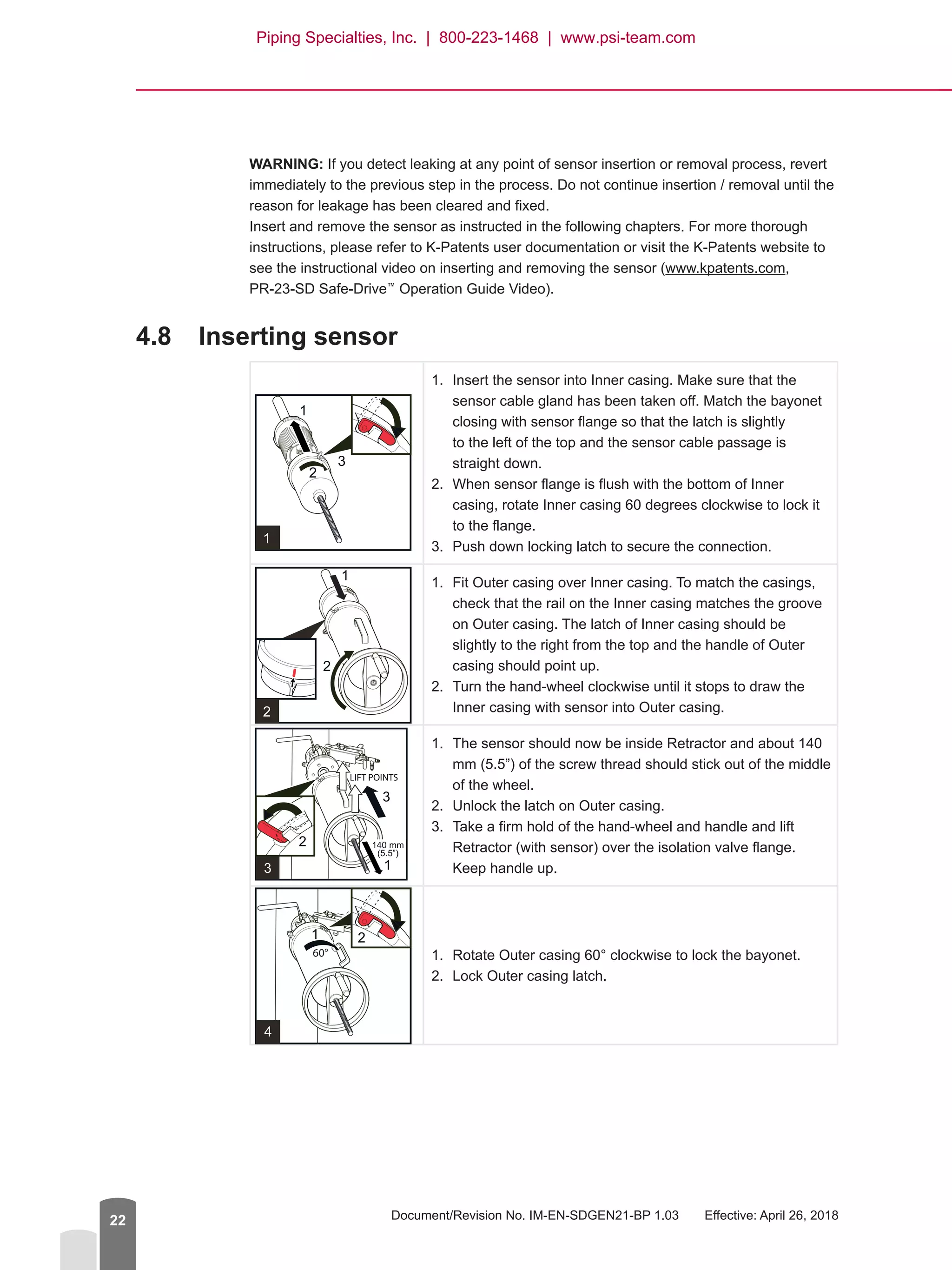
4.8	 Inserting sensor
1.	 Insert the sensor into Inner casing. Make sure that the
sensor cable gland has been taken off. Match the bayonet
closing with sensor flange so that the latch is slightly
to the left of the top and the sensor cable passage is
straight down.
2.	 When sensor flange is flush with the bottom of Inner
casing, rotate Inner casing 60 degrees clockwise to lock it
to the flange.
3.	 Push down locking latch to secure the connection.
1.	 Fit Outer casing over Inner casing. To match the casings,
check that the rail on the Inner casing matches the groove
on Outer casing. The latch of Inner casing should be
slightly to the right from the top and the handle of Outer
casing should point up.
2.	 Turn the hand-wheel clockwise until it stops to draw the
Inner casing with sensor into Outer casing.
1.	 The sensor should now be inside Retractor and about 140
mm (5.5”) of the screw thread should stick out of the middle
of the wheel.
2.	 Unlock the latch on Outer casing.
3.	 Take a firm hold of the hand-wheel and handle and lift
Retractor (with sensor) over the isolation valve flange.
Keep handle up.
1.	 Rotate Outer casing 60° clockwise to lock the bayonet.
2.	 Lock Outer casing latch.
Piping Specialties, Inc. | 800-223-1468 | www.psi-team.com
Safe-Drive™
Process Refractometer PR-23-SD Best Practices, Generation 2.1
© Copyright K-Patents 2018. All rights reserved. 23
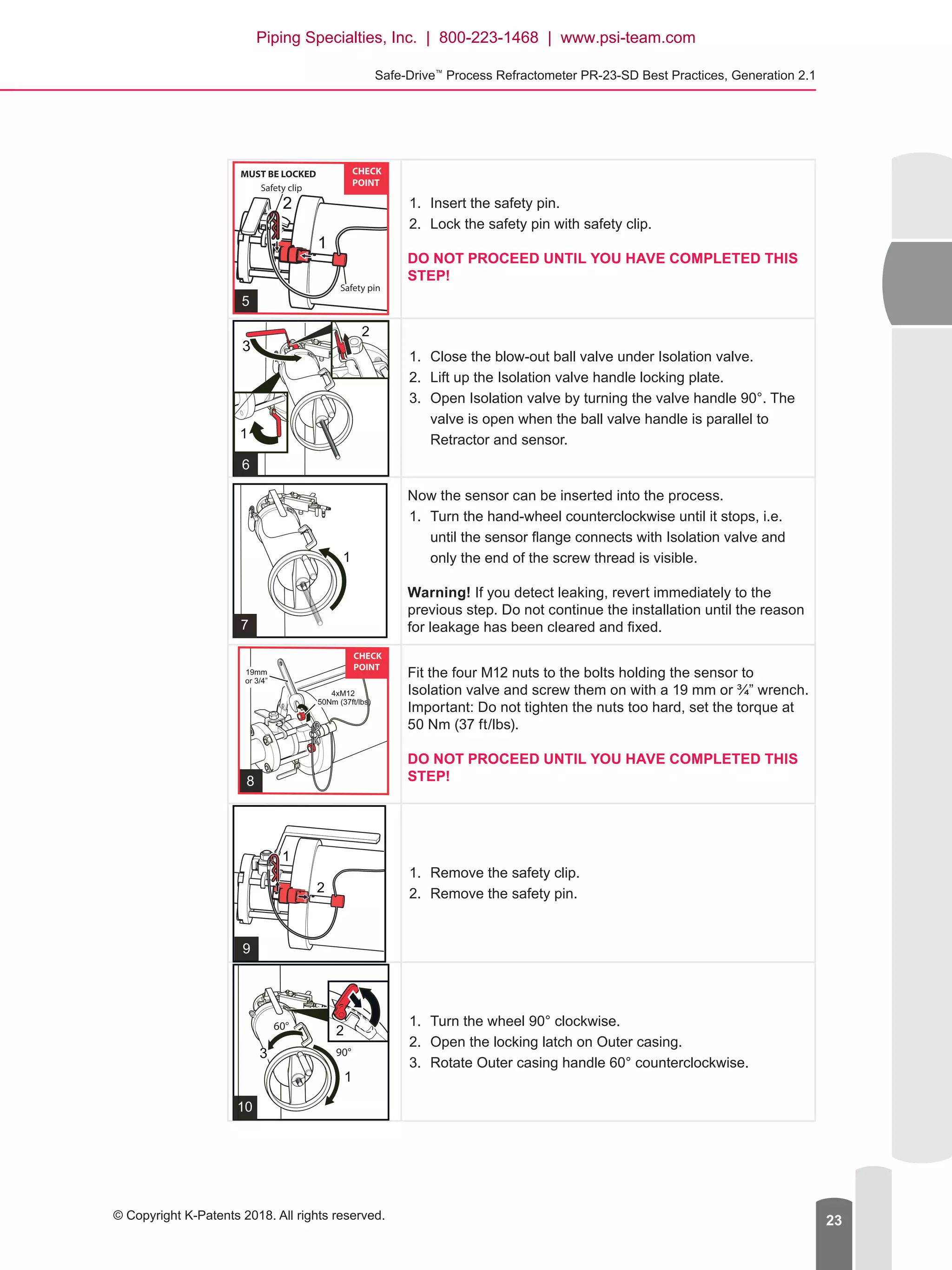
1.	 Insert the safety pin.
2.	 Lock the safety pin with safety clip.
DO NOT PROCEED UNTIL YOU HAVE COMPLETED THIS
STEP!
1.	 Close the blow-out ball valve under Isolation valve.
2.	 Lift up the Isolation valve handle locking plate.
3.	 Open Isolation valve by turning the valve handle 90°. The
valve is open when the ball valve handle is parallel to
Retractor and sensor.
Now the sensor can be inserted into the process.
1.	 Turn the hand-wheel counterclockwise until it stops, i.e.
until the sensor flange connects with Isolation valve and
only the end of the screw thread is visible.
Warning! If you detect leaking, revert immediately to the
previous step. Do not continue the installation until the reason
for leakage has been cleared and fixed.
Fit the four M12 nuts to the bolts holding the sensor to
Isolation valve and screw them on with a 19 mm or ¾” wrench.
Important: Do not tighten the nuts too hard, set the torque at
50 Nm (37 ft/lbs).
DO NOT PROCEED UNTIL YOU HAVE COMPLETED THIS
STEP!
1.	 Remove the safety clip.
2.	 Remove the safety pin.
1.	 Turn the wheel 90° clockwise.
2.	 Open the locking latch on Outer casing.
3.	 Rotate Outer casing handle 60° counterclockwise.
Piping Specialties, Inc. | 800-223-1468 | www.psi-team.com
Document/Revision No. IM-EN-SDGEN21-BP 1.03   Effective: April 26, 201824
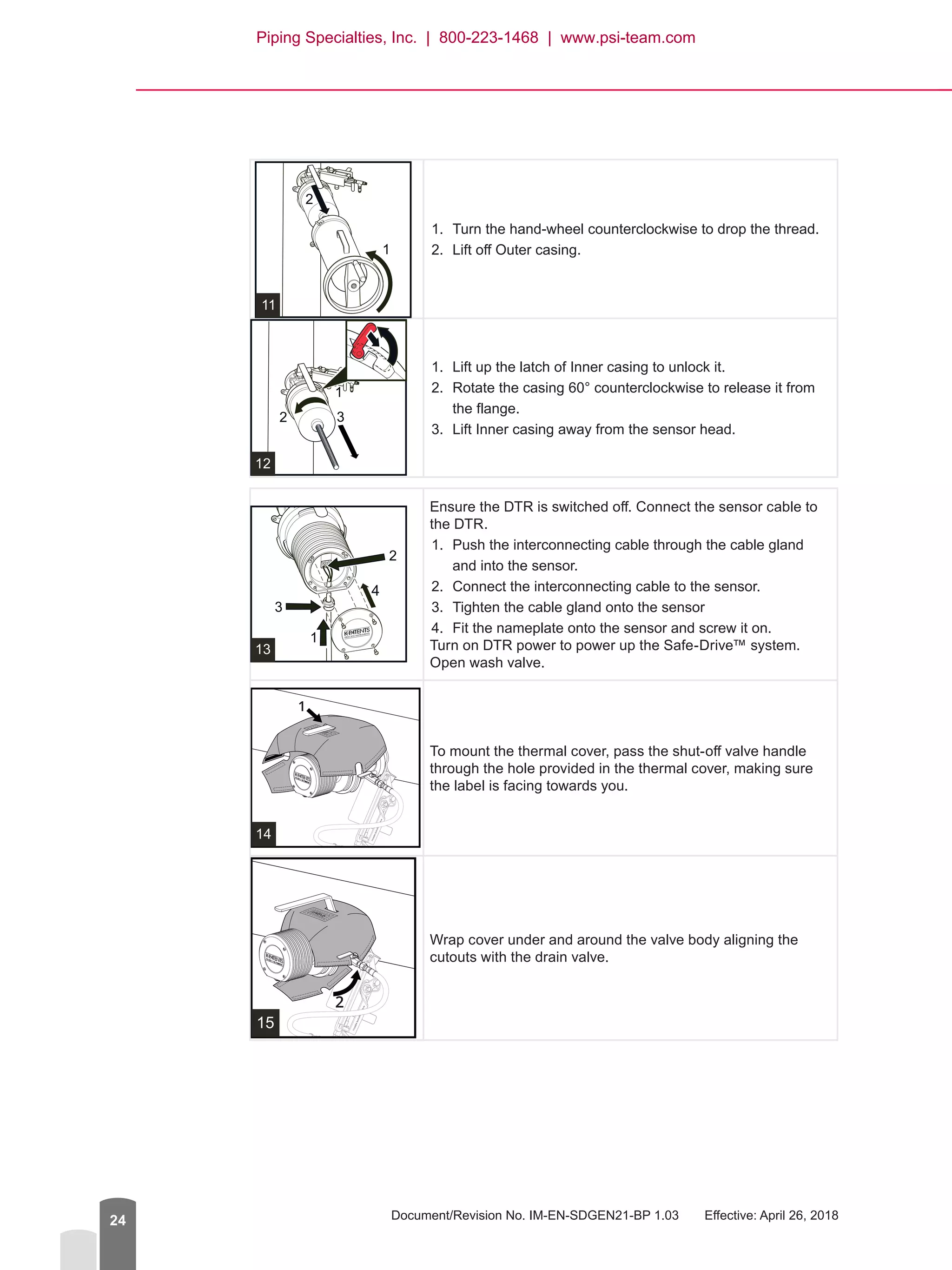
1.	 Turn the hand-wheel counterclockwise to drop the thread.
2.	 Lift off Outer casing.
1.	 Lift up the latch of Inner casing to unlock it.
2.	 Rotate the casing 60° counterclockwise to release it from
the flange.
3.	 Lift Inner casing away from the sensor head.
Ensure the DTR is switched off. Connect the sensor cable to
the DTR.
1.	 Push the interconnecting cable through the cable gland
and into the sensor.
2.	 Connect the interconnecting cable to the sensor.
3.	 Tighten the cable gland onto the sensor
4.	 Fit the nameplate onto the sensor and screw it on.
Turn on DTR power to power up the Safe-Drive™ system.
Open wash valve.
14
To mount the thermal cover, pass the shut-off valve handle
through the hole provided in the thermal cover, making sure
the label is facing towards you.
15
Wrap cover under and around the valve body aligning the
cutouts with the drain valve.
Piping Specialties, Inc. | 800-223-1468 | www.psi-team.com
Safe-Drive™
Process Refractometer PR-23-SD Best Practices, Generation 2.1
© Copyright K-Patents 2018. All rights reserved. 25
16
Close the thermal cover by using the velcro strips, first the
single join on the left.
17
And finally close the two velcro joins on the right.
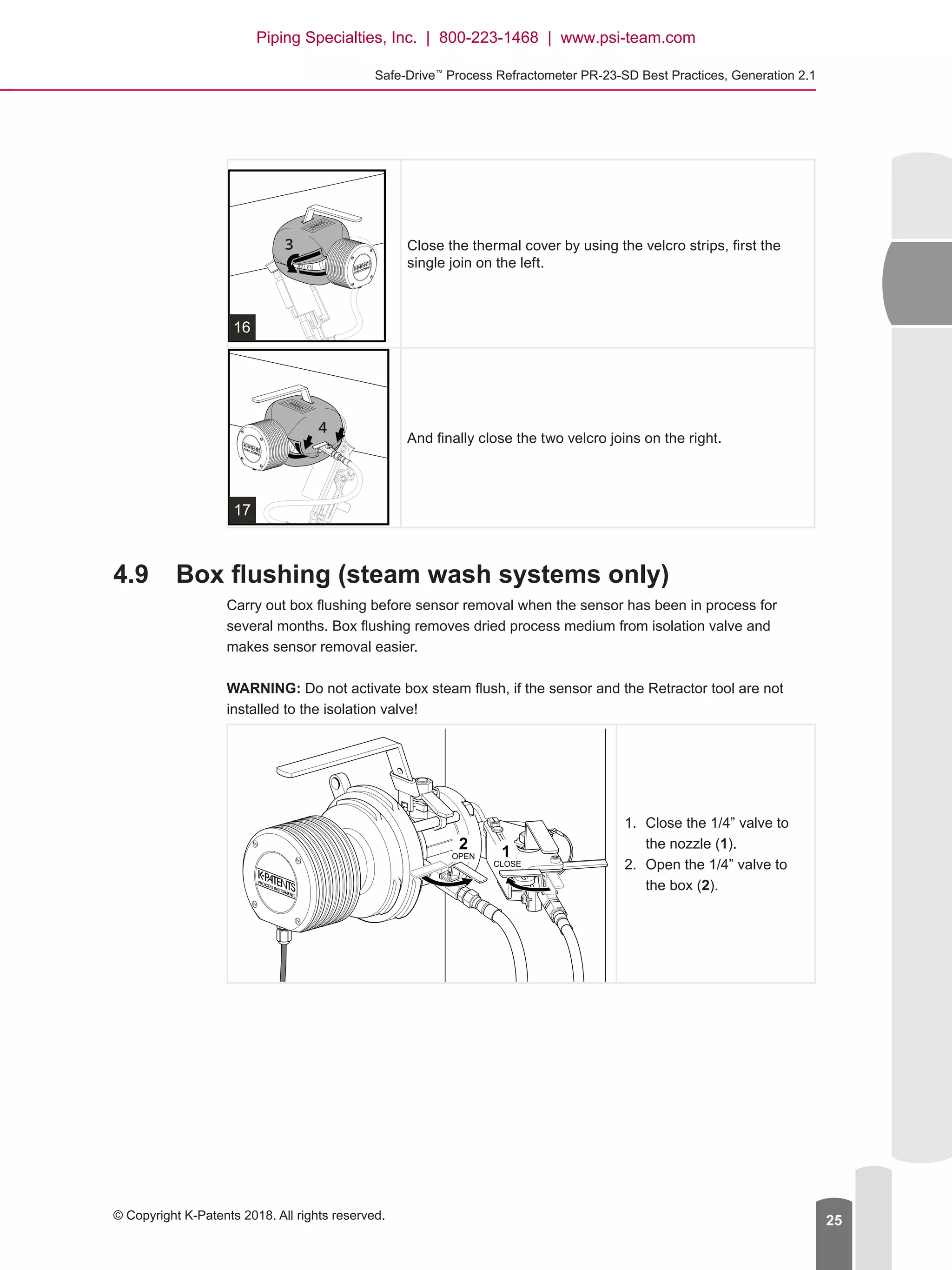
4.9	 Box flushing (steam wash systems only)
Carry out box flushing before sensor removal when the sensor has been in process for
several months. Box flushing removes dried process medium from isolation valve and
makes sensor removal easier.
WARNING: Do not activate box steam flush, if the sensor and the Retractor tool are not
installed to the isolation valve!
1.	 Close the 1/4” valve to
the nozzle (1).
2.	 Open the 1/4” valve to
the box (2).
12
OPEN
CLOSE
Piping Specialties, Inc. | 800-223-1468 | www.psi-team.com
Document/Revision No. IM-EN-SDGEN21-BP 1.03   Effective: April 26, 201826
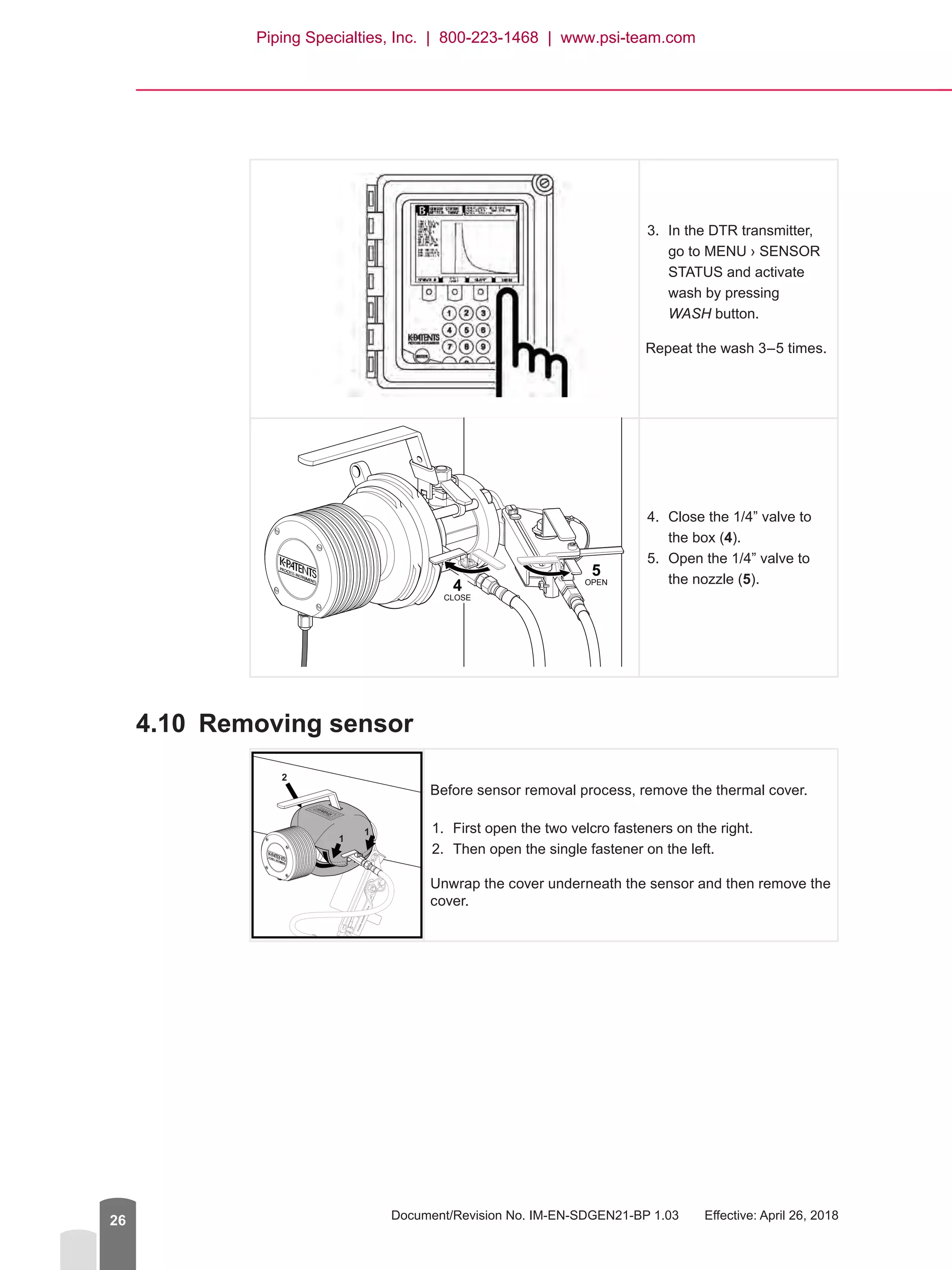
3.	 In the DTR transmitter,
go to MENU › SENSOR
STATUS and activate
wash by pressing
WASH button.
Repeat the wash 3–5 times.
4.	 Close the 1/4” valve to
the box (4).
5.	 Open the 1/4” valve to
the nozzle (5).
4.10	 Removing sensor
1
1
2
Before sensor removal process, remove the thermal cover.
1.	 First open the two velcro fasteners on the right.
2.	 Then open the single fastener on the left.
Unwrap the cover underneath the sensor and then remove the
cover.
5
4
CLOSE
OPEN
Piping Specialties, Inc. | 800-223-1468 | www.psi-team.com
Safe-Drive™
Process Refractometer PR-23-SD Best Practices, Generation 2.1
© Copyright K-Patents 2018. All rights reserved. 27
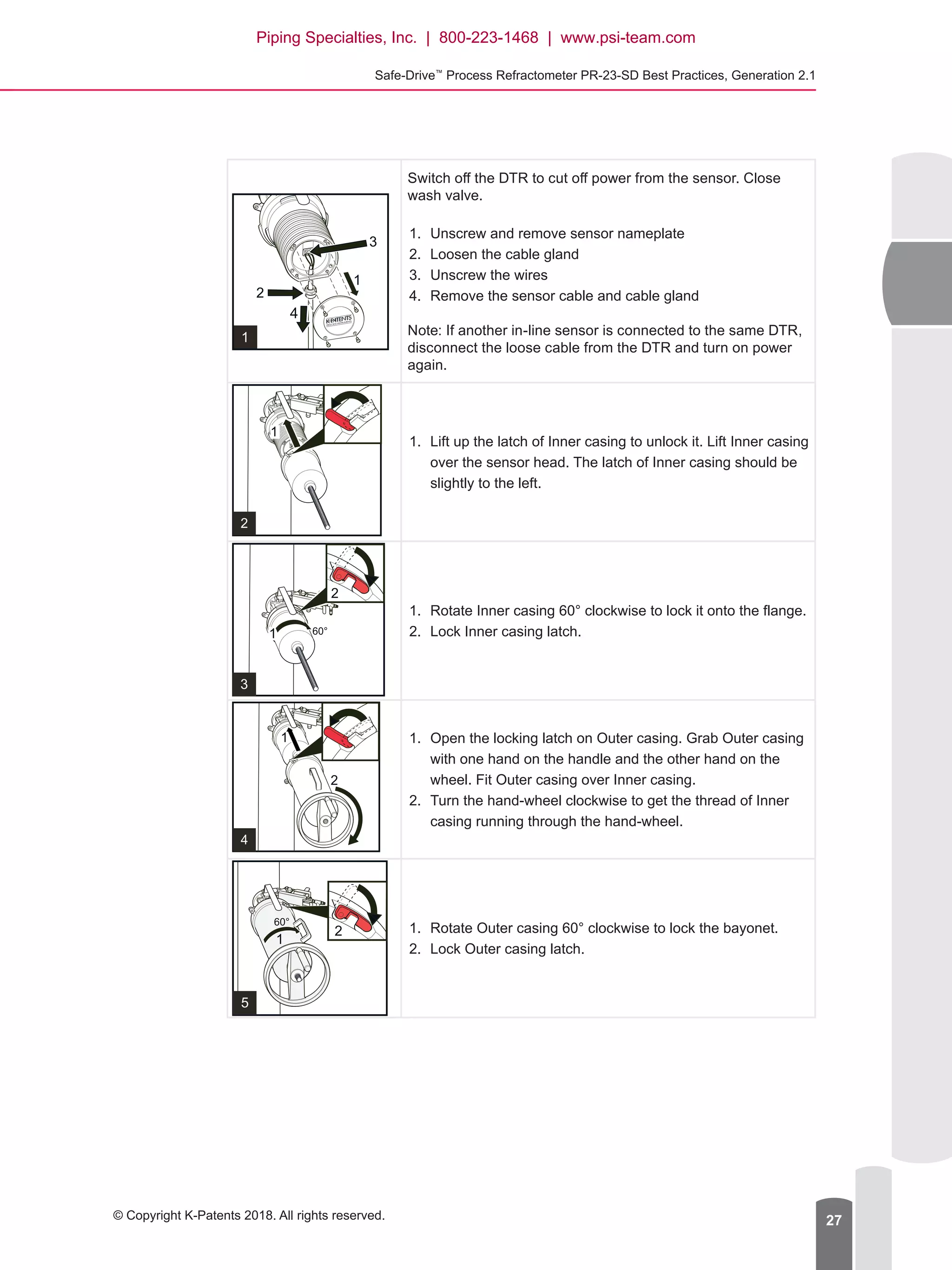
Switch off the DTR to cut off power from the sensor. Close
wash valve.
1.	 Unscrew and remove sensor nameplate
2.	 Loosen the cable gland
3.	 Unscrew the wires
4.	 Remove the sensor cable and cable gland
Note: If another in-line sensor is connected to the same DTR,
disconnect the loose cable from the DTR and turn on power
again.
1.	 Lift up the latch of Inner casing to unlock it. Lift Inner casing
over the sensor head. The latch of Inner casing should be
slightly to the left.
1.	 Rotate Inner casing 60° clockwise to lock it onto the flange.
2.	 Lock Inner casing latch.
1.	 Open the locking latch on Outer casing. Grab Outer casing
with one hand on the handle and the other hand on the
wheel. Fit Outer casing over Inner casing.
2.	 Turn the hand-wheel clockwise to get the thread of Inner
casing running through the hand-wheel.
1.	 Rotate Outer casing 60° clockwise to lock the bayonet.
2.	 Lock Outer casing latch.
Piping Specialties, Inc. | 800-223-1468 | www.psi-team.com
Document/Revision No. IM-EN-SDGEN21-BP 1.03   Effective: April 26, 201828
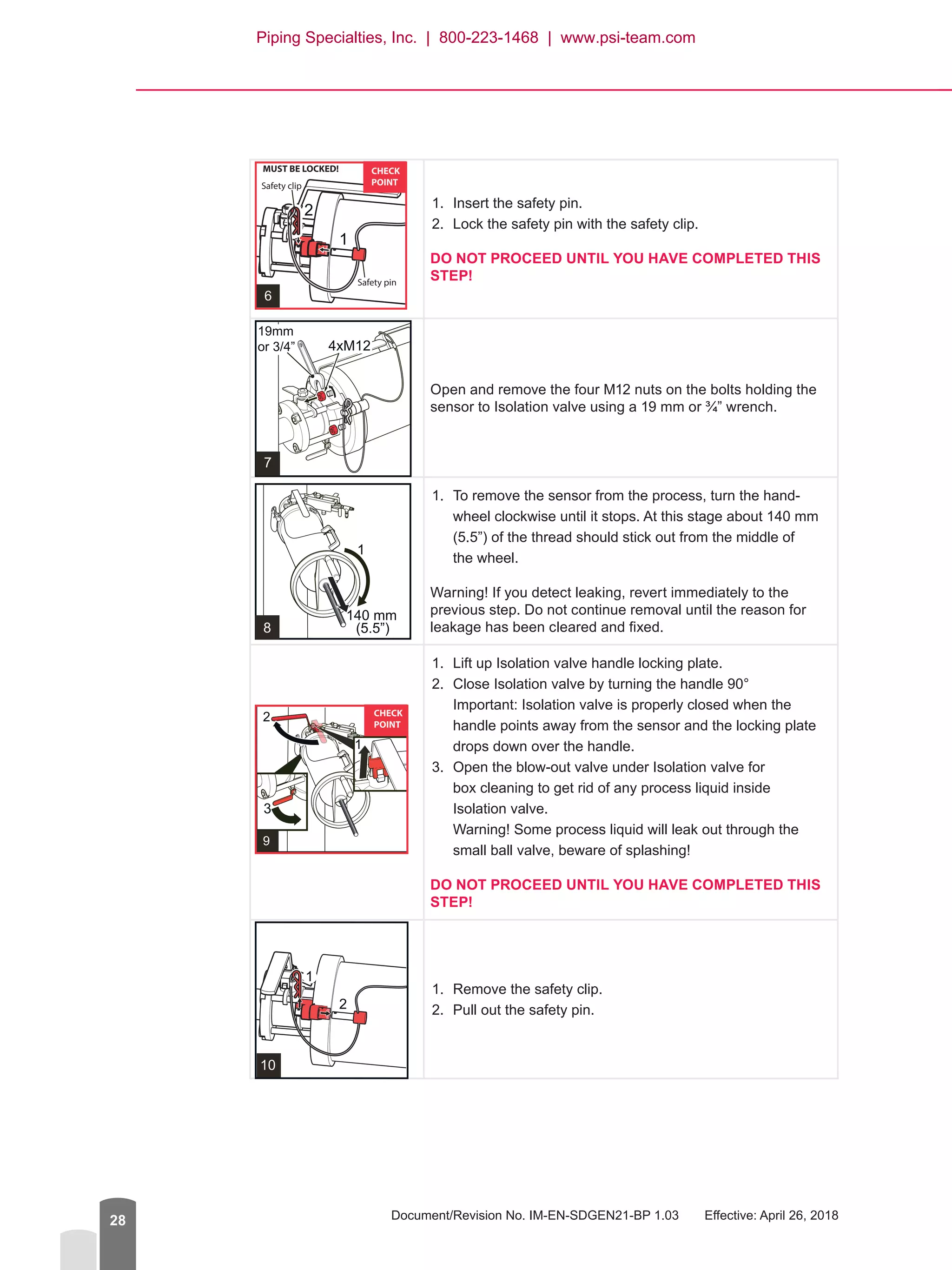
1.	 Insert the safety pin.
2.	 Lock the safety pin with the safety clip.
DO NOT PROCEED UNTIL YOU HAVE COMPLETED THIS
STEP!
Open and remove the four M12 nuts on the bolts holding the
sensor to Isolation valve using a 19 mm or ¾” wrench.
1.	 To remove the sensor from the process, turn the hand-
wheel clockwise until it stops. At this stage about 140 mm
(5.5”) of the thread should stick out from the middle of
the wheel.
Warning! If you detect leaking, revert immediately to the
previous step. Do not continue removal until the reason for
leakage has been cleared and fixed.
1.	 Lift up Isolation valve handle locking plate.
2.	 Close Isolation valve by turning the handle 90°
Important: Isolation valve is properly closed when the
handle points away from the sensor and the locking plate
drops down over the handle.
3.	 Open the blow-out valve under Isolation valve for
box cleaning to get rid of any process liquid inside
Isolation valve.
Warning! Some process liquid will leak out through the
small ball valve, beware of splashing!
DO NOT PROCEED UNTIL YOU HAVE COMPLETED THIS
STEP!
1.	 Remove the safety clip.
2.	 Pull out the safety pin.
Piping Specialties, Inc. | 800-223-1468 | www.psi-team.com
Safe-Drive™
Process Refractometer PR-23-SD Best Practices, Generation 2.1
© Copyright K-Patents 2018. All rights reserved. 29
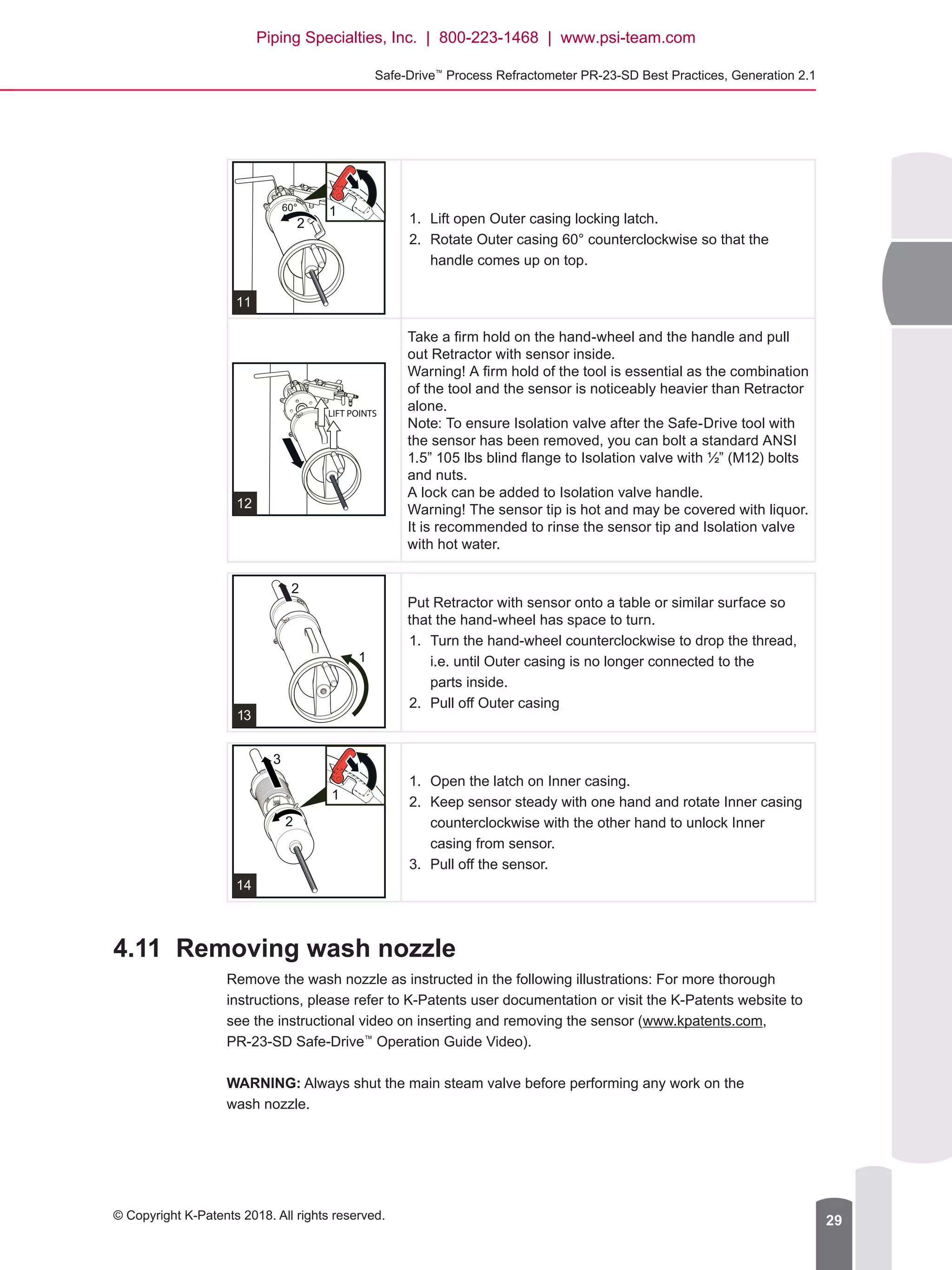
1.	 Lift open Outer casing locking latch.
2.	 Rotate Outer casing 60° counterclockwise so that the
handle comes up on top.
Take a firm hold on the hand-wheel and the handle and pull
out Retractor with sensor inside.
Warning! A firm hold of the tool is essential as the combination
of the tool and the sensor is noticeably heavier than Retractor
alone.
Note: To ensure Isolation valve after the Safe-Drive tool with
the sensor has been removed, you can bolt a standard ANSI
1.5” 105 lbs blind flange to Isolation valve with ½” (M12) bolts
and nuts.
A lock can be added to Isolation valve handle.
Warning! The sensor tip is hot and may be covered with liquor.
It is recommended to rinse the sensor tip and Isolation valve
with hot water.
Put Retractor with sensor onto a table or similar surface so
that the hand-wheel has space to turn.
1.	 Turn the hand-wheel counterclockwise to drop the thread,
i.e. until Outer casing is no longer connected to the
parts inside.
2.	 Pull off Outer casing
1.	 Open the latch on Inner casing.
2.	 Keep sensor steady with one hand and rotate Inner casing
counterclockwise with the other hand to unlock Inner
casing from sensor.
3.	 Pull off the sensor.
4.11	 Removing wash nozzle
Remove the wash nozzle as instructed in the following illustrations: For more thorough
instructions, please refer to K-Patents user documentation or visit the K-Patents website to
see the instructional video on inserting and removing the sensor (www.kpatents.com,
PR-23-SD Safe-Drive™
Operation Guide Video).
WARNING: Always shut the main steam valve before performing any work on the
wash nozzle.
Piping Specialties, Inc. | 800-223-1468 | www.psi-team.com
Document/Revision No. IM-EN-SDGEN21-BP 1.03   Effective: April 26, 201830
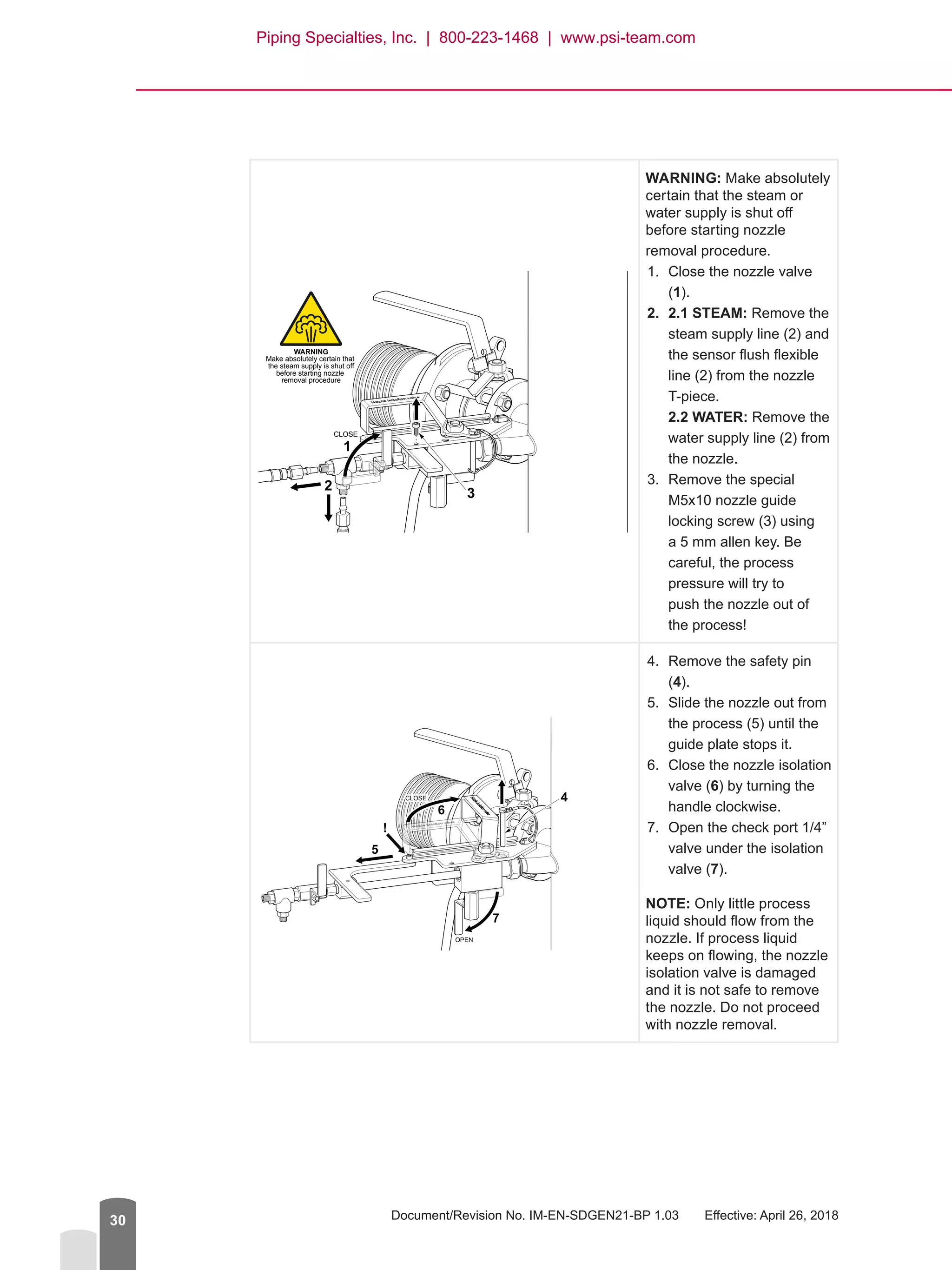
WARNING: Make absolutely
certain that the steam or
water supply is shut off
before starting nozzle
removal procedure.
1.	 Close the nozzle valve
(1).
2.	 2.1 STEAM: Remove the
steam supply line (2) and
the sensor flush flexible
line (2) from the nozzle
T-piece.
2.2 WATER: Remove the
water supply line (2) from
the nozzle.
3.	 Remove the special
M5x10 nozzle guide
locking screw (3) using
a 5 mm allen key. Be
careful, the process
pressure will try to
push the nozzle out of
the process!
4.	 Remove the safety pin
(4).
5.	 Slide the nozzle out from
the process (5) until the
guide plate stops it.
6.	 Close the nozzle isolation
valve (6) by turning the
handle clockwise.
7.	 Open the check port 1/4”
valve under the isolation
valve (7).
NOTE: Only little process
liquid should flow from the
nozzle. If process liquid
keeps on flowing, the nozzle
isolation valve is damaged
and it is not safe to remove
the nozzle. Do not proceed
with nozzle removal.
CLOSE
WARNING
Make absolutely certain that
the steam supply is shut off
before starting nozzle
removal procedure
1
3
2
6
4
7
5
!
OPEN
CLOSE
Piping Specialties, Inc. | 800-223-1468 | www.psi-team.com
Safe-Drive™
Process Refractometer PR-23-SD Best Practices, Generation 2.1
© Copyright K-Patents 2018. All rights reserved. 31
1
2
3
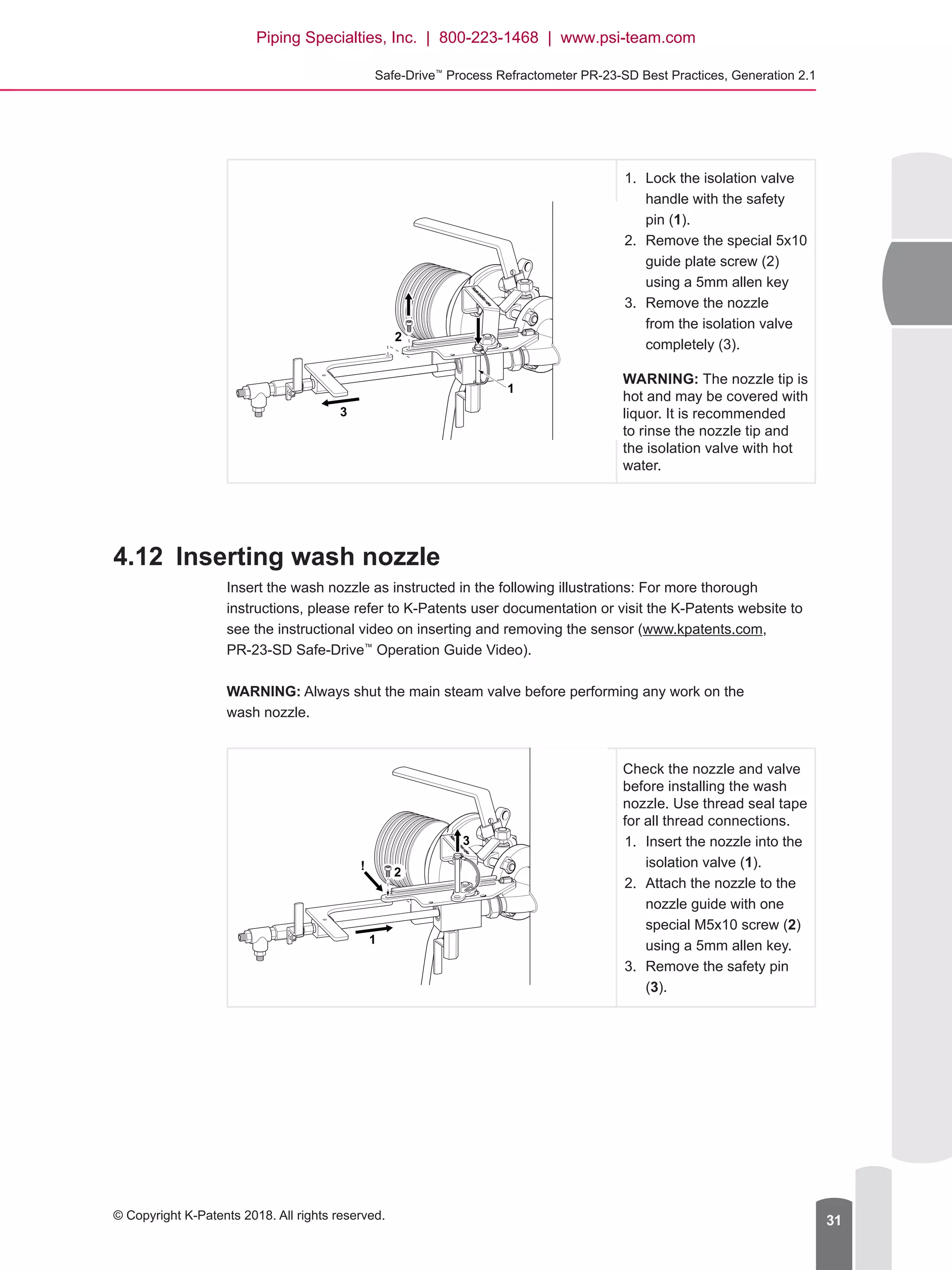
1.	 Lock the isolation valve
handle with the safety
pin (1).
2.	 Remove the special 5x10
guide plate screw (2)
using a 5mm allen key
3.	 Remove the nozzle
from the isolation valve
completely (3).
WARNING: The nozzle tip is
hot and may be covered with
liquor. It is recommended
to rinse the nozzle tip and
the isolation valve with hot
water.
4.12	 Inserting wash nozzle
Insert the wash nozzle as instructed in the following illustrations: For more thorough
instructions, please refer to K-Patents user documentation or visit the K-Patents website to
see the instructional video on inserting and removing the sensor (www.kpatents.com,
PR-23-SD Safe-Drive™
Operation Guide Video).
WARNING: Always shut the main steam valve before performing any work on the
wash nozzle.
Check the nozzle and valve
before installing the wash
nozzle. Use thread seal tape
for all thread connections.
1.	 Insert the nozzle into the
isolation valve (1).
2.	 Attach the nozzle to the
nozzle guide with one
special M5x10 screw (2)
using a 5mm allen key.
3.	 Remove the safety pin
(3).
1
3
2
!
Piping Specialties, Inc. | 800-223-1468 | www.psi-team.com
Document/Revision No. IM-EN-SDGEN21-BP 1.03   Effective: April 26, 201832
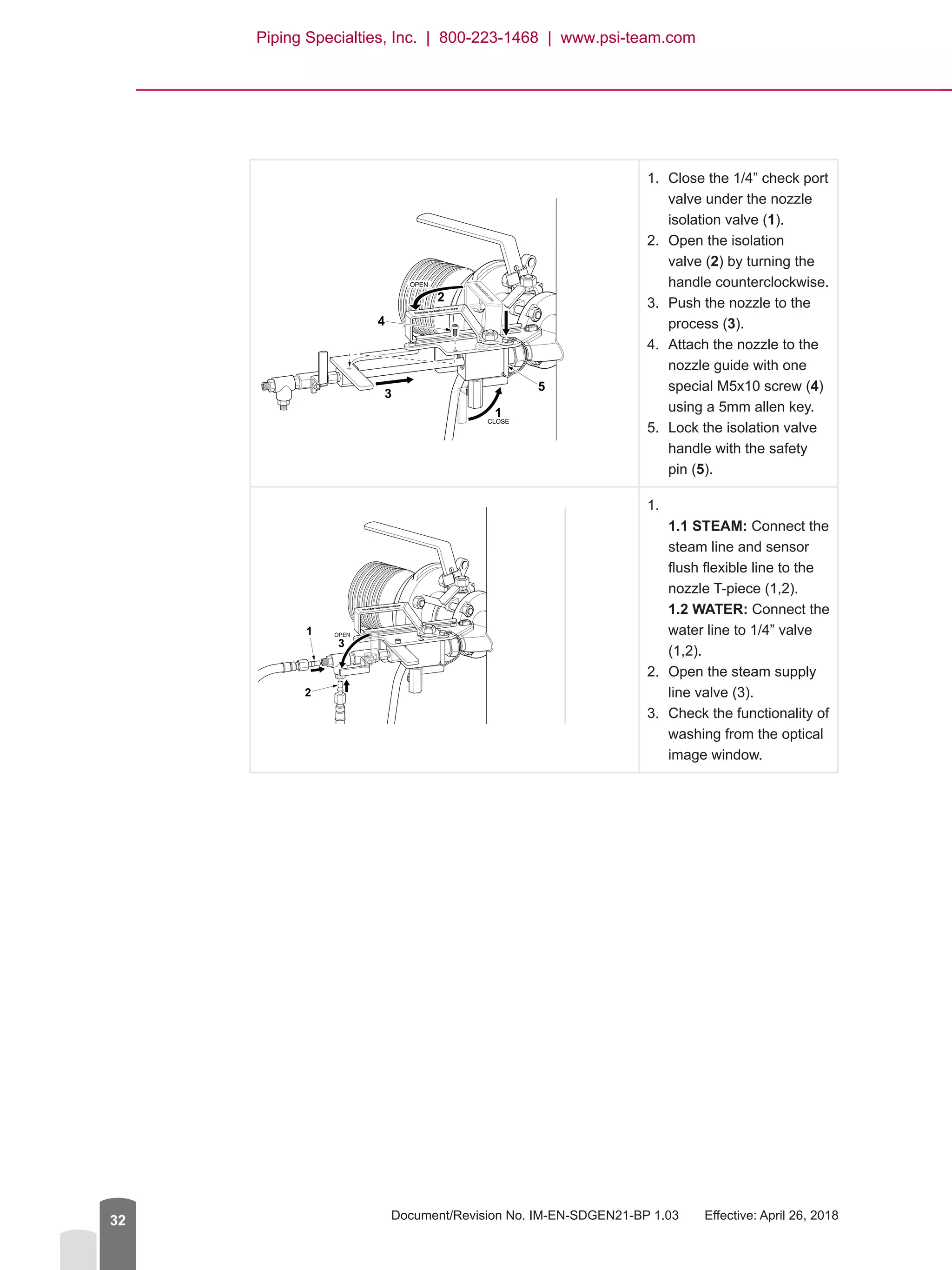
1.	 Close the 1/4” check port
valve under the nozzle
isolation valve (1).
2.	 Open the isolation
valve (2) by turning the
handle counterclockwise.
3.	 Push the nozzle to the
process (3).
4.	 Attach the nozzle to the
nozzle guide with one
special M5x10 screw (4)
using a 5mm allen key.
5.	 Lock the isolation valve
handle with the safety
pin (5).

1.	
1.1 STEAM: Connect the
steam line and sensor
flush flexible line to the
nozzle T-piece (1,2).
1.2 WATER: Connect the
water line to 1/4” valve
(1,2).
2.	 Open the steam supply
line valve (3).
3.	 Check the functionality of
washing from the optical
image window.
1
5
4
3
2
CLOSE
OPEN
OPEN1
2
3
Piping Specialties, Inc. | 800-223-1468 | www.psi-team.com
Safe-Drive™
Process Refractometer PR-23-SD Best Practices, Generation 2.1
© Copyright K-Patents 2018. All rights reserved. 33
4.13	 Blinding the SD system
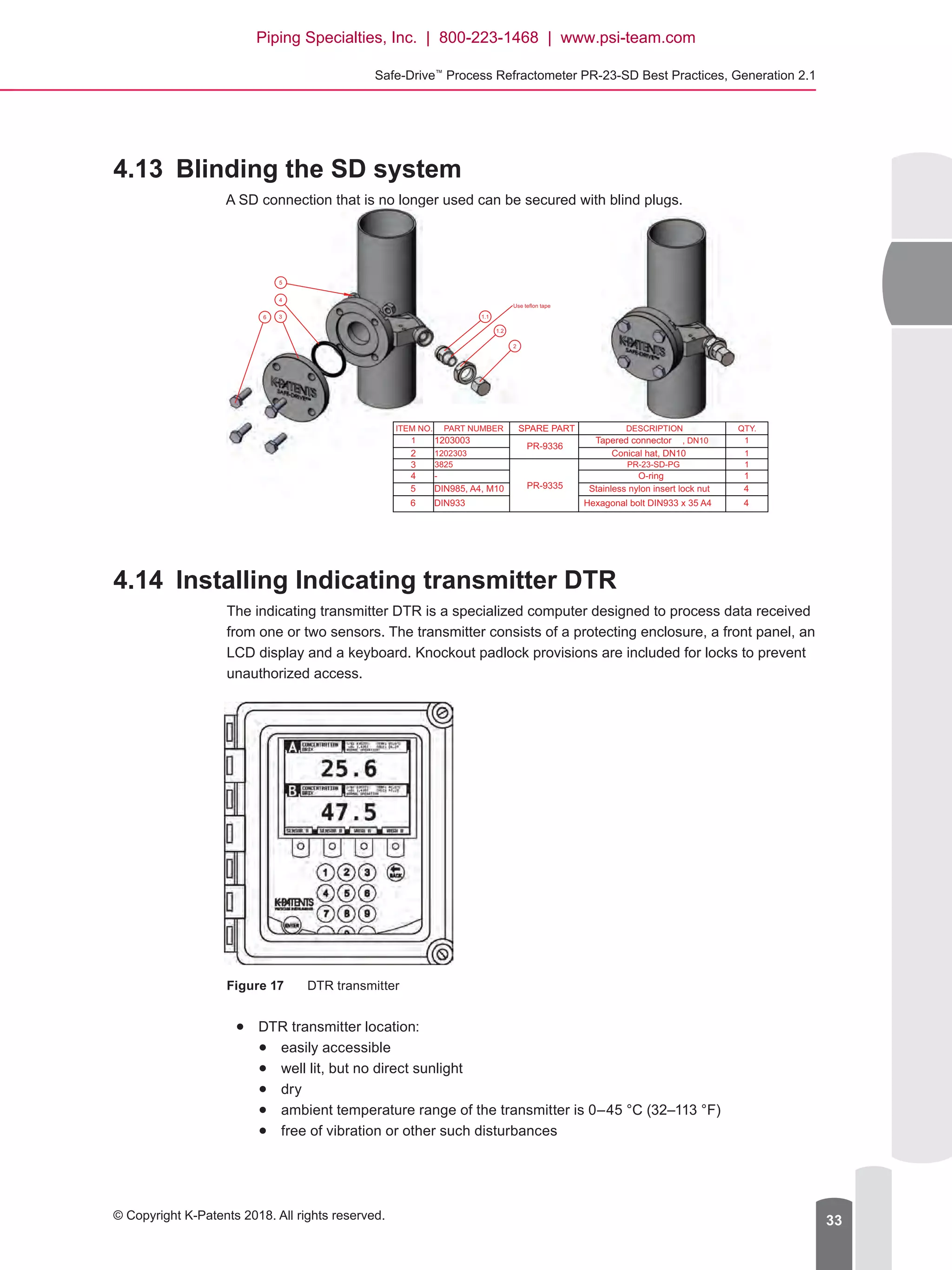
A SD connection that is no longer used can be secured with blind plugs.
4.14	 Installing Indicating transmitter DTR
The indicating transmitter DTR is a specialized computer designed to process data received
from one or two sensors. The transmitter consists of a protecting enclosure, a front panel, an
LCD display and a keyboard. Knockout padlock provisions are included for locks to prevent
unauthorized access.
Figure 17	 DTR transmitter
●● DTR transmitter location:
●● easily accessible
●● well lit, but no direct sunlight
●● dry
●● ambient temperature range of the transmitter is 0–45 °C (32–113 °F)
●● free of vibration or other such disturbances
2
1.1
1.2
6 3
4
5
Use teflon tape
ITEM NO. PART NUMBER SPARE PART DESCRIPTION QTY.
1 1203003
PR-9336
Tapered connector , DN10 1
2 1202303 Conical hat, DN10 1
3 3825
PR-9335
PR-23-SD-PG 1
4 - O-ring 1
5 DIN985, A4, M10 Stainless nylon insert lock nut 4
6 DIN933 Hexagonal bolt DIN933 x 35 A4 4
Piping Specialties, Inc. | 800-223-1468 | www.psi-team.com
Document/Revision No. IM-EN-SDGEN21-BP 1.03   Effective: April 26, 201834
●● Consider the interconnecting cable length when choosing the installation location.
The standard delivery is 10 meter (33 feet) of cable and the maximum allowed
length is 200 meters (660 feet). You can use your own cable as long as it meets IEC
61158-2 type A standard requirements. For more information, please refer to chapter
Interconnecting cable specifications in K-Patents user documentation.
●● Consider installing a drip shield to protect the transmitter from rain, sun and dust,
especially if the transmitter is installed outside.
WARNING: The transmitter does not have a built-in power switch so it is always powered
when connected to a power source. K-Patents recommends mounting an external power
switch to control the power supply.
To install the transmitter
1.	 Install the transmitter vertically on an upright surface (wall) using the four mounting feet,
preferably on the eye level of the user.
WARNING: Do not drill mounting holes in the enclosure. That will affect the protection
class of the enclosure and damage the electronics.
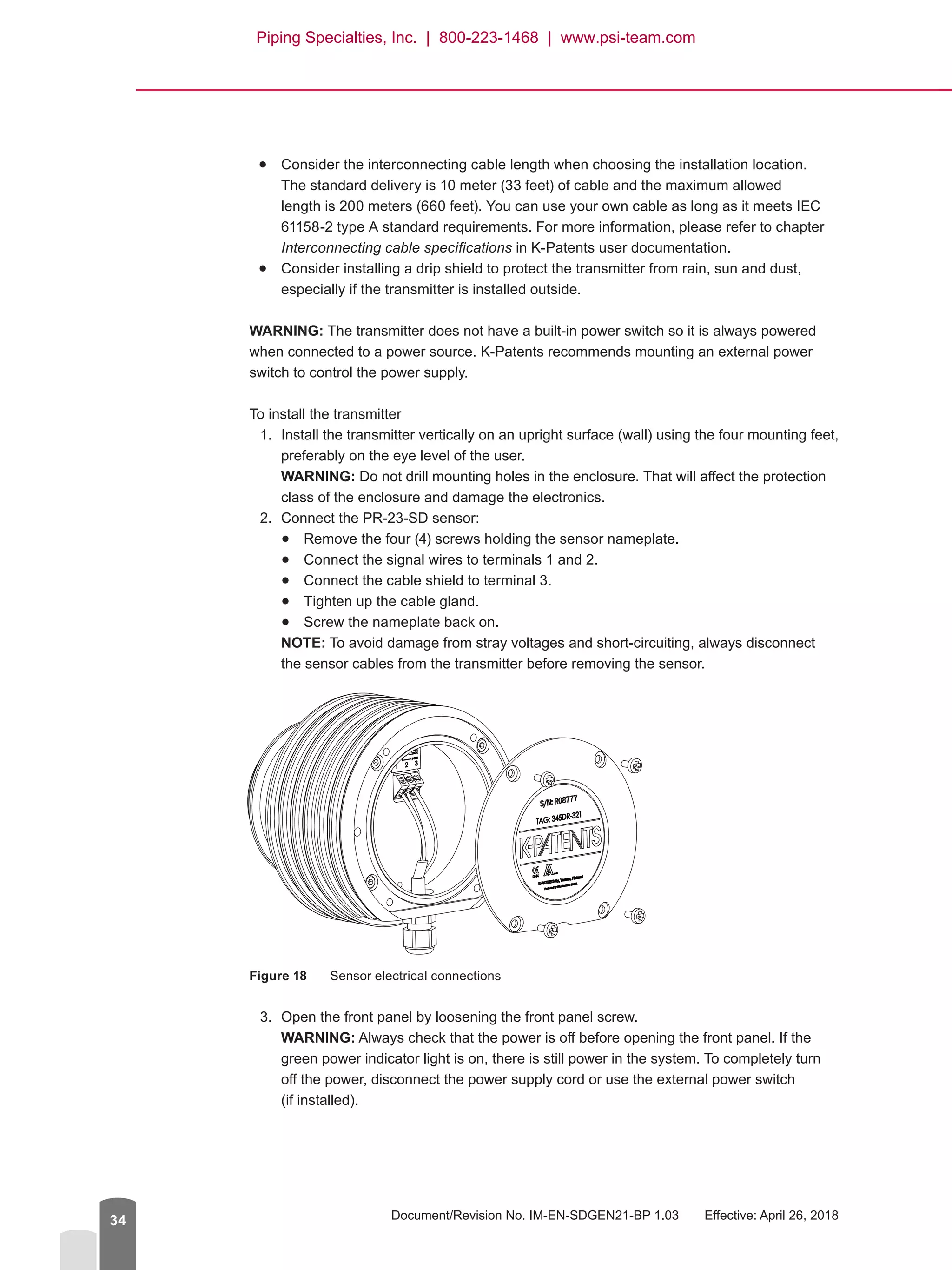
2.	 Connect the PR-23-SD sensor:
●● Remove the four (4) screws holding the sensor nameplate.
●● Connect the signal wires to terminals 1 and 2.
●● Connect the cable shield to terminal 3.
●● Tighten up the cable gland.
●● Screw the nameplate back on.
NOTE: To avoid damage from stray voltages and short-circuiting, always disconnect
the sensor cables from the transmitter before removing the sensor.
Figure 18	 Sensor electrical connections
3.	 Open the front panel by loosening the front panel screw.
WARNING: Always check that the power is off before opening the front panel. If the
green power indicator light is on, there is still power in the system. To completely turn
off the power, disconnect the power supply cord or use the external power switch
(if installed).
Piping Specialties, Inc. | 800-223-1468 | www.psi-team.com
Safe-Drive™
Process Refractometer PR-23-SD Best Practices, Generation 2.1
© Copyright K-Patents 2018. All rights reserved. 35
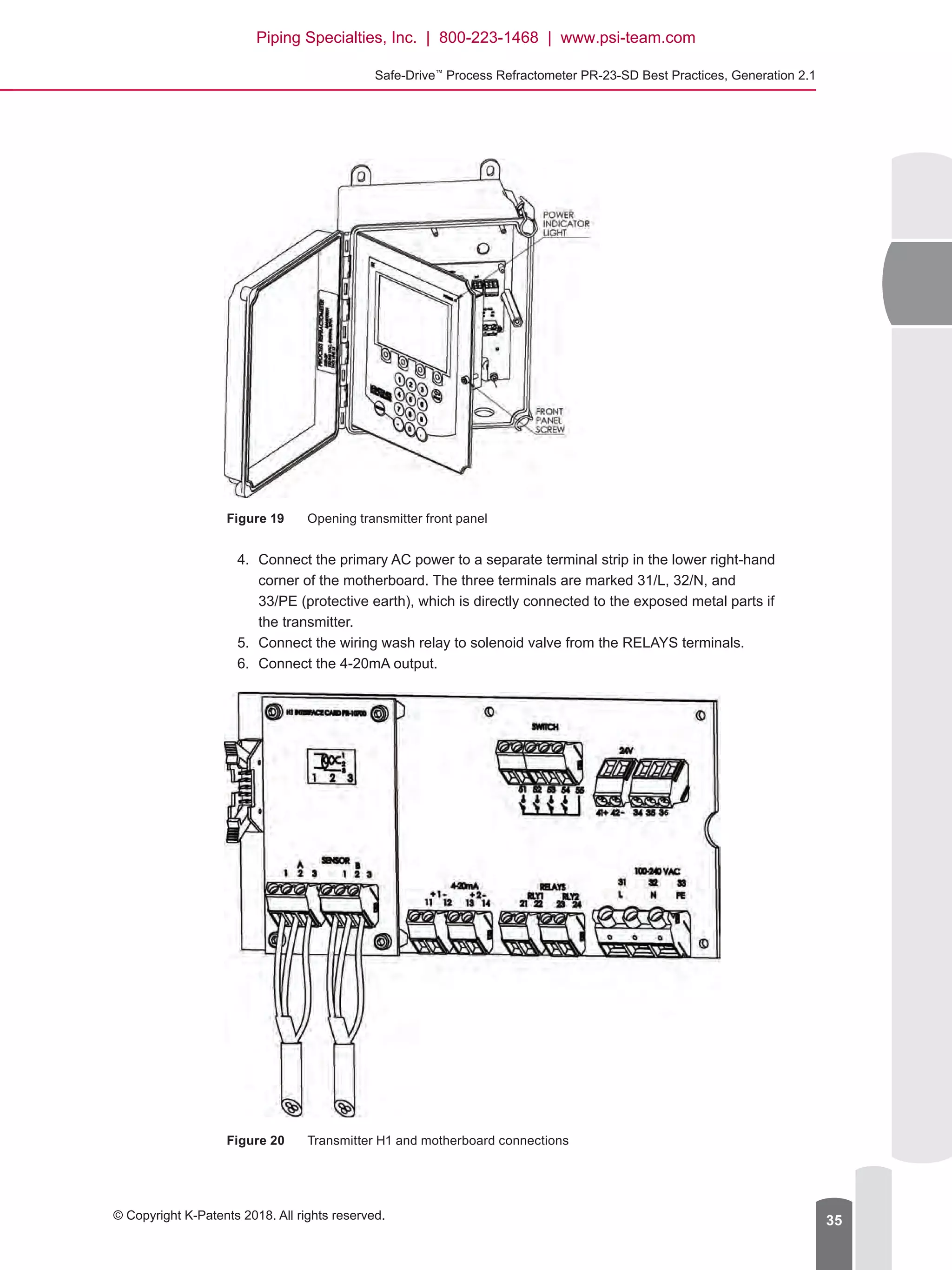
Figure 19	 Opening transmitter front panel
4.	 Connect the primary AC power to a separate terminal strip in the lower right-hand
corner of the motherboard. The three terminals are marked 31/L, 32/N, and
33/PE (protective earth), which is directly connected to the exposed metal parts if
the transmitter.
5.	 Connect the wiring wash relay to solenoid valve from the RELAYS terminals.
6.	 Connect the 4-20mA output.
Figure 20	 Transmitter H1 and motherboard connections
Piping Specialties, Inc. | 800-223-1468 | www.psi-team.com
Document/Revision No. IM-EN-SDGEN21-BP 1.03   Effective: April 26, 201836
H1
A 1 2 3 Connection for Sensor A, signal wires (1, 2), cable shield (3).
B 1 2 3 Connection for Sensor B, signal wires (1, 2), cable shield (3).
Motherboard
11 12
4–20 mA output 1, positive (11), negative (12), max. load 1000 Ohm, galvanically
isolated.
13 14
4–20 mA output 2, positive (13), negative (14), max. load 1000 Ohm, galvanically
isolated.
21 22 Relay 1, one contact output, max. 250 V AC, max. 3 A.
23 24 Relay 2, one contact output, max. 250 V AC, max. 3 A.
31 32 33
Power, L (31), N (32), protective earth (33), 100-240 V AC, 50–60 Hz. An external
power switch is recommended.
41 42
24V terminal for DTR internal use only.
NOTE: Connecting terminal to external 24V supply will void warranty. Connecting
external devices to 24V terminal will void warranty.
51 52 53
54 55
Switch inputs: switch 1 (51), switch 2 (52), switch 3 (53), switch 4 (54) and common
(55). A voltage of 3 V DC is provided over each switch.
The switch terminals are galvanically isolated.
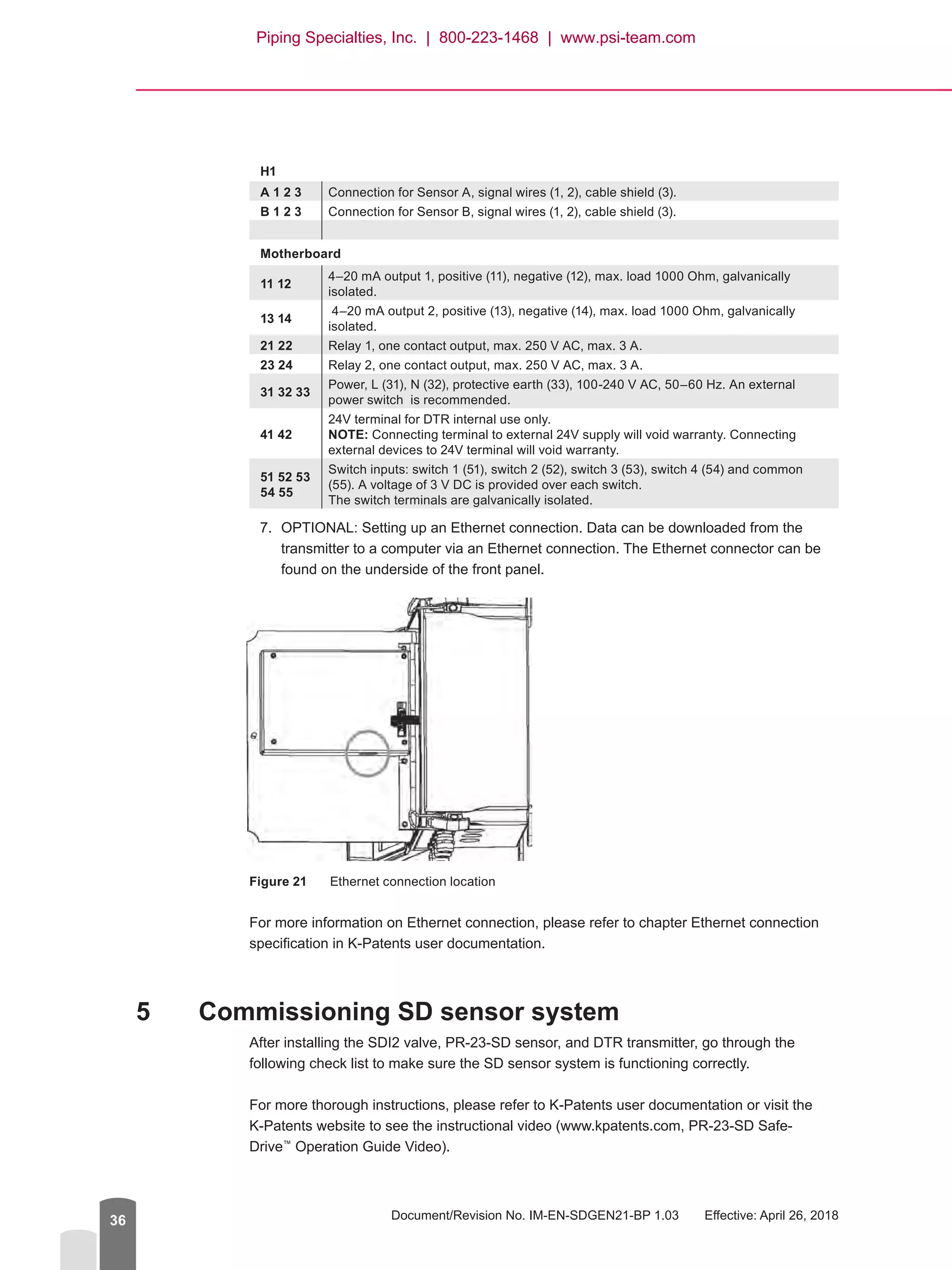
7.	 OPTIONAL: Setting up an Ethernet connection. Data can be downloaded from the
transmitter to a computer via an Ethernet connection. The Ethernet connector can be
found on the underside of the front panel.
Figure 21	 Ethernet connection location
For more information on Ethernet connection, please refer to chapter Ethernet connection
specification in K-Patents user documentation.
5	 Commissioning SD sensor system
After installing the SDI2 valve, PR-23-SD sensor, and DTR transmitter, go through the
following check list to make sure the SD sensor system is functioning correctly.
For more thorough instructions, please refer to K-Patents user documentation or visit the
K-Patents website to see the instructional video (www.kpatents.com, PR-23-SD Safe-
Drive™
Operation Guide Video).
Piping Specialties, Inc. | 800-223-1468 | www.psi-team.com
Safe-Drive™
Process Refractometer PR-23-SD Best Practices, Generation 2.1
© Copyright K-Patents 2018. All rights reserved. 37
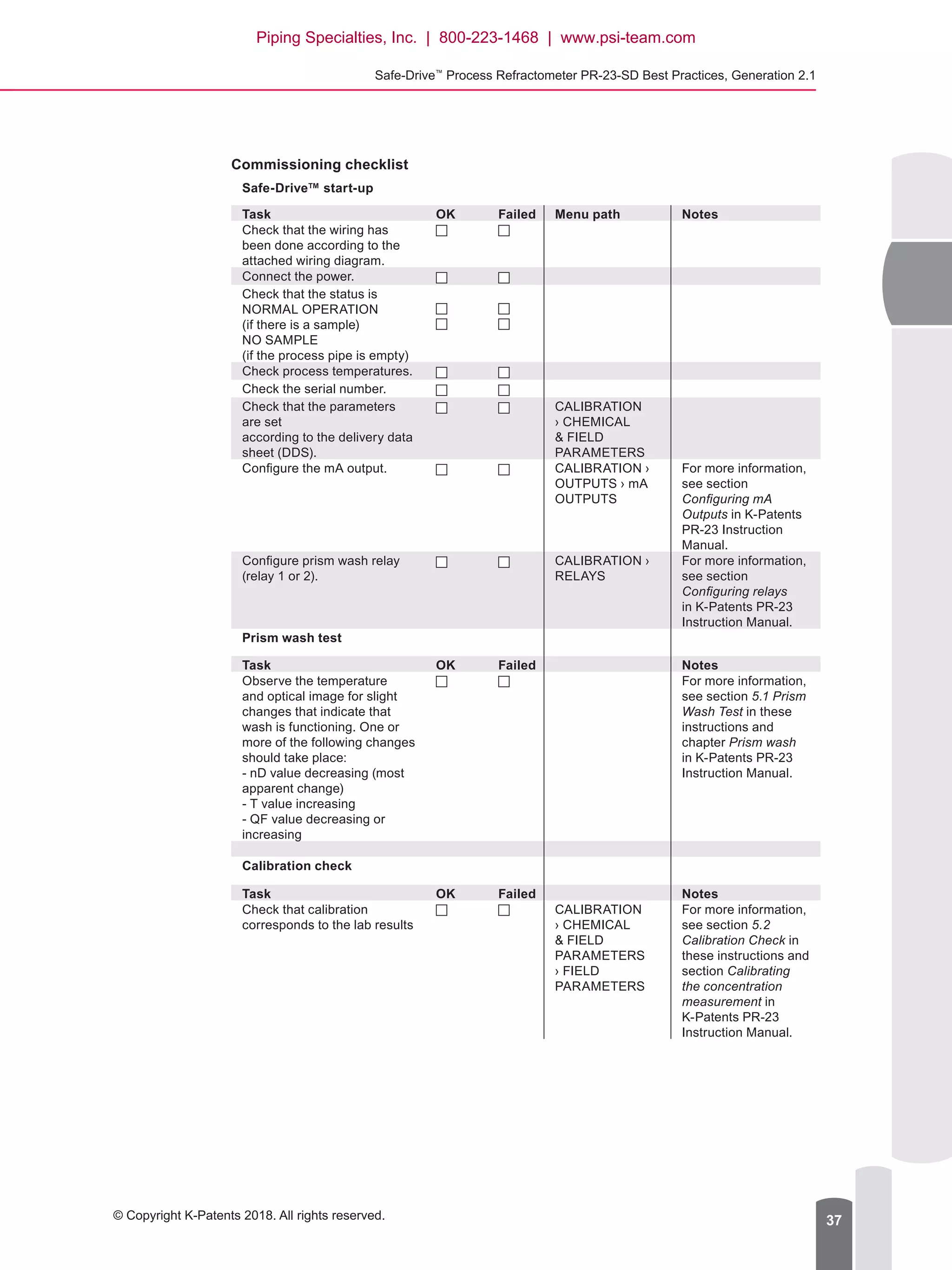
Commissioning checklist
Safe-Drive™ start-up
Task OK Failed Menu path Notes
Check that the wiring has
been done according to the
attached wiring diagram.
Connect the power.
Check that the status is
NORMAL OPERATION
(if there is a sample)
NO SAMPLE
(if the process pipe is empty)
Check process temperatures.
Check the serial number.
Check that the parameters
are set
according to the delivery data
sheet (DDS).
CALIBRATION
› CHEMICAL
 FIELD
PARAMETERS
Configure the mA output. CALIBRATION ›
OUTPUTS › mA
OUTPUTS
For more information,
see section
Configuring mA
Outputs in K-Patents
PR-23 Instruction
Manual.
Configure prism wash relay
(relay 1 or 2).
CALIBRATION ›
RELAYS
For more information,
see section
Configuring relays
in K-Patents PR-23
Instruction Manual.
Prism wash test
Task OK Failed Notes
Observe the temperature
and optical image for slight
changes that indicate that
wash is functioning. One or
more of the following changes
should take place:
- nD value decreasing (most
apparent change)
- T value increasing
- QF value decreasing or
increasing
For more information,
see section 5.1 Prism
Wash Test in these
instructions and
chapter Prism wash
in K-Patents PR-23
Instruction Manual.
Calibration check
Task OK Failed Notes
Check that calibration
corresponds to the lab results
CALIBRATION
› CHEMICAL
 FIELD
PARAMETERS
› FIELD
PARAMETERS
For more information,
see section 5.2
Calibration Check in
these instructions and
section Calibrating
the concentration
measurement in
K-Patents PR-23
Instruction Manual.
Piping Specialties, Inc. | 800-223-1468 | www.psi-team.com
Document/Revision No. IM-EN-SDGEN21-BP 1.03   Effective: April 26, 201838
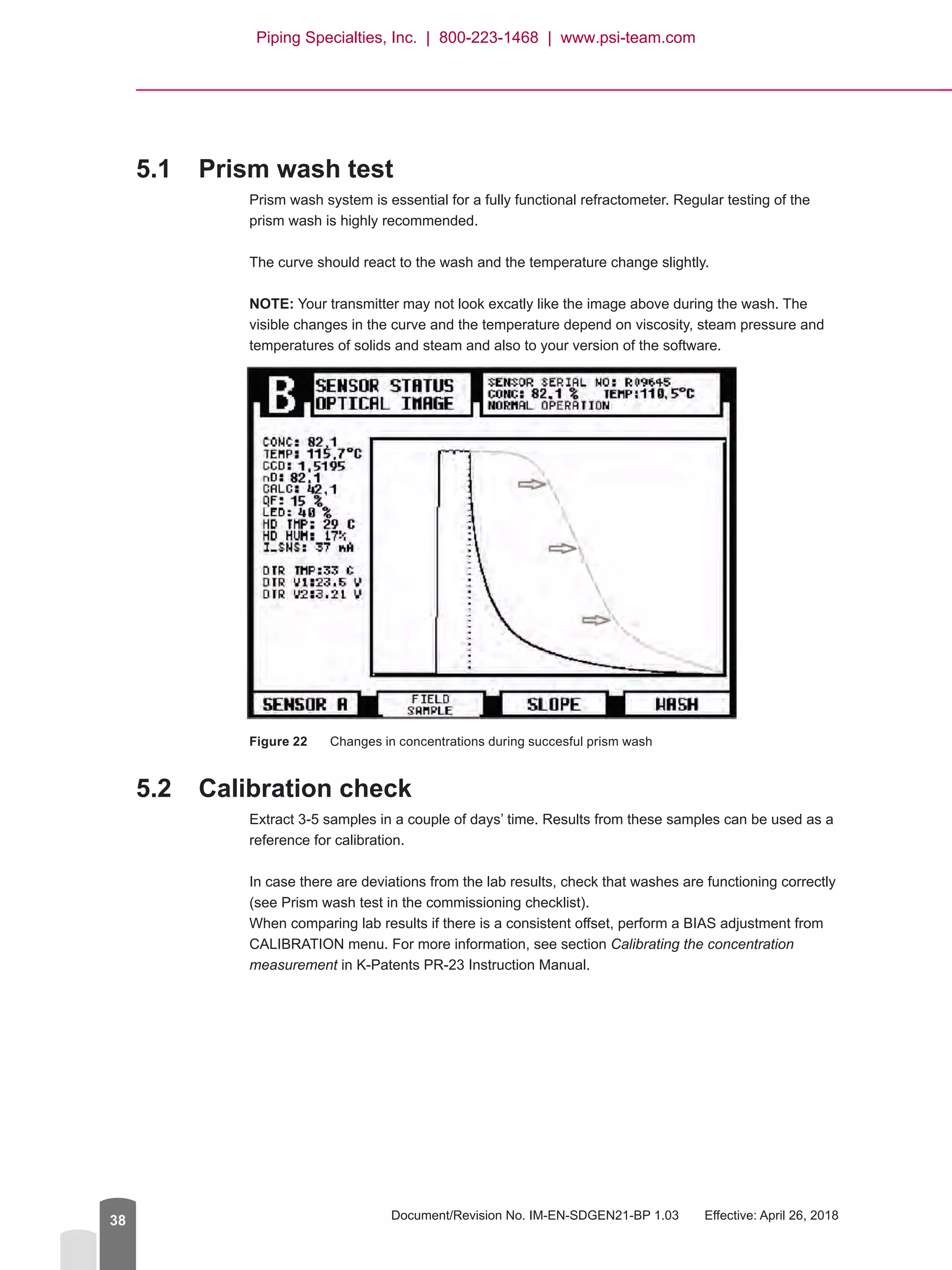
5.1	 Prism wash test
Prism wash system is essential for a fully functional refractometer. Regular testing of the
prism wash is highly recommended.
The curve should react to the wash and the temperature change slightly.
NOTE: Your transmitter may not look excatly like the image above during the wash. The
visible changes in the curve and the temperature depend on viscosity, steam pressure and
temperatures of solids and steam and also to your version of the software.
Figure 22	 Changes in concentrations during succesful prism wash
5.2	 Calibration check
Extract 3-5 samples in a couple of days’ time. Results from these samples can be used as a
reference for calibration.
In case there are deviations from the lab results, check that washes are functioning correctly
(see Prism wash test in the commissioning checklist).
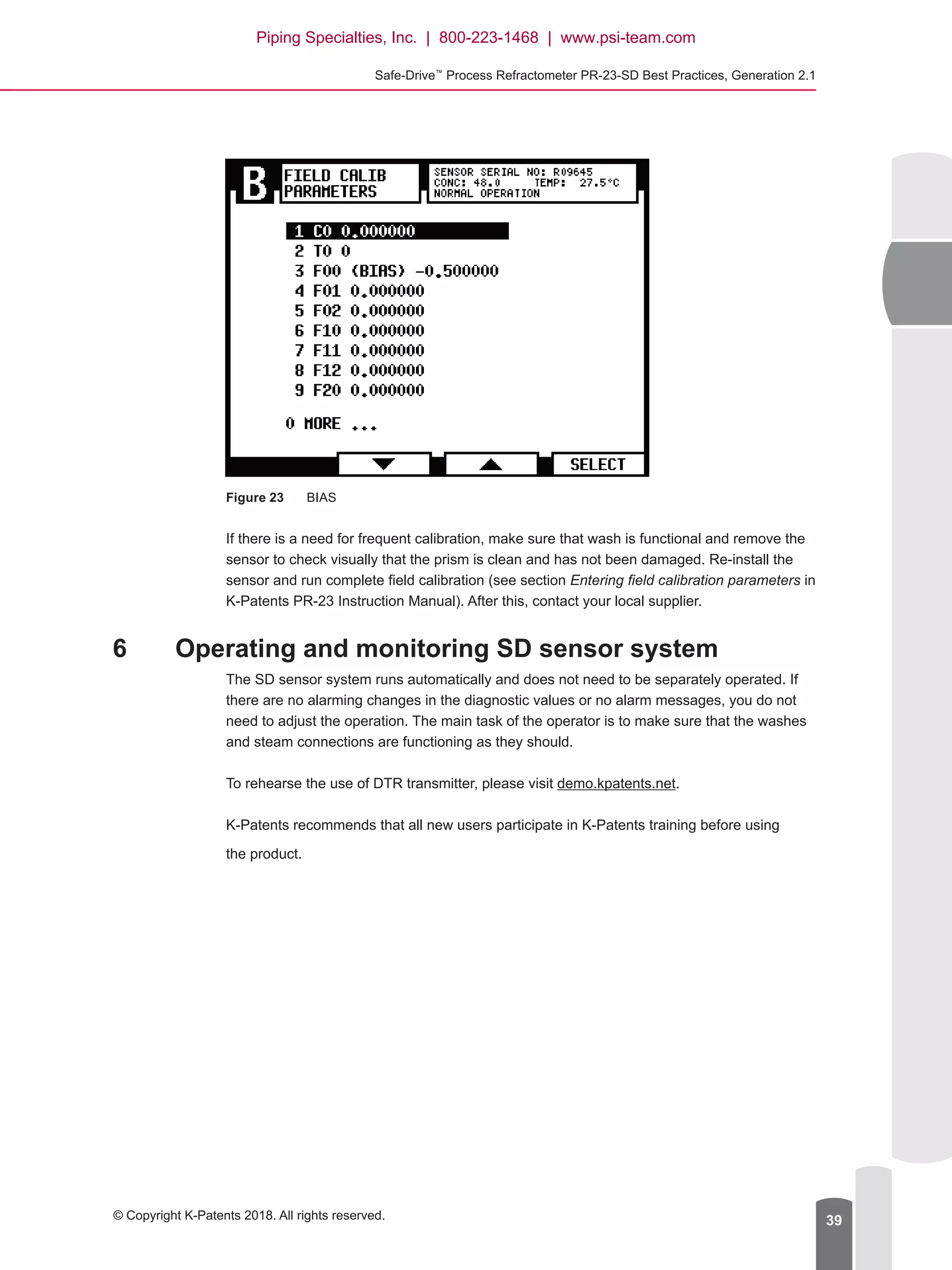
When comparing lab results if there is a consistent offset, perform a BIAS adjustment from
CALIBRATION menu. For more information, see section Calibrating the concentration
measurement in K-Patents PR-23 Instruction Manual.
Piping Specialties, Inc. | 800-223-1468 | www.psi-team.com
Safe-Drive™
Process Refractometer PR-23-SD Best Practices, Generation 2.1
© Copyright K-Patents 2018. All rights reserved. 39
Figure 23	 BIAS
If there is a need for frequent calibration, make sure that wash is functional and remove the
sensor to check visually that the prism is clean and has not been damaged. Re-install the
sensor and run complete field calibration (see section Entering field calibration parameters in
K-Patents PR-23 Instruction Manual). After this, contact your local supplier.
6	 Operating and monitoring SD sensor system
The SD sensor system runs automatically and does not need to be separately operated. If
there are no alarming changes in the diagnostic values or no alarm messages, you do not
need to adjust the operation. The main task of the operator is to make sure that the washes
and steam connections are functioning as they should.
To rehearse the use of DTR transmitter, please visit demo.kpatents.net.
K-Patents recommends that all new users participate in K-Patents training before using
the product.
Piping Specialties, Inc. | 800-223-1468 | www.psi-team.com
Document/Revision No. IM-EN-SDGEN21-BP 1.03   Effective: April 26, 201840
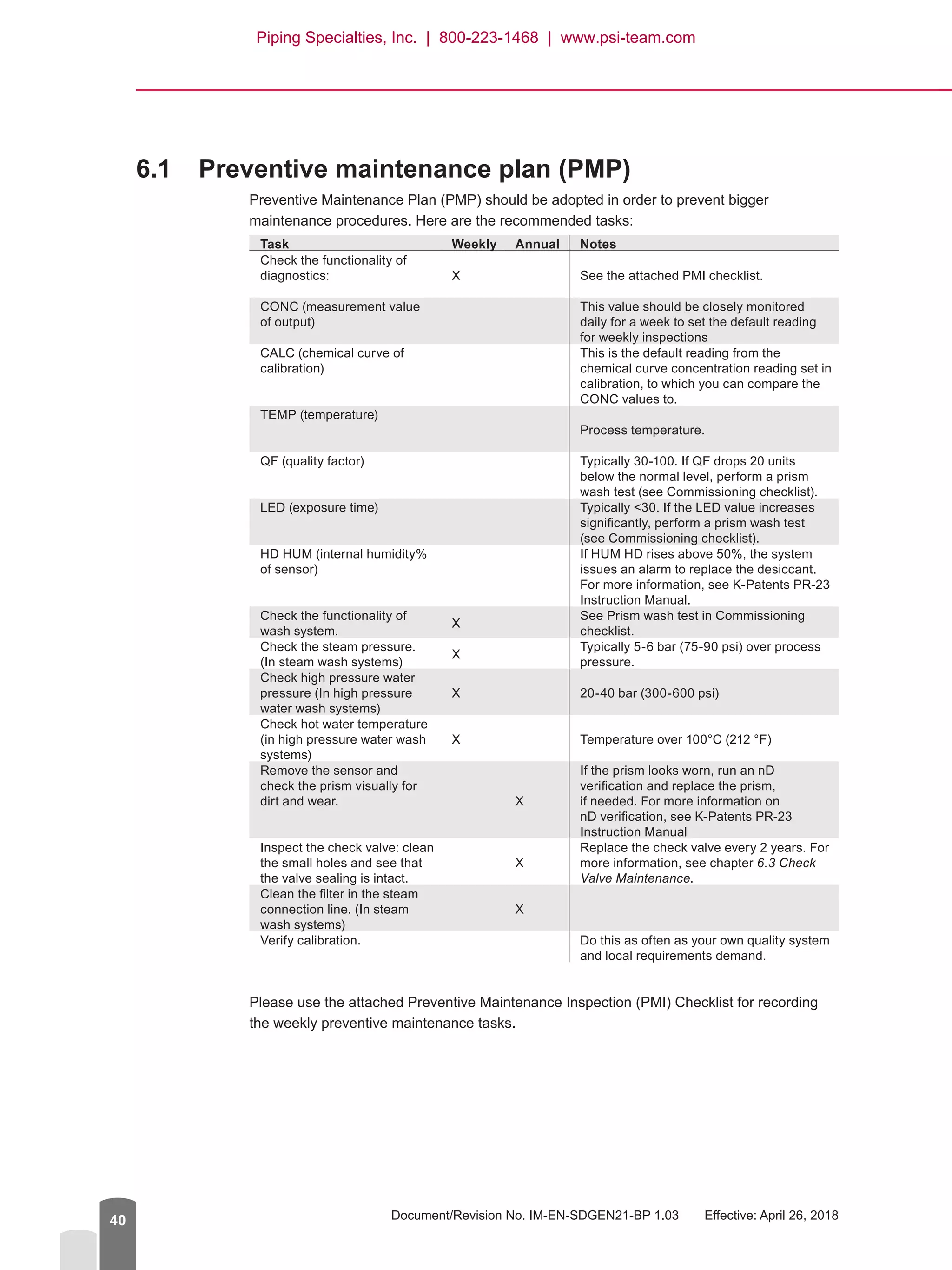
6.1	 Preventive maintenance plan (PMP)
Preventive Maintenance Plan (PMP) should be adopted in order to prevent bigger
maintenance procedures. Here are the recommended tasks:
Task Weekly Annual Notes
Check the functionality of
diagnostics: X See the attached PMI checklist.
CONC (measurement value
of output)
This value should be closely monitored
daily for a week to set the default reading
for weekly inspections
CALC (chemical curve of
calibration)
This is the default reading from the
chemical curve concentration reading set in
calibration, to which you can compare the
CONC values to.
TEMP (temperature)
Process temperature.
QF (quality factor) Typically 30-100. If QF drops 20 units
below the normal level, perform a prism
wash test (see Commissioning checklist).
LED (exposure time) Typically 30. If the LED value increases
significantly, perform a prism wash test
(see Commissioning checklist).
HD HUM (internal humidity%
of sensor)
If HUM HD rises above 50%, the system
issues an alarm to replace the desiccant.
For more information, see K-Patents PR-23
Instruction Manual.
Check the functionality of
wash system.
X
See Prism wash test in Commissioning
checklist.
Check the steam pressure.
(In steam wash systems)
X
Typically 5-6 bar (75-90 psi) over process
pressure.
Check high pressure water
pressure (In high pressure
water wash systems)
X 20-40 bar (300-600 psi)
Check hot water temperature
(in high pressure water wash
systems)
X Temperature over 100°C (212 °F)
Remove the sensor and
check the prism visually for
dirt and wear. X
If the prism looks worn, run an nD
verification and replace the prism,
if needed. For more information on
nD verification, see K-Patents PR-23
Instruction Manual
Inspect the check valve: clean
the small holes and see that
the valve sealing is intact.
X
Replace the check valve every 2 years. For
more information, see chapter 6.3 Check
Valve Maintenance.
Clean the filter in the steam
connection line. (In steam
wash systems)
X
Verify calibration. Do this as often as your own quality system
and local requirements demand.
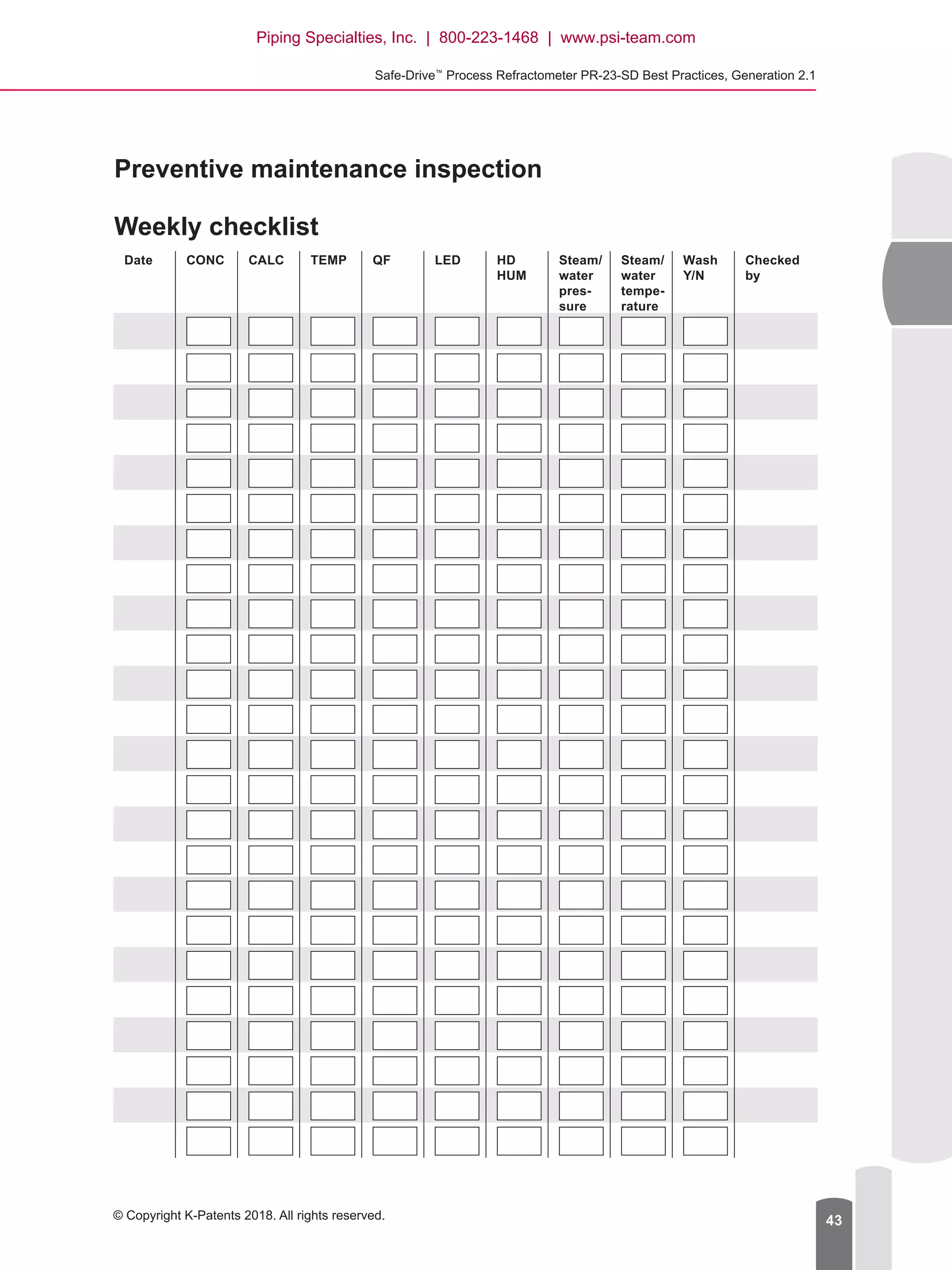
Please use the attached Preventive Maintenance Inspection (PMI) Checklist for recording
the weekly preventive maintenance tasks.
Piping Specialties, Inc. | 800-223-1468 | www.psi-team.com
Safe-Drive™
Process Refractometer PR-23-SD Best Practices, Generation 2.1
© Copyright K-Patents 2018. All rights reserved. 41
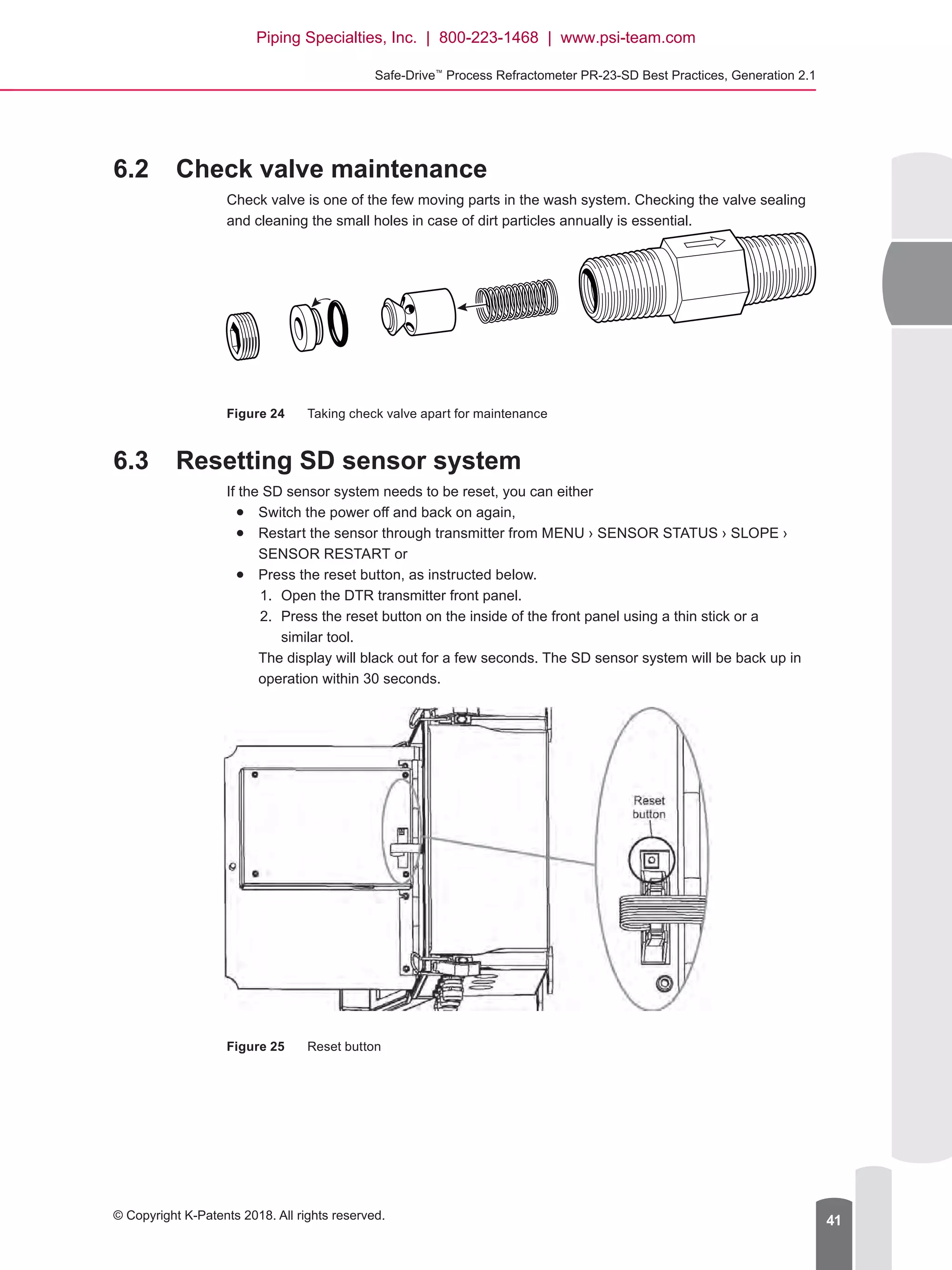
6.2	 Check valve maintenance
Check valve is one of the few moving parts in the wash system. Checking the valve sealing
and cleaning the small holes in case of dirt particles annually is essential.
Figure 24	 Taking check valve apart for maintenance
6.3	 Resetting SD sensor system
If the SD sensor system needs to be reset, you can either
●● Switch the power off and back on again,
●● Restart the sensor through transmitter from MENU › SENSOR STATUS › SLOPE ›
SENSOR RESTART or
●● Press the reset button, as instructed below.
1.	 Open the DTR transmitter front panel.
2.	 Press the reset button on the inside of the front panel using a thin stick or a
similar tool.
The display will black out for a few seconds. The SD sensor system will be back up in
operation within 30 seconds.
Figure 25	 Reset button
Piping Specialties, Inc. | 800-223-1468 | www.psi-team.com
Document/Revision No. IM-EN-SDGEN21-BP 1.03   Effective: April 26, 201842
7	 Appendices
Preventive Maintenance Inspection Weekly Checklist
Data Sheets for Accessories
Welding diagrams
Installation diagrams (MTG DIM)
Wiring Diagrams (WRG)
Piping Specialties, Inc. | 800-223-1468 | www.psi-team.com
Safe-Drive™
Process Refractometer PR-23-SD Best Practices, Generation 2.1
© Copyright K-Patents 2018. All rights reserved. 43
Preventive maintenance inspection
Weekly checklist
Date CONC CALC TEMP QF LED HD
HUM
Steam/
water
pres­
sure
Steam/
water
tempe­
rature
Wash
Y/N
Checked
by
Piping Specialties, Inc. | 800-223-1468 | www.psi-team.com
K-Patents Oy
P.O. Box 77
FI-01511 Vantaa, Finland
Tel: +358 207 291 570
Fax: +358 207 291 577
Email: info@kpatents.com
K-Patents, Inc.
1804 Centre Point Circle, Suite 106
Naperville, IL 60563, USA
Tel: (630) 955 1545
Fax: (630) 955 1585
Email: info@kpatents-usa.com
K-Patents (Shanghai) Co., Ltd
Room 1509, Tomson Commercial
Building, No. 710
Dongfang RD
Pudong District, Shanghai, China
Tel: +86 21 5087 0597/0598
Fax: +86 21 5087 0598
www.kpatents.com
Piping Specialties, Inc. | 800-223-1468 | www.psi-team.com

Safe-Drive™ Process Refractometer PR-23-SD Generation 2.1 Best Practices

  • 1.
    Safe-Drive™ Process Refractometer PR-23-SD Generation 2.1 BestPractices for PR-23-SD IM-EN-SDGEN21-BP v. 1.03 Piping Specialties, Inc. | 800-223-1468 | www.psi-team.com
  • 2.
    Document/Revision No. IM-EN-SDGEN21-BP1.03   Effective: April 26, 20182 Contents Section  1 About this document............................................................................................................ 3 Section  2 Before installation................................................................................................................. 3 2.1 Installation location checklists........................................................................................ 3 2.1.1 Checklist for steam wash (black liquor).............................................................. 3 2.1.2 Checklist for high pressure water wash (green liquor)....................................... 4 2.2 Component checklist (steam wash only)........................................................................ 5 2.3 Installation equipment..................................................................................................... 6 Section  3 Safety requirements.............................................................................................................. 7 Section  4 Installation process............................................................................................................... 8 4.1 Spool piece assembly..................................................................................................... 8 4.2 Cutting installation opening for SDI2 valve..................................................................... 8 4.3 Disassembling SDI2 valve for welding......................................................................... 10 4.4 Welding SDI2 valve in place..........................................................................................11 4.5 Reassembling SDI2 valve............................................................................................. 12 4.5.1 SDI2 wash nozzle upgrade............................................................................... 15 4.6 Installing wash systems................................................................................................ 15 4.6.1 Steam prism wash system................................................................................ 15 4.6.2 High pressure water prism wash system.......................................................... 17 4.6.3 High pressure water wash with a pump............................................................ 19 4.7 Before inserting and removing PR-23-SD sensor........................................................ 21 4.8 Inserting sensor............................................................................................................ 22 4.9 Box flushing (steam wash systems only)...................................................................... 25 4.10 Removing sensor.......................................................................................................... 26 4.11 Removing wash nozzle................................................................................................. 29 4.12 Inserting wash nozzle................................................................................................... 30 4.13 Blinding the SD system................................................................................................. 32 4.14 Installing Indicating transmitter DTR............................................................................ 32 Section  5 Commissioning SD sensor system................................................................................... 35 5.1 Prism wash test............................................................................................................. 37 5.2 Calibration check.......................................................................................................... 37 Section  6 Operating and monitoring SD sensor system................................................................. 38 6.1 Preventive maintenance plan (PMP)............................................................................ 38 6.2 Check valve maintenance............................................................................................. 39 6.3 Resetting SD sensor system........................................................................................ 40 Section  7 Appendices.......................................................................................................................... 40 Piping Specialties, Inc. | 800-223-1468 | www.psi-team.com
  • 3.
    © Copyright K-Patents2018. All rights reserved. 3 Safe-Drive™ Process Refractometer PR-23-SD Generation 2.1 Best Practices 1 About this document This document is intended for individuals installing, commissioning, operating, and/ or servicing the Safe-Drive™ Process Refractometer PR-23-SD, generation 2.1 model. The purpose of this document is to provide a quick guide for the abovementioned tasks in the form of K-Patents recommended best practices. This document is intended for PR-23- SD applications that have a steam wash system (typical application for black liquor) and applications that have high pressure water wash system (typical application for green liquor). NOTE: These instructions are for quick reference only. For more thorough guidance, please refer to K-Patents user manual and documentation. 2 Before installation 2.1 Installation location checklists 2.1.1 Checklist for steam wash (black liquor) Before the SD sensor system is installed, it is important to inspect the installation location carefully for the following conditions: ●● Install the SD sensor system onto either vertical or horizontal pipeline. The recommended flow rate is 0.4 m/s – 2 m/s (1.5 ft/s – 6 ft/s). ●● Mount the system at waist level. This is the natural and safe height for the system and enables you to use the tools more ergonomically. ●● Leave a 1 m (approximately 3 ft) space around the installation for operating around the SD sensor system. For the same reason, the steam connections should be installed on the sides or back of the sensor system. ●● Recommended maximum ambient temperature of installation location is 45°C (120°F). Piping Specialties, Inc. | 800-223-1468 | www.psi-team.com
  • 4.
    Document/Revision No. IM-EN-SDGEN21-BP1.03   Effective: April 26, 20184 ● ● Avoid locations that are blocked by other piping and/or equipment, or require additional tools, such as a ladder, to access the sensor. The installation location must be level, firm, and free of clutter to provide safe and easy access to the system.● ● Use suitable type of steam for cleaning the prism. Dry saturated steam and 10-12 bar (150-180 psi) from steam source are recommended.● ● Access to steam. The distance between the steam supply and the SD sensor system should be minimized.● ● Access to drain for steam trap condensate outlet.● ● Emergency shower and eye wash should be easily accessible. Water can also be used for cleaning SDI2 valve lip seals and sensor after sensor removal.● ● Shut-off valve needs pressurized instrumentation air (5-10 bars / 70-150 psi).● ● Ensure connection to the power supply (110-230V AC). If these conditions do not apply, please reconsider the intended location for your installation or contact K-Patents. 2.1.2 Checklist for high pressure water wash (green liquor) Before the SD sensor system is installed, it is important to inspect the installation location carefully for the following conditions:● ● Install the SD sensor system onto either vertical or horizontal pipeline. The recommended flow rate is 0.4 m/s – 2 m/s (1.5 ft/s – 6 ft/s).● ● Mount the system at waist level. This is the natural and safe height for the system and enables you to use the tools more ergonomically.● ● Leave a 1 m (approximately 3 ft) space around the installation for operating around the SD sensor system. For the same reason, the steam connections should be installed on the sides or back of the sensor system.● ● Recommended maximum ambient temperature of installation location is 45°C (120°F).● ● Avoid locations that are blocked by other piping and/or equipment, or require additional tools, such as a ladder, to access the sensor. The installation location must be level, firm, and free of clutter to provide safe and easy access to the system.● ● Water for washing must be hotter than process temperature and the feed pressure needs to be 20-30 bar (290-435 psi) over process pressure. The source of water can be● ● boiler feed water 100-120 bar (1450-1740 psi), use pressure reducer valve.● ● blowdown water 80-100 bar (1160-1450 psi), use pressure reducer valve.● ● intermediate feed water 40-60 bar (580-870 psi).● ● if there’s no ready source of hot pressurized water, a pump can be used. Check pump temperature rating.● ● The distance between the water supply and the SD sensor system should be considered for the legth of piping. Insulation of piping is important, water temperature must be higher than process temperature● ● Access to drain for precondition outlet● ● Emergency shower and eye wash should be easily accessible. Water can also be used for cleaning SDI2 valve lip seals and sensor after sensor removal.● ● Actuator valve needs pressurized instrumentation air (5-10 bars (70-150 psi))● ● Ensure connection to the power supply (110-230V AC). If these conditions do not apply, please reconsider the intended location for your installation or contact K-Patents. Piping Specialties, Inc. | 800-223-1468 | www.psi-team.com
  • 5.
    Safe-Drive™ Process Refractometer PR-23-SDBest Practices, Generation 2.1 © Copyright K-Patents 2018. All rights reserved. 5 Warning! Hard-scale removal in green liquor handing systems: Make sure that the sensor and wash nozzle materials are suitable for the hard-scale removal chemi- cals. 2.2 Component checklist (steam wash only) Before starting installation, make sure you have all the tools and components listed below. NOTE: Components 4 and 5 are connected by union nipple or piping not included in the delivery. System components included in K-Patents delivery: 1 2 3 4 5 6 7 8 9 - 0 . BACK ENTER 1 7 5 3b 8 4 6 3 2 3a Figure 1 System components included in K-Patents delivery  1 PR-23-SD sensor  2 SDI2 valve  3 Retractor tool SDR  3a   3b Prism wash nozzle assembly Wash nozzle installation bolts and locking plate  4 Compressed air operated solenoid shut-off valve with steam trap  5 Steam connection hose PR-3515   6 Pressure reducer valve and pressure gauge  7 Sensor connection cable   8 DTR transmitter NOTE: If any of tools or components are missing, contact your supplier before starting installation Piping Specialties, Inc. | 800-223-1468 | www.psi-team.com
  • 6.
    Document/Revision No. IM-EN-SDGEN21-BP1.03   Effective: April 26, 20186 2.3 Installation equipment Figure 2 Installation equipment  1 Retractor inner casing Supplied by K-Patents  2 Retractor outer casing Supplied by K-Patents  3 Combination wrenches, 32 mm, 14 mm, 8 mm  4 Allen keys 8 mm, 5 mm  5  5a   5b Torque wrench open end fitting 19 mm hex bit socket 8 mm   6   6a   6b Screwdriver Phillips head Flathead  7 Pliers   8 Thread seal tape  9 Pocket guide for insertion and retraction of sensor and wash nozzle Supplied by K-Patents  10 Laminated instructions for insertion and removal of SAFE- DRIVE sensor Supplied by K-Patents  11 SAFE-DRIVE Process refractometer PR-23-SD Generation 2.1 Best Practices (this document) Supplied by K-Patents NOTE: The material of the SDI2 valve body that is welded onto a process pipe is Duplex steel SAF2205 (EN 1.4462, ASTM S32205/S31803). Choose the welding method and filler accordingly. K-Patents recommends complying with the applicable EN / ASTM standards. PROCESS REFRACTOMETER PR-23 POCKET GUIDE SAFE-DR IVE TM G2.1 ® 1 2 3 4 5 6b 6a 7 8 5b 10 115a 9 Piping Specialties, Inc. | 800-223-1468 | www.psi-team.com
  • 7.
    Safe-Drive™ Process Refractometer PR-23-SDBest Practices, Generation 2.1 © Copyright K-Patents 2018. All rights reserved. 7 3 Safety requirements These safety requirements must be followed at all times when installing, operating, or servicing PR-23-SD sensor. These are the minimum safety requirements – your company may require additional PPE (personal protective equipment). Figure 3 Safety symbols WARNING: Watch out for hot steam and process pipes. Wear protective clothing as instructed below to work safely.● ● Only authorized personnel can perform the tasks instructed in this document.● ● Long-sleeved safety clothing.● ● Protective gloves.● ● Safety glasses and/or goggles.● ● Hard hat or helmet.● ● Locate the nearest emergency shower and eye wash before starting the work.● ● Never operate the Safe-Drive™ Retractor alone.● ● Hard-cap safety boots. It is the user’s responsibility to follow manufacturer’s safety and operating instructions. The client’s organization has the responsibility to develop and maintain occupational safety and create a safety culture where individuals are expected to follow safety instructions at all times. Any negligence towards safety instructions or failure to comply with safe practices should not be tolerated. It is the manufacturer’s responsibility to produce goods that are safe to use when instructions are followed. Piping Specialties, Inc. | 800-223-1468 | www.psi-team.com
  • 8.
    Document/Revision No. IM-EN-SDGEN21-BP1.03   Effective: April 26, 20188 4 Installation process For more thorough instructions, please refer to K-Patents user documentation or visit the K-Patents website to see the instructional video (www.kpatents.com, PR-23-SD Safe-Drive™ Operation Guide Video). Installation of the SD sensor system consists of● ● Cutting pipe opening for SDI2 isolation valve.● ● Welding and assembling the SDI2 valve onto the processing piping.● ● Installing the prism wash system.● ● Installing the DTR transmitter.● ● Installing the PR-23-SD sensor. 4.1 Spool piece assembly If the SDI2 valve was supplied pre-welded and assembled onto a pipe spool piece for integration in existing piping on site, please skip ahead to installing prism wash. Figure 4 Vertical and horizontal spool piece assemblies (steam wash system) 4.2 Cutting installation opening for SDI2 valve Use the installation guide sticker provided by K-Patents to determine the installation opening shape and size suitable for your process pipe. If you do not have the guide sticker at hand, please follow the instructions in the image below: 23SD-023 23SD-024 Piping Specialties, Inc. | 800-223-1468 | www.psi-team.com
  • 9.
    Safe-Drive™ Process Refractometer PR-23-SDBest Practices, Generation 2.1 © Copyright K-Patents 2018. All rights reserved. 9 A Figure 5 Installation guide To cut the installation opening 1. Cut the installation guide sticker to match the pipe size. 2. Clean the surface of the pipe around the installation area and attach the sticker onto the pipe. NOTE: Make sure that the FLOW marker is parallel to the pipe and points to the correct flow direction. On a horizontal pipe the nozzle points downwards and on a vertical pipe it points to right. The SD sensor system must always be installed in horizontal position and on the side of the pipe. 3. Drill two holes – 50 mm (2”) and 25 mm (1”) – as guided by figure 5. 4. Remove the bridge between the holes so that the opening is exactly the shape of the sticker. Piping Specialties, Inc. | 800-223-1468 | www.psi-team.com
  • 10.
    Document/Revision No. IM-EN-SDGEN21-BP1.03   Effective: April 26, 201810 WeldCutout Safe Drive mounting flange Process pipe Weld Cutout Safe Drive mounting flange Process pipe Figure 6 Installation on vertical and horizontal pipes 4.3 Disassembling SDI2 valve for welding To avoid thermal damage to the isolation valve sealing, you must separate the valve body from the valve assembly before it is welded onto the pipe. NOTE: Be very careful not to drop or lose any parts that come loose when separating the body from the assembly. To disassemble the SDI2 valve, open the four (4) M10 allen key bolts with an 8 mm (5/16”) allen key (1). Piping Specialties, Inc. | 800-223-1468 | www.psi-team.com
  • 11.
    Safe-Drive™ Process Refractometer PR-23-SDBest Practices, Generation 2.1 © Copyright K-Patents 2018. All rights reserved. 11 Figure 7 Disassembling valve 4.4 Welding SDI2 valve in place After you have disassembled the SDI2 valve, the valve body is welded onto the process pipe. ●● The material of the SDI2 valve body is Duplex steel SAF2205 (EN 1.4462, ASTM S32205/S31803). Choose the welding method and filler accordingly. ●● See the attached drawings 2149 (MTG) and MTG472 for more detailed welding instructions. ●● Follow all local requirements for welding. ●● K-Patents recommends complying with the applicable EN / ASTM standards. ●● Consider the materials and shapes of the welded objects when performing welding pre-processing (tools, cleaning, preheating). ●● Consider the materials and shapes of the welded objects when performing welding post-processing (postheating, fluxing). 1 Piping Specialties, Inc. | 800-223-1468 | www.psi-team.com
  • 12.
    Document/Revision No. IM-EN-SDGEN21-BP1.03   Effective: April 26, 201812 Figure 8 Welding on vertical and horizontal pipes 4.5 Reassembling SDI2 valve After the SDI2 valve body has been welded in place, reassemble the valve in reverse order. NOTE: Make sure that the seals for the ball valve are propely aligned. ATTENTION! Widest bayonet lug must be positioned at the top ATTENTION! Valve handle must be positioned on top Nyloc nut Vertical process pipe 90° Weld Process pipe 90° Weld Process pipe NOTE! The material of the welded parts is Duplex steel SAF2205 Piping Specialties, Inc. | 800-223-1468 | www.psi-team.com
  • 13.
    Safe-Drive™ Process Refractometer PR-23-SDBest Practices, Generation 2.1 © Copyright K-Patents 2018. All rights reserved. 13 ATTENTION! Widest bayonet lug must be positioned at the top ATTENTION! Valve handle must be positioned on top Nyloc nut Horizontal process pipe Figure 9 Reassembling valve on vertical and horizontal pipes ●● Make sure that the SDI2 valve handle and the largest bayonet connection are on top. Otherwise, you will not be able to insert the sensor in its place. ●● Use Nyloc nuts. Tighten the bolts to a torque of 17 Nm (13 lb-ft) with an 8 mm (5/16”) allen key. WARNING: Always shut the main steam/water valve before performing any work on the wash nozzle. To re-install the wash nozzle assembly 1. Insert the wash nozzle assembly to its place (1). 2. Place the nozzle guide plate in the correct position and tighten the two (2) M5 bolts (2). 3. Secure the wash nozzle with a locking plate (3, 4). Piping Specialties, Inc. | 800-223-1468 | www.psi-team.com
  • 14.
    Document/Revision No. IM-EN-SDGEN21-BP1.03   Effective: April 26, 201814 1 2 3 4 Unless otherwise indicated, the drain valves should be closed. Piping Specialties, Inc. | 800-223-1468 | www.psi-team.com
  • 15.
    Safe-Drive™ Process Refractometer PR-23-SDBest Practices, Generation 2.1 © Copyright K-Patents 2018. All rights reserved. 15 4.5.1 SDI2 wash nozzle upgrade A Safe-Drive generation 1 wash nozzle system can be upgraded to SDI2 (incl. generation 2.1) with an upgrade kit. PR-11025 Nozzle isolation valve assembly for SDI2 PR-11023-KIT SDI2 Steam wash nozzle SN2 PR-11023-KIT including PR-11023, PR-11030, PR-3516 and PR-3304 PR-11026 Locking bracket for SDI2 isolation valve PR-11032 Valve handle PR-11029 Safety pin for SDI2/SDR2-23 PR-11030 Screws for SDI2 wash nozzle PR-3304 Check valvePR-3516 Ball valve M PR-11031 Sealing set PR-11024-KIT SDI2 High pressure water nozzle WP2 PR-11024-KIT including PR-11024, PR-11030, PR-3516 and PR-3304 PR-11030 Screws for SDI2 wash nozzlePR-3304 Check valve PR-3516 Ball valve C Structure updated 03/09/2014 TL Sparepart kit structures updated TL17/09/2014D Upgrade kit info SN2-KIT Steam wash upgrade to SN2 Consisting of: PR-11023-KIT PR-11025 WP2-KIT High pressure water upgrade to WP2 Consisting of: PR-11024-KIT PR-11025 IA7/11/2014Assembly updatedF IA20/02/2015PR-11030 Description addedG H Upgrade kit info added 05.03.2015 IA IA26.05.2015WP2-KIT info updatedI 4.6 Installing wash systems In the process service material deposit, scaling or coating may occur on the prism surface. To avoid this, you need to install an integral prism steam wash (in black liquor) or high pressure water wash (in green liquor). The wash uses the retractable nozzle included in the SDI2 valve. 4.6.1 Steam prism wash system Important steam prism wash considerations ●● The distance from the steam nozzle on the SDI2 valve to the steam shut-off valve should be kept as short as possible to avoid condensate. The recommended length of the distance is 0.6 m (2 ft) or less. ●● Separate or isolate the power to the solenoid from the power to the transmitter by installing a safety switch. This enables the steam wash to be serviced without having to power down the whole SD sensor system. ●● Pipe the steam trap properly to drain so that the trap is not blowing hot steam. ●● Steam piping upstream of shut-off valve is ½” or larger. ●● In addition to the SDI2 valve steam fittings, the following components must be included in the steam wash installation: ●● steam shut-off valve ●● air-operated solenoid valve ●● steam trap ●● switch or terminal for power isolation Piping Specialties, Inc. | 800-223-1468 | www.psi-team.com
  • 16.
    Document/Revision No. IM-EN-SDGEN21-BP1.03   Effective: April 26, 201816 ●● OPTIONAL, in case of contaminants: To remove any contaminants within the steam source, installing a steam strainer is recommended. ●● OPTIONAL, in case of excessive pressure: If the steam pressure exceeds to maximum pressure differential, a pressure reducing valve PR-3341-J needs to be installed to reduce the steam pressure to optimal design. Figure 10 Mounting steam wash system Figure 11 Strainer orientation for PR-3341-J To install the wash system 1. Define the wash setting values for the wash system: ●● steam source minimum and maximum pressures ●● wash time – the time one wash will last (seconds) ●● recovery time – the time after the wash has finished, before the measurement is live data again (seconds) ●● interval – the time between washes (minutes) Horizontal 23SD-035Strainer orientation Vertical Piping Specialties, Inc. | 800-223-1468 | www.psi-team.com
  • 17.
    Safe-Drive™ Process Refractometer PR-23-SDBest Practices, Generation 2.1 © Copyright K-Patents 2018. All rights reserved. 17 Recommended steam prism wash settings CONC % value Minimum above process pressure Maximum above process pressure Wash time Reco­very Interval 10-30 % 2 bar (30 psi) 4 bar (60 psi) 2-3 s 20 s 120-360 min 30-60 % 3 bar (45 psi) 6 bar (90 psi) 3 s 20 s 20-60 min 60-90 % 4 bar (60 psi) 8 bar (120 psi) 3-5 s 20 s 15-25 min NOTE: Damage caused to prism by excessive pressure or washing is not covered by the product warranty. Choose the correct steam source pressure by comparing it to the process pressure. The steam source pressure must be higher than process pressure to provide adequate washing, but excessive pressure may also cause premature damage or etching of the prism. Also, if the washing phase is programmed to last too long, the prism may wear out prematurely. 2. Install the steam pipes in the SDI2 valve, as instructed below. NOTE: All the necessary wash fittings are included in the valve. 3. Connect the steam wash system power supply. Figure 12 Wiring steam wash system For more information on controlling the prism wash cycle, please refer to section Configuring relays in K-Patents user documentation. Piping Specialties, Inc. | 800-223-1468 | www.psi-team.com
  • 18.
    Document/Revision No. IM-EN-SDGEN21-BP1.03   Effective: April 26, 201818 4.6.2 High pressure water prism wash system Important high pressure water prism wash considerations ●● The water has to be very hot, over 100°C (212°F) To install the wash system 1. Define the wash setting values for the wash system: ●● water source minimum and maximum pressures ●● wash time – the time one wash will last (seconds) ●● recovery time – the time after the wash has finished, before the measurement is live data again (seconds) ●● interval – the time between washes (minutes) Figure 13 Mounting high pressure wash system Recommended high pressure water prism wash settings Minimum above process pressure Maximum above process pressure Wash time Reco­very Interval 20 bar (290 psi) 30 bar (435 psi) 10-15 s 20 s 5-20 min NOTE: Damage caused to prism by excessive pressure or washing is not covered by the product warranty. Piping Specialties, Inc. | 800-223-1468 | www.psi-team.com
  • 19.
    Safe-Drive™ Process Refractometer PR-23-SDBest Practices, Generation 2.1 © Copyright K-Patents 2018. All rights reserved. 19 Choose the correct source pressure by comparing it to the process pressure. The source pressure must be higher than process pressure to provide adequate washing, but excessive pressure may also cause premature damage or etching of the prism. Also, if the washing phase is programmed to last too long, the prism may wear out prematurely. 2. Install the pipes in the SDI2 valve, as instructed above. NOTE: All the necessary wash fittings are included in the valve. 3. Connect the wash system power supply. Figure 14 Wiring high pressure wash system For more information on controlling the prism wash cycle, please refer to section Configuring relays in K-Patents user documentation. 4.6.3 High pressure water wash with a pump If high pressure water is not available, use of a high pressure pump is recommended. Important considerations ●● The feed water should be as hot as possible, but maximum 60 ºC (140 ºF) due to pump temperature tolerance. The feed water has to be clean (filtered) water, use of a strainer is recommended. The strainer must be cleaned directly after commissioning and then checked monthly. Minimum volume for feed water is 20 l/min with the feed water source preferably above the pump. Feed water pressure should be 0.5-10 bar (7-145 psi). The diameter of the feed water piping should be 1/2 to 3/4 inches. ●● The pump is installed horizontally in an easily accessible location that is protected from dirt and water. Use of dampers is recommended. The distance (line length) from the nozzle should be 5-10 m (16-33 ft). Piping Specialties, Inc. | 800-223-1468 | www.psi-team.com
  • 20.
    Document/Revision No. IM-EN-SDGEN21-BP1.03   Effective: April 26, 201820 ●● It is recommended to install the power relay unit near the pump, with short cable routings. ●● The pressure requirement for the high pressure piping is 140 bar (2030 psi). Insulation is recommended to keep the washing water hot. With trace heating the water temperature can be brought up to 90 ºC (194 ºF). Figure 15 Mounting high pressure water wash with a pump To install the wash system 1. Define the wash setting values for the wash system: ●● water source minimum and maximum pressures ●● wash time – the time one wash will last (seconds) ●● recovery time – the time after the wash has finished, before the measurement is live data again (seconds) ●● interval – the time between washes (minutes) Recommended high pressure water prism wash settings Minimum above process pressure Maximum above process pressure Wash time Reco­very Interval 20 bar (290 psi) 30 bar (435 psi) 10-15 s 20 s 5-20 min NOTE: Damage caused to prism by excessive pressure or washing is not covered by the product warranty. Choose the correct source pressure by comparing it to the process pressure. Piping Specialties, Inc. | 800-223-1468 | www.psi-team.com
  • 21.
    Safe-Drive™ Process Refractometer PR-23-SDBest Practices, Generation 2.1 © Copyright K-Patents 2018. All rights reserved. 21 The source pressure must be higher than process pressure to provide adequate washing, but excessive pressure may also cause premature damage or etching of the prism. Also, if the washing phase is programmed to last too long, the prism may wear out prematurely. 2. Install the pipes in the SDI2 valve, as instructed above. NOTE: All the necessary wash fittings are included in the valve. 3. Connect the wash system power supply. Figure 16 Wiring a high pressure water system with a pump (for wiring in the US see WRG-435-US) For more information on controlling the prism wash cycle, please refer to section Configuring relays in K-Patents user documentation. 4.7 Before inserting and removing PR-23-SD sensor WARNING: Always use the Safe-Drive™ Retractor tool for inserting and removing the sensor. Removing the sensor without the Retractor tool may cause a life-threatening situation, if there is any pressure in the process pipe. Inserting or removing sensor without Retractor tool may also cause damage to the lip seal. Always store the Retractor tool indoors in a clean and dry location. Successful sensor insertion and removal can only be guaranteed when the Retractor tool is used and the instructions for insertion or removal are carefully followed. NOTE: Check the Retractor tool visually before starting insertion / removal process. Make sure the handwheel rotates freely. Piping Specialties, Inc. | 800-223-1468 | www.psi-team.com
  • 22.
    Document/Revision No. IM-EN-SDGEN21-BP1.03   Effective: April 26, 201822 WARNING: If you detect leaking at any point of sensor insertion or removal process, revert immediately to the previous step in the process. Do not continue insertion / removal until the reason for leakage has been cleared and fixed. Insert and remove the sensor as instructed in the following chapters. For more thorough instructions, please refer to K-Patents user documentation or visit the K-Patents website to see the instructional video on inserting and removing the sensor (www.kpatents.com, PR-23-SD Safe-Drive™ Operation Guide Video). 4.8 Inserting sensor 1. Insert the sensor into Inner casing. Make sure that the sensor cable gland has been taken off. Match the bayonet closing with sensor flange so that the latch is slightly to the left of the top and the sensor cable passage is straight down. 2. When sensor flange is flush with the bottom of Inner casing, rotate Inner casing 60 degrees clockwise to lock it to the flange. 3. Push down locking latch to secure the connection. 1. Fit Outer casing over Inner casing. To match the casings, check that the rail on the Inner casing matches the groove on Outer casing. The latch of Inner casing should be slightly to the right from the top and the handle of Outer casing should point up. 2. Turn the hand-wheel clockwise until it stops to draw the Inner casing with sensor into Outer casing. 1. The sensor should now be inside Retractor and about 140 mm (5.5”) of the screw thread should stick out of the middle of the wheel. 2. Unlock the latch on Outer casing. 3. Take a firm hold of the hand-wheel and handle and lift Retractor (with sensor) over the isolation valve flange. Keep handle up. 1. Rotate Outer casing 60° clockwise to lock the bayonet. 2. Lock Outer casing latch. Piping Specialties, Inc. | 800-223-1468 | www.psi-team.com
  • 23.
    Safe-Drive™ Process Refractometer PR-23-SDBest Practices, Generation 2.1 © Copyright K-Patents 2018. All rights reserved. 23 1. Insert the safety pin. 2. Lock the safety pin with safety clip. DO NOT PROCEED UNTIL YOU HAVE COMPLETED THIS STEP! 1. Close the blow-out ball valve under Isolation valve. 2. Lift up the Isolation valve handle locking plate. 3. Open Isolation valve by turning the valve handle 90°. The valve is open when the ball valve handle is parallel to Retractor and sensor. Now the sensor can be inserted into the process. 1. Turn the hand-wheel counterclockwise until it stops, i.e. until the sensor flange connects with Isolation valve and only the end of the screw thread is visible. Warning! If you detect leaking, revert immediately to the previous step. Do not continue the installation until the reason for leakage has been cleared and fixed. Fit the four M12 nuts to the bolts holding the sensor to Isolation valve and screw them on with a 19 mm or ¾” wrench. Important: Do not tighten the nuts too hard, set the torque at 50 Nm (37 ft/lbs). DO NOT PROCEED UNTIL YOU HAVE COMPLETED THIS STEP! 1. Remove the safety clip. 2. Remove the safety pin. 1. Turn the wheel 90° clockwise. 2. Open the locking latch on Outer casing. 3. Rotate Outer casing handle 60° counterclockwise. Piping Specialties, Inc. | 800-223-1468 | www.psi-team.com
  • 24.
    Document/Revision No. IM-EN-SDGEN21-BP1.03   Effective: April 26, 201824 1. Turn the hand-wheel counterclockwise to drop the thread. 2. Lift off Outer casing. 1. Lift up the latch of Inner casing to unlock it. 2. Rotate the casing 60° counterclockwise to release it from the flange. 3. Lift Inner casing away from the sensor head. Ensure the DTR is switched off. Connect the sensor cable to the DTR. 1. Push the interconnecting cable through the cable gland and into the sensor. 2. Connect the interconnecting cable to the sensor. 3. Tighten the cable gland onto the sensor 4. Fit the nameplate onto the sensor and screw it on. Turn on DTR power to power up the Safe-Drive™ system. Open wash valve. 14 To mount the thermal cover, pass the shut-off valve handle through the hole provided in the thermal cover, making sure the label is facing towards you. 15 Wrap cover under and around the valve body aligning the cutouts with the drain valve. Piping Specialties, Inc. | 800-223-1468 | www.psi-team.com
  • 25.
    Safe-Drive™ Process Refractometer PR-23-SDBest Practices, Generation 2.1 © Copyright K-Patents 2018. All rights reserved. 25 16 Close the thermal cover by using the velcro strips, first the single join on the left. 17 And finally close the two velcro joins on the right. 4.9 Box flushing (steam wash systems only) Carry out box flushing before sensor removal when the sensor has been in process for several months. Box flushing removes dried process medium from isolation valve and makes sensor removal easier. WARNING: Do not activate box steam flush, if the sensor and the Retractor tool are not installed to the isolation valve! 1. Close the 1/4” valve to the nozzle (1). 2. Open the 1/4” valve to the box (2). 12 OPEN CLOSE Piping Specialties, Inc. | 800-223-1468 | www.psi-team.com
  • 26.
    Document/Revision No. IM-EN-SDGEN21-BP1.03   Effective: April 26, 201826 3. In the DTR transmitter, go to MENU › SENSOR STATUS and activate wash by pressing WASH button. Repeat the wash 3–5 times. 4. Close the 1/4” valve to the box (4). 5. Open the 1/4” valve to the nozzle (5). 4.10 Removing sensor 1 1 2 Before sensor removal process, remove the thermal cover. 1. First open the two velcro fasteners on the right. 2. Then open the single fastener on the left. Unwrap the cover underneath the sensor and then remove the cover. 5 4 CLOSE OPEN Piping Specialties, Inc. | 800-223-1468 | www.psi-team.com
  • 27.
    Safe-Drive™ Process Refractometer PR-23-SDBest Practices, Generation 2.1 © Copyright K-Patents 2018. All rights reserved. 27 Switch off the DTR to cut off power from the sensor. Close wash valve. 1. Unscrew and remove sensor nameplate 2. Loosen the cable gland 3. Unscrew the wires 4. Remove the sensor cable and cable gland Note: If another in-line sensor is connected to the same DTR, disconnect the loose cable from the DTR and turn on power again. 1. Lift up the latch of Inner casing to unlock it. Lift Inner casing over the sensor head. The latch of Inner casing should be slightly to the left. 1. Rotate Inner casing 60° clockwise to lock it onto the flange. 2. Lock Inner casing latch. 1. Open the locking latch on Outer casing. Grab Outer casing with one hand on the handle and the other hand on the wheel. Fit Outer casing over Inner casing. 2. Turn the hand-wheel clockwise to get the thread of Inner casing running through the hand-wheel. 1. Rotate Outer casing 60° clockwise to lock the bayonet. 2. Lock Outer casing latch. Piping Specialties, Inc. | 800-223-1468 | www.psi-team.com
  • 28.
    Document/Revision No. IM-EN-SDGEN21-BP1.03   Effective: April 26, 201828 1. Insert the safety pin. 2. Lock the safety pin with the safety clip. DO NOT PROCEED UNTIL YOU HAVE COMPLETED THIS STEP! Open and remove the four M12 nuts on the bolts holding the sensor to Isolation valve using a 19 mm or ¾” wrench. 1. To remove the sensor from the process, turn the hand- wheel clockwise until it stops. At this stage about 140 mm (5.5”) of the thread should stick out from the middle of the wheel. Warning! If you detect leaking, revert immediately to the previous step. Do not continue removal until the reason for leakage has been cleared and fixed. 1. Lift up Isolation valve handle locking plate. 2. Close Isolation valve by turning the handle 90° Important: Isolation valve is properly closed when the handle points away from the sensor and the locking plate drops down over the handle. 3. Open the blow-out valve under Isolation valve for box cleaning to get rid of any process liquid inside Isolation valve. Warning! Some process liquid will leak out through the small ball valve, beware of splashing! DO NOT PROCEED UNTIL YOU HAVE COMPLETED THIS STEP! 1. Remove the safety clip. 2. Pull out the safety pin. Piping Specialties, Inc. | 800-223-1468 | www.psi-team.com
  • 29.
    Safe-Drive™ Process Refractometer PR-23-SDBest Practices, Generation 2.1 © Copyright K-Patents 2018. All rights reserved. 29 1. Lift open Outer casing locking latch. 2. Rotate Outer casing 60° counterclockwise so that the handle comes up on top. Take a firm hold on the hand-wheel and the handle and pull out Retractor with sensor inside. Warning! A firm hold of the tool is essential as the combination of the tool and the sensor is noticeably heavier than Retractor alone. Note: To ensure Isolation valve after the Safe-Drive tool with the sensor has been removed, you can bolt a standard ANSI 1.5” 105 lbs blind flange to Isolation valve with ½” (M12) bolts and nuts. A lock can be added to Isolation valve handle. Warning! The sensor tip is hot and may be covered with liquor. It is recommended to rinse the sensor tip and Isolation valve with hot water. Put Retractor with sensor onto a table or similar surface so that the hand-wheel has space to turn. 1. Turn the hand-wheel counterclockwise to drop the thread, i.e. until Outer casing is no longer connected to the parts inside. 2. Pull off Outer casing 1. Open the latch on Inner casing. 2. Keep sensor steady with one hand and rotate Inner casing counterclockwise with the other hand to unlock Inner casing from sensor. 3. Pull off the sensor. 4.11 Removing wash nozzle Remove the wash nozzle as instructed in the following illustrations: For more thorough instructions, please refer to K-Patents user documentation or visit the K-Patents website to see the instructional video on inserting and removing the sensor (www.kpatents.com, PR-23-SD Safe-Drive™ Operation Guide Video). WARNING: Always shut the main steam valve before performing any work on the wash nozzle. Piping Specialties, Inc. | 800-223-1468 | www.psi-team.com
  • 30.
    Document/Revision No. IM-EN-SDGEN21-BP1.03   Effective: April 26, 201830 WARNING: Make absolutely certain that the steam or water supply is shut off before starting nozzle removal procedure. 1. Close the nozzle valve (1). 2. 2.1 STEAM: Remove the steam supply line (2) and the sensor flush flexible line (2) from the nozzle T-piece. 2.2 WATER: Remove the water supply line (2) from the nozzle. 3. Remove the special M5x10 nozzle guide locking screw (3) using a 5 mm allen key. Be careful, the process pressure will try to push the nozzle out of the process! 4. Remove the safety pin (4). 5. Slide the nozzle out from the process (5) until the guide plate stops it. 6. Close the nozzle isolation valve (6) by turning the handle clockwise. 7. Open the check port 1/4” valve under the isolation valve (7). NOTE: Only little process liquid should flow from the nozzle. If process liquid keeps on flowing, the nozzle isolation valve is damaged and it is not safe to remove the nozzle. Do not proceed with nozzle removal. CLOSE WARNING Make absolutely certain that the steam supply is shut off before starting nozzle removal procedure 1 3 2 6 4 7 5 ! OPEN CLOSE Piping Specialties, Inc. | 800-223-1468 | www.psi-team.com
  • 31.
    Safe-Drive™ Process Refractometer PR-23-SDBest Practices, Generation 2.1 © Copyright K-Patents 2018. All rights reserved. 31 1 2 3 1. Lock the isolation valve handle with the safety pin (1). 2. Remove the special 5x10 guide plate screw (2) using a 5mm allen key 3. Remove the nozzle from the isolation valve completely (3). WARNING: The nozzle tip is hot and may be covered with liquor. It is recommended to rinse the nozzle tip and the isolation valve with hot water. 4.12 Inserting wash nozzle Insert the wash nozzle as instructed in the following illustrations: For more thorough instructions, please refer to K-Patents user documentation or visit the K-Patents website to see the instructional video on inserting and removing the sensor (www.kpatents.com, PR-23-SD Safe-Drive™ Operation Guide Video). WARNING: Always shut the main steam valve before performing any work on the wash nozzle. Check the nozzle and valve before installing the wash nozzle. Use thread seal tape for all thread connections. 1. Insert the nozzle into the isolation valve (1). 2. Attach the nozzle to the nozzle guide with one special M5x10 screw (2) using a 5mm allen key. 3. Remove the safety pin (3). 1 3 2 ! Piping Specialties, Inc. | 800-223-1468 | www.psi-team.com
  • 32.
    Document/Revision No. IM-EN-SDGEN21-BP1.03   Effective: April 26, 201832 1. Close the 1/4” check port valve under the nozzle isolation valve (1). 2. Open the isolation valve (2) by turning the handle counterclockwise. 3. Push the nozzle to the process (3). 4. Attach the nozzle to the nozzle guide with one special M5x10 screw (4) using a 5mm allen key. 5. Lock the isolation valve handle with the safety pin (5). 1. 1.1 STEAM: Connect the steam line and sensor flush flexible line to the nozzle T-piece (1,2). 1.2 WATER: Connect the water line to 1/4” valve (1,2). 2. Open the steam supply line valve (3). 3. Check the functionality of washing from the optical image window. 1 5 4 3 2 CLOSE OPEN OPEN1 2 3 Piping Specialties, Inc. | 800-223-1468 | www.psi-team.com
  • 33.
    Safe-Drive™ Process Refractometer PR-23-SDBest Practices, Generation 2.1 © Copyright K-Patents 2018. All rights reserved. 33 4.13 Blinding the SD system A SD connection that is no longer used can be secured with blind plugs. 4.14 Installing Indicating transmitter DTR The indicating transmitter DTR is a specialized computer designed to process data received from one or two sensors. The transmitter consists of a protecting enclosure, a front panel, an LCD display and a keyboard. Knockout padlock provisions are included for locks to prevent unauthorized access. Figure 17 DTR transmitter ●● DTR transmitter location: ●● easily accessible ●● well lit, but no direct sunlight ●● dry ●● ambient temperature range of the transmitter is 0–45 °C (32–113 °F) ●● free of vibration or other such disturbances 2 1.1 1.2 6 3 4 5 Use teflon tape ITEM NO. PART NUMBER SPARE PART DESCRIPTION QTY. 1 1203003 PR-9336 Tapered connector , DN10 1 2 1202303 Conical hat, DN10 1 3 3825 PR-9335 PR-23-SD-PG 1 4 - O-ring 1 5 DIN985, A4, M10 Stainless nylon insert lock nut 4 6 DIN933 Hexagonal bolt DIN933 x 35 A4 4 Piping Specialties, Inc. | 800-223-1468 | www.psi-team.com
  • 34.
    Document/Revision No. IM-EN-SDGEN21-BP1.03   Effective: April 26, 201834 ●● Consider the interconnecting cable length when choosing the installation location. The standard delivery is 10 meter (33 feet) of cable and the maximum allowed length is 200 meters (660 feet). You can use your own cable as long as it meets IEC 61158-2 type A standard requirements. For more information, please refer to chapter Interconnecting cable specifications in K-Patents user documentation. ●● Consider installing a drip shield to protect the transmitter from rain, sun and dust, especially if the transmitter is installed outside. WARNING: The transmitter does not have a built-in power switch so it is always powered when connected to a power source. K-Patents recommends mounting an external power switch to control the power supply. To install the transmitter 1. Install the transmitter vertically on an upright surface (wall) using the four mounting feet, preferably on the eye level of the user. WARNING: Do not drill mounting holes in the enclosure. That will affect the protection class of the enclosure and damage the electronics. 2. Connect the PR-23-SD sensor: ●● Remove the four (4) screws holding the sensor nameplate. ●● Connect the signal wires to terminals 1 and 2. ●● Connect the cable shield to terminal 3. ●● Tighten up the cable gland. ●● Screw the nameplate back on. NOTE: To avoid damage from stray voltages and short-circuiting, always disconnect the sensor cables from the transmitter before removing the sensor. Figure 18 Sensor electrical connections 3. Open the front panel by loosening the front panel screw. WARNING: Always check that the power is off before opening the front panel. If the green power indicator light is on, there is still power in the system. To completely turn off the power, disconnect the power supply cord or use the external power switch (if installed). Piping Specialties, Inc. | 800-223-1468 | www.psi-team.com
  • 35.
    Safe-Drive™ Process Refractometer PR-23-SDBest Practices, Generation 2.1 © Copyright K-Patents 2018. All rights reserved. 35 Figure 19 Opening transmitter front panel 4. Connect the primary AC power to a separate terminal strip in the lower right-hand corner of the motherboard. The three terminals are marked 31/L, 32/N, and 33/PE (protective earth), which is directly connected to the exposed metal parts if the transmitter. 5. Connect the wiring wash relay to solenoid valve from the RELAYS terminals. 6. Connect the 4-20mA output. Figure 20 Transmitter H1 and motherboard connections Piping Specialties, Inc. | 800-223-1468 | www.psi-team.com
  • 36.
    Document/Revision No. IM-EN-SDGEN21-BP1.03   Effective: April 26, 201836 H1 A 1 2 3 Connection for Sensor A, signal wires (1, 2), cable shield (3). B 1 2 3 Connection for Sensor B, signal wires (1, 2), cable shield (3). Motherboard 11 12 4–20 mA output 1, positive (11), negative (12), max. load 1000 Ohm, galvanically isolated. 13 14 4–20 mA output 2, positive (13), negative (14), max. load 1000 Ohm, galvanically isolated. 21 22 Relay 1, one contact output, max. 250 V AC, max. 3 A. 23 24 Relay 2, one contact output, max. 250 V AC, max. 3 A. 31 32 33 Power, L (31), N (32), protective earth (33), 100-240 V AC, 50–60 Hz. An external power switch is recommended. 41 42 24V terminal for DTR internal use only. NOTE: Connecting terminal to external 24V supply will void warranty. Connecting external devices to 24V terminal will void warranty. 51 52 53 54 55 Switch inputs: switch 1 (51), switch 2 (52), switch 3 (53), switch 4 (54) and common (55). A voltage of 3 V DC is provided over each switch. The switch terminals are galvanically isolated. 7. OPTIONAL: Setting up an Ethernet connection. Data can be downloaded from the transmitter to a computer via an Ethernet connection. The Ethernet connector can be found on the underside of the front panel. Figure 21 Ethernet connection location For more information on Ethernet connection, please refer to chapter Ethernet connection specification in K-Patents user documentation. 5 Commissioning SD sensor system After installing the SDI2 valve, PR-23-SD sensor, and DTR transmitter, go through the following check list to make sure the SD sensor system is functioning correctly. For more thorough instructions, please refer to K-Patents user documentation or visit the K-Patents website to see the instructional video (www.kpatents.com, PR-23-SD Safe- Drive™ Operation Guide Video). Piping Specialties, Inc. | 800-223-1468 | www.psi-team.com
  • 37.
    Safe-Drive™ Process Refractometer PR-23-SDBest Practices, Generation 2.1 © Copyright K-Patents 2018. All rights reserved. 37 Commissioning checklist Safe-Drive™ start-up Task OK Failed Menu path Notes Check that the wiring has been done according to the attached wiring diagram. Connect the power. Check that the status is NORMAL OPERATION (if there is a sample) NO SAMPLE (if the process pipe is empty) Check process temperatures. Check the serial number. Check that the parameters are set according to the delivery data sheet (DDS). CALIBRATION › CHEMICAL FIELD PARAMETERS Configure the mA output. CALIBRATION › OUTPUTS › mA OUTPUTS For more information, see section Configuring mA Outputs in K-Patents PR-23 Instruction Manual. Configure prism wash relay (relay 1 or 2). CALIBRATION › RELAYS For more information, see section Configuring relays in K-Patents PR-23 Instruction Manual. Prism wash test Task OK Failed Notes Observe the temperature and optical image for slight changes that indicate that wash is functioning. One or more of the following changes should take place: - nD value decreasing (most apparent change) - T value increasing - QF value decreasing or increasing For more information, see section 5.1 Prism Wash Test in these instructions and chapter Prism wash in K-Patents PR-23 Instruction Manual. Calibration check Task OK Failed Notes Check that calibration corresponds to the lab results CALIBRATION › CHEMICAL FIELD PARAMETERS › FIELD PARAMETERS For more information, see section 5.2 Calibration Check in these instructions and section Calibrating the concentration measurement in K-Patents PR-23 Instruction Manual. Piping Specialties, Inc. | 800-223-1468 | www.psi-team.com
  • 38.
    Document/Revision No. IM-EN-SDGEN21-BP1.03   Effective: April 26, 201838 5.1 Prism wash test Prism wash system is essential for a fully functional refractometer. Regular testing of the prism wash is highly recommended. The curve should react to the wash and the temperature change slightly. NOTE: Your transmitter may not look excatly like the image above during the wash. The visible changes in the curve and the temperature depend on viscosity, steam pressure and temperatures of solids and steam and also to your version of the software. Figure 22 Changes in concentrations during succesful prism wash 5.2 Calibration check Extract 3-5 samples in a couple of days’ time. Results from these samples can be used as a reference for calibration. In case there are deviations from the lab results, check that washes are functioning correctly (see Prism wash test in the commissioning checklist). When comparing lab results if there is a consistent offset, perform a BIAS adjustment from CALIBRATION menu. For more information, see section Calibrating the concentration measurement in K-Patents PR-23 Instruction Manual. Piping Specialties, Inc. | 800-223-1468 | www.psi-team.com
  • 39.
    Safe-Drive™ Process Refractometer PR-23-SDBest Practices, Generation 2.1 © Copyright K-Patents 2018. All rights reserved. 39 Figure 23 BIAS If there is a need for frequent calibration, make sure that wash is functional and remove the sensor to check visually that the prism is clean and has not been damaged. Re-install the sensor and run complete field calibration (see section Entering field calibration parameters in K-Patents PR-23 Instruction Manual). After this, contact your local supplier. 6 Operating and monitoring SD sensor system The SD sensor system runs automatically and does not need to be separately operated. If there are no alarming changes in the diagnostic values or no alarm messages, you do not need to adjust the operation. The main task of the operator is to make sure that the washes and steam connections are functioning as they should. To rehearse the use of DTR transmitter, please visit demo.kpatents.net. K-Patents recommends that all new users participate in K-Patents training before using the product. Piping Specialties, Inc. | 800-223-1468 | www.psi-team.com
  • 40.
    Document/Revision No. IM-EN-SDGEN21-BP1.03   Effective: April 26, 201840 6.1 Preventive maintenance plan (PMP) Preventive Maintenance Plan (PMP) should be adopted in order to prevent bigger maintenance procedures. Here are the recommended tasks: Task Weekly Annual Notes Check the functionality of diagnostics: X See the attached PMI checklist. CONC (measurement value of output) This value should be closely monitored daily for a week to set the default reading for weekly inspections CALC (chemical curve of calibration) This is the default reading from the chemical curve concentration reading set in calibration, to which you can compare the CONC values to. TEMP (temperature) Process temperature. QF (quality factor) Typically 30-100. If QF drops 20 units below the normal level, perform a prism wash test (see Commissioning checklist). LED (exposure time) Typically 30. If the LED value increases significantly, perform a prism wash test (see Commissioning checklist). HD HUM (internal humidity% of sensor) If HUM HD rises above 50%, the system issues an alarm to replace the desiccant. For more information, see K-Patents PR-23 Instruction Manual. Check the functionality of wash system. X See Prism wash test in Commissioning checklist. Check the steam pressure. (In steam wash systems) X Typically 5-6 bar (75-90 psi) over process pressure. Check high pressure water pressure (In high pressure water wash systems) X 20-40 bar (300-600 psi) Check hot water temperature (in high pressure water wash systems) X Temperature over 100°C (212 °F) Remove the sensor and check the prism visually for dirt and wear. X If the prism looks worn, run an nD verification and replace the prism, if needed. For more information on nD verification, see K-Patents PR-23 Instruction Manual Inspect the check valve: clean the small holes and see that the valve sealing is intact. X Replace the check valve every 2 years. For more information, see chapter 6.3 Check Valve Maintenance. Clean the filter in the steam connection line. (In steam wash systems) X Verify calibration. Do this as often as your own quality system and local requirements demand. Please use the attached Preventive Maintenance Inspection (PMI) Checklist for recording the weekly preventive maintenance tasks. Piping Specialties, Inc. | 800-223-1468 | www.psi-team.com
  • 41.
    Safe-Drive™ Process Refractometer PR-23-SDBest Practices, Generation 2.1 © Copyright K-Patents 2018. All rights reserved. 41 6.2 Check valve maintenance Check valve is one of the few moving parts in the wash system. Checking the valve sealing and cleaning the small holes in case of dirt particles annually is essential. Figure 24 Taking check valve apart for maintenance 6.3 Resetting SD sensor system If the SD sensor system needs to be reset, you can either ●● Switch the power off and back on again, ●● Restart the sensor through transmitter from MENU › SENSOR STATUS › SLOPE › SENSOR RESTART or ●● Press the reset button, as instructed below. 1. Open the DTR transmitter front panel. 2. Press the reset button on the inside of the front panel using a thin stick or a similar tool. The display will black out for a few seconds. The SD sensor system will be back up in operation within 30 seconds. Figure 25 Reset button Piping Specialties, Inc. | 800-223-1468 | www.psi-team.com
  • 42.
    Document/Revision No. IM-EN-SDGEN21-BP1.03   Effective: April 26, 201842 7 Appendices Preventive Maintenance Inspection Weekly Checklist Data Sheets for Accessories Welding diagrams Installation diagrams (MTG DIM) Wiring Diagrams (WRG) Piping Specialties, Inc. | 800-223-1468 | www.psi-team.com
  • 43.
    Safe-Drive™ Process Refractometer PR-23-SDBest Practices, Generation 2.1 © Copyright K-Patents 2018. All rights reserved. 43 Preventive maintenance inspection Weekly checklist Date CONC CALC TEMP QF LED HD HUM Steam/ water pres­ sure Steam/ water tempe­ rature Wash Y/N Checked by Piping Specialties, Inc. | 800-223-1468 | www.psi-team.com
  • 44.
    K-Patents Oy P.O. Box77 FI-01511 Vantaa, Finland Tel: +358 207 291 570 Fax: +358 207 291 577 Email: info@kpatents.com K-Patents, Inc. 1804 Centre Point Circle, Suite 106 Naperville, IL 60563, USA Tel: (630) 955 1545 Fax: (630) 955 1585 Email: info@kpatents-usa.com K-Patents (Shanghai) Co., Ltd Room 1509, Tomson Commercial Building, No. 710 Dongfang RD Pudong District, Shanghai, China Tel: +86 21 5087 0597/0598 Fax: +86 21 5087 0598 www.kpatents.com Piping Specialties, Inc. | 800-223-1468 | www.psi-team.com