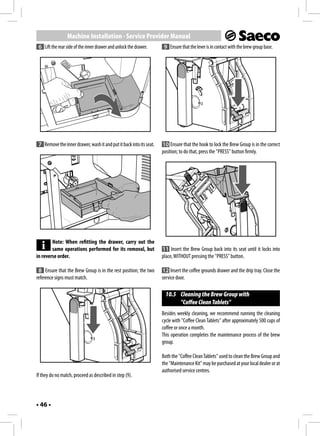
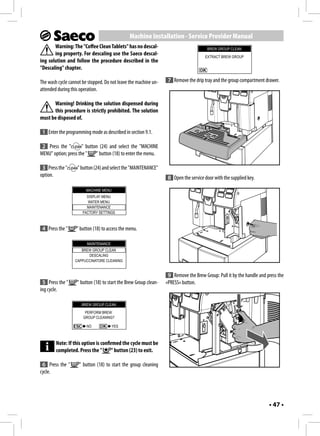
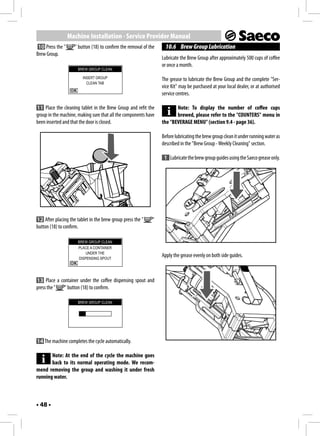
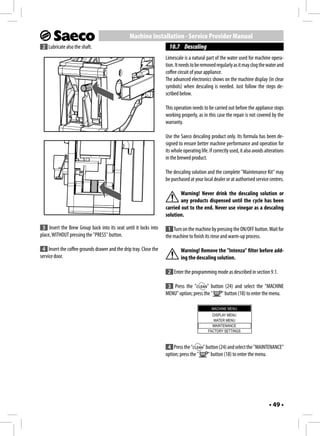
02


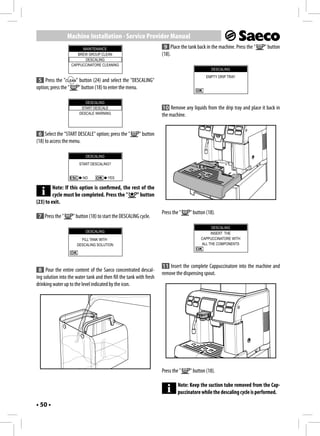
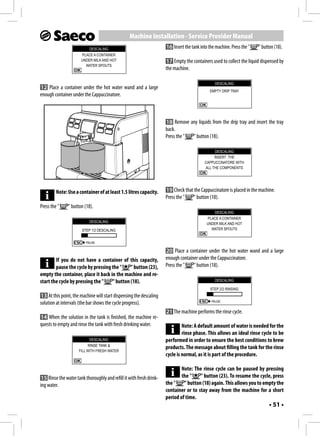
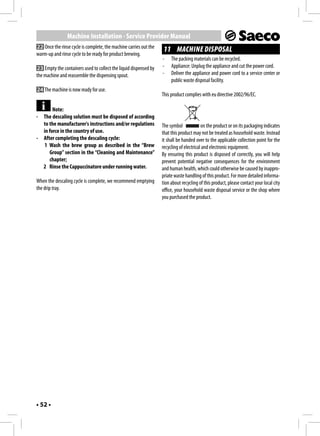
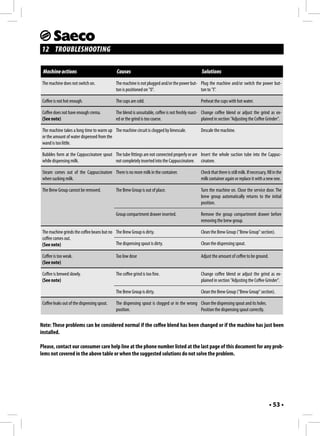
                                                                        ENGLISH
                       Office Coffee Machine
EN
02


              OPERATING INSTRUCTIONS
     Read these instructions carefully before using the machine.
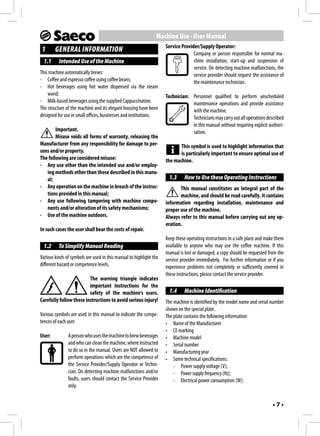
1                   1


                     2

                     3

                     4
                     5
                                          6
                                         26

                7


                     8
                 9
                10

                11
                                    15
                12
                13

                14


                                    16
      17   18        19   20   21


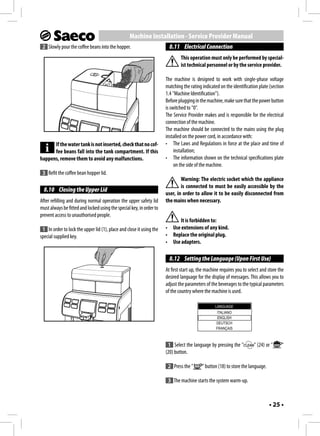
      22   23             24   25
•2•
2    3    4


5    6    7


8    9    10


11   12   13


               •3•
SAFETY REGULATIONS
                                                   or feet. Do not let the power cord hang freely
                                                   from tables or shelves.
Never allow water to come into contact
                                                    For the Safety of Others
with any of the electrical parts of the ma-
                                                   Ensure that children cannot play with the ma-
chine: Danger of short circuit! Hot water
                                                   chine and/or the packaging materials. Never
and steam may cause burning!
                                                   direct the jet of hot water and/or steam to-
                                                   wards yourself or others. Do not touch the hot
 Intended Use                                      water wand with bare hands. Always use the
The machine is intended to be used in small of-    handles or knobs provided.
fices/organisations only.
                                                    Danger of Burns
The appliance is not to be used by persons
                                                   Do not touch the hot water wand and/or the
(including children) with reduced physical,
                                                   coffee/product dispensing spout.
mental or sensory abilities or with scarce expe-
rience and/or expertise, unless they are super-     Fire Safety Precautions
vised by a person responsible for their safety,    In case of fire, use carbon dioxide (CO2) extin-
or they are instructed by this person on how to    guishers. Do not use water or dry powder ex-
properly use the machine.                          tinguishers.
 Power Supply                                       Suitable Location for Operation
The machine must be connected to the power          and Maintenance
supply by the service provider, in accordance      The machine should be installed by the service
with its specifications.                           provider in accordance with the safety regula-
                                                   tions in force at the time of installation.
 Power Cord
                                                   The machine may only be moved by the service
Never use the machine if the power cord is de-
                                                   provider.
fective.
                                                   Do not use the machine outdoors.
Report any defects in the cord and/or plug to
                                                   Avoid placing open flames and/or incandes-
the service provider immediately. Do not pass
                                                   cent objects near the machine in order to avoid
the power cord around corners, over sharp
                                                   melting or other damage to the machine hous-
edges or over hot objects and keep it away
                                                   ing. Do not use in places where the tempera-
from oil. Do not use the power cord to carry
                                                   ture may drop to a level equal to and/or lower
or pull the machine. Do not pull out the plug
                                                   than 0°C. If the machine has been exposed to
by the power cord nor touch it with wet hands
•4•
such conditions alert the service provider, who Storing the Machine
will carry out a safety check.                    If the machine is to remain inactive for a long
                                                  time, turn it off and unplug it. Store the ma-
  Cleaning
                                                  chine in a dry place, out of the reach of chil-
Before cleaning the machine, the power button
                                                  dren. Keep it protected from dust and dirt.
must be switched to OFF (0) and the plug must
be removed from the power socket. Wait also Repairs / Maintenance
for the machine to cool down. Never immerse In case of failure, problems or a suspected fault
the machine in water! It is strictly forbidden to resulting from a fall, immediately remove the
tamper with the internal parts of the machine. plug from the power socket and alert the ser-
Do not clean the machine using a jet of water. vice provider or specialised technician.
The appliance and its components must be Never attempt to operate the machine if it is
cleaned and washed following a period of in- faulty. Only the service provider and/or tech-
activity.                                         nician may carry out servicing operations and
                                                  repairs on the machine.
 Using Milk
Milk must be used and stored in accordance
with the instructions given on the manufac-
turer's original packaging.
We accept no liability for use of milk unsuitable
for human consumption.
Milk must be kept cold, as high temperatures
make it become acid - this is a natural charac-
teristic of milk. For this reason, the Cappucci-
natore must be cleaned after each use, as de-
scribed in the manual.
For thorough cleaning, the Cappuccinatore can
be detached and disassembled, and its parts
can be put in a dishwasher (not professional
type).
The washing process in the dishwasher may
cause the surface of the Cappuccinatore parts
to tarnish or the graphics to fade, especially if
aggressive detergents are used.
This is a normal phenomenon and does not
affect in any way the correct operation of the
milk system.
                                                                                            •5•
Machine Use - User Manual
 CONTENTS
1 GENERAL INFORMATION ...................................... 7                             8.7    Opening the Upper Lid ...............................................23
 1.1 Intended Use of the Machine .......................................7                  8.8    Filling the Water Tank.................................................24
 1.2 To Simplify Manual Reading.........................................7                  8.9    Filling the Coffee Bean Hopper...................................24
 1.3 How to Use these Operating Instructions .....................7                        8.10   Closing the Upper Lid .................................................25
 1.4 Machine Identification .................................................7             8.11   Electrical Connection..................................................25
 1.5 Technical Specifications ...............................................8             8.12   Setting the Language (Upon First Use) ......................25
 1.6 Residual Risks ..............................................................8        8.13   First Use - Use After a Long Period of Inactivity ..........26
                                                                                           8.14   Measuring and Adjusting Water Hardness .................26
2 MACHINE COMPONENTS ...................................... 8
                                                                                           8.15   "INTENZA+" Water Filter ...........................................27
 2.1 Control Panel Description ............................................9               8.16   Adjusting the Coffee Grinder ......................................29
3 USING THE MACHINE .......................................... 9                           8.17   Adjusting the "Aroma" - Amount of Ground Coffee ....30
 3.1 Switching on the Machine ...........................................9                 8.18   Adjusting Brewed Products ........................................30
 3.2 Warm-up and Rinsing ................................................10             9 MACHINE PROGRAMMING ................................. 33
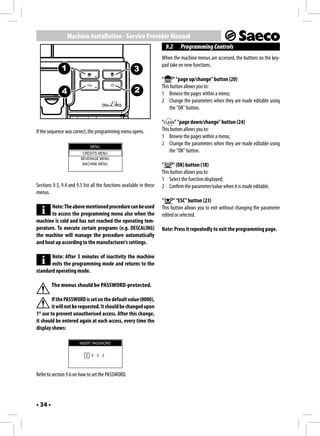
 3.3 Rinse/Self-Cleaning Cycle...........................................10              9.1 Accessing the Programming Mode.............................33
 3.4 Eco-friendly: Stand-by ...............................................10            9.2 Programming Controls ...............................................34
 3.5 Adjusting the Dispensing Spout .................................10                  9.3 Credits Menu..............................................................35
 3.6 Coffee Brewing ..........................................................11         9.4 Beverage Menu ..........................................................36
 3.7 Emptying the Coffee Grounds Drawer .......................11                        9.5 Machine Menu ...........................................................38
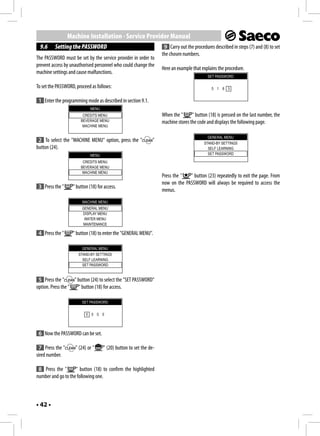
 3.8 Brewing a Cappuccino ...............................................12              9.6 Setting the PASSWORD ..............................................42
 3.9 Latte Macchiato .........................................................12
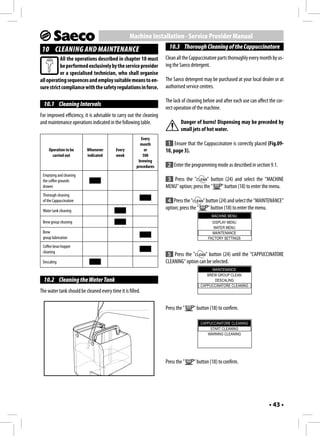
 3.10 Dispensing Hot Water.................................................13           10 CLEANING AND MAINTENANCE ........................... 43
 3.11 "SPECIAL" Products ....................................................13           10.1 Cleaning Intervals ......................................................43
                                                                                          10.2 Cleaning the Water Tank ............................................43
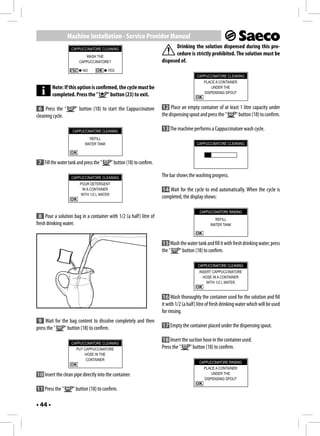
4 USING THE MACHINE WITH CREDITS .................. 15                                    10.3 Thorough Cleaning of the Cappuccinatore .................43
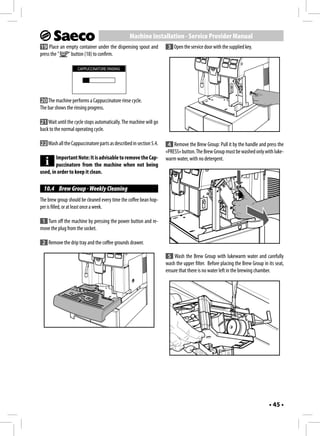
5 CLEANING AND MAINTENANCE ........................... 15                                 10.4 Brew Group - Weekly Cleaning ...................................45
                                                                                          10.5 Cleaning the Brew Group with “Coffee Clean Tablets”.46
 5.1 Cleaning the Hot Water / Steam Wand .......................15
                                                                                          10.6 Brew Group Lubrication .............................................48
 5.2 Cleaning the Coffee Grounds Drawer..........................16
                                                                                          10.7 Descaling ...................................................................49
 5.3 Cleaning the Drip Tray ................................................16
 5.4 Cleaning the Cappuccinatore (After Each Use) ............16                        11 MACHINE DISPOSAL .......................................... 52
6 MACHINE WARNINGS ........................................ 18                          12 TROUBLESHOOTING .......................................... 53


7 HANDLING AND STORAGE .................................. 20
 7.1 Handling ....................................................................20
 7.2 Storage ......................................................................20
8 INSTALLATION .................................................. 20
 8.1 Safety Regulations ....................................................20
 8.2 Stop Functions ...........................................................21
 8.3 List of Accessories Supplied........................................21
 8.4 Assembly-Siting.........................................................22
 8.5 Disposal of Packaging ................................................22
 8.6 Installing the Container Base .....................................22

•6•
Machine Use - User Manual
                                                                    Service Provider/Supply Operator:
 1      GENERAL INFORMATION                                                       Company or person responsible for normal ma-
  1.1     Intended Use of the Machine                                             chine installation, start-up and suspension of
                                                                                  service. On detecting machine malfunctions, the
This machine automatically brews:                                                 service provider should request the assistance of
- Coffee and espresso coffee using coffee beans;                                  the maintenance technician.
- Hot beverages using hot water dispensed via the steam
    wand;                                                           Technician: Personnel qualified to perform unscheduled
- Milk-based beverages using the supplied Cappuccinatore.                       maintenance operations and provide assistance
The structure of the machine and its elegant housing have been                  with the machine.
designed for use in small offices, businesses and institutions.                 Technicians may carry out all operations described
                                                                                in this manual without requiring explicit authori-
        Important.                                                              sation.
        Misuse voids all forms of warranty, releasing the
Manufacturer from any responsibility for damage to per-                    This symbol is used to highlight information that
sons and/or property.                                                      is particularly important to ensure optimal use of
The following are considered misuse:                                the machine.
- Any use other than the intended use and/or employ-
   ing methods other than those described in this manu-
   al;                                                               1.3     How to Use these Operating Instructions
- Any operation on the machine in breach of the instruc-                   This manual constitutes an integral part of the
   tions provided in this manual;                                          machine, and should be read carefully. It contains
- Any use following tampering with machine compo-                   information regarding installation, maintenance and
   nents and/or alteration of its safety mechanisms;                proper use of the machine.
- Use of the machine outdoors.                                      Always refer to this manual before carrying out any op-
                                                                    eration.
In such cases the user shall bear the costs of repair.
                                                                    Keep these operating instructions in a safe place and make them
  1.2     To Simplify Manual Reading                                available to anyone who may use the coffee machine. If this
                                                                    manual is lost or damaged, a copy should be requested from the
Various kinds of symbols are used in this manual to highlight the   service provider immediately. For further information or if you
different hazard or competence levels.                              experience problems not completely or sufficiently covered in
                                                                    these instructions, please contact the service provider.
                         The warning triangle indicates
                         important instructions for the
                         safety of the machine's users.              1.4     Machine Identification
Carefully follow these instructions to avoid serious injury!        The machine is identified by the model name and serial number
                                                                    shown on the special plate.
Various symbols are used in this manual to indicate the compe-      The plate contains the following information:
tences of each user.                                                • Name of the Manufacturer
                                                                    • CE marking
User:          A person who uses the machine to brew beverages      • Machine model
               and who can clean the machine, where instructed      • Serial number
               to do so in the manual. Users are NOT allowed to     • Manufacturing year
               perform operations which are the competence of       • Some technical specifications:
               the Service Provider/Supply Operator or Techni-          - Power supply voltage (V);
               cian. On detecting machine malfunctions and/or           - Power supply frequency (Hz);
               faults, users should contact the Service Provider        - Electrical power consumption (W).
               only.


                                                                                                                             •7•
Machine Use - User Manual
         Note: When contacting the Service Provider, al-        1.6     Residual Risks
         ways refer to this plate, and to the machine's spe-   The dispensing outlet has no guards to prevent accidental hand
cific data shown on it.                                        contact with coffee, hot beverages and/or steam.

 1.5      Technical Specifications
                                                               2      MACHINE COMPONENTS
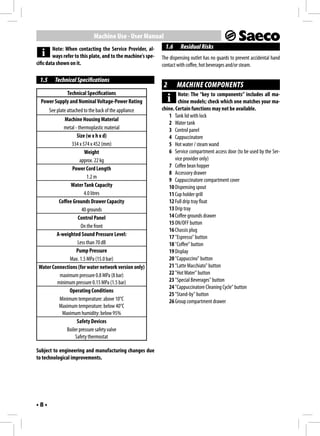
             Technical Specifications                                   Note: The “key to components” includes all ma-
  Power Supply and Nominal Voltage-Power Rating                         chine models; check which one matches your ma-
       See plate attached to the back of the appliance         chine. Certain functions may not be available.
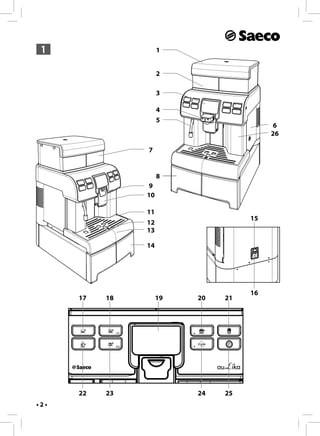
                                                                  1 Tank lid with lock
             Machine Housing Material
                                                                  2 Water tank
            metal - thermoplastic material                        3 Control panel
                    Size (w x h x d)                              4 Cappuccinatore
                334 x 574 x 452 (mm)                              5 Hot water / steam wand
                        Weight                                    6 Service compartment access door (to be used by the Ser-
                     approx. 22 kg                                    vice provider only)
                Power Cord Length                                 7 Coffee bean hopper
                                                                  8 Accessory drawer
                         1.2 m
                                                                  9 Cappuccinatore compartment cover
                Water Tank Capacity                               10 Dispensing spout
                        4.0 litres                                11 Cup holder grill
          Coffee Grounds Drawer Capacity                          12 Full drip tray float
                      40 grounds                                  13 Drip tray
                    Control Panel                                 14 Coffee grounds drawer
                                                                  15 ON/OFF button
                      On the front
                                                                  16 Chassis plug
         A-weighted Sound Pressure Level:                         17 "Espresso" button
                    Less than 70 dB                               18 "Coffee" button
                   Pump Pressure                                  19 Display
               Max. 1.5 MPa (15.0 bar)                            20 "Cappuccino" button
 Water Connections (for water network version only)               21 "Latte Macchiato" button
          maximum pressure 0.8 MPa (8 bar)                        22 "Hot Water" button
         minimum pressure 0.15 MPa (1.5 bar)                      23 "Special Beverages" button
                                                                  24 "Cappuccinatore Cleaning Cycle" button
               Operating Conditions
                                                                  25 "Stand-by" button
          Minimum temperature: above 10°C                         26 Group compartment drawer
          Maximum temperature: below 40°C
           Maximum humidity: below 95%
                    Safety Devices
              Boiler pressure safety valve
                   Safety thermostat

Subject to engineering and manufacturing changes due
to technological improvements.


•8•
Machine Use - User Manual
 2.1      Control Panel Description                                     3      USING THE MACHINE
         Note: All possible controls are described here.               Before start using the machine check that the water tank and the
         Refer to the following sections for the operating             coffee bean hopper are filled and that the machine is properly
modes.                                                                 clean.
         Some buttons in the control panel have a double
         function. The double function is only activated in
                                                                         3.1     Switching on the Machine
certain moments during the machine operation or when
accessing the programming mode. The additional func-                          Warning! Connection to the power supply should
tion is indicated by the icon under the machine button.                       be carried out exclusively by the service provider!
                                                                       Ensure that the upper lid (1) is always locked.
                 Button - Description                                  Before switching on the machine, ensure that the plug is correctly
 17 "Espresso" button                                                  inserted in the power socket.
 When this button is pressed an espresso cup is brewed.
 18 "Coffee" button - 2nd Function (OK)
 When this button is pressed a coffee cup is brewed.

 2nd Function - Press it to select the displayed option.
 19 LCD Display
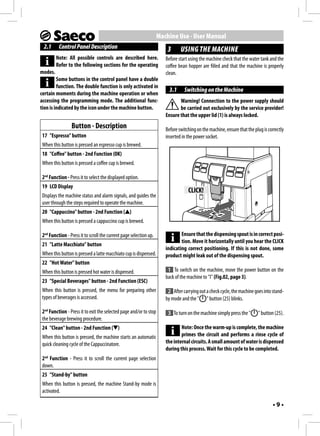
                                                                                   CLICK!
 Displays the machine status and alarm signals, and guides the
 user through the steps required to operate the machine.
 20 "Cappuccino" button - 2nd Function ( )
 When this button is pressed a cappuccino cup is brewed.

 2nd Function - Press it to scroll the current page selection up.              Ensure that the dispensing spout is in correct posi-
                                                                               tion. Move it horizontally until you hear the CLICK
 21 "Latte Macchiato" button
                                                                       indicating correct positioning. If this is not done, some
 When this button is pressed a latte macchiato cup is dispensed.       product might leak out of the dispensing spout.
 22 "Hot Water" button
 When this button is pressed hot water is dispensed.                    1 To switch on the machine, move the power button on the
                                                                       back of the machine to "I" (Fig.02, page 3).
 23 "Special Beverages" button - 2nd Function (ESC)
 When this button is pressed, the menu for preparing other              2 After carrying out a check cycle, the machine goes into stand-
 types of beverages is accessed.                                       by mode and the " " button (25) blinks.

 2nd Function - Press it to exit the selected page and/or to stop       3 To turn on the machine simply press the "       " button (25).
 the beverage brewing procedure.
 24 "Clean" button - 2nd Function ( )                                          Note: Once the warm-up is complete, the machine
 When this button is pressed, the machine starts an automatic                  primes the circuit and performs a rinse cycle of
 quick cleaning cycle of the Cappuccinatore.                           the internal circuits. A small amount of water is dispensed
                                                                       during this process. Wait for this cycle to be completed.
 2nd Function - Press it to scroll the current page selection
 down.
 25 "Stand-by" button
 When this button is pressed, the machine Stand-by mode is
 activated.

                                                                                                                                  •9•
Machine Use - User Manual
  3.2     Warm-up and Rinsing                                              button (25) (if at least one coffee-based product has been
                                                                           brewed).
 1 Upon start-up, the machine activates the warm-up phase.
Wait until it is completed.                                           A small amount of water will be dispensed to rinse and heat all
                         HEATING UP…                                  the machine parts; in this phase this icon is displayed.
                                                                                                   RINSING


         Note: The bar is in progress to show that the ma-                               ESC     STOP RINSING

         chine is heating up the system.
                                                                      Wait for the cycle to finish automatically. The dispensing process
 2 Once the warm-up is complete, the machine performs a rinse         can be stopped by pressing the "      " button (23).
cycle of the internal circuits.

                            RINSING
                                                                          3.4   Eco-friendly: Stand-by
                                                                      The machine is designed for energy saving. The machine auto-
                                                                      matically turns off after 30 minutes of inactivity.
                   ESC    STOP RINSING


         Note: The bar is in progress to show that the ma-
                                                                               Note:
         chine is performing the rinse cycle of the system.
                                                                      -    During the turning off phase, the machine performs a
                                                                           rinse cycle, if a coffee product has been brewed.
 3 A small amount of water is dispensed. Wait for the cycle to
                                                                      -    Time can be programmed according to your needs
end.
                                                                           (contact the Service Provider).
         Note: The cycle can be stopped by pressing the
                                                                      To turn the machine on again, simply press either button on the
         "   " button (23).
                                                                      control panel (if the power button is set to "I"). In this case the
                                                                      machine will go through the rinse cycle only if the boiler is cold.
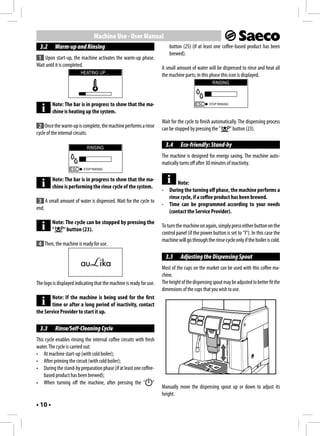
 4 Then, the machine is ready for use.

                                                                          3.5   Adjusting the Dispensing Spout
                                                                      Most of the cups on the market can be used with this coffee ma-
                                                                      chine.
The logo is displayed indicating that the machine is ready for use.   The height of the dispensing spout may be adjusted to better fit the
                                                                      dimensions of the cups that you wish to use.
       Note: If the machine is being used for the first
       time or after a long period of inactivity, contact
the Service Provider to start it up.

  3.3     Rinse/Self-Cleaning Cycle
This cycle enables rinsing the internal coffee circuits with fresh
water. The cycle is carried out:
• At machine start-up (with cold boiler);
• After priming the circuit (with cold boiler);
• During the stand-by preparation phase (if at least one coffee-
    based product has been brewed);
• When turning off the machine, after pressing the " "
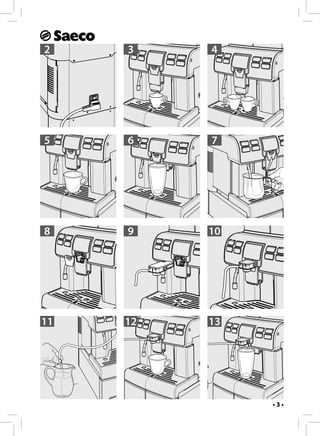
                                                                      Manually move the dispensing spout up or down to adjust its
                                                                      height.
• 10 •
Machine Use - User Manual
The recommended positions are:                                            2 Once the prebrewing cycle is complete, coffee begins to come
- When using small cups (Fig.03, page 3);                                out of the dispensing spout.
- When using large cups (Fig.05, page 3).
                                                                          3 Coffee brewing stops automatically when the set level is
Two cups can be placed under the dispensing spout to brew two            reached. However, the coffee brewing process can be stopped by
cups of coffee at the same time (Fig.04, page 3).                        pressing the "    " button (23).

If you want to use tall glasses or mugs, push the dispensing spout to           Note: The machine is set to brew a true Italian es-
its limit stop. In this case, you can brew only one product at a time.          presso coffee. This feature may slightly lengthen
(Fig.06, page 3).                                                        the brewing time, allowing the intense coffee flavour to
                                                                         develop fully.
        Note: Before brewing any product and/or when
        bringing the dispensing spout back to its normal
                                                                           3.7     Emptying the Coffee Grounds Drawer
brewing position, ensure that it is correctly positioned.
This can be noted through the CLICK indicating correct                           Note: This operation must be performed with the
positioning.                                                                     machine switched on and/or in stand-by mode.

                                                                         The machine will indicate when the coffee grounds drawer has
                                                                         reached its maximum capacity.
                                                                         The first warning alerts the user that the coffee grounds drawer
                                                                         must be emptied, but the machine can still be used to brew cof-
                                                                         fee; the display shows:
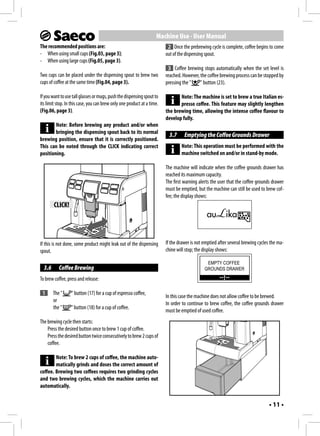
        CLICK!


If this is not done, some product might leak out of the dispensing       If the drawer is not emptied after several brewing cycles the ma-
spout.                                                                   chine will stop; the display shows:

                                                                                               EMPTY COFFEE
  3.6      Coffee Brewing                                                                     GROUNDS DRAWER

To brew coffee, press and release:

 1      The "     " button (17) for a cup of espresso coffee,
                                                                         In this case the machine does not allow coffee to be brewed.
        or
                                                                         In order to continue to brew coffee, the coffee grounds drawer
        the "     " button (18) for a cup of coffee.
                                                                         must be emptied of used coffee.
The brewing cycle then starts:
    Press the desired button once to brew 1 cup of coffee.
    Press the desired button twice consecutively to brew 2 cups of
    coffee.

        Note: To brew 2 cups of coffee, the machine auto-
        matically grinds and doses the correct amount of
coffee. Brewing two coffees requires two grinding cycles
and two brewing cycles, which the machine carries out
automatically.


                                                                                                                                  • 11 •
Machine Use - User Manual
Remove the drawer and empty out the coffee grounds in a suit-           4 Place the cup under the dispensing spout (Fig.12, page 3).
able container. Only when the display shows:                           Press the "   " button (20).

                       INSERT COFFEE                                    5 The machine needs a preheating time.
                      GROUNDS DRAWER

                                                                        6 After preheating, the machine starts brewing the cappuc-
                                                                       cino.
                                                                                                CAPPUCCINO
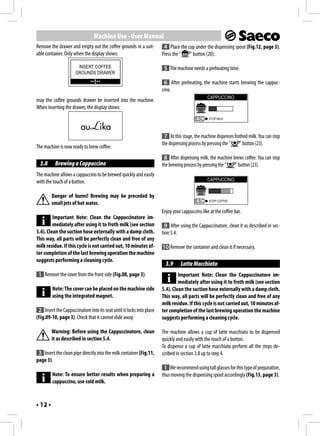
may the coffee grounds drawer be inserted into the machine.
When inserting the drawer, the display shows:
                                                                                          ESC    STOP MILK


                                                                        7 At this stage, the machine dispenses frothed milk. You can stop
                                                                       the dispensing process by pressing the "   " button (23).
The machine is now ready to brew coffee.
                                                                        8 After dispensing milk, the machine brews coffee. You can stop
  3.8     Brewing a Cappuccino                                         the brewing process by pressing the "  " button (23).
The machine allows a cappuccino to be brewed quickly and easily
with the touch of a button.                                                                     CAPPUCCINO


         Danger of burns! Brewing may be preceded by
         small jets of hot water.                                                         ESC    STOP COFFEE


                                                                       Enjoy your cappuccino like at the coffee bar.
         Important Note: Clean the Cappuccinatore im-
         mediately after using it to froth milk (see section             9 After using the Cappuccinatore, clean it as described in sec-
5.4). Clean the suction hose externally with a damp cloth.             tion 5.4.
This way, all parts will be perfectly clean and free of any
milk residue. If this cycle is not carried out, 10 minutes af-         10 Remove the container and clean it if necessary.
ter completion of the last brewing operation the machine
suggests performing a cleaning cycle.
                                                                         3.9     Latte Macchiato
 1 Remove the cover from the front side (Fig.08, page 3).                       Important Note: Clean the Cappuccinatore im-
                                                                                mediately after using it to froth milk (see section
         Note: The cover can be placed on the machine side             5.4). Clean the suction hose externally with a damp cloth.
         using the integrated magnet.                                  This way, all parts will be perfectly clean and free of any
                                                                       milk residue. If this cycle is not carried out, 10 minutes af-
 2 Insert the Cappuccinatore into its seat until it locks into place   ter completion of the last brewing operation the machine
(Fig.09-10, page 3). Check that it cannot slide away.                  suggests performing a cleaning cycle.

         Warning: Before using the Cappuccinatore, clean               The machine allows a cup of latte macchiato to be dispensed
         it as described in section 5.4.                               quickly and easily with the touch of a button.
                                                                       To dispense a cup of latte macchiato perform all the steps de-
 3 Insert the clean pipe directly into the milk container (Fig.11,     scribed in section 3.8 up to step 4.
page 3).
                                                                        1 We recommend using tall glasses for this type of preparation,
         Note: To ensure better results when preparing a               thus moving the dispensing spout accordingly (Fig.13, page 3).
         cappuccino, use cold milk.


• 12 •
Machine Use - User Manual
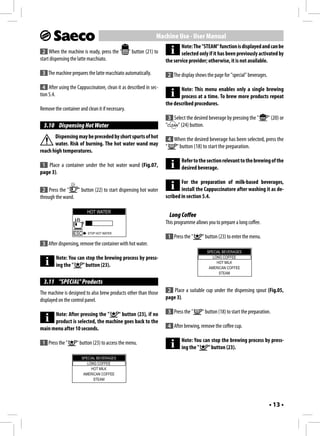
                                                                             Note: The "STEAM" function is displayed and can be
 2 When the machine is ready, press the "         " button (21) to           selected only if it has been previously activated by
start dispensing the latte macchiato.                                the service provider; otherwise, it is not available.

 3 The machine prepares the latte macchiato automatically.               2 The display shows the page for "special" beverages.

  4 After using the Cappuccinatore, clean it as described in sec-           Note: This menu enables only a single brewing
tion 5.4.                                                                   process at a time. To brew more products repeat
                                                                     the described procedures.
Remove the container and clean it if necessary.
                                                                         3 Select the desired beverage by pressing the "         " (20) or
  3.10 Dispensing Hot Water                                          "       " (24) button.
       Dispensing may be preceded by short spurts of hot                 4 When the desired beverage has been selected, press the
       water. Risk of burning. The hot water wand may                "      " button (18) to start the preparation.
reach high temperatures.
                                                                                Refer to the section relevant to the brewing of the
 1 Place a container under the hot water wand (Fig.07,                          desired beverage.
page 3).
                                                                             For the preparation of milk-based beverages,
 2 Press the "    " button (22) to start dispensing hot water                install the Cappuccinatore after washing it as de-
through the wand.                                                    scribed in section 5.4.

                          HOT WATER
                                                                         Long Coffee
                                                                     This programme allows you to prepare a long coffee.
                  ESC     STOP HOT WATER
                                                                         1 Press the "     " button (23) to enter the menu.
 3 After dispensing, remove the container with hot water.
                                                                                             SPECIAL BEVERAGES
        Note: You can stop the brewing process by press-                                        LONG COFFEE
                                                                                                  HOT MILK
        ing the "   " button (23).                                                            AMERICAN COFFEE
                                                                                                   STEAM

  3.11 "SPECIAL" Products
The machine is designed to also brew products other than those        2 Place a suitable cup under the dispensing spout (Fig.05,
displayed on the control panel.                                      page 3).

      Note: After pressing the "    " button (23), if no                 3 Press the "     " button (18) to start the preparation.
      product is selected, the machine goes back to the
main menu after 10 seconds.                                              4 After brewing, remove the coffee cup.

 1 Press the "      " button (23) to access the menu.                           Note: You can stop the brewing process by press-
                                                                                ing the "   " button (23).
                      SPECIAL BEVERAGES
                         LONG COFFEE
                           HOT MILK
                       AMERICAN COFFEE
                            STEAM


                                                                                                                                 • 13 •
Machine Use - User Manual
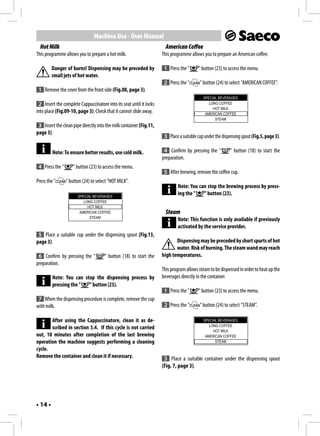
  Hot Milk                                                             American Coffee
This programme allows you to prepare a hot milk.                     This programme allows you to prepare an American coffee.

         Danger of burns! Dispensing may be preceded by               1 Press the "      " button (23) to access the menu.
         small jets of hot water.
                                                                      2 Press the "       " button (24) to select "AMERICAN COFFEE".
 1 Remove the cover from the front side (Fig.08, page 3).
                                                                                            SPECIAL BEVERAGES
 2 Insert the complete Cappuccinatore into its seat until it locks                             LONG COFFEE
                                                                                                 HOT MILK
into place (Fig.09-10, page 3). Check that it cannot slide away.                             AMERICAN COFFEE
                                                                                                  STEAM
 3 Insert the clean pipe directly into the milk container (Fig.11,
page 3).
                                                                      3 Place a suitable cup under the dispensing spout (Fig.5, page 3).

         Note: To ensure better results, use cold milk.               4 Confirm by pressing the "          " button (18) to start the
                                                                     preparation.
 4 Press the "      " button (23) to access the menu.
                                                                      5 After brewing, remove the coffee cup.
Press the "      " button (24) to select "HOT MILK".
                                                                             Note: You can stop the brewing process by press-
                       SPECIAL BEVERAGES
                                                                             ing the "   " button (23).
                          LONG COFFEE
                            HOT MILK
                        AMERICAN COFFEE                                Steam
                             STEAM
                                                                             Note: This function is only available if previously
                                                                             activated by the service provider.
 5 Place a suitable cup under the dispensing spout (Fig.13,
page 3).                                                                    Dispensing may be preceded by short spurts of hot
                                                                            water. Risk of burning. The steam wand may reach
 6 Confirm by pressing the "          " button (18) to start the     high temperatures.
preparation.
                                                                     This program allows steam to be dispensed in order to heat up the
         Note: You can stop the dispensing process by                beverages directly in the container.
         pressing the "  " button (23).
                                                                      1 Press the "      " button (23) to access the menu.
 7 When the dispensing procedure is complete, remove the cup
with milk.                                                            2 Press the "       " button (24) to select "STEAM".

       After using the Cappuccinatore, clean it as de-                                      SPECIAL BEVERAGES
                                                                                               LONG COFFEE
       scribed in section 5.4. If this cycle is not carried
                                                                                                 HOT MILK
out, 10 minutes after completion of the last brewing                                         AMERICAN COFFEE
operation the machine suggests performing a cleaning                                              STEAM
cycle.
Remove the container and clean it if necessary.                       3 Place a suitable container under the dispensing spout
                                                                     (Fig. 7, page 3).


• 14 •
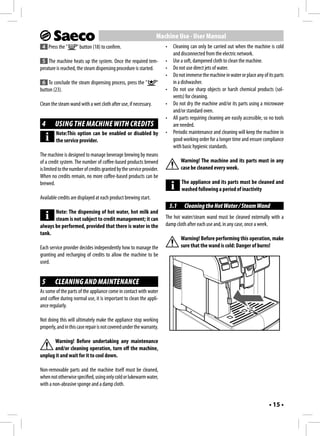
Machine Use - User Manual
 4 Press the "       " button (18) to confirm.                         •    Cleaning can only be carried out when the machine is cold
                                                                            and disconnected from the electric network.
 5 The machine heats up the system. Once the required tem-             •    Use a soft, dampened cloth to clean the machine.
perature is reached, the steam dispensing procedure is started.        •    Do not use direct jets of water.
                                                                       •    Do not immerse the machine in water or place any of its parts
 6 To conclude the steam dispensing process, press the "          "         in a dishwasher.
button (23).                                                           •    Do not use sharp objects or harsh chemical products (sol-
                                                                            vents) for cleaning.
Clean the steam wand with a wet cloth after use, if necessary.         •    Do not dry the machine and/or its parts using a microwave
                                                                            and/or standard oven.
                                                                       •    All parts requiring cleaning are easily accessible, so no tools
 4      USING THE MACHINE WITH CREDITS                                      are needed.
         Note:This option can be enabled or disabled by                •    Periodic maintenance and cleaning will keep the machine in
         the service provider.                                              good working order for a longer time and ensure compliance
                                                                            with basic hygienic standards.
The machine is designed to manage beverage brewing by means
of a credit system. The number of coffee-based products brewed                   Warning! The machine and its parts must in any
is limited to the number of credits granted by the service provider.             case be cleaned every week.
When no credits remain, no more coffee-based products can be
brewed.                                                                          The appliance and its parts must be cleaned and
                                                                                 washed following a period of inactivity
Available credits are displayed at each product brewing start.
                                                                           5.1    Cleaning the Hot Water / Steam Wand
       Note: The dispensing of hot water, hot milk and
       steam is not subject to credit management; it can               The hot water/steam wand must be cleaned externally with a
always be performed, provided that there is water in the               damp cloth after each use and, in any case, once a week.
tank.
                                                                                 Warning! Before performing this operation, make
Each service provider decides independently how to manage the                    sure that the wand is cold: Danger of burns!
granting and recharging of credits to allow the machine to be
used.


 5      CLEANING AND MAINTENANCE
As some of the parts of the appliance come in contact with water
and coffee during normal use, it is important to clean the appli-
ance regularly.

Not doing this will ultimately make the appliance stop working
properly, and in this case repair is not covered under the warranty.

      Warning! Before undertaking any maintenance
      and/or cleaning operation, turn off the machine,
unplug it and wait for it to cool down.

Non-removable parts and the machine itself must be cleaned,
when not otherwise specified, using only cold or lukewarm water,
with a non-abrasive sponge and a damp cloth.


                                                                                                                                  • 15 •
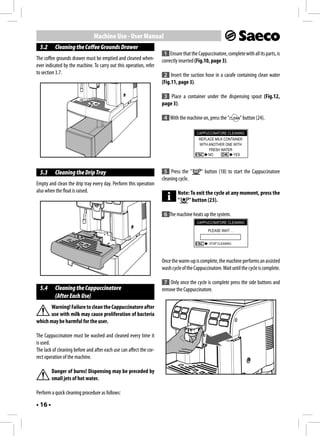
Machine Use - User Manual
  5.2     Cleaning the Coffee Grounds Drawer
                                                                      1 Ensure that the Cappuccinatore, complete with all its parts, is
The coffee grounds drawer must be emptied and cleaned when-          correctly inserted (Fig.10, page 3).
ever indicated by the machine. To carry out this operation, refer
to section 3.7.                                                       2 Insert the suction hose in a carafe containing clean water
                                                                     (Fig.11, page 3).

                                                                      3 Place a container under the dispensing spout (Fig.12,
                                                                     page 3).

                                                                      4 With the machine on, press the "         " button (24).

                                                                                        CAPPUCCINATORE CLEANING
                                                                                          REPLACE MILK CONTAINER
                                                                                          WITH ANOTHER ONE WITH
                                                                                               FRESH WATER
                                                                                               NO          YES


  5.3     Cleaning the Drip Tray                                      5 Press the "        " button (18) to start the Cappuccinatore
                                                                     cleaning cycle.
Empty and clean the drip tray every day. Perform this operation
also when the float is raised.                                                Note: To exit the cycle at any moment, press the
                                                                              "    " button (23).

                                                                      6 The machine heats up the system.
                                                                                        CAPPUCCINATORE CLEANING

                                                                                               PLEASE WAIT …


                                                                                               STOP CLEANING


                                                                     Once the warm-up is complete, the machine performs an assisted
                                                                     wash cycle of the Cappuccinatore. Wait until the cycle is complete.

                                                                      7 Only once the cycle is complete press the side buttons and
  5.4     Cleaning the Cappuccinatore                                remove the Cappuccinatore.
          (After Each Use)
      Warning! Failure to clean the Cappuccinatore after
      use with milk may cause proliferation of bacteria
which may be harmful for the user.

The Cappuccinatore must be washed and cleaned every time it
is used.
The lack of cleaning before and after each use can affect the cor-
rect operation of the machine.

         Danger of burns! Dispensing may be preceded by
         small jets of hot water.

Perform a quick cleaning procedure as follows:

• 16 •
Machine Use - User Manual
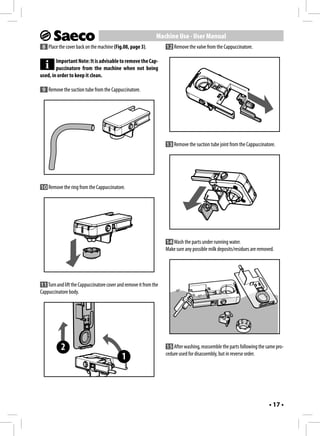
 8 Place the cover back on the machine (Fig.08, page 3).           12 Remove the valve from the Cappuccinatore.

        Important Note: It is advisable to remove the Cap-
        puccinatore from the machine when not being
used, in order to keep it clean.

 9 Remove the suction tube from the Cappuccinatore.


                                                                   13 Remove the suction tube joint from the Cappuccinatore.


10 Remove the ring from the Cappuccinatore.


                                                                   14 Wash the parts under running water.
                                                                   Make sure any possible milk deposits/residues are removed.


11 Turn and lift the Cappuccinatore cover and remove it from the
Cappuccinatore body.


           2                                                       15 After washing, reassemble the parts following the same pro-
                                                                   cedure used for disassembly, but in reverse order.
                                            1


                                                                                                                          • 17 •
Machine Use - User Manual
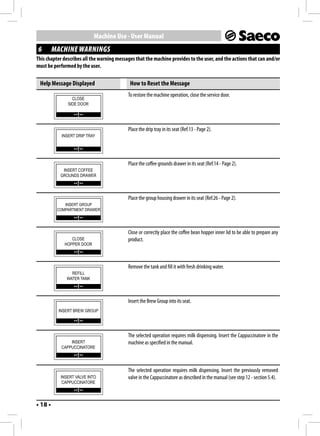
6        MACHINE WARNINGS
This chapter describes all the warning messages that the machine provides to the user, and the actions that can and/or
must be performed by the user.

 Help Message Displayed                      How to Reset the Message
                                            To restore the machine operation, close the service door.
                 CLOSE
               SIDE DOOR


                                            Place the drip tray in its seat (Ref.13 - Page 2).
            INSERT DRIP TRAY


                                            Place the coffee grounds drawer in its seat (Ref.14 - Page 2).
            INSERT COFFEE
           GROUNDS DRAWER


                                            Place the group housing drawer in its seat (Ref.26 - Page 2).
             INSERT GROUP
          COMPARTMENT DRAWER


                                            Close or correctly place the coffee bean hopper inner lid to be able to prepare any
                CLOSE                       product.
             HOPPER DOOR


                                            Remove the tank and fill it with fresh drinking water.
                REFILL
              WATER TANK


                                            Insert the Brew Group into its seat.
          INSERT BREW GROUP


                                            The selected operation requires milk dispensing. Insert the Cappuccinatore in the
                INSERT                      machine as specified in the manual.
            CAPPUCCINATORE


                                            The selected operation requires milk dispensing. Insert the previously removed
           INSERT VALVE INTO                valve in the Cappuccinatore as described in the manual (see step 12 - section 5.4).
            CAPPUCCINATORE


• 18 •
Machine Use - User Manual


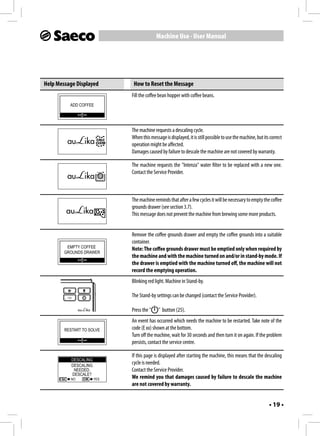
Help Message Displayed        How to Reset the Message
                             Fill the coffee bean hopper with coffee beans.
          ADD COFFEE


                             The machine requests a descaling cycle.
                             When this message is displayed, it is still possible to use the machine, but its correct
                             operation might be affected.
                             Damages caused by failure to descale the machine are not covered by warranty.

                             The machine requests the "Intenza" water filter to be replaced with a new one.
                             Contact the Service Provider.


                             The machine reminds that after a few cycles it will be necessary to empty the coffee
                             grounds drawer (see section 3.7).
                             This message does not prevent the machine from brewing some more products.


                             Remove the coffee grounds drawer and empty the coffee grounds into a suitable
                             container.
         EMPTY COFFEE        Note: The coffee grounds drawer must be emptied only when required by
        GROUNDS DRAWER
                             the machine and with the machine turned on and/or in stand-by mode. If
                             the drawer is emptied with the machine turned off, the machine will not
                             record the emptying operation.
                             Blinking red light. Machine in Stand-by.

                             The Stand-by settings can be changed (contact the Service Provider).

                             Press the "    " button (25).
                             An event has occurred which needs the machine to be restarted. Take note of the
        RESTART TO SOLVE     code (E xx) shown at the bottom.
                             Turn off the machine, wait for 30 seconds and then turn it on again. If the problem
                             persists, contact the service centre.

                             If this page is displayed after starting the machine, this means that the descaling
           DESCALING
           DESCALING
                             cycle is needed.
            NEEDED.          Contact the Service Provider.
           DESCALE?
          NO           YES   We remind you that damages caused by failure to descale the machine
                             are not covered by warranty.


                                                                                                             • 19 •
Machine Installation - Service Provider Manual
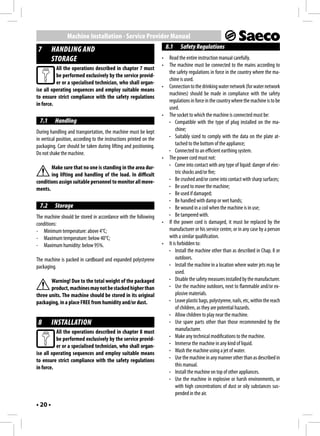
 7       HANDLING AND                                                    8.1    Safety Regulations
         STORAGE                                                     •    Read the entire instruction manual carefully.
                                                                     •    The machine must be connected to the mains according to
          All the operations described in chapter 7 must
                                                                          the safety regulations in force in the country where the ma-
          be performed exclusively by the service provid-
                                                                          chine is used.
          er or a specialised technician, who shall organ-
                                                                     •    Connection to the drinking water network (for water network
ise all operating sequences and employ suitable means
                                                                          machines) should be made in compliance with the safety
to ensure strict compliance with the safety regulations
                                                                          regulations in force in the country where the machine is to be
in force.
                                                                          used.
                                                                     •    The socket to which the machine is connected must be:
  7.1     Handling                                                        - Compatible with the type of plug installed on the ma-
During handling and transportation, the machine must be kept                   chine;
in vertical position, according to the instructions printed on the        - Suitably sized to comply with the data on the plate at-
packaging. Care should be taken during lifting and positioning.                tached to the bottom of the appliance;
Do not shake the machine.                                                 - Connected to an efficient earthing system.
                                                                     •    The power cord must not:
       Make sure that no one is standing in the area dur-                 - Come into contact with any type of liquid: danger of elec-
       ing lifting and handling of the load. In difficult                      tric shocks and/or fire;
conditions assign suitable personnel to monitor all move-                 - Be crushed and/or come into contact with sharp surfaces;
ments.                                                                    - Be used to move the machine;
                                                                          - Be used if damaged;
                                                                          - Be handled with damp or wet hands;
  7.2     Storage                                                         - Be wound in a coil when the machine is in use;
The machine should be stored in accordance with the following             - Be tampered with.
conditions:                                                          •    If the power cord is damaged, it must be replaced by the
- Minimum temperature: above 4°C;                                         manufacturer or his service centre, or in any case by a person
- Maximum temperature: below 40°C;                                        with a similar qualification.
- Maximum humidity: below 95%.                                       •    It is forbidden to:
                                                                          - Install the machine other than as described in Chap. 8 or
The machine is packed in cardboard and expanded polystyrene                    outdoors.
packaging.                                                                - Install the machine in a location where water jets may be
                                                                               used.
       Warning! Due to the total weight of the packaged                   - Disable the safety measures installed by the manufacturer.
       product, machines may not be stacked higher than                   - Use the machine outdoors, next to flammable and/or ex-
three units. The machine should be stored in its original                      plosive materials.
packaging, in a place FREE from humidity and/or dust.                     - Leave plastic bags, polystyrene, nails, etc, within the reach
                                                                               of children, as they are potential hazards.
                                                                          - Allow children to play near the machine.
 8       INSTALLATION                                                     - Use spare parts other than those recommended by the
          All the operations described in chapter 8 must                       manufacturer.
          be performed exclusively by the service provid-                 - Make any technical modifications to the machine.
          er or a specialised technician, who shall organ-                - Immerse the machine in any kind of liquid.
ise all operating sequences and employ suitable means                     - Wash the machine using a jet of water.
to ensure strict compliance with the safety regulations                   - Use the machine in any manner other than as described in
in force.                                                                      this manual.
                                                                          - Install the machine on top of other appliances.
                                                                          - Use the machine in explosive or harsh environments, or
                                                                               with high concentrations of dust or oily substances sus-
                                                                               pended in the air.
• 20 •
Machine Installation - Service Provider Manual
  - Use the machine in an environment in which a risk of fire       Power cord to connect the machine to the mains.
      exists.
  - Use the machine to dispense products other than those it
      is designed for.
• Before cleaning the machine, ensure the plug is disconnected
  from the power socket; do not wash it with fuel and/or sol-
  vents of any kind.                                                Lubricating oil to lubricate the Brew Group at periodic intervals
• Do not place the machine near heating equipment (such as          (see section 10.6).
  stoves or radiators).
• In case of fire, use carbon dioxide (CO2) extinguishers. Do not
  use water or dry powder extinguishers.

  8.2     Stop Functions
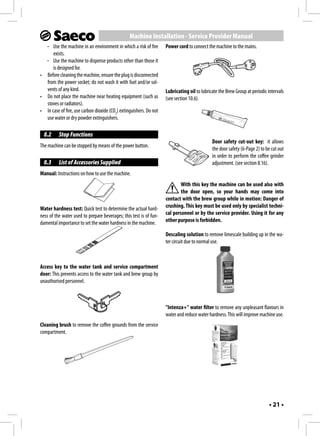
                                                                                             Door safety cut-out key: it allows
The machine can be stopped by means of the power button.
                                                                                             the door safety (6-Page 2) to be cut out
                                                                                             in order to perform the coffee grinder
  8.3     List of Accessories Supplied                                                       adjustment. (see section 8.16).
Manual: Instructions on how to use the machine.
                                                                            With this key the machine can be used also with
                                                                            the door open, so your hands may come into
                                                                    contact with the brew group while in motion: Danger of
Water hardness test: Quick test to determine the actual hard-       crushing. This key must be used only by specialist techni-
ness of the water used to prepare beverages; this test is of fun-   cal personnel or by the service provider. Using it for any
damental importance to set the water hardness in the machine.       other purpose is forbidden.

                                                                    Descaling solution to remove limescale building up in the wa-
                                                                    ter circuit due to normal use.


Access key to the water tank and service compartment
door: This prevents access to the water tank and brew group by
unauthorised personnel.


                                                                    "Intenza+" water filter to remove any unpleasant flavours in
                                                                    water and reduce water hardness. This will improve machine use.
Cleaning brush to remove the coffee grounds from the service
compartment.


                                                                                                                             • 21 •
Machine Installation - Service Provider Manual
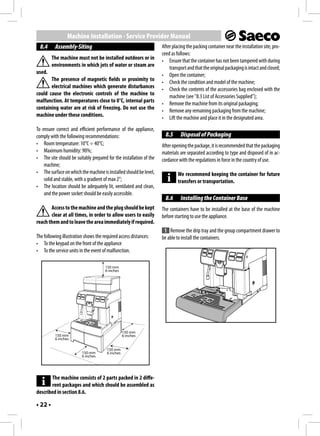
  8.4     Assembly-Siting                                            After placing the packing container near the installation site, pro-
                                                                     ceed as follows:
         The machine must not be installed outdoors or in            • Ensure that the container has not been tampered with during
         environments in which jets of water or steam are                transport and that the original packaging is intact and closed;
used.                                                                • Open the container;
       The presence of magnetic fields or proximity to               • Check the condition and model of the machine;
       electrical machines which generate disturbances               • Check the contents of the accessories bag enclosed with the
could cause the electronic controls of the machine to                    machine (see "8.3 List of Accessories Supplied");
malfunction. At temperatures close to 0°C, internal parts            • Remove the machine from its original packaging;
containing water are at risk of freezing. Do not use the             • Remove any remaining packaging from the machine;
machine under these conditions.                                      • Lift the machine and place it in the designated area.
To ensure correct and efficient performance of the appliance,
comply with the following recommendations:                             8.5     Disposal of Packaging
• Room temperature: 10°C ÷ 40°C;                                     After opening the package, it is recommended that the packaging
• Maximum humidity: 90%;                                             materials are separated according to type and disposed of in ac-
• The site should be suitably prepared for the installation of the   cordance with the regulations in force in the country of use.
    machine;
• The surface on which the machine is installed should be level,              We recommend keeping the container for future
    solid and stable, with a gradient of max 2°;                              transfers or transportation.
• The location should be adequately lit, ventilated and clean,
    and the power socket should be easily accessible.
                                                                       8.6     Installing the Container Base
       Access to the machine and the plug should be kept             The containers have to be installed at the base of the machine
       clear at all times, in order to allow users to easily         before starting to use the appliance.
reach them and to leave the area immediately if required.
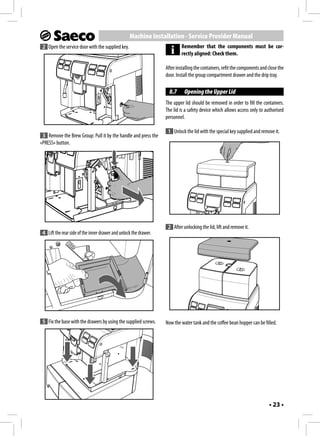
                                                                      1 Remove the drip tray and the group compartment drawer to
The following illustration shows the required access distances:      be able to install the containers.
• To the keypad on the front of the appliance
• To the service units in the event of malfunction.


       The machine consists of 2 parts packed in 2 diffe-
       rent packages and which should be assembled as
described in section 8.6.

• 22 •
Machine Installation - Service Provider Manual
 2 Open the service door with the supplied key.                             Remember that the components must be cor-
                                                                            rectly aligned: Check them.

                                                                   After installing the containers, refit the components and close the
                                                                   door. Install the group compartment drawer and the drip tray.

                                                                     8.7     Opening the Upper Lid
                                                                   The upper lid should be removed in order to fill the containers.
                                                                   The lid is a safety device which allows access only to authorised
                                                                   personnel.

                                                                    1 Unlock the lid with the special key supplied and remove it.
 3 Remove the Brew Group: Pull it by the handle and press the
«PRESS» button.


                                                                    2 After unlocking the lid, lift and remove it.
 4 Lift the rear side of the inner drawer and unlock the drawer.


 5 Fix the base with the drawers by using the supplied screws.     Now the water tank and the coffee bean hopper can be filled.


                                                                                                                             • 23 •
Machine Installation - Service Provider Manual
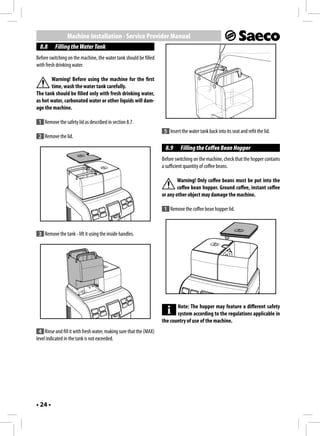
  8.8     Filling the Water Tank
Before switching on the machine, the water tank should be filled
with fresh drinking water.

       Warning! Before using the machine for the first
       time, wash the water tank carefully.
The tank should be filled only with fresh drinking water,
as hot water, carbonated water or other liquids will dam-
age the machine.

 1 Remove the safety lid as described in section 8.7.
                                                                     5 Insert the water tank back into its seat and refit the lid.
 2 Remove the lid.
                                                                     8.9      Filling the Coffee Bean Hopper
                                                                    Before switching on the machine, check that the hopper contains
                                                                    a sufficient quantity of coffee beans.

                                                                            Warning! Only coffee beans must be put into the
                                                                            coffee bean hopper. Ground coffee, instant coffee
                                                                    or any other object may damage the machine.

                                                                     1 Remove the coffee bean hopper lid.


 3 Remove the tank - lift it using the inside handles.


                                                                           Note: The hopper may feature a different safety
                                                                           system according to the regulations applicable in
                                                                    the country of use of the machine.
 4 Rinse and fill it with fresh water, making sure that the (MAX)
level indicated in the tank is not exceeded.


• 24 •
Machine Installation - Service Provider Manual
 2 Slowly pour the coffee beans into the hopper.                        8.11 Electrical Connection
                                                                              This operation must only be performed by special-
                                                                              ist technical personnel or by the service provider.

                                                                      The machine is designed to work with single-phase voltage
                                                                      matching the rating indicated on the identification plate (section
                                                                      1.4 "Machine Identification").
                                                                      Before plugging in the machine, make sure that the power button
                                                                      is switched to "0".
                                                                      The Service Provider makes and is responsible for the electrical
                                                                      connection of the machine.
                                                                      The machine should be connected to the mains using the plug
                                                                      installed on the power cord, in accordance with:
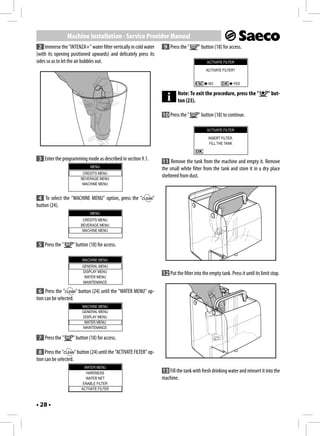
      If the water tank is not inserted, check that no cof-           • The Laws and Regulations in force at the place and time of
      fee beans fall into the tank compartment. If this                    installation;
happens, remove them to avoid any malfunctions.                       • The information shown on the technical specifications plate
                                                                           on the side of the machine.
 3 Refit the coffee bean hopper lid.
                                                                              Warning: The electric socket which the appliance
                                                                              is connected to must be easily accessible by the
  8.10 Closing the Upper Lid
                                                                      user, in order to allow it to be easily disconnected from
After refilling and during normal operation the upper safety lid      the mains when necessary.
must always be fitted and locked using the special key, in order to
prevent access to unauthorised people.
                                                                           It is forbidden to:
 1 In order to lock the upper lid (1), place and close it using the   • Use extensions of any kind.
special supplied key.                                                 • Replace the original plug.
                                                                      • Use adapters.

                                                                        8.12 Setting the Language (Upon First Use)
                                                                      At first start up, the machine requires you to select and store the
                                                                      desired language for the display of messages. This allows you to
                                                                      adjust the parameters of the beverages to the typical parameters
                                                                      of the country where the machine is used.

                                                                                                  LANGUAGE
                                                                                                  ITALIANO
                                                                                                   ENGLISH
                                                                                                  DEUTSCH
                                                                                                  FRANÇAIS


                                                                       1 Select the language by pressing the "          " (24) or "    "
                                                                      (20) button.

                                                                       2 Press the "      " button (18) to store the language.

                                                                       3 The machine starts the system warm-up.


                                                                                                                                 • 25 •
Machine Installation - Service Provider Manual
         Note: Upon first use, once the warm-up is com-               8.14 Measuring and Adjusting Water Hardness
         plete the machine primes the circuit and performs
a rinse cycle of the internal circuits. During this process, a      Measuring water hardness is very important in order to correctly
small amount of water is dispensed. Wait for this cycle to          manage the "INTENZA+" filter and the frequency with which the
be completed.                                                       machine must be descaled.

                                                                     1 Immerse the water hardness test strip - provided with the
  8.13 First Use - Use After a Long Period                          machine - in water for 1 second.
       of Inactivity
For a perfect Espresso: Rinse the coffee circuit if using the
                                                                            Note: The test strip is only valid for one measure-
machine for the first time or after a long period of inactiv-
                                                                    ment.
ity.
                                                                     2 Check how many squares change colour and refer to the ta-
These simple operations allow you to always brew excellent cof-
                                                                    ble.
fee. They have to be performed:
A) At first start-up;
B) When the machine remains inactive for a long time (more
     than 2 weeks).

 1 Empty the water tank, wash and rinse it and fill it with fresh
water (see section 8.8).
                                                                                               Hardness 4

 2 Place a large container under the dispensing spout (Fig.05,
                                                                                               Hardness 3
page 3).
                                                                                               Hardness 2
 3 Press the "      "button to start the brewing procedure.
                                                                                               Hardness 1

 4 The machine will brew coffee through the dispensing spout
(10, page 2). Wait until the procedure is complete and empty the
container.                                                           3 The numbers correspond to the settings indicated in the fol-
                                                                    lowing machine adjustments.
 5 Repeat the operations from step 2 to step 4 for 3 times, then
continue with step 6.                                               HARDNESS 4 (hard)
                                                                    HARDNESS 3 (medium)
 6 Place a container under the hot water wand (Fig.07,              HARDNESS 2 (soft)
page 3).                                                            HARDNESS 1 (very soft)

 7 Press the "      " button (22) to start dispensing HOT WATER.     4 Enter the programming mode as described in section 9.1.

                                                                                                 MENU
 8 When the hot water dispensing procedure is complete,
                                                                                              CREDITS MENU
empty the container.                                                                         BEVERAGE MENU
                                                                                              MACHINE MENU
The machine is now ready for use.
                                                                     5 To select the "MACHINE MENU" option, press the "            "
                                                                    button (24).


• 26 •
Machine Installation - Service Provider Manual
                                MENU                                    8.15 "INTENZA+" Water Filter
                           CREDITS MENU
                          BEVERAGE MENU
                                                                      Water is a key element for a good espresso coffee, and should the-
                           MACHINE MENU                               refore always be filtered in a professional manner. That is why all
                                                                      Saeco machines are equipped with the INTENZA+ filter. This filter
 6 Press the "        " button (18) for access.                       is easy to use and its sophisticated technology is effective in pre-
                                                                      venting limescale build-up. This way, water will always be perfect
                           MACHINE MENU                               and will give a much more intense aroma to your espresso coffee.
                           GENERAL MENU
                           DISPLAY MENU                                        The “INTENZA+” water filter can be installed only
                            WATER MENU
                           MAINTENANCE
                                                                               if the machine is NOT connected to the water net-
                                                                      work.
  7 Press the "       " button (24) until the "WATER MENU" op-
tion can be selected.                                                       The descaling filter should be replaced whenever
                           MACHINE MENU                                     indicated by the machine. Before descaling, re-
                           GENERAL MENU
                           DISPLAY MENU                               move the anti-scale filter from the water tank.
                            WATER MENU
                           MAINTENANCE
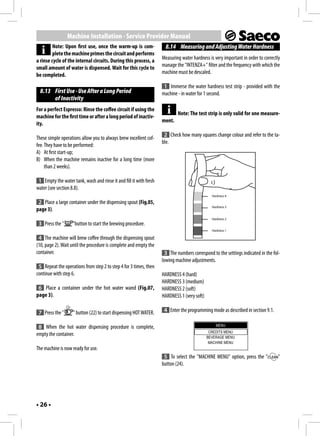
                                                                               Measuring water hardness is very important in
 8 Press the "        " button (18) for access.                                order to correctly manage the "INTENZA+" water
                                                                      filter and the frequency with which the machine must be
                             WATER MENU                               descaled.
                              HARDNESS
                              WATER NET                                 1 Remove the "INTENZA+" water filter from its package. The
                            ENABLE FILTER
                           ACTIVATE FILTER
                                                                      filter should be set according to the measurements performed to
                                                                      set water hardness.
 9 Press the "        " button (18) to enter the "HARDNESS" menu.
                                                                      Use the water hardness test strip provided with the machine. Set
        Note: The machine is supplied with standard ad-               the "Intenza Aroma System" as specified on the filter package
        justments, suitable for most of the uses.                     (see section 8.14).

                             HARDNESS
                                  1
                                  2
                                  3
                                  4


10 Press:
  The "          " button (24) to increase the value
  or
  the "      " button (20) to decrease the value.

11 Press the "        " button (18) to confirm the selected change.
                                                                          A=       Soft water
                                                                          B=       Hard water (standard)
After adjusting water hardness install the filter (Intenza+), as
                                                                          C=       Very hard water
described in the following section. Then, exit the programming
page as described in section 9.2.


                                                                                                                                 • 27 •
Machine Installation - Service Provider Manual
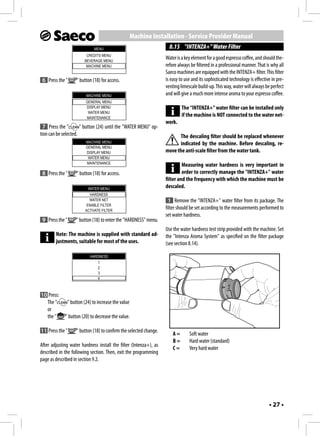
 2 Immerse the "INTENZA+" water filter vertically in cold water        9 Press the "       " button (18) for access.
(with its opening positioned upwards) and delicately press its
sides so as to let the air bubbles out.                                                         ACTIVATE FILTER

                                                                                               ACTIVATE FILTER?


                                                                                                 NO               YES

                                                                               Note: To exit the procedure, press the "             " but-
                                                                               ton (23).

                                                                      10 Press the "       " button (18) to continue.

                                                                                                ACTIVATE FILTER

                                                                                                 INSERT FILTER.
                                                                                                  FILL THE TANK


 3 Enter the programming mode as described in section 9.1.            11 Remove the tank from the machine and empty it. Remove
                              MENU
                                                                      the small white filter from the tank and store it in a dry place
                          CREDITS MENU
                         BEVERAGE MENU
                                                                      sheltered from dust.
                          MACHINE MENU


 4 To select the "MACHINE MENU" option, press the "              "
button (24).
                              MENU
                          CREDITS MENU
                         BEVERAGE MENU
                          MACHINE MENU


 5 Press the "      " button (18) for access.

                          MACHINE MENU
                         GENERAL MENU
                         DISPLAY MENU
                                                                      12 Put the filter into the empty tank. Press it until its limit stop.
                          WATER MENU
                         MAINTENANCE

  6 Press the "       " button (24) until the "WATER MENU" op-
tion can be selected.
                         MACHINE MENU
                         GENERAL MENU
                         DISPLAY MENU
                          WATER MENU
                         MAINTENANCE

 7 Press the "      " button (18) for access.

  8 Press the "       " button (24) until the "ACTIVATE FILTER" op-
tion can be selected.
                           WATER MENU
                            HARDNESS                                  13 Fill the tank with fresh drinking water and reinsert it into the
                            WATER NET                                 machine.
                          ENABLE FILTER
                         ACTIVATE FILTER


• 28 •
Machine Installation - Service Provider Manual
14 Press the "      " button (18) to confirm the introduction of    The machine allows the coffee grinder to be slightly adjusted in
the new filter.                                                     order to adapt it to the kind of coffee used. For any adjustments,
                                                                    use the lever placed on the inner side of the machine service com-
                        ACTIVATE FILTER                             partment.
                        EMPTY DRIP TRAY
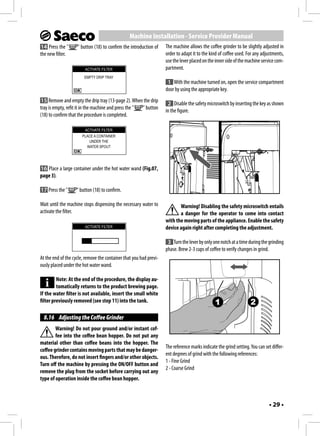
                                                                     1 With the machine turned on, open the service compartment
                                                                    door by using the appropriate key.
15 Remove and empty the drip tray (13-page 2). When the drip
                                                                     2 Disable the safety microswitch by inserting the key as shown
tray is empty, refit it in the machine and press the " " button
                                                                    in the figure.
(18) to confirm that the procedure is completed.

                        ACTIVATE FILTER
                       PLACE A CONTAINER
                          UNDER THE
                         WATER SPOUT


16 Place a large container under the hot water wand (Fig.07,
page 3).

17 Press the "      " button (18) to confirm.

Wait until the machine stops dispensing the necessary water to             Warning! Disabling the safety microswitch entails
activate the filter.                                                       a danger for the operator to come into contact
                                                                    with the moving parts of the appliance. Enable the safety
                        ACTIVATE FILTER                             device again right after completing the adjustment.

                                                                     3 Turn the lever by only one notch at a time during the grinding
                                                                    phase. Brew 2-3 cups of coffee to verify changes in grind.
At the end of the cycle, remove the container that you had previ-
ously placed under the hot water wand.

         Note: At the end of the procedure, the display au-
         tomatically returns to the product brewing page.
If the water filter is not available, insert the small white
filter previously removed (see step 11) into the tank.                                          1                   2
  8.16 Adjusting the Coffee Grinder
        Warning! Do not pour ground and/or instant cof-
        fee into the coffee bean hopper. Do not put any
material other than coffee beans into the hopper. The
                                                                    The reference marks indicate the grind setting. You can set differ-
coffee grinder contains moving parts that may be danger-
                                                                    ent degrees of grind with the following references:
ous. Therefore, do not insert fingers and/or other objects.
                                                                    1 - Fine Grind
Turn off the machine by pressing the ON/OFF button and
                                                                    2 - Coarse Grind
remove the plug from the socket before carrying out any
type of operation inside the coffee bean hopper.


                                                                                                                              • 29 •
Machine Installation - Service Provider Manual
  8.17 Adjusting the "Aroma" -                                         8.18 Adjusting Brewed Products
       Amount of Ground Coffee                                       The machine allows you to adjust the product length according to
The machine allows you to program the amount of coffee to be         your needs and to the cup features.
ground for preparing each cup of coffee.
                                                                     The product length in the cup can be set with two methods:
      Warning! The Aroma adjustment lever must only                      1 Numeric method
      be turned when the coffee grinder is stopped. Ad-                  2 Visual method
justment must be performed before brewing coffee.
                                                                       Numeric Method
For any adjustments, use the lever placed on the inner side of the
                                                                     To set the length with this method, enter the "BEVERAGE
machine service compartment.
                                                                     MENU" and program each available beverage from the keypad.
 1 Open the service compartment door with the appropriate
                                                                     This system requires the user to carry out a subsequent check of
key.
                                                                     the actual quantity of product brewed in the cup.

                                                                     The procedure for programming a cappuccino, with detailed op-
                                                                     erational sequences, is explained as an example.

                                                                      1 Enter the programming mode as described in section 9.1.

                                                                                                  MENU
                                                                                              CREDITS MENU
                                                                                             BEVERAGE MENU
                                                                                              MACHINE MENU


                                                                      2 To select the "BEVERAGE MENU" option, press the "           "
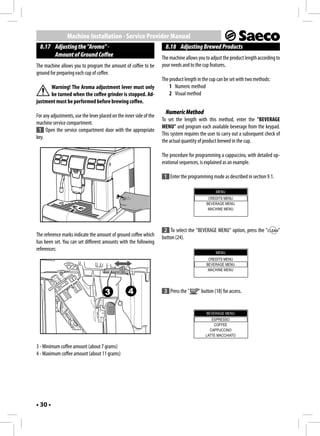
The reference marks indicate the amount of ground coffee which       button (24).
has been set. You can set different amounts with the following
references:
                                                                                                  MENU
                                                                                              CREDITS MENU
                                                                                             BEVERAGE MENU
                                                                                              MACHINE MENU


                                      3            4                  3 Press the "     " button (18) for access.


                                                                                             BEVERAGE MENU
                                                                                               ESPRESSO
                                                                                                COFFEE
                                                                                              CAPPUCCINO
                                                                                            LATTE MACCHIATO

3 - Minimum coffee amount (about 7 grams)
4 - Maximum coffee amount (about 11 grams)


• 30 •
Machine Installation - Service Provider Manual
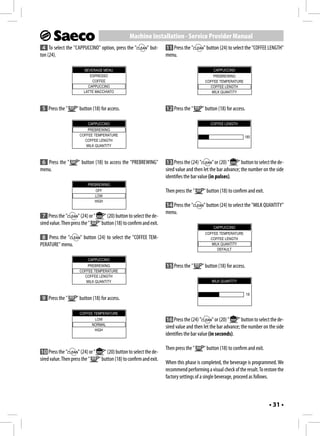
 4 To select the "CAPPUCCINO" option, press the "            " but-    11 Press the "       " button (24) to select the "COFFEE LENGTH"
ton (24).                                                              menu.

                         BEVERAGE MENU                                                           CAPPUCCINO
                            ESPRESSO                                                             PREBREWING
                             COFFEE                                                          COFFEE TEMPERATURE
                           CAPPUCCINO                                                          COFFEE LENGTH
                         LATTE MACCHIATO                                                        MILK QUANTITY


 5 Press the "       " button (18) for access.                         12 Press the "      " button (18) for access.

                           CAPPUCCINO                                                           COFFEE LENGTH
                          PREBREWING
                      COFFEE TEMPERATURE                                                                           185
                        COFFEE LENGTH
                         MILK QUANTITY


 6 Press the "       " button (18) to access the "PREBREWING"           13 Press the (24) "       " or (20) "  " button to select the de-
menu.                                                                  sired value and then let the bar advance; the number on the side
                                                                       identifies the bar value (in pulses).
                           PREBREWING
                               OFF                                     Then press the "     " button (18) to confirm and exit.
                               LOW
                               HIGH
                                                                       14 Press the "       " button (24) to select the "MILK QUANTITY"
                                                                       menu.
 7 Press the "        " (24) or "    " (20) button to select the de-
sired value. Then press the "     " button (18) to confirm and exit.
                                                                                                 CAPPUCCINO
                                                                                             COFFEE TEMPERATURE
 8 Press the "         " button (24) to select the "COFFEE TEM-                                COFFEE LENGTH
PERATURE" menu.                                                                                 MILK QUANTITY
                                                                                                   DEFAULT

                           CAPPUCCINO
                          PREBREWING                                   15 Press the "      " button (18) for access.
                      COFFEE TEMPERATURE
                        COFFEE LENGTH
                         MILK QUANTITY                                                          MILK QUANTITY


                                                                                                                       18
 9 Press the "       " button (18) for access.

                      COFFEE TEMPERATURE
                              LOW                                       16 Press the (24) "       " or (20) "  " button to select the de-
                             NORMAL
                              HIGH
                                                                       sired value and then let the bar advance; the number on the side
                                                                       identifies the bar value (in seconds).

                                                                       Then press the "     " button (18) to confirm and exit.
10 Press the "        " (24) or "    " (20) button to select the de-
sired value. Then press the "     " button (18) to confirm and exit.
                                                                       When this phase is completed, the beverage is programmed. We
                                                                       recommend performing a visual check of the result. To restore the
                                                                       factory settings of a single beverage, proceed as follows.


                                                                                                                                 • 31 •
Machine Installation - Service Provider Manual
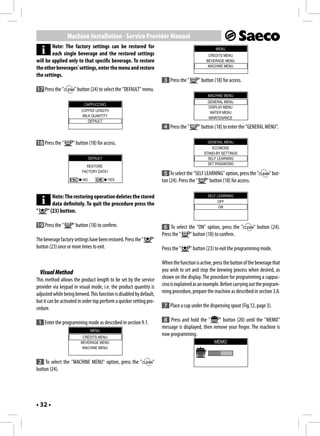
        Note: The factory settings can be restored for                                               MENU
        each single beverage and the restored settings                                          CREDITS MENU
will be applied only to that specific beverage. To restore                                     BEVERAGE MENU
                                                                                                MACHINE MENU
the other beverages' settings, enter the menu and restore
the settings.
                                                                       3 Press the "       " button (18) for access.
17 Press the "        " button (24) to select the "DEFAULT" menu.
                                                                                                MACHINE MENU
                                                                                                GENERAL MENU
                           CAPPUCCINO
                                                                                                DISPLAY MENU
                          COFFEE LENGTH                                                          WATER MENU
                           MILK QUANTITY                                                        MAINTENANCE
                              DEFAULT
                                                                       4 Press the "       " button (18) to enter the "GENERAL MENU".

18 Press the "       " button (18) for access.                                                  GENERAL MENU
                                                                                                  ECOMODE
                                                                                              STAND-BY SETTINGS
                               DEFAULT                                                          SELF LEARNING
                                                                                                SET PASSWORD
                            RESTORE
                          FACTORY DATA?
                                                                       5 To select the "SELF LEARNING" option, press the "        " but-
                          NO             YES                          ton (24). Press the "   " button (18) for access.

           Note: The restoring operation deletes the stored                                     SELF LEARNING
                                                                                                     OFF
           data definitely. To quit the procedure press the                                           ON
"       " (23) button.

19 Press the "       " button (18) to confirm.                         6 To select the "ON" option, press the "          " button (24).
                                                                      Press the "   " button (18) to confirm.
The beverage factory settings have been restored. Press the "    "
button (23) once or more times to exit.                               Press the "      " button (23) to exit the programming mode.
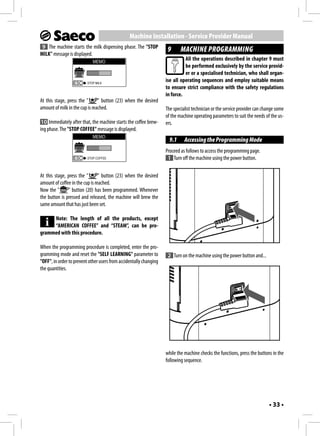
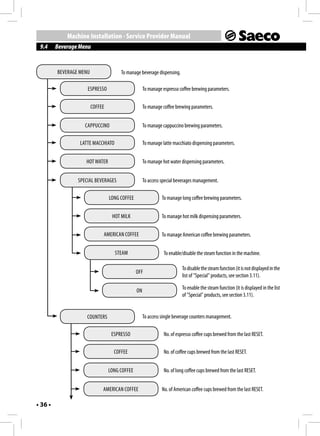
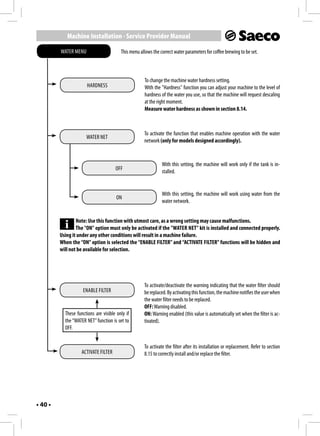
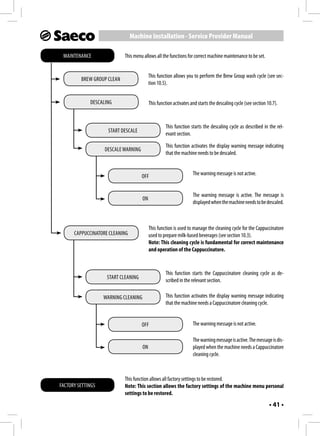
                                                                      When the function is active, press the button of the beverage that
    Visual Method                                                     you wish to set and stop the brewing process when desired, as
This method allows the product length to be set by the service        shown on the display. The procedure for programming a cappuc-
provider via keypad in visual mode, i.e. the product quantity is      cino is explained as an example. Before carrying out the program-
adjusted while being brewed. This function is disabled by default,    ming procedure, prepare the machine as described in section 3.8.
but it can be activated in order top perform a quicker setting pro-
cedure.                                                                7 Place a cup under the dispensing spout (Fig.12, page 3).

    1 Enter the programming mode as described in section 9.1.          8 Press and hold the "       " button (20) until the "MEMO"
                                                                      message is displayed, then remove your finger. The machine is
                                MENU
                          CREDITS MENU
                                                                      now programming.
                         BEVERAGE MENU                                                              MEMO
                          MACHINE MENU


 2 To select the "MACHINE MENU" option, press the "              "
button (24).


• 32 •
Machine Installation - Service Provider Manual
 9 The machine starts the milk dispensing phase. The "STOP
                                                                     9      MACHINE PROGRAMMING
MILK" message is displayed.
                             MEMO
                                                                              All the operations described in chapter 9 must
                                                                              be performed exclusively by the service provid-
                                                                              er or a specialised technician, who shall organ-
                  ESC     STOP MILK
                                                                    ise all operating sequences and employ suitable means
                                                                    to ensure strict compliance with the safety regulations
                                                                    in force.
At this stage, press the "      " button (23) when the desired
amount of milk in the cup is reached.                               The specialist technician or the service provider can change some
                                                                    of the machine operating parameters to suit the needs of the us-
 10 Immediately after that, the machine starts the coffee brew-     ers.
ing phase. The "STOP COFFEE" message is displayed.
                             MEMO
                                                                      9.1     Accessing the Programming Mode
                                                                    Proceed as follows to access the programming page.
                  ESC     STOP COFFEE                                1 Turn off the machine using the power button.

At this stage, press the "       " button (23) when the desired
amount of coffee in the cup is reached.
Now the "      " button (20) has been programmed. Whenever
the button is pressed and released, the machine will brew the
same amount that has just been set.

     Note: The length of all the products, except
     “AMERICAN COFFEE” and “STEAM”, can be pro-
grammed with this procedure.

When the programming procedure is completed, enter the pro-
gramming mode and reset the "SELF LEARNING" parameter to             2 Turn on the machine using the power button and...
"OFF", in order to prevent other users from accidentally changing
the quantities.


                                                                    while the machine checks the functions, press the buttons in the
                                                                    following sequence.


                                                                                                                             • 33 •
Machine Installation - Service Provider Manual
                                                                       9.2     Programming Controls
                                                                      When the machine menus are accessed, the buttons on the key-
              1
                                                                      pad take on new functions.
                                                       3
                                                                      "     " "page up/change" button (20)
                                                       2
                                                                      This button allows you to:
              4                                                       1 Browse the pages within a menu;
                                                                      2 Change the parameters when they are made editable using
                                                                          the "OK" button.

                                                                      "      " "page down/change" button (24)
If the sequence was correct, the programming menu opens.              This button allows you to:
                                                                      1 Browse the pages within a menu;
                              MENU
                                                                      2 Change the parameters when they are made editable using
                          CREDITS MENU
                                                                          the "OK" button.
                         BEVERAGE MENU
                          MACHINE MENU                                "     " (OK) button (18)
                                                                      This button allows you to:
                                                                      1 Select the function displayed;
Sections 9.3, 9.4 and 9.5 list all the functions available in these   2 Confirm the parameter/value when it is made editable.
menus.
                                                                      "     " "ESC" button (23)
       Note: The above mentioned procedure can be used                This button allows you to exit without changing the parameter
       to access the programming menu also when the                   edited or selected.
machine is cold and has not reached the operating tem-
perature. To execute certain programs (e.g. DESCALING)                Note: Press it repeatedly to exit the programming page.
the machine will manage the procedure automatically
and heat up according to the manufacturer's settings.

       Note: After 3 minutes of inactivity the machine
       exits the programming mode and returns to the
standard operating mode.

         The menus should be PASSWORD-protected.

         If the PASSWORD is set on the default value (0000),
         it will not be requested. It should be changed upon
1st use to prevent unauthorised access. After this change,
it should be entered again at each access, every time the
display shows:

                        INSERT PASSWORD


                            0 0 0 0


Refer to section 9.6 on how to set the PASSWORD.


• 34 •
Machine Installation - Service Provider Manual
 9.3     Credits Menu
This menu allows you to manage the machine credits to avoid undesired product brewing. Credit management is not active for hot
water, hot milk and steam dispensing.


           CREDITS MENU                    To manage machine operation with credits.


                         ADD CREDITS                    This function allows you to add credits to the machine.


                        RESET CREDITS                  This function allows you to reset all the credits in the machine.


                                                        This function allows the credits to be displayed in the main page.
                         SHOW CREDITS                   Note: Regardless of the parameter chosen, the “CREDIT CONTROL”
                                                        function must be enabled, otherwise the credits are not displayed
                                                        by the machine.


                                         OFF                     To deactivate credits display.
                                                                 Note: The credit number is always displayed when the
                                                                 minimum level of 30 credits is reached, in order for the
                                                                 user to contact the service provider.


                                          ON                     To activate credits display.


                        CREDIT CONTROL                  This function activates the credit control.


                                         OFF                     This function deactivates the credit control operation.


                                          ON                     This function activates the operation mode with credit control.


                                                                                                                           • 35 •
Machine Installation - Service Provider Manual
 9.4     Beverage Menu


         BEVERAGE MENU                 To manage beverage dispensing.

                     ESPRESSO                        To manage espresso coffee brewing parameters.


                         COFFEE                      To manage coffee brewing parameters.


                    CAPPUCCINO                       To manage cappuccino brewing parameters.

                  LATTE MACCHIATO                    To manage latte macchiato dispensing parameters.


                    HOT WATER                        To manage hot water dispensing parameters.


                 SPECIAL BEVERAGES                   To access special beverages management.

                                  LONG COFFEE                  To manage long coffee brewing parameters.


                                   HOT MILK                    To manage hot milk dispensing parameters.


                              AMERICAN COFFEE                  To manage American coffee brewing parameters.


                                    STEAM                       To enable/disable the steam function in the machine.

                                                                          To disable the steam function (it is not displayed in the
                                                OFF
                                                                          list of "Special" products, see section 3.11).

                                                ON                        To enable the steam function (it is displayed in the list
                                                                          of "Special" products, see section 3.11).


                     COUNTERS                        To access single beverage counters management.

                                   ESPRESSO                     No. of espresso coffee cups brewed from the last RESET.

                                    COFFEE                      No. of coffee cups brewed from the last RESET.


                                  LONG COFFEE                   No. of long coffee cups brewed from the last RESET.


                              AMERICAN COFFEE                  No. of American coffee cups brewed from the last RESET.

• 36 •
Machine Installation - Service Provider Manual


                           COUNTERS


                                        HOT WATER                   No. of hot water cups dispensed from the last RESET.


                                       CAPPUCCINO                   No. of cappuccino cups brewed from the last RESET.


                                     LATTE MACCHIATO                No. of latte macchiato cups dispensed from the last RESET.


                                         HOT MILK                   No. of hot milk cups dispensed from the last RESET.


                                     COUNTERS RESET                 To reset all the counters of the brewed beverages.


  Beverage Parameters
Changeable parameters are described in this section.
Note: Not all parameters are always available for each
programmable option.


                         PREBREWING
                                                                                            MILK QUANTITY
Prebrewing: Coffee is slightly dampened before brewing so as to
bring out its full aroma and let it acquire an excellent taste.     This section allows you to program the amount of milk for each
OFF: prebrewing is not performed.                                   selected beverage. The bar allows you to set the exact amount of
LOW: activated.                                                     milk to be dispensed (the value is measured in seconds).
HIGH: longer in order to bring out the coffee taste.                These settings are valid only for programming the dis-
                                                                    pensing of milk-based beverages.
                    COFFEE TEMPERATURE
                                                                                           WATER QUANTITY
This section allows you to program the temperature for the coffee
brewing.                                                            This section allows you to set the amount of water to be dis-
LOW: low temperature.                                               pensed when pressing the corresponding button. The bar allows
NORMAL: standard temperature.                                       you to set the exact amount of water to be dispensed (the value
HIGH: high temperature.                                             is measured in turbine pulses).
                                                                    These settings are valid only for programming hot water
                                                                    dispensing.
                        COFFEE LENGTH

This section allows you to program the amount of coffee to be                                   DEFAULT
brewed for each selected beverage. The bar allows you to set the
exact amount of coffee to be brewed (the value is measured in       The original standard values assigned by the manufacturer to
turbine pulses).                                                    each beverage can be reset also according to the selected lan-
                                                                    guage. After selecting this function, the customised beverage
                                                                    settings are deleted.

                                                                                                                             • 37 •
Machine Installation - Service Provider Manual
 9.5     Machine Menu
This menu allows the general operation and maintenance parameters of the machine to be managed.


           GENERAL MENU                    To change the machine operating settings.


                            TONE                       This function activates/deactivates the acoustic alarms.


                                        OFF                     To deactivate the acoustic alarms.


                                         ON                     To activate the acoustic alarms


                          ECOMODE                      This function allows the machine boilers to be activated in order to save
                                                       energy.
                                                       The function is set by default to «ON».


                                                                This function activates all the boilers at every machine start-up, to
                                                                be immediately able to prepare all kinds of beverages. The power
                                        OFF
                                                                consumption is higher this way, because the machine is always
                                                                ready for use.


                                                                This way, only the coffee boiler is activated at machine start-up.
                                         ON                     The machine saves energy but needs longer time to dispense
                                                                milk-based beverages.


                                                       To set the time interval for the machine to go into stand-by mode after the
                     STAND-BY SETTINGS                 last brewing.
                                                       The default time value is «after 30 minutes».


                                    15 MINUTES


                                    30 MINUTES                  Once the set time has elapsed, the machine goes into stand-by
                                                                mode.
                                    60 MINUTES                  Press any button to turn the machine on again. After performing
                                                                the function diagnostics and the warm-up phase, the machine is
                                                                again ready for use.
                                    180 MINUTES

• 38 •
Machine Installation - Service Provider Manual


GENERAL MENU


         SELF LEARNING                 To activate the beverage length self learning function.


                         OFF                       When set this way, self learning is not active.

                                                   When set this way, self learning is active. Hold a button pressed
                         ON                        for 3 seconds to start the automatic cup length learning cycle.


                                       To set the access PASSWORD for machine programming.
         SET PASSWORD                  Note: If the PASSWORD is set to (0000), it will not be requested
                                       upon access.
                                       If the PASSWORD is forgotten, a restoring procedure must be start-
                                       ed. Contact the Customer Service to do that.


DISPLAY MENU               With this menu, the menu language and the display brightness and contrast can be set.

                                       This setting is of fundamental importance for correctly adjusting the pa-
           LANGUAGE
                                       rameters of the machine according to the country where the machine is
                                       used.
                                                   The currently selected language is displayed. The language can
                       ENGLISH                     be changed with the special controls.


          BRIGHTNESS                   To set the correct display brightness according to room illumination.


           CONTRAST                    To set the correct display contrast according to the room illumination.


                                                                                                           • 39 •
Machine Installation - Service Provider Manual

         WATER MENU                      This menu allows the correct water parameters for coffee brewing to be set.


                                                     To change the machine water hardness setting.
                      HARDNESS                       With the "Hardness" function you can adjust your machine to the level of
                                                     hardness of the water you use, so that the machine will request descaling
                                                     at the right moment.
                                                     Measure water hardness as shown in section 8.14.


                                                     To activate the function that enables machine operation with the water
                      WATER NET
                                                     network (only for models designed accordingly).


                                                               With this setting, the machine will work only if the tank is in-
                                      OFF
                                                               stalled.


                                                               With this setting, the machine will work using water from the
                                       ON
                                                               water network.


                 Note: Use this function with utmost care, as a wrong setting may cause malfunctions.
                 The "ON" option must only be activated if the "WATER NET" kit is installed and connected properly.
         Using it under any other conditions will result in a machine failure.
         When the “ON” option is selected the “ENABLE FILTER” and “ACTIVATE FILTER” functions will be hidden and
         will not be available for selection.


                                                     To activate/deactivate the warning indicating that the water filter should
                    ENABLE FILTER                    be replaced. By activating this function, the machine notifies the user when
                                                     the water filter needs to be replaced.
                                                     OFF: Warning disabled.
           These functions are visible only if       ON: Warning enabled (this value is automatically set when the filter is ac-
           the “WATER NET” function is set to        tivated).
           OFF.


                                                     To activate the filter after its installation or replacement. Refer to section
                    ACTIVATE FILTER                  8.15 to correctly install and/or replace the filter.


• 40 •
Machine Installation - Service Provider Manual

 MAINTENANCE                This menu allows all the functions for correct machine maintenance to be set.


                                           This function allows you to perform the Brew Group wash cycle (see sec-
         BREW GROUP CLEAN
                                           tion 10.5).


             DESCALING                     This function activates and starts the descaling cycle (see section 10.7).


                                                    This function starts the descaling cycle as described in the rel-
                    START DESCALE
                                                    evant section.

                                                    This function activates the display warning message indicating
                   DESCALE WARNING
                                                    that the machine needs to be descaled.


                                     OFF                            The warning message is not active.


                                                                    The warning message is active. The message is
                                      ON
                                                                    displayed when the machine needs to be descaled.


                                           This function is used to manage the cleaning cycle for the Cappuccinatore
      CAPPUCCINATORE CLEANING              used to prepare milk-based beverages (see section 10.3).
                                           Note: This cleaning cycle is fundamental for correct maintenance
                                           and operation of the Cappuccinatore.


                                                    This function starts the Cappuccinatore cleaning cycle as de-
                    START CLEANING
                                                    scribed in the relevant section.

                   WARNING CLEANING                 This function activates the display warning message indicating
                                                    that the machine needs a Cappuccinatore cleaning cycle.


                                     OFF                            The warning message is not active.

                                                                    The warning message is active. The message is dis-
                                      ON                            played when the machine needs a Cappuccinatore
                                                                    cleaning cycle.


                            This function allows all factory settings to be restored.
FACTORY SETTINGS            Note: This section allows the factory settings of the machine menu personal
                            settings to be restored.
                                                                                                                • 41 •
Machine Installation - Service Provider Manual
 9.6     Setting the PASSWORD                                       9 Carry out the procedures described in steps (7) and (8) to set
                                                                   the chosen numbers.
The PASSWORD must be set by the service provider in order to
prevent access by unauthorised personnel who could change the
                                                                   Here an example that explains the procedure.
machine settings and cause malfunctions.
                                                                                            SET PASSWORD

To set the PASSWORD, proceed as follows:                                                      5 1 8 3


 1 Enter the programming mode as described in section 9.1.
                             MENU
                        CREDITS MENU                               When the "      " button (18) is pressed on the last number, the
                       BEVERAGE MENU                               machine stores the code and displays the following page.
                        MACHINE MENU

                                                                                            GENERAL MENU
 2 To select the "MACHINE MENU" option, press the "           "                           STAND-BY SETTINGS
button (24).                                                                                SELF LEARNING
                             MENU                                                           SET PASSWORD

                        CREDITS MENU
                       BEVERAGE MENU
                        MACHINE MENU
                                                                   Press the "  " button (23) repeatedly to exit the page. From
                                                                   now on the PASSWORD will always be required to access the
 3 Press the "     " button (18) for access.
                                                                   menus.
                        MACHINE MENU
                        GENERAL MENU
                        DISPLAY MENU
                         WATER MENU
                        MAINTENANCE

 4 Press the "     " button (18) to enter the "GENERAL MENU".

                        GENERAL MENU
                      STAND-BY SETTINGS
                        SELF LEARNING
                        SET PASSWORD


 5 Press the "      " button (24) to select the "SET PASSWORD"
option. Press the "   " button (18) for access.

                        SET PASSWORD


                          0 0 0 0


 6 Now the PASSWORD can be set.

 7 Press the "      " (24) or "     " (20) button to set the de-
sired number.

 8 Press the "      " button (18) to confirm the highlighted
number and go to the following one.


• 42 •
Machine Installation - Service Provider Manual
 10 CLEANING AND MAINTENANCE                                           10.3 Thorough Cleaning of the Cappuccinatore
           All the operations described in chapter 10 must           Clean all the Cappuccinatore parts thoroughly every month by us-
           be performed exclusively by the service provider          ing the Saeco detergent.
           or a specialised technician, who shall organise
all operating sequences and employ suitable means to en-             The Saeco detergent may be purchased at your local dealer or at
sure strict compliance with the safety regulations in force.         authorised service centres.

                                                                     The lack of cleaning before and after each use can affect the cor-
  10.1 Cleaning Intervals
                                                                     rect operation of the machine.
For improved efficiency, it is advisable to carry out the cleaning
and maintenance operations indicated in the following table.                 Danger of burns! Dispensing may be preceded by
                                                                             small jets of hot water.
                                                         Every
                                                        month         1 Ensure that the Cappuccinatore is correctly placed (Fig.09-
     Operation to be      Whenever         Every           or        10, page 3).
       carried out        indicated        week           500
                                                       brewing
                                                      procedures      2 Enter the programming mode as described in section 9.1.
 Emptying and cleaning
 the coffee grounds                                                   3 Press the "        " button (24) and select the "MACHINE
 drawer.                                                             MENU" option; press the "    " button (18) to enter the menu.
 Thorough cleaning
 of the Cappuccinatore                                                4 Press the "      " button (24) and select the "MAINTENANCE"
 Water tank cleaning
                                                                     option; press the "    " button (18) to enter the menu.
                                                                                              MACHINE MENU
 Brew group cleaning                                                                          DISPLAY MENU
                                                                                               WATER MENU
 Brew                                                                                         MAINTENANCE
 group lubrication                                                                          FACTORY SETTINGS

 Coffee bean hopper
 cleaning
                                                                      5 Press the "      " button (24) until the "CAPPUCCINATORE
 Descaling                                                           CLEANING" option can be selected.
                                                                                             MAINTENANCE
                                                                                           BREW GROUP CLEAN
  10.2 Cleaning the Water Tank                                                                DESCALING
                                                                                        CAPPUCCINATORE CLEANING
The water tank should be cleaned every time it is filled.

                                                                     Press the "    " button (18) to confirm.

                                                                                        CAPPUCCINATORE CLEANING
                                                                                            START CLEANING
                                                                                           WARNING CLEANING


                                                                     Press the "    " button (18) to confirm.


                                                                                                                              • 43 •
Machine Installation - Service Provider Manual
                    CAPPUCCINATORE CLEANING
                                                                               Drinking the solution dispensed during this pro-
                           WASH THE
                                                                               cedure is strictly prohibited. The solution must be
                        CAPPUCCINATORE?                                 disposed of.
                          NO             YES
                                                                                            CAPPUCCINATORE CLEANING
                                                                                               PLACE A CONTAINER
         Note: If this option is confirmed, the cycle must be                                      UNDER THE
                                                                                               DISPENSING SPOUT
         completed. Press the "        " button (23) to exit.

 6 Press the "        " button (18) to start the Cappuccinatore         12 Place an empty container of at least 1 litre capacity under
cleaning cycle.                                                         the dispensing spout and press the " " button (18) to confirm.

                    CAPPUCCINATORE CLEANING
                                                                        13 The machine performs a Cappuccinatore wash cycle.
                              REFILL
                            WATER TANK                                                      CAPPUCCINATORE CLEANING


 7 Fill the water tank and press the "      " button (18) to confirm.

                    CAPPUCCINATORE CLEANING
                                                                        The bar shows the washing progress.
                         POUR DETERGENT
                          IN A CONTAINER                                14 Wait for the cycle to end automatically. When the cycle is
                         WITH 1/2 L WATER
                                                                        completed, the display shows:

                                                                                              CAPPUCCINATORE RINSING
  8 Pour a solution bag in a container with 1/2 (a half) litre of                                     REFILL
fresh drinking water.                                                                               WATER TANK


                                                                        15 Wash the water tank and fill it with fresh drinking water; press
                                                                        the "  " button (18) to confirm.

                                                                                             CAPPUCCINATORE CLEANING
                                                                                             INSERT CAPPUCCINATORE
                                                                                               HOSE IN A CONTAINER
                                                                                                 WITH 1/2 L WATER


                                                                         16 Wash thoroughly the container used for the solution and fill
                                                                        it with 1/2 (a half) litre of fresh drinking water which will be used
                                                                        for rinsing.
 9 Wait for the bag content to dissolve completely and then
press the "  " button (18) to confirm.                                  17 Empty the container placed under the dispensing spout.

                                                                        18 Insert the suction hose in the container used.
                    CAPPUCCINATORE CLEANING
                      PUT CAPPUCCINATORE                                Press the "    " button (18) to confirm.
                          HOSE IN THE
                           CONTAINER
                                                                                             CAPPUCCINATORE RINSING
                                                                                               PLACE A CONTAINER
10 Insert the clean pipe directly into the container.                                              UNDER THE
                                                                                               DISPENSING SPOUT

11 Press the "       " button (18) to confirm.

• 44 •
Machine Installation - Service Provider Manual
19 Place an empty container under the dispensing spout and           3 Open the service door with the supplied key.
press the "  " button (18) to confirm.

                    CAPPUCCINATORE RINSING


20 The machine performs a Cappuccinatore rinse cycle.
The bar shows the rinsing progress.

21 Wait until the cycle stops automatically. The machine will go
back to the normal operating cycle.

22 Wash all the Cappuccinatore parts as described in section 5.4.    4 Remove the Brew Group: Pull it by the handle and press the
                                                                    «PRESS» button. The Brew Group must be washed only with luke-
        Important Note: It is advisable to remove the Cap-          warm water, with no detergent.
        puccinatore from the machine when not being
used, in order to keep it clean.

  10.4 Brew Group - Weekly Cleaning
The brew group should be cleaned every time the coffee bean hop-
per is filled, or at least once a week.

 1 Turn off the machine by pressing the power button and re-
move the plug from the socket.

 2 Remove the drip tray and the coffee grounds drawer.

                                                                     5 Wash the Brew Group with lukewarm water and carefully
                                                                    wash the upper filter. Before placing the Brew Group in its seat,
                                                                    ensure that there is no water left in the brewing chamber.


                                                                                                                             • 45 •
Machine Installation - Service Provider Manual
 6 Lift the rear side of the inner drawer and unlock the drawer.      9 Ensure that the lever is in contact with the brew group base.


 7 Remove the inner drawer, wash it and put it back into its seat.   10 Ensure that the hook to lock the Brew Group is in the correct
                                                                     position; to do that, press the "PRESS" button firmly.


        Note: When refitting the drawer, carry out the
        same operations performed for its removal, but               11 Insert the Brew Group back into its seat until it locks into
in reverse order.                                                    place, WITHOUT pressing the "PRESS" button.

 8 Ensure that the Brew Group is in the rest position; the two       12 Insert the coffee grounds drawer and the drip tray. Close the
reference signs must match.                                          service door.

                                                                       10.5 Cleaning the Brew Group with
                                                                            "Coffee Clean Tablets"
                                                                     Besides weekly cleaning, we recommend running the cleaning
                                                                     cycle with "Coffee Clean Tablets" after approximately 500 cups of
                                                                     coffee or once a month.
                                                                     This operation completes the maintenance process of the brew
                                                                     group.

                                                                     Both the "Coffee Clean Tablets" used to clean the Brew Group and
                                                                     the "Maintenance Kit" may be purchased at your local dealer or at
                                                                     authorised service centres.
If they do no match, proceed as described in step (9).


• 46 •
Machine Installation - Service Provider Manual
       Warning: The "Coffee Clean Tablets" has no descal-                              BREW GROUP CLEAN
       ing property. For descaling use the Saeco descal-                              EXTRACT BREW GROUP
ing solution and follow the procedure described in the
"Descaling" chapter.

The wash cycle cannot be stopped. Do not leave the machine un-     7 Remove the drip tray and the group compartment drawer.
attended during this operation.

      Warning! Drinking the solution dispensed during
      this procedure is strictly prohibited. The solution
must be disposed of.

 1 Enter the programming mode as described in section 9.1.

 2 Press the "        " button (24) and select the "MACHINE
MENU" option; press the "    " button (18) to enter the menu.

 3 Press the "     " button (24) and select the "MAINTENANCE"
option.                                                            8 Open the service door with the supplied key.

                        MACHINE MENU
                        DISPLAY MENU
                         WATER MENU
                        MAINTENANCE
                      FACTORY SETTINGS


 4 Press the "     " button (18) to access the menu.

                        MAINTENANCE
                     BREW GROUP CLEAN
                        DESCALING
                  CAPPUCCINATORE CLEANING


                                                                   9 Remove the Brew Group: Pull it by the handle and press the
 5 Press the "     " button (18) to start the Brew Group clean-   «PRESS» button.
ing cycle.

                     BREW GROUP CLEAN
                       PERFORM BREW
                      GROUP CLEANING?

                        NO             YES


        Note: If this option is confirmed the cycle must be
        completed. Press the "       " button (23) to exit.

 6 Press the "      " button (18) to start the group cleaning
cycle.


                                                                                                                       • 47 •
Machine Installation - Service Provider Manual
 10 Press the "     " button (18) to confirm the removal of the     10.6 Brew Group Lubrication
Brew Group.
                                                                  Lubricate the Brew Group after approximately 500 cups of coffee
                                                                  or once a month.
                      BREW GROUP CLEAN

                        INSERT GROUP                              The grease to lubricate the Brew Group and the complete "Ser-
                          CLEAN TAB
                                                                  vice Kit" may be purchased at your local dealer, or at authorised
                                                                  service centres.

11 Place the cleaning tablet in the Brew Group and refit the             Note: To display the number of coffee cups
group in the machine, making sure that all the components have           brewed, please refer to the "COUNTERS" menu in
been inserted and that the door is closed.                        the "BEVERAGE MENU" (section 9.4 - page 36).

                                                                  Before lubricating the brew group clean it under running water as
                                                                  described in the "Brew Group - Weekly Cleaning" section.

                                                                   1 Lubricate the brew group guides using the Saeco grease only.


12 After placing the tablet in the brew group press the "     "
button (18) to confirm.

                      BREW GROUP CLEAN
                      PLACE A CONTAINER
                          UNDER THE
                      DISPENSING SPOUT
                                                                  Apply the grease evenly on both side guides.


13 Place a container under the coffee dispensing spout and
press the "  " button (18) to confirm.

                      BREW GROUP CLEAN


14 The machine completes the cycle automatically.

       Note: At the end of the cycle the machine goes
       back to its normal operating mode. We recom-
mend removing the group and washing it under fresh
running water.


• 48 •
Machine Installation - Service Provider Manual
 2 Lubricate also the shaft.                                         10.7 Descaling
                                                                   Limescale is a natural part of the water used for machine opera-
                                                                   tion. It needs to be removed regularly as it may clog the water and
                                                                   coffee circuit of your appliance.
                                                                   The advanced electronics shows on the machine display (in clear
                                                                   symbols) when descaling is needed. Just follow the steps de-
                                                                   scribed below.

                                                                   This operation needs to be carried out before the appliance stops
                                                                   working properly, as in this case the repair is not covered by the
                                                                   warranty.

                                                                   Use the Saeco descaling product only. Its formula has been de-
                                                                   signed to ensure better machine performance and operation for
                                                                   its whole operating life. If correctly used, it also avoids alterations
                                                                   in the brewed product.

                                                                   The descaling solution and the complete "Maintenance Kit" may
                                                                   be purchased at your local dealer or at authorised service centres.

                                                                           Warning! Never drink the descaling solution or
                                                                           any products dispensed until the cycle has been
                                                                   carried out to the end. Never use vinegar as a descaling
                                                                   solution.

 3 Insert the Brew Group back into its seat until it locks into     1 Turn on the machine by pressing the ON/OFF button. Wait for
place, WITHOUT pressing the "PRESS" button.                        the machine to finish its rinse and warm-up process.

 4 Insert the coffee grounds drawer and the drip tray. Close the            Warning! Remove the "Intenza" filter before add-
service door.                                                               ing the descaling solution.

                                                                    2 Enter the programming mode as described in section 9.1.

                                                                    3 Press the "        " button (24) and select the "MACHINE
                                                                   MENU" option; press the "    " button (18) to enter the menu.

                                                                                              MACHINE MENU
                                                                                              DISPLAY MENU
                                                                                               WATER MENU
                                                                                              MAINTENANCE
                                                                                            FACTORY SETTINGS


                                                                    4 Press the "      " button (24) and select the "MAINTENANCE"
                                                                   option; press the "    " button (18) to enter the menu.


                                                                                                                                 • 49 •
Machine Installation - Service Provider Manual
                           MAINTENANCE                                9 Place the tank back in the machine. Press the "   " button
                         BREW GROUP CLEAN                            (18).
                            DESCALING
                      CAPPUCCINATORE CLEANING
                                                                                               DESCALING
                                                                                             EMPTY DRIP TRAY
 5 Press the "          " button (24) and select the "DESCALING"
option; press the "       " button (18) to enter the menu.

                            DESCALING
                          START DESCALE                              10 Remove any liquids from the drip tray and place it back in
                         DESCALE WARNING                             the machine.


 6 Select the "START DESCALE" option; press the "         " button
(18) to access the menu.

                             DESCALING
                         START DESCALING?


                           NO            YES

         Note: If this option is confirmed, the rest of the
         cycle must be completed. Press the "     " button
(23) to exit.
                                                                     Press the "    " button (18).
 7 Press the "        " button (18) to start the DESCALING cycle.
                                                                                                DESCALING
                             DESCALING                                                         INSERT THE
                          FILL TANK WITH                                                  CAPPUCCINATORE WITH
                        DESCALING SOLUTION                                                ALL THE COMPONENTS


                                                                     11 Insert the complete Cappuccinatore into the machine and
 8 Pour the entire content of the Saeco concentrated descal-
                                                                     remove the dispensing spout.
ing solution into the water tank and then fill the tank with fresh
drinking water up to the level indicated by the icon.


                                                                     Press the "    " button (18).

                                                                              Note: Keep the suction tube removed from the Cap-
                                                                              puccinatore while the descaling cycle is performed.

• 50 •
Machine Installation - Service Provider Manual
                           DESCALING                                  16 Insert the tank into the machine. Press the "   " button (18).
                       PLACE A CONTAINER
                       UNDER MILK AND HOT                             17 Empty the containers used to collect the liquid dispensed by
                         WATER SPOUTS
                                                                      the machine.

                                                                                                  DESCALING
12 Place a container under the hot water wand and a large
                                                                                               EMPTY DRIP TRAY
enough container under the Cappuccinatore.


                                                                      18 Remove any liquids from the drip tray and insert the tray
                                                                      back.
                                                                      Press the " " button (18).

                                                                                                  DESCALING
                                                                                                 INSERT THE
                                                                                            CAPPUCCINATORE WITH
                                                                                            ALL THE COMPONENTS


         Note: Use a container of at least 1.5 litres capacity.       19 Check that the Cappuccinatore is placed in the machine.
                                                                      Press the "   " button (18).
Press the "    " button (18).
                                                                                                 DESCALING
                                                                                             PLACE A CONTAINER
                            DESCALING                                                        UNDER MILK AND HOT
                       STEP 1/2 DESCALING                                                      WATER SPOUTS


                          PAUSE

                                                                      20 Place a container under the hot water wand and a large
        If you do not have a container of this capacity,              enough container under the Cappuccinatore.
        pause the cycle by pressing the "    " button (23),           Press the "   " button (18).
empty the container, place it back in the machine and re-
start the cycle by pressing the "   " button (18).                                                DESCALING

                                                                                               STEP 2/2 RINSING
13 At this point, the machine will start dispensing the descaling
                                                                                                PAUSE
solution at intervals (the bar shows the cycle progress).
                                                                      21 The machine performs the rinse cycle.
14 When the solution in the tank is finished, the machine re-
quests to empty and rinse the tank with fresh drinking water.                  Note: A default amount of water is needed for the
                                                                               rinse phase. This allows an ideal rinse cycle to be
                            DESCALING                                 performed in order to ensure the best conditions to brew
                           RINSE TANK &
                                                                      products. The message about filling the tank for the rinse
                      FILL WITH FRESH WATER
                                                                      cycle is normal, as it is part of the procedure.

                                                                              Note: The rinse cycle can be paused by pressing
 15 Rinse the water tank thoroughly and refill it with fresh drink-           the "    " button (23). To resume the cycle, press
ing water.                                                            the "    " button (18) again. This allows you to empty the
                                                                      container or to stay away from the machine for a short
                                                                      period of time.
                                                                                                                               • 51 •
Machine Installation - Service Provider Manual
22 Once the rinse cycle is complete, the machine carries out the
                                                                    11 MACHINE DISPOSAL
warm-up and rinse cycle to be ready for product brewing.
                                                                   -    The packing materials can be recycled.
23 Empty the containers used to collect the liquid dispensed by    -    Appliance: Unplug the appliance and cut the power cord.
the machine and reassemble the dispensing spout.                   -    Deliver the appliance and power cord to a service center or
                                                                        public waste disposal facility.
24 The machine is now ready for use.
                                                                   This product complies with eu directive 2002/96/EC.

       Note:
- The descaling solution must be disposed of according
  to the manufacturer's instructions and/or regulations            The symbol             on the product or on its packaging indicates
  in force in the country of use.                                  that this product may not be treated as household waste. Instead
- After completing the descaling cycle:                            it shall be handed over to the applicable collection point for the
   1 Wash the brew group as described in the “Brew                 recycling of electrical and electronic equipment.
     Group” section in the “Cleaning and Maintenance”              By ensuring this product is disposed of correctly, you will help
     chapter;                                                      prevent potential negative consequences for the environment
  2 Rinse the Cappuccinatore under running water.                  and human health, which could otherwise be caused by inappro-
                                                                   priate waste handling of this product. For more detailed informa-
When the descaling cycle is complete, we recommend emptying        tion about recycling of this product, please contact your local city
the drip tray.                                                     office, your household waste disposal service or the shop where
                                                                   you purchased the product.


• 52 •
12 TROUBLESHOOTING

 Machine actions                              Causes                                              Solutions
 The machine does not switch on.             The machine is not plugged and/or the power but- Plug the machine and/or switch the power but-
                                             ton is positioned on "0".                        ton to "I".

 Coffee is not hot enough.                   The cups are cold.                                   Preheat the cups with hot water.

 Coffee does not have enough crema.          The blend is unsuitable, coffee is not freshly roast- Change coffee blend or adjust the grind as ex-
 (See note)                                  ed or the grind is too coarse.                        plained in section "Adjusting the Coffee Grinder".

 The machine takes a long time to warm up The machine circuit is clogged by limescale.            Descale the machine.
 or the amount of water dispensed from the
 wand is too little.

 Bubbles form at the Cappuccinatore spout The tube fittings are not connected properly or are Insert the whole suction tube into the Cappuc-
 while dispensing milk.                   not completely inserted into the Cappuccinatore. cinatore.

 Steam comes out of the Cappuccinatore There is no more milk in the container.                    Check that there is still milk. If necessary, fill in the
 when sucking milk.                                                                               milk container again or replace it with a new one.

 The Brew Group cannot be removed.           The Brew Group is out of place.                      Turn the machine on. Close the service door. The
                                                                                                  brew group automatically returns to the initial
                                                                                                  position.

                                             Group compartment drawer inserted.                   Remove the group compartment drawer before
                                                                                                  removing the brew group.

 The machine grinds the coffee beans but no The Brew Group is dirty.                              Clean the Brew Group ("Brew Group" section).
 coffee comes out.
 (See note)                                 The dispensing spout is dirty.                        Clean the dispensing spout.

 Coffee is too weak.                         Too low dose                                         Adjust the amount of coffee to be ground.
 (See note)

 Coffee is brewed slowly.                    The coffee grind is too fine.                        Change coffee blend or adjust the grind as ex-
 (See note)                                                                                       plained in section "Adjusting the Coffee Grinder".

                                             The Brew Group is dirty.                             Clean the Brew Group ("Brew Group" section).

 Coffee leaks out of the dispensing spout.   The dispensing spout is clogged or in the wrong Clean the dispensing spout and its holes.
                                             position.                                       Position the dispensing spout correctly.

Note: These problems can be considered normal if the coffee blend has been changed or if the machine has just been
installed.

Please, contact our consumer care help line at the phone number listed at the last page of this document for any prob-
lems not covered in the above table or when the suggested solutions do not solve the problem.


                                                                                                                                                  • 53 •
• 54 •
• 55 •
02


                                                           - Rev.02 del 15-06-12


                                                                                   EN
                                                                                   02


     Saeco Aulika available at www.espressoitalia.com.au

Saeco aulika user manual

  • 1.
    02 ENGLISH Office Coffee Machine EN 02 OPERATING INSTRUCTIONS Read these instructions carefully before using the machine.
  • 2.
    1 1 2 3 4 5 6 26 7 8 9 10 11 15 12 13 14 16 17 18 19 20 21 22 23 24 25 •2•
  • 3.
    2 3 4 5 6 7 8 9 10 11 12 13 •3•
  • 4.
    SAFETY REGULATIONS or feet. Do not let the power cord hang freely from tables or shelves. Never allow water to come into contact For the Safety of Others with any of the electrical parts of the ma- Ensure that children cannot play with the ma- chine: Danger of short circuit! Hot water chine and/or the packaging materials. Never and steam may cause burning! direct the jet of hot water and/or steam to- wards yourself or others. Do not touch the hot Intended Use water wand with bare hands. Always use the The machine is intended to be used in small of- handles or knobs provided. fices/organisations only. Danger of Burns The appliance is not to be used by persons Do not touch the hot water wand and/or the (including children) with reduced physical, coffee/product dispensing spout. mental or sensory abilities or with scarce expe- rience and/or expertise, unless they are super- Fire Safety Precautions vised by a person responsible for their safety, In case of fire, use carbon dioxide (CO2) extin- or they are instructed by this person on how to guishers. Do not use water or dry powder ex- properly use the machine. tinguishers. Power Supply Suitable Location for Operation The machine must be connected to the power and Maintenance supply by the service provider, in accordance The machine should be installed by the service with its specifications. provider in accordance with the safety regula- tions in force at the time of installation. Power Cord The machine may only be moved by the service Never use the machine if the power cord is de- provider. fective. Do not use the machine outdoors. Report any defects in the cord and/or plug to Avoid placing open flames and/or incandes- the service provider immediately. Do not pass cent objects near the machine in order to avoid the power cord around corners, over sharp melting or other damage to the machine hous- edges or over hot objects and keep it away ing. Do not use in places where the tempera- from oil. Do not use the power cord to carry ture may drop to a level equal to and/or lower or pull the machine. Do not pull out the plug than 0°C. If the machine has been exposed to by the power cord nor touch it with wet hands •4•
  • 5.
    such conditions alertthe service provider, who Storing the Machine will carry out a safety check. If the machine is to remain inactive for a long time, turn it off and unplug it. Store the ma- Cleaning chine in a dry place, out of the reach of chil- Before cleaning the machine, the power button dren. Keep it protected from dust and dirt. must be switched to OFF (0) and the plug must be removed from the power socket. Wait also Repairs / Maintenance for the machine to cool down. Never immerse In case of failure, problems or a suspected fault the machine in water! It is strictly forbidden to resulting from a fall, immediately remove the tamper with the internal parts of the machine. plug from the power socket and alert the ser- Do not clean the machine using a jet of water. vice provider or specialised technician. The appliance and its components must be Never attempt to operate the machine if it is cleaned and washed following a period of in- faulty. Only the service provider and/or tech- activity. nician may carry out servicing operations and repairs on the machine. Using Milk Milk must be used and stored in accordance with the instructions given on the manufac- turer's original packaging. We accept no liability for use of milk unsuitable for human consumption. Milk must be kept cold, as high temperatures make it become acid - this is a natural charac- teristic of milk. For this reason, the Cappucci- natore must be cleaned after each use, as de- scribed in the manual. For thorough cleaning, the Cappuccinatore can be detached and disassembled, and its parts can be put in a dishwasher (not professional type). The washing process in the dishwasher may cause the surface of the Cappuccinatore parts to tarnish or the graphics to fade, especially if aggressive detergents are used. This is a normal phenomenon and does not affect in any way the correct operation of the milk system. •5•
  • 6.
    Machine Use -User Manual CONTENTS 1 GENERAL INFORMATION ...................................... 7 8.7 Opening the Upper Lid ...............................................23 1.1 Intended Use of the Machine .......................................7 8.8 Filling the Water Tank.................................................24 1.2 To Simplify Manual Reading.........................................7 8.9 Filling the Coffee Bean Hopper...................................24 1.3 How to Use these Operating Instructions .....................7 8.10 Closing the Upper Lid .................................................25 1.4 Machine Identification .................................................7 8.11 Electrical Connection..................................................25 1.5 Technical Specifications ...............................................8 8.12 Setting the Language (Upon First Use) ......................25 1.6 Residual Risks ..............................................................8 8.13 First Use - Use After a Long Period of Inactivity ..........26 8.14 Measuring and Adjusting Water Hardness .................26 2 MACHINE COMPONENTS ...................................... 8 8.15 "INTENZA+" Water Filter ...........................................27 2.1 Control Panel Description ............................................9 8.16 Adjusting the Coffee Grinder ......................................29 3 USING THE MACHINE .......................................... 9 8.17 Adjusting the "Aroma" - Amount of Ground Coffee ....30 3.1 Switching on the Machine ...........................................9 8.18 Adjusting Brewed Products ........................................30 3.2 Warm-up and Rinsing ................................................10 9 MACHINE PROGRAMMING ................................. 33 3.3 Rinse/Self-Cleaning Cycle...........................................10 9.1 Accessing the Programming Mode.............................33 3.4 Eco-friendly: Stand-by ...............................................10 9.2 Programming Controls ...............................................34 3.5 Adjusting the Dispensing Spout .................................10 9.3 Credits Menu..............................................................35 3.6 Coffee Brewing ..........................................................11 9.4 Beverage Menu ..........................................................36 3.7 Emptying the Coffee Grounds Drawer .......................11 9.5 Machine Menu ...........................................................38 3.8 Brewing a Cappuccino ...............................................12 9.6 Setting the PASSWORD ..............................................42 3.9 Latte Macchiato .........................................................12 3.10 Dispensing Hot Water.................................................13 10 CLEANING AND MAINTENANCE ........................... 43 3.11 "SPECIAL" Products ....................................................13 10.1 Cleaning Intervals ......................................................43 10.2 Cleaning the Water Tank ............................................43 4 USING THE MACHINE WITH CREDITS .................. 15 10.3 Thorough Cleaning of the Cappuccinatore .................43 5 CLEANING AND MAINTENANCE ........................... 15 10.4 Brew Group - Weekly Cleaning ...................................45 10.5 Cleaning the Brew Group with “Coffee Clean Tablets”.46 5.1 Cleaning the Hot Water / Steam Wand .......................15 10.6 Brew Group Lubrication .............................................48 5.2 Cleaning the Coffee Grounds Drawer..........................16 10.7 Descaling ...................................................................49 5.3 Cleaning the Drip Tray ................................................16 5.4 Cleaning the Cappuccinatore (After Each Use) ............16 11 MACHINE DISPOSAL .......................................... 52 6 MACHINE WARNINGS ........................................ 18 12 TROUBLESHOOTING .......................................... 53 7 HANDLING AND STORAGE .................................. 20 7.1 Handling ....................................................................20 7.2 Storage ......................................................................20 8 INSTALLATION .................................................. 20 8.1 Safety Regulations ....................................................20 8.2 Stop Functions ...........................................................21 8.3 List of Accessories Supplied........................................21 8.4 Assembly-Siting.........................................................22 8.5 Disposal of Packaging ................................................22 8.6 Installing the Container Base .....................................22 •6•
  • 7.
    Machine Use -User Manual Service Provider/Supply Operator: 1 GENERAL INFORMATION Company or person responsible for normal ma- 1.1 Intended Use of the Machine chine installation, start-up and suspension of service. On detecting machine malfunctions, the This machine automatically brews: service provider should request the assistance of - Coffee and espresso coffee using coffee beans; the maintenance technician. - Hot beverages using hot water dispensed via the steam wand; Technician: Personnel qualified to perform unscheduled - Milk-based beverages using the supplied Cappuccinatore. maintenance operations and provide assistance The structure of the machine and its elegant housing have been with the machine. designed for use in small offices, businesses and institutions. Technicians may carry out all operations described in this manual without requiring explicit authori- Important. sation. Misuse voids all forms of warranty, releasing the Manufacturer from any responsibility for damage to per- This symbol is used to highlight information that sons and/or property. is particularly important to ensure optimal use of The following are considered misuse: the machine. - Any use other than the intended use and/or employ- ing methods other than those described in this manu- al; 1.3 How to Use these Operating Instructions - Any operation on the machine in breach of the instruc- This manual constitutes an integral part of the tions provided in this manual; machine, and should be read carefully. It contains - Any use following tampering with machine compo- information regarding installation, maintenance and nents and/or alteration of its safety mechanisms; proper use of the machine. - Use of the machine outdoors. Always refer to this manual before carrying out any op- eration. In such cases the user shall bear the costs of repair. Keep these operating instructions in a safe place and make them 1.2 To Simplify Manual Reading available to anyone who may use the coffee machine. If this manual is lost or damaged, a copy should be requested from the Various kinds of symbols are used in this manual to highlight the service provider immediately. For further information or if you different hazard or competence levels. experience problems not completely or sufficiently covered in these instructions, please contact the service provider. The warning triangle indicates important instructions for the safety of the machine's users. 1.4 Machine Identification Carefully follow these instructions to avoid serious injury! The machine is identified by the model name and serial number shown on the special plate. Various symbols are used in this manual to indicate the compe- The plate contains the following information: tences of each user. • Name of the Manufacturer • CE marking User: A person who uses the machine to brew beverages • Machine model and who can clean the machine, where instructed • Serial number to do so in the manual. Users are NOT allowed to • Manufacturing year perform operations which are the competence of • Some technical specifications: the Service Provider/Supply Operator or Techni- - Power supply voltage (V); cian. On detecting machine malfunctions and/or - Power supply frequency (Hz); faults, users should contact the Service Provider - Electrical power consumption (W). only. •7•
  • 8.
    Machine Use -User Manual Note: When contacting the Service Provider, al- 1.6 Residual Risks ways refer to this plate, and to the machine's spe- The dispensing outlet has no guards to prevent accidental hand cific data shown on it. contact with coffee, hot beverages and/or steam. 1.5 Technical Specifications 2 MACHINE COMPONENTS Technical Specifications Note: The “key to components” includes all ma- Power Supply and Nominal Voltage-Power Rating chine models; check which one matches your ma- See plate attached to the back of the appliance chine. Certain functions may not be available. 1 Tank lid with lock Machine Housing Material 2 Water tank metal - thermoplastic material 3 Control panel Size (w x h x d) 4 Cappuccinatore 334 x 574 x 452 (mm) 5 Hot water / steam wand Weight 6 Service compartment access door (to be used by the Ser- approx. 22 kg vice provider only) Power Cord Length 7 Coffee bean hopper 8 Accessory drawer 1.2 m 9 Cappuccinatore compartment cover Water Tank Capacity 10 Dispensing spout 4.0 litres 11 Cup holder grill Coffee Grounds Drawer Capacity 12 Full drip tray float 40 grounds 13 Drip tray Control Panel 14 Coffee grounds drawer 15 ON/OFF button On the front 16 Chassis plug A-weighted Sound Pressure Level: 17 "Espresso" button Less than 70 dB 18 "Coffee" button Pump Pressure 19 Display Max. 1.5 MPa (15.0 bar) 20 "Cappuccino" button Water Connections (for water network version only) 21 "Latte Macchiato" button maximum pressure 0.8 MPa (8 bar) 22 "Hot Water" button minimum pressure 0.15 MPa (1.5 bar) 23 "Special Beverages" button 24 "Cappuccinatore Cleaning Cycle" button Operating Conditions 25 "Stand-by" button Minimum temperature: above 10°C 26 Group compartment drawer Maximum temperature: below 40°C Maximum humidity: below 95% Safety Devices Boiler pressure safety valve Safety thermostat Subject to engineering and manufacturing changes due to technological improvements. •8•
  • 9.
    Machine Use -User Manual 2.1 Control Panel Description 3 USING THE MACHINE Note: All possible controls are described here. Before start using the machine check that the water tank and the Refer to the following sections for the operating coffee bean hopper are filled and that the machine is properly modes. clean. Some buttons in the control panel have a double function. The double function is only activated in 3.1 Switching on the Machine certain moments during the machine operation or when accessing the programming mode. The additional func- Warning! Connection to the power supply should tion is indicated by the icon under the machine button. be carried out exclusively by the service provider! Ensure that the upper lid (1) is always locked. Button - Description Before switching on the machine, ensure that the plug is correctly 17 "Espresso" button inserted in the power socket. When this button is pressed an espresso cup is brewed. 18 "Coffee" button - 2nd Function (OK) When this button is pressed a coffee cup is brewed. 2nd Function - Press it to select the displayed option. 19 LCD Display CLICK! Displays the machine status and alarm signals, and guides the user through the steps required to operate the machine. 20 "Cappuccino" button - 2nd Function ( ) When this button is pressed a cappuccino cup is brewed. 2nd Function - Press it to scroll the current page selection up. Ensure that the dispensing spout is in correct posi- tion. Move it horizontally until you hear the CLICK 21 "Latte Macchiato" button indicating correct positioning. If this is not done, some When this button is pressed a latte macchiato cup is dispensed. product might leak out of the dispensing spout. 22 "Hot Water" button When this button is pressed hot water is dispensed. 1 To switch on the machine, move the power button on the back of the machine to "I" (Fig.02, page 3). 23 "Special Beverages" button - 2nd Function (ESC) When this button is pressed, the menu for preparing other 2 After carrying out a check cycle, the machine goes into stand- types of beverages is accessed. by mode and the " " button (25) blinks. 2nd Function - Press it to exit the selected page and/or to stop 3 To turn on the machine simply press the " " button (25). the beverage brewing procedure. 24 "Clean" button - 2nd Function ( ) Note: Once the warm-up is complete, the machine When this button is pressed, the machine starts an automatic primes the circuit and performs a rinse cycle of quick cleaning cycle of the Cappuccinatore. the internal circuits. A small amount of water is dispensed during this process. Wait for this cycle to be completed. 2nd Function - Press it to scroll the current page selection down. 25 "Stand-by" button When this button is pressed, the machine Stand-by mode is activated. •9•
  • 10.
    Machine Use -User Manual 3.2 Warm-up and Rinsing button (25) (if at least one coffee-based product has been brewed). 1 Upon start-up, the machine activates the warm-up phase. Wait until it is completed. A small amount of water will be dispensed to rinse and heat all HEATING UP… the machine parts; in this phase this icon is displayed. RINSING Note: The bar is in progress to show that the ma- ESC STOP RINSING chine is heating up the system. Wait for the cycle to finish automatically. The dispensing process 2 Once the warm-up is complete, the machine performs a rinse can be stopped by pressing the " " button (23). cycle of the internal circuits. RINSING 3.4 Eco-friendly: Stand-by The machine is designed for energy saving. The machine auto- matically turns off after 30 minutes of inactivity. ESC STOP RINSING Note: The bar is in progress to show that the ma- Note: chine is performing the rinse cycle of the system. - During the turning off phase, the machine performs a rinse cycle, if a coffee product has been brewed. 3 A small amount of water is dispensed. Wait for the cycle to - Time can be programmed according to your needs end. (contact the Service Provider). Note: The cycle can be stopped by pressing the To turn the machine on again, simply press either button on the " " button (23). control panel (if the power button is set to "I"). In this case the machine will go through the rinse cycle only if the boiler is cold. 4 Then, the machine is ready for use. 3.5 Adjusting the Dispensing Spout Most of the cups on the market can be used with this coffee ma- chine. The logo is displayed indicating that the machine is ready for use. The height of the dispensing spout may be adjusted to better fit the dimensions of the cups that you wish to use. Note: If the machine is being used for the first time or after a long period of inactivity, contact the Service Provider to start it up. 3.3 Rinse/Self-Cleaning Cycle This cycle enables rinsing the internal coffee circuits with fresh water. The cycle is carried out: • At machine start-up (with cold boiler); • After priming the circuit (with cold boiler); • During the stand-by preparation phase (if at least one coffee- based product has been brewed); • When turning off the machine, after pressing the " " Manually move the dispensing spout up or down to adjust its height. • 10 •
  • 11.
    Machine Use -User Manual The recommended positions are: 2 Once the prebrewing cycle is complete, coffee begins to come - When using small cups (Fig.03, page 3); out of the dispensing spout. - When using large cups (Fig.05, page 3). 3 Coffee brewing stops automatically when the set level is Two cups can be placed under the dispensing spout to brew two reached. However, the coffee brewing process can be stopped by cups of coffee at the same time (Fig.04, page 3). pressing the " " button (23). If you want to use tall glasses or mugs, push the dispensing spout to Note: The machine is set to brew a true Italian es- its limit stop. In this case, you can brew only one product at a time. presso coffee. This feature may slightly lengthen (Fig.06, page 3). the brewing time, allowing the intense coffee flavour to develop fully. Note: Before brewing any product and/or when bringing the dispensing spout back to its normal 3.7 Emptying the Coffee Grounds Drawer brewing position, ensure that it is correctly positioned. This can be noted through the CLICK indicating correct Note: This operation must be performed with the positioning. machine switched on and/or in stand-by mode. The machine will indicate when the coffee grounds drawer has reached its maximum capacity. The first warning alerts the user that the coffee grounds drawer must be emptied, but the machine can still be used to brew cof- fee; the display shows: CLICK! If this is not done, some product might leak out of the dispensing If the drawer is not emptied after several brewing cycles the ma- spout. chine will stop; the display shows: EMPTY COFFEE 3.6 Coffee Brewing GROUNDS DRAWER To brew coffee, press and release: 1 The " " button (17) for a cup of espresso coffee, In this case the machine does not allow coffee to be brewed. or In order to continue to brew coffee, the coffee grounds drawer the " " button (18) for a cup of coffee. must be emptied of used coffee. The brewing cycle then starts: Press the desired button once to brew 1 cup of coffee. Press the desired button twice consecutively to brew 2 cups of coffee. Note: To brew 2 cups of coffee, the machine auto- matically grinds and doses the correct amount of coffee. Brewing two coffees requires two grinding cycles and two brewing cycles, which the machine carries out automatically. • 11 •
  • 12.
    Machine Use -User Manual Remove the drawer and empty out the coffee grounds in a suit- 4 Place the cup under the dispensing spout (Fig.12, page 3). able container. Only when the display shows: Press the " " button (20). INSERT COFFEE 5 The machine needs a preheating time. GROUNDS DRAWER 6 After preheating, the machine starts brewing the cappuc- cino. CAPPUCCINO may the coffee grounds drawer be inserted into the machine. When inserting the drawer, the display shows: ESC STOP MILK 7 At this stage, the machine dispenses frothed milk. You can stop the dispensing process by pressing the " " button (23). The machine is now ready to brew coffee. 8 After dispensing milk, the machine brews coffee. You can stop 3.8 Brewing a Cappuccino the brewing process by pressing the " " button (23). The machine allows a cappuccino to be brewed quickly and easily with the touch of a button. CAPPUCCINO Danger of burns! Brewing may be preceded by small jets of hot water. ESC STOP COFFEE Enjoy your cappuccino like at the coffee bar. Important Note: Clean the Cappuccinatore im- mediately after using it to froth milk (see section 9 After using the Cappuccinatore, clean it as described in sec- 5.4). Clean the suction hose externally with a damp cloth. tion 5.4. This way, all parts will be perfectly clean and free of any milk residue. If this cycle is not carried out, 10 minutes af- 10 Remove the container and clean it if necessary. ter completion of the last brewing operation the machine suggests performing a cleaning cycle. 3.9 Latte Macchiato 1 Remove the cover from the front side (Fig.08, page 3). Important Note: Clean the Cappuccinatore im- mediately after using it to froth milk (see section Note: The cover can be placed on the machine side 5.4). Clean the suction hose externally with a damp cloth. using the integrated magnet. This way, all parts will be perfectly clean and free of any milk residue. If this cycle is not carried out, 10 minutes af- 2 Insert the Cappuccinatore into its seat until it locks into place ter completion of the last brewing operation the machine (Fig.09-10, page 3). Check that it cannot slide away. suggests performing a cleaning cycle. Warning: Before using the Cappuccinatore, clean The machine allows a cup of latte macchiato to be dispensed it as described in section 5.4. quickly and easily with the touch of a button. To dispense a cup of latte macchiato perform all the steps de- 3 Insert the clean pipe directly into the milk container (Fig.11, scribed in section 3.8 up to step 4. page 3). 1 We recommend using tall glasses for this type of preparation, Note: To ensure better results when preparing a thus moving the dispensing spout accordingly (Fig.13, page 3). cappuccino, use cold milk. • 12 •
  • 13.
    Machine Use -User Manual Note: The "STEAM" function is displayed and can be 2 When the machine is ready, press the " " button (21) to selected only if it has been previously activated by start dispensing the latte macchiato. the service provider; otherwise, it is not available. 3 The machine prepares the latte macchiato automatically. 2 The display shows the page for "special" beverages. 4 After using the Cappuccinatore, clean it as described in sec- Note: This menu enables only a single brewing tion 5.4. process at a time. To brew more products repeat the described procedures. Remove the container and clean it if necessary. 3 Select the desired beverage by pressing the " " (20) or 3.10 Dispensing Hot Water " " (24) button. Dispensing may be preceded by short spurts of hot 4 When the desired beverage has been selected, press the water. Risk of burning. The hot water wand may " " button (18) to start the preparation. reach high temperatures. Refer to the section relevant to the brewing of the 1 Place a container under the hot water wand (Fig.07, desired beverage. page 3). For the preparation of milk-based beverages, 2 Press the " " button (22) to start dispensing hot water install the Cappuccinatore after washing it as de- through the wand. scribed in section 5.4. HOT WATER Long Coffee This programme allows you to prepare a long coffee. ESC STOP HOT WATER 1 Press the " " button (23) to enter the menu. 3 After dispensing, remove the container with hot water. SPECIAL BEVERAGES Note: You can stop the brewing process by press- LONG COFFEE HOT MILK ing the " " button (23). AMERICAN COFFEE STEAM 3.11 "SPECIAL" Products The machine is designed to also brew products other than those 2 Place a suitable cup under the dispensing spout (Fig.05, displayed on the control panel. page 3). Note: After pressing the " " button (23), if no 3 Press the " " button (18) to start the preparation. product is selected, the machine goes back to the main menu after 10 seconds. 4 After brewing, remove the coffee cup. 1 Press the " " button (23) to access the menu. Note: You can stop the brewing process by press- ing the " " button (23). SPECIAL BEVERAGES LONG COFFEE HOT MILK AMERICAN COFFEE STEAM • 13 •
  • 14.
    Machine Use -User Manual Hot Milk American Coffee This programme allows you to prepare a hot milk. This programme allows you to prepare an American coffee. Danger of burns! Dispensing may be preceded by 1 Press the " " button (23) to access the menu. small jets of hot water. 2 Press the " " button (24) to select "AMERICAN COFFEE". 1 Remove the cover from the front side (Fig.08, page 3). SPECIAL BEVERAGES 2 Insert the complete Cappuccinatore into its seat until it locks LONG COFFEE HOT MILK into place (Fig.09-10, page 3). Check that it cannot slide away. AMERICAN COFFEE STEAM 3 Insert the clean pipe directly into the milk container (Fig.11, page 3). 3 Place a suitable cup under the dispensing spout (Fig.5, page 3). Note: To ensure better results, use cold milk. 4 Confirm by pressing the " " button (18) to start the preparation. 4 Press the " " button (23) to access the menu. 5 After brewing, remove the coffee cup. Press the " " button (24) to select "HOT MILK". Note: You can stop the brewing process by press- SPECIAL BEVERAGES ing the " " button (23). LONG COFFEE HOT MILK AMERICAN COFFEE Steam STEAM Note: This function is only available if previously activated by the service provider. 5 Place a suitable cup under the dispensing spout (Fig.13, page 3). Dispensing may be preceded by short spurts of hot water. Risk of burning. The steam wand may reach 6 Confirm by pressing the " " button (18) to start the high temperatures. preparation. This program allows steam to be dispensed in order to heat up the Note: You can stop the dispensing process by beverages directly in the container. pressing the " " button (23). 1 Press the " " button (23) to access the menu. 7 When the dispensing procedure is complete, remove the cup with milk. 2 Press the " " button (24) to select "STEAM". After using the Cappuccinatore, clean it as de- SPECIAL BEVERAGES LONG COFFEE scribed in section 5.4. If this cycle is not carried HOT MILK out, 10 minutes after completion of the last brewing AMERICAN COFFEE operation the machine suggests performing a cleaning STEAM cycle. Remove the container and clean it if necessary. 3 Place a suitable container under the dispensing spout (Fig. 7, page 3). • 14 •
  • 15.
    Machine Use -User Manual 4 Press the " " button (18) to confirm. • Cleaning can only be carried out when the machine is cold and disconnected from the electric network. 5 The machine heats up the system. Once the required tem- • Use a soft, dampened cloth to clean the machine. perature is reached, the steam dispensing procedure is started. • Do not use direct jets of water. • Do not immerse the machine in water or place any of its parts 6 To conclude the steam dispensing process, press the " " in a dishwasher. button (23). • Do not use sharp objects or harsh chemical products (sol- vents) for cleaning. Clean the steam wand with a wet cloth after use, if necessary. • Do not dry the machine and/or its parts using a microwave and/or standard oven. • All parts requiring cleaning are easily accessible, so no tools 4 USING THE MACHINE WITH CREDITS are needed. Note:This option can be enabled or disabled by • Periodic maintenance and cleaning will keep the machine in the service provider. good working order for a longer time and ensure compliance with basic hygienic standards. The machine is designed to manage beverage brewing by means of a credit system. The number of coffee-based products brewed Warning! The machine and its parts must in any is limited to the number of credits granted by the service provider. case be cleaned every week. When no credits remain, no more coffee-based products can be brewed. The appliance and its parts must be cleaned and washed following a period of inactivity Available credits are displayed at each product brewing start. 5.1 Cleaning the Hot Water / Steam Wand Note: The dispensing of hot water, hot milk and steam is not subject to credit management; it can The hot water/steam wand must be cleaned externally with a always be performed, provided that there is water in the damp cloth after each use and, in any case, once a week. tank. Warning! Before performing this operation, make Each service provider decides independently how to manage the sure that the wand is cold: Danger of burns! granting and recharging of credits to allow the machine to be used. 5 CLEANING AND MAINTENANCE As some of the parts of the appliance come in contact with water and coffee during normal use, it is important to clean the appli- ance regularly. Not doing this will ultimately make the appliance stop working properly, and in this case repair is not covered under the warranty. Warning! Before undertaking any maintenance and/or cleaning operation, turn off the machine, unplug it and wait for it to cool down. Non-removable parts and the machine itself must be cleaned, when not otherwise specified, using only cold or lukewarm water, with a non-abrasive sponge and a damp cloth. • 15 •
  • 16.
    Machine Use -User Manual 5.2 Cleaning the Coffee Grounds Drawer 1 Ensure that the Cappuccinatore, complete with all its parts, is The coffee grounds drawer must be emptied and cleaned when- correctly inserted (Fig.10, page 3). ever indicated by the machine. To carry out this operation, refer to section 3.7. 2 Insert the suction hose in a carafe containing clean water (Fig.11, page 3). 3 Place a container under the dispensing spout (Fig.12, page 3). 4 With the machine on, press the " " button (24). CAPPUCCINATORE CLEANING REPLACE MILK CONTAINER WITH ANOTHER ONE WITH FRESH WATER NO YES 5.3 Cleaning the Drip Tray 5 Press the " " button (18) to start the Cappuccinatore cleaning cycle. Empty and clean the drip tray every day. Perform this operation also when the float is raised. Note: To exit the cycle at any moment, press the " " button (23). 6 The machine heats up the system. CAPPUCCINATORE CLEANING PLEASE WAIT … STOP CLEANING Once the warm-up is complete, the machine performs an assisted wash cycle of the Cappuccinatore. Wait until the cycle is complete. 7 Only once the cycle is complete press the side buttons and 5.4 Cleaning the Cappuccinatore remove the Cappuccinatore. (After Each Use) Warning! Failure to clean the Cappuccinatore after use with milk may cause proliferation of bacteria which may be harmful for the user. The Cappuccinatore must be washed and cleaned every time it is used. The lack of cleaning before and after each use can affect the cor- rect operation of the machine. Danger of burns! Dispensing may be preceded by small jets of hot water. Perform a quick cleaning procedure as follows: • 16 •
  • 17.
    Machine Use -User Manual 8 Place the cover back on the machine (Fig.08, page 3). 12 Remove the valve from the Cappuccinatore. Important Note: It is advisable to remove the Cap- puccinatore from the machine when not being used, in order to keep it clean. 9 Remove the suction tube from the Cappuccinatore. 13 Remove the suction tube joint from the Cappuccinatore. 10 Remove the ring from the Cappuccinatore. 14 Wash the parts under running water. Make sure any possible milk deposits/residues are removed. 11 Turn and lift the Cappuccinatore cover and remove it from the Cappuccinatore body. 2 15 After washing, reassemble the parts following the same pro- cedure used for disassembly, but in reverse order. 1 • 17 •
  • 18.
    Machine Use -User Manual 6 MACHINE WARNINGS This chapter describes all the warning messages that the machine provides to the user, and the actions that can and/or must be performed by the user. Help Message Displayed How to Reset the Message To restore the machine operation, close the service door. CLOSE SIDE DOOR Place the drip tray in its seat (Ref.13 - Page 2). INSERT DRIP TRAY Place the coffee grounds drawer in its seat (Ref.14 - Page 2). INSERT COFFEE GROUNDS DRAWER Place the group housing drawer in its seat (Ref.26 - Page 2). INSERT GROUP COMPARTMENT DRAWER Close or correctly place the coffee bean hopper inner lid to be able to prepare any CLOSE product. HOPPER DOOR Remove the tank and fill it with fresh drinking water. REFILL WATER TANK Insert the Brew Group into its seat. INSERT BREW GROUP The selected operation requires milk dispensing. Insert the Cappuccinatore in the INSERT machine as specified in the manual. CAPPUCCINATORE The selected operation requires milk dispensing. Insert the previously removed INSERT VALVE INTO valve in the Cappuccinatore as described in the manual (see step 12 - section 5.4). CAPPUCCINATORE • 18 •
  • 19.
    Machine Use -User Manual Help Message Displayed How to Reset the Message Fill the coffee bean hopper with coffee beans. ADD COFFEE The machine requests a descaling cycle. When this message is displayed, it is still possible to use the machine, but its correct operation might be affected. Damages caused by failure to descale the machine are not covered by warranty. The machine requests the "Intenza" water filter to be replaced with a new one. Contact the Service Provider. The machine reminds that after a few cycles it will be necessary to empty the coffee grounds drawer (see section 3.7). This message does not prevent the machine from brewing some more products. Remove the coffee grounds drawer and empty the coffee grounds into a suitable container. EMPTY COFFEE Note: The coffee grounds drawer must be emptied only when required by GROUNDS DRAWER the machine and with the machine turned on and/or in stand-by mode. If the drawer is emptied with the machine turned off, the machine will not record the emptying operation. Blinking red light. Machine in Stand-by. The Stand-by settings can be changed (contact the Service Provider). Press the " " button (25). An event has occurred which needs the machine to be restarted. Take note of the RESTART TO SOLVE code (E xx) shown at the bottom. Turn off the machine, wait for 30 seconds and then turn it on again. If the problem persists, contact the service centre. If this page is displayed after starting the machine, this means that the descaling DESCALING DESCALING cycle is needed. NEEDED. Contact the Service Provider. DESCALE? NO YES We remind you that damages caused by failure to descale the machine are not covered by warranty. • 19 •
  • 20.
    Machine Installation -Service Provider Manual 7 HANDLING AND 8.1 Safety Regulations STORAGE • Read the entire instruction manual carefully. • The machine must be connected to the mains according to All the operations described in chapter 7 must the safety regulations in force in the country where the ma- be performed exclusively by the service provid- chine is used. er or a specialised technician, who shall organ- • Connection to the drinking water network (for water network ise all operating sequences and employ suitable means machines) should be made in compliance with the safety to ensure strict compliance with the safety regulations regulations in force in the country where the machine is to be in force. used. • The socket to which the machine is connected must be: 7.1 Handling - Compatible with the type of plug installed on the ma- During handling and transportation, the machine must be kept chine; in vertical position, according to the instructions printed on the - Suitably sized to comply with the data on the plate at- packaging. Care should be taken during lifting and positioning. tached to the bottom of the appliance; Do not shake the machine. - Connected to an efficient earthing system. • The power cord must not: Make sure that no one is standing in the area dur- - Come into contact with any type of liquid: danger of elec- ing lifting and handling of the load. In difficult tric shocks and/or fire; conditions assign suitable personnel to monitor all move- - Be crushed and/or come into contact with sharp surfaces; ments. - Be used to move the machine; - Be used if damaged; - Be handled with damp or wet hands; 7.2 Storage - Be wound in a coil when the machine is in use; The machine should be stored in accordance with the following - Be tampered with. conditions: • If the power cord is damaged, it must be replaced by the - Minimum temperature: above 4°C; manufacturer or his service centre, or in any case by a person - Maximum temperature: below 40°C; with a similar qualification. - Maximum humidity: below 95%. • It is forbidden to: - Install the machine other than as described in Chap. 8 or The machine is packed in cardboard and expanded polystyrene outdoors. packaging. - Install the machine in a location where water jets may be used. Warning! Due to the total weight of the packaged - Disable the safety measures installed by the manufacturer. product, machines may not be stacked higher than - Use the machine outdoors, next to flammable and/or ex- three units. The machine should be stored in its original plosive materials. packaging, in a place FREE from humidity and/or dust. - Leave plastic bags, polystyrene, nails, etc, within the reach of children, as they are potential hazards. - Allow children to play near the machine. 8 INSTALLATION - Use spare parts other than those recommended by the All the operations described in chapter 8 must manufacturer. be performed exclusively by the service provid- - Make any technical modifications to the machine. er or a specialised technician, who shall organ- - Immerse the machine in any kind of liquid. ise all operating sequences and employ suitable means - Wash the machine using a jet of water. to ensure strict compliance with the safety regulations - Use the machine in any manner other than as described in in force. this manual. - Install the machine on top of other appliances. - Use the machine in explosive or harsh environments, or with high concentrations of dust or oily substances sus- pended in the air. • 20 •
  • 21.
    Machine Installation -Service Provider Manual - Use the machine in an environment in which a risk of fire Power cord to connect the machine to the mains. exists. - Use the machine to dispense products other than those it is designed for. • Before cleaning the machine, ensure the plug is disconnected from the power socket; do not wash it with fuel and/or sol- vents of any kind. Lubricating oil to lubricate the Brew Group at periodic intervals • Do not place the machine near heating equipment (such as (see section 10.6). stoves or radiators). • In case of fire, use carbon dioxide (CO2) extinguishers. Do not use water or dry powder extinguishers. 8.2 Stop Functions Door safety cut-out key: it allows The machine can be stopped by means of the power button. the door safety (6-Page 2) to be cut out in order to perform the coffee grinder 8.3 List of Accessories Supplied adjustment. (see section 8.16). Manual: Instructions on how to use the machine. With this key the machine can be used also with the door open, so your hands may come into contact with the brew group while in motion: Danger of Water hardness test: Quick test to determine the actual hard- crushing. This key must be used only by specialist techni- ness of the water used to prepare beverages; this test is of fun- cal personnel or by the service provider. Using it for any damental importance to set the water hardness in the machine. other purpose is forbidden. Descaling solution to remove limescale building up in the wa- ter circuit due to normal use. Access key to the water tank and service compartment door: This prevents access to the water tank and brew group by unauthorised personnel. "Intenza+" water filter to remove any unpleasant flavours in water and reduce water hardness. This will improve machine use. Cleaning brush to remove the coffee grounds from the service compartment. • 21 •
  • 22.
    Machine Installation -Service Provider Manual 8.4 Assembly-Siting After placing the packing container near the installation site, pro- ceed as follows: The machine must not be installed outdoors or in • Ensure that the container has not been tampered with during environments in which jets of water or steam are transport and that the original packaging is intact and closed; used. • Open the container; The presence of magnetic fields or proximity to • Check the condition and model of the machine; electrical machines which generate disturbances • Check the contents of the accessories bag enclosed with the could cause the electronic controls of the machine to machine (see "8.3 List of Accessories Supplied"); malfunction. At temperatures close to 0°C, internal parts • Remove the machine from its original packaging; containing water are at risk of freezing. Do not use the • Remove any remaining packaging from the machine; machine under these conditions. • Lift the machine and place it in the designated area. To ensure correct and efficient performance of the appliance, comply with the following recommendations: 8.5 Disposal of Packaging • Room temperature: 10°C ÷ 40°C; After opening the package, it is recommended that the packaging • Maximum humidity: 90%; materials are separated according to type and disposed of in ac- • The site should be suitably prepared for the installation of the cordance with the regulations in force in the country of use. machine; • The surface on which the machine is installed should be level, We recommend keeping the container for future solid and stable, with a gradient of max 2°; transfers or transportation. • The location should be adequately lit, ventilated and clean, and the power socket should be easily accessible. 8.6 Installing the Container Base Access to the machine and the plug should be kept The containers have to be installed at the base of the machine clear at all times, in order to allow users to easily before starting to use the appliance. reach them and to leave the area immediately if required. 1 Remove the drip tray and the group compartment drawer to The following illustration shows the required access distances: be able to install the containers. • To the keypad on the front of the appliance • To the service units in the event of malfunction. The machine consists of 2 parts packed in 2 diffe- rent packages and which should be assembled as described in section 8.6. • 22 •
  • 23.
    Machine Installation -Service Provider Manual 2 Open the service door with the supplied key. Remember that the components must be cor- rectly aligned: Check them. After installing the containers, refit the components and close the door. Install the group compartment drawer and the drip tray. 8.7 Opening the Upper Lid The upper lid should be removed in order to fill the containers. The lid is a safety device which allows access only to authorised personnel. 1 Unlock the lid with the special key supplied and remove it. 3 Remove the Brew Group: Pull it by the handle and press the «PRESS» button. 2 After unlocking the lid, lift and remove it. 4 Lift the rear side of the inner drawer and unlock the drawer. 5 Fix the base with the drawers by using the supplied screws. Now the water tank and the coffee bean hopper can be filled. • 23 •
  • 24.
    Machine Installation -Service Provider Manual 8.8 Filling the Water Tank Before switching on the machine, the water tank should be filled with fresh drinking water. Warning! Before using the machine for the first time, wash the water tank carefully. The tank should be filled only with fresh drinking water, as hot water, carbonated water or other liquids will dam- age the machine. 1 Remove the safety lid as described in section 8.7. 5 Insert the water tank back into its seat and refit the lid. 2 Remove the lid. 8.9 Filling the Coffee Bean Hopper Before switching on the machine, check that the hopper contains a sufficient quantity of coffee beans. Warning! Only coffee beans must be put into the coffee bean hopper. Ground coffee, instant coffee or any other object may damage the machine. 1 Remove the coffee bean hopper lid. 3 Remove the tank - lift it using the inside handles. Note: The hopper may feature a different safety system according to the regulations applicable in the country of use of the machine. 4 Rinse and fill it with fresh water, making sure that the (MAX) level indicated in the tank is not exceeded. • 24 •
  • 25.
    Machine Installation -Service Provider Manual 2 Slowly pour the coffee beans into the hopper. 8.11 Electrical Connection This operation must only be performed by special- ist technical personnel or by the service provider. The machine is designed to work with single-phase voltage matching the rating indicated on the identification plate (section 1.4 "Machine Identification"). Before plugging in the machine, make sure that the power button is switched to "0". The Service Provider makes and is responsible for the electrical connection of the machine. The machine should be connected to the mains using the plug installed on the power cord, in accordance with: If the water tank is not inserted, check that no cof- • The Laws and Regulations in force at the place and time of fee beans fall into the tank compartment. If this installation; happens, remove them to avoid any malfunctions. • The information shown on the technical specifications plate on the side of the machine. 3 Refit the coffee bean hopper lid. Warning: The electric socket which the appliance is connected to must be easily accessible by the 8.10 Closing the Upper Lid user, in order to allow it to be easily disconnected from After refilling and during normal operation the upper safety lid the mains when necessary. must always be fitted and locked using the special key, in order to prevent access to unauthorised people. It is forbidden to: 1 In order to lock the upper lid (1), place and close it using the • Use extensions of any kind. special supplied key. • Replace the original plug. • Use adapters. 8.12 Setting the Language (Upon First Use) At first start up, the machine requires you to select and store the desired language for the display of messages. This allows you to adjust the parameters of the beverages to the typical parameters of the country where the machine is used. LANGUAGE ITALIANO ENGLISH DEUTSCH FRANÇAIS 1 Select the language by pressing the " " (24) or " " (20) button. 2 Press the " " button (18) to store the language. 3 The machine starts the system warm-up. • 25 •
  • 26.
    Machine Installation -Service Provider Manual Note: Upon first use, once the warm-up is com- 8.14 Measuring and Adjusting Water Hardness plete the machine primes the circuit and performs a rinse cycle of the internal circuits. During this process, a Measuring water hardness is very important in order to correctly small amount of water is dispensed. Wait for this cycle to manage the "INTENZA+" filter and the frequency with which the be completed. machine must be descaled. 1 Immerse the water hardness test strip - provided with the 8.13 First Use - Use After a Long Period machine - in water for 1 second. of Inactivity For a perfect Espresso: Rinse the coffee circuit if using the Note: The test strip is only valid for one measure- machine for the first time or after a long period of inactiv- ment. ity. 2 Check how many squares change colour and refer to the ta- These simple operations allow you to always brew excellent cof- ble. fee. They have to be performed: A) At first start-up; B) When the machine remains inactive for a long time (more than 2 weeks). 1 Empty the water tank, wash and rinse it and fill it with fresh water (see section 8.8). Hardness 4 2 Place a large container under the dispensing spout (Fig.05, Hardness 3 page 3). Hardness 2 3 Press the " "button to start the brewing procedure. Hardness 1 4 The machine will brew coffee through the dispensing spout (10, page 2). Wait until the procedure is complete and empty the container. 3 The numbers correspond to the settings indicated in the fol- lowing machine adjustments. 5 Repeat the operations from step 2 to step 4 for 3 times, then continue with step 6. HARDNESS 4 (hard) HARDNESS 3 (medium) 6 Place a container under the hot water wand (Fig.07, HARDNESS 2 (soft) page 3). HARDNESS 1 (very soft) 7 Press the " " button (22) to start dispensing HOT WATER. 4 Enter the programming mode as described in section 9.1. MENU 8 When the hot water dispensing procedure is complete, CREDITS MENU empty the container. BEVERAGE MENU MACHINE MENU The machine is now ready for use. 5 To select the "MACHINE MENU" option, press the " " button (24). • 26 •
  • 27.
    Machine Installation -Service Provider Manual MENU 8.15 "INTENZA+" Water Filter CREDITS MENU BEVERAGE MENU Water is a key element for a good espresso coffee, and should the- MACHINE MENU refore always be filtered in a professional manner. That is why all Saeco machines are equipped with the INTENZA+ filter. This filter 6 Press the " " button (18) for access. is easy to use and its sophisticated technology is effective in pre- venting limescale build-up. This way, water will always be perfect MACHINE MENU and will give a much more intense aroma to your espresso coffee. GENERAL MENU DISPLAY MENU The “INTENZA+” water filter can be installed only WATER MENU MAINTENANCE if the machine is NOT connected to the water net- work. 7 Press the " " button (24) until the "WATER MENU" op- tion can be selected. The descaling filter should be replaced whenever MACHINE MENU indicated by the machine. Before descaling, re- GENERAL MENU DISPLAY MENU move the anti-scale filter from the water tank. WATER MENU MAINTENANCE Measuring water hardness is very important in 8 Press the " " button (18) for access. order to correctly manage the "INTENZA+" water filter and the frequency with which the machine must be WATER MENU descaled. HARDNESS WATER NET 1 Remove the "INTENZA+" water filter from its package. The ENABLE FILTER ACTIVATE FILTER filter should be set according to the measurements performed to set water hardness. 9 Press the " " button (18) to enter the "HARDNESS" menu. Use the water hardness test strip provided with the machine. Set Note: The machine is supplied with standard ad- the "Intenza Aroma System" as specified on the filter package justments, suitable for most of the uses. (see section 8.14). HARDNESS 1 2 3 4 10 Press: The " " button (24) to increase the value or the " " button (20) to decrease the value. 11 Press the " " button (18) to confirm the selected change. A= Soft water B= Hard water (standard) After adjusting water hardness install the filter (Intenza+), as C= Very hard water described in the following section. Then, exit the programming page as described in section 9.2. • 27 •
  • 28.
    Machine Installation -Service Provider Manual 2 Immerse the "INTENZA+" water filter vertically in cold water 9 Press the " " button (18) for access. (with its opening positioned upwards) and delicately press its sides so as to let the air bubbles out. ACTIVATE FILTER ACTIVATE FILTER? NO YES Note: To exit the procedure, press the " " but- ton (23). 10 Press the " " button (18) to continue. ACTIVATE FILTER INSERT FILTER. FILL THE TANK 3 Enter the programming mode as described in section 9.1. 11 Remove the tank from the machine and empty it. Remove MENU the small white filter from the tank and store it in a dry place CREDITS MENU BEVERAGE MENU sheltered from dust. MACHINE MENU 4 To select the "MACHINE MENU" option, press the " " button (24). MENU CREDITS MENU BEVERAGE MENU MACHINE MENU 5 Press the " " button (18) for access. MACHINE MENU GENERAL MENU DISPLAY MENU 12 Put the filter into the empty tank. Press it until its limit stop. WATER MENU MAINTENANCE 6 Press the " " button (24) until the "WATER MENU" op- tion can be selected. MACHINE MENU GENERAL MENU DISPLAY MENU WATER MENU MAINTENANCE 7 Press the " " button (18) for access. 8 Press the " " button (24) until the "ACTIVATE FILTER" op- tion can be selected. WATER MENU HARDNESS 13 Fill the tank with fresh drinking water and reinsert it into the WATER NET machine. ENABLE FILTER ACTIVATE FILTER • 28 •
  • 29.
    Machine Installation -Service Provider Manual 14 Press the " " button (18) to confirm the introduction of The machine allows the coffee grinder to be slightly adjusted in the new filter. order to adapt it to the kind of coffee used. For any adjustments, use the lever placed on the inner side of the machine service com- ACTIVATE FILTER partment. EMPTY DRIP TRAY 1 With the machine turned on, open the service compartment door by using the appropriate key. 15 Remove and empty the drip tray (13-page 2). When the drip 2 Disable the safety microswitch by inserting the key as shown tray is empty, refit it in the machine and press the " " button in the figure. (18) to confirm that the procedure is completed. ACTIVATE FILTER PLACE A CONTAINER UNDER THE WATER SPOUT 16 Place a large container under the hot water wand (Fig.07, page 3). 17 Press the " " button (18) to confirm. Wait until the machine stops dispensing the necessary water to Warning! Disabling the safety microswitch entails activate the filter. a danger for the operator to come into contact with the moving parts of the appliance. Enable the safety ACTIVATE FILTER device again right after completing the adjustment. 3 Turn the lever by only one notch at a time during the grinding phase. Brew 2-3 cups of coffee to verify changes in grind. At the end of the cycle, remove the container that you had previ- ously placed under the hot water wand. Note: At the end of the procedure, the display au- tomatically returns to the product brewing page. If the water filter is not available, insert the small white filter previously removed (see step 11) into the tank. 1 2 8.16 Adjusting the Coffee Grinder Warning! Do not pour ground and/or instant cof- fee into the coffee bean hopper. Do not put any material other than coffee beans into the hopper. The The reference marks indicate the grind setting. You can set differ- coffee grinder contains moving parts that may be danger- ent degrees of grind with the following references: ous. Therefore, do not insert fingers and/or other objects. 1 - Fine Grind Turn off the machine by pressing the ON/OFF button and 2 - Coarse Grind remove the plug from the socket before carrying out any type of operation inside the coffee bean hopper. • 29 •
  • 30.
    Machine Installation -Service Provider Manual 8.17 Adjusting the "Aroma" - 8.18 Adjusting Brewed Products Amount of Ground Coffee The machine allows you to adjust the product length according to The machine allows you to program the amount of coffee to be your needs and to the cup features. ground for preparing each cup of coffee. The product length in the cup can be set with two methods: Warning! The Aroma adjustment lever must only 1 Numeric method be turned when the coffee grinder is stopped. Ad- 2 Visual method justment must be performed before brewing coffee. Numeric Method For any adjustments, use the lever placed on the inner side of the To set the length with this method, enter the "BEVERAGE machine service compartment. MENU" and program each available beverage from the keypad. 1 Open the service compartment door with the appropriate This system requires the user to carry out a subsequent check of key. the actual quantity of product brewed in the cup. The procedure for programming a cappuccino, with detailed op- erational sequences, is explained as an example. 1 Enter the programming mode as described in section 9.1. MENU CREDITS MENU BEVERAGE MENU MACHINE MENU 2 To select the "BEVERAGE MENU" option, press the " " The reference marks indicate the amount of ground coffee which button (24). has been set. You can set different amounts with the following references: MENU CREDITS MENU BEVERAGE MENU MACHINE MENU 3 4 3 Press the " " button (18) for access. BEVERAGE MENU ESPRESSO COFFEE CAPPUCCINO LATTE MACCHIATO 3 - Minimum coffee amount (about 7 grams) 4 - Maximum coffee amount (about 11 grams) • 30 •
  • 31.
    Machine Installation -Service Provider Manual 4 To select the "CAPPUCCINO" option, press the " " but- 11 Press the " " button (24) to select the "COFFEE LENGTH" ton (24). menu. BEVERAGE MENU CAPPUCCINO ESPRESSO PREBREWING COFFEE COFFEE TEMPERATURE CAPPUCCINO COFFEE LENGTH LATTE MACCHIATO MILK QUANTITY 5 Press the " " button (18) for access. 12 Press the " " button (18) for access. CAPPUCCINO COFFEE LENGTH PREBREWING COFFEE TEMPERATURE 185 COFFEE LENGTH MILK QUANTITY 6 Press the " " button (18) to access the "PREBREWING" 13 Press the (24) " " or (20) " " button to select the de- menu. sired value and then let the bar advance; the number on the side identifies the bar value (in pulses). PREBREWING OFF Then press the " " button (18) to confirm and exit. LOW HIGH 14 Press the " " button (24) to select the "MILK QUANTITY" menu. 7 Press the " " (24) or " " (20) button to select the de- sired value. Then press the " " button (18) to confirm and exit. CAPPUCCINO COFFEE TEMPERATURE 8 Press the " " button (24) to select the "COFFEE TEM- COFFEE LENGTH PERATURE" menu. MILK QUANTITY DEFAULT CAPPUCCINO PREBREWING 15 Press the " " button (18) for access. COFFEE TEMPERATURE COFFEE LENGTH MILK QUANTITY MILK QUANTITY 18 9 Press the " " button (18) for access. COFFEE TEMPERATURE LOW 16 Press the (24) " " or (20) " " button to select the de- NORMAL HIGH sired value and then let the bar advance; the number on the side identifies the bar value (in seconds). Then press the " " button (18) to confirm and exit. 10 Press the " " (24) or " " (20) button to select the de- sired value. Then press the " " button (18) to confirm and exit. When this phase is completed, the beverage is programmed. We recommend performing a visual check of the result. To restore the factory settings of a single beverage, proceed as follows. • 31 •
  • 32.
    Machine Installation -Service Provider Manual Note: The factory settings can be restored for MENU each single beverage and the restored settings CREDITS MENU will be applied only to that specific beverage. To restore BEVERAGE MENU MACHINE MENU the other beverages' settings, enter the menu and restore the settings. 3 Press the " " button (18) for access. 17 Press the " " button (24) to select the "DEFAULT" menu. MACHINE MENU GENERAL MENU CAPPUCCINO DISPLAY MENU COFFEE LENGTH WATER MENU MILK QUANTITY MAINTENANCE DEFAULT 4 Press the " " button (18) to enter the "GENERAL MENU". 18 Press the " " button (18) for access. GENERAL MENU ECOMODE STAND-BY SETTINGS DEFAULT SELF LEARNING SET PASSWORD RESTORE FACTORY DATA? 5 To select the "SELF LEARNING" option, press the " " but- NO YES ton (24). Press the " " button (18) for access. Note: The restoring operation deletes the stored SELF LEARNING OFF data definitely. To quit the procedure press the ON " " (23) button. 19 Press the " " button (18) to confirm. 6 To select the "ON" option, press the " " button (24). Press the " " button (18) to confirm. The beverage factory settings have been restored. Press the " " button (23) once or more times to exit. Press the " " button (23) to exit the programming mode. When the function is active, press the button of the beverage that Visual Method you wish to set and stop the brewing process when desired, as This method allows the product length to be set by the service shown on the display. The procedure for programming a cappuc- provider via keypad in visual mode, i.e. the product quantity is cino is explained as an example. Before carrying out the program- adjusted while being brewed. This function is disabled by default, ming procedure, prepare the machine as described in section 3.8. but it can be activated in order top perform a quicker setting pro- cedure. 7 Place a cup under the dispensing spout (Fig.12, page 3). 1 Enter the programming mode as described in section 9.1. 8 Press and hold the " " button (20) until the "MEMO" message is displayed, then remove your finger. The machine is MENU CREDITS MENU now programming. BEVERAGE MENU MEMO MACHINE MENU 2 To select the "MACHINE MENU" option, press the " " button (24). • 32 •
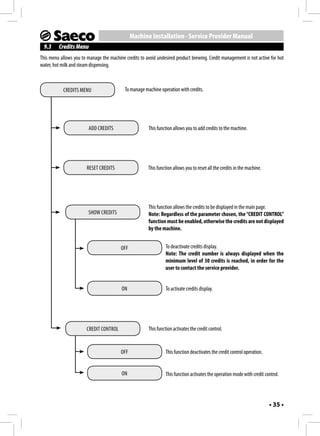
  • 33.
    Machine Installation -Service Provider Manual 9 The machine starts the milk dispensing phase. The "STOP 9 MACHINE PROGRAMMING MILK" message is displayed. MEMO All the operations described in chapter 9 must be performed exclusively by the service provid- er or a specialised technician, who shall organ- ESC STOP MILK ise all operating sequences and employ suitable means to ensure strict compliance with the safety regulations in force. At this stage, press the " " button (23) when the desired amount of milk in the cup is reached. The specialist technician or the service provider can change some of the machine operating parameters to suit the needs of the us- 10 Immediately after that, the machine starts the coffee brew- ers. ing phase. The "STOP COFFEE" message is displayed. MEMO 9.1 Accessing the Programming Mode Proceed as follows to access the programming page. ESC STOP COFFEE 1 Turn off the machine using the power button. At this stage, press the " " button (23) when the desired amount of coffee in the cup is reached. Now the " " button (20) has been programmed. Whenever the button is pressed and released, the machine will brew the same amount that has just been set. Note: The length of all the products, except “AMERICAN COFFEE” and “STEAM”, can be pro- grammed with this procedure. When the programming procedure is completed, enter the pro- gramming mode and reset the "SELF LEARNING" parameter to 2 Turn on the machine using the power button and... "OFF", in order to prevent other users from accidentally changing the quantities. while the machine checks the functions, press the buttons in the following sequence. • 33 •
  • 34.
    Machine Installation -Service Provider Manual 9.2 Programming Controls When the machine menus are accessed, the buttons on the key- 1 pad take on new functions. 3 " " "page up/change" button (20) 2 This button allows you to: 4 1 Browse the pages within a menu; 2 Change the parameters when they are made editable using the "OK" button. " " "page down/change" button (24) If the sequence was correct, the programming menu opens. This button allows you to: 1 Browse the pages within a menu; MENU 2 Change the parameters when they are made editable using CREDITS MENU the "OK" button. BEVERAGE MENU MACHINE MENU " " (OK) button (18) This button allows you to: 1 Select the function displayed; Sections 9.3, 9.4 and 9.5 list all the functions available in these 2 Confirm the parameter/value when it is made editable. menus. " " "ESC" button (23) Note: The above mentioned procedure can be used This button allows you to exit without changing the parameter to access the programming menu also when the edited or selected. machine is cold and has not reached the operating tem- perature. To execute certain programs (e.g. DESCALING) Note: Press it repeatedly to exit the programming page. the machine will manage the procedure automatically and heat up according to the manufacturer's settings. Note: After 3 minutes of inactivity the machine exits the programming mode and returns to the standard operating mode. The menus should be PASSWORD-protected. If the PASSWORD is set on the default value (0000), it will not be requested. It should be changed upon 1st use to prevent unauthorised access. After this change, it should be entered again at each access, every time the display shows: INSERT PASSWORD 0 0 0 0 Refer to section 9.6 on how to set the PASSWORD. • 34 •
  • 35.
    Machine Installation -Service Provider Manual 9.3 Credits Menu This menu allows you to manage the machine credits to avoid undesired product brewing. Credit management is not active for hot water, hot milk and steam dispensing. CREDITS MENU To manage machine operation with credits. ADD CREDITS This function allows you to add credits to the machine. RESET CREDITS This function allows you to reset all the credits in the machine. This function allows the credits to be displayed in the main page. SHOW CREDITS Note: Regardless of the parameter chosen, the “CREDIT CONTROL” function must be enabled, otherwise the credits are not displayed by the machine. OFF To deactivate credits display. Note: The credit number is always displayed when the minimum level of 30 credits is reached, in order for the user to contact the service provider. ON To activate credits display. CREDIT CONTROL This function activates the credit control. OFF This function deactivates the credit control operation. ON This function activates the operation mode with credit control. • 35 •
  • 36.
    Machine Installation -Service Provider Manual 9.4 Beverage Menu BEVERAGE MENU To manage beverage dispensing. ESPRESSO To manage espresso coffee brewing parameters. COFFEE To manage coffee brewing parameters. CAPPUCCINO To manage cappuccino brewing parameters. LATTE MACCHIATO To manage latte macchiato dispensing parameters. HOT WATER To manage hot water dispensing parameters. SPECIAL BEVERAGES To access special beverages management. LONG COFFEE To manage long coffee brewing parameters. HOT MILK To manage hot milk dispensing parameters. AMERICAN COFFEE To manage American coffee brewing parameters. STEAM To enable/disable the steam function in the machine. To disable the steam function (it is not displayed in the OFF list of "Special" products, see section 3.11). ON To enable the steam function (it is displayed in the list of "Special" products, see section 3.11). COUNTERS To access single beverage counters management. ESPRESSO No. of espresso coffee cups brewed from the last RESET. COFFEE No. of coffee cups brewed from the last RESET. LONG COFFEE No. of long coffee cups brewed from the last RESET. AMERICAN COFFEE No. of American coffee cups brewed from the last RESET. • 36 •
  • 37.
    Machine Installation -Service Provider Manual COUNTERS HOT WATER No. of hot water cups dispensed from the last RESET. CAPPUCCINO No. of cappuccino cups brewed from the last RESET. LATTE MACCHIATO No. of latte macchiato cups dispensed from the last RESET. HOT MILK No. of hot milk cups dispensed from the last RESET. COUNTERS RESET To reset all the counters of the brewed beverages. Beverage Parameters Changeable parameters are described in this section. Note: Not all parameters are always available for each programmable option. PREBREWING MILK QUANTITY Prebrewing: Coffee is slightly dampened before brewing so as to bring out its full aroma and let it acquire an excellent taste. This section allows you to program the amount of milk for each OFF: prebrewing is not performed. selected beverage. The bar allows you to set the exact amount of LOW: activated. milk to be dispensed (the value is measured in seconds). HIGH: longer in order to bring out the coffee taste. These settings are valid only for programming the dis- pensing of milk-based beverages. COFFEE TEMPERATURE WATER QUANTITY This section allows you to program the temperature for the coffee brewing. This section allows you to set the amount of water to be dis- LOW: low temperature. pensed when pressing the corresponding button. The bar allows NORMAL: standard temperature. you to set the exact amount of water to be dispensed (the value HIGH: high temperature. is measured in turbine pulses). These settings are valid only for programming hot water dispensing. COFFEE LENGTH This section allows you to program the amount of coffee to be DEFAULT brewed for each selected beverage. The bar allows you to set the exact amount of coffee to be brewed (the value is measured in The original standard values assigned by the manufacturer to turbine pulses). each beverage can be reset also according to the selected lan- guage. After selecting this function, the customised beverage settings are deleted. • 37 •
  • 38.
    Machine Installation -Service Provider Manual 9.5 Machine Menu This menu allows the general operation and maintenance parameters of the machine to be managed. GENERAL MENU To change the machine operating settings. TONE This function activates/deactivates the acoustic alarms. OFF To deactivate the acoustic alarms. ON To activate the acoustic alarms ECOMODE This function allows the machine boilers to be activated in order to save energy. The function is set by default to «ON». This function activates all the boilers at every machine start-up, to be immediately able to prepare all kinds of beverages. The power OFF consumption is higher this way, because the machine is always ready for use. This way, only the coffee boiler is activated at machine start-up. ON The machine saves energy but needs longer time to dispense milk-based beverages. To set the time interval for the machine to go into stand-by mode after the STAND-BY SETTINGS last brewing. The default time value is «after 30 minutes». 15 MINUTES 30 MINUTES Once the set time has elapsed, the machine goes into stand-by mode. 60 MINUTES Press any button to turn the machine on again. After performing the function diagnostics and the warm-up phase, the machine is again ready for use. 180 MINUTES • 38 •
  • 39.
    Machine Installation -Service Provider Manual GENERAL MENU SELF LEARNING To activate the beverage length self learning function. OFF When set this way, self learning is not active. When set this way, self learning is active. Hold a button pressed ON for 3 seconds to start the automatic cup length learning cycle. To set the access PASSWORD for machine programming. SET PASSWORD Note: If the PASSWORD is set to (0000), it will not be requested upon access. If the PASSWORD is forgotten, a restoring procedure must be start- ed. Contact the Customer Service to do that. DISPLAY MENU With this menu, the menu language and the display brightness and contrast can be set. This setting is of fundamental importance for correctly adjusting the pa- LANGUAGE rameters of the machine according to the country where the machine is used. The currently selected language is displayed. The language can ENGLISH be changed with the special controls. BRIGHTNESS To set the correct display brightness according to room illumination. CONTRAST To set the correct display contrast according to the room illumination. • 39 •
  • 40.
    Machine Installation -Service Provider Manual WATER MENU This menu allows the correct water parameters for coffee brewing to be set. To change the machine water hardness setting. HARDNESS With the "Hardness" function you can adjust your machine to the level of hardness of the water you use, so that the machine will request descaling at the right moment. Measure water hardness as shown in section 8.14. To activate the function that enables machine operation with the water WATER NET network (only for models designed accordingly). With this setting, the machine will work only if the tank is in- OFF stalled. With this setting, the machine will work using water from the ON water network. Note: Use this function with utmost care, as a wrong setting may cause malfunctions. The "ON" option must only be activated if the "WATER NET" kit is installed and connected properly. Using it under any other conditions will result in a machine failure. When the “ON” option is selected the “ENABLE FILTER” and “ACTIVATE FILTER” functions will be hidden and will not be available for selection. To activate/deactivate the warning indicating that the water filter should ENABLE FILTER be replaced. By activating this function, the machine notifies the user when the water filter needs to be replaced. OFF: Warning disabled. These functions are visible only if ON: Warning enabled (this value is automatically set when the filter is ac- the “WATER NET” function is set to tivated). OFF. To activate the filter after its installation or replacement. Refer to section ACTIVATE FILTER 8.15 to correctly install and/or replace the filter. • 40 •
  • 41.
    Machine Installation -Service Provider Manual MAINTENANCE This menu allows all the functions for correct machine maintenance to be set. This function allows you to perform the Brew Group wash cycle (see sec- BREW GROUP CLEAN tion 10.5). DESCALING This function activates and starts the descaling cycle (see section 10.7). This function starts the descaling cycle as described in the rel- START DESCALE evant section. This function activates the display warning message indicating DESCALE WARNING that the machine needs to be descaled. OFF The warning message is not active. The warning message is active. The message is ON displayed when the machine needs to be descaled. This function is used to manage the cleaning cycle for the Cappuccinatore CAPPUCCINATORE CLEANING used to prepare milk-based beverages (see section 10.3). Note: This cleaning cycle is fundamental for correct maintenance and operation of the Cappuccinatore. This function starts the Cappuccinatore cleaning cycle as de- START CLEANING scribed in the relevant section. WARNING CLEANING This function activates the display warning message indicating that the machine needs a Cappuccinatore cleaning cycle. OFF The warning message is not active. The warning message is active. The message is dis- ON played when the machine needs a Cappuccinatore cleaning cycle. This function allows all factory settings to be restored. FACTORY SETTINGS Note: This section allows the factory settings of the machine menu personal settings to be restored. • 41 •
  • 42.
    Machine Installation -Service Provider Manual 9.6 Setting the PASSWORD 9 Carry out the procedures described in steps (7) and (8) to set the chosen numbers. The PASSWORD must be set by the service provider in order to prevent access by unauthorised personnel who could change the Here an example that explains the procedure. machine settings and cause malfunctions. SET PASSWORD To set the PASSWORD, proceed as follows: 5 1 8 3 1 Enter the programming mode as described in section 9.1. MENU CREDITS MENU When the " " button (18) is pressed on the last number, the BEVERAGE MENU machine stores the code and displays the following page. MACHINE MENU GENERAL MENU 2 To select the "MACHINE MENU" option, press the " " STAND-BY SETTINGS button (24). SELF LEARNING MENU SET PASSWORD CREDITS MENU BEVERAGE MENU MACHINE MENU Press the " " button (23) repeatedly to exit the page. From now on the PASSWORD will always be required to access the 3 Press the " " button (18) for access. menus. MACHINE MENU GENERAL MENU DISPLAY MENU WATER MENU MAINTENANCE 4 Press the " " button (18) to enter the "GENERAL MENU". GENERAL MENU STAND-BY SETTINGS SELF LEARNING SET PASSWORD 5 Press the " " button (24) to select the "SET PASSWORD" option. Press the " " button (18) for access. SET PASSWORD 0 0 0 0 6 Now the PASSWORD can be set. 7 Press the " " (24) or " " (20) button to set the de- sired number. 8 Press the " " button (18) to confirm the highlighted number and go to the following one. • 42 •
  • 43.
    Machine Installation -Service Provider Manual 10 CLEANING AND MAINTENANCE 10.3 Thorough Cleaning of the Cappuccinatore All the operations described in chapter 10 must Clean all the Cappuccinatore parts thoroughly every month by us- be performed exclusively by the service provider ing the Saeco detergent. or a specialised technician, who shall organise all operating sequences and employ suitable means to en- The Saeco detergent may be purchased at your local dealer or at sure strict compliance with the safety regulations in force. authorised service centres. The lack of cleaning before and after each use can affect the cor- 10.1 Cleaning Intervals rect operation of the machine. For improved efficiency, it is advisable to carry out the cleaning and maintenance operations indicated in the following table. Danger of burns! Dispensing may be preceded by small jets of hot water. Every month 1 Ensure that the Cappuccinatore is correctly placed (Fig.09- Operation to be Whenever Every or 10, page 3). carried out indicated week 500 brewing procedures 2 Enter the programming mode as described in section 9.1. Emptying and cleaning the coffee grounds 3 Press the " " button (24) and select the "MACHINE drawer. MENU" option; press the " " button (18) to enter the menu. Thorough cleaning of the Cappuccinatore 4 Press the " " button (24) and select the "MAINTENANCE" Water tank cleaning option; press the " " button (18) to enter the menu. MACHINE MENU Brew group cleaning DISPLAY MENU WATER MENU Brew MAINTENANCE group lubrication FACTORY SETTINGS Coffee bean hopper cleaning 5 Press the " " button (24) until the "CAPPUCCINATORE Descaling CLEANING" option can be selected. MAINTENANCE BREW GROUP CLEAN 10.2 Cleaning the Water Tank DESCALING CAPPUCCINATORE CLEANING The water tank should be cleaned every time it is filled. Press the " " button (18) to confirm. CAPPUCCINATORE CLEANING START CLEANING WARNING CLEANING Press the " " button (18) to confirm. • 43 •
  • 44.
    Machine Installation -Service Provider Manual CAPPUCCINATORE CLEANING Drinking the solution dispensed during this pro- WASH THE cedure is strictly prohibited. The solution must be CAPPUCCINATORE? disposed of. NO YES CAPPUCCINATORE CLEANING PLACE A CONTAINER Note: If this option is confirmed, the cycle must be UNDER THE DISPENSING SPOUT completed. Press the " " button (23) to exit. 6 Press the " " button (18) to start the Cappuccinatore 12 Place an empty container of at least 1 litre capacity under cleaning cycle. the dispensing spout and press the " " button (18) to confirm. CAPPUCCINATORE CLEANING 13 The machine performs a Cappuccinatore wash cycle. REFILL WATER TANK CAPPUCCINATORE CLEANING 7 Fill the water tank and press the " " button (18) to confirm. CAPPUCCINATORE CLEANING The bar shows the washing progress. POUR DETERGENT IN A CONTAINER 14 Wait for the cycle to end automatically. When the cycle is WITH 1/2 L WATER completed, the display shows: CAPPUCCINATORE RINSING 8 Pour a solution bag in a container with 1/2 (a half) litre of REFILL fresh drinking water. WATER TANK 15 Wash the water tank and fill it with fresh drinking water; press the " " button (18) to confirm. CAPPUCCINATORE CLEANING INSERT CAPPUCCINATORE HOSE IN A CONTAINER WITH 1/2 L WATER 16 Wash thoroughly the container used for the solution and fill it with 1/2 (a half) litre of fresh drinking water which will be used for rinsing. 9 Wait for the bag content to dissolve completely and then press the " " button (18) to confirm. 17 Empty the container placed under the dispensing spout. 18 Insert the suction hose in the container used. CAPPUCCINATORE CLEANING PUT CAPPUCCINATORE Press the " " button (18) to confirm. HOSE IN THE CONTAINER CAPPUCCINATORE RINSING PLACE A CONTAINER 10 Insert the clean pipe directly into the container. UNDER THE DISPENSING SPOUT 11 Press the " " button (18) to confirm. • 44 •
  • 45.
    Machine Installation -Service Provider Manual 19 Place an empty container under the dispensing spout and 3 Open the service door with the supplied key. press the " " button (18) to confirm. CAPPUCCINATORE RINSING 20 The machine performs a Cappuccinatore rinse cycle. The bar shows the rinsing progress. 21 Wait until the cycle stops automatically. The machine will go back to the normal operating cycle. 22 Wash all the Cappuccinatore parts as described in section 5.4. 4 Remove the Brew Group: Pull it by the handle and press the «PRESS» button. The Brew Group must be washed only with luke- Important Note: It is advisable to remove the Cap- warm water, with no detergent. puccinatore from the machine when not being used, in order to keep it clean. 10.4 Brew Group - Weekly Cleaning The brew group should be cleaned every time the coffee bean hop- per is filled, or at least once a week. 1 Turn off the machine by pressing the power button and re- move the plug from the socket. 2 Remove the drip tray and the coffee grounds drawer. 5 Wash the Brew Group with lukewarm water and carefully wash the upper filter. Before placing the Brew Group in its seat, ensure that there is no water left in the brewing chamber. • 45 •
  • 46.
    Machine Installation -Service Provider Manual 6 Lift the rear side of the inner drawer and unlock the drawer. 9 Ensure that the lever is in contact with the brew group base. 7 Remove the inner drawer, wash it and put it back into its seat. 10 Ensure that the hook to lock the Brew Group is in the correct position; to do that, press the "PRESS" button firmly. Note: When refitting the drawer, carry out the same operations performed for its removal, but 11 Insert the Brew Group back into its seat until it locks into in reverse order. place, WITHOUT pressing the "PRESS" button. 8 Ensure that the Brew Group is in the rest position; the two 12 Insert the coffee grounds drawer and the drip tray. Close the reference signs must match. service door. 10.5 Cleaning the Brew Group with "Coffee Clean Tablets" Besides weekly cleaning, we recommend running the cleaning cycle with "Coffee Clean Tablets" after approximately 500 cups of coffee or once a month. This operation completes the maintenance process of the brew group. Both the "Coffee Clean Tablets" used to clean the Brew Group and the "Maintenance Kit" may be purchased at your local dealer or at authorised service centres. If they do no match, proceed as described in step (9). • 46 •
  • 47.
    Machine Installation -Service Provider Manual Warning: The "Coffee Clean Tablets" has no descal- BREW GROUP CLEAN ing property. For descaling use the Saeco descal- EXTRACT BREW GROUP ing solution and follow the procedure described in the "Descaling" chapter. The wash cycle cannot be stopped. Do not leave the machine un- 7 Remove the drip tray and the group compartment drawer. attended during this operation. Warning! Drinking the solution dispensed during this procedure is strictly prohibited. The solution must be disposed of. 1 Enter the programming mode as described in section 9.1. 2 Press the " " button (24) and select the "MACHINE MENU" option; press the " " button (18) to enter the menu. 3 Press the " " button (24) and select the "MAINTENANCE" option. 8 Open the service door with the supplied key. MACHINE MENU DISPLAY MENU WATER MENU MAINTENANCE FACTORY SETTINGS 4 Press the " " button (18) to access the menu. MAINTENANCE BREW GROUP CLEAN DESCALING CAPPUCCINATORE CLEANING 9 Remove the Brew Group: Pull it by the handle and press the 5 Press the " " button (18) to start the Brew Group clean- «PRESS» button. ing cycle. BREW GROUP CLEAN PERFORM BREW GROUP CLEANING? NO YES Note: If this option is confirmed the cycle must be completed. Press the " " button (23) to exit. 6 Press the " " button (18) to start the group cleaning cycle. • 47 •
  • 48.
    Machine Installation -Service Provider Manual 10 Press the " " button (18) to confirm the removal of the 10.6 Brew Group Lubrication Brew Group. Lubricate the Brew Group after approximately 500 cups of coffee or once a month. BREW GROUP CLEAN INSERT GROUP The grease to lubricate the Brew Group and the complete "Ser- CLEAN TAB vice Kit" may be purchased at your local dealer, or at authorised service centres. 11 Place the cleaning tablet in the Brew Group and refit the Note: To display the number of coffee cups group in the machine, making sure that all the components have brewed, please refer to the "COUNTERS" menu in been inserted and that the door is closed. the "BEVERAGE MENU" (section 9.4 - page 36). Before lubricating the brew group clean it under running water as described in the "Brew Group - Weekly Cleaning" section. 1 Lubricate the brew group guides using the Saeco grease only. 12 After placing the tablet in the brew group press the " " button (18) to confirm. BREW GROUP CLEAN PLACE A CONTAINER UNDER THE DISPENSING SPOUT Apply the grease evenly on both side guides. 13 Place a container under the coffee dispensing spout and press the " " button (18) to confirm. BREW GROUP CLEAN 14 The machine completes the cycle automatically. Note: At the end of the cycle the machine goes back to its normal operating mode. We recom- mend removing the group and washing it under fresh running water. • 48 •
  • 49.
    Machine Installation -Service Provider Manual 2 Lubricate also the shaft. 10.7 Descaling Limescale is a natural part of the water used for machine opera- tion. It needs to be removed regularly as it may clog the water and coffee circuit of your appliance. The advanced electronics shows on the machine display (in clear symbols) when descaling is needed. Just follow the steps de- scribed below. This operation needs to be carried out before the appliance stops working properly, as in this case the repair is not covered by the warranty. Use the Saeco descaling product only. Its formula has been de- signed to ensure better machine performance and operation for its whole operating life. If correctly used, it also avoids alterations in the brewed product. The descaling solution and the complete "Maintenance Kit" may be purchased at your local dealer or at authorised service centres. Warning! Never drink the descaling solution or any products dispensed until the cycle has been carried out to the end. Never use vinegar as a descaling solution. 3 Insert the Brew Group back into its seat until it locks into 1 Turn on the machine by pressing the ON/OFF button. Wait for place, WITHOUT pressing the "PRESS" button. the machine to finish its rinse and warm-up process. 4 Insert the coffee grounds drawer and the drip tray. Close the Warning! Remove the "Intenza" filter before add- service door. ing the descaling solution. 2 Enter the programming mode as described in section 9.1. 3 Press the " " button (24) and select the "MACHINE MENU" option; press the " " button (18) to enter the menu. MACHINE MENU DISPLAY MENU WATER MENU MAINTENANCE FACTORY SETTINGS 4 Press the " " button (24) and select the "MAINTENANCE" option; press the " " button (18) to enter the menu. • 49 •
  • 50.
    Machine Installation -Service Provider Manual MAINTENANCE 9 Place the tank back in the machine. Press the " " button BREW GROUP CLEAN (18). DESCALING CAPPUCCINATORE CLEANING DESCALING EMPTY DRIP TRAY 5 Press the " " button (24) and select the "DESCALING" option; press the " " button (18) to enter the menu. DESCALING START DESCALE 10 Remove any liquids from the drip tray and place it back in DESCALE WARNING the machine. 6 Select the "START DESCALE" option; press the " " button (18) to access the menu. DESCALING START DESCALING? NO YES Note: If this option is confirmed, the rest of the cycle must be completed. Press the " " button (23) to exit. Press the " " button (18). 7 Press the " " button (18) to start the DESCALING cycle. DESCALING DESCALING INSERT THE FILL TANK WITH CAPPUCCINATORE WITH DESCALING SOLUTION ALL THE COMPONENTS 11 Insert the complete Cappuccinatore into the machine and 8 Pour the entire content of the Saeco concentrated descal- remove the dispensing spout. ing solution into the water tank and then fill the tank with fresh drinking water up to the level indicated by the icon. Press the " " button (18). Note: Keep the suction tube removed from the Cap- puccinatore while the descaling cycle is performed. • 50 •
  • 51.
    Machine Installation -Service Provider Manual DESCALING 16 Insert the tank into the machine. Press the " " button (18). PLACE A CONTAINER UNDER MILK AND HOT 17 Empty the containers used to collect the liquid dispensed by WATER SPOUTS the machine. DESCALING 12 Place a container under the hot water wand and a large EMPTY DRIP TRAY enough container under the Cappuccinatore. 18 Remove any liquids from the drip tray and insert the tray back. Press the " " button (18). DESCALING INSERT THE CAPPUCCINATORE WITH ALL THE COMPONENTS Note: Use a container of at least 1.5 litres capacity. 19 Check that the Cappuccinatore is placed in the machine. Press the " " button (18). Press the " " button (18). DESCALING PLACE A CONTAINER DESCALING UNDER MILK AND HOT STEP 1/2 DESCALING WATER SPOUTS PAUSE 20 Place a container under the hot water wand and a large If you do not have a container of this capacity, enough container under the Cappuccinatore. pause the cycle by pressing the " " button (23), Press the " " button (18). empty the container, place it back in the machine and re- start the cycle by pressing the " " button (18). DESCALING STEP 2/2 RINSING 13 At this point, the machine will start dispensing the descaling PAUSE solution at intervals (the bar shows the cycle progress). 21 The machine performs the rinse cycle. 14 When the solution in the tank is finished, the machine re- quests to empty and rinse the tank with fresh drinking water. Note: A default amount of water is needed for the rinse phase. This allows an ideal rinse cycle to be DESCALING performed in order to ensure the best conditions to brew RINSE TANK & products. The message about filling the tank for the rinse FILL WITH FRESH WATER cycle is normal, as it is part of the procedure. Note: The rinse cycle can be paused by pressing 15 Rinse the water tank thoroughly and refill it with fresh drink- the " " button (23). To resume the cycle, press ing water. the " " button (18) again. This allows you to empty the container or to stay away from the machine for a short period of time. • 51 •
  • 52.
    Machine Installation -Service Provider Manual 22 Once the rinse cycle is complete, the machine carries out the 11 MACHINE DISPOSAL warm-up and rinse cycle to be ready for product brewing. - The packing materials can be recycled. 23 Empty the containers used to collect the liquid dispensed by - Appliance: Unplug the appliance and cut the power cord. the machine and reassemble the dispensing spout. - Deliver the appliance and power cord to a service center or public waste disposal facility. 24 The machine is now ready for use. This product complies with eu directive 2002/96/EC. Note: - The descaling solution must be disposed of according to the manufacturer's instructions and/or regulations The symbol on the product or on its packaging indicates in force in the country of use. that this product may not be treated as household waste. Instead - After completing the descaling cycle: it shall be handed over to the applicable collection point for the 1 Wash the brew group as described in the “Brew recycling of electrical and electronic equipment. Group” section in the “Cleaning and Maintenance” By ensuring this product is disposed of correctly, you will help chapter; prevent potential negative consequences for the environment 2 Rinse the Cappuccinatore under running water. and human health, which could otherwise be caused by inappro- priate waste handling of this product. For more detailed informa- When the descaling cycle is complete, we recommend emptying tion about recycling of this product, please contact your local city the drip tray. office, your household waste disposal service or the shop where you purchased the product. • 52 •
  • 53.
    12 TROUBLESHOOTING Machineactions Causes Solutions The machine does not switch on. The machine is not plugged and/or the power but- Plug the machine and/or switch the power but- ton is positioned on "0". ton to "I". Coffee is not hot enough. The cups are cold. Preheat the cups with hot water. Coffee does not have enough crema. The blend is unsuitable, coffee is not freshly roast- Change coffee blend or adjust the grind as ex- (See note) ed or the grind is too coarse. plained in section "Adjusting the Coffee Grinder". The machine takes a long time to warm up The machine circuit is clogged by limescale. Descale the machine. or the amount of water dispensed from the wand is too little. Bubbles form at the Cappuccinatore spout The tube fittings are not connected properly or are Insert the whole suction tube into the Cappuc- while dispensing milk. not completely inserted into the Cappuccinatore. cinatore. Steam comes out of the Cappuccinatore There is no more milk in the container. Check that there is still milk. If necessary, fill in the when sucking milk. milk container again or replace it with a new one. The Brew Group cannot be removed. The Brew Group is out of place. Turn the machine on. Close the service door. The brew group automatically returns to the initial position. Group compartment drawer inserted. Remove the group compartment drawer before removing the brew group. The machine grinds the coffee beans but no The Brew Group is dirty. Clean the Brew Group ("Brew Group" section). coffee comes out. (See note) The dispensing spout is dirty. Clean the dispensing spout. Coffee is too weak. Too low dose Adjust the amount of coffee to be ground. (See note) Coffee is brewed slowly. The coffee grind is too fine. Change coffee blend or adjust the grind as ex- (See note) plained in section "Adjusting the Coffee Grinder". The Brew Group is dirty. Clean the Brew Group ("Brew Group" section). Coffee leaks out of the dispensing spout. The dispensing spout is clogged or in the wrong Clean the dispensing spout and its holes. position. Position the dispensing spout correctly. Note: These problems can be considered normal if the coffee blend has been changed or if the machine has just been installed. Please, contact our consumer care help line at the phone number listed at the last page of this document for any prob- lems not covered in the above table or when the suggested solutions do not solve the problem. • 53 •
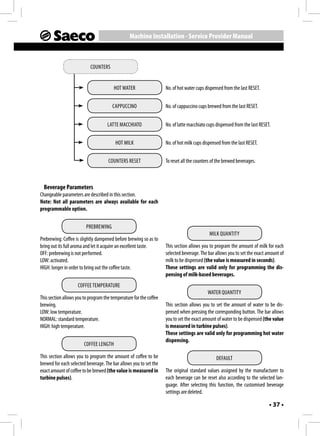
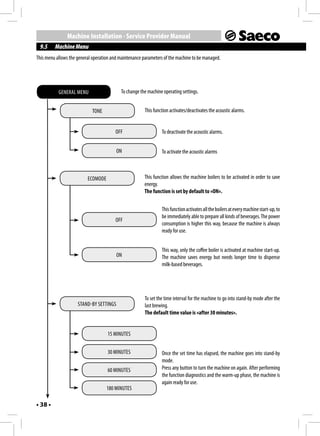
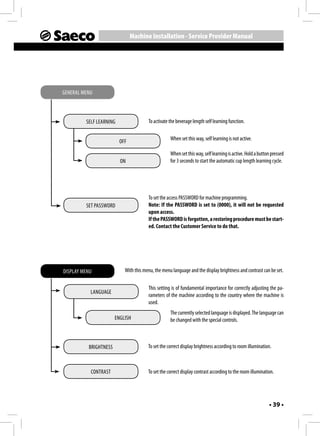
  • 54.
  • 55.
  • 56.
    02 - Rev.02 del 15-06-12 EN 02 Saeco Aulika available at www.espressoitalia.com.au