SaaSPlex Enterprise
The SaaSPlex Cloud The SaaSPlex Cloud allows companies to maintain corporate control over all web and SaaS applications used by the company. The platform allows for multiple applications to be provisioned to multiple employees through a single administration console. Once applications have been provisioned they are made available through a company webtop that is accessible with a single username and password for each user.  The platform allows companies to easily enforce enterprise security and compliance strategy and regain control over the web/SaaS ecosystem.  In addition the platform allows resellers and SaaS providers to connect to the SaaSPlex Cloud to offer consolidated access to their own and multiple 3 rd  party SaaS applications.
Features The following are the main features of the SaaSPlex Cloud: Auditing of User Actions Successful Utilisation of Desktop Paradigm in Browser SSO across all applications on the platform User and Application Provisioning Platform White Labelling Alternative Platform UIs (multiple user interfaces are available including a mobile interface) Intuitive Administration Console for Unlimited Number of Users and Companies
Features Continued Identity Synchronization Automated Application Deployment and Configuration Secure User and Password Management Across All Applications DNS Management Custom Email Domain Names Data Backups to Secure Off-site Location Access from Mobile Devices Platform Integration Available Through Rest Web Services Works With All Popular Web Browsers - Browser Independent Designed with the Reseller in Mind
Features Continued Connectors to Multiple Web and SaaS Applications VPN Functionality to Connect Securely to Internal Company Infrastructure Utilises Full Amazon EC2 and S3 Features Including Unlimited Processing Power, Storage and Bandwidth Utilises SaaSPlex Billing Engine and Amazon Billing Services High Availability and Failover Capability Advanced Secure Architecture and Implementation Comes Bundled With Multiple SaaS Applications
Benefits The following are the main benefits for the enterprise: Maintain corporate control over all web and SaaS applications used by your company Automatically provision/de-provision multiple applications to multiple employees through a single administration console Consolidated access to all applications through a company branded web-top Single sign-on across all applications Easier enforcement of enterprise security and compliance strategy Control access to web/SaaS ecosystem Low information security risk, no data on the end devices Access to multiple applications can be terminated on a per user basis Control of SaaS licensing expenditure (pay only for what you use)
SaaSPlex Cloud
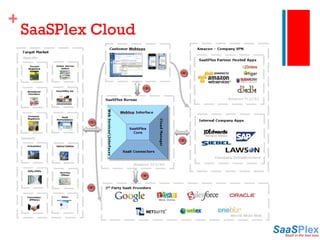
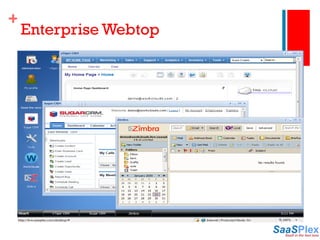
Key Workings SaaSPlex customers connect to the Cloud using web services. The web services allow for multiple uses including using the Cloud as a SaaS Marketplace where SaaS applications can be purchased and deployed or provisioned automatically on the Amazon infrastructure. Alternatively the Cloud can be used to provide provisioning capabilities to an enterprise client where an administration console is used to create users for multiple web and SaaS based systems. A ‘web space’ is created for each user. The user accesses all web/SaaS applications through this customer branded virtual web desktop or ‘webtop’. Once logged in, all applications are available to the user in a consolidated view. If the web/SaaS application selected is an application owned or hosted by the customer, or a partner of the customer, the user will be created on this instance of the application. Additional services can be provided here by the partner such as backups, additional email addresses, storage, CPU etc. If the customer requires access to internal company applications a VPN can be created between Amazon and the customers infrastructure and serve these application back to the user. 1 2 3
Key Workings If the web/SaaS application selected for the user is provided externally by a 3 rd  party, then a user will automatically be created on the 3 rd  party web/SaaS application. The SaaSPlex bureau maintains a database of all employee details required to access all web/SaaS applications. All security credentials are encrypted and stored on a secure SaaSPlex server. When a user clicks on an icon on the SaaSPlex webtop they are redirected to the location of that particular application with their relevant user credentials. It is not possible for users to access SaaS applications without going through the SaaSPlex webtop thus giving complete control over application access to the company. 4 5 6
Enterprise Webtop

SaaSPlex Enterprise

  • 1.
  • 2.
    The SaaSPlex CloudThe SaaSPlex Cloud allows companies to maintain corporate control over all web and SaaS applications used by the company. The platform allows for multiple applications to be provisioned to multiple employees through a single administration console. Once applications have been provisioned they are made available through a company webtop that is accessible with a single username and password for each user. The platform allows companies to easily enforce enterprise security and compliance strategy and regain control over the web/SaaS ecosystem. In addition the platform allows resellers and SaaS providers to connect to the SaaSPlex Cloud to offer consolidated access to their own and multiple 3 rd party SaaS applications.
  • 3.
    Features The followingare the main features of the SaaSPlex Cloud: Auditing of User Actions Successful Utilisation of Desktop Paradigm in Browser SSO across all applications on the platform User and Application Provisioning Platform White Labelling Alternative Platform UIs (multiple user interfaces are available including a mobile interface) Intuitive Administration Console for Unlimited Number of Users and Companies
  • 4.
    Features Continued IdentitySynchronization Automated Application Deployment and Configuration Secure User and Password Management Across All Applications DNS Management Custom Email Domain Names Data Backups to Secure Off-site Location Access from Mobile Devices Platform Integration Available Through Rest Web Services Works With All Popular Web Browsers - Browser Independent Designed with the Reseller in Mind
  • 5.
    Features Continued Connectorsto Multiple Web and SaaS Applications VPN Functionality to Connect Securely to Internal Company Infrastructure Utilises Full Amazon EC2 and S3 Features Including Unlimited Processing Power, Storage and Bandwidth Utilises SaaSPlex Billing Engine and Amazon Billing Services High Availability and Failover Capability Advanced Secure Architecture and Implementation Comes Bundled With Multiple SaaS Applications
  • 6.
    Benefits The followingare the main benefits for the enterprise: Maintain corporate control over all web and SaaS applications used by your company Automatically provision/de-provision multiple applications to multiple employees through a single administration console Consolidated access to all applications through a company branded web-top Single sign-on across all applications Easier enforcement of enterprise security and compliance strategy Control access to web/SaaS ecosystem Low information security risk, no data on the end devices Access to multiple applications can be terminated on a per user basis Control of SaaS licensing expenditure (pay only for what you use)
  • 7.
  • 8.
    Key Workings SaaSPlexcustomers connect to the Cloud using web services. The web services allow for multiple uses including using the Cloud as a SaaS Marketplace where SaaS applications can be purchased and deployed or provisioned automatically on the Amazon infrastructure. Alternatively the Cloud can be used to provide provisioning capabilities to an enterprise client where an administration console is used to create users for multiple web and SaaS based systems. A ‘web space’ is created for each user. The user accesses all web/SaaS applications through this customer branded virtual web desktop or ‘webtop’. Once logged in, all applications are available to the user in a consolidated view. If the web/SaaS application selected is an application owned or hosted by the customer, or a partner of the customer, the user will be created on this instance of the application. Additional services can be provided here by the partner such as backups, additional email addresses, storage, CPU etc. If the customer requires access to internal company applications a VPN can be created between Amazon and the customers infrastructure and serve these application back to the user. 1 2 3
  • 9.
    Key Workings Ifthe web/SaaS application selected for the user is provided externally by a 3 rd party, then a user will automatically be created on the 3 rd party web/SaaS application. The SaaSPlex bureau maintains a database of all employee details required to access all web/SaaS applications. All security credentials are encrypted and stored on a secure SaaSPlex server. When a user clicks on an icon on the SaaSPlex webtop they are redirected to the location of that particular application with their relevant user credentials. It is not possible for users to access SaaS applications without going through the SaaSPlex webtop thus giving complete control over application access to the company. 4 5 6
  • 10.