®
®
About Ruchoks
About Ruchoks
►Established in 2007 in Mumbai, Ruchoks has made its name as the prominent handmade chocolate
manufacturer and supplier. Our products are supplied to distributors and corporate across the India.
►Ruchoks’ motto, "MAKE TODAY DELICIOUS" captures the spirit of what we are trying to achieve as a
business. Through our delightful and high quality products we are spreading long-lasting joys in the
lives of people.
►With a capability of producing high volumes with no compromise on quality, Ruchoks has adopted a
high quality production method. With all of our hand molded chocolates, we ensure each chocolate
has an eye-catching shine, luster and sharpness in taste with the economic price range.
►Our chocolates are pure vegetarian (i.e. Egg-less) and made up of finest ingredients.
►Ruchoks offers you a delightful combination of plenty of natural flavors and shapes in variety of
attractive and professional customized packing, which can be utilized for gifting to your near n dear
ones and for corporate gifting so as to make occasions and festivals more delightful.
®
Why Ruchoks
Ruchoks has robust infrastructure which comprised of
►Modern amenities
►Manufacturing units spread in a sprawling area
►Well trained and high skilled labor
This high quality infrastructure enables Ruchoks to perform quality
large scale production and hence cost effective.
► Production capacity of 1000 kg chocolate per day
Ruchoks holds following licenses ensuring the sky-scraping quality
control:
► ISO 9001
► ISO22000
► HACCP (Hazard Analysis and Critical Control Point)
► Food license from FSSCI
► Registered under SSI and NSIC
► Having credit rating from top credit rating agency
Ruchoks is committed to:
►Implementing a Food Safety Management System with an aim to
produce and supply safe quality Chocolate that meet customers’
satisfaction and expectations
►Comply with legal obligations and to protect the end users with
___,safe products through the application of good manufacturing,
______hygiene practices
►Ensure all employees involved in production receive
appropriate and adequate training in food safety and
handling.
Food safety policyQuality Control
Value for money
and high quality
service
Infrastructure
Widespread variety of chocolates
and packaging
Ruchoks offers you a delightful combination of
► 100+ variety of chocolates including several natural
flavors, dry fruits chocolates, truffles, pralines, clusters
and many more
► Variety of attractive and professional packaging options
► Flexibility to customize chocolate as well as boxes as required
► Extensive introduction of innovative packing for gifting for
corporate
®
Why Ruchoks
Chocolate Quality and Variety
►Superior quality controls maintains quality and taste
►100+ varieties of chocolates satisfy fantasy of every chocolate lover
►Gorgeous shapes and eye catching luster on each peace of chocolates
enhance loveliness of the taste
Innovative Packaging Options
►Variety of innovative and qualitative packaging options
►Each packaging option further diversified into multiple colors and sizes
►Immense flexibility in the budget for packaging starting from Rs10 to Rs400
Customization Option
►Chocolate can be embossed with your company name and logo
►Wrapper can be designed expressing importance of the occasion for the company
►Bags/ Boxes can be printed describing the company and the occasion
►Special cards/ Stickers only designed for your company
►High quality service
►Value for money
►Flexibility of budget
from Rs 50 to Rs
5000 per gift
►Elasticity through
customization
What do you get?
®
Mouth-Watering Varieties
Chocolate – Regular
(Bitter/ Milk)
Variety
Bulk rate
per kg
Taxes
Dark Chocolate
Rs 675
12.5% VAT
Extra
Crunch Punch
Butter Bite
Dual Delight
Orange Aura
Chocolate – DRY Fruits
(Bitter/ Milk)
Variety
Bulk rate
per kg
Discount per
kg
Almond Allure
Rs 800
12.5% VAT
Extra
Cashew Catch
Cashew Raisin
Raisins shine
Fig, Mixed Nuts
®
Mouth-Watering Varieties
Chocolate – Premium DRY
Fruits
Variety
BULK Rate
per kg
TAXES
Walnut Surprise
Rs 1000
VAT 12.5%
extra
Hazelnut
Apricot
Date Lip
Dried Plum
Chocolate – Center FILLED
Variety
BULK Rate
per kg
TAXES
Strawberry
Rs 1100
VAT 12.5%
extra
Honey
Salted Caramel
Hazelnut
Orange
®
Mouth-Watering Varieties
Chocolate – TRUFFLE
Variety
Bulk Rate
per kg
Taxes
Morroco Coconut
Rs 1250
VAT 12.5%
extra
Nutella
Strawberry
Oreo
Peanut
Chocolate – PRALINE
Variety
BULK Rate
per kg
Taxes
Almond Rs 1350
VAT 12.5%
extra
Pista Rs 1700
Inside Rs 1350
®
Mouth-Watering Varieties
Chocolate – Rocks
Variety
BULK Rate
per kg
Taxes
Almond Rs 1100
VAT 12.5%
will be extra
Cashew Raisins Rs 1100
Peanut Rs 800
Rice flakes Rs 800
Chocolate – SPECIAL
Variety Bulk per kg
Chocolate Pizza Rs 750
Oreo Almond Rs 900
®
Gift
Chocolates
®
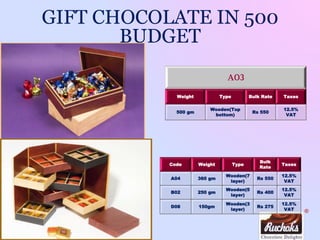
GIFT CHOCOLATE IN 500
BUDGET
A02
Weight Type Bulk Rate Taxes
340 gm
Wooden(Draw
er)
Rs 525
12.5%
VAT
A05
Weight Type Bulk Rate Taxes
500 gm
Cupa
board(Top
bottom)
Rs 525
12.5%
VAT
®
A03
Weight Type Bulk Rate Taxes
500 gm
Wooden(Top
bottom)
Rs 550
12.5%
VAT
GIFT CHOCOLATE IN 500
BUDGET
Code Weight Type
Bulk
Rate
Taxes
A04 360 gm
Wooden(7
layer)
Rs 550
12.5%
VAT
B02 250 gm
Wooden(5
layer)
Rs 400
12.5%
VAT
D08 150gm
Wooden(3
layer)
Rs 275
12.5%
VAT
®
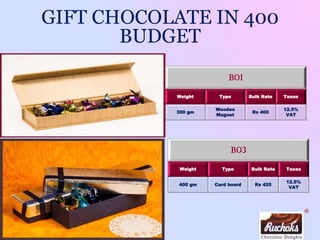
B01
Weight Type Bulk Rate Taxes
300 gm
Wooden
Magnet
Rs 400
12.5%
VAT
GIFT CHOCOLATE IN 400
BUDGET
B03
Weight Type Bulk Rate Taxes
400 gm Card board Rs 425
12.5%
VAT
®
C03
Weight Type Bulk Rate Taxes
250 gm Cupa board Rs 300
12.5%
VAT
GIFT CHOCOLATE IN 300 BUDGET
C04
Weight Type Bulk Rate Taxes
200 gm
Premium
cupa board
Rs 330
12.5%
VAT
®
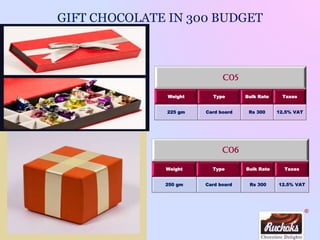
C05
Weight Type Bulk Rate Taxes
225 gm Card board Rs 300 12.5% VAT
GIFT CHOCOLATE IN 300 BUDGET
C06
Weight Type Bulk Rate Taxes
250 gm Card board Rs 300 12.5% VAT
®
C07
Weight Type Bulk Rate Taxes
230 gm Wooden Rs 325
12.5%
VAT
GIFT CHOCOLATE IN 300 BUDGET
C08
Weight Type Bulk Rate Taxes
250 gm Cupa board Rs 300
12.5%
VAT
®
GIFT CHOCOLATE IN 300 BUDGET
C10
Weight Type Bulk Rate Taxes
250 gm
Wooden(top
bottom)
Rs 320
12.5%
VAT
C02
Weight Type Bulk Rate Taxes
275 gm Cupa board Rs 360
12.5%
VAT
®
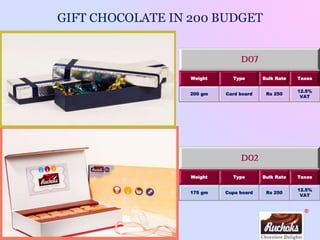
GIFT CHOCOLATE IN 200 BUDGET
D02
Weight Type Bulk Rate Taxes
175 gm Cupa board Rs 250
12.5%
VAT
D07
Weight Type Bulk Rate Taxes
200 gm Card board Rs 250
12.5%
VAT
®
D03
Weight Type Bulk Rate Taxes
120 gm
Premium
cupa board
Rs 225
12.5%
VAT
GIFT CHOCOLATE IN 200 BUDGET
D04
Weight Type Bulk Rate Taxes
130 gm
Premium
Cupa board
Rs 250
12.5%
VAT
®
D05
Weight Type Bulk Rate Taxes
125 gm Card board Rs 180
12.5%
VAT
GIFT CHOCOLATE IN 200 BUDGET
D06
Weight Type Bulk Rate Taxes
150 gm Wooden Rs 225
12.5%
VAT
®
Code Weight Type
Bulk
Rate
Taxes
E01 50 gm Paper box Rs 65
12.5%
VAT
E03 75 gm Paper box Rs 100
12.5%
VAT
GIFT CHOCOLATE IN 100 BUDGET
Code Weight Type
Bulk
Rate
Taxes
E02 60 gm Paper box Rs 80
12.5%
VAT
E04 125 gm Paper box Rs 150
12.5%
VAT
®
GIFT CHOCOLATE IN 100 BUDGET
E05
Weight Type Bulk Rate Taxes
75 gm Wooden Rs 115
12.5%
VAT
®
Our Diverse Clients
®
We Delight Occasions like
► CORPORATE GIFTING
► DIWALI GIFTING
► CHRISTMAS GIFTING
► CORPORATE PARTIES AND EXHIBITIONS
► WEDDING EVENTS
► BABY SHOWER / ANNOUNCEMENT
► BIRTHDAYS / ANNIVERSARIES PARTIES
► AND “N” NUMBER OF OCCASIONS
®
Contact Us
D – 252, Solaris-1, Saki Vihar Road, Andheri (E),
Mumbai – 400072. Tel.: 022 2857 5333
74 & 75, Solaris 1, Saki Vihar Road, Andheri(east), Mumbai-72.
Mob.: +91 9699764200/ 9619900456 E-mail : ruchika@ruchoks.com
www.ruchoks.com

Ruchoks Chocolates

  • 1.
  • 2.
    ® About Ruchoks About Ruchoks ►Establishedin 2007 in Mumbai, Ruchoks has made its name as the prominent handmade chocolate manufacturer and supplier. Our products are supplied to distributors and corporate across the India. ►Ruchoks’ motto, "MAKE TODAY DELICIOUS" captures the spirit of what we are trying to achieve as a business. Through our delightful and high quality products we are spreading long-lasting joys in the lives of people. ►With a capability of producing high volumes with no compromise on quality, Ruchoks has adopted a high quality production method. With all of our hand molded chocolates, we ensure each chocolate has an eye-catching shine, luster and sharpness in taste with the economic price range. ►Our chocolates are pure vegetarian (i.e. Egg-less) and made up of finest ingredients. ►Ruchoks offers you a delightful combination of plenty of natural flavors and shapes in variety of attractive and professional customized packing, which can be utilized for gifting to your near n dear ones and for corporate gifting so as to make occasions and festivals more delightful.
  • 3.
    ® Why Ruchoks Ruchoks hasrobust infrastructure which comprised of ►Modern amenities ►Manufacturing units spread in a sprawling area ►Well trained and high skilled labor This high quality infrastructure enables Ruchoks to perform quality large scale production and hence cost effective. ► Production capacity of 1000 kg chocolate per day Ruchoks holds following licenses ensuring the sky-scraping quality control: ► ISO 9001 ► ISO22000 ► HACCP (Hazard Analysis and Critical Control Point) ► Food license from FSSCI ► Registered under SSI and NSIC ► Having credit rating from top credit rating agency Ruchoks is committed to: ►Implementing a Food Safety Management System with an aim to produce and supply safe quality Chocolate that meet customers’ satisfaction and expectations ►Comply with legal obligations and to protect the end users with ___,safe products through the application of good manufacturing, ______hygiene practices ►Ensure all employees involved in production receive appropriate and adequate training in food safety and handling. Food safety policyQuality Control Value for money and high quality service Infrastructure Widespread variety of chocolates and packaging Ruchoks offers you a delightful combination of ► 100+ variety of chocolates including several natural flavors, dry fruits chocolates, truffles, pralines, clusters and many more ► Variety of attractive and professional packaging options ► Flexibility to customize chocolate as well as boxes as required ► Extensive introduction of innovative packing for gifting for corporate
  • 4.
    ® Why Ruchoks Chocolate Qualityand Variety ►Superior quality controls maintains quality and taste ►100+ varieties of chocolates satisfy fantasy of every chocolate lover ►Gorgeous shapes and eye catching luster on each peace of chocolates enhance loveliness of the taste Innovative Packaging Options ►Variety of innovative and qualitative packaging options ►Each packaging option further diversified into multiple colors and sizes ►Immense flexibility in the budget for packaging starting from Rs10 to Rs400 Customization Option ►Chocolate can be embossed with your company name and logo ►Wrapper can be designed expressing importance of the occasion for the company ►Bags/ Boxes can be printed describing the company and the occasion ►Special cards/ Stickers only designed for your company ►High quality service ►Value for money ►Flexibility of budget from Rs 50 to Rs 5000 per gift ►Elasticity through customization What do you get?
  • 5.
    ® Mouth-Watering Varieties Chocolate –Regular (Bitter/ Milk) Variety Bulk rate per kg Taxes Dark Chocolate Rs 675 12.5% VAT Extra Crunch Punch Butter Bite Dual Delight Orange Aura Chocolate – DRY Fruits (Bitter/ Milk) Variety Bulk rate per kg Discount per kg Almond Allure Rs 800 12.5% VAT Extra Cashew Catch Cashew Raisin Raisins shine Fig, Mixed Nuts
  • 6.
    ® Mouth-Watering Varieties Chocolate –Premium DRY Fruits Variety BULK Rate per kg TAXES Walnut Surprise Rs 1000 VAT 12.5% extra Hazelnut Apricot Date Lip Dried Plum Chocolate – Center FILLED Variety BULK Rate per kg TAXES Strawberry Rs 1100 VAT 12.5% extra Honey Salted Caramel Hazelnut Orange
  • 7.
    ® Mouth-Watering Varieties Chocolate –TRUFFLE Variety Bulk Rate per kg Taxes Morroco Coconut Rs 1250 VAT 12.5% extra Nutella Strawberry Oreo Peanut Chocolate – PRALINE Variety BULK Rate per kg Taxes Almond Rs 1350 VAT 12.5% extra Pista Rs 1700 Inside Rs 1350
  • 8.
    ® Mouth-Watering Varieties Chocolate –Rocks Variety BULK Rate per kg Taxes Almond Rs 1100 VAT 12.5% will be extra Cashew Raisins Rs 1100 Peanut Rs 800 Rice flakes Rs 800 Chocolate – SPECIAL Variety Bulk per kg Chocolate Pizza Rs 750 Oreo Almond Rs 900
  • 9.
  • 10.
    ® GIFT CHOCOLATE IN500 BUDGET A02 Weight Type Bulk Rate Taxes 340 gm Wooden(Draw er) Rs 525 12.5% VAT A05 Weight Type Bulk Rate Taxes 500 gm Cupa board(Top bottom) Rs 525 12.5% VAT
  • 11.
    ® A03 Weight Type BulkRate Taxes 500 gm Wooden(Top bottom) Rs 550 12.5% VAT GIFT CHOCOLATE IN 500 BUDGET Code Weight Type Bulk Rate Taxes A04 360 gm Wooden(7 layer) Rs 550 12.5% VAT B02 250 gm Wooden(5 layer) Rs 400 12.5% VAT D08 150gm Wooden(3 layer) Rs 275 12.5% VAT
  • 12.
    ® B01 Weight Type BulkRate Taxes 300 gm Wooden Magnet Rs 400 12.5% VAT GIFT CHOCOLATE IN 400 BUDGET B03 Weight Type Bulk Rate Taxes 400 gm Card board Rs 425 12.5% VAT
  • 13.
    ® C03 Weight Type BulkRate Taxes 250 gm Cupa board Rs 300 12.5% VAT GIFT CHOCOLATE IN 300 BUDGET C04 Weight Type Bulk Rate Taxes 200 gm Premium cupa board Rs 330 12.5% VAT
  • 14.
    ® C05 Weight Type BulkRate Taxes 225 gm Card board Rs 300 12.5% VAT GIFT CHOCOLATE IN 300 BUDGET C06 Weight Type Bulk Rate Taxes 250 gm Card board Rs 300 12.5% VAT
  • 15.
    ® C07 Weight Type BulkRate Taxes 230 gm Wooden Rs 325 12.5% VAT GIFT CHOCOLATE IN 300 BUDGET C08 Weight Type Bulk Rate Taxes 250 gm Cupa board Rs 300 12.5% VAT
  • 16.
    ® GIFT CHOCOLATE IN300 BUDGET C10 Weight Type Bulk Rate Taxes 250 gm Wooden(top bottom) Rs 320 12.5% VAT C02 Weight Type Bulk Rate Taxes 275 gm Cupa board Rs 360 12.5% VAT
  • 17.
    ® GIFT CHOCOLATE IN200 BUDGET D02 Weight Type Bulk Rate Taxes 175 gm Cupa board Rs 250 12.5% VAT D07 Weight Type Bulk Rate Taxes 200 gm Card board Rs 250 12.5% VAT
  • 18.
    ® D03 Weight Type BulkRate Taxes 120 gm Premium cupa board Rs 225 12.5% VAT GIFT CHOCOLATE IN 200 BUDGET D04 Weight Type Bulk Rate Taxes 130 gm Premium Cupa board Rs 250 12.5% VAT
  • 19.
    ® D05 Weight Type BulkRate Taxes 125 gm Card board Rs 180 12.5% VAT GIFT CHOCOLATE IN 200 BUDGET D06 Weight Type Bulk Rate Taxes 150 gm Wooden Rs 225 12.5% VAT
  • 20.
    ® Code Weight Type Bulk Rate Taxes E0150 gm Paper box Rs 65 12.5% VAT E03 75 gm Paper box Rs 100 12.5% VAT GIFT CHOCOLATE IN 100 BUDGET Code Weight Type Bulk Rate Taxes E02 60 gm Paper box Rs 80 12.5% VAT E04 125 gm Paper box Rs 150 12.5% VAT
  • 21.
    ® GIFT CHOCOLATE IN100 BUDGET E05 Weight Type Bulk Rate Taxes 75 gm Wooden Rs 115 12.5% VAT
  • 22.
  • 23.
    ® We Delight Occasionslike ► CORPORATE GIFTING ► DIWALI GIFTING ► CHRISTMAS GIFTING ► CORPORATE PARTIES AND EXHIBITIONS ► WEDDING EVENTS ► BABY SHOWER / ANNOUNCEMENT ► BIRTHDAYS / ANNIVERSARIES PARTIES ► AND “N” NUMBER OF OCCASIONS
  • 24.
    ® Contact Us D –252, Solaris-1, Saki Vihar Road, Andheri (E), Mumbai – 400072. Tel.: 022 2857 5333 74 & 75, Solaris 1, Saki Vihar Road, Andheri(east), Mumbai-72. Mob.: +91 9699764200/ 9619900456 E-mail : ruchika@ruchoks.com www.ruchoks.com

Editor's Notes

  • #2 For information on applying this template onto existing presentations, refer to the notes on slide 2 of this presentation. The Input area of the Beam can be customized to reflect the content of the presentation. The Input area is an AutoShape with a picture fill. To change this, ensure you have the image you wish to use (ideally a .jpg or a .png file) in an accessible folder. The image should have a ratio of 1:1 to ensure it does not appear distorted. Acceptable images for importing into the Input area of the Beam are the three approved graphics (lines), and black and white photography or illustrations which follow the principles laid out on The Branding Zone. Color images should never be imported into this area. To create a thank you slide with a picture in the Input area of the Beam, duplicate this master slide and create a new master slide. If using the graphic on the title slide the same should be used on the thank you slide. If using a picture in the Input area of the Beam in the title slide, the same or different but related picture can be used on the thank you slide. Customize the Input area of the Beam as described below. Click on the View tab from the menu bar and select Master>Slide Master Right-click on the Input graphic and select Format AutoShape From the Fill menu, under the Color and Lines tab, click on the drop-down arrow next to Color and select the Fill Effects menu From the Picture tab, click on Select Picture. Navigate to the folder containing the image you wish to insert in the Input area. Highlight the image and tick the Lock picture aspect ratio box. Click on OK. You can now preview the image before continuing. If you are happy with how it looks, click Ok to continue. Otherwise, repeat the process until you are happy with your selected image To exit from Master View, click on View>Normal. The change you made to the Input graphic should now be visible on the title slide
  • #3 It is possible to apply this template to exiting presentations. Have the latest presentation template open Click on the View tab and select Normal Delete all unwanted slides Click on the Insert tab from the menu bar and select Slides from Files Click on Browse. Navigate to the presentation you wish to update with the new template. Highlight the presentation and click Open Wait for the slides from the presentation to load and click on Insert All. Then click Close Check the inserted slides to ensure that the most appropriate master slide has been used on each slide To change the master applied to a slide select the slide you wish to apply a different master to then click on the Format tab from the menu bar and select Slide Design From the Used in This Presentation section choose the master you wish to apply to the slide and hover over it to reveal a drop-down arrow. Click on the arrow and select Apply to Selected Slides It is important to thoroughly check the presentation to ensure that no further formatting is needed.
  • #4 It is possible to apply this template to exiting presentations. Have the latest presentation template open Click on the View tab and select Normal Delete all unwanted slides Click on the Insert tab from the menu bar and select Slides from Files Click on Browse. Navigate to the presentation you wish to update with the new template. Highlight the presentation and click Open Wait for the slides from the presentation to load and click on Insert All. Then click Close Check the inserted slides to ensure that the most appropriate master slide has been used on each slide To change the master applied to a slide select the slide you wish to apply a different master to then click on the Format tab from the menu bar and select Slide Design From the Used in This Presentation section choose the master you wish to apply to the slide and hover over it to reveal a drop-down arrow. Click on the arrow and select Apply to Selected Slides It is important to thoroughly check the presentation to ensure that no further formatting is needed.
  • #5 It is possible to apply this template to exiting presentations. Have the latest presentation template open Click on the View tab and select Normal Delete all unwanted slides Click on the Insert tab from the menu bar and select Slides from Files Click on Browse. Navigate to the presentation you wish to update with the new template. Highlight the presentation and click Open Wait for the slides from the presentation to load and click on Insert All. Then click Close Check the inserted slides to ensure that the most appropriate master slide has been used on each slide To change the master applied to a slide select the slide you wish to apply a different master to then click on the Format tab from the menu bar and select Slide Design From the Used in This Presentation section choose the master you wish to apply to the slide and hover over it to reveal a drop-down arrow. Click on the arrow and select Apply to Selected Slides It is important to thoroughly check the presentation to ensure that no further formatting is needed.
  • #6 It is possible to apply this template to exiting presentations. Have the latest presentation template open Click on the View tab and select Normal Delete all unwanted slides Click on the Insert tab from the menu bar and select Slides from Files Click on Browse. Navigate to the presentation you wish to update with the new template. Highlight the presentation and click Open Wait for the slides from the presentation to load and click on Insert All. Then click Close Check the inserted slides to ensure that the most appropriate master slide has been used on each slide To change the master applied to a slide select the slide you wish to apply a different master to then click on the Format tab from the menu bar and select Slide Design From the Used in This Presentation section choose the master you wish to apply to the slide and hover over it to reveal a drop-down arrow. Click on the arrow and select Apply to Selected Slides It is important to thoroughly check the presentation to ensure that no further formatting is needed.
  • #7 It is possible to apply this template to exiting presentations. Have the latest presentation template open Click on the View tab and select Normal Delete all unwanted slides Click on the Insert tab from the menu bar and select Slides from Files Click on Browse. Navigate to the presentation you wish to update with the new template. Highlight the presentation and click Open Wait for the slides from the presentation to load and click on Insert All. Then click Close Check the inserted slides to ensure that the most appropriate master slide has been used on each slide To change the master applied to a slide select the slide you wish to apply a different master to then click on the Format tab from the menu bar and select Slide Design From the Used in This Presentation section choose the master you wish to apply to the slide and hover over it to reveal a drop-down arrow. Click on the arrow and select Apply to Selected Slides It is important to thoroughly check the presentation to ensure that no further formatting is needed.
  • #8 It is possible to apply this template to exiting presentations. Have the latest presentation template open Click on the View tab and select Normal Delete all unwanted slides Click on the Insert tab from the menu bar and select Slides from Files Click on Browse. Navigate to the presentation you wish to update with the new template. Highlight the presentation and click Open Wait for the slides from the presentation to load and click on Insert All. Then click Close Check the inserted slides to ensure that the most appropriate master slide has been used on each slide To change the master applied to a slide select the slide you wish to apply a different master to then click on the Format tab from the menu bar and select Slide Design From the Used in This Presentation section choose the master you wish to apply to the slide and hover over it to reveal a drop-down arrow. Click on the arrow and select Apply to Selected Slides It is important to thoroughly check the presentation to ensure that no further formatting is needed.
  • #9 It is possible to apply this template to exiting presentations. Have the latest presentation template open Click on the View tab and select Normal Delete all unwanted slides Click on the Insert tab from the menu bar and select Slides from Files Click on Browse. Navigate to the presentation you wish to update with the new template. Highlight the presentation and click Open Wait for the slides from the presentation to load and click on Insert All. Then click Close Check the inserted slides to ensure that the most appropriate master slide has been used on each slide To change the master applied to a slide select the slide you wish to apply a different master to then click on the Format tab from the menu bar and select Slide Design From the Used in This Presentation section choose the master you wish to apply to the slide and hover over it to reveal a drop-down arrow. Click on the arrow and select Apply to Selected Slides It is important to thoroughly check the presentation to ensure that no further formatting is needed.
  • #10 It is possible to apply this template to exiting presentations. Have the latest presentation template open Click on the View tab and select Normal Delete all unwanted slides Click on the Insert tab from the menu bar and select Slides from Files Click on Browse. Navigate to the presentation you wish to update with the new template. Highlight the presentation and click Open Wait for the slides from the presentation to load and click on Insert All. Then click Close Check the inserted slides to ensure that the most appropriate master slide has been used on each slide To change the master applied to a slide select the slide you wish to apply a different master to then click on the Format tab from the menu bar and select Slide Design From the Used in This Presentation section choose the master you wish to apply to the slide and hover over it to reveal a drop-down arrow. Click on the arrow and select Apply to Selected Slides It is important to thoroughly check the presentation to ensure that no further formatting is needed.