latrobe.edu.au CRICOS Provider 00115M
Using Ulrich’s to find out about journals
Library/ Research Partnerships
March 2016
2La Trobe University
Using UlrichsWeb
Ulrich’s Periodicals Directory (Ulrichsweb) is a bibliographic database providing detailed,
comprehensive, and authoritative information on serials published throughout the
world.
You can use it to help you identify if a journal you are using is a peer reviewed, trade or
popular journal.
1
2
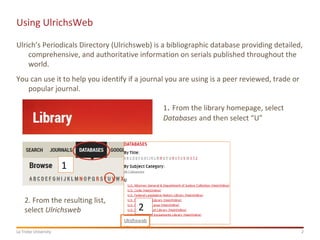
1. From the library homepage, select
Databases and then select “U”
2. From the resulting list,
select Ulrichsweb
3La Trobe University
Using UlrichsWeb
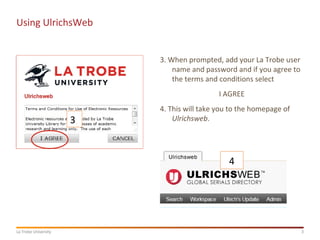
3. When prompted, add your La Trobe user
name and password and if you agree to
the terms and conditions select
I AGREE
4. This will take you to the homepage of
Ulrichsweb.3
4
4La Trobe University
Using UlrichsWeb
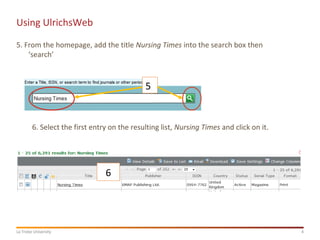
5. From the homepage, add the title Nursing Times into the search box then
‘search’
5
6
6. Select the first entry on the resulting list, Nursing Times and click on it.
5La Trobe University
Using UlrichsWeb
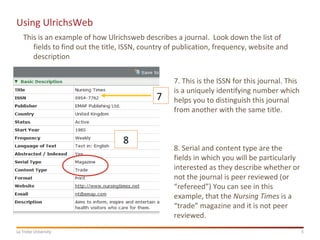
This is an example of how Ulrichsweb describes a journal. Look down the list of
fields to find out the title, ISSN, country of publication, frequency, website and
description
7
8
7. This is the ISSN for this journal. This
is a uniquely identifying number which
helps you to distinguish this journal
from another with the same title.
8. Serial and content type are the
fields in which you will be particularly
interested as they describe whether or
not the journal is peer reviewed (or
“refereed”) You can see in this
example, that the Nursing Times is a
“trade” magazine and it is not peer
reviewed.
6La Trobe University
Using UlrichsWeb
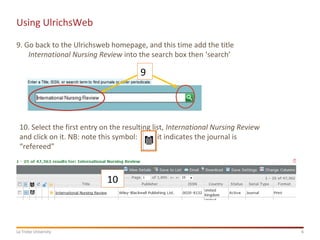
9. Go back to the Ulrichsweb homepage, and this time add the title
International Nursing Review into the search box then ‘search’
9
10
10. Select the first entry on the resulting list, International Nursing Review
and click on it. NB: note this symbol: it indicates the journal is
“refereed”
7La Trobe University
Using UlrichsWeb
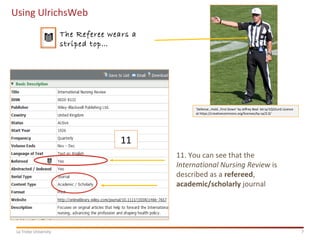
11
11. You can see that the
International Nursing Review is
described as a refereed,
academic/scholarly journal
‘Defense…Hold…First Down’ by Jeffrey Beal bit.ly/1Q32unS Licence
at https://creativecommons.org/licenses/by-sa/2.0/
The Referee wears a
striped top…
Thank you
latrobe.edu.au CRICOS Provider 00115M
Help!
Email us libraryresearchsupport@Latrobe.edu.au
Book a Research Partnerships consultation

Rmd5 fdr 20160208_ulrich's

  • 1.
    latrobe.edu.au CRICOS Provider00115M Using Ulrich’s to find out about journals Library/ Research Partnerships March 2016
  • 2.
    2La Trobe University UsingUlrichsWeb Ulrich’s Periodicals Directory (Ulrichsweb) is a bibliographic database providing detailed, comprehensive, and authoritative information on serials published throughout the world. You can use it to help you identify if a journal you are using is a peer reviewed, trade or popular journal. 1 2 1. From the library homepage, select Databases and then select “U” 2. From the resulting list, select Ulrichsweb
  • 3.
    3La Trobe University UsingUlrichsWeb 3. When prompted, add your La Trobe user name and password and if you agree to the terms and conditions select I AGREE 4. This will take you to the homepage of Ulrichsweb.3 4
  • 4.
    4La Trobe University UsingUlrichsWeb 5. From the homepage, add the title Nursing Times into the search box then ‘search’ 5 6 6. Select the first entry on the resulting list, Nursing Times and click on it.
  • 5.
    5La Trobe University UsingUlrichsWeb This is an example of how Ulrichsweb describes a journal. Look down the list of fields to find out the title, ISSN, country of publication, frequency, website and description 7 8 7. This is the ISSN for this journal. This is a uniquely identifying number which helps you to distinguish this journal from another with the same title. 8. Serial and content type are the fields in which you will be particularly interested as they describe whether or not the journal is peer reviewed (or “refereed”) You can see in this example, that the Nursing Times is a “trade” magazine and it is not peer reviewed.
  • 6.
    6La Trobe University UsingUlrichsWeb 9. Go back to the Ulrichsweb homepage, and this time add the title International Nursing Review into the search box then ‘search’ 9 10 10. Select the first entry on the resulting list, International Nursing Review and click on it. NB: note this symbol: it indicates the journal is “refereed”
  • 7.
    7La Trobe University UsingUlrichsWeb 11 11. You can see that the International Nursing Review is described as a refereed, academic/scholarly journal ‘Defense…Hold…First Down’ by Jeffrey Beal bit.ly/1Q32unS Licence at https://creativecommons.org/licenses/by-sa/2.0/ The Referee wears a striped top…
  • 8.
    Thank you latrobe.edu.au CRICOSProvider 00115M Help! Email us libraryresearchsupport@Latrobe.edu.au Book a Research Partnerships consultation