Yale Valley Community Association: 
Assessment of Cyber Security Risks 
February 17, 2014 
Prepared by Jeffrey P. Macharyas 
Utica College 
CYB 605-Principles of Cybersecurity 
Dr. Timothy Ball
Yale Valley Community Association: Assessment of Cyber Security Risks 2 
What is the Yale Valley Community Association?.................................................................. 3 
Purpose of this Report.............................................................................................................4 
Executive Summary 
Member Identity Scan Tags.................................................................................................... 5 
Biometric Employee Time Clock............................................................................................. 7 
Facilities Surveillance Systems...............................................................................................8 
Online Registration............................................................................................................... 10 
Personal Devices & Computer Misuse...................................................................................14 
Computer Operating System..................................................................................................19 
Risks & Vulnerabilities Matrix..............................................................................................22 
Conclusion.............................................................................................................................23 
References..............................................................................................................................24 
Contents
Yale Valley Community Association: Assessment of Cyber Security Risks 3 
Yale Valley Community Association 
is a community-based health and 
fitness organization with approxi-mately 
4,000 paid members that of-fers 
fitness, health and nutritional programs 
to members of all ages. YVCA also maintains 
several sports programs and teams, coached 
by volunteers and paid staff of approximate-ly 
40 persons. Sports currently offered in-clude 
basketball, archery, swimming, soccer, 
running. YVCA also offers childcare, special-ty 
seminars, and health-related classes, such 
as Zumba, yoga, and weight training. 
YVCA has been serving the community 
for more than five decades and has slowly 
upgraded and maintained their security, 
computer, and data systems—if at all. Now, 
coming under increased threats of data 
leakage, identity theft, physical theft, data 
corruption, and inoperable hardware/soft-ware 
systems, YVCA has come to the reali-zation 
that systems need to be modernized 
and maintained properly. This report was 
commissioned to provide insight and rec-ommendations 
to help YVCA become com-pliant 
with current standards and to offer 
and safer and more secure environment to 
their constituents and employees. 
What is the Yale Valley Community Association? 
EXECUTIVE SUMMARY
Yale Valley Community Association: Assessment of Cyber Security Risks 4 
The purpose of this report is to assist the 
Yale Valley Community Association (YVCA) 
in assessing the risks to its sensitive digi-tal 
system, security systems and data, and 
to protect the resources that support the 
Association’s mission. These instructions 
are based on an analysis of the threats and 
vulnerabilities inherent in a community 
organization. Threats can come from ex-ternal 
or internal sources and systems in 
use currently can be outdated, inefficient 
or insecure. This report identifies the ar-eas 
where security can be weak and offers 
recommendations on how to strengthen 
the Association’s assets against threats and 
reduce vulnerabilities. 
The Association is responsible for keep-ing 
the data and personal property of its 
members and employees safe from theft, 
harm and misuse. This report will examine 
several areas of the Association’s cyber and 
security infrastructure that were deemed 
necessary of updating, replacement and 
implementation. 
This report will cover functions that are 
initiated by members, staff, and anony-mous 
threat agents and will offer specific 
recommendations on how to mitigate dam-age 
and keep the Association’s constituents 
safe and productive. 
Purpose of this Report
Yale Valley Community Association: Assessment of Cyber Security Risks 5 
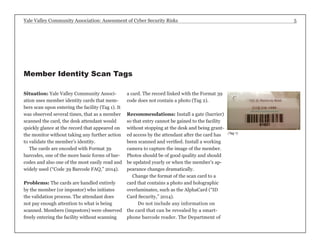
Situation: Yale Valley Community Associ-ation 
uses member identity cards that mem-bers 
scan upon entering the facility (Tag 1). It 
was observed several times, that as a member 
scanned the card, the desk attendant would 
quickly glance at the record that appeared on 
the monitor without taking any further action 
to validate the member’s identity. 
The cards are encoded with Format 39 
barcodes, one of the more basic forms of bar-codes 
and also one of the most easily read and 
widely used (“Code 39 Barcode FAQ,” 2014). 
Problems: The cards are handled entirely 
by the member (or impostor) who initiates 
the validation process. The attendant does 
not pay enough attention to what is being 
scanned. Members (impostors) were observed 
freely entering the facility without scanning 
a card. The record linked with the Format 39 
code does not contain a photo (Tag 2). 
Recommendations: Install a gate (barrier) 
so that entry cannot be gained to the facility 
without stopping at the desk and being grant-ed 
access by the attendant after the card has 
been scanned and verified. Install a working 
camera to capture the image of the member. 
Photos should be of good quality and should 
be updated yearly or when the member’s ap-pearance 
changes dramatically. 
Change the format of the scan card to a 
card that contains a photo and holographic 
overlaminates, such as the AlphaCard (“ID 
Card Security,” 2014). 
Do not include any information on 
the card that can be revealed by a smart-phone 
barcode reader. The Department of 
(Tag 1) 
Member Identity Scan Tags
Yale Valley Community Association: Assessment of Cyber Security Risks 6 
Veteran’s Affairs faced a situation where 
members’ Social Security Numbers were 
revealed by simple smartphone barcode 
reader apps (Callaway, 2013). 
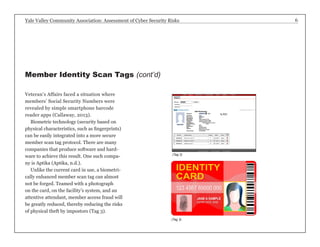
Biometric technology (security based on 
physical characteristics, such as fingerprints) 
can be easily integrated into a more secure 
member scan tag protocol. There are many 
companies that produce software and hard-ware 
to achieve this result. One such compa-ny 
is Aptika (Aptika, n.d.). 
Unlike the current card in use, a biometri-cally 
enhanced member scan tag can almost 
not be forged. Teamed with a photograph 
on the card, on the facility’s system, and an 
attentive attendant, member access fraud will 
be greatly reduced, thereby reducing the risks 
of physical theft by impostors (Tag 3). 
Member Identity Scan Tags (cont’d) 
(Tag 3) 
(Tag 2)
Yale Valley Community Association: Assessment of Cyber Security Risks 7 
Situation: Employees currently record their 
work hours on timesheets. Times in and out 
are often “rounded” to the convenience of the 
employee or simply estimated. There are also 
instances where employees will phone in their 
time and have another employee record the 
times on the timesheet “in anticipation.” This 
act is referred to as “buddy punching” (“Bio-metric 
Time Clocks,” n.d.). 
74% of business have experienced payroll 
increase due to buddy punching (“Biometrics 
Time Clock,” n.d.). 
Problems: The result of this largely unmon-itored 
timekeeping chore leads to workers 
getting paid for hours not worked, thereby 
hurting the bottom line of the YVCA and do-ing 
a disservice to members and honest staff. 
On many occasions, co-workers, and even 
supervisors, are complicit in work-hour theft. 
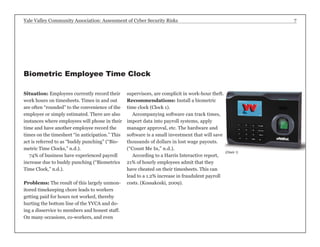
Recommendations: Install a biometric 
time clock (Clock 1). 
Accompanying software can track times, 
import data into payroll systems, apply 
manager approval, etc. The hardware and 
software is a small investment that will save 
thousands of dollars in lost wage payouts. 
(“Count Me In,” n.d.). 
According to a Harris Interactive report, 
21% of hourly employees admit that they 
have cheated on their timesheets. This can 
lead to a 1.2% increase in fraudulent payroll 
costs. (Kossakoski, 2009). 
Biometric Employee Time Clock 
(Clock 1)
Yale Valley Community Association: Assessment of Cyber Security Risks 8 
Situation: There have been numerous 
thefts and damage at the YVCA facilities, 
both outside and inside. There have been 
many reports of car break-ins in the parking 
lot, and personal item thefts, illegal smok-ing, 
illegal parking, etc. The facilities cur-rently 
employ camera monitoring equipment 
that is only accessible at one location in the 
facility. The cameras are set up in positions 
that do not adequately cover the entire areas 
in need of monitoring. 
Problems: Cameras, especially those 
placed outside, are susceptible to damage, 
theft, tampering and frequent breakdowns. 
An attendant must be present on-site in one 
location to monitor activity. Due to firm-ware 
vulnerabilities and user complacency, 
cameras are susceptible to outside attack if 
proper remedies are not taken. 
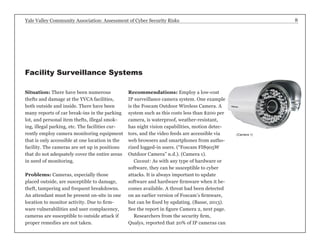
Recommendations: Employ a low-cost 
IP surveillance camera system. One example 
is the Foscam Outdoor Wireless Camera. A 
system such as this costs less than $200 per 
camera, is waterproof, weather-resistant, 
has night vision capabilities, motion detec-tors, 
and the video feeds are accessible via 
web browsers and smartphones from autho-rized 
logged-in users. (“Foscam FI8905W 
Outdoor Camera” n.d.). (Camera 1). 
Caveat: As with any type of hardware or 
software, they can be susceptible to cyber 
attacks. It is always important to update 
software and hardware firmware when it be-comes 
available. A threat had been detected 
on an earlier version of Foscam’s firmware, 
but can be fixed by updating. (Basse, 2013). 
See the report in figure Camera 2, next page. 
Researchers from the security firm, 
Qualys, reported that 20% of IP cameras can 
Facility Surveillance Systems 
(Camera 1)
Yale Valley Community Association: Assessment of Cyber Security Risks 9 
Re: [CVE-REQUEST] Foscam <= 11.37.2.48 path traversal vulnerability 
From: Frederic BASSE (basse.fredericgmail.com) 
Date: Wed Mar 13 2013 - 10:01:47 CDT 
Messages sorted by: [ date ] [ thread ] [ subject ] [ author ] 
CVE Assigned: CVE-2013-2560. 
2013/3/2 Frederic BASSE <basse.fredericgmail.com>: 
> [CVE-REQUEST] Foscam <= 11.37.2.48 path traversal vulnerability 
> _______________________________________________________________________ 
> Summary: 
> Foscam firmware <= 11.37.2.48 is prone to a path traversal 
> vulnerability in the embedded web interface. 
> 
> The unauthenticated attacker can access to the entire filesystem and 
> steal web & wifi credentials. 
> _______________________________________________________________________ 
> Details: 
> 
> GET //../proc/kcore HTTP/1.0 
> 
> 
> ____________________________________________________________________ 
> CVSS Version 2 Metrics: 
> Access Vector: Network exploitable 
> Access Complexity: Low 
> Authentication: Not required to exploit 
> Confidentiality Impact: Complete 
> Availability Impact: Complete 
> _______________________________________________________________________ 
> Disclosure Timeline: 
> 2013-01-18 Vendor fixed the issue in fw 11.37.2.49; no security notice 
> 2013-02-21 Vulnerability found 
> 2013-03-01 Public advisory 
> _______________________________________________________________________ 
> Solution: 
> A new firmware is available on vendor’s site: 
> http://www.foscam.com/down3.aspx 
> _______________________________________________________________________ 
> References: 
> http://code.google.com/p/bflt-utils/ 
> http://wiki.openipcam.com/ 
> _______________________________________________________________________ 
> Arnaud Calmejane - Frederic Basse 
(Camera 2) 
be hacked with the username “admin” and 
no password. They further state that 99% of 
the Foscam cameras noted above, were not 
patched after the firmware update was re-leased 
(Smith, 2013). 
Researchers have found a way to exploit a 
vulnerability in the camera’s Web interface 
that can allow attackers to get a “snapshot” 
of the camera’s memory. 
This memory snapshot would contain the 
admin username and password in clear text 
and other information such as Wi-Fi cre-dentials 
or details about devices on the local 
network. (Constantin, 2013).
Yale Valley Community Association: Assessment of Cyber Security Risks 10 
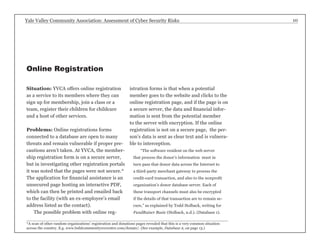
Situation: YVCA offers online registration 
as a service to its members where they can 
sign up for membership, join a class or a 
team, register their children for childcare 
and a host of other services. 
Problems: Online registrations forms 
connected to a database are open to many 
threats and remain vulnerable if proper pre-cautions 
aren’t taken. At YVCA, the member-ship 
registration form is on a secure server, 
but in investigating other registration portals 
it was noted that the pages were not secure.* 
The application for financial assistance is an 
unsecured page hosting an interactive PDF, 
which can then be printed and emailed back 
to the facility (with an ex-employee’s email 
address listed as the contact). 
The possible problem with online reg-istration 
forms is that when a potential 
member goes to the website and clicks to the 
online registration page, and if the page is on 
a secure server, the data and financial infor-mation 
is sent from the potential member 
to the server with encryption. If the online 
registration is not on a secure page, the per-son’s 
data is sent as clear text and is vulnera-ble 
to interception. 
“The software resident on the web server 
that process the donor’s information must in 
turn pass that donor data across the Internet to 
a third-party merchant gateway to process the 
credit-card transaction, and also to the nonprofit 
organization’s donor database server. Each of 
these transport channels must also be encrypted 
if the details of that transaction are to remain se-cure,” 
as explained by Todd Holback, writing for 
FundRaiscr Basic (Holback, n.d.). (Database 1). 
Online Registration 
*A scan of other random organizations’ registration and donations pages revealed that this is a very common situation 
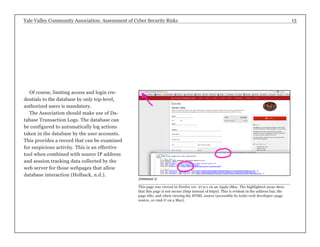
across the country. E.g. www.buhlcommunityreccenter.com/donate/. (See example, Database 2, on page 13.)
Yale Valley Community Association: Assessment of Cyber Security Risks 11 
(Database 1) 
Recommendations: 
All data should use a se-cure 
encryption protocol, 
such as Secure Sockets 
Layer (SSL). SSL is the 
encryption protocol used 
when a connection to a 
web page’s URL starts with 
‘https:’ instead of ‘http:’. 
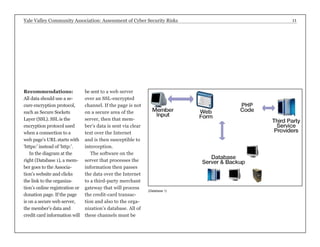
In the diagram at the 
right (Database 1), a mem-ber 
goes to the Associa-tion’s 
website and clicks 
the link to the organiza-tion’s 
online registration or 
donation page. If the page 
is on a secure web server, 
the member’s data and 
credit card information will 
be sent to a web server 
over an SSL-encrypted 
channel. If the page is not 
on a secure area of the 
server, then that mem-ber’s 
data is sent via clear 
text over the Internet 
and is then susceptible to 
interception. 
The software on the 
server that processes the 
information then passes 
the data over the Internet 
to a third-party merchant 
gateway that will process 
the credit-card transac-tion 
and also to the orga-nization’s 
database. All of 
these channels must be
Yale Valley Community Association: Assessment of Cyber Security Risks 12 
encrypted if the transactions are to be secure 
(Holback, n.d.). 
The database resides on a server located 
at the association’s offices. The database 
files must be encrypted to provide the best 
security. 
Unencrypted databases are susceptible to 
common virus and spyware attacks just like 
any other file. Even when the database server 
is not connected directly to the Internet but 
networked to any computer that is connect-ed 
to the Internet, there is a chance that an 
attack on the database can be perpetrated. 
The database should be encrypted. The 
data in the database will be protected by en-cryption 
while “at rest” on the server. When 
a request is made of the database from an 
external source, the software decrypts the re-quested 
data before sending it to the server 
—using an encrypted data transport channel 
such as SSL (Holback, n.d.). 
Additionally, security can be tightened by 
employing indirect logins. The login cre-dentials 
should be for the webpage only and 
not the database. Limited login attempts 
should be employed. Limiting the number 
of attempts reduces the opportunity to gain 
access via “brute force” attacks, where a 
threat agent will use a software system to 
keep trying different password combina-tions. 
Appropriate privilege levels should be 
set. Only the requested information inter-action 
from the webpage to the database 
should be accessible. This means that if a 
member is making a donation, that infor-mation 
will interact only with the donations 
portion of the database and not, say, sports 
registration (Holback, n.d.). 
Online Registration (cont’d)
Yale Valley Community Association: Assessment of Cyber Security Risks 13 
Of course, limiting access and login cre-dentials 
to the database by only top-level, 
authorized users is mandatory. 
The Association should make use of Da-tabase 
Transaction Logs. The database can 
be configured to automatically log actions 
taken in the database by the user accounts. 
This provides a record that can be examined 
for suspicious activity. This is an effective 
tool when combined with source IP address 
and session tracking data collected by the 
web server for those webpages that allow 
database interaction (Holback, n.d.). 
(Database 2) 
This page was viewed in Firefox ver. 27.0.1 on an Apple iMac. The highlighted areas show 
that this page is not secure (http instead of https). This is evident in the address bar, the 
page title, and when viewing the HTML source (accessible by tools>web developer>page 
source, or cmd-U on a Mac).
Yale Valley Community Association: Assessment of Cyber Security Risks 14 
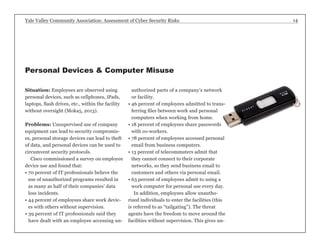
Situation: Employees are observed using 
personal devices, such as cellphones, iPads, 
laptops, flash drives, etc., within the facility 
without oversight (Moka5, 2013). 
Problems: Unsupervised use of company 
equipment can lead to security compromis-es, 
personal storage devices can lead to theft 
of data, and personal devices can be used to 
circumvent security protocols. 
Cisco commissioned a survey on employee 
device use and found that: 
• 70 percent of IT professionals believe the 
use of unauthorized programs resulted in 
as many as half of their companies’ data 
loss incidents. 
• 44 percent of employees share work devic-es 
with others without supervision. 
• 39 percent of IT professionals said they 
have dealt with an employee accessing un-authorized 
parts of a company’s network 
or facility. 
• 46 percent of employees admitted to trans-ferring 
files between work and personal 
computers when working from home. 
• 18 percent of employees share passwords 
with co-workers. 
• 78 percent of employees accessed personal 
email from business computers. 
• 13 percent of telecommuters admit that 
they cannot connect to their corporate 
networks, so they send business email to 
customers and others via personal email. 
• 63 percent of employees admit to using a 
work computer for personal use every day. 
In addition, employees allow unautho-rized 
individuals to enter the facilities (this 
is referred to as “tailgating”). The threat 
agents have the freedom to move around the 
facilities without supervision. This gives un- 
Personal Devices & Computer Misuse
Yale Valley Community Association: Assessment of Cyber Security Risks 15 
authorized individuals the oppor-tunity 
to steal resources or access 
sensitive information. Since people 
have almost unfettered access to 
the facilities due to lax front desk 
security, the YVCA is at great risk 
from this form of crime. Better use 
of IP cameras could help prevent 
this (see page 8). 
Thirty percent of employees 
leave their computers logged on 
when away. Twenty percent of 
employees store login information 
and passwords on their computers 
or written down and left on their 
desk, in unlocked cabinets, under 
the keyboard or stuck on their 
monitors.(Cisco, n.d.). 
Personal use of YVCA comput-ers 
not only puts the organiza-tion 
at risk, but employees waste 
valuable company time pursuing 
personal exploits, which can lead 
to identity theft, malware, spy-ware, 
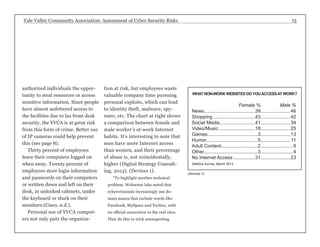
etc. The chart at right shows 
a comparison between female and 
male worker’s at-work Internet 
habits. It’s interesting to note that 
men have more Internet access 
than women, and their percentage 
of abuse is, not coincidentally, 
higher (Digital Strategy Consult-ing, 
2013). (Devices 1). 
“To highlight another technical 
problem, Websense labs noted that 
cybercriminals increasingly use do-main 
names that include words like 
Facebook, MySpace and Twitter, with 
no official connection to the real sites. 
They do this to trick unsuspecting 
WHAT NON-WORK WEBSITES DO YOU ACCESS AT WORK? 
Female % Male % 
News......................................39.......................46 
Shopping................................43.......................42 
Social Media...........................41.......................34 
Video/Music............................18.......................25 
Games......................................3.......................13 
Humor.......................................5....................... 11 
Adult Content............................2.........................9 
Other........................................3.........................4 
No Internet Access.................31.......................23 
Safetica Survey, March 2013 
(Devices 1)
Yale Valley Community Association: Assessment of Cyber Security Risks 16 
visitors to fake Web sites and lure them to input 
sensitive data,” wrote Ernie Hayden for Disaster 
Resource Guide (Hayden, n.d.). 
USB flash drives are used by employ-ees 
to transfer work from the office to 
home or vice versa. However, flash drives 
are an easy way for the organization to 
lose data without being aware of it. A 
recent incident involving a wellness pro-gram 
in Milwaukee illustrates the dan-gers 
quite clearly: 
Joanne Wojcik, writing for Modern 
Healthcare reports, 
“... the city provided Froedtert Workforce 
Health with a password-protected encrypted 
flash drive containing patient names, ad-dresses, 
dates of birth, Social Security num-bers 
and gender. However, that information 
was allegedly transferred to an unencrypted, 
non-password-protected flash drive that was 
reported stolen on Oct. 21 from the car of 
an employee of United/Dynacare, a lab with 
which Froedtert subcontracted to perform 
blood tests on Milwaukee city employees.” 
Recommendations: 
Password Policy: Employees and members 
should be required to follow current stan-dards 
on creating passwords (see Devices 2, 
page 17). 
Removable Media: Use USBDeview, a free 
utility to check whether a USB device (flash 
drive) had been attached to a computer. If 
suspicions arise that data has been trans-ferred, 
this utility can be used to check type 
of device, date and time, and other factors. 
(Devices 3, page 17). 
Install web filtering software, such as that 
provided by OpenDNS—this will allow the 
organization to block categories of websites 
Personal Devices & Computer Misuse (cont’d)
Yale Valley Community Association: Assessment of Cyber Security Risks 17 
Current Standards on Passwords 
Example • SANS Institute • sans.org 
Strong passwords 
have the following characteristics: 
• Contain at least three of the five following character 
classes: 
• Lower case characters 
• Upper case characters 
• Numbers 
• Punctuation 
• “Special” characters (e.g. @#$%^&*()_+|~-=`{} 
[]:”;’<>/ etc) 
• Contain at least fifteen alphanumeric characters. 
Weak passwords 
have the following characteristics: 
• The password contains less than fifteen characters 
• The password is a word found in a dictionary (En-glish 
or foreign) 
• The password is a common usage word such as: 
• Names of family, pets, friends, co-workers, fantasy 
characters, etc. 
• Computer terms and names, commands, sites, 
companies, hardware, software. 
• The words “<Company Name>”, “<city>”, “<city, 
abbrev.>” or any derivation. 
• Birthdays and other personal information such as 
addresses and phone numbers. 
• Word or number patterns like aaabbb, qwerty, zyx-wvuts, 
123321, etc. 
• Any of the above spelled backwards. 
• Any of the above preceded or followed by a digit 
(e.g., secret1, 1secret) 
(Devices 2) 
(Devices 3)
Yale Valley Community Association: Assessment of Cyber Security Risks 18 
from access on organization computers. Not 
only would this lead to higher productivity 
(see Devices 1, page 15), but could improve 
speed, reliability and security. 
Personal Devices & Computer Misuse (cont’d) 
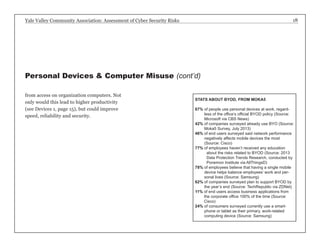
STATS ABOUT BYOD, FROM MOKA5 
67% of people use personal devices at work, regard-less 
of the office’s official BYOD policy (Source: 
Microsoft via CBS News) 
42% of companies surveyed already use BYO (Source: 
Moka5 Survey, July 2013) 
46% of end users surveyed said network performance 
negatively affects mobile devices the most 
(Source: Cisco) 
77% o f employees haven’t received any education 
about the risks related to BYOD (Source: 2013 
Data Protection Trends Research, conducted by 
Ponemon Institute via AllThingsD) 
78% of employees believe that having a single mobile 
device helps balance employees’ work and per-sonal 
lives (Source: Samsung) 
62% of companies surveyed plan to support BYOD by 
the year’s end (Source: TechRepublic via ZDNet) 
11% of end users access business applications from 
the corporate office 100% of the time (Source: 
Cisco) 
24% of consumers surveyed currently use a smart-phone 
or tablet as their primary, work-related 
computing device (Source: Samsung)
Yale Valley Community Association: Assessment of Cyber Security Risks 19 
Situation: Computers have been used at 
YVCA for many years. For the most part, 
they’ve worked well and have required lit-tle 
maintenance. There is also the matter of 
finding trained personnel to handle trou-bleshooting 
issues and updates and replace-ments.* 
So, updates haven’t been done in a 
long time, programs have become corrupted, 
files systems have become overloaded, an-ti- 
virus is weak or not present, computers 
are running slow and crashing. The first 
response is to blame the computer, but it 
is the responsibility of the organization to 
maintain a proper update schedule. 
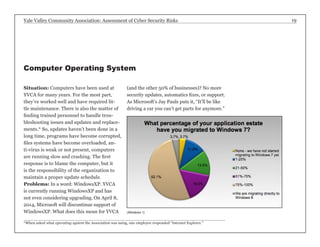
Problems: In a word: WindowsXP. YVCA 
is currently running WindowsXP and has 
not even considering upgrading. On April 8, 
2014, Microsoft will discontinue support of 
WindowsXP. What does this mean for YVCA 
(and the other 50% of businesses)? No more 
security updates, automatics fixes, or support. 
As Microsoft’s Jay Pauls puts it, “It’ll be like 
driving a car you can’t get parts for anymore.” 
Computer Operating System 
(Windows 1) 
*When asked what operating system the Association was using, one employee responded “Internet Explorer.”
Yale Valley Community Association: Assessment of Cyber Security Risks 20 
Upgrading goes beyond just pure mechan-ics: 
46 states and the United Kingdom have 
laws that require organizations to use up-to- 
date software as a way to protect critical 
and private information. Breaches traced to 
a Windows XP system will most likely bring 
up the following question: was the organi-zation 
being “duly diligent”? (“Is Your Small 
Business Prepared,” n.d.). 
Of course, cost is a major factor. The 
basic software cost to upgrade from XP to 
7 is approximately $225 for the software 
and $150 for a professional install. There 
is the matter, of course, of the hardware. It 
is highly probably that machines that have 
been running XP for several years will not 
be able to handle Windows 7 and all the 
associated drivers, software upgrades, and 
utilities. Add to the cost, say $1000/ma-chine 
for a total of $1375/computer. 
Recommendations: The YVCA is cur-rently 
using PCs running WindowsXP. 
Many of the operations use the Daxko suite 
of web-based applications. If the organiza-tion 
is to keep using PCs, it is imperative 
that it upgrades its software and hardware 
immediately. Alternatively, switching to an 
all-Mac organization could be beneficial for 
several reasons: 
• Macs are becoming as commonplace as PCs 
in the business world and losing the stigma 
of “not for business” computers 
• People, in general, have become used to 
the Mac interfaces by using iPhones and 
iPads, as well as many Macs at home for 
personal use 
• Macs will run the existing Daxko web-based 
applications 
• Operating system upgrades are free, unlike 
Windows 
Computer Operating System (cont’d)
Yale Valley Community Association: Assessment of Cyber Security Risks 21 
• All the commonly used software programs, 
such as Microsoft Office, will run on Macs. 
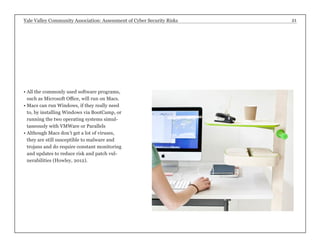
• Macs can run Windows, if they really need 
to, by installing Windows via BootCamp, or 
running the two operating systems simul-taneously 
with VMWare or Parallels 
• Although Macs don’t get a lot of viruses, 
they are still susceptible to malware and 
trojans and do require constant monitoring 
and updates to reduce risk and patch vul-nerabilities 
(Howley, 2012).
Yale Valley Community Association: Assessment of Cyber Security Risks 22 
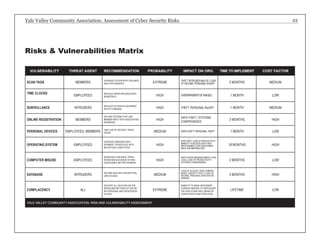
Risks & Vulnerabilities Matrix 
VULNERABILITY THREAT AGENT RECOMMENDATION PROBABILITY IMPACT ON ORG. TIME TO IMPLEMENT COST FACTOR 
SCAN TAGS MEMBERS UPGRADE SYSTEM WITH VIGILANCE 
AND PHOTOGRAPHS EXTREME THEFT, INTRUDER MALICE, LOSS 
OF INCOME, PERSONAL INJURY 2 MONTHS MEDIUM 
TIME CLOCKS EMPLOYEES REPLACE PAPER RECORDS WITH 
BIOMETRICS HIGH OVERPAYMENT OF WAGES 1 MONTH LOW 
SURVEILLANCE INTRUDERS REPLACE OUTDATED EQUIPMENT 
WITH IP CAMERAS HIGH THEFT, PERSONAL INJURY 1 MONTH MEDIUM 
ONLINE REGISTRATION MEMBERS 
SECURE SYSTEMS THAT LINK 
MEMBER INPUT WITH ASSOCIATION 
DATABASES 
HIGH DATA THEFT, SYSTEMS 
COMPROMISED 3 MONTHS HIGH 
PERSONAL DEVICES EMPLOYEES, MEMBERS LIMIT USE OF DEVICES, TRACK 
USAGE MEDIUM DATA THEFT, PERSONAL THEFT 1 MONTH LOW 
OPERATING SYSTEM EMPLOYEES 
UPGRADE WINDOWS ENVI-RONMENT 
OR REPLACE WITH 
MACINTOSH COMPUTERS 
HIGH 
DATA THEFT, LOSS OF PRODUCTIVITY, 
INABILITY TO ACCESS DATA, HIGH 
REPLACEMENT COST, NON-COMPLI-ANCE, 
INCOMPATIBILITIES 
18 MONTHS HIGH 
COMPUTER MISUSE EMPLOYEES 
INCREASED VIGILANCE, PROHI-BITION 
AND BLOCKAGE OF WEB 
CATEGORIES, BETTER TRAINING 
HIGH REPUTATION MISMANAGMENT, DATA 
LOSS, LOSS OF PRODUCTIVITY, 
SYSTEMS COMPROMISED 2 MONTHS LOW 
DATABASE INTRUDERS SECURE DATA WITH ENCRYPTION, 
LIMIT ACCESS MEDIUM 
LOSS OF ACCESS, DATA COMPRO-MISED, 
IDENTITY THEFT, LOSS OF 
INCOME, PERSONAL REPUTATION 
DAMAGE 
3 MONTHS HIGH 
COMPLACENCY ALL 
EDUCATE ALL INVOLVED ON THE 
NEEDS AND METHODS OF SECUR-ING 
PERSONAL AND PROFESSION-AL 
DATA 
EXTREME 
INABILITY TO MAKE NECESSARY 
CHANGES NEEDED TO SAFEGUARD 
THE HEALTH AND WELL-BEING OF 
CONSTITUENTS AND THEIR DATA 
LIFETIME LOW 
YALE VALLEY COMMUNITY ASSOCIATION: RISK AND VULNERABILITY ASSESSMENT
Yale Valley Community Association: Assessment of Cyber Security Risks 23 
There are many threats and vulnerabilities 
inherent in an organization such as YVCA. 
With thousands of members and dozens 
of employees, it is critical to maintain the 
highest level of vigilance possible to guard 
against malicious activity. An undertaking 
such as this is monumental. There are many 
different software, hardware and human 
concerns that need to be addressed, mod-ified 
or removed. One of the more difficult 
things to accomplish is getting the personnel 
to acknowledge and understand the threats 
against them and their data. Complacen-cy 
and ignorance are oftentimes “valued” 
by many and leads to a “head-in-the-sand” 
approach to cyber and facilities security. It is 
incumbent upon those tasked with investi-gating 
and implementing change to educate 
all the personnel in a way that is under-standable 
and actionable. 
This study investigated several areas of 
vulnerabilities at the Yale Valley Commu-nity 
Association, but doesn’t address every 
possible eventuality. As more and more 
parts of our human and cyber lives are 
interconnected, the threats and vulnerabil-ities 
will grow and become more difficult 
to mitigate. With the advent of the Internet 
of Things, Google Glass, and other innova-tions, 
it is even more important to address 
the known threats now and get prepared 
and educated about those yet to come. 
Cyber technology is a valuable tool, but 
it serves no purpose if it doesn’t work—or 
if it works against your best interests by 
denying access or being used to steal infor-mation, 
funds, or cause harm to the organi-zation 
and its constituents. 
Conclusion
Yale Valley Community Association: Assessment of Cyber Security Risks 24 
Code 39 Barcode FAQ & Tutorial 
(2014). Retrieved from http://www.id-automation. 
com/barcode-faq/code-39/ 
ID Cards. (2014). Retrieved from http:// 
publicsafety.yale.edu/security/id-cards 
ID Card Security. (2014). Retrieved 
from http://www.alphacard.com/id-cards/ 
id-card-security 
Callaway, J. (2013, November 16). 
Scannable VA cards easily reveal Social 
Security numbers, put veterans at risk 
of identity theft. Retrieved from http:// 
www.turnto23.com/news/us-world/ 
scannable-va-cards-easily-reveal-so-cial- 
security-numbers-put-veter-ans- 
at-risk-of-identity-theft-111613 
Aptika.(n.d.) Retrieved from http:// 
www.aptika.com/product/idpack-busi-ness- 
9 
Biometric Time Clocks (n.d.). Re-trieved 
from http://www.alliedtime. 
com/Biometric-Time-Clocks-s/1814. 
htm 
Kossakoski, K. (2009). Retrieved 
from http://www.businesswire. 
com/news/home/20090615005237/ 
en/%E2%80%9CGam-ing- 
Clock%E2%80%9D-Sur-vey- 
Finds-Employees-Admit-Cheat-ing#. 
UwbS-UJdW7o 
Biometrics Time Clocks. (n.d.). 
Retrieved from http://www.about-timetech. 
com/collect-accurate-time/ 
mobile-time-clock-technology/biomet-ric- 
time-clock.html 
Count Me In. (n.d.). Retrieved from 
http://www.countmeinllc.com/prod-uct_ 
gold.html 
Foscam FI8905W Outdoor Wireless 
IP Camera. (n.d.) Retrieved from 
http://foscam.us/foscam-fi8905w-outdoor- 
wireless-ip-camera-23. 
html?SID=4b94fd3a1bdd5daefcd- 
84f799930659b 
Basse, F. ( 2013, March 13). Retrieved 
from http://archives.neohapsis.com/ 
archives/bugtraq/2013-03/0080.html 
Smith, M. (2013, April 14). Retrieved 
from http://www.networkworld.com/ 
community/blog/hacks-turn-your-wireless- 
ip-surveillance-cameras-against- 
you 
Constantin, L. (2013, April 11). Retrie-ived 
from http://www.computerworld. 
com/s/article/9238329/Wireless_IP_ 
cameras_open_to_hijacking_over_ 
the_Internet_researchers_say 
Holback, T. (n.d.) Retrieved from 
http://www.fundraiserbasic.com/ 
library/fruniv/109-security-is-sues- 
for-online-databases.html 
Cisco. (n.d.). Retrieved from http://www. 
cisco.com/c/en/us/solutions/collateral/ 
enterprise-networks/data-loss-preven-tion/ 
white_paper_c11-499060.html 
Digital Strategy Consulting. (2013, 
March 10). Retrieved from http:// 
www.digitalstrategyconsulting.com/ 
intelligence/2013/10/half_of_brits_ 
skive_online_at_work_but_women_ 
waste_less_time_than_men.php 
Hayden, E. (n.d.). Retrieved from 
http://www.disaster-resource. 
com/index.php?option=com_con-tent& 
view=article&id=829 
Wojcik, J. (2013, December 27). 
Retrieved from http://www.modern-healthcare. 
com/article/20131227/ 
INFO/312279994 
Web Filtering. (n.d.). Retrieved from 
http://www.opendns.com/enter-prise- 
security/solutions/web-filtering/ 
Moka5. (2013, September 10). Re-trieved 
from http://www.moka5. 
com/2013/09/10/8-share-worthy-stats- 
about-byod/ 
Is Your Small Business Ready for the 
End of Windows XP? (n.d.). Retrieved 
from http://www.maximizer.com/ 
blog/is-your-small-business-prepared-for- 
the-end-of-windows-xp/ 
Wolfe, L. (n.d.). Retrieved from http:// 
womeninbusiness.about.com/od/ 
newsreviewsinterviews/a/review-win-dows- 
7-costs.htm 
Howley, D. (2012, January 3). Re-trieved 
from http://blog.laptopmag. 
com/will-your-next-business-machine-be- 
a-mac 
References

Risk Assessment Cybersecurity Project at Utica College

  • 1.
    Yale Valley CommunityAssociation: Assessment of Cyber Security Risks February 17, 2014 Prepared by Jeffrey P. Macharyas Utica College CYB 605-Principles of Cybersecurity Dr. Timothy Ball
  • 2.
    Yale Valley CommunityAssociation: Assessment of Cyber Security Risks 2 What is the Yale Valley Community Association?.................................................................. 3 Purpose of this Report.............................................................................................................4 Executive Summary Member Identity Scan Tags.................................................................................................... 5 Biometric Employee Time Clock............................................................................................. 7 Facilities Surveillance Systems...............................................................................................8 Online Registration............................................................................................................... 10 Personal Devices & Computer Misuse...................................................................................14 Computer Operating System..................................................................................................19 Risks & Vulnerabilities Matrix..............................................................................................22 Conclusion.............................................................................................................................23 References..............................................................................................................................24 Contents
  • 3.
    Yale Valley CommunityAssociation: Assessment of Cyber Security Risks 3 Yale Valley Community Association is a community-based health and fitness organization with approxi-mately 4,000 paid members that of-fers fitness, health and nutritional programs to members of all ages. YVCA also maintains several sports programs and teams, coached by volunteers and paid staff of approximate-ly 40 persons. Sports currently offered in-clude basketball, archery, swimming, soccer, running. YVCA also offers childcare, special-ty seminars, and health-related classes, such as Zumba, yoga, and weight training. YVCA has been serving the community for more than five decades and has slowly upgraded and maintained their security, computer, and data systems—if at all. Now, coming under increased threats of data leakage, identity theft, physical theft, data corruption, and inoperable hardware/soft-ware systems, YVCA has come to the reali-zation that systems need to be modernized and maintained properly. This report was commissioned to provide insight and rec-ommendations to help YVCA become com-pliant with current standards and to offer and safer and more secure environment to their constituents and employees. What is the Yale Valley Community Association? EXECUTIVE SUMMARY
  • 4.
    Yale Valley CommunityAssociation: Assessment of Cyber Security Risks 4 The purpose of this report is to assist the Yale Valley Community Association (YVCA) in assessing the risks to its sensitive digi-tal system, security systems and data, and to protect the resources that support the Association’s mission. These instructions are based on an analysis of the threats and vulnerabilities inherent in a community organization. Threats can come from ex-ternal or internal sources and systems in use currently can be outdated, inefficient or insecure. This report identifies the ar-eas where security can be weak and offers recommendations on how to strengthen the Association’s assets against threats and reduce vulnerabilities. The Association is responsible for keep-ing the data and personal property of its members and employees safe from theft, harm and misuse. This report will examine several areas of the Association’s cyber and security infrastructure that were deemed necessary of updating, replacement and implementation. This report will cover functions that are initiated by members, staff, and anony-mous threat agents and will offer specific recommendations on how to mitigate dam-age and keep the Association’s constituents safe and productive. Purpose of this Report
  • 5.
    Yale Valley CommunityAssociation: Assessment of Cyber Security Risks 5 Situation: Yale Valley Community Associ-ation uses member identity cards that mem-bers scan upon entering the facility (Tag 1). It was observed several times, that as a member scanned the card, the desk attendant would quickly glance at the record that appeared on the monitor without taking any further action to validate the member’s identity. The cards are encoded with Format 39 barcodes, one of the more basic forms of bar-codes and also one of the most easily read and widely used (“Code 39 Barcode FAQ,” 2014). Problems: The cards are handled entirely by the member (or impostor) who initiates the validation process. The attendant does not pay enough attention to what is being scanned. Members (impostors) were observed freely entering the facility without scanning a card. The record linked with the Format 39 code does not contain a photo (Tag 2). Recommendations: Install a gate (barrier) so that entry cannot be gained to the facility without stopping at the desk and being grant-ed access by the attendant after the card has been scanned and verified. Install a working camera to capture the image of the member. Photos should be of good quality and should be updated yearly or when the member’s ap-pearance changes dramatically. Change the format of the scan card to a card that contains a photo and holographic overlaminates, such as the AlphaCard (“ID Card Security,” 2014). Do not include any information on the card that can be revealed by a smart-phone barcode reader. The Department of (Tag 1) Member Identity Scan Tags
  • 6.
    Yale Valley CommunityAssociation: Assessment of Cyber Security Risks 6 Veteran’s Affairs faced a situation where members’ Social Security Numbers were revealed by simple smartphone barcode reader apps (Callaway, 2013). Biometric technology (security based on physical characteristics, such as fingerprints) can be easily integrated into a more secure member scan tag protocol. There are many companies that produce software and hard-ware to achieve this result. One such compa-ny is Aptika (Aptika, n.d.). Unlike the current card in use, a biometri-cally enhanced member scan tag can almost not be forged. Teamed with a photograph on the card, on the facility’s system, and an attentive attendant, member access fraud will be greatly reduced, thereby reducing the risks of physical theft by impostors (Tag 3). Member Identity Scan Tags (cont’d) (Tag 3) (Tag 2)
  • 7.
    Yale Valley CommunityAssociation: Assessment of Cyber Security Risks 7 Situation: Employees currently record their work hours on timesheets. Times in and out are often “rounded” to the convenience of the employee or simply estimated. There are also instances where employees will phone in their time and have another employee record the times on the timesheet “in anticipation.” This act is referred to as “buddy punching” (“Bio-metric Time Clocks,” n.d.). 74% of business have experienced payroll increase due to buddy punching (“Biometrics Time Clock,” n.d.). Problems: The result of this largely unmon-itored timekeeping chore leads to workers getting paid for hours not worked, thereby hurting the bottom line of the YVCA and do-ing a disservice to members and honest staff. On many occasions, co-workers, and even supervisors, are complicit in work-hour theft. Recommendations: Install a biometric time clock (Clock 1). Accompanying software can track times, import data into payroll systems, apply manager approval, etc. The hardware and software is a small investment that will save thousands of dollars in lost wage payouts. (“Count Me In,” n.d.). According to a Harris Interactive report, 21% of hourly employees admit that they have cheated on their timesheets. This can lead to a 1.2% increase in fraudulent payroll costs. (Kossakoski, 2009). Biometric Employee Time Clock (Clock 1)
  • 8.
    Yale Valley CommunityAssociation: Assessment of Cyber Security Risks 8 Situation: There have been numerous thefts and damage at the YVCA facilities, both outside and inside. There have been many reports of car break-ins in the parking lot, and personal item thefts, illegal smok-ing, illegal parking, etc. The facilities cur-rently employ camera monitoring equipment that is only accessible at one location in the facility. The cameras are set up in positions that do not adequately cover the entire areas in need of monitoring. Problems: Cameras, especially those placed outside, are susceptible to damage, theft, tampering and frequent breakdowns. An attendant must be present on-site in one location to monitor activity. Due to firm-ware vulnerabilities and user complacency, cameras are susceptible to outside attack if proper remedies are not taken. Recommendations: Employ a low-cost IP surveillance camera system. One example is the Foscam Outdoor Wireless Camera. A system such as this costs less than $200 per camera, is waterproof, weather-resistant, has night vision capabilities, motion detec-tors, and the video feeds are accessible via web browsers and smartphones from autho-rized logged-in users. (“Foscam FI8905W Outdoor Camera” n.d.). (Camera 1). Caveat: As with any type of hardware or software, they can be susceptible to cyber attacks. It is always important to update software and hardware firmware when it be-comes available. A threat had been detected on an earlier version of Foscam’s firmware, but can be fixed by updating. (Basse, 2013). See the report in figure Camera 2, next page. Researchers from the security firm, Qualys, reported that 20% of IP cameras can Facility Surveillance Systems (Camera 1)
  • 9.
    Yale Valley CommunityAssociation: Assessment of Cyber Security Risks 9 Re: [CVE-REQUEST] Foscam <= 11.37.2.48 path traversal vulnerability From: Frederic BASSE (basse.fredericgmail.com) Date: Wed Mar 13 2013 - 10:01:47 CDT Messages sorted by: [ date ] [ thread ] [ subject ] [ author ] CVE Assigned: CVE-2013-2560. 2013/3/2 Frederic BASSE <basse.fredericgmail.com>: > [CVE-REQUEST] Foscam <= 11.37.2.48 path traversal vulnerability > _______________________________________________________________________ > Summary: > Foscam firmware <= 11.37.2.48 is prone to a path traversal > vulnerability in the embedded web interface. > > The unauthenticated attacker can access to the entire filesystem and > steal web & wifi credentials. > _______________________________________________________________________ > Details: > > GET //../proc/kcore HTTP/1.0 > > > ____________________________________________________________________ > CVSS Version 2 Metrics: > Access Vector: Network exploitable > Access Complexity: Low > Authentication: Not required to exploit > Confidentiality Impact: Complete > Availability Impact: Complete > _______________________________________________________________________ > Disclosure Timeline: > 2013-01-18 Vendor fixed the issue in fw 11.37.2.49; no security notice > 2013-02-21 Vulnerability found > 2013-03-01 Public advisory > _______________________________________________________________________ > Solution: > A new firmware is available on vendor’s site: > http://www.foscam.com/down3.aspx > _______________________________________________________________________ > References: > http://code.google.com/p/bflt-utils/ > http://wiki.openipcam.com/ > _______________________________________________________________________ > Arnaud Calmejane - Frederic Basse (Camera 2) be hacked with the username “admin” and no password. They further state that 99% of the Foscam cameras noted above, were not patched after the firmware update was re-leased (Smith, 2013). Researchers have found a way to exploit a vulnerability in the camera’s Web interface that can allow attackers to get a “snapshot” of the camera’s memory. This memory snapshot would contain the admin username and password in clear text and other information such as Wi-Fi cre-dentials or details about devices on the local network. (Constantin, 2013).
  • 10.
    Yale Valley CommunityAssociation: Assessment of Cyber Security Risks 10 Situation: YVCA offers online registration as a service to its members where they can sign up for membership, join a class or a team, register their children for childcare and a host of other services. Problems: Online registrations forms connected to a database are open to many threats and remain vulnerable if proper pre-cautions aren’t taken. At YVCA, the member-ship registration form is on a secure server, but in investigating other registration portals it was noted that the pages were not secure.* The application for financial assistance is an unsecured page hosting an interactive PDF, which can then be printed and emailed back to the facility (with an ex-employee’s email address listed as the contact). The possible problem with online reg-istration forms is that when a potential member goes to the website and clicks to the online registration page, and if the page is on a secure server, the data and financial infor-mation is sent from the potential member to the server with encryption. If the online registration is not on a secure page, the per-son’s data is sent as clear text and is vulnera-ble to interception. “The software resident on the web server that process the donor’s information must in turn pass that donor data across the Internet to a third-party merchant gateway to process the credit-card transaction, and also to the nonprofit organization’s donor database server. Each of these transport channels must also be encrypted if the details of that transaction are to remain se-cure,” as explained by Todd Holback, writing for FundRaiscr Basic (Holback, n.d.). (Database 1). Online Registration *A scan of other random organizations’ registration and donations pages revealed that this is a very common situation across the country. E.g. www.buhlcommunityreccenter.com/donate/. (See example, Database 2, on page 13.)
  • 11.
    Yale Valley CommunityAssociation: Assessment of Cyber Security Risks 11 (Database 1) Recommendations: All data should use a se-cure encryption protocol, such as Secure Sockets Layer (SSL). SSL is the encryption protocol used when a connection to a web page’s URL starts with ‘https:’ instead of ‘http:’. In the diagram at the right (Database 1), a mem-ber goes to the Associa-tion’s website and clicks the link to the organiza-tion’s online registration or donation page. If the page is on a secure web server, the member’s data and credit card information will be sent to a web server over an SSL-encrypted channel. If the page is not on a secure area of the server, then that mem-ber’s data is sent via clear text over the Internet and is then susceptible to interception. The software on the server that processes the information then passes the data over the Internet to a third-party merchant gateway that will process the credit-card transac-tion and also to the orga-nization’s database. All of these channels must be
  • 12.
    Yale Valley CommunityAssociation: Assessment of Cyber Security Risks 12 encrypted if the transactions are to be secure (Holback, n.d.). The database resides on a server located at the association’s offices. The database files must be encrypted to provide the best security. Unencrypted databases are susceptible to common virus and spyware attacks just like any other file. Even when the database server is not connected directly to the Internet but networked to any computer that is connect-ed to the Internet, there is a chance that an attack on the database can be perpetrated. The database should be encrypted. The data in the database will be protected by en-cryption while “at rest” on the server. When a request is made of the database from an external source, the software decrypts the re-quested data before sending it to the server —using an encrypted data transport channel such as SSL (Holback, n.d.). Additionally, security can be tightened by employing indirect logins. The login cre-dentials should be for the webpage only and not the database. Limited login attempts should be employed. Limiting the number of attempts reduces the opportunity to gain access via “brute force” attacks, where a threat agent will use a software system to keep trying different password combina-tions. Appropriate privilege levels should be set. Only the requested information inter-action from the webpage to the database should be accessible. This means that if a member is making a donation, that infor-mation will interact only with the donations portion of the database and not, say, sports registration (Holback, n.d.). Online Registration (cont’d)
  • 13.
    Yale Valley CommunityAssociation: Assessment of Cyber Security Risks 13 Of course, limiting access and login cre-dentials to the database by only top-level, authorized users is mandatory. The Association should make use of Da-tabase Transaction Logs. The database can be configured to automatically log actions taken in the database by the user accounts. This provides a record that can be examined for suspicious activity. This is an effective tool when combined with source IP address and session tracking data collected by the web server for those webpages that allow database interaction (Holback, n.d.). (Database 2) This page was viewed in Firefox ver. 27.0.1 on an Apple iMac. The highlighted areas show that this page is not secure (http instead of https). This is evident in the address bar, the page title, and when viewing the HTML source (accessible by tools>web developer>page source, or cmd-U on a Mac).
  • 14.
    Yale Valley CommunityAssociation: Assessment of Cyber Security Risks 14 Situation: Employees are observed using personal devices, such as cellphones, iPads, laptops, flash drives, etc., within the facility without oversight (Moka5, 2013). Problems: Unsupervised use of company equipment can lead to security compromis-es, personal storage devices can lead to theft of data, and personal devices can be used to circumvent security protocols. Cisco commissioned a survey on employee device use and found that: • 70 percent of IT professionals believe the use of unauthorized programs resulted in as many as half of their companies’ data loss incidents. • 44 percent of employees share work devic-es with others without supervision. • 39 percent of IT professionals said they have dealt with an employee accessing un-authorized parts of a company’s network or facility. • 46 percent of employees admitted to trans-ferring files between work and personal computers when working from home. • 18 percent of employees share passwords with co-workers. • 78 percent of employees accessed personal email from business computers. • 13 percent of telecommuters admit that they cannot connect to their corporate networks, so they send business email to customers and others via personal email. • 63 percent of employees admit to using a work computer for personal use every day. In addition, employees allow unautho-rized individuals to enter the facilities (this is referred to as “tailgating”). The threat agents have the freedom to move around the facilities without supervision. This gives un- Personal Devices & Computer Misuse
  • 15.
    Yale Valley CommunityAssociation: Assessment of Cyber Security Risks 15 authorized individuals the oppor-tunity to steal resources or access sensitive information. Since people have almost unfettered access to the facilities due to lax front desk security, the YVCA is at great risk from this form of crime. Better use of IP cameras could help prevent this (see page 8). Thirty percent of employees leave their computers logged on when away. Twenty percent of employees store login information and passwords on their computers or written down and left on their desk, in unlocked cabinets, under the keyboard or stuck on their monitors.(Cisco, n.d.). Personal use of YVCA comput-ers not only puts the organiza-tion at risk, but employees waste valuable company time pursuing personal exploits, which can lead to identity theft, malware, spy-ware, etc. The chart at right shows a comparison between female and male worker’s at-work Internet habits. It’s interesting to note that men have more Internet access than women, and their percentage of abuse is, not coincidentally, higher (Digital Strategy Consult-ing, 2013). (Devices 1). “To highlight another technical problem, Websense labs noted that cybercriminals increasingly use do-main names that include words like Facebook, MySpace and Twitter, with no official connection to the real sites. They do this to trick unsuspecting WHAT NON-WORK WEBSITES DO YOU ACCESS AT WORK? Female % Male % News......................................39.......................46 Shopping................................43.......................42 Social Media...........................41.......................34 Video/Music............................18.......................25 Games......................................3.......................13 Humor.......................................5....................... 11 Adult Content............................2.........................9 Other........................................3.........................4 No Internet Access.................31.......................23 Safetica Survey, March 2013 (Devices 1)
  • 16.
    Yale Valley CommunityAssociation: Assessment of Cyber Security Risks 16 visitors to fake Web sites and lure them to input sensitive data,” wrote Ernie Hayden for Disaster Resource Guide (Hayden, n.d.). USB flash drives are used by employ-ees to transfer work from the office to home or vice versa. However, flash drives are an easy way for the organization to lose data without being aware of it. A recent incident involving a wellness pro-gram in Milwaukee illustrates the dan-gers quite clearly: Joanne Wojcik, writing for Modern Healthcare reports, “... the city provided Froedtert Workforce Health with a password-protected encrypted flash drive containing patient names, ad-dresses, dates of birth, Social Security num-bers and gender. However, that information was allegedly transferred to an unencrypted, non-password-protected flash drive that was reported stolen on Oct. 21 from the car of an employee of United/Dynacare, a lab with which Froedtert subcontracted to perform blood tests on Milwaukee city employees.” Recommendations: Password Policy: Employees and members should be required to follow current stan-dards on creating passwords (see Devices 2, page 17). Removable Media: Use USBDeview, a free utility to check whether a USB device (flash drive) had been attached to a computer. If suspicions arise that data has been trans-ferred, this utility can be used to check type of device, date and time, and other factors. (Devices 3, page 17). Install web filtering software, such as that provided by OpenDNS—this will allow the organization to block categories of websites Personal Devices & Computer Misuse (cont’d)
  • 17.
    Yale Valley CommunityAssociation: Assessment of Cyber Security Risks 17 Current Standards on Passwords Example • SANS Institute • sans.org Strong passwords have the following characteristics: • Contain at least three of the five following character classes: • Lower case characters • Upper case characters • Numbers • Punctuation • “Special” characters (e.g. @#$%^&*()_+|~-=`{} []:”;’<>/ etc) • Contain at least fifteen alphanumeric characters. Weak passwords have the following characteristics: • The password contains less than fifteen characters • The password is a word found in a dictionary (En-glish or foreign) • The password is a common usage word such as: • Names of family, pets, friends, co-workers, fantasy characters, etc. • Computer terms and names, commands, sites, companies, hardware, software. • The words “<Company Name>”, “<city>”, “<city, abbrev.>” or any derivation. • Birthdays and other personal information such as addresses and phone numbers. • Word or number patterns like aaabbb, qwerty, zyx-wvuts, 123321, etc. • Any of the above spelled backwards. • Any of the above preceded or followed by a digit (e.g., secret1, 1secret) (Devices 2) (Devices 3)
  • 18.
    Yale Valley CommunityAssociation: Assessment of Cyber Security Risks 18 from access on organization computers. Not only would this lead to higher productivity (see Devices 1, page 15), but could improve speed, reliability and security. Personal Devices & Computer Misuse (cont’d) STATS ABOUT BYOD, FROM MOKA5 67% of people use personal devices at work, regard-less of the office’s official BYOD policy (Source: Microsoft via CBS News) 42% of companies surveyed already use BYO (Source: Moka5 Survey, July 2013) 46% of end users surveyed said network performance negatively affects mobile devices the most (Source: Cisco) 77% o f employees haven’t received any education about the risks related to BYOD (Source: 2013 Data Protection Trends Research, conducted by Ponemon Institute via AllThingsD) 78% of employees believe that having a single mobile device helps balance employees’ work and per-sonal lives (Source: Samsung) 62% of companies surveyed plan to support BYOD by the year’s end (Source: TechRepublic via ZDNet) 11% of end users access business applications from the corporate office 100% of the time (Source: Cisco) 24% of consumers surveyed currently use a smart-phone or tablet as their primary, work-related computing device (Source: Samsung)
  • 19.
    Yale Valley CommunityAssociation: Assessment of Cyber Security Risks 19 Situation: Computers have been used at YVCA for many years. For the most part, they’ve worked well and have required lit-tle maintenance. There is also the matter of finding trained personnel to handle trou-bleshooting issues and updates and replace-ments.* So, updates haven’t been done in a long time, programs have become corrupted, files systems have become overloaded, an-ti- virus is weak or not present, computers are running slow and crashing. The first response is to blame the computer, but it is the responsibility of the organization to maintain a proper update schedule. Problems: In a word: WindowsXP. YVCA is currently running WindowsXP and has not even considering upgrading. On April 8, 2014, Microsoft will discontinue support of WindowsXP. What does this mean for YVCA (and the other 50% of businesses)? No more security updates, automatics fixes, or support. As Microsoft’s Jay Pauls puts it, “It’ll be like driving a car you can’t get parts for anymore.” Computer Operating System (Windows 1) *When asked what operating system the Association was using, one employee responded “Internet Explorer.”
  • 20.
    Yale Valley CommunityAssociation: Assessment of Cyber Security Risks 20 Upgrading goes beyond just pure mechan-ics: 46 states and the United Kingdom have laws that require organizations to use up-to- date software as a way to protect critical and private information. Breaches traced to a Windows XP system will most likely bring up the following question: was the organi-zation being “duly diligent”? (“Is Your Small Business Prepared,” n.d.). Of course, cost is a major factor. The basic software cost to upgrade from XP to 7 is approximately $225 for the software and $150 for a professional install. There is the matter, of course, of the hardware. It is highly probably that machines that have been running XP for several years will not be able to handle Windows 7 and all the associated drivers, software upgrades, and utilities. Add to the cost, say $1000/ma-chine for a total of $1375/computer. Recommendations: The YVCA is cur-rently using PCs running WindowsXP. Many of the operations use the Daxko suite of web-based applications. If the organiza-tion is to keep using PCs, it is imperative that it upgrades its software and hardware immediately. Alternatively, switching to an all-Mac organization could be beneficial for several reasons: • Macs are becoming as commonplace as PCs in the business world and losing the stigma of “not for business” computers • People, in general, have become used to the Mac interfaces by using iPhones and iPads, as well as many Macs at home for personal use • Macs will run the existing Daxko web-based applications • Operating system upgrades are free, unlike Windows Computer Operating System (cont’d)
  • 21.
    Yale Valley CommunityAssociation: Assessment of Cyber Security Risks 21 • All the commonly used software programs, such as Microsoft Office, will run on Macs. • Macs can run Windows, if they really need to, by installing Windows via BootCamp, or running the two operating systems simul-taneously with VMWare or Parallels • Although Macs don’t get a lot of viruses, they are still susceptible to malware and trojans and do require constant monitoring and updates to reduce risk and patch vul-nerabilities (Howley, 2012).
  • 22.
    Yale Valley CommunityAssociation: Assessment of Cyber Security Risks 22 Risks & Vulnerabilities Matrix VULNERABILITY THREAT AGENT RECOMMENDATION PROBABILITY IMPACT ON ORG. TIME TO IMPLEMENT COST FACTOR SCAN TAGS MEMBERS UPGRADE SYSTEM WITH VIGILANCE AND PHOTOGRAPHS EXTREME THEFT, INTRUDER MALICE, LOSS OF INCOME, PERSONAL INJURY 2 MONTHS MEDIUM TIME CLOCKS EMPLOYEES REPLACE PAPER RECORDS WITH BIOMETRICS HIGH OVERPAYMENT OF WAGES 1 MONTH LOW SURVEILLANCE INTRUDERS REPLACE OUTDATED EQUIPMENT WITH IP CAMERAS HIGH THEFT, PERSONAL INJURY 1 MONTH MEDIUM ONLINE REGISTRATION MEMBERS SECURE SYSTEMS THAT LINK MEMBER INPUT WITH ASSOCIATION DATABASES HIGH DATA THEFT, SYSTEMS COMPROMISED 3 MONTHS HIGH PERSONAL DEVICES EMPLOYEES, MEMBERS LIMIT USE OF DEVICES, TRACK USAGE MEDIUM DATA THEFT, PERSONAL THEFT 1 MONTH LOW OPERATING SYSTEM EMPLOYEES UPGRADE WINDOWS ENVI-RONMENT OR REPLACE WITH MACINTOSH COMPUTERS HIGH DATA THEFT, LOSS OF PRODUCTIVITY, INABILITY TO ACCESS DATA, HIGH REPLACEMENT COST, NON-COMPLI-ANCE, INCOMPATIBILITIES 18 MONTHS HIGH COMPUTER MISUSE EMPLOYEES INCREASED VIGILANCE, PROHI-BITION AND BLOCKAGE OF WEB CATEGORIES, BETTER TRAINING HIGH REPUTATION MISMANAGMENT, DATA LOSS, LOSS OF PRODUCTIVITY, SYSTEMS COMPROMISED 2 MONTHS LOW DATABASE INTRUDERS SECURE DATA WITH ENCRYPTION, LIMIT ACCESS MEDIUM LOSS OF ACCESS, DATA COMPRO-MISED, IDENTITY THEFT, LOSS OF INCOME, PERSONAL REPUTATION DAMAGE 3 MONTHS HIGH COMPLACENCY ALL EDUCATE ALL INVOLVED ON THE NEEDS AND METHODS OF SECUR-ING PERSONAL AND PROFESSION-AL DATA EXTREME INABILITY TO MAKE NECESSARY CHANGES NEEDED TO SAFEGUARD THE HEALTH AND WELL-BEING OF CONSTITUENTS AND THEIR DATA LIFETIME LOW YALE VALLEY COMMUNITY ASSOCIATION: RISK AND VULNERABILITY ASSESSMENT
  • 23.
    Yale Valley CommunityAssociation: Assessment of Cyber Security Risks 23 There are many threats and vulnerabilities inherent in an organization such as YVCA. With thousands of members and dozens of employees, it is critical to maintain the highest level of vigilance possible to guard against malicious activity. An undertaking such as this is monumental. There are many different software, hardware and human concerns that need to be addressed, mod-ified or removed. One of the more difficult things to accomplish is getting the personnel to acknowledge and understand the threats against them and their data. Complacen-cy and ignorance are oftentimes “valued” by many and leads to a “head-in-the-sand” approach to cyber and facilities security. It is incumbent upon those tasked with investi-gating and implementing change to educate all the personnel in a way that is under-standable and actionable. This study investigated several areas of vulnerabilities at the Yale Valley Commu-nity Association, but doesn’t address every possible eventuality. As more and more parts of our human and cyber lives are interconnected, the threats and vulnerabil-ities will grow and become more difficult to mitigate. With the advent of the Internet of Things, Google Glass, and other innova-tions, it is even more important to address the known threats now and get prepared and educated about those yet to come. Cyber technology is a valuable tool, but it serves no purpose if it doesn’t work—or if it works against your best interests by denying access or being used to steal infor-mation, funds, or cause harm to the organi-zation and its constituents. Conclusion
  • 24.
    Yale Valley CommunityAssociation: Assessment of Cyber Security Risks 24 Code 39 Barcode FAQ & Tutorial (2014). Retrieved from http://www.id-automation. com/barcode-faq/code-39/ ID Cards. (2014). Retrieved from http:// publicsafety.yale.edu/security/id-cards ID Card Security. (2014). Retrieved from http://www.alphacard.com/id-cards/ id-card-security Callaway, J. (2013, November 16). Scannable VA cards easily reveal Social Security numbers, put veterans at risk of identity theft. Retrieved from http:// www.turnto23.com/news/us-world/ scannable-va-cards-easily-reveal-so-cial- security-numbers-put-veter-ans- at-risk-of-identity-theft-111613 Aptika.(n.d.) Retrieved from http:// www.aptika.com/product/idpack-busi-ness- 9 Biometric Time Clocks (n.d.). Re-trieved from http://www.alliedtime. com/Biometric-Time-Clocks-s/1814. htm Kossakoski, K. (2009). Retrieved from http://www.businesswire. com/news/home/20090615005237/ en/%E2%80%9CGam-ing- Clock%E2%80%9D-Sur-vey- Finds-Employees-Admit-Cheat-ing#. UwbS-UJdW7o Biometrics Time Clocks. (n.d.). Retrieved from http://www.about-timetech. com/collect-accurate-time/ mobile-time-clock-technology/biomet-ric- time-clock.html Count Me In. (n.d.). Retrieved from http://www.countmeinllc.com/prod-uct_ gold.html Foscam FI8905W Outdoor Wireless IP Camera. (n.d.) Retrieved from http://foscam.us/foscam-fi8905w-outdoor- wireless-ip-camera-23. html?SID=4b94fd3a1bdd5daefcd- 84f799930659b Basse, F. ( 2013, March 13). Retrieved from http://archives.neohapsis.com/ archives/bugtraq/2013-03/0080.html Smith, M. (2013, April 14). Retrieved from http://www.networkworld.com/ community/blog/hacks-turn-your-wireless- ip-surveillance-cameras-against- you Constantin, L. (2013, April 11). Retrie-ived from http://www.computerworld. com/s/article/9238329/Wireless_IP_ cameras_open_to_hijacking_over_ the_Internet_researchers_say Holback, T. (n.d.) Retrieved from http://www.fundraiserbasic.com/ library/fruniv/109-security-is-sues- for-online-databases.html Cisco. (n.d.). Retrieved from http://www. cisco.com/c/en/us/solutions/collateral/ enterprise-networks/data-loss-preven-tion/ white_paper_c11-499060.html Digital Strategy Consulting. (2013, March 10). Retrieved from http:// www.digitalstrategyconsulting.com/ intelligence/2013/10/half_of_brits_ skive_online_at_work_but_women_ waste_less_time_than_men.php Hayden, E. (n.d.). Retrieved from http://www.disaster-resource. com/index.php?option=com_con-tent& view=article&id=829 Wojcik, J. (2013, December 27). Retrieved from http://www.modern-healthcare. com/article/20131227/ INFO/312279994 Web Filtering. (n.d.). Retrieved from http://www.opendns.com/enter-prise- security/solutions/web-filtering/ Moka5. (2013, September 10). Re-trieved from http://www.moka5. com/2013/09/10/8-share-worthy-stats- about-byod/ Is Your Small Business Ready for the End of Windows XP? (n.d.). Retrieved from http://www.maximizer.com/ blog/is-your-small-business-prepared-for- the-end-of-windows-xp/ Wolfe, L. (n.d.). Retrieved from http:// womeninbusiness.about.com/od/ newsreviewsinterviews/a/review-win-dows- 7-costs.htm Howley, D. (2012, January 3). Re-trieved from http://blog.laptopmag. com/will-your-next-business-machine-be- a-mac References