Riak Tutorial
         Sean Cribbs & Ian Plosker
           Basho Technologies


basho
What is Riak?
• Key-Value store (plus extras)
• Distributed, horizontally scalable
• Key-Value store (plus extras)
• Distributed, horizontally scalable
• Fault-tolerant
• Key-Value store (plus extras)
• Distributed, horizontally scalable
• Fault-tolerant
• Highly-available
• Key-Value store (plus extras)
• Distributed, horizontally scalable
• Fault-tolerant
• Highly-available
• Built for the Web
• Key-Value store (plus extras)
• Distributed, horizontally scalable
• Fault-tolerant
• Highly-available
• Built for the Web
• Inspired by Amazon’s Dynamo
Key-Value
Key-Value
• Simple operations - get, put, delete
Key-Value
• Simple operations - get, put, delete
• Value is mostly opaque (some metadata)
Key-Value
• Simple operations - get, put, delete
• Value is mostly opaque (some metadata)
• Extras
Key-Value
• Simple operations - get, put, delete
• Value is mostly opaque (some metadata)
• Extras
 • MapReduce
Key-Value
• Simple operations - get, put, delete
• Value is mostly opaque (some metadata)
• Extras
 • MapReduce
 • Links
Key-Value
• Simple operations - get, put, delete
• Value is mostly opaque (some metadata)
• Extras
 • MapReduce
 • Links
 • Full-text search (new, optional)
Key-Value
• Simple operations - get, put, delete
• Value is mostly opaque (some metadata)
• Extras
 • MapReduce
 • Links
 • Full-text search (new, optional)
 • Secondary Indexes
Distributed &
Horizontally
Distributed &
     Horizontally

• Default configuration is in a cluster
Distributed &
     Horizontally

• Default configuration is in a cluster
• Load and data are spread evenly
Distributed &
     Horizontally

• Default configuration is in a cluster
• Load and data are spread evenly
• Add more nodes to get more X
Fault-Tolerant
Fault-Tolerant
• All nodes participate equally - no
  SPOF
Fault-Tolerant
• All nodes participate equally - no
  SPOF
• All data is replicated
Fault-Tolerant
• All nodes participate equally - no
  SPOF
• All data is replicated
• Cluster transparently survives...
Fault-Tolerant
• All nodes participate equally - no
  SPOF
• All data is replicated
• Cluster transparently survives...
 • node failure
Fault-Tolerant
• All nodes participate equally - no
  SPOF
• All data is replicated
• Cluster transparently survives...
 • node failure
 • network partitions
Fault-Tolerant
• All nodes participate equally - no
  SPOF
• All data is replicated
• Cluster transparently survives...
 • node failure
 • network partitions
• Built on Erlang/OTP (designed for FT)
Highly-Available
Highly-Available
• Any node can serve client requests
Highly-Available
• Any node can serve client requests
• Fallbacks are used when nodes are
  down
Highly-Available
• Any node can serve client requests
• Fallbacks are used when nodes are
  down

• Always accepts read and write
  requests
Highly-Available
• Any node can serve client requests
• Fallbacks are used when nodes are
  down

• Always accepts read and write
  requests

• Per-request quorums
Built for the Web
Built for the Web
• HTTP is default (but not only) interface
Built for the Web
• HTTP is default (but not only) interface
• Does HTTP/REST well (see
  Webmachine)
Built for the Web
• HTTP is default (but not only) interface
• Does HTTP/REST well (see
  Webmachine)

• Plays well with HTTP infrastructure -
  reverse proxy caches, load balancers,
  web servers
Built for the Web
• HTTP is default (but not only) interface
• Does HTTP/REST well (see
  Webmachine)

• Plays well with HTTP infrastructure -
  reverse proxy caches, load balancers,
  web servers
• Suitable to many web applications
Inspired by
Amazon’s Dynamo
Inspired by
Amazon’s Dynamo
• Masterless, peer-coordinated
  replication
Inspired by
Amazon’s Dynamo
• Masterless, peer-coordinated
  replication

• Consistent hashing
Inspired by
Amazon’s Dynamo
• Masterless, peer-coordinated
  replication

• Consistent hashing
• Eventually consistent
Inspired by
Amazon’s Dynamo
• Masterless, peer-coordinated
  replication

• Consistent hashing
• Eventually consistent
• Quorum reads and writes
Inspired by
Amazon’s Dynamo
• Masterless, peer-coordinated
  replication

• Consistent hashing
• Eventually consistent
• Quorum reads and writes
• Anti-entropy: read repair, hinted
  handoff
Lab: Riak Basics
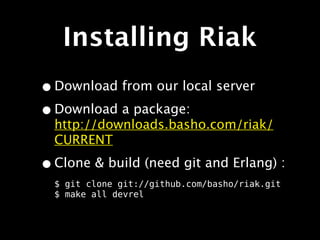
Installing Riak
Installing Riak
• Download from our local server
Installing Riak
• Download from our local server
• Download a package:
  http://downloads.basho.com/riak/
  CURRENT
Installing Riak
• Download from our local server
• Download a package:
  http://downloads.basho.com/riak/
  CURRENT

• Clone & build (need git and Erlang) :
  $ git clone git://github.com/basho/riak.git
  $ make all devrel
You need `curl`
    apt-get install curl
     yum install curl
Start the Cluster
Start the Cluster

$ surge-start.sh
Start the Cluster

$ surge-start.sh
dev1/bin/riak start
dev2/bin/riak start
dev3/bin/riak start
dev4/bin/riak start
Start the Cluster

$ surge-start.sh
dev1/bin/riak start
dev2/bin/riak start
dev3/bin/riak start
dev4/bin/riak start
dev2/bin/riak-admin join dev1
Sent join request to dev1
dev3/bin/riak-admin join dev1
Sent join request to dev1
dev4/bin/riak-admin join dev1
Sent join request to dev1
Check its status
Check its status


$ dev1/bin/riak-admin member_status

$ dev1/bin/riak-admin ring_status

$ dev1/bin/riak-admin status
PUT
PUT
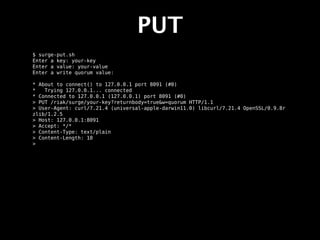
$ surge-put.sh
PUT
$ surge-put.sh
Enter a key: your-key
PUT
$ surge-put.sh
Enter a key: your-key
Enter a value: your-value
PUT
$ surge-put.sh
Enter a key: your-key
Enter a value: your-value
Enter a write quorum value:
PUT
$ surge-put.sh
Enter a key: your-key
Enter a value: your-value
Enter a write quorum value:

* About to connect() to 127.0.0.1 port 8091 (#0)
*   Trying 127.0.0.1... connected
* Connected to 127.0.0.1 (127.0.0.1) port 8091 (#0)
> PUT /riak/surge/your-key?returnbody=true&w=quorum HTTP/1.1
> User-Agent: curl/7.21.4 (universal-apple-darwin11.0) libcurl/7.21.4 OpenSSL/0.9.8r
zlib/1.2.5
> Host: 127.0.0.1:8091
> Accept: */*
> Content-Type: text/plain
> Content-Length: 10
>
PUT
$ surge-put.sh
Enter a key: your-key
Enter a value: your-value
Enter a write quorum value:

* About to connect() to 127.0.0.1 port 8091 (#0)
*   Trying 127.0.0.1... connected
* Connected to 127.0.0.1 (127.0.0.1) port 8091 (#0)
> PUT /riak/surge/your-key?returnbody=true&w=quorum HTTP/1.1
> User-Agent: curl/7.21.4 (universal-apple-darwin11.0) libcurl/7.21.4 OpenSSL/0.9.8r
zlib/1.2.5
> Host: 127.0.0.1:8091
> Accept: */*
> Content-Type: text/plain
> Content-Length: 10
>
< HTTP/1.1 200 OK
< X-Riak-Vclock: a85hYGBgzGDKBVIcR4M2cvs1qb3LYEpkzGNleL/k23G+LAA=
< Vary: Accept-Encoding
< Server: MochiWeb/1.1 WebMachine/1.9.0 (participate in the frantic)
< Link: </riak/surge>; rel="up"
< Date: Tue, 27 Sep 2011 19:21:08 GMT
< Content-Type: text/plain
< Content-Length: 10
<
* Connection #0 to host 127.0.0.1 left intact
* Closing connection #0
your-value
GET
GET
$ surge-get.sh
GET
$ surge-get.sh
Enter a key: your-key
GET
$ surge-get.sh
Enter a key: your-key
Enter a read quorum value (default: quorum):
GET
$ surge-get.sh
Enter a key: your-key
Enter a read quorum value (default: quorum):

* About to connect() to 127.0.0.1 port 8091 (#0)
*   Trying 127.0.0.1... connected
* Connected to 127.0.0.1 (127.0.0.1) port 8091 (#0)
> GET /riak/surge/your-key?r=quorum HTTP/1.1
> User-Agent: curl/7.21.4 (universal-apple-darwin11.0) libcurl/7.21.4 OpenSSL/0.9.8r
zlib/1.2.5
> Host: 127.0.0.1:8091
> Accept: */*
>
GET
$ surge-get.sh
Enter a key: your-key
Enter a read quorum value (default: quorum):

* About to connect() to 127.0.0.1 port 8091 (#0)
*   Trying 127.0.0.1... connected
* Connected to 127.0.0.1 (127.0.0.1) port 8091 (#0)
> GET /riak/surge/your-key?r=quorum HTTP/1.1
> User-Agent: curl/7.21.4 (universal-apple-darwin11.0) libcurl/7.21.4 OpenSSL/0.9.8r
zlib/1.2.5
> Host: 127.0.0.1:8091
> Accept: */*
>
< HTTP/1.1 200 OK
< X-Riak-Vclock: a85hYGBgzGDKBVIcR4M2cvs1qb3LYEpkzGNleL/k23G+LAA=
< Vary: Accept-Encoding
< Server: MochiWeb/1.1 WebMachine/1.9.0 (participate in the frantic)
< Link: </riak/surge>; rel="up"
< Last-Modified: Tue, 27 Sep 2011 19:01:45 GMT
< ETag: "51h3q7RjTNaHWYpO4P0MJj"
< Date: Tue, 27 Sep 2011 19:31:01 GMT
< Content-Type: text/plain
< Content-Length: 10
<
* Connection #0 to host 127.0.0.1 left intact
* Closing connection #0
your-value
GET
$ surge-get.sh
Enter a key: your-key
Enter a read quorum value (default: quorum):

* About to connect() to 127.0.0.1 port 8091 (#0)
*   Trying 127.0.0.1... connected
* Connected to 127.0.0.1 (127.0.0.1) port 8091 (#0)
> GET /riak/surge/your-key?r=quorum HTTP/1.1
> User-Agent: curl/7.21.4 (universal-apple-darwin11.0) libcurl/7.21.4 OpenSSL/0.9.8r
zlib/1.2.5
> Host: 127.0.0.1:8091
> Accept: */*
>
< HTTP/1.1 200 OK
< X-Riak-Vclock: a85hYGBgzGDKBVIcR4M2cvs1qb3LYEpkzGNleL/k23G+LAA=
< Vary: Accept-Encoding
< Server: MochiWeb/1.1 WebMachine/1.9.0 (participate in the frantic)
< Link: </riak/surge>; rel="up"
< Last-Modified: Tue, 27 Sep 2011 19:01:45 GMT
< ETag: "51h3q7RjTNaHWYpO4P0MJj"
< Date: Tue, 27 Sep 2011 19:31:01 GMT
< Content-Type: text/plain
                                                                vector clock
< Content-Length: 10
<
* Connection #0 to host 127.0.0.1 left intact
* Closing connection #0
your-value
GET
$ surge-get.sh
Enter a key: your-key
Enter a read quorum value (default: quorum):

* About to connect() to 127.0.0.1 port 8091 (#0)
*   Trying 127.0.0.1... connected
* Connected to 127.0.0.1 (127.0.0.1) port 8091 (#0)
> GET /riak/surge/your-key?r=quorum HTTP/1.1
> User-Agent: curl/7.21.4 (universal-apple-darwin11.0) libcurl/7.21.4 OpenSSL/0.9.8r
zlib/1.2.5
> Host: 127.0.0.1:8091
> Accept: */*
>
< HTTP/1.1 200 OK
< X-Riak-Vclock: a85hYGBgzGDKBVIcR4M2cvs1qb3LYEpkzGNleL/k23G+LAA=
< Vary: Accept-Encoding
< Server: MochiWeb/1.1 WebMachine/1.9.0 (participate in the frantic)
< Link: </riak/surge>; rel="up"
< Last-Modified: Tue, 27 Sep 2011 19:01:45 GMT
< ETag: "51h3q7RjTNaHWYpO4P0MJj"
< Date: Tue, 27 Sep 2011 19:31:01 GMT
< Content-Type: text/plain
< Content-Length: 10
<
* Connection #0 to host 127.0.0.1 left intact
* Closing connection #0
your-value
                                                    caching headers
GET
$ surge-get.sh
Enter a key: your-key
Enter a read quorum value (default: quorum):

* About to connect() to 127.0.0.1 port 8091 (#0)
*   Trying 127.0.0.1... connected
* Connected to 127.0.0.1 (127.0.0.1) port 8091 (#0)
> GET /riak/surge/your-key?r=quorum HTTP/1.1
> User-Agent: curl/7.21.4 (universal-apple-darwin11.0) libcurl/7.21.4 OpenSSL/0.9.8r
zlib/1.2.5
> Host: 127.0.0.1:8091
> Accept: */*
>
< HTTP/1.1 200 OK
< X-Riak-Vclock: a85hYGBgzGDKBVIcR4M2cvs1qb3LYEpkzGNleL/k23G+LAA=
< Vary: Accept-Encoding
< Server: MochiWeb/1.1 WebMachine/1.9.0 (participate in the frantic)
< Link: </riak/surge>; rel="up"
< Last-Modified: Tue, 27 Sep 2011 19:01:45 GMT
< ETag: "51h3q7RjTNaHWYpO4P0MJj"
< Date: Tue, 27 Sep 2011 19:31:01 GMT
< Content-Type: text/plain
< Content-Length: 10
<
* Connection #0 to host 127.0.0.1 left intact
* Closing connection #0
your-value
                                   content-type
DELETE
DELETE
$ surge-delete.sh
DELETE
$ surge-delete.sh
Type a key: your-key
DELETE
$ surge-delete.sh
Type a key: your-key

* About to connect() to 127.0.0.1 port 8091 (#0)
*   Trying 127.0.0.1... connected
* Connected to 127.0.0.1 (127.0.0.1) port 8091 (#0)
> DELETE /riak/surge/your-key HTTP/1.1
> User-Agent: curl/7.21.4 (universal-apple-darwin11.0) libcurl/7.21.4 OpenSSL/0.9.8r
zlib/1.2.5
> Host: 127.0.0.1:8091
> Accept: */*
>
DELETE
$ surge-delete.sh
Type a key: your-key

* About to connect() to 127.0.0.1 port 8091 (#0)
*   Trying 127.0.0.1... connected
* Connected to 127.0.0.1 (127.0.0.1) port 8091 (#0)
> DELETE /riak/surge/your-key HTTP/1.1
> User-Agent: curl/7.21.4 (universal-apple-darwin11.0) libcurl/7.21.4 OpenSSL/0.9.8r
zlib/1.2.5
> Host: 127.0.0.1:8091
> Accept: */*
>
< HTTP/1.1 204 No Content
< Vary: Accept-Encoding
< Server: MochiWeb/1.1 WebMachine/1.9.0 (participate in the frantic)
< Date: Tue, 27 Sep 2011 19:33:59 GMT
< Content-Type: text/plain
< Content-Length: 0
<
* Connection #0 to host 127.0.0.1 left intact
* Closing connection #0
Kill two nodes
Kill two nodes


$ dev4/bin/riak stop
Kill two nodes


$ dev4/bin/riak stop
ok
Kill two nodes


$ dev4/bin/riak stop
ok

$ dev3/bin/riak stop
Kill two nodes


$ dev4/bin/riak stop
ok

$ dev3/bin/riak stop
ok
Try GETting your key
$ . ~/Desktop/surge/surge-get.sh
Try GETting your key
$ . ~/Desktop/surge/surge-get.sh
Enter a key: your-key
Try GETting your key
$ . ~/Desktop/surge/surge-get.sh
Enter a key: your-key
Enter a read quorum value (default: quorum):
Try GETting your key
$ . ~/Desktop/surge/surge-get.sh
Enter a key: your-key
Enter a read quorum value (default: quorum):

* About to connect() to 127.0.0.1 port 8091 (#0)
*   Trying 127.0.0.1... connected
* Connected to 127.0.0.1 (127.0.0.1) port 8091 (#0)
> GET /riak/surge/your-key?r=quorum HTTP/1.1
> User-Agent: curl/7.21.4 (universal-apple-darwin11.0) libcurl/7.21.4 OpenSSL/0.9.8r
zlib/1.2.5
> Host: 127.0.0.1:8091
> Accept: */*
>
Try GETting your key
$ . ~/Desktop/surge/surge-get.sh
Enter a key: your-key
Enter a read quorum value (default: quorum):

* About to connect() to 127.0.0.1 port 8091 (#0)
*   Trying 127.0.0.1... connected
* Connected to 127.0.0.1 (127.0.0.1) port 8091 (#0)
> GET /riak/surge/your-key?r=quorum HTTP/1.1
> User-Agent: curl/7.21.4 (universal-apple-darwin11.0) libcurl/7.21.4 OpenSSL/0.9.8r
zlib/1.2.5
> Host: 127.0.0.1:8091
> Accept: */*
>
< HTTP/1.1 200 OK
< X-Riak-Vclock: a85hYGBgzGDKBVIcR4M2cvs1qb3LYEpkzGNleL/k23G+LAA=
< Vary: Accept-Encoding
< Server: MochiWeb/1.1 WebMachine/1.9.0 (participate in the frantic)
< Link: </riak/surge>; rel="up"
< Last-Modified: Tue, 27 Sep 2011 19:50:07 GMT
< ETag: "51h3q7RjTNaHWYpO4P0MJj"
< Date: Tue, 27 Sep 2011 19:51:10 GMT
< Content-Type: text/plain
< Content-Length: 10
<
* Connection #0 to host 127.0.0.1 left intact
* Closing connection #0
your-value
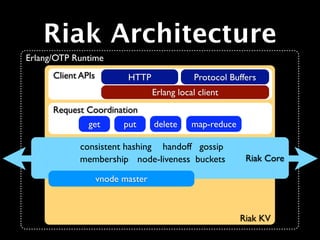
Riak Architecture
Key-Value Data
    Model
Key-Value Data
       Model
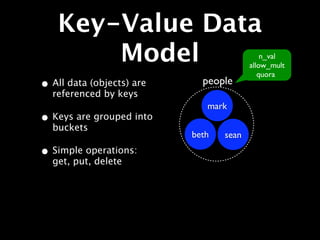
• All data (objects) are
  referenced by keys
                              mark


                           beth   sean
Key-Value Data
       Model                                 n_val
                                         allow_mult
                                            quora
• All data (objects) are     people
  referenced by keys
                              mark
• Keys are grouped into
  buckets
                           beth   sean
Key-Value Data
       Model                                 n_val
                                         allow_mult
                                            quora
• All data (objects) are     people
  referenced by keys
                              mark
• Keys are grouped into
  buckets
                           beth   sean
• Simple operations:
  get, put, delete
Key-Value Data
       Model
• All data (objects) are
  referenced by keys
                           people/beth
• Keys are grouped into    vclock: ...
                           content-type: text/html
  buckets
                           last-mod: 20101108T...
                           links: ...
• Simple operations:
  get, put, delete
                              <html><head>....
• Object is composed
  of metadata and value
Consistent Hashing
   & The Ring
Consistent Hashing
   & The Ring
• 160-bit integer
  keyspace
                      0


                              2 160/4


                    2 160/2
Consistent Hashing
   & The Ring
• 160-bit integer
  keyspace
                                    0
• Divided into fixed
  number of evenly-sized
  partitions
                           32 partitions    2 160/4


                                  2 160/2
Consistent Hashing
   & The Ring                                            node 0

                                                         node 1

• 160-bit integer                                        node 2
  keyspace
                                       0                 node 3

• Divided into fixed
  number of evenly-sized
  partitions
                              32 partitions    2 160/4
• Partitions are claimed by
  nodes in the cluster


                                     2 160/2
Consistent Hashing
   & The Ring                 node 0

                              node 1

• 160-bit integer             node 2
  keyspace
                              node 3

• Divided into fixed
  number of evenly-sized
  partitions

• Partitions are claimed by
  nodes in the cluster

• Replicas go to the N
  partitions following the
  key
Consistent Hashing
   & The Ring                                node 0

                                             node 1

• 160-bit integer                            node 2
  keyspace
                                             node 3

• Divided into fixed
  number of evenly-sized
  partitions

• Partitions are claimed by   N=3
  nodes in the cluster

• Replicas go to the N
  partitions following the
  key
                 hash(“conferences/surge”)
Request Quorums
Request Quorums

• Every request contacts all replicas of
  key
Request Quorums

• Every request contacts all replicas of
  key

• N - number of replicas (default 3)
Request Quorums

• Every request contacts all replicas of
  key

• N - number of replicas (default 3)
• R - read quorum
Request Quorums

• Every request contacts all replicas of
  key

• N - number of replicas (default 3)
• R - read quorum
• W - write quorum
Vector Clocks
Vector Clocks
• Every node has an ID (changed in 1.0)
Vector Clocks
• Every node has an ID (changed in 1.0)
• Send last-seen vector clock in every
  “put” or “delete” request
Vector Clocks
• Every node has an ID (changed in 1.0)
• Send last-seen vector clock in every
  “put” or “delete” request

• Riak tracks history of updates
Vector Clocks
• Every node has an ID (changed in 1.0)
• Send last-seen vector clock in every
  “put” or “delete” request

• Riak tracks history of updates
 • Auto-resolves stale versions
Vector Clocks
• Every node has an ID (changed in 1.0)
• Send last-seen vector clock in every
  “put” or “delete” request

• Riak tracks history of updates
 • Auto-resolves stale versions
 • Lets you decide conflicts
Vector Clocks
http://blog.basho.com/2010/01/29/why-vector-clocks-are-easy/

• Every node has an ID (changed in 1.0)
• Send last-seen vector clock in every
   “put” or “delete” request

• Riak tracks history of updates
 • Auto-resolves stale versions
 • Lets you decide conflicts
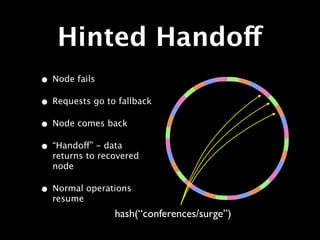
Hinted Handoff
Hinted Handoff
• Node fails               X
                   X
                               X

               X
                                   X

                   X
                               X
                       X
Hinted Handoff
• Node fails                              X
                                X
• Requests go to fallback                     X

                            X
                                                  X

                                X
                                              X
                                      X
                hash(“conferences/surge”)
Hinted Handoff
• Node fails
• Requests go to fallback
• Node comes back


                hash(“conferences/surge”)
Hinted Handoff
• Node fails
• Requests go to fallback
• Node comes back
• “Handoff” - data
  returns to recovered
  node


                hash(“conferences/surge”)
Hinted Handoff
• Node fails
• Requests go to fallback
• Node comes back
• “Handoff” - data
  returns to recovered
  node

• Normal operations
  resume
                hash(“conferences/surge”)
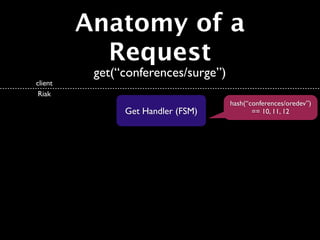
Anatomy of a
  Request
 get(“conferences/surge”)
Anatomy of a
           Request
          get(“conferences/surge”)
client
 Riak
Anatomy of a
           Request
          get(“conferences/surge”)
client
 Riak

               Get Handler (FSM)
Anatomy of a
           Request
          get(“conferences/surge”)
client
 Riak
                                     hash(“conferences/oredev”)
               Get Handler (FSM)            == 10, 11, 12
Anatomy of a
                          Request
                         get(“conferences/surge”)
          client
           Riak
                                                        hash(“conferences/oredev”)
                              Get Handler (FSM)                == 10, 11, 12


    Coordinating node
        Cluster


6        7         8     9    10     11       12   13         14        15           16
                                   The Ring
Anatomy of a
                           Request
                             get(“conferences/surge”)
          client
           Riak

                                     Get Handler (FSM)

                   get(“conferences/oredev”)
    Coordinating node
        Cluster


6        7           8       9       10        11    12   13   14   15   16
                                          The Ring
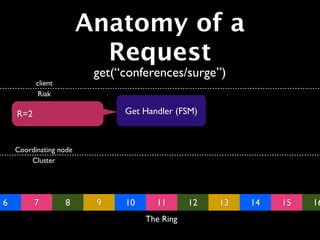
Anatomy of a
                          Request
                         get(“conferences/surge”)
          client
           Riak

    R=2                       Get Handler (FSM)


    Coordinating node
        Cluster


6         7        8     9    10     11       12   13   14   15   16
                                   The Ring
Anatomy of a
                          Request
                         get(“conferences/surge”)
          client
           Riak

    R=2       v1              Get Handler (FSM)


    Coordinating node
        Cluster


6         7        8     9    10     11       12   13   14   15   16
                                   The Ring
Anatomy of a
                 Request
                    get(“conferences/surge”)
      client
       Riak

R=2      v1    v2        Get Handler (FSM)
Anatomy of a
                 Request
                    get(“conferences/surge”)
      client                          v2
       Riak

R=2            v2        Get Handler (FSM)
Anatomy of a
  Request
 get(“conferences/surge”)
                 v2
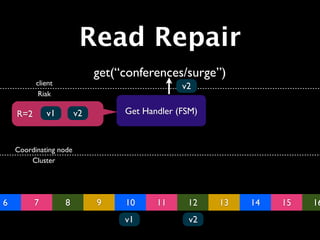
Read Repair
                             get(“conferences/surge”)
          client                               v2
           Riak

    R=2       v1        v2        Get Handler (FSM)


    Coordinating node
        Cluster


6         7        8         9    10     11     12    13   14   15   16
                                  v1            v2
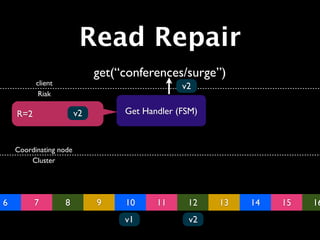
Read Repair
                             get(“conferences/surge”)
          client                               v2
           Riak

    R=2                 v2        Get Handler (FSM)


    Coordinating node
        Cluster


6         7        8         9    10     11     12    13   14   15   16
                                  v1            v2
Read Repair
                             get(“conferences/surge”)
          client                               v2
           Riak

    R=2                 v2        Get Handler (FSM)


    Coordinating node
        Cluster


6         7        8         9    10     11     12    13   14   15   16
                                  v1     v1     v2
Read Repair
                             get(“conferences/surge”)
          client                                     v2
           Riak

    R=2                 v2            Get Handler (FSM)


    Coordinating node
        Cluster
                                 v2        v2


6         7        8         9        10        11    12   13   14   15   16
                                      v2        v2    v2
Riak Architecture
Erlang/OTP Runtime
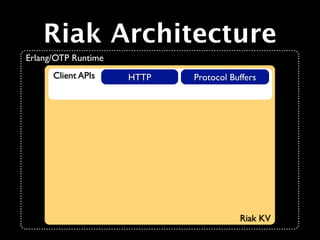
Riak Architecture
Erlang/OTP Runtime


                     Riak KV
Riak Architecture
Erlang/OTP Runtime
      Client APIs


                     Riak KV
Riak Architecture
Erlang/OTP Runtime
      Client APIs    HTTP


                            Riak KV
Riak Architecture
Erlang/OTP Runtime
      Client APIs    HTTP   Protocol Buffers


                                       Riak KV
Riak Architecture
Erlang/OTP Runtime
      Client APIs    HTTP               Protocol Buffers
                            Erlang local client


                                                   Riak KV
Riak Architecture
Erlang/OTP Runtime
      Client APIs      HTTP               Protocol Buffers
                              Erlang local client
      Request Coordination


                                                     Riak KV
Riak Architecture
Erlang/OTP Runtime
      Client APIs      HTTP               Protocol Buffers
                              Erlang local client
      Request Coordination
               get    put     delete     map-reduce


                                                      Riak KV
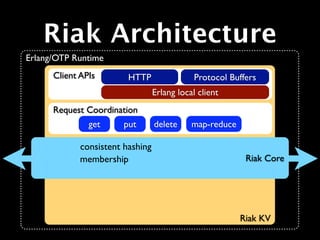
Riak Architecture
Erlang/OTP Runtime
      Client APIs      HTTP               Protocol Buffers
                              Erlang local client
      Request Coordination
               get    put     delete     map-reduce


                                                       Riak Core


                                                      Riak KV
Riak Architecture
Erlang/OTP Runtime
      Client APIs        HTTP                 Protocol Buffers
                                  Erlang local client
      Request Coordination
               get      put       delete     map-reduce

             consistent hashing
                                                           Riak Core


                                                          Riak KV
Riak Architecture
Erlang/OTP Runtime
      Client APIs        HTTP                 Protocol Buffers
                                  Erlang local client
      Request Coordination
               get      put       delete     map-reduce

             consistent hashing
             membership                                    Riak Core


                                                          Riak KV
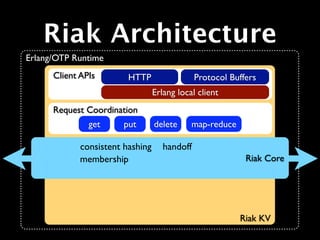
Riak Architecture
Erlang/OTP Runtime
      Client APIs        HTTP                  Protocol Buffers
                                  Erlang local client
      Request Coordination
               get      put       delete     map-reduce

             consistent hashing      handoff
             membership                                     Riak Core


                                                          Riak KV
Riak Architecture
Erlang/OTP Runtime
      Client APIs       HTTP               Protocol Buffers
                               Erlang local client
      Request Coordination
               get     put     delete     map-reduce

             consistent hashing handoff
             membership node-liveness                   Riak Core


                                                       Riak KV
Riak Architecture
Erlang/OTP Runtime
      Client APIs       HTTP               Protocol Buffers
                               Erlang local client
      Request Coordination
               get     put     delete     map-reduce

             consistent hashing handoff gossip
             membership node-liveness                   Riak Core


                                                       Riak KV
Riak Architecture
Erlang/OTP Runtime
      Client APIs      HTTP               Protocol Buffers
                              Erlang local client
      Request Coordination
               get    put     delete     map-reduce

             consistent hashing handoff gossip
             membership node-liveness buckets          Riak Core


                                                      Riak KV
Riak Architecture
Erlang/OTP Runtime
      Client APIs          HTTP                Protocol Buffers
                                   Erlang local client
      Request Coordination
               get        put      delete     map-reduce

             consistent hashing handoff gossip
             membership node-liveness buckets               Riak Core

                    vnode master


                                                           Riak KV
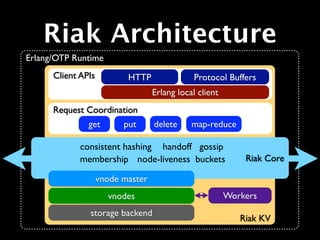
Riak Architecture
Erlang/OTP Runtime
      Client APIs          HTTP                Protocol Buffers
                                   Erlang local client
      Request Coordination
               get        put      delete     map-reduce

             consistent hashing handoff gossip
             membership node-liveness buckets               Riak Core

                    vnode master
                      vnodes

                                                           Riak KV
Riak Architecture
Erlang/OTP Runtime
      Client APIs          HTTP                Protocol Buffers
                                   Erlang local client
      Request Coordination
               get        put      delete     map-reduce

             consistent hashing handoff gossip
             membership node-liveness buckets               Riak Core

                    vnode master
                      vnodes
               storage backend
                                                           Riak KV
Riak Architecture
Erlang/OTP Runtime
      Client APIs          HTTP                Protocol Buffers
                                   Erlang local client
      Request Coordination
               get        put      delete     map-reduce

             consistent hashing handoff gossip
             membership node-liveness buckets                Riak Core

                    vnode master
                      vnodes                             Workers
               storage backend
                                                            Riak KV
Modeling &
 Querying
Application
  Design
Application
        Design
• No intrinsic schema
Application
        Design
• No intrinsic schema
• Your application defines the
  structure and semantics
Application
        Design
• No intrinsic schema
• Your application defines the
  structure and semantics

• Your application resolves conflicts
  (if you care)
Modeling Tools
Modeling Tools

• Key-Value
Modeling Tools

• Key-Value
• Links
Modeling Tools

• Key-Value
• Links
• Full-text Search
Modeling Tools

• Key-Value
• Links
• Full-text Search
• Secondary Indexes (2I)
Modeling Tools

• Key-Value
• Links
• Full-text Search
• Secondary Indexes (2I)
• MapReduce
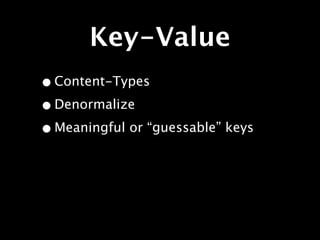
Key-Value
Key-Value
• Content-Types
Key-Value
• Content-Types
• Denormalize
Key-Value
• Content-Types
• Denormalize
• Meaningful or “guessable” keys
Key-Value
• Content-Types
• Denormalize
• Meaningful or “guessable” keys
 • Composites
Key-Value
• Content-Types
• Denormalize
• Meaningful or “guessable” keys
 • Composites
 • Time-boxing
Key-Value
• Content-Types
• Denormalize
• Meaningful or “guessable” keys
 • Composites
 • Time-boxing
• References (value is a key or list)
Links
Links

• Lightweight relationships, like <a>
Links

• Lightweight relationships, like <a>
• Includes a “tag”
Links

• Lightweight relationships, like <a>
• Includes a “tag”
• Built-in traversal op (“walking”)
  GET /riak/b/k/[bucket],[tag],[keep]
Links

• Lightweight relationships, like <a>
• Includes a “tag”
• Built-in traversal op (“walking”)
  GET /riak/b/k/[bucket],[tag],[keep]

• Limited in number (part of meta)
Full-text Search
Full-text Search

• Designed for searching prose
Full-text Search

• Designed for searching prose
• Lucene/Solr-like query interface
Full-text Search

• Designed for searching prose
• Lucene/Solr-like query interface
• Automatically index K/V values
Full-text Search

• Designed for searching prose
• Lucene/Solr-like query interface
• Automatically index K/V values
• Input to MapReduce
Full-text Search

• Designed for searching prose
• Lucene/Solr-like query interface
• Automatically index K/V values
• Input to MapReduce
• Customizable index schemas
Secondary Indexes
Secondary Indexes

• Defined as metadata
Secondary Indexes

• Defined as metadata
• Two index types: _int and _bin
Secondary Indexes

• Defined as metadata
• Two index types: _int and _bin
• Two query types: equal and range
Secondary Indexes

• Defined as metadata
• Two index types: _int and _bin
• Two query types: equal and range
• Input to MapReduce
MapReduce
MapReduce
• For more involved queries
MapReduce
• For more involved queries
 • Specify input keys
MapReduce
• For more involved queries
 • Specify input keys
 • Process data in “map” and
   “reduce” functions
MapReduce
• For more involved queries
 • Specify input keys
 • Process data in “map” and
   “reduce” functions

   • JavaScript or Erlang
MapReduce
• For more involved queries
 • Specify input keys
 • Process data in “map” and
   “reduce” functions

   • JavaScript or Erlang
• Not tuned for batch processing
Lab: Querying
Lab: Walk Links
Lab: Walk Links

• Store an object with a Link
Lab: Walk Links

• Store an object with a Link
• Store the target of the Link
Lab: Walk Links

• Store an object with a Link
• Store the target of the Link
• Walk from one to the other
Lab: Store Links
Lab: Store Links
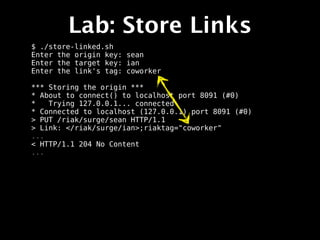
$ ./store-linked.sh
Lab: Store Links
$ ./store-linked.sh
Enter the origin key: sean
Enter the target key: ian
Enter the link's tag: coworker
Lab: Store Links
$ ./store-linked.sh
Enter the origin key: sean
Enter the target key: ian
Enter the link's tag: coworker

*** Storing the origin ***
* About to connect() to localhost port 8091 (#0)
*   Trying 127.0.0.1... connected
* Connected to localhost (127.0.0.1) port 8091 (#0)
> PUT /riak/surge/sean HTTP/1.1
> Link: </riak/surge/ian>;riaktag="coworker"
...
< HTTP/1.1 204 No Content
...
Lab: Store Links
$ ./store-linked.sh
Enter the origin key: sean
Enter the target key: ian
Enter the link's tag: coworker

*** Storing the origin ***
* About to connect() to localhost port 8091 (#0)
*   Trying 127.0.0.1... connected
* Connected to localhost (127.0.0.1) port 8091 (#0)
> PUT /riak/surge/sean HTTP/1.1
> Link: </riak/surge/ian>;riaktag="coworker"
...
< HTTP/1.1 204 No Content
...
Lab: Store Links
$ ./store-linked.sh
Enter the origin key: sean
Enter the target key: ian
Enter the link's tag: coworker

*** Storing the origin ***
* About to connect() to localhost port 8091 (#0)
*   Trying 127.0.0.1... connected
* Connected to localhost (127.0.0.1) port 8091 (#0)
> PUT /riak/surge/sean HTTP/1.1
> Link: </riak/surge/ian>;riaktag="coworker"
...
< HTTP/1.1 204 No Content
...
Lab: Store Links
$ ./store-linked.sh
Enter the origin key: sean
Enter the target key: ian
Enter the link's tag: coworker

*** Storing the origin ***
* About to connect() to localhost port 8091 (#0)
*   Trying 127.0.0.1... connected
* Connected to localhost (127.0.0.1) port 8091 (#0)
> PUT /riak/surge/sean HTTP/1.1
> Link: </riak/surge/ian>;riaktag="coworker"
...
< HTTP/1.1 204 No Content
...
Lab: Store Links
$ ./store-linked.sh
Enter the origin key: sean
Enter the target key: ian
Enter the link's tag: coworker

*** Storing the origin ***
* About to connect() to localhost port 8091 (#0)
*   Trying 127.0.0.1... connected
* Connected to localhost (127.0.0.1) port 8091 (#0)
> PUT /riak/surge/sean HTTP/1.1
> Link: </riak/surge/ian>;riaktag="coworker"
...
< HTTP/1.1 204 No Content
...
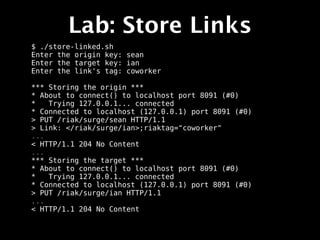
*** Storing the target ***
* About to connect() to localhost port 8091 (#0)
*   Trying 127.0.0.1... connected
* Connected to localhost (127.0.0.1) port 8091 (#0)
> PUT /riak/surge/ian HTTP/1.1
...
< HTTP/1.1 204 No Content
Lab: Store Links
$ ./store-linked.sh
Enter the origin key: sean
Enter the target key: ian
Enter the link's tag: coworker

*** Storing the origin ***
* About to connect() to localhost port 8091 (#0)
*   Trying 127.0.0.1... connected
* Connected to localhost (127.0.0.1) port 8091 (#0)
> PUT /riak/surge/sean HTTP/1.1
> Link: </riak/surge/ian>;riaktag="coworker"
...
< HTTP/1.1 204 No Content
...
*** Storing the target ***
* About to connect() to localhost port 8091 (#0)
*   Trying 127.0.0.1... connected
* Connected to localhost (127.0.0.1) port 8091 (#0)
> PUT /riak/surge/ian HTTP/1.1
...
< HTTP/1.1 204 No Content
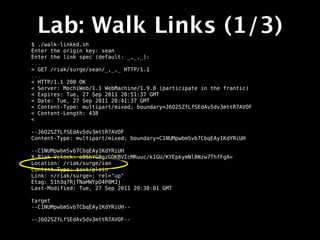
Lab: Walk Links (1/3)
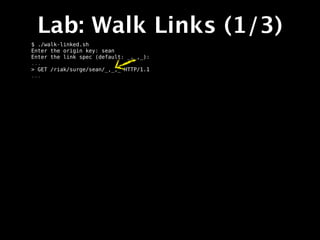
$ ./walk-linked.sh
Lab: Walk Links (1/3)
$ ./walk-linked.sh
Enter the origin key: sean
Enter the link spec (default: _,_,_):
Lab: Walk Links (1/3)
$ ./walk-linked.sh
Enter the origin key: sean
Enter the link spec (default: _,_,_):
...
> GET /riak/surge/sean/_,_,_ HTTP/1.1
...
Lab: Walk Links (1/3)
$ ./walk-linked.sh
Enter the origin key: sean
Enter the link spec (default: _,_,_):
...
> GET /riak/surge/sean/_,_,_ HTTP/1.1
...
Lab: Walk Links (1/3)
$ ./walk-linked.sh
Enter the origin key: sean
Enter the link spec (default: _,_,_):
...
> GET /riak/surge/sean/_,_,_ HTTP/1.1
...
Lab: Walk Links (1/3)
$ ./walk-linked.sh
Enter the origin key: sean
Enter the link spec (default: _,_,_):
...
> GET /riak/surge/sean/_,_,_ HTTP/1.1
...
< HTTP/1.1 200 OK
< Server: MochiWeb/1.1 WebMachine/1.9.0 (participate in the frantic)
< Expires: Tue, 27 Sep 2011 20:51:37 GMT
< Date: Tue, 27 Sep 2011 20:41:37 GMT
< Content-Type: multipart/mixed; boundary=J6O2SZfLfSEdAv5dv3mttR7AVOF
< Content-Length: 438
<
Lab: Walk Links (1/3)
$ ./walk-linked.sh
Enter the origin key: sean
Enter the link spec (default: _,_,_):
...
> GET /riak/surge/sean/_,_,_ HTTP/1.1
...
< HTTP/1.1 200 OK
< Server: MochiWeb/1.1 WebMachine/1.9.0 (participate in the frantic)
< Expires: Tue, 27 Sep 2011 20:51:37 GMT
< Date: Tue, 27 Sep 2011 20:41:37 GMT
< Content-Type: multipart/mixed; boundary=J6O2SZfLfSEdAv5dv3mttR7AVOF
< Content-Length: 438
<
Lab: Walk Links (1/3)
$ ./walk-linked.sh
Enter the origin key: sean
Enter the link spec (default: _,_,_):
...
> GET /riak/surge/sean/_,_,_ HTTP/1.1
...
< HTTP/1.1 200 OK
< Server: MochiWeb/1.1 WebMachine/1.9.0 (participate in the frantic)
< Expires: Tue, 27 Sep 2011 20:51:37 GMT
< Date: Tue, 27 Sep 2011 20:41:37 GMT
< Content-Type: multipart/mixed; boundary=J6O2SZfLfSEdAv5dv3mttR7AVOF
< Content-Length: 438
<

--J6O2SZfLfSEdAv5dv3mttR7AVOF
Content-Type: multipart/mixed; boundary=C1NUMpwbmSvb7CbqEAy1KdYRiUH

--C1NUMpwbmSvb7CbqEAy1KdYRiUH
X-Riak-Vclock: a85hYGBgzGDKBVIcMRuuc/k1GU/KYEpkymNl0Nzw7ThfFgA=
Location: /riak/surge/ian
Content-Type: text/plain
Link: </riak/surge>; rel="up"
Etag: 51h3q7RjTNaHWYpO4P0MJj
Last-Modified: Tue, 27 Sep 2011 20:38:01 GMT

target
--C1NUMpwbmSvb7CbqEAy1KdYRiUH--

--J6O2SZfLfSEdAv5dv3mttR7AVOF--
Lab: Walk Links (1/3)
$ ./walk-linked.sh
Enter the origin key: sean
Enter the link spec (default: _,_,_):
...
> GET /riak/surge/sean/_,_,_ HTTP/1.1
...
< HTTP/1.1 200 OK
< Server: MochiWeb/1.1 WebMachine/1.9.0 (participate in the frantic)
< Expires: Tue, 27 Sep 2011 20:51:37 GMT
< Date: Tue, 27 Sep 2011 20:41:37 GMT
< Content-Type: multipart/mixed; boundary=J6O2SZfLfSEdAv5dv3mttR7AVOF
< Content-Length: 438
<

--J6O2SZfLfSEdAv5dv3mttR7AVOF
Content-Type: multipart/mixed; boundary=C1NUMpwbmSvb7CbqEAy1KdYRiUH

--C1NUMpwbmSvb7CbqEAy1KdYRiUH
X-Riak-Vclock: a85hYGBgzGDKBVIcMRuuc/k1GU/KYEpkymNl0Nzw7ThfFgA=
Location: /riak/surge/ian
Content-Type: text/plain
Link: </riak/surge>; rel="up"
Etag: 51h3q7RjTNaHWYpO4P0MJj
Last-Modified: Tue, 27 Sep 2011 20:38:01 GMT

target
--C1NUMpwbmSvb7CbqEAy1KdYRiUH--

--J6O2SZfLfSEdAv5dv3mttR7AVOF--
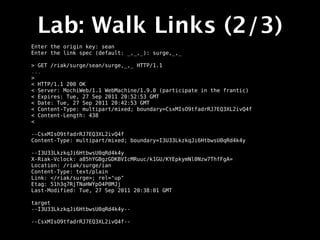
Lab: Walk Links (2/3)
Enter the origin key: sean
Enter the link spec (default: _,_,_): surge,_,_
Lab: Walk Links (2/3)
Enter the origin key: sean
Enter the link spec (default: _,_,_): surge,_,_

> GET /riak/surge/sean/surge,_,_ HTTP/1.1
...
Lab: Walk Links (2/3)
Enter the origin key: sean
Enter the link spec (default: _,_,_): surge,_,_

> GET /riak/surge/sean/surge,_,_ HTTP/1.1
...
>
< HTTP/1.1 200 OK
< Server: MochiWeb/1.1 WebMachine/1.9.0 (participate in the frantic)
< Expires: Tue, 27 Sep 2011 20:52:53 GMT
< Date: Tue, 27 Sep 2011 20:42:53 GMT
< Content-Type: multipart/mixed; boundary=CsxMIsO9tfadrRJ7EQ3XL2ivQ4f
< Content-Length: 438
<

--CsxMIsO9tfadrRJ7EQ3XL2ivQ4f
Content-Type: multipart/mixed; boundary=I3U33LkzkqJi6HtbwsU0qRd4k4y

--I3U33LkzkqJi6HtbwsU0qRd4k4y
X-Riak-Vclock: a85hYGBgzGDKBVIcMRuuc/k1GU/KYEpkymNl0Nzw7ThfFgA=
Location: /riak/surge/ian
Content-Type: text/plain
Link: </riak/surge>; rel="up"
Etag: 51h3q7RjTNaHWYpO4P0MJj
Last-Modified: Tue, 27 Sep 2011 20:38:01 GMT

target
--I3U33LkzkqJi6HtbwsU0qRd4k4y--

--CsxMIsO9tfadrRJ7EQ3XL2ivQ4f--
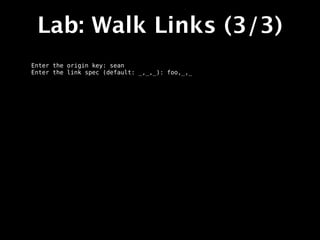
Lab: Walk Links (3/3)
Enter the origin key: sean
Enter the link spec (default: _,_,_): foo,_,_
Lab: Walk Links (3/3)
Enter the origin key: sean
Enter the link spec (default: _,_,_): foo,_,_

...
> GET /riak/surge/sean/foo,_,_ HTTP/1.1
< HTTP/1.1 200 OK
< Server: MochiWeb/1.1 WebMachine/1.9.0 (participate in the frantic)
< Expires: Tue, 27 Sep 2011 20:53:08 GMT
< Date: Tue, 27 Sep 2011 20:43:08 GMT
< Content-Type: multipart/mixed; boundary=3AsxaHhVMlDEQCakLSmNqQUTS4Y
< Content-Length: 172
<

--3AsxaHhVMlDEQCakLSmNqQUTS4Y
Content-Type: multipart/mixed; boundary=Ivtq9RgHpydECNEZOnHpiqHcFYl

--Ivtq9RgHpydECNEZOnHpiqHcFYl--

--3AsxaHhVMlDEQCakLSmNqQUTS4Y--
Lab: Secondary
   Indexes
Lab: Secondary
      Indexes

• Create some objects with indexes
Lab: Secondary
      Indexes

• Create some objects with indexes
• Query the index for their keys
Lab: Secondary
      Indexes

• Create some objects with indexes
• Query the index for their keys
• Query input to MapReduce
Lab: Create 2I Objects
$ ./store-indexed.sh
Lab: Create 2I Objects
$ ./store-indexed.sh
Enter the number of objects to create: 40
Lab: Create 2I Objects
$ ./store-indexed.sh
Enter the number of objects to create: 40
* About to connect() to localhost port 8091 (#0)
*   Trying 127.0.0.1... connected
* Connected to localhost (127.0.0.1) port 8091 (#0)
> PUT /riak/surge/surgeobj1?returnbody=true HTTP/1.1
> User-Agent: curl/7.19.7 (universal-apple-darwin10.0) libcurl/7.19.7 OpenSSL/0.9.8r
zlib/1.2.3
> Host: localhost:8091
> Accept: */*
> Content-Type: application/json
> X-Riak-Index-surgeobj_int: 1
> Content-Length: 14
>
< HTTP/1.1 200 OK
< X-Riak-Vclock: a85hYGBgzGDKBVIcR4M2cvs1uZVkMCUy5rEyHDn57ThfFgA=
< x-riak-index-surgeobj_int: 1
< Vary: Accept-Encoding
< Server: MochiWeb/1.1 WebMachine/1.9.0 (participate in the frantic)
< Link: </riak/surge>; rel="up"
< Date: Tue, 27 Sep 2011 22:27:16 GMT
< Content-Type: application/json
< Content-Length: 14
<
* Connection #0 to host localhost left intact
* Closing connection #0
{"surgeobj":1} ...
Lab: Create 2I Objects
$ ./store-indexed.sh
Enter the number of objects to create: 40       key
* About to connect() to localhost port 8091 (#0)
*   Trying 127.0.0.1... connected
* Connected to localhost (127.0.0.1) port 8091 (#0)
> PUT /riak/surge/surgeobj1?returnbody=true HTTP/1.1
> User-Agent: curl/7.19.7 (universal-apple-darwin10.0) libcurl/7.19.7 OpenSSL/0.9.8r
zlib/1.2.3
> Host: localhost:8091
> Accept: */*
> Content-Type: application/json
> X-Riak-Index-surgeobj_int: 1
> Content-Length: 14
>
< HTTP/1.1 200 OK
< X-Riak-Vclock: a85hYGBgzGDKBVIcR4M2cvs1uZVkMCUy5rEyHDn57ThfFgA=
< x-riak-index-surgeobj_int: 1
< Vary: Accept-Encoding
< Server: MochiWeb/1.1 WebMachine/1.9.0 (participate in the frantic)
< Link: </riak/surge>; rel="up"
< Date: Tue, 27 Sep 2011 22:27:16 GMT
< Content-Type: application/json
< Content-Length: 14
<
* Connection #0 to host localhost left intact
* Closing connection #0
{"surgeobj":1} ...
Lab: Create 2I Objects
$ ./store-indexed.sh
Enter the number of objects to create: 40
* About to connect() to localhost port 8091 (#0)
*   Trying 127.0.0.1... connected
* Connected to localhost (127.0.0.1) port 8091 (#0)
> PUT /riak/surge/surgeobj1?returnbody=true HTTP/1.1
> User-Agent: curl/7.19.7 (universal-apple-darwin10.0) libcurl/7.19.7 OpenSSL/0.9.8r
zlib/1.2.3
> Host: localhost:8091
> Accept: */*
                                                       index header
> Content-Type: application/json
> X-Riak-Index-surgeobj_int: 1
> Content-Length: 14
>
< HTTP/1.1 200 OK
< X-Riak-Vclock: a85hYGBgzGDKBVIcR4M2cvs1uZVkMCUy5rEyHDn57ThfFgA=
< x-riak-index-surgeobj_int: 1
< Vary: Accept-Encoding
< Server: MochiWeb/1.1 WebMachine/1.9.0 (participate in the frantic)
< Link: </riak/surge>; rel="up"
< Date: Tue, 27 Sep 2011 22:27:16 GMT
< Content-Type: application/json
< Content-Length: 14
<
* Connection #0 to host localhost left intact
* Closing connection #0
{"surgeobj":1} ...
Lab: Query 2I (1/2)
Lab: Query 2I (1/2)
$ ./query-indexed.sh
Lab: Query 2I (1/2)
$ ./query-indexed.sh
Query on range or equality? (r/e) e
Index value: 10
Lab: Query 2I (1/2)
$ ./query-indexed.sh
Query on range or equality? (r/e) e
Index value: 10

* About to connect() to localhost port 8091 (#0)
*   Trying 127.0.0.1... connected
* Connected to localhost (127.0.0.1) port 8091 (#0)
> GET /buckets/surge/index/surgeobj_int/10 HTTP/1.1
> User-Agent: curl/7.19.7 (universal-apple-darwin10.0) libcurl/7.19.7
OpenSSL/0.9.8r zlib/1.2.3
> Host: localhost:8091
> Accept: */*
>
< HTTP/1.1 200 OK
< Vary: Accept-Encoding
< Server: MochiWeb/1.1 WebMachine/1.9.0 (participate in the frantic)
< Date: Tue, 27 Sep 2011 22:27:27 GMT
< Content-Type: application/json
< Content-Length: 23
<
* Connection #0 to host localhost left intact
* Closing connection #0
{"keys":["surgeobj10"]}
Lab: Query 2I (2/2)
Lab: Query 2I (2/2)
Query on range or equality? (r/e) r
Range start: 5
Range end: 15
Lab: Query 2I (2/2)
Query on range or equality? (r/e) r
Range start: 5
Range end: 15

* About to connect() to localhost port 8091 (#0)
*   Trying 127.0.0.1... connected
* Connected to localhost (127.0.0.1) port 8091 (#0)
> GET /buckets/surge/index/surgeobj_int/5/15 HTTP/1.1
> User-Agent: curl/7.19.7 (universal-apple-darwin10.0) libcurl/7.19.7
OpenSSL/0.9.8r zlib/1.2.3
> Host: localhost:8091
> Accept: */*
>
< HTTP/1.1 200 OK
< Vary: Accept-Encoding
< Server: MochiWeb/1.1 WebMachine/1.9.0 (participate in the frantic)
< Date: Tue, 27 Sep 2011 22:27:36 GMT
< Content-Type: application/json
< Content-Length: 148
<
* Connection #0 to host localhost left intact
* Closing connection #0
{"keys":
["surgeobj12","surgeobj15","surgeobj6","surgeobj5","surgeobj13","surgeob
j8","surgeobj11","surgeobj14","surgeobj9","surgeobj10","surgeobj7"]}
Lab: 2I MapReduce
Lab: 2I MapReduce
$ ./mapred-indexed.sh
Lab: 2I MapReduce
$ ./mapred-indexed.sh
Query on range or equality? (r/e) r
Range start: 35
Range end: 40
Lab: 2I MapReduce
$ ./mapred-indexed.sh
Query on range or equality? (r/e) r
Range start: 35
Range end: 40

Executing MapReduce:
{ "inputs":{ "bucket":"surge", "index":"surgeobj_int" ,"start":35,"end":40},
"query":[ {"map":
{"name":"Riak.mapValuesJson","language":"javascript","keep":true}} ]}
Lab: 2I MapReduce
$ ./mapred-indexed.sh
Query on range or equality? (r/e) r
Range start: 35
Range end: 40

Executing MapReduce:
{ "inputs":{ "bucket":"surge", "index":"surgeobj_int" ,"start":35,"end":40},
"query":[ {"map":
{"name":"Riak.mapValuesJson","language":"javascript","keep":true}} ]}

> POST /mapred HTTP/1.1
> User-Agent: curl/7.19.7 (universal-apple-darwin10.0) libcurl/7.19.7 OpenSSL/
0.9.8r zlib/1.2.3
> Host: localhost:8091
> Accept: */*
> Content-Type: application/json
> Content-Length: 164
>
< HTTP/1.1 200 OK
< Server: MochiWeb/1.1 WebMachine/1.9.0 (participate in the frantic)
< Date: Wed, 28 Sep 2011 01:41:53 GMT
< Content-Type: application/json
< Content-Length: 97
<
* Connection #0 to host localhost left intact
* Closing connection #0
[{"surgeobj":35},{"surgeobj":40},{"surgeobj":36},{"surgeobj":37},{"surgeobj":
39},{"surgeobj":38}]
Riak Operations
Configuration
File Locations
File Locations
• Configuration
File Locations
• Configuration
  •   /etc/riak
File Locations
• Configuration
  •   /etc/riak

• Binaries
File Locations
• Configuration
  •   /etc/riak

• Binaries
  •   /usr/sbin/riak
File Locations
• Configuration
  •   /etc/riak

• Binaries
  •   /usr/sbin/riak

  •   /usr/sbin/riak-admin
File Locations
• Configuration
  •   /etc/riak

• Binaries
  •   /usr/sbin/riak

  •   /usr/sbin/riak-admin

  •   /usr/[lib,lib64]/riak
File Locations
• Configuration                • Logs
  •   /etc/riak

• Binaries
  •   /usr/sbin/riak

  •   /usr/sbin/riak-admin

  •   /usr/[lib,lib64]/riak
File Locations
• Configuration                • Logs
  •   /etc/riak                 •   /var/log/riak

• Binaries
  •   /usr/sbin/riak

  •   /usr/sbin/riak-admin

  •   /usr/[lib,lib64]/riak
File Locations
• Configuration                • Logs
  •   /etc/riak                 •   /var/log/riak

• Binaries                    • Data
  •   /usr/sbin/riak

  •   /usr/sbin/riak-admin

  •   /usr/[lib,lib64]/riak
File Locations
• Configuration                • Logs
  •   /etc/riak                 •   /var/log/riak

• Binaries                    • Data
  •   /usr/sbin/riak            • /var/lib/riak
  •   /usr/sbin/riak-admin

  •   /usr/[lib,lib64]/riak
File Locations
• Configuration                • Logs
  •   /etc/riak                 •   /var/log/riak

• Binaries                    • Data
  •   /usr/sbin/riak            • /var/lib/riak
  •   /usr/sbin/riak-admin    • Handles / Temp Files
  •   /usr/[lib,lib64]/riak
File Locations
• Configuration                • Logs
  •   /etc/riak                 •   /var/log/riak

• Binaries                    • Data
  •   /usr/sbin/riak            • /var/lib/riak
  •   /usr/sbin/riak-admin    • Handles / Temp Files
  •   /usr/[lib,lib64]/riak
                                • /tmp/riak
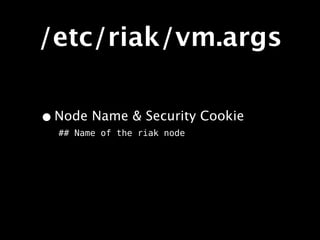
/etc/riak/vm.args
/etc/riak/vm.args
• Overview
/etc/riak/vm.args
• Overview
 • Erlang VM configuration settings.
/etc/riak/vm.args
• Overview
 • Erlang VM configuration settings.
• Important Settings
/etc/riak/vm.args
• Overview
 • Erlang VM configuration settings.
• Important Settings
 • Node name.
/etc/riak/vm.args
• Overview
 • Erlang VM configuration settings.
• Important Settings
 • Node name.
 • Security cookie.
/etc/riak/vm.args
• Overview
 • Erlang VM configuration settings.
• Important Settings
 • Node name.
 • Security cookie.
• Documentation
/etc/riak/vm.args
• Overview
 • Erlang VM configuration settings.
• Important Settings
 • Node name.
 • Security cookie.
• Documentation
 • http://www.erlang.org/doc/man/erl.html
/etc/riak/vm.args
/etc/riak/vm.args

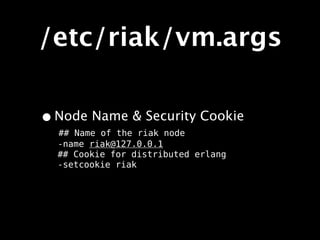
• Node Name & Security Cookie
  ## Name of the riak node
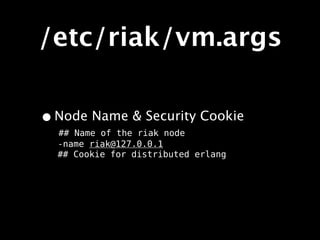
/etc/riak/vm.args

• Node Name & Security Cookie
  ## Name of the riak node
  -name riak@127.0.0.1
/etc/riak/vm.args

• Node Name & Security Cookie
  ## Name of the riak node
  -name riak@127.0.0.1
  ## Cookie for distributed erlang
/etc/riak/vm.args

• Node Name & Security Cookie
  ## Name of the riak node
  -name riak@127.0.0.1
  ## Cookie for distributed erlang
  -setcookie riak
/etc/riak/
app.config
/etc/riak/
               app.config
•   Overview
/etc/riak/
               app.config
•   Overview
    •   Riak (and dependency) configuration settings.
/etc/riak/
               app.config
•   Overview
    •   Riak (and dependency) configuration settings.

•   Important Settings
/etc/riak/
                app.config
•   Overview
    •   Riak (and dependency) configuration settings.

•   Important Settings

        •   Ports
/etc/riak/
                app.config
•   Overview
    •   Riak (and dependency) configuration settings.

•   Important Settings

        •   Ports

        •   Directories
/etc/riak/
                app.config
•   Overview
    •   Riak (and dependency) configuration settings.

•   Important Settings

        •   Ports

        •   Directories

        •   Number of Partitions
/etc/riak/
                app.config
•   Overview
    •   Riak (and dependency) configuration settings.

•   Important Settings

        •   Ports

        •   Directories

        •   Number of Partitions

        •   Storage Backend
/etc/riak/
                app.config
•   Overview
    •   Riak (and dependency) configuration settings.

•   Important Settings

        •   Ports

        •   Directories

        •   Number of Partitions

        •   Storage Backend

•   Documentation
/etc/riak/
                app.config
•   Overview
    •   Riak (and dependency) configuration settings.

•   Important Settings

        •   Ports

        •   Directories

        •   Number of Partitions

        •   Storage Backend

•   Documentation

    •   http://wiki.basho.com/Configuration-Files.html
/etc/riak/
                app.config
•   Overview
    •   Riak (and dependency) configuration settings.

•   Important Settings

        •   Ports

        •   Directories

        •   Number of Partitions

        •   Storage Backend

•   Documentation

    •   http://wiki.basho.com/Configuration-Files.html
    •   Inline comments
/etc/riak/
app.config
/etc/riak/
             app.config
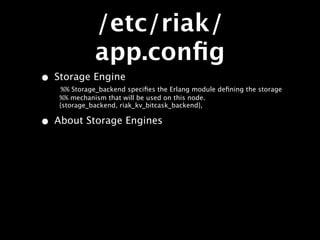
• Storage Engine
   %% Storage_backend specifies the Erlang module defining the storage
/etc/riak/
             app.config
• Storage Engine
   %% Storage_backend specifies the Erlang module defining the storage
   %% mechanism that will be used on this node.
/etc/riak/
             app.config
• Storage Engine
    %% Storage_backend specifies the Erlang module defining the storage
   %% mechanism that will be used on this node.
   {storage_backend, riak_kv_bitcask_backend},
/etc/riak/
             app.config
• Storage Engine
    %% Storage_backend specifies the Erlang module defining the storage
   %% mechanism that will be used on this node.
   {storage_backend, riak_kv_bitcask_backend},

• About Storage Engines
/etc/riak/
             app.config
• Storage Engine
    %% Storage_backend specifies the Erlang module defining the storage
   %% mechanism that will be used on this node.
   {storage_backend, riak_kv_bitcask_backend},

• About Storage Engines
 • Riak has pluggable storage engines. (Bitcask,
    Innostore, LevelDB)
/etc/riak/
             app.config
• Storage Engine
    %% Storage_backend specifies the Erlang module defining the storage
   %% mechanism that will be used on this node.
   {storage_backend, riak_kv_bitcask_backend},

• About Storage Engines
 • Riak has pluggable storage engines. (Bitcask,
    Innostore, LevelDB)

  • Different engines have different tradeoffs.
/etc/riak/
             app.config
• Storage Engine
    %% Storage_backend specifies the Erlang module defining the storage
   %% mechanism that will be used on this node.
   {storage_backend, riak_kv_bitcask_backend},

• About Storage Engines
 • Riak has pluggable storage engines. (Bitcask,
    Innostore, LevelDB)

  • Different engines have different tradeoffs.
  • Engine selection depends on shape of data.
/etc/riak/
             app.config
• Storage Engine
    %% Storage_backend specifies the Erlang module defining the storage
   %% mechanism that will be used on this node.
   {storage_backend, riak_kv_bitcask_backend},

• About Storage Engines
 • Riak has pluggable storage engines. (Bitcask,
    Innostore, LevelDB)

  • Different engines have different tradeoffs.
  • Engine selection depends on shape of data.
  • More on this later.
/etc/riak/
          app.config

%% Bitcask Config
{bitcask, [
            {data_root, "data/bitcask"}
          ]},

{eleveldb, [
             {data_root, “data/leveldb”}
           ]},
/etc/riak/
          app.config
• File Locations
%% Bitcask Config
{bitcask, [
            {data_root, "data/bitcask"}
          ]},

{eleveldb, [
             {data_root, “data/leveldb”}
           ]},
/etc/riak/
          app.config
• File Locations
%% Bitcask Config
{bitcask, [
            {data_root, "data/bitcask"}
          ]},

{eleveldb, [
             {data_root, “data/leveldb”}
           ]},
/etc/riak/
          app.config
• File Locations
%% Bitcask Config
{bitcask, [
            {data_root, "data/bitcask"}
          ]},

{eleveldb, [
             {data_root, “data/leveldb”}
           ]},
/etc/riak/
          app.config
• File Locations
%% Bitcask Config
{bitcask, [
            {data_root, "data/bitcask"}
          ]},

{eleveldb, [
             {data_root, “data/leveldb”}
           ]},
/etc/riak/
          app.config
• File Locations
%% Bitcask Config
{bitcask, [
            {data_root, "data/bitcask"}
          ]},

{eleveldb, [
             {data_root, “data/leveldb”}
•          ]},
/etc/riak/
             app.config
%% http is a list of IP addresses and TCP ports that the
Riak
%% HTTP interface will bind.
{http, [ {"127.0.0.1", 8091 } ]},


%% pb_ip is the IP address that the Riak Protocol Buffers
interface
%% will bind to. If this is undefined, the interface will
not run.
{pb_ip,   "127.0.0.1" },

%% pb_port is the TCP port that the Riak Protocol Buffers
interface
%% will bind to
{pb_port, 8081 },
/etc/riak/
             app.config
• HTTP & Protocol Buffers
%% http is a list of IP addresses and TCP ports that the
Riak
%% HTTP interface will bind.
{http, [ {"127.0.0.1", 8091 } ]},


%% pb_ip is the IP address that the Riak Protocol Buffers
interface
%% will bind to. If this is undefined, the interface will
not run.
{pb_ip,   "127.0.0.1" },

%% pb_port is the TCP port that the Riak Protocol Buffers
interface
%% will bind to
{pb_port, 8081 },
Securing Riak
Securing Riak
•   Overview
Securing Riak
•   Overview

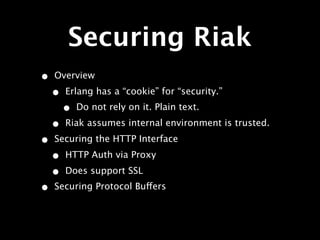
    •   Erlang has a “cookie” for “security.”
Securing Riak
•   Overview

    •   Erlang has a “cookie” for “security.”
        •   Do not rely on it. Plain text.
Securing Riak
•   Overview

    •   Erlang has a “cookie” for “security.”
        •   Do not rely on it. Plain text.

    •   Riak assumes internal environment is trusted.
Securing Riak
•   Overview

    •   Erlang has a “cookie” for “security.”
        •   Do not rely on it. Plain text.

    •   Riak assumes internal environment is trusted.

•   Securing the HTTP Interface
Securing Riak
•   Overview

    •   Erlang has a “cookie” for “security.”
        •   Do not rely on it. Plain text.

    •   Riak assumes internal environment is trusted.

•   Securing the HTTP Interface

    •   HTTP Auth via Proxy
Securing Riak
•   Overview

    •   Erlang has a “cookie” for “security.”
        •   Do not rely on it. Plain text.

    •   Riak assumes internal environment is trusted.

•   Securing the HTTP Interface

    •   HTTP Auth via Proxy

    •   Does support SSL
Securing Riak
•   Overview

    •   Erlang has a “cookie” for “security.”
        •   Do not rely on it. Plain text.

    •   Riak assumes internal environment is trusted.

•   Securing the HTTP Interface

    •   HTTP Auth via Proxy

    •   Does support SSL
•   Securing Protocol Buffers
Securing Riak
•   Overview

    •   Erlang has a “cookie” for “security.”
        •   Do not rely on it. Plain text.

    •   Riak assumes internal environment is trusted.

•   Securing the HTTP Interface

    •   HTTP Auth via Proxy

    •   Does support SSL
•   Securing Protocol Buffers

    •   No security.
Load Balancing
Load Balancing
•   Overview
Load Balancing
•   Overview

    •   Any node can handle any request.
Load Balancing
•   Overview

    •   Any node can handle any request.
    •   Makes load balancing easy.
Load Balancing
•   Overview

    •   Any node can handle any request.
    •   Makes load balancing easy.

•   Load Balancing HTTP
Load Balancing
•   Overview

    •   Any node can handle any request.
    •   Makes load balancing easy.

•   Load Balancing HTTP

    •   HAProxy, nginx, etc...
Load Balancing
•   Overview

    •   Any node can handle any request.
    •   Makes load balancing easy.

•   Load Balancing HTTP

    •   HAProxy, nginx, etc...

•   Load Balancing Protocol Buffers
Load Balancing
•   Overview

    •   Any node can handle any request.
    •   Makes load balancing easy.

•   Load Balancing HTTP

    •   HAProxy, nginx, etc...

•   Load Balancing Protocol Buffers

    •   Any TCP Load Balancer
Load Balancing
•   Overview

    •   Any node can handle any request.
    •   Makes load balancing easy.

•   Load Balancing HTTP

    •   HAProxy, nginx, etc...

•   Load Balancing Protocol Buffers

    •   Any TCP Load Balancer
•   In General
Load Balancing
•   Overview

    •   Any node can handle any request.
    •   Makes load balancing easy.

•   Load Balancing HTTP

    •   HAProxy, nginx, etc...

•   Load Balancing Protocol Buffers

    •   Any TCP Load Balancer
•   In General

    •   Use “least connected” strategy.
Storage Backends
There are 5 to
 choose from
There are 5 to
      choose from
• Bitcask
There are 5 to
      choose from
• Bitcask
• Innostore
There are 5 to
      choose from
• Bitcask
• Innostore
• LevelDB
There are 5 to
      choose from
• Bitcask
• Innostore
• LevelDB
• Memory
There are 5 to
      choose from
• Bitcask
• Innostore
• LevelDB
• Memory
• Multi
Bitcask
Bitcask
• A fast, append-only key-value store
Bitcask
• A fast, append-only key-value store
• In memory key lookup table
  (key_dir)
Bitcask
• A fast, append-only key-value store
• In memory key lookup table
  (key_dir)

• Closed files are immutable
Bitcask
• A fast, append-only key-value store
• In memory key lookup table
  (key_dir)

• Closed files are immutable
• Merging cleans up old data
Bitcask
• A fast, append-only key-value store
• In memory key lookup table
  (key_dir)

• Closed files are immutable
• Merging cleans up old data
• Apache 2 license
Innostore
Innostore
• Based on Embedded InnoDB
Innostore
• Based on Embedded InnoDB
• Write ahead log plus B-tree storage
Innostore
• Based on Embedded InnoDB
• Write ahead log plus B-tree storage
• Similar characterics to the MySQL
  InnoDB plugin
Innostore
• Based on Embedded InnoDB
• Write ahead log plus B-tree storage
• Similar characterics to the MySQL
  InnoDB plugin

• Manages which pages of the B-trees
  are in memory
Innostore
• Based on Embedded InnoDB
• Write ahead log plus B-tree storage
• Similar characterics to the MySQL
  InnoDB plugin

• Manages which pages of the B-trees
  are in memory

• GPL license
LevelDB
LevelDB

• A Google developed key-value store
LevelDB

• A Google developed key-value store
• Append-only
LevelDB

• A Google developed key-value store
• Append-only
• Multiple levels of SSTable-like
  structures
LevelDB

• A Google developed key-value store
• Append-only
• Multiple levels of SSTable-like
  structures

• BSD license
Cluster Capacity
   Planning
Cluster Capacity
   Planning
Cluster Capacity
       Planning
•   Overview
Cluster Capacity
       Planning
•   Overview
    •   There are MANY variables that affect performance.
Cluster Capacity
       Planning
•   Overview
    •   There are MANY variables that affect performance.

    •   Safest route is to simulate load and see what
        happens.
Cluster Capacity
       Planning
•   Overview
    •   There are MANY variables that affect performance.

    •   Safest route is to simulate load and see what
        happens.

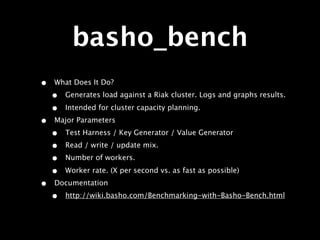
    •   basho_bench can help
Cluster Capacity
       Planning
•   Overview
    •   There are MANY variables that affect performance.

    •   Safest route is to simulate load and see what
        happens.

    •   basho_bench can help
•   Documentation
Cluster Capacity
       Planning
•   Overview
    •   There are MANY variables that affect performance.

    •   Safest route is to simulate load and see what
        happens.

    •   basho_bench can help
•   Documentation

    •   http://wiki.basho.com/Cluster-Capacity-
        Planning.html
Cluster Capacity
       Planning
•   Overview
    •   There are MANY variables that affect performance.

    •   Safest route is to simulate load and see what
        happens.

    •   basho_bench can help
•   Documentation

    •   http://wiki.basho.com/Cluster-Capacity-
        Planning.html
    •   http://wiki.basho.com/System-
        Requirements.html
Things to Consider
      (1/3)
Things to Consider
      (1/3)
•   Virtualization
Things to Consider
      (1/3)
•   Virtualization

    •   Riak’s workload is I/O bound
Things to Consider
      (1/3)
•   Virtualization

    •   Riak’s workload is I/O bound

    •   Run on bare metal for best performance.
Things to Consider
      (1/3)
•   Virtualization

    •   Riak’s workload is I/O bound

    •   Run on bare metal for best performance.

    •   Virtualize for other factors (agility or cost)
Things to Consider
      (1/3)
•   Virtualization

    •   Riak’s workload is I/O bound

    •   Run on bare metal for best performance.

    •   Virtualize for other factors (agility or cost)

•   Object size
Things to Consider
      (1/3)
•   Virtualization

    •   Riak’s workload is I/O bound

    •   Run on bare metal for best performance.

    •   Virtualize for other factors (agility or cost)

•   Object size

    •   Too small means unnecessary disk and network
        overhead
Things to Consider
      (1/3)
•   Virtualization

    •   Riak’s workload is I/O bound

    •   Run on bare metal for best performance.

    •   Virtualize for other factors (agility or cost)

•   Object size

    •   Too small means unnecessary disk and network
        overhead

    •   Too large means chunky reads and writes.
Things to Consider
      (1/3)
•   Virtualization

    •   Riak’s workload is I/O bound

    •   Run on bare metal for best performance.

    •   Virtualize for other factors (agility or cost)

•   Object size

    •   Too small means unnecessary disk and network
        overhead

    •   Too large means chunky reads and writes.

•   Read/Write Ratio
Things to Consider
      (1/3)
•   Virtualization

    •   Riak’s workload is I/O bound

    •   Run on bare metal for best performance.

    •   Virtualize for other factors (agility or cost)

•   Object size

    •   Too small means unnecessary disk and network
        overhead

    •   Too large means chunky reads and writes.

•   Read/Write Ratio

    •   Riak is not meant for dumping many tiny datapoints.
Things to Consider
      (2/3)
Things to Consider
      (2/3)
•   “Randomness” of Reads /
    Writes
Things to Consider
      (2/3)
•   “Randomness” of Reads /
    Writes

    •   Recently accessed
        objects are cached in
        memory.
Things to Consider
      (2/3)
•   “Randomness” of Reads /
    Writes

    •   Recently accessed
        objects are cached in
        memory.

    •   A small working set of
        objects will be fast.
Things to Consider
      (2/3)
•   “Randomness” of Reads /
    Writes

    •   Recently accessed
        objects are cached in
        memory.

    •   A small working set of
        objects will be fast.

•   Amount of RAM
Things to Consider
      (2/3)
•   “Randomness” of Reads /
    Writes

    •   Recently accessed
        objects are cached in
        memory.

    •   A small working set of
        objects will be fast.

•   Amount of RAM

    •   Expands the size of
        cached working set,
        lowers latency.
Things to Consider
      (2/3)
•   “Randomness” of Reads /      •   Disk Speed
    Writes

    •   Recently accessed
        objects are cached in
        memory.

    •   A small working set of
        objects will be fast.

•   Amount of RAM

    •   Expands the size of
        cached working set,
        lowers latency.
Things to Consider
      (2/3)
•   “Randomness” of Reads /      •   Disk Speed
    Writes
                                     •   Faster disk means
    •   Recently accessed                lower read/write
        objects are cached in            latency.
        memory.

    •   A small working set of
        objects will be fast.

•   Amount of RAM

    •   Expands the size of
        cached working set,
        lowers latency.
Things to Consider
      (2/3)
•   “Randomness” of Reads /      •   Disk Speed
    Writes
                                     •   Faster disk means
    •   Recently accessed                lower read/write
        objects are cached in            latency.
        memory.
                                 •   Number of Processors
    •   A small working set of
        objects will be fast.

•   Amount of RAM

    •   Expands the size of
        cached working set,
        lowers latency.
Things to Consider
      (2/3)
•   “Randomness” of Reads /      •   Disk Speed
    Writes
                                     •   Faster disk means
    •   Recently accessed                lower read/write
        objects are cached in            latency.
        memory.
                                 •   Number of Processors
    •   A small working set of
        objects will be fast.        •   More processors ==
                                         more Map/Reduce
•   Amount of RAM                        throughput.

    •   Expands the size of
        cached working set,
        lowers latency.
Things to Consider
      (2/3)
•   “Randomness” of Reads /      •   Disk Speed
    Writes
                                     •   Faster disk means
    •   Recently accessed                lower read/write
        objects are cached in            latency.
        memory.
                                 •   Number of Processors
    •   A small working set of
        objects will be fast.        •   More processors ==
                                         more Map/Reduce
•   Amount of RAM                        throughput.

    •   Expands the size of          •   Faster processors ==
        cached working set,              lower Map/Reduce
        lowers latency.                  latency.
Things to Consider
      (3/3)
Things to Consider
      (3/3)
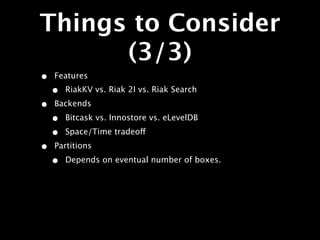
•   Features
Things to Consider
      (3/3)
•   Features
    •   RiakKV vs. Riak 2I vs. Riak Search
Things to Consider
      (3/3)
•   Features
    •   RiakKV vs. Riak 2I vs. Riak Search

•   Backends
Things to Consider
      (3/3)
•   Features
    •   RiakKV vs. Riak 2I vs. Riak Search

•   Backends

    •   Bitcask vs. Innostore vs. eLevelDB
Things to Consider
      (3/3)
•   Features
    •   RiakKV vs. Riak 2I vs. Riak Search

•   Backends

    •   Bitcask vs. Innostore vs. eLevelDB

    •   Space/Time tradeoff
Things to Consider
      (3/3)
•   Features
    •   RiakKV vs. Riak 2I vs. Riak Search

•   Backends

    •   Bitcask vs. Innostore vs. eLevelDB

    •   Space/Time tradeoff

•   Partitions
Things to Consider
      (3/3)
•   Features
    •   RiakKV vs. Riak 2I vs. Riak Search

•   Backends

    •   Bitcask vs. Innostore vs. eLevelDB

    •   Space/Time tradeoff

•   Partitions

    •   Depends on eventual number of boxes.
Things to Consider
      (3/3)
•   Features
    •   RiakKV vs. Riak 2I vs. Riak Search

•   Backends

    •   Bitcask vs. Innostore vs. eLevelDB

    •   Space/Time tradeoff

•   Partitions

    •   Depends on eventual number of boxes.

•   Protocol
Things to Consider
      (3/3)
•   Features
    •   RiakKV vs. Riak 2I vs. Riak Search

•   Backends

    •   Bitcask vs. Innostore vs. eLevelDB

    •   Space/Time tradeoff

•   Partitions

    •   Depends on eventual number of boxes.

•   Protocol

    •   HTTP vs. Protocol Buffers
Things to Consider
      (3/3)
•   Features
    •   RiakKV vs. Riak 2I vs. Riak Search

•   Backends

    •   Bitcask vs. Innostore vs. eLevelDB

    •   Space/Time tradeoff

•   Partitions

    •   Depends on eventual number of boxes.

•   Protocol

    •   HTTP vs. Protocol Buffers
    •   All clients support HTTP, some support PB.
Performance
  Tuning
Performance
          Tuning
•   General Tips
Performance
            Tuning
•   General Tips

    •   Start with a “DB” Like Machine Profile
Performance
              Tuning
•   General Tips

    •   Start with a “DB” Like Machine Profile
        •   Multi-core 64-bit CPUs
Performance
              Tuning
•   General Tips

    •   Start with a “DB” Like Machine Profile
        •   Multi-core 64-bit CPUs

        •   The More RAM the Better
Performance
              Tuning
•   General Tips

    •   Start with a “DB” Like Machine Profile
        •   Multi-core 64-bit CPUs

        •   The More RAM the Better

        •   Fast Disk
Performance
              Tuning
•   General Tips

    •   Start with a “DB” Like Machine Profile
        •   Multi-core 64-bit CPUs

        •   The More RAM the Better

        •   Fast Disk

    •   Use noatime mounts
Performance
              Tuning
•   General Tips

    •   Start with a “DB” Like Machine Profile
        •   Multi-core 64-bit CPUs

        •   The More RAM the Better

        •   Fast Disk

    •   Use noatime mounts

    •   Limit List Keys and Full Bucket MapReduce
Performance
              Tuning
•   General Tips

    •   Start with a “DB” Like Machine Profile
        •   Multi-core 64-bit CPUs

        •   The More RAM the Better

        •   Fast Disk

    •   Use noatime mounts

    •   Limit List Keys and Full Bucket MapReduce
    •   Benchmark in Advance
Performance
              Tuning
•   General Tips

    •   Start with a “DB” Like Machine Profile
        •   Multi-core 64-bit CPUs

        •   The More RAM the Better

        •   Fast Disk

    •   Use noatime mounts

    •   Limit List Keys and Full Bucket MapReduce
    •   Benchmark in Advance

    •   Graph Everything
Performance
  Tuning
Performance
          Tuning
•   Bitcask Backend
Performance
            Tuning
•   Bitcask Backend

    •   KeyDir is in Memory
Performance
            Tuning
•   Bitcask Backend

    •   KeyDir is in Memory

    •   Filesystem Cache (Access Profile Considerations)
Performance
            Tuning
•   Bitcask Backend

    •   KeyDir is in Memory

    •   Filesystem Cache (Access Profile Considerations)

    •   Merge Trigger Settings
Performance
            Tuning
•   Bitcask Backend

    •   KeyDir is in Memory

    •   Filesystem Cache (Access Profile Considerations)

    •   Merge Trigger Settings

    •   Scheduling Bitcask Merges
Performance
            Tuning
•   Bitcask Backend

    •   KeyDir is in Memory

    •   Filesystem Cache (Access Profile Considerations)

    •   Merge Trigger Settings

    •   Scheduling Bitcask Merges

    •   Key Expiration
Performance
            Tuning
•   Bitcask Backend

    •   KeyDir is in Memory

    •   Filesystem Cache (Access Profile Considerations)

    •   Merge Trigger Settings

    •   Scheduling Bitcask Merges

    •   Key Expiration

•   Documentation
Performance
            Tuning
•   Bitcask Backend

    •   KeyDir is in Memory

    •   Filesystem Cache (Access Profile Considerations)

    •   Merge Trigger Settings

    •   Scheduling Bitcask Merges

    •   Key Expiration

•   Documentation

    •   http://wiki.basho.com/Bitcask.html
Performance
            Tuning
•   Bitcask Backend

    •   KeyDir is in Memory

    •   Filesystem Cache (Access Profile Considerations)

    •   Merge Trigger Settings

    •   Scheduling Bitcask Merges

    •   Key Expiration

•   Documentation

    •   http://wiki.basho.com/Bitcask.html

    •   http://wiki.basho.com/Bitcask-Capacity-Planning.html
Performance
  Tuning
Performance
          Tuning
•   Innostore Backend
Performance
            Tuning
•   Innostore Backend

    •   Similar to MySQL + InnoDB
Performance
            Tuning
•   Innostore Backend

    •   Similar to MySQL + InnoDB

    •   buffer pool size
Performance
            Tuning
•   Innostore Backend

    •   Similar to MySQL + InnoDB

    •   buffer pool size

    •   o_direct
Performance
            Tuning
•   Innostore Backend

    •   Similar to MySQL + InnoDB

    •   buffer pool size

    •   o_direct

    •   log_files_in_groups
Performance
            Tuning
•   Innostore Backend

    •   Similar to MySQL + InnoDB

    •   buffer pool size

    •   o_direct

    •   log_files_in_groups

    •   Separate Spindles for Log and Data
Performance
            Tuning
•   Innostore Backend

    •   Similar to MySQL + InnoDB

    •   buffer pool size

    •   o_direct

    •   log_files_in_groups

    •   Separate Spindles for Log and Data

•   Documentation
Performance
            Tuning
•   Innostore Backend

    •   Similar to MySQL + InnoDB

    •   buffer pool size

    •   o_direct

    •   log_files_in_groups

    •   Separate Spindles for Log and Data

•   Documentation

    •   http://wiki.basho.com/Setting-Up-Innostore.html
Performance
            Tuning
•   Innostore Backend

    •   Similar to MySQL + InnoDB

    •   buffer pool size

    •   o_direct

    •   log_files_in_groups

    •   Separate Spindles for Log and Data

•   Documentation

    •   http://wiki.basho.com/Setting-Up-Innostore.html

    •   http://wiki.basho.com/Innostore-Configuration-and-
        Tuning.html
basho_bench
basho_bench
•   What Does It Do?
basho_bench
•   What Does It Do?
    •   Generates load against a Riak cluster. Logs and graphs results.
basho_bench
•   What Does It Do?
    •   Generates load against a Riak cluster. Logs and graphs results.

    •   Intended for cluster capacity planning.
basho_bench
•   What Does It Do?
    •   Generates load against a Riak cluster. Logs and graphs results.

    •   Intended for cluster capacity planning.
•   Major Parameters
basho_bench
•   What Does It Do?
    •   Generates load against a Riak cluster. Logs and graphs results.

    •   Intended for cluster capacity planning.
•   Major Parameters
    •   Test Harness / Key Generator / Value Generator
basho_bench
•   What Does It Do?
    •   Generates load against a Riak cluster. Logs and graphs results.

    •   Intended for cluster capacity planning.
•   Major Parameters
    •   Test Harness / Key Generator / Value Generator
    •   Read / write / update mix.
basho_bench
•   What Does It Do?
    •   Generates load against a Riak cluster. Logs and graphs results.

    •   Intended for cluster capacity planning.
•   Major Parameters
    •   Test Harness / Key Generator / Value Generator
    •   Read / write / update mix.
    •   Number of workers.
basho_bench
•   What Does It Do?
    •   Generates load against a Riak cluster. Logs and graphs results.

    •   Intended for cluster capacity planning.
•   Major Parameters
    •   Test Harness / Key Generator / Value Generator
    •   Read / write / update mix.
    •   Number of workers.

    •   Worker rate. (X per second vs. as fast as possible)
basho_bench
•   What Does It Do?
    •   Generates load against a Riak cluster. Logs and graphs results.

    •   Intended for cluster capacity planning.
•   Major Parameters
    •   Test Harness / Key Generator / Value Generator
    •   Read / write / update mix.
    •   Number of workers.

    •   Worker rate. (X per second vs. as fast as possible)
•   Documentation
basho_bench
•   What Does It Do?
    •   Generates load against a Riak cluster. Logs and graphs results.

    •   Intended for cluster capacity planning.
•   Major Parameters
    •   Test Harness / Key Generator / Value Generator
    •   Read / write / update mix.
    •   Number of workers.

    •   Worker rate. (X per second vs. as fast as possible)
•   Documentation
    •   http://wiki.basho.com/Benchmarking-with-Basho-Bench.html
basho_bench:
   Configuration
{mode, max}.
{duration, 20}.
{concurrent, 3}.
{driver, basho_bench_driver_http_raw}.
{code_paths, ["deps/ibrowse"]}.
{key_generator, {int_to_bin,
{uniform_int, 50000000}}}.
{value_generator, {fixed_bin, 5000}}.
{http_raw_port, 8098}.
{operations, [{insert, 1}]}.
{source_dir, "foo"}.
basho_bench:
   Results
elapsed, window, total, successful, failed
10, 10, 10747, 10747, 0
20, 10, 13295, 13295, 0
30, 10, 11840, 11840, 0
40, 10, 1688, 1688, 0
50, 10, 10675, 10675, 0
60, 10, 13599, 13599, 0
70, 10, 7747, 7747, 0
80, 10, 4089, 4089, 0
90, 10, 13851, 13851, 0
100, 10, 13374, 13374, 0
110, 10, 2293, 2293, 0
120, 10, 9813, 9813, 0
130, 10, 13860, 13860, 0
140, 10, 8333, 8333, 0
150, 10, 3592, 3592, 0
160, 10, 14104, 14104, 0
170, 10, 13834, 13834, 0
...snip...
basho_bench:
   Results
Monitoring
Lager
Lager
•   Notes
Lager
•   Notes

    •   Basho’s replacement for Erlang logging tools
Lager
•   Notes

    •   Basho’s replacement for Erlang logging tools
    •   It plays nice with your tools
Lager
•   Notes

    •   Basho’s replacement for Erlang logging tools
    •   It plays nice with your tools

•   /var/log/riak/console.log
Lager
•   Notes

    •   Basho’s replacement for Erlang logging tools
    •   It plays nice with your tools

•   /var/log/riak/console.log

    •   Console Output
Lager
•   Notes

    •   Basho’s replacement for Erlang logging tools
    •   It plays nice with your tools

•   /var/log/riak/console.log

    •   Console Output

•   /var/log/riak/error.log
Lager
•   Notes

    •   Basho’s replacement for Erlang logging tools
    •   It plays nice with your tools

•   /var/log/riak/console.log

    •   Console Output

•   /var/log/riak/error.log

    •   Errors Reports
Lager
•   Notes

    •   Basho’s replacement for Erlang logging tools
    •   It plays nice with your tools

•   /var/log/riak/console.log

    •   Console Output

•   /var/log/riak/error.log

    •   Errors Reports
•   /var/log/riak/crash.log
Lager
•   Notes

    •   Basho’s replacement for Erlang logging tools
    •   It plays nice with your tools

•   /var/log/riak/console.log

    •   Console Output

•   /var/log/riak/error.log

    •   Errors Reports
•   /var/log/riak/crash.log

    •   Verbose Crash Output
Logs
{lager, [
            %% What handlers to install with what arguments
            {handlers, [
                {lager_console_backend, info},
                {lager_file_backend, [
                    {"./log/error.log", error},
                    {"./log/console.log", info}
                ]}
            ]},
            %% Whether to write a crash log, and where.
            %% Commented/omitted/undefined means no crash
logger.
            {crash_log, "./log/crash.log"},
            %% Maximum size in bytes of events in the crash log.
            %% Default is 64kb.
            {crash_log_size, 65536},
            %% Whether to redirect error_logger messages into
lager - defaults to true
            {error_logger_redirect, true}
        ]},
Useful Commands
 for Monitoring
Useful Commands
 for Monitoring
• riak-admin ping
Useful Commands
 for Monitoring
• riak-admin ping
• Check that a node is running.
Useful Commands
 for Monitoring
• riak-admin ping
• Check that a node is running.
 • Also available as localhost:8098/ping
Useful Commands
 for Monitoring
• riak-admin ping
• Check that a node is running.
 • Also available as localhost:8098/ping
• riak-admin status
Useful Commands
 for Monitoring
• riak-admin ping
• Check that a node is running.
 • Also available as localhost:8098/ping
• riak-admin status
 • Show status of the node.
Useful Commands
 for Monitoring
• riak-admin ping
• Check that a node is running.
 • Also available as localhost:8098/ping
• riak-admin status
 • Show status of the node.
 • Also available as localhost:8098/
    stats
riak-admin status
Other Tools
Other Tools
• Unix Commands
Other Tools
• Unix Commands
 • top
Other Tools
• Unix Commands
 • top
 • iostat
Other Tools
• Unix Commands
 • top
 • iostat
• Enterprise Tools
Other Tools
• Unix Commands
 • top
 • iostat
• Enterprise Tools
 • JMX Monitoring
Other Tools
• Unix Commands
 • top
 • iostat
• Enterprise Tools
 • JMX Monitoring
 • SNMP Monitoring
Backups
Backups
•   Overview
Backups
•   Overview

    •   Backup options depend on backend.
Backups
•   Overview

    •   Backup options depend on backend.
•   Bitcask, LevelDB, & Merge_Index
Backups
•   Overview

    •   Backup options depend on backend.
•   Bitcask, LevelDB, & Merge_Index

    •   Immutable files.
Backups
•   Overview

    •   Backup options depend on backend.
•   Bitcask, LevelDB, & Merge_Index

    •   Immutable files.

    •   Can use rsync, snapshots, cp, or riak-admin backup.
Backups
•   Overview

    •   Backup options depend on backend.
•   Bitcask, LevelDB, & Merge_Index

    •   Immutable files.

    •   Can use rsync, snapshots, cp, or riak-admin backup.
•   Innostore
Backups
•   Overview

    •   Backup options depend on backend.
•   Bitcask, LevelDB, & Merge_Index

    •   Immutable files.

    •   Can use rsync, snapshots, cp, or riak-admin backup.
•   Innostore

    •   Only riak-admin backup
Backups
•   Overview

    •   Backup options depend on backend.
•   Bitcask, LevelDB, & Merge_Index

    •   Immutable files.

    •   Can use rsync, snapshots, cp, or riak-admin backup.
•   Innostore

    •   Only riak-admin backup
•   Enterprise Replication
Backups
•   Overview

    •   Backup options depend on backend.
•   Bitcask, LevelDB, & Merge_Index

    •   Immutable files.

    •   Can use rsync, snapshots, cp, or riak-admin backup.
•   Innostore

    •   Only riak-admin backup
•   Enterprise Replication

    •   Mirror to another cluster.
Rolling Upgrades
Rolling Upgrades
•   Overview
Rolling Upgrades
•   Overview

    •   You can upgrade Riak without taking down cluster.
Rolling Upgrades
•   Overview

    •   You can upgrade Riak without taking down cluster.

    •   Instead, take down one node at a time. Stay read/write available.
Rolling Upgrades
•   Overview

    •   You can upgrade Riak without taking down cluster.

    •   Instead, take down one node at a time. Stay read/write available.

•   Steps
Rolling Upgrades
•   Overview

    •    You can upgrade Riak without taking down cluster.

    •    Instead, take down one node at a time. Stay read/write available.

•   Steps
    1.   Stop node.
Rolling Upgrades
•   Overview

    •    You can upgrade Riak without taking down cluster.

    •    Instead, take down one node at a time. Stay read/write available.

•   Steps
    1.   Stop node.
    2.   Back up configuration and data directories. (If possible.)
Rolling Upgrades
•   Overview

    •    You can upgrade Riak without taking down cluster.

    •    Instead, take down one node at a time. Stay read/write available.

•   Steps
    1.   Stop node.
    2.   Back up configuration and data directories. (If possible.)
    3.   Install new package.
Rolling Upgrades
•   Overview

    •    You can upgrade Riak without taking down cluster.

    •    Instead, take down one node at a time. Stay read/write available.

•   Steps
    1.   Stop node.
    2.   Back up configuration and data directories. (If possible.)
    3.   Install new package.

    4.   Start node.
Rolling Upgrades
•   Overview

    •    You can upgrade Riak without taking down cluster.

    •    Instead, take down one node at a time. Stay read/write available.

•   Steps
    1.   Stop node.
    2.   Back up configuration and data directories. (If possible.)
    3.   Install new package.

    4.   Start node.
    5.   Do next node.
Rolling Upgrades
•   Overview

    •    You can upgrade Riak without taking down cluster.

    •    Instead, take down one node at a time. Stay read/write available.

•   Steps
    1.   Stop node.
    2.   Back up configuration and data directories. (If possible.)
    3.   Install new package.

    4.   Start node.
    5.   Do next node.

•   Documentation
Rolling Upgrades
•   Overview

    •    You can upgrade Riak without taking down cluster.

    •    Instead, take down one node at a time. Stay read/write available.

•   Steps
    1.   Stop node.
    2.   Back up configuration and data directories. (If possible.)
    3.   Install new package.

    4.   Start node.
    5.   Do next node.

•   Documentation

    •    http://wiki.basho.com/Rolling-Upgrades.html
EC2 and EBS
EC2 and EBS
• Follow DB Best Practices
EC2 and EBS
• Follow DB Best Practices
• To EBS or Not to EBS?
EC2 and EBS
• Follow DB Best Practices
• To EBS or Not to EBS?
• Raid0 is Faster, but an OPS Headache
EC2 and EBS
• Follow DB Best Practices
• To EBS or Not to EBS?
• Raid0 is Faster, but an OPS Headache
• Speed vs Fault Tolerance (Availability
  Zones)
EC2 and EBS
• Follow DB Best Practices
• To EBS or Not to EBS?
• Raid0 is Faster, but an OPS Headache
• Speed vs Fault Tolerance (Availability
  Zones)

• Specific Tweaks for EC2 (net_ticktime)
EC2 and EBS
• Follow DB Best Practices
• To EBS or Not to EBS?
• Raid0 is Faster, but an OPS Headache
• Speed vs Fault Tolerance (Availability
  Zones)

• Specific Tweaks for EC2 (net_ticktime)
• There are MANY successful deployments
Troubleshooting
Node Crashed, Now
   What? (1/3)
Node Crashed, Now
   What? (1/3)
• Overview
Node Crashed, Now
   What? (1/3)
• Overview
 • Approach this like any other
    troubleshooting.
Node Crashed, Now
   What? (1/3)
• Overview
 • Approach this like any other
    troubleshooting.

 • Stay calm. Your system is still fully
    available.
Node Crashed, Now
   What? (1/3)
• Overview
 • Approach this like any other
    troubleshooting.

 • Stay calm. Your system is still fully
    available.

 • Survey the scene:
Node Crashed, Now
   What? (1/3)
• Overview
 • Approach this like any other
    troubleshooting.

 • Stay calm. Your system is still fully
    available.

 • Survey the scene:
  • Was anything abnormal? High load?
      Notice any patterns?
Node Crashed, Now
   What? (2/3)
Node Crashed, Now
   What? (2/3)
• Save Log Files!
Node Crashed, Now
   What? (2/3)
• Save Log Files!
 • Ensure you can find the root cause
   later.
Node Crashed, Now
   What? (2/3)
• Save Log Files!
 • Ensure you can find the root cause
   later.
 •/var/log/riak
Node Crashed, Now
   What? (2/3)
• Save Log Files!
 • Ensure you can find the root cause
   later.
 •/var/log/riak
 •/var/lib/riak/ring
Node Crashed, Now
   What? (3/3)
Node Crashed, Now
   What? (3/3)
•   Did you run out of resources?
Node Crashed, Now
   What? (3/3)
•   Did you run out of resources?

    •   Plan to scale out.
Node Crashed, Now
   What? (3/3)
•   Did you run out of resources?

    •   Plan to scale out.

•   Did your hardware fail?
Node Crashed, Now
   What? (3/3)
•   Did you run out of resources?

    •   Plan to scale out.

•   Did your hardware fail?

    •   Fix hardware, restore from backup (if available/
        necessary)
Node Crashed, Now
   What? (3/3)
•   Did you run out of resources?

    •   Plan to scale out.

•   Did your hardware fail?

    •   Fix hardware, restore from backup (if available/
        necessary)

    •   Remember to re-ip!
Node Crashed, Now
   What? (3/3)
•   Did you run out of resources?

    •   Plan to scale out.

•   Did your hardware fail?

    •   Fix hardware, restore from backup (if available/
        necessary)

    •   Remember to re-ip!

•   Software Error / Some Other Reason?
Node Crashed, Now
   What? (3/3)
•   Did you run out of resources?

    •   Plan to scale out.

•   Did your hardware fail?

    •   Fix hardware, restore from backup (if available/
        necessary)

    •   Remember to re-ip!

•   Software Error / Some Other Reason?

    •   Contact mailing list or get support.
Node Crashed, Now
   What? (3/3)
•   Did you run out of resources?

    •   Plan to scale out.

•   Did your hardware fail?

    •   Fix hardware, restore from backup (if available/
        necessary)

    •   Remember to re-ip!

•   Software Error / Some Other Reason?

    •   Contact mailing list or get support.

•   Documentation
Node Crashed, Now
   What? (3/3)
•   Did you run out of resources?

    •   Plan to scale out.

•   Did your hardware fail?

    •   Fix hardware, restore from backup (if available/
        necessary)

    •   Remember to re-ip!

•   Software Error / Some Other Reason?

    •   Contact mailing list or get support.

•   Documentation

    •   http://wiki.basho.com/Recovering-a-failed-node.html

Riak Training Session — Surge 2011

  • 1.
    Riak Tutorial Sean Cribbs & Ian Plosker Basho Technologies basho
  • 2.
  • 4.
    • Key-Value store(plus extras)
  • 5.
    • Key-Value store(plus extras) • Distributed, horizontally scalable
  • 6.
    • Key-Value store(plus extras) • Distributed, horizontally scalable • Fault-tolerant
  • 7.
    • Key-Value store(plus extras) • Distributed, horizontally scalable • Fault-tolerant • Highly-available
  • 8.
    • Key-Value store(plus extras) • Distributed, horizontally scalable • Fault-tolerant • Highly-available • Built for the Web
  • 9.
    • Key-Value store(plus extras) • Distributed, horizontally scalable • Fault-tolerant • Highly-available • Built for the Web • Inspired by Amazon’s Dynamo
  • 10.
  • 11.
  • 12.
    Key-Value • Simple operations- get, put, delete • Value is mostly opaque (some metadata)
  • 13.
    Key-Value • Simple operations- get, put, delete • Value is mostly opaque (some metadata) • Extras
  • 14.
    Key-Value • Simple operations- get, put, delete • Value is mostly opaque (some metadata) • Extras • MapReduce
  • 15.
    Key-Value • Simple operations- get, put, delete • Value is mostly opaque (some metadata) • Extras • MapReduce • Links
  • 16.
    Key-Value • Simple operations- get, put, delete • Value is mostly opaque (some metadata) • Extras • MapReduce • Links • Full-text search (new, optional)
  • 17.
    Key-Value • Simple operations- get, put, delete • Value is mostly opaque (some metadata) • Extras • MapReduce • Links • Full-text search (new, optional) • Secondary Indexes
  • 18.
  • 19.
    Distributed & Horizontally • Default configuration is in a cluster
  • 20.
    Distributed & Horizontally • Default configuration is in a cluster • Load and data are spread evenly
  • 21.
    Distributed & Horizontally • Default configuration is in a cluster • Load and data are spread evenly • Add more nodes to get more X
  • 22.
  • 23.
    Fault-Tolerant • All nodesparticipate equally - no SPOF
  • 24.
    Fault-Tolerant • All nodesparticipate equally - no SPOF • All data is replicated
  • 25.
    Fault-Tolerant • All nodesparticipate equally - no SPOF • All data is replicated • Cluster transparently survives...
  • 26.
    Fault-Tolerant • All nodesparticipate equally - no SPOF • All data is replicated • Cluster transparently survives... • node failure
  • 27.
    Fault-Tolerant • All nodesparticipate equally - no SPOF • All data is replicated • Cluster transparently survives... • node failure • network partitions
  • 28.
    Fault-Tolerant • All nodesparticipate equally - no SPOF • All data is replicated • Cluster transparently survives... • node failure • network partitions • Built on Erlang/OTP (designed for FT)
  • 29.
  • 30.
    Highly-Available • Any nodecan serve client requests
  • 31.
    Highly-Available • Any nodecan serve client requests • Fallbacks are used when nodes are down
  • 32.
    Highly-Available • Any nodecan serve client requests • Fallbacks are used when nodes are down • Always accepts read and write requests
  • 33.
    Highly-Available • Any nodecan serve client requests • Fallbacks are used when nodes are down • Always accepts read and write requests • Per-request quorums
  • 34.
  • 35.
    Built for theWeb • HTTP is default (but not only) interface
  • 36.
    Built for theWeb • HTTP is default (but not only) interface • Does HTTP/REST well (see Webmachine)
  • 37.
    Built for theWeb • HTTP is default (but not only) interface • Does HTTP/REST well (see Webmachine) • Plays well with HTTP infrastructure - reverse proxy caches, load balancers, web servers
  • 38.
    Built for theWeb • HTTP is default (but not only) interface • Does HTTP/REST well (see Webmachine) • Plays well with HTTP infrastructure - reverse proxy caches, load balancers, web servers • Suitable to many web applications
  • 39.
  • 40.
    Inspired by Amazon’s Dynamo •Masterless, peer-coordinated replication
  • 41.
    Inspired by Amazon’s Dynamo •Masterless, peer-coordinated replication • Consistent hashing
  • 42.
    Inspired by Amazon’s Dynamo •Masterless, peer-coordinated replication • Consistent hashing • Eventually consistent
  • 43.
    Inspired by Amazon’s Dynamo •Masterless, peer-coordinated replication • Consistent hashing • Eventually consistent • Quorum reads and writes
  • 44.
    Inspired by Amazon’s Dynamo •Masterless, peer-coordinated replication • Consistent hashing • Eventually consistent • Quorum reads and writes • Anti-entropy: read repair, hinted handoff
  • 45.
  • 46.
  • 47.
    Installing Riak • Downloadfrom our local server
  • 48.
    Installing Riak • Downloadfrom our local server • Download a package: http://downloads.basho.com/riak/ CURRENT
  • 49.
    Installing Riak • Downloadfrom our local server • Download a package: http://downloads.basho.com/riak/ CURRENT • Clone & build (need git and Erlang) : $ git clone git://github.com/basho/riak.git $ make all devrel
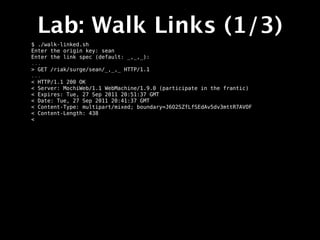
  • 50.
    You need `curl` apt-get install curl yum install curl
  • 51.
  • 52.
    Start the Cluster $surge-start.sh
  • 53.
    Start the Cluster $surge-start.sh dev1/bin/riak start dev2/bin/riak start dev3/bin/riak start dev4/bin/riak start
  • 54.
    Start the Cluster $surge-start.sh dev1/bin/riak start dev2/bin/riak start dev3/bin/riak start dev4/bin/riak start dev2/bin/riak-admin join dev1 Sent join request to dev1 dev3/bin/riak-admin join dev1 Sent join request to dev1 dev4/bin/riak-admin join dev1 Sent join request to dev1
  • 55.
  • 56.
    Check its status $dev1/bin/riak-admin member_status $ dev1/bin/riak-admin ring_status $ dev1/bin/riak-admin status
  • 57.
  • 58.
  • 59.
  • 60.
    PUT $ surge-put.sh Enter akey: your-key Enter a value: your-value
  • 61.
    PUT $ surge-put.sh Enter akey: your-key Enter a value: your-value Enter a write quorum value:
  • 62.
    PUT $ surge-put.sh Enter akey: your-key Enter a value: your-value Enter a write quorum value: * About to connect() to 127.0.0.1 port 8091 (#0) * Trying 127.0.0.1... connected * Connected to 127.0.0.1 (127.0.0.1) port 8091 (#0) > PUT /riak/surge/your-key?returnbody=true&w=quorum HTTP/1.1 > User-Agent: curl/7.21.4 (universal-apple-darwin11.0) libcurl/7.21.4 OpenSSL/0.9.8r zlib/1.2.5 > Host: 127.0.0.1:8091 > Accept: */* > Content-Type: text/plain > Content-Length: 10 >
  • 63.
    PUT $ surge-put.sh Enter akey: your-key Enter a value: your-value Enter a write quorum value: * About to connect() to 127.0.0.1 port 8091 (#0) * Trying 127.0.0.1... connected * Connected to 127.0.0.1 (127.0.0.1) port 8091 (#0) > PUT /riak/surge/your-key?returnbody=true&w=quorum HTTP/1.1 > User-Agent: curl/7.21.4 (universal-apple-darwin11.0) libcurl/7.21.4 OpenSSL/0.9.8r zlib/1.2.5 > Host: 127.0.0.1:8091 > Accept: */* > Content-Type: text/plain > Content-Length: 10 > < HTTP/1.1 200 OK < X-Riak-Vclock: a85hYGBgzGDKBVIcR4M2cvs1qb3LYEpkzGNleL/k23G+LAA= < Vary: Accept-Encoding < Server: MochiWeb/1.1 WebMachine/1.9.0 (participate in the frantic) < Link: </riak/surge>; rel="up" < Date: Tue, 27 Sep 2011 19:21:08 GMT < Content-Type: text/plain < Content-Length: 10 < * Connection #0 to host 127.0.0.1 left intact * Closing connection #0 your-value
  • 64.
  • 65.
  • 66.
  • 67.
    GET $ surge-get.sh Enter akey: your-key Enter a read quorum value (default: quorum):
  • 68.
    GET $ surge-get.sh Enter akey: your-key Enter a read quorum value (default: quorum): * About to connect() to 127.0.0.1 port 8091 (#0) * Trying 127.0.0.1... connected * Connected to 127.0.0.1 (127.0.0.1) port 8091 (#0) > GET /riak/surge/your-key?r=quorum HTTP/1.1 > User-Agent: curl/7.21.4 (universal-apple-darwin11.0) libcurl/7.21.4 OpenSSL/0.9.8r zlib/1.2.5 > Host: 127.0.0.1:8091 > Accept: */* >
  • 69.
    GET $ surge-get.sh Enter akey: your-key Enter a read quorum value (default: quorum): * About to connect() to 127.0.0.1 port 8091 (#0) * Trying 127.0.0.1... connected * Connected to 127.0.0.1 (127.0.0.1) port 8091 (#0) > GET /riak/surge/your-key?r=quorum HTTP/1.1 > User-Agent: curl/7.21.4 (universal-apple-darwin11.0) libcurl/7.21.4 OpenSSL/0.9.8r zlib/1.2.5 > Host: 127.0.0.1:8091 > Accept: */* > < HTTP/1.1 200 OK < X-Riak-Vclock: a85hYGBgzGDKBVIcR4M2cvs1qb3LYEpkzGNleL/k23G+LAA= < Vary: Accept-Encoding < Server: MochiWeb/1.1 WebMachine/1.9.0 (participate in the frantic) < Link: </riak/surge>; rel="up" < Last-Modified: Tue, 27 Sep 2011 19:01:45 GMT < ETag: "51h3q7RjTNaHWYpO4P0MJj" < Date: Tue, 27 Sep 2011 19:31:01 GMT < Content-Type: text/plain < Content-Length: 10 < * Connection #0 to host 127.0.0.1 left intact * Closing connection #0 your-value
  • 70.
    GET $ surge-get.sh Enter akey: your-key Enter a read quorum value (default: quorum): * About to connect() to 127.0.0.1 port 8091 (#0) * Trying 127.0.0.1... connected * Connected to 127.0.0.1 (127.0.0.1) port 8091 (#0) > GET /riak/surge/your-key?r=quorum HTTP/1.1 > User-Agent: curl/7.21.4 (universal-apple-darwin11.0) libcurl/7.21.4 OpenSSL/0.9.8r zlib/1.2.5 > Host: 127.0.0.1:8091 > Accept: */* > < HTTP/1.1 200 OK < X-Riak-Vclock: a85hYGBgzGDKBVIcR4M2cvs1qb3LYEpkzGNleL/k23G+LAA= < Vary: Accept-Encoding < Server: MochiWeb/1.1 WebMachine/1.9.0 (participate in the frantic) < Link: </riak/surge>; rel="up" < Last-Modified: Tue, 27 Sep 2011 19:01:45 GMT < ETag: "51h3q7RjTNaHWYpO4P0MJj" < Date: Tue, 27 Sep 2011 19:31:01 GMT < Content-Type: text/plain vector clock < Content-Length: 10 < * Connection #0 to host 127.0.0.1 left intact * Closing connection #0 your-value
  • 71.
    GET $ surge-get.sh Enter akey: your-key Enter a read quorum value (default: quorum): * About to connect() to 127.0.0.1 port 8091 (#0) * Trying 127.0.0.1... connected * Connected to 127.0.0.1 (127.0.0.1) port 8091 (#0) > GET /riak/surge/your-key?r=quorum HTTP/1.1 > User-Agent: curl/7.21.4 (universal-apple-darwin11.0) libcurl/7.21.4 OpenSSL/0.9.8r zlib/1.2.5 > Host: 127.0.0.1:8091 > Accept: */* > < HTTP/1.1 200 OK < X-Riak-Vclock: a85hYGBgzGDKBVIcR4M2cvs1qb3LYEpkzGNleL/k23G+LAA= < Vary: Accept-Encoding < Server: MochiWeb/1.1 WebMachine/1.9.0 (participate in the frantic) < Link: </riak/surge>; rel="up" < Last-Modified: Tue, 27 Sep 2011 19:01:45 GMT < ETag: "51h3q7RjTNaHWYpO4P0MJj" < Date: Tue, 27 Sep 2011 19:31:01 GMT < Content-Type: text/plain < Content-Length: 10 < * Connection #0 to host 127.0.0.1 left intact * Closing connection #0 your-value caching headers
  • 72.
    GET $ surge-get.sh Enter akey: your-key Enter a read quorum value (default: quorum): * About to connect() to 127.0.0.1 port 8091 (#0) * Trying 127.0.0.1... connected * Connected to 127.0.0.1 (127.0.0.1) port 8091 (#0) > GET /riak/surge/your-key?r=quorum HTTP/1.1 > User-Agent: curl/7.21.4 (universal-apple-darwin11.0) libcurl/7.21.4 OpenSSL/0.9.8r zlib/1.2.5 > Host: 127.0.0.1:8091 > Accept: */* > < HTTP/1.1 200 OK < X-Riak-Vclock: a85hYGBgzGDKBVIcR4M2cvs1qb3LYEpkzGNleL/k23G+LAA= < Vary: Accept-Encoding < Server: MochiWeb/1.1 WebMachine/1.9.0 (participate in the frantic) < Link: </riak/surge>; rel="up" < Last-Modified: Tue, 27 Sep 2011 19:01:45 GMT < ETag: "51h3q7RjTNaHWYpO4P0MJj" < Date: Tue, 27 Sep 2011 19:31:01 GMT < Content-Type: text/plain < Content-Length: 10 < * Connection #0 to host 127.0.0.1 left intact * Closing connection #0 your-value content-type
  • 73.
  • 74.
  • 75.
  • 76.
    DELETE $ surge-delete.sh Type akey: your-key * About to connect() to 127.0.0.1 port 8091 (#0) * Trying 127.0.0.1... connected * Connected to 127.0.0.1 (127.0.0.1) port 8091 (#0) > DELETE /riak/surge/your-key HTTP/1.1 > User-Agent: curl/7.21.4 (universal-apple-darwin11.0) libcurl/7.21.4 OpenSSL/0.9.8r zlib/1.2.5 > Host: 127.0.0.1:8091 > Accept: */* >
  • 77.
    DELETE $ surge-delete.sh Type akey: your-key * About to connect() to 127.0.0.1 port 8091 (#0) * Trying 127.0.0.1... connected * Connected to 127.0.0.1 (127.0.0.1) port 8091 (#0) > DELETE /riak/surge/your-key HTTP/1.1 > User-Agent: curl/7.21.4 (universal-apple-darwin11.0) libcurl/7.21.4 OpenSSL/0.9.8r zlib/1.2.5 > Host: 127.0.0.1:8091 > Accept: */* > < HTTP/1.1 204 No Content < Vary: Accept-Encoding < Server: MochiWeb/1.1 WebMachine/1.9.0 (participate in the frantic) < Date: Tue, 27 Sep 2011 19:33:59 GMT < Content-Type: text/plain < Content-Length: 0 < * Connection #0 to host 127.0.0.1 left intact * Closing connection #0
  • 78.
  • 79.
    Kill two nodes $dev4/bin/riak stop
  • 80.
    Kill two nodes $dev4/bin/riak stop ok
  • 81.
    Kill two nodes $dev4/bin/riak stop ok $ dev3/bin/riak stop
  • 82.
    Kill two nodes $dev4/bin/riak stop ok $ dev3/bin/riak stop ok
  • 83.
  • 84.
    Try GETting yourkey $ . ~/Desktop/surge/surge-get.sh
  • 85.
    Try GETting yourkey $ . ~/Desktop/surge/surge-get.sh Enter a key: your-key
  • 86.
    Try GETting yourkey $ . ~/Desktop/surge/surge-get.sh Enter a key: your-key Enter a read quorum value (default: quorum):
  • 87.
    Try GETting yourkey $ . ~/Desktop/surge/surge-get.sh Enter a key: your-key Enter a read quorum value (default: quorum): * About to connect() to 127.0.0.1 port 8091 (#0) * Trying 127.0.0.1... connected * Connected to 127.0.0.1 (127.0.0.1) port 8091 (#0) > GET /riak/surge/your-key?r=quorum HTTP/1.1 > User-Agent: curl/7.21.4 (universal-apple-darwin11.0) libcurl/7.21.4 OpenSSL/0.9.8r zlib/1.2.5 > Host: 127.0.0.1:8091 > Accept: */* >
  • 88.
    Try GETting yourkey $ . ~/Desktop/surge/surge-get.sh Enter a key: your-key Enter a read quorum value (default: quorum): * About to connect() to 127.0.0.1 port 8091 (#0) * Trying 127.0.0.1... connected * Connected to 127.0.0.1 (127.0.0.1) port 8091 (#0) > GET /riak/surge/your-key?r=quorum HTTP/1.1 > User-Agent: curl/7.21.4 (universal-apple-darwin11.0) libcurl/7.21.4 OpenSSL/0.9.8r zlib/1.2.5 > Host: 127.0.0.1:8091 > Accept: */* > < HTTP/1.1 200 OK < X-Riak-Vclock: a85hYGBgzGDKBVIcR4M2cvs1qb3LYEpkzGNleL/k23G+LAA= < Vary: Accept-Encoding < Server: MochiWeb/1.1 WebMachine/1.9.0 (participate in the frantic) < Link: </riak/surge>; rel="up" < Last-Modified: Tue, 27 Sep 2011 19:50:07 GMT < ETag: "51h3q7RjTNaHWYpO4P0MJj" < Date: Tue, 27 Sep 2011 19:51:10 GMT < Content-Type: text/plain < Content-Length: 10 < * Connection #0 to host 127.0.0.1 left intact * Closing connection #0 your-value
  • 89.
  • 90.
  • 91.
    Key-Value Data Model • All data (objects) are referenced by keys mark beth sean
  • 92.
    Key-Value Data Model n_val allow_mult quora • All data (objects) are people referenced by keys mark • Keys are grouped into buckets beth sean
  • 93.
    Key-Value Data Model n_val allow_mult quora • All data (objects) are people referenced by keys mark • Keys are grouped into buckets beth sean • Simple operations: get, put, delete
  • 94.
    Key-Value Data Model • All data (objects) are referenced by keys people/beth • Keys are grouped into vclock: ... content-type: text/html buckets last-mod: 20101108T... links: ... • Simple operations: get, put, delete <html><head>.... • Object is composed of metadata and value
  • 95.
  • 96.
    Consistent Hashing & The Ring • 160-bit integer keyspace 0 2 160/4 2 160/2
  • 97.
    Consistent Hashing & The Ring • 160-bit integer keyspace 0 • Divided into fixed number of evenly-sized partitions 32 partitions 2 160/4 2 160/2
  • 98.
    Consistent Hashing & The Ring node 0 node 1 • 160-bit integer node 2 keyspace 0 node 3 • Divided into fixed number of evenly-sized partitions 32 partitions 2 160/4 • Partitions are claimed by nodes in the cluster 2 160/2
  • 99.
    Consistent Hashing & The Ring node 0 node 1 • 160-bit integer node 2 keyspace node 3 • Divided into fixed number of evenly-sized partitions • Partitions are claimed by nodes in the cluster • Replicas go to the N partitions following the key
  • 100.
    Consistent Hashing & The Ring node 0 node 1 • 160-bit integer node 2 keyspace node 3 • Divided into fixed number of evenly-sized partitions • Partitions are claimed by N=3 nodes in the cluster • Replicas go to the N partitions following the key hash(“conferences/surge”)
  • 101.
  • 102.
    Request Quorums • Everyrequest contacts all replicas of key
  • 103.
    Request Quorums • Everyrequest contacts all replicas of key • N - number of replicas (default 3)
  • 104.
    Request Quorums • Everyrequest contacts all replicas of key • N - number of replicas (default 3) • R - read quorum
  • 105.
    Request Quorums • Everyrequest contacts all replicas of key • N - number of replicas (default 3) • R - read quorum • W - write quorum
  • 106.
  • 107.
    Vector Clocks • Everynode has an ID (changed in 1.0)
  • 108.
    Vector Clocks • Everynode has an ID (changed in 1.0) • Send last-seen vector clock in every “put” or “delete” request
  • 109.
    Vector Clocks • Everynode has an ID (changed in 1.0) • Send last-seen vector clock in every “put” or “delete” request • Riak tracks history of updates
  • 110.
    Vector Clocks • Everynode has an ID (changed in 1.0) • Send last-seen vector clock in every “put” or “delete” request • Riak tracks history of updates • Auto-resolves stale versions
  • 111.
    Vector Clocks • Everynode has an ID (changed in 1.0) • Send last-seen vector clock in every “put” or “delete” request • Riak tracks history of updates • Auto-resolves stale versions • Lets you decide conflicts
  • 112.
    Vector Clocks http://blog.basho.com/2010/01/29/why-vector-clocks-are-easy/ • Everynode has an ID (changed in 1.0) • Send last-seen vector clock in every “put” or “delete” request • Riak tracks history of updates • Auto-resolves stale versions • Lets you decide conflicts
  • 113.
  • 114.
    Hinted Handoff • Nodefails X X X X X X X X
  • 115.
    Hinted Handoff • Nodefails X X • Requests go to fallback X X X X X X hash(“conferences/surge”)
  • 116.
    Hinted Handoff • Nodefails • Requests go to fallback • Node comes back hash(“conferences/surge”)
  • 117.
    Hinted Handoff • Nodefails • Requests go to fallback • Node comes back • “Handoff” - data returns to recovered node hash(“conferences/surge”)
  • 118.
    Hinted Handoff • Nodefails • Requests go to fallback • Node comes back • “Handoff” - data returns to recovered node • Normal operations resume hash(“conferences/surge”)
  • 119.
    Anatomy of a Request get(“conferences/surge”)
  • 120.
    Anatomy of a Request get(“conferences/surge”) client Riak
  • 121.
    Anatomy of a Request get(“conferences/surge”) client Riak Get Handler (FSM)
  • 122.
    Anatomy of a Request get(“conferences/surge”) client Riak hash(“conferences/oredev”) Get Handler (FSM) == 10, 11, 12
  • 123.
    Anatomy of a Request get(“conferences/surge”) client Riak hash(“conferences/oredev”) Get Handler (FSM) == 10, 11, 12 Coordinating node Cluster 6 7 8 9 10 11 12 13 14 15 16 The Ring
  • 124.
    Anatomy of a Request get(“conferences/surge”) client Riak Get Handler (FSM) get(“conferences/oredev”) Coordinating node Cluster 6 7 8 9 10 11 12 13 14 15 16 The Ring
  • 125.
    Anatomy of a Request get(“conferences/surge”) client Riak R=2 Get Handler (FSM) Coordinating node Cluster 6 7 8 9 10 11 12 13 14 15 16 The Ring
  • 126.
    Anatomy of a Request get(“conferences/surge”) client Riak R=2 v1 Get Handler (FSM) Coordinating node Cluster 6 7 8 9 10 11 12 13 14 15 16 The Ring
  • 127.
    Anatomy of a Request get(“conferences/surge”) client Riak R=2 v1 v2 Get Handler (FSM)
  • 128.
    Anatomy of a Request get(“conferences/surge”) client v2 Riak R=2 v2 Get Handler (FSM)
  • 129.
    Anatomy of a Request get(“conferences/surge”) v2
  • 130.
    Read Repair get(“conferences/surge”) client v2 Riak R=2 v1 v2 Get Handler (FSM) Coordinating node Cluster 6 7 8 9 10 11 12 13 14 15 16 v1 v2
  • 131.
    Read Repair get(“conferences/surge”) client v2 Riak R=2 v2 Get Handler (FSM) Coordinating node Cluster 6 7 8 9 10 11 12 13 14 15 16 v1 v2
  • 132.
    Read Repair get(“conferences/surge”) client v2 Riak R=2 v2 Get Handler (FSM) Coordinating node Cluster 6 7 8 9 10 11 12 13 14 15 16 v1 v1 v2
  • 133.
    Read Repair get(“conferences/surge”) client v2 Riak R=2 v2 Get Handler (FSM) Coordinating node Cluster v2 v2 6 7 8 9 10 11 12 13 14 15 16 v2 v2 v2
  • 134.
  • 135.
  • 136.
  • 137.
    Riak Architecture Erlang/OTP Runtime Client APIs HTTP Riak KV
  • 138.
    Riak Architecture Erlang/OTP Runtime Client APIs HTTP Protocol Buffers Riak KV
  • 139.
    Riak Architecture Erlang/OTP Runtime Client APIs HTTP Protocol Buffers Erlang local client Riak KV
  • 140.
    Riak Architecture Erlang/OTP Runtime Client APIs HTTP Protocol Buffers Erlang local client Request Coordination Riak KV
  • 141.
    Riak Architecture Erlang/OTP Runtime Client APIs HTTP Protocol Buffers Erlang local client Request Coordination get put delete map-reduce Riak KV
  • 142.
    Riak Architecture Erlang/OTP Runtime Client APIs HTTP Protocol Buffers Erlang local client Request Coordination get put delete map-reduce Riak Core Riak KV
  • 143.
    Riak Architecture Erlang/OTP Runtime Client APIs HTTP Protocol Buffers Erlang local client Request Coordination get put delete map-reduce consistent hashing Riak Core Riak KV
  • 144.
    Riak Architecture Erlang/OTP Runtime Client APIs HTTP Protocol Buffers Erlang local client Request Coordination get put delete map-reduce consistent hashing membership Riak Core Riak KV
  • 145.
    Riak Architecture Erlang/OTP Runtime Client APIs HTTP Protocol Buffers Erlang local client Request Coordination get put delete map-reduce consistent hashing handoff membership Riak Core Riak KV
  • 146.
    Riak Architecture Erlang/OTP Runtime Client APIs HTTP Protocol Buffers Erlang local client Request Coordination get put delete map-reduce consistent hashing handoff membership node-liveness Riak Core Riak KV
  • 147.
    Riak Architecture Erlang/OTP Runtime Client APIs HTTP Protocol Buffers Erlang local client Request Coordination get put delete map-reduce consistent hashing handoff gossip membership node-liveness Riak Core Riak KV
  • 148.
    Riak Architecture Erlang/OTP Runtime Client APIs HTTP Protocol Buffers Erlang local client Request Coordination get put delete map-reduce consistent hashing handoff gossip membership node-liveness buckets Riak Core Riak KV
  • 149.
    Riak Architecture Erlang/OTP Runtime Client APIs HTTP Protocol Buffers Erlang local client Request Coordination get put delete map-reduce consistent hashing handoff gossip membership node-liveness buckets Riak Core vnode master Riak KV
  • 150.
    Riak Architecture Erlang/OTP Runtime Client APIs HTTP Protocol Buffers Erlang local client Request Coordination get put delete map-reduce consistent hashing handoff gossip membership node-liveness buckets Riak Core vnode master vnodes Riak KV
  • 151.
    Riak Architecture Erlang/OTP Runtime Client APIs HTTP Protocol Buffers Erlang local client Request Coordination get put delete map-reduce consistent hashing handoff gossip membership node-liveness buckets Riak Core vnode master vnodes storage backend Riak KV
  • 152.
    Riak Architecture Erlang/OTP Runtime Client APIs HTTP Protocol Buffers Erlang local client Request Coordination get put delete map-reduce consistent hashing handoff gossip membership node-liveness buckets Riak Core vnode master vnodes Workers storage backend Riak KV
  • 153.
  • 154.
  • 155.
    Application Design • No intrinsic schema
  • 156.
    Application Design • No intrinsic schema • Your application defines the structure and semantics
  • 157.
    Application Design • No intrinsic schema • Your application defines the structure and semantics • Your application resolves conflicts (if you care)
  • 158.
  • 159.
  • 160.
  • 161.
    Modeling Tools • Key-Value •Links • Full-text Search
  • 162.
    Modeling Tools • Key-Value •Links • Full-text Search • Secondary Indexes (2I)
  • 163.
    Modeling Tools • Key-Value •Links • Full-text Search • Secondary Indexes (2I) • MapReduce
  • 164.
  • 165.
  • 166.
  • 167.
    Key-Value • Content-Types • Denormalize •Meaningful or “guessable” keys
  • 168.
    Key-Value • Content-Types • Denormalize •Meaningful or “guessable” keys • Composites
  • 169.
    Key-Value • Content-Types • Denormalize •Meaningful or “guessable” keys • Composites • Time-boxing
  • 170.
    Key-Value • Content-Types • Denormalize •Meaningful or “guessable” keys • Composites • Time-boxing • References (value is a key or list)
  • 171.
  • 172.
  • 173.
    Links • Lightweight relationships,like <a> • Includes a “tag”
  • 174.
    Links • Lightweight relationships,like <a> • Includes a “tag” • Built-in traversal op (“walking”) GET /riak/b/k/[bucket],[tag],[keep]
  • 175.
    Links • Lightweight relationships,like <a> • Includes a “tag” • Built-in traversal op (“walking”) GET /riak/b/k/[bucket],[tag],[keep] • Limited in number (part of meta)
  • 176.
  • 177.
    Full-text Search • Designedfor searching prose
  • 178.
    Full-text Search • Designedfor searching prose • Lucene/Solr-like query interface
  • 179.
    Full-text Search • Designedfor searching prose • Lucene/Solr-like query interface • Automatically index K/V values
  • 180.
    Full-text Search • Designedfor searching prose • Lucene/Solr-like query interface • Automatically index K/V values • Input to MapReduce
  • 181.
    Full-text Search • Designedfor searching prose • Lucene/Solr-like query interface • Automatically index K/V values • Input to MapReduce • Customizable index schemas
  • 182.
  • 183.
  • 184.
    Secondary Indexes • Definedas metadata • Two index types: _int and _bin
  • 185.
    Secondary Indexes • Definedas metadata • Two index types: _int and _bin • Two query types: equal and range
  • 186.
    Secondary Indexes • Definedas metadata • Two index types: _int and _bin • Two query types: equal and range • Input to MapReduce
  • 187.
  • 188.
    MapReduce • For moreinvolved queries
  • 189.
    MapReduce • For moreinvolved queries • Specify input keys
  • 190.
    MapReduce • For moreinvolved queries • Specify input keys • Process data in “map” and “reduce” functions
  • 191.
    MapReduce • For moreinvolved queries • Specify input keys • Process data in “map” and “reduce” functions • JavaScript or Erlang
  • 192.
    MapReduce • For moreinvolved queries • Specify input keys • Process data in “map” and “reduce” functions • JavaScript or Erlang • Not tuned for batch processing
  • 193.
  • 194.
  • 195.
    Lab: Walk Links •Store an object with a Link
  • 196.
    Lab: Walk Links •Store an object with a Link • Store the target of the Link
  • 197.
    Lab: Walk Links •Store an object with a Link • Store the target of the Link • Walk from one to the other
  • 198.
  • 199.
    Lab: Store Links $./store-linked.sh
  • 200.
    Lab: Store Links $./store-linked.sh Enter the origin key: sean Enter the target key: ian Enter the link's tag: coworker
  • 201.
    Lab: Store Links $./store-linked.sh Enter the origin key: sean Enter the target key: ian Enter the link's tag: coworker *** Storing the origin *** * About to connect() to localhost port 8091 (#0) * Trying 127.0.0.1... connected * Connected to localhost (127.0.0.1) port 8091 (#0) > PUT /riak/surge/sean HTTP/1.1 > Link: </riak/surge/ian>;riaktag="coworker" ... < HTTP/1.1 204 No Content ...
  • 202.
    Lab: Store Links $./store-linked.sh Enter the origin key: sean Enter the target key: ian Enter the link's tag: coworker *** Storing the origin *** * About to connect() to localhost port 8091 (#0) * Trying 127.0.0.1... connected * Connected to localhost (127.0.0.1) port 8091 (#0) > PUT /riak/surge/sean HTTP/1.1 > Link: </riak/surge/ian>;riaktag="coworker" ... < HTTP/1.1 204 No Content ...
  • 203.
    Lab: Store Links $./store-linked.sh Enter the origin key: sean Enter the target key: ian Enter the link's tag: coworker *** Storing the origin *** * About to connect() to localhost port 8091 (#0) * Trying 127.0.0.1... connected * Connected to localhost (127.0.0.1) port 8091 (#0) > PUT /riak/surge/sean HTTP/1.1 > Link: </riak/surge/ian>;riaktag="coworker" ... < HTTP/1.1 204 No Content ...
  • 204.
    Lab: Store Links $./store-linked.sh Enter the origin key: sean Enter the target key: ian Enter the link's tag: coworker *** Storing the origin *** * About to connect() to localhost port 8091 (#0) * Trying 127.0.0.1... connected * Connected to localhost (127.0.0.1) port 8091 (#0) > PUT /riak/surge/sean HTTP/1.1 > Link: </riak/surge/ian>;riaktag="coworker" ... < HTTP/1.1 204 No Content ...
  • 205.
    Lab: Store Links $./store-linked.sh Enter the origin key: sean Enter the target key: ian Enter the link's tag: coworker *** Storing the origin *** * About to connect() to localhost port 8091 (#0) * Trying 127.0.0.1... connected * Connected to localhost (127.0.0.1) port 8091 (#0) > PUT /riak/surge/sean HTTP/1.1 > Link: </riak/surge/ian>;riaktag="coworker" ... < HTTP/1.1 204 No Content ... *** Storing the target *** * About to connect() to localhost port 8091 (#0) * Trying 127.0.0.1... connected * Connected to localhost (127.0.0.1) port 8091 (#0) > PUT /riak/surge/ian HTTP/1.1 ... < HTTP/1.1 204 No Content
  • 206.
    Lab: Store Links $./store-linked.sh Enter the origin key: sean Enter the target key: ian Enter the link's tag: coworker *** Storing the origin *** * About to connect() to localhost port 8091 (#0) * Trying 127.0.0.1... connected * Connected to localhost (127.0.0.1) port 8091 (#0) > PUT /riak/surge/sean HTTP/1.1 > Link: </riak/surge/ian>;riaktag="coworker" ... < HTTP/1.1 204 No Content ... *** Storing the target *** * About to connect() to localhost port 8091 (#0) * Trying 127.0.0.1... connected * Connected to localhost (127.0.0.1) port 8091 (#0) > PUT /riak/surge/ian HTTP/1.1 ... < HTTP/1.1 204 No Content
  • 207.
  • 208.
    Lab: Walk Links(1/3) $ ./walk-linked.sh
  • 209.
    Lab: Walk Links(1/3) $ ./walk-linked.sh Enter the origin key: sean Enter the link spec (default: _,_,_):
  • 210.
    Lab: Walk Links(1/3) $ ./walk-linked.sh Enter the origin key: sean Enter the link spec (default: _,_,_): ... > GET /riak/surge/sean/_,_,_ HTTP/1.1 ...
  • 211.
    Lab: Walk Links(1/3) $ ./walk-linked.sh Enter the origin key: sean Enter the link spec (default: _,_,_): ... > GET /riak/surge/sean/_,_,_ HTTP/1.1 ...
  • 212.
    Lab: Walk Links(1/3) $ ./walk-linked.sh Enter the origin key: sean Enter the link spec (default: _,_,_): ... > GET /riak/surge/sean/_,_,_ HTTP/1.1 ...
  • 213.
    Lab: Walk Links(1/3) $ ./walk-linked.sh Enter the origin key: sean Enter the link spec (default: _,_,_): ... > GET /riak/surge/sean/_,_,_ HTTP/1.1 ... < HTTP/1.1 200 OK < Server: MochiWeb/1.1 WebMachine/1.9.0 (participate in the frantic) < Expires: Tue, 27 Sep 2011 20:51:37 GMT < Date: Tue, 27 Sep 2011 20:41:37 GMT < Content-Type: multipart/mixed; boundary=J6O2SZfLfSEdAv5dv3mttR7AVOF < Content-Length: 438 <
  • 214.
    Lab: Walk Links(1/3) $ ./walk-linked.sh Enter the origin key: sean Enter the link spec (default: _,_,_): ... > GET /riak/surge/sean/_,_,_ HTTP/1.1 ... < HTTP/1.1 200 OK < Server: MochiWeb/1.1 WebMachine/1.9.0 (participate in the frantic) < Expires: Tue, 27 Sep 2011 20:51:37 GMT < Date: Tue, 27 Sep 2011 20:41:37 GMT < Content-Type: multipart/mixed; boundary=J6O2SZfLfSEdAv5dv3mttR7AVOF < Content-Length: 438 <
  • 215.
    Lab: Walk Links(1/3) $ ./walk-linked.sh Enter the origin key: sean Enter the link spec (default: _,_,_): ... > GET /riak/surge/sean/_,_,_ HTTP/1.1 ... < HTTP/1.1 200 OK < Server: MochiWeb/1.1 WebMachine/1.9.0 (participate in the frantic) < Expires: Tue, 27 Sep 2011 20:51:37 GMT < Date: Tue, 27 Sep 2011 20:41:37 GMT < Content-Type: multipart/mixed; boundary=J6O2SZfLfSEdAv5dv3mttR7AVOF < Content-Length: 438 < --J6O2SZfLfSEdAv5dv3mttR7AVOF Content-Type: multipart/mixed; boundary=C1NUMpwbmSvb7CbqEAy1KdYRiUH --C1NUMpwbmSvb7CbqEAy1KdYRiUH X-Riak-Vclock: a85hYGBgzGDKBVIcMRuuc/k1GU/KYEpkymNl0Nzw7ThfFgA= Location: /riak/surge/ian Content-Type: text/plain Link: </riak/surge>; rel="up" Etag: 51h3q7RjTNaHWYpO4P0MJj Last-Modified: Tue, 27 Sep 2011 20:38:01 GMT target --C1NUMpwbmSvb7CbqEAy1KdYRiUH-- --J6O2SZfLfSEdAv5dv3mttR7AVOF--
  • 216.
    Lab: Walk Links(1/3) $ ./walk-linked.sh Enter the origin key: sean Enter the link spec (default: _,_,_): ... > GET /riak/surge/sean/_,_,_ HTTP/1.1 ... < HTTP/1.1 200 OK < Server: MochiWeb/1.1 WebMachine/1.9.0 (participate in the frantic) < Expires: Tue, 27 Sep 2011 20:51:37 GMT < Date: Tue, 27 Sep 2011 20:41:37 GMT < Content-Type: multipart/mixed; boundary=J6O2SZfLfSEdAv5dv3mttR7AVOF < Content-Length: 438 < --J6O2SZfLfSEdAv5dv3mttR7AVOF Content-Type: multipart/mixed; boundary=C1NUMpwbmSvb7CbqEAy1KdYRiUH --C1NUMpwbmSvb7CbqEAy1KdYRiUH X-Riak-Vclock: a85hYGBgzGDKBVIcMRuuc/k1GU/KYEpkymNl0Nzw7ThfFgA= Location: /riak/surge/ian Content-Type: text/plain Link: </riak/surge>; rel="up" Etag: 51h3q7RjTNaHWYpO4P0MJj Last-Modified: Tue, 27 Sep 2011 20:38:01 GMT target --C1NUMpwbmSvb7CbqEAy1KdYRiUH-- --J6O2SZfLfSEdAv5dv3mttR7AVOF--
  • 217.
  • 218.
    Lab: Walk Links(2/3) Enter the origin key: sean Enter the link spec (default: _,_,_): surge,_,_
  • 219.
    Lab: Walk Links(2/3) Enter the origin key: sean Enter the link spec (default: _,_,_): surge,_,_ > GET /riak/surge/sean/surge,_,_ HTTP/1.1 ...
  • 220.
    Lab: Walk Links(2/3) Enter the origin key: sean Enter the link spec (default: _,_,_): surge,_,_ > GET /riak/surge/sean/surge,_,_ HTTP/1.1 ... > < HTTP/1.1 200 OK < Server: MochiWeb/1.1 WebMachine/1.9.0 (participate in the frantic) < Expires: Tue, 27 Sep 2011 20:52:53 GMT < Date: Tue, 27 Sep 2011 20:42:53 GMT < Content-Type: multipart/mixed; boundary=CsxMIsO9tfadrRJ7EQ3XL2ivQ4f < Content-Length: 438 < --CsxMIsO9tfadrRJ7EQ3XL2ivQ4f Content-Type: multipart/mixed; boundary=I3U33LkzkqJi6HtbwsU0qRd4k4y --I3U33LkzkqJi6HtbwsU0qRd4k4y X-Riak-Vclock: a85hYGBgzGDKBVIcMRuuc/k1GU/KYEpkymNl0Nzw7ThfFgA= Location: /riak/surge/ian Content-Type: text/plain Link: </riak/surge>; rel="up" Etag: 51h3q7RjTNaHWYpO4P0MJj Last-Modified: Tue, 27 Sep 2011 20:38:01 GMT target --I3U33LkzkqJi6HtbwsU0qRd4k4y-- --CsxMIsO9tfadrRJ7EQ3XL2ivQ4f--
  • 221.
  • 222.
    Lab: Walk Links(3/3) Enter the origin key: sean Enter the link spec (default: _,_,_): foo,_,_
  • 223.
    Lab: Walk Links(3/3) Enter the origin key: sean Enter the link spec (default: _,_,_): foo,_,_ ... > GET /riak/surge/sean/foo,_,_ HTTP/1.1 < HTTP/1.1 200 OK < Server: MochiWeb/1.1 WebMachine/1.9.0 (participate in the frantic) < Expires: Tue, 27 Sep 2011 20:53:08 GMT < Date: Tue, 27 Sep 2011 20:43:08 GMT < Content-Type: multipart/mixed; boundary=3AsxaHhVMlDEQCakLSmNqQUTS4Y < Content-Length: 172 < --3AsxaHhVMlDEQCakLSmNqQUTS4Y Content-Type: multipart/mixed; boundary=Ivtq9RgHpydECNEZOnHpiqHcFYl --Ivtq9RgHpydECNEZOnHpiqHcFYl-- --3AsxaHhVMlDEQCakLSmNqQUTS4Y--
  • 224.
  • 225.
    Lab: Secondary Indexes • Create some objects with indexes
  • 226.
    Lab: Secondary Indexes • Create some objects with indexes • Query the index for their keys
  • 227.
    Lab: Secondary Indexes • Create some objects with indexes • Query the index for their keys • Query input to MapReduce
  • 228.
  • 229.
    Lab: Create 2IObjects $ ./store-indexed.sh
  • 230.
    Lab: Create 2IObjects $ ./store-indexed.sh Enter the number of objects to create: 40
  • 231.
    Lab: Create 2IObjects $ ./store-indexed.sh Enter the number of objects to create: 40 * About to connect() to localhost port 8091 (#0) * Trying 127.0.0.1... connected * Connected to localhost (127.0.0.1) port 8091 (#0) > PUT /riak/surge/surgeobj1?returnbody=true HTTP/1.1 > User-Agent: curl/7.19.7 (universal-apple-darwin10.0) libcurl/7.19.7 OpenSSL/0.9.8r zlib/1.2.3 > Host: localhost:8091 > Accept: */* > Content-Type: application/json > X-Riak-Index-surgeobj_int: 1 > Content-Length: 14 > < HTTP/1.1 200 OK < X-Riak-Vclock: a85hYGBgzGDKBVIcR4M2cvs1uZVkMCUy5rEyHDn57ThfFgA= < x-riak-index-surgeobj_int: 1 < Vary: Accept-Encoding < Server: MochiWeb/1.1 WebMachine/1.9.0 (participate in the frantic) < Link: </riak/surge>; rel="up" < Date: Tue, 27 Sep 2011 22:27:16 GMT < Content-Type: application/json < Content-Length: 14 < * Connection #0 to host localhost left intact * Closing connection #0 {"surgeobj":1} ...
  • 232.
    Lab: Create 2IObjects $ ./store-indexed.sh Enter the number of objects to create: 40 key * About to connect() to localhost port 8091 (#0) * Trying 127.0.0.1... connected * Connected to localhost (127.0.0.1) port 8091 (#0) > PUT /riak/surge/surgeobj1?returnbody=true HTTP/1.1 > User-Agent: curl/7.19.7 (universal-apple-darwin10.0) libcurl/7.19.7 OpenSSL/0.9.8r zlib/1.2.3 > Host: localhost:8091 > Accept: */* > Content-Type: application/json > X-Riak-Index-surgeobj_int: 1 > Content-Length: 14 > < HTTP/1.1 200 OK < X-Riak-Vclock: a85hYGBgzGDKBVIcR4M2cvs1uZVkMCUy5rEyHDn57ThfFgA= < x-riak-index-surgeobj_int: 1 < Vary: Accept-Encoding < Server: MochiWeb/1.1 WebMachine/1.9.0 (participate in the frantic) < Link: </riak/surge>; rel="up" < Date: Tue, 27 Sep 2011 22:27:16 GMT < Content-Type: application/json < Content-Length: 14 < * Connection #0 to host localhost left intact * Closing connection #0 {"surgeobj":1} ...
  • 233.
    Lab: Create 2IObjects $ ./store-indexed.sh Enter the number of objects to create: 40 * About to connect() to localhost port 8091 (#0) * Trying 127.0.0.1... connected * Connected to localhost (127.0.0.1) port 8091 (#0) > PUT /riak/surge/surgeobj1?returnbody=true HTTP/1.1 > User-Agent: curl/7.19.7 (universal-apple-darwin10.0) libcurl/7.19.7 OpenSSL/0.9.8r zlib/1.2.3 > Host: localhost:8091 > Accept: */* index header > Content-Type: application/json > X-Riak-Index-surgeobj_int: 1 > Content-Length: 14 > < HTTP/1.1 200 OK < X-Riak-Vclock: a85hYGBgzGDKBVIcR4M2cvs1uZVkMCUy5rEyHDn57ThfFgA= < x-riak-index-surgeobj_int: 1 < Vary: Accept-Encoding < Server: MochiWeb/1.1 WebMachine/1.9.0 (participate in the frantic) < Link: </riak/surge>; rel="up" < Date: Tue, 27 Sep 2011 22:27:16 GMT < Content-Type: application/json < Content-Length: 14 < * Connection #0 to host localhost left intact * Closing connection #0 {"surgeobj":1} ...
  • 234.
  • 235.
    Lab: Query 2I(1/2) $ ./query-indexed.sh
  • 236.
    Lab: Query 2I(1/2) $ ./query-indexed.sh Query on range or equality? (r/e) e Index value: 10
  • 237.
    Lab: Query 2I(1/2) $ ./query-indexed.sh Query on range or equality? (r/e) e Index value: 10 * About to connect() to localhost port 8091 (#0) * Trying 127.0.0.1... connected * Connected to localhost (127.0.0.1) port 8091 (#0) > GET /buckets/surge/index/surgeobj_int/10 HTTP/1.1 > User-Agent: curl/7.19.7 (universal-apple-darwin10.0) libcurl/7.19.7 OpenSSL/0.9.8r zlib/1.2.3 > Host: localhost:8091 > Accept: */* > < HTTP/1.1 200 OK < Vary: Accept-Encoding < Server: MochiWeb/1.1 WebMachine/1.9.0 (participate in the frantic) < Date: Tue, 27 Sep 2011 22:27:27 GMT < Content-Type: application/json < Content-Length: 23 < * Connection #0 to host localhost left intact * Closing connection #0 {"keys":["surgeobj10"]}
  • 238.
  • 239.
    Lab: Query 2I(2/2) Query on range or equality? (r/e) r Range start: 5 Range end: 15
  • 240.
    Lab: Query 2I(2/2) Query on range or equality? (r/e) r Range start: 5 Range end: 15 * About to connect() to localhost port 8091 (#0) * Trying 127.0.0.1... connected * Connected to localhost (127.0.0.1) port 8091 (#0) > GET /buckets/surge/index/surgeobj_int/5/15 HTTP/1.1 > User-Agent: curl/7.19.7 (universal-apple-darwin10.0) libcurl/7.19.7 OpenSSL/0.9.8r zlib/1.2.3 > Host: localhost:8091 > Accept: */* > < HTTP/1.1 200 OK < Vary: Accept-Encoding < Server: MochiWeb/1.1 WebMachine/1.9.0 (participate in the frantic) < Date: Tue, 27 Sep 2011 22:27:36 GMT < Content-Type: application/json < Content-Length: 148 < * Connection #0 to host localhost left intact * Closing connection #0 {"keys": ["surgeobj12","surgeobj15","surgeobj6","surgeobj5","surgeobj13","surgeob j8","surgeobj11","surgeobj14","surgeobj9","surgeobj10","surgeobj7"]}
  • 241.
  • 242.
    Lab: 2I MapReduce $./mapred-indexed.sh
  • 243.
    Lab: 2I MapReduce $./mapred-indexed.sh Query on range or equality? (r/e) r Range start: 35 Range end: 40
  • 244.
    Lab: 2I MapReduce $./mapred-indexed.sh Query on range or equality? (r/e) r Range start: 35 Range end: 40 Executing MapReduce: { "inputs":{ "bucket":"surge", "index":"surgeobj_int" ,"start":35,"end":40}, "query":[ {"map": {"name":"Riak.mapValuesJson","language":"javascript","keep":true}} ]}
  • 245.
    Lab: 2I MapReduce $./mapred-indexed.sh Query on range or equality? (r/e) r Range start: 35 Range end: 40 Executing MapReduce: { "inputs":{ "bucket":"surge", "index":"surgeobj_int" ,"start":35,"end":40}, "query":[ {"map": {"name":"Riak.mapValuesJson","language":"javascript","keep":true}} ]} > POST /mapred HTTP/1.1 > User-Agent: curl/7.19.7 (universal-apple-darwin10.0) libcurl/7.19.7 OpenSSL/ 0.9.8r zlib/1.2.3 > Host: localhost:8091 > Accept: */* > Content-Type: application/json > Content-Length: 164 > < HTTP/1.1 200 OK < Server: MochiWeb/1.1 WebMachine/1.9.0 (participate in the frantic) < Date: Wed, 28 Sep 2011 01:41:53 GMT < Content-Type: application/json < Content-Length: 97 < * Connection #0 to host localhost left intact * Closing connection #0 [{"surgeobj":35},{"surgeobj":40},{"surgeobj":36},{"surgeobj":37},{"surgeobj": 39},{"surgeobj":38}]
  • 246.
  • 247.
  • 248.
  • 249.
  • 250.
  • 251.
    File Locations • Configuration • /etc/riak • Binaries
  • 252.
    File Locations • Configuration • /etc/riak • Binaries • /usr/sbin/riak
  • 253.
    File Locations • Configuration • /etc/riak • Binaries • /usr/sbin/riak • /usr/sbin/riak-admin
  • 254.
    File Locations • Configuration • /etc/riak • Binaries • /usr/sbin/riak • /usr/sbin/riak-admin • /usr/[lib,lib64]/riak
  • 255.
    File Locations • Configuration • Logs • /etc/riak • Binaries • /usr/sbin/riak • /usr/sbin/riak-admin • /usr/[lib,lib64]/riak
  • 256.
    File Locations • Configuration • Logs • /etc/riak • /var/log/riak • Binaries • /usr/sbin/riak • /usr/sbin/riak-admin • /usr/[lib,lib64]/riak
  • 257.
    File Locations • Configuration • Logs • /etc/riak • /var/log/riak • Binaries • Data • /usr/sbin/riak • /usr/sbin/riak-admin • /usr/[lib,lib64]/riak
  • 258.
    File Locations • Configuration • Logs • /etc/riak • /var/log/riak • Binaries • Data • /usr/sbin/riak • /var/lib/riak • /usr/sbin/riak-admin • /usr/[lib,lib64]/riak
  • 259.
    File Locations • Configuration • Logs • /etc/riak • /var/log/riak • Binaries • Data • /usr/sbin/riak • /var/lib/riak • /usr/sbin/riak-admin • Handles / Temp Files • /usr/[lib,lib64]/riak
  • 260.
    File Locations • Configuration • Logs • /etc/riak • /var/log/riak • Binaries • Data • /usr/sbin/riak • /var/lib/riak • /usr/sbin/riak-admin • Handles / Temp Files • /usr/[lib,lib64]/riak • /tmp/riak
  • 261.
  • 262.
  • 263.
    /etc/riak/vm.args • Overview •Erlang VM configuration settings.
  • 264.
    /etc/riak/vm.args • Overview •Erlang VM configuration settings. • Important Settings
  • 265.
    /etc/riak/vm.args • Overview •Erlang VM configuration settings. • Important Settings • Node name.
  • 266.
    /etc/riak/vm.args • Overview •Erlang VM configuration settings. • Important Settings • Node name. • Security cookie.
  • 267.
    /etc/riak/vm.args • Overview •Erlang VM configuration settings. • Important Settings • Node name. • Security cookie. • Documentation
  • 268.
    /etc/riak/vm.args • Overview •Erlang VM configuration settings. • Important Settings • Node name. • Security cookie. • Documentation • http://www.erlang.org/doc/man/erl.html
  • 269.
  • 270.
    /etc/riak/vm.args • Node Name& Security Cookie ## Name of the riak node
  • 271.
    /etc/riak/vm.args • Node Name& Security Cookie ## Name of the riak node -name riak@127.0.0.1
  • 272.
    /etc/riak/vm.args • Node Name& Security Cookie ## Name of the riak node -name riak@127.0.0.1 ## Cookie for distributed erlang
  • 273.
    /etc/riak/vm.args • Node Name& Security Cookie ## Name of the riak node -name riak@127.0.0.1 ## Cookie for distributed erlang -setcookie riak
  • 274.
  • 275.
    /etc/riak/ app.config • Overview
  • 276.
    /etc/riak/ app.config • Overview • Riak (and dependency) configuration settings.
  • 277.
    /etc/riak/ app.config • Overview • Riak (and dependency) configuration settings. • Important Settings
  • 278.
    /etc/riak/ app.config • Overview • Riak (and dependency) configuration settings. • Important Settings • Ports
  • 279.
    /etc/riak/ app.config • Overview • Riak (and dependency) configuration settings. • Important Settings • Ports • Directories
  • 280.
    /etc/riak/ app.config • Overview • Riak (and dependency) configuration settings. • Important Settings • Ports • Directories • Number of Partitions
  • 281.
    /etc/riak/ app.config • Overview • Riak (and dependency) configuration settings. • Important Settings • Ports • Directories • Number of Partitions • Storage Backend
  • 282.
    /etc/riak/ app.config • Overview • Riak (and dependency) configuration settings. • Important Settings • Ports • Directories • Number of Partitions • Storage Backend • Documentation
  • 283.
    /etc/riak/ app.config • Overview • Riak (and dependency) configuration settings. • Important Settings • Ports • Directories • Number of Partitions • Storage Backend • Documentation • http://wiki.basho.com/Configuration-Files.html
  • 284.
    /etc/riak/ app.config • Overview • Riak (and dependency) configuration settings. • Important Settings • Ports • Directories • Number of Partitions • Storage Backend • Documentation • http://wiki.basho.com/Configuration-Files.html • Inline comments
  • 285.
  • 286.
    /etc/riak/ app.config • Storage Engine %% Storage_backend specifies the Erlang module defining the storage
  • 287.
    /etc/riak/ app.config • Storage Engine %% Storage_backend specifies the Erlang module defining the storage %% mechanism that will be used on this node.
  • 288.
    /etc/riak/ app.config • Storage Engine %% Storage_backend specifies the Erlang module defining the storage %% mechanism that will be used on this node. {storage_backend, riak_kv_bitcask_backend},
  • 289.
    /etc/riak/ app.config • Storage Engine %% Storage_backend specifies the Erlang module defining the storage %% mechanism that will be used on this node. {storage_backend, riak_kv_bitcask_backend}, • About Storage Engines
  • 290.
    /etc/riak/ app.config • Storage Engine %% Storage_backend specifies the Erlang module defining the storage %% mechanism that will be used on this node. {storage_backend, riak_kv_bitcask_backend}, • About Storage Engines • Riak has pluggable storage engines. (Bitcask, Innostore, LevelDB)
  • 291.
    /etc/riak/ app.config • Storage Engine %% Storage_backend specifies the Erlang module defining the storage %% mechanism that will be used on this node. {storage_backend, riak_kv_bitcask_backend}, • About Storage Engines • Riak has pluggable storage engines. (Bitcask, Innostore, LevelDB) • Different engines have different tradeoffs.
  • 292.
    /etc/riak/ app.config • Storage Engine %% Storage_backend specifies the Erlang module defining the storage %% mechanism that will be used on this node. {storage_backend, riak_kv_bitcask_backend}, • About Storage Engines • Riak has pluggable storage engines. (Bitcask, Innostore, LevelDB) • Different engines have different tradeoffs. • Engine selection depends on shape of data.
  • 293.
    /etc/riak/ app.config • Storage Engine %% Storage_backend specifies the Erlang module defining the storage %% mechanism that will be used on this node. {storage_backend, riak_kv_bitcask_backend}, • About Storage Engines • Riak has pluggable storage engines. (Bitcask, Innostore, LevelDB) • Different engines have different tradeoffs. • Engine selection depends on shape of data. • More on this later.
  • 294.
    /etc/riak/ app.config %% Bitcask Config {bitcask, [ {data_root, "data/bitcask"} ]}, {eleveldb, [ {data_root, “data/leveldb”} ]},
  • 295.
    /etc/riak/ app.config • File Locations %% Bitcask Config {bitcask, [ {data_root, "data/bitcask"} ]}, {eleveldb, [ {data_root, “data/leveldb”} ]},
  • 296.
    /etc/riak/ app.config • File Locations %% Bitcask Config {bitcask, [ {data_root, "data/bitcask"} ]}, {eleveldb, [ {data_root, “data/leveldb”} ]},
  • 297.
    /etc/riak/ app.config • File Locations %% Bitcask Config {bitcask, [ {data_root, "data/bitcask"} ]}, {eleveldb, [ {data_root, “data/leveldb”} ]},
  • 298.
    /etc/riak/ app.config • File Locations %% Bitcask Config {bitcask, [ {data_root, "data/bitcask"} ]}, {eleveldb, [ {data_root, “data/leveldb”} ]},
  • 299.
    /etc/riak/ app.config • File Locations %% Bitcask Config {bitcask, [ {data_root, "data/bitcask"} ]}, {eleveldb, [ {data_root, “data/leveldb”} • ]},
  • 300.
    /etc/riak/ app.config %% http is a list of IP addresses and TCP ports that the Riak %% HTTP interface will bind. {http, [ {"127.0.0.1", 8091 } ]}, %% pb_ip is the IP address that the Riak Protocol Buffers interface %% will bind to. If this is undefined, the interface will not run. {pb_ip, "127.0.0.1" }, %% pb_port is the TCP port that the Riak Protocol Buffers interface %% will bind to {pb_port, 8081 },
  • 301.
    /etc/riak/ app.config • HTTP & Protocol Buffers %% http is a list of IP addresses and TCP ports that the Riak %% HTTP interface will bind. {http, [ {"127.0.0.1", 8091 } ]}, %% pb_ip is the IP address that the Riak Protocol Buffers interface %% will bind to. If this is undefined, the interface will not run. {pb_ip, "127.0.0.1" }, %% pb_port is the TCP port that the Riak Protocol Buffers interface %% will bind to {pb_port, 8081 },
  • 302.
  • 303.
  • 304.
    Securing Riak • Overview • Erlang has a “cookie” for “security.”
  • 305.
    Securing Riak • Overview • Erlang has a “cookie” for “security.” • Do not rely on it. Plain text.
  • 306.
    Securing Riak • Overview • Erlang has a “cookie” for “security.” • Do not rely on it. Plain text. • Riak assumes internal environment is trusted.
  • 307.
    Securing Riak • Overview • Erlang has a “cookie” for “security.” • Do not rely on it. Plain text. • Riak assumes internal environment is trusted. • Securing the HTTP Interface
  • 308.
    Securing Riak • Overview • Erlang has a “cookie” for “security.” • Do not rely on it. Plain text. • Riak assumes internal environment is trusted. • Securing the HTTP Interface • HTTP Auth via Proxy
  • 309.
    Securing Riak • Overview • Erlang has a “cookie” for “security.” • Do not rely on it. Plain text. • Riak assumes internal environment is trusted. • Securing the HTTP Interface • HTTP Auth via Proxy • Does support SSL
  • 310.
    Securing Riak • Overview • Erlang has a “cookie” for “security.” • Do not rely on it. Plain text. • Riak assumes internal environment is trusted. • Securing the HTTP Interface • HTTP Auth via Proxy • Does support SSL • Securing Protocol Buffers
  • 311.
    Securing Riak • Overview • Erlang has a “cookie” for “security.” • Do not rely on it. Plain text. • Riak assumes internal environment is trusted. • Securing the HTTP Interface • HTTP Auth via Proxy • Does support SSL • Securing Protocol Buffers • No security.
  • 312.
  • 313.
  • 314.
    Load Balancing • Overview • Any node can handle any request.
  • 315.
    Load Balancing • Overview • Any node can handle any request. • Makes load balancing easy.
  • 316.
    Load Balancing • Overview • Any node can handle any request. • Makes load balancing easy. • Load Balancing HTTP
  • 317.
    Load Balancing • Overview • Any node can handle any request. • Makes load balancing easy. • Load Balancing HTTP • HAProxy, nginx, etc...
  • 318.
    Load Balancing • Overview • Any node can handle any request. • Makes load balancing easy. • Load Balancing HTTP • HAProxy, nginx, etc... • Load Balancing Protocol Buffers
  • 319.
    Load Balancing • Overview • Any node can handle any request. • Makes load balancing easy. • Load Balancing HTTP • HAProxy, nginx, etc... • Load Balancing Protocol Buffers • Any TCP Load Balancer
  • 320.
    Load Balancing • Overview • Any node can handle any request. • Makes load balancing easy. • Load Balancing HTTP • HAProxy, nginx, etc... • Load Balancing Protocol Buffers • Any TCP Load Balancer • In General
  • 321.
    Load Balancing • Overview • Any node can handle any request. • Makes load balancing easy. • Load Balancing HTTP • HAProxy, nginx, etc... • Load Balancing Protocol Buffers • Any TCP Load Balancer • In General • Use “least connected” strategy.
  • 322.
  • 323.
    There are 5to choose from
  • 324.
    There are 5to choose from • Bitcask
  • 325.
    There are 5to choose from • Bitcask • Innostore
  • 326.
    There are 5to choose from • Bitcask • Innostore • LevelDB
  • 327.
    There are 5to choose from • Bitcask • Innostore • LevelDB • Memory
  • 328.
    There are 5to choose from • Bitcask • Innostore • LevelDB • Memory • Multi
  • 329.
  • 330.
    Bitcask • A fast,append-only key-value store
  • 331.
    Bitcask • A fast,append-only key-value store • In memory key lookup table (key_dir)
  • 332.
    Bitcask • A fast,append-only key-value store • In memory key lookup table (key_dir) • Closed files are immutable
  • 333.
    Bitcask • A fast,append-only key-value store • In memory key lookup table (key_dir) • Closed files are immutable • Merging cleans up old data
  • 334.
    Bitcask • A fast,append-only key-value store • In memory key lookup table (key_dir) • Closed files are immutable • Merging cleans up old data • Apache 2 license
  • 335.
  • 336.
    Innostore • Based onEmbedded InnoDB
  • 337.
    Innostore • Based onEmbedded InnoDB • Write ahead log plus B-tree storage
  • 338.
    Innostore • Based onEmbedded InnoDB • Write ahead log plus B-tree storage • Similar characterics to the MySQL InnoDB plugin
  • 339.
    Innostore • Based onEmbedded InnoDB • Write ahead log plus B-tree storage • Similar characterics to the MySQL InnoDB plugin • Manages which pages of the B-trees are in memory
  • 340.
    Innostore • Based onEmbedded InnoDB • Write ahead log plus B-tree storage • Similar characterics to the MySQL InnoDB plugin • Manages which pages of the B-trees are in memory • GPL license
  • 341.
  • 342.
    LevelDB • A Googledeveloped key-value store
  • 343.
    LevelDB • A Googledeveloped key-value store • Append-only
  • 344.
    LevelDB • A Googledeveloped key-value store • Append-only • Multiple levels of SSTable-like structures
  • 345.
    LevelDB • A Googledeveloped key-value store • Append-only • Multiple levels of SSTable-like structures • BSD license
  • 346.
  • 347.
  • 348.
    Cluster Capacity Planning • Overview
  • 349.
    Cluster Capacity Planning • Overview • There are MANY variables that affect performance.
  • 350.
    Cluster Capacity Planning • Overview • There are MANY variables that affect performance. • Safest route is to simulate load and see what happens.
  • 351.
    Cluster Capacity Planning • Overview • There are MANY variables that affect performance. • Safest route is to simulate load and see what happens. • basho_bench can help
  • 352.
    Cluster Capacity Planning • Overview • There are MANY variables that affect performance. • Safest route is to simulate load and see what happens. • basho_bench can help • Documentation
  • 353.
    Cluster Capacity Planning • Overview • There are MANY variables that affect performance. • Safest route is to simulate load and see what happens. • basho_bench can help • Documentation • http://wiki.basho.com/Cluster-Capacity- Planning.html
  • 354.
    Cluster Capacity Planning • Overview • There are MANY variables that affect performance. • Safest route is to simulate load and see what happens. • basho_bench can help • Documentation • http://wiki.basho.com/Cluster-Capacity- Planning.html • http://wiki.basho.com/System- Requirements.html
  • 355.
  • 356.
    Things to Consider (1/3) • Virtualization
  • 357.
    Things to Consider (1/3) • Virtualization • Riak’s workload is I/O bound
  • 358.
    Things to Consider (1/3) • Virtualization • Riak’s workload is I/O bound • Run on bare metal for best performance.
  • 359.
    Things to Consider (1/3) • Virtualization • Riak’s workload is I/O bound • Run on bare metal for best performance. • Virtualize for other factors (agility or cost)
  • 360.
    Things to Consider (1/3) • Virtualization • Riak’s workload is I/O bound • Run on bare metal for best performance. • Virtualize for other factors (agility or cost) • Object size
  • 361.
    Things to Consider (1/3) • Virtualization • Riak’s workload is I/O bound • Run on bare metal for best performance. • Virtualize for other factors (agility or cost) • Object size • Too small means unnecessary disk and network overhead
  • 362.
    Things to Consider (1/3) • Virtualization • Riak’s workload is I/O bound • Run on bare metal for best performance. • Virtualize for other factors (agility or cost) • Object size • Too small means unnecessary disk and network overhead • Too large means chunky reads and writes.
  • 363.
    Things to Consider (1/3) • Virtualization • Riak’s workload is I/O bound • Run on bare metal for best performance. • Virtualize for other factors (agility or cost) • Object size • Too small means unnecessary disk and network overhead • Too large means chunky reads and writes. • Read/Write Ratio
  • 364.
    Things to Consider (1/3) • Virtualization • Riak’s workload is I/O bound • Run on bare metal for best performance. • Virtualize for other factors (agility or cost) • Object size • Too small means unnecessary disk and network overhead • Too large means chunky reads and writes. • Read/Write Ratio • Riak is not meant for dumping many tiny datapoints.
  • 365.
  • 366.
    Things to Consider (2/3) • “Randomness” of Reads / Writes
  • 367.
    Things to Consider (2/3) • “Randomness” of Reads / Writes • Recently accessed objects are cached in memory.
  • 368.
    Things to Consider (2/3) • “Randomness” of Reads / Writes • Recently accessed objects are cached in memory. • A small working set of objects will be fast.
  • 369.
    Things to Consider (2/3) • “Randomness” of Reads / Writes • Recently accessed objects are cached in memory. • A small working set of objects will be fast. • Amount of RAM
  • 370.
    Things to Consider (2/3) • “Randomness” of Reads / Writes • Recently accessed objects are cached in memory. • A small working set of objects will be fast. • Amount of RAM • Expands the size of cached working set, lowers latency.
  • 371.
    Things to Consider (2/3) • “Randomness” of Reads / • Disk Speed Writes • Recently accessed objects are cached in memory. • A small working set of objects will be fast. • Amount of RAM • Expands the size of cached working set, lowers latency.
  • 372.
    Things to Consider (2/3) • “Randomness” of Reads / • Disk Speed Writes • Faster disk means • Recently accessed lower read/write objects are cached in latency. memory. • A small working set of objects will be fast. • Amount of RAM • Expands the size of cached working set, lowers latency.
  • 373.
    Things to Consider (2/3) • “Randomness” of Reads / • Disk Speed Writes • Faster disk means • Recently accessed lower read/write objects are cached in latency. memory. • Number of Processors • A small working set of objects will be fast. • Amount of RAM • Expands the size of cached working set, lowers latency.
  • 374.
    Things to Consider (2/3) • “Randomness” of Reads / • Disk Speed Writes • Faster disk means • Recently accessed lower read/write objects are cached in latency. memory. • Number of Processors • A small working set of objects will be fast. • More processors == more Map/Reduce • Amount of RAM throughput. • Expands the size of cached working set, lowers latency.
  • 375.
    Things to Consider (2/3) • “Randomness” of Reads / • Disk Speed Writes • Faster disk means • Recently accessed lower read/write objects are cached in latency. memory. • Number of Processors • A small working set of objects will be fast. • More processors == more Map/Reduce • Amount of RAM throughput. • Expands the size of • Faster processors == cached working set, lower Map/Reduce lowers latency. latency.
  • 376.
  • 377.
    Things to Consider (3/3) • Features
  • 378.
    Things to Consider (3/3) • Features • RiakKV vs. Riak 2I vs. Riak Search
  • 379.
    Things to Consider (3/3) • Features • RiakKV vs. Riak 2I vs. Riak Search • Backends
  • 380.
    Things to Consider (3/3) • Features • RiakKV vs. Riak 2I vs. Riak Search • Backends • Bitcask vs. Innostore vs. eLevelDB
  • 381.
    Things to Consider (3/3) • Features • RiakKV vs. Riak 2I vs. Riak Search • Backends • Bitcask vs. Innostore vs. eLevelDB • Space/Time tradeoff
  • 382.
    Things to Consider (3/3) • Features • RiakKV vs. Riak 2I vs. Riak Search • Backends • Bitcask vs. Innostore vs. eLevelDB • Space/Time tradeoff • Partitions
  • 383.
    Things to Consider (3/3) • Features • RiakKV vs. Riak 2I vs. Riak Search • Backends • Bitcask vs. Innostore vs. eLevelDB • Space/Time tradeoff • Partitions • Depends on eventual number of boxes.
  • 384.
    Things to Consider (3/3) • Features • RiakKV vs. Riak 2I vs. Riak Search • Backends • Bitcask vs. Innostore vs. eLevelDB • Space/Time tradeoff • Partitions • Depends on eventual number of boxes. • Protocol
  • 385.
    Things to Consider (3/3) • Features • RiakKV vs. Riak 2I vs. Riak Search • Backends • Bitcask vs. Innostore vs. eLevelDB • Space/Time tradeoff • Partitions • Depends on eventual number of boxes. • Protocol • HTTP vs. Protocol Buffers
  • 386.
    Things to Consider (3/3) • Features • RiakKV vs. Riak 2I vs. Riak Search • Backends • Bitcask vs. Innostore vs. eLevelDB • Space/Time tradeoff • Partitions • Depends on eventual number of boxes. • Protocol • HTTP vs. Protocol Buffers • All clients support HTTP, some support PB.
  • 387.
  • 388.
    Performance Tuning • General Tips
  • 389.
    Performance Tuning • General Tips • Start with a “DB” Like Machine Profile
  • 390.
    Performance Tuning • General Tips • Start with a “DB” Like Machine Profile • Multi-core 64-bit CPUs
  • 391.
    Performance Tuning • General Tips • Start with a “DB” Like Machine Profile • Multi-core 64-bit CPUs • The More RAM the Better
  • 392.
    Performance Tuning • General Tips • Start with a “DB” Like Machine Profile • Multi-core 64-bit CPUs • The More RAM the Better • Fast Disk
  • 393.
    Performance Tuning • General Tips • Start with a “DB” Like Machine Profile • Multi-core 64-bit CPUs • The More RAM the Better • Fast Disk • Use noatime mounts
  • 394.
    Performance Tuning • General Tips • Start with a “DB” Like Machine Profile • Multi-core 64-bit CPUs • The More RAM the Better • Fast Disk • Use noatime mounts • Limit List Keys and Full Bucket MapReduce
  • 395.
    Performance Tuning • General Tips • Start with a “DB” Like Machine Profile • Multi-core 64-bit CPUs • The More RAM the Better • Fast Disk • Use noatime mounts • Limit List Keys and Full Bucket MapReduce • Benchmark in Advance
  • 396.
    Performance Tuning • General Tips • Start with a “DB” Like Machine Profile • Multi-core 64-bit CPUs • The More RAM the Better • Fast Disk • Use noatime mounts • Limit List Keys and Full Bucket MapReduce • Benchmark in Advance • Graph Everything
  • 397.
  • 398.
    Performance Tuning • Bitcask Backend
  • 399.
    Performance Tuning • Bitcask Backend • KeyDir is in Memory
  • 400.
    Performance Tuning • Bitcask Backend • KeyDir is in Memory • Filesystem Cache (Access Profile Considerations)
  • 401.
    Performance Tuning • Bitcask Backend • KeyDir is in Memory • Filesystem Cache (Access Profile Considerations) • Merge Trigger Settings
  • 402.
    Performance Tuning • Bitcask Backend • KeyDir is in Memory • Filesystem Cache (Access Profile Considerations) • Merge Trigger Settings • Scheduling Bitcask Merges
  • 403.
    Performance Tuning • Bitcask Backend • KeyDir is in Memory • Filesystem Cache (Access Profile Considerations) • Merge Trigger Settings • Scheduling Bitcask Merges • Key Expiration
  • 404.
    Performance Tuning • Bitcask Backend • KeyDir is in Memory • Filesystem Cache (Access Profile Considerations) • Merge Trigger Settings • Scheduling Bitcask Merges • Key Expiration • Documentation
  • 405.
    Performance Tuning • Bitcask Backend • KeyDir is in Memory • Filesystem Cache (Access Profile Considerations) • Merge Trigger Settings • Scheduling Bitcask Merges • Key Expiration • Documentation • http://wiki.basho.com/Bitcask.html
  • 406.
    Performance Tuning • Bitcask Backend • KeyDir is in Memory • Filesystem Cache (Access Profile Considerations) • Merge Trigger Settings • Scheduling Bitcask Merges • Key Expiration • Documentation • http://wiki.basho.com/Bitcask.html • http://wiki.basho.com/Bitcask-Capacity-Planning.html
  • 407.
  • 408.
    Performance Tuning • Innostore Backend
  • 409.
    Performance Tuning • Innostore Backend • Similar to MySQL + InnoDB
  • 410.
    Performance Tuning • Innostore Backend • Similar to MySQL + InnoDB • buffer pool size
  • 411.
    Performance Tuning • Innostore Backend • Similar to MySQL + InnoDB • buffer pool size • o_direct
  • 412.
    Performance Tuning • Innostore Backend • Similar to MySQL + InnoDB • buffer pool size • o_direct • log_files_in_groups
  • 413.
    Performance Tuning • Innostore Backend • Similar to MySQL + InnoDB • buffer pool size • o_direct • log_files_in_groups • Separate Spindles for Log and Data
  • 414.
    Performance Tuning • Innostore Backend • Similar to MySQL + InnoDB • buffer pool size • o_direct • log_files_in_groups • Separate Spindles for Log and Data • Documentation
  • 415.
    Performance Tuning • Innostore Backend • Similar to MySQL + InnoDB • buffer pool size • o_direct • log_files_in_groups • Separate Spindles for Log and Data • Documentation • http://wiki.basho.com/Setting-Up-Innostore.html
  • 416.
    Performance Tuning • Innostore Backend • Similar to MySQL + InnoDB • buffer pool size • o_direct • log_files_in_groups • Separate Spindles for Log and Data • Documentation • http://wiki.basho.com/Setting-Up-Innostore.html • http://wiki.basho.com/Innostore-Configuration-and- Tuning.html
  • 417.
  • 418.
    basho_bench • What Does It Do?
  • 419.
    basho_bench • What Does It Do? • Generates load against a Riak cluster. Logs and graphs results.
  • 420.
    basho_bench • What Does It Do? • Generates load against a Riak cluster. Logs and graphs results. • Intended for cluster capacity planning.
  • 421.
    basho_bench • What Does It Do? • Generates load against a Riak cluster. Logs and graphs results. • Intended for cluster capacity planning. • Major Parameters
  • 422.
    basho_bench • What Does It Do? • Generates load against a Riak cluster. Logs and graphs results. • Intended for cluster capacity planning. • Major Parameters • Test Harness / Key Generator / Value Generator
  • 423.
    basho_bench • What Does It Do? • Generates load against a Riak cluster. Logs and graphs results. • Intended for cluster capacity planning. • Major Parameters • Test Harness / Key Generator / Value Generator • Read / write / update mix.
  • 424.
    basho_bench • What Does It Do? • Generates load against a Riak cluster. Logs and graphs results. • Intended for cluster capacity planning. • Major Parameters • Test Harness / Key Generator / Value Generator • Read / write / update mix. • Number of workers.
  • 425.
    basho_bench • What Does It Do? • Generates load against a Riak cluster. Logs and graphs results. • Intended for cluster capacity planning. • Major Parameters • Test Harness / Key Generator / Value Generator • Read / write / update mix. • Number of workers. • Worker rate. (X per second vs. as fast as possible)
  • 426.
    basho_bench • What Does It Do? • Generates load against a Riak cluster. Logs and graphs results. • Intended for cluster capacity planning. • Major Parameters • Test Harness / Key Generator / Value Generator • Read / write / update mix. • Number of workers. • Worker rate. (X per second vs. as fast as possible) • Documentation
  • 427.
    basho_bench • What Does It Do? • Generates load against a Riak cluster. Logs and graphs results. • Intended for cluster capacity planning. • Major Parameters • Test Harness / Key Generator / Value Generator • Read / write / update mix. • Number of workers. • Worker rate. (X per second vs. as fast as possible) • Documentation • http://wiki.basho.com/Benchmarking-with-Basho-Bench.html
  • 428.
    basho_bench: Configuration {mode, max}. {duration, 20}. {concurrent, 3}. {driver, basho_bench_driver_http_raw}. {code_paths, ["deps/ibrowse"]}. {key_generator, {int_to_bin, {uniform_int, 50000000}}}. {value_generator, {fixed_bin, 5000}}. {http_raw_port, 8098}. {operations, [{insert, 1}]}. {source_dir, "foo"}.
  • 429.
    basho_bench: Results elapsed, window, total, successful, failed 10, 10, 10747, 10747, 0 20, 10, 13295, 13295, 0 30, 10, 11840, 11840, 0 40, 10, 1688, 1688, 0 50, 10, 10675, 10675, 0 60, 10, 13599, 13599, 0 70, 10, 7747, 7747, 0 80, 10, 4089, 4089, 0 90, 10, 13851, 13851, 0 100, 10, 13374, 13374, 0 110, 10, 2293, 2293, 0 120, 10, 9813, 9813, 0 130, 10, 13860, 13860, 0 140, 10, 8333, 8333, 0 150, 10, 3592, 3592, 0 160, 10, 14104, 14104, 0 170, 10, 13834, 13834, 0 ...snip...
  • 430.
  • 431.
  • 432.
  • 433.
  • 434.
    Lager • Notes • Basho’s replacement for Erlang logging tools
  • 435.
    Lager • Notes • Basho’s replacement for Erlang logging tools • It plays nice with your tools
  • 436.
    Lager • Notes • Basho’s replacement for Erlang logging tools • It plays nice with your tools • /var/log/riak/console.log
  • 437.
    Lager • Notes • Basho’s replacement for Erlang logging tools • It plays nice with your tools • /var/log/riak/console.log • Console Output
  • 438.
    Lager • Notes • Basho’s replacement for Erlang logging tools • It plays nice with your tools • /var/log/riak/console.log • Console Output • /var/log/riak/error.log
  • 439.
    Lager • Notes • Basho’s replacement for Erlang logging tools • It plays nice with your tools • /var/log/riak/console.log • Console Output • /var/log/riak/error.log • Errors Reports
  • 440.
    Lager • Notes • Basho’s replacement for Erlang logging tools • It plays nice with your tools • /var/log/riak/console.log • Console Output • /var/log/riak/error.log • Errors Reports • /var/log/riak/crash.log
  • 441.
    Lager • Notes • Basho’s replacement for Erlang logging tools • It plays nice with your tools • /var/log/riak/console.log • Console Output • /var/log/riak/error.log • Errors Reports • /var/log/riak/crash.log • Verbose Crash Output
  • 442.
    Logs {lager, [ %% What handlers to install with what arguments {handlers, [ {lager_console_backend, info}, {lager_file_backend, [ {"./log/error.log", error}, {"./log/console.log", info} ]} ]}, %% Whether to write a crash log, and where. %% Commented/omitted/undefined means no crash logger. {crash_log, "./log/crash.log"}, %% Maximum size in bytes of events in the crash log. %% Default is 64kb. {crash_log_size, 65536}, %% Whether to redirect error_logger messages into lager - defaults to true {error_logger_redirect, true} ]},
  • 443.
  • 444.
    Useful Commands forMonitoring • riak-admin ping
  • 445.
    Useful Commands forMonitoring • riak-admin ping • Check that a node is running.
  • 446.
    Useful Commands forMonitoring • riak-admin ping • Check that a node is running. • Also available as localhost:8098/ping
  • 447.
    Useful Commands forMonitoring • riak-admin ping • Check that a node is running. • Also available as localhost:8098/ping • riak-admin status
  • 448.
    Useful Commands forMonitoring • riak-admin ping • Check that a node is running. • Also available as localhost:8098/ping • riak-admin status • Show status of the node.
  • 449.
    Useful Commands forMonitoring • riak-admin ping • Check that a node is running. • Also available as localhost:8098/ping • riak-admin status • Show status of the node. • Also available as localhost:8098/ stats
  • 450.
  • 451.
  • 452.
  • 453.
    Other Tools • UnixCommands • top
  • 454.
    Other Tools • UnixCommands • top • iostat
  • 455.
    Other Tools • UnixCommands • top • iostat • Enterprise Tools
  • 456.
    Other Tools • UnixCommands • top • iostat • Enterprise Tools • JMX Monitoring
  • 457.
    Other Tools • UnixCommands • top • iostat • Enterprise Tools • JMX Monitoring • SNMP Monitoring
  • 458.
  • 459.
    Backups • Overview
  • 460.
    Backups • Overview • Backup options depend on backend.
  • 461.
    Backups • Overview • Backup options depend on backend. • Bitcask, LevelDB, & Merge_Index
  • 462.
    Backups • Overview • Backup options depend on backend. • Bitcask, LevelDB, & Merge_Index • Immutable files.
  • 463.
    Backups • Overview • Backup options depend on backend. • Bitcask, LevelDB, & Merge_Index • Immutable files. • Can use rsync, snapshots, cp, or riak-admin backup.
  • 464.
    Backups • Overview • Backup options depend on backend. • Bitcask, LevelDB, & Merge_Index • Immutable files. • Can use rsync, snapshots, cp, or riak-admin backup. • Innostore
  • 465.
    Backups • Overview • Backup options depend on backend. • Bitcask, LevelDB, & Merge_Index • Immutable files. • Can use rsync, snapshots, cp, or riak-admin backup. • Innostore • Only riak-admin backup
  • 466.
    Backups • Overview • Backup options depend on backend. • Bitcask, LevelDB, & Merge_Index • Immutable files. • Can use rsync, snapshots, cp, or riak-admin backup. • Innostore • Only riak-admin backup • Enterprise Replication
  • 467.
    Backups • Overview • Backup options depend on backend. • Bitcask, LevelDB, & Merge_Index • Immutable files. • Can use rsync, snapshots, cp, or riak-admin backup. • Innostore • Only riak-admin backup • Enterprise Replication • Mirror to another cluster.
  • 468.
  • 469.
  • 470.
    Rolling Upgrades • Overview • You can upgrade Riak without taking down cluster.
  • 471.
    Rolling Upgrades • Overview • You can upgrade Riak without taking down cluster. • Instead, take down one node at a time. Stay read/write available.
  • 472.
    Rolling Upgrades • Overview • You can upgrade Riak without taking down cluster. • Instead, take down one node at a time. Stay read/write available. • Steps
  • 473.
    Rolling Upgrades • Overview • You can upgrade Riak without taking down cluster. • Instead, take down one node at a time. Stay read/write available. • Steps 1. Stop node.
  • 474.
    Rolling Upgrades • Overview • You can upgrade Riak without taking down cluster. • Instead, take down one node at a time. Stay read/write available. • Steps 1. Stop node. 2. Back up configuration and data directories. (If possible.)
  • 475.
    Rolling Upgrades • Overview • You can upgrade Riak without taking down cluster. • Instead, take down one node at a time. Stay read/write available. • Steps 1. Stop node. 2. Back up configuration and data directories. (If possible.) 3. Install new package.
  • 476.
    Rolling Upgrades • Overview • You can upgrade Riak without taking down cluster. • Instead, take down one node at a time. Stay read/write available. • Steps 1. Stop node. 2. Back up configuration and data directories. (If possible.) 3. Install new package. 4. Start node.
  • 477.
    Rolling Upgrades • Overview • You can upgrade Riak without taking down cluster. • Instead, take down one node at a time. Stay read/write available. • Steps 1. Stop node. 2. Back up configuration and data directories. (If possible.) 3. Install new package. 4. Start node. 5. Do next node.
  • 478.
    Rolling Upgrades • Overview • You can upgrade Riak without taking down cluster. • Instead, take down one node at a time. Stay read/write available. • Steps 1. Stop node. 2. Back up configuration and data directories. (If possible.) 3. Install new package. 4. Start node. 5. Do next node. • Documentation
  • 479.
    Rolling Upgrades • Overview • You can upgrade Riak without taking down cluster. • Instead, take down one node at a time. Stay read/write available. • Steps 1. Stop node. 2. Back up configuration and data directories. (If possible.) 3. Install new package. 4. Start node. 5. Do next node. • Documentation • http://wiki.basho.com/Rolling-Upgrades.html
  • 480.
  • 481.
    EC2 and EBS •Follow DB Best Practices
  • 482.
    EC2 and EBS •Follow DB Best Practices • To EBS or Not to EBS?
  • 483.
    EC2 and EBS •Follow DB Best Practices • To EBS or Not to EBS? • Raid0 is Faster, but an OPS Headache
  • 484.
    EC2 and EBS •Follow DB Best Practices • To EBS or Not to EBS? • Raid0 is Faster, but an OPS Headache • Speed vs Fault Tolerance (Availability Zones)
  • 485.
    EC2 and EBS •Follow DB Best Practices • To EBS or Not to EBS? • Raid0 is Faster, but an OPS Headache • Speed vs Fault Tolerance (Availability Zones) • Specific Tweaks for EC2 (net_ticktime)
  • 486.
    EC2 and EBS •Follow DB Best Practices • To EBS or Not to EBS? • Raid0 is Faster, but an OPS Headache • Speed vs Fault Tolerance (Availability Zones) • Specific Tweaks for EC2 (net_ticktime) • There are MANY successful deployments
  • 487.
  • 488.
    Node Crashed, Now What? (1/3)
  • 489.
    Node Crashed, Now What? (1/3) • Overview
  • 490.
    Node Crashed, Now What? (1/3) • Overview • Approach this like any other troubleshooting.
  • 491.
    Node Crashed, Now What? (1/3) • Overview • Approach this like any other troubleshooting. • Stay calm. Your system is still fully available.
  • 492.
    Node Crashed, Now What? (1/3) • Overview • Approach this like any other troubleshooting. • Stay calm. Your system is still fully available. • Survey the scene:
  • 493.
    Node Crashed, Now What? (1/3) • Overview • Approach this like any other troubleshooting. • Stay calm. Your system is still fully available. • Survey the scene: • Was anything abnormal? High load? Notice any patterns?
  • 494.
    Node Crashed, Now What? (2/3)
  • 495.
    Node Crashed, Now What? (2/3) • Save Log Files!
  • 496.
    Node Crashed, Now What? (2/3) • Save Log Files! • Ensure you can find the root cause later.
  • 497.
    Node Crashed, Now What? (2/3) • Save Log Files! • Ensure you can find the root cause later. •/var/log/riak
  • 498.
    Node Crashed, Now What? (2/3) • Save Log Files! • Ensure you can find the root cause later. •/var/log/riak •/var/lib/riak/ring
  • 499.
    Node Crashed, Now What? (3/3)
  • 500.
    Node Crashed, Now What? (3/3) • Did you run out of resources?
  • 501.
    Node Crashed, Now What? (3/3) • Did you run out of resources? • Plan to scale out.
  • 502.
    Node Crashed, Now What? (3/3) • Did you run out of resources? • Plan to scale out. • Did your hardware fail?
  • 503.
    Node Crashed, Now What? (3/3) • Did you run out of resources? • Plan to scale out. • Did your hardware fail? • Fix hardware, restore from backup (if available/ necessary)
  • 504.
    Node Crashed, Now What? (3/3) • Did you run out of resources? • Plan to scale out. • Did your hardware fail? • Fix hardware, restore from backup (if available/ necessary) • Remember to re-ip!
  • 505.
    Node Crashed, Now What? (3/3) • Did you run out of resources? • Plan to scale out. • Did your hardware fail? • Fix hardware, restore from backup (if available/ necessary) • Remember to re-ip! • Software Error / Some Other Reason?
  • 506.
    Node Crashed, Now What? (3/3) • Did you run out of resources? • Plan to scale out. • Did your hardware fail? • Fix hardware, restore from backup (if available/ necessary) • Remember to re-ip! • Software Error / Some Other Reason? • Contact mailing list or get support.
  • 507.
    Node Crashed, Now What? (3/3) • Did you run out of resources? • Plan to scale out. • Did your hardware fail? • Fix hardware, restore from backup (if available/ necessary) • Remember to re-ip! • Software Error / Some Other Reason? • Contact mailing list or get support. • Documentation
  • 508.
    Node Crashed, Now What? (3/3) • Did you run out of resources? • Plan to scale out. • Did your hardware fail? • Fix hardware, restore from backup (if available/ necessary) • Remember to re-ip! • Software Error / Some Other Reason? • Contact mailing list or get support. • Documentation • http://wiki.basho.com/Recovering-a-failed-node.html

Editor's Notes