CFCAMP 2024 - Luis Majano
Revolutionizing Task Scheduling
In CFML & BoxLang
• Computer Engineer
• Coding since year 9
• Creator of all things box!
• Documentation Weirdo!
• Thanks to Giancarlo Gomez
Luis Majano
CEO Ortus Solutions
@lmajano @ortussolutions
CFCAMP 2024
CFCAMP 2024
THE PROS AND CONS - ADOBE COLDFUSION
PROS
• cronTime
Configured using custom Cron-Expressions
http://www.quartz-scheduler.org/documentation/quartz-2.2.2/tutorials/tutorial-
lesson-06.html
• group
Pause or Resume all tasks in a group
• action
create and modify options added in 2018.
Create a fresh task which throws and error if it already exists and modify allows to
update an existing task while retaining its old values
• mode - Enterprise
Allows to define Application level tasks
• eventHandler - Enterprise
Simple Event Handlers
- onException, onComplete, onMisfire
CONS
• The cool features come at a hefty cost $$$
• Although you can track in code
• tasks can be created / edited
* server tasks
• tasks can be removed
* server and application level
CFCAMP 2024
THE PROS AND CONS - LUCEE
PROS
• unique
Execute task once at a time no overlapping
Funny behavior ... Does not add the full interval only the remaining
• readonly ?
No edit or delete allowed in admin
Nice way to force in code only workflow
• autodelete
Helps with the bad habit of people not being pro active about code debt
clean up and yes tasks that are no longer needed create code debt to
manage
CONS
• None of the features from ACF
• Application level tasks
• Event Handlers
• Tasks under 10 second intervals do not fire
• Access to the web admin can be a bit of a pain due to
individual context
CFCAMP 2024
THE PROS AND CONS - EXTERNAL RUNNERS (CRON,JENKINS, GITLAB, ETC)
PROS
• Dashboard
Most provide a nice UI for visualization, most, not all
• Complex Schedules
Most allow more complex scheduling
• Interaction
Ability to run, stop, pause, delete, add, etc.
• Centralization
Manage all the tasks on one console and execute against many runners.
CONS
• No developer visibility
• Yet another system to maintain
• More logs to traverse and make sure logged
• Only http/https access to our tasks
• Hard to track exceptions
• Security
• API Keys
• Obfuscated URLs for access
• Public URLs (not good)
CFCAMP 2024
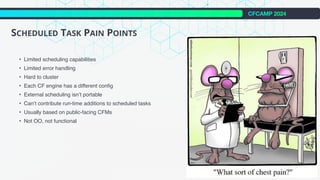
SCHEDULED TASK PAIN POINTS
• Limited scheduling capabilities
• Limited error handling
• Hard to cluster
• Each CF engine has a different config
• External scheduling isn’t portable
• Can‘t contribute run-time additions to scheduled tasks
• Usually based on public-facing CFMs
• Not OO, not functional
CFCAMP 2024
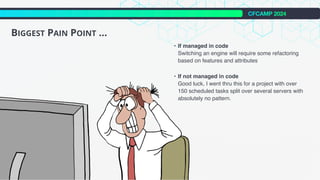
BIGGEST PAIN POINT ...
• If managed in code
Switching an engine will require some refactoring
based on features and attributes
• If not managed in code
Good luck, I went thru this for a project with over
150 scheduled tasks split over several servers with
absolutely no pattern.
CFCAMP 2024
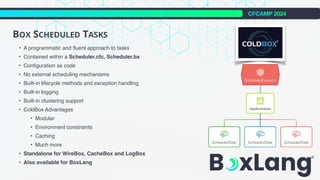
BOX SCHEDULED TASKS
• A programmatic and fluent approach to tasks
• Contained within a Scheduler.cfc, Scheduler.bx
• Configuration as code
• No external scheduling mechanisms
• Built-in lifecycle methods and exception handling
• Built-in logging
• Built-in clustering support
• ColdBox Advantages
• Modular
• Environment constraints
• Caching
• Much more
• Standalone for WireBox, CacheBox and LogBox
• Also available for BoxLang
CFCAMP 2024
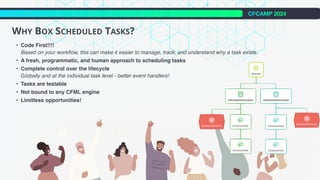
WHY BOX SCHEDULED TASKS?
• Code First!!!!
Based on your workflow, this can make it easier to manage, track, and understand why a task exists.
• A fresh, programmatic, and human approach to scheduling tasks
• Complete control over the lifecycle
Globally and at the individual task level - better event handlers!
• Tasks are testable
• Not bound to any CFML engine
• Limitless opportunities!
CFCAMP 2024
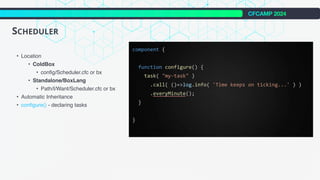
SCHEDULER
• Location
• ColdBox
• config/Scheduler.cfc or bx
• Standalone/BoxLang
• Path/I/Want/Scheduler.cfc or bx
• Automatic Inheritance
• configure() - declaring tasks
CFCAMP 2024
SCHEDULED TASK INTRO
• Frequencies
Easy to understand frequencies to scheduled our tasks with.
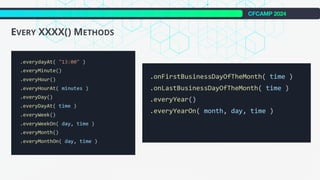
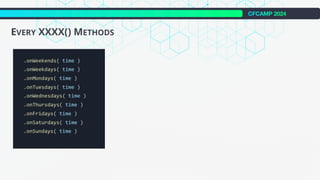
• every ( period, timeunit ) / everyMinute() / onFirstBusinessDayOfTheMonth( time ) / onWeekends()
.
.
.
• Prevent Stacking
Allows to force a task to have a fixed delay starting when the task finishes executing.
• Delay First Execution
Great for delaying the first execution of a scheduled task.
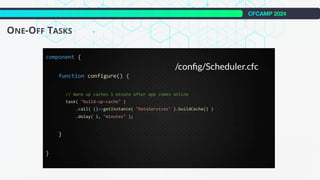
• Create One Off Tasks
Great for warming up caches, registering yourself with control planes, setting up initial data collections and so much more.
• Life-Cycle Methods
The scheduler itself has global life-cycle methods but tasks can also have these methods.
• after / before / onFailure / onSuccess
• Constraints
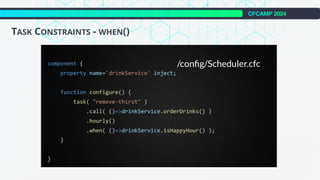
• Truth Test - Register a when() closure that will be executed at runtime and boolean evaluated.
• Start Date / End Date - Specify when the task will become active on a specific date and time and/or when the task will become disabled.
• Start Time / End Time - Restrict the execution of the task after and/or before a certain time
• Environment - For ColdBox apps you can specify what environment to run on
CFCAMP 2024
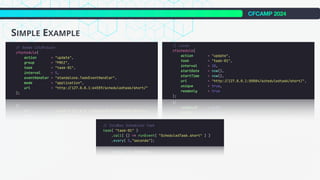
SIMPLE EXAMPLE
CFCAMP 2024
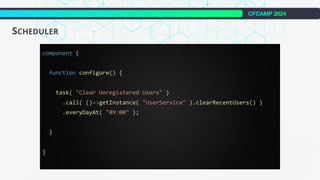
SCHEDULER
CFCAMP 2024
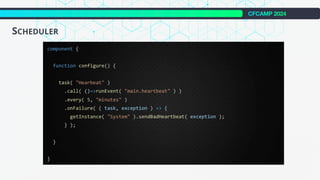
SCHEDULER
CFCAMP 2024
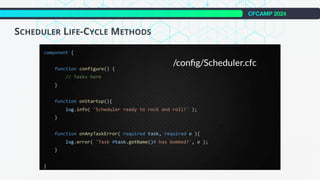
SCHEDULER LIFE-CYCLE METHODS
CFCAMP 2024
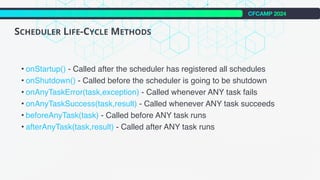
SCHEDULER LIFE-CYCLE METHODS
• onStartup() - Called after the scheduler has registered all schedules
• onShutdown() - Called before the scheduler is going to be shutdown
• onAnyTaskError(task,exception) - Called whenever ANY task fails
• onAnyTaskSuccess(task,result) - Called whenever ANY task succeeds
• beforeAnyTask(task) - Called before ANY task runs
• afterAnyTask(task,result) - Called after ANY task runs
CFCAMP 2024
SCHEDULER LIFE-CYCLE METHODS
CFCAMP 2024
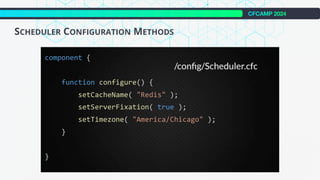
SCHEDULER CONFIGURATION METHODS
CFCAMP 2024
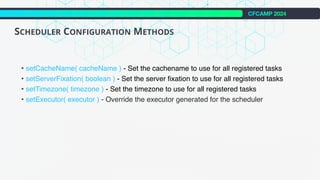
SCHEDULER CONFIGURATION METHODS
• setCacheName( cacheName ) - Set the cachename to use for all registered tasks
• setServerFixation( boolean ) - Set the server fixation to use for all registered tasks
• setTimezone( timezone ) - Set the timezone to use for all registered tasks
• setExecutor( executor ) - Override the executor generated for the scheduler
CFCAMP 2024
SCHEDULER CONFIGURATION METHODS
CFCAMP 2024
SCHEDULER TASK METHODS
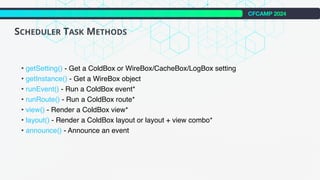
• getSetting() - Get a ColdBox or WireBox/CacheBox/LogBox setting
• getInstance() - Get a WireBox object
• runEvent() - Run a ColdBox event*
• runRoute() - Run a ColdBox route*
• view() - Render a ColdBox view*
• layout() - Render a ColdBox layout or layout + view combo*
• announce() - Announce an event
CFCAMP 2024
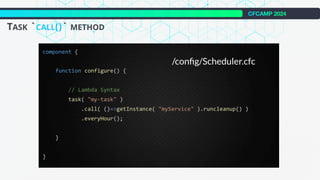
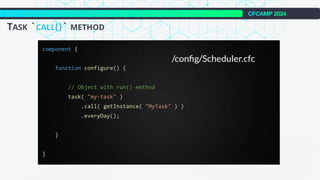
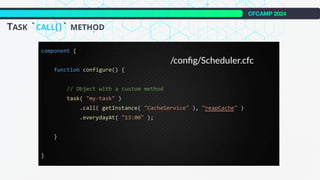
TASK `CALL()` METHOD
CFCAMP 2024
TASK `CALL()` METHOD
CFCAMP 2024
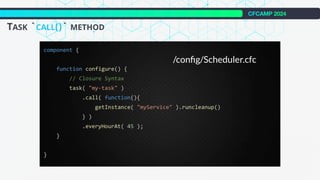
TASK `CALL()` METHOD
CFCAMP 2024
TASK `CALL()` METHOD
CFCAMP 2024
TASK `CALL()` METHOD
CFCAMP 2024
SCHEDULING TIMES
CFCAMP 2024
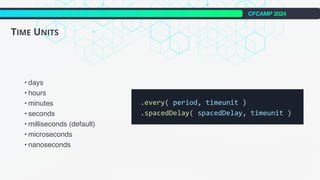
TIME UNITS
• days
• hours
• minutes
• seconds
• milliseconds (default)
• microseconds
• nanoseconds
CFCAMP 2024
EVERY XXXX() METHODS
CFCAMP 2024
EVERY XXXX() METHODS
CFCAMP 2024
ONE-OFF TASKS
CFCAMP 2024
ONE-OFF TASKS
CFCAMP 2024
TASK LIFE-CYCLE METHODS
CFCAMP 2024
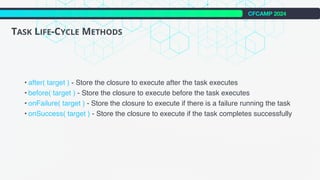
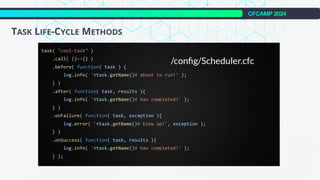
• after( target ) - Store the closure to execute after the task executes
• before( target ) - Store the closure to execute before the task executes
• onFailure( target ) - Store the closure to execute if there is a failure running the task
• onSuccess( target ) - Store the closure to execute if the task completes successfully
TASK LIFE-CYCLE METHODS
CFCAMP 2024
TASK LIFE-CYCLE METHODS
CFCAMP 2024
TASK CONSTRAINTS
CFCAMP 2024
TASK CONSTRAINTS - WHEN()
CFCAMP 2024
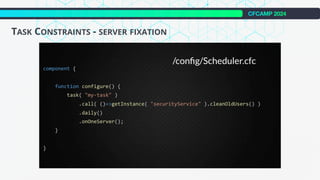
TASK CONSTRAINTS - SERVER FIXATION
CFCAMP 2024
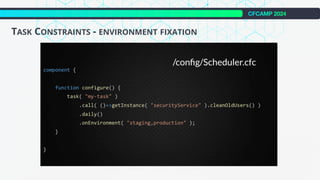
TASK CONSTRAINTS - ENVIRONMENT FIXATION
CFCAMP 2024
TASK STATS
CFCAMP 2024
TASK STATS
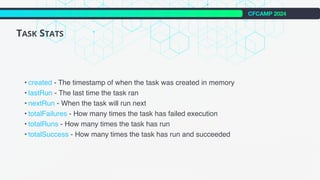
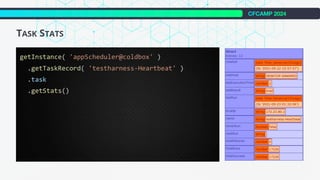
• created - The timestamp of when the task was created in memory
• lastRun - The last time the task ran
• nextRun - When the task will run next
• totalFailures - How many times the task has failed execution
• totalRuns - How many times the task has run
• totalSuccess - How many times the task has run and succeeded
CFCAMP 2024
TASK STATS
CFCAMP 2024
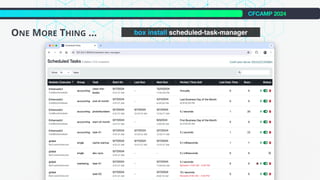
ONE MORE THING ... box install scheduled-task-manager
INTO THE BOX 2024
Thank You !
CFCAMP 2024

Revolutionizing Task Scheduling in CFML!

  • 1.
    CFCAMP 2024 -Luis Majano Revolutionizing Task Scheduling In CFML & BoxLang
  • 2.
    • Computer Engineer •Coding since year 9 • Creator of all things box! • Documentation Weirdo! • Thanks to Giancarlo Gomez Luis Majano CEO Ortus Solutions @lmajano @ortussolutions
  • 3.
  • 4.
    CFCAMP 2024 THE PROSAND CONS - ADOBE COLDFUSION PROS • cronTime Configured using custom Cron-Expressions http://www.quartz-scheduler.org/documentation/quartz-2.2.2/tutorials/tutorial- lesson-06.html • group Pause or Resume all tasks in a group • action create and modify options added in 2018. Create a fresh task which throws and error if it already exists and modify allows to update an existing task while retaining its old values • mode - Enterprise Allows to define Application level tasks • eventHandler - Enterprise Simple Event Handlers - onException, onComplete, onMisfire CONS • The cool features come at a hefty cost $$$ • Although you can track in code • tasks can be created / edited * server tasks • tasks can be removed * server and application level
  • 5.
    CFCAMP 2024 THE PROSAND CONS - LUCEE PROS • unique Execute task once at a time no overlapping Funny behavior ... Does not add the full interval only the remaining • readonly ? No edit or delete allowed in admin Nice way to force in code only workflow • autodelete Helps with the bad habit of people not being pro active about code debt clean up and yes tasks that are no longer needed create code debt to manage CONS • None of the features from ACF • Application level tasks • Event Handlers • Tasks under 10 second intervals do not fire • Access to the web admin can be a bit of a pain due to individual context
  • 6.
    CFCAMP 2024 THE PROSAND CONS - EXTERNAL RUNNERS (CRON,JENKINS, GITLAB, ETC) PROS • Dashboard Most provide a nice UI for visualization, most, not all • Complex Schedules Most allow more complex scheduling • Interaction Ability to run, stop, pause, delete, add, etc. • Centralization Manage all the tasks on one console and execute against many runners. CONS • No developer visibility • Yet another system to maintain • More logs to traverse and make sure logged • Only http/https access to our tasks • Hard to track exceptions • Security • API Keys • Obfuscated URLs for access • Public URLs (not good)
  • 7.
    CFCAMP 2024 SCHEDULED TASKPAIN POINTS • Limited scheduling capabilities • Limited error handling • Hard to cluster • Each CF engine has a different config • External scheduling isn’t portable • Can‘t contribute run-time additions to scheduled tasks • Usually based on public-facing CFMs • Not OO, not functional
  • 8.
    CFCAMP 2024 BIGGEST PAINPOINT ... • If managed in code Switching an engine will require some refactoring based on features and attributes • If not managed in code Good luck, I went thru this for a project with over 150 scheduled tasks split over several servers with absolutely no pattern.
  • 9.
    CFCAMP 2024 BOX SCHEDULEDTASKS • A programmatic and fluent approach to tasks • Contained within a Scheduler.cfc, Scheduler.bx • Configuration as code • No external scheduling mechanisms • Built-in lifecycle methods and exception handling • Built-in logging • Built-in clustering support • ColdBox Advantages • Modular • Environment constraints • Caching • Much more • Standalone for WireBox, CacheBox and LogBox • Also available for BoxLang
  • 10.
    CFCAMP 2024 WHY BOXSCHEDULED TASKS? • Code First!!!! Based on your workflow, this can make it easier to manage, track, and understand why a task exists. • A fresh, programmatic, and human approach to scheduling tasks • Complete control over the lifecycle Globally and at the individual task level - better event handlers! • Tasks are testable • Not bound to any CFML engine • Limitless opportunities!
  • 11.
    CFCAMP 2024 SCHEDULER • Location •ColdBox • config/Scheduler.cfc or bx • Standalone/BoxLang • Path/I/Want/Scheduler.cfc or bx • Automatic Inheritance • configure() - declaring tasks
  • 12.
    CFCAMP 2024 SCHEDULED TASKINTRO • Frequencies Easy to understand frequencies to scheduled our tasks with. • every ( period, timeunit ) / everyMinute() / onFirstBusinessDayOfTheMonth( time ) / onWeekends() . . . • Prevent Stacking Allows to force a task to have a fixed delay starting when the task finishes executing. • Delay First Execution Great for delaying the first execution of a scheduled task. • Create One Off Tasks Great for warming up caches, registering yourself with control planes, setting up initial data collections and so much more. • Life-Cycle Methods The scheduler itself has global life-cycle methods but tasks can also have these methods. • after / before / onFailure / onSuccess • Constraints • Truth Test - Register a when() closure that will be executed at runtime and boolean evaluated. • Start Date / End Date - Specify when the task will become active on a specific date and time and/or when the task will become disabled. • Start Time / End Time - Restrict the execution of the task after and/or before a certain time • Environment - For ColdBox apps you can specify what environment to run on
  • 13.
  • 14.
  • 15.
  • 16.
  • 17.
    CFCAMP 2024 SCHEDULER LIFE-CYCLEMETHODS • onStartup() - Called after the scheduler has registered all schedules • onShutdown() - Called before the scheduler is going to be shutdown • onAnyTaskError(task,exception) - Called whenever ANY task fails • onAnyTaskSuccess(task,result) - Called whenever ANY task succeeds • beforeAnyTask(task) - Called before ANY task runs • afterAnyTask(task,result) - Called after ANY task runs
  • 18.
  • 19.
  • 20.
    CFCAMP 2024 SCHEDULER CONFIGURATIONMETHODS • setCacheName( cacheName ) - Set the cachename to use for all registered tasks • setServerFixation( boolean ) - Set the server fixation to use for all registered tasks • setTimezone( timezone ) - Set the timezone to use for all registered tasks • setExecutor( executor ) - Override the executor generated for the scheduler
  • 21.
  • 22.
    CFCAMP 2024 SCHEDULER TASKMETHODS • getSetting() - Get a ColdBox or WireBox/CacheBox/LogBox setting • getInstance() - Get a WireBox object • runEvent() - Run a ColdBox event* • runRoute() - Run a ColdBox route* • view() - Render a ColdBox view* • layout() - Render a ColdBox layout or layout + view combo* • announce() - Announce an event
  • 23.
  • 24.
  • 25.
  • 26.
  • 27.
  • 28.
  • 29.
    CFCAMP 2024 TIME UNITS •days • hours • minutes • seconds • milliseconds (default) • microseconds • nanoseconds
  • 30.
  • 31.
  • 32.
  • 33.
  • 34.
  • 35.
    CFCAMP 2024 • after(target ) - Store the closure to execute after the task executes • before( target ) - Store the closure to execute before the task executes • onFailure( target ) - Store the closure to execute if there is a failure running the task • onSuccess( target ) - Store the closure to execute if the task completes successfully TASK LIFE-CYCLE METHODS
  • 36.
  • 37.
  • 38.
  • 39.
  • 40.
    CFCAMP 2024 TASK CONSTRAINTS- ENVIRONMENT FIXATION
  • 41.
  • 42.
    CFCAMP 2024 TASK STATS •created - The timestamp of when the task was created in memory • lastRun - The last time the task ran • nextRun - When the task will run next • totalFailures - How many times the task has failed execution • totalRuns - How many times the task has run • totalSuccess - How many times the task has run and succeeded
  • 43.
  • 44.
    CFCAMP 2024 ONE MORETHING ... box install scheduled-task-manager
  • 45.
    INTO THE BOX2024 Thank You ! CFCAMP 2024