Reproducible
research
C. Tobin Magle, PhD
06-26-2017
10:00 – 11:30 a.m.
Morgan Library
Computer Classroom 175
Outline
• What is reproducible research?
• Why would I do that?
• How? (in R Studio)
• Automation
• Git
• R Markdown
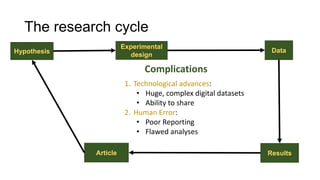
Hypothesis Data
Experimental
design
ResultsArticle
The research cycle
1. Technological advances:
• Huge, complex digital datasets
• Ability to share
2. Human Error:
• Poor Reporting
• Flawed analyses
Complications
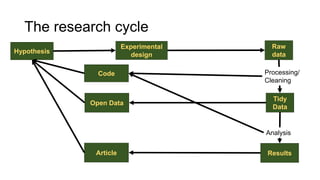
Hypothesis
Raw
data
Experimental
design
Tidy
Data
ResultsArticle
Processing/
Cleaning
Analysis
Open Data
Code
The research cycle
Reproducible research
is the practice of distributing all data,
software source code, and tools required
to reproduce the results discussed in a
research publication.
https://www.ctspedia.org/do/view/CTSpedia/ReproducibleResearchStandards
Reproducible research
=
Data (with metadata)
+
Code/Software
Reproducible research
=
Transparency
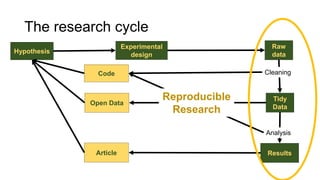
Hypothesis
Raw
data
Experimental
design
Tidy
Data
ResultsArticle
Cleaning
Analysis
Open Data
Code
Reproducible
Research
The research cycle
Replication vs. Reproducibility
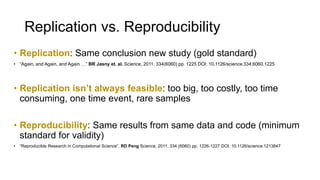
• Replication: Same conclusion new study (gold standard)
• “Again, and Again, and Again …” BR Jasny et. al. Science, 2011. 334(6060) pp. 1225 DOI: 10.1126/science.334.6060.1225
• Replication isn’t always feasible: too big, too costly, too time
consuming, one time event, rare samples
• Reproducibility: Same results from same data and code (minimum
standard for validity)
• “Reproducible Research in Computational Science”. RD Peng Science, 2011. 334 (6060) pp. 1226-1227 DOI: 10.1126/science.1213847
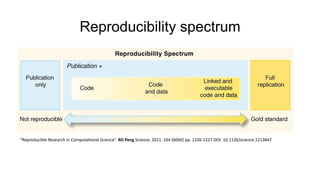
Reproducibility spectrum
“Reproducible Research in Computational Science”. RD Peng Science, 2011. 334 (6060) pp. 1226-1227 DOI: 10.1126/science.1213847
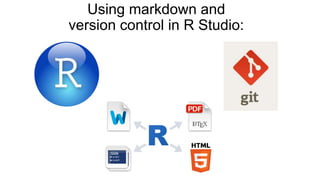
Using markdown and
version control in R Studio:
Documenting analysis
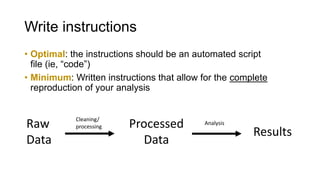
• Optimal: the instructions should be an automated script
file (ie, “code”)
• Minimum: Written instructions that allow for the complete
reproduction of your analysis
Raw
Data
Processed
Data
Results
Cleaning/
processing
Analysis
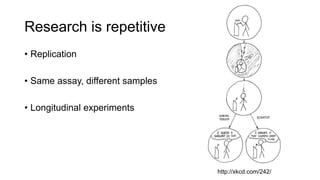
Research is repetitive
• Replication
• Same assay, different samples
• Longitudinal experiments
http://xkcd.com/242/
Doing things by hand is…
• Slow
• Hard to document
• Hard to repeat
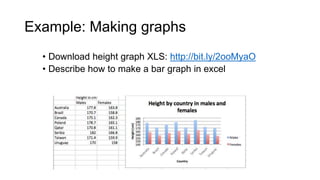
Exercise 1: Making graphs
• Download height graph XLS: http://bit.ly/2ooMyaO
• Describe how to make a bar graph in excel
Automation
• Fast
• Easy to document
• Easy to repeat
• Write scripts or save log files
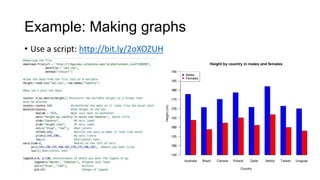
Example: Making graphs
• Use a script: http://bit.ly/2oXOZUH
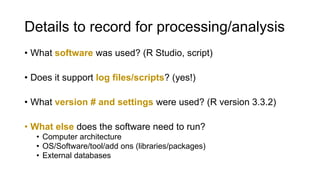
Details to record for processing/analysis
• What software was used? (R Studio, script)
• Does it support log files/scripts? (yes!)
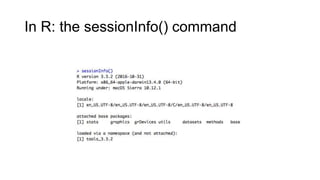
• What version # and settings were used? (R version 3.3.2)
• What else does the software need to run?
• Computer architecture
• OS/Software/tool/add ons (libraries/packages)
• External databases
In R: the sessionInfo() command
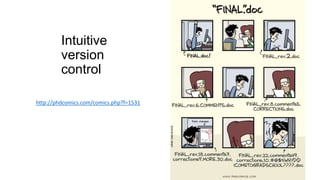
Intuitive
version
control
http://phdcomics.com/comics.php?f=1531
Version Control
• A system that records changes to a
file or set of files over time so that you
can recall specific versions later
• https://git-scm.com/doc
• Saves EVERYTHING
• Records who made what change
• Identifies conflicting changes
• Not just for code
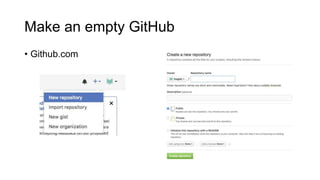
Make an empty GitHub
• Github.com
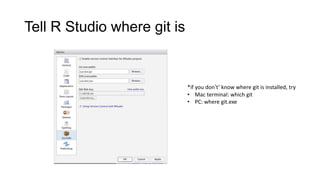
Tell R Studio where git is
*if you don’t’ know where git is installed, try
• Mac terminal: which git
• PC: where git.exe
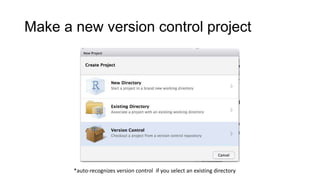
Make a new version control project
*auto-recognizes version control if you select an existing directory
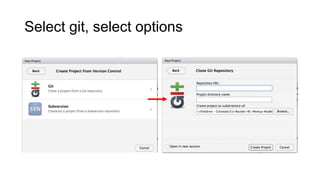
Select git, select options
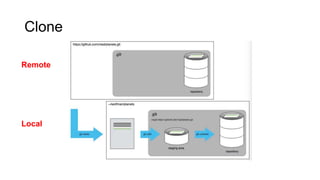
Clone
Remote
Local
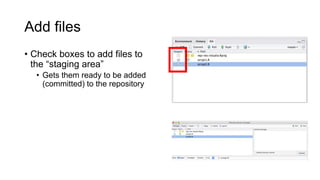
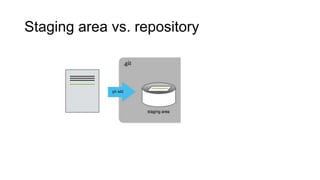
Add files
• Check boxes to add files to
the “staging area”
• Gets them ready to be added
(committed) to the repository
Staging area vs. repository
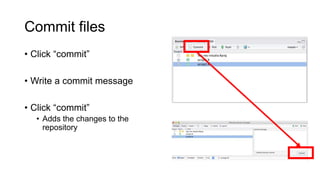
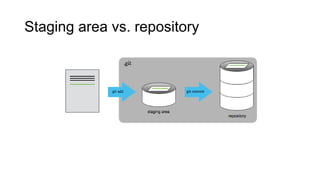
Commit files
• Click “commit”
• Write a commit message
• Click “commit”
• Adds the changes to the
repository
Staging area vs. repository
Exercise 2
• Make some changes to the script file in your repo
• add the changes by clicking the checkbox
• Create a new file – don’t click the checkbox next to it
• Commit the changes
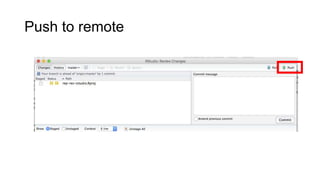
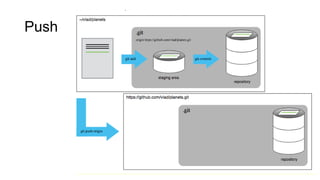
• Push the changes to the remote
• Does the new file appear in your remote git repository
Push to remote
Push
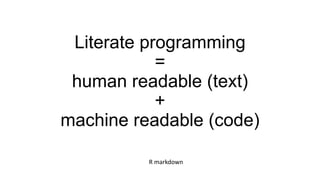
Literate programming
=
human readable (text)
+
machine readable (code)
R markdown
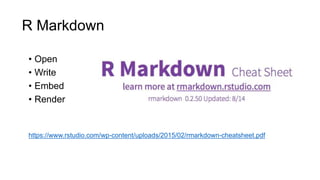
R Markdown
• Open
• Write
• Embed
• Render
https://www.rstudio.com/wp-content/uploads/2015/02/rmarkdown-cheatsheet.pdf
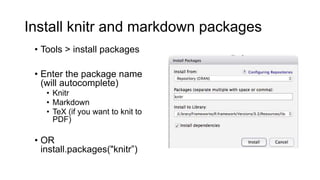
Install knitr and markdown packages
• Tools > install packages
• Enter the package name
(will autocomplete)
• Knitr
• Rmarkdown
• TeX (if you want to knit to
PDF)
• OR
install.packages("knitr”)
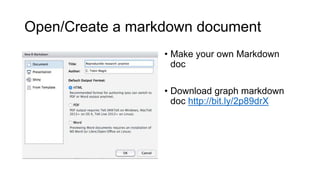
Open/Create a markdown document
• Make your own Markdown
doc
• Download graph markdown
doc http://bit.ly/2p89drX
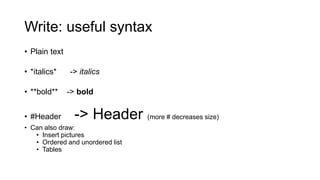
Write: useful syntax
• Plain text
• *italics* -> italics
• **bold** -> bold
• #Header -> Header (more # decreases size)
• Can also draw:
• Insert pictures
• Ordered and unordered list
• Tables
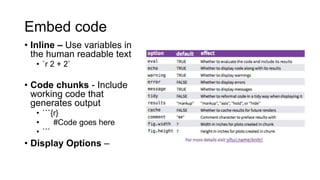
Embed code
• Inline – Use variables in
the human readable text
• `r 2 + 2`
• Code chunks - Include
working code that
generates output
• ```{r}
• #Code goes here
• ```
• Display Options –
Render
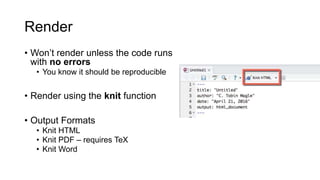
• Won’t render unless the code runs
with no errors
• You know it should be reproducible
• Render using the knit function
• Output Formats
• Knit HTML
• Knit PDF – requires TeX
• Knit Word
Exercise 3
• Open a new markdown document
• Use the formatting commands from the R Markdown cheat
sheet to create a bulleted list that looks like the content of this
slide.
• https://www.rstudio.com/wp-
content/uploads/2015/02/rmarkdown-cheatsheet.pdf
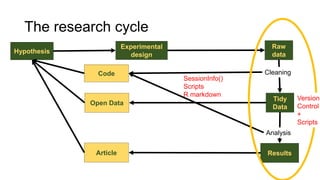
SessionInfo()
Scripts
R markdown
Hypothesis
Raw
data
Experimental
design
Tidy
Data
ResultsArticle
Cleaning
Analysis
Open Data
Code
The research cycle
Version
Control
+
Scripts
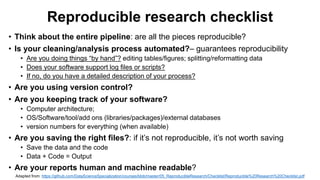
Reproducible research checklist
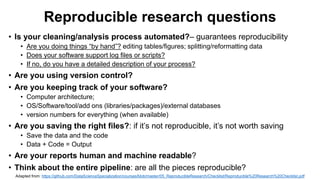
• Think about the entire pipeline: are all the pieces reproducible?
• Is your cleaning/analysis process automated?– guarantees reproducibility
• Are you doing things “by hand”? editing tables/figures; splitting/reformatting data
• Does your software support log files or scripts?
• If no, do you have a detailed description of your process?
• Are you using version control?
• Are you keeping track of your software?
• Computer architecture;
• OS/Software/tool/add ons (libraries/packages)/external databases
• version numbers for everything (when available)
• Are you saving the right files?: if it’s not reproducible, it’s not worth saving
• Save the data and the code
• Data + Code = Output
• Are your reports human and machine readable?
Adapted from: https://github.com/DataScienceSpecialization/courses/blob/master/05_ReproducibleResearch/Checklist/Reproducible%20Research%20Checklist.pdf
Need help?
• Email: tobin.magle@colostate.edu
• Data Management Services website:
http://lib.colostate.edu/services/data-management
• Software Carpentry Reproducible Scientific Analysis Lesson:
http://swcarpentry.github.io/r-novice-gapminder/
• Git with R tutorial: http://happygitwithr.com/
• R markdown cheatsheet: https://www.rstudio.com/wp-
content/uploads/2015/02/rmarkdown-cheatsheet.pdf

Reproducible research

  • 1.
    Reproducible research C. Tobin Magle,PhD 06-26-2017 10:00 – 11:30 a.m. Morgan Library Computer Classroom 175
  • 2.
    Outline • What isreproducible research? • Why would I do that? • How? (in R Studio) • Automation • Git • R Markdown
  • 3.
    Hypothesis Data Experimental design ResultsArticle The researchcycle 1. Technological advances: • Huge, complex digital datasets • Ability to share 2. Human Error: • Poor Reporting • Flawed analyses Complications
  • 4.
  • 5.
    Reproducible research is thepractice of distributing all data, software source code, and tools required to reproduce the results discussed in a research publication. https://www.ctspedia.org/do/view/CTSpedia/ReproducibleResearchStandards
  • 6.
    Reproducible research = Data (withmetadata) + Code/Software
  • 7.
  • 8.
  • 9.
    Replication vs. Reproducibility •Replication: Same conclusion new study (gold standard) • “Again, and Again, and Again …” BR Jasny et. al. Science, 2011. 334(6060) pp. 1225 DOI: 10.1126/science.334.6060.1225 • Replication isn’t always feasible: too big, too costly, too time consuming, one time event, rare samples • Reproducibility: Same results from same data and code (minimum standard for validity) • “Reproducible Research in Computational Science”. RD Peng Science, 2011. 334 (6060) pp. 1226-1227 DOI: 10.1126/science.1213847
  • 10.
    Reproducibility spectrum “Reproducible Researchin Computational Science”. RD Peng Science, 2011. 334 (6060) pp. 1226-1227 DOI: 10.1126/science.1213847
  • 11.
    Using markdown and versioncontrol in R Studio:
  • 12.
    Documenting analysis • Optimal:the instructions should be an automated script file (ie, “code”) • Minimum: Written instructions that allow for the complete reproduction of your analysis Raw Data Processed Data Results Cleaning/ processing Analysis
  • 13.
    Research is repetitive •Replication • Same assay, different samples • Longitudinal experiments http://xkcd.com/242/
  • 14.
    Doing things byhand is… • Slow • Hard to document • Hard to repeat
  • 15.
    Exercise 1: Makinggraphs • Download height graph XLS: http://bit.ly/2ooMyaO • Describe how to make a bar graph in excel
  • 16.
    Automation • Fast • Easyto document • Easy to repeat • Write scripts or save log files
  • 17.
    Example: Making graphs •Use a script: http://bit.ly/2oXOZUH
  • 18.
    Details to recordfor processing/analysis • What software was used? (R Studio, script) • Does it support log files/scripts? (yes!) • What version # and settings were used? (R version 3.3.2) • What else does the software need to run? • Computer architecture • OS/Software/tool/add ons (libraries/packages) • External databases
  • 19.
    In R: thesessionInfo() command
  • 20.
  • 21.
    Version Control • Asystem that records changes to a file or set of files over time so that you can recall specific versions later • https://git-scm.com/doc • Saves EVERYTHING • Records who made what change • Identifies conflicting changes • Not just for code
  • 22.
    Make an emptyGitHub • Github.com
  • 23.
    Tell R Studiowhere git is *if you don’t’ know where git is installed, try • Mac terminal: which git • PC: where git.exe
  • 24.
    Make a newversion control project *auto-recognizes version control if you select an existing directory
  • 25.
  • 26.
  • 27.
    Add files • Checkboxes to add files to the “staging area” • Gets them ready to be added (committed) to the repository
  • 28.
    Staging area vs.repository
  • 29.
    Commit files • Click“commit” • Write a commit message • Click “commit” • Adds the changes to the repository
  • 30.
    Staging area vs.repository
  • 31.
    Exercise 2 • Makesome changes to the script file in your repo • add the changes by clicking the checkbox • Create a new file – don’t click the checkbox next to it • Commit the changes • Push the changes to the remote • Does the new file appear in your remote git repository
  • 32.
  • 33.
  • 34.
    Literate programming = human readable(text) + machine readable (code) R markdown
  • 35.
    R Markdown • Open •Write • Embed • Render https://www.rstudio.com/wp-content/uploads/2015/02/rmarkdown-cheatsheet.pdf
  • 36.
    Install knitr andmarkdown packages • Tools > install packages • Enter the package name (will autocomplete) • Knitr • Rmarkdown • TeX (if you want to knit to PDF) • OR install.packages("knitr”)
  • 37.
    Open/Create a markdowndocument • Make your own Markdown doc • Download graph markdown doc http://bit.ly/2p89drX
  • 38.
    Write: useful syntax •Plain text • *italics* -> italics • **bold** -> bold • #Header -> Header (more # decreases size) • Can also draw: • Insert pictures • Ordered and unordered list • Tables
  • 39.
    Embed code • Inline– Use variables in the human readable text • `r 2 + 2` • Code chunks - Include working code that generates output • ```{r} • #Code goes here • ``` • Display Options –
  • 40.
    Render • Won’t renderunless the code runs with no errors • You know it should be reproducible • Render using the knit function • Output Formats • Knit HTML • Knit PDF – requires TeX • Knit Word
  • 41.
    Exercise 3 • Opena new markdown document • Use the formatting commands from the R Markdown cheat sheet to create a bulleted list that looks like the content of this slide. • https://www.rstudio.com/wp- content/uploads/2015/02/rmarkdown-cheatsheet.pdf
  • 42.
  • 43.
    Reproducible research checklist •Think about the entire pipeline: are all the pieces reproducible? • Is your cleaning/analysis process automated?– guarantees reproducibility • Are you doing things “by hand”? editing tables/figures; splitting/reformatting data • Does your software support log files or scripts? • If no, do you have a detailed description of your process? • Are you using version control? • Are you keeping track of your software? • Computer architecture; • OS/Software/tool/add ons (libraries/packages)/external databases • version numbers for everything (when available) • Are you saving the right files?: if it’s not reproducible, it’s not worth saving • Save the data and the code • Data + Code = Output • Are your reports human and machine readable? Adapted from: https://github.com/DataScienceSpecialization/courses/blob/master/05_ReproducibleResearch/Checklist/Reproducible%20Research%20Checklist.pdf
  • 44.
    Need help? • Email:tobin.magle@colostate.edu • Data Management Services website: http://lib.colostate.edu/services/data-management • Software Carpentry Reproducible Scientific Analysis Lesson: http://swcarpentry.github.io/r-novice-gapminder/ • Git with R tutorial: http://happygitwithr.com/ • R markdown cheatsheet: https://www.rstudio.com/wp- content/uploads/2015/02/rmarkdown-cheatsheet.pdf