Presentation on the topic
REMOTE CALL PROCEDURE
Submitted TO-
Meenakshi Chawla
(Assistant Prof.)
Submitted By-
Mudit Mehta
(15IT021)
Remote Procedure Calls (RPC)
• Avoid explicit message exchange between processes
• Basic idea is to allow a process on a machine to call
procedures on a remote machine
– Make a remote procedure possibly look like a local one
• Original paper on RPC:
– A. Birrell, B Nelson, “Implementing Remote Procedure
Calls”, ACM Symposium on Operating System Principles,
1984
• How are parameters passed in a local procedure call
– E.g., #include <sys/types.h>
#include <unistd.h>
...
char buf[20];
size_t nbytes;
ssize_t bytes_read;
int fd;
...
nbytes = sizeof(buf);
bytes_read = read(fd, buf, nbytes);
...
Conventional Procedure Call
Figure 4-5. (a) Parameter passing in a local procedure call: the stack before
the call to read. (b) The stack while the called procedure is active.
Remote Procedure Calls (RPC)
• How are parameter passed in a remote procedure call,
while making it look like a local procedure call?
Client and Server Stubs
Principle of RPC between a client and server program.
Steps of a Remote Procedure Call
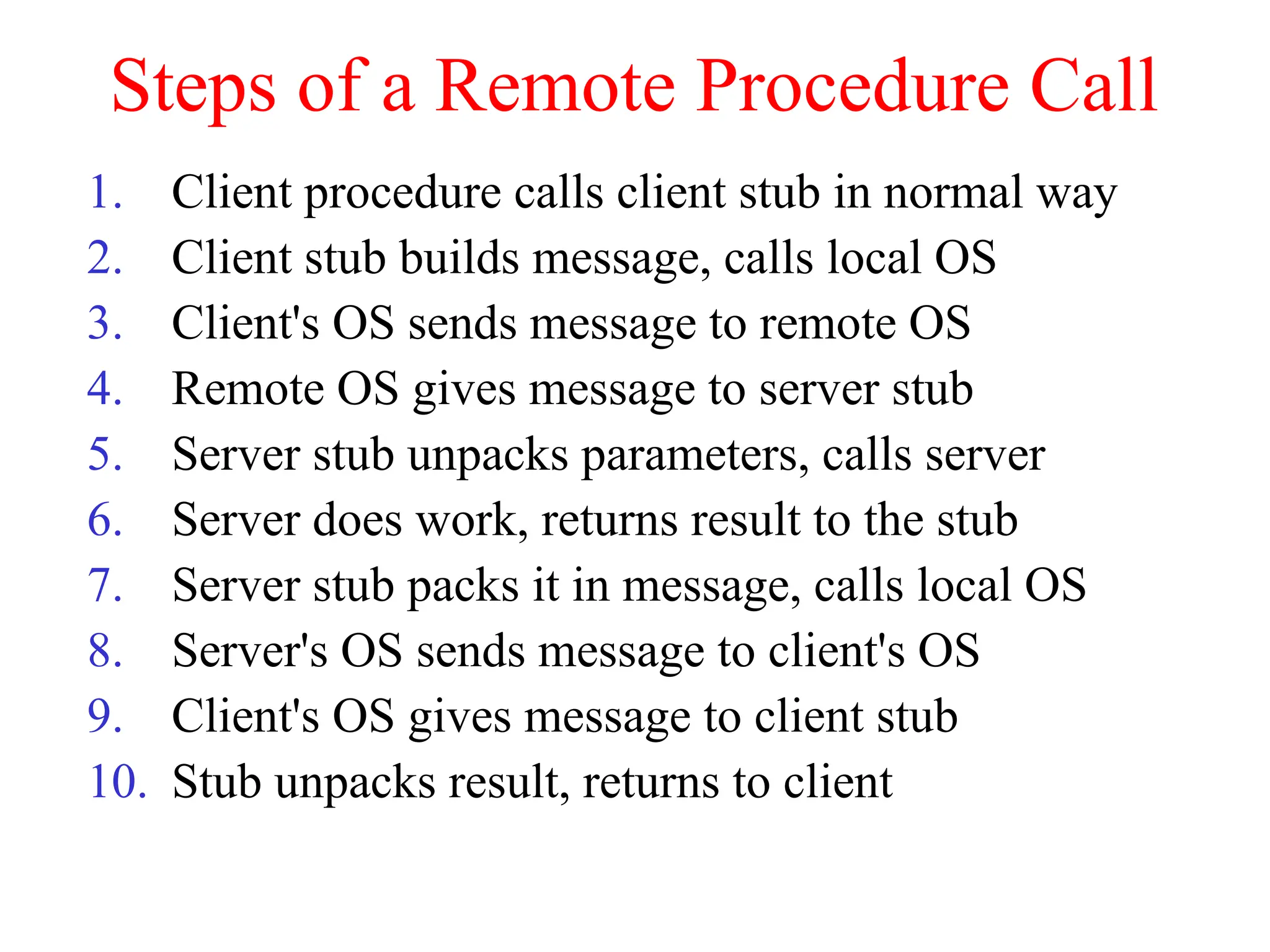
1. Client procedure calls client stub in normal way
2. Client stub builds message, calls local OS
3. Client's OS sends message to remote OS
4. Remote OS gives message to server stub
5. Server stub unpacks parameters, calls server
6. Server does work, returns result to the stub
7. Server stub packs it in message, calls local OS
8. Server's OS sends message to client's OS
9. Client's OS gives message to client stub
10. Stub unpacks result, returns to client
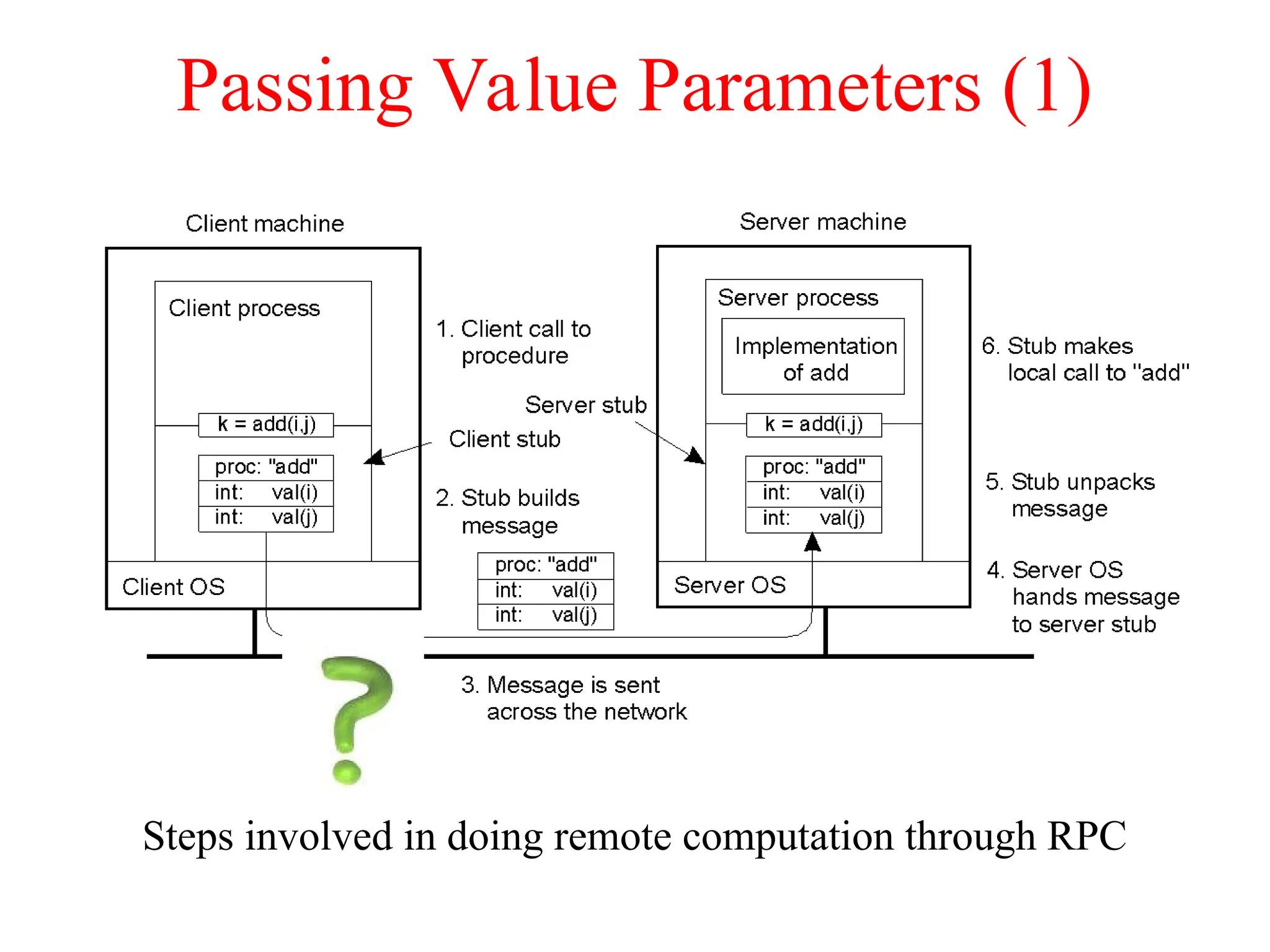
Passing Value Parameters (1)
Steps involved in doing remote computation through RPC
2-8
Passing Value Parameters (2)
Passing Value Parameters (3)
a) Original message on the Pentium (little-endian)
b) The message after receipt on the SPARC (big-endian)
Note: the little numbers in boxes indicate the address of each byte
Passing Value Parameters (3)
a) Original message on the Pentium (little-endian)
b) The message after receipt on the SPARC (big-endian)
c) The message after being inverted (integer 5, string: “LLIJ”)
Note: the little numbers in boxes indicate the address of each byte
Passing reference parameters
– What is Call By Value and Call By Refernce?
– Example: call foo(int, int * ) or read(fd, buf, nbytes)
– Call by copy/restore
– The dreaded “pointer problem”
• Linked list
• Complex graph
a
b
a’
b’
foo(a, &b ) Call foo(a, &b’ )
Copy value a and contents of loc b
into a’ and loc b’
Return Copy contents of loc b’ into b
Machine A
Machine B
Marshalling
Values must cross the network
Machine formats differ
– Integer byte order
• Little-endian or big-endian
– Floating point format
• IEEE 754 or not
Marshalling  transferring data structure used in remote
procedure call from one address space to another.
Define a “network format”, for example following XDR
(eXternal Data Representation) standard
http://www.ietf.org/rfc/rfc1832.txt
RPC: The basic mechanism
Client
routines
Client stub
RPC
runtime
Network
routines
Source: R. Stevens, Unix Network Programming (IPC)
Vol 2, 1998
Server
routines
Server
stub
RPC
runtime
Network
routines
Process
kernel
Process
kernel
Client process Server process 1. Client calls a local procedure on
the client stub
2. The client stub acts as a proxy
and marshalls the call and the
args.
3. The client stub send this to the
remote system (via TCP/UDP)
4. The server stub unmarshalls the
call and args from the client
5. The server stub calls the actual
procedure on the server
6. The server stub marshalls the
reply and sends it back to the
client
1
2
3
4
5
6
Example1: A Time Server Interface
struct time {
int seconds;
int minutes;
int hours;
int day;
int month;
int year;
char timezone[4];
}
int gettime(t); struct time *t;
int settime(t); struct time *t;
Example1: Client Stub for Settime
int settime(t); struct time *t; {
char *p, message[32];
int stat;
p = message;
p = put_int(p, SETTIME);
p = put_int(p, t->seconds);
p = put_int(p, t->minutes);
p = put_int(p, t->hours);
p = put_int(p, t->day);
p = put_int(p, t->month);
p = put_int(p, t->year);
p = put_string(p, t->timezone, 4);
stat = do_operation(“time_server”, message, 32);
if(stat == SUCCESS) get_int(message, &stat);
return(stat);
}
Example1: Server Stub (1)
void main_loop() {
char *p, message[32];
int len, op_code;
struct time t;
for(;;) {
len = receive_request(message, 32);
if(len < 4) {
/* error handling code */
}
p = message;
p = get_int(p, op_code);
switch(op_code) {
case SETTIME:
if (len < 32) {
/* error handling code */
}
p = get_int(p, &t.seconds);
p = get_int(p, &t.minutes);
p = get_int(p, &t.hours);
p = get_int(p, &t.day);
p = get_int(p, &t.month);
p = get_int(p, &t.year);
p = get_string(p, &t.timezone,
4);
len = settime(&t);
put_int(message, len);
len = 4;
break;
case GETTIME:
/* code for unmarshalling
and calling gettime */
}
send_reply(message, len);
}
Binding a Client to a Server (2)
Figure 4-13. Client-to-server binding in DCE.
Asynchronous RPC (1)
a) The interconnection between client and server in a traditional RPC
b) The interaction using asynchronous RPC
2-12
Asynchronous RPC (2)
A client and server interacting through two asynchronous RPCs
2-13
RPC Semantics
• Most RPC systems will offer either:
– at least once semantics
– or at most once semantics
• Understand application:
– Illustrate some applications that “at least once” is
suitable?
• Idempotent functions: may be run any number of times
without harm
– Illustrate some applications that “at most once” is
suitable?

Remote Procedure Call related to computer newtork.ppt

  • 1.
    Presentation on thetopic REMOTE CALL PROCEDURE Submitted TO- Meenakshi Chawla (Assistant Prof.) Submitted By- Mudit Mehta (15IT021)
  • 2.
    Remote Procedure Calls(RPC) • Avoid explicit message exchange between processes • Basic idea is to allow a process on a machine to call procedures on a remote machine – Make a remote procedure possibly look like a local one • Original paper on RPC: – A. Birrell, B Nelson, “Implementing Remote Procedure Calls”, ACM Symposium on Operating System Principles, 1984
  • 3.
    • How areparameters passed in a local procedure call – E.g., #include <sys/types.h> #include <unistd.h> ... char buf[20]; size_t nbytes; ssize_t bytes_read; int fd; ... nbytes = sizeof(buf); bytes_read = read(fd, buf, nbytes); ... Conventional Procedure Call
  • 4.
    Conventional Procedure Call Figure4-5. (a) Parameter passing in a local procedure call: the stack before the call to read. (b) The stack while the called procedure is active.
  • 5.
    Remote Procedure Calls(RPC) • How are parameter passed in a remote procedure call, while making it look like a local procedure call?
  • 6.
    Client and ServerStubs Principle of RPC between a client and server program.
  • 7.
    Steps of aRemote Procedure Call 1. Client procedure calls client stub in normal way 2. Client stub builds message, calls local OS 3. Client's OS sends message to remote OS 4. Remote OS gives message to server stub 5. Server stub unpacks parameters, calls server 6. Server does work, returns result to the stub 7. Server stub packs it in message, calls local OS 8. Server's OS sends message to client's OS 9. Client's OS gives message to client stub 10. Stub unpacks result, returns to client
  • 8.
    Passing Value Parameters(1) Steps involved in doing remote computation through RPC 2-8
  • 9.
  • 10.
    Passing Value Parameters(3) a) Original message on the Pentium (little-endian) b) The message after receipt on the SPARC (big-endian) Note: the little numbers in boxes indicate the address of each byte
  • 11.
    Passing Value Parameters(3) a) Original message on the Pentium (little-endian) b) The message after receipt on the SPARC (big-endian) c) The message after being inverted (integer 5, string: “LLIJ”) Note: the little numbers in boxes indicate the address of each byte
  • 12.
    Passing reference parameters –What is Call By Value and Call By Refernce? – Example: call foo(int, int * ) or read(fd, buf, nbytes) – Call by copy/restore – The dreaded “pointer problem” • Linked list • Complex graph a b a’ b’ foo(a, &b ) Call foo(a, &b’ ) Copy value a and contents of loc b into a’ and loc b’ Return Copy contents of loc b’ into b Machine A Machine B
  • 13.
    Marshalling Values must crossthe network Machine formats differ – Integer byte order • Little-endian or big-endian – Floating point format • IEEE 754 or not Marshalling  transferring data structure used in remote procedure call from one address space to another. Define a “network format”, for example following XDR (eXternal Data Representation) standard http://www.ietf.org/rfc/rfc1832.txt
  • 14.
    RPC: The basicmechanism Client routines Client stub RPC runtime Network routines Source: R. Stevens, Unix Network Programming (IPC) Vol 2, 1998 Server routines Server stub RPC runtime Network routines Process kernel Process kernel Client process Server process 1. Client calls a local procedure on the client stub 2. The client stub acts as a proxy and marshalls the call and the args. 3. The client stub send this to the remote system (via TCP/UDP) 4. The server stub unmarshalls the call and args from the client 5. The server stub calls the actual procedure on the server 6. The server stub marshalls the reply and sends it back to the client 1 2 3 4 5 6
  • 15.
    Example1: A TimeServer Interface struct time { int seconds; int minutes; int hours; int day; int month; int year; char timezone[4]; } int gettime(t); struct time *t; int settime(t); struct time *t;
  • 16.
    Example1: Client Stubfor Settime int settime(t); struct time *t; { char *p, message[32]; int stat; p = message; p = put_int(p, SETTIME); p = put_int(p, t->seconds); p = put_int(p, t->minutes); p = put_int(p, t->hours); p = put_int(p, t->day); p = put_int(p, t->month); p = put_int(p, t->year); p = put_string(p, t->timezone, 4); stat = do_operation(“time_server”, message, 32); if(stat == SUCCESS) get_int(message, &stat); return(stat); }
  • 17.
    Example1: Server Stub(1) void main_loop() { char *p, message[32]; int len, op_code; struct time t; for(;;) { len = receive_request(message, 32); if(len < 4) { /* error handling code */ } p = message; p = get_int(p, op_code); switch(op_code) { case SETTIME: if (len < 32) { /* error handling code */ } p = get_int(p, &t.seconds); p = get_int(p, &t.minutes); p = get_int(p, &t.hours); p = get_int(p, &t.day); p = get_int(p, &t.month); p = get_int(p, &t.year); p = get_string(p, &t.timezone, 4); len = settime(&t); put_int(message, len); len = 4; break; case GETTIME: /* code for unmarshalling and calling gettime */ } send_reply(message, len); }
  • 18.
    Binding a Clientto a Server (2) Figure 4-13. Client-to-server binding in DCE.
  • 19.
    Asynchronous RPC (1) a)The interconnection between client and server in a traditional RPC b) The interaction using asynchronous RPC 2-12
  • 20.
    Asynchronous RPC (2) Aclient and server interacting through two asynchronous RPCs 2-13
  • 21.
    RPC Semantics • MostRPC systems will offer either: – at least once semantics – or at most once semantics • Understand application: – Illustrate some applications that “at least once” is suitable? • Idempotent functions: may be run any number of times without harm – Illustrate some applications that “at most once” is suitable?

Editor's Notes

  • #4 http://linux.die.net/man/2/read
  • #9 The usual contrast is between most versus least significant byte first, called big-endian and little-endian respectively.
  • #20 One-Way RPC: The client invokes a remote procedure but it does not block or wait until it receives a return.
  • #21 At-most-once call semantics are for those RPC applications which require a guarantee that multiple invocations of the same RPC call by a client will not be processed on the server. An example of such an application is inventory control. Consider several point-of-sale (POS) workstations and a server which maintains inventory records. Each POS workstation makes an RPC call to the server when an item is sold. The call causes a count of the number of items left in the inventory to be decremented on the server. If a call indicating that five of the item X was sold is processed on the server more than once, then the inventory record for item X will be in error.