© Copyright 2006-2017, Inflectra Corporation Page: 1
RemoteLaunch - Overview
Test Automation Integration for SpiraTest® and SpiraTeam®
© Copyright 2006-2017, Inflectra Corporation Page: 2
Contents
 Test Automation Overview
 Remote Launch Walkthrough
 Setting up SpiraTest / SpiraTeam
 Overview of Available Plugins
© Copyright 2006-2017, Inflectra Corporation Page: 3
Test Automation Overview
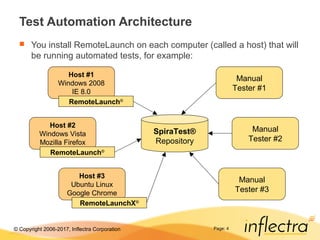
 Automated test scripts are a valuable way to perform
regression testing on applications to ensure that new
features or bug fixes don’t break existing functionality.
 They typically supplement manual testing which is more
efficient at the testing of new features and capabilities.
 For complete test coverage you need to perform the
same automated tests across a complete spectrum of
platforms, browsers, devices and environments.
 Using RemoteLaunch®
with SpiraTest / SpiraTeam allows
you to manage the automated testing process.
 Track the automated tests against the project’s requirements
 Have a holistic view of manual and automated testing
© Copyright 2006-2017, Inflectra Corporation Page: 4
Test Automation Architecture
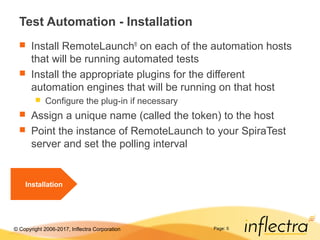
 You install RemoteLaunch on each computer (called a host) that will
be running automated tests, for example:
SpiraTest®
Repository
Host #1
Windows 2008
IE 8.0
Host #2
Windows Vista
Mozilla Firefox
Host #3
Ubuntu Linux
Google Chrome
RemoteLaunch®
RemoteLaunch®
RemoteLaunchX®
Manual
Tester #3
Manual
Tester #2
Manual
Tester #1
© Copyright 2006-2017, Inflectra Corporation Page: 5
Test Automation - Installation
 Install RemoteLaunch®
on each of the automation hosts
that will be running automated tests
 Install the appropriate plugins for the different
automation engines that will be running on that host
 Configure the plug-in if necessary
 Assign a unique name (called the token) to the host
 Point the instance of RemoteLaunch to your SpiraTest
server and set the polling interval
Installation
© Copyright 2006-2017, Inflectra Corporation Page: 6
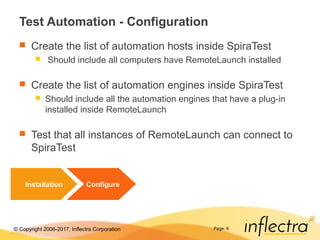
Test Automation - Configuration
 Create the list of automation hosts inside SpiraTest
 Should include all computers have RemoteLaunch installed
 Create the list of automation engines inside SpiraTest
 Should include all the automation engines that have a plug-in
installed inside RemoteLaunch
 Test that all instances of RemoteLaunch can connect to
SpiraTest
Installation Configure
© Copyright 2006-2017, Inflectra Corporation Page: 7
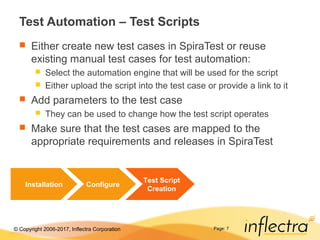
Test Automation – Test Scripts
 Either create new test cases in SpiraTest or reuse
existing manual test cases for test automation:
 Select the automation engine that will be used for the script
 Either upload the script into the test case or provide a link to it
 Add parameters to the test case
 They can be used to change how the test script operates
 Make sure that the test cases are mapped to the
appropriate requirements and releases in SpiraTest
Installation Configure
Test Script
Creation
© Copyright 2006-2017, Inflectra Corporation Page: 8
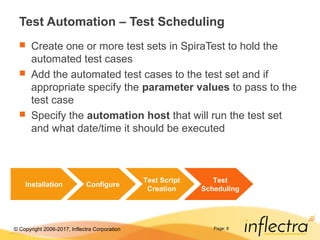
Test Automation – Test Scheduling
 Create one or more test sets in SpiraTest to hold the
automated test cases
 Add the automated test cases to the test set and if
appropriate specify the parameter values to pass to the
test case
 Specify the automation host that will run the test set
and what date/time it should be executed
Installation Configure
Test Script
Creation
Test
Scheduling
© Copyright 2006-2017, Inflectra Corporation Page: 9
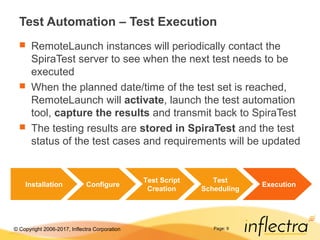
Test Automation – Test Execution
 RemoteLaunch instances will periodically contact the
SpiraTest server to see when the next test needs to be
executed
 When the planned date/time of the test set is reached,
RemoteLaunch will activate, launch the test automation
tool, capture the results and transmit back to SpiraTest
 The testing results are stored in SpiraTest and the test
status of the test cases and requirements will be updated
Installation Configure
Test Script
Creation
Test
Scheduling
Execution
© Copyright 2006-2017, Inflectra Corporation Page: 10
RemoteLaunch Walk-Through
© Copyright 2006-2017, Inflectra Corporation Page: 11
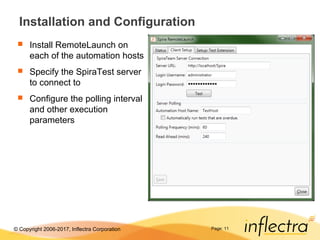
Installation and Configuration
 Install RemoteLaunch on
each of the automation hosts
 Specify the SpiraTest server
to connect to
 Configure the polling interval
and other execution
parameters
© Copyright 2006-2017, Inflectra Corporation Page: 12
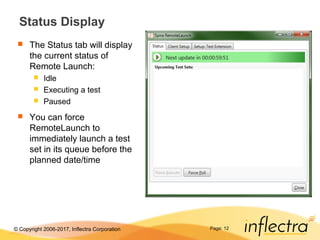
Status Display
 The Status tab will display
the current status of
Remote Launch:
 Idle
 Executing a test
 Paused
 You can force
RemoteLaunch to
immediately launch a test
set in its queue before the
planned date/time
© Copyright 2006-2017, Inflectra Corporation Page: 13
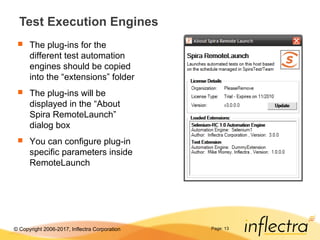
Test Execution Engines
 The plug-ins for the
different test automation
engines should be copied
into the “extensions” folder
 The plug-ins will be
displayed in the “About
Spira RemoteLaunch”
dialog box
 You can configure plug-in
specific parameters inside
RemoteLaunch
© Copyright 2006-2017, Inflectra Corporation
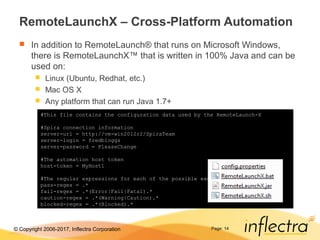
RemoteLaunchX – Cross-Platform Automation
 In addition to RemoteLaunch® that runs on Microsoft Windows,
there is RemoteLaunchX™ that is written in 100% Java and can be
used on:
 Linux (Ubuntu, Redhat, etc.)
 Mac OS X
 Any platform that can run Java 1.7+
Page: 14
#This file contains the configuration data used by the RemoteLaunch-X
#Spira connection information
server-url = http://vm-win2012r2/SpiraTeam
server-login = fredbloggs
server-password = PleaseChange
#The automation host token
host-token = MyHost1
#The regular expressions for each of the possible execution statuses
pass-regex = .*
fail-regex = .*(Error|Fail|Fatal).*
caution-regex = .*(Warning|Caution).*
blocked-regex = .*(Blocked).*
© Copyright 2006-2017, Inflectra Corporation Page: 15
Setting up SpiraTest / SpiraTeam
© Copyright 2006-2017, Inflectra Corporation Page: 16
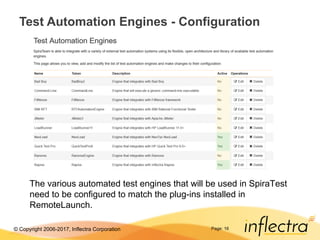
Test Automation Engines - Configuration
The various automated test engines that will be used in SpiraTest
need to be configured to match the plug-ins installed in
RemoteLaunch.
© Copyright 2006-2017, Inflectra Corporation Page: 17
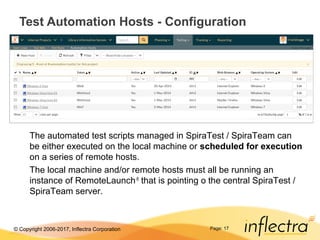
Test Automation Hosts - Configuration
The automated test scripts managed in SpiraTest / SpiraTeam can
be either executed on the local machine or scheduled for execution
on a series of remote hosts.
The local machine and/or remote hosts must all be running an
instance of RemoteLaunch®
that is pointing o the central SpiraTest /
SpiraTeam server.
© Copyright 2006-2017, Inflectra Corporation Page: 18
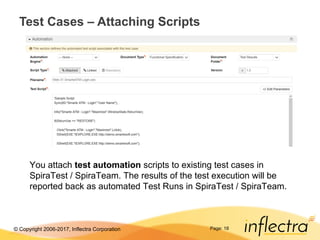
Test Cases – Attaching Scripts
You attach test automation scripts to existing test cases in
SpiraTest / SpiraTeam. The results of the test execution will be
reported back as automated Test Runs in SpiraTest / SpiraTeam.
© Copyright 2006-2017, Inflectra Corporation Page: 19
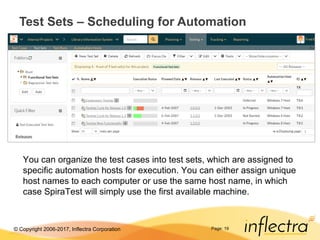
Test Sets – Scheduling for Automation
You can organize the test cases into test sets, which are assigned to
specific automation hosts for execution. You can either assign unique
host names to each computer or use the same host name, in which
case SpiraTest will simply use the first available machine.
© Copyright 2006-2017, Inflectra Corporation Page: 20
Available Engines
© Copyright 2006-2017, Inflectra Corporation Page: 21
Automated Functional Testing Tools
 RemoteLaunch®
can integrate with a variety of
automated functional and load testing tools.
 Functional Testing:
 HP Unified Functional Testing (UFT)
 Selenium WebDriver & IDE
 SmartBear TestComplete® and SoapUI
 Froglogic Squish®
 TestingAnywhere
 Ranorex
 Performance/Load Testing:
 HP LoadRunner®
 Neotys NeoLoad®
 Apache JMeter

Remote Launch Overview Presentation

  • 1.
    © Copyright 2006-2017,Inflectra Corporation Page: 1 RemoteLaunch - Overview Test Automation Integration for SpiraTest® and SpiraTeam®
  • 2.
    © Copyright 2006-2017,Inflectra Corporation Page: 2 Contents  Test Automation Overview  Remote Launch Walkthrough  Setting up SpiraTest / SpiraTeam  Overview of Available Plugins
  • 3.
    © Copyright 2006-2017,Inflectra Corporation Page: 3 Test Automation Overview  Automated test scripts are a valuable way to perform regression testing on applications to ensure that new features or bug fixes don’t break existing functionality.  They typically supplement manual testing which is more efficient at the testing of new features and capabilities.  For complete test coverage you need to perform the same automated tests across a complete spectrum of platforms, browsers, devices and environments.  Using RemoteLaunch® with SpiraTest / SpiraTeam allows you to manage the automated testing process.  Track the automated tests against the project’s requirements  Have a holistic view of manual and automated testing
  • 4.
    © Copyright 2006-2017,Inflectra Corporation Page: 4 Test Automation Architecture  You install RemoteLaunch on each computer (called a host) that will be running automated tests, for example: SpiraTest® Repository Host #1 Windows 2008 IE 8.0 Host #2 Windows Vista Mozilla Firefox Host #3 Ubuntu Linux Google Chrome RemoteLaunch® RemoteLaunch® RemoteLaunchX® Manual Tester #3 Manual Tester #2 Manual Tester #1
  • 5.
    © Copyright 2006-2017,Inflectra Corporation Page: 5 Test Automation - Installation  Install RemoteLaunch® on each of the automation hosts that will be running automated tests  Install the appropriate plugins for the different automation engines that will be running on that host  Configure the plug-in if necessary  Assign a unique name (called the token) to the host  Point the instance of RemoteLaunch to your SpiraTest server and set the polling interval Installation
  • 6.
    © Copyright 2006-2017,Inflectra Corporation Page: 6 Test Automation - Configuration  Create the list of automation hosts inside SpiraTest  Should include all computers have RemoteLaunch installed  Create the list of automation engines inside SpiraTest  Should include all the automation engines that have a plug-in installed inside RemoteLaunch  Test that all instances of RemoteLaunch can connect to SpiraTest Installation Configure
  • 7.
    © Copyright 2006-2017,Inflectra Corporation Page: 7 Test Automation – Test Scripts  Either create new test cases in SpiraTest or reuse existing manual test cases for test automation:  Select the automation engine that will be used for the script  Either upload the script into the test case or provide a link to it  Add parameters to the test case  They can be used to change how the test script operates  Make sure that the test cases are mapped to the appropriate requirements and releases in SpiraTest Installation Configure Test Script Creation
  • 8.
    © Copyright 2006-2017,Inflectra Corporation Page: 8 Test Automation – Test Scheduling  Create one or more test sets in SpiraTest to hold the automated test cases  Add the automated test cases to the test set and if appropriate specify the parameter values to pass to the test case  Specify the automation host that will run the test set and what date/time it should be executed Installation Configure Test Script Creation Test Scheduling
  • 9.
    © Copyright 2006-2017,Inflectra Corporation Page: 9 Test Automation – Test Execution  RemoteLaunch instances will periodically contact the SpiraTest server to see when the next test needs to be executed  When the planned date/time of the test set is reached, RemoteLaunch will activate, launch the test automation tool, capture the results and transmit back to SpiraTest  The testing results are stored in SpiraTest and the test status of the test cases and requirements will be updated Installation Configure Test Script Creation Test Scheduling Execution
  • 10.
    © Copyright 2006-2017,Inflectra Corporation Page: 10 RemoteLaunch Walk-Through
  • 11.
    © Copyright 2006-2017,Inflectra Corporation Page: 11 Installation and Configuration  Install RemoteLaunch on each of the automation hosts  Specify the SpiraTest server to connect to  Configure the polling interval and other execution parameters
  • 12.
    © Copyright 2006-2017,Inflectra Corporation Page: 12 Status Display  The Status tab will display the current status of Remote Launch:  Idle  Executing a test  Paused  You can force RemoteLaunch to immediately launch a test set in its queue before the planned date/time
  • 13.
    © Copyright 2006-2017,Inflectra Corporation Page: 13 Test Execution Engines  The plug-ins for the different test automation engines should be copied into the “extensions” folder  The plug-ins will be displayed in the “About Spira RemoteLaunch” dialog box  You can configure plug-in specific parameters inside RemoteLaunch
  • 14.
    © Copyright 2006-2017,Inflectra Corporation RemoteLaunchX – Cross-Platform Automation  In addition to RemoteLaunch® that runs on Microsoft Windows, there is RemoteLaunchX™ that is written in 100% Java and can be used on:  Linux (Ubuntu, Redhat, etc.)  Mac OS X  Any platform that can run Java 1.7+ Page: 14 #This file contains the configuration data used by the RemoteLaunch-X #Spira connection information server-url = http://vm-win2012r2/SpiraTeam server-login = fredbloggs server-password = PleaseChange #The automation host token host-token = MyHost1 #The regular expressions for each of the possible execution statuses pass-regex = .* fail-regex = .*(Error|Fail|Fatal).* caution-regex = .*(Warning|Caution).* blocked-regex = .*(Blocked).*
  • 15.
    © Copyright 2006-2017,Inflectra Corporation Page: 15 Setting up SpiraTest / SpiraTeam
  • 16.
    © Copyright 2006-2017,Inflectra Corporation Page: 16 Test Automation Engines - Configuration The various automated test engines that will be used in SpiraTest need to be configured to match the plug-ins installed in RemoteLaunch.
  • 17.
    © Copyright 2006-2017,Inflectra Corporation Page: 17 Test Automation Hosts - Configuration The automated test scripts managed in SpiraTest / SpiraTeam can be either executed on the local machine or scheduled for execution on a series of remote hosts. The local machine and/or remote hosts must all be running an instance of RemoteLaunch® that is pointing o the central SpiraTest / SpiraTeam server.
  • 18.
    © Copyright 2006-2017,Inflectra Corporation Page: 18 Test Cases – Attaching Scripts You attach test automation scripts to existing test cases in SpiraTest / SpiraTeam. The results of the test execution will be reported back as automated Test Runs in SpiraTest / SpiraTeam.
  • 19.
    © Copyright 2006-2017,Inflectra Corporation Page: 19 Test Sets – Scheduling for Automation You can organize the test cases into test sets, which are assigned to specific automation hosts for execution. You can either assign unique host names to each computer or use the same host name, in which case SpiraTest will simply use the first available machine.
  • 20.
    © Copyright 2006-2017,Inflectra Corporation Page: 20 Available Engines
  • 21.
    © Copyright 2006-2017,Inflectra Corporation Page: 21 Automated Functional Testing Tools  RemoteLaunch® can integrate with a variety of automated functional and load testing tools.  Functional Testing:  HP Unified Functional Testing (UFT)  Selenium WebDriver & IDE  SmartBear TestComplete® and SoapUI  Froglogic Squish®  TestingAnywhere  Ranorex  Performance/Load Testing:  HP LoadRunner®  Neotys NeoLoad®  Apache JMeter