Angela Wall
Enterprise Architect
North America Technology
April 23, 2020
Upgrade to Oracle Database 19c
Hands-On Workshop
© 2019 Oracle and/or its affiliates
Safe harbor statement
The following is intended to outline our general product direction. It is intended for information
purposes only, and may not be incorporated into any contract. It is not a commitment to deliver
any material, code, or functionality, and should not be relied upon in making purchasing
decisions.

The development, release, timing, and pricing of any features or functionality described for
Oracle’s products may change and remains at the sole discretion of Oracle Corporation.
© 2019 Oracle and/or its affiliates
• Review key principles surrounding the upgrade process to 19c
• Perform hands-on labs leveraging different steps and methods for
upgrading databases to 19c
• Learn about database technologies pertinent to future administration
and deployment models
What You Can Expect Today…
© 2019 Oracle and/or its affiliates
• As part of the 12.2 family, it has all the innovations in 12cR2,
18c and 19c
• Long-term support release for the 12cR2, 18c and 19c family:
• Premier support to March 2023
• Extended support to March 2026
Why Oracle Database 19c?
© 2019 Oracle and/or its affiliates
Review of upgrade/patching and key support principles
Agenda
1
Hands-On Labs
• Installing 19c software
• Upgrade 12.1 CDB to 19c
• Migrate a 12.2 non-CDB database to a 19c PDB
• Upgrade an 18c PDB to 19c through unplug/plug
Overview of related database technologies for
effective deployments
2
3
© 2019 Oracle and/or its affiliates
Review of upgrade/patching and key support principles
Agenda
1
Hands-On Labs
• Installing 19c software
• Upgrade 12.1 CDB to 19c
• Migrate a 12.2 non-CDB database to a 19c PDB
• Upgrade an 18c PDB to 19c through unplug/plug
© 2019 Oracle and/or its affiliates
Overview of related database technologies for
effective deployments
2
3
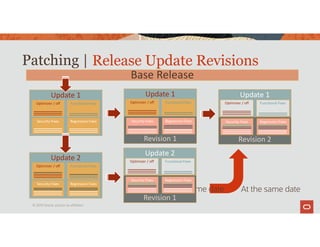
Patching |
© 2019 Oracle and/or its affiliates
Update 1
Security Fixes Regression Fixes
Optimizer / off Functional Fixes
Base Release
Release Update Revisions
Update 2
Security Fixes Regression Fixes
Optimizer / off Functional Fixes
Update 1
Optimizer / off Functional Fixes
Revision 1
Security Fixes Regression Fixes
Update 1
Optimizer / off Functional Fixes
Revision 2
Security Fixes Regression Fixes
At the same date
At the same date
Update 2
Optimizer / off Functional Fixes
Revision 1
Security Fixes Regression Fixes
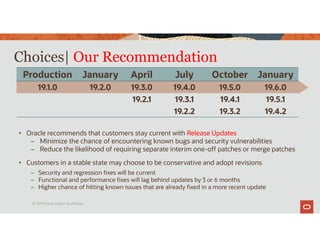
Choices| Our Recommendation
Production January April July October January
19.1.0 19.2.0 19.3.0 19.4.0 19.5.0 19.6.0
19.2.1 19.3.1 19.4.1 19.5.1
19.2.2 19.3.2 19.4.2
• Oracle recommends that customers stay current with Release Updates
– Minimize the chance of encountering known bugs and security vulnerabilities
– Reduce the likelihood of requiring separate interim one-off patches or merge patches
• Customers in a stable state may choose to be conservative and adopt revisions
– Security and regression fixes will be current
– Functional and performance fixes will lag behind updates by 3 or 6 months
– Higher chance of hitting known issues that are already fixed in a more recent update
© 2019 Oracle and/or its affiliates
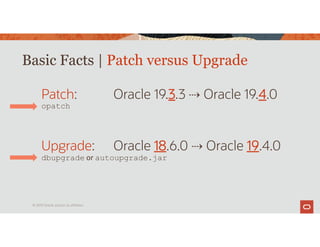
Basic Facts | Patch versus Upgrade
© 2019 Oracle and/or its affiliates
Patch: Oracle 19.3.3 Oracle 19.4.0
opatch
Upgrade: Oracle 18.6.0 Oracle 19.4.0
dbupgrade or autoupgrade.jar
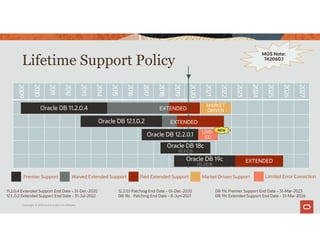
Lifetime Support Policy
Copyright © 2019 Oracle and/or its affiliates.
2009
2010
2011
2012
2013
2014
2015
2016
2017
2018
2019
2020
2021
2022
2023
2024
2025
2026
2027
Oracle DB 18c
(12.2.0.2)
EXTENDED
Oracle DB 11.2.0.4
Oracle DB 12.1.0.2
Oracle DB 12.2.0.1
Oracle DB 19c
(12..2.0.3)
Paid Extended Support
Premier Support Waived Extended Support
MARKET
DRIVEN
Market Driven Support
11.2.0.4 Extended Support End Date – 31-Dec-2020
12.1..0.2 Extended Support End Date – 31-Jul-2022
12.2.0.1 Patching End Date – 01-Dec-2020
DB 18c Patching End Date – 8-Jun-2021
DB 19c Premier Support End Date – 31-Mar-2023
DB 19c Extended Support End Date – 31-Mar-2026
MOS Note:
742060.1
▼
EXTENDED
EXTENDED
LIMIT
ED
Limited Error Correction
NEW
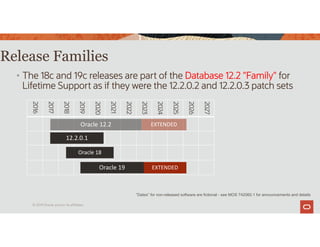
Release Families
• The 18c and 19c releases are part of the Database 12.2 "Family" for
Lifetime Support as if they were the 12.2.0.2 and 12.2.0.3 patch sets
2016
2017
2018
2019
2020
2021
2022
2023
2024
2025
2026
2027
EXTENDED
Oracle 12.2
Oracle 18
EXTENDED
12.2.0.1
Oracle 19
“Dates” for non-released software are fictional - see MOS 742060.1 for announcements and details
© 2019 Oracle and/or its affiliates
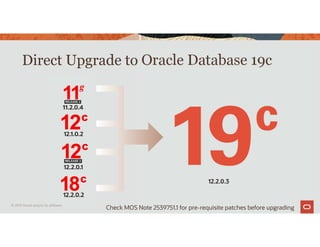
Direct Upgrade to Oracle Database 19c
12.2.0.1
12.1.0.2
11.2.0.4
12.2.0.2
12.2.0.3
© 2019 Oracle and/or its affiliates
Check MOS Note 2539751.1 for pre-requisite patches before upgrading
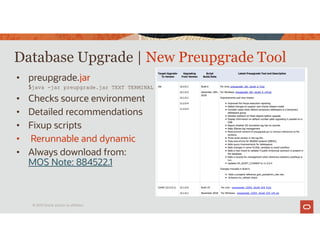
• preupgrade.jar
$java -jar preupgrade.jar TEXT TERMINAL
• Checks source environment
• Detailed recommendations
• Fixup scripts
• Rerunnable and dynamic
• Always download from:
MOS Note: 884522.1
Database Upgrade | New Preupgrade Tool
© 2019 Oracle and/or its affiliates
AutoUpgrade
The recommended way to
upgrade databases
© 2019 Oracle and/or its affiliates.
Photo
by
Joshua
Sortino
on
Unsplash
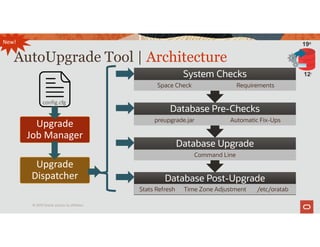
AutoUpgrade Tool | Architecture
Database Post-Upgrade
Stats Refresh Time Zone Adjustment /etc/oratab
Database Upgrade
Database Upgrade
Command Line
Database Pre-Checks
Database Pre-Checks
preupgrade.jar Automatic Fix-Ups
System Checks
System Checks
Space Check Requirements
Upgrade
Job Manager
Upgrade
Dispatcher
config.cfg
New!
© 2019 Oracle and/or its affiliates
12c
19c
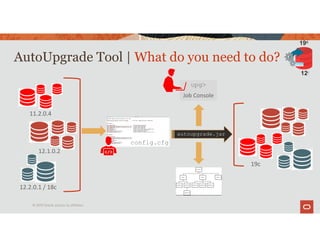
AutoUpgrade Tool | What do you need to do?
11.2.0.4
12.1.0.2
12.2.0.1 / 18c
autoupgrade.jar
19c
upg>
Job Console
config.cfg
© 2019 Oracle and/or its affiliates
12c
19c
AutoUpgrade Tool | Get the newest version of the tool
MOS Note: 2485457.1
© 2019 Oracle and/or its affiliates
12c
19c
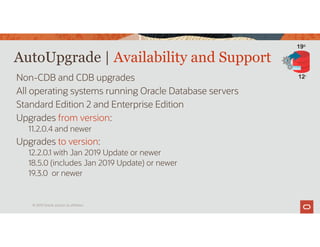
AutoUpgrade | Availability and Support
Non-CDB and CDB upgrades
All operating systems running Oracle Database servers
Standard Edition 2 and Enterprise Edition
Upgrades from version:
11.2.0.4 and newer
Upgrades to version:
12.2.0.1 with Jan 2019 Update or newer
18.5.0 (includes Jan 2019 Update) or newer
19.3.0 or newer
© 2019 Oracle and/or its affiliates
12c
19c
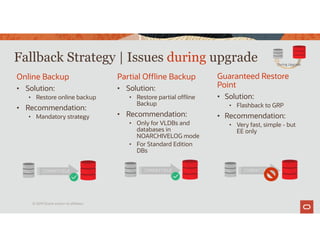
Online Backup
• Solution:
• Restore online backup
• Recommendation:
• Mandatory strategy
Partial Offline Backup
• Solution:
• Restore partial offline
Backup
• Recommendation:
• Only for VLDBs and
databases in
NOARCHIVELOG mode
• For Standard Edition
DBs
Guaranteed Restore
Point
• Solution:
• Flashback to GRP
• Recommendation:
• Very fast, simple - but
EE only
Fallback Strategy | Issues during upgrade
COMPATIBLE COMPATIBLE
During Upgrade
COMPATIBLE
© 2019 Oracle and/or its affiliates
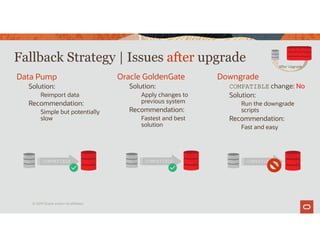
Data Pump
Solution:
Reimport data
Recommendation:
Simple but potentially
slow
Oracle GoldenGate
Solution:
Apply changes to
previous system
Recommendation:
Fastest and best
solution
Downgrade
COMPATIBLE change: No
Solution:
Run the downgrade
scripts
Recommendation:
Fast and easy
Fallback Strategy | Issues after upgrade
COMPATIBLE COMPATIBLE
After Upgrade
COMPATIBLE
© 2019 Oracle and/or its affiliates
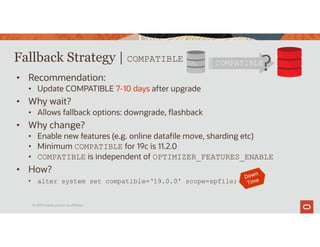
Fallback Strategy | COMPATIBLE
• Recommendation:
• Update COMPATIBLE 7-10 days after upgrade
• Why wait?
• Allows fallback options: downgrade, flashback
• Why change?
• Enable new features (e.g. online datafile move, sharding etc)
• Minimum COMPATIBLE for 19c is 11.2.0
• COMPATIBLE is independent of OPTIMIZER_FEATURES_ENABLE
• How?
• alter system set compatible=‘19.0.0' scope=spfile;
COMPATIBLE
?
© 2019 Oracle and/or its affiliates
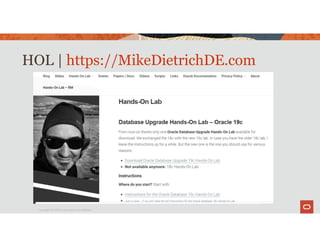
HOL | https://MikeDietrichDE.com
Copyright © 2019 Oracle and/or its affiliates.
Review of upgrade/patching and key support principles
Agenda
1
Hands-On Labs
• Installing 19c software
• Upgrade 12.1 CDB to 19c
• Migrate a non-CDB 12.2 database to a 19c PDB
• Upgrade an 18c PDB to 19c through unplug/plug
Overview of related database technologies for
effective deployments
2
3
© 2019 Oracle and/or its affiliates
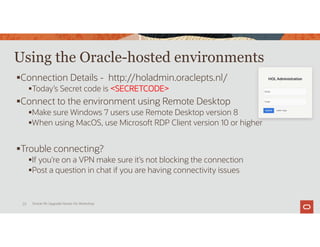
Using the Oracle-hosted environments
Connection Details - http://holadmin.oraclepts.nl/
Today’s Secret code is <SECRETCODE>
Connect to the environment using Remote Desktop
Make sure Windows 7 users use Remote Desktop version 8
When using MacOS, use Microsoft RDP Client version 10 or higher
Trouble connecting?
If you’re on a VPN make sure it’s not blocking the connection
Post a question in chat if you are having connectivity issues
Oracle 19c Upgrade Hands-On Workshop
25
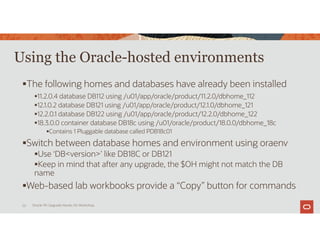
Using the Oracle-hosted environments
The following homes and databases have already been installed
11.2.0.4 database DB112 using /u01/app/oracle/product/11.2.0/dbhome_112
12.1.0.2 database DB121 using /u01/app/oracle/product/12.1.0/dbhome_121
12.2.0.1 database DB122 using /u01/app/oracle/product/12.2.0/dbhome_122
18.3.0.0 container database DB18c using /u01/oracle/product/18.0.0/dbhome_18c
Contains 1 Pluggable database called PDB18c01
Switch between database homes and environment using oraenv
Use ‘DB<version>’ like DB18C or DB121
Keep in mind that after any upgrade, the $OH might not match the DB
name
Web-based lab workbooks provide a “Copy” button for commands
Oracle 19c Upgrade Hands-On Workshop
26
Now you do it !
Let’s get started with Lab Exercise 1!
Execute Labs 0 & 1
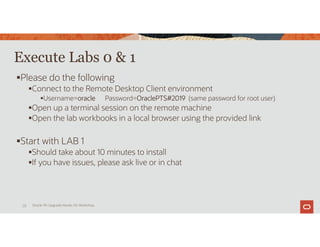
Please do the following
Connect to the Remote Desktop Client environment
Username=oracle Password=OraclePTS#2019 (same password for root user)
Open up a terminal session on the remote machine
Open the lab workbooks in a local browser using the provided link
Start with LAB 1
Should take about 10 minutes to install
If you have issues, please ask live or in chat
Oracle 19c Upgrade Hands-On Workshop
28
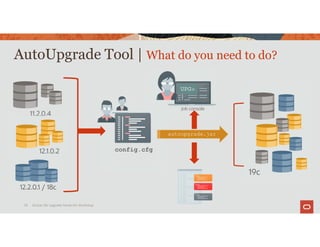
AutoUpgrade Tool | What do you need to do?
Oracle 19c Upgrade Hands‐On Workshop
29
11.2.0.4
12.1.0.2
12.2.0.1 / 18c
autoupgrade.jar
19c
config.cfg
UPG>
job console
Execute LAB2
 Upgrade an Oracle 12.1 Container Database to 19c
 Start the databases on the remote system
 Prepare the source database
 Create the autoupgrade configuration file
 Execute the Analyze step
 Execute the Deploy step
 The Upgrade takes about 60-90 minutes
 When the upgrade has started, please let the instructor know
Oracle 19c Upgrade Hands-On Workshop
30
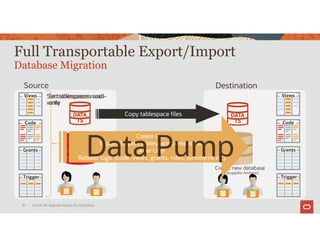
Source Destination
Full Transportable Export/Import
Database Migration
Oracle 19c Upgrade Hands-On Workshop
31
Views
Code
Grants
Trigger
DATA
TS
Create new database
(or pluggable database)
Set tablespaces read-
only
Copy tablespace files DATA
TS
Create User
Export/import tablespace content info
Alter User
Rebuild logic (code, views, grants, roles, synonyms etc)
Set tablespaces read-
write
Views
Code
Grants
Trigger
Data Pump
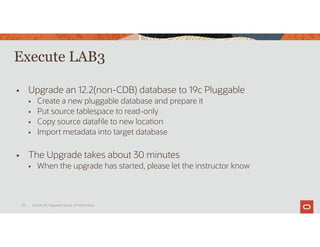
Execute LAB3
 Upgrade an 12.2(non-CDB) database to 19c Pluggable
 Create a new pluggable database and prepare it
 Put source tablespace to read-only
 Copy source datafile to new location
 Import metadata into target database
 The Upgrade takes about 30 minutes
 When the upgrade has started, please let the instructor know
Oracle 19c Upgrade Hands-On Workshop
32
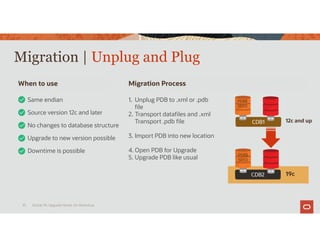
Migration | Unplug and Plug
Oracle 19c Upgrade Hands-On Workshop
33
Same endian
When to use Migration Process
Source version 12c and later
No changes to database structure
1. Unplug PDB to .xml or .pdb
file
2. Transport datafiles and .xml
Transport .pdb file
3. Import PDB into new location
4. Open PDB for Upgrade
5. Upgrade PDB like usual
Upgrade to new version possible
CDB1
CDB2 19c
12c and up
Downtime is possible
PDB$
SEED
PDB$
SEED
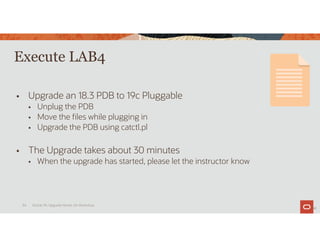
Execute LAB4
 Upgrade an 18.3 PDB to 19c Pluggable
 Unplug the PDB
 Move the files while plugging in
 Upgrade the PDB using catctl.pl
 The Upgrade takes about 30 minutes
 When the upgrade has started, please let the instructor know
34
Oracle 19c Upgrade Hands-On Workshop
34
Upgrade19c_HOL_Overview.04232020.pdf

Upgrade19c_HOL_Overview.04232020.pdf

  • 2.
    Angela Wall Enterprise Architect NorthAmerica Technology April 23, 2020 Upgrade to Oracle Database 19c Hands-On Workshop © 2019 Oracle and/or its affiliates
  • 3.
    Safe harbor statement Thefollowing is intended to outline our general product direction. It is intended for information purposes only, and may not be incorporated into any contract. It is not a commitment to deliver any material, code, or functionality, and should not be relied upon in making purchasing decisions. The development, release, timing, and pricing of any features or functionality described for Oracle’s products may change and remains at the sole discretion of Oracle Corporation. © 2019 Oracle and/or its affiliates
  • 4.
    • Review keyprinciples surrounding the upgrade process to 19c • Perform hands-on labs leveraging different steps and methods for upgrading databases to 19c • Learn about database technologies pertinent to future administration and deployment models What You Can Expect Today… © 2019 Oracle and/or its affiliates
  • 5.
    • As partof the 12.2 family, it has all the innovations in 12cR2, 18c and 19c • Long-term support release for the 12cR2, 18c and 19c family: • Premier support to March 2023 • Extended support to March 2026 Why Oracle Database 19c? © 2019 Oracle and/or its affiliates
  • 6.
    Review of upgrade/patchingand key support principles Agenda 1 Hands-On Labs • Installing 19c software • Upgrade 12.1 CDB to 19c • Migrate a 12.2 non-CDB database to a 19c PDB • Upgrade an 18c PDB to 19c through unplug/plug Overview of related database technologies for effective deployments 2 3 © 2019 Oracle and/or its affiliates
  • 7.
    Review of upgrade/patchingand key support principles Agenda 1 Hands-On Labs • Installing 19c software • Upgrade 12.1 CDB to 19c • Migrate a 12.2 non-CDB database to a 19c PDB • Upgrade an 18c PDB to 19c through unplug/plug © 2019 Oracle and/or its affiliates Overview of related database technologies for effective deployments 2 3
  • 8.
    Patching | © 2019Oracle and/or its affiliates Update 1 Security Fixes Regression Fixes Optimizer / off Functional Fixes Base Release Release Update Revisions Update 2 Security Fixes Regression Fixes Optimizer / off Functional Fixes Update 1 Optimizer / off Functional Fixes Revision 1 Security Fixes Regression Fixes Update 1 Optimizer / off Functional Fixes Revision 2 Security Fixes Regression Fixes At the same date At the same date Update 2 Optimizer / off Functional Fixes Revision 1 Security Fixes Regression Fixes
  • 9.
    Choices| Our Recommendation ProductionJanuary April July October January 19.1.0 19.2.0 19.3.0 19.4.0 19.5.0 19.6.0 19.2.1 19.3.1 19.4.1 19.5.1 19.2.2 19.3.2 19.4.2 • Oracle recommends that customers stay current with Release Updates – Minimize the chance of encountering known bugs and security vulnerabilities – Reduce the likelihood of requiring separate interim one-off patches or merge patches • Customers in a stable state may choose to be conservative and adopt revisions – Security and regression fixes will be current – Functional and performance fixes will lag behind updates by 3 or 6 months – Higher chance of hitting known issues that are already fixed in a more recent update © 2019 Oracle and/or its affiliates
  • 10.
    Basic Facts |Patch versus Upgrade © 2019 Oracle and/or its affiliates Patch: Oracle 19.3.3 Oracle 19.4.0 opatch Upgrade: Oracle 18.6.0 Oracle 19.4.0 dbupgrade or autoupgrade.jar
  • 11.
    Lifetime Support Policy Copyright© 2019 Oracle and/or its affiliates. 2009 2010 2011 2012 2013 2014 2015 2016 2017 2018 2019 2020 2021 2022 2023 2024 2025 2026 2027 Oracle DB 18c (12.2.0.2) EXTENDED Oracle DB 11.2.0.4 Oracle DB 12.1.0.2 Oracle DB 12.2.0.1 Oracle DB 19c (12..2.0.3) Paid Extended Support Premier Support Waived Extended Support MARKET DRIVEN Market Driven Support 11.2.0.4 Extended Support End Date – 31-Dec-2020 12.1..0.2 Extended Support End Date – 31-Jul-2022 12.2.0.1 Patching End Date – 01-Dec-2020 DB 18c Patching End Date – 8-Jun-2021 DB 19c Premier Support End Date – 31-Mar-2023 DB 19c Extended Support End Date – 31-Mar-2026 MOS Note: 742060.1 ▼ EXTENDED EXTENDED LIMIT ED Limited Error Correction NEW
  • 12.
    Release Families • The18c and 19c releases are part of the Database 12.2 "Family" for Lifetime Support as if they were the 12.2.0.2 and 12.2.0.3 patch sets 2016 2017 2018 2019 2020 2021 2022 2023 2024 2025 2026 2027 EXTENDED Oracle 12.2 Oracle 18 EXTENDED 12.2.0.1 Oracle 19 “Dates” for non-released software are fictional - see MOS 742060.1 for announcements and details © 2019 Oracle and/or its affiliates
  • 13.
    Direct Upgrade toOracle Database 19c 12.2.0.1 12.1.0.2 11.2.0.4 12.2.0.2 12.2.0.3 © 2019 Oracle and/or its affiliates Check MOS Note 2539751.1 for pre-requisite patches before upgrading
  • 14.
    • preupgrade.jar $java -jarpreupgrade.jar TEXT TERMINAL • Checks source environment • Detailed recommendations • Fixup scripts • Rerunnable and dynamic • Always download from: MOS Note: 884522.1 Database Upgrade | New Preupgrade Tool © 2019 Oracle and/or its affiliates
  • 15.
    AutoUpgrade The recommended wayto upgrade databases © 2019 Oracle and/or its affiliates. Photo by Joshua Sortino on Unsplash
  • 16.
    AutoUpgrade Tool |Architecture Database Post-Upgrade Database Post-Upgrade Stats Refresh Time Zone Adjustment /etc/oratab Database Upgrade Database Upgrade Command Line Database Pre-Checks Database Pre-Checks preupgrade.jar Automatic Fix-Ups System Checks System Checks Space Check Requirements Upgrade Job Manager Upgrade Dispatcher config.cfg New! © 2019 Oracle and/or its affiliates 12c 19c
  • 17.
    AutoUpgrade Tool |What do you need to do? 11.2.0.4 12.1.0.2 12.2.0.1 / 18c autoupgrade.jar 19c upg> Job Console config.cfg © 2019 Oracle and/or its affiliates 12c 19c
  • 18.
    AutoUpgrade Tool |Get the newest version of the tool MOS Note: 2485457.1 © 2019 Oracle and/or its affiliates 12c 19c
  • 19.
    AutoUpgrade | Availabilityand Support Non-CDB and CDB upgrades All operating systems running Oracle Database servers Standard Edition 2 and Enterprise Edition Upgrades from version: 11.2.0.4 and newer Upgrades to version: 12.2.0.1 with Jan 2019 Update or newer 18.5.0 (includes Jan 2019 Update) or newer 19.3.0 or newer © 2019 Oracle and/or its affiliates 12c 19c
  • 20.
    Online Backup • Solution: •Restore online backup • Recommendation: • Mandatory strategy Partial Offline Backup • Solution: • Restore partial offline Backup • Recommendation: • Only for VLDBs and databases in NOARCHIVELOG mode • For Standard Edition DBs Guaranteed Restore Point • Solution: • Flashback to GRP • Recommendation: • Very fast, simple - but EE only Fallback Strategy | Issues during upgrade COMPATIBLE COMPATIBLE During Upgrade COMPATIBLE © 2019 Oracle and/or its affiliates
  • 21.
    Data Pump Solution: Reimport data Recommendation: Simplebut potentially slow Oracle GoldenGate Solution: Apply changes to previous system Recommendation: Fastest and best solution Downgrade COMPATIBLE change: No Solution: Run the downgrade scripts Recommendation: Fast and easy Fallback Strategy | Issues after upgrade COMPATIBLE COMPATIBLE After Upgrade COMPATIBLE © 2019 Oracle and/or its affiliates
  • 22.
    Fallback Strategy |COMPATIBLE • Recommendation: • Update COMPATIBLE 7-10 days after upgrade • Why wait? • Allows fallback options: downgrade, flashback • Why change? • Enable new features (e.g. online datafile move, sharding etc) • Minimum COMPATIBLE for 19c is 11.2.0 • COMPATIBLE is independent of OPTIMIZER_FEATURES_ENABLE • How? • alter system set compatible=‘19.0.0' scope=spfile; COMPATIBLE ? © 2019 Oracle and/or its affiliates
  • 23.
    HOL | https://MikeDietrichDE.com Copyright© 2019 Oracle and/or its affiliates.
  • 24.
    Review of upgrade/patchingand key support principles Agenda 1 Hands-On Labs • Installing 19c software • Upgrade 12.1 CDB to 19c • Migrate a non-CDB 12.2 database to a 19c PDB • Upgrade an 18c PDB to 19c through unplug/plug Overview of related database technologies for effective deployments 2 3 © 2019 Oracle and/or its affiliates
  • 25.
    Using the Oracle-hostedenvironments Connection Details - http://holadmin.oraclepts.nl/ Today’s Secret code is <SECRETCODE> Connect to the environment using Remote Desktop Make sure Windows 7 users use Remote Desktop version 8 When using MacOS, use Microsoft RDP Client version 10 or higher Trouble connecting? If you’re on a VPN make sure it’s not blocking the connection Post a question in chat if you are having connectivity issues Oracle 19c Upgrade Hands-On Workshop 25
  • 26.
    Using the Oracle-hostedenvironments The following homes and databases have already been installed 11.2.0.4 database DB112 using /u01/app/oracle/product/11.2.0/dbhome_112 12.1.0.2 database DB121 using /u01/app/oracle/product/12.1.0/dbhome_121 12.2.0.1 database DB122 using /u01/app/oracle/product/12.2.0/dbhome_122 18.3.0.0 container database DB18c using /u01/oracle/product/18.0.0/dbhome_18c Contains 1 Pluggable database called PDB18c01 Switch between database homes and environment using oraenv Use ‘DB<version>’ like DB18C or DB121 Keep in mind that after any upgrade, the $OH might not match the DB name Web-based lab workbooks provide a “Copy” button for commands Oracle 19c Upgrade Hands-On Workshop 26
  • 27.
    Now you doit ! Let’s get started with Lab Exercise 1!
  • 28.
    Execute Labs 0& 1 Please do the following Connect to the Remote Desktop Client environment Username=oracle Password=OraclePTS#2019 (same password for root user) Open up a terminal session on the remote machine Open the lab workbooks in a local browser using the provided link Start with LAB 1 Should take about 10 minutes to install If you have issues, please ask live or in chat Oracle 19c Upgrade Hands-On Workshop 28
  • 29.
    AutoUpgrade Tool |What do you need to do? Oracle 19c Upgrade Hands‐On Workshop 29 11.2.0.4 12.1.0.2 12.2.0.1 / 18c autoupgrade.jar 19c config.cfg UPG> job console
  • 30.
    Execute LAB2  Upgradean Oracle 12.1 Container Database to 19c  Start the databases on the remote system  Prepare the source database  Create the autoupgrade configuration file  Execute the Analyze step  Execute the Deploy step  The Upgrade takes about 60-90 minutes  When the upgrade has started, please let the instructor know Oracle 19c Upgrade Hands-On Workshop 30
  • 31.
    Source Destination Full TransportableExport/Import Database Migration Oracle 19c Upgrade Hands-On Workshop 31 Views Code Grants Trigger DATA TS Create new database (or pluggable database) Set tablespaces read- only Copy tablespace files DATA TS Create User Export/import tablespace content info Alter User Rebuild logic (code, views, grants, roles, synonyms etc) Set tablespaces read- write Views Code Grants Trigger Data Pump
  • 32.
    Execute LAB3  Upgradean 12.2(non-CDB) database to 19c Pluggable  Create a new pluggable database and prepare it  Put source tablespace to read-only  Copy source datafile to new location  Import metadata into target database  The Upgrade takes about 30 minutes  When the upgrade has started, please let the instructor know Oracle 19c Upgrade Hands-On Workshop 32
  • 33.
    Migration | Unplugand Plug Oracle 19c Upgrade Hands-On Workshop 33 Same endian When to use Migration Process Source version 12c and later No changes to database structure 1. Unplug PDB to .xml or .pdb file 2. Transport datafiles and .xml Transport .pdb file 3. Import PDB into new location 4. Open PDB for Upgrade 5. Upgrade PDB like usual Upgrade to new version possible CDB1 CDB2 19c 12c and up Downtime is possible PDB$ SEED PDB$ SEED
  • 34.
    Execute LAB4  Upgradean 18.3 PDB to 19c Pluggable  Unplug the PDB  Move the files while plugging in  Upgrade the PDB using catctl.pl  The Upgrade takes about 30 minutes  When the upgrade has started, please let the instructor know 34 Oracle 19c Upgrade Hands-On Workshop 34