Raspberry PI
Intro.
The big question:
Which is the most important of the all ?and why?
-electrical engineering
-computer engineering
-computer science
Electronics VS Computer Science
-both are away from each other
-competition leads to revolution
-RaspberryPI invention
What is it?
● Was shown first at 2012.
● It’s a SOC (System on a chip).
● Spec’s: - size 8.6*5.4 cm. - Weight 45 gm.
-cost 25$. - GPIO
- 700 MHZ CPU.
- 250 MHZ Dual Core.
- 512 MB RAM.
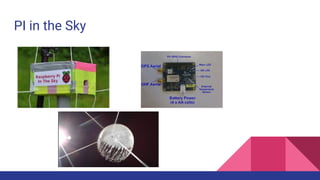
PI in the Sky
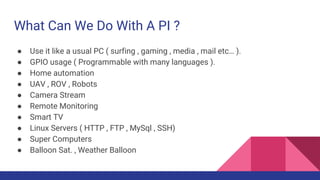
What Can We Do With A PI ?
● Use it like a usual PC ( surfing , gaming , media , mail etc… ).
● GPIO usage ( Programmable with many languages ).
● Home automation
● UAV , ROV , Robots
● Camera Stream
● Remote Monitoring
● Smart TV
● Linux Servers ( HTTP , FTP , MySql , SSH)
● Super Computers
● Balloon Sat. , Weather Balloon
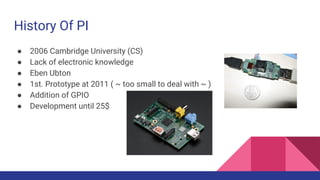
History Of PI
● 2006 Cambridge University (CS)
● Lack of electronic knowledge
● Eben Ubton
● 1st. Prototype at 2011 ( ~ too small to deal with ~ )
● Addition of GPIO
● Development until 25$
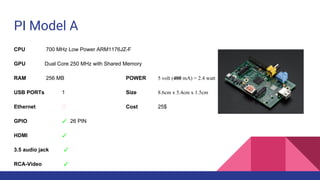
PI Model A
CPU 700 MHz Low Power ARM1176JZ-F
GPU Dual Core 250 MHz with Shared Memory
RAM 256 MB POWER 5 volt (400 mA) = 2.4 watt
USB PORTs 1 Size 8.6cm x 5.4cm x 1.5cm
Ethernet Cost 25$
GPIO ✓ 26 PIN
HDMI ✓
3.5 audio jack ✓
RCA-Video ✓
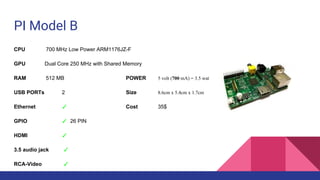
PI Model B
CPU 700 MHz Low Power ARM1176JZ-F
GPU Dual Core 250 MHz with Shared Memory
RAM 512 MB POWER 5 volt (700 mA) = 3.5 wat
USB PORTs 2 Size 8.6cm x 5.4cm x 1.7cm
Ethernet ✓ Cost 35$
GPIO ✓ 26 PIN
HDMI ✓
3.5 audio jack ✓
RCA-Video ✓
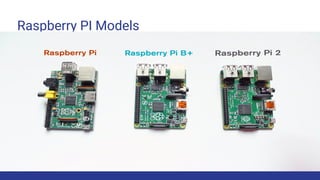
Raspberry PI Models
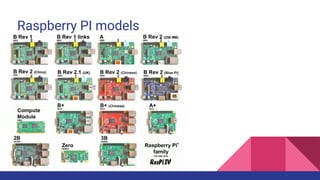
Raspberry PI models
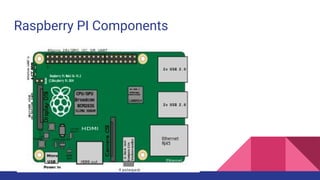
Raspberry PI Components
Linux OS for PI
Raspbian
comes pre-installed with plenty of software for education,
programming and general use.
It has Python, Scratch, Sonic Pi, Java, Mathematica and more.
Linux OS for PI
Open Embedded Linux Entertainment Center (OpenELEC)
is a small Linux based Just Enough Operating System (JeOS)
built from scratch as a platform to turn your computer into
a Kodi media center.
Linux OS for PI
Occidentalis v0.2. Rubus occidentalis
is the black raspberry.
It is derived from Raspbian Wheezy August 16 2012.
Linux OS for PI
Kali Linux
an Advanced Penetration Testing Linux distribution
used for Penetration Testing,
Ethical Hacking and network security assessments.
Linux OS for PI
Robot Operating System (ROS)
is a collection of software frameworks for robot software development,
providing operating system-like functionality on a heterogeneous computer cluster.
ROS provides standard operating system services such as hardware abstraction,
low-level device control, implementation of commonly used functionality,
message-passing between processes, and package management.
Linux OS for PI
Android pi
The goal of this project is to make a version of CM that works on the Pi,
by building Linux kernels and Android images.
Linux OS for PI
Arch Linux
is a Linux distribution for computers based on IA-32 and x86-64 architectures.
It is composed predominantly of free and open-source software.
Linux OS for PI
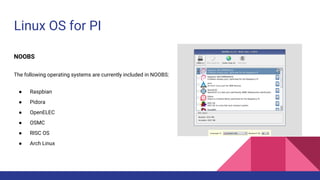
NOOBS
The following operating systems are currently included in NOOBS:
● Raspbian
● Pidora
● OpenELEC
● OSMC
● RISC OS
● Arch Linux
Linux OS for PI
RISC OS
is a computer operating system designed in Cambridge,
England by Acorn. First released in 1987,
its origins can be traced back to the original team
that developed the ARM microprocessor.
Linux OS for PI
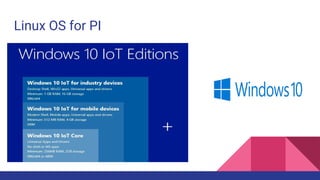
Windows 10 for IoT
(called Windows 10 IoT Core)
that you can use with your own Pi 2.
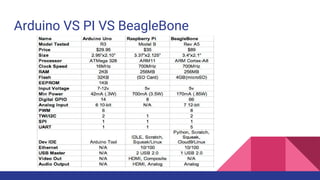
Arduino VS PI VS BeagleBone
Downloading OS
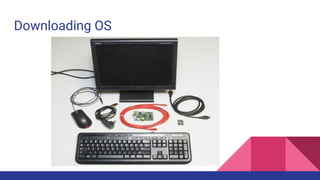
Raspberry Pi Model B or Model A (has less RAM and no Ethernet)
● A 5V power supply with a micro USB termination. The supply should be able to source at least 700mA. Most phone chargers (with
micro USB cables) should work.
● An SD Card no smaller than 4GB, and no less than class 4.
● A USB keyboard and mouse.
● A display connected to either the HDMI or RCA composite video output.
○ If your monitor only has a VGA port, there are HDMI to VGA adapters to convert between the two. (You may need a beefier
power supply if you’re using that.)
○ If your monitor only has DVI, converting from HDMI is easy with an HDMI to DVI cable.
● An ethernet cable and a connection to an Internet-connected network. (Optional, but very useful to get software updates [and Doom].)
○ Alternatively, you can use a USB WiFi module with the Pi. Check out our Wireless on the Pi tutorial for help setting that up.
● Headphones or speakers with a 3.5mm stereo jack termination (optional, unless, for some reason, you don’t want to hear the dying
wails of former humans).
Downloading OS
Downloading OS
Video Included for how to install Raspbian
https://www.youtube.com/watch?v=CXdH3Q2boq8
Or follow the link:
https://www.raspberrypi.org/documentation/installation/installing-
images/README.md
Any Further Questions
info.
Eng: Islam Adel Fawzy
Tel : 01121697263
Mail : engsmsm93@gmail.com

Raspberry pi intro.

  • 1.
  • 2.
    The big question: Whichis the most important of the all ?and why? -electrical engineering -computer engineering -computer science
  • 3.
    Electronics VS ComputerScience -both are away from each other -competition leads to revolution -RaspberryPI invention
  • 4.
    What is it? ●Was shown first at 2012. ● It’s a SOC (System on a chip). ● Spec’s: - size 8.6*5.4 cm. - Weight 45 gm. -cost 25$. - GPIO - 700 MHZ CPU. - 250 MHZ Dual Core. - 512 MB RAM.
  • 5.
  • 6.
    What Can WeDo With A PI ? ● Use it like a usual PC ( surfing , gaming , media , mail etc… ). ● GPIO usage ( Programmable with many languages ). ● Home automation ● UAV , ROV , Robots ● Camera Stream ● Remote Monitoring ● Smart TV ● Linux Servers ( HTTP , FTP , MySql , SSH) ● Super Computers ● Balloon Sat. , Weather Balloon
  • 7.
    History Of PI ●2006 Cambridge University (CS) ● Lack of electronic knowledge ● Eben Ubton ● 1st. Prototype at 2011 ( ~ too small to deal with ~ ) ● Addition of GPIO ● Development until 25$
  • 8.
    PI Model A CPU700 MHz Low Power ARM1176JZ-F GPU Dual Core 250 MHz with Shared Memory RAM 256 MB POWER 5 volt (400 mA) = 2.4 watt USB PORTs 1 Size 8.6cm x 5.4cm x 1.5cm Ethernet Cost 25$ GPIO ✓ 26 PIN HDMI ✓ 3.5 audio jack ✓ RCA-Video ✓
  • 9.
    PI Model B CPU700 MHz Low Power ARM1176JZ-F GPU Dual Core 250 MHz with Shared Memory RAM 512 MB POWER 5 volt (700 mA) = 3.5 wat USB PORTs 2 Size 8.6cm x 5.4cm x 1.7cm Ethernet ✓ Cost 35$ GPIO ✓ 26 PIN HDMI ✓ 3.5 audio jack ✓ RCA-Video ✓
  • 10.
  • 11.
  • 12.
  • 13.
    Linux OS forPI Raspbian comes pre-installed with plenty of software for education, programming and general use. It has Python, Scratch, Sonic Pi, Java, Mathematica and more.
  • 14.
    Linux OS forPI Open Embedded Linux Entertainment Center (OpenELEC) is a small Linux based Just Enough Operating System (JeOS) built from scratch as a platform to turn your computer into a Kodi media center.
  • 15.
    Linux OS forPI Occidentalis v0.2. Rubus occidentalis is the black raspberry. It is derived from Raspbian Wheezy August 16 2012.
  • 16.
    Linux OS forPI Kali Linux an Advanced Penetration Testing Linux distribution used for Penetration Testing, Ethical Hacking and network security assessments.
  • 17.
    Linux OS forPI Robot Operating System (ROS) is a collection of software frameworks for robot software development, providing operating system-like functionality on a heterogeneous computer cluster. ROS provides standard operating system services such as hardware abstraction, low-level device control, implementation of commonly used functionality, message-passing between processes, and package management.
  • 18.
    Linux OS forPI Android pi The goal of this project is to make a version of CM that works on the Pi, by building Linux kernels and Android images.
  • 19.
    Linux OS forPI Arch Linux is a Linux distribution for computers based on IA-32 and x86-64 architectures. It is composed predominantly of free and open-source software.
  • 20.
    Linux OS forPI NOOBS The following operating systems are currently included in NOOBS: ● Raspbian ● Pidora ● OpenELEC ● OSMC ● RISC OS ● Arch Linux
  • 21.
    Linux OS forPI RISC OS is a computer operating system designed in Cambridge, England by Acorn. First released in 1987, its origins can be traced back to the original team that developed the ARM microprocessor.
  • 22.
    Linux OS forPI Windows 10 for IoT (called Windows 10 IoT Core) that you can use with your own Pi 2.
  • 23.
    Arduino VS PIVS BeagleBone
  • 24.
    Downloading OS Raspberry PiModel B or Model A (has less RAM and no Ethernet) ● A 5V power supply with a micro USB termination. The supply should be able to source at least 700mA. Most phone chargers (with micro USB cables) should work. ● An SD Card no smaller than 4GB, and no less than class 4. ● A USB keyboard and mouse. ● A display connected to either the HDMI or RCA composite video output. ○ If your monitor only has a VGA port, there are HDMI to VGA adapters to convert between the two. (You may need a beefier power supply if you’re using that.) ○ If your monitor only has DVI, converting from HDMI is easy with an HDMI to DVI cable. ● An ethernet cable and a connection to an Internet-connected network. (Optional, but very useful to get software updates [and Doom].) ○ Alternatively, you can use a USB WiFi module with the Pi. Check out our Wireless on the Pi tutorial for help setting that up. ● Headphones or speakers with a 3.5mm stereo jack termination (optional, unless, for some reason, you don’t want to hear the dying wails of former humans).
  • 25.
  • 26.
    Downloading OS Video Includedfor how to install Raspbian https://www.youtube.com/watch?v=CXdH3Q2boq8 Or follow the link: https://www.raspberrypi.org/documentation/installation/installing- images/README.md
  • 27.
  • 28.
    info. Eng: Islam AdelFawzy Tel : 01121697263 Mail : engsmsm93@gmail.com