❏ Note:
❏ Please MakeFollowing CompatibleVersion
➔ Reportlab : 2.5
➔ Werkzeug: 0.8.1
➔ Wkhtmltopdf: Upper Version Of0.12.0 Such as
[‘0.12.1’,’0.12.1.1’,’0.12.1.2’]
❏ Please Use Odoo 8.0 LatestVersion
❖ Websites References
https://www.odoo.com/documentation/8.0/reference/reports.html
http://openerp-web-v7.readthedocs.org/en/latest/qweb.html
Report
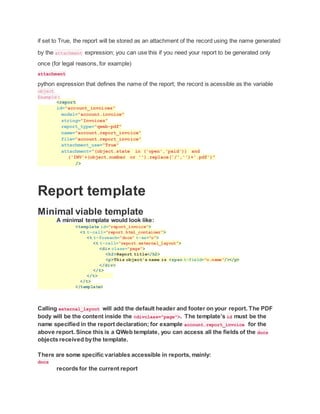
Every report must be declared by a report action.
For simplicity, a shortcut <report> element is available to define a report, rather than have to set
up the action and its surroundings manually. That <report> can take the following attributes:
id
the generated record’s external id
name (mandatory)
only useful as a mnemonic/description of the report when looking for one in a list of some sort
model (mandatory)
the model your report will be about
report_type (mandatory)
either qweb-pdf for PDF reports or qweb-html for HTML
report_name
the name of your report (which will be the name of the PDF output)
groups
Many2many field to the groups allowed to view/use the current report
attachment_use
if set to True, the report will be stored as an attachment of the record using the name generated
by the attachment expression; you can use this if you need your report to be generated only
once (for legal reasons, for example)
attachment
python expression that defines the name of the report; the record is acessible as the variable
object
Example:
<report
id="account_invoices"
model="account.invoice"
string="Invoices"
report_type="qweb-pdf"
name="account.report_invoice"
file="account.report_invoice"
attachment_use="True"
attachment="(object.state in ('open','paid')) and
('INV'+(object.number or '').replace('/','')+'.pdf')"
/>
Report template
Minimal viable template
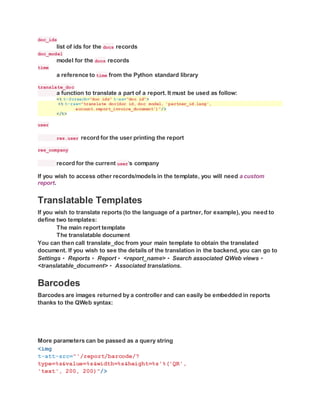
A minimal template would look like:
<template id="report_invoice">
<t t-call="report.html_container">
<t t-foreach="docs" t-as="o">
<t t-call="report.external_layout">
<div class="page">
<h2>Report title</h2>
<p>This object's name is <span t-field="o.name"/></p>
</div>
</t>
</t>
</t>
</template>
Calling external_layout will add the default header and footer on your report. The PDF
body will be the content inside the <divclass="page">. The template’s id must be the
name specified in the report declaration; for example account.report_invoice for the
above report. Since this is a QWeb template, you can access all the fields of the docs
objects received bythe template.
There are some specific variables accessible in reports, mainly:
docs
records for the current report
doc_ids
list of ids for the docs records
doc_model
model for the docs records
time
a reference to time from the Python standard library
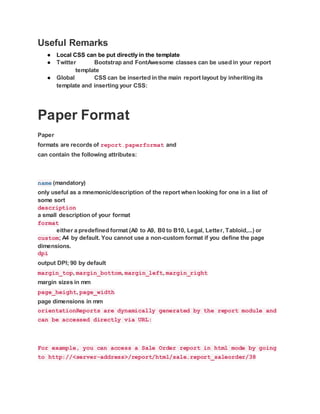
translate_doc
a function to translate a part of a report. It must be used as follow:
<t t-foreach="doc_ids" t-as="doc_id">
<t t-raw="translate_doc(doc_id, doc_model, 'partner_id.lang',
account.report_invoice_document')"/>
</t>
user
res.user record for the user printing the report
res_company
record for the current user‘s company
If you wish to access other records/models in the template, you will need a custom
report.
Translatable Templates
If you wish to translate reports (to the language of a partner, for example), you need to
define two templates:
The main report template
The translatable document
You can then call translate_doc from your main template to obtain the translated
document. If you wish to see the details of the translation in the backend, you can go to
Settings ‣ Reports ‣ Report ‣ <report_name> ‣ Search associated QWeb views ‣
<translatable_document> ‣ Associated translations.
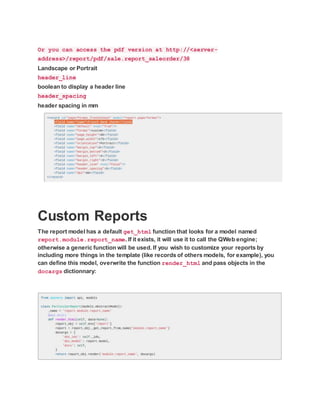
Barcodes
Barcodes are images returned by a controller and can easily be embedded in reports
thanks to the QWeb syntax:
More parameters can be passed as a query string
<img
t-att-src="'/report/barcode/?
type=%s&value=%s&width=%s&height=%s'%('QR',
'text', 200, 200)"/>
Useful Remarks
● Local CSS can be put directly in the template
● Twitter Bootstrap and FontAwesome classes can be used in your report
template
● Global CSS can be inserted in the main report layout by inheriting its
template and inserting your CSS:
Paper Format
Paper
formats are records of report.paperformat and
can contain the following attributes:
name (mandatory)
only useful as a mnemonic/description of the report when looking for one in a list of
some sort
description
a small description of your format
format
either a predefined format (A0 to A9, B0 to B10, Legal, Letter, Tabloid,...) or
custom; A4 by default. You cannot use a non-custom format if you define the page
dimensions.
dpi
output DPI; 90 by default
margin_top, margin_bottom, margin_left, margin_right
margin sizes in mm
page_height, page_width
page dimensions in mm
orientationReports are dynamically generated by the report module and
can be accessed directly via URL:
For example, you can access a Sale Order report in html mode by going
to http://<server-address>/report/html/sale.report_saleorder/38
Or you can access the pdf version at http://<server-
address>/report/pdf/sale.report_saleorder/38
Landscape or Portrait
header_line
boolean to display a header line
header_spacing
header spacing in mm
Custom Reports
The report model has a default get_html function that looks for a model named
report.module.report_name. If it exists, it will use it to call the QWeb engine;
otherwise a generic function will be used. If you wish to customize your reports by
including more things in the template (like records of others models, for example), you
can define this model, overwrite the function render_html and pass objects in the
docargs dictionnary:
Reports are web pages
Reports are dynamically generated bythe report module and can be accessed directly
via URL:
For example, you can access a Sale Order report in html mode by going to http://<server-
address>/report/html/sale.report_saleorder/38
Or you can access the pdf version at http://<server-
address>/report/pdf/sale.report_saleorder/38
QWeb
QWeb is the template engine used by the OpenERP Web Client. It is an XML-based
templating language, similar to Genshi, Thymeleaf or Facelets with a few
peculiarities:
● It’s implemented fully in javascript and rendered in the browser.
● Each template file (XML files) contains multiple templates, where
template engine usually have a 1:1 mapping between template files
and templates.
● It has special support in OpenERP Web’s Widget, though it can be
used outside of OpenERP Web (and it’s possible to use Widget without
relying on the QWeb integration).
Sample Code Of QWeb Report in
Odoo
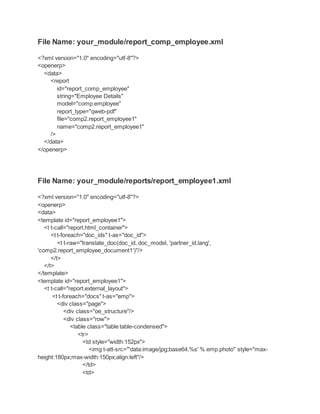
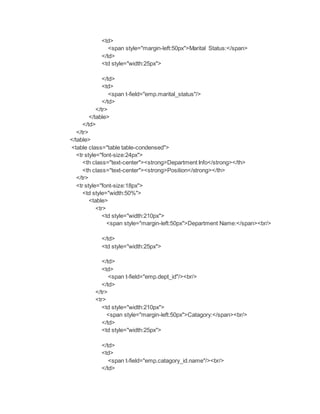
File Name: your_module/report_comp_employee.xml
<?xml version="1.0" encoding="utf-8"?>
<openerp>
<data>
<report
id="report_comp_employee"
string="Employee Details"
model="comp.employee"
report_type="qweb-pdf"
file="comp2.report_employee1"
name="comp2.report_employee1"
/>
</data>
</openerp>
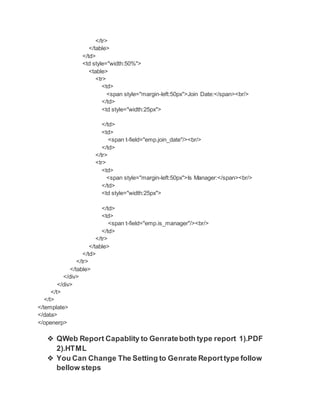
File Name: your_module/reports/report_employee1.xml
<?xml version="1.0" encoding="utf-8"?>
<openerp>
<data>
<template id="report_employee1">
<t t-call="report.html_container">
<t t-foreach="doc_ids" t-as="doc_id">
<t t-raw="translate_doc(doc_id, doc_model, 'partner_id.lang',
'comp2.report_employee_document1')"/>
</t>
</t>
</template>
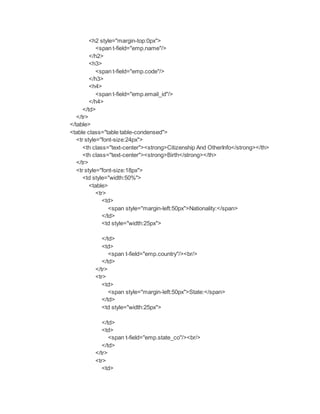
<template id="report_employee1">
<t t-call="report.external_layout">
<t t-foreach="docs" t-as="emp">
<div class="page">
<div class="oe_structure"/>
<div class="row">
<table class="table table-condensed">
<tr>
<td style="width:152px">
<img t-att-src="'data:image/jpg;base64,%s' % emp.photo" style="max-
height:180px;max-width:150px;align:left"/>
</td>
<td>
<h2 style="margin-top:0px">
<span t-field="emp.name"/>
</h2>
<h3>
<span t-field="emp.code"/>
</h3>
<h4>
<span t-field="emp.email_id"/>
</h4>
</td>
</tr>
</table>
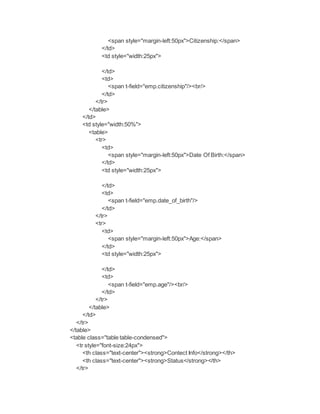
<table class="table table-condensed">
<tr style="font-size:24px">
<th class="text-center"><strong>Citizenship And OtherInfo</strong></th>
<th class="text-center"><strong>Birth</strong></th>
</tr>
<tr style="font-size:18px">
<td style="width:50%">
<table>
<tr>
<td>
<span style="margin-left:50px">Nationality:</span>
</td>
<td style="width:25px">
</td>
<td>
<span t-field="emp.country"/><br/>
</td>
</tr>
<tr>
<td>
<span style="margin-left:50px">State:</span>
</td>
<td style="width:25px">
</td>
<td>
<span t-field="emp.state_co"/><br/>
</td>
</tr>
<tr>
<td>
<span style="margin-left:50px">Citizenship:</span>
</td>
<td style="width:25px">
</td>
<td>
<span t-field="emp.citizenship"/><br/>
</td>
</tr>
</table>
</td>
<td style="width:50%">
<table>
<tr>
<td>
<span style="margin-left:50px">Date Of Birth:</span>
</td>
<td style="width:25px">
</td>
<td>
<span t-field="emp.date_of_birth"/>
</td>
</tr>
<tr>
<td>
<span style="margin-left:50px">Age:</span>
</td>
<td style="width:25px">
</td>
<td>
<span t-field="emp.age"/><br/>
</td>
</tr>
</table>
</td>
</tr>
</table>
<table class="table table-condensed">
<tr style="font-size:24px">
<th class="text-center"><strong>Contect Info</strong></th>
<th class="text-center"><strong>Status</strong></th>
</tr>
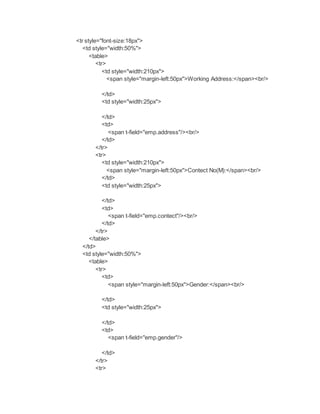
<tr style="font-size:18px">
<td style="width:50%">
<table>
<tr>
<td style="width:210px">
<span style="margin-left:50px">Working Address:</span><br/>
</td>
<td style="width:25px">
</td>
<td>
<span t-field="emp.address"/><br/>
</td>
</tr>
<tr>
<td style="width:210px">
<span style="margin-left:50px">Contect No(M):</span><br/>
</td>
<td style="width:25px">
</td>
<td>
<span t-field="emp.contect"/><br/>
</td>
</tr>
</table>
</td>
<td style="width:50%">
<table>
<tr>
<td>
<span style="margin-left:50px">Gender:</span><br/>
</td>
<td style="width:25px">
</td>
<td>
<span t-field="emp.gender"/>
</td>
</tr>
<tr>
<td>
<span style="margin-left:50px">Marital Status:</span>
</td>
<td style="width:25px">
</td>
<td>
<span t-field="emp.marital_status"/>
</td>
</tr>
</table>
</td>
</tr>
</table>
<table class="table table-condensed">
<tr style="font-size:24px">
<th class="text-center"><strong>Department Info</strong></th>
<th class="text-center"><strong>Position</strong></th>
</tr>
<tr style="font-size:18px">
<td style="width:50%">
<table>
<tr>
<td style="width:210px">
<span style="margin-left:50px">Department Name:</span><br/>
</td>
<td style="width:25px">
</td>
<td>
<span t-field="emp.dept_id"/><br/>
</td>
</tr>
<tr>
<td style="width:210px">
<span style="margin-left:50px">Catagory:</span><br/>
</td>
<td style="width:25px">
</td>
<td>
<span t-field="emp.catagory_id.name"/><br/>
</td>
</tr>
</table>
</td>
<td style="width:50%">
<table>
<tr>
<td>
<span style="margin-left:50px">Join Date:</span><br/>
</td>
<td style="width:25px">
</td>
<td>
<span t-field="emp.join_date"/><br/>
</td>
</tr>
<tr>
<td>
<span style="margin-left:50px">Is Manager:</span><br/>
</td>
<td style="width:25px">
</td>
<td>
<span t-field="emp.is_manager"/><br/>
</td>
</tr>
</table>
</td>
</tr>
</table>
</div>
</div>
</t>
</t>
</template>
</data>
</openerp>
❖ QWeb Report Capablity to Genrateboth type report 1).PDF
2).HTML
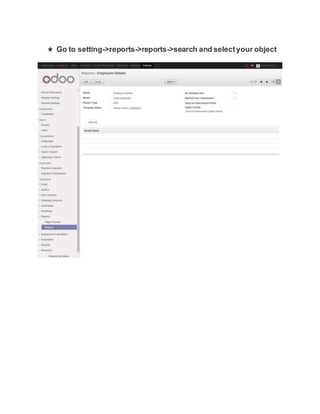
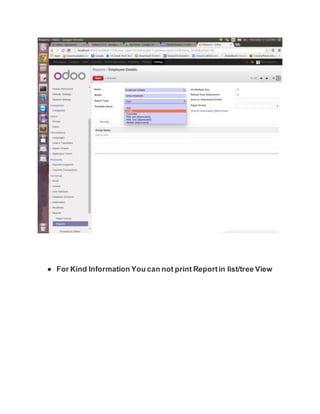
❖ You Can Change The Setting to Genrate Reporttype follow
bellow steps
★ Go to setting->reports->reports->search and selectyour object
● For Kind Information You can not print Reportin list/tree View

QWeb Report in odoo

  • 1.
    ❏ Note: ❏ PleaseMakeFollowing CompatibleVersion ➔ Reportlab : 2.5 ➔ Werkzeug: 0.8.1 ➔ Wkhtmltopdf: Upper Version Of0.12.0 Such as [‘0.12.1’,’0.12.1.1’,’0.12.1.2’] ❏ Please Use Odoo 8.0 LatestVersion ❖ Websites References https://www.odoo.com/documentation/8.0/reference/reports.html http://openerp-web-v7.readthedocs.org/en/latest/qweb.html Report Every report must be declared by a report action. For simplicity, a shortcut <report> element is available to define a report, rather than have to set up the action and its surroundings manually. That <report> can take the following attributes: id the generated record’s external id name (mandatory) only useful as a mnemonic/description of the report when looking for one in a list of some sort model (mandatory) the model your report will be about report_type (mandatory) either qweb-pdf for PDF reports or qweb-html for HTML report_name the name of your report (which will be the name of the PDF output) groups Many2many field to the groups allowed to view/use the current report attachment_use
  • 2.
    if set toTrue, the report will be stored as an attachment of the record using the name generated by the attachment expression; you can use this if you need your report to be generated only once (for legal reasons, for example) attachment python expression that defines the name of the report; the record is acessible as the variable object Example: <report id="account_invoices" model="account.invoice" string="Invoices" report_type="qweb-pdf" name="account.report_invoice" file="account.report_invoice" attachment_use="True" attachment="(object.state in ('open','paid')) and ('INV'+(object.number or '').replace('/','')+'.pdf')" /> Report template Minimal viable template A minimal template would look like: <template id="report_invoice"> <t t-call="report.html_container"> <t t-foreach="docs" t-as="o"> <t t-call="report.external_layout"> <div class="page"> <h2>Report title</h2> <p>This object's name is <span t-field="o.name"/></p> </div> </t> </t> </t> </template> Calling external_layout will add the default header and footer on your report. The PDF body will be the content inside the <divclass="page">. The template’s id must be the name specified in the report declaration; for example account.report_invoice for the above report. Since this is a QWeb template, you can access all the fields of the docs objects received bythe template. There are some specific variables accessible in reports, mainly: docs records for the current report
  • 3.
    doc_ids list of idsfor the docs records doc_model model for the docs records time a reference to time from the Python standard library translate_doc a function to translate a part of a report. It must be used as follow: <t t-foreach="doc_ids" t-as="doc_id"> <t t-raw="translate_doc(doc_id, doc_model, 'partner_id.lang', account.report_invoice_document')"/> </t> user res.user record for the user printing the report res_company record for the current user‘s company If you wish to access other records/models in the template, you will need a custom report. Translatable Templates If you wish to translate reports (to the language of a partner, for example), you need to define two templates: The main report template The translatable document You can then call translate_doc from your main template to obtain the translated document. If you wish to see the details of the translation in the backend, you can go to Settings ‣ Reports ‣ Report ‣ <report_name> ‣ Search associated QWeb views ‣ <translatable_document> ‣ Associated translations. Barcodes Barcodes are images returned by a controller and can easily be embedded in reports thanks to the QWeb syntax: More parameters can be passed as a query string <img t-att-src="'/report/barcode/? type=%s&value=%s&width=%s&height=%s'%('QR', 'text', 200, 200)"/>
  • 4.
    Useful Remarks ● LocalCSS can be put directly in the template ● Twitter Bootstrap and FontAwesome classes can be used in your report template ● Global CSS can be inserted in the main report layout by inheriting its template and inserting your CSS: Paper Format Paper formats are records of report.paperformat and can contain the following attributes: name (mandatory) only useful as a mnemonic/description of the report when looking for one in a list of some sort description a small description of your format format either a predefined format (A0 to A9, B0 to B10, Legal, Letter, Tabloid,...) or custom; A4 by default. You cannot use a non-custom format if you define the page dimensions. dpi output DPI; 90 by default margin_top, margin_bottom, margin_left, margin_right margin sizes in mm page_height, page_width page dimensions in mm orientationReports are dynamically generated by the report module and can be accessed directly via URL: For example, you can access a Sale Order report in html mode by going to http://<server-address>/report/html/sale.report_saleorder/38
  • 5.
    Or you canaccess the pdf version at http://<server- address>/report/pdf/sale.report_saleorder/38 Landscape or Portrait header_line boolean to display a header line header_spacing header spacing in mm Custom Reports The report model has a default get_html function that looks for a model named report.module.report_name. If it exists, it will use it to call the QWeb engine; otherwise a generic function will be used. If you wish to customize your reports by including more things in the template (like records of others models, for example), you can define this model, overwrite the function render_html and pass objects in the docargs dictionnary:
  • 6.
    Reports are webpages Reports are dynamically generated bythe report module and can be accessed directly via URL: For example, you can access a Sale Order report in html mode by going to http://<server- address>/report/html/sale.report_saleorder/38 Or you can access the pdf version at http://<server- address>/report/pdf/sale.report_saleorder/38 QWeb QWeb is the template engine used by the OpenERP Web Client. It is an XML-based templating language, similar to Genshi, Thymeleaf or Facelets with a few peculiarities: ● It’s implemented fully in javascript and rendered in the browser. ● Each template file (XML files) contains multiple templates, where template engine usually have a 1:1 mapping between template files and templates. ● It has special support in OpenERP Web’s Widget, though it can be used outside of OpenERP Web (and it’s possible to use Widget without relying on the QWeb integration). Sample Code Of QWeb Report in Odoo
  • 7.
    File Name: your_module/report_comp_employee.xml <?xmlversion="1.0" encoding="utf-8"?> <openerp> <data> <report id="report_comp_employee" string="Employee Details" model="comp.employee" report_type="qweb-pdf" file="comp2.report_employee1" name="comp2.report_employee1" /> </data> </openerp> File Name: your_module/reports/report_employee1.xml <?xml version="1.0" encoding="utf-8"?> <openerp> <data> <template id="report_employee1"> <t t-call="report.html_container"> <t t-foreach="doc_ids" t-as="doc_id"> <t t-raw="translate_doc(doc_id, doc_model, 'partner_id.lang', 'comp2.report_employee_document1')"/> </t> </t> </template> <template id="report_employee1"> <t t-call="report.external_layout"> <t t-foreach="docs" t-as="emp"> <div class="page"> <div class="oe_structure"/> <div class="row"> <table class="table table-condensed"> <tr> <td style="width:152px"> <img t-att-src="'data:image/jpg;base64,%s' % emp.photo" style="max- height:180px;max-width:150px;align:left"/> </td> <td>
  • 8.
    <h2 style="margin-top:0px"> <span t-field="emp.name"/> </h2> <h3> <spant-field="emp.code"/> </h3> <h4> <span t-field="emp.email_id"/> </h4> </td> </tr> </table> <table class="table table-condensed"> <tr style="font-size:24px"> <th class="text-center"><strong>Citizenship And OtherInfo</strong></th> <th class="text-center"><strong>Birth</strong></th> </tr> <tr style="font-size:18px"> <td style="width:50%"> <table> <tr> <td> <span style="margin-left:50px">Nationality:</span> </td> <td style="width:25px"> </td> <td> <span t-field="emp.country"/><br/> </td> </tr> <tr> <td> <span style="margin-left:50px">State:</span> </td> <td style="width:25px"> </td> <td> <span t-field="emp.state_co"/><br/> </td> </tr> <tr> <td>
  • 9.
    <span style="margin-left:50px">Citizenship:</span> </td> <td style="width:25px"> </td> <td> <spant-field="emp.citizenship"/><br/> </td> </tr> </table> </td> <td style="width:50%"> <table> <tr> <td> <span style="margin-left:50px">Date Of Birth:</span> </td> <td style="width:25px"> </td> <td> <span t-field="emp.date_of_birth"/> </td> </tr> <tr> <td> <span style="margin-left:50px">Age:</span> </td> <td style="width:25px"> </td> <td> <span t-field="emp.age"/><br/> </td> </tr> </table> </td> </tr> </table> <table class="table table-condensed"> <tr style="font-size:24px"> <th class="text-center"><strong>Contect Info</strong></th> <th class="text-center"><strong>Status</strong></th> </tr>
  • 10.
    <tr style="font-size:18px"> <td style="width:50%"> <table> <tr> <tdstyle="width:210px"> <span style="margin-left:50px">Working Address:</span><br/> </td> <td style="width:25px"> </td> <td> <span t-field="emp.address"/><br/> </td> </tr> <tr> <td style="width:210px"> <span style="margin-left:50px">Contect No(M):</span><br/> </td> <td style="width:25px"> </td> <td> <span t-field="emp.contect"/><br/> </td> </tr> </table> </td> <td style="width:50%"> <table> <tr> <td> <span style="margin-left:50px">Gender:</span><br/> </td> <td style="width:25px"> </td> <td> <span t-field="emp.gender"/> </td> </tr> <tr>
  • 11.
    <td> <span style="margin-left:50px">Marital Status:</span> </td> <tdstyle="width:25px"> </td> <td> <span t-field="emp.marital_status"/> </td> </tr> </table> </td> </tr> </table> <table class="table table-condensed"> <tr style="font-size:24px"> <th class="text-center"><strong>Department Info</strong></th> <th class="text-center"><strong>Position</strong></th> </tr> <tr style="font-size:18px"> <td style="width:50%"> <table> <tr> <td style="width:210px"> <span style="margin-left:50px">Department Name:</span><br/> </td> <td style="width:25px"> </td> <td> <span t-field="emp.dept_id"/><br/> </td> </tr> <tr> <td style="width:210px"> <span style="margin-left:50px">Catagory:</span><br/> </td> <td style="width:25px"> </td> <td> <span t-field="emp.catagory_id.name"/><br/> </td>
  • 12.
    </tr> </table> </td> <td style="width:50%"> <table> <tr> <td> <span style="margin-left:50px">JoinDate:</span><br/> </td> <td style="width:25px"> </td> <td> <span t-field="emp.join_date"/><br/> </td> </tr> <tr> <td> <span style="margin-left:50px">Is Manager:</span><br/> </td> <td style="width:25px"> </td> <td> <span t-field="emp.is_manager"/><br/> </td> </tr> </table> </td> </tr> </table> </div> </div> </t> </t> </template> </data> </openerp> ❖ QWeb Report Capablity to Genrateboth type report 1).PDF 2).HTML ❖ You Can Change The Setting to Genrate Reporttype follow bellow steps
  • 13.
    ★ Go tosetting->reports->reports->search and selectyour object
  • 14.
    ● For KindInformation You can not print Reportin list/tree View