First Steps
QUALITYCLICK.COM
c/o NetSlave GmbH
Simon-Dach-Straße 12
D-10245 Berlin
Phone +49 30-94408-730
Email info@qualityclick.com
Fax +49 30-96083-706
First stepswithQualityClick
Content
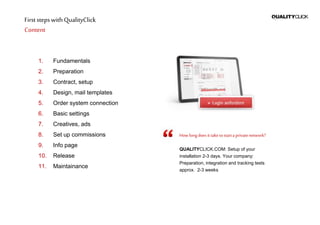
1. Fundamentals
2. Preparation
3. Contract, setup
4. Design, mail templates
5. Order system connection
6. Basic settings
7. Creatives, ads
8. Set up commissions
9. Info page
10. Release
11. Maintainance
Howlongdoesittaketostarta privatenetwork?
QUALITYCLICK.COM: Setup of your
installation 2-3 days. Your company:
Preparation, integration and tracking tests
approx. 2-3 weeks
First stepswithQualityClick
Fundamentals
CookieTracking
Affilate data is stored in a cookie during the click
and transferred to QualityClick.
You should be able to implement html code on your
order completion page. This is possible for most
shop systems. The tracking code contains an
invisible graphic. It transmits transaction data to
QualityClick.
Required minimum data :
transaction ID (order ID) to assign a transaction
in QualityClick
product name that determines the commission
calculation
volume (for volume based commissions)
For more information about tracking
check our YouTube playlist
https://www.youtube.com/user/qualityclick
SessionTracking
For cookieless tracking:
QualityClick transmits affiliateID (pid) as URL
parameter to your landing page
You take it from there to your order completion
page
The tracking pixel transmits the pid to
QualityClick along with the other information
(transactionID etc)
1
First stepswithQualityClick
Preparation
Website
Optimize you web site and all processes for online
shopping. Your conversion rate should be above 1%
except high value products like travel trips.
Ads
Prepare ads like text links, banner and flash
animations. Ads are stored on your ad server and
just need to be linked with QualityClick. If you want
to provide product data feeds please contact us.
Affiliatecontract
Principles of your cooperation are provided in a
partnership agreement. This includes rights and
obligations of your affiliates, payment regulations
and mutual claims.
VAT valueaddedtaxes
You may pay commissions with or without VAT
depending on the affiliate status activated by you.
QualityClick offers the possibility to deposit trade
certificates within the system. Please clarify when
and to whom commission taxes are paid.
2
First stepswithQualityClick
Contractandsetup
Requestcontract
For terms and conditions please contact us by
phone at +49 30 94408-730
or Email: info@qualityclick.com
Selectyouroptions
Referrer tracking: provides short, search engine
friendly links
SSL certificate: protects data transmission
through encryption
Desired start of contract
Domainregistrationpossibilities
1. DNS-A entry:
The domain or sub domain
(partner.YourShop.com) shows on our IP
(provided in the contract)
2. NetSlave may register a domain for you
Sendcontract
Contract, bank account information for direct debit
+ place, date and signature
Fax the contract to:
+49 30 - 96083 706
or via post:
QUALITYCLICK.COM
c/o NetSlave GmbH
Simon-Dach-Straße 12
10245 Berlin
Germany
3
First stepswithQualityClick
Design andmail templates
Design
You may adjust the design of the affiliate area in the
header and footer and additional font parameters
(color, size, etc. via CSS).
In the menue System > Resources > html you have
access to all the design files. On request we match
your affiliate system according to your design
templates.
Configureemailtemplates
You may use text and html templates with your
corporate design.
Use placeholders like <% PartnerID %> to
personalize mails for different actions.
To create the mail templates for other languages
click "save" once.
Invoicedesign
Send us your letterhead as word document to
mail@netslave.de. We just need your logo, contacts
and legal information in the head and foot area.
Leave out all personalized data as these will be
provided by QualityClick
For more information about the payment process
check our YouTube channel
https://www.youtube.com/user/qualityclick
4
First stepswithQualityClick
Ordersystemconnection
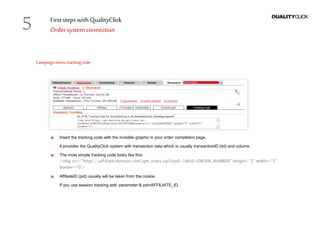
Campaignmenutrackingcode
Insert the tracking code with the invisible graphic in your order completion page.
It provides the QualityClick system with transaction data which is usually transactionID (tid) and volume.
The most simple tracking code looks like this:
<img src="https://affiliate.domain.com/get_trans.cgi?cpid=1&tid=ORDER_NUMBER" height=“2" width=“3"
border="0“>
AffiliateID (pid) usually will be taken from the cookie.
If you use session tracking add parameter & pid=AFFILIATE_ID
5
First stepswithQualityClick
Basicsettings
System» Settings
Affiliateapproval
You can decide whether you approve your affiliates
manually or automatically for system applications as
well as campaign applications
We recommend to at least do one step manually to
check affiliates and avoid fraud.
If your system has multiple campaigns the affiliate
has to apply for each campaign separately
Minimumpayment
This is the lowest limit affiliates can select but they
may set a higher limit for themselves in their
account.
Preposition
This prefix will be the first part of the invoice
numbers.
E-Mail adresses
Specify who will be informed in which situations.
That way payment information go directly to your
accounting and new applications to your affiliate
manager.
System»Manager
Create additional manager accounts with limited
access privileges
6
First stepswithQualityClick
Ads &creatives
Campaigns/program» Advertising material
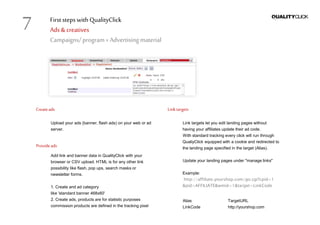
Createads
Upload your ads (banner, flash ads) on your web or ad
server.
Provideads
Add link and banner data in QualityClick with your
browser or CSV upload. HTML is for any other link
possibility like flash, pop ups, search masks or
newsletter forms.
1. Create and ad category
like 'standard banner 468x60'
2. Create ads, products are for statistic purposes
commission products are defined in the tracking pixel
Linktargets
Link targets let you edit landing pages without
having your affiliates update their ad code.
With standard tracking every click will run through
QualiyClick equipped with a cookie and redirected to
the landing page specified in the target (Alias).
Update your landing pages under "manage links"
Example:
http://affiliate.yourshop.com/go.cgi?cpid=1
&pid=AFFILIATE&wmid=1&target=LinkCode
Alias TargetURL
LinkCode http://yourshop.com
7
First stepswithQualityClick
Editcommissions
Campaign »Commissions
Commissionbase
Fixed amount or percentage (volume based)
commission
Products
Pay per Action
(like „contest_registration“)
» Pay per Lead
Pay per Sale
(like „fashion“, „tech“, „summer_sale“)
Commissionlevels
Commission levels are for groups of affiliates
with different commissions like „Standard“ or
„Gold“. Affiliates do not see the name of their
commission level.
1stand2nd levelcommission
1st level
Commission will be paid to the affiliate who
triggered the sale, lead etc
2nd level
Commission will be paid to the affiliate who
referred the 1st level affiliate
8
First stepswithQualityClick
Createinfopage
Tellyourfutureaffiliatesaboutyouroffer:
Create a landing page for potential affiliates.
This site should contain information about:
The products that should be advertised
How much commissions affiliates can
expect
Let your affiliates see interesting example ads
and the terms of service of your program
Informyour customersaboutyour affiliateprogram
i.e. via newsletter. Satisfied customers will be happy
to recommend you.
Placelinkstotheregistrationform
Affiliates often look for a link like „affiliate program“
or „partner“ in the footer of your website.
9
First stepswithQualityClick
Announce
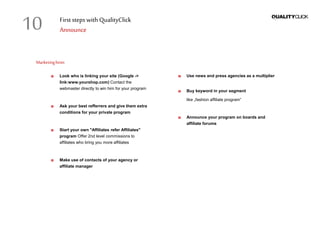
Marketinghints
Look who is linking your site (Google ->
link:www.yourshop.com) Contact the
webmaster directly to win him for your program
Ask your best refferrers and give them extra
conditions for your private program
Start your own "Affiliates refer Affiliates"
program Offer 2nd level commissions to
affiliates who bring you more affiliates
Make use of contacts of your agency or
affiliate manager
Use news and press agencies as a multiplier
Buy keyword in your segment
like „fashion affiliate program“
Announce your program on boards and
affiliate forums
10
First stepswithQualityClick
Maintainyouraffiliateprogram
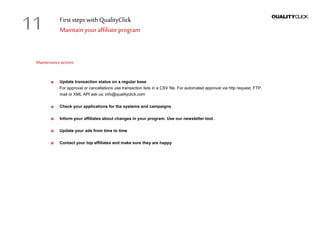
Maintenanceactions
Update transaction status on a regular base
For approval or cancellations use transaction lists in a CSV file. For automated approval via http request, FTP,
mail or XML API ask us: info@qualityclick.com
Check your applications for the systems and campaigns
Inform your affiliates about changes in your program. Use our newsletter tool.
Update your ads from time to time
Contact your top affiliates and make sure they are happy
11
First stepswithQualityClick
Contactus
QUALITYCLICK.COM
c/o NetSlave GmbH
Simon-Dach-Str. 12
D-10245 Berlin
Germany
Phone +49 30 94408-730
Email info@qualityclick.com
Web www.qualityclick.com
Startyour ownprivateaffiliatemarketingprogram
We support you with individual software solutions
and professional assistence.
Jan Bischoff, Founder
QUALITYCLICK.COM
www.qualityclick.com
QUALITYCLICK.COM
c/o NetSlave GmbH
Simon-Dach-Straße 12
10245 Berlin
Germany
Phone +49 30-94408-730
Email info@qualityclick.com
Fax +49 30-96083-706

QUALITYCLICK.COM First Steps

  • 1.
    First Steps QUALITYCLICK.COM c/o NetSlaveGmbH Simon-Dach-Straße 12 D-10245 Berlin Phone +49 30-94408-730 Email info@qualityclick.com Fax +49 30-96083-706
  • 2.
    First stepswithQualityClick Content 1. Fundamentals 2.Preparation 3. Contract, setup 4. Design, mail templates 5. Order system connection 6. Basic settings 7. Creatives, ads 8. Set up commissions 9. Info page 10. Release 11. Maintainance Howlongdoesittaketostarta privatenetwork? QUALITYCLICK.COM: Setup of your installation 2-3 days. Your company: Preparation, integration and tracking tests approx. 2-3 weeks
  • 3.
    First stepswithQualityClick Fundamentals CookieTracking Affilate datais stored in a cookie during the click and transferred to QualityClick. You should be able to implement html code on your order completion page. This is possible for most shop systems. The tracking code contains an invisible graphic. It transmits transaction data to QualityClick. Required minimum data : transaction ID (order ID) to assign a transaction in QualityClick product name that determines the commission calculation volume (for volume based commissions) For more information about tracking check our YouTube playlist https://www.youtube.com/user/qualityclick SessionTracking For cookieless tracking: QualityClick transmits affiliateID (pid) as URL parameter to your landing page You take it from there to your order completion page The tracking pixel transmits the pid to QualityClick along with the other information (transactionID etc) 1
  • 4.
    First stepswithQualityClick Preparation Website Optimize youweb site and all processes for online shopping. Your conversion rate should be above 1% except high value products like travel trips. Ads Prepare ads like text links, banner and flash animations. Ads are stored on your ad server and just need to be linked with QualityClick. If you want to provide product data feeds please contact us. Affiliatecontract Principles of your cooperation are provided in a partnership agreement. This includes rights and obligations of your affiliates, payment regulations and mutual claims. VAT valueaddedtaxes You may pay commissions with or without VAT depending on the affiliate status activated by you. QualityClick offers the possibility to deposit trade certificates within the system. Please clarify when and to whom commission taxes are paid. 2
  • 5.
    First stepswithQualityClick Contractandsetup Requestcontract For termsand conditions please contact us by phone at +49 30 94408-730 or Email: info@qualityclick.com Selectyouroptions Referrer tracking: provides short, search engine friendly links SSL certificate: protects data transmission through encryption Desired start of contract Domainregistrationpossibilities 1. DNS-A entry: The domain or sub domain (partner.YourShop.com) shows on our IP (provided in the contract) 2. NetSlave may register a domain for you Sendcontract Contract, bank account information for direct debit + place, date and signature Fax the contract to: +49 30 - 96083 706 or via post: QUALITYCLICK.COM c/o NetSlave GmbH Simon-Dach-Straße 12 10245 Berlin Germany 3
  • 6.
    First stepswithQualityClick Design andmailtemplates Design You may adjust the design of the affiliate area in the header and footer and additional font parameters (color, size, etc. via CSS). In the menue System > Resources > html you have access to all the design files. On request we match your affiliate system according to your design templates. Configureemailtemplates You may use text and html templates with your corporate design. Use placeholders like <% PartnerID %> to personalize mails for different actions. To create the mail templates for other languages click "save" once. Invoicedesign Send us your letterhead as word document to mail@netslave.de. We just need your logo, contacts and legal information in the head and foot area. Leave out all personalized data as these will be provided by QualityClick For more information about the payment process check our YouTube channel https://www.youtube.com/user/qualityclick 4
  • 7.
    First stepswithQualityClick Ordersystemconnection Campaignmenutrackingcode Insert thetracking code with the invisible graphic in your order completion page. It provides the QualityClick system with transaction data which is usually transactionID (tid) and volume. The most simple tracking code looks like this: <img src="https://affiliate.domain.com/get_trans.cgi?cpid=1&tid=ORDER_NUMBER" height=“2" width=“3" border="0“> AffiliateID (pid) usually will be taken from the cookie. If you use session tracking add parameter & pid=AFFILIATE_ID 5
  • 8.
    First stepswithQualityClick Basicsettings System» Settings Affiliateapproval Youcan decide whether you approve your affiliates manually or automatically for system applications as well as campaign applications We recommend to at least do one step manually to check affiliates and avoid fraud. If your system has multiple campaigns the affiliate has to apply for each campaign separately Minimumpayment This is the lowest limit affiliates can select but they may set a higher limit for themselves in their account. Preposition This prefix will be the first part of the invoice numbers. E-Mail adresses Specify who will be informed in which situations. That way payment information go directly to your accounting and new applications to your affiliate manager. System»Manager Create additional manager accounts with limited access privileges 6
  • 9.
    First stepswithQualityClick Ads &creatives Campaigns/program»Advertising material Createads Upload your ads (banner, flash ads) on your web or ad server. Provideads Add link and banner data in QualityClick with your browser or CSV upload. HTML is for any other link possibility like flash, pop ups, search masks or newsletter forms. 1. Create and ad category like 'standard banner 468x60' 2. Create ads, products are for statistic purposes commission products are defined in the tracking pixel Linktargets Link targets let you edit landing pages without having your affiliates update their ad code. With standard tracking every click will run through QualiyClick equipped with a cookie and redirected to the landing page specified in the target (Alias). Update your landing pages under "manage links" Example: http://affiliate.yourshop.com/go.cgi?cpid=1 &pid=AFFILIATE&wmid=1&target=LinkCode Alias TargetURL LinkCode http://yourshop.com 7
  • 10.
    First stepswithQualityClick Editcommissions Campaign »Commissions Commissionbase Fixedamount or percentage (volume based) commission Products Pay per Action (like „contest_registration“) » Pay per Lead Pay per Sale (like „fashion“, „tech“, „summer_sale“) Commissionlevels Commission levels are for groups of affiliates with different commissions like „Standard“ or „Gold“. Affiliates do not see the name of their commission level. 1stand2nd levelcommission 1st level Commission will be paid to the affiliate who triggered the sale, lead etc 2nd level Commission will be paid to the affiliate who referred the 1st level affiliate 8
  • 11.
    First stepswithQualityClick Createinfopage Tellyourfutureaffiliatesaboutyouroffer: Create alanding page for potential affiliates. This site should contain information about: The products that should be advertised How much commissions affiliates can expect Let your affiliates see interesting example ads and the terms of service of your program Informyour customersaboutyour affiliateprogram i.e. via newsletter. Satisfied customers will be happy to recommend you. Placelinkstotheregistrationform Affiliates often look for a link like „affiliate program“ or „partner“ in the footer of your website. 9
  • 12.
    First stepswithQualityClick Announce Marketinghints Look whois linking your site (Google -> link:www.yourshop.com) Contact the webmaster directly to win him for your program Ask your best refferrers and give them extra conditions for your private program Start your own "Affiliates refer Affiliates" program Offer 2nd level commissions to affiliates who bring you more affiliates Make use of contacts of your agency or affiliate manager Use news and press agencies as a multiplier Buy keyword in your segment like „fashion affiliate program“ Announce your program on boards and affiliate forums 10
  • 13.
    First stepswithQualityClick Maintainyouraffiliateprogram Maintenanceactions Update transactionstatus on a regular base For approval or cancellations use transaction lists in a CSV file. For automated approval via http request, FTP, mail or XML API ask us: info@qualityclick.com Check your applications for the systems and campaigns Inform your affiliates about changes in your program. Use our newsletter tool. Update your ads from time to time Contact your top affiliates and make sure they are happy 11
  • 14.
    First stepswithQualityClick Contactus QUALITYCLICK.COM c/o NetSlaveGmbH Simon-Dach-Str. 12 D-10245 Berlin Germany Phone +49 30 94408-730 Email info@qualityclick.com Web www.qualityclick.com Startyour ownprivateaffiliatemarketingprogram We support you with individual software solutions and professional assistence. Jan Bischoff, Founder QUALITYCLICK.COM
  • 15.
    www.qualityclick.com QUALITYCLICK.COM c/o NetSlave GmbH Simon-Dach-Straße12 10245 Berlin Germany Phone +49 30-94408-730 Email info@qualityclick.com Fax +49 30-96083-706