Download as PDF, PPTX
![Quick Installation Guide
EnGenius Europe | Veldzigt 28, 3454 PW De Meern,
Netherlands | 0900-WIFIABC | www.wifiabc.com
Disclaimer: Information may be subject to changes without prior notification. Follow us
https://www.linkedin.com/company/engeniuseurope
https://plus.google.com/+EngeniusEuropeBVDeMeern
https://www.youtube.com/user/engeniuseuropebv
https://twitter.com/engeniuseu
Captive Portal “Ready”
Hotspotsystem
*** MUST READ ***
The package labelled “Captive Portal Ready” herein contains a third-party
firmware & management feature. It has distinctly different properties,
configuration and capabilities of that the stock product mentioned in the
datasheet, CD user manual and box packaging. This quick installation guide
supersedes any datasheet, CD user manual and information on the box
packaging to contain important instructions in setting up your EnGenius Captive
Portal Ready wireless networks. Please read and follow this guide thoroughly to
have an enjoyable experience in setting up your EnGenius Captive Portal Ready
wireless network.
Note: Guest authentication feature requires a separate paid subscription from
thirdparty cloud captive providers to work.
Check list
• An Internet connection should be already setup & ready to use* (ADSL /Ca-
ble/Fiber modem router)
• Modem/Router must provide RJ45 port to connect with EAP300-CP or
ENS202EXT-CP. An Ethernet cable is further required for the ENS202EXT-CP
• Internet browser (Recent version of Microsoft Internet Explorer or Firefox
browser)
• A pencil or pen ready to use “My personal notes” on the last page to assist
you in remembering any account names and passwords created
Important notes
• (*) The Internet connection should give you the ability to ping
www.yahoo.com (resolve DNS) and to normally browse a web page via http
and https (SSL). If in doubt, use a laptop or computer with your existing Internet
connection (which you will be connecting the equipment to) and type
http://www.yahoo.com on your browser. If there is no response, you need to
resolve this with your Internet Service Provider before proceeding further this
Quick Installation Guide
Installing the first device
STEP 1
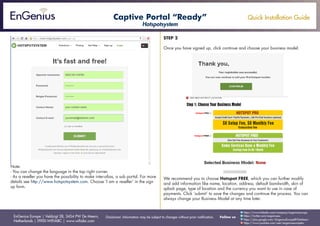
Follow the instructions on the users ID-sticker. The sticker is located on the
device.
Go to the www.hotspotsystem.com and click ‘Sign up’ or ‘Sign up for free’. Sign
up an account using the operator username
[the-characters-on-the-ID-sticker] to activate if this is your first device.
For adding additional device refer to the instructions later on in this manual.](https://image.slidesharecdn.com/qigcphotspotsystem-150730093545-lva1-app6891/85/Quick-Installation-Guide-Captive-Portal-Hotspotsystems-English-1-320.jpg)
![Quick Installation Guide
EnGenius Europe | Veldzigt 28, 3454 PW De Meern,
Netherlands | 0900-WIFIABC | www.wifiabc.com
Disclaimer: Information may be subject to changes without prior notification. Follow us
https://www.linkedin.com/company/engeniuseurope
https://plus.google.com/+EngeniusEuropeBVDeMeern
https://www.youtube.com/user/engeniuseuropebv
https://twitter.com/engeniuseu
STEP 3
After the registration, connect a LAN cable from the LAN port of your existing
Internet modem router to the ethernet port of the EnGenius Captive Portal Ready
device and power up. The device will perform an initial setup which the status
LED will constantly blink for two minutes. After approximately two minutes, the
product is ready. This can be verified by the three LEDs on the device.
(The WLAN LED of the ENS202EXT-CP is not in use in the Captive Portal mode).
For ENS202EXT-CP devices
Note: The ENS202EXT-CP must only be powered with the supplied 24V power
adapter via the PoE (Power-over-Ethernet) injector.
For EAP300-CP devices
Note: The EAP300-CP supports both IEEE802.3af PoE (Power over Ethernet) or
the included power adapter. You may use either one as the power source. Do
not use both at the same time.
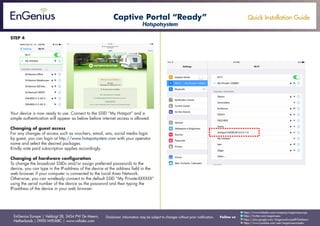
In the wireless SSID scan, you can find the SSIDs by ‘My Hotspot is getting
ready’. Once the initial setup is completed, you find three SSIDs: MyHotspot,
My Private (key is on the sticker) and Hotspot [part of user ID]@[IP-address]. This
last SSID is the help SSID. This is the IP-address that is assigned on your Local
Area Network. The fourth SSID is the wireless Mesh which is used to repeat the
wireless signal to another device if the other device has not Ethernet connection.
Captive Portal “Ready”
Hotspotsystem](https://image.slidesharecdn.com/qigcphotspotsystem-150730093545-lva1-app6891/85/Quick-Installation-Guide-Captive-Portal-Hotspotsystems-English-3-320.jpg)
![Quick Installation Guide
EnGenius Europe | Veldzigt 28, 3454 PW De Meern,
Netherlands | 0900-WIFIABC | www.wifiabc.com
Disclaimer: Information may be subject to changes without prior notification. Follow us
https://www.linkedin.com/company/engeniuseurope
https://plus.google.com/+EngeniusEuropeBVDeMeern
https://www.youtube.com/user/engeniuseuropebv
https://twitter.com/engeniuseu
Installing additional devices
Because of the Mesh capabilities, additional devices can be added wirelessly
or by the wired LAN. If you want to configure it wirelessly, place the additional
device close to the first device with the wired Internet access.
Step 1
Confirm that the first device is powered up and connected to your internet router
and power up the additional device. The device status light will start blinking
constantly for next two minutes.
Step 2
In the wireless network scan you can find the SSIDs by ‘My Hotspot is getting
ready’ while the additional device is preparing itself. Once the initial setup is
complete, the device will reboot and now you will find three SSIDs with the
data of the additional device: MyHotspot, My Private (key is on the sticker) and
Hotspot [part of user ID]@[IP-address].
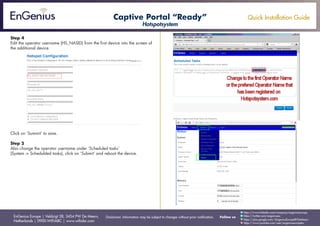
Step 3
Open up web browser screens and type in the IP-address of the additional
device. After logged in, go to ‘System’ and click ‘Hotspot configuration’.
Captive Portal “Ready”
Hotspotsystem](https://image.slidesharecdn.com/qigcphotspotsystem-150730093545-lva1-app6891/85/Quick-Installation-Guide-Captive-Portal-Hotspotsystems-English-5-320.jpg)

This document provides a quick installation guide for setting up an EnGenius Captive Portal Ready wireless network. It outlines the steps to install the first device, including signing up for an account on the hotspotsystem.com portal and configuring basic device settings. It then describes how to install additional devices by connecting them wirelessly or via Ethernet and configuring them using the hotspotsystem portal. Troubleshooting tips are also provided for issues like not seeing expected SSIDs or connecting to secured networks.


