04 April 2020
Cloud Manthan Software Solutions Pvt Ltd
Virtual Desktops in Cloud
Q & A
1
Your Hosts today
● 100+ Workshops for Fortune 500
companies
● 150+ AWS Implementations with team
https://www.linkedin.com/in/amodkadam-aws-certified-consultant-trainer/
● AWS ,DevOps, Automatio , Terraform
● Active user of WorkSpaces for over a
1 year
https://www.linkedin.com/in/devopstechie/
2
Note
● This slide deck contains the Q & A which were asked by the participants
during the online session conducted on 4th April 2020
● The slide deck from the earlier session is available at
https://www.slideshare.net/amodkadam/amazon-workspacesvirtual-desktops-in-cloud
● Responses are based on our own experiences as well as information
available in public domain
● In case you think we should review some of the responses feel free to reach
out to us at connect@cloudmanthan.com and we will look into it as early as
possible
3
Users & WorkSpaces
4
1. Users & Transfer
5
1. Question : Can one user have multiple workspaces ?
No. You can currently provide only one WorkSpace per user in a given AWS directory.
2. Question : Can you transfer WorkSpace to another user ?
No. As of now it is not possible to transfer your WorkSpace to another user.
3. Question : Can users transfer data between WorkSpaces?
Following two approaches can be used for transferring data across WorkSpaces.
First approach is using Amazon WorkDocs where files are shared using WorkDocs and are accessible from the relevant WorkSpaces.
Check out further details at Five reasons to enable Amazon WorkDocs within your Amazon WorkSpaces environment | Amazon Web
Services
Second approach is using Amazon FSx to share files across WorkSpaces. For further information visit the blog Using Amazon FSx for
Windows File Server with Amazon WorkSpaces | Amazon Web Services
Users & WorkSpaces
6
4. Question : How many users can be added to a particular WorkSpace ? Is there any
limitation on it ? Does billing is done on a number of users.
There is one to one mapping from user to WorkSpace.
It is not possible to add any additional users on the WorkSpace.
Billing is not done based on the number of users but it depends primarily on number of WorkSpaces launched.
Pricing
7
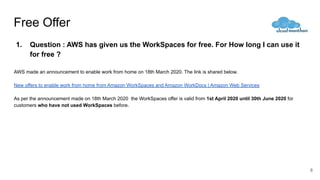
Free Offer
1. Question : AWS has given us the WorkSpaces for free. For How long I can use it
for free ?
AWS made an announcement to enable work from home on 18th March 2020. The link is shared below.
New offers to enable work from home from Amazon WorkSpaces and Amazon WorkDocs | Amazon Web Services
As per the announcement made on 18th March 2020 the WorkSpaces offer is valid from 1st April 2020 until 30th June 2020 for
customers who have not used WorkSpaces before.
8
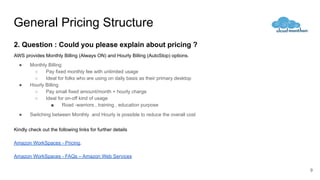
General Pricing Structure
2. Question : Could you please explain about pricing ?
AWS provides Monthly Billing (Always ON) and Hourly Billing (AutoStop) options.
● Monthly Billing
○ Pay fixed monthly fee with unlimited usage
○ Ideal for folks who are using on daily basis as their primary desktop
● Hourly Billing
○ Pay small fixed amount/month + hourly charge
○ Ideal for on-off kind of usage
■ Road -warriors , training , education purpose
● Switching between Monthly and Hourly is possible to reduce the overall cost
Kindly check out the following links for further details
Amazon WorkSpaces - Pricing.
Amazon WorkSpaces - FAQs – Amazon Web Services
9
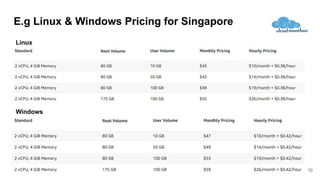
E.g Linux & Windows Pricing for Singapore
Windows
Linux
10
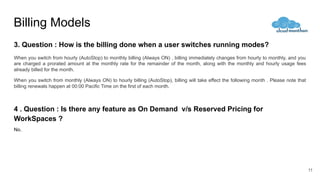
Billing Models
3. Question : How is the billing done when a user switches running modes?
When you switch from hourly (AutoStop) to monthly billing (Always ON) , billing immediately changes from hourly to monthly, and you
are charged a prorated amount at the monthly rate for the remainder of the month, along with the monthly and hourly usage fees
already billed for the month.
When you switch from monthly (Always ON) to hourly billing (AutoStop), billing will take effect the following month . Please note that
billing renewals happen at 00:00 Pacific Time on the first of each month.
4 . Question : Is there any feature as On Demand v/s Reserved Pricing for
WorkSpaces ?
No.
11
Backup
12
Key Features
13
1. Question : What about the data backup ? Will WorkSpaces take full backup or
backup of modified data?
The user volume on a WorkSpace is backed up every 12 hours. In case of a WorkSpace failure, AWS can restore this volume from the last
backup.
As an end user you will always get the entire data. As it uses Elastic Block Store (EBS) we expect that this should be incremental backup
internally.
If Amazon WorkDocs Sync is enabled on a WorkSpace, the folder a user chooses to sync will be continuously backed up and stored in
Amazon WorkDocs.
2. Question : Do we need to set up snapshot policy for the WorkSpace as we do
with EBS volumes ?
No.
General Questions
14
1. Question : Can I learn a new language using AWS ? e.g Python ?
You can find many resources on the web to learn Python. One such resource which I have used in the past is - Python Learning
Tutorial by Mosh. https://www.youtube.com/watch?v=_uQrJ0TkZlc.
However you can use Amazon WorkSpaces to use it as a virtual desktop and setup Python related resources on WorkSpaces and start
using Python so that you can access it from anywhere.
I would also recommend checking out AWS Cloud 9 https://aws.amazon.com/cloud9/ .
Cloud 9 is a cloud-based integrated development environment (IDE) that lets you write, run, and debug your code with just a browser. It
includes a code editor, debugger, and terminal. Cloud9 comes prepackaged with essential tools for popular programming languages,
including JavaScript, Python, PHP, and more, so you don’t need to install files or configure your development machine to start new
projects.
15
Learning new Language
Useful References
● Amazon WorkSpaces - FAQs – Amazon Web Services
16
Cloud Manthan Software Solutions Pvt Ltd.
connect@cloudmanthan.com | www.cloudmanthan.com | +91 98923 00901
17

Q & A - Amazon WorkSpaces

  • 1.
    04 April 2020 CloudManthan Software Solutions Pvt Ltd Virtual Desktops in Cloud Q & A 1
  • 2.
    Your Hosts today ●100+ Workshops for Fortune 500 companies ● 150+ AWS Implementations with team https://www.linkedin.com/in/amodkadam-aws-certified-consultant-trainer/ ● AWS ,DevOps, Automatio , Terraform ● Active user of WorkSpaces for over a 1 year https://www.linkedin.com/in/devopstechie/ 2
  • 3.
    Note ● This slidedeck contains the Q & A which were asked by the participants during the online session conducted on 4th April 2020 ● The slide deck from the earlier session is available at https://www.slideshare.net/amodkadam/amazon-workspacesvirtual-desktops-in-cloud ● Responses are based on our own experiences as well as information available in public domain ● In case you think we should review some of the responses feel free to reach out to us at connect@cloudmanthan.com and we will look into it as early as possible 3
  • 4.
  • 5.
    1. Users &Transfer 5 1. Question : Can one user have multiple workspaces ? No. You can currently provide only one WorkSpace per user in a given AWS directory. 2. Question : Can you transfer WorkSpace to another user ? No. As of now it is not possible to transfer your WorkSpace to another user. 3. Question : Can users transfer data between WorkSpaces? Following two approaches can be used for transferring data across WorkSpaces. First approach is using Amazon WorkDocs where files are shared using WorkDocs and are accessible from the relevant WorkSpaces. Check out further details at Five reasons to enable Amazon WorkDocs within your Amazon WorkSpaces environment | Amazon Web Services Second approach is using Amazon FSx to share files across WorkSpaces. For further information visit the blog Using Amazon FSx for Windows File Server with Amazon WorkSpaces | Amazon Web Services
  • 6.
    Users & WorkSpaces 6 4.Question : How many users can be added to a particular WorkSpace ? Is there any limitation on it ? Does billing is done on a number of users. There is one to one mapping from user to WorkSpace. It is not possible to add any additional users on the WorkSpace. Billing is not done based on the number of users but it depends primarily on number of WorkSpaces launched.
  • 7.
  • 8.
    Free Offer 1. Question: AWS has given us the WorkSpaces for free. For How long I can use it for free ? AWS made an announcement to enable work from home on 18th March 2020. The link is shared below. New offers to enable work from home from Amazon WorkSpaces and Amazon WorkDocs | Amazon Web Services As per the announcement made on 18th March 2020 the WorkSpaces offer is valid from 1st April 2020 until 30th June 2020 for customers who have not used WorkSpaces before. 8
  • 9.
    General Pricing Structure 2.Question : Could you please explain about pricing ? AWS provides Monthly Billing (Always ON) and Hourly Billing (AutoStop) options. ● Monthly Billing ○ Pay fixed monthly fee with unlimited usage ○ Ideal for folks who are using on daily basis as their primary desktop ● Hourly Billing ○ Pay small fixed amount/month + hourly charge ○ Ideal for on-off kind of usage ■ Road -warriors , training , education purpose ● Switching between Monthly and Hourly is possible to reduce the overall cost Kindly check out the following links for further details Amazon WorkSpaces - Pricing. Amazon WorkSpaces - FAQs – Amazon Web Services 9
  • 10.
    E.g Linux &Windows Pricing for Singapore Windows Linux 10
  • 11.
    Billing Models 3. Question: How is the billing done when a user switches running modes? When you switch from hourly (AutoStop) to monthly billing (Always ON) , billing immediately changes from hourly to monthly, and you are charged a prorated amount at the monthly rate for the remainder of the month, along with the monthly and hourly usage fees already billed for the month. When you switch from monthly (Always ON) to hourly billing (AutoStop), billing will take effect the following month . Please note that billing renewals happen at 00:00 Pacific Time on the first of each month. 4 . Question : Is there any feature as On Demand v/s Reserved Pricing for WorkSpaces ? No. 11
  • 12.
  • 13.
    Key Features 13 1. Question: What about the data backup ? Will WorkSpaces take full backup or backup of modified data? The user volume on a WorkSpace is backed up every 12 hours. In case of a WorkSpace failure, AWS can restore this volume from the last backup. As an end user you will always get the entire data. As it uses Elastic Block Store (EBS) we expect that this should be incremental backup internally. If Amazon WorkDocs Sync is enabled on a WorkSpace, the folder a user chooses to sync will be continuously backed up and stored in Amazon WorkDocs. 2. Question : Do we need to set up snapshot policy for the WorkSpace as we do with EBS volumes ? No.
  • 14.
  • 15.
    1. Question :Can I learn a new language using AWS ? e.g Python ? You can find many resources on the web to learn Python. One such resource which I have used in the past is - Python Learning Tutorial by Mosh. https://www.youtube.com/watch?v=_uQrJ0TkZlc. However you can use Amazon WorkSpaces to use it as a virtual desktop and setup Python related resources on WorkSpaces and start using Python so that you can access it from anywhere. I would also recommend checking out AWS Cloud 9 https://aws.amazon.com/cloud9/ . Cloud 9 is a cloud-based integrated development environment (IDE) that lets you write, run, and debug your code with just a browser. It includes a code editor, debugger, and terminal. Cloud9 comes prepackaged with essential tools for popular programming languages, including JavaScript, Python, PHP, and more, so you don’t need to install files or configure your development machine to start new projects. 15 Learning new Language
  • 16.
    Useful References ● AmazonWorkSpaces - FAQs – Amazon Web Services 16
  • 17.
    Cloud Manthan SoftwareSolutions Pvt Ltd. connect@cloudmanthan.com | www.cloudmanthan.com | +91 98923 00901 17