04 April 2020
Cloud Manthan Software Solutions Pvt Ltd
Virtual Desktops in Cloud
Your Hosts today
● 100+ Workshops for Fortune 500
companies
● 150+ AWS Implementations with team
https://www.linkedin.com/in/amodkadam-aws-certified-consultant-trainer/
● AWS ,DevOps, Automatio , Terraform
● Active user of WorkSpaces for over a
1 year
https://www.linkedin.com/in/devopstechie/
Agenda
● Basics of AWS
○ Just enough to understand and use WorkSpaces
● What & Why of WorkSpaces ?
● How to use WorkSpaces ?
● Demo
● Pricing
● Q & A
What is AWS
(Amazon Web Services)?
What is AWS ?
● AWS - Amazon subsidiary
● First mover as as Cloud Service Provider (CSP)
● Started its operations in 2006
● Leader in IaaS Space as well Cloud AI Developer service
● Public Cloud
○ Anyone can use it - Individual, Small to Medium Businesses, Large Enterprise, …
● Offers various services - compute , storage , database..
● Services available across the globe
● Amazon WorkSpaces is one of the service offerings from AWS
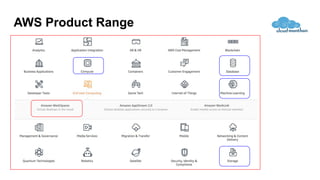
AWS Product Range
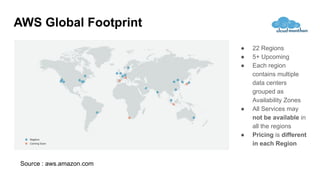
AWS Global Footprint
● 22 Regions
● 5+ Upcoming
● Each region
contains multiple
data centers
grouped as
Availability Zones
● All Services may
not be available in
all the regions
● Pricing is different
in each Region
Source : aws.amazon.com
Amazon WorkSpaces
What is Amazon WorkSpaces ?
Service which provides Virtual Desktop in the Cloud a.k.a.
Desktop-as-a-Service (DaaS)
Flash !
Flash !
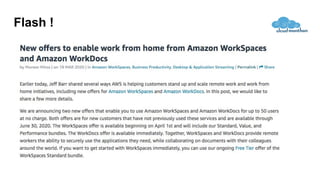
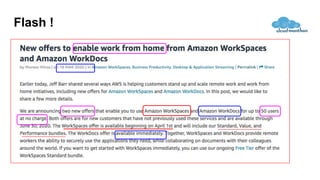
Important points related to Offer
● Offer is valid if you have not used WorkSpaces in your AWS account
● As of now this offer is from 1st April until 30th June 2020
● Eligible for Standard , Value, Professional pack
● Eligible for 50 users
Why do you need Amazon
WorkSpaces like Service ?
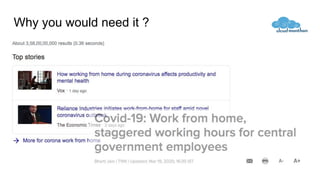
Why you would need it ?
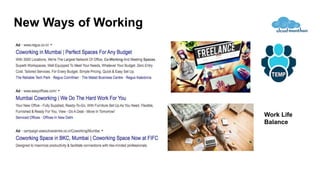
New Ways of Working
Work Life
Balance
Why can’t we just provide users
with laptops or desktops ?
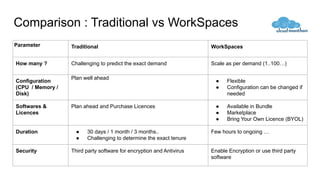
Comparison : Traditional vs WorkSpaces
Parameter Traditional WorkSpaces
How many ? Challenging to predict the exact demand Scale as per demand (1..100…)
Configuration
(CPU / Memory /
Disk)
Plan well ahead
● Flexible
● Configuration can be changed if
needed
Softwares &
Licences
Plan ahead and Purchase Licences ● Available in Bundle
● Marketplace
● Bring Your Own Licence (BYOL)
Duration ● 30 days / 1 month / 3 months..
● Challenging to determine the exact tenure
Few hours to ongoing …
Security Third party software for encryption and Antivirus Enable Encryption or use third party
software
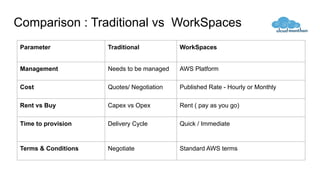
Comparison : Traditional vs WorkSpaces
Parameter Traditional WorkSpaces
Management Needs to be managed AWS Platform
Cost Quotes/ Negotiation Published Rate - Hourly or Monthly
Rent vs Buy Capex vs Opex Rent ( pay as you go)
Time to provision Delivery Cycle Quick / Immediate
Terms & Conditions Negotiate Standard AWS terms
What are the steps to use
WorkSpaces ?
Getting Started with WorkSpaces
1. Get an AWS Account
○ Existing account or
○ New account (12 months Free tier )
2. Create WorkSpace
○ Choose the region closer to you
3. Connect to WorkSpace using WorkSpace Client
○ Start using it
○ Install any additional softwares if required
Step 1 - Setup new AWS Account or
use existing Account
Open AWS account
(Required only if you don’t have an AWS account )
1) To open AWS account you would need
a. Email Id
b. Phone Number
c. Credit or Debit Card (only for Authorization)
2) Go to https://aws.amazon.com/free/ and follow the instructions
● This process typically takes around 5 minutes
Step 2 - Create WorkSpaces
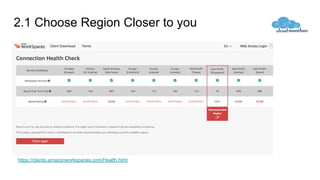
2.1 Choose Region Closer to you
https://clients.amazonworkspaces.com/Health.html
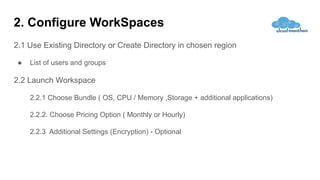
2. Configure WorkSpaces
2.1 Use Existing Directory or Create Directory in chosen region
● List of users and groups
2.2 Launch Workspace
2.2.1 Choose Bundle ( OS, CPU / Memory ,Storage + additional applications)
2.2.2. Choose Pricing Option ( Monthly or Hourly)
2.2.3 Additional Settings (Encryption) - Optional
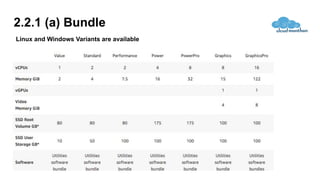
2.2.1 (a) Bundle
Linux and Windows Variants are available
2.2.1(b) - Additional Applications
● Default set of application - IE , FireFox
● Additional application bundle can be setup with additional fees
○ MS Office Professional
○ Trend Micro Business Security
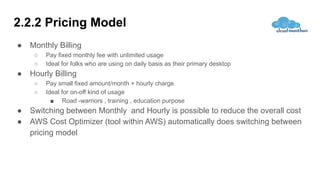
2.2.2 Pricing Model
● Monthly Billing
○ Pay fixed monthly fee with unlimited usage
○ Ideal for folks who are using on daily basis as their primary desktop
● Hourly Billing
○ Pay small fixed amount/month + hourly charge
○ Ideal for on-off kind of usage
■ Road -warriors , training , education purpose
● Switching between Monthly and Hourly is possible to reduce the overall cost
● AWS Cost Optimizer (tool within AWS) automatically does switching between
pricing model
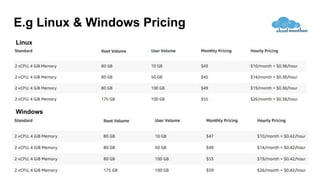
E.g Linux & Windows Pricing
Windows
Linux
Step 3 - Connect to WorkSpace
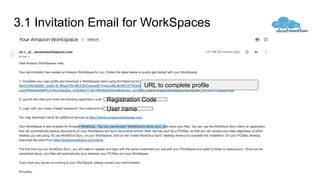
3.1 Invitation Email for WorkSpaces
Registration Code
User name
URL to complete profile
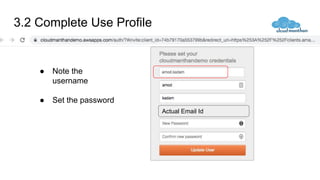
3.2 Complete Use Profile
● Note the
username
● Set the password
Actual Email Id
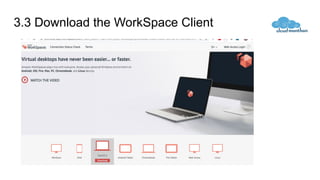
3.3 Download the WorkSpace Client
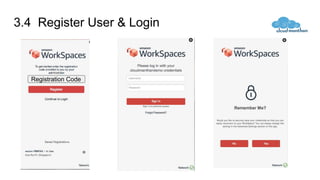
3.4 Register User & Login
Registration Code
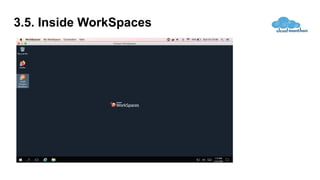
3.5. Inside WorkSpaces
Operations with WorkSpaces
Start/Stop/Reboot..
● Start
● Stop
● Reboot
● Rebuild
○ In case of any system issues
● Change Configuration….
● ...
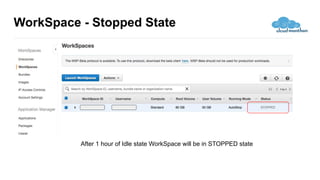
WorkSpace - Stopped State
After 1 hour of Idle state WorkSpace will be in STOPPED state
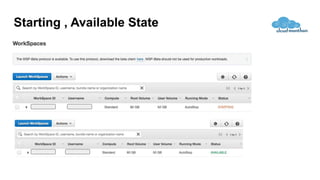
Starting , Available State
● Types of Changes...
○ Disk Size
○ Compute Type
■ e.g. Value (1vCPU , 2GiB) , Standard (2vCPU , 4 GiB) , (PowerPro 8 vCPU / 32 GB) ,...
○ Running Mode
■ AlwaysOn
■ AutoStop
● Changes can be done using
○ AWS Console
○ WorkSpaces Client UI
○ Application Programming Interface (API)
Change Configuration
Additional Features
Key Features
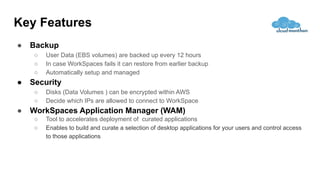
● Backup
○ User Data (EBS volumes) are backed up every 12 hours
○ In case WorkSpaces fails it can restore from earlier backup
○ Automatically setup and managed
● Security
○ Disks (Data Volumes ) can be encrypted within AWS
○ Decide which IPs are allowed to connect to WorkSpace
● WorkSpaces Application Manager (WAM)
○ Tool to accelerates deployment of curated applications
○ Enables to build and curate a selection of desktop applications for your users and control access
to those applications
Key Features
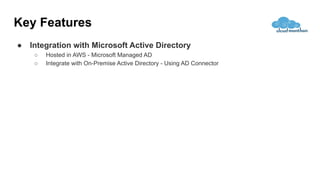
● Integration with Microsoft Active Directory
○ Hosted in AWS - Microsoft Managed AD
○ Integrate with On-Premise Active Directory - Using AD Connector
Useful References
● AWS
○ Amazon Web Services (AWS) - Cloud Computing Services
○ Open an AWS Account AWS Free Tier
● Amazon WorkSpaces
○ Amazon WorkSpaces
○ Amazon WorkSpaces - FAQs – Amazon Web Services
○ Get Started with Amazon WorkSpaces Quick Setup - Amazon WorkSpaces
○ Amazon WorkSpaces - Pricing
● WorkSpaces Videos
○ https://www.youtube.com/watch?v=vansN5WHHTY
Cloud Manthan Software Solutions Pvt Ltd.
connect@cloudmanthan.com | www.cloudmanthan.com | +91 98923 00901

Amazon WorkSpaces-Virtual Desktops in Cloud

  • 1.
    04 April 2020 CloudManthan Software Solutions Pvt Ltd Virtual Desktops in Cloud
  • 2.
    Your Hosts today ●100+ Workshops for Fortune 500 companies ● 150+ AWS Implementations with team https://www.linkedin.com/in/amodkadam-aws-certified-consultant-trainer/ ● AWS ,DevOps, Automatio , Terraform ● Active user of WorkSpaces for over a 1 year https://www.linkedin.com/in/devopstechie/
  • 3.
    Agenda ● Basics ofAWS ○ Just enough to understand and use WorkSpaces ● What & Why of WorkSpaces ? ● How to use WorkSpaces ? ● Demo ● Pricing ● Q & A
  • 4.
    What is AWS (AmazonWeb Services)?
  • 5.
    What is AWS? ● AWS - Amazon subsidiary ● First mover as as Cloud Service Provider (CSP) ● Started its operations in 2006 ● Leader in IaaS Space as well Cloud AI Developer service ● Public Cloud ○ Anyone can use it - Individual, Small to Medium Businesses, Large Enterprise, … ● Offers various services - compute , storage , database.. ● Services available across the globe ● Amazon WorkSpaces is one of the service offerings from AWS
  • 6.
  • 7.
    AWS Global Footprint ●22 Regions ● 5+ Upcoming ● Each region contains multiple data centers grouped as Availability Zones ● All Services may not be available in all the regions ● Pricing is different in each Region Source : aws.amazon.com
  • 8.
  • 9.
    What is AmazonWorkSpaces ? Service which provides Virtual Desktop in the Cloud a.k.a. Desktop-as-a-Service (DaaS)
  • 10.
  • 11.
  • 12.
    Important points relatedto Offer ● Offer is valid if you have not used WorkSpaces in your AWS account ● As of now this offer is from 1st April until 30th June 2020 ● Eligible for Standard , Value, Professional pack ● Eligible for 50 users
  • 13.
    Why do youneed Amazon WorkSpaces like Service ?
  • 14.
    Why you wouldneed it ?
  • 15.
    New Ways ofWorking Work Life Balance
  • 16.
    Why can’t wejust provide users with laptops or desktops ?
  • 17.
    Comparison : Traditionalvs WorkSpaces Parameter Traditional WorkSpaces How many ? Challenging to predict the exact demand Scale as per demand (1..100…) Configuration (CPU / Memory / Disk) Plan well ahead ● Flexible ● Configuration can be changed if needed Softwares & Licences Plan ahead and Purchase Licences ● Available in Bundle ● Marketplace ● Bring Your Own Licence (BYOL) Duration ● 30 days / 1 month / 3 months.. ● Challenging to determine the exact tenure Few hours to ongoing … Security Third party software for encryption and Antivirus Enable Encryption or use third party software
  • 18.
    Comparison : Traditionalvs WorkSpaces Parameter Traditional WorkSpaces Management Needs to be managed AWS Platform Cost Quotes/ Negotiation Published Rate - Hourly or Monthly Rent vs Buy Capex vs Opex Rent ( pay as you go) Time to provision Delivery Cycle Quick / Immediate Terms & Conditions Negotiate Standard AWS terms
  • 19.
    What are thesteps to use WorkSpaces ?
  • 20.
    Getting Started withWorkSpaces 1. Get an AWS Account ○ Existing account or ○ New account (12 months Free tier ) 2. Create WorkSpace ○ Choose the region closer to you 3. Connect to WorkSpace using WorkSpace Client ○ Start using it ○ Install any additional softwares if required
  • 21.
    Step 1 -Setup new AWS Account or use existing Account
  • 22.
    Open AWS account (Requiredonly if you don’t have an AWS account ) 1) To open AWS account you would need a. Email Id b. Phone Number c. Credit or Debit Card (only for Authorization) 2) Go to https://aws.amazon.com/free/ and follow the instructions ● This process typically takes around 5 minutes
  • 23.
    Step 2 -Create WorkSpaces
  • 24.
    2.1 Choose RegionCloser to you https://clients.amazonworkspaces.com/Health.html
  • 25.
    2. Configure WorkSpaces 2.1Use Existing Directory or Create Directory in chosen region ● List of users and groups 2.2 Launch Workspace 2.2.1 Choose Bundle ( OS, CPU / Memory ,Storage + additional applications) 2.2.2. Choose Pricing Option ( Monthly or Hourly) 2.2.3 Additional Settings (Encryption) - Optional
  • 26.
    2.2.1 (a) Bundle Linuxand Windows Variants are available
  • 27.
    2.2.1(b) - AdditionalApplications ● Default set of application - IE , FireFox ● Additional application bundle can be setup with additional fees ○ MS Office Professional ○ Trend Micro Business Security
  • 28.
    2.2.2 Pricing Model ●Monthly Billing ○ Pay fixed monthly fee with unlimited usage ○ Ideal for folks who are using on daily basis as their primary desktop ● Hourly Billing ○ Pay small fixed amount/month + hourly charge ○ Ideal for on-off kind of usage ■ Road -warriors , training , education purpose ● Switching between Monthly and Hourly is possible to reduce the overall cost ● AWS Cost Optimizer (tool within AWS) automatically does switching between pricing model
  • 29.
    E.g Linux &Windows Pricing Windows Linux
  • 30.
    Step 3 -Connect to WorkSpace
  • 31.
    3.1 Invitation Emailfor WorkSpaces Registration Code User name URL to complete profile
  • 32.
    3.2 Complete UseProfile ● Note the username ● Set the password Actual Email Id
  • 33.
    3.3 Download theWorkSpace Client
  • 34.
    3.4 Register User& Login Registration Code
  • 35.
  • 36.
  • 37.
    Start/Stop/Reboot.. ● Start ● Stop ●Reboot ● Rebuild ○ In case of any system issues ● Change Configuration…. ● ...
  • 38.
    WorkSpace - StoppedState After 1 hour of Idle state WorkSpace will be in STOPPED state
  • 39.
  • 40.
    ● Types ofChanges... ○ Disk Size ○ Compute Type ■ e.g. Value (1vCPU , 2GiB) , Standard (2vCPU , 4 GiB) , (PowerPro 8 vCPU / 32 GB) ,... ○ Running Mode ■ AlwaysOn ■ AutoStop ● Changes can be done using ○ AWS Console ○ WorkSpaces Client UI ○ Application Programming Interface (API) Change Configuration
  • 41.
  • 42.
    Key Features ● Backup ○User Data (EBS volumes) are backed up every 12 hours ○ In case WorkSpaces fails it can restore from earlier backup ○ Automatically setup and managed ● Security ○ Disks (Data Volumes ) can be encrypted within AWS ○ Decide which IPs are allowed to connect to WorkSpace ● WorkSpaces Application Manager (WAM) ○ Tool to accelerates deployment of curated applications ○ Enables to build and curate a selection of desktop applications for your users and control access to those applications
  • 43.
    Key Features ● Integrationwith Microsoft Active Directory ○ Hosted in AWS - Microsoft Managed AD ○ Integrate with On-Premise Active Directory - Using AD Connector
  • 44.
    Useful References ● AWS ○Amazon Web Services (AWS) - Cloud Computing Services ○ Open an AWS Account AWS Free Tier ● Amazon WorkSpaces ○ Amazon WorkSpaces ○ Amazon WorkSpaces - FAQs – Amazon Web Services ○ Get Started with Amazon WorkSpaces Quick Setup - Amazon WorkSpaces ○ Amazon WorkSpaces - Pricing ● WorkSpaces Videos ○ https://www.youtube.com/watch?v=vansN5WHHTY
  • 45.
    Cloud Manthan SoftwareSolutions Pvt Ltd. connect@cloudmanthan.com | www.cloudmanthan.com | +91 98923 00901