Introduction
• Python isa high-level, general-purpose, interpreted, interactive, object-
oriented dynamic programming language.
• We have to select and install appropriate installer for Python in windows
and package manager for Linux in order to setup Python environment
for running programs.
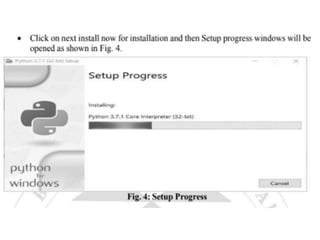
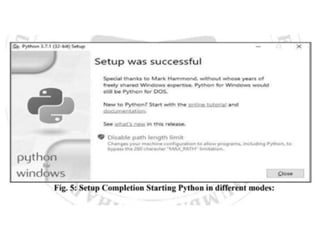
• Installing Python in Windows:
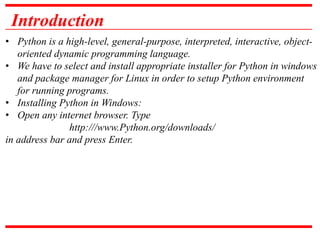
• Open any internet browser. Type
http:///www.Python.org/downloads/
in address bar and press Enter.
8.
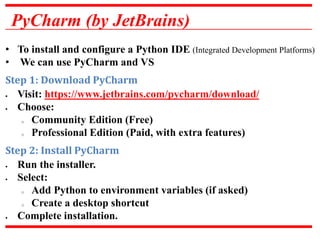
PyCharm (by JetBrains)
•To install and configure a Python IDE (Integrated Development Platforms)
• We can use PyCharm and VS
Step 1: Download PyCharm
Visit: https://www.jetbrains.com/pycharm/download/
Choose:
o Community Edition (Free)
o Professional Edition (Paid, with extra features)
Step 2: Install PyCharm
Run the installer.
Select:
o Add Python to environment variables (if asked)
o Create a desktop shortcut
Complete installation.
9.
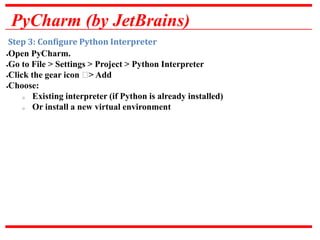
PyCharm (by JetBrains)
Step3: Configure Python Interpreter
Open PyCharm.
Go to File > Settings > Project > Python Interpreter
Click the gear icon ⚙> Add
Choose:
o Existing interpreter (if Python is already installed)
o Or install a new virtual environment
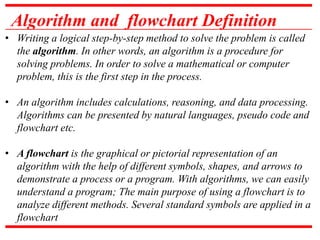
Algorithm and flowchartDefinition
• Writing a logical step-by-step method to solve the problem is called
the algorithm. In other words, an algorithm is a procedure for
solving problems. In order to solve a mathematical or computer
problem, this is the first step in the process.
• An algorithm includes calculations, reasoning, and data processing.
Algorithms can be presented by natural languages, pseudo code and
flowchart etc.
• A flowchart is the graphical or pictorial representation of an
algorithm with the help of different symbols, shapes, and arrows to
demonstrate a process or a program. With algorithms, we can easily
understand a program; The main purpose of using a flowchart is to
analyze different methods. Several standard symbols are applied in a
flowchart
12.
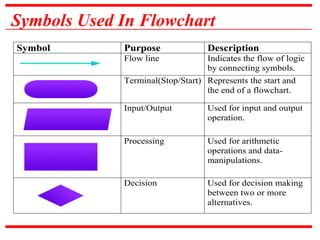
Symbols Used InFlowchart
Symbol Purpose Description
Flow line Indicates the flow of logic
by connecting symbols.
Terminal(Stop/Start) Represents the start and
the end of a flowchart.
Input/Output Used for input and output
operation.
Processing Used for arithmetic
operations and data-
manipulations.
Decision Used for decision making
between two or more
alternatives.
13.
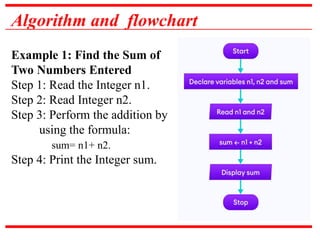
Algorithm and flowchart
Example1: Find the Sum of
Two Numbers Entered
Step 1: Read the Integer n1.
Step 2: Read Integer n2.
Step 3: Perform the addition by
using the formula:
sum= n1+ n2.
Step 4: Print the Integer sum.
14.
Algorithm and flowchart
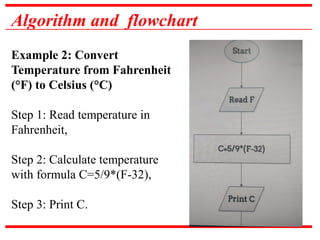
Example2: Convert
Temperature from Fahrenheit
(°F) to Celsius (°C)
Step 1: Read temperature in
Fahrenheit,
Step 2: Calculate temperature
with formula C=5/9*(F-32),
Step 3: Print C.
15.
Algorithm and flowchart
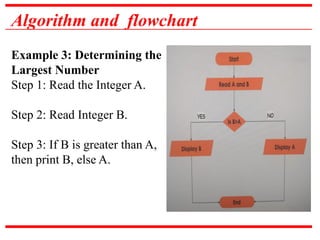
Example3: Determining the
Largest Number
Step 1: Read the Integer A.
Step 2: Read Integer B.
Step 3: If B is greater than A,
then print B, else A.
16.
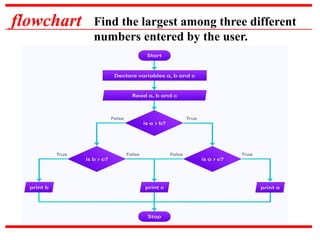
flowchart Find thelargest among three different
numbers entered by the user.
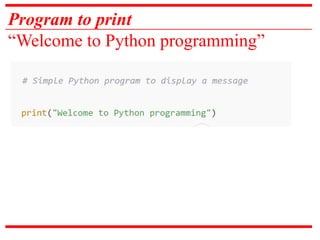
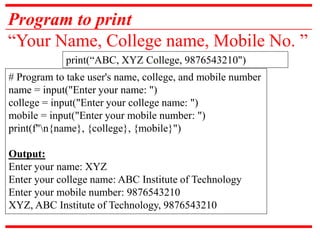
Program to print
“YourName, College name, Mobile No. ”
print(“ABC, XYZ College, 9876543210")
# Program to take user's name, college, and mobile number
name = input("Enter your name: ")
college = input("Enter your college name: ")
mobile = input("Enter your mobile number: ")
print(f"n{name}, {college}, {mobile}")
Output:
Enter your name: XYZ
Enter your college name: ABC Institute of Technology
Enter your mobile number: 9876543210
XYZ, ABC Institute of Technology, 9876543210
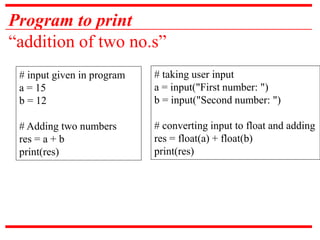
Program to print
“additionof two no.s”
# input given in program
a = 15
b = 12
# Adding two numbers
res = a + b
print(res)
# taking user input
a = input("First number: ")
b = input("Second number: ")
# converting input to float and adding
res = float(a) + float(b)
print(res)
27.
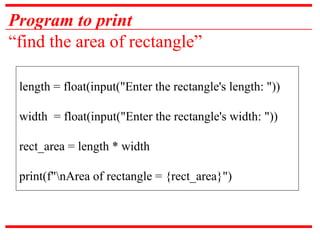
Program to print
“findthe area of rectangle”
length = float(input("Enter the rectangle's length: "))
width = float(input("Enter the rectangle's width: "))
rect_area = length * width
print(f"nArea of rectangle = {rect_area}")
28.
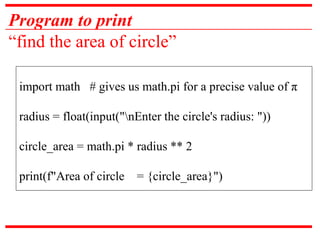
Program to print
“findthe area of circle”
import math # gives us math.pi for a precise value of π
radius = float(input("nEnter the circle's radius: "))
circle_area = math.pi * radius ** 2
print(f"Area of circle = {circle_area}")
29.
Practical 5
Write aprogram to accept
value of Celsius and
convert it to Fahrenheit
30.
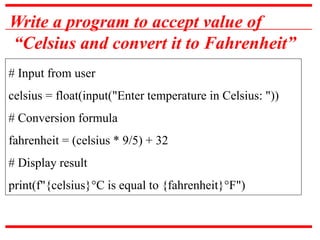
Write a programto accept value of
“Celsius and convert it to Fahrenheit”
# Input from user
celsius = float(input("Enter temperature in Celsius: "))
# Conversion formula
fahrenheit = (celsius * 9/5) + 32
# Display result
print(f"{celsius}°C is equal to {fahrenheit}°F")
31.
Practical 6
Write apython program to
find whether the given
number is even or odd
using if - else statement.
32.
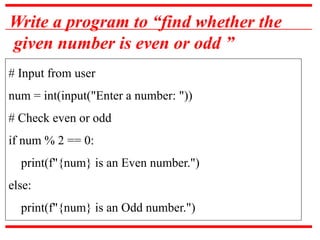
Write a programto “find whether the
given number is even or odd ”
# Input from user
num = int(input("Enter a number: "))
# Check even or odd
if num % 2 == 0:
print(f"{num} is an Even number.")
else:
print(f"{num} is an Odd number.")
33.
Practical 7
Write apython program to
check whether a input
number is positive, negative
or zero using if – elif- else
statement.
34.
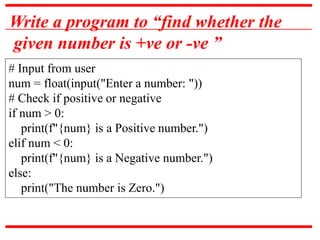
Write a programto “find whether the
given number is +ve or -ve ”
# Input from user
num = float(input("Enter a number: "))
# Check if positive or negative
if num > 0:
print(f"{num} is a Positive number.")
elif num < 0:
print(f"{num} is a Negative number.")
else:
print("The number is Zero.")
35.
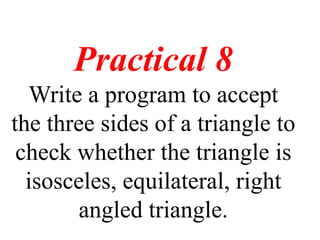
Practical 8
Write aprogram to accept
the three sides of a triangle to
check whether the triangle is
isosceles, equilateral, right
angled triangle.
36.
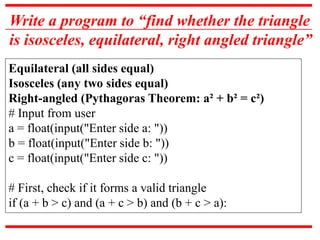
Write a programto “find whether the triangle
is isosceles, equilateral, right angled triangle”
Equilateral (all sides equal)
Isosceles (any two sides equal)
Right-angled (Pythagoras Theorem: a² + b² = c²)
# Input from user
a = float(input("Enter side a: "))
b = float(input("Enter side b: "))
c = float(input("Enter side c: "))
# First, check if it forms a valid triangle
if (a + b > c) and (a + c > b) and (b + c > a):
37.
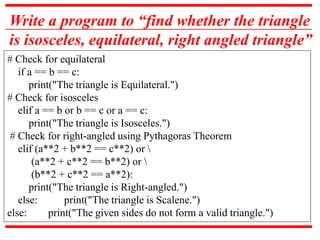
Write a programto “find whether the triangle
is isosceles, equilateral, right angled triangle”
# Check for equilateral
if a == b == c:
print("The triangle is Equilateral.")
# Check for isosceles
elif a == b or b == c or a == c:
print("The triangle is Isosceles.")
# Check for right-angled using Pythagoras Theorem
elif (a**2 + b**2 == c**2) or
(a**2 + c**2 == b**2) or
(b**2 + c**2 == a**2):
print("The triangle is Right-angled.")
else: print("The triangle is Scalene.")
else: print("The given sides do not form a valid triangle.")
38.
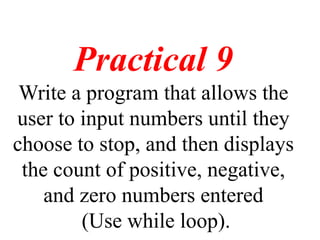
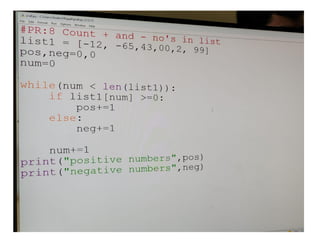
Practical 9
Write aprogram that allows the
user to input numbers until they
choose to stop, and then displays
the count of positive, negative,
and zero numbers entered
(Use while loop).
40.
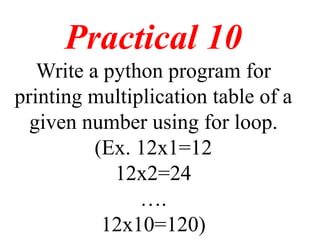
Practical 10
Write apython program for
printing multiplication table of a
given number using for loop.
(Ex. 12x1=12
12x2=24
….
12x10=120)
41.
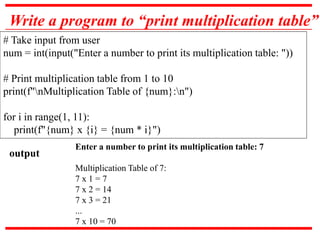
Write a programto “print multiplication table”
# Take input from user
num = int(input("Enter a number to print its multiplication table: "))
# Print multiplication table from 1 to 10
print(f"nMultiplication Table of {num}:n")
for i in range(1, 11):
print(f"{num} x {i} = {num * i}")
Enter a number to print its multiplication table: 7
Multiplication Table of 7:
7 x 1 = 7
7 x 2 = 14
7 x 3 = 21
...
7 x 10 = 70
output
42.
Practical 11
Write aPython program to
demonstrate the use of different
mathematical functions (Ex.
ceiling, floor etc).
43.
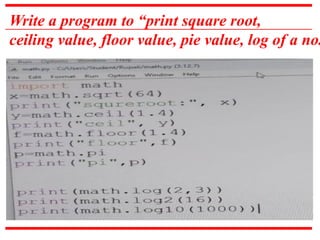
Write a programto “print square root,
ceiling value, floor value, pie value, log of a no.
44.
Practical 12
Write apython program to find
mean, mode, median and
standard deviation using
statistics module.
45.
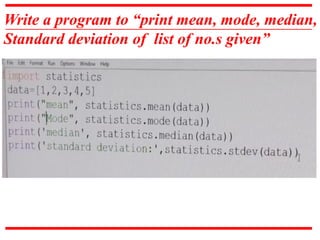
Write a programto “print mean, mode, median,
Standard deviation of list of no.s given”
46.
Practical 13
Write apython program utilizing
a list to display the name of a
month based on a given month
number.
47.
Write a programto “ display the name of
a month based on a given month number”
# List of month names (index 0 = January, index 11 = December)
months = ["January", "February", "March", "April", "May", "June",
"July", "August", "September", "October", "November",
"December"]
# Input from user
month_number = int(input("Enter a month number (1-12): "))
# Validate and display
if 1 <= month_number <= 12:
print(f"The month is: {months[month_number - 1]}")
else:
print("Invalid month number! Please enter a number between 1 and
12.")
48.
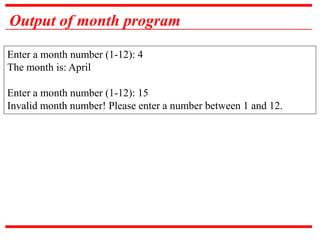
Output of monthprogram
Enter a month number (1-12): 4
The month is: April
Enter a month number (1-12): 15
Invalid month number! Please enter a number between 1 and 12.
49.
Practical 14
Write apython program to add
or subtract two matrices using
multidimensional list.
50.
Python Program additionof matrix
a = [[1, 2, 3], [4, 5, 6], [7, 8, 9]]
b = [[9, 8, 7], [6, 5, 4], [3, 2, 1]]
res = [[a[i][j] + b[i][j] for j in range(len(a[0]))] for i in range(len(a))]
for r in res:
print(r)
51.
Python Program additionof matrix using Numpy
import numpy as np
a = np.array([[1, 2, 3], [4, 5, 6], [7, 8, 9]])
b = np.array([[9, 8, 7], [6, 5, 4], [3, 2, 1]])
res = a + b
print(res)
52.
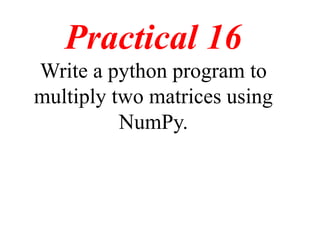
Practical 15
Write apython program to
multiply two matrices using
multidimensional list.
53.
Python Program multiplicationof matrix
matrix_a = [[1, 2], [3, 4]]
matrix_b = [[5, 6], [7, 8]]
result = [[0, 0], [0, 0]]
for i in range(2):
for j in range(2):
result[i][j] = (matrix_a[i][0] * matrix_b[0][j] +
matrix_a[i][1] * matrix_b[1][j])
for row in result:
print(row)
Program multiplication ofmatrix using numpy
import numpy as np
# take a 3x3 matrix
A = [[12, 7, 3], [4, 5, 6], [7, 8, 9]]
# take a 3x4 matrix
B = [[5, 8, 1, 2], [6, 7, 3, 0], [4, 5, 9, 1]]
# result will be 3x4
result= [[0,0,0,0], [0,0,0,0], [0,0,0,0]]
result = np.dot(A,B)
for r in result:
print(r)


![Write a program to “ display the name of
a month based on a given month number”
# List of month names (index 0 = January, index 11 = December)
months = ["January", "February", "March", "April", "May", "June",
"July", "August", "September", "October", "November",
"December"]
# Input from user
month_number = int(input("Enter a month number (1-12): "))
# Validate and display
if 1 <= month_number <= 12:
print(f"The month is: {months[month_number - 1]}")
else:
print("Invalid month number! Please enter a number between 1 and
12.")](https://image.slidesharecdn.com/pythonpracticalmechnaical-250917134400-9cfc9035/85/Python-Practical-Mechanaical-engineering-all-pdf-47-320.jpg)
![Python Program addition of matrix
a = [[1, 2, 3], [4, 5, 6], [7, 8, 9]]
b = [[9, 8, 7], [6, 5, 4], [3, 2, 1]]
res = [[a[i][j] + b[i][j] for j in range(len(a[0]))] for i in range(len(a))]
for r in res:
print(r)](https://image.slidesharecdn.com/pythonpracticalmechnaical-250917134400-9cfc9035/85/Python-Practical-Mechanaical-engineering-all-pdf-50-320.jpg)
![Python Program addition of matrix using Numpy
import numpy as np
a = np.array([[1, 2, 3], [4, 5, 6], [7, 8, 9]])
b = np.array([[9, 8, 7], [6, 5, 4], [3, 2, 1]])
res = a + b
print(res)](https://image.slidesharecdn.com/pythonpracticalmechnaical-250917134400-9cfc9035/85/Python-Practical-Mechanaical-engineering-all-pdf-51-320.jpg)
![Python Program multiplication of matrix
matrix_a = [[1, 2], [3, 4]]
matrix_b = [[5, 6], [7, 8]]
result = [[0, 0], [0, 0]]
for i in range(2):
for j in range(2):
result[i][j] = (matrix_a[i][0] * matrix_b[0][j] +
matrix_a[i][1] * matrix_b[1][j])
for row in result:
print(row)](https://image.slidesharecdn.com/pythonpracticalmechnaical-250917134400-9cfc9035/85/Python-Practical-Mechanaical-engineering-all-pdf-53-320.jpg)
![Program multiplication of matrix using numpy
import numpy as np
# take a 3x3 matrix
A = [[12, 7, 3], [4, 5, 6], [7, 8, 9]]
# take a 3x4 matrix
B = [[5, 8, 1, 2], [6, 7, 3, 0], [4, 5, 9, 1]]
# result will be 3x4
result= [[0,0,0,0], [0,0,0,0], [0,0,0,0]]
result = np.dot(A,B)
for r in result:
print(r)](https://image.slidesharecdn.com/pythonpracticalmechnaical-250917134400-9cfc9035/85/Python-Practical-Mechanaical-engineering-all-pdf-55-320.jpg)


