Python Lab Manual for First year Engineering students
1.
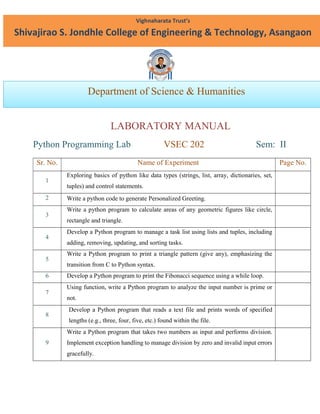
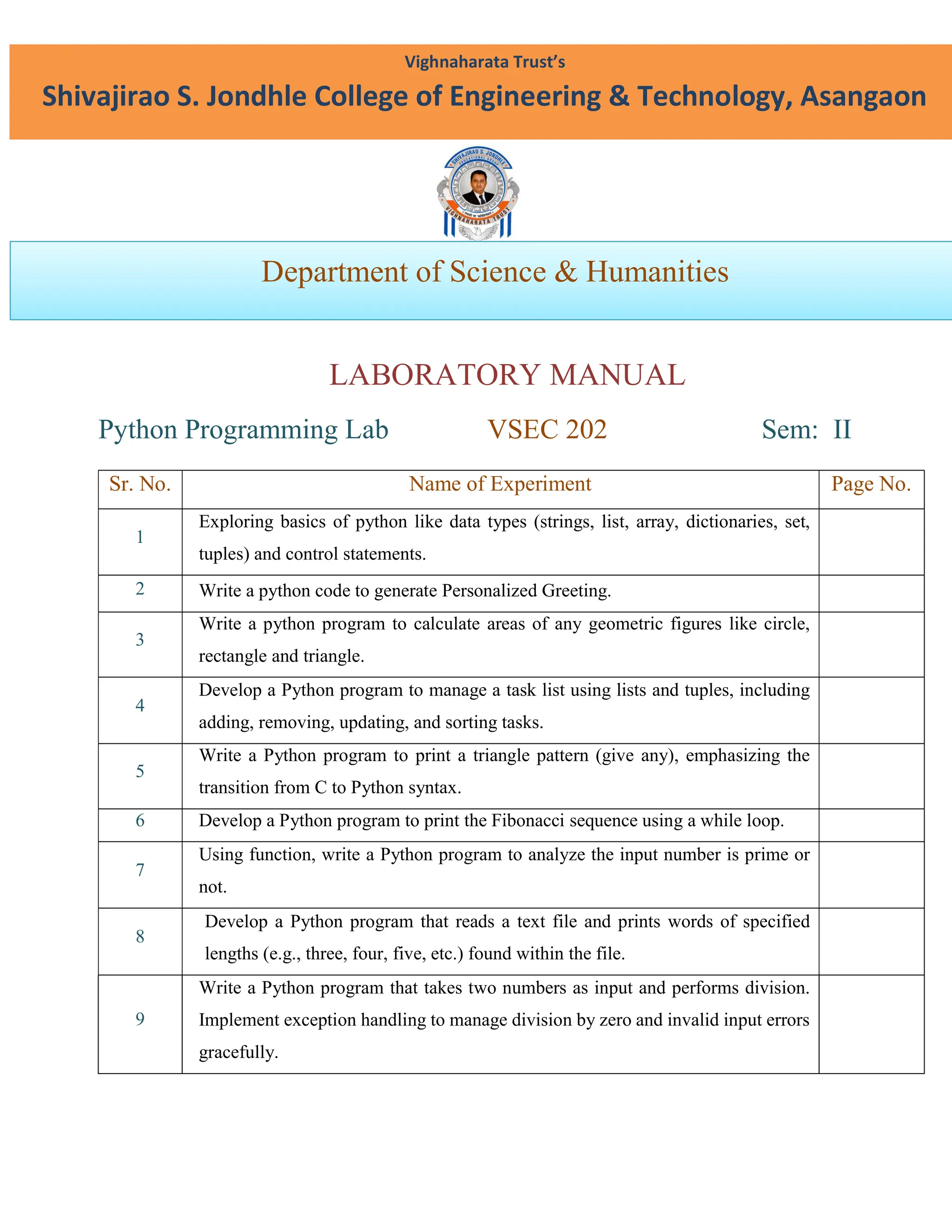
LABORATORY MANUAL
Python ProgrammingLab VSEC 202 Sem: II
Sr. No. Name of Experiment Page No.
1
Exploring basics of python like data types (strings, list, array, dictionaries, set,
tuples) and control statements.
2 Write a python code to generate Personalized Greeting.
3
Write a python program to calculate areas of any geometric figures like circle,
rectangle and triangle.
4
Develop a Python program to manage a task list using lists and tuples, including
adding, removing, updating, and sorting tasks.
5
Write a Python program to print a triangle pattern (give any), emphasizing the
transition from C to Python syntax.
6 Develop a Python program to print the Fibonacci sequence using a while loop.
7
Using function, write a Python program to analyze the input number is prime or
not.
8
Develop a Python program that reads a text file and prints words of specified
lengths (e.g., three, four, five, etc.) found within the file.
9
Write a Python program that takes two numbers as input and performs division.
Implement exception handling to manage division by zero and invalid input errors
gracefully.
Vighnaharata Trust’s
Shivajirao S. Jondhle College of Engineering & Technology, Asangaon
Department of Science & Humanities
2.
10.
Implement an eventmanagement system using OOP concepts to organize and
manage various aspects of college festivals or events. Design classes for events,
organizers, participants, and activities. Include methods for event registration,
scheduling, participant management, and activity coordination.
11
Develop a Python GUI application that performs various unit conversions such as
currency (Rupees to Dollars), temperature (Celsius to Fahrenheit), and length
(Inches to Feet). The application should include input fields for the values,
dropdown menus or buttons to select the type of conversion, and labels to display
the results.
12
Write a Python script that prompts the user to enter their phone number and email
ID. It then employs Regular Expressions to verify if these inputs adhere to standard
phone number and email address formats
13
Implement a simple Python calculator that takes user input and performs basic
arithmetic operations (addition, subtraction, multiplication, division) using
functions.
14
Develop a Python program that takes a numerical input and identifies whether it is
even or odd, utilizing conditional statements and loops.
15 Design a Python program to compute the factorial of a given integer N.
3.
AS&H / SSJCET,Asangaon
Python /VSEC 202/ Sem- II Page 1
EXPERIMENT NO: 1
AIM: Exploring basics of python like data types (strings, list, array, dictionaries, set, and tuples)
and control statements.
THEORY:
The objective of this lab session is to understand and explore the basic concepts of Python, such
as data types and control statements. Students will learn how to work with various data types
such as strings, lists, arrays, dictionaries, sets, and tuples. Additionally, they will gain an
understanding of Python's control flow statements like if, else, elif, for, and while.
Introduction to Python Data Types:
1. Strings:
A string in Python is a sequence of characters enclosed in quotes. Strings can be enclosed in
either single quotes (') or double quotes (").
Strings are immutable, meaning their contents cannot be changed after they are created.
Common string operations include concatenation (+), repetition (*), slicing, and methods like
.lower(), .upper(), .find(), etc.
2. Lists:
A list is an ordered collection of elements that can hold multiple data types (e.g., integers,
strings, or other lists).
Lists are mutable, meaning elements can be changed after the list is created.
Common list operations include indexing, slicing, appending, removing, and iterating over
elements.
3. Arrays:
Arrays in Python are similar to lists but require the array module. Arrays can only hold elements
of the same data type (unlike lists, which can hold different types).
4.
AS&H / SSJCET,Asangaon
Python /VSEC 202/ Sem- II Page 2
4. Dictionaries:
A dictionary is an unordered collection of key-value pairs. Each key must be unique, and values
can be of any data type.
Dictionaries are mutable.
Common dictionary operations include adding, removing, and modifying elements, and
retrieving values using keys.
5. Sets:
A set is an unordered collection of unique elements. Sets are mutable but do not allow duplicate
values.
Common set operations include union (|), intersection (&), and difference (-).
6. Tuples:
A tuple is similar to a list but is immutable. Once a tuple is created, its values cannot be changed.
Python Control Statements:
1. Conditional Statements (if, elif, else):
Conditional statements are used to execute different code based on conditions.
Loops:
a) For Loop:
A for loop is used to iterate over a sequence (e.g., list, tuple, dictionary, or string).
The range() function generates a sequence of numbers.
b) While Loop:
A while loop repeats a block of code as long as a given condition is True.
CONCLUSION:
Thus we have studied basics of python like data types (strings, list, array, dictionaries, set, and
tuples) and control statements.
5.
AS&H / SSJCET,Asangaon
Python /VSEC 202/ Sem- II Page 3
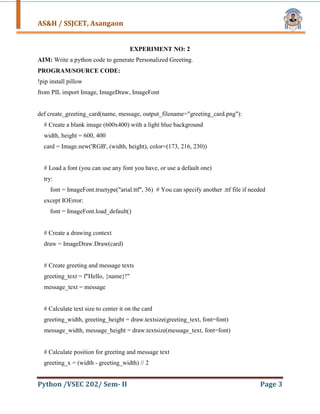
EXPERIMENT NO: 2
AIM: Write a python code to generate Personalized Greeting.
PROGRAM/SOURCE CODE:
!pip install pillow
from PIL import Image, ImageDraw, ImageFont
def create_greeting_card(name, message, output_filename="greeting_card.png"):
# Create a blank image (600x400) with a light blue background
width, height = 600, 400
card = Image.new('RGB', (width, height), color=(173, 216, 230))
# Load a font (you can use any font you have, or use a default one)
try:
font = ImageFont.truetype("arial.ttf", 36) # You can specify another .ttf file if needed
except IOError:
font = ImageFont.load_default()
# Create a drawing context
draw = ImageDraw.Draw(card)
# Create greeting and message texts
greeting_text = f"Hello, {name}!"
message_text = message
# Calculate text size to center it on the card
greeting_width, greeting_height = draw.textsize(greeting_text, font=font)
message_width, message_height = draw.textsize(message_text, font=font)
# Calculate position for greeting and message text
greeting_x = (width - greeting_width) // 2
6.
AS&H / SSJCET,Asangaon
Python /VSEC 202/ Sem- II Page 4
greeting_y = height // 3 - greeting_height // 2
message_x = (width - message_width) // 2
message_y = height // 2 + message_height // 2
# Draw the text on the image
draw.text((greeting_x, greeting_y), greeting_text, font=font, fill="darkblue")
draw.text((message_x, message_y), message_text, font=font, fill="darkgreen")
# Optionally, add an image (like a heart, flower, or other graphic)
# You can load and paste an image on the card like:
# heart_image = Image.open("heart_icon.png")
# card.paste(heart_image, (100, 100))
# Save the card image to a file
card.save(output_filename)
print(f"Your greeting card has been created: {output_filename}")
# Example usage
name = input("Enter the name of the recipient: ")
message = input("Enter your greeting message: ")
create_greeting_card(name, message)
from IPython.display import Image as IPImage
IPImage(filename="greeting_card.png")
7.
AS&H / SSJCET,Asangaon
Python /VSEC 202/ Sem- II Page 5
OUTPUT:
CONCLUSION:
Thus we have studied a python code to generate Personalized Greeting.
8.
AS&H / SSJCET,Asangaon
Python /VSEC 202/ Sem- II Page 6
EXPERIMENT NO: 3
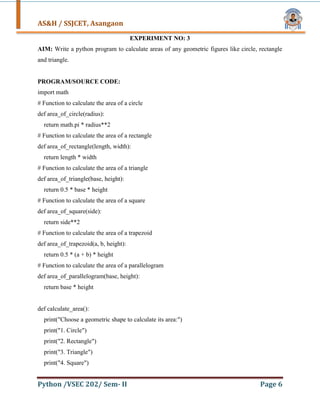
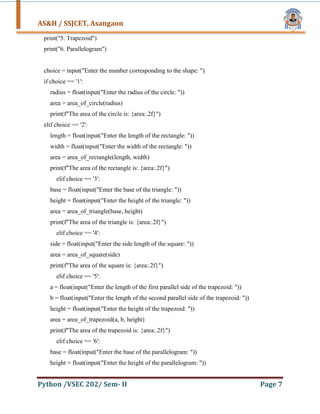
AIM: Write a python program to calculate areas of any geometric figures like circle, rectangle
and triangle.
PROGRAM/SOURCE CODE:
import math
# Function to calculate the area of a circle
def area_of_circle(radius):
return math.pi * radius**2
# Function to calculate the area of a rectangle
def area_of_rectangle(length, width):
return length * width
# Function to calculate the area of a triangle
def area_of_triangle(base, height):
return 0.5 * base * height
# Function to calculate the area of a square
def area_of_square(side):
return side**2
# Function to calculate the area of a trapezoid
def area_of_trapezoid(a, b, height):
return 0.5 * (a + b) * height
# Function to calculate the area of a parallelogram
def area_of_parallelogram(base, height):
return base * height
def calculate_area():
print("Choose a geometric shape to calculate its area:")
print("1. Circle")
print("2. Rectangle")
print("3. Triangle")
print("4. Square")
9.
AS&H / SSJCET,Asangaon
Python /VSEC 202/ Sem- II Page 7
print("5. Trapezoid")
print("6. Parallelogram")
choice = input("Enter the number corresponding to the shape: ")
if choice == '1':
radius = float(input("Enter the radius of the circle: "))
area = area_of_circle(radius)
print(f"The area of the circle is: {area:.2f}")
elif choice == '2':
length = float(input("Enter the length of the rectangle: "))
width = float(input("Enter the width of the rectangle: "))
area = area_of_rectangle(length, width)
print(f"The area of the rectangle is: {area:.2f}")
elif choice == '3':
base = float(input("Enter the base of the triangle: "))
height = float(input("Enter the height of the triangle: "))
area = area_of_triangle(base, height)
print(f"The area of the triangle is: {area:.2f}")
elif choice == '4':
side = float(input("Enter the side length of the square: "))
area = area_of_square(side)
print(f"The area of the square is: {area:.2f}")
elif choice == '5':
a = float(input("Enter the length of the first parallel side of the trapezoid: "))
b = float(input("Enter the length of the second parallel side of the trapezoid: "))
height = float(input("Enter the height of the trapezoid: "))
area = area_of_trapezoid(a, b, height)
print(f"The area of the trapezoid is: {area:.2f}")
elif choice == '6':
base = float(input("Enter the base of the parallelogram: "))
height = float(input("Enter the height of the parallelogram: "))
10.
AS&H / SSJCET,Asangaon
Python /VSEC 202/ Sem- II Page 8
area = area_of_parallelogram(base, height)
print(f"The area of the parallelogram is: {area:.2f}")
else:
print("Invalid choice! Please choose a number from 1 to 6.")
calculate_area()
OUTPUT:
CONCLUSION:
Thus we have studied a Python Program to calculate areas of any geometric figures like circle,
rectangle and triangle.
11.
AS&H / SSJCET,Asangaon
Python /VSEC 202/ Sem- II Page 9
EXPERIMENT NO: 4
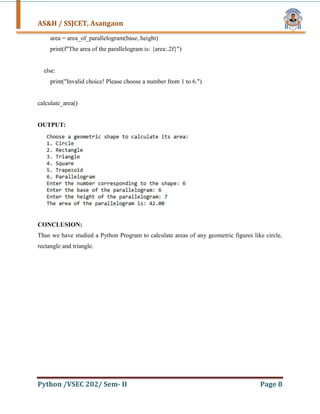
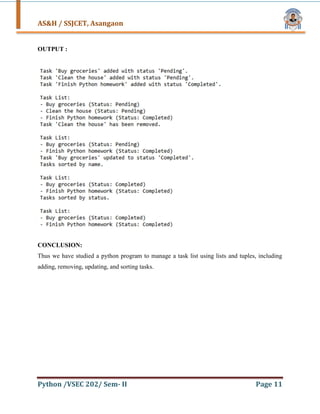
AIM: Develop a Python program to manage a task list using lists and tuples, including adding,
removing, updating, and sorting tasks.
PROGRAM/SOURCE CODE:
task_list = []
# Function to add a task
def add_task(task_name, status="Pending"):
task = (task_name, status)
task_list.append(task)
print(f"Task '{task_name}' added with status '{status}'.")
# Function to remove a task
def remove_task(task_name):
global task_list
task_list = [task for task in task_list if task[0] != task_name]
print(f"Task '{task_name}' has been removed.")
# Function to update a task status
def update_task(task_name, new_status):
for i, task in enumerate(task_list):
if task[0] == task_name:
task_list[i] = (task_name, new_status)
print(f"Task '{task_name}' updated to status '{new_status}'.")
return
print(f"Task '{task_name}' not found.")
# Function to sort tasks by name
def sort_tasks_by_name():
global task_list
12.
AS&H / SSJCET,Asangaon
Python /VSEC 202/ Sem- II Page 10
task_list.sort(key=lambda task: task[0].lower())
print("Tasks sorted by name.")
# Function to sort tasks by status
def sort_tasks_by_status():
global task_list
task_list.sort(key=lambda task: task[1].lower())
print("Tasks sorted by status.")
# Function to display all tasks
def display_tasks():
if not task_list:
print("No tasks available.")
else:
print("nTask List:")
for task in task_list:
print(f"- {task[0]} (Status: {task[1]})")
add_task("Buy groceries")
add_task("Clean the house")
add_task("Finish Python homework", "Completed")
display_tasks()
remove_task("Clean the house")
display_tasks()
update_task("Buy groceries", "Completed")
sort_tasks_by_name()
display_tasks()
sort_tasks_by_status()
display_tasks()
13.
AS&H / SSJCET,Asangaon
Python /VSEC 202/ Sem- II Page 11
OUTPUT :
CONCLUSION:
Thus we have studied a python program to manage a task list using lists and tuples, including
adding, removing, updating, and sorting tasks.
14.
AS&H / SSJCET,Asangaon
Python /VSEC 202/ Sem- II Page 12
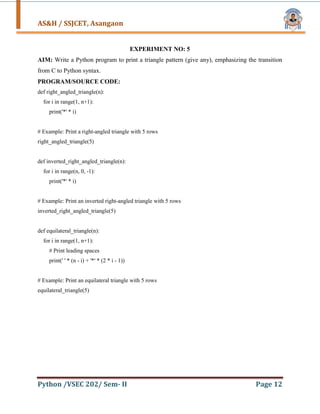
EXPERIMENT NO: 5
AIM: Write a Python program to print a triangle pattern (give any), emphasizing the transition
from C to Python syntax.
PROGRAM/SOURCE CODE:
def right_angled_triangle(n):
for i in range(1, n+1):
print('*' * i)
# Example: Print a right-angled triangle with 5 rows
right_angled_triangle(5)
def inverted_right_angled_triangle(n):
for i in range(n, 0, -1):
print('*' * i)
# Example: Print an inverted right-angled triangle with 5 rows
inverted_right_angled_triangle(5)
def equilateral_triangle(n):
for i in range(1, n+1):
# Print leading spaces
print(' ' * (n - i) + '*' * (2 * i - 1))
# Example: Print an equilateral triangle with 5 rows
equilateral_triangle(5)
15.
AS&H / SSJCET,Asangaon
Python /VSEC 202/ Sem- II Page 13
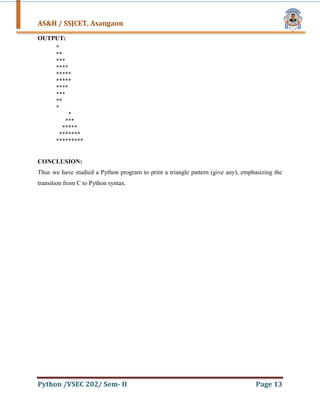
OUTPUT:
CONCLUSION:
Thus we have studied a Python program to print a triangle pattern (give any), emphasizing the
transition from C to Python syntax.
16.
AS&H / SSJCET,Asangaon
Python /VSEC 202/ Sem- II Page 14
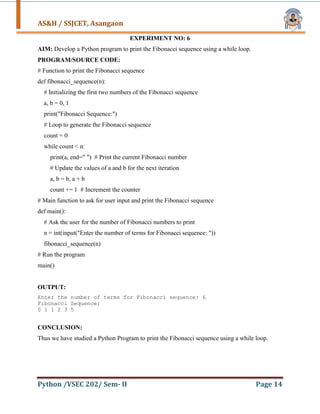
EXPERIMENT NO: 6
AIM: Develop a Python program to print the Fibonacci sequence using a while loop.
PROGRAM/SOURCE CODE:
# Function to print the Fibonacci sequence
def fibonacci_sequence(n):
# Initializing the first two numbers of the Fibonacci sequence
a, b = 0, 1
print("Fibonacci Sequence:")
# Loop to generate the Fibonacci sequence
count = 0
while count < n:
print(a, end=" ") # Print the current Fibonacci number
# Update the values of a and b for the next iteration
a, b = b, a + b
count += 1 # Increment the counter
# Main function to ask for user input and print the Fibonacci sequence
def main():
# Ask the user for the number of Fibonacci numbers to print
n = int(input("Enter the number of terms for Fibonacci sequence: "))
fibonacci_sequence(n)
# Run the program
main()
OUTPUT:
Enter the number of terms for Fibonacci sequence: 6
Fibonacci Sequence:
0 1 1 2 3 5
CONCLUSION:
Thus we have studied a Python Program to print the Fibonacci sequence using a while loop.
17.
AS&H / SSJCET,Asangaon
Python /VSEC 202/ Sem- II Page 15
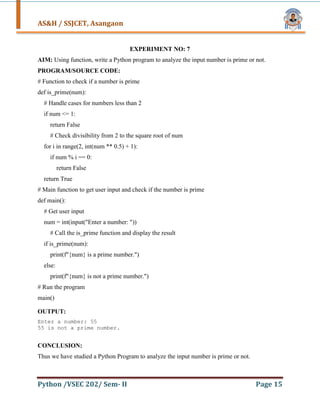
EXPERIMENT NO: 7
AIM: Using function, write a Python program to analyze the input number is prime or not.
PROGRAM/SOURCE CODE:
# Function to check if a number is prime
def is_prime(num):
# Handle cases for numbers less than 2
if num <= 1:
return False
# Check divisibility from 2 to the square root of num
for i in range(2, int(num ** 0.5) + 1):
if num % i == 0:
return False
return True
# Main function to get user input and check if the number is prime
def main():
# Get user input
num = int(input("Enter a number: "))
# Call the is_prime function and display the result
if is_prime(num):
print(f"{num} is a prime number.")
else:
print(f"{num} is not a prime number.")
# Run the program
main()
OUTPUT:
Enter a number: 55
55 is not a prime number.
CONCLUSION:
Thus we have studied a Python Program to analyze the input number is prime or not.
18.
AS&H / SSJCET,Asangaon
Python /VSEC 202/ Sem- II Page 16
EXPERIMENT NO: 8
AIM: Develop a Python program that reads a text file and prints words of specified lengths (e.g.,
three, four, five, etc.) found within the file.
PROGRAM/SOURCE CODE:
def find_words_of_length(filename, length):
try:
# Open the file and read its contents
with open(filename, 'r') as file:
content = file.read()
# Split the content into words using whitespace as delimiter
words = content.split()
# Filter words that match the specified length
matching_words = [word for word in words if len(word) == length]
# Print the matching words
if matching_words:
print(f"Words of length {length}:")
for word in matching_words:
print(word)
else:
print(f"No words of length {length} found.")
except FileNotFoundError:
print(f"File '{filename}' not found.")
except Exception as e:
print(f"An error occurred: {e}")
19.
AS&H / SSJCET,Asangaon
Python /VSEC 202/ Sem- II Page 17
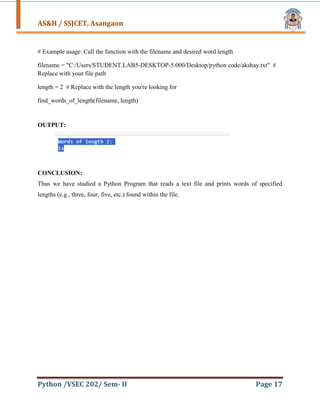
# Example usage: Call the function with the filename and desired word length
filename = "C:/Users/STUDENT.LAB5-DESKTOP-5.000/Desktop/python code/akshay.txt" #
Replace with your file path
length = 2 # Replace with the length you're looking for
find_words_of_length(filename, length)
OUTPUT:
CONCLUSION:
Thus we have studied a Python Program that reads a text file and prints words of specified
lengths (e.g., three, four, five, etc.) found within the file.
20.
AS&H / SSJCET,Asangaon
Python /VSEC 202/ Sem- II Page 18
EXPERIMENT NO: 9
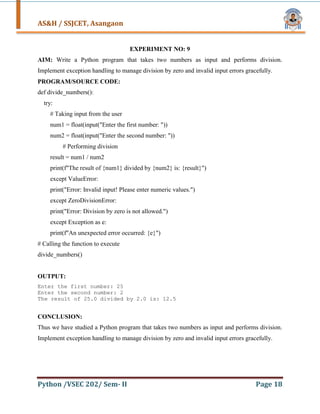
AIM: Write a Python program that takes two numbers as input and performs division.
Implement exception handling to manage division by zero and invalid input errors gracefully.
PROGRAM/SOURCE CODE:
def divide_numbers():
try:
# Taking input from the user
num1 = float(input("Enter the first number: "))
num2 = float(input("Enter the second number: "))
# Performing division
result = num1 / num2
print(f"The result of {num1} divided by {num2} is: {result}")
except ValueError:
print("Error: Invalid input! Please enter numeric values.")
except ZeroDivisionError:
print("Error: Division by zero is not allowed.")
except Exception as e:
print(f"An unexpected error occurred: {e}")
# Calling the function to execute
divide_numbers()
OUTPUT:
Enter the first number: 25
Enter the second number: 2
The result of 25.0 divided by 2.0 is: 12.5
CONCLUSION:
Thus we have studied a Python program that takes two numbers as input and performs division.
Implement exception handling to manage division by zero and invalid input errors gracefully.
21.
AS&H / SSJCET,Asangaon
Python /VSEC 202/ Sem- II Page 19
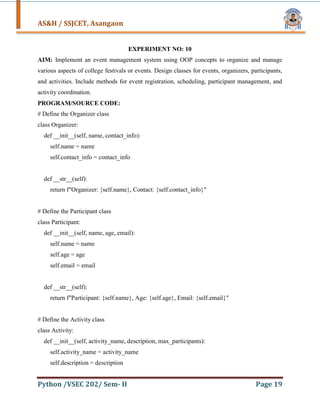
EXPERIMENT NO: 10
AIM: Implement an event management system using OOP concepts to organize and manage
various aspects of college festivals or events. Design classes for events, organizers, participants,
and activities. Include methods for event registration, scheduling, participant management, and
activity coordination.
PROGRAM/SOURCE CODE:
# Define the Organizer class
class Organizer:
def __init__(self, name, contact_info):
self.name = name
self.contact_info = contact_info
def __str__(self):
return f"Organizer: {self.name}, Contact: {self.contact_info}"
# Define the Participant class
class Participant:
def __init__(self, name, age, email):
self.name = name
self.age = age
self.email = email
def __str__(self):
return f"Participant: {self.name}, Age: {self.age}, Email: {self.email}"
# Define the Activity class
class Activity:
def __init__(self, activity_name, description, max_participants):
self.activity_name = activity_name
self.description = description
22.
AS&H / SSJCET,Asangaon
Python /VSEC 202/ Sem- II Page 20
self.max_participants = max_participants
self.participants = []
def register_participant(self, participant):
if len(self.participants) < self.max_participants:
self.participants.append(participant)
print(f"{participant.name} successfully registered for {self.activity_name}.")
else:
print(f"Sorry, {self.activity_name} is full. Cannot register {participant.name}.")
def get_participants(self):
return [str(participant) for participant in self.participants]
def __str__(self):
return f"Activity: {self.activity_name}, Description: {self.description}, Max Participants:
{self.max_participants}"
# Define the Event class
class Event:
def __init__(self, event_name, date, location, organizer):
self.event_name = event_name
self.date = date
self.location = location
self.organizer = organizer
self.activities = []
self.participants = []
def add_activity(self, activity):
self.activities.append(activity)
print(f"Activity '{activity.activity_name}' added to the event '{self.event_name}'.")
23.
AS&H / SSJCET,Asangaon
Python /VSEC 202/ Sem- II Page 21
def register_participant(self, participant):
if participant not in self.participants:
self.participants.append(participant)
print(f"Participant {participant.name} successfully registered for the event
'{self.event_name}'.")
else:
print(f"Participant {participant.name} is already registered for the event
'{self.event_name}'.")
def get_event_details(self):
details = f"Event: {self.event_name}nDate: {self.date}nLocation:
{self.location}nOrganizer: {self.organizer.name}nActivities: n"
for activity in self.activities:
details += f"- {activity.activity_name}n"
return details
def get_participants(self):
return [str(participant) for participant in self.participants]
def __str__(self):
return f"Event: {self.event_name}, Date: {self.date}, Location: {self.location}"
# Creating an event organizer
organizer1 = Organizer("John Doe", "john@example.com")
# Creating an event
event1 = Event("College Tech Fest", "2025-04-20", "College Auditorium", organizer1)
# Creating activities
activity1 = Activity("Coding Challenge", "A competitive coding event", 50)
24.
AS&H / SSJCET,Asangaon
Python /VSEC 202/ Sem- II Page 22
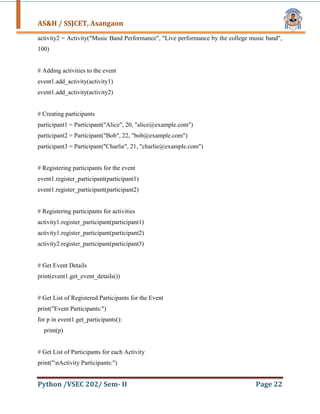
activity2 = Activity("Music Band Performance", "Live performance by the college music band",
100)
# Adding activities to the event
event1.add_activity(activity1)
event1.add_activity(activity2)
# Creating participants
participant1 = Participant("Alice", 20, "alice@example.com")
participant2 = Participant("Bob", 22, "bob@example.com")
participant3 = Participant("Charlie", 21, "charlie@example.com")
# Registering participants for the event
event1.register_participant(participant1)
event1.register_participant(participant2)
# Registering participants for activities
activity1.register_participant(participant1)
activity1.register_participant(participant2)
activity2.register_participant(participant3)
# Get Event Details
print(event1.get_event_details())
# Get List of Registered Participants for the Event
print("Event Participants:")
for p in event1.get_participants():
print(p)
# Get List of Participants for each Activity
print("nActivity Participants:")
25.
AS&H / SSJCET,Asangaon
Python /VSEC 202/ Sem- II Page 23
for activity in event1.activities:
print(f"n{activity.activity_name} Participants:")
for p in activity.get_participants():
print(p)
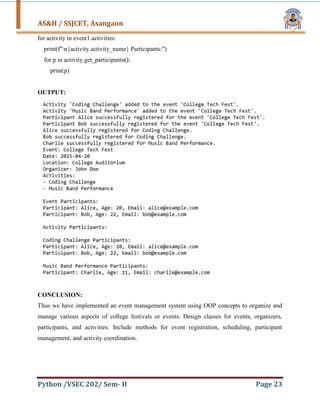
OUTPUT:
CONCLUSION:
Thus we have implemented an event management system using OOP concepts to organize and
manage various aspects of college festivals or events. Design classes for events, organizers,
participants, and activities. Include methods for event registration, scheduling, participant
management, and activity coordination.
26.
AS&H / SSJCET,Asangaon
Python /VSEC 202/ Sem- II Page 24
EXPERIMENT NO: 11
AIM: Develop a Python GUI application that performs various unit conversions such as
currency (Rupees to Dollars), temperature (Celsius to Fahrenheit), and length (Inches to Feet).
The application should include input fields for the values, dropdown menus or buttons to select
the type of conversion, and labels to display the results.
PROGRAM/SOURCE CODE:
import tkinter as tk
from tkinter import ttk
# Conversion functions
def convert_currency():
rupees = float(entry_value.get())
dollars = rupees / 75 # Example conversion rate (1 USD = 75 INR)
result_label.config(text=f"{rupees} Rupees = {dollars:.2f} Dollars")
def convert_temperature():
celsius = float(entry_value.get())
fahrenheit = (celsius * 9/5) + 32 # Celsius to Fahrenheit formula
result_label.config(text=f"{celsius}°C = {fahrenheit:.2f}°F")
def convert_length():
inches = float(entry_value.get())
feet = inches / 12 # 1 foot = 12 inches
result_label.config(text=f"{inches} Inches = {feet:.2f} Feet")
# Create main window
27.
AS&H / SSJCET,Asangaon
Python /VSEC 202/ Sem- II Page 25
root = tk.Tk()
root.title("Unit Converter")
# Define the layout of the application
label_instructions = tk.Label(root, text="Enter the value to convert:")
label_instructions.grid(row=0, column=0, padx=10, pady=10)
entry_value = tk.Entry(root)
entry_value.grid(row=0, column=1, padx=10, pady=10)
# Dropdown menu to select conversion type
conversion_type_label = tk.Label(root, text="Select conversion type:")
conversion_type_label.grid(row=1, column=0, padx=10, pady=10)
conversion_type = ttk.Combobox(root, values=["Currency (Rupees to Dollars)", "Temperature
(Celsius to Fahrenheit)", "Length (Inches to Feet)"])
conversion_type.grid(row=1, column=1, padx=10, pady=10)
conversion_type.set("Currency (Rupees to Dollars)") # Default selection
# Button to perform conversion
convert_button = tk.Button(root, text="Convert", command=lambda: perform_conversion())
convert_button.grid(row=2, column=0, columnspan=2, pady=20)
# Result label to display the conversion result
result_label = tk.Label(root, text="", font=("Helvetica", 14))
result_label.grid(row=3, column=0, columnspan=2, pady=10)
28.
AS&H / SSJCET,Asangaon
Python /VSEC 202/ Sem- II Page 26
# Function to decide which conversion to perform
def perform_conversion():
selected_conversion = conversion_type.get()
if selected_conversion == "Currency (Rupees to Dollars)":
convert_currency()
elif selected_conversion == "Temperature (Celsius to Fahrenheit)":
convert_temperature()
elif selected_conversion == "Length (Inches to Feet)":
convert_length()
# Run the application
root.mainloop()
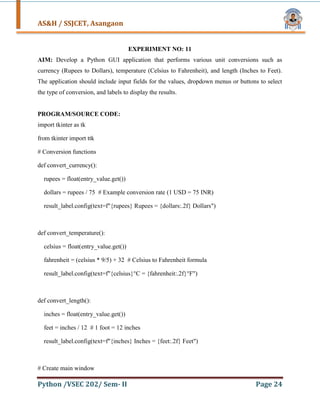
OUTPUT:
CONCLUSION:
Thus we have Developed a Python GUI application that performs various unit conversions such
as currency (Rupees to Dollars), temperature (Celsius to Fahrenheit), and length (Inches to Feet).
The application should include input fields for the values, dropdown menus or buttons to select
the type of conversion, and labels to display the results.
29.
AS&H / SSJCET,Asangaon
Python /VSEC 202/ Sem- II Page 27
EXPERIMENT NO: 12
AIM: Write a Python script that prompts the user to enter their phone number and email ID. It
then employs Regular Expressions to verify if these inputs adhere to standard phone number and
email address formats
PROGRAM/SOURCE CODE:
import re
# Function to validate phone number
def validate_phone_number(phone_number):
# Regular expression pattern for validating phone number
phone_pattern = r"^[+]*d{1,3}[ -]?(?d{1,4})?[ -]?d{1,4}[ -]?d{1,4}$"
if re.match(phone_pattern, phone_number):
return True
else:
return False
# Function to validate email address
def validate_email(email):
# Regular expression pattern for validating email address
email_pattern = r"^[a-zA-Z0-9_.+-]+@[a-zA-Z0-9-]+.[a-zA-Z0-9-.]+$"
if re.match(email_pattern, email):
return True
else:
return False
# Prompt user for phone number
phone_number = input("Enter your phone number: ")
# Prompt user for email ID
email_id = input("Enter your email address: ")
30.
AS&H / SSJCET,Asangaon
Python /VSEC 202/ Sem- II Page 28
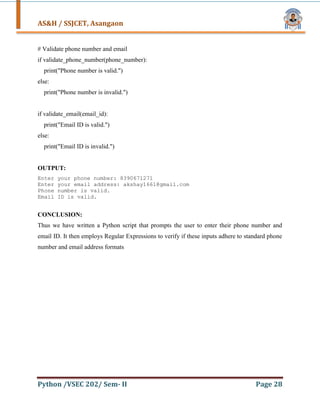
# Validate phone number and email
if validate_phone_number(phone_number):
print("Phone number is valid.")
else:
print("Phone number is invalid.")
if validate_email(email_id):
print("Email ID is valid.")
else:
print("Email ID is invalid.")
OUTPUT:
Enter your phone number: 8390671271
Enter your email address: akshay1661@gmail.com
Phone number is valid.
Email ID is valid.
CONCLUSION:
Thus we have written a Python script that prompts the user to enter their phone number and
email ID. It then employs Regular Expressions to verify if these inputs adhere to standard phone
number and email address formats
31.
AS&H / SSJCET,Asangaon
Python /VSEC 202/ Sem- II Page 29
EXPERIMENT NO: 13
AIM: Implement a simple Python calculator that takes user input and performs basic arithmetic
operations (addition, subtraction, multiplication, division) using functions.
PROGRAM/SOURCE CODE:
# Function to add two numbers
def add(x, y):
return x + y
# Function to subtract two numbers
def subtract(x, y):
return x - y
# Function to multiply two numbers
def multiply(x, y):
return x * y
# Function to divide two numbers
def divide(x, y):
if y == 0:
return "Error! Division by zero."
else:
return x / y
# Function to display the menu
def menu():
print("nSelect operation:")
print("1. Add")
print("2. Subtract")
print("3. Multiply")
print("4. Divide")
32.
AS&H / SSJCET,Asangaon
Python /VSEC 202/ Sem- II Page 30
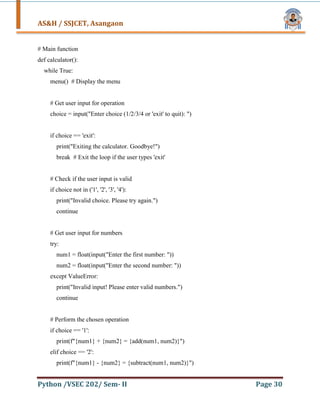
# Main function
def calculator():
while True:
menu() # Display the menu
# Get user input for operation
choice = input("Enter choice (1/2/3/4 or 'exit' to quit): ")
if choice == 'exit':
print("Exiting the calculator. Goodbye!")
break # Exit the loop if the user types 'exit'
# Check if the user input is valid
if choice not in ('1', '2', '3', '4'):
print("Invalid choice. Please try again.")
continue
# Get user input for numbers
try:
num1 = float(input("Enter the first number: "))
num2 = float(input("Enter the second number: "))
except ValueError:
print("Invalid input! Please enter valid numbers.")
continue
# Perform the chosen operation
if choice == '1':
print(f"{num1} + {num2} = {add(num1, num2)}")
elif choice == '2':
print(f"{num1} - {num2} = {subtract(num1, num2)}")
33.
AS&H / SSJCET,Asangaon
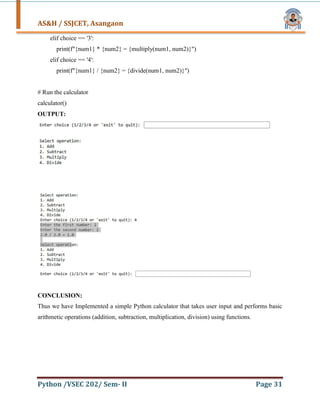
Python /VSEC 202/ Sem- II Page 31
elif choice == '3':
print(f"{num1} * {num2} = {multiply(num1, num2)}")
elif choice == '4':
print(f"{num1} / {num2} = {divide(num1, num2)}")
# Run the calculator
calculator()
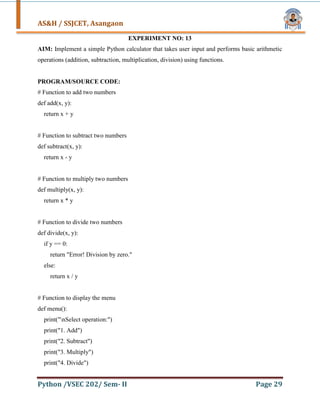
OUTPUT:
CONCLUSION:
Thus we have Implemented a simple Python calculator that takes user input and performs basic
arithmetic operations (addition, subtraction, multiplication, division) using functions.
34.
AS&H / SSJCET,Asangaon
Python /VSEC 202/ Sem- II Page 32
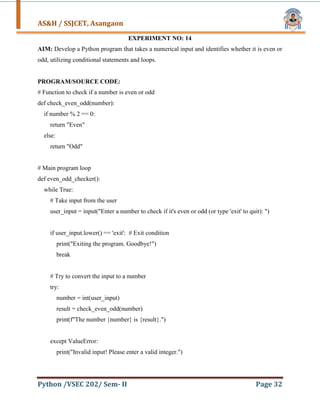
EXPERIMENT NO: 14
AIM: Develop a Python program that takes a numerical input and identifies whether it is even or
odd, utilizing conditional statements and loops.
PROGRAM/SOURCE CODE:
# Function to check if a number is even or odd
def check_even_odd(number):
if number % 2 == 0:
return "Even"
else:
return "Odd"
# Main program loop
def even_odd_checker():
while True:
# Take input from the user
user_input = input("Enter a number to check if it's even or odd (or type 'exit' to quit): ")
if user_input.lower() == 'exit': # Exit condition
print("Exiting the program. Goodbye!")
break
# Try to convert the input to a number
try:
number = int(user_input)
result = check_even_odd(number)
print(f"The number {number} is {result}.")
except ValueError:
print("Invalid input! Please enter a valid integer.")
35.
AS&H / SSJCET,Asangaon
Python /VSEC 202/ Sem- II Page 33
# Run the program
even_odd_checker()
OUTPUT:
CONCLUSION:
Thus we have Developed a Python program that takes a numerical input and identifies whether it
is even or odd, utilizing conditional statements and loops.
36.
AS&H / SSJCET,Asangaon
Python /VSEC 202/ Sem- II Page 34
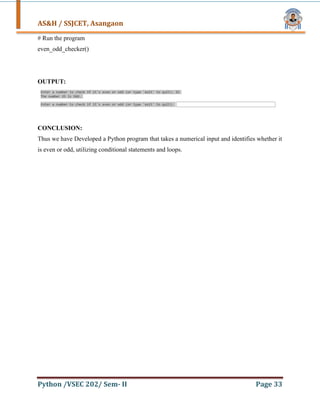
EXPERIMENT NO: 15
AIM: Design a Python program to compute the factorial of a given integer N.
PROGRAM/SOURCE CODE:
# Iterative approach to compute factorial
def factorial_iterative(n):
result = 1
for i in range(1, n + 1):
result *= i
return result
# Recursive approach to compute factorial
def factorial_recursive(n):
if n == 0 or n == 1:
return 1
else:
return n * factorial_recursive(n - 1)
# Main function to compute factorial
def compute_factorial():
while True:
# Take input from the user
user_input = input("Enter a positive integer (or type 'exit' to quit): ")
if user_input.lower() == 'exit': # Exit condition
print("Exiting the program. Goodbye!")
break
37.
AS&H / SSJCET,Asangaon
Python /VSEC 202/ Sem- II Page 35
try:
number = int(user_input)
if number < 0:
print("Please enter a positive integer.")
continue
# Calculate factorial using both methods
fact_iterative = factorial_iterative(number)
fact_recursive = factorial_recursive(number)
# Display the results
print(f"Factorial of {number} (using iterative method): {fact_iterative}")
print(f"Factorial of {number} (using recursive method): {fact_recursive}")
except ValueError:
print("Invalid input! Please enter a valid integer.")
# Run the program
compute_factorial()
OUTPUT:
CONCLUSION:
Thus we have Designed a Python program to compute the factorial of a given integer N.
![AS&H / SSJCET, Asangaon
Python /VSEC 202/ Sem- II Page 9
EXPERIMENT NO: 4
AIM: Develop a Python program to manage a task list using lists and tuples, including adding,
removing, updating, and sorting tasks.
PROGRAM/SOURCE CODE:
task_list = []
# Function to add a task
def add_task(task_name, status="Pending"):
task = (task_name, status)
task_list.append(task)
print(f"Task '{task_name}' added with status '{status}'.")
# Function to remove a task
def remove_task(task_name):
global task_list
task_list = [task for task in task_list if task[0] != task_name]
print(f"Task '{task_name}' has been removed.")
# Function to update a task status
def update_task(task_name, new_status):
for i, task in enumerate(task_list):
if task[0] == task_name:
task_list[i] = (task_name, new_status)
print(f"Task '{task_name}' updated to status '{new_status}'.")
return
print(f"Task '{task_name}' not found.")
# Function to sort tasks by name
def sort_tasks_by_name():
global task_list](https://image.slidesharecdn.com/pythonlabmanualmerged-250327102947-2f2268f6/85/Python-Lab-Manual-for-First-year-Engineering-students-11-320.jpg)
![AS&H / SSJCET, Asangaon
Python /VSEC 202/ Sem- II Page 10
task_list.sort(key=lambda task: task[0].lower())
print("Tasks sorted by name.")
# Function to sort tasks by status
def sort_tasks_by_status():
global task_list
task_list.sort(key=lambda task: task[1].lower())
print("Tasks sorted by status.")
# Function to display all tasks
def display_tasks():
if not task_list:
print("No tasks available.")
else:
print("nTask List:")
for task in task_list:
print(f"- {task[0]} (Status: {task[1]})")
add_task("Buy groceries")
add_task("Clean the house")
add_task("Finish Python homework", "Completed")
display_tasks()
remove_task("Clean the house")
display_tasks()
update_task("Buy groceries", "Completed")
sort_tasks_by_name()
display_tasks()
sort_tasks_by_status()
display_tasks()](https://image.slidesharecdn.com/pythonlabmanualmerged-250327102947-2f2268f6/85/Python-Lab-Manual-for-First-year-Engineering-students-12-320.jpg)
![AS&H / SSJCET, Asangaon
Python /VSEC 202/ Sem- II Page 16
EXPERIMENT NO: 8
AIM: Develop a Python program that reads a text file and prints words of specified lengths (e.g.,
three, four, five, etc.) found within the file.
PROGRAM/SOURCE CODE:
def find_words_of_length(filename, length):
try:
# Open the file and read its contents
with open(filename, 'r') as file:
content = file.read()
# Split the content into words using whitespace as delimiter
words = content.split()
# Filter words that match the specified length
matching_words = [word for word in words if len(word) == length]
# Print the matching words
if matching_words:
print(f"Words of length {length}:")
for word in matching_words:
print(word)
else:
print(f"No words of length {length} found.")
except FileNotFoundError:
print(f"File '{filename}' not found.")
except Exception as e:
print(f"An error occurred: {e}")](https://image.slidesharecdn.com/pythonlabmanualmerged-250327102947-2f2268f6/85/Python-Lab-Manual-for-First-year-Engineering-students-18-320.jpg)
![AS&H / SSJCET, Asangaon
Python /VSEC 202/ Sem- II Page 20
self.max_participants = max_participants
self.participants = []
def register_participant(self, participant):
if len(self.participants) < self.max_participants:
self.participants.append(participant)
print(f"{participant.name} successfully registered for {self.activity_name}.")
else:
print(f"Sorry, {self.activity_name} is full. Cannot register {participant.name}.")
def get_participants(self):
return [str(participant) for participant in self.participants]
def __str__(self):
return f"Activity: {self.activity_name}, Description: {self.description}, Max Participants:
{self.max_participants}"
# Define the Event class
class Event:
def __init__(self, event_name, date, location, organizer):
self.event_name = event_name
self.date = date
self.location = location
self.organizer = organizer
self.activities = []
self.participants = []
def add_activity(self, activity):
self.activities.append(activity)
print(f"Activity '{activity.activity_name}' added to the event '{self.event_name}'.")](https://image.slidesharecdn.com/pythonlabmanualmerged-250327102947-2f2268f6/85/Python-Lab-Manual-for-First-year-Engineering-students-22-320.jpg)
![AS&H / SSJCET, Asangaon
Python /VSEC 202/ Sem- II Page 21
def register_participant(self, participant):
if participant not in self.participants:
self.participants.append(participant)
print(f"Participant {participant.name} successfully registered for the event
'{self.event_name}'.")
else:
print(f"Participant {participant.name} is already registered for the event
'{self.event_name}'.")
def get_event_details(self):
details = f"Event: {self.event_name}nDate: {self.date}nLocation:
{self.location}nOrganizer: {self.organizer.name}nActivities: n"
for activity in self.activities:
details += f"- {activity.activity_name}n"
return details
def get_participants(self):
return [str(participant) for participant in self.participants]
def __str__(self):
return f"Event: {self.event_name}, Date: {self.date}, Location: {self.location}"
# Creating an event organizer
organizer1 = Organizer("John Doe", "john@example.com")
# Creating an event
event1 = Event("College Tech Fest", "2025-04-20", "College Auditorium", organizer1)
# Creating activities
activity1 = Activity("Coding Challenge", "A competitive coding event", 50)](https://image.slidesharecdn.com/pythonlabmanualmerged-250327102947-2f2268f6/85/Python-Lab-Manual-for-First-year-Engineering-students-23-320.jpg)
![AS&H / SSJCET, Asangaon
Python /VSEC 202/ Sem- II Page 25
root = tk.Tk()
root.title("Unit Converter")
# Define the layout of the application
label_instructions = tk.Label(root, text="Enter the value to convert:")
label_instructions.grid(row=0, column=0, padx=10, pady=10)
entry_value = tk.Entry(root)
entry_value.grid(row=0, column=1, padx=10, pady=10)
# Dropdown menu to select conversion type
conversion_type_label = tk.Label(root, text="Select conversion type:")
conversion_type_label.grid(row=1, column=0, padx=10, pady=10)
conversion_type = ttk.Combobox(root, values=["Currency (Rupees to Dollars)", "Temperature
(Celsius to Fahrenheit)", "Length (Inches to Feet)"])
conversion_type.grid(row=1, column=1, padx=10, pady=10)
conversion_type.set("Currency (Rupees to Dollars)") # Default selection
# Button to perform conversion
convert_button = tk.Button(root, text="Convert", command=lambda: perform_conversion())
convert_button.grid(row=2, column=0, columnspan=2, pady=20)
# Result label to display the conversion result
result_label = tk.Label(root, text="", font=("Helvetica", 14))
result_label.grid(row=3, column=0, columnspan=2, pady=10)](https://image.slidesharecdn.com/pythonlabmanualmerged-250327102947-2f2268f6/85/Python-Lab-Manual-for-First-year-Engineering-students-27-320.jpg)
![AS&H / SSJCET, Asangaon
Python /VSEC 202/ Sem- II Page 27
EXPERIMENT NO: 12
AIM: Write a Python script that prompts the user to enter their phone number and email ID. It
then employs Regular Expressions to verify if these inputs adhere to standard phone number and
email address formats
PROGRAM/SOURCE CODE:
import re
# Function to validate phone number
def validate_phone_number(phone_number):
# Regular expression pattern for validating phone number
phone_pattern = r"^[+]*d{1,3}[ -]?(?d{1,4})?[ -]?d{1,4}[ -]?d{1,4}$"
if re.match(phone_pattern, phone_number):
return True
else:
return False
# Function to validate email address
def validate_email(email):
# Regular expression pattern for validating email address
email_pattern = r"^[a-zA-Z0-9_.+-]+@[a-zA-Z0-9-]+.[a-zA-Z0-9-.]+$"
if re.match(email_pattern, email):
return True
else:
return False
# Prompt user for phone number
phone_number = input("Enter your phone number: ")
# Prompt user for email ID
email_id = input("Enter your email address: ")](https://image.slidesharecdn.com/pythonlabmanualmerged-250327102947-2f2268f6/85/Python-Lab-Manual-for-First-year-Engineering-students-29-320.jpg)