Data generator in Python
for Keras (& Tensorflow)
Sean Yu, 2017/08/17
1
What is data generator and why we need it?
• 假設大家都寫過 keras or tensorflow
• Generally, we will have …
• training set / validation set / testing set
• We always load them ALL into memory
• MNIST – 60k images, 28 x 28 x 1
• Cifar10 – 60k images, 32 x 32 x 3
• EASY!
• However, if you have 100k+ 400 x 300 x 3 images,
it is impossible to load them all.
• We need to real-time load data
2
In GPU memory
In RAM (by CPU)
In Disk
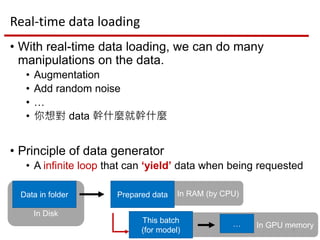
Real-time data loading
• With real-time data loading, we can do many
manipulations on the data.
• Augmentation
• Add random noise
• …
• 你想對 data 幹什麼就幹什麼
• Principle of data generator
• A infinite loop that can ‘yield’ data when being requested
3
Prepared data
This batch
(for model)
Data in folder
…
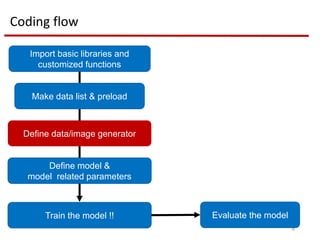
Coding flow
4
Import basic libraries and
customized functions
Make data list & preload
Define data/image generator
Define model &
model related parameters
Train the model !! Evaluate the model
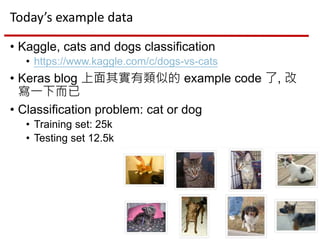
Today’s example data
• Kaggle, cats and dogs classification
• https://www.kaggle.com/c/dogs-vs-cats
• Keras blog 上面其實有類似的 example code 了, 改
寫一下而已
• Classification problem: cat or dog
• Training set: 25k
• Testing set 12.5k
5
Note
• Train generator 跟 Keras 的 Image generator 在
yield 打到怎麼辦?
• 看 code, 簡單來說, break 它
6
Note
• Validation augmentation?
• We only need to augment it at begin (not dynamically!)
• 乾五郝? – 我的經驗, 好像有用捏
• 增加 validation 的難度 (複雜性) – 避免 validation 進步太
神速而太早被 earlystop
7
Note
• Testing set 可以做 augmentation 嗎?
8
Note
• Testing set 可以做 augmentation 嗎?
• 本質上不是不同影像
9
Conclusion
Data generator 很好用
我希望人人都有一個
10
其他 GPU 相關使用注意事項
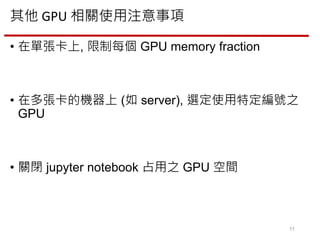
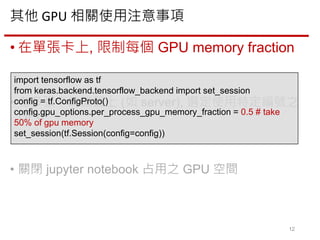
• 在單張卡上, 限制每個 GPU memory fraction
• 在多張卡的機器上 (如 server), 選定使用特定編號之
GPU
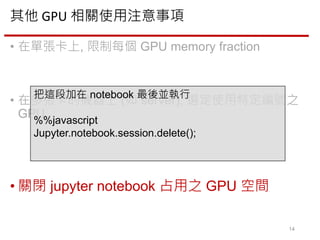
• 關閉 jupyter notebook 占用之 GPU 空間
11
其他 GPU 相關使用注意事項
• 在單張卡上, 限制每個 GPU memory fraction
• 在多張卡的機器上 (如 server), 選定使用特定編號之
GPU
• 關閉 jupyter notebook 占用之 GPU 空間
12
import tensorflow as tf
from keras.backend.tensorflow_backend import set_session
config = tf.ConfigProto()
config.gpu_options.per_process_gpu_memory_fraction = 0.5 # take
50% of gpu memory
set_session(tf.Session(config=config))
其他 GPU 相關使用注意事項
• 在單張卡上, 限制每個 GPU memory fraction
• 在多張卡的機器上 (如 server), 選定使用特定
編號之 GPU
• 關閉 jupyter notebook 占用之 GPU 空間
13
- For Unix (python script)
In the terminal,
CUDA_VISIBLE_DEVICES=0 python
your_script.py
- For python script
At the script begin
Import os
os.environ[‘CUDA_VISIBLE_DEVICES’] = 0
- For jupyter notebook
At the notebook begin
%env CUDA_VISIBLE_DEVICES=0
其他 GPU 相關使用注意事項
• 在單張卡上, 限制每個 GPU memory fraction
• 在多張卡的機器上 (如 server), 選定使用特定編號之
GPU
• 關閉 jupyter notebook 占用之 GPU 空間
14
把這段加在 notebook 最後並執行
%%javascript
Jupyter.notebook.session.delete();

[Python - Deep Learning] Data generator

  • 1.
    Data generator inPython for Keras (& Tensorflow) Sean Yu, 2017/08/17 1
  • 2.
    What is datagenerator and why we need it? • 假設大家都寫過 keras or tensorflow • Generally, we will have … • training set / validation set / testing set • We always load them ALL into memory • MNIST – 60k images, 28 x 28 x 1 • Cifar10 – 60k images, 32 x 32 x 3 • EASY! • However, if you have 100k+ 400 x 300 x 3 images, it is impossible to load them all. • We need to real-time load data 2
  • 3.
    In GPU memory InRAM (by CPU) In Disk Real-time data loading • With real-time data loading, we can do many manipulations on the data. • Augmentation • Add random noise • … • 你想對 data 幹什麼就幹什麼 • Principle of data generator • A infinite loop that can ‘yield’ data when being requested 3 Prepared data This batch (for model) Data in folder …
  • 4.
    Coding flow 4 Import basiclibraries and customized functions Make data list & preload Define data/image generator Define model & model related parameters Train the model !! Evaluate the model
  • 5.
    Today’s example data •Kaggle, cats and dogs classification • https://www.kaggle.com/c/dogs-vs-cats • Keras blog 上面其實有類似的 example code 了, 改 寫一下而已 • Classification problem: cat or dog • Training set: 25k • Testing set 12.5k 5
  • 6.
    Note • Train generator跟 Keras 的 Image generator 在 yield 打到怎麼辦? • 看 code, 簡單來說, break 它 6
  • 7.
    Note • Validation augmentation? •We only need to augment it at begin (not dynamically!) • 乾五郝? – 我的經驗, 好像有用捏 • 增加 validation 的難度 (複雜性) – 避免 validation 進步太 神速而太早被 earlystop 7
  • 8.
    Note • Testing set可以做 augmentation 嗎? 8
  • 9.
    Note • Testing set可以做 augmentation 嗎? • 本質上不是不同影像 9
  • 10.
  • 11.
    其他 GPU 相關使用注意事項 •在單張卡上, 限制每個 GPU memory fraction • 在多張卡的機器上 (如 server), 選定使用特定編號之 GPU • 關閉 jupyter notebook 占用之 GPU 空間 11
  • 12.
    其他 GPU 相關使用注意事項 •在單張卡上, 限制每個 GPU memory fraction • 在多張卡的機器上 (如 server), 選定使用特定編號之 GPU • 關閉 jupyter notebook 占用之 GPU 空間 12 import tensorflow as tf from keras.backend.tensorflow_backend import set_session config = tf.ConfigProto() config.gpu_options.per_process_gpu_memory_fraction = 0.5 # take 50% of gpu memory set_session(tf.Session(config=config))
  • 13.
    其他 GPU 相關使用注意事項 •在單張卡上, 限制每個 GPU memory fraction • 在多張卡的機器上 (如 server), 選定使用特定 編號之 GPU • 關閉 jupyter notebook 占用之 GPU 空間 13 - For Unix (python script) In the terminal, CUDA_VISIBLE_DEVICES=0 python your_script.py - For python script At the script begin Import os os.environ[‘CUDA_VISIBLE_DEVICES’] = 0 - For jupyter notebook At the notebook begin %env CUDA_VISIBLE_DEVICES=0
  • 14.
    其他 GPU 相關使用注意事項 •在單張卡上, 限制每個 GPU memory fraction • 在多張卡的機器上 (如 server), 選定使用特定編號之 GPU • 關閉 jupyter notebook 占用之 GPU 空間 14 把這段加在 notebook 最後並執行 %%javascript Jupyter.notebook.session.delete();