PYTHON
CLICK-O-
MANIA – CLICK
FASTER
TECHVIDVAN
About Python Click-O-Mania Game
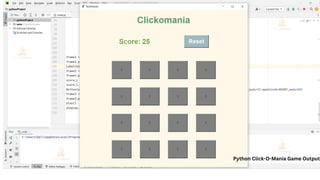
There are 16 gray boxes with a score of 25 in this clickomania project. We only have
25 turns to complete the game. We’ve constructed two major functionalities here:
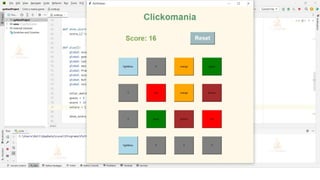
one for developing games and one for activation. By clicking on the gray button, we
can activate a specific color box. We must determine whether two square buttons
are equivalent. .
T E C H V I D V A N
Prerequisites for Click-O-Mania Game
using Python
Basic knowledge of the Python programming language and how functions are
defined in it.
How the GUI window is made using Tkinter
How to work with the Random library
Steps to Create Click-O-Mania Game
using Python
Following are the steps for developing the Python Click-O-Mania Game Project:
Step 1: Importing the necessary modules
Step 2: Making a window for our project
Step 3: Functions
Step 4: The main game loop
T E C H V I D V A N
Python Click-O-Mania Game Output
Summary
We successfully developed a Python Clickomania with a Graphical User Interface.
We’ve learnt about the Tkinter module, random, and the functions it offers. I hope
you had fun building with us.
T E C H V I D V A N

Python Click-O-Mania – Click Faster.pdf

  • 1.
  • 2.
    About Python Click-O-ManiaGame There are 16 gray boxes with a score of 25 in this clickomania project. We only have 25 turns to complete the game. We’ve constructed two major functionalities here: one for developing games and one for activation. By clicking on the gray button, we can activate a specific color box. We must determine whether two square buttons are equivalent. . T E C H V I D V A N Prerequisites for Click-O-Mania Game using Python Basic knowledge of the Python programming language and how functions are defined in it. How the GUI window is made using Tkinter How to work with the Random library
  • 3.
    Steps to CreateClick-O-Mania Game using Python Following are the steps for developing the Python Click-O-Mania Game Project: Step 1: Importing the necessary modules Step 2: Making a window for our project Step 3: Functions Step 4: The main game loop T E C H V I D V A N
  • 4.
  • 6.
    Summary We successfully developeda Python Clickomania with a Graphical User Interface. We’ve learnt about the Tkinter module, random, and the functions it offers. I hope you had fun building with us. T E C H V I D V A N