PyClustering: BANG Tutorial
Pyclustering Library Tutorial
Theme: BANG
Library Version: 0.8.2
Author: Andrei Novikov
E-Mail: pyclustering@yandex.ru
Agenda
● PyClustering BANG Features;
● Input format for BANG;
● Data clustering using BANG;
● Data clustering result visualization;
● Animation of BANG clustering process;
● Image segmentation by BANG;
PyClustering BANG Features
● BANG algorithm provides clustering results that can be
used for further analysis (not only clusters and noise itself):
dendrogram, BANG directory - information about density
distribution, structure, approximate amount of real clusters
and influence of input argument on clustering results.
● BANG visualizer for clustering results, BANG directory and
dendrogram.
● BANG animator for creating animation of BANG clustering
process.
Import BANG
BANG algorithm and its features can be imported from
„pyclustering.cluster.bang“:
from pyclustering.cluster.bang import bang
from pyclustering.cluster.bang import bang_directory
from pyclustering.cluster.bang import bang_visualizer
from pyclustering.cluster.bang import bang_animator
Input data format for BANG
BANG algorithm uses array_like data format, for example,
list where each element is a point that is represented by
coordinates. Here is an example of 1-D data:
dataset = [ [0.25], [0.43], [1.34], [-0.56] ]
Example of 2-D data:
dataset = [ [0.1, 0.2], [0.1, 0.6], [0.2, -1.4] ]
Example of 3-D data:
dataset = [ [0.6, 0.1, 0.4], [0.2, 0.1, 0.9] ]
Clustering by BANG algorithm
BANG uses one general parameter for clustering: level of
division that technically means amount of BANG tree hight
where root is a cell that covers whole data.
from pyclustering.cluster.bang import bang
data = [ [0.1], [0.2], [0.5], [0.3], [1.5], [1.8], [1.3], [1.6], [1.5] ]
levels = 3
instance = bang(data, levels)
instance.process() # perform processing
clusters = instance.get_clusters(); # allocated clusters
noise = instance.get_noise(); # cluster noise
directory = instance.get_directory(); # BANG directory
dendrogram = instance.get_dendrogram() # BANG dendrogram
Output result of BANG
BANG algorithm returns allocated clusters, outliers (noise),
BANG directory and dendrogram:
● Clusters are represented by list of clusters and each cluster
contains object indexes from dataset.
● Outliers are represented by list of object indexes from
dataset.
● BANG directory is a object of class bang_directory.
● Dendrogram is represented by list of dendrogram clusters
where each cluster contains expand order of blocks that
was formed during clustering process.
BANG result visualization
Output result such as clusters and outliers can be shown
by common visualizer „cluster_visualizer“ from
„pyclustering.cluster“ or by BANG visualizer:
instance = bang(sample, levels)
instance.process()
clusters = instance.get_clusters() # allocated clusters
noise = instance.get_noise() # outliers
directory = instance.get_directory() # get BANG directory
# visualize clustering results
bang_visualizer.show_clusters(sample, clusters, noise)
bang_visualizer.show_dendrogram(dendrogram)
bang_visualizer.show_blocks(directory)
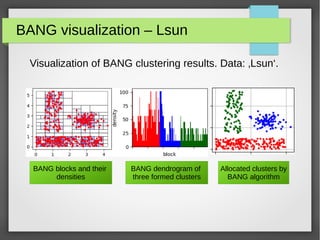
BANG visualization – Lsun
Visualization of BANG clustering results. Data: ‚Lsun‘.
BANG blocks and their
densities
BANG dendrogram of
three formed clusters
Allocated clusters by
BANG algorithm
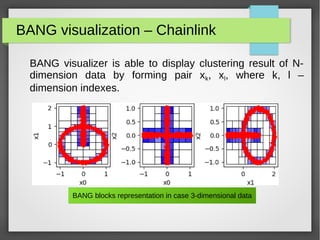
BANG visualization – Chainlink
BANG visualizer is able to display clustering result of N-
dimension data by forming pair xk, xl, where k, l –
dimension indexes.
BANG blocks representation in case 3-dimensional data
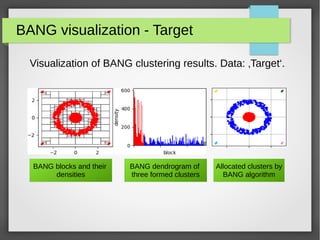
BANG visualization - Target
Visualization of BANG clustering results. Data: ‚Target‘.
BANG blocks and their
densities
BANG dendrogram of
three formed clusters
Allocated clusters by
BANG algorithm
Animate BANG clustering process
BANG clustering process can be animated (in case of 2-
dimensional data) using services of class ‚bang_animator‘.
instance = bang(data, levels, density_threshold)
instance.process()
# obtain BANG clustering result for creating animation
clusters = instance.get_clusters()
noise = instance.get_noise()
directory = instance.get_directory()
# show animation
bang_animator(directory, clusters, noise).animate()
# or save animation to file
bang_animator(directory, clusters, noise).animate(movie_filename=bang.mp4)
BANG for segmentation
BANG can consider image as a data where each point
represent pixel with three coordinate (RGB), or with four
coordinate (RGBA). Here is an example of image
segmentation using BANG algorithm:
from pyclustering.utils import draw_image_mask_segments, read_image
from pyclustering.cluster.bang import bang;
data = read_image(file_path_to_image);
bang_instance = bang(data, levels, density_threshold);
bang_instance.process();
clusters = bang_instance.get_clusters();
draw_image_mask_segments(source, clusters);
Image segmentation results
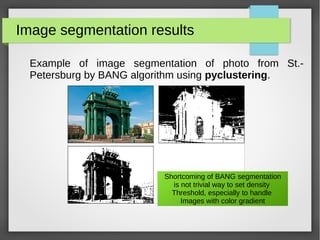
Example of image segmentation of photo from St.-
Petersburg by BANG algorithm using pyclustering.
Shortcoming of BANG segmentation
is not trivial way to set density
Threshold, especially to handle
Images with color gradient
References and Links
● Official pyclustering github repository:
https://github.com/annoviko/pyclustering
● Official pypi pyclustering page:
https://pypi.org/project/pyclustering/
● Official pyclustering web-site:
https://pyclustering.github.io/
Thank you for your attention
Thank you!

Pyclustering tutorial - BANG

  • 1.
    PyClustering: BANG Tutorial PyclusteringLibrary Tutorial Theme: BANG Library Version: 0.8.2 Author: Andrei Novikov E-Mail: pyclustering@yandex.ru
  • 2.
    Agenda ● PyClustering BANGFeatures; ● Input format for BANG; ● Data clustering using BANG; ● Data clustering result visualization; ● Animation of BANG clustering process; ● Image segmentation by BANG;
  • 3.
    PyClustering BANG Features ●BANG algorithm provides clustering results that can be used for further analysis (not only clusters and noise itself): dendrogram, BANG directory - information about density distribution, structure, approximate amount of real clusters and influence of input argument on clustering results. ● BANG visualizer for clustering results, BANG directory and dendrogram. ● BANG animator for creating animation of BANG clustering process.
  • 4.
    Import BANG BANG algorithmand its features can be imported from „pyclustering.cluster.bang“: from pyclustering.cluster.bang import bang from pyclustering.cluster.bang import bang_directory from pyclustering.cluster.bang import bang_visualizer from pyclustering.cluster.bang import bang_animator
  • 5.
    Input data formatfor BANG BANG algorithm uses array_like data format, for example, list where each element is a point that is represented by coordinates. Here is an example of 1-D data: dataset = [ [0.25], [0.43], [1.34], [-0.56] ] Example of 2-D data: dataset = [ [0.1, 0.2], [0.1, 0.6], [0.2, -1.4] ] Example of 3-D data: dataset = [ [0.6, 0.1, 0.4], [0.2, 0.1, 0.9] ]
  • 6.
    Clustering by BANGalgorithm BANG uses one general parameter for clustering: level of division that technically means amount of BANG tree hight where root is a cell that covers whole data. from pyclustering.cluster.bang import bang data = [ [0.1], [0.2], [0.5], [0.3], [1.5], [1.8], [1.3], [1.6], [1.5] ] levels = 3 instance = bang(data, levels) instance.process() # perform processing clusters = instance.get_clusters(); # allocated clusters noise = instance.get_noise(); # cluster noise directory = instance.get_directory(); # BANG directory dendrogram = instance.get_dendrogram() # BANG dendrogram
  • 7.
    Output result ofBANG BANG algorithm returns allocated clusters, outliers (noise), BANG directory and dendrogram: ● Clusters are represented by list of clusters and each cluster contains object indexes from dataset. ● Outliers are represented by list of object indexes from dataset. ● BANG directory is a object of class bang_directory. ● Dendrogram is represented by list of dendrogram clusters where each cluster contains expand order of blocks that was formed during clustering process.
  • 8.
    BANG result visualization Outputresult such as clusters and outliers can be shown by common visualizer „cluster_visualizer“ from „pyclustering.cluster“ or by BANG visualizer: instance = bang(sample, levels) instance.process() clusters = instance.get_clusters() # allocated clusters noise = instance.get_noise() # outliers directory = instance.get_directory() # get BANG directory # visualize clustering results bang_visualizer.show_clusters(sample, clusters, noise) bang_visualizer.show_dendrogram(dendrogram) bang_visualizer.show_blocks(directory)
  • 9.
    BANG visualization –Lsun Visualization of BANG clustering results. Data: ‚Lsun‘. BANG blocks and their densities BANG dendrogram of three formed clusters Allocated clusters by BANG algorithm
  • 10.
    BANG visualization –Chainlink BANG visualizer is able to display clustering result of N- dimension data by forming pair xk, xl, where k, l – dimension indexes. BANG blocks representation in case 3-dimensional data
  • 11.
    BANG visualization -Target Visualization of BANG clustering results. Data: ‚Target‘. BANG blocks and their densities BANG dendrogram of three formed clusters Allocated clusters by BANG algorithm
  • 12.
    Animate BANG clusteringprocess BANG clustering process can be animated (in case of 2- dimensional data) using services of class ‚bang_animator‘. instance = bang(data, levels, density_threshold) instance.process() # obtain BANG clustering result for creating animation clusters = instance.get_clusters() noise = instance.get_noise() directory = instance.get_directory() # show animation bang_animator(directory, clusters, noise).animate() # or save animation to file bang_animator(directory, clusters, noise).animate(movie_filename=bang.mp4)
  • 13.
    BANG for segmentation BANGcan consider image as a data where each point represent pixel with three coordinate (RGB), or with four coordinate (RGBA). Here is an example of image segmentation using BANG algorithm: from pyclustering.utils import draw_image_mask_segments, read_image from pyclustering.cluster.bang import bang; data = read_image(file_path_to_image); bang_instance = bang(data, levels, density_threshold); bang_instance.process(); clusters = bang_instance.get_clusters(); draw_image_mask_segments(source, clusters);
  • 14.
    Image segmentation results Exampleof image segmentation of photo from St.- Petersburg by BANG algorithm using pyclustering. Shortcoming of BANG segmentation is not trivial way to set density Threshold, especially to handle Images with color gradient
  • 15.
    References and Links ●Official pyclustering github repository: https://github.com/annoviko/pyclustering ● Official pypi pyclustering page: https://pypi.org/project/pyclustering/ ● Official pyclustering web-site: https://pyclustering.github.io/
  • 16.
    Thank you foryour attention Thank you!