Py-Browser
What is a Browser?
2
A software application used to access information on the World Wide Web
is called a Web Browser. When a user requests some information, the web
browser fetches the data from a web server and then displays the webpage
on the user’s screen.
 When a URL is entered in a browser, the web server takes us to that website.
 To run Java applets and flash content, plugins are available on the web
browser.
 Multiple webpages can be opened at the same time on a web browser.
 Options like back, forward, reload, stop reload, home, etc. are available on
these web browsers, which make using them easy and convenient.
Py - Browser
3
Py-Browser is a simple web browser which is designed
by using python programming language.
The framework that I used for Graphical User Interface is PyQt5.
What is PyQt ?
PyQt is a GUI widgets toolkit. It is a Python interface for Qt, one of
the most powerful, and popular cross-platform GUI library. PyQt is a
blend of Python programming language and the Qt library.
The libraries of PyQt that were used in Py-Browser are :
1.QtCore
2.QtWebEngineWidgets
3.QtGUI
4.QtPrintSupport
“
4
THIS IS HOW PY-BROWSER LOOKS LIKE : -
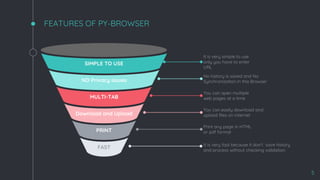
FEATURES OF PY-BROWSER
5
PRINT
FAST
SIMPLE TO USE
MULTI-TAB
NO Privacy issues
Download and Upload
It is very simple to use
only you have to enter
URL
No history is saved and No
Synchronization in this Browser
You can open multiple
web pages at a time
You can easily download and
upload files on internet
Print any page in HTML
or pdf format
It is very fast because it don‘t save history
and process without checking validation
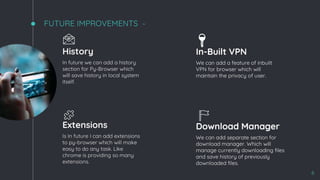
FUTURE IMPROVEMENTS -
6
History
In future we can add a history
section for Py-Browser which
will save history in local system
itself.
In-Built VPN
We can add a feature of inbuilt
VPN for browser which will
maintain the privacy of user.
Extensions
Is In future I can add extensions
to py-browser which will make
easy to do any task. Like
chrome is providing so many
extensions.
Download Manager
We can add separate section for
download manager. Which will
manage currently downloading files
and save history of previously
downloaded files.
🔑
7

Py browser

  • 1.
  • 2.
    What is aBrowser? 2 A software application used to access information on the World Wide Web is called a Web Browser. When a user requests some information, the web browser fetches the data from a web server and then displays the webpage on the user’s screen.  When a URL is entered in a browser, the web server takes us to that website.  To run Java applets and flash content, plugins are available on the web browser.  Multiple webpages can be opened at the same time on a web browser.  Options like back, forward, reload, stop reload, home, etc. are available on these web browsers, which make using them easy and convenient.
  • 3.
    Py - Browser 3 Py-Browseris a simple web browser which is designed by using python programming language. The framework that I used for Graphical User Interface is PyQt5. What is PyQt ? PyQt is a GUI widgets toolkit. It is a Python interface for Qt, one of the most powerful, and popular cross-platform GUI library. PyQt is a blend of Python programming language and the Qt library. The libraries of PyQt that were used in Py-Browser are : 1.QtCore 2.QtWebEngineWidgets 3.QtGUI 4.QtPrintSupport
  • 4.
    “ 4 THIS IS HOWPY-BROWSER LOOKS LIKE : -
  • 5.
    FEATURES OF PY-BROWSER 5 PRINT FAST SIMPLETO USE MULTI-TAB NO Privacy issues Download and Upload It is very simple to use only you have to enter URL No history is saved and No Synchronization in this Browser You can open multiple web pages at a time You can easily download and upload files on internet Print any page in HTML or pdf format It is very fast because it don‘t save history and process without checking validation
  • 6.
    FUTURE IMPROVEMENTS - 6 History Infuture we can add a history section for Py-Browser which will save history in local system itself. In-Built VPN We can add a feature of inbuilt VPN for browser which will maintain the privacy of user. Extensions Is In future I can add extensions to py-browser which will make easy to do any task. Like chrome is providing so many extensions. Download Manager We can add separate section for download manager. Which will manage currently downloading files and save history of previously downloaded files. 🔑
  • 7.