The PuReWidgets toolkit for
interactive public display
applications


      Jorge Cardoso          Rui José
 jorgecardoso@ieee.org   rui@dsi.uminho.pt
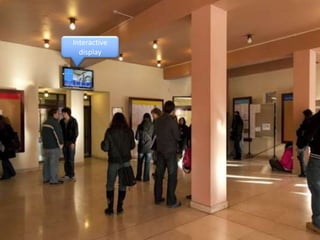
Interactive
  display
Motivation
  Interaction in Public Displays
  • Every display uses its own approach
  • Wasted development effort
  • Users face inconsistent interaction models

  We can learn from the desktop platform
  • Faced similar problems in the beginning

                                                 3
Requirements
 The toolkit should support
 • Multiple, extensible, controls
 • Various input mechanisms and
   modalities
 • Concurrent interaction
 • Asynchronous interaction
 • Graphical representations
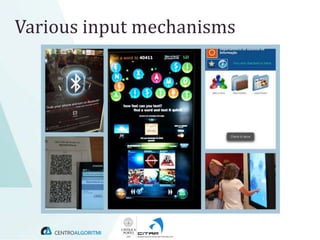
Various input mechanisms
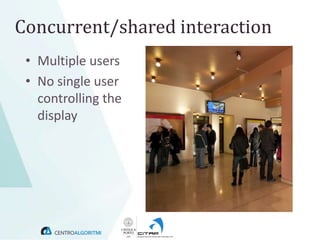
Concurrent/shared interaction
 • Multiple users
 • No single user
   controlling the
   display
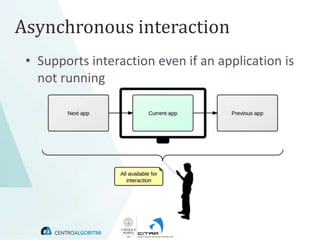
Asynchronous interaction
 • Supports interaction even if an application is
   not running
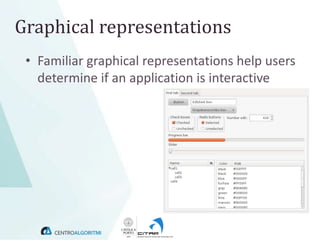
Graphical representations
 • Familiar graphical representations help users
   determine if an application is interactive
PuReWidgets
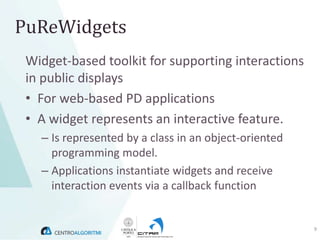
 Widget-based toolkit for supporting interactions
 in public displays
 • For web-based PD applications
 • A widget represents an interactive feature.
   – Is represented by a class in an object-oriented
     programming model.
   – Applications instantiate widgets and receive
     interaction events via a callback function


                                                       9
Features
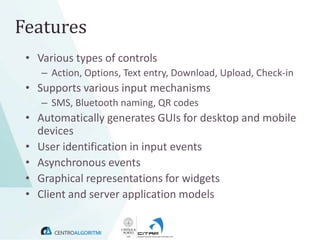
 • Various types of controls
    – Action, Options, Text entry, Download, Upload, Check-in
 • Supports various input mechanisms
    – SMS, Bluetooth naming, QR codes
 • Automatically generates GUIs for desktop and mobile
   devices
 • User identification in input events
 • Asynchronous events
 • Graphical representations for widgets
 • Client and server application models
PuReWidgets Architecture


                           11
PuReWidgets Implementation
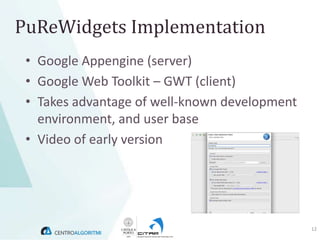
 • Google Appengine (server)
 • Google Web Toolkit – GWT (client)
 • Takes advantage of well-known development
   environment, and user base
 • Video of early version


                                               12
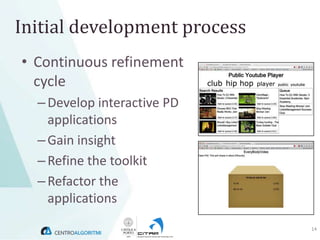
Initial development process
• Continuous refinement
  cycle
  – Develop interactive PD
    applications
  – Gain insight
  – Refine the toolkit
  – Refactor the
    applications
                              14
Conclusion
 • PuReWidgets is an example of how toolkits
   can lower the barrier to public display
   application development

 • Such toolkits will be crucial for widespread
   creation of new public display applications.

 • Focus on making it easy to explore interactive
   features in applications

                                                    15
The PuReWidgets toolkit for
interactive public display
applications


                                                 End
          Jorge Cardoso                                                                 Rui José
     jorgecardoso@ieee.org                                                          rui@dsi.uminho.pt
Photo credits:
Bluetooth photo: creative commons (Flickr user ‘dhaun’) | Touch-screen: creative commons (Flickr user ‘Happydog’)
Locamoda app: creative commons (Flickr user ‘gumption’) | Widgets panel: GFDL (http://en.wikipedia.org/wiki/File:Widgets.png)

PuReWidgets presentation at EICS 2012

  • 1.
    The PuReWidgets toolkitfor interactive public display applications Jorge Cardoso Rui José jorgecardoso@ieee.org rui@dsi.uminho.pt
  • 2.
  • 3.
    Motivation Interactionin Public Displays • Every display uses its own approach • Wasted development effort • Users face inconsistent interaction models We can learn from the desktop platform • Faced similar problems in the beginning 3
  • 4.
    Requirements The toolkitshould support • Multiple, extensible, controls • Various input mechanisms and modalities • Concurrent interaction • Asynchronous interaction • Graphical representations
  • 5.
  • 6.
    Concurrent/shared interaction •Multiple users • No single user controlling the display
  • 7.
    Asynchronous interaction •Supports interaction even if an application is not running
  • 8.
    Graphical representations •Familiar graphical representations help users determine if an application is interactive
  • 9.
    PuReWidgets Widget-based toolkitfor supporting interactions in public displays • For web-based PD applications • A widget represents an interactive feature. – Is represented by a class in an object-oriented programming model. – Applications instantiate widgets and receive interaction events via a callback function 9
  • 10.
    Features • Varioustypes of controls – Action, Options, Text entry, Download, Upload, Check-in • Supports various input mechanisms – SMS, Bluetooth naming, QR codes • Automatically generates GUIs for desktop and mobile devices • User identification in input events • Asynchronous events • Graphical representations for widgets • Client and server application models
  • 11.
  • 12.
    PuReWidgets Implementation •Google Appengine (server) • Google Web Toolkit – GWT (client) • Takes advantage of well-known development environment, and user base • Video of early version 12
  • 14.
    Initial development process •Continuous refinement cycle – Develop interactive PD applications – Gain insight – Refine the toolkit – Refactor the applications 14
  • 15.
    Conclusion • PuReWidgetsis an example of how toolkits can lower the barrier to public display application development • Such toolkits will be crucial for widespread creation of new public display applications. • Focus on making it easy to explore interactive features in applications 15
  • 16.
    The PuReWidgets toolkitfor interactive public display applications End Jorge Cardoso Rui José jorgecardoso@ieee.org rui@dsi.uminho.pt Photo credits: Bluetooth photo: creative commons (Flickr user ‘dhaun’) | Touch-screen: creative commons (Flickr user ‘Happydog’) Locamoda app: creative commons (Flickr user ‘gumption’) | Widgets panel: GFDL (http://en.wikipedia.org/wiki/File:Widgets.png)

Editor's Notes

  • #3 Just to give a quick idea of the type of environment we are addressing, imagine you need to develop interactive content for a display such as the one in the picture.
  • #4 Right now what happens is that each application uses its own, ad hoc approach to interaction.There is still too much that must be done outside the core functionality of an application to support interaction, and this results in inconsistencies and confuses users.But we can learn from how these same problems were address in desktop computing with the emergence of programming abstractions.The natural conclusion is that we need a programming toolkit for interactive PD applications!
  • #5 However, public displays are very different from thedesktop and so we have a specific set of requirements. The first one is that we obviously need to provide a set of interactive controls that allow developers to choose from the ones that best suit their applications.
  • #6 Another one is the support for various input mechanisms. Typical mechanisms for interacting with public display range from SMS, Bluetooth naming, QR codes, mobile applications, web applications, dedicated touch-screens, Allows applications should be able to work in heterogeneous locations that support different mechanisms.
  • #7 Another is the support for concurrent and shared interaction, were multiple users may interact at the same time, possibly using different mechanisms, but no single user is controlling the display.
  • #8 Its also important to support asynchronous interaction because we want to support interaction even for applications that may not be currently running on a particular public display.So, for example, in particular display, applications may be scheduled in a time-multiplexed way, but users should be able to interact with all applications at all times. (Even if a particular application will not be able to react on the PD)
  • #9 Graphical representations are another important requirement. Currently, one of the problems with PD interactions is communicating to users that a given display is interactive.So, just as we know that a desktop application is interactive and what controls it has, we should also be able to do that with a PD application.
  • #10 PuReWidgets is a toolkit for web-based applications that addresses those requirements.The toolkit is widget-based, where a widget represents an interactive feature in an application and, from the programming point of view, is represented by a class in an object-oriented programming model.
  • #11 PuReWidgets provides a number of important features for display applications.It provides various types of controls from which programmers can choose the ones that best fit their application’s needs.Supports various types of interaction mechanisms, such as SMS, QR Codes, Provides users with automatically generated rich desktop and mobile interfaces.Provides applications with user ids, if available.Allows asynchronous interactions, meaning that the application does not have to be running to be available for interaction.Provides graphical representations for widgets, which can optionally be used on the public display and promote awareness about the available interactive features.Supports two application models (server and client).
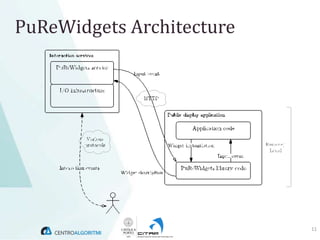
  • #12 In order to provide all those features, we need an architecture such as this. Interaction services can drive several displays and applicationsPuReWidgets serviceKeeps information about every widgetGenerates GUI for desktop and mobileGenerates a QR code address for every widgetGenerates unique textual reference codes for text-based interactions (SMS, BT naming, email…)IO infrastructureProvides low-level text-based interaction
  • #13 The toolkit is implemented using Google’s Web Toolkit and Google’s AppengineAnd we can take advantage of a well-known development environment, and development user base.Next I’ll play a short video that shows how the toolkit can be used, and some of its features. Keep in mind that this is still a very early version of the toolkit.
  • #14 The video does not show it, but we could also interact via SMS, for example, without any extra code, provided the display owner configured an SMS gateway.
  • #15 Continuous refinementDevelop interactive public display applicationsGain more insight about the difficulties Refine the toolkit to address the identified problemsRefactor the applications to include the toolkit changes