Network Protocols and Communication
2.0 Network Protocols and
Communication
 2.1 Rules of Communication
• Explain how rules facilitate communication.
• Describe the types of rules that are necessary to successfully communicate.
 2.2 Network Protocols and Standards
• Explain the role of protocols and standards organizations in facilitating interoperability in network
communications.
• Explain why protocols are necessary in network communication.
• Explain the purpose of adhering to a protocol suite.
• Explain the role of standards organizations in establishing protocols for network interoperability.
• Explain how the TCP/IP model and the OSI model are used to facilitate standardization in the
communication process.
 2.3 Data Transfer in the Network
• Explain how devices on a LAN access resources in a small to medium-sized business network.
• Explain how data encapsulation allows data to be transported across the network.
• Explain how local hosts access local resources on a network.
Topic 2 - Objectives
2.1 Rules of Communication
 All communication methods have three elements in common:
• Source or sender
• Destination or receiver
• Channel or media
 Rules or protocols govern all methods of communication.
The Rules
Communication Fundamentals
 Protocols are necessary for effective communication and include:
• An identified sender and receiver
• Common language and grammar
• Speed and timing of delivery
• Confirmation or acknowledgment requirements
 Protocols used in network communications also define:
• Message encoding
• Message delivery options
• Message Formatting and Encapsulation
• Message Timing
• Message Size
The Rules
Rule Establishment
 Encoding between hosts must be in
appropriate format for the medium.
 Messages are first converted into bits
by the sending host.
 Each bit is encoded into a pattern of
sounds, light waves, or electrical
impulses depending on the network
media
 The destination host receives and
decodes the signals in order to
interpret the message.
The Rules
Message Encoding
 There is an agreed format for letters and
addressing letters which is required for
proper delivery.
 Putting the letter into the addressed
envelope is called encapsulation.
 Each computer message is
encapsulated in a specific format, called
a frame, before it is sent over the
network.
 A frame acts like an envelope providing
destination address and source address.
The Rules
Message Formatting and Encapsulation
 Humans break long messages into smaller
parts or sentences.
 Long messages must also be broken into
smaller pieces to travel across a network.
• Each piece is sent in a separate frame.
• Each frame has its own addressing
information.
• A receiving host will reconstruct multiple
frames into the original message.
The Rules
Message Size
 Access Method
• Hosts on a network need to know when to begin sending
messages and how to respond when collisions occur.
 Flow Control
• Source and destination hosts use flow control to negotiate
correct timing to avoid overwhelming the destination and
ensure information is received.
 Response Timeout
• Hosts on the network have rules that specify how long to
wait for responses and what action to take if a response
timeout occurs.
The Rules
Message Timing
Unicast Message Multicast Message Broadcast Message
The Rules
Message Delivery Options
One-to-many delivery One-to-all delivery
One-to-one delivery
2.2 Network Protocols and
Standards
 Protocol suites are implemented
by hosts and networking devices
in software, hardware or both.
 The protocols are viewed in terms
of layers, with each higher level
service depending on the
functionality defined by the
protocols shown in the lower
levels.
Protocols
Rules that Govern Communications
 Networking protocols define a
common format and set of rules
for exchanging messages
between devices.
 Some common networking
protocols are Hypertext Transfer
Protocol (HTTP), Transmission
Control Protocol (TCP), and
Internet Protocol (IP).
Protocols
Network Protocols
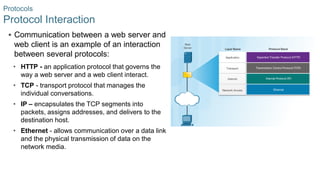
 Communication between a web server and
web client is an example of an interaction
between several protocols:
• HTTP - an application protocol that governs the
way a web server and a web client interact.
• TCP - transport protocol that manages the
individual conversations.
• IP – encapsulates the TCP segments into
packets, assigns addresses, and delivers to the
destination host.
• Ethernet - allows communication over a data link
and the physical transmission of data on the
network media.
Protocols
Protocol Interaction
 A protocol suite is a set of protocols
that work together to provide
comprehensive network
communication services.
• May be specified by a standards
organization or developed by a vendor.
 The TCP/IP protocol suite is an open
standard, the protocols are freely
available, and any vendor is able to
implement these protocols on their
hardware or in their software.
Protocol Suites
Protocol Suites and Industry Standards
 Advanced Research Projects Agency
Network (ARPANET) was the
predecessor to today’s Internet.
• ARPANET was funded by the U.S.
Department of Defense for use by
universities and research
laboratories.
Protocol Suites
Development of TCP/IP
Protocol Suites
TCP/IP Protocol Suite
 When sending data from a web server to
a client the encapsulation procedure
would be as follows:
• The webserver prepares the Hypertext
Markup Language (HTML) page. The HTTP
application layer protocol sends the data to
the transport layer.
• The transport layer breaks the data into
segments and identifies each.
• Next the IP source and destination
addresses are added, creating an IP Packet.
• The Ethernet information is then added
creating the Ethernet Frame, or data link
frame.
Protocol Suites
TCP/IP Communication Process
• This frame is delivered to the nearest
router along the path towards the web
client. Each router adds new data link
information before forwarding the packet.
 When receiving the data link frames from
the web server, the client processes and
removes each protocol header in the
opposite order it was added:
• First the Ethernet header is removed
• Then the IP header
• Then the Transport layer header
• Finally the HTTP information is processed and
sent to the client’s web browser
Protocol Suites
TCP/IP Communication Process (Cont.)
 Open standards encourage
interoperability, competition, and
innovation.
 Standards organizations are usually
vendor-neutral, non-profit organizations
established to develop and promote the
concept of open standards.
Standards Organizations
Open Standards
 Internet Society (ISOC) –promotes open
development and evolution of Internet use
globally.
 Internet Architecture Board (IAB) -
management and development of Internet
standards.
 Internet Engineering Task Force (IETF) -
develops, updates, and maintains Internet
and TCP/IP technologies.
 Internet Research Task Force (IRTF) -
focused on long-term research related to
Internet and TCP/IP protocols.
Standards Organizations
Internet Standards
 Internet Corporation for Assigned Names
and Numbers (ICANN) - coordinates IP
address allocation and management of
domain names.
 Internet Assigned Numbers Authority
(IANA) - manages IP address allocation,
domain name management, and protocol
identifiers for ICANN.
 Institute of Electrical and Electronics Engineers
(IEEE) - dedicated to advancing technological innovation
and creating standards in a wide area of industries
including networking.
 Electronic Industries Alliance (EIA) - standards related
to electrical wiring, connectors, and network racks.
 Telecommunications Industry Association (TIA)
standards for radio equipment, cellular towers, Voice over
IP (VoIP) devices, and satellite communications.
 International Telecommunications Union-
Telecommunication Standardization Sector (ITU-T)
standards for video compression, Internet Protocol
Television (IPTV), and broadband communications.
Standards Organizations
Electronics and Communications Standard Organizations
 The benefits of using a layered
model include:
• Assisting in protocol design since
protocols at each layer have
defined functions.
• Fostering competition because
products from different vendors
can work together.
• Preventing technology changes in
one layer from affecting other
layers.
• Providing a common language to
describe networking functions and
capabilities.
Reference Models
The Benefits of Using a Layered Model
 Application - contains protocols used for process-to-process
communications.
 Presentation - provides for common representation of the data.
 Session - provides services to the presentation layer to
organize its dialogue and to manage data exchange.
 Transport - defines services to segment, transfer, and
reassemble the data.
 Network - provides services to exchange the individual pieces
of data over the network between identified end devices.
 Data Link - provides methods for exchanging data frames
between devices over a common media.
 Physical - describes the mechanical, electrical, functional, and
procedural means to transmit bits across physical connections.
Reference Models
The OSI Reference Model
 The TCP/IP Protocol Model
• Created in the early 1970s for
internetwork communications.
• Open Standard.
• Also called The TCP/IP Model
or the Internet Model.
Reference Models
The TCP/IP Protocol Model
 In the OSI model, the network access layer and the application layer of the
TCP/IP model are further divided to describe discrete functions that must
occur at these layers.
Reference Models
OSI Model and TCP/IP Model Comparison
2.3 Data Transfer in the Network
 Large streams of data are divided
into smaller, more manageable
pieces to send over the network.
• By sending smaller pieces, many
different conversations can be
interleaved on the network, called
multiplexing.
• Each piece must be labeled.
• If part of the message fails to
make it to the destination, only the
missing pieces need to be
retransmitted.
Data Encapsulation
Message Segmentation
 As application data is passed down the
protocol stack, information is added at each
level. This is known as the encapsulation
process.
 The form that the data takes at each layer is
known as a Protocol Data Unit (PDU).
• Data - application layer PDU
• Segment – Transport layer PDU
• Packet – Network layer PDU
• Frame – Data Link Layer PDU
• Bits – Physical Layer PDU
Data Encapsulation
Protocol Data Units
 The encapsulation process works
from top to bottom:
• Data is divided into segments.
• The TCP segment is encapsulated
in the IP Packet.
• The IP packet is encapsulated in the
Ethernet Frame.
Data Encapsulation
Encapsulation Example
 The de-encapsulation process
works from bottom to top.
 De-encapsulation is the process
used by a receiving device to
remove one or more of the protocol
headers.
• The data is de-encapsulated as it
moves up the stack toward the end-
user application.
Data Encapsulation
De-encapsulation
 Network layer source and
destination addresses - Responsible
for delivering the IP packet from the
original source to the final
destination.
• Source IP address - The IP address
of the sending device, the original
source of the packet.
• Destination IP address - The IP
address of the receiving device, the
final destination of the packet.
Data Access
Network Addresses
 The purpose of the data link
address is to deliver the data link
frame from one network interface to
another network interface on the
same network.
• As the IP packet travels from source to
destination it is encapsulated in a new
data link frame when it is forwarded by
each router.
Data Access
Data Link Addresses
 The network layer addresses, or IP addresses,
indicate the original source and final
destination.
• Network portion – The left-most part of the
address indicates which network the IP address
is a member of.
• Host portion – The remaining part of the address
identifies a specific device on the network.
 The data link frame which uses MAC
addressing, is sent directly to the receiving
device.
• Source MAC address - address of sending
device.
• Destination MAC address – address of receiving
device.
Data Access
Devices on the Same Network
 Sending to a remote network - the
source and destination IP
addresses represent hosts on
different networks.
 The data link frame cannot be sent
directly to the remote destination
host. Therefore the frame is sent to
the default gateway (nearest router
interface).
 The router removes the received
Layer 2 information and adds new
data link information before
forwarding out the exit interface.
Data Access
Devices on a Remote Network
2.4 Topic Summary
Conclusion
Topic 2: Network Protocols and Communications
 Explain how rules facilitate communication.
 Explain the role of protocols and standards organizations in facilitating
interoperability in network communications.
 Explain how devices on a LAN access resources in a small to medium-
sized business network.
New Terms and Commands
• Encoding
• Protocol
• Channel
• Flow Control
• Response Timeout
• Acknowledgement
• Unicast
• Multicast
• Broadcast
• Protocol Suite
• Ethernet
• Standard
• Proprietary protocol
• 802.3 (Ethernet)
• 802.11 (Wireless Ethernet)
• Segmentation
• Default Gateway
• Hypertext Transfer Protocol (HTTP)
• Simple Mail Transfer Protocol (SMTP)
• Post Office Protocol (POP)
• Transmission Control Protocol (TCP)
• Transport
• Data Link
• Network Access
• Advanced Research Projects Agency Network
(ARPANET)
New Terms and Commands (Cont.)
• )
• Internet Message Access Protocol (IMAP)
• File Transfer Protocol (FTP)
• Trivial File Transfer Protocol (TFTP)
• User Datagram Protocol (UDP)
• Network Address Translation (NAT)
• Internet Control Messaging Protocol (ICMP)
• Open Shortest Path First (OSPF)
• Enhanced Interior Gateway Routing Protocol
(EIGRP)
• Address Resolution Protocol (ARP)
• Dynamic Host Configuration (DHCP)
• Encapsulation
• De-encapsulation
• Protocol Data Unit (PDU)
• Segment
• Packet
• Frame

Protocols guide data flow and enable system communication.

  • 1.
    Network Protocols andCommunication
  • 2.
    2.0 Network Protocolsand Communication
  • 3.
     2.1 Rulesof Communication • Explain how rules facilitate communication. • Describe the types of rules that are necessary to successfully communicate.  2.2 Network Protocols and Standards • Explain the role of protocols and standards organizations in facilitating interoperability in network communications. • Explain why protocols are necessary in network communication. • Explain the purpose of adhering to a protocol suite. • Explain the role of standards organizations in establishing protocols for network interoperability. • Explain how the TCP/IP model and the OSI model are used to facilitate standardization in the communication process.  2.3 Data Transfer in the Network • Explain how devices on a LAN access resources in a small to medium-sized business network. • Explain how data encapsulation allows data to be transported across the network. • Explain how local hosts access local resources on a network. Topic 2 - Objectives
  • 4.
    2.1 Rules ofCommunication
  • 5.
     All communicationmethods have three elements in common: • Source or sender • Destination or receiver • Channel or media  Rules or protocols govern all methods of communication. The Rules Communication Fundamentals
  • 6.
     Protocols arenecessary for effective communication and include: • An identified sender and receiver • Common language and grammar • Speed and timing of delivery • Confirmation or acknowledgment requirements  Protocols used in network communications also define: • Message encoding • Message delivery options • Message Formatting and Encapsulation • Message Timing • Message Size The Rules Rule Establishment
  • 7.
     Encoding betweenhosts must be in appropriate format for the medium.  Messages are first converted into bits by the sending host.  Each bit is encoded into a pattern of sounds, light waves, or electrical impulses depending on the network media  The destination host receives and decodes the signals in order to interpret the message. The Rules Message Encoding
  • 8.
     There isan agreed format for letters and addressing letters which is required for proper delivery.  Putting the letter into the addressed envelope is called encapsulation.  Each computer message is encapsulated in a specific format, called a frame, before it is sent over the network.  A frame acts like an envelope providing destination address and source address. The Rules Message Formatting and Encapsulation
  • 9.
     Humans breaklong messages into smaller parts or sentences.  Long messages must also be broken into smaller pieces to travel across a network. • Each piece is sent in a separate frame. • Each frame has its own addressing information. • A receiving host will reconstruct multiple frames into the original message. The Rules Message Size
  • 10.
     Access Method •Hosts on a network need to know when to begin sending messages and how to respond when collisions occur.  Flow Control • Source and destination hosts use flow control to negotiate correct timing to avoid overwhelming the destination and ensure information is received.  Response Timeout • Hosts on the network have rules that specify how long to wait for responses and what action to take if a response timeout occurs. The Rules Message Timing
  • 11.
    Unicast Message MulticastMessage Broadcast Message The Rules Message Delivery Options One-to-many delivery One-to-all delivery One-to-one delivery
  • 12.
    2.2 Network Protocolsand Standards
  • 13.
     Protocol suitesare implemented by hosts and networking devices in software, hardware or both.  The protocols are viewed in terms of layers, with each higher level service depending on the functionality defined by the protocols shown in the lower levels. Protocols Rules that Govern Communications
  • 14.
     Networking protocolsdefine a common format and set of rules for exchanging messages between devices.  Some common networking protocols are Hypertext Transfer Protocol (HTTP), Transmission Control Protocol (TCP), and Internet Protocol (IP). Protocols Network Protocols
  • 15.
     Communication betweena web server and web client is an example of an interaction between several protocols: • HTTP - an application protocol that governs the way a web server and a web client interact. • TCP - transport protocol that manages the individual conversations. • IP – encapsulates the TCP segments into packets, assigns addresses, and delivers to the destination host. • Ethernet - allows communication over a data link and the physical transmission of data on the network media. Protocols Protocol Interaction
  • 16.
     A protocolsuite is a set of protocols that work together to provide comprehensive network communication services. • May be specified by a standards organization or developed by a vendor.  The TCP/IP protocol suite is an open standard, the protocols are freely available, and any vendor is able to implement these protocols on their hardware or in their software. Protocol Suites Protocol Suites and Industry Standards
  • 17.
     Advanced ResearchProjects Agency Network (ARPANET) was the predecessor to today’s Internet. • ARPANET was funded by the U.S. Department of Defense for use by universities and research laboratories. Protocol Suites Development of TCP/IP
  • 18.
  • 19.
     When sendingdata from a web server to a client the encapsulation procedure would be as follows: • The webserver prepares the Hypertext Markup Language (HTML) page. The HTTP application layer protocol sends the data to the transport layer. • The transport layer breaks the data into segments and identifies each. • Next the IP source and destination addresses are added, creating an IP Packet. • The Ethernet information is then added creating the Ethernet Frame, or data link frame. Protocol Suites TCP/IP Communication Process • This frame is delivered to the nearest router along the path towards the web client. Each router adds new data link information before forwarding the packet.
  • 20.
     When receivingthe data link frames from the web server, the client processes and removes each protocol header in the opposite order it was added: • First the Ethernet header is removed • Then the IP header • Then the Transport layer header • Finally the HTTP information is processed and sent to the client’s web browser Protocol Suites TCP/IP Communication Process (Cont.)
  • 21.
     Open standardsencourage interoperability, competition, and innovation.  Standards organizations are usually vendor-neutral, non-profit organizations established to develop and promote the concept of open standards. Standards Organizations Open Standards
  • 22.
     Internet Society(ISOC) –promotes open development and evolution of Internet use globally.  Internet Architecture Board (IAB) - management and development of Internet standards.  Internet Engineering Task Force (IETF) - develops, updates, and maintains Internet and TCP/IP technologies.  Internet Research Task Force (IRTF) - focused on long-term research related to Internet and TCP/IP protocols. Standards Organizations Internet Standards  Internet Corporation for Assigned Names and Numbers (ICANN) - coordinates IP address allocation and management of domain names.  Internet Assigned Numbers Authority (IANA) - manages IP address allocation, domain name management, and protocol identifiers for ICANN.
  • 23.
     Institute ofElectrical and Electronics Engineers (IEEE) - dedicated to advancing technological innovation and creating standards in a wide area of industries including networking.  Electronic Industries Alliance (EIA) - standards related to electrical wiring, connectors, and network racks.  Telecommunications Industry Association (TIA) standards for radio equipment, cellular towers, Voice over IP (VoIP) devices, and satellite communications.  International Telecommunications Union- Telecommunication Standardization Sector (ITU-T) standards for video compression, Internet Protocol Television (IPTV), and broadband communications. Standards Organizations Electronics and Communications Standard Organizations
  • 24.
     The benefitsof using a layered model include: • Assisting in protocol design since protocols at each layer have defined functions. • Fostering competition because products from different vendors can work together. • Preventing technology changes in one layer from affecting other layers. • Providing a common language to describe networking functions and capabilities. Reference Models The Benefits of Using a Layered Model
  • 25.
     Application -contains protocols used for process-to-process communications.  Presentation - provides for common representation of the data.  Session - provides services to the presentation layer to organize its dialogue and to manage data exchange.  Transport - defines services to segment, transfer, and reassemble the data.  Network - provides services to exchange the individual pieces of data over the network between identified end devices.  Data Link - provides methods for exchanging data frames between devices over a common media.  Physical - describes the mechanical, electrical, functional, and procedural means to transmit bits across physical connections. Reference Models The OSI Reference Model
  • 26.
     The TCP/IPProtocol Model • Created in the early 1970s for internetwork communications. • Open Standard. • Also called The TCP/IP Model or the Internet Model. Reference Models The TCP/IP Protocol Model
  • 27.
     In theOSI model, the network access layer and the application layer of the TCP/IP model are further divided to describe discrete functions that must occur at these layers. Reference Models OSI Model and TCP/IP Model Comparison
  • 28.
    2.3 Data Transferin the Network
  • 29.
     Large streamsof data are divided into smaller, more manageable pieces to send over the network. • By sending smaller pieces, many different conversations can be interleaved on the network, called multiplexing. • Each piece must be labeled. • If part of the message fails to make it to the destination, only the missing pieces need to be retransmitted. Data Encapsulation Message Segmentation
  • 30.
     As applicationdata is passed down the protocol stack, information is added at each level. This is known as the encapsulation process.  The form that the data takes at each layer is known as a Protocol Data Unit (PDU). • Data - application layer PDU • Segment – Transport layer PDU • Packet – Network layer PDU • Frame – Data Link Layer PDU • Bits – Physical Layer PDU Data Encapsulation Protocol Data Units
  • 31.
     The encapsulationprocess works from top to bottom: • Data is divided into segments. • The TCP segment is encapsulated in the IP Packet. • The IP packet is encapsulated in the Ethernet Frame. Data Encapsulation Encapsulation Example
  • 32.
     The de-encapsulationprocess works from bottom to top.  De-encapsulation is the process used by a receiving device to remove one or more of the protocol headers. • The data is de-encapsulated as it moves up the stack toward the end- user application. Data Encapsulation De-encapsulation
  • 33.
     Network layersource and destination addresses - Responsible for delivering the IP packet from the original source to the final destination. • Source IP address - The IP address of the sending device, the original source of the packet. • Destination IP address - The IP address of the receiving device, the final destination of the packet. Data Access Network Addresses
  • 34.
     The purposeof the data link address is to deliver the data link frame from one network interface to another network interface on the same network. • As the IP packet travels from source to destination it is encapsulated in a new data link frame when it is forwarded by each router. Data Access Data Link Addresses
  • 35.
     The networklayer addresses, or IP addresses, indicate the original source and final destination. • Network portion – The left-most part of the address indicates which network the IP address is a member of. • Host portion – The remaining part of the address identifies a specific device on the network.  The data link frame which uses MAC addressing, is sent directly to the receiving device. • Source MAC address - address of sending device. • Destination MAC address – address of receiving device. Data Access Devices on the Same Network
  • 36.
     Sending toa remote network - the source and destination IP addresses represent hosts on different networks.  The data link frame cannot be sent directly to the remote destination host. Therefore the frame is sent to the default gateway (nearest router interface).  The router removes the received Layer 2 information and adds new data link information before forwarding out the exit interface. Data Access Devices on a Remote Network
  • 37.
  • 38.
    Conclusion Topic 2: NetworkProtocols and Communications  Explain how rules facilitate communication.  Explain the role of protocols and standards organizations in facilitating interoperability in network communications.  Explain how devices on a LAN access resources in a small to medium- sized business network.
  • 39.
    New Terms andCommands • Encoding • Protocol • Channel • Flow Control • Response Timeout • Acknowledgement • Unicast • Multicast • Broadcast • Protocol Suite • Ethernet • Standard • Proprietary protocol • 802.3 (Ethernet) • 802.11 (Wireless Ethernet) • Segmentation • Default Gateway • Hypertext Transfer Protocol (HTTP) • Simple Mail Transfer Protocol (SMTP) • Post Office Protocol (POP) • Transmission Control Protocol (TCP) • Transport • Data Link • Network Access • Advanced Research Projects Agency Network (ARPANET)
  • 40.
    New Terms andCommands (Cont.) • ) • Internet Message Access Protocol (IMAP) • File Transfer Protocol (FTP) • Trivial File Transfer Protocol (TFTP) • User Datagram Protocol (UDP) • Network Address Translation (NAT) • Internet Control Messaging Protocol (ICMP) • Open Shortest Path First (OSPF) • Enhanced Interior Gateway Routing Protocol (EIGRP) • Address Resolution Protocol (ARP) • Dynamic Host Configuration (DHCP) • Encapsulation • De-encapsulation • Protocol Data Unit (PDU) • Segment • Packet • Frame