Introduction
computers usenetwork protocols to communicate in computer networks.
There are many network protocols in existence; TCP/IP is a family of
network protocols that are used for the Internet.
A network protocol is a standard written down on a piece of paper (or,
more precisely, with a text editor in a computer). The standards that are
used for the Internet are called Requests For Comment (RFC).
2.
What are networkprotocols
The word protocol comes from the Greek protocollon, meaning a leaf of
paper glued to a manuscript volume that describes the contents.
Network Protocol is a set of rules that governs the communications
between computers on a network. Network protocols are formal standards
and policies comprised of rules, procedures and formats that define
communication between two or more devices over a network.
Network protocols govern the end-to-end processes of timely, secure and
managed data or network communication.
3.
Protocol functions
Identifieserrors
Applies compression techniques
Decides on:
How to announce sent data
How to announce receive data
How to address data
How data is to be sent
4.
The Rules
Communications Fundamentals
Networkscan vary in size and complexity. It is not enough to have a
connection; devices must agree on “how” to communicate.
There are three elements to any communication:
There will be a source (sender).
There will be a destination (receiver).
There will be a channel (media) that provides for the path of
communications to occur.
5.
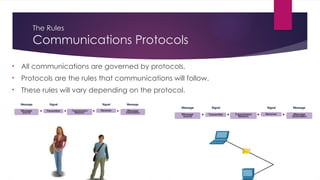
The Rules
Communications Protocols
•All communications are governed by protocols.
• Protocols are the rules that communications will follow.
• These rules will vary depending on the protocol.
6.
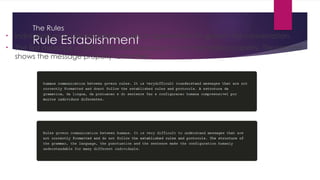
The Rules
Rule Establishment
•Individuals must use established rules or agreements to govern the conversation.
• The first message is difficult to read because it is not formatted properly. The second
shows the message properly formatted
7.
Rule Establishment (Cont.)
Protocolsmust account for the following requirements:
An identified sender and receiver
Common language and grammar
Speed and timing of delivery
Confirmation or acknowledgment requirements
8.
The Rules
Network ProtocolRequirements
Common computer protocols must be in agreement and include the
following requirements:
Message encoding
Message formatting and encapsulation
Message size
Message timing
Message delivery options
9.
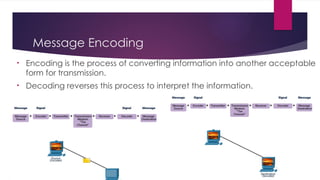
Message Encoding
• Encodingis the process of converting information into another acceptable
form for transmission.
• Decoding reverses this process to interpret the information.
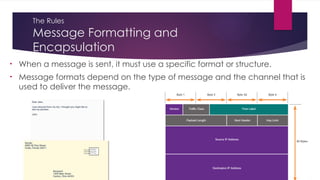
10.
The Rules
Message Formattingand
Encapsulation
• When a message is sent, it must use a specific format or structure.
• Message formats depend on the type of message and the channel that is
used to deliver the message.
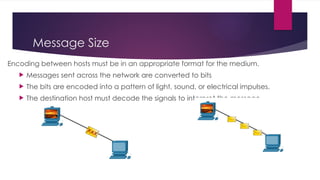
11.
Message Size
Encoding betweenhosts must be in an appropriate format for the medium.
Messages sent across the network are converted to bits
The bits are encoded into a pattern of light, sound, or electrical impulses.
The destination host must decode the signals to interpret the message.
12.
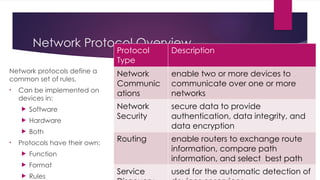
Network Protocol Overview
Networkprotocols define a
common set of rules.
• Can be implemented on
devices in:
Software
Hardware
Both
• Protocols have their own:
Function
Format
Rules
Protocol
Type
Description
Network
Communic
ations
enable two or more devices to
communicate over one or more
networks
Network
Security
secure data to provide
authentication, data integrity, and
data encryption
Routing enable routers to exchange route
information, compare path
information, and select best path
Service used for the automatic detection of
13.
Protocols
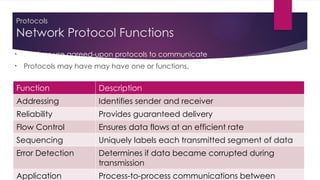
Network Protocol Functions
•Devices use agreed-upon protocols to communicate .
• Protocols may have may have one or functions.
Function Description
Addressing Identifies sender and receiver
Reliability Provides guaranteed delivery
Flow Control Ensures data flows at an efficient rate
Sequencing Uniquely labels each transmitted segment of data
Error Detection Determines if data became corrupted during
transmission
Application Process-to-process communications between
14.
Protocols
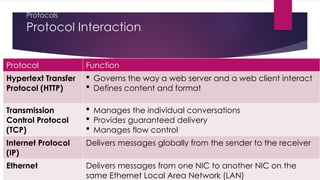
Protocol Interaction
Protocol Function
HypertextTransfer
Protocol (HTTP)
Governs the way a web server and a web client interact
Defines content and format
Transmission
Control Protocol
(TCP)
Manages the individual conversations
Provides guaranteed delivery
Manages flow control
Internet Protocol
(IP)
Delivers messages globally from the sender to the receiver
Ethernet Delivers messages from one NIC to another NIC on the
same Ethernet Local Area Network (LAN)
15.
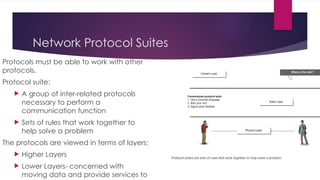
Network Protocol Suites
Protocolsmust be able to work with other
protocols.
Protocol suite:
A group of inter-related protocols
necessary to perform a
communication function
Sets of rules that work together to
help solve a problem
The protocols are viewed in terms of layers:
Higher Layers
Lower Layers- concerned with
moving data and provide services to
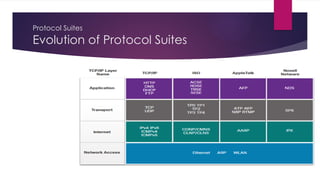
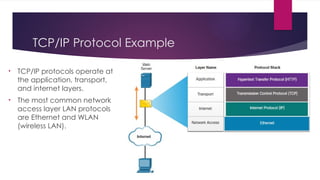
TCP/IP Protocol Example
•TCP/IP protocols operate at
the application, transport,
and internet layers.
• The most common network
access layer LAN protocols
are Ethernet and WLAN
(wireless LAN).
18.
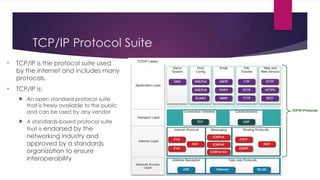
TCP/IP Protocol Suite
•TCP/IP is the protocol suite used
by the internet and includes many
protocols.
• TCP/IP is:
An open standard protocol suite
that is freely available to the public
and can be used by any vendor
A standards-based protocol suite
that is endorsed by the
networking industry and
approved by a standards
organization to ensure
interoperability
19.
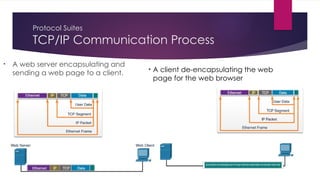
Protocol Suites
TCP/IP CommunicationProcess
• A web server encapsulating and
sending a web page to a client.
• A client de-encapsulating the web
page for the web browser
20.
HTTP Protocol
HTTP:
The HypertextTransfer Protocol (HTTP) is an application protocol for
distributed, collaborative, hypermedia information systems.HTTP is the
foundation of data communication for the World Wide Web.
Development of HTTP was initiated by Tim Berners-Lee at CERN in 1989
HTTP is an application layer protocol designed within the framework of the
Internet protocol suite.
21.
FTP Protocol
FTP:
File Transfer Protocol (FTP) is a standard Internet protocol for transmitting
files between computers on the Internet over TCP/IP connections.
FTP is a client-server protocol that relies on two communications channels
between client and server: a command channel for controlling the
conversation and a data channel for transmitting file content.
22.
SMTP:
SimpleMail Transfer Protocol is used to transport mail. Simple Mail Transport
Protocol is used on the internet, it is not a transport layer protocol but is an
application layer protocol.
UDP:
- An unreliable connection less protocol used to control the management
of application level services between computers. It is used for transport by
some applications which must provide their own reliability.
23.
ICMP:
Internetcontrol message protocol provides management and error
reporting to help manage the process of sending data between
computers. (Management).
ARP:
Address Resolution Protocol enables the packaging of IP data into
ethernet packages. It is the system and messaging protocol that is used to
find the ethernet (hardware) address from a specific IP number
24.
POP:
POPstands for Post Office Protocol. It is generally used to support a single
client. There are several versions of POP but the POP 3 is the current
standard.
POP is an application layer internet standard protocol.
POP does not allow search facility.
It is not suitable for accessing non mail data.
25.
Benefits of networkprotocols
Some important benefits are;
They provide the path to increase the network connections
Enhance the speed of the connection,
Enhance the data transmission rate and provide easy working to the users
Editor's Notes
#4 3 – Protocols and Models
3.1 – The Rules
3.1.2 –Communications Fundamentals
#5 3 – Protocols and Models
3.1 – The Rules
3.1.3 – Communications Protocols
#6 3 – Protocols and Models
3.1 – The Rules
3.1.4 – Rules Establishment
#7 3 – Protocols and Models
3.1 – The Rules
3.1.4 – Rules Establishment (Cont.)
#8 3 – Protocols and Models
3.1 – The Rules
3.1.5 – Network Protocol Requirements
#9 3 – Protocols and Models
3.1 – The Rules
3.1.6 – Message Encoding
#10 3 – Protocols and Models
3.1 – The Rules
3.1.7 – Message Formatting and Encapsulation
#11 3 – Protocols and Models
3.1 – The Rules
3.1.8 – Message Size


![[DSC Europe 25] Bojan Banjac - AI is always right when it comes to the matter...](https://cdn.slidesharecdn.com/ss_thumbnails/syoxtqierpydwxm5srcb-4-bojan-banjac-ai-is-always-right-when-it-comes-to-the-matters-of-taste-260119101519-694ee7d7-thumbnail.jpg?width=640&height=640&fit=bounds)


![[DSC Europe 25] Andrzej Kowalczyk - AI - how to start small and grow in the f...](https://cdn.slidesharecdn.com/ss_thumbnails/oy1zmo94qv6vpcqjvno2-andrzej-kowalczyk-ai-how-to-start-small-and-grow-in-the-future-1-260119121559-cf093b23-thumbnail.jpg?width=640&height=640&fit=bounds)
![[DSC Europe 25] Milovan Jovicic - Beyond AI's Reach: The Enduring Value of Ev...](https://cdn.slidesharecdn.com/ss_thumbnails/pyeij0hurgwq5jugmtnv-2-milovan-jovicic-beyond-ais-reach-the-enduring-value-of-evergreen-design-v2-260120105856-d6ee57e5-thumbnail.jpg?width=640&height=640&fit=bounds)

![[DSC Europe 25] Mikhail Rozhkov - AI Product Canvas: From Business Goals to T...](https://cdn.slidesharecdn.com/ss_thumbnails/d53doddtpgfqivmzqel6-mikhail-rozhkov-ai-product-canvas-v1-260121115910-9dd517a7-thumbnail.jpg?width=640&height=640&fit=bounds)


![[DSC Europe 25] Tamas Srancsik - How To Teach Your AI Football? An Argument f...](https://cdn.slidesharecdn.com/ss_thumbnails/bcjh1m9xtbosv20ucftb-tamas-srancsik-how-to-teach-your-ai-football-260121115910-08b53e9e-thumbnail.jpg?width=640&height=640&fit=bounds)
![[DSC Europe 25] Tali Fulman - Guild Meetings, Then What? Building Data Commun...](https://cdn.slidesharecdn.com/ss_thumbnails/fgohhi33rwmhqdowdj5k-tali-fulman-guild-meetings-then-what-building-data-communities-that-actually-ch-260120105855-528492c3-thumbnail.jpg?width=640&height=640&fit=bounds)
![[DSC Europe 25] Josip Saban - Career building for data professionals.pptx](https://cdn.slidesharecdn.com/ss_thumbnails/zroflcttkm1vmli0txea-josip-saban-career-building-for-data-professionals-260123083019-587cdb8c-thumbnail.jpg?width=640&height=640&fit=bounds)

![[DSC Europe 25] Milos Belcevic - Product Professional's Journey to Full-Stack...](https://cdn.slidesharecdn.com/ss_thumbnails/1zovd6fgsycdg4wvgvls-milos-belcevic-product-professionals-journey-to-full-stack-product-developer-260123083019-d993120d-thumbnail.jpg?width=640&height=640&fit=bounds)