PROGRAMMING USING C#
LAB MANUAL
SARASWATHI RAMALINGAM
SRI AKILANDESWARI WOMENS COLLEGE
THIRUVALLUVAR UNIVERSITY
Windows Form Controls (Label,
Text, Button, Check Box, Radio)
using System;
using System.Collections.Generic;
using System.ComponentModel;
using System.Data;
using System.Drawing;
using System.Linq;
using System.Text;
using System.Windows.Forms;
namespace CONTROLS1
{
public partial class Form1 : Form
{
public Form1()
{
InitializeComponent();
}
private void button1_Click(object sender, EventArgs e)
{
if (checkBox1.Checked == true)
label4.Font = new Font(label4.Font, FontStyle.Bold);
if (checkBox2.Checked == true)
label4.Font = new Font(label4.Font, FontStyle.Italic);
if (checkBox3.Checked == true)
label4.Font = new Font(label4.Font, FontStyle.Underline);
if (checkBox4.Checked == true)
label4.Font = new Font(label4.Font, FontStyle.Strikeout);
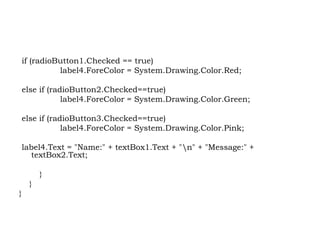
if (radioButton1.Checked == true)
label4.ForeColor = System.Drawing.Color.Red;
else if (radioButton2.Checked==true)
label4.ForeColor = System.Drawing.Color.Green;
else if (radioButton3.Checked==true)
label4.ForeColor = System.Drawing.Color.Pink;
label4.Text = "Name:" + textBox1.Text + "n" + "Message:" +
textBox2.Text;
}
}
}
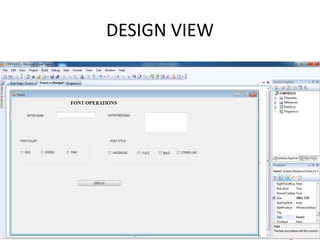
DESIGN VIEW
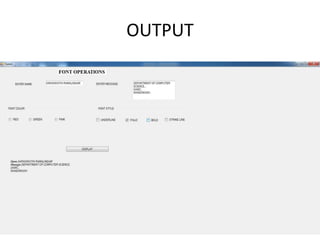
OUTPUT

PROGRAMMING USING C# .NET - SARASWATHI RAMALINGAM

  • 1.
    PROGRAMMING USING C# LABMANUAL SARASWATHI RAMALINGAM SRI AKILANDESWARI WOMENS COLLEGE THIRUVALLUVAR UNIVERSITY
  • 2.
    Windows Form Controls(Label, Text, Button, Check Box, Radio) using System; using System.Collections.Generic; using System.ComponentModel; using System.Data; using System.Drawing; using System.Linq; using System.Text; using System.Windows.Forms; namespace CONTROLS1 { public partial class Form1 : Form { public Form1() { InitializeComponent(); }
  • 3.
    private void button1_Click(objectsender, EventArgs e) { if (checkBox1.Checked == true) label4.Font = new Font(label4.Font, FontStyle.Bold); if (checkBox2.Checked == true) label4.Font = new Font(label4.Font, FontStyle.Italic); if (checkBox3.Checked == true) label4.Font = new Font(label4.Font, FontStyle.Underline); if (checkBox4.Checked == true) label4.Font = new Font(label4.Font, FontStyle.Strikeout);
  • 4.
    if (radioButton1.Checked ==true) label4.ForeColor = System.Drawing.Color.Red; else if (radioButton2.Checked==true) label4.ForeColor = System.Drawing.Color.Green; else if (radioButton3.Checked==true) label4.ForeColor = System.Drawing.Color.Pink; label4.Text = "Name:" + textBox1.Text + "n" + "Message:" + textBox2.Text; } } }
  • 5.
  • 6.