Programming Laboratory
Java(PCCO3060L)
Unit 1
Introduction to Object Oriented Programming
Prof. Swapnil H. Chaudhari
Computer Engineering Department,
R.C.Patel Institute of Technology, Shirpur
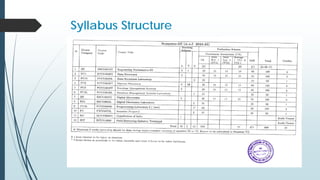
Syllabus Structure
Outline
 INTRODUCTION
 PRINCIPLES OF OBJECT-ORIENTED LANGUAGES
 Classes
 Objects
 Abstraction
 Inheritance
 Encapsulation
 Polymorphism
 JAVA ESSENTIALS
 JAVA VIRTUAL MACHINE
 JAVA FEATURES
 BASIC CONSTRUCT/ NOTIONS
 Constant , Variable and Data types, Operators and expression
 Revision of Branching and looing
INTRODUCTION
 What Is Object Oriented Programming ?
 Object-oriented programming (OOP) is a computer programming
model that organizes software design around data, or objects, rather
than functions and logic.
OR
 Object-oriented programming is a method of implementation in which
programs are organized as cooperative collections of objects, each of
which represents an instance of some class, and whose classes are all
members of a hierarchy of classes united via inheritance relationships.
- Grady Booch
PRINCIPLES OF OBJECT-ORIENTED
LANGUAGES
Classes
Objects
Abstraction
Inheritance
Encapsulation
Polymorphism
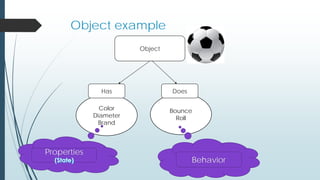
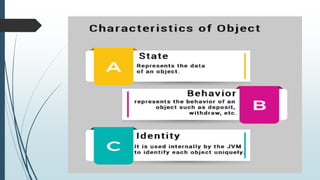
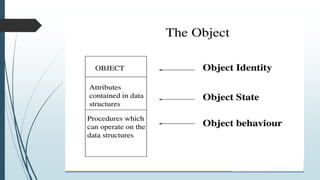
What Is Object ?
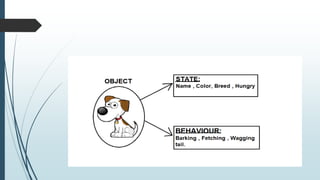
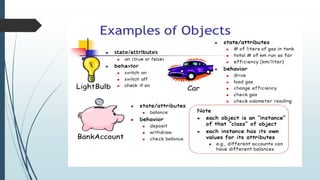
 An object is a real-world entity that has attributes, behavior, and
properties. It is referred to as an instance of the class.
 It contains member functions, variables that we have defined in
the class.
 It occupies space in the memory.
 Different objects have different states or attributes, and behaviors.
 Object are the basic run-time entities in an object-oriented system.
 They may represent a person, a place ,a bank account, a table of
data or any item that the program has to handle.
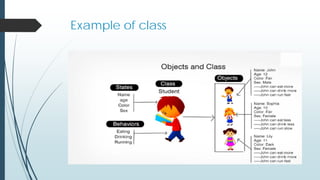
Attributes :
 Every object has some attribute different types of
objects contain different attributes or characteristics.
 Example
 The student are name, roll number , subject The attribute for car
would be color, engine power , number of seats etc.
 Attribute are real world are like data they have some
specific value Raj(for name) or 23 (roll number).
Behavior :
 Behavior defines what can be done with the objects and may manipulate
the attributes of an object
Example,
 if a manager orders an employee to do some task, then he responds either
by doing it or not doing it.
 The wings of a fan start moving only when the fan is switched ON.
 Behavior actually determines the way an object interacts with other
objects.
Object example
Object
Color
Diameter
Brand
Has
Properties
Bounce
Roll
Does
Behavior
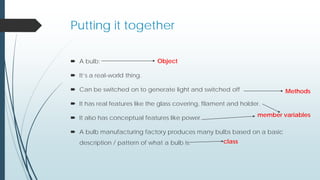
Putting it together
 A bulb:
 It’s a real-world thing.
 Can be switched on to generate light and switched off
 It has real features like the glass covering, filament and holder.
 It also has conceptual features like power.
 A bulb manufacturing factory produces many bulbs based on a basic
description / pattern of what a bulb is.
Object
Methods
member variables
class
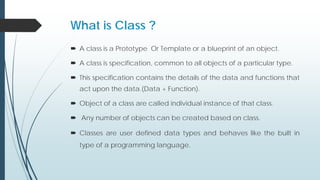
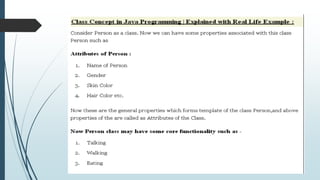
What is Class ?
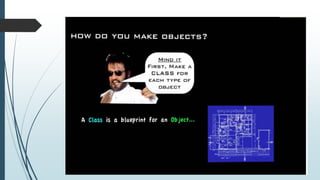
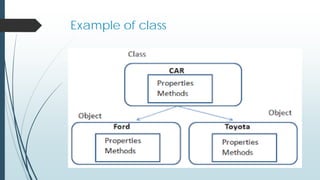
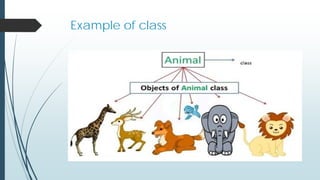
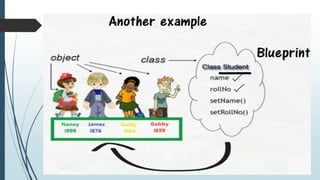
 A class is a Prototype Or Template or a blueprint of an object.
 A class is specification, common to all objects of a particular type.
 This specification contains the details of the data and functions that
act upon the data.(Data + Function).
 Object of a class are called individual instance of that class.
 Any number of objects can be created based on class.
 Classes are user defined data types and behaves like the built in
type of a programming language.
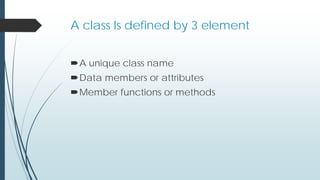
A class Is defined by 3 element
A unique class name
Data members or attributes
Member functions or methods
Example of class
Example of class
Example of class
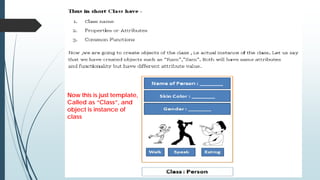
Now this is just template,
Called as “Class”, and
object is instance of
class
Abstraction
 Abstraction is a process of hiding the implementation details and showing
only functionality to the user.
 For example, when we are driving a car, we are only concerned about
driving the car like start/stop the car, accelerate/ break, etc. We are not
concerned about how the actual start/stop mechanism or
accelerate/brake process works internally. We are just not interested in
those details.
 Abstraction reduces the programming efforts and thereby the complexity.
An end-user using the application need not be concerned about how a
particular feature is implemented. He/she can just use the features as
required.
Abstraction
 In abstraction, we deal with ideas and not the events. This means that we
hide the implementation details from the user and expose only the
functionality to the end-user. Thereby the user will only know “what it does”
rather than “how it does”.
 Java provides a non-access modifier “abstract” for implementing
abstraction. This abstract modifier can be used with classes and methods
but not variables.
 The interface provides complete abstraction i.e. it only provides method
prototypes and not their implementation.
Abstraction in OOP can be of two types.
 Data Abstraction
 In data abstraction, we mostly create complex data types and hide their
implementation. We only expose the operations to manipulate these data types
without going into the details of their implementation.
 One advantage of this approach is that we can change the implementation
anytime without changing the behavior that is exposed to the user.
 Control Abstraction
 Control abstraction collects all the control statements that are a part of the
application and exposes them as a unit. This feature is used when we have to
perform a working feature using this control unit.
Abstraction Example
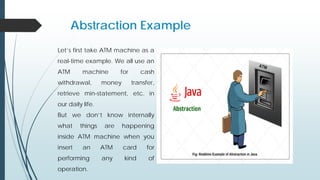
Let’s first take ATM machine as a
real-time example. We all use an
ATM machine for cash
withdrawal, money transfer,
retrieve min-statement, etc. in
our daily life.
But we don’t know internally
what things are happening
inside ATM machine when you
insert an ATM card for
performing any kind of
operation.
Abstraction Example
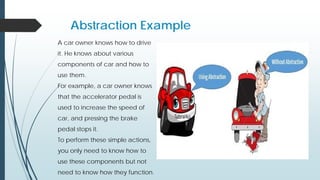
A car owner knows how to drive
it. He knows about various
components of car and how to
use them.
For example, a car owner knows
that the accelerator pedal is
used to increase the speed of
car, and pressing the brake
pedal stops it.
To perform these simple actions,
you only need to know how to
use these components but not
need to know how they function.
Abstraction Example
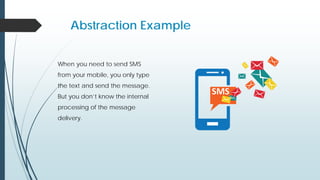
When you need to send SMS
from your mobile, you only type
the text and send the message.
But you don’t know the internal
processing of the message
delivery.
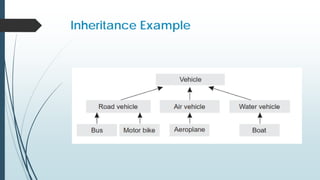
Inheritance
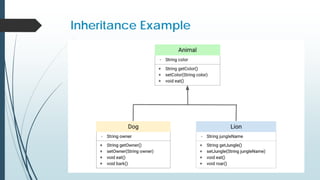
 Inheritance is the process by which objects of one class
acquire the properties of objects of another class.
 It supports the concept of hierarchical classification.
 Inheritance is a compile-time mechanism in Java that
allows you to extend a class (called the that allows you
to extend a class (called the base class or superclass) 
with another class (called the derived class or subclass)
or
Inheritance
 The mechanism of deriving a class from another existing class is called as
inheritance .
 Access specifies:- public, protected ,private, default.
Inheritance Example
Inheritance Example
Encapsulation
 Encapsulation is one of the features of object-oriented methodology. The
process of binding the data procedures into objects to hide them from the
outside world is called encapsulation
 In other words, encapsulation is a programming technique that binds the
class members (variables and methods) together and prevents them from
being accessed by other classes.
 Thereby, we can keep variables and methods safes from outside
interference and misuse.
 Every Java class is an example of encapsulation because we write
everything within the class only that binds variables and methods together
and hides their complexity from other classes.
Encapsulation Example
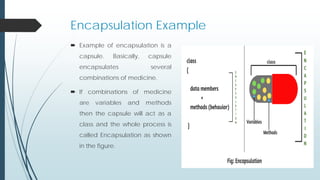
 Example of encapsulation is a
capsule. Basically, capsule
encapsulates several
combinations of medicine.
 If combinations of medicine
are variables and methods
then the capsule will act as a
class and the whole process is
called Encapsulation as shown
in the figure.
Real-time Example of Encapsulation in Java
 School bag is one of the most real examples of Encapsulation. School bag can
keep our books, pens, etc.
 When you log into your email accounts such as Gmail, Yahoo Mail, or Rediff
mail, there is a lot of internal processes taking place in the backend and you
have no control over it.
 Suppose you have an account in the bank. If your balance variable is declared
as a public variable in the bank software, your account balance will be known
as public, In this case, anyone can know your account balance. So, would you
like it? Obviously No.
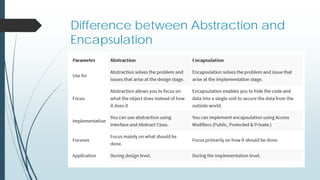
Difference between Abstraction and
Encapsulation
Polymorphism
 The word polymorphism is derived from two Greek words: poly and
morphs. The word “poly” implies many and “morphs” means forms.
 Therefore, polymorphism means “many forms”. That is one thing that
can take many forms.
 Polymorphism is a concept by which we can perform a single task in
different ways. That is, when a single entity behaves differently in
different cases, it is called polymorphism in Java.
Real-time Example of Polymorphism in Java
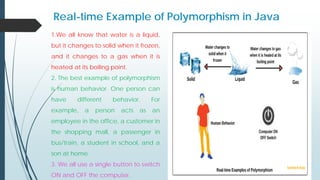
1.We all know that water is a liquid,
but it changes to solid when it frozen,
and it changes to a gas when it is
heated at its boiling point.
2. The best example of polymorphism
is human behavior. One person can
have different behavior. For
example, a person acts as an
employee in the office, a customer in
the shopping mall, a passenger in
bus/train, a student in school, and a
son at home.
3. We all use a single button to switch
ON and OFF the computer.
Features of Java
 Platform Independence
 Object Oriented
 Both Compiled and Interpreted
 Java is Robust
 JAVA Language Security Features
 Java is Multithreaded
 Other Features
 Automatic Memory Management
 Dynamic Binding
Platform Independence
 Compiler converts source code to bytecode and then the JVM executes
the bytecode generated by the compiler. This bytecode can run on any
platform be it Windows, Linux, or macOS which means if we compile a
program on Windows, then we can run it on Linux and vice versa. Each
operating system has a different JVM, but the output produced by all the
OS is the same after the execution of bytecode. That is why we call java a
platform-independent language.
Object Oriented
 It is conceived that Java is a pure object-oriented language, meaning that
the outermost level of data structure in Java is the object.
 Everything in Java (constants, variables, and methods) are defined inside a
class and accessed through objects.
 Java has been developed in a way that it allows the user to not only learn
object-oriented programming but to apply and practice it.
 But there are some constraints that violate the purity of Java. It was
designed mainly for OOP, but with some procedural elements. For
example, Java supports primitive data types that are not objects.
Both Compiled and Interpreted
 Interpretation:
 An interpreter reads one line of a program and executes it before going to the next
line.
 The line is parsed to its smallest operations, the corresponding machine-level code is
found, and then the instruction is executed.
 In interpretation, there are no intermediate steps between writing/modifying the
code and running it. The best part is: debugging is fast. Also, the programs are easily
transportable to other platforms (if an interpreter is available). The drawback is its
slow performance.
Both Compiled and Interpreted
 Compilation:
 The program text file is first converted to native machine code with a program called
a compiler.
 A linker may also be required to connect together multiple code files together. The
output of the compiler is an executable code. C and C++ are both compiled
languages.
 The compiler can perform certain optimization operations because it looks at the
program as a whole and not line by line.
 The disadvantages include slower debugging and reduced portability to other
platforms. The source code must be recompiled on the destination platform.
Java is Robust
 Java language is robust which means reliable.
 It is developed in such a way that it puts a lot of effort into checking
errors as early as possible, that is why the java compiler is able to
detect even those errors that are not easy to detect by another
programming language.
 The main features of java that make it robust are garbage
collection, Exception Handling, and memory allocation.
JAVA Language Security Features
 Java has several language features that protect the integrity of the security
system and prevent several common attacks.
 Security Through Definition Java is strict in its definition of the language:
 All primitive data types in the language have a specific size.
 All operations are defined to be performed in a specific order.
 Security Through Lack of Pointer Arithmetic
 Java does not have pointer arithmetic, so Java programmers cannot forge a pointer
to memory. All methods and instance variables are referred to with their symbolic
names. Users cannot write a code that interprets system variables or accesses private
information stored in a system.
 Security Through Garbage Collection
 Garbage collection makes Java programs more secure and robust by automatically
freeing memory, once it is no longer needed.
Java is Multithreaded
 A thread can be loosely defined as a separate stream of execution that takes
place simultaneously and independent of everything else that might be
happening.
 Threads are independent parts of a process that run concurrently. Using
threads, a program cannot hold the CPU for a long duration intentionally (e.g.
infinite loop).
 The beauty of multithreading is that the other tasks that are not stuck in the loop
can continue processing without having to wait for the stuck task to finish.
 Threads in Java can place locks on shared resources so that while one thread is
using it, no other
 thread is allowed to access it. This is achieved with the help of synchronization.
Java Programming Constructs
 VARIABLES
 PRIMITIVE DATA TYPES
 IDENTIFIER
 Rules for Naming
 Keywords
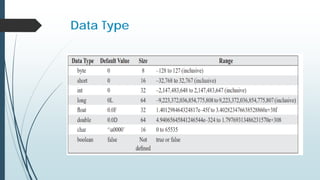
 Data Type
 OPERATORS
 FLOW OF CONTROL
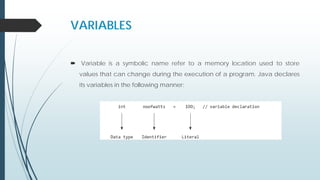
VARIABLES
 Variable is a symbolic name refer to a memory location used to store
values that can change during the execution of a program. Java declares
its variables in the following manner:
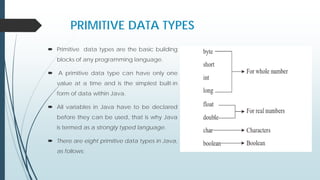
PRIMITIVE DATA TYPES
 Primitive data types are the basic building
blocks of any programming language.
 A primitive data type can have only one
value at a time and is the simplest built-in
form of data within Java.
 All variables in Java have to be declared
before they can be used, that is why Java
is termed as a strongly typed language.
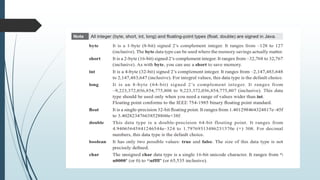
 There are eight primitive data types in Java,
as follows:
IDENTIFIER
 Identifiers are names assigned to variables, constants, methods, classes,
packages, and interfaces.
 No limit has been specified for the length of a variable name.
 Identifiers can have letters, numbers, underscores, and any currency
symbol.
 However they may only begin with a letter, underscore, or a dollar sign.
Digits cannot be the first character in an identifier.
Rules for Naming
 The first character of an identifier must be a letter, an underscore, or a
dollar sign ($).
 The subsequent characters can be a letter, an underscore, dollar sign, or a
digit. Note that white spaces are not allowed within identifiers.
 Identifiers are case-sensitive. This means that Total Price and total price are
different identifiers.
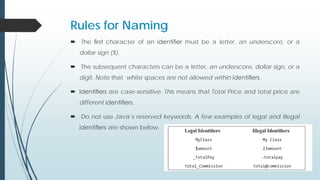
 Do not use Java’s reserved keywords. A few examples of legal and illegal
identifiers are shown below.
Naming Convention
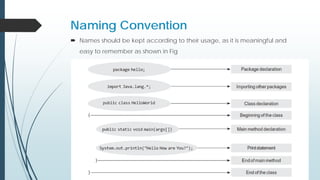
 Names should be kept according to their usage, as it is meaningful and
easy to remember as shown in Fig
Class or Interface Identifiers
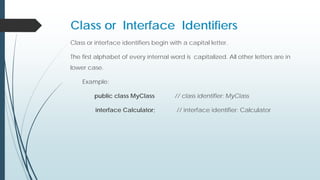
Class or interface identifiers begin with a capital letter.
The first alphabet of every internal word is capitalized. All other letters are in
lower case.
Example:
public class MyClass // class identifier: MyClass
interface Calculator; // interface identifier: Calculator
Variable or Method Identifiers
 Variable or Method Identifiers start with a lower-case letter. The first
alphabet of every internal word is capitalized. All other letters are in lower
case.
example
int totalPay; // variable identifier: totalPay
MyClass.showResult(); // MyClass is the Class Name and showResult()
is a method of MyClass.
Constant Identifiers
 Constant Identifiers These are specified in upper case. Underscores are
used to separate internal words.
example
final double TAX_RATE = 0.05; // constant identifier: TAX_RATE
Package Identifiers
 Package Identifiers These consist of all lower-case letters.
package mypackage.subpackage.subpackage; //Package Declaration
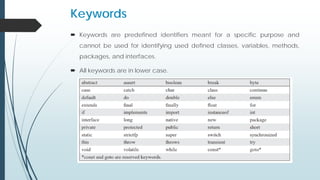
Keywords
 Keywords are predefined identifiers meant for a specific purpose and
cannot be used for identifying used defined classes, variables, methods,
packages, and interfaces.
 All keywords are in lower case.
Data Type
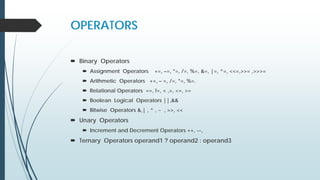
OPERATORS
 Binary Operators
 Assignment Operators +=, –=, *=, /=, %=, &=, |=, ^=, <<=,>>= ,>>>=
 Arithmetic Operators +=, – =, /=, *=, %=.
 Relational Operators ==, !=, < ,>, <=, >=
 Boolean Logical Operators ||,&&
 Bitwise Operators &,| , ^ , ~ , >>, <<
 Unary Operators
 Increment and Decrement Operators ++, --,
 Ternary Operators operand1 ? operand2 : operand3
FLOW OF CONTROL
 Control flow statements help programmers make decisions about which
statements to execute and to change the flow of execution in a program.
 The four categories of control flow statements available in Java are
conditional statement, loops, exception, and branch.
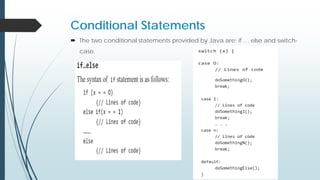
Conditional Statements
 The two conditional statements provided by Java are: if … else and switch-
case.
Loops
 The purpose of loop statements is to execute Java statements many times.
There are three types of loops in Java—
 for
 while
 do ..while
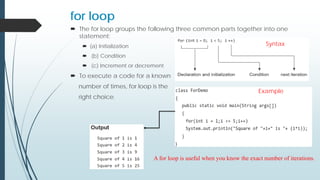
for loop
 The for loop groups the following three common parts together into one
statement:
 (a) Initialization
 (b) Condition
 (c) Increment or decrement
 To execute a code for a known
number of times, for loop is the
right choice.
Syntax
Example
A for loop is useful when you know the exact number of iterations.
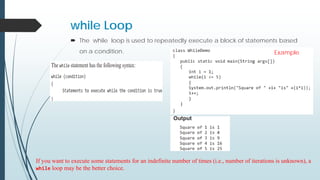
while Loop
 The while loop is used to repeatedly execute a block of statements based
on a condition.
If you want to execute some statements for an indefinite number of times (i.e., number of iterations is unknown), a
while loop may be the better choice.
Example
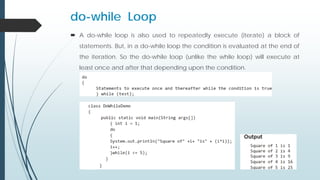
do-while Loop
 A do-while loop is also used to repeatedly execute (iterate) a block of
statements. But, in a do-while loop the condition is evaluated at the end of
the iteration. So the do-while loop (unlike the while loop) will execute at
least once and after that depending upon the condition.
Branching Mechanism
 Java does not offer a go to type of statement as in some older languages,
because it leads to unreadable code.
 However, Java supports other ways to jump from one statement to another.
 Two types of branching statements are available in Java— break and
continue.
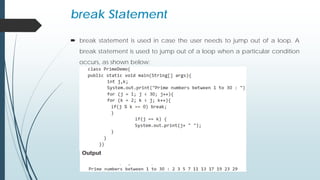
break Statement
 break statement is used in case the user needs to jump out of a loop. A
break statement is used to jump out of a loop when a particular condition
occurs, as shown below:
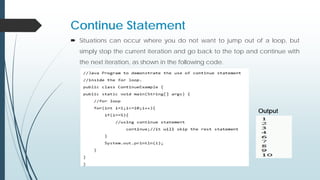
Continue Statement
 Situations can occur where you do not want to jump out of a loop, but
simply stop the current iteration and go back to the top and continue with
the next iteration, as shown in the following code.
Output

Programming Laboratory Unit 1.pdf

  • 1.
    Programming Laboratory Java(PCCO3060L) Unit 1 Introductionto Object Oriented Programming Prof. Swapnil H. Chaudhari Computer Engineering Department, R.C.Patel Institute of Technology, Shirpur
  • 2.
  • 3.
    Outline  INTRODUCTION  PRINCIPLESOF OBJECT-ORIENTED LANGUAGES  Classes  Objects  Abstraction  Inheritance  Encapsulation  Polymorphism  JAVA ESSENTIALS  JAVA VIRTUAL MACHINE  JAVA FEATURES  BASIC CONSTRUCT/ NOTIONS  Constant , Variable and Data types, Operators and expression  Revision of Branching and looing
  • 4.
    INTRODUCTION  What IsObject Oriented Programming ?  Object-oriented programming (OOP) is a computer programming model that organizes software design around data, or objects, rather than functions and logic. OR  Object-oriented programming is a method of implementation in which programs are organized as cooperative collections of objects, each of which represents an instance of some class, and whose classes are all members of a hierarchy of classes united via inheritance relationships. - Grady Booch
  • 5.
  • 6.
    What Is Object?  An object is a real-world entity that has attributes, behavior, and properties. It is referred to as an instance of the class.  It contains member functions, variables that we have defined in the class.  It occupies space in the memory.  Different objects have different states or attributes, and behaviors.  Object are the basic run-time entities in an object-oriented system.  They may represent a person, a place ,a bank account, a table of data or any item that the program has to handle.
  • 7.
    Attributes :  Everyobject has some attribute different types of objects contain different attributes or characteristics.  Example  The student are name, roll number , subject The attribute for car would be color, engine power , number of seats etc.  Attribute are real world are like data they have some specific value Raj(for name) or 23 (roll number).
  • 8.
    Behavior :  Behaviordefines what can be done with the objects and may manipulate the attributes of an object Example,  if a manager orders an employee to do some task, then he responds either by doing it or not doing it.  The wings of a fan start moving only when the fan is switched ON.  Behavior actually determines the way an object interacts with other objects.
  • 9.
  • 12.
    Putting it together A bulb:  It’s a real-world thing.  Can be switched on to generate light and switched off  It has real features like the glass covering, filament and holder.  It also has conceptual features like power.  A bulb manufacturing factory produces many bulbs based on a basic description / pattern of what a bulb is. Object Methods member variables class
  • 15.
    What is Class?  A class is a Prototype Or Template or a blueprint of an object.  A class is specification, common to all objects of a particular type.  This specification contains the details of the data and functions that act upon the data.(Data + Function).  Object of a class are called individual instance of that class.  Any number of objects can be created based on class.  Classes are user defined data types and behaves like the built in type of a programming language.
  • 17.
    A class Isdefined by 3 element A unique class name Data members or attributes Member functions or methods
  • 18.
  • 19.
  • 20.
  • 22.
    Now this isjust template, Called as “Class”, and object is instance of class
  • 24.
    Abstraction  Abstraction isa process of hiding the implementation details and showing only functionality to the user.  For example, when we are driving a car, we are only concerned about driving the car like start/stop the car, accelerate/ break, etc. We are not concerned about how the actual start/stop mechanism or accelerate/brake process works internally. We are just not interested in those details.  Abstraction reduces the programming efforts and thereby the complexity. An end-user using the application need not be concerned about how a particular feature is implemented. He/she can just use the features as required.
  • 25.
    Abstraction  In abstraction,we deal with ideas and not the events. This means that we hide the implementation details from the user and expose only the functionality to the end-user. Thereby the user will only know “what it does” rather than “how it does”.  Java provides a non-access modifier “abstract” for implementing abstraction. This abstract modifier can be used with classes and methods but not variables.  The interface provides complete abstraction i.e. it only provides method prototypes and not their implementation.
  • 26.
    Abstraction in OOPcan be of two types.  Data Abstraction  In data abstraction, we mostly create complex data types and hide their implementation. We only expose the operations to manipulate these data types without going into the details of their implementation.  One advantage of this approach is that we can change the implementation anytime without changing the behavior that is exposed to the user.  Control Abstraction  Control abstraction collects all the control statements that are a part of the application and exposes them as a unit. This feature is used when we have to perform a working feature using this control unit.
  • 27.
    Abstraction Example Let’s firsttake ATM machine as a real-time example. We all use an ATM machine for cash withdrawal, money transfer, retrieve min-statement, etc. in our daily life. But we don’t know internally what things are happening inside ATM machine when you insert an ATM card for performing any kind of operation.
  • 28.
    Abstraction Example A carowner knows how to drive it. He knows about various components of car and how to use them. For example, a car owner knows that the accelerator pedal is used to increase the speed of car, and pressing the brake pedal stops it. To perform these simple actions, you only need to know how to use these components but not need to know how they function.
  • 29.
    Abstraction Example When youneed to send SMS from your mobile, you only type the text and send the message. But you don’t know the internal processing of the message delivery.
  • 30.
    Inheritance  Inheritance isthe process by which objects of one class acquire the properties of objects of another class.  It supports the concept of hierarchical classification.  Inheritance is a compile-time mechanism in Java that allows you to extend a class (called the that allows you to extend a class (called the base class or superclass) with another class (called the derived class or subclass) or
  • 31.
    Inheritance  The mechanismof deriving a class from another existing class is called as inheritance .  Access specifies:- public, protected ,private, default.
  • 32.
  • 33.
  • 34.
    Encapsulation  Encapsulation isone of the features of object-oriented methodology. The process of binding the data procedures into objects to hide them from the outside world is called encapsulation  In other words, encapsulation is a programming technique that binds the class members (variables and methods) together and prevents them from being accessed by other classes.  Thereby, we can keep variables and methods safes from outside interference and misuse.  Every Java class is an example of encapsulation because we write everything within the class only that binds variables and methods together and hides their complexity from other classes.
  • 35.
    Encapsulation Example  Exampleof encapsulation is a capsule. Basically, capsule encapsulates several combinations of medicine.  If combinations of medicine are variables and methods then the capsule will act as a class and the whole process is called Encapsulation as shown in the figure.
  • 36.
    Real-time Example ofEncapsulation in Java  School bag is one of the most real examples of Encapsulation. School bag can keep our books, pens, etc.  When you log into your email accounts such as Gmail, Yahoo Mail, or Rediff mail, there is a lot of internal processes taking place in the backend and you have no control over it.  Suppose you have an account in the bank. If your balance variable is declared as a public variable in the bank software, your account balance will be known as public, In this case, anyone can know your account balance. So, would you like it? Obviously No.
  • 37.
  • 38.
    Polymorphism  The wordpolymorphism is derived from two Greek words: poly and morphs. The word “poly” implies many and “morphs” means forms.  Therefore, polymorphism means “many forms”. That is one thing that can take many forms.  Polymorphism is a concept by which we can perform a single task in different ways. That is, when a single entity behaves differently in different cases, it is called polymorphism in Java.
  • 39.
    Real-time Example ofPolymorphism in Java 1.We all know that water is a liquid, but it changes to solid when it frozen, and it changes to a gas when it is heated at its boiling point. 2. The best example of polymorphism is human behavior. One person can have different behavior. For example, a person acts as an employee in the office, a customer in the shopping mall, a passenger in bus/train, a student in school, and a son at home. 3. We all use a single button to switch ON and OFF the computer.
  • 40.
    Features of Java Platform Independence  Object Oriented  Both Compiled and Interpreted  Java is Robust  JAVA Language Security Features  Java is Multithreaded  Other Features  Automatic Memory Management  Dynamic Binding
  • 41.
    Platform Independence  Compilerconverts source code to bytecode and then the JVM executes the bytecode generated by the compiler. This bytecode can run on any platform be it Windows, Linux, or macOS which means if we compile a program on Windows, then we can run it on Linux and vice versa. Each operating system has a different JVM, but the output produced by all the OS is the same after the execution of bytecode. That is why we call java a platform-independent language.
  • 42.
    Object Oriented  Itis conceived that Java is a pure object-oriented language, meaning that the outermost level of data structure in Java is the object.  Everything in Java (constants, variables, and methods) are defined inside a class and accessed through objects.  Java has been developed in a way that it allows the user to not only learn object-oriented programming but to apply and practice it.  But there are some constraints that violate the purity of Java. It was designed mainly for OOP, but with some procedural elements. For example, Java supports primitive data types that are not objects.
  • 43.
    Both Compiled andInterpreted  Interpretation:  An interpreter reads one line of a program and executes it before going to the next line.  The line is parsed to its smallest operations, the corresponding machine-level code is found, and then the instruction is executed.  In interpretation, there are no intermediate steps between writing/modifying the code and running it. The best part is: debugging is fast. Also, the programs are easily transportable to other platforms (if an interpreter is available). The drawback is its slow performance.
  • 44.
    Both Compiled andInterpreted  Compilation:  The program text file is first converted to native machine code with a program called a compiler.  A linker may also be required to connect together multiple code files together. The output of the compiler is an executable code. C and C++ are both compiled languages.  The compiler can perform certain optimization operations because it looks at the program as a whole and not line by line.  The disadvantages include slower debugging and reduced portability to other platforms. The source code must be recompiled on the destination platform.
  • 45.
    Java is Robust Java language is robust which means reliable.  It is developed in such a way that it puts a lot of effort into checking errors as early as possible, that is why the java compiler is able to detect even those errors that are not easy to detect by another programming language.  The main features of java that make it robust are garbage collection, Exception Handling, and memory allocation.
  • 46.
    JAVA Language SecurityFeatures  Java has several language features that protect the integrity of the security system and prevent several common attacks.  Security Through Definition Java is strict in its definition of the language:  All primitive data types in the language have a specific size.  All operations are defined to be performed in a specific order.  Security Through Lack of Pointer Arithmetic  Java does not have pointer arithmetic, so Java programmers cannot forge a pointer to memory. All methods and instance variables are referred to with their symbolic names. Users cannot write a code that interprets system variables or accesses private information stored in a system.  Security Through Garbage Collection  Garbage collection makes Java programs more secure and robust by automatically freeing memory, once it is no longer needed.
  • 47.
    Java is Multithreaded A thread can be loosely defined as a separate stream of execution that takes place simultaneously and independent of everything else that might be happening.  Threads are independent parts of a process that run concurrently. Using threads, a program cannot hold the CPU for a long duration intentionally (e.g. infinite loop).  The beauty of multithreading is that the other tasks that are not stuck in the loop can continue processing without having to wait for the stuck task to finish.  Threads in Java can place locks on shared resources so that while one thread is using it, no other  thread is allowed to access it. This is achieved with the help of synchronization.
  • 48.
    Java Programming Constructs VARIABLES  PRIMITIVE DATA TYPES  IDENTIFIER  Rules for Naming  Keywords  Data Type  OPERATORS  FLOW OF CONTROL
  • 49.
    VARIABLES  Variable isa symbolic name refer to a memory location used to store values that can change during the execution of a program. Java declares its variables in the following manner:
  • 50.
    PRIMITIVE DATA TYPES Primitive data types are the basic building blocks of any programming language.  A primitive data type can have only one value at a time and is the simplest built-in form of data within Java.  All variables in Java have to be declared before they can be used, that is why Java is termed as a strongly typed language.  There are eight primitive data types in Java, as follows:
  • 52.
    IDENTIFIER  Identifiers arenames assigned to variables, constants, methods, classes, packages, and interfaces.  No limit has been specified for the length of a variable name.  Identifiers can have letters, numbers, underscores, and any currency symbol.  However they may only begin with a letter, underscore, or a dollar sign. Digits cannot be the first character in an identifier.
  • 53.
    Rules for Naming The first character of an identifier must be a letter, an underscore, or a dollar sign ($).  The subsequent characters can be a letter, an underscore, dollar sign, or a digit. Note that white spaces are not allowed within identifiers.  Identifiers are case-sensitive. This means that Total Price and total price are different identifiers.  Do not use Java’s reserved keywords. A few examples of legal and illegal identifiers are shown below.
  • 54.
    Naming Convention  Namesshould be kept according to their usage, as it is meaningful and easy to remember as shown in Fig
  • 55.
    Class or InterfaceIdentifiers Class or interface identifiers begin with a capital letter. The first alphabet of every internal word is capitalized. All other letters are in lower case. Example: public class MyClass // class identifier: MyClass interface Calculator; // interface identifier: Calculator
  • 56.
    Variable or MethodIdentifiers  Variable or Method Identifiers start with a lower-case letter. The first alphabet of every internal word is capitalized. All other letters are in lower case. example int totalPay; // variable identifier: totalPay MyClass.showResult(); // MyClass is the Class Name and showResult() is a method of MyClass.
  • 57.
    Constant Identifiers  ConstantIdentifiers These are specified in upper case. Underscores are used to separate internal words. example final double TAX_RATE = 0.05; // constant identifier: TAX_RATE
  • 58.
    Package Identifiers  PackageIdentifiers These consist of all lower-case letters. package mypackage.subpackage.subpackage; //Package Declaration
  • 59.
    Keywords  Keywords arepredefined identifiers meant for a specific purpose and cannot be used for identifying used defined classes, variables, methods, packages, and interfaces.  All keywords are in lower case.
  • 60.
  • 61.
    OPERATORS  Binary Operators Assignment Operators +=, –=, *=, /=, %=, &=, |=, ^=, <<=,>>= ,>>>=  Arithmetic Operators +=, – =, /=, *=, %=.  Relational Operators ==, !=, < ,>, <=, >=  Boolean Logical Operators ||,&&  Bitwise Operators &,| , ^ , ~ , >>, <<  Unary Operators  Increment and Decrement Operators ++, --,  Ternary Operators operand1 ? operand2 : operand3
  • 62.
    FLOW OF CONTROL Control flow statements help programmers make decisions about which statements to execute and to change the flow of execution in a program.  The four categories of control flow statements available in Java are conditional statement, loops, exception, and branch.
  • 63.
    Conditional Statements  Thetwo conditional statements provided by Java are: if … else and switch- case.
  • 64.
    Loops  The purposeof loop statements is to execute Java statements many times. There are three types of loops in Java—  for  while  do ..while
  • 65.
    for loop  Thefor loop groups the following three common parts together into one statement:  (a) Initialization  (b) Condition  (c) Increment or decrement  To execute a code for a known number of times, for loop is the right choice. Syntax Example A for loop is useful when you know the exact number of iterations.
  • 66.
    while Loop  Thewhile loop is used to repeatedly execute a block of statements based on a condition. If you want to execute some statements for an indefinite number of times (i.e., number of iterations is unknown), a while loop may be the better choice. Example
  • 67.
    do-while Loop  Ado-while loop is also used to repeatedly execute (iterate) a block of statements. But, in a do-while loop the condition is evaluated at the end of the iteration. So the do-while loop (unlike the while loop) will execute at least once and after that depending upon the condition.
  • 68.
    Branching Mechanism  Javadoes not offer a go to type of statement as in some older languages, because it leads to unreadable code.  However, Java supports other ways to jump from one statement to another.  Two types of branching statements are available in Java— break and continue.
  • 69.
    break Statement  breakstatement is used in case the user needs to jump out of a loop. A break statement is used to jump out of a loop when a particular condition occurs, as shown below:
  • 70.
    Continue Statement  Situationscan occur where you do not want to jump out of a loop, but simply stop the current iteration and go back to the top and continue with the next iteration, as shown in the following code. Output