Productionizing Python ML
Models using Fusion 5
A N D Y L I U – S E N I O R D ATA E N G I N E E R , L U C I D W O R K S
S A N K E T S H A H A N E – D ATA S C I E N T I S T, L U C I D W O R K S
Agenda
• Introducing Native Python model serving in Fusion 5.0
• Native Python model serving in action
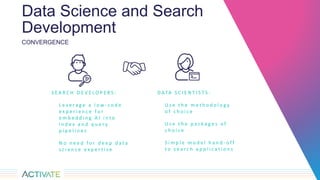
Data Science and Search
Development
D ATA S C I E N T I S T S :
U s e t h e m e t h o d o l o g y
o f c h o i c e
U s e t h e p a c k a g e s o f
c h o i c e
S i m p l e m o d e l h a n d - o f f
t o s e a r c h a p p l i c a t i o n s
CONVERGENCE
S E A R C H D E V E L O P E R S :
L e v e r a g e a l o w - c o d e
e x p e r i e n c e f o r
e m b e d d i n g A I i n t o
i n d e x a n d q u e r y
p i p e l i n e s
N o n e e d f o r d e e p d a t a
s c i e n c e e x p e r t i s e
Can I use my own…
…model with
Fusion?
YES!!
Introducing native Python model serving in Fusion 5.0
• Real-time ML model serving using native Python
– Just for model serving, not model training
• For data scientists who want to integrate custom trained Python machine
learning models with Fusion’s index and query pipelines
Have your cake and eat it too!
U S E Y O U R E X I S T I N G S E A R C H
D ATA C O L L E C T I O N S F O R
M O D E L I N G
B R I N G Y O U R O W N M O D E L
( B Y O M )
O P E N I N T E G R AT I O N T H R O U G H
F U S I O N M L M I C R O S E R V I C E
L E V E R A G E S C A L A B L E S E A R C H
P L AT F O R M W I T H O P E R AT I O N A L
P I P E L I N E S
Fusion ML
Microservic
e
Architecture
Architecture
• Microservices architecture running in K8s
• Exposes endpoints for adding, updating,
and deleting user-defined models, running
predictions
• Data Science Integration Toolkit includes
client library for ease of use
Architecture
Architectural Goals
Building a runtime Python model execution environment
• Extensible
– Pluggable API for data scientists to add data processing and modeling code
• Scalable
– Leverages modern technologies like GRPC and K8s for performance at scale
• Flexible
– Simple yet flexible API to support different kinds of machine learning models
• Integrated
– Fully integrated with Fusion’s Index and Query Pipelines
• Easy to use
– API driven with convenient Python client libraries
Process Overview
Process
Train
model
Create
plugin
Deploy &
Test
Integrate
Process
Train
model
Create
plugin
Deploy &
Test
Integrate
Model
Tokeniz
er
Embeds
Iterations
Process
Train
model
Create
plugin
Deploy &
Test
Integrate
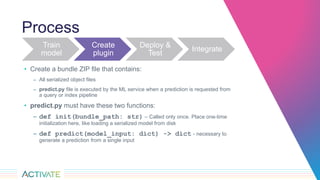
• Create a bundle ZIP file that contains:
– All serialized object files
– predict.py file is executed by the ML service when a prediction is requested from
a query or index pipeline
• predict.py must have these two functions:
– def init(bundle_path: str) – Called only once. Place one-time
initialization here, like loading a serialized model from disk
– def predict(model_input: dict) -> dict - necessary to
generate a prediction from a single input
Process
Train
model
Create
plugin
Deploy &
Test
Integrate
Fusion 5
ML SDK
API
API
Process
Train
model
Create
plugin
Deploy &
Test
Integrate
• Machine Learning Stage Properties
– Model ID
– Model input transformation script
– Model output transformation script
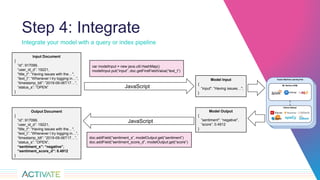
Step 4: Integrate
Integrate your model with a query or index pipeline
Model Input
{
”input": ”Having issues…",
}
Input Document
{
“id”: 917099,
“user_id_d”: 19221,
"title_t": ”Having issues with the…",
“text_t”: “Whenever I try logging in…”,
“timestamp_tdt”: “2019-09-06T17…”,
“status_s”: “OPEN”
}
JavaScript
Model Output
{
”sentiment": “negative",
“score”: 0.4912
}
Output Document
{
“id”: 917099,
“user_id_d”: 19221,
"title_t": ”Having issues with the…",
“text_t”: “Whenever I try logging in…”,
“timestamp_tdt”: “2019-09-06T17…”,
“status_s”: “OPEN”,
“sentiment_s”: “negative”,
“sentiment_score_d”: 0.4912
}
JavaScript
var modelInput = new java.util.HashMap()
modelInput.put(“input”, doc.getFirstFieldValue(“text_t”)
doc.addField(“sentiment_s”, modelOutput.get(“sentiment”)
doc.addField(“sentiment_score_d”, modelOutput.get(“score”)
Demo
https://www.kaggle.com/c/jigsaw-toxic-comment-classification-challenge/overview/description
Reference
Interested?
Visit https://github.com/lucidworks/fusion-data-science-toolkit
THANK YOU

Productionizing Python ML Models Using Fusion 5

  • 2.
    Productionizing Python ML Modelsusing Fusion 5 A N D Y L I U – S E N I O R D ATA E N G I N E E R , L U C I D W O R K S S A N K E T S H A H A N E – D ATA S C I E N T I S T, L U C I D W O R K S
  • 3.
    Agenda • Introducing NativePython model serving in Fusion 5.0 • Native Python model serving in action
  • 4.
    Data Science andSearch Development D ATA S C I E N T I S T S : U s e t h e m e t h o d o l o g y o f c h o i c e U s e t h e p a c k a g e s o f c h o i c e S i m p l e m o d e l h a n d - o f f t o s e a r c h a p p l i c a t i o n s CONVERGENCE S E A R C H D E V E L O P E R S : L e v e r a g e a l o w - c o d e e x p e r i e n c e f o r e m b e d d i n g A I i n t o i n d e x a n d q u e r y p i p e l i n e s N o n e e d f o r d e e p d a t a s c i e n c e e x p e r t i s e
  • 5.
    Can I usemy own… …model with Fusion?
  • 6.
    YES!! Introducing native Pythonmodel serving in Fusion 5.0 • Real-time ML model serving using native Python – Just for model serving, not model training • For data scientists who want to integrate custom trained Python machine learning models with Fusion’s index and query pipelines
  • 7.
    Have your cakeand eat it too! U S E Y O U R E X I S T I N G S E A R C H D ATA C O L L E C T I O N S F O R M O D E L I N G B R I N G Y O U R O W N M O D E L ( B Y O M ) O P E N I N T E G R AT I O N T H R O U G H F U S I O N M L M I C R O S E R V I C E L E V E R A G E S C A L A B L E S E A R C H P L AT F O R M W I T H O P E R AT I O N A L P I P E L I N E S Fusion ML Microservic e
  • 8.
  • 9.
    Architecture • Microservices architecturerunning in K8s • Exposes endpoints for adding, updating, and deleting user-defined models, running predictions • Data Science Integration Toolkit includes client library for ease of use
  • 10.
  • 11.
    Architectural Goals Building aruntime Python model execution environment • Extensible – Pluggable API for data scientists to add data processing and modeling code • Scalable – Leverages modern technologies like GRPC and K8s for performance at scale • Flexible – Simple yet flexible API to support different kinds of machine learning models • Integrated – Fully integrated with Fusion’s Index and Query Pipelines • Easy to use – API driven with convenient Python client libraries
  • 12.
  • 13.
  • 14.
  • 15.
    Process Train model Create plugin Deploy & Test Integrate • Createa bundle ZIP file that contains: – All serialized object files – predict.py file is executed by the ML service when a prediction is requested from a query or index pipeline • predict.py must have these two functions: – def init(bundle_path: str) – Called only once. Place one-time initialization here, like loading a serialized model from disk – def predict(model_input: dict) -> dict - necessary to generate a prediction from a single input
  • 16.
  • 17.
    Process Train model Create plugin Deploy & Test Integrate • MachineLearning Stage Properties – Model ID – Model input transformation script – Model output transformation script
  • 18.
    Step 4: Integrate Integrateyour model with a query or index pipeline Model Input { ”input": ”Having issues…", } Input Document { “id”: 917099, “user_id_d”: 19221, "title_t": ”Having issues with the…", “text_t”: “Whenever I try logging in…”, “timestamp_tdt”: “2019-09-06T17…”, “status_s”: “OPEN” } JavaScript Model Output { ”sentiment": “negative", “score”: 0.4912 } Output Document { “id”: 917099, “user_id_d”: 19221, "title_t": ”Having issues with the…", “text_t”: “Whenever I try logging in…”, “timestamp_tdt”: “2019-09-06T17…”, “status_s”: “OPEN”, “sentiment_s”: “negative”, “sentiment_score_d”: 0.4912 } JavaScript var modelInput = new java.util.HashMap() modelInput.put(“input”, doc.getFirstFieldValue(“text_t”) doc.addField(“sentiment_s”, modelOutput.get(“sentiment”) doc.addField(“sentiment_score_d”, modelOutput.get(“score”)
  • 19.
  • 20.
  • 21.