TM100
Processes in Transportation
Management
.
.
PARTICIPANT HANDBOOK
INSTRUCTOR-LED TRAINING
.
Course Version: 18
Course Duration: 4 Day(s)
Material Number: 50150578
Librería ERP — Sample | libreriaerp.com/us | info@libreriaerp.com
SAP Copyrights, Trademarks and
Disclaimers
© 2022 SAP SE or an SAP affiliate company. All rights reserved.
No part of this publication may be reproduced or transmitted in any form or for any
purpose without the express permission of SAP SE or an SAP affiliate company.
SAP and other SAP products and services mentioned herein as well as their
respective logos are trademarks or registered trademarks of SAP SE (or an SAP
affiliate company) in Germany and other countries. Please see https://
www.sap.com/corporate/en/legal/copyright.html for additional trademark
information and notices.
Some software products marketed by SAP SE and its distributors contain proprietary
software components of other software vendors.
National product specifications may vary.
These materials may have been machine translated and may contain grammatical
errors or inaccuracies.
These materials are provided by SAP SE or an SAP affiliate company for
informational purposes only, without representation or warranty of any kind, and SAP
SE or its affiliated companies shall not be liable for errors or omissions with respect
to the materials. The only warranties for SAP SE or SAP affiliate company products
and services are those that are set forth in the express warranty statements
accompanying such products and services, if any. Nothing herein should be
construed as constituting an additional warranty.
In particular, SAP SE or its affiliated companies have no obligation to pursue any
course of business outlined in this document or any related presentation, or to
develop or release any functionality mentioned therein. This document, or any related
presentation, and SAP SE’s or its affiliated companies’ strategy and possible future
developments, products, and/or platform directions and functionality are all subject
to change and may be changed by SAP SE or its affiliated companies at any time for
any reason without notice. The information in this document is not a commitment,
promise, or legal obligation to deliver any material, code, or functionality. All forward-
looking statements are subject to various risks and uncertainties that could cause
actual results to differ materially from expectations. Readers are cautioned not to
place undue reliance on these forward-looking statements, which speak only as of
their dates, and they should not be relied upon in making purchasing decisions.
Librería ERP — Sample | libreriaerp.com/us | info@libreriaerp.com
© Copyright. All rights reserved. iii
Librería ERP — Sample | libreriaerp.com/us | info@libreriaerp.com
iv © Copyright. All rights reserved.
Librería ERP — Sample | libreriaerp.com/us | info@libreriaerp.com
Contents
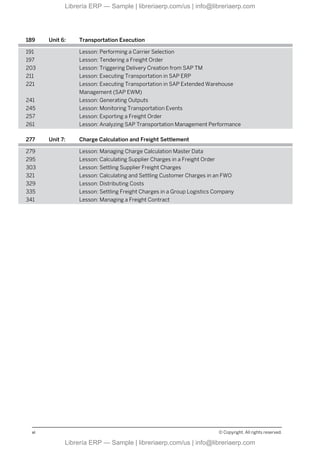
vii Course Overview
1 Unit 1: SAP Transportation Management (TM)
3 Lesson: Evaluating SAP TM
11 Lesson: Evaluating the SAP TM System Landscape
19 Unit 2: SAP TM User Interface
21 Lesson: Identifying NetWeaver Business Client (NWBC)
Components
25 Lesson: Configuring a Personal Object Worklist (POWL)
27 Lesson: Customizing the Screen Layout in SAP TM
31 Unit 3: SAP TM Master Data
33 Lesson: Identifying the Master Data Requirements for SAP TM
49 Lesson: Evaluating the Organizational Structures Used in SAP TM
57 Lesson: Defining a Condition
61 Lesson: Determining a Freight Incompatibility
65 Lesson: Determining a Dangerous Goods Shipping Requirement
77 Unit 4: Transportation Order Management
79 Lesson: Triggering the Transportation Management Process
85 Lesson: Integrating SAP ERP with SAP TM
97 Lesson: Managing the Freight Forwarding Process
107 Lesson: Booking Capacities
119 Unit 5: Transportation Planning
121 Lesson: Defining the Transportation Planning Process
129 Lesson: Viewing a Freight Unit
135 Lesson: Building a Package
141 Lesson: Defining a Selection Profile
143 Lesson: Determining a Planning Profile
149 Lesson: Accessing the Transportation Cockpit
161 Lesson: Generating a Transportation Proposal
165 Lesson: Creating a Freight Order
173 Lesson: Optimizing a Load
© Copyright. All rights reserved. v
Librería ERP — Sample | libreriaerp.com/us | info@libreriaerp.com
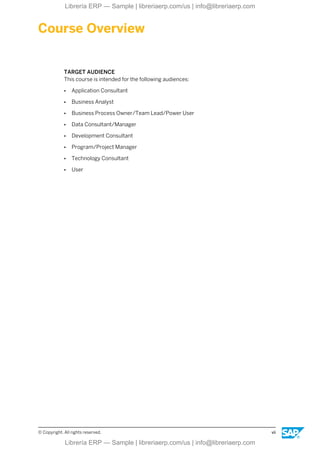
189 Unit 6: Transportation Execution
191 Lesson: Performing a Carrier Selection
197 Lesson: Tendering a Freight Order
203 Lesson: Triggering Delivery Creation from SAP TM
211 Lesson: Executing Transportation in SAP ERP
221 Lesson: Executing Transportation in SAP Extended Warehouse
Management (SAP EWM)
241 Lesson: Generating Outputs
245 Lesson: Monitoring Transportation Events
257 Lesson: Exporting a Freight Order
261 Lesson: Analyzing SAP Transportation Management Performance
277 Unit 7: Charge Calculation and Freight Settlement
279 Lesson: Managing Charge Calculation Master Data
295 Lesson: Calculating Supplier Charges in a Freight Order
303 Lesson: Settling Supplier Freight Charges
321 Lesson: Calculating and Settling Customer Charges in an FWO
329 Lesson: Distributing Costs
335 Lesson: Settling Freight Charges in a Group Logistics Company
341 Lesson: Managing a Freight Contract
vi © Copyright. All rights reserved.
Librería ERP — Sample | libreriaerp.com/us | info@libreriaerp.com
Course Overview
TARGET AUDIENCE
This course is intended for the following audiences:
● Application Consultant
● Business Analyst
● Business Process Owner/Team Lead/Power User
● Data Consultant/Manager
● Development Consultant
● Program/Project Manager
● Technology Consultant
● User
© Copyright. All rights reserved. vii
Librería ERP — Sample | libreriaerp.com/us | info@libreriaerp.com
viii © Copyright. All rights reserved.
Librería ERP — Sample | libreriaerp.com/us | info@libreriaerp.com
UNIT 1 SAP Transportation
Management (TM)
Lesson 1
Evaluating SAP TM 3
Lesson 2
Evaluating the SAP TM System Landscape 11
UNIT OBJECTIVES
● List the benefits of SAP Transportation Management
● Identify the scenarios supported for each release of SAP TM
● Explain the components of transportation planning
● Explain the components of transportation execution
● Identify the basic capabilities of SAP Transportation Management
● Explain the deployment options related to the SAP TM landscape
● Log on to the SAP system
© Copyright. All rights reserved. 1
Librería ERP — Sample | libreriaerp.com/us | info@libreriaerp.com
Unit 1: SAP Transportation Management (TM)
2 © Copyright. All rights reserved.
Librería ERP — Sample | libreriaerp.com/us | info@libreriaerp.com
Unit 1
Lesson 1
Evaluating SAP TM
LESSON OVERVIEW
Your company is considering using SAP Transportation Management (SAP TM) to manage its
transportation activities. This lesson provides you with an idea of the scope of SAP TM and
how it is integrated into a host of other SAP tools.
LESSON OBJECTIVES
After completing this lesson, you will be able to:
● List the benefits of SAP Transportation Management
● Identify the scenarios supported for each release of SAP TM
● Explain the components of transportation planning
● Explain the components of transportation execution
● Identify the basic capabilities of SAP Transportation Management
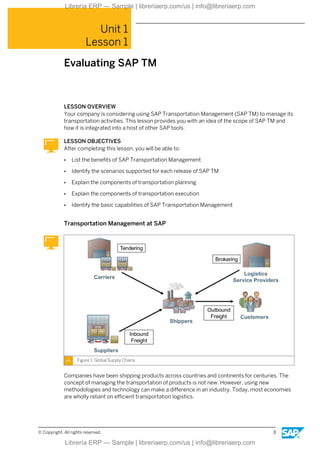
Transportation Management at SAP
Figure 1: Global Supply Chains
Companies have been shipping products across countries and continents for centuries. The
concept of managing the transportation of products is not new. However, using new
methodologies and technology can make a difference in an industry. Today, most economies
are wholly reliant on efficient transportation logistics.
© Copyright. All rights reserved. 3
Librería ERP — Sample | libreriaerp.com/us | info@libreriaerp.com
With the shift in recent years towards a global economy, crossing borders has become
commonplace. Reaching customers in more remote locations and sourcing the procurement
of product from multiple vendors or locations has increased the cost of transporting
products. As the world becomes smaller, the team tasked with maintaining logistics needs to
respond faster and more cost-effectively.
Global natural disasters and other dangers show the vulnerability of the global supply chain.
Despite these challenges, the transportation part of the supply chain, in particular, has to
solve the problems that arise in order to keep factories running and customers supplied.
Executive Decisions
The following examples are issues that key executives face:
● How can I manage my logistics network in a holistic fashion?
● How can I minimize the risk factors throughout my supply chain?
● How can I reduce my operational costs and better understand transportation costs at the
customer level?
● How can I ensure best possible usage of my assets? How do I ensure high customer
service levels and responsiveness to unexpected supply chain events?
● How do I ensure I am compliant with all the varying regulations and compliance policies?
Transportation management is never an isolated process. Rather, it is always integrated into
other business processes. If transportation management is poorly organized, this may have a
negative impact on related business processes, for example manufacturing or distribution.
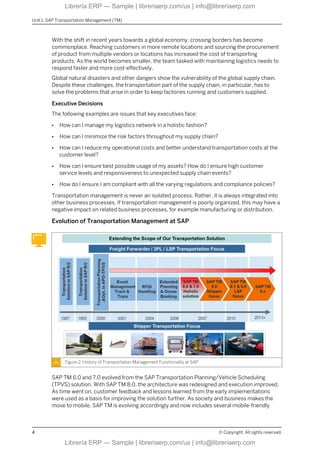
Evolution of Transportation Management at SAP
Figure 2: History of Transportation Management Functionality at SAP
SAP TM 6.0 and 7.0 evolved from the SAP Transportation Planning/Vehicle Scheduling
(TPVS) solution. With SAP TM 8.0, the architecture was redesigned and execution improved.
As time went on, customer feedback and lessons learned from the early implementations
were used as a basis for improving the solution further. As society and business makes the
move to mobile, SAP TM is evolving accordingly and now includes several mobile-friendly
Unit 1: SAP Transportation Management (TM)
4 © Copyright. All rights reserved.
Librería ERP — Sample | libreriaerp.com/us | info@libreriaerp.com
elements. For example, drivers can input updates using mobile devices and this information
can be used to update customers of possible delays. While previous iterations included
integration with Global Trade Services (GTS) and facilitated compliance, the focus more
recently has been on improving the shipper and freight forwarder elements of SAP TM.
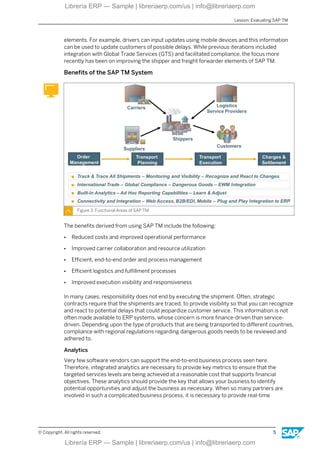
Benefits of the SAP TM System
Figure 3: Functional Areas of SAP TM
The benefits derived from using SAP TM include the following:
● Reduced costs and improved operational performance
● Improved carrier collaboration and resource utilization
● Efficient, end-to-end order and process management
● Efficient logistics and fulfillment processes
● Improved execution visibility and responsiveness
In many cases, responsibility does not end by executing the shipment. Often, strategic
contracts require that the shipments are traced, to provide visibility so that you can recognize
and react to potential delays that could jeopardize customer service. This information is not
often made available to ERP systems, whose concern is more finance-driven than service-
driven. Depending upon the type of products that are being transported to different countries,
compliance with regional regulations regarding dangerous goods needs to be reviewed and
adhered to.
Analytics
Very few software vendors can support the end-to-end business process seen here.
Therefore, integrated analytics are necessary to provide key metrics to ensure that the
targeted services levels are being achieved at a reasonable cost that supports financial
objectives. These analytics should provide the key that allows your business to identify
potential opportunities and adjust the business as necessary. When so many partners are
involved in such a complicated business process, it is necessary to provide real-time
Lesson: Evaluating SAP TM
© Copyright. All rights reserved. 5
Librería ERP — Sample | libreriaerp.com/us | info@libreriaerp.com
integration and connectivity. With SAP TM, access can be achieved through tools like Web
Access, B2B/EDI, and Mobile Plug and Play integration to SAP ERP.
This ensures accurate and timely data to all parties, to reduce decision cycle times and
improve overall visibility.
Key Features of the SAP TM System
Figure 4: Key Features of SAP TM
With SAP TM, existing SAP ERP customers can achieve integrated order processing and
management. SAP TM is delivered with out-of-the-box integration, with order-to-cash and
procure-to-pay scenarios to support timely execution updates. In addition, integrated freight
settlement with SAP ERP billing and invoicing is available for customers who want to increase
the speed at which business process cycles are executed. Additional planning features are
available to support comprehensive order management. This includes forwarding, freight
(land), and booking (sea and air) order and intermodal scenarios. This integrated
environment provides full document flow and order lifecycle management, as well as a
centralized order data management tool for planning, tendering, and so on.
Interactive and Mass Processing
With the freight planning and tendering functions, customers can perform advanced
interactive planning using the transportation cockpit. This tool allows users to see order
details and maps of transit routes. It allows planning to happen both interactively and via
mass processing. Zero click planning functions allow SAP ERP to take the order, and the SAP
TM system goes from order to carrier tendering in one smooth process, with no user
involvement.
SAP TM supports both domestic and international shipment planning, including ocean freight
booking and customs.
Unit 1: SAP Transportation Management (TM)
6 © Copyright. All rights reserved.
Librería ERP — Sample | libreriaerp.com/us | info@libreriaerp.com
Document Management
Figure 5: SAP TM End to End
As part of the integration, SAP TM supports comprehensive transportation document
management. This includes document creation, status management, printing of bills of lading
(road, sea, air), labels, forwarding instructions, and more. Scenarios for integrated logistics
and fulfillment management with SAP ERP for integrating inbound and outbound processing
are available. Your company can also tie into SAP EHS for dangerous goods handling. For
international shipping, integrated customs and compliance management with SAP GTS is
supported for export document and customs procedure processing.
The graphic gives an overview of the SAP TM document model. Depending upon the extent of
your integration and business requirements, different document types and statuses are
available. Different types of transportation requests can be made on SAP TM by the execution
or order management system. These could include freight forwarding orders (FWO), sales
order-based transportation requirements (OTR), and delivery-based transportation
requirements (DTR).
Freight Units and Freight Orders
Upon receiving transportation requirements, freight units are created and become the basic
element for planning the movement of goods through the network. The freight unit is a
transport unit used in planning. It could be a pallet or container, but it could also be two pallets
that need to be transported together, for example for customs reasons.
Freight orders will record the manual or system-generated transportation planning
(intermodal) activities. These freight orders are the result of planning, consolidation of freight
units on a vehicle, booked capacity, or scheduled means of transport. Once freight orders are
created, carrier short-term tendering works with additional business processes (objects):
Lesson: Evaluating SAP TM
© Copyright. All rights reserved. 7
Librería ERP — Sample | libreriaerp.com/us | info@libreriaerp.com
request for supplier quote, response for supplier quote. Once this has been completed,
transport order execution can be triggered and follow-on settlement processing can begin.
Business Scenarios Supported by SAP TM
Over recent years SAP has made a significant investment in designing and building a best-in-
class transportation management solution. This solution will continue to evolve as more
functionality is rolled out. Currently, the solution supports the following scenarios for shippers
and logistic service providers:
● Domestic Inbound Transportation
● Domestic Outbound Transportation
● International Inbound Logistics
● International Outbound Transportation
● Ocean Freight
● Air Freight
● Intermodal Rail Freight
● Courier Express Parcel
Order Management
The business purpose of order management is providing the ability to handle transportation
requests, which are designated as requirements or demands from an ordering system.
One of the major benefits of SAP TM is the ability to use the system integrated to SAP ERP as
the source demand system; or use it integrated with a company’s legacy order management
system; or use it as a standalone planning system. So you can see the flexibility with SAP TM
from an order management standpoint. If you choose to integrate with an SAP ERP system,
SAP TM would be integrated by means of Process Integration (PI) interfaces. Orders and
deliveries from SAP ERP can be converted into SAP TM transportation requirements
automatically. If you run SAP TM as a standalone system, LSP Forwarding Order creation is
either done by manual entry in the SAP TM UI, or integrated from a customer's system via
EDI.
You can use the Forwarding Order Management component in SAP TM to create, edit, and
confirm the forwarding orders from your ordering parties. In addition to creating the
forwarding order, you can also enter the data as a forwarding quotation and send it to the
ordering party. You can then create a forwarding order based on the forwarding quotation.
Transportation Planning
You can use the Freight Order Management component in SAP Transportation Management
(SAP TM) to create and edit freight orders and freight bookings. You use freight orders above
all for land transportation and you use freight bookings for sea and air transportation.
Freight orders and bookings are the result of transportation planning.
One of the major benefits of SAP TM is the ability to perform advanced planning activities.
Some of the tools were originally included in the Advanced Planning and Optimization solution
designed by SAP. However, it was determined that a planning and execution system was
desired to support transportation-related activities for several different industries. Some of
the planning processes delivered with SAP TM are as follows:
Unit 1: SAP Transportation Management (TM)
8 © Copyright. All rights reserved.
Librería ERP — Sample | libreriaerp.com/us | info@libreriaerp.com
● Transportation cockpit (affords visibility)
● Planning and optimization
● Carrier selection
● Order tendering
Transportation Execution
In addition to advanced planning capabilities in SAP TM, your organization can also gain the
added benefit of integration execution activities in SAP TM.
These integration tasks include the following:
● Integration with SAP Event Management (EM) for alerts and transportation tracking
● Generation of delivery documents in SAP ERP
● Generation of shipping documents in SAP ERP or (via interfaces) other systems
● Integration with dangerous goods management as part of SAP Environment, Health and
Safety (requires separate license)
● Document printing
● Integration with SAP Extended Warehouse Management (EWM)
● Application of analytics to analyze and adjust business processes
Freight Settlement
When working with customers or subcontractors it may be necessary to collect or pay fees in
relation to the movement of products. With SAP TM, it is possible to introduce a settlement
process in addition to planning and execution activities. The settlement process supports the
following:
● Ability to define transportation charges
● Definition of freight or forwarding agreements
● Generation of settlement documents
● Integration of settlement documents to SAP ERP
● Integration of customer billing to SAP ERP
LESSON SUMMARY
You should now be able to:
● List the benefits of SAP Transportation Management
● Identify the scenarios supported for each release of SAP TM
● Explain the components of transportation planning
● Explain the components of transportation execution
● Identify the basic capabilities of SAP Transportation Management
Lesson: Evaluating SAP TM
© Copyright. All rights reserved. 9
Librería ERP — Sample | libreriaerp.com/us | info@libreriaerp.com
Unit 1: SAP Transportation Management (TM)
10 © Copyright. All rights reserved.
Librería ERP — Sample | libreriaerp.com/us | info@libreriaerp.com
Unit 1
Lesson 2
Evaluating the SAP TM System Landscape
LESSON OVERVIEW
In this lesson, you will learn about the components of the SAP TM environment and
implementation scenarios.
LESSON OBJECTIVES
After completing this lesson, you will be able to:
● Explain the deployment options related to the SAP TM landscape
● Log on to the SAP system
SAP TM System Architecture
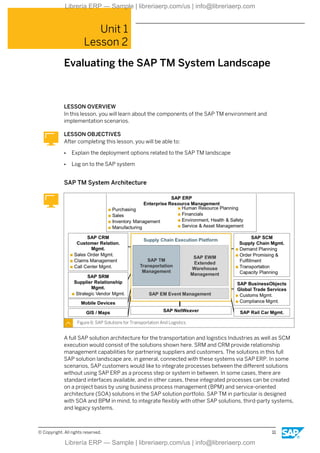
Figure 6: SAP Solutions for Transportation And Logistics
A full SAP solution architecture for the transportation and logistics Industries as well as SCM
execution would consist of the solutions shown here. SRM and CRM provide relationship
management capabilities for partnering suppliers and customers. The solutions in this full
SAP solution landscape are, in general, connected with these systems via SAP ERP. In some
scenarios, SAP customers would like to integrate processes between the different solutions
without using SAP ERP as a process step or system in between. In some cases, there are
standard interfaces available, and in other cases, these integrated processes can be created
on a project basis by using business process management (BPM) and service-oriented
architecture (SOA) solutions in the SAP solution portfolio. SAP TM in particular is designed
with SOA and BPM in mind, to integrate flexibly with other SAP solutions, third-party systems,
and legacy systems.
© Copyright. All rights reserved. 11
Librería ERP — Sample | libreriaerp.com/us | info@libreriaerp.com
SAP TM Integration Architecture
Figure 7: System Landscape Overview
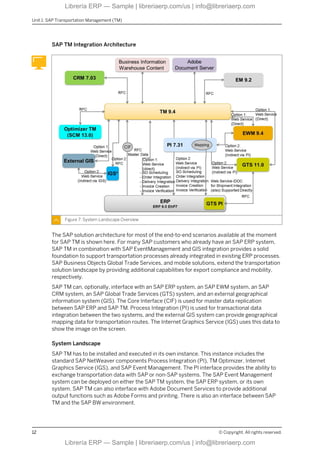
The SAP solution architecture for most of the end-to-end scenarios available at the moment
for SAP TM is shown here. For many SAP customers who already have an SAP ERP system,
SAP TM in combination with SAP EventManagement and GIS integration provides a solid
foundation to support transportation processes already integrated in existing ERP processes.
SAP Business Objects Global Trade Services, and mobile solutions, extend the transportation
solution landscape by providing additional capabilities for export compliance and mobility,
respectively.
SAP TM can, optionally, interface with an SAP ERP system, an SAP EWM system, an SAP
CRM system, an SAP Global Trade Services (GTS) system, and an external geographical
information system (GIS). The Core Interface (CIF) is used for master data replication
between SAP ERP and SAP TM. Process Integration (PI) is used for transactional data
integration between the two systems, and the external GIS system can provide geographical
mapping data for transportation routes. The Internet Graphics Service (IGS) uses this data to
show the image on the screen.
System Landscape
SAP TM has to be installed and executed in its own instance. This instance includes the
standard SAP NetWeaver components Process Integration (PI), TM Optimizer, Internet
Graphics Service (IGS), and SAP Event Management. The PI interface provides the ability to
exchange transportation data with SAP or non-SAP systems. The SAP Event Management
system can be deployed on either the SAP TM system, the SAP ERP system, or its own
system. SAP TM can also interface with Adobe Document Services to provide additional
output functions such as Adobe Forms and printing. There is also an interface between SAP
TM and the SAP BW environment.
Unit 1: SAP Transportation Management (TM)
12 © Copyright. All rights reserved.
Librería ERP — Sample | libreriaerp.com/us | info@libreriaerp.com

Processes in SAP Transportation Management, TM100 Col18

  • 1.
    TM100 Processes in Transportation Management . . PARTICIPANTHANDBOOK INSTRUCTOR-LED TRAINING . Course Version: 18 Course Duration: 4 Day(s) Material Number: 50150578 Librería ERP — Sample | libreriaerp.com/us | info@libreriaerp.com Librería ERP — Sample | libreriaerp.com/us | info@libreriaerp.com
  • 2.
    SAP Copyrights, Trademarksand Disclaimers © 2022 SAP SE or an SAP affiliate company. All rights reserved. No part of this publication may be reproduced or transmitted in any form or for any purpose without the express permission of SAP SE or an SAP affiliate company. SAP and other SAP products and services mentioned herein as well as their respective logos are trademarks or registered trademarks of SAP SE (or an SAP affiliate company) in Germany and other countries. Please see https:// www.sap.com/corporate/en/legal/copyright.html for additional trademark information and notices. Some software products marketed by SAP SE and its distributors contain proprietary software components of other software vendors. National product specifications may vary. These materials may have been machine translated and may contain grammatical errors or inaccuracies. These materials are provided by SAP SE or an SAP affiliate company for informational purposes only, without representation or warranty of any kind, and SAP SE or its affiliated companies shall not be liable for errors or omissions with respect to the materials. The only warranties for SAP SE or SAP affiliate company products and services are those that are set forth in the express warranty statements accompanying such products and services, if any. Nothing herein should be construed as constituting an additional warranty. In particular, SAP SE or its affiliated companies have no obligation to pursue any course of business outlined in this document or any related presentation, or to develop or release any functionality mentioned therein. This document, or any related presentation, and SAP SE’s or its affiliated companies’ strategy and possible future developments, products, and/or platform directions and functionality are all subject to change and may be changed by SAP SE or its affiliated companies at any time for any reason without notice. The information in this document is not a commitment, promise, or legal obligation to deliver any material, code, or functionality. All forward- looking statements are subject to various risks and uncertainties that could cause actual results to differ materially from expectations. Readers are cautioned not to place undue reliance on these forward-looking statements, which speak only as of their dates, and they should not be relied upon in making purchasing decisions. Librería ERP — Sample | libreriaerp.com/us | info@libreriaerp.com Librería ERP — Sample | libreriaerp.com/us | info@libreriaerp.com
  • 3.
    © Copyright. Allrights reserved. iii Librería ERP — Sample | libreriaerp.com/us | info@libreriaerp.com Librería ERP — Sample | libreriaerp.com/us | info@libreriaerp.com
  • 4.
    iv © Copyright.All rights reserved. Librería ERP — Sample | libreriaerp.com/us | info@libreriaerp.com Librería ERP — Sample | libreriaerp.com/us | info@libreriaerp.com
  • 5.
    Contents vii Course Overview 1Unit 1: SAP Transportation Management (TM) 3 Lesson: Evaluating SAP TM 11 Lesson: Evaluating the SAP TM System Landscape 19 Unit 2: SAP TM User Interface 21 Lesson: Identifying NetWeaver Business Client (NWBC) Components 25 Lesson: Configuring a Personal Object Worklist (POWL) 27 Lesson: Customizing the Screen Layout in SAP TM 31 Unit 3: SAP TM Master Data 33 Lesson: Identifying the Master Data Requirements for SAP TM 49 Lesson: Evaluating the Organizational Structures Used in SAP TM 57 Lesson: Defining a Condition 61 Lesson: Determining a Freight Incompatibility 65 Lesson: Determining a Dangerous Goods Shipping Requirement 77 Unit 4: Transportation Order Management 79 Lesson: Triggering the Transportation Management Process 85 Lesson: Integrating SAP ERP with SAP TM 97 Lesson: Managing the Freight Forwarding Process 107 Lesson: Booking Capacities 119 Unit 5: Transportation Planning 121 Lesson: Defining the Transportation Planning Process 129 Lesson: Viewing a Freight Unit 135 Lesson: Building a Package 141 Lesson: Defining a Selection Profile 143 Lesson: Determining a Planning Profile 149 Lesson: Accessing the Transportation Cockpit 161 Lesson: Generating a Transportation Proposal 165 Lesson: Creating a Freight Order 173 Lesson: Optimizing a Load © Copyright. All rights reserved. v Librería ERP — Sample | libreriaerp.com/us | info@libreriaerp.com Librería ERP — Sample | libreriaerp.com/us | info@libreriaerp.com
  • 6.
    189 Unit 6:Transportation Execution 191 Lesson: Performing a Carrier Selection 197 Lesson: Tendering a Freight Order 203 Lesson: Triggering Delivery Creation from SAP TM 211 Lesson: Executing Transportation in SAP ERP 221 Lesson: Executing Transportation in SAP Extended Warehouse Management (SAP EWM) 241 Lesson: Generating Outputs 245 Lesson: Monitoring Transportation Events 257 Lesson: Exporting a Freight Order 261 Lesson: Analyzing SAP Transportation Management Performance 277 Unit 7: Charge Calculation and Freight Settlement 279 Lesson: Managing Charge Calculation Master Data 295 Lesson: Calculating Supplier Charges in a Freight Order 303 Lesson: Settling Supplier Freight Charges 321 Lesson: Calculating and Settling Customer Charges in an FWO 329 Lesson: Distributing Costs 335 Lesson: Settling Freight Charges in a Group Logistics Company 341 Lesson: Managing a Freight Contract vi © Copyright. All rights reserved. Librería ERP — Sample | libreriaerp.com/us | info@libreriaerp.com Librería ERP — Sample | libreriaerp.com/us | info@libreriaerp.com
  • 7.
    Course Overview TARGET AUDIENCE Thiscourse is intended for the following audiences: ● Application Consultant ● Business Analyst ● Business Process Owner/Team Lead/Power User ● Data Consultant/Manager ● Development Consultant ● Program/Project Manager ● Technology Consultant ● User © Copyright. All rights reserved. vii Librería ERP — Sample | libreriaerp.com/us | info@libreriaerp.com Librería ERP — Sample | libreriaerp.com/us | info@libreriaerp.com
  • 8.
    viii © Copyright.All rights reserved. Librería ERP — Sample | libreriaerp.com/us | info@libreriaerp.com Librería ERP — Sample | libreriaerp.com/us | info@libreriaerp.com
  • 9.
    UNIT 1 SAPTransportation Management (TM) Lesson 1 Evaluating SAP TM 3 Lesson 2 Evaluating the SAP TM System Landscape 11 UNIT OBJECTIVES ● List the benefits of SAP Transportation Management ● Identify the scenarios supported for each release of SAP TM ● Explain the components of transportation planning ● Explain the components of transportation execution ● Identify the basic capabilities of SAP Transportation Management ● Explain the deployment options related to the SAP TM landscape ● Log on to the SAP system © Copyright. All rights reserved. 1 Librería ERP — Sample | libreriaerp.com/us | info@libreriaerp.com Librería ERP — Sample | libreriaerp.com/us | info@libreriaerp.com
  • 10.
    Unit 1: SAPTransportation Management (TM) 2 © Copyright. All rights reserved. Librería ERP — Sample | libreriaerp.com/us | info@libreriaerp.com Librería ERP — Sample | libreriaerp.com/us | info@libreriaerp.com
  • 11.
    Unit 1 Lesson 1 EvaluatingSAP TM LESSON OVERVIEW Your company is considering using SAP Transportation Management (SAP TM) to manage its transportation activities. This lesson provides you with an idea of the scope of SAP TM and how it is integrated into a host of other SAP tools. LESSON OBJECTIVES After completing this lesson, you will be able to: ● List the benefits of SAP Transportation Management ● Identify the scenarios supported for each release of SAP TM ● Explain the components of transportation planning ● Explain the components of transportation execution ● Identify the basic capabilities of SAP Transportation Management Transportation Management at SAP Figure 1: Global Supply Chains Companies have been shipping products across countries and continents for centuries. The concept of managing the transportation of products is not new. However, using new methodologies and technology can make a difference in an industry. Today, most economies are wholly reliant on efficient transportation logistics. © Copyright. All rights reserved. 3 Librería ERP — Sample | libreriaerp.com/us | info@libreriaerp.com Librería ERP — Sample | libreriaerp.com/us | info@libreriaerp.com
  • 12.
    With the shiftin recent years towards a global economy, crossing borders has become commonplace. Reaching customers in more remote locations and sourcing the procurement of product from multiple vendors or locations has increased the cost of transporting products. As the world becomes smaller, the team tasked with maintaining logistics needs to respond faster and more cost-effectively. Global natural disasters and other dangers show the vulnerability of the global supply chain. Despite these challenges, the transportation part of the supply chain, in particular, has to solve the problems that arise in order to keep factories running and customers supplied. Executive Decisions The following examples are issues that key executives face: ● How can I manage my logistics network in a holistic fashion? ● How can I minimize the risk factors throughout my supply chain? ● How can I reduce my operational costs and better understand transportation costs at the customer level? ● How can I ensure best possible usage of my assets? How do I ensure high customer service levels and responsiveness to unexpected supply chain events? ● How do I ensure I am compliant with all the varying regulations and compliance policies? Transportation management is never an isolated process. Rather, it is always integrated into other business processes. If transportation management is poorly organized, this may have a negative impact on related business processes, for example manufacturing or distribution. Evolution of Transportation Management at SAP Figure 2: History of Transportation Management Functionality at SAP SAP TM 6.0 and 7.0 evolved from the SAP Transportation Planning/Vehicle Scheduling (TPVS) solution. With SAP TM 8.0, the architecture was redesigned and execution improved. As time went on, customer feedback and lessons learned from the early implementations were used as a basis for improving the solution further. As society and business makes the move to mobile, SAP TM is evolving accordingly and now includes several mobile-friendly Unit 1: SAP Transportation Management (TM) 4 © Copyright. All rights reserved. Librería ERP — Sample | libreriaerp.com/us | info@libreriaerp.com Librería ERP — Sample | libreriaerp.com/us | info@libreriaerp.com
  • 13.
    elements. For example,drivers can input updates using mobile devices and this information can be used to update customers of possible delays. While previous iterations included integration with Global Trade Services (GTS) and facilitated compliance, the focus more recently has been on improving the shipper and freight forwarder elements of SAP TM. Benefits of the SAP TM System Figure 3: Functional Areas of SAP TM The benefits derived from using SAP TM include the following: ● Reduced costs and improved operational performance ● Improved carrier collaboration and resource utilization ● Efficient, end-to-end order and process management ● Efficient logistics and fulfillment processes ● Improved execution visibility and responsiveness In many cases, responsibility does not end by executing the shipment. Often, strategic contracts require that the shipments are traced, to provide visibility so that you can recognize and react to potential delays that could jeopardize customer service. This information is not often made available to ERP systems, whose concern is more finance-driven than service- driven. Depending upon the type of products that are being transported to different countries, compliance with regional regulations regarding dangerous goods needs to be reviewed and adhered to. Analytics Very few software vendors can support the end-to-end business process seen here. Therefore, integrated analytics are necessary to provide key metrics to ensure that the targeted services levels are being achieved at a reasonable cost that supports financial objectives. These analytics should provide the key that allows your business to identify potential opportunities and adjust the business as necessary. When so many partners are involved in such a complicated business process, it is necessary to provide real-time Lesson: Evaluating SAP TM © Copyright. All rights reserved. 5 Librería ERP — Sample | libreriaerp.com/us | info@libreriaerp.com Librería ERP — Sample | libreriaerp.com/us | info@libreriaerp.com
  • 14.
    integration and connectivity.With SAP TM, access can be achieved through tools like Web Access, B2B/EDI, and Mobile Plug and Play integration to SAP ERP. This ensures accurate and timely data to all parties, to reduce decision cycle times and improve overall visibility. Key Features of the SAP TM System Figure 4: Key Features of SAP TM With SAP TM, existing SAP ERP customers can achieve integrated order processing and management. SAP TM is delivered with out-of-the-box integration, with order-to-cash and procure-to-pay scenarios to support timely execution updates. In addition, integrated freight settlement with SAP ERP billing and invoicing is available for customers who want to increase the speed at which business process cycles are executed. Additional planning features are available to support comprehensive order management. This includes forwarding, freight (land), and booking (sea and air) order and intermodal scenarios. This integrated environment provides full document flow and order lifecycle management, as well as a centralized order data management tool for planning, tendering, and so on. Interactive and Mass Processing With the freight planning and tendering functions, customers can perform advanced interactive planning using the transportation cockpit. This tool allows users to see order details and maps of transit routes. It allows planning to happen both interactively and via mass processing. Zero click planning functions allow SAP ERP to take the order, and the SAP TM system goes from order to carrier tendering in one smooth process, with no user involvement. SAP TM supports both domestic and international shipment planning, including ocean freight booking and customs. Unit 1: SAP Transportation Management (TM) 6 © Copyright. All rights reserved. Librería ERP — Sample | libreriaerp.com/us | info@libreriaerp.com Librería ERP — Sample | libreriaerp.com/us | info@libreriaerp.com
  • 15.
    Document Management Figure 5:SAP TM End to End As part of the integration, SAP TM supports comprehensive transportation document management. This includes document creation, status management, printing of bills of lading (road, sea, air), labels, forwarding instructions, and more. Scenarios for integrated logistics and fulfillment management with SAP ERP for integrating inbound and outbound processing are available. Your company can also tie into SAP EHS for dangerous goods handling. For international shipping, integrated customs and compliance management with SAP GTS is supported for export document and customs procedure processing. The graphic gives an overview of the SAP TM document model. Depending upon the extent of your integration and business requirements, different document types and statuses are available. Different types of transportation requests can be made on SAP TM by the execution or order management system. These could include freight forwarding orders (FWO), sales order-based transportation requirements (OTR), and delivery-based transportation requirements (DTR). Freight Units and Freight Orders Upon receiving transportation requirements, freight units are created and become the basic element for planning the movement of goods through the network. The freight unit is a transport unit used in planning. It could be a pallet or container, but it could also be two pallets that need to be transported together, for example for customs reasons. Freight orders will record the manual or system-generated transportation planning (intermodal) activities. These freight orders are the result of planning, consolidation of freight units on a vehicle, booked capacity, or scheduled means of transport. Once freight orders are created, carrier short-term tendering works with additional business processes (objects): Lesson: Evaluating SAP TM © Copyright. All rights reserved. 7 Librería ERP — Sample | libreriaerp.com/us | info@libreriaerp.com Librería ERP — Sample | libreriaerp.com/us | info@libreriaerp.com
  • 16.
    request for supplierquote, response for supplier quote. Once this has been completed, transport order execution can be triggered and follow-on settlement processing can begin. Business Scenarios Supported by SAP TM Over recent years SAP has made a significant investment in designing and building a best-in- class transportation management solution. This solution will continue to evolve as more functionality is rolled out. Currently, the solution supports the following scenarios for shippers and logistic service providers: ● Domestic Inbound Transportation ● Domestic Outbound Transportation ● International Inbound Logistics ● International Outbound Transportation ● Ocean Freight ● Air Freight ● Intermodal Rail Freight ● Courier Express Parcel Order Management The business purpose of order management is providing the ability to handle transportation requests, which are designated as requirements or demands from an ordering system. One of the major benefits of SAP TM is the ability to use the system integrated to SAP ERP as the source demand system; or use it integrated with a company’s legacy order management system; or use it as a standalone planning system. So you can see the flexibility with SAP TM from an order management standpoint. If you choose to integrate with an SAP ERP system, SAP TM would be integrated by means of Process Integration (PI) interfaces. Orders and deliveries from SAP ERP can be converted into SAP TM transportation requirements automatically. If you run SAP TM as a standalone system, LSP Forwarding Order creation is either done by manual entry in the SAP TM UI, or integrated from a customer's system via EDI. You can use the Forwarding Order Management component in SAP TM to create, edit, and confirm the forwarding orders from your ordering parties. In addition to creating the forwarding order, you can also enter the data as a forwarding quotation and send it to the ordering party. You can then create a forwarding order based on the forwarding quotation. Transportation Planning You can use the Freight Order Management component in SAP Transportation Management (SAP TM) to create and edit freight orders and freight bookings. You use freight orders above all for land transportation and you use freight bookings for sea and air transportation. Freight orders and bookings are the result of transportation planning. One of the major benefits of SAP TM is the ability to perform advanced planning activities. Some of the tools were originally included in the Advanced Planning and Optimization solution designed by SAP. However, it was determined that a planning and execution system was desired to support transportation-related activities for several different industries. Some of the planning processes delivered with SAP TM are as follows: Unit 1: SAP Transportation Management (TM) 8 © Copyright. All rights reserved. Librería ERP — Sample | libreriaerp.com/us | info@libreriaerp.com Librería ERP — Sample | libreriaerp.com/us | info@libreriaerp.com
  • 17.
    ● Transportation cockpit(affords visibility) ● Planning and optimization ● Carrier selection ● Order tendering Transportation Execution In addition to advanced planning capabilities in SAP TM, your organization can also gain the added benefit of integration execution activities in SAP TM. These integration tasks include the following: ● Integration with SAP Event Management (EM) for alerts and transportation tracking ● Generation of delivery documents in SAP ERP ● Generation of shipping documents in SAP ERP or (via interfaces) other systems ● Integration with dangerous goods management as part of SAP Environment, Health and Safety (requires separate license) ● Document printing ● Integration with SAP Extended Warehouse Management (EWM) ● Application of analytics to analyze and adjust business processes Freight Settlement When working with customers or subcontractors it may be necessary to collect or pay fees in relation to the movement of products. With SAP TM, it is possible to introduce a settlement process in addition to planning and execution activities. The settlement process supports the following: ● Ability to define transportation charges ● Definition of freight or forwarding agreements ● Generation of settlement documents ● Integration of settlement documents to SAP ERP ● Integration of customer billing to SAP ERP LESSON SUMMARY You should now be able to: ● List the benefits of SAP Transportation Management ● Identify the scenarios supported for each release of SAP TM ● Explain the components of transportation planning ● Explain the components of transportation execution ● Identify the basic capabilities of SAP Transportation Management Lesson: Evaluating SAP TM © Copyright. All rights reserved. 9 Librería ERP — Sample | libreriaerp.com/us | info@libreriaerp.com Librería ERP — Sample | libreriaerp.com/us | info@libreriaerp.com
  • 18.
    Unit 1: SAPTransportation Management (TM) 10 © Copyright. All rights reserved. Librería ERP — Sample | libreriaerp.com/us | info@libreriaerp.com Librería ERP — Sample | libreriaerp.com/us | info@libreriaerp.com
  • 19.
    Unit 1 Lesson 2 Evaluatingthe SAP TM System Landscape LESSON OVERVIEW In this lesson, you will learn about the components of the SAP TM environment and implementation scenarios. LESSON OBJECTIVES After completing this lesson, you will be able to: ● Explain the deployment options related to the SAP TM landscape ● Log on to the SAP system SAP TM System Architecture Figure 6: SAP Solutions for Transportation And Logistics A full SAP solution architecture for the transportation and logistics Industries as well as SCM execution would consist of the solutions shown here. SRM and CRM provide relationship management capabilities for partnering suppliers and customers. The solutions in this full SAP solution landscape are, in general, connected with these systems via SAP ERP. In some scenarios, SAP customers would like to integrate processes between the different solutions without using SAP ERP as a process step or system in between. In some cases, there are standard interfaces available, and in other cases, these integrated processes can be created on a project basis by using business process management (BPM) and service-oriented architecture (SOA) solutions in the SAP solution portfolio. SAP TM in particular is designed with SOA and BPM in mind, to integrate flexibly with other SAP solutions, third-party systems, and legacy systems. © Copyright. All rights reserved. 11 Librería ERP — Sample | libreriaerp.com/us | info@libreriaerp.com Librería ERP — Sample | libreriaerp.com/us | info@libreriaerp.com
  • 20.
    SAP TM IntegrationArchitecture Figure 7: System Landscape Overview The SAP solution architecture for most of the end-to-end scenarios available at the moment for SAP TM is shown here. For many SAP customers who already have an SAP ERP system, SAP TM in combination with SAP EventManagement and GIS integration provides a solid foundation to support transportation processes already integrated in existing ERP processes. SAP Business Objects Global Trade Services, and mobile solutions, extend the transportation solution landscape by providing additional capabilities for export compliance and mobility, respectively. SAP TM can, optionally, interface with an SAP ERP system, an SAP EWM system, an SAP CRM system, an SAP Global Trade Services (GTS) system, and an external geographical information system (GIS). The Core Interface (CIF) is used for master data replication between SAP ERP and SAP TM. Process Integration (PI) is used for transactional data integration between the two systems, and the external GIS system can provide geographical mapping data for transportation routes. The Internet Graphics Service (IGS) uses this data to show the image on the screen. System Landscape SAP TM has to be installed and executed in its own instance. This instance includes the standard SAP NetWeaver components Process Integration (PI), TM Optimizer, Internet Graphics Service (IGS), and SAP Event Management. The PI interface provides the ability to exchange transportation data with SAP or non-SAP systems. The SAP Event Management system can be deployed on either the SAP TM system, the SAP ERP system, or its own system. SAP TM can also interface with Adobe Document Services to provide additional output functions such as Adobe Forms and printing. There is also an interface between SAP TM and the SAP BW environment. Unit 1: SAP Transportation Management (TM) 12 © Copyright. All rights reserved. Librería ERP — Sample | libreriaerp.com/us | info@libreriaerp.com Librería ERP — Sample | libreriaerp.com/us | info@libreriaerp.com