Prettier
A newer approach to code formatting
@dej611 - Marco Liberati
June 21st 2017
Agenda
Prettier
ESlint
AST
Prettier + ESlint
Prettier
Prettier is an opinionated code formatter with advanced support for
JS, JSX, Flow, TypeScript, CSS, LESS and SASS.
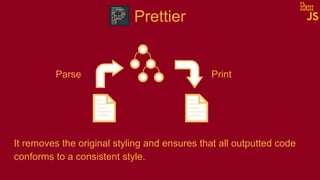
It removes the original styling and ensures that all outputted code
conforms to a consistent style.
Formatting code make it more readable, therefore easy to
understand and maintain.
ESlint
ESLint is an open source JavaScript performs a static analysis of
the code to find problematic patterns or code that doesn’t adhere to
certain style guidelines.
The primary reason ESLint was created was to allow developers to
create their own linting rules.
Therefore it is about code quality.
AST: Abstract Syntax Tree
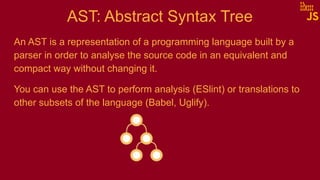
An AST is a representation of a programming language built by a
parser in order to analyse the source code in an equivalent and
compact way without changing it.
AST: Abstract Syntax Tree
An AST is a representation of a programming language built by a
parser in order to analyse the source code in an equivalent and
compact way without changing it.
You can use the AST to perform analysis (ESlint) or translations to
other subsets of the language (Babel, Uglify).
Prettier
Parse Print
It removes the original styling and ensures that all outputted code
conforms to a consistent style.
ESlint
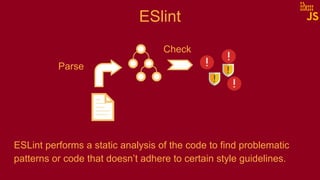
ESLint performs a static analysis of the code to find problematic
patterns or code that doesn’t adhere to certain style guidelines.
Parse
Check
ESlint --fix
ESLint --fix traverses the AST tree and every time it finds a node
that doesn’t not respect the rule, it sends a message.
The message ends up in a queue and contains a fix for the error.
ESlint --fix vs Prettier
DEMO
https://github.com/dej611/prettier-romajs
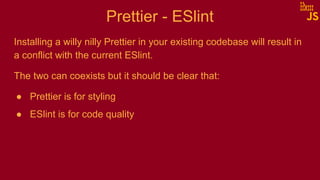
Prettier - ESlint
Installing a willy nilly Prettier in your existing codebase will result in
a conflict with the current ESlint.
The two can coexists but it should be clear that:
● Prettier is for styling
● ESlint is for code quality
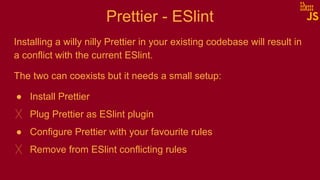
Prettier - ESlint
Installing a willy nilly Prettier in your existing codebase will result in
a conflict with the current ESlint.
The two can coexists but it needs a small setup:
● Install Prettier
╳ Plug Prettier as ESlint plugin
● Configure Prettier with your favourite rules
╳ Remove from ESlint conflicting rules
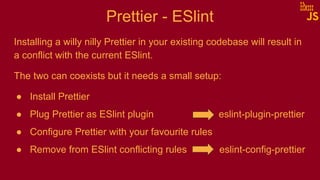
Prettier - ESlint
Installing a willy nilly Prettier in your existing codebase will result in
a conflict with the current ESlint.
The two can coexists but it needs a small setup:
● Install Prettier
● Plug Prettier as ESlint plugin eslint-plugin-prettier
● Configure Prettier with your favourite rules
● Remove from ESlint conflicting rules eslint-config-prettier
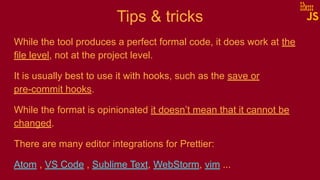
Tips & tricks
While the tool produces a perfect formal code, it does work at the
file level, not at the project level.
It is usually best to use it with hooks, such as the save or
pre-commit hooks.
While the format is opinionated it doesn’t mean that it cannot be
changed.
There are many editor integrations for Prettier:
Atom , VS Code , Sublime Text, WebStorm, vim ...
Projects using Prettier
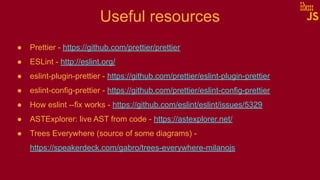
Useful resources
● Prettier - https://github.com/prettier/prettier
● ESLint - http://eslint.org/
● eslint-plugin-prettier - https://github.com/prettier/eslint-plugin-prettier
● eslint-config-prettier - https://github.com/prettier/eslint-config-prettier
● How eslint --fix works - https://github.com/eslint/eslint/issues/5329
● ASTExplorer: live AST from code - https://astexplorer.net/
● Trees Everywhere (source of some diagrams) -
https://speakerdeck.com/gabro/trees-everywhere-milanojs
Thank you
@dej611
http://github.com/dej611

Prettier - a newer approach to code formatting

  • 1.
    Prettier A newer approachto code formatting @dej611 - Marco Liberati June 21st 2017
  • 2.
  • 3.
    Prettier Prettier is anopinionated code formatter with advanced support for JS, JSX, Flow, TypeScript, CSS, LESS and SASS. It removes the original styling and ensures that all outputted code conforms to a consistent style. Formatting code make it more readable, therefore easy to understand and maintain.
  • 4.
    ESlint ESLint is anopen source JavaScript performs a static analysis of the code to find problematic patterns or code that doesn’t adhere to certain style guidelines. The primary reason ESLint was created was to allow developers to create their own linting rules. Therefore it is about code quality.
  • 5.
    AST: Abstract SyntaxTree An AST is a representation of a programming language built by a parser in order to analyse the source code in an equivalent and compact way without changing it.
  • 6.
    AST: Abstract SyntaxTree An AST is a representation of a programming language built by a parser in order to analyse the source code in an equivalent and compact way without changing it. You can use the AST to perform analysis (ESlint) or translations to other subsets of the language (Babel, Uglify).
  • 7.
    Prettier Parse Print It removesthe original styling and ensures that all outputted code conforms to a consistent style.
  • 8.
    ESlint ESLint performs astatic analysis of the code to find problematic patterns or code that doesn’t adhere to certain style guidelines. Parse Check
  • 9.
    ESlint --fix ESLint --fixtraverses the AST tree and every time it finds a node that doesn’t not respect the rule, it sends a message. The message ends up in a queue and contains a fix for the error.
  • 10.
    ESlint --fix vsPrettier DEMO https://github.com/dej611/prettier-romajs
  • 11.
    Prettier - ESlint Installinga willy nilly Prettier in your existing codebase will result in a conflict with the current ESlint. The two can coexists but it should be clear that: ● Prettier is for styling ● ESlint is for code quality
  • 12.
    Prettier - ESlint Installinga willy nilly Prettier in your existing codebase will result in a conflict with the current ESlint. The two can coexists but it needs a small setup: ● Install Prettier ╳ Plug Prettier as ESlint plugin ● Configure Prettier with your favourite rules ╳ Remove from ESlint conflicting rules
  • 13.
    Prettier - ESlint Installinga willy nilly Prettier in your existing codebase will result in a conflict with the current ESlint. The two can coexists but it needs a small setup: ● Install Prettier ● Plug Prettier as ESlint plugin eslint-plugin-prettier ● Configure Prettier with your favourite rules ● Remove from ESlint conflicting rules eslint-config-prettier
  • 14.
    Tips & tricks Whilethe tool produces a perfect formal code, it does work at the file level, not at the project level. It is usually best to use it with hooks, such as the save or pre-commit hooks. While the format is opinionated it doesn’t mean that it cannot be changed. There are many editor integrations for Prettier: Atom , VS Code , Sublime Text, WebStorm, vim ...
  • 15.
  • 16.
    Useful resources ● Prettier- https://github.com/prettier/prettier ● ESLint - http://eslint.org/ ● eslint-plugin-prettier - https://github.com/prettier/eslint-plugin-prettier ● eslint-config-prettier - https://github.com/prettier/eslint-config-prettier ● How eslint --fix works - https://github.com/eslint/eslint/issues/5329 ● ASTExplorer: live AST from code - https://astexplorer.net/ ● Trees Everywhere (source of some diagrams) - https://speakerdeck.com/gabro/trees-everywhere-milanojs
  • 17.