 Protractor is an end-to-end testing framework for AngularJS applications.
 combining powerful tools and technologies such as NodeJS, Selenium,
webDriver, Jasmine, Cucumber and Mocha.
 It has a bunch of customizations from Selenium to easily create tests for
AngularJS applications.
 Protractor also speeds up your testing as it avoids the need for a lot of
“sleeps” and “waits” in your tests, as it optimizes sleep and wait times.
 Protractor allows tests to be organized based on Jasmine, thus allowing you to
write both unit and functional tests on Jasmine.
 It runs on real browsers .
To set up protractor, we need to install below three things
1. Node.js
2. Protractor
3. Selenium Webdriver
Step 1: First we have to install NodeJS.
 Node.js is an event driven, lightweigth and efficient program.
 To install NodeJs we just need to download windows installer from Nodejs site
and follow installation wizard instruction and finish the installation.
 Check nodejs version by running command prompt.
C:> npm – version
Step 2: Installing protractor.
 Installing protractor can be done in two ways Locally and Globally.
 To install project directory, navigate to that folder and type the command
D: > ApplicationFolder > npm install protractor
 To install globally type the command
C:  > npm install –g protractor
Step 3: Update selenium webdriver
 Run the update command, This will install the server and ChromeDriver.
C: >webdriver-manager update
 Run the start command, This will start the server. Keep running the server to
conduct the test session.
C: >webdriver-manager start
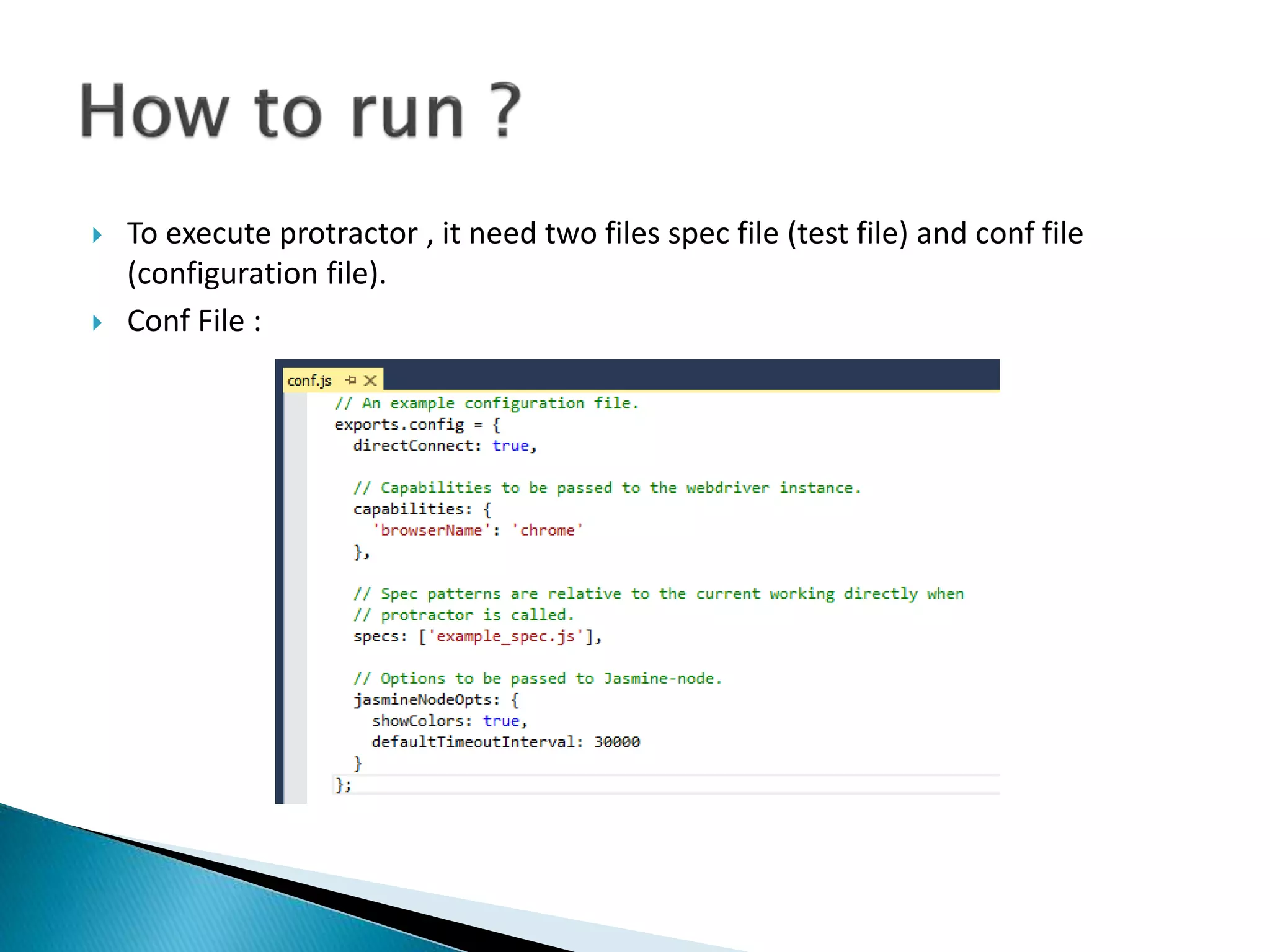
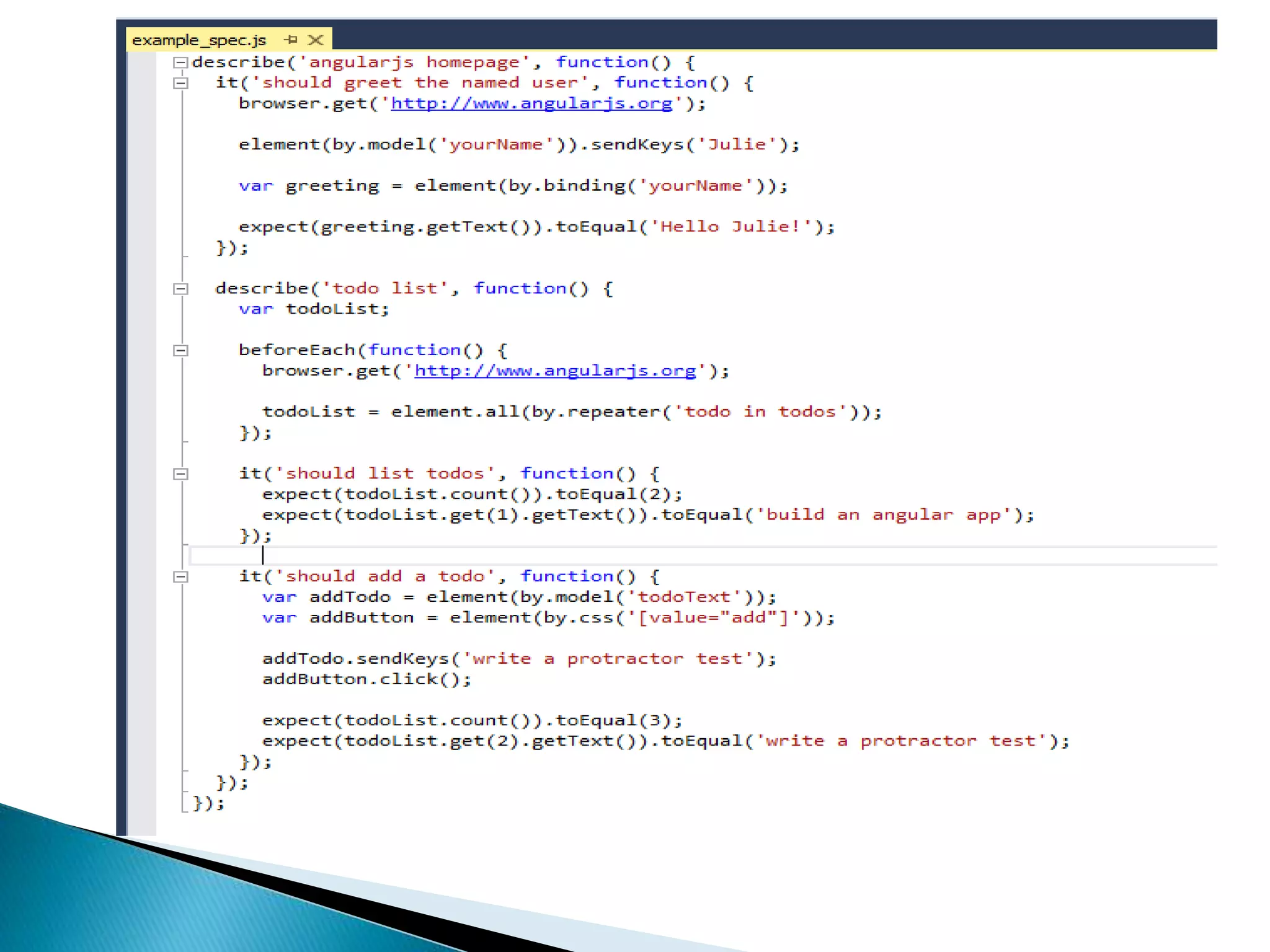
 To execute protractor , it need two files spec file (test file) and conf file
(configuration file).
 Conf File :
Presentation_Protractor

Presentation_Protractor

  • 2.
     Protractor isan end-to-end testing framework for AngularJS applications.  combining powerful tools and technologies such as NodeJS, Selenium, webDriver, Jasmine, Cucumber and Mocha.  It has a bunch of customizations from Selenium to easily create tests for AngularJS applications.  Protractor also speeds up your testing as it avoids the need for a lot of “sleeps” and “waits” in your tests, as it optimizes sleep and wait times.  Protractor allows tests to be organized based on Jasmine, thus allowing you to write both unit and functional tests on Jasmine.  It runs on real browsers .
  • 3.
    To set upprotractor, we need to install below three things 1. Node.js 2. Protractor 3. Selenium Webdriver Step 1: First we have to install NodeJS.  Node.js is an event driven, lightweigth and efficient program.  To install NodeJs we just need to download windows installer from Nodejs site and follow installation wizard instruction and finish the installation.
  • 4.
     Check nodejsversion by running command prompt. C:> npm – version Step 2: Installing protractor.  Installing protractor can be done in two ways Locally and Globally.  To install project directory, navigate to that folder and type the command D: > ApplicationFolder > npm install protractor  To install globally type the command C: > npm install –g protractor
  • 5.
    Step 3: Updateselenium webdriver  Run the update command, This will install the server and ChromeDriver. C: >webdriver-manager update  Run the start command, This will start the server. Keep running the server to conduct the test session. C: >webdriver-manager start
  • 6.
     To executeprotractor , it need two files spec file (test file) and conf file (configuration file).  Conf File :