Creating a Production Company Logo
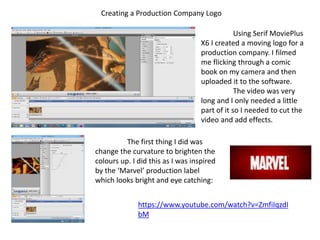
Using Serif MoviePlus
X6 I created a moving logo for a
production company. I filmed
me flicking through a comic
book on my camera and then
uploaded it to the software.
The video was very
long and I only needed a little
part of it so I needed to cut the
video and add effects.
The first thing I did was
change the curvature to brighten the
colours up. I did this as I was inspired
by the ‘Marvel’ production label
which looks bright and eye catching:
https://www.youtube.com/watch?v=ZmfiIqzdI
bM
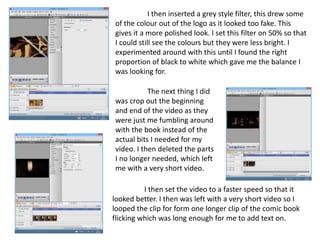
I then inserted a grey style filter, this drew some
of the colour out of the logo as it looked too fake. This
gives it a more polished look. I set this filter on 50% so that
I could still see the colours but they were less bright. I
experimented around with this until I found the right
proportion of black to white which gave me the balance I
was looking for.
The next thing I did
was crop out the beginning
and end of the video as they
were just me fumbling around
with the book instead of the
actual bits I needed for my
video. I then deleted the parts
I no longer needed, which left
me with a very short video.
I then set the video to a faster speed so that it
looked better. I then was left with a very short video so I
looped the clip for form one longer clip of the comic book
flicking which was long enough for me to add text on.
I then added a title on top, as I had few
ideas on what to put as the company title I just added
my name followed by “pictures”.
I set the text in white and to the font
‘Platinum Beat BTN’ which was a font which I think
looked good against the background as it still stood
out and looked vaguely like comic book writing.
I then
repositioned the
text and then I was
finished with my
short production
company video.
I then
exported the film as
an MP4 so that I
could insert it onto
a video easily, I also
saved it in a format
which would allow
me to go back and
edit the video.

Editing of production company video logo

  • 1.
    Creating a ProductionCompany Logo Using Serif MoviePlus X6 I created a moving logo for a production company. I filmed me flicking through a comic book on my camera and then uploaded it to the software. The video was very long and I only needed a little part of it so I needed to cut the video and add effects. The first thing I did was change the curvature to brighten the colours up. I did this as I was inspired by the ‘Marvel’ production label which looks bright and eye catching: https://www.youtube.com/watch?v=ZmfiIqzdI bM
  • 2.
    I then inserteda grey style filter, this drew some of the colour out of the logo as it looked too fake. This gives it a more polished look. I set this filter on 50% so that I could still see the colours but they were less bright. I experimented around with this until I found the right proportion of black to white which gave me the balance I was looking for. The next thing I did was crop out the beginning and end of the video as they were just me fumbling around with the book instead of the actual bits I needed for my video. I then deleted the parts I no longer needed, which left me with a very short video. I then set the video to a faster speed so that it looked better. I then was left with a very short video so I looped the clip for form one longer clip of the comic book flicking which was long enough for me to add text on.
  • 3.
    I then addeda title on top, as I had few ideas on what to put as the company title I just added my name followed by “pictures”. I set the text in white and to the font ‘Platinum Beat BTN’ which was a font which I think looked good against the background as it still stood out and looked vaguely like comic book writing. I then repositioned the text and then I was finished with my short production company video. I then exported the film as an MP4 so that I could insert it onto a video easily, I also saved it in a format which would allow me to go back and edit the video.